Quick take: AWS Control Tower turns the undifferentiated heavy lifting of account setup, guardrails and centralized logging into a repeatable factory. Once your organization is past a handful of AWS accounts, a governed landing zone is no longer optional — it is the foundation that every workload, every audit and every security control sits on top of.
You inherit an AWS estate and ask the only question that matters: who can do what, where, and how would I stop them? If the answer takes a week of spreadsheet archaeology, you do not have a landing zone — you have account sprawl. AWS Control Tower is the managed service that converts sprawl into structure: it stands up a multi-account organization on top of AWS Organizations, creates three hardened shared accounts (management, log archive, audit), organizes workloads into organizational units (OUs), and applies guardrails — pre-packaged governance rules — so that a developer in a sandbox account cannot open an S3 bucket to the internet, cannot disable CloudTrail, and cannot spin resources up in a region you never approved. The promise is autonomy with rails: teams move fast inside a box you defined, and the box does not let them fall off a cliff.
This article is the deep version. We treat Control Tower not as a wizard you click once, but as four tightly coupled systems you must understand to operate: the account model (management/log-archive/audit plus the OU tree), the guardrail engine (preventive SCPs, detective AWS Config rules, and proactive CloudFormation Hooks), the account vending pipeline (Account Factory, baselines, and the landing zone version), and the drift and enrollment machinery that keeps it all true over time. Every concept comes with the exact place it lives, the precise aws CLI or Terraform to inspect and change it, and — because guardrails deny real API calls — a symptom→cause→confirm→fix playbook for when a guardrail blocks something it should not, or fails to block something it should. The reference tables are the point: read the prose once, then keep the tables open the next time an AccessDenied lands in your inbox at 9am with “Control Tower” in the error.
By the end you will stop treating the landing zone as a black box. When an account fails to enroll, when an SCP denies a legitimate deploy, when Config flags 200 resources as non-compliant overnight, or when someone asks “are we actually preventing public S3 across all 80 accounts?”, you will know exactly which control type is in play, where to read its state, and how to change it without breaking the next deploy. Knowing which guardrail, of which type, attached to which OU within ninety seconds is what separates a five-minute governance question from a two-day one.
What problem this solves
Growth without structure produces a specific, recognizable failure: account sprawl. Shadow environments created with personal credit cards, inconsistent IAM where every account reinvents its own roles, orphaned resources nobody owns, CloudTrail switched off “for the demo” and never switched back, and an audit that cannot answer basic questions because the evidence is scattered across accounts with no central archive. The security team is asked “who has admin in production?” and genuinely cannot say. A landing zone exists to make those questions answerable by construction: a defined account hierarchy, centralized and immutable logging, governance rules applied automatically at the OU level, and a repeatable way to vend new accounts that are compliant the moment they are created.
What breaks without it is rarely dramatic on day one — it is the slow accretion of risk. One account has public S3 because someone needed a quick static site. Another has root access keys in a CI pipeline. A third runs in ap-south-1 and us-east-1 and eu-central-1 because three teams each picked their favourite, tripling the audit surface and the data-residency exposure. None of these is a breach by itself; together they are an audit failure waiting for a trigger. Control Tower’s preventive guardrails make the dangerous actions impossible (the API call is denied by an SCP before anything is created), and its detective guardrails make the existing-but-undesirable state visible (a Config rule flags it and you remediate). The difference between “we hope nobody does X” and “X is denied at the organization root” is the entire value.
Who hits this: any organization past roughly five AWS accounts, any team with a compliance obligation (PCI-DSS, HIPAA, SOC 2, ISO 27001, RBI/SEBI data-localization in India), and anyone who has lived through an acquisition that handed them a second, third and fourth AWS environment with different conventions. It bites hardest where engineers have broad IAM in shared accounts, where there is no central log archive (so a compromised account can erase its own trail), and where “the cloud team” is two people trying to review every new account by hand. The fix is almost never “write more IAM policies in each account” — it is “define the guardrails once, at the OU, and let the organization enforce them everywhere, including in accounts that do not exist yet.”
To frame the whole field before the deep dive, here is every governance concern this article covers, the Control Tower mechanism that addresses it, and where its state lives:
| Governance concern | What goes wrong without it | Control Tower mechanism | Where its state lives |
|---|---|---|---|
| Who can do what | Inconsistent IAM per account; no central identity | IAM Identity Center + permission sets | Management account (delegated) |
| What must never happen | Public S3, disabled CloudTrail, root keys | Preventive guardrails (SCPs) | OU → SCP attachment |
| What undesirable state exists | Unencrypted volumes, open security groups | Detective guardrails (Config rules) | Audit account + per-account Config |
| Block bad resources before deploy | Non-compliant CFN stacks created anyway | Proactive guardrails (CFN Hooks) | Per-account, evaluated at deploy |
| Where workloads may run | Region sprawl; data-residency exposure | Region deny SCP | Organization root / OU |
| A repeatable, compliant new account | Hand-built accounts drift from standard | Account Factory (Service Catalog) | Management/provisioning account |
| Tamper-proof audit trail | Compromised account erases its own logs | Log Archive account (org CloudTrail) | Dedicated log-archive account |
| The whole thing staying true | Manual changes silently break governance | Drift detection + landing zone version | Control Tower dashboard / API |
Learning objectives
By the end of this article you can:
- Lay out a production OU structure (Security, Infrastructure, Workloads, Sandbox, Suspended, Exceptions) and explain why each OU exists and what guardrails attach to it.
- Distinguish preventive, detective and proactive guardrails by mechanism (SCP vs Config rule vs CloudFormation Hook), behaviour, blast radius and cost — and pick the right type for a given control.
- Explain the role of each of the three shared accounts (management, log archive, audit) and why splitting them is a security control, not bureaucracy.
- Vend a new account with Account Factory (console, Service Catalog, and Terraform/AFT), and describe exactly what the account baseline applies on enrollment.
- Read and reason about guardrail control behaviours — mandatory vs strongly-recommended vs elective, and what each actually enforces.
- Diagnose the operational failures that define running a landing zone: an account that won’t enroll, an SCP that denies a legitimate call, Config drift after a manual change, a region-deny that blocks a global service, and a landing zone stuck on an old version.
- Build a region-deny SCP correctly (with the global-service and Control Tower exceptions that stop it locking you out) using both raw Organizations policy and Control Tower’s managed region setting.
- Map every concept to the certifications that test it: SAP-C02 (Solutions Architect Professional) and AWS Certified Security – Specialty.
Prerequisites & where this fits
You should already understand AWS IAM at the level of policies, roles and the difference between identity-based and resource-based policies, and you should know what an AWS account is as a billing and isolation boundary. Familiarity with AWS Organizations — that a management account (formerly “master”) sits at the root and that accounts can be grouped into organizational units — is assumed; if that is shaky, read AWS Organizations & IAM Foundations first, because Control Tower is a managed layer on top of Organizations and every guardrail is ultimately an Organizations construct (an SCP, a delegated admin, an OU). You should be comfortable running the aws CLI with a named profile and reading JSON output.
This sits at the very base of the AWS governance and security track — it is the layer everything else assumes. The audit and compliance tooling in AWS CloudTrail, Config & Audit Compliance is what Control Tower configures for you (org-wide CloudTrail to the log-archive account, Config recorders feeding the audit account). The network foundation from AWS VPC, Subnets & Security Groups is what you build inside the accounts the landing zone vends, often in a dedicated network account under the Infrastructure OU. And the resilience patterns in AWS Backup & Disaster Recovery Strategies extend the same multi-account model to cross-account, cross-region recovery.
A quick map of who owns what during landing-zone operations, so you escalate to the right person fast:
| Layer | What lives here | Who usually owns it | Failure classes it can cause |
|---|---|---|---|
| Management account | Organizations, billing, Control Tower itself | Cloud platform / CCoE | Catastrophic if compromised; enrollment + SCP changes |
| Log Archive account | Org CloudTrail, Config history (immutable) | Security / SOC | Lost audit trail; cross-account log access |
| Audit account | Cross-account read roles, Config aggregator, SNS | Security / SOC | Detective findings, notification delivery |
| Security OU | The two security accounts above | Security | Mis-scoped guardrails affect SOC tooling |
| Infrastructure OU | Network, shared services accounts | Networking / platform | Region deny blocks Transit Gateway / DNS |
| Workloads OU (Prod/Non-Prod) | Application accounts | App teams (with rails) | SCP denies a legitimate deploy |
| Sandbox OU | Experimentation accounts | Anyone (loose rails) | Cost blowout; weakest guardrails |
Core concepts
Six mental models make every later decision obvious.
Control Tower is an orchestrator, not a new control plane. Everything it does, it does through existing services: it creates an Organizations structure, attaches Service Control Policies (SCPs) to OUs, deploys AWS Config rules and an aggregator, sets up an organization CloudTrail trail delivering to the log-archive account, and provisions accounts via Service Catalog. There is no proprietary “Control Tower policy language.” This matters because when you debug, you debug the underlying service — an SCP AccessDenied, a Config rule evaluation, a Service Catalog provisioning error — and the Control Tower console is a curated view over those.
The account is the unit of isolation; the OU is the unit of governance. You do not attach guardrails to accounts one by one. You place accounts into OUs and attach guardrails (and SCPs) to the OU. An account inherits everything from its OU, and from any parent OU above it, all the way to the root. Move an account to a different OU and its entire governance posture changes instantly — which is both the power (re-home a compromised account into a locked-down “Quarantine” OU in one move) and the foot-gun (move an account out of an OU and silently drop its guardrails).
Guardrails come in three flavours, and the flavour determines the behaviour. A preventive guardrail is an SCP: it denies an API call before anything happens — proactive in the truest sense, blast radius is every principal in the OU including root. A detective guardrail is an AWS Config rule: it evaluates resources that already exist and reports compliant/non-compliant — it does not stop anything, it tells you. A proactive guardrail is a CloudFormation Hook: it evaluates resources at deploy time inside a CloudFormation stack and can block the stack before the resource is created. “Prevent vs detect vs block-at-deploy” is the first fork in choosing a control: SCPs for the things that must be impossible, Config for visibility of what is, Hooks to stop non-compliant infrastructure-as-code before it lands.
The three shared accounts split duties so a breach can’t erase its own evidence. The management account owns Organizations and billing and runs no workloads — it is the crown jewel and you lock it to the floor. The log archive account is write-once storage for all CloudTrail and Config history across the org, owned by security, so a compromised workload account cannot delete the record of what it did. The audit account holds read-only cross-account roles for the SOC and the Config aggregator, so security can inspect every account without holding standing write access anywhere. This separation is the difference between an attacker who breaches one account and an attacker who breaches your ability to detect the breach.
Account Factory makes new accounts compliant by birth. Rather than create an account and then bolt on logging, IAM and guardrails (and inevitably forget one), Account Factory — a Service Catalog product — provisions a new account, enrolls it into a chosen OU, and applies the account baseline (CloudTrail enrollment, Config recorder, the OU’s guardrails, an AWSControlTowerExecution role for the management account to manage it, and IAM Identity Center access). The account is governed before any human logs into it. This is “secure by default” expressed as a vending machine.
Drift is the enemy of governance, and the landing zone has a version. Because Control Tower configures real, mutable resources, someone can detach an SCP by hand, delete a Config rule, or modify the log-archive bucket policy. That divergence is drift, and Control Tower detects and reports it. Separately, the landing zone itself has a version; AWS ships new guardrails and baseline changes, and you must periodically update the landing zone and re-register OUs / re-enroll accounts to apply them. A landing zone three versions behind is missing controls you think you have.
The vocabulary in one table
Before the deep sections, pin down every moving part. The glossary at the end repeats these for lookup; this table is the mental model side by side:
| Term | One-line definition | Where it lives | Why it matters |
|---|---|---|---|
| Landing zone | The whole governed multi-account environment | Spans the org | The thing Control Tower stands up and versions |
| Management account | Owns Organizations + billing; no workloads | Org root | Crown jewel; compromise = total |
| Log Archive account | Immutable store of all CloudTrail/Config | Security OU | Tamper-proof audit trail |
| Audit account | Cross-account read + Config aggregator | Security OU | SOC visibility without standing write |
| OU | Container grouping accounts for governance | Under the root | Unit guardrails attach to |
| SCP | Org policy that allows/denies API actions | Attached to OU/root | The preventive guardrail mechanism |
| Guardrail (control) | A packaged governance rule | OU attachment | Preventive/detective/proactive |
| Account Factory | Service Catalog product that vends accounts | Provisioning account | Compliant-by-birth accounts |
| Account baseline | Config applied on enrollment | Per enrolled account | Logging, Config, roles, access |
| IAM Identity Center | Org SSO + permission sets | Delegated admin | Human access without long-lived keys |
| Drift | Divergence from Control Tower’s intended state | Detected by CT | Silent loss of governance |
| Region deny | SCP restricting which regions are usable | Root/OU | Data residency + audit surface |
The shared accounts and the OU structure
The first design decision — and the one most teams get subtly wrong — is the OU layout and what lives in the shared accounts. Control Tower creates a Security OU (holding the log-archive and audit accounts) and a Sandbox OU by default, but the production-grade structure has more, and the order of guardrail inheritance (root → OU → nested OU) is what you reason about when something is denied.
The three shared accounts in detail
| Account | Created by | Runs workloads? | Holds | Who has access | The control it provides |
|---|---|---|---|---|---|
| Management | You (it pre-exists) | No | Organizations, billing, Control Tower, Account Factory | Tiny set of platform admins | Single blast-radius point; lock it hardest |
| Log Archive | Control Tower | No | Org CloudTrail S3 bucket, Config history, optional KMS CMK | Security read; CT service write | Immutable, central, tamper-evident audit trail |
| Audit | Control Tower | No | Cross-account read roles, Config aggregator, SNS topics for findings | SOC / security | Inspect everything without standing write |
Why the split is a control and not bureaucracy: if logging lived in each workload account, a principal who compromised that account could delete the evidence of the compromise. By delivering every trail to a separate account that the workload account cannot write to or delete from, you guarantee the record survives the breach. The management account runs no workloads for the same reason in reverse — you minimize the number of principals and resources that could ever touch the one account that can rewrite the entire organization.
A production OU structure
| OU | Purpose | Typical accounts | Guardrail posture | Notes |
|---|---|---|---|---|
| Security | SOC + audit tooling | Log Archive, Audit | Strictest mandatory + detective | Created by Control Tower; do not loosen |
| Infrastructure | Shared platform services | Network (TGW, DNS), Shared Services | Strong; region-pinned | Centralized egress, transit, golden AMIs |
| Workloads / Prod | Production applications | prod-payments, prod-web |
Strong preventive; no public exposure by default | PCI/regulated accounts live here |
| Workloads / Non-Prod | Dev, test, staging | dev-web, staging-api |
Moderate; relaxed vs prod | Lower-cost SKUs, broader experimentation |
| Sandbox | Free experimentation | per-engineer accounts | Loosest rails + budget caps | Auto-expire; cost guardrails essential |
| Suspended / Quarantine | Decommission or isolate | accounts pending closure / compromised | Deny-almost-everything SCP | Move a breached account here in one action |
| Exceptions | Documented carve-outs | accounts needing a waived control | Custom; explicitly reviewed | Each exception has a ticket and an owner |
The inheritance rule you reason about during an incident: a principal in prod-payments is governed by the SCPs on Workloads → Prod, Workloads, and the root, combined with logical AND on the deny side. An SCP is a filter, not a grant — IAM still has to allow the action, and every SCP in the chain must also allow it. A deny anywhere in the chain wins. This is why “it works in dev but not prod” is almost always a Prod-OU SCP, and why “it’s denied everywhere” points at a root SCP.
Inspecting the structure from the CLI
List the OUs and where accounts sit — the management account view of the whole tree:
# The organization root id (ou-/r- ids are what SCPs attach to)
ROOT_ID=$(aws organizations list-roots --query 'Roots[0].Id' --output text)

# Top-level OUs under the root
aws organizations list-organizational-units-for-parent \
  --parent-id "$ROOT_ID" \
  --query 'OrganizationalUnits[].{Name:Name,Id:Id}' --output table

# Which accounts live in a given OU
aws organizations list-accounts-for-parent \
  --parent-id ou-xxxx-prodworkloads \
  --query 'Accounts[].{Name:Name,Id:Id,Status:Status}' --output table
The OU-to-guardrail mapping you keep on hand — which OU each control type should target:
| Control class | Attach at | Why there | Anti-pattern |
|---|---|---|---|
| Org-wide non-negotiables (no root keys, CloudTrail on) | Root | Applies to every account incl. future ones | Per-account SCPs that drift |
| Region restriction | Root (with exceptions) | One residency policy for all | Different regions per OU |
| Prod-only hardening (no public S3/RDS) | Workloads/Prod OU | Strict where it matters | Same rule choking dev experimentation |
| Sandbox cost caps | Sandbox OU | Contain spend without blocking learning | Budget alarms with no enforcement |
| Quarantine deny-all | Suspended OU | Instant isolation of a bad account | Deleting the account (loses evidence) |
Human access through Identity Center permission sets
Control Tower wires up IAM Identity Center so humans get role-based SSO into accounts via permission sets — there are no long-lived IAM users for people. A permission set is a named bundle of IAM policies that materializes as a role in each assigned account. Design them per job function, map them to groups, and scope them tightly to the OUs that need them:
| Permission set | Backing policy | Assigned to (group) | Typical OUs | Session duration |
|---|---|---|---|---|
AWSAdministratorAccess |
AdministratorAccess |
platform-admins | All (sparingly) | 1 hour |
AWSPowerUserAccess |
PowerUserAccess |
app-engineers | Workloads/Non-Prod | 4 hours |
ProdReadOnly |
ReadOnlyAccess |
on-call | Workloads/Prod | 8 hours |
SecurityAudit |
SecurityAudit + custom |
soc-analysts | All (read) | 8 hours |
BillingViewer |
Billing (custom) |
finance | Management (scoped) | 4 hours |
BreakGlass |
AdministratorAccess |
break-glass (2 people) | All | 1 hour |
The cross-account assumption flow you should be able to recite: a user authenticates once at the Identity Center portal, picks an account + permission set, and Identity Center brokers a short-lived STS session into the AWSReservedSSO_* role in that account — no access keys ever leave the portal. Map the permission set to a group, not an individual, so leavers are removed in one place:
# List permission sets in the Identity Center instance (run in the delegated admin)
INSTANCE_ARN=$(aws sso-admin list-instances --query 'Instances[0].InstanceArn' --output text)
aws sso-admin list-permission-sets --instance-arn "$INSTANCE_ARN" --output table
Guardrails: preventive, detective and proactive
This is the heart of Control Tower. A guardrail (the console now calls them controls) is a packaged governance rule with a stable identifier and a defined behaviour. There are three implementation mechanisms, and choosing the right one is the single most important guardrail decision.
The three guardrail types side by side
| Dimension | Preventive | Detective | Proactive |
|---|---|---|---|
| Mechanism | Service Control Policy (SCP) | AWS Config rule | CloudFormation Hook |
| When it acts | Before the API call succeeds | After the resource exists | During a CFN stack deploy |
| Effect | Denies the action outright | Reports compliant / non-compliant | Blocks the stack before create |
| Stops a bad resource? | Yes (the call fails) | No (flags it for remediation) | Yes (only if deployed via CFN) |
| Blast radius | Every principal in the OU incl. root | Visibility only | CFN-deployed resources only |
| Example | Deny disabling CloudTrail | Detect unencrypted EBS volume | Block an S3 bucket without encryption in a stack |
| Direct cost | None (SCPs are free) | Per Config rule evaluation | Per Hook invocation (minor) |
| Where you read state | SCP JSON on the OU | Config compliance / aggregator | CFN stack events |
The decision rule: if an action must be impossible for everyone, it is a preventive SCP. If you need visibility into existing state to drive remediation, it is a detective Config rule. If you want to stop non-compliant infrastructure-as-code before it deploys, it is a proactive Hook — but only CloudFormation-deployed resources are covered, so it complements, never replaces, the SCP.
Guardrail control behaviours
Independently of mechanism, every guardrail has a behaviour classification that tells you how AWS recommends you treat it:
| Behaviour | Meaning | Can you disable it? | Typical examples |
|---|---|---|---|
| Mandatory | Always on; foundational to the landing zone | No (enforced by Control Tower) | Disallow changes to CloudTrail config; disallow deleting the log-archive bucket |
| Strongly recommended | AWS best practice; on by default in many OUs | Yes (but think hard) | Detect public read on S3; require MFA delete patterns |
| Elective | Opt-in for specific compliance needs | Yes | Disallow specific instance types; restrict to approved regions |
A representative set of guardrails you will actually enable, with type and behaviour, so you can scan and pick:
| Guardrail (intent) | Type | Behaviour | What it does |
|---|---|---|---|
| Disallow changes to CloudTrail | Preventive | Mandatory | Denies cloudtrail:StopLogging, DeleteTrail on the org trail |
| Disallow deletion of log-archive bucket | Preventive | Mandatory | Protects the central audit S3 bucket |
| Disallow public read access to S3 buckets | Detective | Strongly recommended | Config rule flags buckets with public-read |
| Disallow public write access to S3 buckets | Detective | Strongly recommended | Config rule flags world-writable buckets |
| Detect unencrypted EBS volumes | Detective | Strongly recommended | Flags volumes without encryption |
| Detect RDS instances that are public | Detective | Strongly recommended | Flags PubliclyAccessible databases |
| Disallow internet via IGW without inspection | Preventive | Elective | Restricts route-table changes to IGW |
| Restrict regions (region deny) | Preventive | Elective | Denies actions outside approved regions |
| Disallow EC2 instance types outside an allow-list | Preventive | Elective | Cost/standardization control |
| Require encryption at rest for new S3 (CFN) | Proactive | Elective | Hook blocks unencrypted-bucket stacks |
| Require IMDSv2 on EC2 (CFN) | Proactive | Elective | Hook blocks instances allowing IMDSv1 |
| Restrict root user actions | Preventive | Strongly recommended | Denies most actions by the account root |
| Disallow root access keys | Detective | Mandatory | Flags any root access key that exists |
| Disallow unrestricted SSH (0.0.0.0/0:22) | Detective | Strongly recommended | Flags security groups open to the world on 22 |
| Disallow public EBS/RDS snapshots | Detective | Strongly recommended | Flags snapshots shared publicly |
Guardrails are grouped into categories in the console; knowing the category tells you which compliance objective a control serves and which framework auditors will map it to:
| Category | What it governs | Representative controls | Maps to framework |
|---|---|---|---|
| Audit logging | CloudTrail/Config integrity | Disallow changes to CloudTrail; disallow Config recorder changes | SOC 2 CC7, PCI 10 |
| Encryption | Data at rest | Detect/require EBS, S3, RDS encryption | PCI 3, HIPAA, ISO A.10 |
| Network security | Exposure & ingress | Detect public RDS; disallow unrestricted SSH/RDP; no IGW route | CIS, PCI 1 |
| Data protection | Public data exposure | Disallow public S3 read/write; block public ACLs | PCI 1.3, GDPR |
| Identity | Root & credential hygiene | Restrict root user; require MFA; no root access keys | CIS 1, SOC 2 CC6 |
| Resilience | Backup & recovery posture | Detect un-backed-up RDS; versioning on critical buckets | ISO A.17 |
| Cost/standardization | Resource sprawl | Disallow instance types outside an allow-list | Internal policy |
| Region | Data residency | Region deny to approved regions | GDPR, RBI/SEBI |
Enabling a guardrail via the Controls API
Control Tower exposes guardrails through the controltower API (EnableControl / DisableControl). You enable a control by its control identifier (ARN) against a target OU:
# Enable a control (region-deny example) on the Prod Workloads OU
aws controltower enable-control \
  --control-identifier "arn:aws:controltower:ap-south-1::control/AWS-GR_REGION_DENY" \
  --target-identifier "arn:aws:organizations::111122223333:ou/o-exampleorgid/ou-prod-xxxxxxxx"

# List which controls are enabled on that OU
aws controltower list-enabled-controls \
  --target-identifier "arn:aws:organizations::111122223333:ou/o-exampleorgid/ou-prod-xxxxxxxx" \
  --query 'enabledControls[].{control:controlIdentifier,status:statusSummary.status}' --output table
In Terraform, the same enablement is declarative and reviewable in version control — the way you should manage guardrails at scale:
resource "aws_controltower_control" "region_deny_prod" {
  control_identifier = "arn:aws:controltower:ap-south-1::control/AWS-GR_REGION_DENY"
  target_identifier  = aws_organizations_organizational_unit.prod.arn
}

resource "aws_controltower_control" "detect_public_s3_read_prod" {
  control_identifier = "arn:aws:controltower:ap-south-1::control/AWS-GR_S3_BUCKET_PUBLIC_READ_PROHIBITED"
  target_identifier  = aws_organizations_organizational_unit.prod.arn
}
The guardrail naming you will see in identifiers, decoded so the ARNs stop being opaque:
| Prefix / token | Meaning | Example control |
|---|---|---|
AWS-GR_ |
An AWS-managed Control Tower guardrail | AWS-GR_RESTRICT_ROOT_USER |
REGION_DENY |
The region-restriction control | AWS-GR_REGION_DENY |
*_PROHIBITED |
A detective rule that flags a prohibited state | AWS-GR_S3_BUCKET_PUBLIC_READ_PROHIBITED |
DISALLOW_* |
A preventive control denying an action | AWS-GR_DISALLOW_VPC_INTERNET_ACCESS |
ENCRYPTED_* |
A detective/proactive encryption check | AWS-GR_EBS_ENCRYPTED |
controltower::control/ |
Control Tower-managed (vs your own SCP) | enabled via EnableControl |
A working reference of the managed control identifiers you reach for most, with type and the API action or state each governs — keep it next to your enable-control calls:
Control identifier (suffix after AWS-GR_) |
Type | Governs | Behaviour |
|---|---|---|---|
REGION_DENY |
Preventive | aws:RequestedRegion outside approved set |
Elective |
RESTRICT_ROOT_USER |
Preventive | Most root-user actions | Strongly recommended |
RESTRICT_ROOT_USER_ACCESS_KEYS |
Detective | Existence of root access keys | Mandatory |
DISALLOW_CLOUDTRAIL_CHANGES |
Preventive | cloudtrail:Stop/Delete* |
Mandatory |
DISALLOW_CONFIG_RULE_CHANGES |
Preventive | config:Delete*/Stop* |
Mandatory |
S3_BUCKET_PUBLIC_READ_PROHIBITED |
Detective | Public-read S3 buckets | Strongly recommended |
S3_BUCKET_PUBLIC_WRITE_PROHIBITED |
Detective | Public-write S3 buckets | Strongly recommended |
ENCRYPTED_VOLUMES |
Detective | Unencrypted EBS volumes | Strongly recommended |
RDS_STORAGE_ENCRYPTED |
Detective | Unencrypted RDS storage | Strongly recommended |
RDS_INSTANCE_PUBLIC_ACCESS_CHECK |
Detective | Publicly accessible RDS | Strongly recommended |
RESTRICTED_SSH |
Detective | SG open to 0.0.0.0/0 on 22 | Strongly recommended |
DISALLOW_VPC_INTERNET_ACCESS |
Preventive | IGW route changes | Elective |
EC2_INSTANCE_NO_PUBLIC_IP |
Detective | EC2 with a public IP | Elective |
Service Control Policies up close
Because every preventive guardrail is an SCP, you must understand SCPs themselves — including the ones you write beyond Control Tower’s managed set. An SCP is an organization policy that sets the maximum available permissions for accounts in an OU. It never grants anything; it only filters what IAM is otherwise allowed to do. The effective permission of any principal is the intersection of its IAM policy and every SCP in its OU chain.
SCP evaluation logic
| Rule | Behaviour | Practical consequence |
|---|---|---|
| SCPs filter, never grant | An action allowed by an SCP still needs IAM to allow it | An empty SCP grants nothing; IAM is still required |
Explicit Deny always wins |
A Deny in any SCP in the chain blocks the action |
One stray deny at the root blocks everyone |
FullAWSAccess is the default |
The default attached SCP allows all; you add denies | Removing it without a replacement allow-list locks the OU |
| Affects the root user too | SCPs constrain even the account root | The way you stop root from disabling CloudTrail |
| Does not affect the management account | SCPs never restrict the management account | Never put workloads there expecting SCP protection |
| Does not affect service-linked roles | SLRs are exempt from SCPs | AWS services keep working under tight SCPs |
That last-but-one row is the one that surprises people: SCPs do not restrict the management account. Any deny you attach to the root OU is ignored for principals in the management account. This is precisely why the management account runs no workloads — it is the one account SCPs cannot protect.
Allow-list vs deny-list strategy
| Strategy | How it works | Pros | Cons | When to use |
|---|---|---|---|---|
| Deny-list (default) | Keep FullAWSAccess, add explicit Deny statements |
Simple, additive, low risk of lockout | Easy to miss a new dangerous action | Most organizations, most OUs |
| Allow-list | Remove FullAWSAccess, explicitly Allow only what’s needed |
Tightest possible; deny-by-default | High maintenance; lockout risk; breaks new services | High-security/regulated OUs only |
Control Tower’s managed guardrails are deny-list SCPs — they add targeted denies and keep the broad allow. Hand-written allow-list SCPs are powerful but brittle: the day AWS launches a service your allow-list does not mention, it is silently unusable in that OU.
A hand-written guardrail SCP
Beyond the managed set, you write your own. A classic: deny anyone from disabling GuardDuty, Config or the CloudTrail trail, and deny leaving the organization:
{
  "Version": "2012-10-17",
  "Statement": [
    {
      "Sid": "ProtectSecurityServices",
      "Effect": "Deny",
      "Action": [
        "guardduty:DeleteDetector",
        "guardduty:UpdateDetector",
        "config:DeleteConfigurationRecorder",
        "config:StopConfigurationRecorder",
        "cloudtrail:StopLogging",
        "cloudtrail:DeleteTrail"
      ],
      "Resource": "*"
    },
    {
      "Sid": "DenyLeaveOrg",
      "Effect": "Deny",
      "Action": "organizations:LeaveOrganization",
      "Resource": "*"
    }
  ]
}
Attach it to an OU with raw Organizations (Control Tower coexists with hand-attached SCPs, as long as you do not fight its managed ones):
POLICY_ID=$(aws organizations create-policy \
  --name protect-security-services \
  --type SERVICE_CONTROL_POLICY \
  --content file://protect-security-services.json \
  --query 'Policy.PolicySummary.Id' --output text)

aws organizations attach-policy \
  --policy-id "$POLICY_ID" \
  --target-id ou-xxxx-prodworkloads
The SCP limits that bite at scale — know these before you design a deny-everything monster:
| Limit | Value | Consequence |
|---|---|---|
| Max SCPs attached to one OU/account | 5 | Consolidate statements; you run out fast on deny-lists |
| Max SCP document size | 5,120 characters | Big region-deny + condition lists hit this |
| SCPs apply to | Member accounts only | Management account is never constrained |
| Inheritance | Cumulative down the OU chain | Every level must allow; any deny blocks |
| Effect on existing resources | None directly | SCPs gate actions, not stored state |
| Max OU nesting depth | 5 levels below root | Keep the tree shallow; deep trees confuse inheritance |
| SCPs require | Organizations “all features” enabled | Consolidated-billing-only orgs can’t use SCPs |
| Attachment targets | Root, OU, or individual account | Prefer OU attachment; per-account drifts |
Region deny: the control that locks you out if you get it wrong
A region deny restricts which AWS regions principals in your org may operate in — essential for data residency (RBI/SEBI localization in India, GDPR in the EU) and for shrinking your audit surface. It is also the guardrail most likely to lock you out, because several AWS services are global (they transact in us-east-1 regardless of where you work) and Control Tower itself needs certain regions. A naive “deny everything outside ap-south-1” SCP will break IAM, CloudFront, Route 53, Organizations, and Control Tower’s own operations.
The two ways to do it, and when each fits:
| Approach | How | Pros | Cons |
|---|---|---|---|
| Control Tower managed | Set “Region deny” in landing-zone settings / AWS-GR_REGION_DENY |
Maintained by AWS; global-service exceptions handled; integrates with CT | Less granular; tied to landing-zone config |
| Hand-written SCP | Custom SCP with aws:RequestedRegion condition + NotAction exceptions |
Full control over exceptions | You own the exception list; easy to lock out |
The condition keys and exceptions that make a hand-written region deny safe:
| Element | Purpose | What happens if you omit it |
|---|---|---|
aws:RequestedRegion condition |
The region the call targets | Without it the policy does nothing |
StringNotEquals allow-list of regions |
Your approved regions | Wrong operator denies your own regions |
NotAction for global services (iam:*, cloudfront:*, route53:*, organizations:*, sts:*, support:*, cur:*, globalaccelerator:*) |
Global services transact in us-east-1 | IAM/CloudFront/Route 53 break org-wide |
aws:PrincipalArn exclusion for AWSControlTowerExecution |
Let Control Tower operate | Control Tower drift/enrollment breaks |
| Exclusion for your platform/break-glass roles | Don’t lock out the operators | You cannot fix the policy you just attached |
A correct region-deny skeleton (abbreviated — the real one has the full global-service list and your role ARNs):
{
  "Version": "2012-10-17",
  "Statement": [{
    "Sid": "DenyOutsideApprovedRegions",
    "Effect": "Deny",
    "NotAction": [
      "iam:*", "sts:*", "organizations:*", "cloudfront:*",
      "route53:*", "support:*", "globalaccelerator:*", "cur:*",
      "budgets:*", "waf:*", "wafv2:*", "shield:*"
    ],
    "Resource": "*",
    "Condition": {
      "StringNotEquals": { "aws:RequestedRegion": ["ap-south-1", "ap-south-2"] },
      "ArnNotLike": {
        "aws:PrincipalARN": [
          "arn:aws:iam::*:role/AWSControlTowerExecution",
          "arn:aws:iam::*:role/PlatformBreakGlass"
        ]
      }
    }
  }]
}
The prefer-managed rule of thumb: unless you have a residency requirement Control Tower’s managed region setting cannot express, use the managed region deny — it keeps the global-service exception list current as AWS adds services, which a hand-written list will silently fall behind on.
Account Factory: vending compliant accounts
Account Factory is the account vending machine. It is implemented as an AWS Service Catalog product in the management (or a delegated provisioning) account; provisioning a copy creates a new AWS account, enrolls it into a target OU, and applies the account baseline. The result is an account that is governed before anyone logs in.
What the account baseline applies on enrollment
| Baseline element | What it configures | Why it matters |
|---|---|---|
| Org membership + OU placement | Joins the org under the chosen OU | Inherits the OU’s guardrails immediately |
| Org CloudTrail enrollment | Account’s API activity flows to log-archive | Central, immutable audit from minute one |
| AWS Config recorder + delivery | Records resource config to the audit account | Detective guardrails can evaluate it |
AWSControlTowerExecution role |
Lets the management account manage the account | Enrollment, drift remediation, updates |
AWSControlTowerAdmin/audit roles |
Cross-account read for the SOC | Audit account can inspect without standing write |
| IAM Identity Center access | Permission sets mapped to the account | Humans get role-based SSO, no long-lived keys |
| The OU’s guardrails | Preventive SCPs + detective Config rules | Compliant-by-birth posture |
| Default VPC handling | Optionally removes the default VPC | Forces an intentional, governed network |
| Cost-allocation tags | Applies org tags (owner, cost-center) | Every account is attributable from day one |
Three ways to vend an account
| Method | Tooling | Best for | Trade-off |
|---|---|---|---|
| Console | Account Factory page in Control Tower | One-off accounts, first learning | Manual; no version control |
| Service Catalog | Provision the AF product directly | Self-service with approval workflows | Still imperative; params per launch |
| Terraform (AFT) | Account Factory for Terraform pipeline | Fleet vending, GitOps, customizations | Most setup; the production answer at scale |
The console/Service Catalog parameters you supply per account:
| Parameter | Example | Notes |
|---|---|---|
| Account name | prod-payments |
Human-readable; appears in Organizations |
| Account email | aws+prod-payments@example.com |
Must be globally unique; use plus-addressing |
| Organizational unit | Workloads/Prod |
Decides inherited guardrails |
| SSO user / group | payments-admins |
Initial Identity Center access |
| Optional: VPC params | CIDR, region | Some baselines pre-create a network |
Provisioning the Account Factory product from the CLI via Service Catalog (the product/artifact ids come from list-portfolios / search-products):
aws servicecatalog provision-product \
  --product-id prod-xxxxxxxxxxxx \
  --provisioning-artifact-id pa-xxxxxxxxxxxx \
  --provisioned-product-name "prod-payments" \
  --provisioning-parameters \
    Key=AccountName,Value=prod-payments \
    Key=AccountEmail,Value=aws+prod-payments@example.com \
    Key=ManagedOrganizationalUnit,Value="Workloads/Prod" \
    Key=SSOUserEmail,Value=payments-admins@example.com \
    Key=SSOUserFirstName,Value=Payments \
    Key=SSOUserLastName,Value=Admins
For fleet scale, Account Factory for Terraform (AFT) turns account requests into pull requests: you describe the account (name, OU, custom baselines, network) in a Terraform request, and an AFT pipeline provisions it and layers your account customizations (extra IAM roles, a baseline VPC, org-specific tags) on top of the standard baseline. This is the GitOps-native way and the one large organizations land on, because it makes “create a compliant account” a reviewed, auditable code change rather than a console click.
AFT layers customizations in a defined order; knowing which layer does what tells you where to add a given change:
| AFT layer | Applies to | Typical contents | When it runs |
|---|---|---|---|
| Account request | One account | Name, email, OU, SSO access, tags | On the PR that requests the account |
| Global customizations | Every AFT account | Org-wide IAM roles, baseline VPC, log forwarding | After baseline, on every account |
| Account customizations | A named account | App-specific roles, KMS keys, endpoints | After globals, for that account |
| Account provisioning customizations | Pre/post hooks | Notifications, CMDB registration, Slack ping | Around provisioning |
| Standard CT baseline | Every governed account | CloudTrail, Config, execution role, guardrails | First, before AFT layers |
The standard baseline always runs first (logging and guardrails before anything custom), then AFT’s global layer, then the per-account layer — so an account is compliant before your customizations touch it, never after.
The account lifecycle states you will see, and what each means:
| State | Meaning | Your move |
|---|---|---|
ENROLLED / Governed |
Account is under Control Tower governance | Normal steady state |
PROVISIONING |
Account Factory is creating/baselining it | Wait; do not touch |
ENROLL_FAILED |
Baseline could not complete | Check the failure reason (roles, quota, region) |
Not enrolled |
Exists in the org but outside Control Tower | Enroll it to apply baseline |
Drifted |
Diverged from Control Tower’s intended state | Investigate and re-register/re-enroll |
Suspended |
Account closed / pending closure | Moves to Suspended OU; retain logs |
Drift, enrollment and keeping the landing zone true
A landing zone is not “set up once.” It is an operated system, and three things constantly threaten its integrity: drift (someone changes a Control-Tower-managed resource by hand), enrollment gaps (pre-existing accounts that never got the baseline), and version lag (the landing zone and its guardrails fall behind AWS’s current release).
Drift: types and remediation
| Drift type | What changed | How Control Tower reacts | Fix |
|---|---|---|---|
| SCP modified/detached | A managed guardrail SCP was edited or removed | Flags drift on the OU/account | Re-register the OU (reapplies managed SCPs) |
| Account moved out of OU | An account dragged to an un-governed parent | Account shows as not-governed/drifted | Move it back; re-enroll |
| Log-archive bucket policy changed | Central audit bucket altered | Drift on the log-archive account | Re-register; restore intended policy |
| Config recorder deleted/stopped | Detective evaluation silently stops | Drift; compliance goes blind | Re-enroll the account |
AWSControlTowerExecution role deleted |
CT can no longer manage the account | Management actions fail | Re-create the role / re-enroll |
| IAM Identity Center changes | Permission sets altered out of band | Possible drift | Reconcile via CT or re-register |
| Enabled guardrail disabled out of band | A control turned off outside CT | Control shows not-enabled/drift | Re-enable via enable-control |
| Org trail deleted in a member account | Someone deletes the local trail config | Logging gap on that account | Re-enroll; deny cloudtrail:DeleteTrail |
The most common operational pattern: a well-meaning engineer detaches a guardrail SCP “to unblock a deploy,” the deploy works, and three weeks later an audit finds the control gone. Control Tower’s drift detection is what surfaces this; re-registering the OU is what reapplies the intended state. The discipline is to never edit Control-Tower-managed resources directly — change them through Control Tower (or through your own additive, non-conflicting SCPs).
Enrolling pre-existing accounts
Acquisitions and legacy accounts arrive outside the landing zone. Enrolling them retrofits the baseline, but there are prerequisites:
| Prerequisite | Why | If missing |
|---|---|---|
| Account is in the organization | CT governs org members | Invite it to the org first |
AWSControlTowerExecution role exists in the account |
CT assumes it to baseline | Create it manually before enrolling |
| No conflicting CloudTrail/Config that blocks the baseline | Baseline sets up org trail/Config | Reconcile or remove conflicting setup |
| Account not in the Security/management special slots | Those are reserved | Place in a workload OU |
| Enrolling within a supported region set | Baseline needs CT’s governed regions | Expand governed regions first |
# Enroll an existing account by moving it into a governed OU, then
# Control Tower re-baselines it. (Console "Enroll account" or AFT does this end to end.)
aws organizations move-account \
  --account-id 444455556666 \
  --source-parent-id ou-xxxx-unmanaged \
  --destination-parent-id ou-xxxx-nonprodworkloads
Landing zone versioning
| Aspect | Detail | Operational rule |
|---|---|---|
| Landing zone has a version | AWS ships baseline + guardrail updates | Check the dashboard for “update available” |
| Updating may add/modify guardrails | New mandatory controls appear | Review the release notes before updating |
| OUs/accounts may need re-registration | New baseline applies on re-register | Re-register OUs after a landing-zone update |
| Drift can appear after AWS-side changes | Service evolution shifts intended state | Reconcile drift post-update |
| Region expansion is a landing-zone op | Adding governed regions re-baselines | Plan it; it touches every account |
# Inspect the landing zone (one per org); shows version + status
LZ_ARN=$(aws controltower list-landing-zones --query 'landingZones[0].arn' --output text)
aws controltower get-landing-zone --landing-zone-identifier "$LZ_ARN" \
  --query '{version:landingZone.version,status:landingZone.status}' --output table
The operations command reference — the calls you run to inspect and steer a landing zone, and which question each answers:
| Question | Service / command | Reads or changes |
|---|---|---|
| What’s the org root id? | aws organizations list-roots |
Read |
| What OUs exist? | aws organizations list-organizational-units-for-parent |
Read |
| Which accounts are in an OU? | aws organizations list-accounts-for-parent |
Read |
| What SCPs hit this OU? | aws organizations list-policies-for-target |
Read |
| What’s in an SCP? | aws organizations describe-policy |
Read |
| Which controls are enabled here? | aws controltower list-enabled-controls |
Read |
| Turn a guardrail on/off | aws controltower enable-control / disable-control |
Change |
| What landing-zone version am I on? | aws controltower get-landing-zone |
Read |
| Re-home an account (governance change) | aws organizations move-account |
Change |
| Vend a new account | aws servicecatalog provision-product |
Change |
| Who can SSO where? | aws sso-admin list-permission-sets |
Read |
| Why was this call denied? | aws cloudtrail lookup-events |
Read |
Architecture at a glance
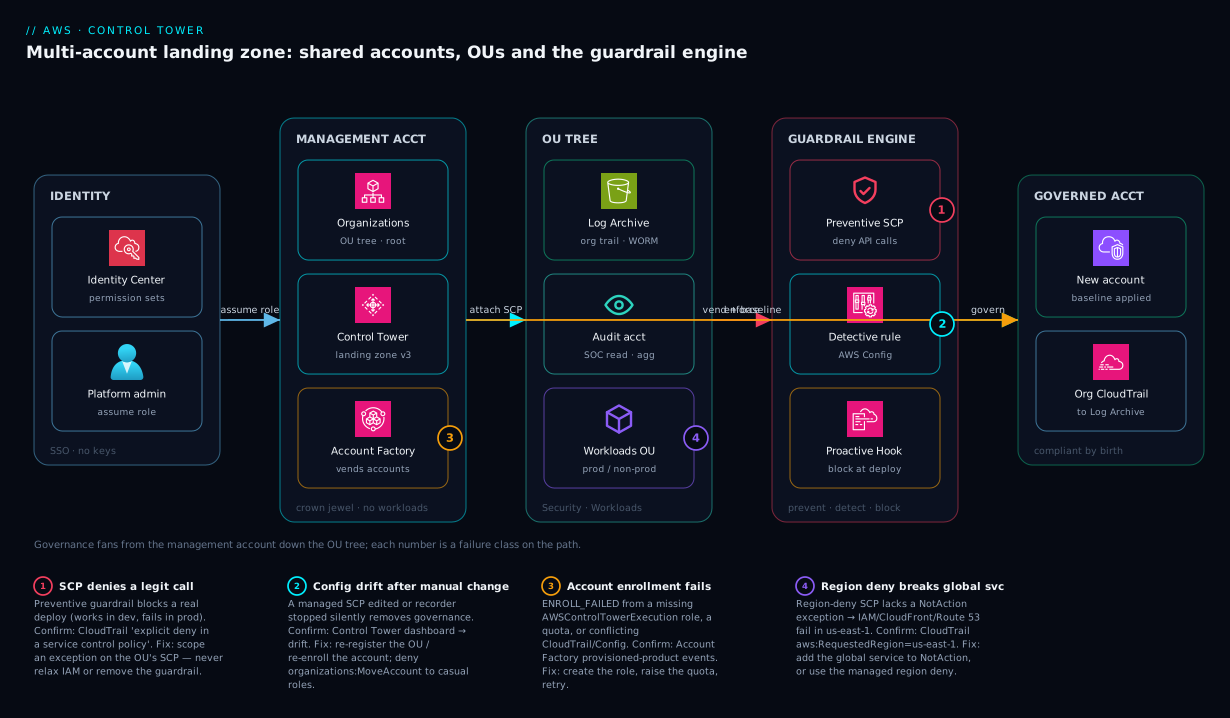
The diagram traces the landing zone as it actually composes, left to right, and marks the four places that fail in practice. On the far left a human authenticates once through IAM Identity Center (the org’s SSO) and assumes a permission set into a target account — no long-lived keys anywhere. That request lands in the management account, the crown jewel that owns AWS Organizations, Control Tower and Account Factory but runs no workloads. From there governance fans downward into the OU tree: the Security OU holds the two shared accounts (Log Archive, the write-once audit store, and Audit, the SOC’s cross-account read plane), while the Workloads OUs hold the application accounts. Every one of those accounts is governed by the guardrail engine that hangs off the OUs — preventive SCPs that deny dangerous API calls outright, detective Config rules that flag undesirable state into the audit account, and proactive CloudFormation Hooks that block non-compliant stacks at deploy time. Account Factory is the vending arrow on the right: it provisions a brand-new account, drops it into the chosen OU, and applies the baseline so the account is compliant before anyone logs in.
Read the badges as the four failure classes you will actually debug. Badge 1 sits on the SCP layer — a preventive guardrail denying a legitimate call (the deploy that “works in dev, fails in prod”); you confirm it in CloudTrail as an SCP-sourced AccessDenied and fix it by adjusting the OU’s SCP, not the IAM policy. Badge 2 sits on the Config/detective layer — drift after a manual change silently turning compliance blind; you confirm it on the Control Tower dashboard and re-register the OU. Badge 3 sits on Account Factory — an enrollment that fails because the AWSControlTowerExecution role or a quota is missing; you read the provisioning error and fix the prerequisite. Badge 4 sits on the region-deny control — a global service broken because the region SCP lacks its NotAction exception; you confirm with the requested-region context in CloudTrail and add the exception. The whole method is in the picture: localize the symptom to a layer, read that layer’s state, apply the fix at the right altitude.
Real-world scenario
Nova Retail is a mid-size Indian e-commerce company that grew the hard way. It started with one AWS account and three admins sharing the root password. Then it acquired a smaller competitor and inherited two more AWS environments with completely different conventions: one used us-east-1, one used eu-central-1, neither had organization-wide CloudTrail, and one had three S3 buckets with public-read ACLs serving what someone thought were public marketing assets but actually included a CSV of historical order data. The security team — two engineers — was asked by a new PCI auditor to produce, within a week, a list of every account, who had administrative access, and proof that audit logging could not be tampered with. They could not. That failure is what funded the landing-zone project.
The platform team set up Control Tower in a fresh management account in ap-south-1 (Mumbai), with the Security OU holding the auto-created Log Archive and Audit accounts. They designed five workload OUs: Infrastructure (a network-prod account for Transit Gateway and Route 53), Workloads/Prod, Workloads/Non-Prod, Sandbox, and a Suspended OU for the eventual decommission of the acquired accounts. At the root they attached the non-negotiables as preventive guardrails: deny disabling CloudTrail or Config, deny organizations:LeaveOrganization, and a managed region-deny restricting everything to ap-south-1 and ap-south-2 — with the global-service exceptions Control Tower maintains, so IAM, CloudFront and Route 53 kept working. On Workloads/Prod they enabled the strongly-recommended detective guardrails for public S3 read/write and unencrypted EBS/RDS, plus a proactive Hook requiring encryption on any S3 bucket created via CloudFormation.
Then came the migration, and the lessons. They enrolled the two acquired accounts by first creating the AWSControlTowerExecution role in each (the enroll failed loudly until they did), then moving them into Workloads/Non-Prod for triage. The instant the region-deny took effect on the us-east-1 account, a nightly Lambda that called a global service broke — until they confirmed in CloudTrail that the denial carried an aws:RequestedRegion of us-east-1 for an action the managed exception list already covered after they re-registered the OU to pull the current guardrail set. The public-read buckets surfaced immediately as detective findings in the Audit account’s Config aggregator; the order-data CSV was locked down within the hour and rotated. The biggest near-miss: an engineer, blocked deploying a legitimate cross-region replication job in prod, asked to “just remove the region SCP.” Instead, they added a scoped exception for the replication role’s ARN — and three weeks later Control Tower’s drift detection confirmed no managed guardrail had been touched, which is exactly the audit evidence they had failed to produce before.
The outcome, six weeks in: every new account is vended through Account Factory in minutes, compliant by birth; the SOC answers “who has admin in production?” from IAM Identity Center permission-set assignments in seconds; the PCI auditor got immutable-log proof from the Log Archive account’s bucket policy and object-lock posture; and the public-read class of mistake is now impossible in prod because the detective finding is paired with an SCP that denies making a bucket public in the first place. Monthly Control Tower cost was negligible — the spend was the Config recorders and the engineering time. The lesson on the wall: “A guardrail that blocks a real deploy is a question about scope, not a reason to remove the guardrail.”
Advantages and disadvantages
The managed-landing-zone model both removes enormous toil and introduces a new operating discipline. Weigh it honestly:
| Advantages (why this model helps you) | Disadvantages (why it bites) |
|---|---|
| New accounts are consistent and compliant by default — Account Factory bakes in logging, Config, roles and guardrails | Up-front design cost: the OU tree, guardrail choices and exception process need real planning |
| Security is baseline, not bolt-on — central immutable logging and detective rules from minute one | Guardrails can break legitimate workloads — an over-broad SCP denies real API calls; region-deny can lock you out |
| Clear blast radius — prod, non-prod and sandbox are isolated accounts under different rails | The management account is a single catastrophic blast point; SCPs cannot even protect it |
| Faster audits — centralized logs + standardized IAM answer “who can do what” in seconds | Some services/regions aren’t supported everywhere; region coverage varies and lags new launches |
| AWS-managed mandatory guardrails are maintained for you (e.g. global-service region exceptions) | Drift is silent — a hand-edited SCP or moved account quietly removes governance until detection runs |
| One place to reason about region/data-residency policy across the whole org | Landing-zone version lag means missing controls you assume you have; updates are operational events |
| Composes with raw Organizations — you can add your own SCPs alongside the managed set | Coexistence requires discipline; fighting CT’s managed resources causes perpetual drift |
When each side matters: Control Tower is the right call for any multi-team, multi-environment, or regulated organization — the toil it removes and the audit posture it grants dwarf the operating overhead. It is overkill for a single-account startup or a short-lived proof of concept, where an Organizations-only structure with two or three hand-managed SCPs is enough and the landing-zone machinery is friction without payoff. The disadvantages are all manageable — but only with the discipline of never editing managed resources by hand, keeping the landing zone current, and treating every guardrail exception as a reviewed, ticketed, scoped change.
And to place Control Tower against the alternatives you will be asked to compare in a design review (and on the exam):
| Approach | Setup effort | Guardrails | Account vending | Best for | Limitation |
|---|---|---|---|---|---|
| Control Tower | Low (managed) | Packaged preventive/detective/proactive | Account Factory | Most orgs past ~5 accounts | Region coverage lag; opinionated |
| Organizations + hand-rolled SCPs | Medium | You write every SCP | Manual / scripted | 2–4 accounts, simple needs | No baseline, no drift detection, no Config setup |
| Landing Zone Accelerator (LZA) | High | Highly customizable, code-driven | Config-driven pipeline | Complex/regulated (gov, large enterprise) | Steeper learning curve; more to operate |
| Account Factory for Terraform (AFT) | Medium-High | Inherits CT guardrails | GitOps PR-driven | Fleet vending on top of CT | Requires Control Tower underneath |
| Third-party CSPM only | Medium | Detective-only overlay | None | Visibility add-on | Doesn’t prevent; no native vending |
The rule of thumb: start with Control Tower unless you have a requirement it cannot express (then LZA), drop to Organizations-only below ~5 accounts, and add AFT on top once vending volume justifies GitOps. A third-party CSPM complements but never replaces the preventive SCP layer — detection without prevention still lets the bad call succeed.
Hands-on lab
This lab inspects and reasons about a landing zone non-destructively using read-only and reversible commands, then enables and disables one elective guardrail on a sandbox OU. It assumes Control Tower is already set up (standing one up programmatically is a management-account, billing-impacting operation, not a free-tier exercise). Run from the management account with admin credentials in ap-south-1.
Step 1 — Confirm the organization and find the root id.
aws organizations describe-organization \
  --query 'Organization.{Id:Id,MasterEmail:MasterAccountEmail,FeatureSet:FeatureSet}' --output table

ROOT_ID=$(aws organizations list-roots --query 'Roots[0].Id' --output text)
echo "Root: $ROOT_ID"
Expected: FeatureSet is ALL (Control Tower requires all features enabled), and a r-xxxx root id.
Step 2 — Walk the OU tree and see where accounts live.
aws organizations list-organizational-units-for-parent \
  --parent-id "$ROOT_ID" \
  --query 'OrganizationalUnits[].{Name:Name,Id:Id}' --output table
Expected: at least a Security OU (and likely Sandbox). Note the ou-xxxx id of your Sandbox OU for later.
Step 3 — Confirm the three shared accounts.
aws organizations list-accounts \
  --query 'Accounts[?Status==`ACTIVE`].{Name:Name,Id:Id,Email:Email}' --output table
Expected: you can identify the management account plus Log Archive and Audit (their names are set at landing-zone setup).
Step 4 — Inspect the SCPs attached to the root.
aws organizations list-policies-for-target \
  --target-id "$ROOT_ID" --filter SERVICE_CONTROL_POLICY \
  --query 'Policies[].{Name:Name,Id:Id}' --output table
Expected: FullAWSAccess plus any Control-Tower-managed guardrail policies. Read one:
POLICY_ID=$(aws organizations list-policies-for-target --target-id "$ROOT_ID" \
  --filter SERVICE_CONTROL_POLICY --query 'Policies[?Name!=`FullAWSAccess`]|[0].Id' --output text)
aws organizations describe-policy --policy-id "$POLICY_ID" --query 'Policy.Content' --output text
Step 5 — List the landing zone and its version.
LZ_ARN=$(aws controltower list-landing-zones --query 'landingZones[0].arn' --output text)
aws controltower get-landing-zone --landing-zone-identifier "$LZ_ARN" \
  --query '{version:landingZone.version,status:landingZone.status}' --output table
Expected: a version string (e.g. 3.x) and status: ACTIVE. If an update is available, the console flags it.
Step 6 — Enable an elective guardrail on the Sandbox OU (reversible). Pick a low-risk detective control so nothing is denied:
SANDBOX_OU_ARN="arn:aws:organizations::111122223333:ou/o-exampleorgid/ou-sbx-xxxxxxxx"

aws controltower enable-control \
  --control-identifier "arn:aws:controltower:ap-south-1::control/AWS-GR_ENCRYPTED_VOLUMES" \
  --target-identifier "$SANDBOX_OU_ARN"

# Confirm it landed
aws controltower list-enabled-controls --target-identifier "$SANDBOX_OU_ARN" \
  --query 'enabledControls[].controlIdentifier' --output table
Step 7 — Teardown: disable the guardrail you added.
aws controltower disable-control \
  --control-identifier "arn:aws:controltower:ap-south-1::control/AWS-GR_ENCRYPTED_VOLUMES" \
  --target-identifier "$SANDBOX_OU_ARN"
Nothing else in this lab created billable resources. The only persistent change was the guardrail in Step 6, removed in Step 7.
Common mistakes & troubleshooting
This is the section you return to mid-incident. Each failure mode is symptom → root cause → how to confirm (exact command) → fix. First the playbook table, then the detail on the ones with subtlety.
| # | Symptom | Root cause | Confirm (exact command / path) | Fix |
|---|---|---|---|---|
| 1 | Legit API call returns AccessDenied with an SCP reason |
A preventive guardrail/SCP denies it for the OU | CloudTrail event: errorCode=AccessDenied, message cites SCP |
Scope the SCP or add an exception; never relax IAM |
| 2 | Action denied only in prod, works in dev | A Prod-OU SCP is stricter than Non-Prod | Compare list-policies-for-target on both OUs |
Add a scoped allow/exception on the Prod OU |
| 3 | Global service (IAM/CloudFront/Route 53) breaks after region deny | Region-deny SCP lacks the NotAction exception |
CloudTrail shows aws:RequestedRegion=us-east-1 denied |
Add the global service to NotAction; prefer managed region deny |
| 4 | Account fails to enroll (ENROLL_FAILED) |
Missing AWSControlTowerExecution role or quota |
Account Factory error reason; check the role exists | Create the role; raise quota; retry enrollment |
| 5 | Config flags 200 resources non-compliant overnight | A detective guardrail was just enabled on the OU | Audit account Config aggregator; rule name | Remediate or scope; detective ≠ blocking |
| 6 | Guardrail shows as Drifted | A managed SCP/role was edited or an account moved | Control Tower dashboard → drift; move-account history |
Re-register the OU / re-enroll the account |
| 7 | New account has no centralized logging | Account exists but was never enrolled | list-accounts-for-parent shows it outside governed OU |
Enroll it (move into a governed OU) |
| 8 | Removing FullAWSAccess locked out an OU |
Switched to allow-list without listing all needs | OU SCPs show only narrow allows | Re-attach FullAWSAccess; rebuild deny-list |
| 9 | Management account ignores a root SCP deny | SCPs never constrain the management account | Action succeeds in mgmt, denied elsewhere | Don’t run workloads in mgmt; move them out |
| 10 | Landing zone update keeps failing | Drift or an unsupported region/config blocks it | get-landing-zone status; release notes |
Resolve drift first, then update |
| 11 | Service-linked role still works under a tight SCP | SLRs are exempt from SCPs (expected) | Action by SLR succeeds despite deny | None — this is intended behaviour |
| 12 | Cross-account role assumption denied org-wide | A Deny on sts:AssumeRole too broad in an SCP |
CloudTrail on the sts:AssumeRole call |
Narrow the deny; exclude required roles |
Mistake 1 & 2 — An SCP denies a legitimate call (and the dev/prod split)
The most common landing-zone ticket: a deploy that worked yesterday, or works in dev, fails in prod with AccessDenied and the message mentions a service control policy. The instinct is to widen the IAM policy — which does nothing, because the SCP is the ceiling and IAM is already under it. The denial is happening above IAM.
Confirm. Find the exact event in CloudTrail (in the affected account, or the org trail in log archive) and read why it was denied:
aws cloudtrail lookup-events \
  --lookup-attributes AttributeKey=EventName,AttributeValue=RunInstances \
  --query 'Events[0].CloudTrailEvent' --output text | python3 -m json.tool | grep -A3 errorMessage
A message containing “with an explicit deny in a service control policy” tells you it is an SCP, not IAM. Then diff the SCPs on the Prod OU versus a working OU:
aws organizations list-policies-for-target --target-id ou-xxxx-prod \
  --filter SERVICE_CONTROL_POLICY --query 'Policies[].Name' --output table
aws organizations list-policies-for-target --target-id ou-xxxx-nonprod \
  --filter SERVICE_CONTROL_POLICY --query 'Policies[].Name' --output table
Fix. Decide whether the action should be allowed in that OU. If yes, add a scoped exception — narrow the deny with a condition on the specific role ARN or resource, or move the account to an OU where the action is permitted. Never remove a managed guardrail to unblock one deploy; that trades a five-minute scope change for a silent governance hole.
Mistake 3 — Region deny breaks a global service
You enable region-deny to ap-south-1 and suddenly CloudFront distributions can’t be created, Route 53 changes fail, or IAM calls error — all of which “happen” in us-east-1.
Confirm. The CloudTrail event shows the denied action with requestParameters or the condition context carrying aws:RequestedRegion: us-east-1. If the action is iam:*, cloudfront:*, route53:*, organizations:*, sts:*, support:*, globalaccelerator:*, waf*, or shield:*, it is a global service that must be in your NotAction exception list.
Fix. Add the service to the region-deny SCP’s NotAction, or — far better — switch to Control Tower’s managed region deny, which maintains the global-service exception list as AWS adds services. A hand-rolled list inevitably falls behind.
Mistake 4 — Account enrollment fails
ENROLL_FAILED (or a stuck PROVISIONING) almost always traces to the AWSControlTowerExecution role missing in the target account (Control Tower assumes it to apply the baseline), a service quota (max accounts per org, or a region resource cap), or a pre-existing CloudTrail/Config that conflicts with the baseline.
Confirm. Read the failure reason in the Account Factory / Service Catalog provisioned-product events, and check the role:
# In the target account (or via assumed role), confirm the execution role exists
aws iam get-role --role-name AWSControlTowerExecution \
  --query 'Role.Arn' --output text 2>&1 || echo "MISSING — create it before enrolling"
Fix. Create the AWSControlTowerExecution role with the trust policy allowing the management account, raise the relevant quota via Service Quotas, or reconcile the conflicting CloudTrail/Config, then retry enrollment.
Mistake 6 — Drift after a manual change
Someone detaches a managed SCP, deletes a Config recorder, or drags an account into a different OU. Governance silently degrades until drift detection runs.
Confirm. The Control Tower dashboard shows drifted OUs/accounts; for an account move, the Organizations event history shows the MoveAccount. Fix. Re-register the OU (reapplies managed SCPs and baselines) or re-enroll the account — and put a guardrail on the behaviour itself: an SCP denying organizations:MoveAccount to non-platform roles stops casual re-homing.
Best practices
- Keep the management account empty and locked. No workloads, MFA on root, root access keys deleted, root used only for the handful of tasks that require it, and a tiny set of human principals — it is the one account SCPs cannot protect.
- Attach non-negotiables at the root, hardening at the OU. Org-wide denies (CloudTrail/Config protection, no
LeaveOrganization, region policy) go at the root; prod-only strictness goes on the Prod OU so it does not choke dev experimentation. - Start detective, then add preventive. Turn on detective guardrails first to see your real state, remediate, then add the preventive SCP that makes the bad state impossible — so you do not discover the blast radius in production.
- Prefer the managed region deny. It maintains the global-service exception list for you; a hand-written
NotActionlist silently falls behind every AWS launch. - Never edit Control-Tower-managed resources by hand. Change them through Control Tower; add your own additive SCPs alongside. Direct edits cause perpetual drift.
- Vend every account through Account Factory (ideally AFT). Make “create a compliant account” a reviewed code change, not a console click — and never hand-build accounts that drift from the standard.
- Treat every guardrail exception as a ticketed, scoped, reviewed change. Scope to a role ARN or resource, document the reason, and put it in an Exceptions OU or an explicit policy — not a blanket removal.
- Run drift detection on a schedule and alert on it. Drift is silent governance loss; surface it fast and re-register promptly.
- Keep the landing zone current. Track the version, read release notes, update deliberately, and re-register OUs so new mandatory guardrails actually apply.
- Put budget guardrails on Sandbox. The loosest-rails OU is where cost runs away; pair experimentation freedom with hard budget caps and auto-expiry.
- Store break-glass credentials in a physical vault, not a password manager, and exclude the break-glass role from the region-deny and lockdown SCPs so you can always recover.
- Tag at account creation and enforce it. Require ownership/cost-center tags via the baseline and a tag-policy or SCP so every account is attributable.
Security notes
The landing zone is a security control, but it has its own attack surface to defend.
- Least privilege through permission sets, not keys. Human access is via IAM Identity Center permission sets mapped to accounts; there should be zero long-lived IAM users for humans. Map permission sets to groups, scope them per OU, and review assignments quarterly.
- The management account is the crown jewel. Compromise there rewrites the org: it can detach every SCP, delete the log archive’s protections, and create accounts. Lock root with MFA, delete root keys, restrict the few principals that can assume management roles, and alert on every management-account API call.
- Immutable, isolated logging. The Log Archive account receives the org CloudTrail trail; harden its S3 bucket with Object Lock / bucket policies so even an org admin cannot quietly delete history, and consider a separate KMS CMK. A breach must not be able to erase its own evidence.
- Detective + preventive in pairs. For the highest-risk states (public S3, disabled logging, public RDS), pair the detective guardrail (visibility) with a preventive SCP (impossibility) so you both see and stop the condition.
- Protect the security services themselves. Deny
guardduty:Delete*,config:Stop*/Delete*,cloudtrail:StopLogging/DeleteTrail, andorganizations:LeaveOrganizationacross the org so no member account can blind the SOC. - Encrypt everything by default. Detective/proactive guardrails for unencrypted EBS, S3 and RDS, plus a proactive Hook that blocks unencrypted resources at CloudFormation deploy time, make “unencrypted” a non-event.
- Data residency as code. The region-deny SCP is your enforceable residency boundary — but only if its exception list is correct; an over-broad exception is a residency hole.
- Network isolation lives in the accounts. The landing zone governs who and what; the VPC design (AWS VPC, Subnets & Security Groups) governs network reachability inside each vended account — usually centralized through an Infrastructure-OU network account.
Cost & sizing
Control Tower itself has no per-account license fee — you pay for the underlying resources it configures. Understanding that bill prevents a surprise as the org grows.
| Cost driver | What incurs it | Rough scale | How to control |
|---|---|---|---|
| AWS Config | Configuration items recorded + rule evaluations across every governed account | The dominant line item; grows with resource count × accounts | Scope recorders, exclude noisy resource types, right-size detective rules |
| CloudTrail | The org trail’s first copy is free; extra trails + data events cost | Management events ~free; data events add up | Avoid duplicate trails; be selective with S3/Lambda data events |
| S3 (Log Archive) | Storage of CloudTrail + Config history | Grows steadily; cheap per-GB | Lifecycle to Glacier; the S3 storage classes policy applies |
| KMS | CMKs for log encryption, per-request | Minor | One CMK for the log archive; monitor request volume |
| GuardDuty / Security Hub (if enabled) | Per-event / per-finding analysis | Optional add-ons | Enable where the SOC needs it |
| CloudFormation Hooks | Per proactive-guardrail invocation | Minor, per deploy | Negligible at normal deploy rates |
| Account Factory / Service Catalog | The vending mechanism itself | Free | n/a |
Rough figures to anchor planning: for a ~25-account org of moderate resource density, the Control-Tower-attributable spend is dominated by AWS Config and is often in the range of a few hundred USD per month (roughly ₹15,000–₹40,000/month depending on resource churn and how many detective rules and data-event trails you enable) — the landing-zone machinery is essentially free; the observability it turns on is the cost. Right-size by scoping Config recorders (exclude ephemeral or high-cardinality resource types you do not need to govern), avoiding duplicate trails, lifecycling the log-archive bucket to cheaper storage, and only enabling the detective guardrails you will actually act on. The biggest “cost” is rarely the AWS bill — it is the engineering discipline to design the OU tree, curate guardrails, and operate drift and versioning. Free-tier note: a demo org with two or three lightly-used accounts often sits within or just above free-tier Config/CloudTrail allowances, but Control Tower formally requires Organizations all features and is not designed for throwaway experimentation.
Interview & exam questions
Where each concept shows up on the certifications, so you know what to over-prepare:
| Concept | SAP-C02 | Security Specialty | Common exam framing |
|---|---|---|---|
| Control Tower vs Organizations | Yes | Yes | “Fastest way to a governed multi-account setup” |
| Preventive vs detective vs proactive | Light | Yes | “Make X impossible vs detect X” |
| SCP evaluation (filter, deny wins) | Yes | Yes | “Why is an allowed-by-IAM action denied?” |
| Management account exemption | Yes | Yes | “Why not run workloads in management?” |
| Region deny + global services | Yes | Yes | “Enforce data residency without breaking IAM” |
| Account Factory baseline | Yes | Light | “Vend a compliant account at scale” |
| Drift detection / re-register | Light | Yes | “A guardrail was removed — restore it” |
| Log Archive immutability | Light | Yes | “Prove logs can’t be tampered with” |
1. What is the difference between AWS Organizations and AWS Control Tower? Organizations is the underlying service that groups accounts into OUs and lets you attach SCPs; Control Tower is a managed orchestration layer on top of it that stands up a best-practice landing zone — shared accounts, baselines, packaged guardrails, Account Factory — and keeps it versioned. Control Tower uses Organizations; it does not replace it. (SAP-C02, Security Specialty.)
2. Explain preventive vs detective vs proactive guardrails. Preventive guardrails are SCPs that deny an API action before it happens; detective guardrails are AWS Config rules that report whether existing resources are compliant; proactive guardrails are CloudFormation Hooks that block non-compliant resources at deploy time within a stack. Prevent makes it impossible, detect makes it visible, proactive stops bad IaC before it lands. (Security Specialty.)
3. Why does an SCP not protect the management account? SCPs constrain member accounts only; the management account is explicitly exempt, so any deny attached to the root is ignored for management-account principals. That is the reason the management account runs no workloads — it is the one account SCPs cannot guard. (SAP-C02.)
4. What do the three shared accounts do, and why split them? Management owns Organizations/billing and runs no workloads; Log Archive holds immutable, central CloudTrail/Config history; Audit holds read-only cross-account roles and the Config aggregator for the SOC. Splitting them ensures a compromised workload account cannot erase the record of its own actions and that security has visibility without standing write access. (Security Specialty.)
5. How do SCPs evaluate — do they grant permissions? No. SCPs only filter the maximum available permissions; an action must be allowed by IAM and by every SCP in the OU chain, and any explicit Deny anywhere in the chain wins. An SCP with no allow grants nothing on its own. (SAP-C02.)
6. A team’s deploy works in dev but is denied in prod. Where do you look? At the SCPs attached to the Prod OU (and its parents) versus the dev OU — the denial is almost certainly a stricter preventive guardrail on the Prod OU, not an IAM difference. Confirm via CloudTrail (explicit deny in a service control policy) and fix by scoping an exception, not by widening IAM. (SAP-C02.)
7. How do you implement data residency for an Indian regulatory requirement? A region-deny control restricting actions to ap-south-1/ap-south-2 via aws:RequestedRegion, with NotAction exceptions for global services (IAM, CloudFront, Route 53, Organizations, STS) and for the Control Tower execution and break-glass roles. Prefer the managed region deny so the global-service exception list stays current. (Security Specialty, SAP-C02.)
8. What is Account Factory and what does it apply? A Service Catalog product that vends a new account, enrolls it into a chosen OU, and applies the account baseline: org CloudTrail enrollment, a Config recorder, the AWSControlTowerExecution role, audit/SOC roles, IAM Identity Center access, and the OU’s guardrails — so the account is compliant before anyone logs in. (SAP-C02.)
9. What is drift in Control Tower and how do you remediate it? Drift is divergence from Control Tower’s intended state — a managed SCP edited, a Config recorder stopped, or an account moved out of its OU. Control Tower detects and flags it; you remediate by re-registering the OU or re-enrolling the account, and you prevent casual moves with an SCP denying organizations:MoveAccount. (Security Specialty.)
10. When would you NOT use Control Tower? For a single-account startup or a short-lived proof of concept, where an Organizations-only structure with a couple of hand-managed SCPs suffices and the landing-zone machinery (shared accounts, versioning, drift) is overhead without payoff. (SAP-C02.)
11. Why enable detective guardrails before preventive ones? To discover your real, existing state and remediate it before a preventive SCP starts denying calls — so you do not learn the blast radius of a new deny in production. Detect, remediate, then make the bad state impossible. (Security Specialty.)
12. How does Control Tower keep an audit trail tamper-proof? It delivers the organization CloudTrail trail to a dedicated Log Archive account that workload accounts cannot write to or delete from, and you harden that bucket with Object Lock / restrictive policies. Even an org admin cannot quietly erase the history, which is the evidence auditors require. (Security Specialty.)
Quick check
- Which guardrail type would you use to make it impossible to disable CloudTrail across the org — preventive, detective, or proactive?
- True or false: an SCP attached to the root OU restricts what the management account can do.
- You enable a region-deny SCP and CloudFront stops working. What single change fixes it?
- An account exists in the organization but has no centralized logging and no guardrails. What is its likely state, and what is the fix?
- Which shared account holds the immutable copy of all CloudTrail and Config history?
Answers
- Preventive — a preventive guardrail is an SCP that denies the API action (e.g.
cloudtrail:StopLogging) outright. Detective only reports; proactive only blocks CloudFormation-deployed resources. - False. SCPs never restrict the management account — they apply to member accounts only. That is exactly why the management account must run no workloads.
- Add the global service (
cloudfront:*, and ideallyiam:*,route53:*,sts:*,organizations:*) to the SCP’sNotActionexception list — or switch to Control Tower’s managed region deny, which maintains that list for you. - It is not enrolled (exists in the org but outside Control Tower governance). The fix is to enroll it — move it into a governed OU so the account baseline (logging, Config, guardrails) is applied.
- The Log Archive account, which receives the organization CloudTrail trail and Config history and is hardened so even an org admin cannot delete it.
Glossary
- Landing zone — the complete, governed multi-account AWS environment that Control Tower stands up and versions.
- AWS Control Tower — the managed service that orchestrates a landing zone (shared accounts, OUs, guardrails, Account Factory) on top of AWS Organizations.
- AWS Organizations — the underlying service that groups accounts into OUs and lets you attach SCPs; the substrate Control Tower builds on.
- Management account — the org root account that owns Organizations and billing and runs no workloads; the crown jewel.
- Log Archive account — a dedicated shared account holding immutable, centralized CloudTrail and Config history for the whole org.
- Audit account — a dedicated shared account holding read-only cross-account roles and the Config aggregator for the SOC.
- Organizational unit (OU) — a container that groups accounts so guardrails and SCPs can be attached and inherited at one level.
- Guardrail (control) — a packaged governance rule, implemented as preventive (SCP), detective (Config rule), or proactive (CloudFormation Hook).
- Service Control Policy (SCP) — an Organizations policy that filters (never grants) the maximum available permissions for member accounts in an OU.
- Preventive guardrail — an SCP that denies a dangerous API action before it can succeed.
- Detective guardrail — an AWS Config rule that evaluates existing resources and reports compliant/non-compliant.
- Proactive guardrail — a CloudFormation Hook that blocks a non-compliant resource at stack-deploy time.
- Account Factory — the Service Catalog product that vends new, baseline-compliant accounts into a chosen OU.
- Account baseline — the set of configurations (CloudTrail enrollment, Config recorder, execution/audit roles, Identity Center access, OU guardrails) applied when an account is enrolled.
- IAM Identity Center — the org’s single sign-on with permission sets, giving humans role-based access without long-lived keys.
- Region deny — a control restricting which AWS regions principals may operate in, for data residency and reduced audit surface.
- Drift — divergence from Control Tower’s intended state (an edited SCP, a moved account, a stopped Config recorder) that silently removes governance.
- AWSControlTowerExecution — the IAM role Control Tower assumes in each managed account to apply baselines and remediate; enrollment fails without it.
Next steps
- AWS Organizations & IAM Foundations — the substrate beneath Control Tower: OUs, SCPs and the identity model the landing zone orchestrates.
- AWS CloudTrail, Config & Audit Compliance — the audit and detective-control tooling Control Tower configures for you across every account.
- AWS VPC, Subnets & Security Groups — the network foundation you build inside each vended account, usually via an Infrastructure-OU network account.
- AWS Backup & Disaster Recovery Strategies — extending the multi-account model to cross-account, cross-region resilience and recovery.
- AWS Regions & Availability Zones Explained — the regional model your region-deny guardrail enforces and your residency policy depends on.