Quick take: ECS is the easy AWS-native path. EKS is Kubernetes when you genuinely need it. Fargate removes nodes from both. The hard decision is not ECS vs EKS — it is whether you actually need Kubernetes, and separately, whether you want to own the servers.
A SaaS company adopted Amazon EKS because it was “the industry standard.” Six months later, three platform engineers spent their weeks managing node groups, the VPC CNI, an ingress controller, the cluster autoscaler and a sprawl of Helm charts — all to run a handful of stateless HTTP services that did nothing Kubernetes-specific. They migrated the web tier to ECS on Fargate and cut platform toil in half. The data platform, which leaned on the Spark Operator and custom controllers, stayed on EKS because Kubernetes was genuinely earning its keep there. That is the whole article in one anecdote: AWS gives you two orchestrators (ECS, EKS) crossed with two launch types (Fargate, EC2), and the cost of choosing wrong is measured in engineer-years, not dollars.
This is the decision guide I wish that team had read first. We treat the choice as two orthogonal axes, not one menu. Axis one — orchestrator — is ECS (AWS’s own scheduler, no control-plane fee, deep IAM/CloudWatch integration) versus EKS (conformant Kubernetes, portable, ecosystem-rich, but you operate add-ons and upgrades and pay $0.10/hr per cluster). Axis two — launch type — is Fargate (serverless: no nodes to patch, scale or right-size, billed per vCPU-second) versus EC2 (you own the instances: cheaper at steady state, Spot/Graviton/GPU available, daemonsets and privileged mode possible). Four corners: ECS+Fargate, ECS+EC2, EKS+Fargate, EKS+EC2 (and EKS+Karpenter, the modern node-provisioning answer). Each corner has a different operating model, a different bill, and a different set of 2 a.m. failure modes.
By the end you will stop choosing by brand recognition. You will know that an awsvpc task needs an ALB target group of target-type ip or it will never pass health checks; that a task stuck in PROVISIONING in a private subnet almost always means missing ECR/S3/logs VPC endpoints; that CannotPullContainerError is an execution-role problem, not a task-role one; that EKS Fargate quietly forbids DaemonSets and hostNetwork; and that the cheapest steady-state path is usually EC2 Spot on Graviton with Karpenter, while the cheapest operationally is Fargate. Because this is a reference you will return to mid-decision and mid-incident, the trade-offs, the limits, the task-definition fields and the failure modes are all laid out as scannable tables — read the prose once, then keep the tables open when the architecture review (or the pager) starts.
What problem this solves
Containers need an orchestrator: something to place them on hosts, restart them when they die, roll out new versions, wire them to load balancers, and scale them with demand. AWS does not give you one answer — it gives you a 2×2, and the marketing pages make all four corners sound equally good. They are not. The wrong corner is expensive in the way that hurts most: not a surprise invoice (though that too), but a permanent tax on every deploy, every patch cycle, every on-call rotation.
What breaks without a deliberate choice: a five-person startup stands up EKS “to be cloud-native,” then discovers that keeping the cluster alive — Kubernetes minor-version upgrades every ~14 months before support ends, VPC CNI / CoreDNS / kube-proxy add-on bumps, IP-exhaustion from the CNI’s per-pod ENI model, ingress-controller CVEs, Helm-chart drift — is now a full-time job that produces zero customer value. Conversely, a platform team standardizes on ECS for simplicity, then spends a year reinventing Helm-style templating, operators and CRDs in CloudFormation because they actually did need Kubernetes’ extensibility. Both teams chose on the wrong axis. The orchestrator axis is about extensibility and portability; the launch-type axis is about who owns the servers. Conflating them is the root mistake.
Who hits this: essentially every team that has outgrown a single EC2 box or a Lambda and wants to run long-lived containers. It bites hardest on teams that (a) adopt Kubernetes for resume-driven reasons, (b) run Fargate at high steady-state utilization and overpay versus EC2, © deploy into private subnets without the VPC endpoints awsvpc networking requires, or (d) confuse the execution role with the task role and then can’t pull an image or read a secret. The fix is almost never “switch orchestrators in a panic” — it’s “decide the two axes on their actual merits, then implement the networking and IAM correctly.”
To frame the whole field before the deep dive, here is the 2×2 with the one question each corner forces and the single fact that most often makes the decision:
| Corner | One-line identity | Question it forces | Deciding fact | Best when |
|---|---|---|---|---|
| ECS + Fargate | AWS-native, no nodes | “Do I really need k8s? No.” | Lowest total ops; per-vCPU premium | Stateless services, batch, side-projects, small teams |
| ECS + EC2 | AWS-native, own nodes | “Need GPU/Spot/custom AMI on ECS?” | Cheaper steady-state; you patch AMIs | Cost-sensitive steady load, GPU, daemons on ECS |
| EKS + Fargate | k8s API, no nodes | “Want k8s but hate node ops?” | k8s API minus DaemonSets/GPU/hostNet | Portable manifests, low-ops k8s, per-pod isolation |
| EKS + EC2 (Karpenter) | Full k8s, own nodes | “Operators/CRDs + Spot/GPU?” | Max power & cost control; max toil | Spark/ML, service mesh, multi-cloud, big platforms |
Learning objectives
By the end of this article you can:
- Separate the orchestrator decision (ECS vs EKS) from the launch-type decision (Fargate vs EC2) and reason about each on its own axis instead of as a single menu choice.
- State precisely when Kubernetes earns its complexity — existing Helm/CRDs/operators, portability/multi-cloud, advanced scheduling — and when it is pure overhead you should avoid.
- Choose between Fargate and EC2 using utilization, GPU/daemon needs, Spot tolerance and the per-vCPU cost premium, and back it with real numbers.
- Author a task definition (ECS) and a Pod/Deployment (EKS) and explain every field that bites: CPU/memory pairs,
networkMode awsvpc, execution role vs task role, log driver, health check. - Wire containers to an ALB correctly, including why
awsvpc/Fargate tasks require target-typeipand how the health check must target the container port. - Diagnose the canonical container failures — PROVISIONING hangs,
CannotPullContainerError,ResourceInitializationError, OOM (exit 137), IP exhaustion, ALB 503s — to a specific root cause with the exact command to confirm it. - Right-size and cost-model all four corners (Fargate vCPU-seconds, EC2/Spot/Graviton, the EKS control-plane fee, Savings Plans) in rough INR/USD and pick the cheapest appropriate path.
- Map each choice to the relevant certifications (SAP-C02, DVA-C02, DOP-C02) and the Kubernetes (CKA) mindset.
Prerequisites & where this fits
You should already be comfortable with the AWS container fundamentals: a container image lives in a registry (Amazon ECR or another OCI registry); a task (ECS) or Pod (Kubernetes) is one or more containers scheduled together; a service keeps N copies running and registers them with a load balancer. You should know how to run the AWS CLI and read JSON output, what a VPC, subnet, security group and route table are, and that IAM roles grant AWS permissions. Basic Kubernetes literacy (Deployment, Service, namespace) helps for the EKS sections but is not required to follow the decision logic.
This sits in the Compute → Containers track and is the decision upstream of all the hands-on container work. It assumes the compute landscape from AWS Compute: EC2, Lambda, ECS and EKS — Which One to Choose? (that article picks the category; this one picks within containers). It depends on the networking from AWS VPC, Subnets and Security Groups Explained — awsvpc task networking, VPC endpoints and SGs are where most container outages actually live — and on the load-balancer choice from AWS ALB vs NLB vs API Gateway Compared, because the ALB target-type detail below is the single most common ECS wiring bug. Identity grounding comes from AWS Organizations & IAM Foundations.
A quick map of who owns what during a container incident, so you page the right person fast:
| Layer | What lives here | Who usually owns it | Failure classes it can cause |
|---|---|---|---|
| Client / DNS / TLS | Name resolution, certs, retries | Frontend / SRE | 5xx only if misrouted; mostly red herrings |
| ALB / target group | Listener, health check, target-type | Network / platform | 503 (no healthy targets), 504 (slow app) |
| Orchestrator (ECS/EKS) | Scheduling, desired count, rollout | Platform team | Tasks not placed, stuck rollout, throttling |
| Launch type (Fargate/EC2) | Capacity, ENI attach, node health | Platform / AWS | PROVISIONING hang, node pressure, IP exhaustion |
| Image / ECR | Pull auth, image tag, size | App + platform | CannotPullContainerError, slow cold start |
| Task / Pod (your code) | Process, port bind, memory | App / dev team | Crash loop, OOM (137), wrong port |
| IAM (exec + task role) | Pull/log/secrets vs app APIs | App + security | AccessDenied, secret resolve fail |
Core concepts
Six mental models make every later decision and diagnosis obvious.
The choice is two axes, not one. Orchestrator (ECS vs EKS) decides the API and ecosystem you program against and operate. Launch type (Fargate vs EC2) decides who owns the servers. They are independent: you can run ECS on Fargate or EC2, and EKS on Fargate or EC2 (or both at once). Decide them separately. The orchestrator question is “do I need Kubernetes’ extensibility and portability?” The launch-type question is “do I want to patch, scale and right-size servers, in exchange for lower cost and more control?”
ECS is the AWS-native, no-cluster-fee orchestrator. Amazon ECS (Elastic Container Service) schedules tasks (defined by a task definition — a versioned JSON describing containers, CPU/memory, networking, roles, logging). A service maintains a desired count and integrates natively with ALB/NLB, CloudWatch, IAM, App Mesh and Service Connect. There is no charge for the ECS control plane — you pay only for the compute (Fargate or EC2). ECS concepts map cleanly onto AWS primitives, so there is little to learn beyond AWS itself. The trade: it is AWS-only and less extensible than Kubernetes.
EKS is conformant Kubernetes, with a control-plane fee and add-on operations. Amazon EKS (Elastic Kubernetes Service) runs an upstream-conformant Kubernetes control plane that AWS manages (highly available across AZs) for $0.10 per cluster-hour (~$73/month). You get the entire Kubernetes API: Deployments, CRDs, operators, Helm, the Horizontal/Vertical Pod Autoscaler, network policies, and portability across clouds. The cost is operational: you own the add-on lifecycle (VPC CNI, CoreDNS, kube-proxy), cluster version upgrades (a new minor roughly every ~4 months; ~14 months of standard support each), the ingress/load-balancer controller, IP planning for the CNI, and the broader Kubernetes blast radius. Power and portability in exchange for toil.
Fargate is serverless containers — no nodes, billed per vCPU-second. AWS Fargate runs your task/pod on AWS-managed capacity. You specify CPU and memory; AWS finds the host, attaches an ENI (awsvpc), pulls the image and runs the container. No EC2 to patch, scale, secure or right-size. You pay per vCPU-second and GB-second while the task runs (per-second, 1-minute minimum). The trade-offs: a per-vCPU premium over EC2 at steady state (~20–50% depending on Region/commitment), no DaemonSets/privileged/GPU, fixed CPU↔memory ratios, slower cold starts than a warm EC2 node, and ephemeral storage capped (20 GiB default, up to 200 GiB configurable).
EC2 launch type means you own the nodes — cheaper and more flexible, but yours to operate. With the EC2 launch type, tasks/pods run on EC2 instances you provision (an ECS capacity provider / Auto Scaling Group, or on EKS a managed node group or Karpenter). You choose instance families (Graviton/arm64 for ~20–40% better price-performance, GPU for ML, memory-optimized for caches), use Spot for up to ~90% savings on interruptible work, bring custom AMIs, run DaemonSets/privileged containers, and bin-pack many tasks per instance. The cost: you patch AMIs, manage scaling and capacity, and carry the security of the host OS.
awsvpc networking gives each task its own ENI — and its own failure modes. On Fargate (always) and increasingly on EC2, ECS/EKS use the awsvpc network mode: each task/pod gets its own Elastic Network Interface with a VPC IP, its own security group, and first-class VPC routing. This is clean (per-task SGs, no port conflicts) but introduces three classics: IP exhaustion (each task burns a subnet IP; the EKS CNI burns several), the ALB target-type ip requirement (the LB targets the task’s ENI IP, not a host), and VPC-endpoint dependence in private subnets (pulling from ECR and writing to CloudWatch need a route to AWS — a NAT Gateway or interface/gateway endpoints).
The vocabulary in one table
Before the deep sections, pin down every moving part. The glossary repeats these for lookup; this table is the mental model side by side:
| Concept | One-line definition | Where it lives | Why it matters to the choice |
|---|---|---|---|
| Orchestrator | ECS or EKS — the scheduler/API | Account / Region | Axis 1: extensibility & portability |
| Launch type | Fargate or EC2 — who owns hosts | Per service/profile | Axis 2: cost & control vs ops |
| Task definition | Versioned JSON: containers, CPU/mem, roles | ECS | The unit you deploy on ECS |
| Service | Keeps N tasks/pods running + LB-wired | ECS / EKS | Steady-state app; rollout target |
| Pod / Deployment | k8s scheduling unit / replica controller | EKS | The unit you deploy on EKS |
| Execution role | Pull image, write logs, read secrets | ECS task def | Wrong → CannotPullContainerError |
| Task role / IRSA | The app’s own AWS permissions | Task / Pod | Wrong → app AccessDenied |
| Capacity provider | Maps a service to Fargate/EC2 capacity | ECS | How EC2/Spot/Fargate mix is set |
| Managed node group | AWS-managed EC2 ASG for EKS | EKS | Node lifecycle without raw ASGs |
| Karpenter | Just-in-time node provisioner for EKS | EKS | Modern EC2 scaling; bin-packs Spot |
| VPC CNI | EKS plugin giving pods VPC IPs | EKS | IP exhaustion; prefix delegation |
| awsvpc ENI | Per-task/pod network interface + SG | Subnet | IP burn; ALB target-type ip |
| VPC endpoint | Private route to ECR/S3/logs/STS | VPC | Missing → PROVISIONING/pull fails |
Axis 1 — ECS or EKS? Deciding whether you need Kubernetes
This is the consequential decision, and it is not about which is “better” — it is about whether your workload needs Kubernetes’ extensibility and portability enough to pay for operating it. Default to ECS. Reach for EKS only when you can name a concrete Kubernetes capability you depend on.
What ECS gives you (and what it doesn’t)
ECS is the path of least resistance on AWS. Everything is an AWS primitive you already understand; there is no second API to learn, no add-on fleet to keep current, and no control-plane bill.
| Capability | ECS | Notes |
|---|---|---|
| Control-plane cost | $0 (free) | You pay only Fargate/EC2 compute |
| Learning curve | Low (AWS concepts only) | Task def ≈ “JSON of containers” |
| Native ALB/NLB integration | Yes (target group + service) | First-class, no extra controller |
| IAM per task | Yes (task role) | Clean least-privilege per workload |
| Service discovery | Cloud Map / Service Connect | DNS + L7 mesh-lite, no sidecar to run |
| Autoscaling | Service Auto Scaling (target tracking) | On CPU/mem/ALB request count |
| Secrets | Secrets Manager / SSM injection | Declared in task def |
| Observability | CloudWatch Logs/Container Insights | Native; OTel via ADOT sidecar |
| Custom controllers / operators | No | The big gap vs k8s |
| CRDs / extensible API | No | Can’t extend the API |
| Portability off AWS | No | AWS-only |
| Ecosystem (Helm/charts) | No | Use CloudFormation/CDK/Terraform |
What EKS gives you (and what it costs)
EKS is Kubernetes — the full API, the ecosystem, the portability. The price is a control-plane fee plus a permanent operational surface.
| Capability | EKS | Notes |
|---|---|---|
| Control-plane cost | $0.10/hr (~$73/mo) per cluster | Plus compute; consolidate clusters |
| Learning curve | High (Kubernetes + AWS) | YAML, controllers, RBAC, CNI |
| API extensibility (CRDs) | Yes | Operators, custom resources |
| Operators ecosystem | Yes | Spark, Flink, Strimzi, cert-manager… |
| Helm / chart ecosystem | Yes | Huge reuse for off-the-shelf software |
| Portability / multi-cloud | Yes (conformant) | Same manifests on GKE/AKS/on-prem |
| Advanced scheduling | Yes | Affinity, taints/tolerations, topology |
| Network policies | Yes (CNI/Calico) | Pod-level micro-segmentation |
| HPA + VPA + KEDA | Yes | Event-driven & vertical autoscaling |
| Add-on lifecycle (you own) | CNI, CoreDNS, kube-proxy | Version-bump on every cluster upgrade |
| Cluster upgrades (you own) | ~every 14 months before EOL | In-place; test add-on compat |
| LB controller (you install) | AWS Load Balancer Controller | Provisions ALB/NLB from Ingress/Service |
| IP planning (you own) | VPC CNI per-pod ENI | Prefix delegation / custom networking |
The decision table — does this workload need Kubernetes?
Run each “yes” signal against the list. One genuine yes can justify EKS; all no means ECS, full stop.
| Signal | If YES → lean | Why |
|---|---|---|
| You already run Helm charts / operators / CRDs | EKS | Reusing the k8s ecosystem is the point |
| You need multi-cloud / on-prem portability | EKS | Conformant API runs the same elsewhere |
| You run Spark/Flink/ML on Kubernetes operators | EKS | Operators are the value (e.g. Spark Operator) |
| You need advanced scheduling (affinity, topology, gang) | EKS | ECS scheduling is comparatively basic |
| Your org has deep Kubernetes skills already | EKS | The toil is cheaper when you know k8s |
| You need a service mesh (Istio/Linkerd) | EKS | Mesh ecosystems are k8s-native |
| You just need to run stateless containers + ALB | ECS | k8s buys you nothing here |
| Team is small / no k8s expertise | ECS | Don’t pay the cluster tax for nothing |
| You want lowest operational surface | ECS | No add-ons, no upgrades, no CNI |
| Cost of the control plane matters at small scale | ECS | $0 vs $73/mo per cluster |
| You want resume-driven Kubernetes | ECS | Not a technical reason; resist |
Operating-toil comparison (the part the bill doesn’t show)
The control-plane fee is the visible cost. The invisible one is recurring engineering time. This is where most “we should have used ECS” regret originates.
| Recurring task | ECS | EKS | Notes |
|---|---|---|---|
| Patch the orchestrator | AWS (none for you) | AWS does control plane; you do add-ons | Add-on bumps every upgrade |
| Minor-version upgrades | None | Yes, ~yearly before EOL | Test CNI/CoreDNS/app compat |
| Networking plugin (CNI) | None (native) | You tune (prefix deleg., custom net) | IP exhaustion is an EKS-only class |
| Load-balancer wiring | Native service↔TG | Install/operate LB Controller | A Deployment you keep current |
| Ingress | ALB via service | Ingress + controller | More moving parts |
| RBAC / access | IAM only | IAM + Kubernetes RBAC + aws-auth/Access Entries | Two systems to keep in sync |
| Secrets | Native injection | CSI driver / External Secrets | Extra components |
| Disaster of a bad upgrade | Rare | Real risk (add-on/app breakage) | Blue/green clusters mitigate |
Axis 2 — Fargate or EC2? Deciding who owns the servers
Independent of the orchestrator, decide whether you want to operate nodes. Fargate trades money for the elimination of node operations; EC2 trades operations for lower cost and more capability. Both work under ECS and EKS.
Fargate — the no-nodes model
| Property | Fargate behaviour | Implication |
|---|---|---|
| Host management | None (AWS-managed) | No AMI patching, no node scaling |
| Billing | Per vCPU-second + GB-second | Pay only while the task runs |
| Sizing | Fixed CPU↔memory combinations | Can’t pick arbitrary ratios |
| Networking | Always awsvpc (own ENI) | Per-task SG; burns a subnet IP |
| GPU | Not supported | ML/GPU must use EC2 |
| Privileged / hostNetwork / DaemonSet | Not supported | No node-level agents on Fargate |
| Ephemeral storage | 20 GiB default (up to 200 GiB) | No persistent local disk |
| Spot equivalent | Fargate Spot (~70% off, interruptible) | Great for batch/dev |
| Cold start | Seconds (image pull + ENI attach) | Slower than a warm EC2 node |
| Per-vCPU cost vs EC2 | ~20–50% premium at steady state | The core trade-off |
EC2 launch type — own the nodes
| Property | EC2 behaviour | Implication |
|---|---|---|
| Host management | Yours (patch, scale, secure) | Operational cost |
| Billing | Per instance-hour (or Spot/RI/SP) | Cheaper at steady, high utilization |
| Sizing | Any instance family/size | Graviton, GPU, memory/compute-optimized |
| Bin-packing | Many tasks per instance | Higher density = lower unit cost |
| Spot | Up to ~90% off (interruptible) | Big savings on tolerant workloads |
| Graviton (arm64) | ~20–40% better price/perf | Rebuild image multi-arch |
| GPU | Supported (g/p families) | Required for ML inference/training |
| DaemonSets / privileged | Supported | Node agents, log shippers, security tools |
| Custom AMI / kernel | Supported | Compliance, special drivers |
| Scaling mechanism | ASG / capacity provider / Karpenter | Karpenter = fast, bin-packing JIT nodes |
Fargate-vs-EC2 decision table
| If your workload… | Choose | Why |
|---|---|---|
| Is spiky / low-and-variable utilization | Fargate | Pay per second; no idle nodes to fund |
| Has a small team / wants min ops | Fargate | No node patching or scaling |
| Runs steady & high utilization 24×7 | EC2 | Bin-pack + RI/SP beats per-task pricing |
| Needs GPU (ML inference/training) | EC2 | Fargate has no GPU |
| Needs DaemonSets / node agents / privileged | EC2 | Fargate forbids them |
| Can tolerate interruptions (batch, CI, dev) | Fargate Spot / EC2 Spot | Up to 70–90% savings |
| Wants Graviton price-performance | EC2 (arm64) or Fargate arm64 | Both support arm64; EC2 cheaper |
| Has bursty batch with no infra team | Fargate | Scales to zero between runs |
| Needs custom AMI / kernel modules | EC2 | Fargate is a sealed runtime |
| Wants the cheapest possible steady compute | EC2 Spot + Graviton + Karpenter | Lowest unit cost, highest toil |
The four corners, side by side
| Fargate | EC2 | |
|---|---|---|
| ECS | Lowest ops; AWS-native; no nodes; per-vCPU premium. Default for most services. | AWS-native + Spot/Graviton/GPU/daemons; you patch AMIs. Cost-optimized ECS. |
| EKS | k8s API, no nodes; no DaemonSet/GPU/hostNet; per-pod isolation; pod-level fee mechanics. Low-ops k8s. | Full k8s power: operators, GPU, Spot via Karpenter, daemonsets. Max toil. Spark/ML/mesh. |
ECS deep dive — the task definition, every field that bites
On ECS you deploy task definitions. A task definition is immutable and versioned (family:revision); you register a new revision and update the service to it. The fields below are where real incidents originate.
Task-level settings
| Field | What it sets | Choices / values | Default | Gotcha |
|---|---|---|---|---|
requiresCompatibilities |
Launch type compatibility | FARGATE / EC2 |
— | Fargate forces awsvpc + valid CPU/mem pair |
networkMode |
Task networking | awsvpc / bridge / host / none |
bridge (EC2) |
Fargate = awsvpc only; ALB needs target-type ip |
cpu (task) |
vCPU units (1024 = 1 vCPU) | 256–16384 (Fargate set) | — | Fargate: only specific CPU↔mem pairs |
memory (task) |
MiB | Tied to CPU on Fargate | — | EC2: optional but recommended as a cap |
executionRoleArn |
Pull image, logs, secrets | An IAM role | — | Missing → CannotPullContainerError |
taskRoleArn |
App’s AWS permissions | An IAM role | — | The app’s calls (S3/DDB) use THIS, not exec role |
ephemeralStorage.sizeInGiB |
Scratch disk (Fargate) | 21–200 | 20 | Not persistent; gone on stop |
runtimePlatform |
OS/arch | LINUX/X86_64, LINUX/ARM64, Windows |
x86_64 | arm64 = Graviton savings; rebuild image |
pidMode / ipcMode |
Shared namespaces | task/host |
none | host not allowed on Fargate |
Fargate CPU↔memory valid combinations
Fargate does not let you pick arbitrary CPU/memory. Pick a row.
vCPU (cpu) |
Memory options (memory) |
|---|---|
| 0.25 (256) | 0.5, 1, 2 GB |
| 0.5 (512) | 1, 2, 3, 4 GB |
| 1 (1024) | 2–8 GB (1 GB steps) |
| 2 (2048) | 4–16 GB (1 GB steps) |
| 4 (4096) | 8–30 GB (1 GB steps) |
| 8 (8192) | 16–60 GB (4 GB steps) |
| 16 (16384) | 32–120 GB (8 GB steps) |
Container-level settings (inside containerDefinitions)
| Field | What it sets | Notes / gotcha |
|---|---|---|
image |
ECR/OCI image URI | Pin a digest/tag, never :latest in prod |
portMappings.containerPort |
Port the app listens on | Must match the ALB health check + target group port |
essential |
If false, container dying doesn’t kill task | Sidecars often essential:false |
logConfiguration |
Log driver | awslogs (CloudWatch) or awsfirelens (FireLens→anywhere) |
healthCheck |
Container-level health (Docker) | Separate from the ALB health check |
secrets |
Inject from Secrets Manager/SSM | Needs execution role permission |
environment |
Plain env vars | Never put secrets here |
ulimits / linuxParameters |
nofile, capabilities | add/drop Linux capabilities here |
dependsOn |
Container start ordering | E.g. app waits for a proxy to be HEALTHY |
cpu / memoryReservation |
Per-container limits | Sum must fit the task-level sizing |
Create an ECS Fargate service (CLI)
# 1) Register the task definition (JSON in file)
aws ecs register-task-definition --cli-input-json file://taskdef.json

# 2) Create a target group of TYPE IP (awsvpc requires this!)
aws elbv2 create-target-group --name web-tg \
  --protocol HTTP --port 8080 --vpc-id vpc-0abc \
  --target-type ip --health-check-path /healthz

# 3) Create the service on Fargate, wired to the ALB
aws ecs create-service --cluster prod --service-name web \
  --task-definition web:7 --desired-count 3 --launch-type FARGATE \
  --network-configuration 'awsvpcConfiguration={subnets=[subnet-1,subnet-2],securityGroups=[sg-web],assignPublicIp=DISABLED}' \
  --load-balancers 'targetGroupArn=arn:...:targetgroup/web-tg/...,containerName=web,containerPort=8080'
The same in Terraform
resource "aws_ecs_service" "web" {
  name            = "web"
  cluster         = aws_ecs_cluster.prod.id
  task_definition = aws_ecs_task_definition.web.arn
  desired_count   = 3
  launch_type     = "FARGATE"

  network_configuration {
    subnets          = var.private_subnets
    security_groups  = [aws_security_group.web.id]
    assign_public_ip = false
  }
  load_balancer {
    target_group_arn = aws_lb_target_group.web.arn # target_type = "ip"
    container_name   = "web"
    container_port   = 8080
  }
}
ECS capacity providers — how Fargate/EC2/Spot mix is set
| Capacity provider | Backs | Use it for |
|---|---|---|
FARGATE |
On-demand Fargate | Baseline reliable capacity |
FARGATE_SPOT |
Interruptible Fargate (~70% off) | Batch, dev, fault-tolerant tiers |
| ASG capacity provider | Your EC2 Auto Scaling Group | EC2 launch type; managed scaling |
| Capacity-provider strategy | Weighted mix (e.g. 1 on-demand : 3 Spot) | Cost/reliability blend with a base count |
EKS deep dive — clusters, node options, and the add-ons you own
On EKS you deploy standard Kubernetes objects (Deployment, Service, Ingress). The differences from a generic cluster are where the nodes come from, how pods get IPs, and which add-ons you keep current.
EKS compute options
| Compute option | What it is | Pros | Cons |
|---|---|---|---|
| Managed node groups | AWS-managed EC2 ASG of workers | Simple lifecycle, AWS-patched AMIs, drain on update | Less flexible than Karpenter; coarse scaling |
| Self-managed nodes | Your own ASG/AMI | Full control (custom AMI/kernel) | You own everything, including upgrades |
| Karpenter | JIT node provisioner (controller) | Fast, bin-packs, picks cheapest fit, Spot-native | A controller you operate; newer mental model |
| EKS on Fargate | Serverless pods via Fargate profiles | No nodes; per-pod isolation | No DaemonSet/GPU/hostNetwork; profile selectors |
| EKS Auto Mode | AWS-managed compute+addons | Lowest ops EKS; AWS runs nodes/CNI/LB | Newer; less control; premium |
The add-ons you must keep current (the toil, enumerated)
| Add-on | Job | If you neglect it |
|---|---|---|
VPC CNI (aws-node) |
Gives pods VPC IPs | IP exhaustion; pods stuck ContainerCreating |
| CoreDNS | In-cluster DNS | Service discovery breaks |
| kube-proxy | Service VIP routing | Service traffic fails |
| AWS Load Balancer Controller | ALB/NLB from Ingress/Service | No external load balancing |
| Cluster Autoscaler / Karpenter | Node scaling | Pods Pending, no capacity |
| EBS/EFS CSI driver | Persistent volumes | PVCs won’t bind |
| Metrics Server | HPA input | HPA can’t scale |
| cert-manager / ExternalDNS (optional) | TLS / DNS automation | Manual cert/DNS toil |
Fargate profiles (EKS) — and their hard limits
A Fargate profile declares which pods (by namespace + labels) run on Fargate instead of nodes. The limits below decide whether your workload even fits.
| Limitation on EKS Fargate | Detail | Consequence |
|---|---|---|
| No DaemonSets | Can’t schedule one pod per node | Node-level agents (logging, security) won’t run; use sidecars |
| No GPU | No accelerator support | ML/GPU pods must use EC2 nodes |
No hostNetwork / hostPort |
Pod can’t share host net | Some CNIs/agents incompatible |
| No privileged containers | Sealed runtime | Security/observability tooling that needs it fails |
| One pod per “node” | Each pod = its own micro-VM | Higher isolation; different cost profile |
| Sidecar logging | No node agent → use FireLens/sidecar | Wire logs per pod |
| Profile selectors required | Pods must match a profile to land | Mismatched pods stay Pending |
IRSA vs Pod Identity — granting AWS permissions to pods
| Mechanism | How it works | When to use |
|---|---|---|
| IRSA (IAM Roles for Service Accounts) | OIDC trust → annotate a ServiceAccount with a role ARN | Mature, widely supported, fine-grained per-SA |
| EKS Pod Identity | Pod Identity Agent + association; no per-cluster OIDC trust setup | Newer, simpler at scale; fewer trust-policy edits |
Minimal EKS on Fargate, then a Deployment
# Cluster + a Fargate profile for the "apps" namespace (eksctl)
eksctl create cluster --name prod --region ap-south-1 --fargate

# Install the AWS Load Balancer Controller (Helm) so Ingress provisions an ALB
helm repo add eks https://aws.github.io/eks-charts
helm install aws-lb-controller eks/aws-load-balancer-controller \
  -n kube-system --set clusterName=prod
apiVersion: apps/v1
kind: Deployment
metadata: { name: web, namespace: apps }
spec:
  replicas: 3
  selector: { matchLabels: { app: web } }
  template:
    metadata: { labels: { app: web } }
    spec:
      serviceAccountName: web-sa   # IRSA-annotated for the app's AWS perms
      containers:
        - name: web
          image: 1234.dkr.ecr.ap-south-1.amazonaws.com/web:1.4.2
          ports: [{ containerPort: 8080 }]
          resources:
            requests: { cpu: "250m", memory: "512Mi" }
            limits:   { cpu: "500m", memory: "1Gi" }
Networking — awsvpc, ALB target types, and the VPC endpoints you forget
This section is where the most outages live. awsvpc networking is clean but unforgiving, and the ALB/endpoint requirements are non-negotiable.
Network modes (ECS)
| Mode | Each task gets | ALB target type | Use when |
|---|---|---|---|
| awsvpc | Own ENI + IP + SG | ip | Fargate (forced); EC2 when you want per-task SGs |
| bridge | Shared host net (Docker bridge) | instance | Legacy EC2; dynamic host ports |
| host | Host’s network namespace | instance | Max perf, no isolation; EC2 only |
| none | No external networking | n/a | Batch with no inbound |
ALB target-type — the #1 ECS wiring bug
| Target type | Registers | Required for | Symptom if wrong |
|---|---|---|---|
| ip | Task/pod ENI IP | awsvpc / Fargate | Targets never register / ALB 503 with bridge-style TG |
| instance | EC2 instance + host port | bridge/host EC2 |
Health checks fail for awsvpc tasks |
If your service is Fargate or awsvpc and you created an instance target group, registration fails or the ALB has no healthy targets → clients get 503. Recreate the target group with --target-type ip and point its health check at the container port.
VPC endpoints private tasks need (or a NAT Gateway)
A task in a private subnet with assignPublicIp=DISABLED must reach AWS APIs to pull the image and ship logs. Either route via a NAT Gateway or add these endpoints (cheaper at scale, and required if you have no NAT):
| Endpoint | Type | Why the task needs it |
|---|---|---|
com.amazonaws.<region>.ecr.api |
Interface | ECR auth / metadata |
com.amazonaws.<region>.ecr.dkr |
Interface | Pull image layers |
com.amazonaws.<region>.s3 |
Gateway | ECR layers live in S3 (must add!) |
com.amazonaws.<region>.logs |
Interface | CloudWatch Logs (awslogs driver) |
com.amazonaws.<region>.secretsmanager |
Interface | If injecting secrets |
com.amazonaws.<region>.ssm / ssmmessages |
Interface | SSM params / ECS Exec |
com.amazonaws.<region>.sts |
Interface | IRSA / role assumption (EKS) |
com.amazonaws.<region>.ecs / ecs-agent / ecs-telemetry |
Interface | ECS agent comms (EC2 launch) |
Forgetting the S3 gateway endpoint is the classic: ecr.api/ecr.dkr resolve, auth succeeds, but the layer download (which goes to S3) hangs → task stuck in PROVISIONING or CannotPullContainerError.
EKS VPC CNI — IP exhaustion math
The EKS VPC CNI gives each pod a real VPC IP, pre-allocating a warm pool per node. Without prefix delegation, a node’s pod density is capped by its ENI/IP limits, and large clusters exhaust /24s fast.
| Lever | Effect | Trade-off |
|---|---|---|
| Prefix delegation | Assign /28 prefixes → ~16× more pods/node | Slight IP fragmentation; enable early |
| Custom networking | Pods in a secondary CIDR | More config; preserves primary subnet IPs |
| Bigger subnets (/19+) | More headroom | Plan CIDRs up front; hard to change later |
| Fewer, larger nodes | Fewer warm-pool IPs wasted | Larger blast radius per node |
Deployments & rollouts — keeping the service alive during change
ECS deployment controllers
| Controller | Behaviour | Use when |
|---|---|---|
| ECS rolling (default) | Replaces tasks per min/max healthy % | Default; simple rolling update |
| CodeDeploy blue/green | Shifts ALB traffic to a new task set | Safe canary/linear/all-at-once with rollback |
| EXTERNAL | You drive task sets via API | Custom deployment tooling |
Deployment-tuning knobs (ECS)
| Setting | Controls | Default | Gotcha |
|---|---|---|---|
minimumHealthyPercent |
How many tasks stay up during deploy | 100 | Too high + no spare capacity = stuck deploy |
maximumPercent |
Burst capacity during deploy | 200 | Fargate has no nodes to “fill”; fine. EC2 needs headroom |
deploymentCircuitBreaker.rollback |
Auto-roll-back on failed deploy | off | Turn ON — saves a bad rollout |
| Health-check grace period | Ignore ALB health for N s after start | 0 | Set it for slow-booting apps or you’ll thrash |
Kubernetes rollout knobs (EKS)
| Setting | Controls | Notes |
|---|---|---|
strategy.rollingUpdate.maxUnavailable |
Pods down during rollout | Lower = safer, slower |
strategy.rollingUpdate.maxSurge |
Extra pods during rollout | Needs node headroom (or Karpenter scales) |
readinessProbe |
When a pod joins the LB | Wrong path → pod never Ready → no endpoints |
livenessProbe |
When kubelet restarts a pod | Too aggressive = crash-loop you caused |
PodDisruptionBudget |
Min available during drains | Protects availability during node upgrades |
Architecture at a glance
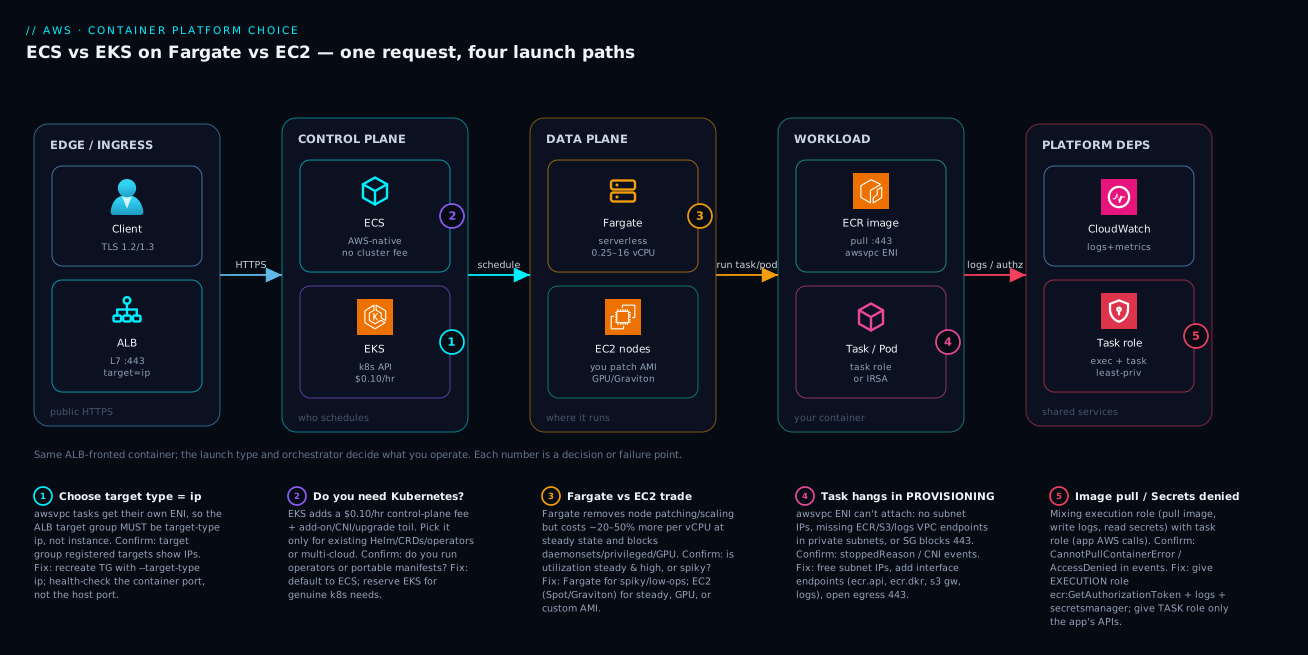
Trace one HTTPS request and you can see the whole 2×2 in a single path. A client hits an Application Load Balancer on :443 (TLS terminates here). Because the containers run with awsvpc networking, the ALB’s target group must be target-type ip — it sends traffic to the task’s own ENI IP, not to a host. From there the request enters the control plane you chose: ECS (AWS-native, no cluster fee) or EKS (the Kubernetes API at $0.10/hr). That orchestrator schedules the work onto the data plane you chose: Fargate (serverless, 0.25–16 vCPU, nothing to patch) or EC2 nodes (you own the AMI; Graviton, Spot and GPU live here). Whichever combination, the actual workload is the same container — an image pulled from ECR over :443, running as a task or pod under a task role (ECS) or IRSA (EKS). Finally every task leans on shared platform dependencies: CloudWatch for logs and metrics, and IAM split into an execution role (pull the image, write logs, read secrets) and a task role (the app’s own AWS calls).
The numbered badges mark the five places this architecture most often goes wrong or forces a decision. (1) is the ALB target-type trap — awsvpc demands ip, and an instance target group gives you a 503 with no healthy targets. (2) is the orchestrator fork itself: pay the EKS control-plane fee and add-on toil only for genuine Kubernetes needs. (3) is the Fargate-vs-EC2 trade — serverless simplicity versus steady-state cost, GPU and daemons. (4) is the dreaded PROVISIONING hang: an ENI that can’t attach because the subnet is out of IPs or the private subnet lacks ECR/S3/logs endpoints. (5) is the IAM split — mixing the execution and task roles is why images won’t pull or secrets won’t resolve. Read the diagram left to right and the badges become your pre-flight checklist.
Real-world scenario
Northwind Stream (fictional) is a 40-engineer media-analytics SaaS on AWS. Two years ago a newly hired platform lead stood up a single large EKS cluster “to be cloud-native,” and everything went on it: the customer-facing web/API tier (a dozen stateless Go and Node services), a set of scheduled batch jobs, and the data platform (Spark on the Spark Operator, plus a couple of bespoke controllers). It worked — until operating it became the team’s main job.
The symptoms were classic misallocation. The platform group had grown to three full-time engineers whose week was Kubernetes upkeep: a minor-version upgrade every cycle (with the obligatory VPC CNI / CoreDNS compatibility testing), recurring IP-exhaustion alerts as the CNI burned through a /23 (prefix delegation hadn’t been enabled), AWS Load Balancer Controller CVEs to patch, Helm-chart drift, and a painful incident where a bad CoreDNS bump broke service discovery for twenty minutes. None of this produced customer value. Meanwhile the web tier — pure stateless HTTP behind an ALB — used nothing Kubernetes-specific. It was paying the full cluster tax for zero benefit.
The architecture review split the workloads along the two axes honestly:
| Workload | Needs k8s? | Utilization | Decision | Why |
|---|---|---|---|---|
| Web / API tier (12 services) | No | Spiky daytime | ECS + Fargate | Stateless + ALB; no k8s features used; min ops |
| Scheduled batch (reports) | No | Bursty, scale-to-zero | ECS + Fargate (Spot) | EventBridge-triggered; cheap; no idle nodes |
| Data platform (Spark, controllers) | Yes | Steady, heavy, GPU-ish | EKS + EC2 (Karpenter, Spot, Graviton) | Operators/CRDs are the value; cost-tuned nodes |
| ML inference (GPU) | Maybe | Steady | EKS + EC2 GPU | Operators + GPU; Fargate can’t do GPU |
They migrated the web tier to ECS Fargate behind the existing ALBs (recreating the target groups as target-type ip), moved the batch jobs to ECS Fargate Spot triggered by EventBridge Scheduler, and kept the data platform on EKS — but moved its nodes to Karpenter on Graviton Spot, and finally enabled prefix delegation to kill the IP-exhaustion alerts. The numbers afterward: the platform team shrank from three engineers to one; the EKS cluster’s blast radius dropped (only the data platform now depends on it); the batch tier’s compute bill fell sharply because it scaled to zero between runs; and the Spark/ML workloads got cheaper on Karpenter+Graviton+Spot while gaining the JIT bin-packing they’d lacked. The lesson the lead wrote in the post-mortem: “Kubernetes was the right tool for the 20% of our workload that needed it, and an expensive mistake for the 80% that didn’t. We chose on the wrong axis — we picked an orchestrator before asking whether each workload needed one.”
Advantages and disadvantages
| Dimension | Advantage | Disadvantage |
|---|---|---|
| ECS | $0 control plane; lowest learning curve; native AWS integration; per-task IAM | AWS-only; no CRDs/operators; less extensible |
| EKS | Full Kubernetes API; portable; huge ecosystem; advanced scheduling | $0.10/hr/cluster; add-on + upgrade toil; bigger blast radius |
| Fargate | No node patching/scaling/right-sizing; per-second billing; per-task isolation | ~20–50% per-vCPU premium; no GPU/DaemonSet/privileged; fixed CPU/mem pairs |
| EC2 | Cheaper at steady state; Spot/Graviton/GPU; daemons; custom AMI; bin-packing | You patch/scale/secure nodes; capacity planning; host security surface |
In prose: ECS wins when the workload is “just containers + a load balancer” and you value shipping over operating — which is most workloads, most of the time. EKS wins precisely when you can name the Kubernetes capability you depend on (an operator, CRDs, a mesh, portability) — and when that value clears the bar of the control-plane fee plus the permanent add-on/upgrade surface. On the other axis, Fargate wins on spiky utilization, small teams, and anything you’d rather not babysit; its premium is real but often dwarfed by the salary cost of node operations at small scale. EC2 wins on steady, high-utilization fleets where bin-packing plus Savings Plans/Spot/Graviton make it dramatically cheaper, and on the hard requirements Fargate simply can’t meet (GPU, DaemonSets, custom kernels). The corners are not ranked; they are matched to a workload’s shape.
Hands-on lab
This lab deploys a tiny HTTP container on ECS Fargate behind an ALB, hits it, then tears everything down. It is free-tier-adjacent (Fargate and ALB are not free, but a few minutes costs cents). Run in a Region like ap-south-1 (Mumbai). Replace IDs with yours.
Step 0 — prerequisites
aws sts get-caller-identity            # confirm you're authenticated
aws ec2 describe-vpcs --query 'Vpcs[0].VpcId' --output text   # note a VPC id
Step 1 — create a cluster
aws ecs create-cluster --cluster-name lab --capacity-providers FARGATE FARGATE_SPOT
Expected: JSON with "status": "ACTIVE".
Step 2 — an execution role (pull image + write logs)
aws iam create-role --role-name lab-exec \
  --assume-role-policy-document '{"Version":"2012-10-17","Statement":[{"Effect":"Allow","Principal":{"Service":"ecs-tasks.amazonaws.com"},"Action":"sts:AssumeRole"}]}'
aws iam attach-role-policy --role-name lab-exec \
  --policy-arn arn:aws:iam::aws:policy/service-role/AmazonECSTaskExecutionRolePolicy
Step 3 — register a task definition (taskdef.json)
{
  "family": "lab-web",
  "requiresCompatibilities": ["FARGATE"],
  "networkMode": "awsvpc",
  "cpu": "256", "memory": "512",
  "executionRoleArn": "arn:aws:iam::<acct>:role/lab-exec",
  "containerDefinitions": [{
    "name": "web",
    "image": "public.ecr.aws/nginx/nginx:latest",
    "portMappings": [{ "containerPort": 80 }],
    "essential": true,
    "logConfiguration": {
      "logDriver": "awslogs",
      "options": {
        "awslogs-group": "/ecs/lab-web",
        "awslogs-region": "ap-south-1",
        "awslogs-stream-prefix": "web",
        "awslogs-create-group": "true"
      }
    }
  }]
}
aws ecs register-task-definition --cli-input-json file://taskdef.json
Step 4 — an ALB + a TARGET-TYPE IP target group (the lab’s whole point)
aws elbv2 create-load-balancer --name lab-alb --type application \
  --subnets subnet-1 subnet-2 --security-groups sg-alb
aws elbv2 create-target-group --name lab-tg --protocol HTTP --port 80 \
  --vpc-id vpc-0abc --target-type ip --health-check-path /
# create a listener on :80 forwarding to lab-tg (ARNs from the two commands above)
aws elbv2 create-listener --load-balancer-arn <alb-arn> --protocol HTTP --port 80 \
  --default-actions Type=forward,TargetGroupArn=<tg-arn>
Step 5 — run the service
aws ecs create-service --cluster lab --service-name web \
  --task-definition lab-web --desired-count 2 --launch-type FARGATE \
  --network-configuration 'awsvpcConfiguration={subnets=[subnet-1,subnet-2],securityGroups=[sg-web],assignPublicIp=ENABLED}' \
  --load-balancers 'targetGroupArn=<tg-arn>,containerName=web,containerPort=80'
Note:
assignPublicIp=ENABLEDlets the lab pull the public ECR image without VPC endpoints. In production you’d use private subnets + the endpoints in the table above.
Step 6 — verify
aws ecs describe-services --cluster lab --services web \
  --query 'services[0].deployments[0].runningCount'      # → 2 when ready
aws elbv2 describe-target-health --target-group-arn <tg-arn> \
  --query 'TargetHealthDescriptions[].TargetHealth.State' # → ["healthy","healthy"]
curl http://<alb-dns-name>/                               # → nginx welcome HTML
Step 7 — teardown (avoid charges)
aws ecs update-service --cluster lab --service web --desired-count 0
aws ecs delete-service --cluster lab --service web --force
aws elbv2 delete-listener --listener-arn <listener-arn>
aws elbv2 delete-load-balancer --load-balancer-arn <alb-arn>
aws elbv2 delete-target-group --target-group-arn <tg-arn>
aws ecs delete-cluster --cluster lab
aws logs delete-log-group --log-group-name /ecs/lab-web
Common mistakes & troubleshooting
This is the differentiator. Containers fail in a small set of recurring ways with a specific root cause and an exact confirm step. Use this as a playbook: match the symptom, confirm the cause, apply the fix.
| # | Symptom | Root cause | Confirm (exact command / path) | Fix |
|---|---|---|---|---|
| 1 | Task stuck in PROVISIONING | ENI can’t attach: no free subnet IPs, or private subnet missing ECR/S3/logs endpoints | aws ecs describe-tasks ... --query 'tasks[0].stoppedReason'; check subnet free IPs |
Free IPs / bigger subnet; add ECR(api,dkr)+S3 gateway+logs endpoints |
| 2 | CannotPullContainerError |
Execution role lacks ECR perms, or no route to ECR/S3 | Task stoppedReason; CloudTrail ecr:GetAuthorizationToken deny |
Attach AmazonECSTaskExecutionRolePolicy; add ECR+S3 endpoints or NAT |
| 3 | ResourceInitializationError: unable to pull secrets |
Execution role can’t read Secrets Manager/SSM, or no endpoint | stoppedReason; secret ARN in task def |
Grant exec role secretsmanager:GetSecretValue; add SM endpoint |
| 4 | App throws AccessDenied calling S3/DDB | Permission put on execution role, not task role | App logs; the call uses the task role | Move the app’s policy to the task role (taskRoleArn) |
| 5 | ALB returns 503, no healthy targets | Target group is target-type instance for an awsvpc/Fargate service |
aws elbv2 describe-target-health shows no/unhealthy targets |
Recreate TG --target-type ip; health-check the container port |
| 6 | Targets unhealthy, app is fine | Health-check path/port wrong; SG blocks ALB→task | describe-target-health reason Target.ResponseCodeMismatch/Timeout |
Fix --health-check-path/port; allow ALB SG → task SG on the port |
| 7 | Container exits with code 137 | OOM — exceeded task/container memory | stoppedReason: OutOfMemoryError; Container Insights memory |
Raise memory; fix leak; set memoryReservation sensibly |
| 8 | Crash loop (task restarts forever) | App throws at startup (bad env/secret/migration) | aws logs tail /ecs/<svc> repeating trace; ECS events |
Fix config; enable circuit-breaker rollback; add health grace period |
| 9 | EKS pods Pending |
No capacity (no nodes) or no matching Fargate profile | kubectl describe pod → FailedScheduling/Insufficient cpu |
Scale nodes/Karpenter; add a Fargate profile matching the labels |
| 10 | EKS pods ContainerCreating forever |
IP exhaustion (VPC CNI) or CNI not ready | kubectl describe pod → failed to assign an IP; aws-node logs |
Enable prefix delegation; bigger subnets; restart CNI |
| 11 | Spot interruption kills tasks/nodes | Fargate Spot/EC2 Spot reclaimed | ECS events / node Terminating; Spot interruption notice |
Run an on-demand base via capacity-provider strategy; PDBs (EKS) |
| 12 | Deploy stuck, never completes | minimumHealthyPercent 100 + no spare EC2 capacity |
aws ecs describe-services deployment IN_PROGRESS forever |
Lower min-healthy or add capacity; Fargate avoids this |
| 13 | 504 Gateway Timeout from ALB | App slower than ALB idle/target timeout | App Insights/logs latency; ALB idle timeout | Speed up app; raise target/idle timeout; fix downstream |
| 14 | exec format error on start |
arm64 image on x86 task (or vice-versa) | Container logs first line | Build multi-arch image; match runtimePlatform |
| 15 | ECS Exec / kubectl exec fails |
Missing SSM endpoints or enableExecuteCommand off |
aws ecs execute-command error; SSM agent |
Enable exec; add ssm/ssmmessages endpoints; task-role SSM perms |
A few reading notes that save the most time:
- Always read
stoppedReasonfirst.aws ecs describe-tasks --cluster <c> --tasks <id> --query 'tasks[0].stoppedReason'tells the truth for almost every Fargate failure (pull, secrets, ENI, OOM). On EKS, the equivalent iskubectl describe podevents. - Execution role vs task role is the most common IAM confusion. Execution role = the platform pulling your image, writing your logs, reading your secrets before/around your code. Task role = your code’s AWS identity. If the image won’t pull or a secret won’t resolve, it’s the execution role. If your app gets AccessDenied calling AWS, it’s the task role.
target-type ipis mandatory for awsvpc/Fargate. This single setting causes more “ALB returns 503” tickets than anything else.
Best practices
- Default to ECS; adopt EKS only with a named Kubernetes requirement. Write the requirement down (operator X, CRD Y, portability to Z). If you can’t, you don’t need EKS.
- Default to Fargate; move to EC2 when the bill or a hard requirement says so. Start serverless; switch steady, high-utilization or GPU/daemon workloads to EC2 with data.
- Always use
target-type iptarget groups for awsvpc/Fargate, and health-check the container port — not a host port. - Split IAM correctly: execution role for pull/logs/secrets, task role for the app. Keep both least-privilege; never reuse one for both jobs.
- In private subnets, add the ECR(api+dkr) + S3 gateway + logs endpoints (and
secretsmanager/sts/ssmas needed) — or you’ll chase PROVISIONING hangs. - Turn on the ECS deployment circuit breaker with rollback so a bad task definition auto-reverts instead of taking the service down.
- Pin image digests/tags; never
:latestin production. Reproducible deploys and clean rollbacks depend on it. - Run an on-demand base + Spot burst (capacity-provider strategy on ECS; Karpenter Spot with on-demand fallback on EKS) for cost without fragility.
- On EKS, enable VPC CNI prefix delegation early and plan CIDRs generously — IP exhaustion is painful to fix after the fact.
- On EKS, keep add-ons current and test upgrades on a non-prod cluster (or use blue/green clusters). CNI/CoreDNS/kube-proxy must match the control-plane version.
- Right-size with Container Insights / metrics, then commit (Savings Plans for Fargate+EC2) once usage is steady.
- Prefer Graviton (arm64) for both Fargate and EC2 where your stack supports it; build multi-arch images so you’re not locked to x86.
Security notes
- Least-privilege task roles. Scope the task role to exactly the AWS APIs the app calls; never grant
*. On EKS, use IRSA or Pod Identity so each ServiceAccount maps to a minimal role — not node-wide instance-profile permissions. - Don’t put secrets in
environment. Inject from Secrets Manager/SSM Parameter Store via the task definitionsecretsblock (or External Secrets/CSI on EKS); the execution role reads them, and they never appear in the task-def history or logs. - Private subnets + endpoints, no public IPs. Run tasks with
assignPublicIp=DISABLEDin private subnets and reach AWS via VPC endpoints, keeping image pulls and log shipping off the public internet. - Per-task security groups (awsvpc) let you micro-segment: the ALB SG → app SG on the container port only; app SG → database SG on the DB port only. On EKS, add network policies for pod-to-pod controls.
- Image provenance. Scan images in ECR (enhanced scanning / Inspector), pin digests, and ideally enforce signed images. A vulnerable base image is a vulnerable fleet.
- EKS RBAC + IAM together. Lock down Access Entries / aws-auth so only the right principals reach the API server, and use Kubernetes RBAC for in-cluster authorization. Restrict the public API endpoint or make it private.
- No privileged unless required. On Fargate it’s impossible (a security feature). On EC2/EKS, drop Linux capabilities you don’t need and avoid
privileged: true.
Cost & sizing
What drives the bill differs sharply by corner. Roughly (us-east-1-class on-demand list; INR at ~₹84/USD; verify current pricing):
| Cost driver | Applies to | Rough figure | Notes |
|---|---|---|---|
| Fargate vCPU | ECS/EKS Fargate | ~$0.04048 / vCPU-hr | Per-second, 1-min minimum |
| Fargate memory | ECS/EKS Fargate | ~$0.004445 / GB-hr | Billed alongside vCPU |
| Fargate Spot | ECS Fargate | ~70% off | Interruptible; batch/dev |
| EKS control plane | Every EKS cluster | $0.10/hr (~$73/mo / ~₹6,100) | Per cluster — consolidate! |
| EC2 on-demand | EC2 launch type | Instance-hour | Cheaper than Fargate at high utilization |
| EC2 Spot | EC2 launch type | up to ~90% off | Interruptible; Karpenter handles it |
| Graviton (arm64) | Fargate & EC2 | ~20–40% better price/perf | Multi-arch image required |
| NAT Gateway | Private tasks w/o endpoints | ~$0.045/hr + $0.045/GB | Endpoints often cheaper at scale |
| Interface VPC endpoint | Private tasks | ~$0.01/hr each + data | Fixed per-AZ; adds up with many |
| ALB | Fronting services | ~$0.0225/hr + LCU | Shared across many target groups |
| CloudWatch Logs | All | ~$0.50/GB ingest + storage | Sample/route via FireLens to cut cost |
| Container Insights | Optional | Per metric/log | Useful but priced; scope it |
Right-sizing guidance
| Decision | Heuristic |
|---|---|
| Fargate task size | Start at the smallest valid CPU/mem pair that fits; scale out, not up, first |
| Fargate vs EC2 crossover | Above ~60–70% steady utilization 24×7, EC2 (with RI/SP) usually wins |
| Spot mix | On-demand base for availability + Spot burst for cost (e.g. 1:3) |
| EKS cluster count | Consolidate — each cluster is $73/mo; use namespaces/RBAC, not extra clusters |
| arm64 adoption | Default new services to Graviton if the stack supports it |
| Logs spend | Route with FireLens, sample debug logs, set retention |
Free-tier-ish notes
- ECS itself is free (you pay only compute) — there is no orchestrator charge.
- EKS has no free tier: the $0.10/hr control-plane fee starts immediately, so don’t leave idle clusters running.
- Fargate/ALB are not free but a few minutes of the lab above costs only cents — just remember to tear down.
Interview & exam questions
Q1. ECS vs EKS in one sentence — when each? ECS is AWS’s native orchestrator with no control-plane fee and the lowest operational surface — use it for straightforward containerized services. EKS is conformant Kubernetes ($0.10/hr/cluster) — use it when you need the Kubernetes ecosystem (operators, CRDs, Helm), portability, or advanced scheduling. (SAP-C02)
Q2. Fargate vs EC2 launch type — the trade-off? Fargate is serverless (no nodes to patch/scale/right-size, per-second billing) at a per-vCPU premium and without GPU/DaemonSet/privileged support. EC2 is cheaper at steady high utilization and supports Spot, Graviton, GPU, daemons and custom AMIs, but you own host operations. (DVA-C02 / SAP-C02)
Q3. Your Fargate service behind an ALB returns 503 with no healthy targets. Why?
Almost certainly the target group is target-type instance while Fargate uses awsvpc, so targets register the wrong way. Recreate the target group with --target-type ip and point the health check at the container port. (DVA-C02)
Q4. A Fargate task is stuck in PROVISIONING in a private subnet. First two suspects?
No free IPs in the subnet for the task ENI, or missing VPC endpoints (ECR api+dkr, the S3 gateway endpoint for layers, and logs). Confirm via stoppedReason and subnet free-IP count. (SAP-C02)
Q5. Difference between the ECS execution role and task role?
The execution role lets the ECS agent pull the image, write logs and read secrets (platform-side). The task role is the application’s own AWS identity for its API calls (S3, DynamoDB, etc.). CannotPullContainerError → execution role; app AccessDenied → task role. (DVA-C02)
Q6. When is EKS genuinely the right call over ECS? When you depend on Kubernetes-specific capabilities: existing Helm charts/operators/CRDs, a service mesh, advanced scheduling, multi-cloud portability, or workloads like Spark/Flink/ML that run on Kubernetes operators. Brand recognition is not a reason. (SAP-C02)
Q7. What can’t you run on EKS Fargate?
DaemonSets, GPU workloads, privileged containers and hostNetwork/hostPort pods. Node-level agents (logging/security) must be sidecars; GPU/daemon needs require EC2 node groups. (CKA mindset / SAP-C02)
Q8. How do you give an EKS pod AWS permissions securely? Use IRSA (IAM Roles for Service Accounts via OIDC) or EKS Pod Identity to bind a least-privilege role to a ServiceAccount — not the node instance profile, which would over-grant every pod on the node. (DOP-C02)
Q9. Container exits with code 137 — what happened and how do you confirm?
It was OOM-killed for exceeding its memory limit. Confirm via stoppedReason: OutOfMemoryError (ECS) or the pod’s OOMKilled reason (EKS) and Container Insights memory metrics; fix by raising memory or fixing the leak. (DVA-C02)
Q10. How do you cut container compute cost without sacrificing availability? Run an on-demand base plus Spot burst (capacity-provider strategy on ECS; Karpenter Spot with on-demand fallback on EKS), adopt Graviton/arm64, right-size from metrics, and commit Savings Plans once usage is steady. (SAP-C02)
Q11. Why does the EKS control plane cost matter for cluster strategy? Each cluster is $0.10/hr (~$73/mo). Spinning up a cluster per team/app multiplies that fee and the add-on toil. Consolidate with namespaces and RBAC instead, reserving separate clusters for genuine isolation needs. (SAP-C02)
Q12. What is Karpenter and why prefer it over the Cluster Autoscaler? Karpenter is a just-in-time node provisioner for EKS that watches pending pods and launches right-sized, cheapest-fit nodes (Spot-native, bin-packing) in seconds, then consolidates. It’s faster and more cost-efficient than ASG-based Cluster Autoscaler’s fixed node groups. (DOP-C02)
Quick check
- You have a dozen stateless HTTP services, a five-person team, and no Kubernetes experience. Which corner of the 2×2 do you pick, and why?
- Your Fargate service behind an ALB shows “no healthy targets” and clients get 503. What is the single most likely misconfiguration?
- Name two VPC endpoints (besides logs) a private-subnet Fargate task needs to pull an image, and the easy one to forget.
- The app logs
AccessDeniedcalling DynamoDB. Execution role or task role — which do you fix? - Give one workload that genuinely justifies EKS over ECS and one that genuinely justifies EC2 over Fargate.
Answers
- ECS + Fargate. Stateless containers + ALB use nothing Kubernetes-specific, and Fargate removes node ops — the lowest total operational surface for a small team. EKS would add a control-plane fee and an add-on/upgrade burden for zero benefit.
- The target group is
target-type instanceinstead ofip.awsvpc/Fargate tasks must be targeted by ENI IP; recreate the target group with--target-type ipand health-check the container port. ecr.apiandecr.dkr(interface endpoints) — plus the easy-to-forget S3 gateway endpoint, because ECR image layers are stored in S3 and the download stalls without it.- The task role. The app’s own AWS calls use the task role; the execution role only covers image pull, log writes and secret reads.
- EKS-justifying: Spark/ML on the Spark Operator (or anything needing CRDs/operators, a mesh, or multi-cloud portability). EC2-justifying: a GPU inference service (Fargate has no GPU) or a steady 24×7 fleet where Spot+Graviton+bin-packing is far cheaper.
Glossary
- Amazon ECS — AWS’s native container orchestrator; schedules tasks, integrates with ALB/IAM/CloudWatch; no control-plane fee.
- Amazon EKS — AWS-managed, conformant Kubernetes; full k8s API and ecosystem; $0.10/hr per cluster.
- AWS Fargate — Serverless compute for containers; runs tasks/pods with no nodes to manage; billed per vCPU/GB-second.
- EC2 launch type — Running tasks/pods on EC2 instances you provision; cheaper at steady state; supports Spot/Graviton/GPU/daemons.
- Task definition — Immutable, versioned JSON describing an ECS task’s containers, CPU/memory, roles, networking and logging.
- Execution role — IAM role the ECS agent uses to pull the image, write logs and read secrets (platform-side).
- Task role — IAM role that is the application’s own AWS identity for its API calls.
- awsvpc — Network mode giving each task/pod its own ENI, IP and security group; required by Fargate.
- Target-type ip — ALB target-group mode that registers task/pod ENI IPs; required for awsvpc/Fargate services.
- Capacity provider — ECS construct mapping a service to Fargate/Fargate-Spot/EC2 capacity (with weighted strategies).
- Managed node group — AWS-managed EC2 Auto Scaling Group of EKS worker nodes with lifecycle handling.
- Karpenter — EKS just-in-time node provisioner that launches right-sized, cheapest-fit (Spot) nodes and consolidates.
- VPC CNI — EKS networking plugin that assigns each pod a real VPC IP; tuned via prefix delegation/custom networking.
- IRSA — IAM Roles for Service Accounts; binds a least-privilege IAM role to a Kubernetes ServiceAccount via OIDC.
- Fargate profile — EKS construct selecting which pods (namespace + labels) run on Fargate instead of nodes.
- Graviton (arm64) — AWS Arm-based processors offering ~20–40% better price-performance; needs multi-arch images.
Next steps
- Go deep on the launch-type cost mechanics in AWS Compute: EC2, Lambda, ECS and EKS — Which One to Choose?.
- Get the load-balancer choice right (the target-type detail lives here) in AWS ALB vs NLB vs API Gateway Compared.
- Master the
awsvpc/endpoint/SG networking your tasks depend on in AWS VPC, Subnets and Security Groups Explained. - Lock down the execution/task roles and account guardrails via AWS Organizations & IAM Foundations.
- Pair containers with event-driven glue (EventBridge-triggered batch tasks) using AWS Lambda Event-Driven Patterns.