Quick take: A VPC is your own private network inside one AWS region. Subnets carve it into per-AZ zones; route tables decide where each subnet’s traffic can go; an internet gateway is the only door to the public internet and a NAT gateway lets private things reach out without being reachable. Security groups are stateful firewalls on each resource; NACLs are stateless firewalls on each subnet edge. Get these seven pieces straight and AWS networking stops being magic — and stops being a security incident waiting to happen.
A developer deployed a new API into the default VPC and, fighting a connection error, “fixed” it by opening the security group to ports 0-65535 from 0.0.0.0/0. The fix worked — and so did the breach review three weeks later. The database sat in the same subnet as the internet-facing EC2 instance, that subnet had a route to the internet gateway, and the security group now welcomed the whole planet. Nothing in that story was a clever attack. It was four small misunderstandings stacked on top of each other: the default VPC puts everything in a public subnet, the route table there points at the internet, security groups are the last line of defence, and 0.0.0.0/0 means everyone. Each of those is a five-minute concept. Together, un-understood, they cost a weekend and a customer.
This article unpacks the whole picture from the ground up. We will define every moving part — VPC, CIDR, subnet, route table, internet gateway, NAT gateway, security group, network ACL, VPC endpoint — and then trace a single HTTPS request from a browser, through a public-subnet load balancer, into a private-subnet application server, down to a database that is reachable only from that application and nowhere else. You will see which control sits at which hop, what each one’s default is, where the limits bite, and the exact aws CLI and Terraform to set each one. Because this is the kind of thing you come back to mid-incident — “wait, is a NACL stateful?” — the reference itself is laid out as scannable tables: read the prose once to build the model, then keep the tables open when you are actually wiring a VPC or chasing a dropped packet.
By the end you will not just know the words. You will be able to design a multi-tier VPC that is private by default, explain why the database cannot be reached from the internet even though the web server can, confirm exactly where a blocked connection died using VPC Flow Logs, and avoid the single most common AWS security mistake — the wide-open security group — by sourcing rules from other security groups instead of from IP ranges. This maps directly to the networking domain of the AWS Certified Solutions Architect – Associate (SAA-C03) exam, which leans on these fundamentals harder than any other topic.
What problem this solves
Every workload you run in AWS — an EC2 instance, an RDS database, a Lambda in a VPC, an EKS pod — needs an address and a set of rules about who can talk to it. AWS could have dropped every customer’s resources onto one giant shared network and let firewalls sort it out, the way a lot of on-prem data centres grew up. Instead it gives each account isolated virtual networks (VPCs) that are invisible to and unreachable from every other customer by default, and inside each VPC a layered set of controls so you decide, precisely, what can reach what. The VPC is the boundary; subnets, route tables, gateways, security groups and NACLs are the dials.
What breaks without this understanding is not subtle. Teams ship databases into public subnets and discover them in a breach report. They open security groups to 0.0.0.0/0 to “make it work” and never close them. They put everything in one subnet, lose all tier isolation, and then cannot answer “can the web server reach the database, and can anything else?” They run out of IP addresses mid-deploy because nobody planned the CIDR. They burn money on a NAT gateway processing S3 traffic that should have gone through a free gateway endpoint. And when a connection silently fails, they guess for an hour because they do not know that a security group is stateful (return traffic is automatic) while a NACL is stateless (you must allow the return path explicitly).
Who hits this: essentially everyone who deploys anything beyond a toy into AWS. It bites hardest on people who start in the default VPC — which is deliberately permissive so a first-time user can ssh into an instance in two minutes — and then carry those permissive habits into production. It bites teams who treat networking as “someone else’s job” until a connection times out at 2 a.m. The good news is that the model is small. Seven concepts, a handful of defaults, and a single rule of thumb — private by default, reference security groups not IP ranges, the internet gateway is the only public door — cover the overwhelming majority of real designs.
To frame the whole field before we go deep, here is every core building block, the problem it solves, and the single most common mistake people make with it:
| Building block | What it solves | Scope | Default in default VPC | Most common mistake |
|---|---|---|---|---|
| VPC | An isolated private network you own | One region | One per region, 172.31.0.0/16 |
Using the default VPC for production |
| Subnet | A per-AZ slice of the VPC’s IP space | One AZ | One public subnet per AZ | Putting databases in a public subnet |
| Route table | Where a subnet’s traffic is allowed to go | Per subnet (via association) | Main table routes to the IGW | Leaving a 0.0.0.0/0→IGW route on a private subnet |
| Internet gateway (IGW) | The only door to the public internet | One per VPC | Attached | Assuming “private subnet” means no IGW route — check it |
| NAT gateway | Outbound internet for private subnets, no inbound | Per AZ (for HA) | None | One NAT in one AZ (single point of failure + cross-AZ cost) |
| Security group (SG) | Stateful firewall on a resource’s network interface | Per ENI / instance | Allows all outbound, denies all inbound | Opening to 0.0.0.0/0 instead of another SG |
| Network ACL (NACL) | Stateless firewall on a subnet’s edge | Per subnet | Allows all in and out | Forgetting the ephemeral-port return rule (stateless!) |
| VPC endpoint | Private path to AWS services, off the internet | Per service/route | None | Routing S3/DynamoDB through a paid NAT gateway |
Learning objectives
By the end of this article you can:
- Explain what a VPC is, why it is region-scoped and isolated, and how its CIDR block sets the total address space you have to work with.
- Carve a VPC into public and private subnets across Availability Zones, and explain why “public” vs “private” is decided by the route table, not by the subnet itself.
- Read and write route tables: the implicit local route, a
0.0.0.0/0route to an internet gateway or NAT gateway, and a prefix-list route to a VPC endpoint. - Configure security groups correctly — stateful, allow-only, sourced from other security groups rather than IP ranges — and articulate exactly why
0.0.0.0/0on a non-public port is the canonical AWS mistake. - Use network ACLs where they actually help (explicit subnet-level deny, stateless return-path rules) and explain how they differ from security groups in five concrete ways.
- Trace a real HTTPS request through a three-tier VPC (ALB → app → database) and name which control governs each hop and what its default is.
- Confirm where a dropped connection died using VPC Flow Logs, Reachability Analyzer and the right
aws ec2 describe-*calls, and apply the matching fix. - Size a VPC’s CIDR, place a cost-efficient NAT topology, and answer the networking questions on the SAA-C03 exam without second-guessing.
Prerequisites & where this fits
You should be comfortable with the absolute basics of IP networking: that an address like 10.0.11.42 lives inside a range written in CIDR notation like 10.0.11.0/24, that /24 means the first 24 bits are the network and the last 8 identify hosts (so 256 addresses, 251 usable in a VPC subnet), and that 0.0.0.0/0 is shorthand for “every possible address.” You should have an AWS account, the AWS CLI installed and configured (aws configure), and know how to read JSON output. Knowing what an EC2 instance and an RDS database are — at the “it’s a virtual server” / “it’s a managed database” level — is enough; you do not need to be an expert in either.
This is a foundational networking topic, and almost everything else in AWS sits on top of it. The compute services you place into the VPC are covered in AWS Compute Demystified: EC2 vs Lambda vs ECS vs EKS; the databases that belong in your private data subnet are in Choosing an AWS Database: RDS vs DynamoDB vs Aurora. The Availability Zones your subnets bind to are explained in AWS Regions and Availability Zones Explained, and the load balancers that live in your public subnet are compared in ALB vs NLB vs API Gateway: Choosing the Right AWS Entry Point. Once you are comfortable here, the natural next layers are connecting many VPCs and accounts together — the network-segmentation mindset in Cloud Network Segmentation with Hub-and-Spoke for Beginners — and locking down outbound traffic, in AWS Network Firewall: Suricata Egress Inspection and Rule Engineering.
A quick map of who owns and confirms each layer, so during an incident you look in the right place and call the right person:
| Layer | What lives here | Who usually owns it | What it can break |
|---|---|---|---|
| VPC / CIDR plan | Address space, AZ layout | Cloud platform / network team | Out-of-IPs at deploy; overlapping CIDRs blocking peering |
| Subnets & route tables | Public/private split, routes | Platform team | “Private” subnet with an internet path; unroutable subnet |
| Internet / NAT gateways | Public ingress, private egress | Platform team | No outbound from private; single-AZ NAT outage |
| Security groups | Per-resource allow rules | App + platform | Over-open ports; app can’t reach DB |
| NACLs | Subnet-edge allow/deny | Platform / security | Stateless return traffic dropped; surprise deny |
| VPC endpoints | Private path to AWS APIs | Platform team | S3 traffic on the public path; endpoint policy too strict |
| Elastic IPs / public IPs | Public addressing | Platform team | Unintended public exposure; idle-EIP charges |
| Peering / Transit Gateway | VPC-to-VPC connectivity | Network team | Overlapping CIDRs; missing routes; blackholes |
| Flow Logs / Reachability Analyzer | Diagnostics & forensics | SRE / security | Un-diagnosable drops when not enabled |
Core concepts
Five mental models make every later decision obvious.
A VPC is your private network in one region, isolated from everyone. When you create a VPC (Virtual Private Cloud) you choose a CIDR block — say 10.0.0.0/16, which is 65,536 addresses — and that range is yours to subdivide. The VPC spans every Availability Zone in the region but exists in exactly one region; a VPC in ap-south-1 cannot, by itself, reach a VPC in us-east-1 (that needs peering or a transit gateway). Nothing outside your account can route into your VPC unless you explicitly attach a gateway and add a route. Isolation is the default; connectivity is opt-in. This is the inverse of a flat on-prem LAN, and it is the whole security premise of AWS networking.
“Public” and “private” are a property of the route table, not the subnet. This is the single most misunderstood point, and the one that put the database on the internet in the opening story. A subnet is just an IP range pinned to one AZ. What makes it public is that its associated route table has a route 0.0.0.0/0 → internet gateway. Remove that route and the identical subnet is now private. A “private” subnet is simply one whose route table has no path to an internet gateway; it may instead route outbound 0.0.0.0/0 to a NAT gateway (so it can reach out but nothing can reach in) or have no internet route at all (fully isolated). Always check the route table to know what a subnet really is — the name you gave it means nothing.
Routing is longest-prefix-match, and the local route is sacred. Every route table has an implicit, undeletable local route for the VPC’s own CIDR (e.g. 10.0.0.0/16 → local) so all subnets in the VPC can talk to each other. Beyond that, you add routes, and when a packet needs a destination, AWS picks the route with the most specific (longest) prefix that matches. So 10.0.21.0/24 → vpc-peering wins over 0.0.0.0/0 → igw for traffic to that range. The default route 0.0.0.0/0 is the catch-all “everything else goes here” — point it at an IGW for a public subnet, a NAT gateway for a private-with-egress subnet, or leave it out entirely for an isolated subnet.
Security groups are stateful and allow-only; NACLs are stateless and have deny. A security group attaches to a resource’s elastic network interface (ENI) — practically, to an instance, a load balancer, an RDS instance. It has only allow rules (there is no deny rule in an SG); anything not explicitly allowed is denied. Crucially it is stateful: if you allow an outbound connection, the return traffic is automatically allowed, and vice-versa — you never write return rules. A network ACL attaches to a subnet and guards its edge; it has both allow and deny rules evaluated in numbered order, and it is stateless — it does not remember connections, so you must explicitly allow the return traffic (which, for replies, lands on ephemeral ports 1024–65535). Security groups are your everyday tool; NACLs are a coarse subnet-wide backstop you reach for occasionally.
The internet gateway is the only public door, and NAT is one-way. An internet gateway (IGW) is a horizontally-scaled, highly-available component you attach to a VPC; it is the only thing that lets traffic flow between your VPC and the public internet, and it also performs the network address translation between a resource’s private IP and its public/Elastic IP. A resource is internet-reachable only if all three are true: it is in a subnet whose route table points 0.0.0.0/0 at the IGW, it has a public IP, and its security group/NACL allow the traffic. A NAT gateway is the asymmetric cousin: it lets resources in a private subnet initiate outbound connections to the internet (for OS updates, calling third-party APIs) while making them unreachable from the internet — connections can only start from inside.
The vocabulary in one table
Before the deep sections, pin down every moving part. The glossary at the end repeats these for lookup; this table is the model side by side:
| Concept | One-line definition | Scope | Stateful? | Why it matters |
|---|---|---|---|---|
| VPC | Isolated virtual network with a CIDR | One region | n/a | The boundary; everything lives inside it |
| CIDR block | The IP range, e.g. 10.0.0.0/16 |
Per VPC / subnet | n/a | Sets total addresses; can’t easily change later |
| Subnet | A CIDR slice bound to one AZ | One AZ | n/a | Where resources actually live |
| Availability Zone | An isolated datacenter group in a region | Within region | n/a | Subnets are AZ-scoped; spread for HA |
| Route table | Rules: destination CIDR → target | Per subnet | n/a | Decides public vs private |
| Local route | Implicit VPC-CIDR → local | Every route table | n/a | Lets all subnets talk; undeletable |
| Internet gateway (IGW) | The only public internet door | One per VPC | n/a | No IGW route = no public ingress |
| NAT gateway | Outbound-only internet for private subnets | Per AZ | yes (it tracks flows) | Private egress without inbound exposure |
| Security group (SG) | Allow-only firewall on an ENI | Per resource | Stateful | Everyday control; reference other SGs |
| Network ACL (NACL) | Allow+deny firewall on a subnet | Per subnet | Stateless | Coarse backstop; needs return rules |
| Elastic IP (EIP) | A static public IPv4 you own | Per allocation | n/a | Fixed public address; NAT GW uses one |
| VPC endpoint | Private route to AWS services | Per service | n/a | Keeps S3/API traffic off the internet |
| VPC Flow Logs | Per-ENI/subnet/VPC traffic record | Configurable | n/a | The truth about what was ACCEPTed/REJECTed |
VPCs and CIDR: planning the address space
A VPC begins and ends with its CIDR block, and this is the one decision that is genuinely painful to undo, so it earns the first deep section. When you create the VPC you pick an IPv4 CIDR between /16 (65,536 addresses) and /28 (16 addresses). You almost always want it big — a /16 from the RFC 1918 private ranges (10.0.0.0/8, 172.16.0.0/12, 192.168.0.0/16) — because subnets are carved from it and you cannot grow a subnet later. You can add up to four secondary CIDR blocks to a VPC after the fact, but you cannot shrink or renumber the primary one, and overlapping CIDRs between two VPCs make peering impossible. So plan as if you will one day connect this VPC to others: give each VPC a non-overlapping slice of a larger plan.
Here is the full menu of VPC-level CIDR choices and their consequences:
| Setting | Values | Default | When to change | Trade-off / gotcha |
|---|---|---|---|---|
| Primary IPv4 CIDR size | /16 to /28 |
/16 (172.31.0.0/16 in default VPC) |
Pick /16 for prod, smaller for tiny isolated VPCs |
Cannot resize or renumber after creation |
| CIDR range | Any RFC 1918 (or public, rarely) | Default VPC: 172.31.0.0/16 |
Use 10.x for large estates, plan non-overlap |
Overlap blocks peering / TGW between VPCs |
| Secondary CIDRs | Up to 4 additional blocks | None | When you run out of space in the primary | Some ranges restricted; routing gets complex |
| IPv6 CIDR | Amazon-provided /56 or BYOIP |
None | Dual-stack / IPv6-only designs | Different SG/NACL rules; not all services support |
| Tenancy | default / dedicated |
default |
Compliance requiring single-tenant hardware | dedicated is far more expensive |
| DNS resolution | Enabled / disabled | Enabled | Rarely disable | Off → no internal DNS names resolve |
| DNS hostnames | Enabled / disabled | Off (custom VPC) / On (default VPC) | Enable for public DNS names on instances | Public DNS won’t resolve to public IP if off |
The address math matters because AWS reserves five addresses in every subnet, so a /24 subnet gives you 251 usable hosts, not 256. Misjudging this is a classic cause of “Insufficient free addresses” mid-deploy. The reserved addresses, for any subnet x.x.x.0/24:
| Address | Reserved for | Example in 10.0.11.0/24 | Notes |
|---|---|---|---|
.0 |
Network address | 10.0.11.0 | Standard networking reservation |
.1 |
VPC router | 10.0.11.1 | The implicit gateway for the subnet |
.2 |
Amazon DNS (base + 2) | 10.0.11.2 | The .2 resolver; also reachable at 169.254.169.253 |
.3 |
Reserved for future use | 10.0.11.3 | AWS-reserved |
.255 |
Broadcast (not supported) | 10.0.11.255 | VPCs don’t support broadcast, but it’s reserved |
A practical sizing reference — how many usable hosts each common subnet size yields:
| Subnet CIDR | Total addresses | AWS-reserved | Usable hosts | Typical use |
|---|---|---|---|---|
/28 |
16 | 5 | 11 | Tiny: a NAT subnet, a few endpoints |
/27 |
32 | 5 | 27 | Small bastion / management subnet |
/26 |
64 | 5 | 59 | Small app tier |
/24 |
256 | 5 | 251 | Standard tier subnet (most common) |
/23 |
512 | 5 | 507 | Large app/EKS subnet |
/22 |
1,024 | 5 | 1,019 | Big EKS node pools, lots of ENIs |
/20 |
4,096 | 5 | 4,091 | Very large subnet; whole-AZ tier |
Create a VPC with the CLI — note that creating a non-default VPC gives you a blank slate (no subnets, no IGW, only the local route), which is exactly what you want for production:
# Create a custom VPC with a /16 and enable DNS hostnames
aws ec2 create-vpc \
  --cidr-block 10.0.0.0/16 \
  --tag-specifications 'ResourceType=vpc,Tags=[{Key=Name,Value=vpc-shop-prod}]' \
  --query 'Vpc.VpcId' --output text
# Then turn on DNS hostnames (off by default on custom VPCs)
aws ec2 modify-vpc-attribute --vpc-id vpc-0abc123 --enable-dns-hostnames '{"Value":true}'
The same in Terraform, which is how you should actually manage this so the CIDR plan is reviewed and version-controlled:
resource "aws_vpc" "shop_prod" {
  cidr_block           = "10.0.0.0/16"
  enable_dns_support   = true
  enable_dns_hostnames = true
  tags = {
    Name = "vpc-shop-prod"
    Env  = "prod"
  }
}
If you are weighing IPv6, the addressing model differs in ways that change subnet design and firewalling — a quick orientation (the full migration story is in IPv6 Dual-Stack VPC/VNet Design and Migration):
| Aspect | IPv4 in a VPC | IPv6 in a VPC |
|---|---|---|
| Address source | You choose RFC 1918 CIDR | Amazon-provided /56 (or BYOIP) |
| Subnet size | You pick (/16–/28) |
Fixed /64 per subnet |
| Public vs private | Private IPs + NAT/IGW | All IPv6 are globally routable; control via routes |
| Outbound-only | NAT gateway | Egress-only internet gateway (free) |
| Default reachability | Private by default | Routable, so lock down with SG/NACL/routes |
| SG/NACL rules | IPv4 CIDRs | Separate IPv6 (::/0) rules required |
A reference VPC plan for a three-tier app across two AZs — this is the layout the rest of the article uses, and a sane default to copy:
| Tier | AZ-a subnet | AZ-b subnet | Route table | Public? |
|---|---|---|---|---|
| Public (ALB, NAT, bastion) | 10.0.1.0/24 |
10.0.2.0/24 |
0.0.0.0/0 → IGW |
Yes |
| Private app (EC2/ECS/EKS) | 10.0.11.0/24 |
10.0.12.0/24 |
0.0.0.0/0 → NAT |
No (egress only) |
| Private data (RDS/Aurora) | 10.0.21.0/24 |
10.0.22.0/24 |
local only (+ endpoints) | No (isolated) |
| Spare / future | 10.0.31.0/24 |
10.0.32.0/24 |
— | — |
Subnets and Availability Zones: where resources live
A subnet is a CIDR slice of the VPC pinned to exactly one Availability Zone. This AZ-binding is the reason you create subnets in pairs (or triples): to be highly available you place each tier’s resources in subnets in different AZs, so the loss of one datacenter group does not take your app down. A subnet cannot span AZs, and you cannot move a subnet to another AZ — it is fixed at creation. The choice of public vs private is, again, made by the route table you associate, not by anything on the subnet itself, though one subnet attribute — auto-assign public IPv4 — is a convenient signal of intent (turn it on for public subnets so instances get a public IP automatically, off for private ones).
Every subnet-level setting, what it does, and when to touch it:
| Setting | Values | Default | When to change | Gotcha |
|---|---|---|---|---|
| CIDR block | A sub-range of the VPC CIDR | You choose | At creation only | Can’t overlap another subnet; can’t resize later |
| Availability Zone | One AZ in the region | You choose | At creation only | Fixed; spread tiers across ≥2 AZs for HA |
| Auto-assign public IPv4 | Enabled / disabled | Disabled | Enable on public subnets | On + IGW route + SG = internet-reachable |
| Auto-assign IPv6 | Enabled / disabled | Disabled | Dual-stack subnets | Needs VPC IPv6 CIDR first |
| Route table association | Explicit or the main table | Main route table | Always associate explicitly in prod | Unassociated subnets silently use the main table |
| Network ACL association | Explicit or the default | Default (allow-all) NACL | When you need subnet-level deny | Default NACL allows everything in/out |
| Map customer-owned IP | On / off (Outposts) | Off | Outposts only | Niche |
The relationship between VPC, subnet, AZ and route table is the heart of the model. This table makes the “who decides what” explicit:
| Question | Answered by | Not by |
|---|---|---|
| What addresses can a resource get? | The subnet CIDR | The VPC CIDR directly |
| Which datacenter does it run in? | The AZ the subnet is in | The region alone |
| Can it reach the internet? | The route table (IGW route?) | The subnet name |
| Can the internet reach it? | Route table + public IP + SG/NACL | Any single one of those |
| Can it reach another subnet? | The local route (same VPC) | Anything you configure |
| What’s allowed in/out at the edge? | The NACL (subnet) + SG (resource) | Just one of them |
Create a public and a private subnet in two AZs with the CLI:
VPC=vpc-0abc123
# Public subnet in AZ-a, auto-assign public IPs on
aws ec2 create-subnet --vpc-id $VPC --cidr-block 10.0.1.0/24 \
  --availability-zone ap-south-1a \
  --tag-specifications 'ResourceType=subnet,Tags=[{Key=Name,Value=public-1a}]'
aws ec2 modify-subnet-attribute --subnet-id subnet-pub1a --map-public-ip-on-launch
# Private app subnet in AZ-b, no public IPs
aws ec2 create-subnet --vpc-id $VPC --cidr-block 10.0.12.0/24 \
  --availability-zone ap-south-1b \
  --tag-specifications 'ResourceType=subnet,Tags=[{Key=Name,Value=private-app-1b}]'
In Terraform, parameterised across AZs so the pattern scales cleanly:
resource "aws_subnet" "public" {
  for_each                = { "1a" = "10.0.1.0/24", "1b" = "10.0.2.0/24" }
  vpc_id                  = aws_vpc.shop_prod.id
  cidr_block              = each.value
  availability_zone       = "ap-south-${each.key}"
  map_public_ip_on_launch = true            # public subnet: hand out public IPs
  tags = { Name = "public-${each.key}", Tier = "public" }
}

resource "aws_subnet" "data" {
  for_each          = { "1a" = "10.0.21.0/24", "1b" = "10.0.22.0/24" }
  vpc_id            = aws_vpc.shop_prod.id
  cidr_block        = each.value
  availability_zone = "ap-south-${each.key}"
  # no map_public_ip_on_launch → private; route table will have no IGW route
  tags = { Name = "data-${each.key}", Tier = "data" }
}
The three subnet archetypes you will use over and over, side by side:
| Archetype | Route table has | Public IP on launch | What goes here | Reachable from internet? |
|---|---|---|---|---|
| Public | 0.0.0.0/0 → IGW |
On | ALB, NAT gateway, bastion | Yes (if SG allows) |
| Private (egress) | 0.0.0.0/0 → NAT |
Off | App servers, containers, workers | No inbound; can reach out |
| Private (isolated) | local only (+ endpoints) | Off | Databases, internal-only services | No inbound, no internet egress |
Route tables, internet gateways and NAT gateways: controlling the flow
Routing is where “public” and “private” actually happen. A route table is a list of destination CIDR → target rules; each subnet is associated with exactly one route table (and one table can serve many subnets). There is always the implicit local route for the VPC CIDR, which you cannot remove and which guarantees intra-VPC reachability. Everything else you add. The targets you will use: an internet gateway (igw-…) for public internet, a NAT gateway (nat-…) for private egress, a VPC endpoint (via a prefix list) for AWS services, a peering connection (pcx-…) or transit gateway (tgw-…) for other VPCs, and a virtual private gateway for VPN/Direct Connect.
The complete route-target reference — what each target does and when to point traffic at it:
| Target | What it does | Typical route | Direction | Notes / cost |
|---|---|---|---|---|
local |
Reach other subnets in this VPC | VPC CIDR → local | Both | Implicit, undeletable, free |
| Internet gateway | Public internet, both ways | 0.0.0.0/0 → igw |
In + out | Free; makes a subnet public |
| NAT gateway | Outbound internet only | 0.0.0.0/0 → nat |
Out only | Hourly + per-GB; per AZ for HA |
| Egress-only IGW | IPv6 outbound only | ::/0 → eigw |
Out only | IPv6 equivalent of NAT; free |
| Gateway VPC endpoint | Private S3/DynamoDB access | prefix-list → vpce | Out (to service) | Free; route-table based |
| Interface VPC endpoint | Private access to other AWS APIs | (ENI in subnet, DNS) | Out (to service) | Hourly + per-GB; not a route entry |
| Peering connection | Reach a specific peered VPC | peer CIDR → pcx | Both | Free same-AZ; cross-AZ data cost |
| Transit gateway | Hub to many VPCs/accounts | summary CIDR → tgw | Both | Hourly per attachment + per-GB |
| Virtual private gateway | VPN / Direct Connect to on-prem | on-prem CIDR → vgw | Both | VPN/DX charges |
| Carrier gateway | Wavelength 5G edge egress | 0.0.0.0/0 → cgw |
Out | Wavelength zones only |
| Network interface (ENI) | Route via an appliance/NVA | CIDR → eni | Both | For inline firewalls / NVAs |
| Gateway Load Balancer endpoint | Steer traffic to an inspection fleet | CIDR → gwlbe | Both | Transparent L3 inspection |
An internet gateway is deceptively simple: one per VPC, you attach it, and it is fully managed and highly available — there is nothing to size or scale. It does two jobs: it is the routing target that connects the VPC to the internet, and it performs NAT between private and public IPv4 addresses for instances that have a public/Elastic IP. The rule to memorise: a resource is internet-reachable only when route table → IGW and public IP present and SG/NACL allow all hold. Miss any one and it is not reachable, which is often a feature.
A NAT gateway is a managed, AZ-resident component that lets private instances initiate outbound IPv4 connections while blocking all unsolicited inbound. It is stateful (it tracks each outbound flow to route the response back), it needs an Elastic IP, and it lives in a public subnet (it needs the IGW route to actually reach the internet) while serving private subnets (whose route tables point 0.0.0.0/0 at it). Two cost traps define NAT-gateway design: it bills both an hourly rate and a per-GB data-processing charge, and it is AZ-scoped — one NAT gateway in one AZ is a single point of failure, and routing another AZ’s private subnet through it incurs cross-AZ data charges. The HA pattern is one NAT gateway per AZ, with each AZ’s private subnets routing to their local NAT.
NAT options compared — the gateway is almost always right, but know the alternatives:
| Option | Managed? | Bandwidth | HA | Cost shape | When to use |
|---|---|---|---|---|---|
| NAT gateway | Yes (AWS) | Up to 100 Gbps, scales automatically | Per-AZ (deploy one each) | Hourly + per-GB processed | Default for private egress |
| NAT instance (EC2) | No (you patch it) | Limited by instance size | You build it (HA pair) | EC2 + EIP only | Legacy / extreme cost-tuning only |
| Egress-only IGW | Yes | High | Built-in | Free | IPv6 outbound-only |
| No NAT (isolated) | n/a | n/a | n/a | Free | Subnets that must never egress (data tier) |
| VPC endpoints | Yes | High | Multi-AZ (interface) | Gateway free / interface hourly | Reach AWS services without NAT at all |
Wire the public path with the CLI — create and attach an IGW, then a public route table pointing the default route at it:
VPC=vpc-0abc123
# Internet gateway: create and attach
IGW=$(aws ec2 create-internet-gateway --query 'InternetGateway.InternetGatewayId' --output text)
aws ec2 attach-internet-gateway --internet-gateway-id $IGW --vpc-id $VPC
# Public route table: default route to the IGW, then associate the public subnet
RT=$(aws ec2 create-route-table --vpc-id $VPC --query 'RouteTable.RouteTableId' --output text)
aws ec2 create-route --route-table-id $RT --destination-cidr-block 0.0.0.0/0 --gateway-id $IGW
aws ec2 associate-route-table --route-table-id $RT --subnet-id subnet-pub1a
The private egress path — a NAT gateway with an Elastic IP in the public subnet, and a private route table pointing at it:
# Allocate an EIP and create a NAT gateway in the PUBLIC subnet
EIP=$(aws ec2 allocate-address --domain vpc --query AllocationId --output text)
NAT=$(aws ec2 create-nat-gateway --subnet-id subnet-pub1a --allocation-id $EIP \
  --query 'NatGateway.NatGatewayId' --output text)
# Private route table: default route to the NAT, associate the PRIVATE app subnet
PRT=$(aws ec2 create-route-table --vpc-id $VPC --query 'RouteTable.RouteTableId' --output text)
aws ec2 create-route --route-table-id $PRT --destination-cidr-block 0.0.0.0/0 --nat-gateway-id $NAT
aws ec2 associate-route-table --route-table-id $PRT --subnet-id subnet-app1a
The whole public/private topology in Terraform, the way you should keep it:
resource "aws_internet_gateway" "igw" {
  vpc_id = aws_vpc.shop_prod.id
  tags   = { Name = "igw-shop-prod" }
}

resource "aws_route_table" "public" {
  vpc_id = aws_vpc.shop_prod.id
  route {
    cidr_block = "0.0.0.0/0"
    gateway_id = aws_internet_gateway.igw.id   # public: default route to IGW
  }
  tags = { Name = "rt-public" }
}

resource "aws_eip" "nat" { domain = "vpc" }

resource "aws_nat_gateway" "nat" {
  allocation_id = aws_eip.nat.id
  subnet_id     = aws_subnet.public["1a"].id    # NAT lives in a PUBLIC subnet
  tags          = { Name = "nat-1a" }
}

resource "aws_route_table" "private_app" {
  vpc_id = aws_vpc.shop_prod.id
  route {
    cidr_block     = "0.0.0.0/0"
    nat_gateway_id = aws_nat_gateway.nat.id      # private egress: default route to NAT
  }
  tags = { Name = "rt-private-app" }
}
# Data subnets get NO 0.0.0.0/0 route at all → fully isolated
resource "aws_route_table" "private_data" {
  vpc_id = aws_vpc.shop_prod.id
  tags   = { Name = "rt-private-data" }   # local route only
}
A side-by-side of the three route tables this design uses — read down a column to understand a subnet’s reachability completely:
| Route entry | Public RT | Private-app RT | Private-data RT |
|---|---|---|---|
10.0.0.0/16 → local |
yes (implicit) | yes (implicit) | yes (implicit) |
0.0.0.0/0 → IGW |
yes | no | no |
0.0.0.0/0 → NAT |
no | yes | no |
| S3 prefix-list → gateway endpoint | optional | yes | yes |
| Net effect | public ingress + egress | egress only, no ingress | isolated (+ AWS endpoints) |
Security groups: the stateful firewall you use every day
A security group is the control you will touch more than any other, so it earns the most space. It attaches to a resource’s elastic network interface — in practice to an EC2 instance, an ALB, an RDS instance, a Lambda’s ENI — and it is a stateful, allow-only firewall. “Allow-only” means there is no such thing as a deny rule in a security group: you list what is permitted, and everything else is implicitly denied. “Stateful” means that if you allow a connection in one direction, the response is automatically allowed back — you never write rules for return traffic. By default a new security group denies all inbound and allows all outbound; you tighten from there.
The defining superpower of security groups — and the fix for the opening story’s wide-open rule — is that a rule’s source (for inbound) or destination (for outbound) can be another security group, not just an IP range. When the app tier’s SG says “allow 5432 from sg-app,” the database accepts connections from anything wearing sg-app and nothing else, regardless of IP, and it keeps working as instances come and go and IPs churn. This is the single most important habit in AWS networking: reference security groups, not CIDR ranges, for any traffic between your own resources. Reserve CIDR sources (especially 0.0.0.0/0) for genuinely public ingress on the load balancer’s 80/443, and nowhere else.
Every property of a security-group rule, enumerated:
| Rule field | Values | Notes / gotcha |
|---|---|---|
| Direction | Inbound / Outbound | Separate rule sets; SG is stateful so no return rules |
| Type | Preset (SSH, HTTPS…) or custom | Preset just fills protocol+port for you |
| Protocol | TCP / UDP / ICMP / all | “All” ignores the port field |
| Port range | Single, range, or all | e.g. 443, 8000-8100, or 0-65535 |
| Source (inbound) | CIDR, another SG, prefix list | Prefer another SG for internal traffic |
| Destination (outbound) | CIDR, another SG, prefix list | Same idea for egress control |
| Description | Free text | Always fill it — future-you will thank you |
| ICMP / ICMPv6 | Type + code (not ports) | For ping/path-MTU; pick type/code, not a port |
| Prefix list source | An AWS-managed or custom prefix list | Counts toward the rule limit by its max size |
| IPv6 source/dest | A ::/0 or specific IPv6 CIDR |
Separate from IPv4 rules; both may be needed |
| Deny rule? | Not supported | SGs are allow-only; use a NACL for deny |
The hard limits you can actually hit on security groups — worth knowing before a sprawling design surprises you:
| Limit | Default value | Adjustable? | What hitting it looks like |
|---|---|---|---|
| Security groups per ENI | 5 | Up to 16 (via support) | Can’t attach another SG to an instance |
| Inbound or outbound rules per SG | 60 each | Up to 1,000 (rules × SGs ≤ limit) | Rule add fails; consolidate or use prefix lists |
| Security groups per VPC | 2,500 | Adjustable | Rare; usually a tagging/sprawl smell |
| References to other SGs (rules) | Counts toward the rule limit | n/a | Deep SG-chaining eats the 60-rule budget |
| SGs in a single rule (prefix list) | A prefix list counts as its max size | n/a | A big managed prefix list can blow the budget |
The canonical three-tier security-group chain — each tier sources only from the tier above. This is the whole design in one table:
| SG | Attached to | Inbound allow | Source | Outbound |
|---|---|---|---|---|
sg-alb |
The ALB | TCP 443 (and 80→redirect) | 0.0.0.0/0 (public) |
to sg-app on 8080 |
sg-app |
App EC2/ECS | TCP 8080 | sg-alb only |
to sg-db 5432, NAT for updates |
sg-db |
RDS/Aurora | TCP 5432 | sg-app only |
none needed (stateful replies auto) |
sg-bastion |
Bastion host | TCP 22 | your office CIDR / SSM-only | to sg-app 22 (or use SSM, no SG) |
Build the chain with the CLI — notice the source is a group id, never an IP, for internal hops:
VPC=vpc-0abc123
ALB=$(aws ec2 create-security-group --group-name sg-alb --description "ALB public 443" --vpc-id $VPC --query GroupId --output text)
APP=$(aws ec2 create-security-group --group-name sg-app --description "App tier" --vpc-id $VPC --query GroupId --output text)
DB=$(aws ec2 create-security-group  --group-name sg-db  --description "DB tier"  --vpc-id $VPC --query GroupId --output text)

# ALB: 443 from anywhere (the only place 0.0.0.0/0 belongs)
aws ec2 authorize-security-group-ingress --group-id $ALB --protocol tcp --port 443 --cidr 0.0.0.0/0
# App: 8080 ONLY from the ALB's security group
aws ec2 authorize-security-group-ingress --group-id $APP --protocol tcp --port 8080 --source-group $ALB
# DB: 5432 ONLY from the app's security group
aws ec2 authorize-security-group-ingress --group-id $DB  --protocol tcp --port 5432 --source-group $APP
The same chain in Terraform, where SG references are first-class and self-documenting:
resource "aws_security_group" "alb" {
  name   = "sg-alb"
  vpc_id = aws_vpc.shop_prod.id
  ingress {
    description = "HTTPS from the internet"
    from_port   = 443
    to_port     = 443
    protocol    = "tcp"
    cidr_blocks = ["0.0.0.0/0"]            # public ingress: the ONLY 0.0.0.0/0
  }
  egress { from_port = 0; to_port = 0; protocol = "-1"; cidr_blocks = ["0.0.0.0/0"] }
}

resource "aws_security_group" "app" {
  name   = "sg-app"
  vpc_id = aws_vpc.shop_prod.id
  ingress {
    description     = "App port from the ALB only"
    from_port       = 8080
    to_port         = 8080
    protocol        = "tcp"
    security_groups = [aws_security_group.alb.id]   # source = SG, not a CIDR
  }
  egress { from_port = 0; to_port = 0; protocol = "-1"; cidr_blocks = ["0.0.0.0/0"] }
}

resource "aws_security_group" "db" {
  name   = "sg-db"
  vpc_id = aws_vpc.shop_prod.id
  ingress {
    description     = "Postgres from the app tier only"
    from_port       = 5432
    to_port         = 5432
    protocol        = "tcp"
    security_groups = [aws_security_group.app.id]   # database reachable only from app
  }
  # no egress block needed; stateful replies are automatic
}
A quick reference of the source types and exactly when each is appropriate:
| Source / destination type | Use it for | Avoid it for | Example |
|---|---|---|---|
| Another security group | All internal tier-to-tier traffic | n/a — this is the default choice | sg-db allows 5432 from sg-app |
| Your office/VPN CIDR | Admin/SSH from a known network | Anything public-facing | sg-bastion allows 22 from 203.0.113.0/24 |
| A specific partner IP | A known external integration | Internal traffic | webhook source 198.51.100.7/32 |
0.0.0.0/0 |
Public web ingress on the ALB only (80/443) | Any non-public port; databases; SSH | sg-alb allows 443 from 0.0.0.0/0 |
| AWS-managed prefix list | Allowing an AWS service range (e.g. CloudFront) | When a gateway endpoint is better | inbound from com.amazonaws.global.cloudfront.origin-facing |
The ports you will write into rules most often, so you stop guessing — and which ones must never face 0.0.0.0/0:
| Port | Protocol | Service | Belongs on which SG | Open to internet? |
|---|---|---|---|---|
| 22 | TCP | SSH | Bastion (from office CIDR) or use SSM | Never 0.0.0.0/0 |
| 3389 | TCP | RDP | Bastion (from office CIDR) or use SSM | Never 0.0.0.0/0 |
| 80 | TCP | HTTP | ALB (redirect to 443) | Yes (ALB only) |
| 443 | TCP | HTTPS | ALB | Yes (ALB only) |
| 8080 / 8000 | TCP | App backend | App tier (from sg-alb) |
Never |
| 5432 | TCP | PostgreSQL | DB tier (from sg-app) |
Never |
| 3306 | TCP | MySQL / Aurora | DB tier (from sg-app) |
Never |
| 6379 | TCP | Redis / ElastiCache | Cache tier (from sg-app) |
Never |
| 1433 | TCP | SQL Server | DB tier (from sg-app) |
Never |
| 53 | TCP/UDP | DNS | Resolver / endpoints | Internal only |
| ICMP echo | ICMP | ping / diagnostics | As needed (type 8/0) | Rarely; internal |
Network ACLs: the stateless subnet backstop
A network ACL (NACL) is the other firewall, and the one people misuse because they assume it behaves like a security group. It does not. A NACL attaches to a subnet and filters traffic crossing the subnet boundary; it has numbered allow and deny rules evaluated in ascending order (first match wins), and — the part that trips everyone — it is stateless. Statelessness means the NACL does not remember that a connection was allowed out, so the return traffic is evaluated fresh against the inbound rules. Since responses come back on ephemeral ports (the dynamic range the client OS picks, typically 1024–65535), you must add an inbound allow rule for that range or the replies are silently dropped — connections appear to hang. The default NACL that comes with a VPC allows all inbound and all outbound, which is why most people never notice NACLs exist until they create a custom one and break return traffic.
The five concrete ways a NACL differs from a security group — internalise this table and you will never confuse them:
| Dimension | Security group | Network ACL |
|---|---|---|
| Attaches to | A resource’s ENI (instance, ALB, RDS) | A subnet |
| Rules | Allow only | Allow and deny |
| State | Stateful (return auto-allowed) | Stateless (return must be allowed) |
| Evaluation | All rules evaluated; any allow wins | Numbered order; first match wins |
| Default behaviour | Deny inbound, allow outbound | Default NACL allows all both ways |
| Return traffic | Automatic | You must allow ephemeral ports 1024–65535 |
| Scope of effect | Just the attached resources | Every resource in the subnet |
When you should reach for a NACL — it is a coarse tool, useful in specific cases:
| Use case | Why a NACL fits | Why not just an SG |
|---|---|---|
| Explicitly deny a known-bad IP/CIDR | SGs have no deny rule | An SG can only allow, never block a subset |
| Subnet-wide blanket rule (e.g. block all SSH at the data subnet edge) | One rule covers every resource | Would need the rule on every SG |
| Defence-in-depth backstop behind SGs | Independent second layer | A single misconfigured SG bypasses nothing else |
| Compliance requirement for subnet-level controls | Auditors sometimes mandate it | SG-only may not satisfy the control |
A correct custom NACL for a private app subnet (HTTP/HTTPS in, ephemeral return out) — note the explicit ephemeral-port rules, the part people forget:
| Rule # | Direction | Type | Protocol | Port range | Source/Dest | Allow/Deny |
|---|---|---|---|---|---|---|
| 100 | Inbound | HTTPS | TCP | 443 | 10.0.1.0/24 (ALB subnet) | ALLOW |
| 110 | Inbound | Custom | TCP | 8080 | 10.0.1.0/24 | ALLOW |
| 120 | Inbound | Ephemeral | TCP | 1024–65535 | 0.0.0.0/0 | ALLOW (return traffic) |
| 130 | Inbound | SSH | TCP | 22 | 198.51.100.7/32 (bad actor) | DENY |
* |
Inbound | All | All | All | 0.0.0.0/0 | DENY (implicit) |
| 100 | Outbound | All | TCP | 0–65535 | 0.0.0.0/0 | ALLOW |
* |
Outbound | All | All | All | 0.0.0.0/0 | DENY (implicit) |
Create and wire a NACL with the CLI:
VPC=vpc-0abc123
NACL=$(aws ec2 create-network-acl --vpc-id $VPC --query 'NetworkAcl.NetworkAclId' --output text)
# Inbound: allow HTTPS, then the ephemeral return range (stateless!)
aws ec2 create-network-acl-entry --network-acl-id $NACL --rule-number 100 --protocol tcp \
  --port-range From=443,To=443 --cidr-block 10.0.1.0/24 --rule-action allow --ingress
aws ec2 create-network-acl-entry --network-acl-id $NACL --rule-number 120 --protocol tcp \
  --port-range From=1024,To=65535 --cidr-block 0.0.0.0/0 --rule-action allow --ingress
# Associate to the app subnet
aws ec2 replace-network-acl-association \
  --association-id $(aws ec2 describe-network-acls --query "NetworkAcls[?Associations[?SubnetId=='subnet-app1a']].Associations[0].NetworkAclAssociationId" --output text) \
  --network-acl-id $NACL
In Terraform, a NACL with its rules and association:
resource "aws_network_acl" "app" {
  vpc_id     = aws_vpc.shop_prod.id
  subnet_ids = [aws_subnet.app["1a"].id, aws_subnet.app["1b"].id]

  ingress { rule_no = 100; action = "allow"; protocol = "tcp"; from_port = 443;  to_port = 443;   cidr_block = "10.0.1.0/24" }
  ingress { rule_no = 120; action = "allow"; protocol = "tcp"; from_port = 1024; to_port = 65535; cidr_block = "0.0.0.0/0" }  # stateless return path
  egress  { rule_no = 100; action = "allow"; protocol = "tcp"; from_port = 0;    to_port = 65535; cidr_block = "0.0.0.0/0" }
  tags = { Name = "nacl-app" }
}
VPC endpoints and Flow Logs: private paths and the truth about traffic
Two features turn a good VPC into a production-grade one. VPC endpoints give your resources a private path to AWS services without crossing the public internet (and, for the gateway type, without paying a NAT gateway to carry that traffic). VPC Flow Logs record every accepted and rejected connection, which is the only reliable way to know where a packet actually died.
There are two endpoint types, and the distinction matters for both routing and cost. A gateway endpoint (only for S3 and DynamoDB) is free and works by adding a route — a managed prefix list destination pointing at the endpoint — to your route tables, so traffic to those services stays on the AWS backbone. An interface endpoint (for almost every other AWS API — SSM, ECR, Secrets Manager, CloudWatch, etc.) places an actual ENI with a private IP in your subnet and gives you a private DNS name; it bills hourly per AZ plus per-GB. The most common money leak in AWS networking is private instances reaching S3 through a NAT gateway (paying per-GB data processing) when a free gateway endpoint would carry it for nothing.
The two endpoint types, fully compared:
| Dimension | Gateway endpoint | Interface endpoint |
|---|---|---|
| Services | S3 and DynamoDB only | Most other AWS services |
| Mechanism | Route-table prefix-list entry | ENI with a private IP in your subnet |
| DNS | No new DNS; uses route | Private DNS name (or use service name) |
| Cost | Free | Hourly per AZ + per-GB |
| Security control | Endpoint policy | Endpoint policy + security group on the ENI |
| Crosses the internet? | No | No |
| Replaces NAT for that traffic? | Yes (S3/DDB) | Yes (that service) |
Add an S3 gateway endpoint with the CLI — it attaches to route tables, not subnets:
VPC=vpc-0abc123
aws ec2 create-vpc-endpoint --vpc-id $VPC --vpc-endpoint-type Gateway \
  --service-name com.amazonaws.ap-south-1.s3 \
  --route-table-ids rt-private-app rt-private-data
resource "aws_vpc_endpoint" "s3" {
  vpc_id            = aws_vpc.shop_prod.id
  service_name      = "com.amazonaws.ap-south-1.s3"
  vpc_endpoint_type = "Gateway"
  route_table_ids   = [aws_route_table.private_app.id, aws_route_table.private_data.id]
  tags              = { Name = "vpce-s3" }
}
VPC Flow Logs capture metadata for every flow at the VPC, subnet, or ENI level, and publish to CloudWatch Logs, S3, or Kinesis Data Firehose. The single most useful field is the action — ACCEPT or REJECT — because a REJECT tells you a security group or NACL blocked the traffic, and the source/destination/port tell you exactly which rule to fix. The default log format gives you the essentials; you can customise it to add more.
The default Flow Log fields, in order, and what each tells you during an investigation:
| Field | Meaning | Why it matters in an incident |
|---|---|---|
version |
Log format version | Usually ignore |
account-id |
Owning account | Multi-account triage |
interface-id |
The ENI | Which resource saw the traffic |
srcaddr / dstaddr |
Source / destination IP | Who was talking to whom |
srcport / dstport |
Source / dest port | Identifies the service (e.g. 5432 = Postgres) |
protocol |
IANA protocol number (6=TCP, 17=UDP) | TCP vs UDP vs ICMP |
packets / bytes |
Volume in the window | Spot heavy flows / scans |
start / end |
Capture window (epoch) | When it happened |
action |
ACCEPT / REJECT | The single most important field — was it blocked? |
log-status |
OK / NODATA / SKIPDATA | Whether logging itself is healthy |
Enable Flow Logs on the whole VPC to CloudWatch:
aws ec2 create-flow-logs --resource-type VPC --resource-ids vpc-0abc123 \
  --traffic-type ALL --log-group-name /vpc/flowlogs \
  --deliver-logs-permission-arn arn:aws:iam::111122223333:role/flowlogsRole
resource "aws_flow_log" "vpc" {
  vpc_id          = aws_vpc.shop_prod.id
  traffic_type    = "ALL"               # ACCEPT, REJECT, or ALL
  log_destination = aws_cloudwatch_log_group.flow.arn
  iam_role_arn    = aws_iam_role.flow.arn
}
The three traffic-type choices and when each is right:
traffic_type |
Captures | Use when |
|---|---|---|
ACCEPT |
Only allowed flows | Auditing what is talking |
REJECT |
Only blocked flows | Hunting “why is this connection dropping?” |
ALL |
Both | Default for production; full picture |
Architecture at a glance
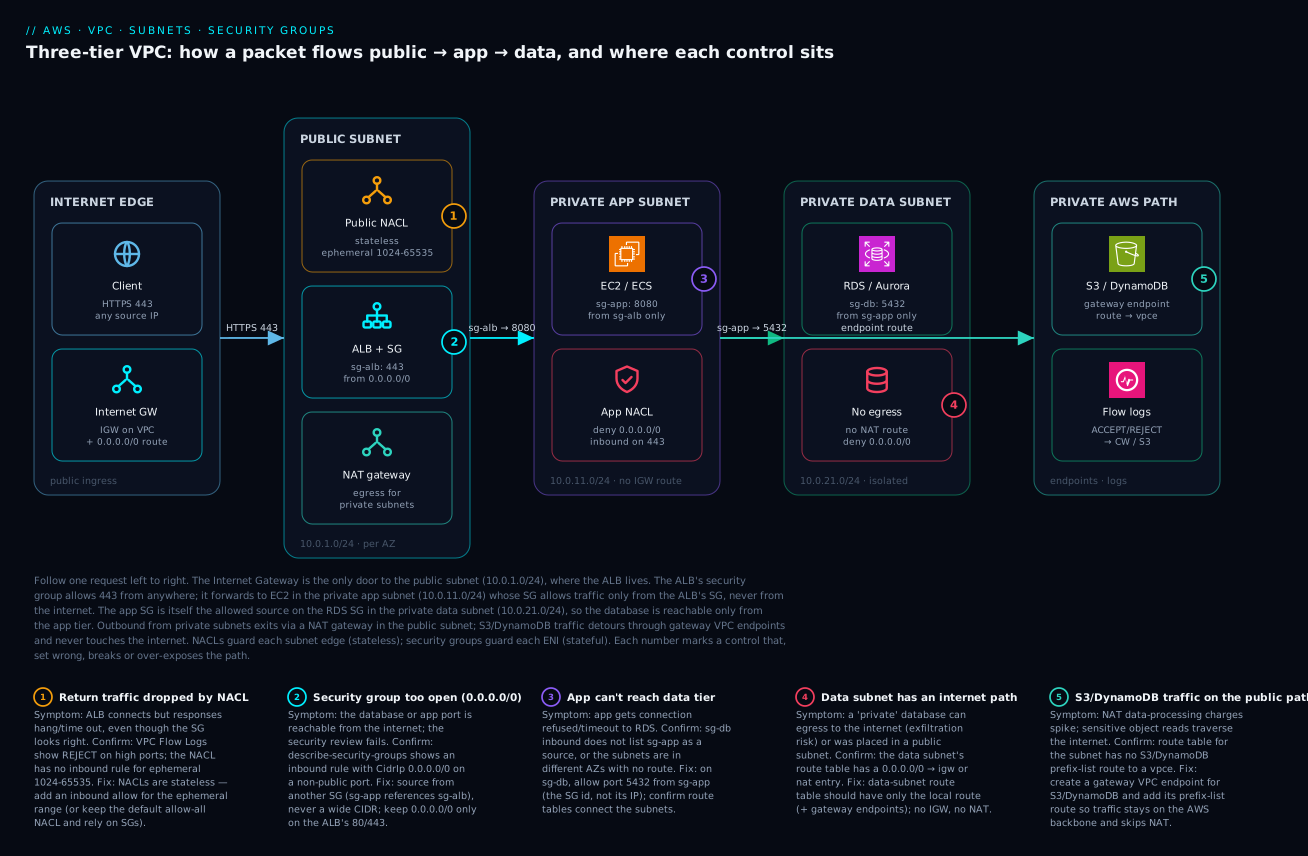
Picture a single HTTPS request and follow it left to right through the reference VPC. A browser opens a connection to your site on port 443. That request enters the VPC only because the internet gateway is attached and the public subnet’s route table points 0.0.0.0/0 at it. In that public subnet (10.0.1.0/24) sits the Application Load Balancer, whose security group sg-alb is the one and only place where 0.0.0.0/0 is allowed — on 443. The ALB terminates TLS and forwards the request to an application instance in the private app subnet (10.0.11.0/24). That instance’s security group sg-app does not trust the internet at all; it allows port 8080 only from sg-alb, so even though the instance is running, nothing on the public internet can reach it directly — there is no IGW route on its subnet and no public IP on the instance.
From the app tier, two things happen. To serve the request, the app connects to the database in the isolated data subnet (10.0.21.0/24); the database’s security group sg-db allows port 5432 only from sg-app, and the data subnet’s route table has no path to an IGW or NAT, so the database is reachable from the app tier and from nowhere else — not the internet, and not even outbound to the internet. Separately, when the app needs to read an object from S3 or fetch a secret, that traffic detours through a gateway VPC endpoint and stays on the AWS backbone, never touching the NAT gateway or the public internet. Anything the app genuinely needs from the outside world (an OS patch, a third-party API) goes out through the NAT gateway in the public subnet — outbound only, with no way back in. Overlaying all of this, security groups guard each resource’s interface (stateful — replies are automatic) and NACLs guard each subnet edge (stateless — you allow the ephemeral return path), and VPC Flow Logs record every ACCEPT and REJECT so that when something is blocked you can prove exactly where. The numbered badges in the diagram mark the five controls that, misconfigured, either break the path or over-expose it.
Real-world scenario
Lumio, a fictional but very typical SaaS startup running a customer-facing analytics product in ap-south-1, started where most teams start: everything in the default VPC. Their stack was three EC2 web servers, one self-managed PostgreSQL instance, and an S3 bucket of report exports. It worked, the demo went well, and they signed their first enterprise customer — who promptly requested a security review. The review found three things, all rooted in the same misunderstanding: the PostgreSQL instance was in a public subnet with a public IP and 0.0.0.0/0 route to the IGW; its security group allowed 5432 from 0.0.0.0/0 (a developer had opened it months earlier to connect from home and never reverted it); and the report-export traffic to S3 was flowing through the instances’ public IPs across the internet. The database had not been breached — but it was one nmap scan and a weak password away, and the auditor said so in bold.
The fix was a deliberate rebuild into a custom VPC, done over two sprints with zero new compute cost (the controls themselves are free). They created vpc-lumio-prod as 10.0.0.0/16. They laid out three tiers across two AZs exactly as in the reference: public subnets 10.0.1.0/24 and 10.0.2.0/24 for the ALB and a per-AZ NAT gateway; private app subnets 10.0.11.0/24 and 10.0.12.0/24 for the web servers (now behind the ALB, with no public IPs); and isolated data subnets 10.0.21.0/24 and 10.0.22.0/24 for a migrated Amazon RDS for PostgreSQL instance whose route table had no internet path whatsoever. The security-group chain replaced every IP-based rule: sg-alb allowed 443 from 0.0.0.0/0; sg-app allowed 8080 only from sg-alb; sg-db allowed 5432 only from sg-app. The S3 traffic moved onto a gateway VPC endpoint, which incidentally cut their NAT data-processing bill because those gigabytes no longer traversed the NAT.
Two things went wrong during the cutover, and both are instructive. First, after migrating the database into the isolated subnet, the app could not connect — connection timed out. VPC Flow Logs showed REJECT on 5432 at the database ENI; the cause was that sg-db referenced the old app security group, not the new sg-app. Updating the source SG fixed it in seconds. Second, a batch job that called a third-party billing API started failing intermittently under load with connection errors — the classic symptom of routing all egress through a single AZ’s NAT gateway while the per-AZ NAT in the other zone sat unused, plus a brief SNAT pressure spike. They corrected the private route tables so each AZ’s app subnet routed to its own local NAT gateway, which both removed the cross-AZ data charges and spread the egress load. (The deeper SNAT-exhaustion mechanics, when egress volume is genuinely high, are covered in NAT Gateway SNAT Port Exhaustion: Diagnosis and Remediation.)
The outcome satisfied the auditor and, more importantly, made the system provably private. After the rebuild, Lumio could state — and demonstrate with Flow Logs and Reachability Analyzer — that the database was reachable only from the application tier, that no private resource had an inbound internet path, and that sensitive S3 reads never left the AWS backbone. None of it required a single extra dollar of compute; it required understanding that “private” is a route-table property, that security groups should reference other security groups, and that the internet gateway is the only public door. The whole incident came from not knowing those three sentences. That is the entire lesson of this article, learned the expensive way.
Advantages and disadvantages
The VPC model buys you strong, layered isolation — but it has real costs in complexity and a few sharp edges. The honest two-column view:
| Advantages | Disadvantages |
|---|---|
| Hard isolation from every other AWS customer by default | Complexity grows fast with peering, transit gateways, hybrid links |
| Layered controls (SG + NACL + route table + endpoint) | Many interacting layers mean more places to misconfigure |
| Private-by-default designs (data tier with no internet path) | CIDR mistakes are hard to undo — can’t renumber the primary block |
| SG-to-SG references survive IP churn and scaling | NACL statelessness trips people (dropped return traffic) |
| Gateway endpoints keep S3/DDB traffic free and private | NAT gateways add cost (hourly + per-GB) for private egress |
| Flow Logs give forensic-grade visibility | Cross-AZ data charges if NAT/peering topology is careless |
| Predictable addressing for VPN/Direct Connect | AZ-scoped subnets force you to design for HA explicitly |
| Free controls (SG, NACL, route tables, IGW, Flow Logs metadata*) | Quotas (5 SGs/ENI, 60 rules/SG) constrain sprawling designs |
When each side matters: the advantages dominate for any production workload — the isolation and layering are exactly what a security review wants to see, and most of the controls cost nothing. The disadvantages bite hardest at scale and at the edges: a single VPC for one app is simple, but a 30-account organisation with shared services, hybrid connectivity and centralised egress is a genuine networking project (start with Cloud Network Segmentation with Hub-and-Spoke for Beginners). The CIDR-planning and cross-AZ-cost disadvantages are the ones that hurt after you have built — so the time to think about them is at design, not in production.
Hands-on lab
This lab builds the full three-tier VPC, launches a private instance reachable only through a bastion, proves the database tier is isolated, and tears everything down. It uses only free-tier-eligible pieces except the NAT gateway (which bills hourly — the teardown removes it). Run it in a region you can clean up, e.g. ap-south-1. Every step shows the command and what you expect.
Step 1 — Create the VPC and verify the local route.
VPC=$(aws ec2 create-vpc --cidr-block 10.0.0.0/16 \
  --tag-specifications 'ResourceType=vpc,Tags=[{Key=Name,Value=lab-vpc}]' \
  --query 'Vpc.VpcId' --output text)
aws ec2 modify-vpc-attribute --vpc-id $VPC --enable-dns-hostnames '{"Value":true}'
# Expect: the main route table already has 10.0.0.0/16 -> local
aws ec2 describe-route-tables --filters Name=vpc-id,Values=$VPC \
  --query 'RouteTables[0].Routes' --output table
Step 2 — Create three subnets (public, app, data) in one AZ for the lab.
PUB=$(aws ec2 create-subnet --vpc-id $VPC --cidr-block 10.0.1.0/24 --availability-zone ap-south-1a --query 'Subnet.SubnetId' --output text)
APP=$(aws ec2 create-subnet --vpc-id $VPC --cidr-block 10.0.11.0/24 --availability-zone ap-south-1a --query 'Subnet.SubnetId' --output text)
DATA=$(aws ec2 create-subnet --vpc-id $VPC --cidr-block 10.0.21.0/24 --availability-zone ap-south-1a --query 'Subnet.SubnetId' --output text)
aws ec2 modify-subnet-attribute --subnet-id $PUB --map-public-ip-on-launch
Step 3 — Internet gateway + public route table.
IGW=$(aws ec2 create-internet-gateway --query 'InternetGateway.InternetGatewayId' --output text)
aws ec2 attach-internet-gateway --internet-gateway-id $IGW --vpc-id $VPC
PUBRT=$(aws ec2 create-route-table --vpc-id $VPC --query 'RouteTable.RouteTableId' --output text)
aws ec2 create-route --route-table-id $PUBRT --destination-cidr-block 0.0.0.0/0 --gateway-id $IGW
aws ec2 associate-route-table --route-table-id $PUBRT --subnet-id $PUB
# Expect: create-route returns "Return": true
Step 4 — NAT gateway + private (egress) route table for the app subnet.
EIP=$(aws ec2 allocate-address --domain vpc --query AllocationId --output text)
NAT=$(aws ec2 create-nat-gateway --subnet-id $PUB --allocation-id $EIP --query 'NatGateway.NatGatewayId' --output text)
echo "Waiting for NAT to become available..."; aws ec2 wait nat-gateway-available --nat-gateway-ids $NAT
APPRT=$(aws ec2 create-route-table --vpc-id $VPC --query 'RouteTable.RouteTableId' --output text)
aws ec2 create-route --route-table-id $APPRT --destination-cidr-block 0.0.0.0/0 --nat-gateway-id $NAT
aws ec2 associate-route-table --route-table-id $APPRT --subnet-id $APP
# Leave the DATA subnet on the main route table → no internet path (isolated)
Step 5 — Security-group chain (bastion → app → db).
BAS=$(aws ec2 create-security-group --group-name lab-bastion --description bastion --vpc-id $VPC --query GroupId --output text)
APPSG=$(aws ec2 create-security-group --group-name lab-app --description app --vpc-id $VPC --query GroupId --output text)
DBSG=$(aws ec2 create-security-group --group-name lab-db --description db --vpc-id $VPC --query GroupId --output text)
MYIP=$(curl -s https://checkip.amazonaws.com)/32
aws ec2 authorize-security-group-ingress --group-id $BAS   --protocol tcp --port 22   --cidr $MYIP
aws ec2 authorize-security-group-ingress --group-id $APPSG --protocol tcp --port 22   --source-group $BAS
aws ec2 authorize-security-group-ingress --group-id $DBSG  --protocol tcp --port 5432 --source-group $APPSG
Step 6 — Prove the data tier is isolated with Reachability Analyzer. Create a path from the bastion to a (hypothetical) DB ENI and confirm it is not reachable on 5432 unless it comes via the app SG. The conceptual check:
# After launching a bastion in $PUB and a db host in $DATA, analyze reachability:
aws ec2 create-network-insights-path --source <bastion-eni> --destination <db-eni> \
  --protocol tcp --destination-port 5432 --query 'NetworkInsightsPath.NetworkInsightsPathId' --output text
# Start the analysis; expect NetworkPathFound=false (bastion SG is not allowed by sg-db)
Step 7 — Enable Flow Logs so you can see REJECTs.
aws logs create-log-group --log-group-name /lab/flowlogs
aws ec2 create-flow-logs --resource-type VPC --resource-ids $VPC --traffic-type ALL \
  --log-group-name /lab/flowlogs \
  --deliver-logs-permission-arn arn:aws:iam::<acct>:role/flowlogsRole
Step 8 — Teardown (delete in reverse dependency order; the NAT and EIP are the billed items).
aws ec2 delete-flow-logs --flow-log-ids <id>
aws ec2 delete-nat-gateway --nat-gateway-id $NAT
aws ec2 wait nat-gateway-deleted --nat-gateway-ids $NAT
aws ec2 release-address --allocation-id $EIP
aws ec2 detach-internet-gateway --internet-gateway-id $IGW --vpc-id $VPC
aws ec2 delete-internet-gateway --internet-gateway-id $IGW
# delete subnets, route tables, security groups, then the VPC
aws ec2 delete-subnet --subnet-id $PUB; aws ec2 delete-subnet --subnet-id $APP; aws ec2 delete-subnet --subnet-id $DATA
aws ec2 delete-vpc --vpc-id $VPC
What each step proved, for your notes:
| Step | What it demonstrates |
|---|---|
| 1–2 | A custom VPC starts isolated; subnets are AZ-scoped CIDR slices |
| 3 | A subnet becomes public only via an IGW route |
| 4 | Private egress needs a NAT in a public subnet; isolated tier has no internet route |
| 5 | SG-to-SG chaining: db reachable only from app, app only from bastion |
| 6 | Reachability Analyzer proves the data tier is unreachable from the wrong source |
| 7 | Flow Logs make blocked traffic visible (REJECT) |
| 8 | NAT gateway + EIP are the billed items — always tear them down |
Common mistakes & troubleshooting
Networking failures are quiet — a dropped packet does not raise an exception, it just times out — so the skill is knowing which control to check and how to confirm it. Here is the playbook: scan the matrix for your symptom, then read the matching detail. Every row gives you the exact way to confirm and the real fix.
| # | Symptom | Likely root cause | How to confirm (exact path/command) | Fix |
|---|---|---|---|---|
| 1 | Database reachable from the internet | DB in a public subnet and/or SG open to 0.0.0.0/0 | describe-route-tables shows IGW route on the DB subnet; describe-security-groups shows 0.0.0.0/0 on 5432 |
Move DB to an isolated subnet; source SG from sg-app |
| 2 | App can’t connect to the database (timeout) | sg-db doesn’t allow sg-app as source |
Flow Logs show REJECT on 5432 at the DB ENI |
Add inbound 5432 from sg-app (the SG id) |
| 3 | Connection “hangs”, no response | NACL is stateless; ephemeral return rule missing | Flow Logs REJECT on high ports (1024–65535) inbound |
Add an inbound NACL allow for 1024–65535 |
| 4 | Private instance can’t reach the internet | No NAT route, or NAT in a private subnet | describe-route-tables lacks 0.0.0.0/0 → nat; NAT not in a public subnet |
Put NAT in a public subnet; add NAT route to the private RT |
| 5 | “Insufficient free addresses” at launch | Subnet CIDR too small / exhausted | describe-subnets AvailableIpAddressCount near 0 |
Use a bigger subnet or a secondary CIDR; plan ahead |
| 6 | Can’t reach instance from the internet | Missing public IP, IGW route, or SG rule | Check all three: public IP? IGW route? SG allows port? | Supply whichever of the three is missing |
| 7 | Cross-AZ data charges higher than expected | Private subnets routing to a NAT in another AZ | Trace each private RT’s NAT vs the subnet’s AZ | One NAT per AZ; route each subnet to its local NAT |
| 8 | S3 traffic on the NAT bill | No gateway endpoint; S3 goes via NAT/internet | NAT data-processing charges high; no S3 vpce route | Create an S3 gateway endpoint; add its route |
| 9 | SG change “didn’t take effect” | Edited the wrong SG, or instance has multiple SGs | describe-instances → which SGs are attached |
Edit the SG actually on the ENI; remember 5/ENI limit |
| 10 | Peering between two VPCs won’t route | Overlapping CIDRs, or no route added | Check both VPC CIDRs overlap; routes missing the peer CIDR | Non-overlapping CIDRs; add peer-CIDR routes both sides |
| 11 | NACL deny rule isn’t blocking | Higher-numbered allow rule matched first | NACL rules evaluate low→high, first match wins | Renumber the deny rule below the allow |
| 12 | Lambda in VPC can’t reach AWS APIs | No NAT and no interface endpoint | Lambda timing out calling e.g. Secrets Manager | Add NAT egress or an interface endpoint for that service |
Mistake 1 — The database is in a public subnet (the headline incident)
This is the opening story and the most expensive mistake in the list. A resource is internet-exposed when its subnet’s route table points 0.0.0.0/0 at the IGW and it has a public IP and its SG allows the port. Databases tend to acquire all three by accident in the default VPC.
Confirm. Check whether the DB’s subnet route table has an IGW route, and whether the SG is open:
# Does the DB subnet have an internet path?
aws ec2 describe-route-tables \
  --filters Name=association.subnet-id,Values=subnet-db1a \
  --query 'RouteTables[].Routes[?GatewayId!=`local`]' --output table
# Is the DB SG open to the world on 5432?
aws ec2 describe-security-groups --group-ids sg-db \
  --query 'SecurityGroups[].IpPermissions[?contains(IpRanges[].CidrIp, `0.0.0.0/0`)]' --output json
Fix. Move the database into an isolated subnet (route table with no IGW/NAT route), remove any public IP, and change the SG to allow 5432 only from sg-app. Nothing should be able to reach the database except the application tier.
Mistake 2 — App can’t reach the database because the SG sources the wrong group
The most common cutover failure (it happened to Lumio). The app times out connecting to the DB. People check the DB is up, the credentials, the connection string — and miss that sg-db allows the old app SG, or an IP range, not the current sg-app.
Confirm. Flow Logs are definitive — a REJECT on 5432 at the database ENI:
# Filter Flow Logs for rejected Postgres traffic to the DB ENI
aws logs filter-log-events --log-group-name /vpc/flowlogs \
  --filter-pattern "REJECT 5432" --max-items 20
Fix. Add (or correct) the inbound rule on sg-db to allow 5432 from the SG that the app instances actually wear:
aws ec2 authorize-security-group-ingress --group-id sg-db \
  --protocol tcp --port 5432 --source-group sg-app
Mistake 3 — Stateless NACL drops the return traffic
You add a custom NACL, allow the inbound request port, and connections start hanging. Because NACLs are stateless, the response (which arrives on an ephemeral port) is evaluated against the inbound rules and dropped if there is no rule for the 1024–65535 range.
Confirm. Flow Logs show REJECT inbound on high ports:
aws logs filter-log-events --log-group-name /vpc/flowlogs \
  --filter-pattern "REJECT" --max-items 50 \
  | grep -E '102[4-9]|10[3-9][0-9]|[1-9][0-9]{4}'   # ephemeral-range rejects
Fix. Add an inbound NACL rule allowing TCP 1024–65535 (or simply rely on the default allow-all NACL and do your filtering with security groups, which is what most designs should do).
Mistake 4 — Private instances have no outbound internet
A private instance can’t yum update or call an external API. Either there is no 0.0.0.0/0 → NAT route on its subnet, or the NAT gateway was placed in a private subnet (so the NAT itself has no internet path).
Confirm.
# Is there a NAT route on the private subnet?
aws ec2 describe-route-tables --filters Name=association.subnet-id,Values=subnet-app1a \
  --query 'RouteTables[].Routes[?NatGatewayId!=null]' --output table
# Is the NAT in a subnet that has an IGW route?
aws ec2 describe-nat-gateways --nat-gateway-ids nat-0xyz --query 'NatGateways[].SubnetId'
Fix. Ensure the NAT lives in a public subnet (one with an IGW route) and that each private subnet’s route table has 0.0.0.0/0 → nat.
Mistakes 5–12 — the rest of the playbook in brief
The remaining rows in the matrix above each follow the same shape — confirm with a describe-* call or Flow Logs, then apply the targeted fix. Two deserve a one-line emphasis: #7 (cross-AZ NAT cost) is the silent money leak — always route a private subnet to a NAT in its own AZ; and #11 (NACL rule order) catches everyone once — NACL rules are evaluated lowest number first, first match wins, so a deny must be numbered below any allow it needs to override.
Best practices
- Never use the default VPC for production. It is deliberately permissive (everything public, open-ish defaults) to get newcomers started. Build a custom VPC where every subnet’s posture is a deliberate choice.
- Plan the CIDR once, generously, and for the future. Use a
/16from RFC 1918, carve subnets by tier × AZ, and pick a non-overlapping slice so you can peer later. You cannot renumber the primary block. - Make “private by default” the rule. Put only internet-facing things (load balancers, NAT, bastions) in public subnets. App servers go in private-egress subnets; databases go in isolated subnets with no internet path at all.
- Reference security groups, not IP ranges, for internal traffic.
sg-dballowssg-app,sg-appallowssg-alb. This survives scaling and IP churn and is the antidote to the wide-open-SG mistake. - Reserve
0.0.0.0/0for genuine public ingress only — the ALB’s 80/443. It should appear nowhere else inbound, and never on a database, SSH, or admin port. - Spread every tier across at least two AZs, with a NAT gateway per AZ, and route each private subnet to its local NAT to get HA and avoid cross-AZ data charges.
- Use gateway endpoints for S3 and DynamoDB so that traffic is free and stays on the backbone — it also trims your NAT data-processing bill.
- Enable VPC Flow Logs from day one. When a connection silently drops, the
REJECTrecords are the difference between a two-minute fix and an hour of guessing. - Prefer SG-to-SG over NACLs for everyday filtering; use NACLs only for explicit subnet-wide deny or as a defence-in-depth backstop, and remember they are stateless.
- Tag and name everything (subnets by tier, SGs by role, route tables by purpose) and manage it in Terraform so the CIDR plan and rules are reviewed, version-controlled, and reproducible.
- Validate reachability with Reachability Analyzer / Network Access Analyzer before and after changes, so “the database is unreachable from the internet” is a proven fact, not a hope.
Security notes
VPC design is network security, so the whole article is a security note — but a few principles deserve to be called out explicitly. Least privilege at the network layer means every allow rule should name the narrowest possible source: another security group for internal traffic, a /32 for a known partner, your office CIDR for admin — and 0.0.0.0/0 only on a public load balancer. The default-deny posture of security groups (nothing inbound until you allow it) is your friend; do not undermine it with broad rules to “make it work.”
Defence in depth comes from the layers being independent: a misconfigured security group does not bypass the route table (an isolated data subnet has no internet path regardless of its SG), and a NACL can backstop a subnet edge even if a per-resource SG is wrong. Eliminate inbound surfaces entirely where you can: prefer AWS Systems Manager Session Manager over a bastion with an open SSH port (no inbound port at all, full audit trail), and prefer VPC endpoints over NAT-to-internet for AWS service access so sensitive traffic never leaves the backbone. Encrypt in transit end to end — TLS at the ALB and re-encrypted to the backend, TLS to the database — because network isolation reduces, but does not eliminate, the need for encryption. Finally, turn Flow Logs into detections: a REJECT storm on a database port is reconnaissance; route Flow Logs to a SIEM and alert on it. For locking down outbound traffic specifically (egress filtering, FQDN allow-listing), graduate to AWS Network Firewall: Suricata Egress Inspection and Rule Engineering; for the broader segmentation mindset across accounts, see Cloud Network Segmentation with Hub-and-Spoke for Beginners.
The security controls and what each protects against:
| Control | Protects against | Cost | Note |
|---|---|---|---|
| Private/isolated subnets (no IGW route) | Inbound internet exposure of data tier | Free | The strongest, simplest control |
| SG-to-SG references | Over-broad access, IP-churn drift | Free | Default choice for internal traffic |
| NACL explicit deny | Known-bad IPs at the subnet edge | Free | Stateless; coarse; defence-in-depth |
| VPC endpoints | Sensitive traffic crossing the internet | Gateway free / interface hourly | Also cuts NAT cost |
| Session Manager (vs bastion) | Open SSH/RDP inbound ports | Free | No inbound port; full audit |
| VPC Flow Logs → SIEM | Undetected recon / exfiltration | Logs storage | Alert on REJECT storms |
| Encryption in transit (TLS) | Sniffing on a compromised segment | Free–small | Isolation complements, not replaces |
Cost & sizing
The reassuring headline: the controls themselves are free. VPCs, subnets, route tables, internet gateways, security groups, NACLs, gateway endpoints, and the metadata of Flow Logs cost nothing to create. What costs money is data movement and a few managed components — chiefly the NAT gateway, interface endpoints, cross-AZ/cross-region data, and Flow Log storage. The NAT gateway is the line item people are surprised by: it bills an hourly rate per gateway and a per-GB data-processing charge on everything that flows through it, so a chatty workload egressing terabytes through NAT can run a meaningful monthly bill, and that is before cross-AZ charges if the topology is careless.
What drives the bill, roughly, with indicative figures (always check current regional pricing — these are order-of-magnitude, ap-south-1-ish):
| Cost driver | Rough rate | Free? | How to reduce it |
|---|---|---|---|
| VPC / subnets / route tables / SG / NACL / IGW | — | Free | n/a — never charged |
| NAT gateway — hourly | ~₹3–4 / hr (~$0.045) per gateway | No | Don’t over-provision; consolidate where HA allows |
| NAT gateway — data processing | ~₹3–4 / GB (~$0.045) processed | No | Gateway endpoints for S3/DDB; reduce egress |
| Elastic IP (attached) | Free while attached to a running resource | Mostly | Release unused EIPs (idle ones now bill) |
| Interface endpoint | ~₹0.8/hr per AZ + per-GB | No | Use gateway endpoints (free) where possible |
| Cross-AZ data transfer | ~₹0.8/GB (~$0.01) each way | No | Keep traffic AZ-local; per-AZ NAT |
| Cross-region / internet egress | Tiered per-GB | No | CDN, endpoints, regional design |
| Flow Logs storage | CloudWatch/S3 storage rates | No (storage) | Sample, or send to cheaper S3; lifecycle it |
Sizing guidance, distilled:
| Decision | Rule of thumb |
|---|---|
| VPC CIDR | /16 for prod; never undersize the primary block |
| Subnet size per tier | /24 (251 hosts) is the sane default; /22+ for big EKS |
| NAT gateways | One per AZ you run private workloads in (HA + no cross-AZ cost) |
| When to skip NAT entirely | Data tier (isolated); use VPC endpoints for AWS APIs |
| Gateway vs interface endpoint | Gateway (free) for S3/DDB; interface for everything else, only where needed |
| Bastion vs Session Manager | Prefer SSM (no inbound port, no bastion cost) over an SSH bastion |
| NACL vs security group | SG-to-SG for everyday filtering; NACL only for subnet-wide deny |
| Flow Logs destination | S3 + lifecycle for cheap retention; CloudWatch for live querying |
| Free-tier reality | All the networking controls are free; watch NAT, interface endpoints, and data transfer |
The single highest-leverage cost move in a typical VPC is adding gateway endpoints for S3 and DynamoDB: they are free, and they pull that traffic off the per-GB NAT meter entirely. The second is per-AZ NAT routing to kill cross-AZ charges. Neither requires more compute — just correct wiring.
Interview & exam questions
Q1. What makes a subnet “public” versus “private”?
A public subnet has an associated route table with a 0.0.0.0/0 route to an internet gateway; a private subnet does not. The distinction is purely the route table — the subnet itself is just an AZ-scoped CIDR range. A private subnet may route outbound through a NAT gateway (egress-only) or have no internet route at all (isolated). (SAA-C03 networking core.)
Q2. A security group is stateful — what does that mean in practice? If you allow traffic in one direction, the response is automatically allowed back; you never write return rules. Allow inbound 443 and the reply egress is permitted; allow an outbound call and its response is permitted. This contrasts with a NACL, which is stateless and requires you to explicitly allow the return path (on ephemeral ports 1024–65535).
Q3. Why should you source a security-group rule from another security group rather than an IP range?
Because it expresses intent (“anything in the app tier may reach the database”) and survives IP churn and scaling — instances can come and go and the rule keeps working. It also avoids the canonical mistake of opening a port to a broad CIDR like 0.0.0.0/0. Reserve CIDR sources for genuine public ingress and known external partners.
Q4. Name five differences between a security group and a network ACL. (1) SG attaches to a resource/ENI, NACL to a subnet. (2) SG is allow-only, NACL has allow and deny. (3) SG is stateful, NACL is stateless. (4) SG evaluates all rules (any allow wins), NACL evaluates in numbered order (first match wins). (5) SG default denies inbound, the default NACL allows everything. (A frequent exam question.)
Q5. An instance in a public subnet still can’t be reached from the internet. What three things must all be true?
The subnet’s route table must point 0.0.0.0/0 at the internet gateway, the instance must have a public IP (or EIP), and its security group (and NACL) must allow the inbound traffic. Missing any one makes it unreachable — which is often intentional for private resources.
Q6. What is the difference between an internet gateway and a NAT gateway? An internet gateway allows bidirectional traffic between the VPC and the internet and performs NAT for resources with public IPs; it makes a subnet public. A NAT gateway allows only outbound connections from private subnets (responses return, but nothing can initiate inbound), letting private resources reach the internet while staying unreachable. The IGW is free; the NAT gateway bills hourly plus per-GB.
Q7. Why is the database unreachable from the internet in a well-designed three-tier VPC, even though the web server is reachable? The database is in an isolated subnet whose route table has no IGW or NAT route, it has no public IP, and its security group allows its port only from the app tier’s SG. The web tier, by contrast, sits behind a public ALB. Multiple independent layers (route table, public IP, SG) all enforce the isolation. (SAA-C03 favourite.)
Q8. You add a custom NACL and connections start timing out. What’s the likely cause? The NACL is stateless, so the return traffic — arriving on ephemeral ports 1024–65535 — is being dropped because there’s no inbound allow rule for that range. Add the ephemeral-port inbound allow (or rely on the default allow-all NACL and filter with security groups instead).
Q9. When would you use a gateway VPC endpoint versus an interface VPC endpoint? Use a gateway endpoint for S3 and DynamoDB — it’s free and works via a route-table prefix-list entry. Use an interface endpoint for almost every other AWS service — it places an ENI with a private IP in your subnet and bills hourly per AZ plus per-GB. Gateway endpoints also reduce NAT costs by keeping S3/DDB traffic off the internet path.
Q10. How do you confirm exactly where a blocked connection died?
Enable VPC Flow Logs and look for REJECT entries; the source, destination, and port pinpoint which security group or NACL blocked it (e.g. a REJECT on 5432 at the DB ENI means sg-db doesn’t allow the source). Reachability Analyzer and Network Access Analyzer complement this by statically proving whether a path exists.
Q11. Why can’t you peer two VPCs with the same CIDR, and how do you avoid the problem? VPC peering relies on non-overlapping address space to route between the two networks; identical or overlapping CIDRs make a destination ambiguous. Avoid it by planning each VPC’s CIDR from a larger non-overlapping allocation up front — this is why you treat CIDR planning as a one-way door at design time.
Q12. What’s the cost trap with NAT gateways and AZs? A NAT gateway is AZ-scoped and bills per-GB of data processed. If a private subnet in AZ-b routes through a NAT in AZ-a, you pay both NAT data-processing and cross-AZ data-transfer charges, plus you have a single point of failure. The fix is one NAT per AZ with each private subnet routing to its local NAT.
Quick check
- What single thing determines whether a subnet is public or private?
- True or false: a security group has both allow and deny rules.
- Where is the one place a
0.0.0.0/0inbound rule legitimately belongs in a three-tier VPC? - A NACL allows inbound 443 but connections hang. What rule is probably missing, and why?
- Which VPC endpoint type is free, and which services does it support?
Answers
- The route table associated with the subnet — specifically whether it has a
0.0.0.0/0route to an internet gateway. The subnet name and CIDR are irrelevant to its public/private status. - False. Security groups are allow-only (and stateful). Only NACLs have deny rules (and are stateless). If you need to block a specific source, that’s a NACL job.
- On the public load balancer’s security group, for ports 80/443. Nowhere else inbound — and never on a database, SSH, or admin port.
- The inbound allow for ephemeral ports 1024–65535. NACLs are stateless, so the response (which returns on an ephemeral port) is evaluated against inbound rules and dropped without that rule.
- The gateway endpoint is free; it supports S3 and DynamoDB only, via a route-table prefix-list entry. Interface endpoints cover other services but bill hourly plus per-GB.
Glossary
- VPC (Virtual Private Cloud): Your own isolated virtual network within a single AWS region, defined by a CIDR block, invisible to other accounts by default.
- CIDR block: An IP range in slash notation (e.g.
10.0.0.0/16); the VPC’s total address space, from which subnets are carved. - Subnet: A CIDR slice of a VPC bound to exactly one Availability Zone; where resources actually get their IP addresses.
- Availability Zone (AZ): An isolated group of datacenters within a region; subnets are AZ-scoped, so you spread tiers across AZs for high availability.
- Route table: A set of
destination CIDR → targetrules controlling where a subnet’s traffic may go; it decides public vs private. - Local route: The implicit, undeletable route for the VPC’s own CIDR that lets every subnet in the VPC reach every other.
- Internet gateway (IGW): The single, highly available component that connects a VPC to the public internet and performs NAT for public-IP resources.
- NAT gateway: A managed, AZ-scoped component that lets private subnets initiate outbound internet connections while blocking all unsolicited inbound traffic.
- Elastic IP (EIP): A static, account-owned public IPv4 address; required by a NAT gateway and assignable to instances needing a fixed public IP.
- Security group (SG): A stateful, allow-only firewall attached to a resource’s ENI; its rules can source from other security groups, not just IP ranges.
- Network ACL (NACL): A stateless firewall attached to a subnet with numbered allow and deny rules evaluated first-match-wins; needs explicit return-path rules.
- Ephemeral ports: The dynamic high port range (typically 1024–65535) on which responses return; relevant because stateless NACLs must allow them inbound.
- ENI (Elastic Network Interface): The virtual network card a security group attaches to; an instance, ALB, or RDS instance has one or more.
- VPC endpoint: A private path from your VPC to AWS services; gateway endpoints (free, S3/DynamoDB) use route entries, interface endpoints (paid) use ENIs.
- VPC Flow Logs: Records of accepted and rejected traffic at the VPC/subnet/ENI level; the
ACCEPT/REJECTaction field is the key to diagnosing dropped connections. - Reachability Analyzer: A tool that statically proves whether a network path exists between two points and, if not, which component blocks it.
Next steps
- Put real workloads into your subnets: start with AWS Compute Demystified: EC2 vs Lambda vs ECS vs EKS for the app tier and Choosing an AWS Database: RDS vs DynamoDB vs Aurora for the data tier.
- Add the public-facing entry point properly with ALB vs NLB vs API Gateway: Choosing the Right AWS Entry Point.
- Connect many VPCs and accounts with the segmentation mindset in Cloud Network Segmentation with Hub-and-Spoke for Beginners.
- Lock down outbound traffic with AWS Network Firewall: Suricata Egress Inspection and Rule Engineering, and master the egress edge case in NAT Gateway SNAT Port Exhaustion: Diagnosis and Remediation.
- Build the account-level guardrails your VPC lives under with AWS Organizations and IAM Foundations and AWS Control Tower: Guardrails and the Multi-Account Foundation.