Quick take — An active-active design runs your application in two (or more) Azure regions at the same time, with a global front door splitting traffic across both and data replicated between them. When a region fails, users barely notice. The price you pay is real: distributed-data consistency, doubled run-rate, and the operational discipline to keep two live stacks identical. This article shows the architecture, the failover sequence, the data-tier choice that makes or breaks it, and exactly when the complexity is worth it — laid out as scannable tables you can keep open during a game-day or an outage.
At 03:14 a regional networking incident takes Central India’s load balancers offline. A payments platform that runs entirely in that one region goes dark. The on-call engineer has a runbook to “fail over to the DR region” — but DR is a cold copy: VMs are off, the last database restore point is twenty minutes old, and DNS still points at the dead region. By the time DNS TTLs expire and the standby database is promoted, 47 minutes have passed and a handful of in-flight transactions are lost. The post-incident review asks one question: why did a single region’s bad night become our customers’ bad night?
Multi-region active-active is the architecture that answers that question. Instead of a primary that fails over to a standby, you run both regions hot, take real traffic in each, and treat a region loss as the removal of capacity rather than a disaster you scramble to recover from. A single Azure region is a remarkably reliable unit, but it is still a shared fault domain — a control-plane bug, a fibre cut, a bad config push, or a capacity shortfall can degrade an entire region at once, and Availability Zones (which protect against a single datacentre failure within a region) do not help when the whole region is impaired.
By the end of this article you will stop treating “the region” as a single point of failure. You will know how Azure Front Door health-probes and steers traffic globally, how the data tier — not the stateless web tier — is the real decision, how to pick between Azure SQL auto-failover groups, Cosmos DB multi-region writes, and event-driven replication, how to budget RPO/RTO honestly, what each choice costs in rupees and consistency, and how to run a region-kill game-day that proves the design instead of merely hoping. Every decision comes with a table that enumerates the options end-to-end, plus the az/Bicep to implement it and the KQL to watch it.
What problem this solves
A single-region workload couples your availability to the worst day of one Azure region. Most of the time that is excellent — a well-architected single region with zone redundancy clears three to four nines. But the tail risk is brutal: when a whole region degrades, everything you run there degrades together, and the blast radius is your entire customer base. Active-passive disaster recovery softens this but does not remove it — the standby is cold or warm, the failover is manual or semi-automatic, and the recovery is measured in tens of minutes during which you are losing money and trust.
What breaks without active-active: the failover gap (promote the standby, repoint DNS, warm the caches — minutes you do not have), the cold-standby surprise (the standby that has never taken production load is the one that fails when you finally need it), and the all-or-nothing capacity cliff (a region loss takes you to zero, not to half). Teams discover all three at 3 a.m., in that order, with an audience.
Who hits this: customer-facing, revenue- or safety-critical workloads where an hour of downtime costs more than a second region costs per month — payments, ordering, authentication, real-time APIs, anything with a contractual SLA above ~99.9%. It is not for an internal tool that can tolerate a 30-minute recovery; that workload wants active-passive with a warm standby, which is far cheaper and simpler. The art is knowing which workload you have, and engineering the data tier honestly once you commit.
To frame the whole field before the deep dive, here is what active-active removes from your single-point-of-failure list, and what it adds to your problem list in exchange:
| Single-region risk it removes | How active-active removes it | New problem it hands you in exchange |
|---|---|---|
| Region is a single fault domain | Both regions serve live traffic concurrently | Data must be replicated and reconciled across regions |
| Minutes-long failover gap | Front Door evicts the bad origin in seconds, no DNS change | Health probes must be meaningful or you route to a dead region |
| Cold standby that has never run | Both stacks are continuously exercised by real users | Config/schema/secret drift between regions surfaces as failover bugs |
| Capacity drops to zero on outage | Capacity drops to ~half; survivors autoscale | You must provision survivors to absorb 100% load, not 50% |
| Untested recovery path | Region-drain becomes a routine deploy/maintenance move | You must run real region-kill game-days, not tabletop ones |
Learning objectives
By the end of this article you can:
- Distinguish active-active from active-passive and pilot-light/warm-standby, and pick the right one for a given RTO/RPO budget and cost ceiling.
- Design the global routing tier with Azure Front Door (or Traffic Manager / cross-region Load Balancer) — health probes, priority vs latency vs weighted routing, session affinity, and the failover timing maths.
- Choose the data-tier pattern — single global writer (SQL failover groups), true multi-region writes (Cosmos DB), or event-driven/async — and explain the consistency, conflict, and cost trade-off of each.
- Budget RPO and RTO from replication mode (sync vs async), probe interval, and failover automation, and turn replication lag into a first-class SLO.
- Keep two regions identical via IaC (one Bicep/Terraform module, region as a parameter) and reason about deployment, secrets, and certificate parity.
- Run a region-kill game-day and read the failover in Front Door, SQL failover-group, and Cosmos metrics — and diagnose the common failure modes when failover misbehaves.
- Right-size the design so you pay for resilience only where an outage genuinely hurts, with rough INR/USD figures for each tier.
Prerequisites & where this fits
You should be comfortable with single-region Azure architecture: a resource group, a VNet with subnets and NSGs, an ingress (App Gateway or Front Door), a stateless compute tier (App Service / AKS / Functions), and a managed data store (Azure SQL or Cosmos DB). You should know what an Availability Zone is and why it is not a multi-region story — if that distinction is fuzzy, read Azure Regions & Availability Zones Explained first, because it is the floor this article builds on. You should be able to run az in Cloud Shell, read JSON output, and deploy a Bicep module.
This sits at the top of the Resiliency & Business Continuity track. It assumes the regional fundamentals and extends them across regions. It is the active-active sibling of Azure Backup & Site Recovery: Protection Strategies (which covers the active-passive / DR end of the spectrum), it leans on the global routing concepts in Azure Load Balancer vs Application Gateway, and its data tier connects to anything you have learned about Azure SQL and Cosmos DB. When a region does fail, the per-service diagnosis lives in companions like Troubleshooting Azure SQL: Connectivity, Timeouts, Throttling & Blocking and Troubleshooting App Service: 502/503, Cold Starts & Restart Loops.
A quick map of who owns which layer of an active-active stack, so during an incident you page the right person fast:
| Layer | What lives here | Who usually owns it | What it can break during a region loss |
|---|---|---|---|
| Global routing (Front Door) | TLS, WAF, health probes, origin steering | Network / platform team | Routes to a dead origin (bad probe), or fails to evict it |
| DNS / naming | Apex/CNAME to the front door, TTLs | Network team | Stale TTLs delay any DNS-based failover (avoid DNS in the path) |
| Regional ingress | App Gateway / regional LB, private DNS | Network + app team | One region’s ingress down; global tier must steer away |
| Compute (stateless) | App Service / AKS / Functions per region | App / dev team | Survivor under-provisioned for 100% load → 503 under failover |
| Data tier (stateful) | SQL failover group / Cosmos multi-write | Data + app team | Split-brain, write loss, lag spike — the real risk |
| Messaging | Service Bus / Event Hubs geo-DR | Integration team | Duplicate or lost events if not idempotent |
| Config / secrets / certs | Key Vault, App Config per region | Platform team | Drift makes the survivor behave differently (subtle bugs) |
Core concepts
Six mental models make every later decision obvious. Define each one precisely now; the deep sections then go option-by-option.
Active-active means every region serves live traffic concurrently. None is idle, none is a standby waiting to be promoted. A region loss is the removal of capacity, absorbed by the survivors and (ideally) by autoscale — not a disaster you recover from. Contrast this with active-passive (one region serves, the other waits) and pilot-light (the other region exists only as data + minimal scaffolding, scaled up on demand).
The global routing tier is the thing that makes “active-active” real. A layer-7 (or layer-4) entry point that health-probes each regional origin and steers each user to a healthy, near one. Azure Front Door is the default (anycast edge, TLS termination, WAF, fast origin failover); Traffic Manager is DNS-based (slower, TTL-bound); cross-region Load Balancer is the layer-4 option. The probe is the brain: it decides which origins are eligible, and a lying probe (returns 200 from a region that cannot actually serve) is the single most dangerous bug in the design.
RPO and RTO are budgets, and the data tier sets them. RPO (Recovery Point Objective) is how much data you can afford to lose — driven by replication mode (synchronous = ~0, asynchronous = your replication lag). RTO (Recovery Time Objective) is how fast you recover — driven by probe interval, failover automation, and (for the writer) promotion time. Stateless tiers give you RTO in seconds for free; the data tier is where both numbers are earned.
The stateless tiers are trivially duplicated; state is the entire problem. Ingress and compute are stateless and identical in both regions — you stamp them from one IaC module with the region as a parameter. State does not duplicate for free: you choose single global writer (SQL failover groups — one writable primary, async geo-replicas), multi-region writes (Cosmos DB — every region writable, with conflict resolution and tunable consistency), or event-driven (idempotent operations, replicated events, eventual consistency). This choice, not the web tier, determines your RPO, your consistency, and most of your cost.
Paired regions are Azure’s curated couples. Azure pairs most regions (e.g. Central India ↔ South India, East US ↔ West US) with two properties that matter: sequential platform updates (Azure won’t patch both halves of a pair at once) and geo-replication affinity (some services default their geo-replica to the pair). You are not required to use the pair, but pinning to it buys update isolation and is the conventional choice. Note the asterisk: a few regions (notably Brazil South, and some newer regions) have non-reciprocal or no pairs — verify before you assume.
Consistency is a dial, not a switch. Cosmos DB exposes five consistency levels (Strong → Bounded Staleness → Session → Consistent Prefix → Eventual). Azure SQL geo-replicas are read-only and asynchronous (so cross-region reads can lag the primary). Choosing weaker consistency buys availability and latency; choosing stronger buys correctness at the cost of cross-region round-trips (and, for Strong in Cosmos, a same-region-write constraint). Active-active forces you to pick a number here rather than ignore it.
Pin the vocabulary side by side before the deep dive:
| Term | One-line definition | Where it lives | Why it matters to active-active |
|---|---|---|---|
| Active-active | Both regions serve live traffic at once | Whole architecture | The premise; region loss = capacity loss, not outage |
| Active-passive / DR | One serves, the other waits to be promoted | Whole architecture | Cheaper, simpler, but has a failover gap |
| Global routing | Health-probed L7/L4 entry steering users | Front Door / TM / cross-region LB | The mechanism that hides a region loss |
| RPO | Max data loss tolerated | Data tier | Set by sync vs async replication |
| RTO | Max time to recover | Routing + data tier | Set by probe interval + promotion time |
| Paired region | Azure’s curated region couple | Platform | Update isolation + geo-replica affinity |
| Failover group | SQL’s auto-failover listener + replica set | Azure SQL | One writer, async read replicas, auto-promote |
| Multi-region writes | Every region accepts writes | Cosmos DB | True active-active writes; needs conflict resolution |
| Consistency level | The staleness/availability dial | Cosmos DB (5 levels) | Trades correctness vs latency/availability |
| Replication lag | How far the replica trails the primary | Data tier | Your real RPO; treat as an SLO |
| Health probe | The check that marks an origin eligible | Front Door / LB | A lying probe routes users to a dead region |
| Idempotency key | Makes a repeated operation safe | App code | Turns cross-region retries from “double” to “once” |
Region pairs you’ll actually use
Pin your two regions to an Azure pair for sequential platform updates and geo-replica affinity. The common pairs (the asterisks matter — verify before you assume reciprocity):
| Primary region | Paired with | Geo (for geo-redundant storage) | Notes |
|---|---|---|---|
| Central India | South India | India | The default Indian pair; West India is non-paired |
| East US | West US | United States | Classic US pair |
| East US 2 | Central US | United States | Common US-East pairing |
| West Europe | North Europe | Europe | The default European pair |
| UK South | UK West | United Kingdom | In-country pair for data residency |
| Southeast Asia | East Asia | Asia Pacific | Singapore ↔ Hong Kong |
| Australia East | Australia Southeast | Australia | In-country pair |
| Brazil South | South Central US (one-way) | — | Non-reciprocal — verify the asterisk |
Which Azure services support multi-region (and how)
Active-active is only as resilient as your weakest stateful service. The mechanism differs per service — know each one’s native cross-region story:
| Service | Native multi-region mechanism | Active-active writes? | RPO story |
|---|---|---|---|
| Azure Front Door | Global by design (anycast) | N/A (edge) | N/A |
| App Service / AKS / Functions | Stateless; stamp per region | Yes (stateless) | N/A (state is elsewhere) |
| Azure SQL Database | Auto-failover groups (async) | Single-writer (partition for AA) | ~replication lag |
| Cosmos DB | Multi-region writes | Yes | ~0 (conflicts possible) |
| Azure Storage | RA-GRS / GZRS (read-only secondary) | No (read secondary) | Async; manual/account failover |
| Service Bus | Geo-DR alias / Premium geo-replication | Alias repoint | Metadata (or data on Premium) |
| Event Hubs | Geo-replication | Promote secondary | Stream-position handling |
| Key Vault | Auto-replicated within geo | Reads everywhere | Platform-managed |
| Azure Cache for Redis | Active geo-replication (Enterprise) | Yes (Enterprise) | Near-real-time |
Resiliency patterns end to end (choose your altitude)
Before drilling into active-active specifically, locate it on the spectrum — because the most common architecture mistake is reaching for active-active when warm-standby would do, or shipping “active-passive with extra steps” and calling it active-active. The four canonical patterns, by what they cost and what they buy:
| Pattern | Second region runs… | Typical RTO | Typical RPO | Relative cost | Failover trigger |
|---|---|---|---|---|---|
| Backup & restore | Nothing (restore from backup) | Hours | Hours (last backup) | ~1.05× | Manual restore |
| Pilot light | Data replica + minimal core | 10s of min | Minutes | ~1.2× | Manual/scripted scale-up |
| Warm standby (active-passive) | Full stack, scaled down, no traffic | Minutes | Seconds–minutes | ~1.4–1.7× | Auto/semi-auto promote + repoint |
| Active-active (multi-site) | Full stack, scaled up, live traffic | Seconds | ~0 (committed) | ~1.8–2.1× | Probe evicts origin; writer auto-promotes |
The same four, judged on the qualities that decide which one a workload actually needs:
| Quality | Backup & restore | Pilot light | Warm standby | Active-active |
|---|---|---|---|---|
| Is the recovery path continuously tested? | No | Partly | Partly | Yes (real traffic) |
| Cold-start risk on failover | High | High | Medium | None |
| Capacity after one region lost | 0 → restore | Low → scale | Full (if pre-scaled) | ~Half → autoscale |
| Data-tier complexity you own | Low | Low–med | Medium | High |
| Suits revenue/safety-critical? | No | Marginal | Often | Yes |
| Suits an internal back-office tool? | Yes | Yes | Sometimes | Overkill |
Read the decision as a table — match the workload to the smallest pattern that meets its budget:
| If the workload… | Tolerable RTO | Right pattern | Why not go higher |
|---|---|---|---|
| Internal report, nightly batch | Hours | Backup & restore | Active-active wastes money on a tool nobody pages for |
| Line-of-business app, business hours | 10s of min | Pilot light / warm standby | A short recovery is acceptable; halve the bill |
| Customer portal, modest SLA | Minutes | Warm standby | Auto-promote covers it without dual-write complexity |
| Payments / auth / ordering / real-time API | Seconds | Active-active | Every minute down is revenue/trust; the data model can be partitioned or tuned |
| Strongly-consistent single-writer that cannot partition | Minutes | Warm standby (not active-active) | Multi-write would break correctness; don’t force it |
The global routing tier — Front Door and the failover brain
Everything reaching your stacks passes through the global routing tier, so it is where “active-active” is won or lost. The default is Azure Front Door Standard/Premium: an anycast edge that terminates TLS, runs a WAF, health-probes each regional origin, and steers each request to a healthy, low-latency one. Because Front Door does this at the connection level (not via DNS), eviction of a failed origin happens in seconds, with no TTL to wait out — the property active-passive DNS failover lacks.
You configure an origin group containing your two regional origins (e.g. the public hostnames of each region’s App Gateway or App Service), a health probe (path, protocol, interval), and load-balancing settings (sample size, successful-sample threshold, latency-sensitivity). The probe is the brain. Point it at a /healthz that checks downstream dependencies (DB reachable, cache reachable) — not a static 200 from the web tier — or Front Door will happily keep routing to a region whose web tier is up but whose database is unreachable.
# Front Door Standard/Premium: an endpoint, an origin group with two regional origins,
# a meaningful health probe, and a route. (profile already created)
PROFILE=afd-pay-prod ; RG=rg-pay-global
az afd origin-group create -g $RG --profile-name $PROFILE \
  --origin-group-name og-app \
  --probe-path /healthz --probe-protocol Https --probe-request-type GET \
  --probe-interval-in-seconds 30 \
  --sample-size 4 --successful-samples-required 3 --additional-latency-in-milliseconds 50

az afd origin create -g $RG --profile-name $PROFILE --origin-group-name og-app \
  --origin-name central-india --host-name app-pay-ci.azurewebsites.net \
  --origin-host-header app-pay-ci.azurewebsites.net --priority 1 --weight 1000 --enabled-state Enabled

az afd origin create -g $RG --profile-name $PROFILE --origin-group-name og-app \
  --origin-name south-india --host-name app-pay-si.azurewebsites.net \
  --origin-host-header app-pay-si.azurewebsites.net --priority 1 --weight 1000 --enabled-state Enabled
resource og 'Microsoft.Cdn/profiles/originGroups@2024-02-01' = {
  parent: profile
  name: 'og-app'
  properties: {
    loadBalancingSettings: {
      sampleSize: 4
      successfulSamplesRequired: 3
      additionalLatencyInMilliseconds: 50
    }
    healthProbeSettings: {
      probePath: '/healthz'
      probeProtocol: 'Https'
      probeRequestType: 'GET'
      probeIntervalInSeconds: 30
    }
  }
}
Routing methods — what “active-active” actually means at the edge
Front Door (and the other global options) support several steering methods. With equal priority and weight, Front Door uses latency-based routing among healthy origins — that is true active-active: every region takes the traffic nearest to it. Set different priorities and you get active-passive (priority 2 only serves when priority 1 is unhealthy). Weights let you do canary / gradual shift. Knowing which knob produces which behaviour stops you from accidentally building active-passive:
| Routing method | How it picks an origin | Resulting topology | Use it for | Gotcha |
|---|---|---|---|---|
| Latency (equal priority/weight) | Lowest measured latency among healthy | Active-active | The default for active-active | Both regions must handle their share and the other’s on failover |
| Priority | Highest-priority healthy origin only | Active-passive | Cheap DR with auto-failover | Standby cold-ish unless you also send synthetic traffic |
| Weighted | Proportional to weights | Canary / gradual shift | Blue-green at region level, traffic splitting | Not for HA on its own; pair with health |
| Session affinity (cookie) | Pins a client to one origin | Sticky active-active | Legacy stateful apps | Defeats even spread; avoid for stateless |
Probe and eviction timing — where your routing-tier RTO comes from
The time Front Door takes to evict a failed origin is a function of probe interval × the sample threshold, plus a few seconds of propagation. With a 30-second interval and “3 of 4 samples healthy,” a hard-down origin is evicted within roughly a minute and a half worst case; tighten the interval and the sampling to shave that down (at the cost of more probe traffic and more sensitivity to blips). These are the knobs that set your routing-tier RTO — the data tier adds its own promotion time on top for writes:
| Setting | What it controls | Typical value | Lower it to… | Trade-off of lowering |
|---|---|---|---|---|
probeIntervalInSeconds |
How often each origin is probed | 30 s | Detect failure faster | More probe load; more sensitive to transient blips |
sampleSize |
How many recent probes are considered | 4 | — | Smaller = jumpier decisions |
successfulSamplesRequired |
How many must pass to stay eligible | 3 | Evict faster | More false evictions on a flaky network |
| Probe path | What “healthy” means | /healthz (deep) |
— | Too shallow = route to a dead region; too deep = flap |
Latency sensitivity (additionalLatency) |
Tie-breaking window for “near” | 50 ms | Spread more evenly | Too tight = ping-pong between regions |
Choosing the global front door — Front Door vs Traffic Manager vs cross-region LB
Front Door is the right default for HTTP(S) active-active, but it is not the only global option, and L4 or non-HTTP workloads change the answer:
| Capability | Front Door Std/Premium | Traffic Manager | Cross-region Load Balancer |
|---|---|---|---|
| OSI layer | L7 (HTTP/S) | DNS (steers names) | L4 (TCP/UDP) |
| Failover speed | Seconds (connection-level) | TTL-bound (tens of s–min) | Seconds |
| TLS termination + WAF | Yes | No | No |
| Caching / CDN | Yes | No | No |
| Non-HTTP protocols | No | Yes (any, via DNS) | Yes (TCP/UDP) |
| Health probe depth | HTTP path, deep | HTTP/TCP endpoint | TCP/HTTP |
| Best for | Web/API active-active | Legacy/any-protocol, DNS steering | L4 / regional LB front-ends |
| Anti-pattern | — | Anything needing sub-TTL failover | HTTP apps wanting WAF/caching |
The decision in one line per case:
| If your front-facing workload is… | Choose | Because |
|---|---|---|
| HTTPS web app or API | Front Door | Seconds-level failover, WAF, TLS, caching at the edge |
| TCP/UDP or non-HTTP | Cross-region LB (or Traffic Manager) | Front Door is HTTP-only |
| Legacy that only understands DNS | Traffic Manager | DNS steering with health, any protocol |
| HTTP but you also need regional L4 LB | Front Door over regional Standard LBs | Global L7 in front, regional L4 behind |
If you do land on Traffic Manager (non-HTTP, or a protocol Front Door can’t terminate), its routing methods map to the same active-active vs active-passive choice — but every decision is DNS-resolution-bound, so failover is only as fast as your shortest safe TTL:
| Traffic Manager method | How it steers | Active-active? | Use it for | TTL caveat |
|---|---|---|---|---|
| Performance | Lowest network latency to the user | Yes | Latency-optimal multi-region | Failover waits out the record TTL |
| Priority | Top healthy endpoint only | No (active-passive) | DNS-based DR with auto-failover | Standby cold unless warmed |
| Weighted | Proportional to weights | Yes (split) | Canary / gradual region shift | Not HA on its own |
| Geographic | By the user’s source geography | Yes (data-residency) | Compliance / data-residency routing | Mis-geo’d clients pinned wrongly |
| MultiValue | Returns multiple healthy IPs | Yes | Client-side failover across A records | Client picks; uneven spread |
| Subnet | By caller IP range mapping | Yes | Routing specific networks to specific regions | Maintenance of the IP map |
The data tier — the decision that actually defines the design
Stateless tiers fail over for free. State does not. This section is the heart of the article: you pick one of three patterns, and that choice sets your RPO, your consistency story, your conflict-handling burden, and most of your bill. Get this right and the rest is plumbing; get it wrong and you have either a correctness bug (lost or conflicting writes) or an availability bug (a single writer that takes the whole system down when its region dies).
The three patterns, side by side, on the axes that matter:
| Axis | A. Single global writer (SQL failover groups) | B. Multi-region writes (Cosmos DB) | C. Event-driven / async (Service Bus + idempotency) |
|---|---|---|---|
| Where writes land | One region’s primary; other is read-only replica | Every region accepts writes | Each region writes locally; events replicate |
| Consistency | Strong within primary; async (lagging) replica | Tunable: 5 levels (Strong→Eventual) | Eventual |
| RPO (data loss on region loss) | ~replication lag (async) | ~0 within a region; conflicts possible | ~in-flight events (idempotent retries) |
| RTO for writes | Promotion time (~30–120 s typical) | ~0 (other regions already writable) | ~0 (other region already producing) |
| Conflict resolution | N/A (single writer) | Required (LWW or custom) | Designed away via idempotency |
| Cross-region cost | Geo-replica + egress | Multi-write RU surcharge + egress | Egress + dup processing |
| Best fit | Relational, partitionable, single-writer-friendly | Globally distributed, write-anywhere | Async/queue-based, retry-safe operations |
| The trap | “Active-active” reads but writes still single-region | Weak default consistency surprises devs | Eventual consistency leaks into UX |
Pattern A — Single global writer with Azure SQL auto-failover groups
An auto-failover group wraps one or more Azure SQL databases with a read-write listener and a read-only listener, a writable primary in one region, and an asynchronously replicated secondary in the other. Apps connect to the read-write listener; on failover the group promotes the secondary and the listener now points there — connection strings do not change. Because replication is asynchronous, your RPO is the replication lag (typically seconds, but it is not zero), and a forced failover during an outage can lose the un-replicated tail.
The crucial subtlety for active-active: the secondary is read-only until promoted. So true active-active writes with SQL means either (a) partition data by home region — a customer’s writes always go to their home region’s primary, and the other region holds their read replica — or (b) accept that one region owns all writes and the other serves reads + stands ready to promote. Pattern A is “active-active reads, single-writer writes” unless you do the partitioning work.
# Create an auto-failover group across the paired regions (primary server already exists)
az sql failover-group create --name fog-pay --resource-group rg-pay-data \
  --server sql-pay-ci --partner-server sql-pay-si \
  --add-db payments \
  --failover-policy Automatic --grace-period 1   # hours of unavailability before auto-failover
resource fog 'Microsoft.Sql/servers/failoverGroups@2023-08-01-preview' = {
  parent: primaryServer            // sql-pay-ci (Central India)
  name: 'fog-pay'
  properties: {
    partnerServers: [ { id: secondaryServer.id } ]   // sql-pay-si (South India)
    readWriteEndpoint: {
      failoverPolicy: 'Automatic'
      failoverWithDataLossGracePeriodMinutes: 60     // wait before forced (lossy) failover
    }
    readOnlyEndpoint: { failoverPolicy: 'Enabled' }
    databases: [ payments.id ]
  }
}
Connect each region’s app to the right listener — writers to the read-write endpoint, read-heavy paths to the read-only endpoint for local latency:
| Listener | Hostname pattern | Points at | Use it for | Behaviour on failover |
|---|---|---|---|---|
| Read-write | fog-pay.database.windows.net |
Current primary | All writes; read-after-write | Repoints to promoted secondary automatically |
| Read-only | fog-pay.secondary.database.windows.net |
Current secondary (replica) | Local-region reads, reports | Follows the role swap |
The failover-group knobs you must understand, because their defaults decide whether you lose data or availability:
| Setting | What it does | Default / typical | When to change | Trade-off |
|---|---|---|---|---|
failoverPolicy |
Automatic vs Manual failover | Manual (set to Automatic for HA) | Set Automatic for true auto-failover | Automatic can fail over on a transient region blip |
failoverWithDataLossGracePeriodMinutes (grace period) |
How long to wait before a forced, possibly lossy failover | 60 min | Lower for tighter RTO; higher to avoid lossy flips | Shorter = faster recovery but higher data-loss risk |
| Read-only endpoint | Whether the RO listener is enabled | Enabled | Keep enabled to offload reads | Replica reads can be stale (async lag) |
| Replica count / regions | One secondary (FOG); more via active geo-replication | 1 secondary | Add geo-replicas for more read regions | Each replica costs ~full DB price |
| Service tier (DTU/vCore) | Compute on both primary and secondary | Match prod | Size secondary = primary | You pay full price for the secondary |
The failure modes specific to SQL failover groups — confirm and fix:
| Symptom | Likely cause | Confirm | Fix |
|---|---|---|---|
| Writes fail after a region blip; app on RW listener | Auto-failover triggered, app cached old IP / DNS | az sql failover-group show --query replicationRole; check listener resolution |
Use the listener name, not the server name; set short client DNS TTL; retry transient errors |
| Replica lag climbing, RPO at risk | Write-heavy load or throttled secondary | sys.dm_geo_replication_link_status / portal replication-lag metric |
Scale the secondary to match; reduce write burst; alert on lag |
| Failover didn’t happen during a real outage | Grace period not elapsed, or policy Manual | failoverWithDataLossGracePeriodMinutes; failoverPolicy |
Shorten grace period; set Automatic; or trigger manual forced failover |
| Cross-region writes are slow | App in region B writing to primary in region A | App Insights dependency latency to SQL | Partition by home region, or accept B as read-only until promotion |
| Split data after forced failover | Lossy failover dropped un-replicated tail | Reconcile against event log / idempotency store | Use idempotent writes + an event log to replay the tail |
Pattern B — True multi-region writes with Cosmos DB
Azure Cosmos DB is the cleanest fit for active-active writes: enable multi-region writes and every region you add becomes a writable replica. Writes are accepted locally (single-digit-millisecond latency in-region), replicated to the others, and conflicts (two regions writing the same item) are resolved by a policy — Last-Writer-Wins (LWW) on a timestamp by default, or a custom merge procedure. The price is a higher RU cost for multi-write and a default consistency (Session) that surprises developers expecting strong reads everywhere.
# Cosmos account with two regions and multi-region writes enabled
az cosmosdb create --name cosmos-pay --resource-group rg-pay-data \
  --locations regionName=centralindia failoverPriority=0 isZoneRedundant=true \
  --locations regionName=southindia  failoverPriority=1 isZoneRedundant=true \
  --enable-multiple-write-locations true \
  --default-consistency-level Session
resource cosmos 'Microsoft.DocumentDB/databaseAccounts@2024-05-15' = {
  name: 'cosmos-pay'
  location: 'centralindia'
  properties: {
    databaseAccountOfferType: 'Standard'
    enableMultipleWriteLocations: true
    consistencyPolicy: {
      defaultConsistencyLevel: 'Session'           // pick deliberately; see table
      maxStalenessPrefix: 100000                    // only used for BoundedStaleness
      maxIntervalInSeconds: 300
    }
    locations: [
      { locationName: 'centralindia', failoverPriority: 0, isZoneRedundant: true }
      { locationName: 'southindia',  failoverPriority: 1, isZoneRedundant: true }
    ]
  }
}
The five consistency levels are the dial you must set on purpose. Stronger = more correct, more latency/cost, less availability under partition; weaker = faster, cheaper, more anomalies your code must tolerate:
| Level | Guarantee | Read latency | Availability under partition | Multi-write friendly? | Use it when |
|---|---|---|---|---|---|
| Strong | Linearizable; reads see latest committed | Highest (cross-region quorum) | Lowest | No (single write region only) | You truly need global linearizability (rare) |
| Bounded Staleness | Lags by at most K versions or T seconds | High | Medium | Yes | You need “close to fresh” with a bounded window |
| Session (default) | Read-your-writes within a session | Low | High | Yes | Most apps; per-user consistency is enough |
| Consistent Prefix | Never see out-of-order writes | Low | High | Yes | Order matters but absolute freshness doesn’t |
| Eventual | Converges, no order guarantee | Lowest | Highest | Yes | Counters, likes, telemetry — anomalies are fine |
Conflict resolution when two regions write the same item:
| Mode | How it resolves | Configure | Best for | Limitation |
|---|---|---|---|---|
| Last-Writer-Wins (LWW) | Highest value of a chosen property (default: _ts) wins |
conflictResolutionPolicy: LastWriterWins |
Most cases; simple, automatic | Silently drops the “loser” write |
| Custom (stored procedure) | Your merge logic runs on conflict | conflictResolutionPolicy: Custom + sproc |
Mergeable state (carts, sets) | You must write & maintain the merge |
| Conflict feed (manual) | Conflicts surfaced to you to resolve | Read the conflicts feed | Audit / human-in-loop reconciliation | You build the resolver and the UX |
Cosmos failure modes in active-active:
| Symptom | Likely cause | Confirm | Fix |
|---|---|---|---|
| “Lost” updates after a partition healed | LWW dropped a concurrent write | Conflicts feed; compare _ts |
Use custom merge for mergeable state; design idempotent ops |
| Reads look stale in region B | Session/Eventual consistency as configured | Check defaultConsistencyLevel; use session tokens |
Raise to Bounded Staleness, or pass session tokens through |
| RU costs jumped after enabling multi-write | Multi-write RU surcharge + cross-region replication | Cosmos metrics: RU/s by region | Right-size RU/s; use autoscale RU; partition hot keys |
| 429 throttling under failover load | Survivor region RU/s sized for half the traffic | TotalRequestUnits + 429 count |
Autoscale RU; provision survivor for 100% |
| Hot partition in one region | Poor partition key choice | Cosmos metrics: per-partition RU | Re-key for even distribution; spread the hot tenant |
Pattern C — Event-driven replication with idempotency
When the data model resists both single-writer and multi-write — or when operations are naturally asynchronous — you sidestep distributed transactions entirely: make every operation idempotent (a repeated “charge order #123” applies once, not twice), have each region act on local state, and replicate the events between regions with Service Bus geo-disaster-recovery (alias-based namespace pairing) or Event Hubs geo-replication. You accept eventual consistency but you never have a distributed-lock or conflict problem, because retries are safe by construction.
# Service Bus geo-DR: pair a primary and secondary namespace under a stable alias.
# Apps connect to the alias; on failover the alias repoints to the secondary.
az servicebus georecovery-alias set --resource-group rg-pay-msg \
  --namespace-name sb-pay-ci --alias sb-pay \
  --partner-namespace $(az servicebus namespace show -g rg-pay-msg -n sb-pay-si --query id -o tsv)
The two messaging geo options differ in what they replicate — pick by whether you need the data or just the metadata to survive:
| Option | What replicates | Failover model | Data loss risk | Use it for |
|---|---|---|---|---|
| Service Bus geo-DR (alias) | Entities/metadata (not in-flight messages) | Manual alias repoint to secondary | In-flight messages not replicated | Queue/topic topology survival; idempotent consumers |
| Service Bus Premium geo-replication | Metadata and message data | Promote replica | Lower (data replicated) | When losing queued messages is unacceptable |
| Event Hubs geo-replication | Namespace metadata (+ data in newer tiers) | Promote secondary | Stream position handling needed | Telemetry/stream pipelines |
Idempotency is the load-bearing discipline. The patterns that make cross-region retries safe:
| Technique | How it works | Where to store the key | Good for |
|---|---|---|---|
| Idempotency key (client-supplied) | Caller sends a unique key; server dedups | Cosmos/SQL unique index on the key | Payments, order submission |
| Dedup window (broker) | Broker drops duplicate message IDs in a window | Service Bus duplicate detection | At-least-once delivery to exactly-once effect |
| Upsert by natural key | Write is INSERT ... ON CONFLICT UPDATE |
The store itself | State-convergent updates |
| Outbox pattern | Write state + event in one local tx; relay later | Local DB outbox table | Avoiding dual-write inconsistency |
Picking the data pattern — the decision table
The whole data-tier decision in one grid — start at the top and stop at the first row that matches:
| If your data… | And you need… | Pick | Active-active writes? |
|---|---|---|---|
| Is relational and partitions cleanly by tenant/region | Familiar SQL, strong in-region consistency | SQL failover groups + home-region partitioning | Yes (per-partition) |
| Is relational but cannot partition; one writer is fine | Simplicity over write-locality | SQL failover group (single writer) | No (active-active reads) |
| Is document/key-value, globally distributed | Write-anywhere, tunable consistency | Cosmos DB multi-region writes | Yes |
| Tolerates eventual consistency; ops are retry-safe | No distributed transactions | Event-driven + idempotency | Yes (async) |
| Needs global linearizability on every read | Correctness above all | Single strong writer (not active-active writes) | No |
Keeping two regions identical — IaC, drift, and parity
Active-active fails in subtle ways when the two regions are not byte-for-byte equivalent: a feature flag set in one region and not the other, a TLS cert renewed in region A but expired in B, an app setting that differs by a typo. The discipline is non-negotiable: deploy both regions from one IaC module with the region as a parameter, and treat any drift as an incident. The compute and ingress tiers are stateless, so this is mechanical — a for over a region list in Bicep or a Terraform module called twice.
// One module, stamped per region. main.bicep:
param regions array = [ 'centralindia', 'southindia' ]

module stamp 'region-stack.bicep' = [for r in regions: {
  name: 'stack-${r}'
  params: {
    location: r
    appName: 'app-pay-${take(r,2)}'   // app-pay-ce / app-pay-so
    skuName: 'P1v3'
    // identical everything else — only location changes
  }
}]
The parity checklist — everything that must match across regions, how it drifts, and how you catch it:
| Component | Must be identical because… | Common drift cause | How to detect drift |
|---|---|---|---|
| App settings / config | Survivor behaves differently otherwise | Hotfix applied to one region | Diff az webapp config appsettings list both regions in CI |
| Secrets / Key Vault refs | A missing secret crash-loops the survivor | Secret rotated in one vault only | Compare secret names/versions; use one rotation pipeline |
| TLS certificates | Expired cert in the standby fails on failover | Renewed in A, not B | Cert-expiry alert on both; automate renewal |
| Schema / migrations | A write to an un-migrated replica fails | Migration ran in one region | Migration gate in CI applies to both / shared DB |
| Compute SKU & count | Survivor can’t absorb 100% load | Scaled up one region manually | IaC drift detection (what-if / terraform plan) |
| WAF / NSG rules | One region blocks legit traffic | Rule added ad hoc | Policy-as-code; deny manual portal edits |
| Feature flags | Behaviour diverges under failover | Flag toggled per region | Centralise flags (App Config) with region-agnostic targeting |
Drift-detection commands you run on a schedule:
# Bicep what-if against both regions' resource groups — anything non-empty is drift
az deployment group what-if -g rg-pay-ci -f main.bicep -p regions="['centralindia']"
az deployment group what-if -g rg-pay-si -f main.bicep -p regions="['southindia']"

# Diff app settings between the two regions (should produce no differences)
diff <(az webapp config appsettings list -g rg-pay-ci -n app-pay-ce --query "sort_by([],&name)" -o json) \
     <(az webapp config appsettings list -g rg-pay-si -n app-pay-so --query "sort_by([],&name)" -o json)
RPO/RTO budgeting and the SLO maths
You do not get to wish for “RPO ≈ 0, RTO ≈ seconds” — you compute it from the mechanisms you chose. Two-nines of difference in availability comes from getting these numbers right. Build the budget from the parts:
| Budget component | Set by | Active-active typical | What worsens it |
|---|---|---|---|
| Routing-tier RTO | Probe interval × sample threshold + propagation | ~30–90 s to evict a bad origin | Long probe interval; shallow probe that lies |
| Writer RTO (SQL) | Failover-group promotion time | ~30–120 s | Long grace period; manual policy |
| Writer RTO (Cosmos multi-write) | None — other region already writable | ~0 | N/A |
| RPO (SQL async) | Replication lag at moment of loss | Seconds (not zero) | Write burst; throttled secondary |
| RPO (Cosmos) | In-region durability; conflict outcome | ~0 committed; LWW may drop a loser | Concurrent cross-region writes |
| RPO (event-driven) | In-flight, un-replicated events | ~ a few events (idempotent retries recover) | Geo-DR that doesn’t replicate message data |
The budget tells you how long; this tells you what fires the failover and whether a human is in the loop — the second half of the RTO story:
| Failover trigger | Who/what initiates it | Automatic? | Data-loss risk | Typical time |
|---|---|---|---|---|
| Front Door origin eviction | Probe failing sample threshold | Yes | None (routing only) | ~30–90 s |
| SQL FOG planned failover | Operator (failover) |
Manual, no data loss | None (sync drain) | ~30–60 s |
| SQL FOG forced failover | Operator or auto after grace period | Auto (Automatic policy) | Possible (async tail) | ~30–120 s |
| Cosmos region failover | Operator or auto-failover priority | Auto (if enabled) | ~0 (multi-write) | Seconds |
| Service Bus geo-DR | Operator alias repoint | Manual | In-flight messages | Seconds–minutes |
| Storage account failover | Operator | Manual | Async tail | Up to ~1 h |
Translate availability targets into what they allow per year, so the business chooses with eyes open:
| Availability | Downtime / year | Downtime / month | Realistic with… |
|---|---|---|---|
| 99.9% | 8.77 h | 43.8 min | Single region + zones, good ops |
| 99.95% | 4.38 h | 21.9 min | Warm standby with auto-failover |
| 99.99% | 52.6 min | 4.38 min | Active-active, tuned probes, auto-promote |
| 99.999% | 5.26 min | 26.3 s | Active-active + flawless data tier + drills (hard) |
Treat replication lag as a first-class SLO and alert on it — it is your real RPO. KQL over the lag metric:
// Alert when SQL geo-replication lag (seconds) breaches the RPO budget
AzureMetrics
| where ResourceProvider == "MICROSOFT.SQL" and MetricName == "replication_lag_sec"
| summarize maxLag = max(Maximum) by bin(TimeGenerated, 5m), Resource
| where maxLag > 30   // RPO budget = 30 s
| order by TimeGenerated desc
The signals to wire before the next failover — the leading indicators that catch trouble before users do:
| Signal | Source metric | Alert threshold (starting point) | Why it’s leading |
|---|---|---|---|
| SQL replication lag | replication_lag_sec |
> RPO budget (e.g. 30 s) | Predicts data loss on a lossy failover |
| Cosmos staleness / conflicts | Conflicts feed count; staleness | Any sustained conflicts | LWW may be dropping real writes |
| Origin health flapping | Front Door origin health % | < 100% intermittently | A region is becoming ineligible |
| Survivor saturation | App Service CPU% / Cosmos RU% per region | > 70% sustained | Survivor can’t take 100% on failover |
| 429 throttling | Cosmos 429 count by region |
> 0 sustained | RU/s under-provisioned for failover load |
| 5xx at the edge | Front Door Http5xx |
> 1% of requests | Routing to a region that can’t serve |
| Cross-region egress | Inter-region data transfer (GB) | Trend vs budget | Chatty cross-region calls / runaway cost |
| Cert expiry (both regions) | Key Vault cert expiry | < 30 days, either region | Standby cert expiry only bites on failover |
Composite SLA is the other number leadership asks for, and active-active changes its shape. For services in series (a request must pass all of them), multiply the SLAs — adding components lowers the composite. For a workload deployed redundantly across two regions (either can serve), the combined availability is 1 − (1 − A)², which raises it. That asymmetry is the whole financial argument for active-active:
| Configuration | Formula | Example (per-component A = 99.9%) | Composite |
|---|---|---|---|
| Two components in series | A₁ × A₂ | 0.999 × 0.999 | 99.80% (worse) |
| Three components in series | A₁ × A₂ × A₃ | 0.999³ | 99.70% (worse) |
| Same stack in two regions (redundant) | 1 − (1 − A)² | 1 − (0.001)² | 99.9999% (better) |
| Front Door SLA (the edge gate) | Stated SLA | Front Door availability SLA | ~99.99% |
| Realistic end-to-end active-active | min(edge, redundant stack) | edge ~99.99% caps it | ~99.99% |
The practical reading: the redundant stack math gives you headroom, but your composite is capped by the single global front door in front of it — so the edge SLA, not the doubled stack, is usually your ceiling. Adding more series components (extra hops, extra dependencies) erodes it; adding region redundancy to each tier restores it.
Architecture at a glance
Read the diagram left to right as the request and data paths an active-active payments stack actually uses. At the far left, users arrive over HTTPS and hit Azure Front Door at the edge, which terminates TLS, runs the WAF, and — because both regional origins share equal priority and weight — uses latency-based routing to steer each user to the nearest healthy region. Front Door continuously probes a deep /healthz in each region; the moment one region’s probe fails the sample threshold, Front Door evicts that origin within seconds and serves everyone from the survivor, with no DNS change and no human in the loop.
The middle of the diagram is the two regional stacks — Central India and South India — each a self-contained, identical stamp: a regional ingress, an App Service / AKS compute tier, and a regional view of the data store. These tiers are stateless and IaC-identical, so either region can serve a full request alone. The right-hand zone is the data tier, the real decision: an Azure SQL auto-failover group (one writable primary, an async read-only replica, a read-write listener that auto-repoints on promotion) for relational state, and Cosmos DB with multi-region writes (every region writable, Session consistency, LWW conflict resolution) for document state. Idempotent payment events flow through Service Bus geo-DR so a retried charge is never double-applied. The numbered badges mark the four places this design most often breaks — a lying health probe, a single-writer cross-region write, replication lag blowing the RPO, and an under-provisioned survivor — and the legend narrates each as symptom → confirm → fix.
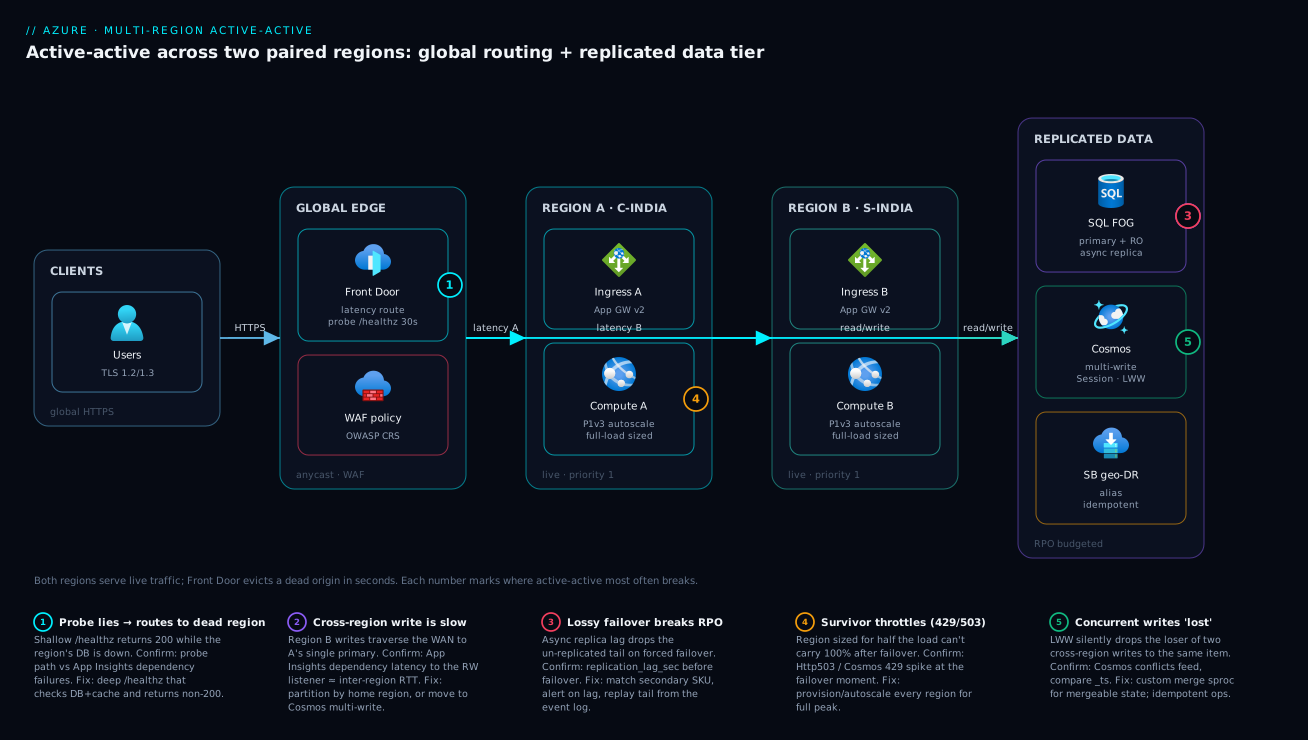
Real-world scenario
Paython, a fictional but realistic Indian payments processor, runs an authorization API: a .NET 8 service on App Service P1v3 behind Application Gateway + WAF, with Azure SQL for the ledger and Cosmos DB for the idempotency/transaction store. Traffic averages 900 requests/second, spiking to ~2,400 rps on salary-day evenings. The platform team is six engineers; the original single-region (Central India) stack cost about ₹95,000/month all-in. After a 47-minute regional incident cost them a six-figure chargeback dispute and a hard conversation with their largest merchant, they committed to active-active across Central India ↔ South India.
The rebuild took the three-pattern decision seriously. The ledger (relational, must be auditable, writes must be strongly consistent in-region) went onto an auto-failover group, with data partitioned by merchant home-region: a merchant’s authorizations always write to their home region’s SQL primary, while the other region holds a read-only replica for low-latency reads and instant promotion. The idempotency store (write-anywhere, must survive a region loss with zero RPO) went onto Cosmos DB multi-region writes at Session consistency with LWW on _ts — a duplicate “authorize txn #X” from a cross-region retry resolves to one record. Idempotent authorization events flow through Service Bus geo-DR so a retried charge is applied exactly once. Front Door fronts both regions with equal priority (true latency-based active-active) and a /healthz that checks SQL and Cosmos reachability — not a static 200.
The first game-day exposed the classic bug. The team killed the Central India stack at 14:30 on a Tuesday. Front Door correctly evicted the origin in ~40 seconds and South India took all traffic — and then started throwing 429 and 503. Cause: the survivor’s Cosmos container and App Service plan were each sized for half the load, so when they suddenly carried 100% they throttled. The fix was a sizing rule that became policy: each region must be provisioned (or able to autoscale) to the full load, not its steady-state share. They moved Cosmos to autoscale RU/s with a max set to peak-total, set App Service autoscale max to cover full peak, and re-ran the drill. Second game-day: clean. South India absorbed 2,400 rps with p95 holding at 240 ms.
The second bug was sneakier and only the third game-day caught it. During a forced (lossy) SQL failover, a handful of authorizations written to the Central India primary in the final second before the kill were not yet replicated — the async lag was ~4 seconds under salary-day write burst, blowing the team’s stated RPO of 1 second. Two changes fixed it: they scaled the secondary to match the primary (a throttled secondary had been the lag source), bringing steady-state lag under 1 second, and they made the authorization path fully idempotent against the Cosmos store + event log, so the un-replicated tail could be replayed from events after promotion rather than lost. They also added a replication-lag SLO alert at 1 second so lag creep is caught before an outage, not during one.
When the next real regional incident hit Central India eight weeks later, the numbers told the story: Front Door evicted the unhealthy origin in 34 seconds, South-India merchants saw nothing, Central-India merchants were served read-only from South India for ~70 seconds while the failover group promoted, then writes resumed — RTO ≈ 70 s, RPO ≈ 0 for committed authorizations, replayed tail included. Monthly cost landed at ₹178,000 (≈1.9× single-region) — and the chargeback-dispute risk that had triggered the whole project went to near zero. The lesson on the team’s wall: “Active-active is not ‘deploy it twice.’ It’s ‘provision the survivor for the whole load, make the writes idempotent, and prove it with a kill switch.’”
The game-day timeline, because the order of discovery is the lesson:
| Drill | What they killed | What happened | Root cause | Fix that became policy |
|---|---|---|---|---|
| #1 | Central India stack | Front Door evicted in 40 s ✓, then survivor 429/503 | Survivor sized for half load | Provision/autoscale each region for full load |
| #2 | Central India stack | Clean traffic shift, p95 held | — | — (validated the sizing fix) |
| #3 | Forced lossy SQL failover | ~4 s of writes lost; RPO breached | Throttled secondary → 4 s lag | Match secondary SKU; idempotent replay from events |
| #4 | Both data + compute | Clean; tail replayed from event log | — | Lag SLO alert at 1 s |
| Real incident | (Azure) Central India networking | RTO 70 s, RPO 0; merchants unaffected | — | The design held |
Advantages and disadvantages
The active-active model both removes your single largest availability risk and hands you the hardest distributed-systems problems. Weigh it honestly:
| Advantages (why you build it) | Disadvantages (why it’s expensive and hard) |
|---|---|
| Near-zero RTO/RPO for a single-region loss, with automatic, human-free failover | Cost roughly doubles — full capacity in two regions, plus cross-region egress and replication |
| Both stacks take real traffic, so there is no untested standby waiting to disappoint you | Distributed-data complexity (conflict resolution, partitioning, or eventual consistency) is now your problem |
| Lower latency globally — users routed to the nearest healthy region | Operational discipline: config/schema/secret/cert parity or failover surfaces subtle bugs |
| Maintenance/deploys can drain one region at a time — a natural region-level blue-green | Testing burden: real region-kill game-days, not tabletop ones; an untested path is a liability |
| Capacity degrades to ~half on a region loss, not to zero | Survivor must be provisioned for 100% load, eroding the “pay for what you use” saving |
| Failover is a routine operation, not a once-a-year scramble | More moving parts (Front Door, failover groups, geo-DR) = more to monitor and more to break |
When each side dominates: the advantages dominate for revenue- or safety-critical, customer-facing workloads where an hour of downtime costs more than the second region costs per month, and where the data model can be partitioned or tolerates tunable consistency. The disadvantages dominate for internal tools that tolerate a 30-minute recovery (use warm standby), for data models that demand a single strongly-consistent writer and cannot be partitioned, and for teams that lack the maturity to operate two live stacks — a poorly-run active-active is less reliable than a well-run single region, because it adds failure modes (split-brain, drift, conflict bugs) without the discipline to contain them.
Hands-on lab
You will stand up the global routing skeleton of an active-active app — two regional web apps stamped identically, a Front Door in front with a meaningful health probe and latency routing, then kill one region and watch Front Door fail over in seconds. Free-tier-friendly (B1 plans; delete at the end). Run in Cloud Shell (Bash).
Step 1 — Variables and resource groups (two regions).
SUFFIX=$RANDOM
RG=rg-aa-lab
APP_CI=app-aa-ci-$SUFFIX     # Central India
APP_SI=app-aa-si-$SUFFIX     # South India
az group create -n $RG -l centralindia -o table
Step 2 — Stamp two identical B1 web apps in two regions.
az appservice plan create -n plan-ci -g $RG -l centralindia --is-linux --sku B1 -o table
az appservice plan create -n plan-si -g $RG -l southindia  --is-linux --sku B1 -o table
az webapp create -n $APP_CI -g $RG -p plan-ci --runtime "NODE:20-lts" -o table
az webapp create -n $APP_SI -g $RG -p plan-si --runtime "NODE:20-lts" -o table
Expected: two apps, identical except for region. Both respond on https://<app>.azurewebsites.net.
Step 3 — Give each a /healthz that returns 200 (the probe target). For the lab, the platform’s default page suffices as a stand-in; in production this path checks downstream dependencies. Enable health-check so the platform itself also tracks it:
az webapp config set -n $APP_CI -g $RG --generic-configurations '{"healthCheckPath": "/"}'
az webapp config set -n $APP_SI -g $RG --generic-configurations '{"healthCheckPath": "/"}'
Step 4 — Create a Front Door Standard profile and an endpoint.
PROFILE=afd-aa-$SUFFIX
az afd profile create -g $RG --profile-name $PROFILE --sku Standard_AzureFrontDoor -o table
az afd endpoint create -g $RG --profile-name $PROFILE --endpoint-name ep-aa --enabled-state Enabled -o table
Step 5 — Origin group with a 30 s probe, then both regions as equal-priority origins (active-active).
az afd origin-group create -g $RG --profile-name $PROFILE --origin-group-name og-aa \
  --probe-path / --probe-protocol Https --probe-request-type GET --probe-interval-in-seconds 30 \
  --sample-size 4 --successful-samples-required 3 --additional-latency-in-milliseconds 50

for pair in "ci:$APP_CI" "si:$APP_SI"; do
  name=${pair%%:*}; host=${pair##*:}.azurewebsites.net
  az afd origin create -g $RG --profile-name $PROFILE --origin-group-name og-aa \
    --origin-name $name --host-name $host --origin-host-header $host \
    --priority 1 --weight 1000 --enabled-state Enabled --https-port 443
done
Step 6 — Add a route so the endpoint serves from the origin group.
az afd route create -g $RG --profile-name $PROFILE --endpoint-name ep-aa \
  --route-name route-aa --origin-group og-aa \
  --supported-protocols Https --https-redirect Enabled --forwarding-protocol HttpsOnly --link-to-default-domain Enabled
Find your endpoint hostname and curl it a few times — you are being served from a healthy region:
az afd endpoint show -g $RG --profile-name $PROFILE --endpoint-name ep-aa --query hostName -o tsv
# curl https://<that-host>/  → 200, served from the nearest healthy origin
Step 7 — Kill one region and watch failover. Stop the Central India app to simulate a regional loss:
az webapp stop -n $APP_CI -g $RG
# Within ~1–1.5 min (30 s interval × 3-of-4 samples), Front Door evicts CI and serves only SI.
# Keep curling the endpoint host — it keeps returning 200, now from South India.
watch -n 5 "curl -s -o /dev/null -w '%{http_code}\n' https://$(az afd endpoint show -g $RG --profile-name $PROFILE --endpoint-name ep-aa --query hostName -o tsv)/"
Expected: the endpoint keeps returning 200 throughout — no DNS change, no human action. That is the active-active property in one observation.
Step 8 — Restore and confirm the region rejoins.
az webapp start -n $APP_CI -g $RG
# After the next healthy samples, Front Door re-admits CI and resumes latency routing across both.
Validation checklist — what each step proved:
| Step | What you did | What it proves |
|---|---|---|
| 2 | Stamped two identical regional apps | Stateless tiers are trivially duplicated |
| 5 | Equal priority/weight origins + deep probe | This is active-active (latency), not active-passive |
| 7 | Stopped one region, kept curling | Front Door evicts a dead origin in seconds; users see 200 throughout |
| 8 | Restarted the region | Failback is automatic when probes pass again |
Cleanup (avoid lingering plan + Front Door charges).
az group delete -n $RG --yes --no-wait
Cost note. Two B1 plans plus a Standard Front Door for an hour is well under ₹100; deleting the resource group stops everything. This lab covered only the routing tier — the data tier (failover groups / Cosmos multi-write) is where production cost and complexity live.
Common mistakes & troubleshooting
This is the playbook — bookmark it for the next game-day or incident. First as a scannable table, then the entries that bite hardest expanded with the exact confirm path.
| # | Symptom | Root cause | Confirm (exact cmd / portal path) | Fix |
|---|---|---|---|---|
| 1 | Front Door keeps routing to a region that can’t actually serve | Probe is shallow (static 200), region’s DB/cache is down | Compare probe path vs real dependency health; App Insights failures in that region | Make /healthz check downstream deps; never a static 200 |
| 2 | Survivor 429/503 right after failover | Survivor sized for half the load | Cosmos 429 count / App Service Http503; plan CPU pinned |
Provision/autoscale each region for full load |
| 3 | Cross-region writes slow (region B writing to region A primary) | Single global writer + no partitioning | App Insights dependency latency to SQL RW listener | Partition by home region, or move that data to Cosmos multi-write |
| 4 | Data lost after a forced SQL failover | Async replica lag at the moment of loss | replication_lag_sec metric just before failover |
Match secondary SKU; idempotent replay from event log; tighten lag SLO |
| 5 | “Lost”/overwritten updates after a partition heals (Cosmos) | LWW dropped a concurrent write | Cosmos conflicts feed; compare _ts |
Custom merge sproc for mergeable state; idempotent ops |
| 6 | Reads stale in one region | Consistency level weaker than the UX assumes | az cosmosdb show --query consistencyPolicy |
Raise to Bounded Staleness, or pass session tokens through |
| 7 | Failover didn’t fire during a real outage | Grace period not elapsed, or policy Manual | failoverWithDataLossGracePeriodMinutes; failoverPolicy |
Set Automatic; shorten grace period; or trigger forced failover |
| 8 | Failover fired on a transient blip (flapping) | Probe too sensitive / grace period too short | Front Door probe history; FOG events | Raise sample threshold; lengthen grace period slightly |
| 9 | Survivor behaves differently (a feature is off / breaks) | Config / flag / secret drift between regions | Diff app settings & flags across regions | One IaC module; centralise flags; drift detection in CI |
| 10 | TLS errors only after failover to the standby region | Cert expired/renewed in one region only | Cert expiry on both origins | Automate renewal; alert on both; one cert pipeline |
| 11 | Duplicate charges/effects after a cross-region retry | Operations not idempotent | Search for duplicate effects by business key | Idempotency keys + unique index; broker dedup; outbox |
| 12 | Egress/replication bill far higher than expected | Cross-region data transfer + multi-write RU surcharge | Cost analysis by meter (inter-region egress, Cosmos RU) | Reduce chatty cross-region calls; right-size RU; keep reads local |
| 13 | One region’s writes never reach the other | Geo-DR replicates metadata, not in-flight messages | Service Bus geo-DR mode; message-count both namespaces | Use Premium geo-replication (data) or rely on idempotent replay |
| 14 | DNS-based failover takes minutes | Traffic Manager TTL, or app caches DNS | TTL on the TM profile; client DNS cache | Use Front Door (connection-level), not DNS, in the hot path; lower TTLs |
| 15 | Both regions patched/restarted at once | Not pinned to a paired region | az account list-locations; check the pair |
Pin both to an Azure pair so updates are sequential |
| 16 | Split-brain: both regions think they’re primary | Forced failover while old primary returned | SQL FOG replicationRole on both servers |
One source of truth for promotion; fence the old primary; reconcile via event log |
| 17 | Private endpoint resolves wrong region’s PaaS | Cross-region private DNS not zone-linked | nslookup the PaaS FQDN in each region |
Link the private DNS zone to both VNets; per-region records |
| 18 | Failover works in drills but not real outages | Game-days only kill compute, not the data tier | Compare drill scope vs real failure modes | Drill the forced data-tier failover, not just webapp stop |
| 19 | App in region B can’t read its own recent write | Read routed to a lagging replica / wrong consistency | Trace the read path; check session token use | Read-your-writes: Session consistency + propagate session tokens; or read RW listener |
| 20 | Cost spikes only during failover events | Survivor autoscales to 2× to absorb full load | Cost analysis during the incident window | Expected — budget for it; reserve baseline, autoscale the burst |
The entries that cause the most 3 a.m. confusion, expanded:
1. Front Door keeps sending users to a region that returns errors.
Root cause: The health probe is shallow — it hits a path that returns 200 from the web tier even when the region’s database or cache is unreachable. Front Door thinks the origin is healthy; users get 5xx from the broken downstream.
Confirm: Compare the probe path against what a real request needs. If /healthz returns 200 but dependencies in App Insights for that region show the DB failing, the probe is lying.
Fix: Make /healthz a deep check — verify the database and any must-have dependency are reachable, return non-200 if not. The probe must answer “can this region serve a real request?”, not “is the web process up?”.
2. The surviving region throttles (429/503) the instant it takes all the traffic.
Root cause: Each region was sized for its steady-state share (~half), so when one dies the survivor suddenly carries 100% and exceeds its provisioned compute or RU/s.
Confirm: Cosmos 429 count or App Service Http503 spikes exactly at the failover moment; plan CPU pinned at 100%.
Fix: Provision (or autoscale) each region for the full expected load, not half. Use Cosmos autoscale RU/s with a max at peak-total, and App Service autoscale max at full peak. This is the single most common active-active mistake.
3. Writes from one region are slow because they cross the WAN to the other region’s primary. Root cause: You chose a single global writer (SQL failover group) without partitioning, so region B’s writes travel to region A’s primary every time. Confirm: App Insights dependency latency from region B to the SQL read-write listener is consistently ~the inter-region RTT. Fix: Partition data by home region (each region writes its own data locally), or move that workload to Cosmos multi-region writes where every region writes locally.
4. A forced SQL failover lost the last few seconds of writes.
Root cause: SQL geo-replication is asynchronous, so a forced (lossy) failover during an outage drops whatever hadn’t replicated — your RPO is the lag, not zero.
Confirm: replication_lag_sec just before the failover shows the gap; the missing rows correspond to that window.
Fix: Match the secondary’s SKU to the primary (a throttled secondary is the usual lag source), alert on lag against your RPO budget, and make the write path idempotent against an event log so the un-replicated tail can be replayed after promotion.
5. Concurrent writes in two regions “lost” one of them (Cosmos).
Root cause: With multi-region writes and Last-Writer-Wins, two regions writing the same item resolve to one — the “loser” is silently dropped, which is wrong for mergeable state (e.g. a shopping cart).
Confirm: The conflicts feed shows the conflict; the surviving item’s _ts is the later one.
Fix: Use a custom merge stored procedure for mergeable state, or design the operation to be idempotent/commutative so order doesn’t matter.
Best practices
- Make health probes meaningful.
/healthzmust check downstream dependencies (DB, cache), not just return 200 from the web tier — otherwise the global tier keeps routing to a region that cannot actually serve. This is the load-bearing rule of the whole design. - Provision every region for the full load, not its share. A survivor sized for 50% throttles the instant it carries 100%. Autoscale max = peak-total, on both compute (App Service/AKS) and data (Cosmos RU/s).
- Keep regions identical via IaC. One Bicep/Terraform module, region as a parameter. Run drift detection (
what-if/plan) on a schedule and treat drift as an incident. - Pick the data pattern deliberately. Single-writer + home-region partitioning, Cosmos multi-write, or event-driven — each has a different RPO and consistency story. Don’t default into “active-active reads, single-writer writes” by accident.
- Design every write to be idempotent. Cross-region retries are inevitable; an idempotency key + unique index turns “maybe double-charged” into “exactly once,” and lets you replay an un-replicated tail.
- Treat replication lag as an SLO. It is your real RPO. Alert when SQL
replication_lag_secor Cosmos staleness exceeds the budget, before an outage forces a lossy failover. - Prefer Front Door (connection-level) over DNS (Traffic Manager) in the hot path. DNS failover is TTL-bound and slow; Front Door evicts a dead origin in seconds.
- Pin to Azure paired regions for sequential platform updates and geo-replica affinity — but verify the pair exists and is reciprocal (a few regions aren’t paired).
- Run real region-kill game-days on a schedule. Resilience you haven’t tested by actually killing a region is a hypothesis, not a guarantee. The first drill almost always exposes the survivor-sizing bug.
- Separate liveness from readiness, and from the global probe. The platform health-check, your liveness, and Front Door’s “can I serve?” probe answer different questions; conflating them either evicts good regions or routes to bad ones.
- Keep cross-region chatter down. Read locally, write locally where the pattern allows; every synchronous cross-region call adds latency and egress cost and couples the two regions.
- Automate certificate and secret rotation across both regions with one pipeline, and alert on expiry in both — a cert that’s valid in A and expired in B is invisible until failover.
Security notes
- Managed identity over secrets, in both regions. Each region’s compute uses its own (or a shared user-assigned) managed identity to reach Key Vault, SQL, and Cosmos — no plaintext connection strings. Grant least privilege (
Key Vault Secrets User, scoped SQL/Cosmos RBAC), and ensure the identity exists and is granted in both regions or the survivor crash-loops. - WAF at the global edge, consistently. Run the WAF on Front Door so both regions are protected by one policy — managing two divergent regional WAFs is how a rule lands in one region and not the other. Keep the policy in code.
- Private connectivity for the data tier. Reach SQL and Cosmos over Private Endpoints in each region’s VNet so replication and app traffic stay on the Microsoft backbone, not the public internet. See Azure Private Link & Private DNS for PaaS for the cross-region private-DNS pattern that makes this work in both regions.
- Encrypt in transit and at rest, both regions. Enforce TLS 1.2+ end-to-end (Front Door → origin → data), and confirm encryption-at-rest (and, where required, customer-managed keys) is configured identically in each region — a CMK present in one region’s Key Vault and not the other breaks the survivor.
- Lock down the health endpoint.
/healthzreturns a status, not a system map — it must not leak dependency hostnames, versions, or internal topology to an anonymous caller, even though Front Door (and you) need it reachable. - Don’t let failover bypass controls. The standby path must enforce the same IP restrictions, authentication, and network rules as the primary; a relaxed rule “just for the DR region” is a hole that’s only exposed when you’re already stressed.
- Audit the conflict/replay path. Lossy failovers and LWW conflict resolution touch financial or sensitive state — log every conflict outcome and every replayed event so the reconciliation is auditable after the incident.
The security controls that double as resilience controls — they pull in the same direction:
| Control | Mechanism | Secures against | Also prevents |
|---|---|---|---|
| Managed identity in both regions | System/user-assigned MI + RBAC | Secrets in plaintext config | Survivor crash-loop from a missing secret |
| WAF at the edge (one policy) | Front Door WAF, policy-as-code | OWASP attacks, bots | Divergent regional WAF rules |
| Private Endpoints per region | Private Link + private DNS | Public exposure of data tier | Replication/app traffic over the internet |
| TLS + CMK parity | minTlsVersion, CMK in both vaults |
Downgrade / cleartext | CMK-missing failure on the survivor |
| Identical network rules | IaC-managed NSG/IP rules | Bypass via a relaxed DR rule | “DR-only” holes exposed under stress |
Cost & sizing
The bill drivers and how they interact with the design:
- Two full stacks dominate. You pay for production-grade compute and data in both regions, sized for full load (not half — see best practices), so the floor is roughly 1.8–2.1× a single-region stack. Active-active’s cost premium is mostly this, not the extras.
- Cross-region data egress is metered per GB. Replication traffic (SQL geo-replica, Cosmos multi-write), plus any synchronous cross-region application calls, all cross the WAN. Chatty cross-region patterns can quietly add a meaningful line item — keep reads and writes local where the pattern allows.
- Cosmos multi-write carries an RU surcharge versus single-write, and you pay RU/s in every write region; size with autoscale RU/s so you’re not paying peak-total around the clock, but set the max high enough that a survivor carrying 100% doesn’t throttle.
- SQL failover groups mean paying ~full price for the secondary, because it must match the primary’s tier to keep replication lag (your RPO) low. A throttled, under-sized secondary is a false economy that breaks RPO.
- Front Door Standard/Premium adds a base fee plus per-GB and per-request charges — small relative to two stacks, and it replaces per-region public ingress complexity.
A rough monthly picture for a mid-size API (the Paython shape, ~900 rps), single-region baseline vs active-active:
| Cost driver | Single-region baseline | Active-active | What the delta buys |
|---|---|---|---|
| Compute (App Service P1v3 × N) | ~₹40,000 | ~₹80,000 (both regions, full-load) | Survivor absorbs 100% load |
| Azure SQL (primary; +secondary in AA) | ~₹25,000 | ~₹52,000 (primary + matched secondary) | RPO≈seconds, auto-promote |
| Cosmos DB (single → multi-write) | ~₹18,000 | ~₹30,000 (multi-write RU + 2nd region) | Write-anywhere, RPO≈0 |
| Cross-region egress + replication | — | ~₹6,000 | Keeping both regions in sync |
| Front Door Std/Premium | ~₹2,000 (or single ingress) | ~₹5,000 | Seconds-level global failover + WAF |
| Service Bus geo-DR | included | ~₹3,000 (Premium for data) | Events survive a region loss |
| Rough total | ~₹95,000 | ~₹178,000 (≈1.9×) | Region loss becomes a non-event |
Right-sizing rules: only go active-active where an outage costs more per hour than the second region costs per month — otherwise warm-standby halves the bill. Use autoscale aggressively so the “full-load survivor” capacity is available but not always paid for. And re-measure after you fix bugs: Paython, like many teams, found that fixing connection reuse and partitioning let them run smaller SKUs than the panicked first cut, landing the active-active bill well below the worst-case 2.1×. For the FinOps discipline around tagging, budgets, and reservations that make a two-region bill predictable, see Azure FinOps & Cost Management at Scale.
Interview & exam questions
1. What is the difference between active-active and active-passive, and when do you choose each? Active-active runs both regions hot, serving live traffic concurrently, so a region loss is a capacity reduction (~half) with seconds-level RTO and ~0 RPO. Active-passive keeps one region serving and the other warm/cold, with a failover gap measured in minutes. Choose active-active for revenue/safety-critical workloads where downtime costs more per hour than the second region per month and the data model can be partitioned or tolerate tunable consistency; choose active-passive for workloads that tolerate a short recovery, because it’s far cheaper and simpler.
2. Why don’t Availability Zones make a workload multi-region resilient? Zones protect against the failure of a single datacentre within a region — they give intra-region HA. A whole-region impairment (control-plane bug, regional networking incident, capacity shortfall) takes all zones in that region together. Multi-region active-active (or DR) is the only thing that removes the region as a single fault domain.
3. Why is the health probe the most important part of the global routing tier? Because it decides which origins are eligible. A shallow probe that returns 200 from the web tier even when the region’s database is down makes Front Door route users to a region that cannot serve, producing 5xx. The probe must be a deep /healthz that verifies downstream dependencies and answers “can this region serve a real request?”.
4. You enabled active-active but writes from one region are slow. Why, and how do you fix it? You likely chose a single global writer (SQL auto-failover group) without partitioning, so the non-primary region’s writes cross the WAN to the primary every time. Fix by partitioning data by home region (each region writes locally) or moving that data to Cosmos DB multi-region writes, where every region accepts writes locally.
5. Compare the three data-tier patterns for active-active. (a) SQL auto-failover groups — one writable primary, async read-only replica, auto-promotion; RPO ≈ replication lag, writes are single-region unless you partition. (b) Cosmos multi-region writes — every region writable with conflict resolution (LWW/custom) and five consistency levels; RPO ≈ 0, weak default consistency. © Event-driven — idempotent operations with replicated events (Service Bus/Event Hubs geo-DR); eventual consistency, no distributed transactions. The choice sets your RPO, consistency, and most of your cost.
6. What determines RPO and RTO in an active-active design? RPO comes from replication mode: synchronous ≈ 0, asynchronous ≈ the replication lag at the moment of loss (so SQL failover groups have non-zero RPO). RTO comes from the routing tier (probe interval × sample threshold to evict a bad origin, ~30–90 s) plus, for writes, the writer’s promotion time (SQL ~30–120 s; Cosmos ~0 because other regions are already writable).
7. What are the five Cosmos DB consistency levels and how do they relate to active-active? Strong, Bounded Staleness, Session, Consistent Prefix, Eventual — from most to least consistent. Strong forbids multi-region writes (single write region only); the other four are multi-write friendly. Session (read-your-writes per session) is the default and suits most apps. Stronger levels add cross-region latency and reduce availability under partition; weaker levels are faster/cheaper but expose anomalies your code must tolerate.
8. How does Cosmos resolve conflicting writes from two regions, and what’s the catch? By a conflict-resolution policy: Last-Writer-Wins (highest _ts or a chosen property wins) by default, or a custom stored procedure for merge logic, or a conflicts feed for manual resolution. The catch with LWW is that it silently drops the loser, which is wrong for mergeable state (carts, sets) — use custom merge or commutative/idempotent operations there.
9. After failover the surviving region starts throwing 429/503. What happened and how do you prevent it? The survivor was sized for its steady-state share (~half the load), so when it suddenly carries 100% it exceeds its provisioned compute or Cosmos RU/s and throttles. Prevent it by provisioning (or autoscaling) each region for the full expected load — Cosmos autoscale RU/s with max at peak-total, App Service autoscale max at full peak. This is the most common active-active mistake and the first thing a game-day exposes.
10. Why must the two regions be kept byte-for-byte identical, and how? Because drift (a config/flag/secret/cert/schema difference) means the survivor behaves differently than the region that failed — a subtle bug that only appears under failover, when you can least afford it. Keep them identical by deploying both from one IaC module with the region as a parameter, centralising feature flags, automating cert/secret rotation across both, and running scheduled drift detection (what-if / terraform plan).
11. What is a region-kill game-day and why is it non-negotiable? It’s a scheduled drill where you actually take a region offline (stop its stack or force a failover) and verify the design recovers within RTO/RPO. It’s non-negotiable because an untested failover path is a liability dressed as resilience — the first game-day almost always finds the survivor-sizing bug or a replication-lag breach, both invisible until you pull the trigger.
12. When should you NOT use active-active? When the workload tolerates a 30-minute recovery (warm standby is far cheaper), when the data model demands a single strongly-consistent writer and cannot be partitioned (multi-write would break correctness), or when the team lacks the maturity to operate two live stacks and keep them in parity — a poorly-run active-active adds failure modes (split-brain, drift, conflict bugs) and is less reliable than a well-run single region.
These map to AZ-305 (Designing Microsoft Azure Infrastructure Solutions) — design for high availability, business continuity, and disaster recovery, region pairs, Front Door, failover groups, Cosmos consistency — and to AZ-700 (Network Engineer) for the global routing tier. The data-tier specifics touch DP-420 (Cosmos DB). A compact cert mapping for revision:
| Question theme | Primary cert | Objective area |
|---|---|---|
| Active-active vs DR; RTO/RPO design | AZ-305 | Design BC/DR; resiliency patterns |
| Front Door, Traffic Manager, routing | AZ-305 / AZ-700 | Design network connectivity; global load balancing |
| SQL failover groups, geo-replication | AZ-305 | Design data storage; high availability |
| Cosmos multi-region writes & consistency | DP-420 / AZ-305 | Distributed data design; consistency models |
| Paired regions, AZ vs multi-region | AZ-305 / AZ-104 | Resiliency fundamentals |
| IaC parity, drift, governance | AZ-305 / AZ-400 | Infrastructure as code; reliable deployment |
Quick check
- Your app is “active-active” but writes from the second region are slow and all land on the first region’s database. What did you most likely skip, and what are the two fixes?
- True or false: Availability Zones give you multi-region resilience.
- Front Door is still routing users to a region that’s returning 5xx. What’s wrong with your design, and where exactly do you fix it?
- You force a SQL auto-failover-group failover during an outage and lose four seconds of writes. Why was RPO not zero, and name two fixes.
- After a region fails, the survivor immediately throttles with 429/503. What sizing rule did you violate?
Answers
- You skipped data partitioning by home region while using a single global writer (SQL failover group), so region B’s writes cross the WAN to region A’s primary. Fixes: partition by home region so each region writes locally, or move that data to Cosmos DB multi-region writes where every region is writable.
- False. Zones protect against a single-datacentre failure within a region; a whole-region impairment takes all zones together. Only multi-region (active-active or DR) removes the region as a single point of failure.
- The health probe is too shallow — it returns 200 from the web tier even though a downstream (DB/cache) in that region is down, so Front Door keeps the origin eligible. Fix it in the
/healthzendpoint: make it a deep check that verifies downstream dependencies and returns non-200 when the region can’t actually serve. - SQL geo-replication is asynchronous, so a forced failover drops whatever hadn’t replicated — RPO equals the replication lag (four seconds here), not zero. Fixes: match the secondary’s SKU to the primary (a throttled secondary causes lag) and make writes idempotent against an event log so the un-replicated tail can be replayed after promotion; also alert on lag against the RPO budget.
- You provisioned each region for its steady-state share (~half the load) instead of the full load. The rule: every region must be provisioned or able to autoscale to 100% of expected load, because a single-region loss makes the survivor carry everything.
Glossary
- Active-active (multi-site) — an architecture where every region serves live traffic concurrently; a region loss is a capacity reduction, not an outage.
- Active-passive / warm standby — one region serves; the other waits (warm or cold) to be promoted on failover, with a failover gap of minutes.
- Pilot light — the second region holds only the data replica and minimal core, scaled up on demand; cheapest cross-region option with the longest RTO.
- Global routing tier — the health-probed L7/L4 entry point (Azure Front Door, Traffic Manager, or cross-region Load Balancer) that steers users to a healthy region.
- Azure Front Door — anycast L7 edge with TLS termination, WAF, caching, deep health probes, and connection-level (seconds) origin failover; the default for HTTP active-active.
- RPO (Recovery Point Objective) — the maximum data loss tolerated; set by replication mode (sync ≈ 0, async ≈ replication lag).
- RTO (Recovery Time Objective) — the maximum time to recover; set by probe interval × sample threshold plus writer promotion time.
- Paired region — Azure’s curated region couple with sequential platform updates and geo-replica affinity (e.g. Central India ↔ South India); a few regions are unpaired.
- Auto-failover group (FOG) — an Azure SQL construct with a read-write and read-only listener over a writable primary and an async replica, auto-promoting on failover without connection-string changes.
- Read-write / read-only listener — the stable DNS names a SQL failover group exposes; the RW listener follows the current primary, the RO listener follows the replica.
- Multi-region writes — a Cosmos DB mode where every region is writable, with conflict resolution and tunable consistency; the cleanest fit for active-active writes.
- Consistency level — Cosmos DB’s staleness/availability dial: Strong, Bounded Staleness, Session (default), Consistent Prefix, Eventual.
- Conflict resolution (LWW / custom) — how Cosmos reconciles two regions writing the same item: Last-Writer-Wins on a timestamp, or a custom merge stored procedure.
- Replication lag — how far a replica trails its primary; for async replication it is your real RPO and should be an SLO.
- Service Bus geo-DR — alias-based pairing of two namespaces so the alias repoints to the secondary on failover; replicates metadata (Premium geo-replication also replicates message data).
- Idempotency key — a unique value that makes a repeated operation apply once, making cross-region retries safe and enabling tail replay.
- Home-region partitioning — partitioning data so each tenant/customer’s writes land in their home region’s primary, enabling local writes with a single-writer engine.
- Region-kill game-day — a scheduled drill that actually takes a region offline to prove the design meets RTO/RPO before a real incident does.
- Drift — divergence in config, flags, secrets, certs, or schema between regions; the cause of subtle failover-only bugs.
Next steps
You can now design, cost, and prove an active-active Azure workload. Build outward:
- Foundation: Azure Regions & Availability Zones Explained — the intra-region resilience this article builds on; know exactly where zones stop and multi-region starts.
- The DR sibling: Azure Backup & Site Recovery: Protection Strategies — the active-passive end of the spectrum for workloads that don’t need active-active.
- Routing depth: Azure Load Balancer vs Application Gateway and Standard Load Balancer: Outbound Rules, Cross-Region HA & HA Ports — the regional and cross-region L4 building blocks under the global tier.
- Private data tier: Azure Private Link & Private DNS for PaaS — make SQL/Cosmos reachable privately in both regions, including the cross-region private-DNS pattern.
- When a region does fail: Troubleshooting Azure SQL: Connectivity, Timeouts, Throttling & Blocking and Troubleshooting App Service: 502/503, Cold Starts & Restart Loops — the per-service diagnosis during a failover.
- Pay for it predictably: Azure FinOps & Cost Management at Scale — tagging, budgets, and reservations that keep a two-region bill from surprising you.