Standard Load Balancer is the Layer-4 plumbing almost every Azure network design sits on, and it is the layer people understand least. They reach for it as “a TCP load balancer,” wire up one rule, and never touch the parts that decide whether the system survives load: outbound rules that give you deterministic SNAT instead of a 2 a.m. port-exhaustion incident, HA Ports that make a firewall sandwich genuinely highly available, health-probe thresholds that decide whether a deploy drains gracefully or black-holes connections, and a global cross-region front end that fails a whole region over without a DNS change. The Azure Standard Load Balancer is a software-defined, zero-latency-added, pass-through L4 device: it does not terminate connections, it rewrites the destination (and optionally the source) of a 5-tuple and forwards the packet. That “pass-through” nature is exactly why its failure modes are subtle — there is no access log, no TLS to inspect, no request to trace, just flows that either complete or quietly die.
This is the engineering-grade walkthrough of every moving part, ending with a global anycast front end whose backend pool is other load balancers. Everything here is the Standard SKU. Basic Load Balancer retires 30 September 2025 — no SLA, no availability zones, no outbound rules, no HA Ports, no cross-region — so if you are still on Basic, migration is the first task, not an optimization. Because this is a reference you will return to mid-incident, the rule types, the SNAT maths, the probe knobs, the metrics, and the failure playbook are all laid out as scannable tables: read the prose once, then keep the tables open when SnatConnectionCount (Failed) starts climbing.
By the end you will stop guessing. When egress fails under a flash sale you will know whether you starved SNAT ports on one destination, whether implicit SNAT is shadowing your explicit rule, whether a “healthy” backend is lying because its probe is TCP, or whether your stateful firewall is resetting long flows because HA Ports does not guarantee path symmetry. Knowing which in ninety seconds is what separates a five-minute incident from a two-hour one.
What problem this solves
Standard LB exists to spread Layer-4 traffic across a pool of backends inside a region, to provide controlled, deterministic outbound internet access for those backends, and — with the cross-region SKU — to give a TCP/UDP service a single global IP with automatic regional failover. The pain it removes is the pain of doing any of that by hand: round-robin DNS that ignores health, a single NAT box that becomes a bottleneck and a single point of failure, or a firewall pair with no safe way to balance across both nodes.
What breaks without engineering it properly is specific and recurring. An app that opens a new outbound connection per request exhausts the shared SNAT pool and throws intermittent dependency timeouts that pass in test and fail in production — the single most common Standard LB incident. A “TCP load balancer” with a TCP probe keeps routing traffic to a worker that returns 500 to every user, because the socket is still open. A firewall sandwich that passed its lab test resets every long-lived database and gRPC connection in production because return packets traverse a different stateful appliance than the forward packets. A team migrates inbound but forgets that Standard is secure by default — no implicit outbound — and every backend silently loses internet access the moment they remove the public IP from the NIC.
Who hits this: anyone running VMs or VM Scale Sets behind L4 in Azure, anyone inserting a network virtual appliance (NGFW, IDS/IPS, proxy) into the data path, anyone with chatty outbound calls to a small number of upstreams (payment APIs, partner endpoints, a shared database), and anyone designing multi-region active-active for a non-HTTP protocol that Azure Front Door (HTTP-only) cannot serve. The fix is almost never “make the LB bigger” — Standard LB has no instance size. It is “allocate ports explicitly, probe at Layer 7, engineer flow symmetry, and watch the SNAT metrics.”
To frame the whole field before the deep dive, here is every failure class this article covers, the question it forces, and where to look first:
| Failure class | What you actually see | First question to ask | First place to look | Most common single cause |
|---|---|---|---|---|
| SNAT port exhaustion | Intermittent outbound timeouts under load, fine at rest | Does it fail to one destination or all? | SnatConnectionCount (Failed) metric |
New connection per request to one upstream |
| Implicit SNAT shadowing | Unpredictable port use; exhaustion despite a rule | Is disableOutboundSnat set on inbound rules? |
LB rule config / ARM disableOutboundSnat |
Inbound rule silently providing default SNAT |
| Backend “healthy” but failing | Users get 500/502 from a node the LB calls healthy | Is the probe TCP or HTTP? | DipAvailability vs real 5xx rate |
TCP probe on an app that 500s |
| Asymmetric NVA reset | Long flows reset, short flows fine | Forward and return path same appliance? | Firewall session log (“no state”) | HA Ports without Floating IP / state sync |
| No regional failover | Region down, global IP keeps sending traffic | Is the regional probe honest? | Cross-region LB backend health | Regional LB still reports healthy |
| No outbound at all | New backends cannot reach the internet | Is there an explicit egress path? | Effective routes; outbound rule presence | Standard is secure-by-default (egress opt-in) |
Learning objectives
By the end of this article you can:
- Choose correctly between Standard (regional), Gateway, and cross-region (Global) load balancers, and explain why they are not interchangeable.
- Design a backend pool the right way (NIC-based vs IP-based) and align it to availability zones so the frontend’s zone-redundancy is actually backed by surviving backends.
- Allocate SNAT ports explicitly with an outbound rule, compute
allocated_outbound_portsagainst your maximum pool size, and stop implicit SNAT from shadowing it withdisableOutboundSnat. - Build an HA Ports rule for an active-active NVA pool and engineer the flow symmetry (Floating IP / DSR + vendor state sync) that HA Ports alone does not give you.
- Tune TCP / HTTP / HTTPS probes and
probe-thresholdfor a deliberate detection-vs-flapping trade-off, and sequence a graceful drain so deploys never black-hole connections. - Front regional LBs with a cross-region LB for one static anycast IP and automatic, DNS-free regional failover on any TCP/UDP protocol.
- Read the Standard LB metrics (
SnatConnectionCount,UsedSnatPorts,AllocatedSnatPorts,DipAvailability,VipAvailability) and wire alerts that fire before users feel it. - Map any Standard LB symptom to a root cause, a confirming command, and a fix — and price the design in INR.
Prerequisites & where this fits
You should already understand the basics: a frontend IP configuration (the VIP — public or internal/private), a backend pool (the targets), a load-balancing rule (which frontend port maps to which backend port), a health probe (what “healthy” means), and an outbound rule (how the pool reaches the internet). You should know how SNAT (Source Network Address Translation) works in principle — a private IP:port rewritten to a public IP:port so return traffic finds its way home — and be comfortable running az in Cloud Shell, reading JSON output, and applying a Bicep or Terraform file. Familiarity with availability zones, NSGs, and UDRs helps; the Azure Virtual Network, Subnets and NSGs fundamentals are assumed.
This sits in the Networking track and is the L4 layer beneath almost everything else. It is the floor under Azure Multi-Region Active-Active Architecture, the SNAT-aware sibling of Diagnosing and Killing SNAT Port Exhaustion on Cloud NAT Gateways (NAT Gateway is the other egress path and often the better one), and the HA mechanism behind Deploying HA Third-Party NVAs in Azure: The Load Balancer Sandwich Pattern. Where you need Layer-7 features — path routing, WAF, edge TLS — you want Application Gateway instead; this article is strictly L4.
A quick map of who owns which layer during an incident, so you call the right person fast:
| Layer | What lives here | Who usually owns it | Failure classes it can cause |
|---|---|---|---|
| Client / DNS | Name resolution, retries | Frontend / SRE | Rarely the LB; usually a red herring |
| Cross-region (Global) LB | Anycast VIP, regional health | Network / platform | No failover (regional probe lies), wrong region steer |
| Regional Standard LB | Inbound rules, probes, outbound rules | Network team | SNAT exhaustion, probe false-healthy, no egress |
| Backend pool (VM/VMSS) | The app, the NIC, the zone | App / compute team | False-healthy app, zone imbalance |
| NVA subnet (firewall sandwich) | UDRs, NSGs, stateful FW | Security / network | Asymmetric reset, total-blast-radius NSG mistake |
| Outbound (SNAT / NAT GW) | Egress to APIs/DB | Platform + network | Port exhaustion under load |
Core concepts
Six mental models make every later diagnosis obvious.
Standard LB is pass-through, not a proxy. It rewrites the 5-tuple (destination — and for outbound, source) and forwards the packet; it never terminates the TCP connection. That is why it adds no measurable latency, sees no application data, and produces no access log. Visibility comes from metrics and VNet flow logs, not from the LB itself. Every troubleshooting instinct you have from an L7 proxy (read the access log, inspect the request) does not apply.
A SNAT port is keyed on the full destination 5-tuple. You are not limited to ~64,000 total outbound connections — you are limited to ~64,000 simultaneous flows to the same destination IP and port per frontend public IP. Exhaustion almost always means many flows to one upstream behind a single VIP. This is the single most misunderstood fact about the device, and it is why “we only have 5,000 connections” still exhausts when they all go to one payment API.
Standard is secure by default — outbound is opt-in. Being in a backend pool does not grant a backend internet access. You must provide egress explicitly: an outbound rule on the LB, a NAT Gateway on the subnet, or an instance-level public IP. Remove a public IP from a NIC without adding one of these and the backend goes dark to the internet — a classic migration surprise.
Zone-redundant frontend, zone-spread backends — both or neither. A Standard LB frontend is zone-redundant by default (its VIP is served from all zones). But HA is only real if the backends span zones too. A zone-redundant frontend in front of a single-zone VMSS dies with that zone. Spread instances across zones 1/2/3 and the frontend keeps serving from the survivors.
The probe defines truth, and the wrong probe lies. The LB sends traffic only to instances the probe says are healthy. A TCP probe proves a socket is open; an HTTP/HTTPS probe proves the app answered 200. A wedged-but-listening process passes a TCP probe and fails every real request. Detection time is roughly interval x probe_threshold, and graceful drain (stop new flows, let established flows finish) is a property you sequence into deploys, not a setting.
HA Ports balances everything; it does not guarantee symmetry. An HA Ports rule (protocol All, ports 0/0, internal LB only) load-balances all ports and protocols at once — the only sane way to front a firewall whose port set you cannot enumerate. But a stateful NVA needs the return packet on the same appliance as the forward packet, and HA Ports hashes flows independently per direction. Symmetry is your job (Floating IP / DSR, vendor state sync, symmetric UDRs) — and getting it wrong is the most common HA-Ports incident.
The vocabulary in one table
Before the deep sections, pin down every moving part. The glossary repeats these for lookup; this is the model side by side:
| Concept | One-line definition | Where it lives | Why it matters |
|---|---|---|---|
| Frontend IP config | The VIP (public or internal) traffic enters on | On the LB | Each public IP = +64k SNAT ports |
| Backend pool | The set of targets (NIC-based or IP-based) | On the LB | IP-based pools cannot do outbound rules |
| Load-balancing rule | Frontend port → backend port mapping | On the LB | Can silently provide implicit SNAT |
| Inbound NAT rule | One frontend port → one backend instance | On the LB | Per-instance reach (SSH/RDP) |
| Health probe | What “healthy” means (TCP/HTTP/HTTPS) | On the LB | Wrong type → false-healthy backend |
| Outbound rule | Explicit SNAT egress + port allocation | On the LB | The deterministic-egress control |
| HA Ports rule | Protocol All, ports 0/0 (internal only) | On internal LB | Balances every port for NVAs |
| SNAT port | One outbound 5-tuple translation entry | Per frontend public IP (~64k) | Exhaustion → outbound failures |
| Floating IP (DSR) | Backend sees original VIP; return symmetric | On the rule | Required for stateful NVA symmetry |
| Cross-region LB | Global anycast VIP over regional LBs | Global tier | One static IP, DNS-free failover |
| DipAvailability | % of probes succeeding per backend | Metric | Your health/drain signal |
| VipAvailability | Whether the frontend datapath is up | Metric | The “is the VIP alive” signal |
Standard vs Gateway vs cross-region, and when each fits
Azure ships three load balancer “shapes.” They are not interchangeable, and picking the wrong one shows up as a missing feature or a redesign weeks later.
| SKU / type | Scope | Primary job | Outbound SNAT | HA Ports | Frontend |
|---|---|---|---|---|---|
| Standard (regional) | One region, zone-aware | General L4 load balancing for VMs/VMSS | Yes, via outbound rules | Yes (internal) | Public or internal |
| Gateway | One region | Transparent insertion of NVAs via service chaining | No (bump-in-the-wire) | N/A | Internal (chained) |
| Cross-region (Global) | Multi-region | Anycast global front end over regional LBs | No | No | Public (global) |
The mental model:
- Standard regional LB is the default — balances inside one region, zone-redundant or zonal, and home to outbound rules and HA Ports. Everything in Steps below uses this unless stated.
- Gateway LB is for service insertion only. You chain it to a Standard LB frontend or a VM NIC so traffic transparently flows through an NVA pool and back, source IP preserved. It is not a general-purpose front end and has no outbound rules.
- Cross-region LB is a thin global anycast layer whose backend pool is other Standard load balancers. One static global IP, steers to the closest healthy region, does no SNAT, and sits in front of regional LBs, not in place of them.
The decision distilled — match the requirement to the shape:
| If you need… | Use | Why not the others |
|---|---|---|
| Balance VMs/VMSS in one region | Standard regional | Gateway has no general rules; cross-region needs regional LBs underneath |
| Insert a firewall/IDS transparently in the path | Gateway LB | Standard needs HA Ports + UDRs; cross-region is global only |
| One static IP for a TCP/UDP service across regions | Cross-region LB | Front Door is HTTP-only; Traffic Manager is DNS/TTL-bound |
| L7 path routing / WAF / edge TLS | Application Gateway / Front Door | Standard LB is L4 only — no HTTP awareness |
| Deterministic, allow-listable egress at scale | NAT Gateway (with or without LB) | LB outbound pre-carves ports; NAT GW allocates on demand |
The rest of this article uses the regional Standard LB for the core sections, layers HA Ports for the NVA case, then puts the cross-region LB on top.
Basic is retiring — what changes on the way to Standard
If you are still on Basic LB (retires 30 September 2025), migration is the first task. The features do not map 1:1, and several Standard behaviors are secure-by-default where Basic was permissive — so a lift-and-shift that ignores these breaks egress or HA:
| Aspect | Basic LB | Standard LB | Migration action |
|---|---|---|---|
| SLA | None | 99.99% (with ≥2 healthy backends) | Gain SLA; ensure 2+ instances |
| Availability zones | Not supported | Zone-redundant / zonal | Re-pin frontend + spread backends |
| Outbound rules | Not supported | Supported (explicit SNAT) | Add an explicit outbound rule |
| Default outbound access | Implicit, on | Secure by default (opt-in) | Add egress or backends go dark |
| HA Ports | Not supported | Internal LB only | Build the HA Ports rule on an internal LB |
| Public IP SKU | Basic | Standard (required) | Upgrade the PIP to Standard |
| Backend pool size | ~300 | ~1,000 | Re-architect large fleets if needed |
| Cross-region | Not supported | Supported (Global tier) | Layer a cross-region LB if multi-region |
| NSG requirement | Optional | Recommended/expected | Add NSGs (Standard assumes them) |
The one that silently bites: default outbound access. On Basic, a backend reached the internet implicitly; on Standard it does not until you add an outbound rule or NAT Gateway. Migrate the egress path in the same change as the LB, or every backend loses internet the moment the public IP leaves the NIC.
Frontend IPs and the rule types
A Standard LB is a collection of frontend IP configurations and the rules that bind them to a backend pool. Get the rule taxonomy straight — each does one job, and mixing them up is where implicit SNAT bites.
| Rule type | What it does | Frontend → backend | SNAT behaviour | Typical use |
|---|---|---|---|---|
| Load-balancing rule | Distributes a port across the whole pool | e.g. 443 → 8443 (all instances) | Provides implicit outbound SNAT unless disabled | Web/API traffic to a VMSS |
| HA Ports rule | Balances all ports/protocols at once | 0 → 0, protocol All (internal LB) | Implicit SNAT off by design (internal) | Active-active NVA sandwich |
| Inbound NAT rule | Maps one port to one specific instance | e.g. 50001 → VM3:22 | None | Per-instance SSH/RDP/jump |
| Inbound NAT pool (VMSS) | Range of ports → instances | 50000-50100 → VMSS:22 | None | SSH into VMSS instances |
| Outbound rule | Explicit egress + manual port allocation | pool → frontend public IP | Explicit SNAT (what you want) | Deterministic internet egress |
Each rule type has hard requirements — what it needs and where it’s allowed. Mismatch any of these and the create is rejected or the rule silently does nothing:
| Rule type | Needs a probe? | Pool type | Public or internal LB | Floating IP option | Key constraint |
|---|---|---|---|---|---|
| Load-balancing rule | Yes | NIC or IP-based | Either | Yes (DSR) | Implicit SNAT on unless disabled |
| HA Ports rule | Yes | NIC or IP-based | Internal only | Yes (needed for NVA) | One per LB; ports 0/0, protocol All |
| Inbound NAT rule | Optional | NIC-based | Either | Yes | One frontend port → one instance |
| Inbound NAT pool (VMSS) | Optional | VMSS NICs | Either | n/a | Port range mapped to instances |
| Outbound rule | No | NIC-based only | Public (egress IP) | n/a | IP-based pools unsupported |
The two constraints that trip people most: HA Ports is internal-LB-only, and outbound rules require a NIC-based pool. If you find yourself trying to put HA Ports on a public LB or an outbound rule on an IP-based pool, the design is wrong, not the syntax.
The frontend itself is public or internal, and zonal or zone-redundant. The defaults and the decision:
| Frontend property | Options | Default | When to change | Gotcha |
|---|---|---|---|---|
| Address type | Public / Internal (private) | — (you choose) | Internal for east-west, NVA, internal services | Internal LBs can do HA Ports; public cannot |
| Zone behaviour | Zone-redundant / Zonal / No-zone | Zone-redundant (Standard) | Zonal only for latency/co-location pins | A zonal frontend dies with its zone |
| IP allocation | Static / Dynamic | Static (Standard PIP) | Always static for a stable VIP | Dynamic VIPs change on dealloc |
| Public IP SKU | Standard / Basic | Standard | Must be Standard with a Standard LB | Basic PIP + Standard LB is rejected |
| Inbound/outbound IP sharing | Same IP / separate IP | Often shared | Separate outbound IP keeps SNAT budget clean | Sharing mixes inbound + SNAT on one budget |
LOC=eastus
RG=rg-lb-prod

# Zone-redundant public frontend IP (Standard SKU, served from all zones).
az network public-ip create \
  --resource-group $RG --name pip-lb-fe \
  --sku Standard --tier Regional \
  --allocation-method Static --zone 1 2 3

az network lb create \
  --resource-group $RG --name lb-app-prod \
  --sku Standard \
  --public-ip-address pip-lb-fe \
  --frontend-ip-name fe-public \
  --backend-pool-name bep-app
Zonal vs zone-redundant is a real decision. A zone-redundant frontend survives a single zone loss transparently. A zonal frontend (pinned with a single
--zone) is occasionally required for latency-sensitive or co-location designs, but it dies with its zone. Default to zone-redundant unless you have a specific, written reason not to.
Backend pool design: NIC-based vs IP-based, and zone alignment
A Standard LB backend pool can be defined two ways, and the choice constrains the entire design — especially outbound.
- NIC-based pool — membership is the NIC (
ipConfiguration) of a VM or VMSS. The right model for VM/VMSS workloads: lifecycle is tied to the compute resource, and outbound rules work cleanly. - IP-based pool — membership is raw private IPs in the VNet, for backends whose lifecycle you do not own or want to pre-declare. The hard constraint: IP-based pools do not support outbound rules. Need LB-provided SNAT? Use a NIC-based pool, or front egress with NAT Gateway.
The trade-off in full:
| Aspect | NIC-based pool | IP-based pool |
|---|---|---|
| Membership unit | VM/VMSS NIC ipConfiguration |
Raw private IP in the VNet |
| Outbound rules (SNAT) | Supported | Not supported |
| Lifecycle coupling | Tied to the compute resource | Decoupled (you manage IPs) |
| Best for | Standard VM/VMSS workloads | Pre-provisioned IPs, mixed/unmanaged backends |
| Auto-membership (VMSS) | Yes, via the scale set | Manual IP management |
| Cross-resource-group targets | Constrained | More flexible |
Zone alignment is the part that gets skipped. A Standard LB frontend is zone-redundant by default, but HA is only real if the backends span zones too. Spread VMSS instances across zones 1/2/3 and the frontend keeps serving from surviving zones when one fails. The zone model side by side:
| Backend zoning | Survives single-zone loss? | When to use | Watch-out |
|---|---|---|---|
| Zone-spread (1/2/3) | Yes — survivors keep serving | Default for HA | Cross-zone bandwidth has a (tiny) cost |
| Zonal (pinned to one zone) | No — dies with the zone | Latency/co-location pin only | Pair with a zonal frontend deliberately |
| No-zone (regional) | Best-effort (no zone guarantee) | Legacy / regions without zones | No explicit zone resilience |
| Mixed zonal + zone-redundant FE | Partial | Migration states | Easy to think you’re HA when you’re not |
See Azure Regions and Availability Zones for the zone model in depth; the rule here is simply both ends or neither.
Outbound rules and explicit SNAT port allocation
This is the part that prevents incidents. By default a Standard LB does not give backends outbound internet access just for being in a pool — Standard is secure by default, and egress is opt-in. The clean ways to provide it:
| Egress method | How it allocates ports | Best for | Cost | Limit / gotcha |
|---|---|---|---|---|
| Outbound rule (LB) | Pre-carved, manual per instance | LB already present; egress must be the LB VIP | PIP only | Pre-divides 64k; caps pool size if over-allocated |
| NAT Gateway | On-demand from a shared pool | Pure egress at scale; many destinations | Hourly + per-GB | Zonal (one per zone); separate article |
| Instance-level public IP | Per-instance dedicated | A handful of VMs needing own IP | PIP per VM | Doesn’t scale; management overhead |
| Default outbound (legacy) | Implicit, Microsoft-managed | Nothing — being retired | None | Non-deterministic; do not rely on it |
A SNAT port is one entry in a translation table keyed on the full 5-tuple, including the destination IP and port. You are not limited to 64K total connections — you are limited to ~64K simultaneous flows to the same destination IP:port per frontend public IP. Exhaustion almost always means many flows to one upstream behind a single VIP.
With an outbound rule you allocate ports explicitly, pre-dividing the 64,000-port budget per frontend IP across the pool. The maths is unforgiving:
ports_per_instance = floor( (64,000 x frontend_IP_count) / backend_instance_count )

64,000 ports, 1 frontend IP, 50 instances  -> 1,280 ports each
64,000 ports, 1 frontend IP, 100 instances ->   640 ports each
64,000 ports, 2 frontend IPs, 100 instances -> 1,280 ports each
The allocation table you actually plan against — note how adding frontend IPs (or a public IP prefix) is the lever that grows the budget:
| Frontend public IPs | Total SNAT ports | 50 instances | 100 instances | 200 instances |
|---|---|---|---|---|
| 1 IP | 64,000 | 1,280 / inst | 640 / inst | 320 / inst |
| 2 IPs | 128,000 | 2,560 / inst | 1,280 / inst | 640 / inst |
| 4 IPs | 256,000 | 5,120 / inst | 2,560 / inst | 1,280 / inst |
| /28 prefix (16 IPs) | 1,024,000 | 20,480 / inst | 10,240 / inst | 5,120 / inst |
Set it too high and you cap pool size (you can run out of ports to hand new instances); too low (the default auto-allocation is famously stingy) and busy instances exhaust ports while the pool looks half-idle. Always allocate manually, against your maximum intended pool size.
# Dedicated outbound frontend IP — do NOT share the inbound VIP for outbound
# if you can avoid it; a separate IP keeps the SNAT budget clean.
az network public-ip create \
  --resource-group $RG --name pip-lb-outbound \
  --sku Standard --allocation-method Static --zone 1 2 3

az network lb frontend-ip create \
  --resource-group $RG --lb-name lb-app-prod \
  --name fe-outbound --public-ip-address pip-lb-outbound

# Explicit outbound rule: manual port allocation, generous idle timeout,
# and TCP reset on idle so clients learn the flow is gone.
az network lb outbound-rule create \
  --resource-group $RG --lb-name lb-app-prod \
  --name obr-app \
  --frontend-ip-configs fe-outbound \
  --address-pool bep-app \
  --protocol All \
  --idle-timeout 15 \
  --enable-tcp-reset true \
  --outbound-ports 1280
The flags that matter, each with its default and the failure if you get it wrong:
| Flag (CLI) | ARM / Bicep | Default | Set it to | Failure if wrong |
|---|---|---|---|---|
--outbound-ports |
allocatedOutboundPorts |
Auto (stingy) | floor(64k×IPs / max-instances) | Too low → exhaustion; too high → can’t add instances |
--enable-tcp-reset |
enableTcpReset |
false | true |
Idle flows dropped silently; clients hang |
--idle-timeout |
idleTimeoutInMinutes |
4 | 15-30 (or app keepalives) | Mid-idle drops on long-lived flows |
--protocol |
protocol |
— | All (TCP+UDP) |
UDP egress missing if set to Tcp only |
--frontend-ip-configs |
frontendIPConfigurations |
— | A dedicated outbound IP | Sharing inbound VIP muddies the budget |
The durable fix for mid-idle drops is application keepalives, not a giant idle timeout. Each extra frontend IP (or a public IP prefix) adds another 64,000 ports. If you are fighting this maths at scale, that is the signal to move egress to NAT Gateway, which allocates ports on demand instead of pre-carving them.
Worked sizing against real workloads — pick the row closest to yours and read the verdict. The key variable is concurrent flows to the busiest single destination, not total throughput:
| Workload | Instances | Frontend IPs | Ports/instance | Peak flows to busiest dest | Verdict |
|---|---|---|---|---|---|
| Internal API, few egress calls | 10 | 1 | 6,400 | ~500 | Huge headroom; fine |
| Web tier → one DB VIP, pooled | 20 | 1 | 3,200 | ~1,500 | Comfortable with reuse |
| Payment fan-out, per-request conns | 50 | 1 | 1,280 | ~30,000 | Exhausts — reuse or add IPs |
| Payment fan-out, pooled clients | 50 | 1 | 1,280 | ~1,200 | Fine once connections are reused |
| Batch webhook fan-out | 100 | 1 | 640 | ~50,000 | Exhausts — needs NAT Gateway |
| Batch webhook fan-out | 100 | 4 (/30 prefix) | 2,560 | ~50,000 | Borderline; NAT Gateway better |
| Large fleet, many destinations | 200 | 2 | 640 | ~3,000 (spread) | Fine — load spread over dests |
| Large fleet, one hot destination | 200 | 2 | 640 | ~80,000 | Exhausts — shard or NAT GW |
The pattern is unmissable: the rows that exhaust all have many concurrent flows to one destination with no connection reuse. Fix reuse first (it collapses the flow count), then add IPs or move to NAT Gateway for genuine high-fan-out to a single upstream.
The implicit-SNAT trap
A load-balancing rule silently provides implicit, unmanaged SNAT alongside any explicit outbound rule unless you turn it off. Two overlapping SNAT behaviors give you unpredictable port use and exhaustion you cannot reason about. The fix is one flag — disableOutboundSnat = true (ARM/Bicep disableOutboundSnat) on the load-balancing rule — so egress is governed only by your explicit outbound rule.
| Configuration | Outbound SNAT source | Determinism | Verdict |
|---|---|---|---|
LB rule only, disableOutboundSnat=false |
Implicit (auto, ~stingy) | Low | Default; exhausts early |
LB rule + outbound rule, disableOutboundSnat=false |
Both (overlapping) | Very low | The trap — unpredictable |
LB rule (disableOutboundSnat=true) + outbound rule |
Explicit rule only | High | Correct |
| NAT Gateway on subnet | NAT GW (on demand) | Highest | Best for pure egress |
HA Ports for active-active NVAs and firewall sandwiches
HA Ports makes an internal Standard LB load-balance all ports and all protocols with one rule. It exists for the network virtual appliance case: you cannot enumerate every port a firewall must pass, so you balance the whole flow space at once. An HA Ports rule is just a load-balancing rule with protocol All and both frontendPort and backendPort set to 0. It is available on internal Standard LBs only (not public).
# Internal LB in front of the active-active NVA pool.
az network lb create \
  --resource-group $RG --name lb-nva-internal \
  --sku Standard \
  --vnet-name vnet-hub --subnet snet-nva-frontend \
  --frontend-ip-name fe-nva --private-ip-address 10.0.10.4 \
  --backend-pool-name bep-nva

# HA Ports: protocol All, ports 0/0 — every port, every protocol.
az network lb rule create \
  --resource-group $RG --lb-name lb-nva-internal \
  --name rule-haports \
  --protocol All --frontend-port 0 --backend-port 0 \
  --frontend-ip-name fe-nva \
  --backend-pool-name bep-nva \
  --probe-name probe-nva \
  --enable-tcp-reset true \
  --idle-timeout 15
The classic topology is the firewall sandwich: an external/internal LB pair around an active-active NVA pool, HA Ports on the internal side. The design rules that decide whether it actually works:
| Design rule | Why it matters | If you skip it |
|---|---|---|
| Symmetric routing | Stateful NVA needs return packet on the same appliance | Mid-stream resets (“no matching state”) on long flows |
| Floating IP (DSR) | Backend sees original VIP; keeps routing symmetric | Return path diverges; asymmetric drops |
| Vendor session-state sync | Any appliance can handle any packet of a flow | Rebalance/probe event drops in-flight sessions |
| Per-NVA liveness probe | Pulls a wedged appliance out of rotation | Black-holes traffic to a hung-but-listening FW |
| Treat the NVA subnet as prod-critical | HA Ports = no per-port blast radius | One bad NSG/UDR breaks all protocols at once |
The two non-negotiables, spelled out:
- Symmetric routing. A stateful NVA requires the return packet to traverse the same appliance as the forward packet. With plain HA Ports, asymmetric paths break connections. Fix it with Floating IP (Direct Server Return) and/or UDRs that keep flows symmetric, or the vendor’s state-synchronizing cluster. This is the single most common HA-Ports failure mode — validate against the vendor reference architecture. See the Load Balancer Sandwich pattern for the full topology.
- Health probe per NVA. The probe must hit a real liveness endpoint so a hung NVA is pulled from rotation. A probe against a port that answers while the data plane is wedged gives false “healthy” and black-holes traffic.
HA Ports balances everything, so a misconfigured NSG or UDR on the NVA subnet now affects all protocols at once. There is no per-port blast radius anymore — treat that subnet as production-critical and test failover explicitly.
Health probe protocols, thresholds, and graceful drain
Probes decide what “healthy” means, and the defaults are rarely what you want for a zero-downtime deploy. Standard LB supports TCP, HTTP, and HTTPS probes.
| Probe type | Healthy when | Proves | Use it for | Limit |
|---|---|---|---|---|
| TCP | 3-way handshake completes on the port | The port is open | Non-HTTP backends; cheapest | A wedged app that still listens passes |
| HTTP | GET on the path returns HTTP 200 | The app answered | Web backends | Slightly more overhead than TCP |
| HTTPS | GET over TLS returns HTTP 200 | The app answered over TLS | Encrypted-probe requirements | Cert/TLS handling on the backend |
Prefer an HTTP/HTTPS probe against a real /healthz over TCP wherever the backend speaks HTTP. A TCP probe stays “healthy” while the app returns 500s to every user, because the socket is still open. Only an L7 probe catches a wedged-but-listening process.
az network lb probe create \
  --resource-group $RG --lb-name lb-app-prod \
  --name probe-app \
  --protocol Http --port 8080 --path /healthz \
  --interval 5 --probe-threshold 2
The probe knobs, their ranges, and the trade-off each controls:
| Setting (CLI) | ARM / Bicep | Default | Range | Trade-off |
|---|---|---|---|---|
--protocol |
protocol |
— | Tcp / Http / Https | TCP = cheap but blind; HTTP = true health |
--port |
port |
— | 1-65535 | Must match the listening/health port |
--path |
requestPath |
— (HTTP/S) | any path returning 200 | Keep it shallow and honest |
--interval |
intervalInSeconds |
15 (min 5) | 5-2147483646 | Tighter = faster detect, more flap risk |
--probe-threshold |
numberOfProbes / probeThreshold |
1-2 | ≥1 | Higher rides blips; lower evicts fast |
Detection time is roughly interval x probe_threshold (~10s at 5s/2). Tighter flaps on a merely-slow backend; looser keeps sending traffic to a dead node. A sizing guide:
| interval × threshold | Detect time | Good for | Risk |
|---|---|---|---|
| 5s × 2 | ~10s | Fast eviction of dead nodes | Flaps a momentarily-slow node |
| 5s × 3 | ~15s | Balanced default | Slightly slower eviction |
| 15s × 2 | ~30s | Stable, flap-averse | Dead node serves up to ~30s |
| 30s × 3 | ~90s | Very stable backends | Slow to pull a failed node |
Graceful drain is the other half. When a probe starts failing (or you pull an instance from the pool), Standard LB stops new flows to it but does not kill established TCP connections — existing flows continue until they close or hit the idle timeout. So the clean deploy sequence is:
| Step | Action | What the LB does | Why |
|---|---|---|---|
| 1 | Flip the instance’s /healthz to non-200 (or stop the app gracefully) |
Probe begins failing | Signal intent to drain |
| 2 | Wait interval × threshold |
Marks instance unhealthy; stops new flows | No new traffic lands on it |
| 3 | Wait out the drain window | Established flows finish naturally | In-flight requests complete |
| 4 | Recycle, bring /healthz back |
Probe succeeds; rejoins rotation | Instance returns warm |
This is the orchestration that VMSS rolling upgrades and App Service slot swaps lean on under the hood. Deploys that black-hole requests almost always skipped the drain wait between steps 2 and 3.
A reference deployment in Bicep and Terraform
Here is the regional public LB, NIC-style pool, explicit outbound rule, HTTP probe, and load-balancing rule as one coherent reference — the shape you want in the repo, not a pile of CLI commands. First Bicep:
param location string = resourceGroup().location

resource pip 'Microsoft.Network/publicIPAddresses@2023-11-01' = {
  name: 'pip-lb-fe'
  location: location
  sku: { name: 'Standard' }
  zones: [ '1', '2', '3' ]
  properties: { publicIPAllocationMethod: 'Static' }
}

resource lb 'Microsoft.Network/loadBalancers@2023-11-01' = {
  name: 'lb-app-prod'
  location: location
  sku: { name: 'Standard' }
  properties: {
    frontendIPConfigurations: [ {
      name: 'fe-public'
      properties: { publicIPAddress: { id: pip.id } }
    } ]
    backendAddressPools: [ { name: 'bep-app' } ]
    probes: [ {
      name: 'probe-app'
      properties: { protocol: 'Http', port: 8080, requestPath: '/healthz', intervalInSeconds: 5, numberOfProbes: 2 }
    } ]
    loadBalancingRules: [ {
      name: 'rule-https'
      properties: {
        protocol: 'Tcp'
        frontendPort: 443
        backendPort: 8443
        idleTimeoutInMinutes: 15
        enableTcpReset: true
        disableOutboundSnat: true   // outbound handled by the explicit rule below
        frontendIPConfiguration: { id: resourceId('Microsoft.Network/loadBalancers/frontendIPConfigurations', 'lb-app-prod', 'fe-public') }
        backendAddressPool: { id: resourceId('Microsoft.Network/loadBalancers/backendAddressPools', 'lb-app-prod', 'bep-app') }
        probe: { id: resourceId('Microsoft.Network/loadBalancers/probes', 'lb-app-prod', 'probe-app') }
      }
    } ]
    outboundRules: [ {
      name: 'obr-app'
      properties: {
        protocol: 'All'
        allocatedOutboundPorts: 1280
        idleTimeoutInMinutes: 15
        enableTcpReset: true
        frontendIPConfigurations: [ { id: resourceId('Microsoft.Network/loadBalancers/frontendIPConfigurations', 'lb-app-prod', 'fe-public') } ]
        backendAddressPool: { id: resourceId('Microsoft.Network/loadBalancers/backendAddressPools', 'lb-app-prod', 'bep-app') }
      }
    } ]
  }
}
The same shape in Terraform, which is what many teams keep in the repo:
resource "azurerm_public_ip" "lb_fe" {
  name                = "pip-lb-fe"
  resource_group_name = var.rg
  location            = var.location
  allocation_method   = "Static"
  sku                 = "Standard"
  zones               = ["1", "2", "3"]
}

resource "azurerm_lb" "app" {
  name                = "lb-app-prod"
  resource_group_name = var.rg
  location            = var.location
  sku                 = "Standard"
  frontend_ip_configuration {
    name                 = "fe-public"
    public_ip_address_id = azurerm_public_ip.lb_fe.id
  }
}

resource "azurerm_lb_backend_address_pool" "app" {
  name            = "bep-app"
  loadbalancer_id = azurerm_lb.app.id
}

resource "azurerm_lb_probe" "app" {
  name                = "probe-app"
  loadbalancer_id     = azurerm_lb.app.id
  protocol            = "Http"
  port                = 8080
  request_path        = "/healthz"
  interval_in_seconds = 5
  number_of_probes    = 2
}

resource "azurerm_lb_rule" "app" {
  name                           = "rule-https"
  loadbalancer_id                = azurerm_lb.app.id
  protocol                       = "Tcp"
  frontend_port                  = 443
  backend_port                   = 8443
  frontend_ip_configuration_name = "fe-public"
  backend_address_pool_ids       = [azurerm_lb_backend_address_pool.app.id]
  probe_id                       = azurerm_lb_probe.app.id
  idle_timeout_in_minutes        = 15
  enable_tcp_reset               = true
  disable_outbound_snat          = true # outbound handled by the explicit rule below
}

resource "azurerm_lb_outbound_rule" "app" {
  name                     = "obr-app"
  loadbalancer_id          = azurerm_lb.app.id
  protocol                 = "All"
  backend_address_pool_id  = azurerm_lb_backend_address_pool.app.id
  allocated_outbound_ports = 1280
  idle_timeout_in_minutes  = 15
  enable_tcp_reset         = true
  frontend_ip_configuration {
    name = "fe-public"
  }
}
The detail that bites people: set disable_outbound_snat = true on the load-balancing rule (disableOutboundSnat in ARM/Bicep) so the inbound rule does not silently provide implicit, unmanaged SNAT alongside your explicit outbound rule. Without it you get two overlapping SNAT behaviors and unpredictable port use. The Bicep-vs-Terraform property names you will reach for:
| Concept | CLI flag | Bicep / ARM property | Terraform argument |
|---|---|---|---|
| Disable implicit SNAT | --disable-outbound-snat |
disableOutboundSnat |
disable_outbound_snat |
| Allocated SNAT ports | --outbound-ports |
allocatedOutboundPorts |
allocated_outbound_ports |
| Idle timeout | --idle-timeout |
idleTimeoutInMinutes |
idle_timeout_in_minutes |
| TCP reset on idle | --enable-tcp-reset |
enableTcpReset |
enable_tcp_reset |
| Floating IP (DSR) | --floating-ip |
enableFloatingIP |
enable_floating_ip |
| Probe threshold | --probe-threshold |
numberOfProbes |
number_of_probes |
Cross-region load balancer: global front end, regional pools, failover
The cross-region (Global) LB gives you a single static anycast IP from Microsoft’s edge, with a backend pool of regional Standard load balancers. Traffic enters at the closest edge and steers to the closest healthy region; if a region’s LB goes unhealthy, flows shift to the next automatically — no DNS TTL to wait out, because the IP never changes.
# Global LB lives in a supported "home region" but serves globally.
az network public-ip create \
  --resource-group rg-global --name pip-global \
  --sku Standard --tier Global --allocation-method Static

az network cross-region-lb create \
  --resource-group rg-global --name lb-global \
  --frontend-ip-name fe-global \
  --public-ip-address pip-global \
  --backend-pool-name bep-regions

# Backend members are the *frontend IP configs of regional Standard LBs*.
az network cross-region-lb address-pool address add \
  --resource-group rg-global --lb-name lb-global \
  --pool-name bep-regions --name eastus-lb \
  --frontend-ip-address "$EASTUS_LB_FE_ID"

az network cross-region-lb address-pool address add \
  --resource-group rg-global --lb-name lb-global \
  --pool-name bep-regions --name westeurope-lb \
  --frontend-ip-address "$WESTEUROPE_LB_FE_ID"
What to internalize about the global LB:
- It health-checks the regional LBs, not your VMs. Each regional LB’s own probes decide regional health; the global LB consumes that signal, so your regional probe design drives global failover quality.
- Default distribution is geo-proximity by network latency, with automatic failover to the next-closest region when one drops.
- Client source IP is preserved to the regional LB, which still sees real client addresses for its own routing and logging.
- It is L4 only. Global L7 (path routing, WAF, edge TLS) is Front Door.
The global-routing options compared, so you pick the right global layer:
| Global option | Layer | Routing basis | Failover speed | Static IP | Protocols |
|---|---|---|---|---|---|
| Cross-region LB | L4 | Geo-proximity (latency) | Seconds, no DNS | Yes (anycast) | Any TCP/UDP |
| Front Door | L7 | Latency / priority / weighted | Seconds (edge) | No (anycast hostname) | HTTP/S only |
| Traffic Manager | DNS | Performance / priority / geo / weighted | DNS TTL-bound (minutes) | No (DNS) | Any (DNS-level) |
| Anycast accelerator | L4 | Edge anycast | Seconds | Yes | TCP/UDP |
This is the cleanest way to give a TCP/UDP service (not just HTTP) one global IP with regional failover — something Traffic Manager (DNS/TTL-bound) and Front Door (HTTP-only) cannot each do alone. For the edge-anycast variant and latency engineering, see Anycast at the Edge, and for the broader pattern Azure Multi-Region Active-Active Architecture.
How the global LB behaves in each failure and routing case — what actually happens to a flow, and what holds constant:
| Event | What the cross-region LB does | Client impact | What stays constant |
|---|---|---|---|
| Normal steady state | Routes to closest healthy region by latency | Lowest-latency region | Global static IP |
| One region’s LB goes unhealthy | Stops sending to it; shifts to next-closest | Brief reconnect, no DNS wait | Global static IP |
| Failed region recovers | Re-includes it once probes pass | Gradual return of nearby traffic | Global static IP |
| New region added to pool | Starts steering nearby clients to it | More local routing | Global static IP |
| All regions unhealthy | No healthy backend; connections fail | Outage (by definition) | IP still answers, no target |
| Client moves geographically | Re-steered to new closest region | Lower latency from new location | Global static IP |
| Regional probe lies “healthy” | Keeps sending to a degraded region | Errors with no failover | (the bug — fix the probe) |
The single design dependency to burn in: the global LB only fails over as well as your regional probes report. A dishonest regional probe (TCP, or / that always 200s) is the difference between automatic failover and a global outage that points at a region that “looks” up.
Diagnostics: metrics, SNAT counts, and the queries that matter
Before the metrics, the hard numbers — the limits and quotas you design against. Most “why did it fall over” moments are one of these ceilings, and knowing the real figure (not a guess) is half the diagnosis:
| Limit / quota | Standard LB value | What hits it | Symptom at the ceiling | Lever to raise it |
|---|---|---|---|---|
| SNAT ports per frontend public IP | ~64,000 | Flows to one destination IP:port | SnatConnectionCount Failed > 0 |
Add public IPs / a prefix; NAT Gateway |
| Backend pool size (NIC-based) | up to ~1,000 instances | Very large VMSS fleets | Can’t add members | Split pools / multiple LBs |
| Frontend IP configurations | up to ~600 per LB | Many VIPs on one LB | Create fails at the cap | Use additional LBs |
| Load-balancing + outbound + NAT rules | up to ~1,500 per LB | Rule-heavy designs | Rule create fails | Consolidate; multiple LBs |
| Probe interval (minimum) | 5 seconds | Fast detection needs | Can’t go tighter | Tune threshold instead |
| Idle timeout range | 4-100 minutes | Long-lived idle flows | Mid-idle drop below your value | App keepalives + raise timeout |
| Public IP prefix size | /28 to /31 (16 down to 2 IPs) | Allow-listable egress block | Prefix too small for budget | Allocate a larger prefix |
| Cross-region LB backend members | regional LB frontends | Multi-region fan-out | — | Add regional LBs to the pool |
| HA Ports rules per internal LB | 1 (it’s “all ports”) | NVA sandwich | N/A (one rule covers all) | — |
| TCP reset on idle | off by default | Silent idle drops | Clients hang, don’t retry | enableTcpReset=true |
These are the figures that matter in practice; Azure publishes the authoritative current limits per subscription/region, and a few are soft (raisable via support). The mechanism — per-destination SNAT, per-IP 64k — never changes even as the published caps shift, so design to the mechanism.
Standard LB emits multi-dimensional metrics under Microsoft.Network/loadBalancers. Because the LB has no access log, these metrics plus VNet flow logs are your only visibility. The ones worth alerting on:
| Metric | What it measures | Split by | Watch for | What it confirms |
|---|---|---|---|---|
| SnatConnectionCount | Established SNAT flows | ConnectionState (Pending/Failed) |
Rising Failed | Port exhaustion (the canary) |
| AllocatedSnatPorts | Ports budgeted per backend | backend | Baseline | Your configured ceiling |
| UsedSnatPorts | Ports actually consumed | backend | Used → Allocated | How close to the ceiling you are |
| DipAvailability | % probes succeeding per backend (Health Probe Status) | backend | Drops below 100% | Backend health / drain signal |
| VipAvailability | Datapath availability of the frontend | frontend | Drops below 100% | Whether the VIP itself is up |
| ByteCount / PacketCount / SYNCount | Throughput and new-connection rate | direction | Sudden spikes | Load / SYN-flood patterns |
A KQL query to catch SNAT pressure before users do:
AzureMetrics
| where ResourceProvider == "MICROSOFT.NETWORK"
| where ResourceId has "/LOADBALANCERS/LB-APP-PROD"
| where MetricName in ("UsedSnatPorts", "AllocatedSnatPorts", "SnatConnectionCount")
| summarize Used = sumif(Total, MetricName == "UsedSnatPorts"),
            Allocated = sumif(Total, MetricName == "AllocatedSnatPorts")
            by bin(TimeGenerated, 5m)
| extend UtilizationPct = round(100.0 * Used / Allocated, 1)
| order by TimeGenerated desc
Alert on SnatConnectionCount with ConnectionState == Failed greater than 0 over 5 minutes — sustained failed SNAT means you are at the ceiling, and the fix is more frontend IPs, higher per-instance ports, or NAT Gateway. The alerts worth wiring before the next incident — leading indicators, not the lagging “VIP down”:
| Alert on | Metric / dimension | Threshold (starting point) | Why it’s leading |
|---|---|---|---|
| SNAT failures | SnatConnectionCount (Failed) |
> 0 sustained 5 min | First sign of exhaustion before timeouts spike |
| SNAT utilization | UsedSnatPorts / AllocatedSnatPorts |
> 80% for 10 min | Predicts exhaustion with headroom to act |
| Backend health | DipAvailability |
< 100% for 5 min | Catches probe failures / drain issues |
| Datapath | VipAvailability |
< 100% for 5 min | The VIP itself is degraded |
| Connection rate | SYNCount |
unusual spike | Load surge or SYN-flood pattern |
An L4 LB has no access logs like an L7 proxy; flow-level visibility comes from VNet flow logs on the backend subnet, fed into Traffic Analytics for top-talker and drop analysis — see Network Flow Logs to Insight. Wire the LB metrics into a workspace and dashboards via Azure Monitor.
Architecture at a glance
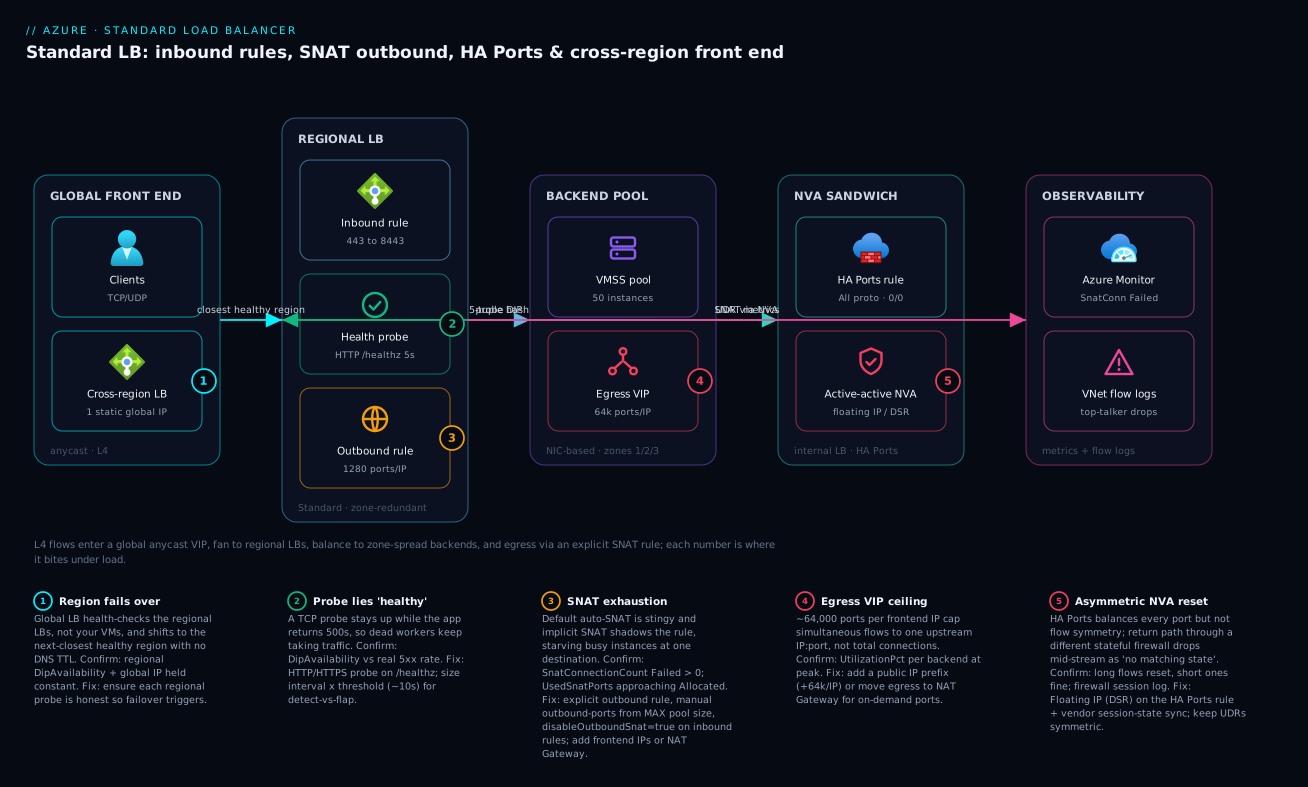
The diagram traces an L4 flow as it actually moves and maps each failure class onto the exact hop where it bites. Read it left to right. Clients hit a single static anycast IP on the cross-region (Global) LB, which steers them to the closest healthy region — badge 1 marks the failover decision, which works only because the global LB consumes each regional LB’s honest health signal (not your VMs directly). Inside the region, the regional Standard LB applies an inbound rule (443 to 8443), runs a health probe (badge 2 — a TCP probe here would lie “healthy” while the app 500s), and governs egress through an explicit outbound rule (badge 3 — where implicit SNAT shadowing and stingy auto-allocation cause exhaustion). The rule hashes each flow by 5-tuple onto the NIC-based backend pool, a VMSS spread across zones 1/2/3; outbound flows leave via the egress VIP (badge 4 — the ~64,000-ports-per-IP ceiling counts simultaneous flows to one destination, not total connections).
Branching off the backend path is the NVA sandwich: spoke traffic is forced by UDR through an internal LB with an HA Ports rule (protocol All, ports 0/0) in front of an active-active firewall pool. Badge 5 sits on the stateful appliance — HA Ports balances every port but not flow symmetry, so without Floating IP (DSR) and vendor session-state sync, return packets land on a different firewall and long flows reset mid-stream. Finally, every hop reports into Azure Monitor and VNet flow logs — the only visibility an access-log-less L4 device gives you. The five numbered legend entries narrate each badge as symptom · confirm · fix; that is the whole diagnostic method: localise the symptom to a hop, read the cause, run the named metric/command, apply the fix.
Real-world scenario
Meridian Pay, a fictional but representative payments platform, ran an active-active NGFW firewall sandwich in their hub VNet: an internal Standard LB in front of three firewall VMs, an HA Ports rule, and all spoke traffic forced through it via UDRs. The fleet was a 50-instance VMSS of payment workers behind a separate public Standard LB, fronted by a single outbound public IP, in Central India. It passed every lab and functional test. Monthly LB-and-egress spend was about ₹14,000. Two separate incidents, two weeks apart, taught the team the two hardest lessons of this device.
Incident one — the firewall sandwich resets. In production, long-lived database and gRPC connections reset randomly after a few minutes while short HTTP calls were fine, and the firewall logs showed sessions with “no matching state.” The constraint was classic stateful-inspection asymmetry. HA Ports hashes flows across the three firewalls by 5-tuple, but the return-path UDRs sent reply packets back through a different firewall than the forward path. The second appliance saw a mid-stream packet for a session it never created and dropped it. Short flows finished inside one hash window; long flows lived long enough to hit a state mismatch on a reconvergence or probe-driven rebalance. The fix had two parts: enable the vendor’s session-state synchronization across the cluster so any appliance can handle any packet of a flow, and enable Floating IP (Direct Server Return) on the HA Ports rule so appliances see the original VIP and routing stays symmetric per the vendor design. They also pointed the probe at a real data-plane liveness URL, not just a listening port.
# HA Ports rule with Floating IP enabled for the stateful NVA sandwich.
az network lb rule create \
  --resource-group rg-hub --lb-name lb-nva-internal \
  --name rule-haports \
  --protocol All --frontend-port 0 --backend-port 0 \
  --frontend-ip-name fe-nva --backend-pool-name bep-nva \
  --probe-name probe-nva-dataplane \
  --floating-ip true \
  --enable-tcp-reset true --idle-timeout 30
The mid-stream resets stopped on the first cutover.
Incident two — SNAT exhaustion during a sale. Three weeks later, a flash sale drove the 50-instance fleet to peak, and the payment-provider callout (a single upstream VIP) started timing out intermittently — ~9% of charges failing. The on-call reflex was to scale the VMSS out, which helped marginally and cost money. The real read came from the metric: SnatConnectionCount with a non-zero Failed dimension, and UsedSnatPorts pinned at AllocatedSnatPorts on the busiest instances. With one frontend IP across 50 instances the outbound rule had auto-allocated a stingy port count, and every flow targeted the same payment VIP, so the ~64,000-ports-per-IP-per-destination ceiling was the wall. Two coupled bugs again: a per-request connection pattern in the worker, and a single outbound IP with no headroom. The night-of fix: set the outbound rule to an explicit --outbound-ports 1280, set disableOutboundSnat=true on the inbound rule to stop implicit shadowing, and add a second outbound public IP to double the budget. The following week they fixed the worker to reuse connections and moved egress to a NAT Gateway for on-demand ports independent of instance count.
The next sale ran at full load with zero failed SNAT, charge success returned to 100%, and they moved the VMSS back down to its baseline size at ₹13,500 — lower than before. The two lessons on the wall: “HA Ports gives you all-port load balancing, not flow symmetry — that is your routing’s job,” and “SNAT is per-destination; one busy upstream exhausts you no matter how few total connections you think you have.” The incidents as a timeline, because the order of moves is the lesson:
| Time | Symptom | Action taken | Effect | What it should have been |
|---|---|---|---|---|
| Wk1 | Long flows reset, short ones fine | Restart firewalls | Brief relief, recurs | Ask: is the path symmetric? |
| Wk1 | “no matching state” in FW log | Read FW session log | Asymmetry identified | The breakthrough |
| Wk1 | Root cause found | Floating IP + vendor state sync + dataplane probe | Resets stop | Correct fix |
| Wk3 | 9% charge timeouts at peak | Scale VMSS out | Marginal, costs money | Don’t scale to mask |
| Wk3 | Still failing | Read SnatConnectionCount (Failed) |
Exhaustion confirmed | This was the read |
| Wk3 | Mitigated | Explicit ports + disableOutboundSnat + 2nd IP |
Failures clear | Correct night-of fix |
| +1wk | Fixed | Connection reuse + NAT Gateway; scale back down | 0 SNAT fails, ₹13,500 | The actual fix is code + egress design |
Advantages and disadvantages
The pass-through L4 model both enables these designs and creates their failure modes. Weigh it honestly:
| Advantages (why this model helps you) | Disadvantages (why it bites) |
|---|---|
| Zero added latency — pure 5-tuple rewrite, no termination | No access log; you diagnose from metrics + flow logs only |
| Protocol-agnostic — balances any TCP/UDP, not just HTTP | No L7 features — no path routing, WAF, or TLS termination |
| Outbound rules give deterministic, allow-listable SNAT | Pre-carved ports cap pool size; the maths is unforgiving |
| HA Ports balances every port for NVAs with one rule | HA Ports gives no flow symmetry — stateful NVAs need extra engineering |
| Zone-redundant frontend survives single-zone loss | Only real if backends are zone-spread too — easy to fake HA |
| Cross-region LB = one static IP, DNS-free regional failover | L4 only; HTTP global routing still needs Front Door |
| Secure by default — no implicit internet exposure | Egress is opt-in; forget it and backends go dark |
| First-class SNAT/health metrics you can alert on | Finite SNAT (~64k/IP/destination) is invisible until you hit it under load |
The model is right when you need a fast, protocol-agnostic L4 front end, controlled egress, or NVA HA. It bites hardest on chatty outbound workloads to few destinations (SNAT), stateful NVA sandwiches (symmetry), and anyone who assumes a zone-redundant frontend alone means HA. The disadvantages are all manageable — but only if you know they exist, which is the point of this article. Where you need L7, reach for Application Gateway instead.
Hands-on lab
Stand up a regional Standard LB with a zone-redundant frontend, a NIC-based pool, an explicit outbound rule, and an HTTP probe — then prove the egress IP is deterministic and the drain works. Free-tier-friendly except the two B1s VMs and the public IPs (a few rupees an hour; delete at the end). Run in Cloud Shell (Bash).
Step 1 — Variables and resource group.
RG=rg-lb-lab
LOC=centralindia
az group create -n $RG -l $LOC -o table
Step 2 — VNet, subnet, and two zone-spread backend VMs.
az network vnet create -g $RG -n vnet-lab --address-prefix 10.0.0.0/16 \
  --subnet-name snet-app --subnet-prefix 10.0.1.0/24 -o table

for i in 1 2; do
  az vm create -g $RG -n vm-app-$i --image Ubuntu2204 --size Standard_B1s \
    --vnet-name vnet-lab --subnet snet-app --zone $i \
    --public-ip-address "" --admin-username azureuser --generate-ssh-keys -o table
done
Expected: two VMs, vm-app-1 in zone 1 and vm-app-2 in zone 2, neither with a public IP (egress will come from the LB).
Step 3 — Zone-redundant public frontend and the Standard LB.
az network public-ip create -g $RG -n pip-lb-fe \
  --sku Standard --allocation-method Static --zone 1 2 3 -o table

az network lb create -g $RG -n lb-lab --sku Standard \
  --public-ip-address pip-lb-fe --frontend-ip-name fe-public \
  --backend-pool-name bep-app -o table
Expected: a Standard LB with frontend fe-public and an empty pool bep-app.
Step 4 — HTTP probe, load-balancing rule (implicit SNAT disabled), and explicit outbound rule.
az network lb probe create -g $RG --lb-name lb-lab -n probe-app \
  --protocol Http --port 80 --path / --interval 5 --probe-threshold 2

az network lb rule create -g $RG --lb-name lb-lab -n rule-http \
  --protocol Tcp --frontend-port 80 --backend-port 80 \
  --frontend-ip-name fe-public --backend-pool-name bep-app \
  --probe-name probe-app --idle-timeout 15 --enable-tcp-reset true \
  --disable-outbound-snat true

az network lb outbound-rule create -g $RG --lb-name lb-lab -n obr-app \
  --frontend-ip-configs fe-public --address-pool bep-app \
  --protocol All --idle-timeout 15 --enable-tcp-reset true --outbound-ports 1280
Expected: disableOutboundSnat: true on the LB rule and an outbound rule allocating 1280 ports.
Step 5 — Add the NICs to the pool and install a tiny web server on each VM.
for i in 1 2; do
  NIC=$(az vm show -g $RG -n vm-app-$i --query "networkProfile.networkInterfaces[0].id" -o tsv)
  IPCFG=$(az network nic show --ids $NIC --query "ipConfigurations[0].name" -o tsv)
  az network nic ip-config address-pool add --nic-name $(basename $NIC) -g $RG \
    --ip-config-name $IPCFG --lb-name lb-lab --address-pool bep-app
  az vm run-command invoke -g $RG -n vm-app-$i --command-id RunShellScript \
    --scripts "sudo apt-get update -y && sudo apt-get install -y nginx && echo vm-app-$i | sudo tee /var/www/html/index.html"
done
Step 6 — Verify inbound balancing and the deterministic egress IP.
LBIP=$(az network public-ip show -g $RG -n pip-lb-fe --query ipAddress -o tsv)
for i in $(seq 1 10); do curl -s http://$LBIP/; done   # alternates vm-app-1 / vm-app-2

# Egress determinism: from inside a backend, the source IP must be pip-lb-fe.
az vm run-command invoke -g $RG -n vm-app-1 --command-id RunShellScript \
  --scripts "curl -s https://api.ipify.org"
echo "Compare the returned IP to:"; echo $LBIP
Expected: the curl loop alternates between vm-app-1 and vm-app-2; the egress check returns the LB’s frontend IP — proof the outbound rule is the egress path.
Step 7 — Prove graceful drain. Stop nginx on one VM, watch it leave rotation after interval × threshold (~10s), confirm the other keeps serving:
az vm run-command invoke -g $RG -n vm-app-1 --command-id RunShellScript \
  --scripts "sudo systemctl stop nginx"
sleep 15
for i in $(seq 1 10); do curl -s http://$LBIP/; done   # now only vm-app-2
az network lb show -g $RG -n lb-lab --query "probes[0].{proto:protocol,interval:intervalInSeconds,threshold:numberOfProbes}" -o jsonc
Expected: after ~10-15s, every response is vm-app-2 — the probe pulled the stopped instance without killing the survivor.
Validation checklist — what each step proved:
| Step | What you did | What it proves | Real-world analogue |
|---|---|---|---|
| 2 | Zone-spread VMs, no public IP | Backends span zones; egress is LB-provided | The HA + secure-by-default model |
| 4 | disable-outbound-snat true + outbound rule |
Explicit SNAT, no implicit shadowing | The incident-proof egress config |
| 6 | curl loop + ipify from inside | Inbound balances; egress is deterministic | “Which IP do partners allow-list?” |
| 7 | Stop nginx, watch drain | Probe pulls dead nodes, keeps survivors | Zero-downtime deploy drain |
Cleanup (avoid lingering charges):
az group delete -n $RG --yes --no-wait
Cost note. Two B1s VMs plus two Standard public IPs run a few rupees per hour; an hour of this lab is well under ₹60, and deleting the resource group stops everything. Standard public IPs and the LB carry a small hourly charge even idle, so do not leave the lab running.
Common mistakes & troubleshooting
This is the playbook — the part you bookmark. An L4 LB emits no HTTP status codes, so the “error reference” is the set of connection-level outcomes and metric/health states you read instead. Learn to map each to what the LB is actually doing:
| Observed outcome | What it means at L4 | Likely cause | How to confirm | First move |
|---|---|---|---|---|
| Connection refused (RST on connect) | No healthy backend on that port | All instances unhealthy / wrong rule port | DipAvailability 0%; rule port vs listener |
Fix probe/listener; check rule mapping |
| Connection times out (no SYN-ACK) | VIP/datapath issue or NSG block | VipAvailability drop, or NSG denies |
VipAvailability metric; NSG effective rules |
Allow AzureLoadBalancer tag; check region health |
| Outbound connect fails under load | SNAT port exhaustion | Per-destination 5-tuple ceiling | SnatConnectionCount Failed > 0 |
Add IP / NAT Gateway; reuse connections |
| Mid-stream RST after minutes (idle) | Idle timeout reclaimed the flow | Idle timeout < flow idle gap | Flow dies at the timeout boundary | App keepalives; raise idle timeout |
| Mid-stream RST after minutes (NVA) | Stateful asymmetry dropped it | Return path on a different firewall | FW log “no matching state” | Floating IP + state sync |
| Backend “Up” but app errors | Probe proves socket, not app | TCP probe on a 500-ing app | DipAvailability 100% vs 5xx |
HTTP/HTTPS /healthz probe |
| New flows stop, old ones continue | Graceful drain in progress | Probe failed / instance removed | DipAvailability dropped on that instance |
Expected; finish the drain sequence |
| Global VIP serves a dead region | Regional probe reports healthy | Dishonest regional probe | Cross-region backend health “Up” | Make the regional probe real |
Now the symptom → cause → confirm → fix table you read mid-incident, then the entries that bite hardest in detail.
| # | Symptom | Root cause | Confirm (exact cmd / portal path) | Fix |
|---|---|---|---|---|
| 1 | Intermittent outbound timeouts under load, fine at rest | SNAT port exhaustion to one destination | SnatConnectionCount (Failed) > 0; UsedSnatPorts ≈ AllocatedSnatPorts |
Explicit outbound rule; more frontend IPs; NAT Gateway; reuse connections |
| 2 | Exhaustion despite an outbound rule; ports unpredictable | Implicit SNAT from the inbound rule shadowing it | LB rule shows disableOutboundSnat: false |
Set disableOutboundSnat=true on every LB rule |
| 3 | Backends “healthy” but users get 500/502 | TCP probe on an app that 500s (wedged-but-listening) | Probe protocol: Tcp; DipAvailability 100% while 5xx high |
Switch to HTTP/HTTPS probe on /healthz |
| 4 | Long-lived flows reset after minutes; short ones fine | Asymmetric routing through stateful NVAs | Firewall log “no matching state”; pattern is long-only | Floating IP (DSR) + vendor state sync; symmetric UDRs |
| 5 | New backends can’t reach the internet | Standard is secure-by-default; no egress configured | No outbound rule / NAT GW; effective routes lack default | Add an outbound rule or NAT Gateway |
| 6 | Region goes down but the global IP keeps sending traffic | Regional LB still reports healthy (probe lies) | Cross-region LB backend health “Up”; regional DipAvailability not 0 |
Make the regional probe honest (HTTP /healthz) |
| 7 | Mid-idle drops on long-lived connections | Idle timeout too short, no keepalives | Flows die at the idle-timeout boundary | App keepalives; raise idleTimeoutInMinutes; enableTcpReset |
| 8 | Scaling out the pool silently starves ports | outbound-ports computed for today, not max |
New instances get fewer ports than needed | Compute ports from maximum pool size, not current |
| 9 | A NSG/UDR change breaks all protocols at once | HA Ports = no per-port blast radius | One subnet change; everything fails together | Treat NVA subnet as prod-critical; test failover |
| 10 | IP-based pool: outbound rule won’t apply | IP-based pools don’t support outbound rules | Pool is IP-based; rule rejected/ineffective | Use a NIC-based pool, or NAT Gateway for egress |
| 11 | HA Ports rule rejected on a public LB | HA Ports is internal-LB only | LB frontend is public | Use an internal LB for the HA Ports rule |
| 12 | Basic→Standard migration breaks egress/zones | Basic features don’t map 1:1 | Still on Basic; retires 30 Sep 2025 | Plan a Standard migration (PIP SKU, outbound, zones) |
The expanded form for the entries that cost the most time:
1. Intermittent outbound timeouts under load, fine at rest.
Root cause: SNAT port exhaustion, almost always many flows to one destination IP:port (the per-destination 5-tuple ceiling, not total connections).
Confirm: SnatConnectionCount with a non-zero Failed dimension under load; UsedSnatPorts pinned at AllocatedSnatPorts on the busy instances.
az monitor metrics list \
  --resource $(az network lb show -g $RG -n lb-app-prod --query id -o tsv) \
  --metric SnatConnectionCount --filter "ConnectionState eq 'Failed'" \
  --interval PT1M --aggregation Total -o table
Fix: Reuse outbound connections (shared client, keepalives); allocate ports explicitly against max pool size; add frontend IPs or a public IP prefix (+64k each); or move egress to a NAT Gateway. Scaling out is a band-aid.
2. Exhaustion despite an outbound rule; port use is unpredictable.
Root cause: The load-balancing rule is providing implicit SNAT alongside your explicit outbound rule — two overlapping behaviors.
Confirm: az network lb rule show ... --query disableOutboundSnat returns false.
Fix: Set disableOutboundSnat=true on every load-balancing rule so egress is governed only by the outbound rule.
3. Backends report healthy but users get 500/502.
Root cause: A TCP probe keeps a wedged-but-listening process in rotation; the socket is open, the app is broken.
Confirm: Probe protocol is Tcp; DipAvailability shows 100% while your app’s 5xx rate is high.
Fix: Switch to an HTTP/HTTPS probe against a real /healthz that exercises the app, not just the socket.
4. Long-lived flows reset after a few minutes; short flows are fine. Root cause: Asymmetric routing through a stateful NVA sandwich — the return packet traverses a different firewall than the forward packet. Confirm: Firewall session log shows “no matching state”; the failure is exclusively long flows (DB, gRPC), never short HTTP. Fix: Enable Floating IP (DSR) on the HA Ports rule, enable the vendor’s session-state sync, and keep UDRs symmetric. Point the probe at a data-plane liveness URL.
5. New backends can’t reach the internet. Root cause: Standard is secure by default — being in a pool grants no egress; nobody added an explicit path. Confirm: No outbound rule and no NAT Gateway on the subnet; effective routes lack an internet default via a managed egress. Fix: Add an outbound rule (NIC-based pool) or a NAT Gateway on the subnet.
6. A region is down but the global IP keeps sending traffic there.
Root cause: The regional probe is dishonest — a TCP probe (or / that always 200s) keeps the regional LB “healthy,” so the cross-region LB never fails it over.
Confirm: Cross-region LB backend health shows the region “Up” while it’s clearly degraded; regional DipAvailability isn’t dropping.
Fix: Make the regional probe a true health check; global failover quality is exactly your regional probe quality.
And the fast triage table — match the signal you have to the likely cause and the immediate move, before you even open the playbook:
| If you see… | It’s probably… | Do this |
|---|---|---|
SnatConnectionCount Failed climbing under load |
Per-destination SNAT exhaustion | Add a frontend IP now; plan NAT Gateway + connection reuse |
UsedSnatPorts ≈ AllocatedSnatPorts, Failed still 0 |
About to exhaust | Raise outbound-ports / add an IP before it fails |
| Exhaustion with an outbound rule present | Implicit SNAT shadowing | Set disableOutboundSnat=true on the LB rule |
DipAvailability 100% but users get 5xx |
TCP probe lying healthy | Switch probe to HTTP/HTTPS /healthz |
DipAvailability flapping on a slow node |
Probe too tight | Raise interval × threshold |
| Only long flows reset, short ones fine | Asymmetric stateful NVA | Floating IP (DSR) + vendor state sync |
| New VMs have no internet | Secure-by-default, no egress | Add outbound rule or NAT Gateway |
| Global IP won’t fail a dead region over | Regional probe dishonest | Make regional /healthz real |
VipAvailability < 100% |
Datapath/frontend degraded | Check region health; open a support case |
| Outbound rule “won’t apply” | IP-based pool | Convert to NIC-based pool |
| HA Ports rule rejected | Public LB (internal-only feature) | Move HA Ports to an internal LB |
| Mid-idle drops at a fixed interval | Idle timeout / no keepalives | App keepalives; raise timeout; enableTcpReset |
Best practices
- Confirm everything is Standard SKU end to end. Basic LB retires 30 September 2025 — no zones, no outbound rules, no HA Ports, no cross-region. Migration is the first task, not an optimization.
- Spread backends across availability zones and keep the frontend zone-redundant unless a zonal pin is specifically justified. A zone-redundant frontend over a single-zone pool is not HA.
- Use a NIC-based backend pool if you need LB outbound rules; IP-based pools cannot do outbound SNAT.
- Provide outbound explicitly — a dedicated outbound rule with manual
outbound-ports, or a NAT Gateway. Never rely on implicit/default SNAT. - Compute
allocated_outbound_portsfrom your maximum pool size, not today’s count, and add frontend IPs (or a public IP prefix) to grow the 64k-per-IP budget. - Set
disableOutboundSnat = trueon inbound rules so they don’t shadow the explicit outbound rule. - For NVA HA, use an internal LB with an HA Ports rule (
protocol All, ports 0/0) and engineer symmetric routing (Floating IP / DSR and/or vendor state sync). - Prefer HTTP/HTTPS
/healthzprobes over TCP; sizeinterval × probe_thresholdfor your detection-vs-flapping trade-off. - Build a drain step into deploys: fail the probe, wait
interval × threshold, let in-flight flows close, then recycle. - For a global static IP with regional failover on L4, front regional LBs with a cross-region LB; use Front Door for global L7.
- Alert on
SnatConnectionCount(Failed) > 0 and dashboardUsedSnatPorts/AllocatedSnatPorts,DipAvailability, andVipAvailability. - Add VNet flow logs + Traffic Analytics on backend subnets for the flow visibility an L4 LB does not log itself.
- Load-test to peak with zero failed SNAT, and rehearse a regional failover with the global IP held constant.
Security notes
- Secure by default is a feature — keep it. Standard LB grants no inbound or outbound exposure implicitly. Provide outbound through a controlled path (outbound rule or NAT Gateway) so egress IPs are known and allow-listable, not random.
- NSGs still gate the data plane. The LB forwards; the NSG on the backend NIC/subnet decides what’s allowed. Restrict inbound to the LB’s expected ports and the AzureLoadBalancer service tag for probes; never open the whole subnet. See Azure Virtual Network, Subnets and NSGs.
- Allow-list egress at the destination. A deterministic outbound IP (or public IP prefix) is what a partner whitelists. Use a prefix so you can scale within a stable CIDR rather than adding loose IPs the partner must re-approve.
- HA Ports has no per-port blast radius. Because one rule governs every port, an NSG or UDR mistake on the NVA subnet exposes or breaks all protocols at once. Treat that subnet as the most sensitive in the hub; review changes like production code.
- Internal LBs for east-west. Keep service-to-service and NVA traffic on internal (private) frontends so it never touches a public IP; reserve public frontends for genuine internet ingress.
- Probe endpoints reveal nothing. A
/healthzreturns a status, not internal topology, versions, or dependency hostnames — it’s reachable from the platform and should not leak a system map. - Pair with a WAF where the protocol is HTTP. Standard LB does no inspection; if you need request filtering, front it with Application Gateway WAF — L4 balancing and L7 inspection are different jobs.
Cost & sizing
Standard LB has no instance size to choose — the cost model is rule-count and processed data, plus the public IPs and any NAT Gateway you attach for egress. The drivers and how they interact with the design:
- Rules and data. Standard LB bills a small hourly charge for the first set of rules and a per-rule charge beyond it, plus a per-GB data processed charge. A handful of rules is rupees per day; the data charge scales with throughput.
- Public IPs. Each Standard public IP carries a small hourly charge. Adding IPs to grow the SNAT budget is cheap insurance against exhaustion — far cheaper than failed transactions during a sale — but they’re not free; size to need.
- NAT Gateway (the better egress path at scale) adds an hourly + per-GB charge. It usually replaces multiple outbound IPs and the port-carving headache, and is the right call once you’re fighting the 64k maths.
- Cross-region LB adds the global tier’s data-processing charge on top of the regional LBs it fronts; you still pay for each regional LB underneath.
- Zone-redundancy is free; cross-zone data has a tiny per-GB cost that is irrelevant next to the resilience it buys.
A rough monthly picture for a mid-size regional deployment in INR:
| Cost driver | What you pay for | Rough INR / month | What it buys | Watch-out |
|---|---|---|---|---|
| Standard LB (rules + base) | Hourly + first rules | ~₹1,500-2,500 | The LB itself | Per-rule charge beyond the base set |
| Data processed | Per-GB through the LB | ~₹0.4-0.5 / GB | Throughput | Scales with traffic; can dominate at high GB |
| Standard public IP (each) | Hourly per IP | ~₹300-400 / IP | +64k SNAT ports each | Don’t over-provision idle IPs |
| NAT Gateway | Hourly + per-GB | ~₹1,500-3,000 | On-demand SNAT, deterministic egress | Zonal; one per zone for AZ coverage |
| Cross-region LB | Global data processing | ~₹1,000-2,500 | One static IP + DNS-free failover | On top of the regional LBs |
| VNet flow logs + Traffic Analytics | Storage + ingestion | ~₹1,000-3,000 | The visibility L4 lacks | Sample/retain sensibly |
| Public IP prefix (/28) | Hourly per IP in the block | ~₹4,500-6,000 (16 IPs) | Allow-listable, stable egress CIDR | Pay for the whole block even if idle |
| Additional LB rules (beyond base) | Per-rule hourly | ~₹100-200 / rule | Extra VIPs/ports | Adds up on rule-heavy LBs |
| Cross-zone data transfer | Per-GB inter-zone | ~₹0.1 / GB | Zone resilience | Negligible vs the resilience |
The sizing rule in one line: pick the minimum outbound IPs (or a NAT Gateway) that keeps UsedSnatPorts comfortably below AllocatedSnatPorts at peak, run zone-spread backends behind a zone-redundant frontend, and only add the cross-region tier when you genuinely need a single global IP. Meridian Pay landed at ₹13,500/month after fixing connection reuse and moving to NAT Gateway — lower than the ₹14,000 they paid while broken, proof the fix is usually design, not a bigger bill.
Interview & exam questions
1. What does an outbound rule do that implicit SNAT does not, and why does it matter? An outbound rule lets you explicitly allocate SNAT ports per instance, pick the outbound frontend IP(s), set the idle timeout, and enable TCP reset — deterministic, plannable egress. Implicit SNAT (from a load-balancing rule) auto-allocates a stingy port count and is non-deterministic. You also set disableOutboundSnat=true on the LB rule so the two don’t overlap. It matters because deterministic egress is the difference between a planned 64k budget and a 2 a.m. exhaustion incident.
2. Why can an app with only 5,000 outbound connections still exhaust SNAT? Because SNAT ports are keyed on the full destination 5-tuple — the limit is ~64,000 simultaneous flows to the same destination IP:port per frontend public IP, not 64,000 total. If all 5,000 connections target one upstream and the app opens a fresh connection per request without reuse, the per-destination pressure builds far past what the raw count suggests.
3. What is an HA Ports rule, and what does it deliberately not solve? An HA Ports rule (protocol All, frontend/backend port 0, internal LB only) load-balances every port and protocol at once — built for NVAs whose port set you can’t enumerate. It does not guarantee flow symmetry: a stateful firewall needs the return packet on the same appliance, and HA Ports hashes directions independently. You add Floating IP (DSR) and vendor session-state sync to get symmetry.
4. Your backends show 100% healthy but users get 502s. Most likely cause? A TCP health probe on an app that is wedged-but-listening — the socket is open so the probe passes, but the app returns 500/502 to real requests. Confirm via DipAvailability at 100% while the 5xx rate is high; fix by switching to an HTTP/HTTPS probe against a real /healthz.
5. Difference between NIC-based and IP-based backend pools, and the constraint that decides it? NIC-based pools attach VM/VMSS NIC ipConfigurations; IP-based pools list raw private IPs. The decisive constraint: IP-based pools cannot use outbound rules. If you need LB-provided SNAT, you must use a NIC-based pool (or provide egress via NAT Gateway).
6. How does the cross-region (Global) LB decide health and where does its failover quality come from? It health-checks the regional load balancers, not your VMs directly — consuming each regional LB’s own probe signal. So global failover quality is exactly your regional probe quality: an honest regional /healthz probe means clean failover; a TCP-or-/ probe that always passes means the region never fails over even when it’s down.
7. Why is a zone-redundant frontend not enough for HA on its own? Because a zone-redundant frontend only guarantees the VIP survives a zone loss. If the backends are pinned to a single zone, losing that zone takes the app down regardless. HA requires both a zone-redundant (or appropriately zonal) frontend and zone-spread backends.
8. What is the implicit-SNAT trap and how do you avoid it? A load-balancing rule silently provides implicit outbound SNAT alongside any explicit outbound rule unless disabled, producing two overlapping behaviors and unpredictable port use. Avoid it by setting disableOutboundSnat=true on every load-balancing rule, so egress is governed solely by the explicit outbound rule.
9. A firewall sandwich resets long-lived connections but not short ones. Diagnose and fix. Classic asymmetric routing through stateful NVAs — return packets traverse a different appliance than the forward path, which has no session state, so it drops mid-stream packets. Short flows finish inside one hash window; long flows hit a rebalance. Fix with Floating IP (DSR) + vendor session-state sync and symmetric UDRs; point the probe at a data-plane liveness URL.
10. Which metric is the canary for SNAT exhaustion, and what do you alert on? SnatConnectionCount split by ConnectionState — alert on the Failed dimension > 0 sustained over ~5 minutes. Dashboard UsedSnatPorts against AllocatedSnatPorts per backend (alert at ~80% utilization) so you act with headroom before failures begin.
11. When do you pick cross-region LB over Front Door or Traffic Manager? Cross-region LB when you need a single static anycast IP for any TCP/UDP protocol with DNS-free, seconds-fast regional failover. Front Door is HTTP-only (no static IP, but L7 + WAF + edge TLS); Traffic Manager is DNS/TTL-bound (minutes to fail over, any protocol at the DNS level but no single IP).
12. How do you grow the SNAT budget without code changes, and what’s the better long-term fix? Add frontend public IPs (or a public IP prefix) — each adds ~64,000 ports — and re-compute outbound-ports against max pool size. The better long-term fix is connection reuse in the app (cuts outbound connections drastically) and, at scale, a NAT Gateway that allocates ports on demand independent of instance count.
These map to AZ-700 (Network Engineer) — design and implement load balancing and network connectivity — most directly, with the egress/SNAT and NVA topics squarely in scope; AZ-104 (Administrator) — configure load balancing, probes, and rules; and the resilience/active-active design angle touches AZ-305 (Solutions Architect). A compact cert-mapping for revision:
| Question theme | Primary cert | Exam objective area |
|---|---|---|
| Outbound rules, SNAT maths, NAT Gateway | AZ-700 | Design & implement network connectivity / load balancing |
| HA Ports, firewall sandwich, symmetry | AZ-700 | Implement load balancing; secure connectivity |
| Probes, rules, NIC vs IP pools | AZ-104 | Configure load balancing |
| Zone-redundant vs zonal frontend/backends | AZ-104 / AZ-305 | Resilience & availability |
| Cross-region LB vs Front Door vs Traffic Manager | AZ-700 / AZ-305 | Global routing & multi-region design |
| SNAT/DipAvailability metrics & alerting | AZ-104 / AZ-700 | Monitor & troubleshoot networking |
Quick check
- An app opens ~3,000 outbound connections, all to a single payment API, with a new connection per request, and you start seeing timeouts under load. Which limit are you hitting and what’s the metric that proves it?
- You configured an explicit outbound rule but still see unpredictable port use and exhaustion. What single property did you forget, and on which rule?
- True or false: a zone-redundant frontend in front of a single-zone VMSS gives you high availability.
- Your firewall sandwich resets long-lived gRPC and DB connections but short HTTP calls are fine. What’s the root cause and the two fixes?
- You need one static IP for a UDP service with automatic failover across two regions. Which Azure load balancer, and why not Front Door?
Answers
- SNAT port exhaustion against the per-destination 5-tuple ceiling (~64,000 simultaneous flows to the same destination IP:port per frontend public IP). The proof is
SnatConnectionCountwith a non-zero Failed dimension (andUsedSnatPorts≈AllocatedSnatPorts). The total connection count being modest is irrelevant — they all target one destination. disableOutboundSnat=trueon the load-balancing rule. Without it, the inbound rule silently provides implicit SNAT alongside your explicit outbound rule, giving two overlapping behaviors and unpredictable port use.- False. Zone-redundancy on the frontend only protects the VIP. If the backends are in one zone, losing that zone takes the app down. HA needs zone-spread backends too.
- Asymmetric routing through the stateful NVAs — return packets land on a different appliance with no session state and get dropped mid-stream. Fixes: Floating IP (Direct Server Return) on the HA Ports rule and the vendor’s session-state synchronization (plus symmetric UDRs).
- The cross-region (Global) Load Balancer — it gives a single static anycast IP for any TCP/UDP protocol with DNS-free regional failover. Front Door is HTTP-only and provides no static IP, so it cannot serve a UDP service.
Glossary
- Standard Load Balancer — a pass-through, zero-added-latency Layer-4 device that rewrites the 5-tuple and forwards packets; zone-aware, with outbound rules and HA Ports. The default Azure LB SKU (Basic retires 30 Sep 2025).
- Frontend IP configuration — the VIP traffic enters on; public or internal, zonal or zone-redundant. Each public IP adds ~64,000 SNAT ports.
- Backend pool — the set of targets; NIC-based (VM/VMSS NIC, supports outbound rules) or IP-based (raw private IPs, no outbound rules).
- Load-balancing rule — maps a frontend port to a backend port across the whole pool; provides implicit SNAT unless
disableOutboundSnatis set. - Inbound NAT rule — maps a single frontend port to a single backend instance (e.g. SSH/RDP to one VM).
- Health probe — defines “healthy” via TCP (port open), HTTP, or HTTPS (returns 200); detection time ≈
interval × probe_threshold. - Outbound rule — explicit egress with manual SNAT port allocation, a chosen outbound IP, idle timeout, and TCP reset — the deterministic-egress control.
- SNAT (Source NAT) port — one outbound 5-tuple translation entry; the limit is ~64,000 simultaneous flows to one destination IP:port per frontend public IP.
disableOutboundSnat— a load-balancing-rule flag that turns off implicit SNAT so egress is governed only by the explicit outbound rule.- HA Ports rule — a load-balancing rule with protocol All and ports 0/0 (internal LB only) that balances every port and protocol at once, for NVA pools.
- Floating IP (Direct Server Return / DSR) — makes the backend see the original VIP and keeps routing symmetric; required for stateful NVA correctness.
- Firewall sandwich — an external/internal LB pair around an active-active NVA pool, HA Ports on the internal side; needs flow symmetry to work.
- Zone-redundant frontend — a VIP served from all availability zones, surviving a single-zone loss (only “HA” if backends are zone-spread too).
- Cross-region (Global) Load Balancer — a global anycast VIP whose backend pool is regional Standard LBs; one static IP, DNS-free regional failover, L4 only.
- DipAvailability — the Health Probe Status metric: percent of probes succeeding per backend; the health/drain signal.
- VipAvailability — the Data Path Availability metric: whether the frontend datapath itself is up.
SnatConnectionCount— established SNAT flows split byConnectionState; a rising Failed count is the canary for port exhaustion.- Graceful drain — the LB stops new flows to an unhealthy/removed instance but lets established flows finish; sequenced into deploys, not a setting.
Next steps
You can now engineer Standard LB end to end — deterministic SNAT, HA Ports symmetry, honest probes, and a global front end — and diagnose any of its failure modes. Build outward:
- Next: Diagnosing and Killing SNAT Port Exhaustion on Cloud NAT Gateways — the other egress path, and usually the better one at scale.
- Related: Deploying HA Third-Party NVAs in Azure: The Load Balancer Sandwich Pattern — the full firewall-sandwich topology behind the HA Ports section.
- Related: Azure Load Balancer vs Application Gateway: Picking the Right Traffic Manager — when you need L7 instead of L4.
- Related: Anycast at the Edge: Global Accelerator-Style TCP/UDP Routing for Latency and Failover — the edge-anycast variant of the cross-region front end.
- Related: Azure Multi-Region Active-Active Architecture: Designing for Zero-Downtime — where the cross-region LB fits in a full active-active design.
- Related: Diagnosing Azure VNet Connectivity: NSGs, UDRs, Effective Routes & Network Watcher — the routing tools that confirm symmetry and egress paths.