Someone on your team just deployed a storage account with public network access wide open. Nobody meant to — it was the default, and they were in a hurry. The question that decides everything that happens next is: did anything catch it? An Azure Policy could have. But whether that policy blocked the deployment, let it through and logged it for a report, quietly added the secure setting for them, or deployed the fix an hour later depends entirely on one word in the policy definition: its effect. Pick the wrong effect and your policy is either useless (it audits a problem nobody reads) or dangerous (it denies a deployment and breaks every pipeline in the tenant at 2pm on a Friday).
This article decodes the four effects you reach for in practice — Deny, Audit, Modify, and DeployIfNotExists (DINE for short). Forget the JSON for a moment; the hard part of Azure Policy is not writing rules, it is choosing what should happen when a rule matches. Deny and Audit answer “what do I do about a new deployment that’s wrong?” — stop it, or note it. Modify and DeployIfNotExists answer “how do I fix things?” — Modify edits the request as it comes in, DINE repairs resources that already exist. Get those four mental models straight and the rest of Azure Policy falls into place.
By the end you will be able to look at any governance goal — “no public IPs,” “tag everything with a cost centre,” “force diagnostic logs onto every resource” — and instantly know which effect to use, what it does at deploy time versus on existing resources, and which two effects secretly need a managed identity to do their job. You will also learn the single most common beginner mistake (setting audit and then wondering why nothing ever got fixed) and how to avoid the most dangerous one (rolling out a broad deny with no audit phase first).
What problem this solves
Manual governance is a treadmill. You can review resources, find the public IPs and the missing tags, and fix them by hand on a Friday — but on Monday the report is dirty again, because nothing stopped the next person from making the same mistake. At any real scale you cannot click through every resource in every subscription every week forever. Azure Policy is how you get off that treadmill: you write a rule once, assign it high in the hierarchy, and it governs every deployment beneath it automatically, including the ones that happen while you sleep.
But a policy is only as good as its effect. This is where beginners get stuck. They author a perfectly correct rule — “managed disks must be encrypted” — assign it, see a compliance dashboard, and assume they are protected. They are not, because they used Audit, which reports non-compliance but never prevents or fixes it. The unencrypted disk still deploys. The dashboard turns red. Nobody is watching the dashboard. Six months later an auditor finds the disk and asks why the policy “didn’t work.” It worked exactly as instructed; it was instructed to do nothing but observe.
The flip side is just as painful. A team learns that Deny actually blocks things, gets enthusiastic, and ships a strict deny policy straight to production scope with no warning. The next deployment — a legitimate one — gets rejected with RequestDisallowedByPolicy, the pipeline goes red, and now three teams are blocked while someone figures out which policy fired. Choosing the right effect, and rolling it out in the right order, is the difference between governance that protects you and governance that becomes the outage.
Here is the whole field in one frame — the four questions these effects answer, and what goes wrong if you pick the wrong one:
| Governance goal | The effect to reach for | What it does | If you pick the wrong effect |
|---|---|---|---|
| “Stop bad resources being created” | Deny | Blocks the deployment outright | Used Audit → bad resource still deploys |
| “Just tell me what’s wrong, don’t block” | Audit | Flags non-compliance in a report | Used Deny → broke a legit pipeline |
| “Fix the request as it comes in” | Modify | Adds/changes a property in flight | Used Deny → rejected instead of fixed |
| “Repair resources that already exist” | DeployIfNotExists | Deploys the missing piece after the fact | Used Audit → drift reported, never fixed |
Learning objectives
By the end of this article you can:
- Explain in one sentence each what Deny, Audit, Modify, and DeployIfNotExists do, and when each runs (at deploy time vs. on existing resources).
- Pick the right effect for a given governance goal and justify the choice to a teammate or an auditor.
- Describe the evaluation pipeline — request → policy match → effect — and where in that pipeline each effect intervenes.
- Identify which two effects (Modify and DINE) require a managed identity with RBAC, and explain why remediation silently fails without it.
- Read an Azure Policy compliance state correctly, including why the dashboard lags by up to ~24 hours and how to trigger an on-demand scan.
- Run a safe rollout: start in Audit, watch compliance, then promote to Deny or wire up remediation.
- Recognise the most common effect-related mistakes and the exact symptom each produces.
Prerequisites & where this fits
You should know the basics of the Azure resource hierarchy — that resources live in resource groups, which live in subscriptions, which can sit under management groups — because policies are assigned at a scope and inherit downward. If that tree is fuzzy, read Azure Resource Hierarchy Explained: Subscriptions, Resource Groups and Resources first. You should be comfortable running az in Cloud Shell and reading JSON output. No prior Azure Policy experience is assumed — that is exactly what this article builds.
This sits at the very front of the Governance & Landing Zones track. It is the on-ramp to the full, production-scale playbook in Azure Policy and Governance at Scale: Enforce the Rules Automatically, which covers every effect (including append, auditIfNotExists, denyAction and disabled), inheritance across a management-group tree, exemptions, and a mid-incident troubleshooting playbook. Think of this article as “learn the four core effects properly”; that one as “run Policy across fifty subscriptions.” Policy is also the enforcement engine underneath an Azure Enterprise-Scale Landing Zone: Foundation for Large Organizations, and it pairs with Azure FinOps and Cost Management: Controlling Cloud Spend at Scale because tag-enforcement policies are what make cost allocation possible.
A quick map of the moving parts you’ll meet, so the later sections don’t surprise you:
| Term | One-line meaning | Why it matters here |
|---|---|---|
| Policy definition | The rule: conditions + an effect | The effect is the part this article decodes |
| Initiative (policy set) | A bundle of definitions assigned together | How real estates ship policies at scale |
| Assignment | A definition applied at a scope | Where the rule actually takes effect |
| Scope | Management group / subscription / RG | Assignments inherit down from here |
| Effect | What happens on a match | Deny, Audit, Modify, DINE, and more |
| Compliance state | Compliant / Non-compliant per resource | The dashboard you read to prove governance |
| Remediation task | The job that applies Modify/DINE to existing resources | Without it, drift is reported, not fixed |
| Managed identity | The identity Modify/DINE act as | No identity + RBAC → remediation no-op |
Core concepts
Five mental models make every effect obvious.
A policy is a rule plus an effect, and the effect is the verb. A policy definition has two halves: a condition (the “if” — if a resource is a storage account and its public network access is enabled) and an effect (the “then” — then deny it / audit it / fix it). Most people obsess over writing the condition. But two policies with the identical condition behave completely differently depending on the effect: one blocks the deployment, another just logs it. The effect is the verb of the sentence; the condition only decides which resources the verb applies to.
Effects split into “gatekeeper” and “janitor.” Two of the four effects act at the front door, as a request comes in: Deny (refuse it) and Modify (let it in but fix it on the way). The other two act on the estate you already have: Audit (walk around and note what’s wrong) and DeployIfNotExists (walk around and fix what’s missing). Some effects, like Audit, do both — they evaluate new requests and existing resources. But framing them as gatekeeper-vs-janitor tells you instantly whether an effect prevents a problem or cleans one up.
Evaluation happens at deploy time AND on a schedule. When you create or update a resource, the Resource Manager runs every applicable policy before committing — this is where Deny can reject and Modify can rewrite. Separately, Azure re-evaluates all existing resources roughly every 24 hours (and on certain changes), which is how Audit and DINE catch resources that were created before the policy existed. So a brand-new deny policy stops new bad resources immediately, but the ones already there don’t vanish — they just get reported (you can’t retroactively “deny” something that already exists; you remediate it instead).
Two effects need an identity to do their work. Audit and Deny only ever observe or block — they never create anything, so they need no permissions. But Modify and DeployIfNotExists actually change resources (Modify edits a property, DINE deploys a whole sub-resource). They can’t act as you; they act as a managed identity attached to the assignment, and that identity needs the right RBAC role. Forget to grant it and remediation fails silently — the dashboard says “non-compliant,” the remediation task says “failed,” and the reason buried in the log is Forbidden. This single gotcha trips up almost everyone the first time.
Compliance is a stored state, not a live query, and it lags. The compliance dashboard doesn’t re-scan your tenant the instant you open it. It reads a stored compliance state that updates on resource changes and on a periodic full scan (up to ~24 hours). So right after you assign a policy, the dashboard may show nothing, or stale numbers. This is not a bug — it’s the scan cadence. When you need a fresh answer, you trigger an on-demand evaluation scan rather than refreshing the page and trusting the number.
The four effects, side by side
This is the table to memorise. Everything else in the article expands one of these rows:
| Effect | Plain-English job | When it acts | Changes resources? | Needs identity? | Catches existing drift? |
|---|---|---|---|---|---|
| Deny | Block the bad deployment | At deploy time (create/update) | No (it refuses) | No | No (only stops new) |
| Audit | Flag non-compliance, don’t block | Deploy time + periodic scan | No (report only) | No | Yes (reports it) |
| Modify | Fix the request in flight | At deploy time; remediate existing | Yes (edits a property) | Yes | Yes (via remediation) |
| DeployIfNotExists | Deploy the missing piece | After deploy; remediate existing | Yes (deploys sub-resource) | Yes | Yes (via remediation) |
A second framing that maps each effect to the question it answers and a canonical example you’ve probably hit:
| The question | Effect | Canonical real-world example |
|---|---|---|
| “Don’t let anyone create X” | Deny | No public IPs on VMs; no storage in non-approved regions |
| “Show me everywhere X is wrong” | Audit | Which VMs lack a backup; which disks aren’t encrypted |
| “Auto-fill the secure setting” | Modify | Add a required tag; set minimumTlsVersion if missing |
| “Bolt on the missing component” | DeployIfNotExists | Send every resource’s logs to a Log Analytics workspace |
Deny: the gatekeeper that says no
Deny is the strictest, most-loved, and most-feared effect. When a resource matches the policy condition, the deployment is rejected before it is created — Resource Manager returns RequestDisallowedByPolicy and names the policy that blocked it. Nothing is created, nothing is changed; the request simply fails. This is true prevention: a noncompliant resource never exists, not even for a second.
Use Deny when “wrong” is genuinely unacceptable: a public endpoint on a sensitive data store, an unencrypted disk in a regulated workload, a resource in a region you’re not licensed for. The value of Deny is that it makes the bad outcome impossible, not just visible. No human has to read a report and react.
The danger is symmetrical. A Deny policy assigned too broadly, or written too strictly, blocks legitimate deployments too. The classic failure: a team adds “deny storage accounts without a CostCenter tag,” forgets that their CI pipeline doesn’t set that tag yet, and every deploy starts failing at 2pm. Because Deny acts at deploy time, the blast radius is every deployment under the assigned scope, immediately.
Here is what Deny does and doesn’t do, at a glance:
| Aspect | Deny behaviour |
|---|---|
| When it fires | Synchronously, at create/update, before the resource exists |
| Effect on the request | Rejected with RequestDisallowedByPolicy (HTTP 403-class) |
| Effect on existing resources | None — it cannot delete or fix what’s already there |
| Identity required | No |
| Typical error the user sees | RequestDisallowedByPolicy. Policy assignment '<name>' disallowed... |
| Safe rollout | Run as Audit first, watch compliance, then flip to Deny |
A minimal “deny storage accounts with public network access” definition, then the assignment:
{
  "if": {
    "allOf": [
      { "field": "type", "equals": "Microsoft.Storage/storageAccounts" },
      { "field": "Microsoft.Storage/storageAccounts/publicNetworkAccess", "equals": "Enabled" }
    ]
  },
  "then": { "effect": "deny" }
}
# Create the definition from a local rule file, then assign it at a resource group
az policy definition create \
  --name "deny-storage-public-access" \
  --display-name "Deny storage accounts with public network access" \
  --rules @deny-storage-public.rules.json \
  --mode All

az policy assignment create \
  --name "deny-storage-public-rg" \
  --policy "deny-storage-public-access" \
  --scope "/subscriptions/<sub-id>/resourceGroups/rg-data-prod"
// Assign a built-in or custom deny definition at a subscription scope
resource denyStoragePublic 'Microsoft.Authorization/policyAssignments@2022-06-01' = {
  name: 'deny-storage-public'
  properties: {
    displayName: 'Deny storage accounts with public network access'
    policyDefinitionId: subscriptionResourceId('Microsoft.Authorization/policyDefinitions', 'deny-storage-public-access')
    enforcementMode: 'Default' // 'DoNotEnforce' = dry-run: evaluates and reports but does NOT block
  }
}
Tip:
enforcementMode: 'DoNotEnforce'is a safety valve. It keeps a Deny policy in “would-have-blocked” mode — you see what it would reject in compliance, without actually rejecting anything. Use it as a final dress rehearsal before going live.
Audit: the observer that never blocks
Audit is the gentlest effect and the one beginners over-trust. When a resource matches, Audit does exactly one thing: it marks the resource Non-compliant in the compliance state and writes an entry to the Activity Log. It does not block the deployment, does not change anything, and does not fix anything. The bad resource is created; a flag is raised; that’s it.
Audit is the right first move for almost every new policy, because it tells you the blast radius before you enforce anything. Assign your future-Deny rule as Audit, wait for a scan, and the dashboard shows you exactly how many existing resources would have been blocked. That number is gold: it’s the list of things you must fix (or exempt) before you can safely turn on Deny without breaking people.
Audit is also the correct permanent choice when you genuinely only want visibility — “I want to know which VMs lack tags for a monthly report, but I’m not ready to enforce.” The trap is using Audit when you actually wanted enforcement, then being surprised that noncompliant resources keep appearing. Audit reports; it never prevents.
| Aspect | Audit behaviour |
|---|---|
| When it fires | At deploy time (logs) and on the periodic compliance scan |
| Effect on the request | None — the deployment succeeds either way |
| Effect on existing resources | Marks them Non-compliant; changes nothing |
| Identity required | No |
| What you get | A compliance number + Activity Log entries to act on |
| Best used as | A staging phase before Deny, or permanent report-only visibility |
# Same rule, but assigned to AUDIT — nothing is blocked, everything is reported
az policy assignment create \
  --name "audit-storage-public-sub" \
  --policy "deny-storage-public-access" \
  --scope "/subscriptions/<sub-id>" \
  --params '{ "effect": { "value": "Audit" } }'   # if the definition parameterises its effect
Many built-in definitions expose the effect as a parameter (so the same definition can be assigned as Audit, Deny, or Disabled). Parameterising the effect is a best practice: it lets you promote a policy from Audit to Deny by changing one assignment value, with no new definition.
Modify: fix the request as it arrives
Modify is the first of the two “fixer” effects. Instead of blocking a noncompliant request (Deny) or merely noting it (Audit), Modify edits the request in flight — it adds, updates, or removes a property before the resource is created. Want every resource to carry an Environment tag? A Modify policy quietly adds it during deployment, even if the user forgot. Want minimumTlsVersion set to 1.2 on storage accounts? Modify sets it.
The key distinction from Deny: Modify says “yes, and I’ll fix it,” whereas Deny says “no.” For settings where the fix is unambiguous and safe to apply automatically — a tag value, a security default — Modify is far friendlier than Deny. Nobody’s pipeline breaks; the resource just comes out compliant.
Modify works on existing resources too, via a remediation task: you run remediation, and the policy applies its operations (add the tag, set the property) to resources that predate the policy. And here is the gotcha that catches everyone: Modify changes resources, so it needs a managed identity with the right RBAC role. The definition declares which role definition IDs the identity needs (e.g. a Contributor-style role to write tags). Assign Modify without granting that role and remediation fails with Forbidden, silently.
| Aspect | Modify behaviour |
|---|---|
| When it fires | At deploy time (alters the request) and on remediation for existing resources |
| What it changes | Adds / replaces / removes a specific property or tag |
| Effect on the request | Succeeds, but with the property added/changed |
| Identity required | Yes — managed identity + the roleDefinitionIds the definition declares |
| Typical use | Enforce tags, set secure defaults (minimumTlsVersion, HTTPS-only) |
| Failure if mis-wired | Remediation task fails Forbidden; resource stays non-compliant |
A Modify rule that adds an Environment=Production tag if it’s missing, plus the assignment with an identity:
{
  "if": { "field": "tags['Environment']", "exists": "false" },
  "then": {
    "effect": "modify",
    "details": {
      "roleDefinitionIds": [
        "/providers/Microsoft.Authorization/roleDefinitions/b24988ac-6180-42a0-ab88-20f7382dd24c"
      ],
      "operations": [
        { "operation": "add", "field": "tags['Environment']", "value": "Production" }
      ]
    }
  }
}
# Modify needs an identity. --mi-system-assigned creates one; --location is required for it.
az policy assignment create \
  --name "modify-add-env-tag" \
  --policy "modify-add-env-tag-def" \
  --scope "/subscriptions/<sub-id>/resourceGroups/rg-app-prod" \
  --mi-system-assigned --location eastus

# Then remediate EXISTING resources that lack the tag
az policy remediation create \
  --name "remediate-env-tag" \
  --policy-assignment "modify-add-env-tag" \
  --resource-group "rg-app-prod"
The roleDefinitionIds in the rule and the --mi-system-assigned identity on the assignment are two halves of one mechanism: the definition says what role is needed, the assignment provides the identity to hold it. Azure grants that role to the identity over the assignment scope when you use the portal “remediate” flow; in IaC you grant it explicitly.
DeployIfNotExists: bolt on what’s missing
DeployIfNotExists (DINE) is the most powerful effect and the one that feels like magic. Where Modify edits a property of the resource being created, DINE deploys a whole separate resource or sub-resource when a related thing is missing. The canonical example: “every resource must send its diagnostic logs to a Log Analytics workspace.” When a resource is created without that diagnostic setting, DINE deploys the diagnostic setting for it. You don’t write the setting on every resource; the policy does, forever, automatically.
DINE checks a condition (“does a diagnostic setting pointing at workspace X exist?”) and, if not, runs an embedded ARM/Bicep deployment to create it. It runs after the resource is created (asynchronously), and it remediates existing resources via a remediation task, just like Modify. This is how landing zones force monitoring, backup, and Defender onto an entire estate from a handful of policies.
DINE has the same identity requirement as Modify — it deploys resources, so it needs a managed identity with enough RBAC to perform that deployment (often a broader role, since it’s creating resources, sometimes across resource types). It’s also the effect most prone to the silent-Forbidden failure, because the deployment it runs can touch a workspace in another resource group, so the identity may need roles in two places.
| Aspect | DeployIfNotExists behaviour |
|---|---|
| When it fires | After create/update (async) and on remediation for existing resources |
| What it does | Runs an embedded deployment to create the missing related resource |
| Versus Modify | Modify edits a property; DINE deploys a whole resource/sub-resource |
| Identity required | Yes — managed identity + roleDefinitionIds (often broader; may span RGs) |
| Classic use | Diagnostic settings → Log Analytics; enable Backup; deploy Defender |
| Common failure | Remediation Forbidden, or existenceCondition written wrong → loops/no-op |
# A DINE assignment also needs an identity. Then remediate existing resources.
az policy assignment create \
  --name "dine-diag-to-law" \
  --policy "deploy-diag-settings-to-law" \
  --scope "/subscriptions/<sub-id>" \
  --mi-system-assigned --location eastus \
  --params '{ "logAnalytics": { "value": "/subscriptions/<sub-id>/resourceGroups/rg-monitor/providers/Microsoft.OperationalInsights/workspaces/law-central" } }'

# Kick off remediation for everything already deployed
az policy remediation create \
  --name "remediate-diag" \
  --policy-assignment "dine-diag-to-law"
// Grant the assignment's identity the role its DINE definition declares, at the right scope
resource dineRole 'Microsoft.Authorization/roleAssignments@2022-04-01' = {
  name: guid(subscription().id, 'dine-diag', 'monitoring-contributor')
  properties: {
    // Monitoring Contributor — enough to create diagnostic settings
    roleDefinitionId: subscriptionResourceId('Microsoft.Authorization/roleDefinitions', '749f88d5-cbae-40b8-bcfc-e573ddc772fa')
    principalId: dineAssignment.identity.principalId
    principalType: 'ServicePrincipal'
  }
}
The two fixer effects, side by side, so you never confuse them:
| Modify | DeployIfNotExists | |
|---|---|---|
| Scope of change | A property/tag on the resource itself | A separate resource or sub-resource |
| Timing | Synchronous, during the request | Asynchronous, after the resource exists |
| Typical target | Tags, minimumTlsVersion, HTTPS-only |
Diagnostic settings, Backup, Defender |
| Identity / RBAC | Yes — usually a narrow write role | Yes — often broader, may span RGs |
| Mental model | “Tweak the thing being made” | “Build the missing companion” |
Reading compliance without chasing a stale number
Once a policy is assigned, you check whether it’s working by reading compliance state — but you have to read it correctly or you’ll waste an afternoon. Each resource gets a state: Compliant (passes), Non-compliant (matches a Deny/Audit condition it shouldn’t), Conflict (two policies disagree), Exempt (a tracked waiver), or Not started / unknown (not yet evaluated).
The thing to internalise: this state is stored, and it lags. Azure updates it when resources change and on a full background scan that runs roughly every 24 hours. So right after you assign a policy, an empty or stale dashboard is normal — it doesn’t mean the policy failed. When you need an answer now, trigger an on-demand scan and wait for it, rather than refreshing the portal and trusting whatever number is cached.
| Compliance state | What it means | What to do |
|---|---|---|
| Compliant | Resource passes the policy | Nothing |
| Non-compliant | Resource matches a “bad” condition | Fix it, remediate, or exempt it |
| Conflict | Two assignments give contradictory effects | Resolve overlap; check scopes |
| Exempt | Covered by a tracked, expiring exemption | Review at expiry |
| Not started / Unknown | Not yet evaluated (scan pending) | Wait, or trigger an on-demand scan |
# Read compliance for an assignment (per-resource states)
az policy state list \
  --resource-group "rg-data-prod" \
  --filter "PolicyAssignmentName eq 'deny-storage-public-rg'" \
  --query "[].{res:resourceId, state:complianceState}" -o table

# Don't trust a stale dashboard — trigger an on-demand evaluation and wait for it
az policy state trigger-scan --resource-group "rg-data-prod"
Architecture at a glance
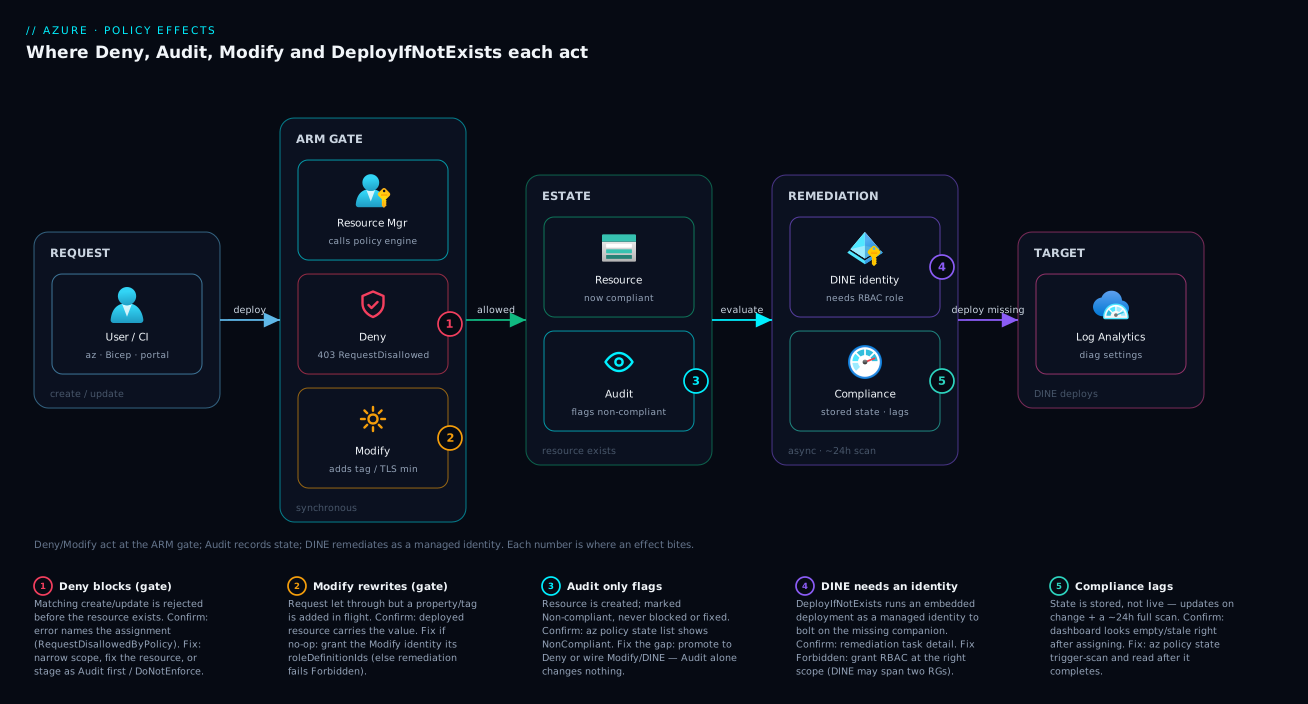
Picture a single deployment travelling left to right and meeting policy at three checkpoints. A user or pipeline sends a create/update request to Azure Resource Manager (ARM) — the one front door every deployment goes through. ARM consults the policy engine, which checks the request against every assignment inherited from the management group → subscription → resource group scope above it. This is the synchronous gate: if a Deny policy matches, ARM rejects the request right here with RequestDisallowedByPolicy and nothing is created. If a Modify policy matches, ARM lets the request through but rewrites it first — adding the tag, setting the secure property — so the resource that lands is already compliant.
Once the resource exists, the path continues to the asynchronous and scheduled side. Audit records the resource’s compliance state (it never blocked anything, it just notes pass/fail) into the compliance store you read on the dashboard. DeployIfNotExists wakes up after creation, checks whether a required companion (say, a diagnostic setting pointing at a Log Analytics workspace) exists, and if not, acts as its managed identity to run an embedded deployment that creates it — the “janitor” repairing drift. The same managed-identity-driven remediation is what fixes resources that existed before the policy, swept up by the periodic ~24-hour scan. Follow the diagram from the request on the left, through the ARM gate where Deny and Modify intervene, to the compliance store and the DINE remediation loop on the right, and you can see exactly where each of the four effects does its work — and why two of them (Modify, DINE) need an identity while the other two (Deny, Audit) don’t.
Real-world scenario
Northwind Retail runs about 40 subscriptions under a single management group, handing dev and prod subscriptions to product teams. A PCI audit gave them three findings: storage accounts with public network access, resources with no CostCenter tag (so finance couldn’t do showback), and resources whose logs weren’t reaching the central Log Analytics workspace (so security had blind spots). The platform team had exactly the four effects in this article to fix all three — and the order they applied them in is the whole lesson.
For public storage access, “wrong” was unacceptable: this was the PCI finding. They wanted Deny. But they did not ship Deny first. They assigned the rule as Audit at the management group, waited a day for the scan, and found 17 existing storage accounts that would have been blocked — including two that legitimately needed a private-endpoint exception. They fixed 15, wrote tracked exemptions for the 2, and only then flipped the assignment’s effect parameter from Audit to Deny. Result: zero broken pipelines, and from that day no public-access storage account could be created tenant-wide. Had they led with Deny, those 17 would have surfaced as 17 failed deployments across product teams on day one.
For the missing CostCenter tag, blocking deployments would have been hostile — teams shouldn’t have a deploy rejected over a tag. This was a textbook Modify case: a policy that adds a default CostCenter=unallocated tag when it’s missing, so nothing breaks and finance at least sees a value. They wired the assignment with a system-assigned managed identity and granted it a tag-writing role, then ran a remediation task to backfill the tag onto thousands of existing resources. The first remediation run failed Forbidden — they’d assigned the identity but forgotten to grant the role at the management-group scope. Granting it fixed the run in minutes. Within a day, every resource carried a CostCenter, and teams that wanted accurate showback overrode unallocated with their real code.
For diagnostic logs, the fix wasn’t a property — it was a whole missing diagnostic setting per resource. That’s DeployIfNotExists. They assigned a DINE policy targeting the central workspace and gave its identity a monitoring role — needing roles in two resource groups, because the deployment wrote settings on resources in one place pointing at a workspace in another — then remediated. New resources now get their diagnostic setting automatically; remediation swept up the old ones, with nobody touching 40 subscriptions by hand. Three findings, four effects, one rollout principle: Audit first, then enforce or remediate — and always check the identity before blaming the policy.
Advantages and disadvantages
The four effects are a toolkit, and each tool is the wrong choice somewhere. The trade-offs:
| Effect | Advantages | Disadvantages |
|---|---|---|
| Deny | True prevention; bad resource never exists; no human in the loop | Blocks legit deploys if too broad; can’t fix existing; needs careful rollout |
| Audit | Zero risk; reveals blast radius; permanent visibility | Fixes nothing; useless if nobody reads the dashboard; false sense of safety |
| Modify | Friendly auto-fix; no broken pipelines; remediates drift | Needs identity + RBAC; silent Forbidden if mis-wired; only edits properties |
| DINE | Bolts on whole components estate-wide; powers landing zones | Most complex; broadest RBAC; async (not instant); existenceCondition is easy to get wrong |
When each matters: reach for Deny when non-compliance is a security or compliance breach and there’s no safe auto-fix — a public data endpoint, an unencrypted disk in a regulated workload. Reach for Audit any time you’re about to enforce something new (use it as the staging phase) or when you genuinely only need a report. Reach for Modify when the fix is a small, safe, unambiguous property change — a tag, a TLS minimum — and you’d rather help than block. Reach for DINE when the missing thing is an entire companion resource you want everywhere — diagnostics, backup, Defender — and you accept the identity/RBAC complexity in exchange for never wiring it by hand again.
Hands-on lab
This lab uses a free-tier-friendly flow: you’ll assign a built-in Audit policy to a resource group, create a noncompliant resource, watch it show up as non-compliant, then promote the policy to Deny and watch the next deployment get blocked. Assignments and compliance evaluation cost nothing.
1. Set up a sandbox resource group.
az group create --name rg-policy-lab --location eastus
2. Find a built-in definition whose effect is parameterised. The built-in “Storage accounts should disable public network access” is ideal — it supports Audit, Deny, and Disabled.
az policy definition list \
  --query "[?contains(displayName, 'public network access') && policyType=='BuiltIn'].{name:name, display:displayName}" -o table
3. Assign it as Audit at the resource group. Capture the definition name from step 2 into DEF.
DEF="<built-in-definition-name-from-step-2>"
az policy assignment create \
  --name "lab-audit-storage-public" \
  --policy "$DEF" \
  --scope "$(az group show -n rg-policy-lab --query id -o tsv)" \
  --params '{ "effect": { "value": "Audit" } }'
4. Create a deliberately noncompliant storage account. It should succeed (Audit never blocks).
az storage account create \
  --name "stpolicylab$RANDOM" \
  --resource-group rg-policy-lab \
  --sku Standard_LRS \
  --public-network-access Enabled
5. Trigger an on-demand scan and read compliance. Don’t trust the cached dashboard.
az policy state trigger-scan --resource-group rg-policy-lab
# after it completes:
az policy state list \
  --resource-group rg-policy-lab \
  --query "[].{res:resourceId, state:complianceState}" -o table
You should see your storage account as NonCompliant — created, but flagged.
6. Promote the policy to Deny. Update the same assignment’s effect parameter.
az policy assignment update \
  --name "lab-audit-storage-public" \
  --scope "$(az group show -n rg-policy-lab --query id -o tsv)" \
  --params '{ "effect": { "value": "Deny" } }'
7. Try to create another public storage account. This time it should fail with RequestDisallowedByPolicy.
az storage account create \
  --name "stpolicylab$RANDOM" \
  --resource-group rg-policy-lab \
  --sku Standard_LRS \
  --public-network-access Enabled
# Expect: (RequestDisallowedByPolicy) Resource ... was disallowed by policy.
8. Tear down.
az policy assignment delete --name "lab-audit-storage-public" \
  --scope "$(az group show -n rg-policy-lab --query id -o tsv)"
az group delete --name rg-policy-lab --yes --no-wait
You just walked the entire safe-rollout pattern — Audit to see, then Deny to enforce — on real resources, for free.
Common mistakes & troubleshooting
The mistakes here are almost all about the effect or the identity, not the rule’s condition. Match your symptom:
| # | Symptom | Root cause | How to confirm | Fix |
|---|---|---|---|---|
| 1 | “Policy isn’t working” — bad resources keep appearing | Effect is Audit, not Deny | Check the assignment’s effect parameter |
Promote to Deny (after an Audit phase) |
| 2 | Pipelines suddenly fail RequestDisallowedByPolicy |
A Deny assigned too broad/strict | Read the error — it names the policy | Narrow scope, fix the resource, or DoNotEnforce |
| 3 | Remediation task shows Failed | Modify/DINE identity lacks RBAC | Remediation detail → Forbidden |
Grant the roleDefinitionIds at the right scope |
| 4 | Modify/DINE assignment won’t create | No --mi-system-assigned/--location |
az policy assignment show → no identity |
Re-create with a managed identity + location |
| 5 | Dashboard empty right after assigning | Compliance state hasn’t scanned yet | It’s stored + lags ~24h | az policy state trigger-scan; wait |
| 6 | DINE keeps redeploying / never marks compliant | existenceCondition written wrong |
Compliance shows perpetual non-compliant | Fix existenceCondition to match what DINE deploys |
| 7 | Existing bad resources never get fixed | No remediation task was run | No remediation under the assignment | az policy remediation create |
| 8 | A resource shows Conflict | Two assignments give opposite effects | az policy state list → Conflict |
Remove overlap or scope them apart |
| 9 | Deny “didn’t stop” an existing resource | Deny only blocks new deploys | Resource predates the assignment | Remediate or delete it; Deny can’t retroactively block |
| 10 | Effect can’t be changed on an assignment | Definition hard-codes the effect | Definition then.effect is a literal |
Use a definition that parameterises the effect |
The two that cost the most time are #1 (Audit mistaken for enforcement) and #3 (the silent Forbidden). For #3 specifically, the remediation task is the place to look — the assignment looks healthy, the dashboard says non-compliant, and only the remediation detail reveals the identity was never granted its role.
Best practices
- Always start in Audit. Every new Deny or Modify policy ships as Audit first, scans, and only promotes once you’ve seen the blast radius and fixed or exempted the existing offenders.
- Parameterise the effect in your definitions (
Audit/Deny/Disabled) so promotion is a one-value assignment change, not a new definition. - Use
enforcementMode: DoNotEnforceas the final dress rehearsal for a Deny — it shows what would be blocked without blocking. - Wire the identity before you remediate. For Modify and DINE, grant the
roleDefinitionIdsat the correct scope before running remediation, and remember DINE may need roles in more than one resource group. - Assign high, exclude narrow. Put assignments at the management group or subscription so they inherit down; carve out exceptions with scope exclusions or tracked exemptions, not by assigning low everywhere.
- Prefer Modify over Deny for safe, small fixes. If the right value is unambiguous (a tag, a TLS minimum), auto-fixing beats blocking.
- Read compliance after a scan, not before. Treat the dashboard as a stored state that lags; trigger
trigger-scanwhen you need a current answer. - Bundle related policies into an initiative. Real estates assign an initiative (policy set), not dozens of loose definitions, so effects ship and version together.
- Document why each Deny exists. A future engineer hitting
RequestDisallowedByPolicyshould be able to find the rationale fast. - Never deny without an escape hatch. Have a defined exemption process so a legitimate edge case isn’t an outage.
Security notes
Policy effects are a security control, so treat their wiring as security-sensitive. The Modify and DeployIfNotExists managed identities hold real RBAC — grant them the least role that lets remediation succeed (Modify usually needs only a narrow write role for the property it touches; DINE needs whatever its embedded deployment creates, no more). An over-privileged remediation identity is a privilege-escalation path: anyone who can edit the policy definition could, in principle, make that identity do more.
Use Deny as a preventative security guardrail for the things that are breaches if they slip — public network access, missing encryption, disallowed regions — and back it with DINE to force on the security companions you can’t trust people to add: diagnostic settings (so you have an audit trail), Microsoft Defender, and backup. The combination — Deny what’s forbidden, DINE what’s mandatory — is the backbone of a secure landing zone. Keep the identities’ role assignments in IaC and reviewed, never granted ad hoc in the portal and forgotten. For the broader secret-handling picture these policies often enforce, see Azure Key Vault: Secrets, Keys and Certificates Done Right.
Cost & sizing
The good news: Azure Policy itself is free. Definitions, assignments, evaluation, compliance state, and remediation tasks carry no per-policy charge. You can assign hundreds of policies across a tenant and the Policy service line on your bill stays at zero.
What does cost money is what the DINE policies deploy. A “send diagnostic logs to Log Analytics” policy is free to run — but the Log Analytics ingestion and retention it forces onto every resource is billed per GB, so blanket diagnostic-logging across a large estate can become a meaningful bill; scope which logs you collect. Likewise, a DINE policy that enables Backup or Defender turns those paid services on for every in-scope resource — the intended outcome, but size it deliberately.
| What you pay for | Driven by | Rough magnitude |
|---|---|---|
| Azure Policy service | — | Free (definitions, assignments, scans, remediation) |
| Log Analytics ingestion (from DINE diagnostics) | GB of logs ingested | Per-GB; scales with estate + verbosity |
| Backup / Defender (enabled by DINE) | Protected resources / plan | Per-resource or per-plan service pricing |
| Engineering time saved | Policies replacing manual fixes | The real return — hours not spent on drift |
The “sizing” decision for Policy is therefore not about the policies, it’s about being deliberate with the paid services your DINE effects switch on — collect the logs you need, protect what must be protected, and don’t let “deploy if not exists” quietly turn on a six-figure ingestion bill.
Interview & exam questions
These map to AZ-104 (Administrator), AZ-305 (Architect), and AZ-500 (Security).
Q1. What’s the difference between Audit and Deny? Deny blocks a noncompliant deployment before the resource is created (RequestDisallowedByPolicy); Audit lets the deployment succeed but marks the resource non-compliant in the compliance state. Audit observes, Deny prevents.
Q2. Which effects need a managed identity, and why? Modify and DeployIfNotExists, because they change resources — Modify edits a property, DINE deploys a sub-resource. They act as the assignment’s managed identity, which needs the RBAC roles declared in the definition’s roleDefinitionIds. Deny and Audit only block/observe, so they need no identity.
Q3. Difference between Modify and DeployIfNotExists? Modify alters a property or tag on the resource being deployed (synchronously, in the request). DINE deploys a separate resource or sub-resource (asynchronously, after creation) when a required companion is missing — e.g. a diagnostic setting.
Q4. You assigned a Deny policy but old noncompliant resources still exist. Why? Deny only acts at deploy time on new create/update requests; it cannot retroactively block or delete resources that already exist. Those are reported as non-compliant and must be remediated or deleted manually.
Q5. Your remediation task fails. What’s the most likely cause? The Modify/DINE managed identity lacks the required RBAC role at the scope it’s remediating — the task fails with Forbidden. Grant the roleDefinitionIds at the correct scope (and remember DINE may need roles in more than one resource group).
Q6. Why does the compliance dashboard show old or empty data right after assigning a policy? Compliance is a stored state that updates on resource change and a periodic full scan (~24h). Right after assigning, it hasn’t scanned yet. Trigger an on-demand evaluation scan for a current result.
Q7. What’s the safe way to roll out a strict Deny policy? Assign it as Audit first, scan, review the blast radius, fix or exempt existing offenders, then promote the effect to Deny — ideally via a parameterised effect so it’s a one-value change. enforcementMode: DoNotEnforce is an extra dry-run safety step.
Q8. What does enforcementMode: DoNotEnforce do? It evaluates the policy and reports what would happen but does not actually enforce the effect — a Deny in this mode reports would-be blocks without blocking anything. A dress rehearsal before going live.
Q9. Where do policy assignments take effect, and how does inheritance work? At the assigned scope (management group, subscription, or resource group) and everything beneath it — assignments inherit downward. Assigning at a management group governs all child subscriptions at once.
Q10. Give one good use of each of the four effects, and say which is billable. Deny: block public network access on storage. Audit: report which VMs lack backup. Modify: add a missing CostCenter tag. DINE: deploy a diagnostic setting that sends logs to a central Log Analytics workspace. Azure Policy itself is free — costs come from what DINE deploys (Log Analytics ingestion, Backup, Defender).
Quick check
- Which two effects change resources (rather than just block or report), and what does each need as a result?
- A bad resource was created and the dashboard flagged it but never blocked or fixed it. Which effect was used?
- You want every resource to send logs to a central Log Analytics workspace, deploying the diagnostic setting automatically. Which effect?
- Why might a freshly assigned policy show an empty compliance dashboard, and how do you get a current answer?
- What is the recommended order for rolling out a strict Deny policy safely?
Answers
- Modify and DeployIfNotExists. Because they change resources, each needs a managed identity with the RBAC roles its definition declares (
roleDefinitionIds); otherwise remediation failsForbidden. - Audit — it marks resources non-compliant and logs them but never blocks creation or fixes anything.
- DeployIfNotExists (DINE) — it runs an embedded deployment to create the missing diagnostic setting, and remediates existing resources too.
- Compliance is a stored state that lags (updates on change and a ~24-hour full scan), so it may not have evaluated yet. Trigger an on-demand scan (
az policy state trigger-scan) and read the result after it completes. - Audit first (see the blast radius), fix or exempt existing offenders, then promote to Deny — ideally via a parameterised effect, with
enforcementMode: DoNotEnforceas an optional dry run.
Glossary
- Azure Policy — the Azure-native governance engine that evaluates resources against rules and applies an effect when they match.
- Effect — what a policy does on a match: Deny, Audit, Modify, DeployIfNotExists, and others (
append,auditIfNotExists,denyAction,disabled,manual). - Deny — effect that blocks a noncompliant deployment before the resource is created (
RequestDisallowedByPolicy). - Audit — effect that marks a resource non-compliant and logs it, but never blocks or fixes it.
- Modify — effect that adds, updates, or removes a property/tag on the resource being deployed; needs a managed identity.
- DeployIfNotExists (DINE) — effect that deploys a missing related resource (e.g. a diagnostic setting) after creation; needs a managed identity.
- Policy definition — the rule itself: a condition plus an effect.
- Initiative (policy set) — a bundle of definitions assigned and versioned together.
- Assignment — a definition applied at a scope, where it actually takes effect.
- Scope — the management group, subscription, or resource group an assignment targets; assignments inherit downward.
- Compliance state — the stored Compliant/Non-compliant/Conflict/Exempt status per resource, updated on change and a periodic scan.
- Remediation task — the job that applies Modify or DINE to existing resources.
- Managed identity — the identity Modify/DINE act as; without the right RBAC it fails
Forbidden. roleDefinitionIds— the RBAC roles a Modify/DINE definition declares its identity needs.enforcementMode—Default(enforce) vsDoNotEnforce(evaluate and report only — a dry run).- Exemption — a tracked, expiring waiver that excuses a resource from a policy with a reason.
Next steps
- Go deep on the full effect set, inheritance, exemptions, and a mid-incident playbook in Azure Policy and Governance at Scale: Enforce the Rules Automatically.
- See where policy assignments live in a real org in Azure Enterprise-Scale Landing Zone: Foundation for Large Organizations.
- Understand the hierarchy your assignments inherit through in Azure Resource Hierarchy Explained: Subscriptions, Resource Groups and Resources.
- Use tag-enforcement policies to power cost allocation in Azure FinOps and Cost Management: Controlling Cloud Spend at Scale.
- Wire the central workspace your DINE diagnostic policies target in Azure Monitor and Application Insights: Full-Stack Observability.