Almost every cloud breach you read about is, at heart, an argument nobody had. A storage container left open to the internet, a database with a blank admin password, a virtual machine missing six months of patches — and afterwards two teams each insisting the other was supposed to handle it. Microsoft assumed you would lock the door; you assumed the cloud locked it for you. The door stayed open. The Azure shared responsibility model is the contract that settles that argument in advance: a precise, public division of security duties between Microsoft (the cloud provider) and you (the customer), drawn differently for each kind of service you consume.
The core idea is simple and never changes: Microsoft secures the cloud; you secure what you put in it. Microsoft guarantees the physical datacenters, host hypervisors, global network backbone and platform services are built and run securely. You remain responsible for your data, who can access it, how your apps are configured, and your accounts and identities. What does change — and where almost everyone gets confused — is the boundary between those two halves. Run a virtual machine (IaaS) and you own the OS, patching and firewall rules; run a managed database (PaaS) and Microsoft patches the engine but you still own the data, logins and firewall; use Microsoft 365 (SaaS) and Microsoft runs almost everything — yet your data and user identities are still yours to protect. The further “up the stack” you go, the more Microsoft handles, but the line never reaches the top.
This article gives you the mental model that prevents the open-door breach: the exact split for IaaS, PaaS and SaaS; the duties that are always yours no matter what (your data, identities and access decisions); how to read any new Azure service and know instantly which side each task falls on; and the real misconfigurations — public Storage containers, internet-exposed VMs, over-shared SharePoint files — that come straight from misreading the model. It underpins every Azure security decision you make, and it is examinable: the model appears on AZ-900 and SC-900, and we map the questions at the end.
What problem this solves
Without a shared responsibility model, every security task lives in a grey zone. “Who patches the database?” “Who turns on encryption?” “Whose job is the firewall?” On-premises the answer was always “us” — your team owned the building, servers, network and software, top to bottom. The cloud breaks that assumption deliberately: you hand large chunks of work to Microsoft so you can move faster. But if nobody writes down which chunks, the handoff creates gaps — and gaps in security are exactly where breaches live.
The failure is rarely a clever attacker defeating strong defenses. Far more often it is a task that fell into the gap because each side thought the other had it: a VM with RDP (3389) opened to the whole internet “just for now” on the assumption Azure’s firewall protects it — but network security groups are the customer’s job on IaaS; a Storage container left at public blob access because “it’s in Azure, it’s private by default” — but the container’s access level is the customer’s; a managed SQL database with no firewall rule and an admin password set once and forgotten because “Microsoft handles security” — true for the engine and disks, but who can connect and with what credentials was always theirs.
Who hits this: everyone, but hardest the teams new to cloud or moving fast. Developers assume the platform is secure-by-default in ways it is not; ops teams from the on-premises world don’t realise how much Microsoft now handles — and how much they’ve stopped doing is still required. The model gives every side one agreed map: read it correctly and the open-door breaches simply don’t happen, because someone always knew the door was theirs to close.
Learning objectives
By the end of this article you can:
- Explain the shared responsibility model in one sentence and state the principle that never changes — Microsoft secures the cloud, you secure what’s in it.
- Draw the responsibility boundary for on-premises, IaaS, PaaS and SaaS and explain exactly how the line shifts as you move up the stack.
- Name the duties that are always the customer’s regardless of service type — your data, your identities and accounts, and your access decisions — and why Azure can never own them for you.
- Map a real Azure service (a VM, App Service, SQL Database, Storage, Microsoft 365) to the correct side of the line, task by task.
- Spot the classic misconfigurations that come from misreading the model — public Storage containers, internet-exposed VMs, missing database firewall rules, over-shared SaaS files — and state who owned the missed control.
- Use the model to evaluate any new Azure service: identify whether it’s IaaS, PaaS or SaaS and infer your responsibilities before you read a single doc.
- Answer AZ-900 and SC-900 exam questions on the shared responsibility model and the responsibilities that are always retained by the customer.
Prerequisites & where this fits
You need very little to follow this. A general sense of what “the cloud” is — renting computing from a provider’s datacenter instead of running your own — is enough. It helps to have heard of a virtual machine (a computer you rent in the cloud), a database, and Microsoft 365, because we use them as the running examples. No coding is required; the az CLI and Bicep snippets just show where a responsibility is configured, and you can skim them on a first read.
This is foundational — the model sits under almost every other Azure topic, telling you which security tasks are even yours before you learn how to do them. It pairs with Azure Resource Hierarchy Explained and Azure Subscriptions Explained: Types, Billing & Boundaries, where your half is organised. Once you know a duty is yours, the how-to lives in topic articles: secrets in Azure Key Vault: Secrets, Keys & Certificates, networking in Azure Virtual Network: Subnets & NSGs, and governance in Azure Policy: Governance at Scale.
Core concepts
A few mental models make every later decision obvious.
Microsoft secures the cloud; you secure what you put in it. This is the whole model in one line. “The cloud” is everything Microsoft builds and operates so the service can exist: the physical datacenters, the host servers and the hypervisor that isolates one customer’s VM from another’s, the global backbone network, and — for managed services — the platform software itself. “What you put in it” is your data, your applications, your configuration and your accounts. Microsoft makes the platform secureable; only you can decide who gets access to your data and how your app is set up.
The line moves with the service model, but never to the very top. Three cloud service models differ by how much Microsoft manages: IaaS (Infrastructure as a Service) — you rent raw infrastructure (VMs, networks, disks), Microsoft runs the hardware and hypervisor, and you own everything from the OS up; PaaS (Platform as a Service) — you rent a managed platform (a database, a web host), Microsoft runs and patches the OS/runtime/platform, and you own data, config and access; SaaS (Software as a Service) — you use finished software (Microsoft 365, GitHub), Microsoft runs essentially the whole stack, and you own data, users and sharing. Each gets its own deep section below. As you go IaaS → PaaS → SaaS, Microsoft takes on more and you take on less — but three things never cross the line.
Three responsibilities are always yours — at every level. No matter how managed the service, the customer always retains: (1) your data — Azure stores and encrypts it, but its sensitivity, classification and retention are yours, because Azure can’t know a column holds national-ID numbers; (2) your identities and accounts — the users and admin roles in your Microsoft Entra ID tenant and whether they use multi-factor authentication (MFA) and least privilege (Microsoft secures the identity platform; you secure the accounts in it); and (3) your access decisions — who can read, write or administer each resource via Azure RBAC (role-based access control), a business call only you can make. Shorthand: “DIM” — Data, Identity, Mistakes are always yours — including any misconfiguration you make (a public container, an open port).
“Shared” sometimes means genuinely shared, not handed off. A few responsibilities split within a layer. Network controls are the clearest: Microsoft provides the secure backbone and DDoS infrastructure, but you configure the network security groups (NSGs), firewalls and open ports. Patching on IaaS is another: Microsoft patches the host and hypervisor; you patch the guest OS. “Shared” means each side owns a real, non-optional piece — not that you can assume the other has it. (Bold terms are defined in the Glossary at the end.)
How the line moves: on-premises → IaaS → PaaS → SaaS
The single most useful artifact in this topic is the layered ownership chart: each row is a layer of the stack, each column a hosting model, each cell the owner. Read it top to bottom and watch the boundary climb as Microsoft takes on more.
| Layer (bottom = physical) | On-premises | IaaS | PaaS | SaaS |
|---|---|---|---|---|
| Data classification & accountability | You | You | You | You |
| Information & data (the content itself) | You | You | You | You |
| Identities & accounts | You | You | You | You |
| Devices (endpoints) | You | You | You | You |
| Identity & directory infrastructure | You | Shared | Shared | Shared |
| Application logic & configuration | You | You | Shared | Microsoft |
| Network controls (NSG, firewall) | You | You | Shared | Microsoft |
| Operating system | You | You | Microsoft | Microsoft |
| Physical hosts | You | Microsoft | Microsoft | Microsoft |
| Physical network | You | Microsoft | Microsoft | Microsoft |
| Physical datacenter | You | Microsoft | Microsoft | Microsoft |
Two things jump out. The top four rows are always yours — data, identity, accounts and your devices never become Microsoft’s job. The bottom three are always Microsoft’s the moment you use Azure — you’ll never patch a hypervisor or guard a datacenter door. The action is in the middle, where the service model decides the split. Here is that shift as “what just became Microsoft’s job” at each step up:
| Move | What Microsoft takes over | What is still yours |
|---|---|---|
| On-prem → IaaS | Physical building, hosts, hypervisor, physical network | OS, patching, NSG/firewall, app, identity, data |
| IaaS → PaaS | Guest OS, OS patching, runtime, platform software | App config, network rules (shared), identity, data |
| PaaS → SaaS | The application itself, most config, most network | Your data, your users/sharing, your access settings |
| Any → any | (never) physical, hypervisor, backbone are always theirs | (never) data, identity, accountability are always yours |
A common misread treats the move up as “Microsoft now does security.” It does not — it does more of the infrastructure, freeing you to focus higher up on the parts only you can judge: who should access this, how sensitive is it, is it configured to policy.
IaaS: you own the operating system and everything above it
Infrastructure as a Service looks most like the old datacenter: you ask Azure for a VM, a virtual network and some disks, and from there up it is yours. The clearest example is an Azure Virtual Machine. Microsoft owns the datacenter, the hardware, and the hypervisor that isolates your VM from every other customer’s — and keeps host and hypervisor patched. What is yours is the long list that surprises people:
| IaaS task | Owner | Why | How you do it on Azure |
|---|---|---|---|
| Guest OS patching | You | Microsoft patches the host, not what’s inside your VM | Update Manager, or your own tooling |
| Antimalware / endpoint protection | You | It runs inside your OS | Defender for Servers / your AV |
| Firewall & open ports | You | NSGs are customer-configured | NSG rules, Azure Firewall |
| Identity & login to the VM | You | Local accounts / domain join are yours | SSH keys, Entra login, JIT |
| Application & its data | You | Your software, always your data | Deploy + classify + access |
| Backup of the VM | You | Microsoft keeps the platform up, not your data safe | Azure Backup |
The most common IaaS mistake follows directly: opening a management port to the internet. A Windows VM listens for RDP on 3389, Linux for SSH on 22, and the rules around them are your responsibility — Azure will happily let you allow *, and brute-force bots find it within minutes. Confirm what’s exposed and lock it down — your job, not Microsoft’s:
# See exactly which inbound ports your NSG allows, and from where
az network nsg rule list \
  --nsg-name nsg-vm-prod --resource-group rg-prod \
  --query "[?direction=='Inbound'].{name:name, port:destinationPortRange, src:sourceAddressPrefix, access:access}" \
  -o table

# Remove a wide-open RDP rule (replace with Bastion or a tight source range)
az network nsg rule delete \
  --nsg-name nsg-vm-prod --resource-group rg-prod --name allow-rdp-any
In Bicep you make the secure choice the default — no inbound management from the internet:
resource nsgRule 'Microsoft.Network/networkSecurityGroups/securityRules@2023-11-01' = {
  name: 'nsg-vm-prod/deny-rdp-from-internet'
  properties: {
    priority: 100
    direction: 'Inbound'
    access: 'Deny'
    protocol: 'Tcp'
    sourceAddressPrefix: 'Internet'   // your responsibility to set this
    sourcePortRange: '*'
    destinationAddressPrefix: '*'
    destinationPortRange: '3389'
  }
}
The right pattern is to never expose 3389/22 at all — reach VMs through Azure Bastion or just-in-time access — but the point here is who owns the decision: you. Full treatment: Azure Virtual Network: Subnets & NSGs.
PaaS: Microsoft patches the platform, you still own data, access and config
Platform as a Service moves the line up: you rent a capability — a database, a web host, a queue — with the OS, runtime and platform software all managed and patched by Microsoft. Examples: Azure App Service and Azure SQL Database. What Microsoft now owns that it didn’t on IaaS: the guest OS and its patching, the runtime, the VM fleet, platform HA, and infrastructure-level encryption. What is still yours is where “Microsoft handles security” becomes the half-truth that gets databases breached:
| PaaS task | Owner | The trap | How you own it on Azure |
|---|---|---|---|
| The data in the database/app | You | “It’s managed, so it’s safe” — no, it’s yours | Classification, backup retention, access |
| Who can connect (firewall) | You | A new SQL DB can be opened to all Azure or 0.0.0.0 |
Firewall rules / Private Endpoint |
| Login credentials & rotation | You | Default admin password never rotated | Entra auth, Key Vault, strong passwords |
| App config & end-user auth | You (shared) | Secrets in plain config; app left open | Key Vault references; Entra (Easy Auth) |
| Network exposure | You (shared) | Public endpoint left wide open | Access restrictions, Private Endpoint |
| OS / engine patching | Microsoft | (Not yours — this is the part that moved) | Nothing to do |
The signature PaaS mistake is deploying a managed SQL database and assuming “managed” covered access control. The engine is patched and disks encrypted — but who can connect, from where, and with what credentials never left your side. A fresh server with a firewall rule allowing all Azure services and an admin password set once and never rotated is a managed database that is wide open. Tighten the firewall — your responsibility:
# List the server-level firewall rules; watch for 0.0.0.0 or "AllowAllAzure"
az sql server firewall-rule list \
  --server sql-shop-prod --resource-group rg-shop-prod \
  --query "[].{name:name, start:startIpAddress, end:endIpAddress}" -o table

# Remove the dangerous "allow all Azure services" rule (start/end 0.0.0.0)
az sql server firewall-rule delete \
  --server sql-shop-prod --resource-group rg-shop-prod --name AllowAllWindowsAzureIps
Better still, prefer Entra-only auth and a private endpoint so credentials and network are both on your terms — asserted as code:
resource sqlServer 'Microsoft.Sql/servers@2023-08-01-preview' = {
  name: 'sql-shop-prod'
  location: location
  properties: {
    administrators: {
      administratorType: 'ActiveDirectory'
      azureADOnlyAuthentication: true   // your call: no SQL-auth password to leak
      login: 'sql-admins'
      sid: aadAdminGroupObjectId
      principalType: 'Group'
    }
    publicNetworkAccess: 'Disabled'      // your call: reach it via Private Endpoint
  }
}
Microsoft removed a whole category of work from your plate (patching the engine), but every decision about access and data stayed put. For storing credentials safely see Azure Key Vault: Secrets, Keys & Certificates; for public-vs-private connectivity see Azure Private Endpoint vs Service Endpoint.
SaaS: Microsoft runs the software — your data, users and sharing are still yours
Software as a Service is the top of the stack: you don’t manage infrastructure or a platform, you sign in and use finished software. Microsoft 365 is the canonical example, with Dynamics 365 and GitHub; Microsoft runs the application, platform, OS and hardware. It is tempting to conclude “SaaS means I have no security responsibilities” — the most expensive misread of all, because the responsibilities that remain are the ones attackers most want: your data and your users.
| SaaS task | Owner | The trap | How you own it |
|---|---|---|---|
| Your documents, mail, chats | You | “Microsoft hosts it, Microsoft protects it” | Sensitivity labels, DLP, retention |
| User accounts & MFA | You | Users without MFA; shared admin accounts | Entra ID, MFA, conditional access |
| Admin role assignment | You | Too many global admins | Least-privilege roles, PIM |
| Sharing & external access | You | Files shared “anyone with the link” | Sharing policies, guest controls |
| Device access | You | Sign-in from unmanaged devices | Conditional access, device compliance |
| The application, platform & infra | Microsoft | (Not yours — the whole stack below your data) | Nothing to do |
The classic SaaS breach is not a hacked datacenter — it is over-sharing. A user sets a SharePoint file to “anyone with the link,” the link leaks, and confidential data walks out the door; Microsoft kept the service running perfectly, but the sharing decision was the customer’s. Likewise, an account without MFA is phished and the attacker is in your tenant — because securing the accounts (not the identity platform) was yours.
Even in pure SaaS the controls are real and configurable. Tightening external sharing in SharePoint Online (via PowerShell) and enforcing MFA through Entra conditional access are both your responsibility:
# Restrict org-wide external sharing to existing guests only (your control, not Microsoft's)
Set-SPOTenant -SharingCapability ExistingExternalUserSharingOnly
# Require sign-in (no anonymous "anyone with the link") for shared content
Set-SPOTenant -DefaultSharingLinkType Internal
The shape is identical to IaaS and PaaS, just higher up: Microsoft owns a bigger slice, but DIM — your Data, Identities and Mistakes — never moved.
A worked split across four common Azure offerings
Concepts stick when applied. Here are the tasks that actually move across a VM, App Service, SQL Database and Microsoft 365 (physical layers, always Microsoft’s, are omitted). Read any row across to watch one task change hands as the model climbs:
| Security task | VM (IaaS) | App Service (PaaS) | SQL Database (PaaS) | Microsoft 365 (SaaS) |
|---|---|---|---|---|
| OS / engine patching | You | Microsoft | Microsoft | Microsoft |
| Firewall / network rules | You | Shared | You | Microsoft |
| App configuration | You | You | n/a | n/a |
| End-user / login auth | You | You | You | You |
| Access control (RBAC) | You | You | You | You |
| Data classification | You | You | You | You |
| The data itself | You | You | You | You |
| Backup of your data | You | You (shared)* | You (shared)* | You (shared)* |
*On backup: PaaS and SaaS provide platform resilience and point-in-time restore, but retention policy and the decision to protect business data remain yours — Microsoft keeps the service available, not your specific data recoverable to your standards. See Azure Business Continuity & Disaster Recovery: RTO/RPO Fundamentals.
The pattern is unmistakable. OS and engine patching flip to Microsoft on PaaS; network rules flip somewhere in the middle. But the bottom four rows — auth, access, classification, data — never flip at all. Remember the shape of that last block: it is always yours.
Architecture at a glance
The diagram lines up the four hosting models left to right and colours each layer by owner. For on-premises, every layer from the datacenter up to your data is yours. Sweep right and watch the boundary climb: with IaaS the bottom physical layers turn Microsoft-blue while everything from the OS up stays yours; with PaaS the blue rises to swallow the OS and runtime, leaving you app config, network (shared), identities and data; with SaaS almost the whole stack is blue and only the top band stays yours.
Now follow the constant top band across all four columns: data, identities, accounts and access stay yours in every model. That unbroken band is the visual heart of the model — the line climbs as you move right, but never reaches the top. The numbered badges mark where common breaches bite and who owned the missed control — the open port on IaaS, the open SQL firewall on PaaS, the over-shared file / no-MFA account on SaaS — and the legend ties each to its symptom, confirmation and fix, all on the customer’s side.
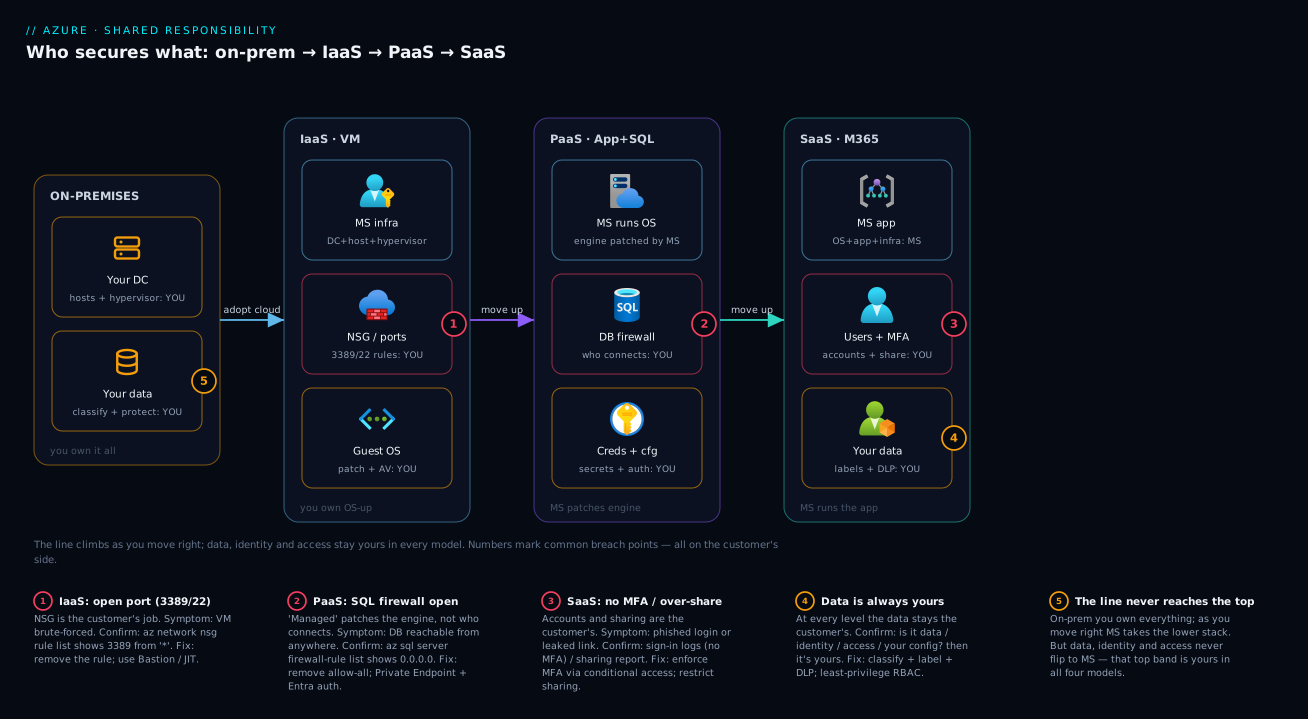
This picture is worth memorising for AZ-900: examiners love “which responsibility is always retained by the customer,” and the answer is anything in that top band — in every model.
Real-world scenario
Northwind Retail, a mid-sized online retailer (fictional, but the pattern is real), moved three workloads to Azure in a single quarter and met three faces of the same lesson. It ran the storefront on Azure VMs (IaaS), the new mobile-API backend on App Service with Azure SQL Database (PaaS), and the whole company on Microsoft 365 (SaaS) — and each team assumed a different wrong thing about who secured what.
The infrastructure team, comfortable from years on-premises, lifted-and-shifted the storefront VMs and — to debug a migration issue at 1 a.m. — opened RDP (3389) to Any on the VM’s NSG, meaning to close it “tomorrow.” They never did. Because network rules on IaaS are the customer’s, Azure faithfully allowed the traffic, and within three days the VM’s security log showed tens of thousands of failed logins from a botnet. No breach yet — the password was strong — but it was a brute-force away. The open port was theirs to close.
The application team built the mobile API fast and trusted that “Azure SQL is a managed, secure database.” It was — patched, encrypted, highly available. But to ship quickly they enabled the “Allow Azure services” firewall rule and pasted a SQL admin password into the app’s config. Access control and credentials on PaaS never left their side. A review found 0.0.0.0-0.0.0.0 plus the password in a config file, and the team realised “managed” had covered the engine, not who could reach it — then moved to Entra-only auth, a private endpoint and Key Vault references.
The biggest surprise came from Microsoft 365, where the team thought there was nothing to secure. A sales manager shared a quarterly forecast in SharePoint as “anyone with the link”; it was forwarded twice into a competitor’s inbox. Microsoft’s service performed flawlessly — the sharing decision and the data were the customer’s, exactly as the model says. Northwind’s response: a tenant sharing policy of “existing guests only,” DLP for Confidential documents, and MFA on every account via conditional access.
The post-incident review fit on one slide — the shared responsibility model. Every gap had been on Northwind’s side, knowable in advance, and not one needed a clever attacker. After mapping each workload explicitly (IaaS → own OS-up; PaaS → own data/access; SaaS → own data/identity/sharing), the grey zones — and the incidents — disappeared.
Advantages and disadvantages
The shared responsibility model is not a feature you turn on — it is the structure cloud security takes. Still, understanding and using it deliberately has clear upsides and real failure modes:
| Advantages of internalising the model | Disadvantages / risks if mishandled |
|---|---|
| Removes the grey zones where breaches live | Easy to misread which side a task is on |
| Lets you offload real work to Microsoft (patching, hardware) | Tempting to over-trust “managed” = “secure” |
| Scales your security focus to what only you can judge | New services need re-evaluation each time |
| Gives teams one shared vocabulary for audits | Split (shared) layers cause “I thought you had it” gaps |
| Directly examinable — clarity pays on AZ-900/SC-900 | Different SaaS vendors draw the line differently |
| Higher up the stack = less to secure, faster delivery | Higher up ≠ nothing to secure (data/identity remain) |
The upside matters most when you adopt a new service: the model lets you reason about your duties before you deploy, so security is designed in, not bolted on after an incident. The downside bites hardest on the shared layers — network on PaaS, identity everywhere — where both sides quietly assume the other has it. The cure is always the same: name the owner of every task explicitly, in writing, before you ship.
Hands-on lab
This lab is conceptual-but-real: you observe the responsibility line on actual Azure resources using read-only commands that change nothing and cost nothing. All commands run in Azure Cloud Shell (free, in the portal). Note up front that there is no command to patch a host or enter a datacenter — that side is entirely Microsoft’s.
Step 1 — See your IaaS network responsibility. If you have a VM, inspect its NSG inbound rules. Every rule here is a decision you made (or inherited):
az network nsg list --query "[].{name:name, rg:resourceGroup}" -o table
az network nsg rule list --nsg-name <nsg-name> --resource-group <rg> \
  --query "[?direction=='Inbound'].{name:name, port:destinationPortRange, src:sourceAddressPrefix, access:access}" -o table
Look for any rule with src = * or Internet on port 3389/22. That open door is yours.
Step 2 — See your PaaS access responsibility. If you have an Azure SQL server, list its firewall rules and check whether public access is on:
az sql server list --query "[].{name:name, rg:resourceGroup, publicAccess:publicNetworkAccess}" -o table
az sql server firewall-rule list --server <server> --resource-group <rg> \
  --query "[].{name:name, start:startIpAddress, end:endIpAddress}" -o table
A rule of 0.0.0.0-0.0.0.0 (named AllowAllWindowsAzureIps) means all Azure traffic can reach it — your call to keep or remove.
Step 3 — See your identity responsibility. List the role assignments on a resource group. Every assignment is an access decision only you can make:
RG_ID=$(az group show -n <rg> --query id -o tsv)
az role assignment list --scope "$RG_ID" \
  --query "[].{principal:principalName, role:roleDefinitionName}" -o table
Too many Owner/Contributor assignments? That’s a least-privilege gap on your side of the line.
Step 4 — Map it. For each resource you inspected, write one line: service type (IaaS/PaaS/SaaS) → the top three things I own. You now have a per-resource responsibility map — the artifact that prevents grey-zone breaches.
Teardown. Nothing to tear down — every command was read-only, so no resources were created and no charges incurred.
Common mistakes & troubleshooting
The real failure modes from misreading the model — each a symptom, the misread that causes it, how to confirm, and the fix. In every case the missed control was the customer’s.
| # | Symptom | The misread (who assumed wrong) | Confirm with | Fix |
|---|---|---|---|---|
| 1 | VM hammered by brute-force logins | “Azure’s firewall protects my VM” (NSG is yours) | az network nsg rule list shows 3389 from * |
Remove the rule; use Bastion / JIT |
| 2 | Storage data found by search engines | “Storage is private by default” (access level is yours) | az storage account show ... allowBlobPublicAccess |
Disable public blob access; use SAS/RBAC |
| 3 | SQL DB reachable from anywhere | “Managed DB = secure DB” (firewall is yours) | firewall-rule list shows 0.0.0.0 |
Remove allow-all; Private Endpoint |
| 4 | Confidential file leaked from SharePoint | “Microsoft hosts it, so it’s safe” (sharing is yours) | Sharing reports / Get-SPOTenant |
Restrict sharing; sensitivity labels + DLP |
| 5 | Account phished, tenant breached | “Microsoft secures identity” (accounts are yours) | Sign-in logs show no MFA on the user | Enforce MFA via conditional access |
| 6 | Old OS CVE exploited on a VM | “The cloud patches everything” (guest OS is yours) | Update Manager shows pending patches | Patch the guest OS; automate it |
| 7 | Secret leaked from app config | “PaaS config is handled” (your config is yours) | Secret visible in app settings | Move to Key Vault references |
| 8 | Too many global admins in M365 | “Admin is Microsoft’s job” (roles are yours) | Role report shows many global admins | Least privilege; PIM for elevation |
| 9 | “Shared” network control left undone | Both sides assumed the other set it | Trace the NSG/firewall on the PaaS resource | Name an owner explicitly; set the rule |
| 10 | Data deleted, no recovery to standard | “Microsoft backs up my data” (retention is yours) | No backup policy / short retention | Configure backup + retention you need |
A rule of thumb when you’re unsure whose job a misconfiguration was: identify the service model, then ask “is this about data, identity, access, or my own configuration?” — if yes, it’s yours, full stop. Only OS-or-below on PaaS/SaaS, or physical/hypervisor on anything, is Microsoft’s.
Best practices
- Name the model for every workload, in writing. Label each system IaaS/PaaS/SaaS and list the responsibilities it puts on you — grey zones can’t survive being written down.
- Treat the top band as sacred. Data, identities, accounts and access are yours in every model; secure them first and hardest, no matter how “managed” the service is.
- Never assume “managed” means “secured for you.” Managed means Microsoft runs the infrastructure; access and data are still your decision.
- Default to closed. No public Storage containers, no open management ports, no SQL firewall allowing all Azure — make the secure choice the IaC default.
- Enforce MFA on every account. The highest-value control on your side of the line, especially for SaaS, and it costs nothing.
- Apply least privilege with RBAC. Grant the narrowest role that works; review
Owner/Contributorregularly, and enforce it fleet-wide via Azure Policy: Governance at Scale. - Watch the shared layers (network controls on PaaS, identity everywhere) — that’s where “I thought you had it” happens; assign an explicit owner.
- Classify your data. Azure can’t know what’s sensitive; sensitivity labels and DLP turn your data responsibility into enforceable controls.
- Re-evaluate every new service before trusting its defaults — and encode secure defaults in Azure Policy and IaC so the right side of the line is the easy side. Humans forget; policy doesn’t.
Security notes
The model is a security topic, so the guidance above is the heart of it, but a few cross-cutting points:
- Least privilege is always yours. Azure RBAC enforces what you set; it can’t decide that a contractor shouldn’t be Owner. No service model removes this duty.
- Encryption: infrastructure is Microsoft’s, the decision and keys can be yours. Data is encrypted at rest by default (Microsoft-managed keys); whether you need customer-managed keys (CMK) in Key Vault is your call for sensitive workloads.
- Network isolation is yours from IaaS through PaaS. NSGs, Azure Firewall, Private Endpoints and access restrictions are customer-configured. Microsoft secures the backbone; you decide who can reach your resource.
- Identity is the new perimeter — and it’s yours. With so much managed by Microsoft, the account is where attacks land. MFA, conditional access and PIM protect the half of the model only you can hold.
- Logging and detection are shared. Microsoft supplies the telemetry (Activity Log, Defender for Cloud, sign-in logs); acting on it — alerts, response, investigation — is yours.
- Compliance accountability never transfers. Microsoft’s certifications (ISO, SOC, PCI) cover the platform; demonstrating your compliant use of it is yours.
Cost & sizing
The model has no SKU and no line item — understanding it is free. What it changes is where your security spend and effort go:
| Cost dimension | What you actually pay for | Free / no extra cost |
|---|---|---|
| The model itself | Nothing — it’s a contract, not a product | Always free to learn and apply |
| Encryption at rest | Included by default on Azure storage/disks | Microsoft-managed keys: free |
| Customer-managed keys (CMK) | Key Vault operations + management | Optional; only if you need key control |
| MFA / conditional access | Included with most Entra ID plans | Security defaults: free baseline |
| Network controls (NSG) | NSGs are free; Azure Firewall is paid | NSG rules: no charge |
| Defender for Cloud | Free foundational CSPM; paid plans per resource | Free tier covers posture basics |
| Backup / retention | Per-GB + storage redundancy you choose | Short PaaS point-in-time restore often included |
The economic shape: moving up the stack trades capital and labour for service fees. On IaaS you pay (in effort) to patch, harden and back up the OS; on PaaS and SaaS you pay Microsoft to do that and redirect your effort to the high-value parts — data, identity, access — you can’t outsource. The cheapest and most secure default is to turn on the free controls everywhere (Security defaults/MFA, NSGs, default encryption, public access disabled) and pay for the advanced ones (Azure Firewall, CMK, Defender plans) only where the risk justifies it. To keep that spend visible see Azure FinOps & Cost Management at Scale.
Interview & exam questions
These map to AZ-900 (Azure Fundamentals) and SC-900 (Security, Compliance & Identity Fundamentals), where the shared responsibility model is a guaranteed topic.
Q1. State the shared responsibility model in one sentence. Microsoft is responsible for the security of the cloud (datacenters, hosts, hypervisor, backbone and managed platform software); the customer is responsible for security in the cloud (their data, identities, access and configuration). The boundary shifts by service model.
Q2. Which responsibilities are always the customer’s, regardless of service type? Data, identities/accounts, and access decisions (plus the customer’s own configuration). They never transfer to Microsoft — only the customer can classify data, manage their users and decide who gets access.
Q3. How does the line differ between IaaS and PaaS? On IaaS the customer owns the OS and up (patching, antimalware, network rules, app, data). On PaaS Microsoft takes over the OS, runtime and platform patching, leaving the customer the data, access, credentials and (shared) network config.
Q4. On SaaS like Microsoft 365, what does the customer still secure? Their data (via labels, DLP, retention), user accounts and MFA, admin role assignments, and sharing/external-access settings. Microsoft runs the application and all infrastructure.
Q5. Who is responsible for patching the guest operating system of an Azure VM? The customer. Microsoft patches the host and hypervisor; the guest OS inside an IaaS VM is yours (e.g., via Azure Update Manager).
Q6. A Storage account container is publicly readable and data leaked. Whose responsibility was the control? The customer’s. A container’s public-access level is a customer configuration — Azure provides the setting (and lets you disable public access entirely), but the choice is yours.
Q7. Who is responsible for physical security of Azure datacenters? Microsoft, in every service model. Customers never have physical datacenter responsibilities.
Q8. Is encryption at rest the customer’s or Microsoft’s responsibility? Shared. Azure encrypts data at rest by default with Microsoft-managed keys (Microsoft’s infrastructure responsibility), but the customer decides whether to use customer-managed keys and owns those keys if they do.
Q9. Why can’t Microsoft take responsibility for your data even on fully-managed SaaS? Only you know your data’s sensitivity, who should access it, and how long to keep it. Microsoft can store and protect the bytes, but cannot make the business judgements that define “secure” for your data.
Q10. A managed Azure SQL Database was breached via an open firewall and an unrotated admin password. Was “managed” doing its job? Yes — Microsoft patched the engine and encrypted the disks. The firewall rules and credentials were always the customer’s responsibility; “managed” never covered who can connect or with what password.
Q11. As you move up the stack (IaaS→PaaS→SaaS), does your security responsibility disappear? No — it shrinks and shifts upward. Microsoft handles more infrastructure, but data, identity and access remain yours at every level. “Less to secure” never becomes “nothing to secure.” (And “shared” layers like network controls on PaaS are where both sides can wrongly assume the other handled it.)
Quick check
- Complete the sentence: “Microsoft secures the ____; the customer secures ____.”
- Name the three things that are always the customer’s responsibility in every service model.
- On an Azure VM (IaaS), who patches the guest operating system?
- A SharePoint file was over-shared and leaked. Whose responsibility was the sharing decision?
- As you move from IaaS to SaaS, who takes on more of the stack — and which responsibilities never move?
Answers
- Microsoft secures the cloud (physical datacenter, hosts, hypervisor, backbone, managed platform); the customer secures what they put in it (data, identities, access, configuration).
- Data, identities/accounts, and access decisions (plus the customer’s own configuration). They can never be delegated to Microsoft.
- The customer. Microsoft patches the host and hypervisor; the guest OS inside the VM is yours.
- The customer’s. Microsoft ran the service correctly; the decision to share, and the data, were always on the customer’s side of the line.
- Microsoft takes on more of the lower stack (OS, runtime, then the application). Data, identities, accounts and access never move — they stay the customer’s in every model.
Glossary
| Term | Definition |
|---|---|
| Shared responsibility model | The agreed division of security duties between Microsoft and the customer, drawn per service model. |
| Security of the cloud | Microsoft’s half — datacenters, hosts, hypervisor, backbone and managed platform software. |
| Security in the cloud | The customer’s half — data, identities, access and configuration. |
| IaaS | Infrastructure as a Service: you rent VMs, networks and disks and own the OS and up. |
| PaaS | Platform as a Service: you rent a managed platform; Microsoft owns the OS/runtime, you own data, access, config. |
| SaaS | Software as a Service: you use finished software (e.g., Microsoft 365); Microsoft runs the app, you own data, users, sharing. |
| Hypervisor | The layer isolating each customer’s VM from others on a shared host; always Microsoft’s responsibility. |
| Guest OS | The operating system inside your VM; yours on IaaS, Microsoft’s on PaaS and above. |
| Network security group (NSG) | Allow/deny rules controlling traffic to/from Azure resources; configured by the customer. |
| Microsoft Entra ID | Azure’s identity platform (your tenant); Microsoft secures the platform, you secure the accounts in it. |
| Azure RBAC | Role-based access control — how you grant who-can-do-what on Azure resources. |
| Encryption at rest | Data encrypted on disk; on by default with Microsoft-managed keys, with optional customer-managed keys (CMK). |
Next steps
- Organise your half by mastering where resources live and are governed: Azure Resource Hierarchy Explained and Azure Subscriptions Explained: Types, Billing & Boundaries.
- Lock down the responsibilities the model assigns you: networking in Azure Virtual Network: Subnets & NSGs and secrets/credentials in Azure Key Vault: Secrets, Keys & Certificates.
- Enforce the secure defaults fleet-wide instead of relying on memory: Azure Policy: Governance at Scale and the bigger picture in Azure Enterprise-Scale Landing Zone.
- Pick public-vs-private connectivity for your PaaS resources with Azure Private Endpoint vs Service Endpoint.
- Own the data-protection duty the model keeps on your side: Azure Business Continuity & Disaster Recovery: RTO/RPO Fundamentals.