A 403 Forbidden from Azure Storage is the single most common — and most misdiagnosed — error in the Azure data platform. In HTTP terms it means exactly one thing: the request reached the service, was understood, and was refused. That precision is the good news — a 403 is never a typo in the account name (that is a 404/DNS failure) and never a transient blip (that is a 500/503). It is a policy decision: something on the account, your identity, your SAS token, or the network path decided this caller is not allowed. The bad news is that Azure Storage has four entirely separate subsystems that can each independently produce a 403, they surface with confusingly similar messages, and the fix for one is useless against the others. Grant an RBAC role to what is actually a firewall deny and you will burn an afternoon watching the same AuthorizationFailure come back.
This article is a diagnostic playbook, not a feature tour. We treat the 403 the way a senior engineer treats a pager alert: triage first, then fix. You will learn to read the error code in the response body — Azure Storage names the subsystem that refused you (AuthorizationPermissionMismatch, AuthenticationFailed, AuthorizationFailure, KeyBasedAuthenticationNotPermitted) — to split the world into authorization (who you are, what you may do) versus network (where you are coming from), and to run the exact az command or portal blade that confirms the cause before changing anything. We cover every cause across Blob, File, Queue and Table, with az and Bicep to make each fix stick. Because this is a reference you will return to mid-incident, the causes, the error codes, the roles, the SAS fields and the network rules are all laid out as scannable tables — read the prose once, then keep the tables open at 2 a.m. By the end you can take any Storage 403, identify which of the four subsystems refused it in under two minutes, and apply the minimal correct fix.
To frame the entire field before the deep dive, here is every 403 cause class this article covers, the error code that fingerprints it, the layer that owns it, and the one place to look first. Reading this table top to bottom is the triage:
| # | Cause class | Error code in body | Owning layer | First confirm | Section |
|---|---|---|---|---|---|
| 1 | Missing data-plane RBAC role | AuthorizationPermissionMismatch |
Identity (data plane) | az role assignment list |
Cause 1 |
| 2 | Wrong scope on the data role | AuthorizationPermissionMismatch |
Identity (data plane) | --scope on the assignment |
Cause 1 |
| 3 | ABAC condition evaluates false | InsufficientAccountPermissions |
Identity (ABAC) | assignment condition |
Cause 2 |
| 4 | Shared key / SAS-by-key disabled | KeyBasedAuthenticationNotPermitted |
Account-key policy | allowSharedKeyAccess |
Cause 2 |
| 5 | SAS expired / not yet valid | AuthenticationFailed |
SAS | decode st/se vs UTC |
Cause 3 |
| 6 | SAS wrong permissions (sp) |
AuthorizationPermissionMismatch |
SAS | decode sp |
Cause 3 |
| 7 | SAS wrong scope (sr/srt/ss) |
AuthorizationResourceTypeMismatch |
SAS | decode sr/srt |
Cause 3 |
| 8 | SAS signature mismatch (sig) |
AuthenticationFailed |
SAS | diff string-to-sign | Cause 3 |
| 9 | SAS clock skew on st |
AuthenticationFailed |
SAS | date -u on client |
Cause 3 |
| 10 | Stored access policy revoked (si) |
AuthenticationFailed |
SAS | policy list |
Cause 3 |
| 11 | Firewall default-deny, no rule | AuthorizationFailure |
Network | networkRuleSet.defaultAction |
Cause 5 |
| 12 | Missing VNet/service-endpoint rule | AuthorizationFailure |
Network | subnet endpoint + account rule | Cause 5 |
| 13 | publicNetworkAccess=Disabled |
AuthorizationFailure |
Network | publicNetworkAccess |
Cause 5 |
| 14 | Trusted-services bypass missing | AuthorizationFailure |
Network | networkRuleSet.bypass |
Cause 5 |
| 15 | Private DNS resolves the public IP | AuthorizationFailure |
Network (DNS) | nslookup returns 20.x/52.x |
Cause 6 |
| 16 | Cross-tenant / wrong directory token | AuthenticationFailed |
Identity | token tid vs account tenant |
Cause 2 |
What problem this solves
In production, a Storage 403 rarely arrives politely. It is a 2 a.m. page when a nightly AzCopy job that ran for eight months suddenly fails; a freshly deployed Function that can’t read its own input container; a Databricks job that worked in dev and dies in prod with This request is not authorized to perform this operation; a customer escalation because downloads return AuthenticationFailed and “nothing changed.” The cost is real: failed ETL silently drops a day of data, a blocked Function poison-queues thousands of messages, and an engineer with the wrong model “fixes” it by granting Owner (which does nothing for data) or — worse — re-enabling shared-key and pasting a key into a config that lands in git.
What breaks without discipline is time and security. The default loop — change, redeploy, wait, see if the 403 returns — is catastrophically slow when each iteration is a five-minute deployment and the cause is one of a dozen. And the panic fixes degrade posture permanently: disabling the firewall “to test,” handing out Storage Account Contributor, minting a one-year account SAS with rwdl on the whole account. Everyone who owns Storage hits this — platform engineers on Private Link, data engineers on Spark/ADF, app developers new to managed identity, SREs inheriting an account whose network rules nobody documented. The skill that separates a senior engineer is not more features; it is reading the error code, isolating the layer, confirming before fixing.
Before the deep dive, here is the who-owns-what map so an incident reaches the right person fast — and the failure classes each layer can produce:
| Layer | What lives here | Who usually owns it | 403 classes it can cause |
|---|---|---|---|
| Client / DNS resolution | Name → IP, TLS, retries | App / SRE | Private-DNS-resolves-public-IP (Cause 6) |
| Identity / token issuance | Entra ID token, tid, claims |
Identity team | Cross-tenant token, stale claims (Cause 1/2) |
| Data-plane RBAC | Role assignments on the data plane | Identity + platform | Missing/wrong-scope data role (Cause 1) |
| ABAC conditions | Tag/path conditions on assignments | Identity team | Selective deny (Cause 2) |
| Account-key policy | allowSharedKeyAccess switch |
Platform / security | Key/SAS-by-key disabled (Cause 2) |
| SAS minting | Who signs, scope, window | App / data team | Every SAS failure (Cause 3/4) |
| Storage firewall | IP/VNet/instance rules, bypass | Network team | Network deny (Cause 5) |
| Private endpoint + Private DNS | PE NIC + privatelink zone |
Network team | Public-IP resolution trap (Cause 6) |
Learning objectives
By the end of this article you can:
- Map a 403 error code (
AuthorizationPermissionMismatch,AuthenticationFailed,AuthorizationFailure,KeyBasedAuthenticationNotPermitted) to the exact subsystem that refused it. - Distinguish the four independent 403 sources — data-plane RBAC, SAS, account-key policy, network — and apply the matching fix.
- Fix missing data-plane RBAC and explain why Owner/Contributor grant no data access while Storage Blob Data Reader/Contributor/Owner do.
- Read the full data-plane RBAC role catalogue across Blob, File, Queue and Table and pick the right role by service and verb.
- Debug every SAS failure — expiry, permissions, scope, signature mismatch, clock skew, stored-access-policy revocation — and choose user-delegation SAS.
- Decode any SAS query string field by field (
sv,sp,sr,st,se,sip,spr,sig,si) and read each permission letter. - Untangle the firewall: default-deny, IP rules, service endpoints vs resource-instance rules, the trusted services exception,
publicNetworkAccess=Disabled. - Fix the classic private-endpoint + Private DNS 403 where the client resolves the public IP and hits the firewall deny.
- Use the right tools —
--auth-mode login, Diagnose and solve problems, effective network rules,StorageBlobLogs,azcopy --debug— to confirm rather than guess. - Tell a 403 from a 409 (and a 404) so you don’t chase an authorization ghost.
Prerequisites & where this fits
You should be comfortable with the Azure resource hierarchy (subscription → resource group → storage account), the control plane (ARM, managing the account resource) vs data plane (the *.blob/file.core.windows.net endpoints serving blobs and files) split, and basic az in Cloud Shell. No prior RBAC or Private Link depth needed — we define every moving part. If you want the storage primer first, Azure Storage Account Fundamentals covers accounts, kinds, tiers and redundancy; the network model behind Cause 5–6 is in Azure Private Endpoint vs Service Endpoint and Azure Private Link & Private DNS for PaaS.
This sits at the intersection of three tracks: Identity (RBAC and managed identities applied to the data plane), Networking (storage firewalls, service endpoints and Private Endpoint meeting a real failure), and Storage (the operational reality behind authorization modes and SAS). It maps directly to AZ-104 (configure storage security), AZ-500 (storage access, SAS, encryption, network rules), and SC-300 (RBAC and Entra ID for data access).
A quick map of where each exam objective is exercised in this playbook, so you can revise by cert:
| Track / cert | What it tests here | Causes it maps to |
|---|---|---|
| AZ-104 | Storage security, SAS, network rules, RBAC basics | Cause 1, 3, 4, 5 |
| AZ-500 | Authorization modes, SAS revocation, firewall, Private Link, encryption | Cause 1–6 + Security notes |
| SC-300 | Entra ID RBAC, managed identities, ABAC, token claims | Cause 1, 2 |
| AZ-700 | Service endpoint vs Private Endpoint, Private DNS, hub-spoke resolution | Cause 5, 6 |
Core concepts
Before any command, fix the mental model — nearly every wasted hour on a Storage 403 comes from missing one of these five ideas.
Control plane and data plane are different authorization systems. ARM governs the account as a resource (create, keys, firewall) — Owner/Contributor/Reader live here. The data plane governs blobs, files, queues, table entities over a different endpoint (https://<acct>.blob.core.windows.net) with its own authorization, and it does not consult your control-plane Owner role. Hence the most infamous trap: subscription Owner grants zero ability to read a blob via Entra ID. Owner can listKeys and do anything with the key — but alone, with --auth-mode login, it gets a clean 403.
Three ways to authorize a data-plane request, each checked differently. (1) Shared Key — the account’s 512-bit key, the all-powerful “root password.” (2) SAS — a signed, time-boxed, scope-limited URL: account/service SAS (key-signed; service SAS can bind a stored access policy) or user-delegation SAS (Entra-signed, no key). (3) Entra ID (OAuth) — a bearer token checked against your data-plane RBAC. A 403 means the path you used was rejected — so step one is always which path am I on?
The network check happens before — and independently of — authorization. The firewall evaluates the request’s source (public IP, subnet via service endpoint, resource instance, private endpoint) against the account’s rules; with default action Deny and no matching allow rule, it’s rejected regardless of how perfect your credentials are. This is why a flawless SAS or correct data role still 403s from a blocked network — and why “works from my laptop, not the VM” is almost always network, not identity.
403 is authorization/network; 409 is state; 404 is existence. A 409 (LeaseIdMissing/LeaseAlreadyPresent, or BlobImmutableDueToPolicy) forbids the operation, not the caller — state-land, not auth-land (covered later). A 404 means the account/container/blob (or its DNS name) doesn’t exist. Don’t grant roles to solve a lease, and don’t debug auth on a typo’d hostname.
The error code in the body is the diagnosis. Every Storage 403 carries a <Code> and <Message>. The status (403) is the class; the code is the subsystem:
| Error code (in body) | Subsystem | Meaning | Auth mode it appears on |
|---|---|---|---|
AuthorizationPermissionMismatch |
Data-plane RBAC | Entra ID call lacking the required data role on this scope | OAuth / --auth-mode login |
AuthenticationFailed |
SAS / Shared Key | Signature, token format, time window, or key didn’t validate | SAS / key |
AuthorizationFailure |
Network firewall | Source not permitted by the account’s network rules | Any (network is pre-auth) |
KeyBasedAuthenticationNotPermitted |
Account-key policy | Shared-key/SAS-by-key disabled (allowSharedKeyAccess=false) |
Key / account+service SAS |
AuthorizationResourceTypeMismatch |
SAS scope | SAS signedResource/signedResourceTypes doesn’t match the request |
SAS |
AuthorizationProtocolMismatch |
SAS protocol | spr=https but request came over HTTP |
SAS |
InsufficientAccountPermissions |
RBAC + ABAC | A role condition (ABAC) evaluated false | OAuth |
InvalidAuthenticationInfo |
Header / token format | Malformed Authorization header, bad date, clock far off |
Key / OAuth |
AccountIsDisabled |
Account state | The account is disabled (not a 403 you fix with auth) | Any |
KeyVaultEncryptionKeyNotFound |
CMK encryption | Account’s customer-managed key is unreachable/deleted | Any (account-level) |
Read the code first, every time — it collapses a dozen possibilities to one or two. Two of those codes are not really authorization problems and trip people who assume every 403/forbidden-feeling error is RBAC:
| Code | Looks like | Actually is | Fix domain |
|---|---|---|---|
InvalidAuthenticationInfo |
A signature problem | Malformed header / x-ms-date skew / wrong API version |
Fix the client/SDK, sync the clock |
AccountIsDisabled |
Permissions | The account was disabled (manually or by policy) | Re-enable the account (control plane) |
KeyVaultEncryptionKeyNotFound |
Network/auth | The CMK in Key Vault was deleted/rotated/blocked | Restore the key / fix the vault access |
The three authentication methods compared
Every Storage request authenticates exactly one of three ways. Picking the wrong one — or not knowing which one a tool is using — is the root of most SAS-vs-RBAC confusion. The full comparison, so you know what each gives up:
| Property | Shared Key | SAS (any kind) | Entra ID (OAuth) | Anonymous (public) |
|---|---|---|---|---|
| Credential | 512-bit account key | Signed query string | Bearer token | None |
| Scope | Whole account | Per the SAS fields | Per RBAC scope + role | Per public-access level |
| Revocable | Only by key rotation | Varies by SAS type | Yes (remove the role) | Toggle public access |
Survives allowSharedKeyAccess=false |
No | Only user-delegation | Yes | Yes (separate switch) |
| Audit identity | “account key” | SAS (object id for UD) | The actual principal | Anonymous |
| Time-boxed | No | Yes | Token lifetime | No |
| Leak blast radius | Catastrophic (full data) | Scoped + expiring | Token expires; no static secret | Read-only public data |
| Typical 403 code | AuthenticationFailed |
AuthenticationFailed |
AuthorizationPermissionMismatch |
AuthorizationFailure (if off) |
| Recommended for | Break-glass only | External/partner hand-off | All app-to-storage | Genuinely public assets |
The 403 triage flow: which subsystem refused you?
Before you touch a setting, run the triage — two minutes that save the afternoon. The goal: land on exactly one of four buckets — RBAC, SAS, account-key policy, or network.
Step 1 — capture the real error. Portal toasts swallow the code; reproduce from a shell. The auth mode is itself a diagnostic — --auth-mode login forces Entra ID (tests RBAC), --auth-mode key forces Shared Key:
# Force Entra ID (tests data-plane RBAC). Add --debug to see the raw HTTP response.
az storage blob list --account-name kvprodstore --container-name input \
  --auth-mode login --debug 2>&1 | grep -E "ErrorCode|x-ms-request-id|HTTP/1.1 4"
The x-ms-request-id is gold — the key for Microsoft support and the filter for diagnostic logs.
Step 2 — read the code and branch:
AuthorizationPermissionMismatch→ RBAC path, missing data role → Cause 1.AuthenticationFailed→ SAS/Shared Key path, signature/window/key failed → Cause 3/4.KeyBasedAuthenticationNotPermitted→ shared-key disabled → Cause 2.AuthorizationFailure(older logs:403 AuthenticationFailedServerCheck) → network rejected the source → Cause 5.
The same branch as a decision table you can scan mid-incident:
| If you see this code… | It’s probably… | Do this next |
|---|---|---|
AuthorizationPermissionMismatch |
Missing/narrow data role (or ABAC) | Cause 1 → list role assignments; check scope/condition |
AuthenticationFailed |
SAS window/scope/signature, or rotated key | Cause 3 → decode the SAS; check key rotation |
KeyBasedAuthenticationNotPermitted |
allowSharedKeyAccess=false |
Cause 2 → move to Entra ID / user-delegation SAS |
AuthorizationFailure |
Firewall denied the source | Cause 5 → effective network rules; check publicNetworkAccess |
AuthorizationResourceTypeMismatch |
SAS sr/srt wrong for the op |
Cause 3 → match scope to operation |
InsufficientAccountPermissions |
ABAC condition false | Cause 2 → inspect the assignment condition |
nslookup returns 20.x/52.x |
Private DNS not resolving the PE | Cause 6 → fix the privatelink zone/link/A-record |
409 Lease…/Immutable… |
Object state, not auth | “403 vs 409” → break lease / wait out WORM |
Step 3 — pin the layer with one account-level read of the account’s posture:
# Shared-key disabled? Public network off? Firewall default action?
az storage account show -n kvprodstore -g rg-data \
  --query "{sharedKey:allowSharedKeyAccess, publicNet:publicNetworkAccess, \
            defaultAction:networkRuleSet.defaultAction, bypass:networkRuleSet.bypass}" -o table
defaultAction: Deny means the firewall can produce a network 403; allowSharedKeyAccess: false means every key/SAS-by-key request is dead on arrival; publicNetworkAccess: Disabled means only private endpoints work. The four account-level switches and exactly what each one breaks:
| Account property | Value that bites | What it forbids | Resulting 403 code |
|---|---|---|---|
allowSharedKeyAccess |
false |
Shared Key + account/service SAS | KeyBasedAuthenticationNotPermitted |
networkRuleSet.defaultAction |
Deny |
Any source without an allow rule | AuthorizationFailure |
publicNetworkAccess |
Disabled |
All public-endpoint traffic (IP/VNet rules ignored) | AuthorizationFailure |
networkRuleSet.bypass |
None |
First-party services (Backup/Monitor/ADF) over the backbone | AuthorizationFailure |
Step 4 — settle the network question separately. Authorization and network are independent: if a valid SAS/key works from an allowed source but not from your VM, the delta is network. The portal’s Diagnose and solve problems has a “403 / authorization” troubleshooter that correlates recent failures against firewall and RBAC state — the fastest second opinion.
Only after triage do you change anything. The rest is per-cause detail, ordered roughly by frequency.
Cause 1 — Missing data-plane RBAC (AuthorizationPermissionMismatch)
The number-one 403 in the era of managed identities: teams correctly stopped using account keys, then assumed their existing roles carried over. They don’t. Symptom. A request with --auth-mode login, a managed identity, or any Entra/OAuth token returns 403 AuthorizationPermissionMismatch — “This request is not authorized to perform this operation using this permission” — even for a subscription Owner. Root cause. Data-plane operations require a data role at account, container, or sub-container scope; control-plane roles include no data actions:
| Role | Plane | Reads/writes blob data? | What it grants |
|---|---|---|---|
| Owner | Control | No | Full account management incl. listKeys (read the key, use that) |
| Contributor | Control | No | Manage the account; never reads data via Entra ID directly |
| Reader | Control | No | View account properties only |
| Storage Account Contributor | Control | No (but can listKeys) | Manage + read keys; data only via the key |
| Storage Blob Data Reader | Data | Read | …/blobs/read + list |
| Storage Blob Data Contributor | Data | Read/Write/Delete | Read, write, delete blobs; create/delete containers |
| Storage Blob Data Owner | Data | Full + ACLs | Everything plus POSIX ACLs on Data Lake Gen2 |
The pattern repeats per service. There is no single “Storage Data” role — you pick by service and verb. The complete data-plane catalogue, with the well-known role-definition GUIDs you need for Bicep and the dataActions each one really grants:
| Service | Role | Reads | Writes / deletes | Notable extra | Role definition GUID |
|---|---|---|---|---|---|
| Blob | Storage Blob Data Reader | Yes | No | List, read tags | 2a2b9908-6ea1-4ae2-8e65-a410df84e7d1 |
| Blob | Storage Blob Data Contributor | Yes | Yes | Create/delete containers; lease | ba92f5b4-2d11-453d-a403-e96b0029c9fe |
| Blob | Storage Blob Data Owner | Yes | Yes | POSIX ACLs (Data Lake Gen2), all ops | b7e6dc6d-f1e8-4753-8033-0f276bb0955b |
| Blob | Storage Blob Delegator | — | — | Mint user-delegation keys (pair with a data role) | db58b8e5-c6ad-4a2a-8342-4190687cbf4a |
| File | Storage File Data SMB Share Reader | Yes (SMB) | No | Read over SMB | (well-known; assign by name) |
| File | Storage File Data SMB Share Contributor | Yes | Yes | Read/write/delete over SMB | (well-known; assign by name) |
| File | Storage File Data SMB Share Elevated Contributor | Yes | Yes | + modify NTFS ACLs | (well-known; assign by name) |
| File | Storage File Data Privileged Reader / Contributor | Yes | Yes (priv.) | REST access overriding share ACLs | (well-known; assign by name) |
| Queue | Storage Queue Data Reader | Peek/read | No | List queues | 19e7f393-937e-4f77-808e-94535e297925 |
| Queue | Storage Queue Data Contributor | Yes | Yes | Add/update/delete messages | 974c5e8b-45b9-4653-ba55-5f855dd0fb88 |
| Queue | Storage Queue Data Message Sender | No | Add only | Enqueue-only producers | c6a89b2d-59bc-44d0-9896-0f6e12d7b80a |
| Queue | Storage Queue Data Message Processor | Read | Process/delete | Dequeue-process workers | 8a0f0c08-91a1-4084-bc3d-661d67233fed |
| Table | Storage Table Data Reader | Yes | No | Query entities | 76199698-9eea-4c19-bc75-cec21354c6b6 |
| Table | Storage Table Data Contributor | Yes | Yes | Insert/merge/replace/delete entities | 0a9a7e1f-b9d0-4cc4-a60d-0319b160aaa3 |
Confirm. List the identity’s assignments at account scope; only Owner/Contributor is the bug (portal: IAM → Check access, no “Storage Blob Data …” entry):
ACCT_ID=$(az storage account show -n kvprodstore -g rg-data --query id -o tsv)
az role assignment list --assignee <objectId-or-appId> --scope "$ACCT_ID" \
  --query "[].{role:roleDefinitionName, scope:scope}" -o table
The fix. Assign the correct data role at the narrowest scope that works — prefer container over account:
# Grant a managed identity read+write on a single container (narrow > account-wide)
PRINCIPAL=$(az identity show -n id-etl -g rg-data --query principalId -o tsv)
az role assignment create \
  --assignee-object-id "$PRINCIPAL" --assignee-principal-type ServicePrincipal \
  --role "Storage Blob Data Contributor" \
  --scope "$ACCT_ID/blobServices/default/containers/input"
// Role assignment on one container. The GUID is the well-known role definition id of
// Storage Blob Data Contributor.
param principalId string
resource container 'Microsoft.Storage/storageAccounts/blobServices/containers@2023-05-01' existing = {
  name: 'kvprodstore/default/input'
}
resource ra 'Microsoft.Authorization/roleAssignments@2022-04-01' = {
  name: guid(container.id, principalId, 'ba92f5b4-2d11-453d-a403-e96b0029c9fe')
  scope: container
  properties: {
    roleDefinitionId: subscriptionResourceId('Microsoft.Authorization/roleDefinitions',
      'ba92f5b4-2d11-453d-a403-e96b0029c9fe')
    principalId: principalId
    principalType: 'ServicePrincipal'
  }
}
Scope matters as much as the role. A correct role at the wrong scope still 403s on the resource you actually touch. The four scopes you can assign at, smallest to largest, and when each is right:
| Scope | Example resource id suffix | Grants data access to | Use when |
|---|---|---|---|
| Single blob path (ACL, Gen2) | …/containers/input/blobs/path |
One blob / directory subtree | Fine-grained Data Lake ACLs |
| Container | …/blobServices/default/containers/input |
All blobs in one container | The default — narrowest that’s practical |
| Storage account | …/storageAccounts/kvprodstore |
Every container in the account | A trusted app owning the whole account |
| Resource group / subscription | /subscriptions/…/resourceGroups/rg-data |
Every account in the group/sub | Platform/admin identities only — broad |
The gotcha that wastes the most time: RBAC propagation. A new data-role assignment can take up to ~5 minutes (sometimes 10) to be honoured by the data plane, and a cached OAuth token may carry stale claims for the token’s life. After granting, wait, then force a fresh token — restarting the process is the simplest reliable reset. Do not conclude the role “didn’t work” inside the first five minutes. The “I assigned it but it still 403s” failure modes, distinguished:
| It still 403s because… | Tell-tale | How to confirm | Fix |
|---|---|---|---|
| Propagation lag | Fails for ~5–10 min, then works | Assignment exists in role assignment list |
Wait; don’t re-assign |
| Cached OAuth token | Works for new processes, not the old one | Restarting the app clears it | Force a token refresh (restart) |
| Wrong scope | Works on some containers, not the target | Compare assignment --scope to the resource |
Re-assign at the right scope |
| Wrong principal | No assignment for the actual caller’s object id | role assignment list --assignee <oid> empty |
Assign to the runtime identity |
| ABAC condition | Selective — some objects allowed | Assignment has a condition |
See Cause 2 |
Cause 2 — ABAC conditions, cross-tenant tokens & disabled shared-key
Even with the right data role, several account-level and assignment-level switches can still produce a 403 — all common in hardened or multi-tenant environments.
ABAC conditions on the role assignment. Azure attribute-based access control (ABAC) attaches a condition to a data-role assignment — e.g. “Storage Blob Data Reader only for blobs tagged classification=public” or “only containers starting team-a.” If it evaluates false, you get a 403 with the role present — the symptom is selective (reads some blobs/containers, not others; AuthorizationPermissionMismatch/InsufficientAccountPermissions on the denied). Confirm by inspecting the assignment for a condition (portal: IAM → the assignment → Condition):
az role assignment list --assignee <objectId> --scope "$ACCT_ID" \
  --query "[?condition!=null].{role:roleDefinitionName, condition:condition}" -o jsonc
Read it against the specific failed request; fix by broadening/correcting/removing the condition, or tag the target so it matches. In Bicep, the condition rides on the role assignment as condition + conditionVersion: '2.0' — e.g. limiting Storage Blob Data Reader to blobs with index tag project=alpha:
// (inside the roleAssignment 'properties' from Cause 1, add:)
conditionVersion: '2.0'
condition: '((!(ActionMatches{\'Microsoft.Storage/storageAccounts/blobServices/containers/blobs/read\'})) OR (@Resource[Microsoft.Storage/storageAccounts/blobServices/containers/blobs/tags:project<$key_case_sensitive$>] StringEquals \'alpha\'))'
The attributes you can condition on, and the typical “selective 403” each produces:
| ABAC attribute source | Example condition | Selective symptom when false |
|---|---|---|
Blob index tag (@Resource …/tags:<key>) |
Read only blobs tagged classification=public |
Some blobs read, sensitive ones 403 |
Container name (@Resource …:name) |
Only containers StringStartsWith 'team-a' |
One team’s containers work, others 403 |
Blob path / prefix (@Resource …:path) |
Only under /incoming/ |
Reads in some folders, 403 elsewhere |
Request attribute (@Request …:snapshot) |
Block snapshot operations | Base blob works, snapshot op 403s |
Principal attribute (@Principal …) |
Match a custom security attribute | Some identities allowed, others 403 |
Cross-tenant / wrong-directory token. A request whose Entra token was issued by a different tenant than the account’s directory fails authorization — common when an app authenticates against tenant B but the storage account lives in tenant A (guest/B2B, multi-tenant SaaS, a misconfigured --tenant). The token is valid but for the wrong directory, so no data role matches. Confirm by decoding the access token’s tid (tenant id) and comparing it to the account’s tenant (az account show --query tenantId); fix by acquiring a token for the account’s tenant (set the correct authority/--tenant, or use a guest invitation + a data role in the resource tenant).
Account-key access disabled — and why not to panic-enable it
A hardened account sets allowSharedKeyAccess=false — the recommended posture (force Entra ID), but it breaks every key path, including account SAS and service SAS (both signed by the key), surfacing KeyBasedAuthenticationNotPermitted. Confirm with the allowSharedKeyAccess query from triage Step 3. When it appears, the reflex is allowSharedKeyAccess=true — resist it: account keys are the worst credential in Azure (static, full data access, unscopable, routinely leaked into source control — leaked storage credentials in git are why many orgs disabled shared key), and flipping it back on to “unblock prod” reopens that hole permanently. The fix is a decision, in order of preference:
- Move the caller to Entra ID — a managed identity, Function, App Service, AKS pod, ADF, or Databricks switches to the OAuth/
DefaultAzureCredentialpath plus the data role from Cause 1. No key, no SAS to rotate. - Use a user-delegation SAS for a short-lived, shareable URL — Entra-signed, RBAC-honouring, shared-key-off-safe, auto-expiring (Cause 4).
- Re-enable shared key only as a temporary, logged exception with a revert date; read the key at runtime from Key Vault, never persist it:
# TEMPORARY break-glass only — record an exception and a date to revert.
az storage account update -n kvprodstore -g rg-data --allow-shared-key-access true
The durable posture is the opposite — keep allowSharedKeyAccess: false, set defaultToOAuthAuthentication: true (Bicep in Cause 4), which makes tools default to Entra ID and surfaces missing data roles immediately. What each authorization path does when shared key is disabled:
| Caller path | With allowSharedKeyAccess=false |
Why |
|---|---|---|
Connection string with AccountKey=… |
Fails KeyBasedAuthenticationNotPermitted |
The string authenticates with the key |
| Account SAS / service SAS | Fails KeyBasedAuthenticationNotPermitted |
Both are signed by the account key |
| Service SAS bound to a stored policy | Fails | Still key-signed |
| User-delegation SAS | Works | Signed by an Entra user-delegation key, not the account key |
| Managed identity + data role | Works | OAuth path, no key involved |
az … --auth-mode login |
Works | Forces Entra ID |
| Anonymous (public container) | Works if public access enabled | Separate switch (allowBlobPublicAccess) |
Cause 3 — SAS failures: the full taxonomy (AuthenticationFailed)
A Shared Access Signature packs everything into the query string: what (sr/sp), when (st/se), how (spr), who-signed (sig), optionally a policy id (si). Any mismatch yields a 403 AuthenticationFailed (or a scope-specific code) whose message names the offending parameter — read it. Before the per-failure detail, two reference tables decode any SAS you are handed.
The complete SAS field reference — paste a token into echo "$SAS" | tr '&' '\n' and read it field by field:
| Field | Name | Example | Meaning | Failure if wrong |
|---|---|---|---|---|
sv |
Signed version | 2024-05-04 |
Storage REST API version used to sign | sig mismatch (client/service sv differ) |
ss |
Signed services (account SAS) | bfqt |
Which services: blob file queue table |
Wrong service 403s |
srt |
Signed resource types (account SAS) | sco |
service container object |
AuthorizationResourceTypeMismatch |
sr |
Signed resource (service SAS) | b / c |
blob, container, bs blob-snapshot, bv version |
AuthorizationResourceTypeMismatch |
sp |
Signed permissions | racwdl |
Allowed verbs (see letter table) | Verb-not-granted 403 |
st |
Signed start | 2026-06-23T09:00Z |
Token valid from (UTC) | Not-yet-valid / skew |
se |
Signed expiry | 2026-06-23T10:00Z |
Token valid until (UTC) | Expired |
sip |
Signed IP range | 203.0.113.0-203.0.113.255 |
Allowed caller public IP(s) | Caller IP excluded |
spr |
Signed protocol | https |
https or https,http |
AuthorizationProtocolMismatch over HTTP |
si |
Signed identifier | recon-ro |
Stored-access-policy id (service SAS) | Policy revoked/edited |
sig |
Signature | …base64… |
HMAC over the canonical string | Key rotated / hand-built / re-encoded |
skoid/sktid/ske… |
User-delegation key fields | (guids/times) | Identifies the Entra UD key (UD SAS only) | UD key expired/revoked |
The signed-permission letters (sp) — presence, not order, matters, and the valid set differs per resource:
| Letter | Permission | Blob | Container | File | Share | Queue | Table |
|---|---|---|---|---|---|---|---|
r |
Read | Yes | Yes | Yes | Yes | Yes (peek) | Yes (query) |
w |
Write | Yes | Yes | Yes | Yes | — | — |
d |
Delete | Yes | Yes | Yes | Yes | — | — |
l |
List | — | Yes | — | Yes | — | — |
a |
Add | Append blob | — | — | — | Yes (enqueue) | Yes (insert) |
c |
Create | Yes | Yes | Yes | Yes | — | — |
u |
Update | — | — | — | — | Yes (update msg) | Yes (merge/replace) |
p |
Process | — | — | — | — | Yes (dequeue) | — |
t |
Tags | Yes (blob index tags) | — | — | — | — | — |
f |
Filter by tag | — | Yes (find-by-tag) | — | — | — | — |
m |
Move (rename) | Gen2 | — | — | — | — | — |
e |
Execute | Gen2 | — | — | — | — | — |
i |
Set immutability | Yes | — | — | — | — | — |
x |
Delete version | Yes (version) | — | — | — | — | — |
y |
Permanent delete | Yes | — | — | — | — | — |
4a — Expired (or not-yet-valid) token
Symptom. AuthenticationFailed, message: “Signed expiry time … must be after signed start time” or “… has expired.” Root cause. The se (expiry) is in the past, or st (start) is in the future, in UTC. Confirm. Decode the SAS query string and compare st/se to UTC now:
# Inspect the time window inside a SAS URL
SAS="https://kvprodstore.blob.core.windows.net/input/f.csv?sv=2024-05-04&st=...&se=...&sp=r&sig=..."
echo "$SAS" | tr '&' '\n' | grep -E "^(st|se|sp|sr|sip|spr)="
date -u +"now=%Y-%m-%dT%H:%M:%SZ"
Fix. Reissue with st a few minutes in the past (to absorb clock skew) and a short lifetime:
END=$(date -u -d "1 hour" '+%Y-%m-%dT%H:%MZ')          # GNU date; macOS: date -u -v+1H ...
START=$(date -u -d "-5 minutes" '+%Y-%m-%dT%H:%MZ')
az storage blob generate-sas \
  --account-name kvprodstore --container-name input --name f.csv \
  --permissions r --start "$START" --expiry "$END" \
  --https-only --auth-mode login --as-user --full-uri
4b–4c, 4f–4g — parameter-mismatch quick table
Four failures share a shape — the SAS validates structurally but a single parameter doesn’t match the request. Decode the URL (echo "$SAS" | tr '&' '\n') and check the offending field:
| Param | Symptom | Root cause | Fix |
|---|---|---|---|
sp (perms) |
Read works, write/delete/list 403s | Permission letter omitted — r a c w d l t f m e i; presence (not order) matters |
Regenerate with every verb the workflow needs, no more (--permissions racwl) |
sr/srt/ss (scope) |
AuthorizationResourceTypeMismatch |
Service SAS sr (b/c) or account SAS ss+srt (s/c/o) wrong — e.g. srt=o used to list (needs c) |
Match scope to op: to list, service SAS sr=c+l, account SAS srt ⊇ c |
spr/sip (protocol/IP) |
Fails only over HTTP or from some IPs | spr=https rejects HTTP; sip excludes the caller’s egress (NAT/LB surprises) |
Use HTTPS; widen sip to the real outbound IP (curl ifconfig.me), not the private IP |
st/se (clock skew) |
Intermittent fail at token start | Signing client’s clock ahead of UTC; st effectively future |
Sync NTP; backdate st 5–15 min (as in 4a) — masquerades as “flaky storage” |
The operation-to-scope matrix that makes AuthorizationResourceTypeMismatch obvious — pick the scope the operation requires:
| Operation | Service SAS sr |
Account SAS srt must include |
Permission sp needs |
|---|---|---|---|
| Download one blob | b |
o |
r |
| Upload one blob | b |
o |
c (+w) |
| List blobs in a container | c |
c |
l |
| Create/delete a container | — | c |
c/d |
| Account-level ops (list containers) | — | s |
l |
| Read blob snapshot | bs |
o |
r |
| Read a specific version | bv |
o |
r |
4d — Signature mismatch (sig)
Symptom. AuthenticationFailed, message “Signature did not match. String to sign used was …” — which prints the string-to-sign the service computed. Root cause. Usually: (1) the signing key was rotated, killing every SAS made with the old key; (2) a double-encoded/truncated URL (a + became a space, or %2F got decoded); (3) client/service sv mismatch; (4) a hand-built SAS with a missing/reordered field. Confirm. Diff the service’s printed string-to-sign against what you signed — the first differing line is it. Fix. Regenerate with the current key; stop hand-building SAS (use generate-sas/the SDK); pass the URL verbatim. The four signature-mismatch sub-causes and the one-line tell for each:
| Sub-cause | Tell-tale | Confirm | Fix |
|---|---|---|---|
| Key rotated | All old SAS die at once, simultaneously | Activity log …/regenerateKey/action |
Reissue with current key; move to user-delegation SAS |
URL re-encoded (+→space, %2F) |
Fails only after copy/paste through a form/JSON | Compare sig byte-for-byte |
Pass the URI verbatim; URL-encode once |
sv mismatch |
Hand-built SAS with an older/newer version | Compare sv to SDK version |
Match sv; let the SDK build it |
| Field missing/reordered in canonical string | Only hand-rolled SAS | Diff printed string-to-sign | Use generate-sas/SDK |
4e — Stored access policy revoked or changed (si)
Symptom. A working service SAS referencing a stored access policy (si=<policyId>) suddenly 403s. Root cause. The policy was deleted, narrowed, or its expiry pulled in — a service SAS inherits its window/permissions from the policy, and editing it is the only way to revoke an issued SAS pre-expiry. Confirm. az storage container policy list --account-name kvprodstore -c input --auth-mode login. Fix. Reissue under a current policy, or restore it if the change was accidental. Use policy-backed SAS deliberately for this revocation lever — an ad-hoc SAS with no si dies only by rotating the account key (nuclear).
Cause 4 — Account SAS vs service SAS vs user-delegation SAS (pick the right one)
Half of all SAS pain disappears once you use the right kind:
| SAS type | Signed by | Scope | Honours data-plane RBAC? | Works when shared-key disabled? | Revocable before expiry? | Best for |
|---|---|---|---|---|---|---|
| Account SAS | Account key | Account-wide (ss+srt) |
No | No | No (only by key rotation) | Account-wide admin scripts (avoid in apps) |
| Service SAS (no policy) | Account key | One blob/container/share | No | No | No (only by key rotation) | Single blob/container, short hand-off |
| Service SAS (with stored access policy) | Account key | Container + policy id | No | No | Yes (edit/delete policy) | Re-usable, revocable container access |
| User-delegation SAS | Entra ID user-delegation key | Blob/container (Blob & Gen2) | Yes | Yes | Yes (revoke the key / the role) | Browser uploads, partner hand-off, zero-key environments |
User-delegation SAS is the modern default for Blob — signed by a user-delegation key via Entra ID (getUserDelegationKey), needing no account key, bounded by the signer’s RBAC (you can’t mint a SAS stronger than your role), and revocable. The CLI produces one with --auth-mode login --as-user:
# A user-delegation SAS (Entra-signed) for a single blob, 1-hour window, https only
az storage blob generate-sas \
  --account-name kvprodstore --container-name input --name report.csv \
  --permissions r --expiry "$(date -u -d '1 hour' '+%Y-%m-%dT%H:%MZ')" \
  --https-only --auth-mode login --as-user --full-uri
// You can't mint a SAS in Bicep, but you can make user-delegation SAS the only viable kind —
// the account 'properties' that disable key-signing and cap/log SAS lifetimes:
properties: {
  allowSharedKeyAccess: false        // kills account & service SAS by key
  defaultToOAuthAuthentication: true
  minimumTlsVersion: 'TLS1_2'
  sasPolicy: { sasExpirationPeriod: '0.01:00:00', expirationAction: 'Log' } // 1h max, log longer
}
sasPolicy.sasExpirationPeriod makes Storage log any longer-lived SAS — so you find the year-long tokens before an auditor does. The revocation lever differs sharply by SAS type, and on-call needs to know which “kill switch” applies:
| To revoke this SAS… | Pull this lever | Blast radius | Time to take effect |
|---|---|---|---|
| Account / ad-hoc service SAS | Rotate the account key | All SAS by that key die | Immediate (and brutal) |
| Service SAS with stored policy | Edit/delete the si policy |
Only SAS referencing that policy | Within seconds |
| User-delegation SAS | Revoke the UD key (revoke-delegation-keys) |
All UD SAS signed by that key | Up to a few minutes |
| User-delegation SAS | Remove the signer’s data role | Future tokens can’t be minted; issued ones expire | Issued SAS run to expiry |
Cause 5 — Network: firewall, IP/VNet rules, trusted services & public access (AuthorizationFailure)
The network half, where all causes surface as AuthorizationFailure. Start with the firewall’s default action — Allow or Deny; with Deny, only sources matching an explicit rule get through, everything else 403s even with perfect credentials. There are exactly five ways a source can be allowed through the firewall — know all five, because the wrong one for your caller is the bug:
| Network rule type | Admits | Set on | Caller it fits | Limit / caveat |
|---|---|---|---|---|
| IP rule | A public IP / CIDR | Account ipRules |
Fixed public egress (office, NAT GW) | Public IPs only; no 10.x; ~200 rules max |
| VNet (service-endpoint) rule | A subnet via Microsoft.Storage endpoint |
Subnet endpoint + account virtualNetworkRules |
VMs/AKS in your VNet | Needs both halves; same-region nuances |
| Resource-instance rule | A specific Azure resource by identity | Account resourceAccessRules |
ADF, Logic Apps, Synapse, a Function | Per-resource; admits that instance only |
| Trusted Microsoft services | First-party services from the backbone | bypass=AzureServices |
Backup, Monitor, Event Grid, ARM | Network only; often also needs a data role |
| Private endpoint | Traffic to a private IP in your subnet | A privateEndpoint resource |
Anything that can resolve the private DNS | DNS must resolve privately (Cause 6) |
Firewall default-deny and IP rules
Symptom. The same credentials/SAS work from one location and 403 from another — classically, from your allow-listed laptop but not a VM/Function whose egress isn’t. Root cause. Default-deny and the source matches no IP, VNet, resource-instance, or private-endpoint rule. Confirm the effective network rules:
az storage account show -n kvprodstore -g rg-data \
  --query "{default:networkRuleSet.defaultAction, \
            ipRules:networkRuleSet.ipRules[].ipAddressOrRange, \
            vnetRules:networkRuleSet.virtualNetworkRules[].id, \
            bypass:networkRuleSet.bypass}" -o jsonc
Portal: Networking → Firewalls and virtual networks; Diagnose and solve problems → “I can’t access my storage account from a network” correlates recent 403s against these rules.
The fix — add the caller’s source. For a fixed public egress IP (NAT gateway, office range), add an IP rule. Storage IP rules accept public CIDRs only — not 10.x private space:
# Allow a specific public egress CIDR; keep default Deny.
az storage account network-rule add \
  -g rg-data --account-name kvprodstore --ip-address 203.0.113.0/24
az storage account update -g rg-data -n kvprodstore --default-action Deny
// The networkAcls block on the account (defaultAction Deny + an IP rule); bypass: see the trusted-services note below.
networkAcls: {
  defaultAction: 'Deny'
  bypass: 'AzureServices'
  ipRules: [ { value: '203.0.113.0/24', action: 'Allow' } ]
}
The IP-rule gotcha: the firewall sees the public source IP. A VM with no public egress (or routed through a private endpoint) has no public IP to match — it needs a VNet rule or private endpoint, not an IP rule. And adding only your laptop’s IP leaves every server-side caller failing. Match the caller to the rule type with this decision table:
| Caller | Has a stable public IP? | Right rule | Wrong rule that wastes time |
|---|---|---|---|
| Your laptop (office) | Yes | IP rule (office CIDR) | — |
| VM/AKS in your VNet | Usually no (private egress) | VNet rule or private endpoint | IP rule (no public IP to match) |
| Azure Function (consumption) | No fixed IP | Resource-instance rule / VNet integration | IP rule (egress IP rotates) |
| ADF / Synapse / Logic App | No (Microsoft backbone) | Resource-instance rule + bypass | VNet rule (it isn’t in your subnet) |
| Azure Backup / Monitor | No (backbone) | Trusted-services bypass | IP/VNet rule |
| On-prem server via ExpressRoute | Yes (NAT’d public) | IP rule (the NAT public range) | VNet rule (not an Azure subnet) |
VNet access: service endpoints & resource-instance rules
To let a VM/subnet through without a public IP, two frequently-confused mechanisms exist. Service endpoints (Microsoft.Storage) turn on at the subnet level — they tag traffic leaving the subnet so Storage recognises it as yours, and you add a matching virtual-network rule on the account (data still hits the public endpoint, but the firewall trusts the subnet). Resource-instance rules admit a specific resource (an ADF instance, Logic App, Synapse, a Function) regardless of its network, by matching the resource’s identity — how you let a trusted first-party service in without opening IPs.
Symptom (service endpoint case). A VM still 403s after “enabling the service endpoint” — because you enabled it on the subnet but never added the matching VNet rule on the account; both halves are required. Confirm and fix — check both, add whichever is missing:
# Confirm: subnet has the endpoint? account has the rule?
az network vnet subnet show -g rg-net --vnet-name vnet-app -n snet-workers --query "serviceEndpoints[].service" -o tsv
az storage account show -n kvprodstore -g rg-data --query "networkRuleSet.virtualNetworkRules[].id" -o tsv

# Fix: Half 1 — endpoint on the subnet; Half 2 — VNet rule on the account
SUBNET_ID=$(az network vnet subnet show -g rg-net --vnet-name vnet-app -n snet-workers --query id -o tsv)
az network vnet subnet update -g rg-net --vnet-name vnet-app -n snet-workers --service-endpoints Microsoft.Storage
az storage account network-rule add -g rg-data --account-name kvprodstore --subnet "$SUBNET_ID"
// Half 1: service endpoint on the subnet
resource subnet 'Microsoft.Network/virtualNetworks/subnets@2023-11-01' = {
  name: 'vnet-app/snet-workers'
  properties: {
    addressPrefix: '10.20.1.0/24'
    serviceEndpoints: [ { service: 'Microsoft.Storage' } ]
  }
}
// Half 2: the matching VNet rule in the account's networkAcls block
//   networkAcls: { defaultAction: 'Deny', virtualNetworkRules: [ { id: subnet.id, action: 'Allow' } ] }
Resource-instance rule (when a service like ADF still 403s):
# Allow one Data Factory instance to reach the account regardless of its network
ADF_ID=$(az datafactory show -g rg-data -n adf-etl --query id -o tsv)
az storage account network-rule add -g rg-data --account-name kvprodstore \
  --resource-id "$ADF_ID" --tenant-id "$(az account show --query tenantId -o tsv)"
Gotcha: service endpoints have cross-region caveats, don’t curb exfiltration like Private Link, and do nothing for callers outside the VNet. A managed service that won’t sit in your subnet needs a resource-instance rule or the trusted services bypass (below), not a service endpoint. Service endpoint vs Private Endpoint, side by side, since this is the most consequential network choice:
| Property | Service endpoint (+ VNet rule) | Private endpoint |
|---|---|---|
| Account IP used | Public endpoint (firewall trusts subnet) | Private IP in your subnet |
| What you can disable | Nothing (public stays on) | The whole public endpoint (publicNetworkAccess=Disabled) |
| Exfiltration protection | Weak (still a public endpoint) | Strong (traffic off the internet) |
| DNS changes needed | None | Yes — privatelink zone (Cause 6) |
| Reaches from on-prem | No | Yes (with DNS forwarding) |
| Cost | Free | Per-endpoint hourly + per-GB |
| Setup pieces | Subnet endpoint + account VNet rule | PE + DNS zone + link + A record |
| Cross-region | Caveats | Works (PE is regional, DNS global) |
Trusted Microsoft services & disabled public access
Two more switches cause a surprising share of post-lock-down 403s.
Allow trusted Microsoft services (bypass=AzureServices). Many first-party services — Backup, Monitor, Event Grid, some Functions/Logic Apps, Azure ML, ARM reading a linked template — reach Storage from Microsoft’s network, not your VNet/IP, so with default-deny and no bypass they 403 (AuthorizationFailure, right after you set default-deny). Confirm. networkRuleSet.bypass; portal Networking → Exceptions. Fix:
az storage account update -g rg-data -n kvprodstore \
  --bypass AzureServices --default-action Deny
Nuance: bypass alone is sometimes insufficient — some services also need a resource-instance rule and a data role. Bypass gets them through the firewall; authorization is separate. The bypass flags and what each waves through:
bypass value |
Lets through | Typical user |
|---|---|---|
AzureServices |
Trusted first-party services from the backbone | Backup, Monitor, Event Grid, ARM templates |
Logging |
Storage Analytics writing its own logs | Diagnostic settings to the same account |
Metrics |
Storage Analytics metrics | Same |
None |
Nothing extra (strict) | Maximum lockdown |
Logging, Metrics, AzureServices (default) |
All three | Default on most accounts |
Public network access disabled (publicNetworkAccess=Disabled). Stricter than default-deny — the public endpoint is off, the account is reachable only via private endpoints, and IP/VNet rules are ignored. Symptom. After “disable public access,” even allow-listed IPs/subnets fail. Confirm. The publicNet field (triage Step 3). Fix. Back to Enabled (rely on the firewall) or commit all callers to private endpoints — don’t mix. The most common “I locked it down and broke everything” 403. The three lock-down postures and what survives each:
| Posture | publicNetworkAccess |
defaultAction |
IP/VNet rules honoured? | Only path that works |
|---|---|---|---|---|
| Open | Enabled |
Allow |
n/a (all allowed) | Anything |
| Firewalled | Enabled |
Deny |
Yes | Allow-listed IP/VNet/instance + PE |
| Private-only | Disabled |
(ignored) | No | Private endpoint only |
Cause 6 — Private endpoint + Private DNS: the public-IP-resolution trap
The most elegant failure in the catalogue — sorcery until you see it once. You stood up a private endpoint, set publicNetworkAccess=Disabled, and your in-VNet client still 403s — or, maddeningly, intermittently.
Symptom. From a VM in the VNet, nslookup kvprodstore.blob.core.windows.net returns a public IP (20.x/52.x), so the request hits the public endpoint and the firewall refuses it (AuthorizationFailure). The private endpoint is healthy; name resolution is wrong.
Root cause. A private endpoint gives the account a private IP, but clients use it only if DNS resolves the hostname there — via a Private DNS zone, privatelink.blob.core.windows.net (…file…, …queue…, …table…, …dfs… for the rest). The public name CNAMEs to kvprodstore.privatelink.blob.core.windows.net, and the client resolves privately only if that zone exists, is linked to the VNet, and holds an A record for the private IP. Break any link — zone missing, not linked, no A record, or custom DNS not forwarding to 168.63.129.16 — and the client falls back to the public IP into the firewall deny.
There is one private DNS zone per storage sub-resource — get the wrong one and that one service silently resolves public while the others work:
| Storage sub-resource | groupId on the PE |
Private DNS zone | Public FQDN it backs |
|---|---|---|---|
| Blob | blob |
privatelink.blob.core.windows.net |
<acct>.blob.core.windows.net |
| Data Lake Gen2 | dfs |
privatelink.dfs.core.windows.net |
<acct>.dfs.core.windows.net |
| File | file |
privatelink.file.core.windows.net |
<acct>.file.core.windows.net |
| Queue | queue |
privatelink.queue.core.windows.net |
<acct>.queue.core.windows.net |
| Table | table |
privatelink.table.core.windows.net |
<acct>.table.core.windows.net |
| Static website | web |
privatelink.web.core.windows.net |
<acct>.web.core.windows.net |
How to confirm — resolve from the client and inspect the zone:
# From a VM INSIDE the VNet — what does the account name resolve to?
nslookup kvprodstore.blob.core.windows.net
# BAD  -> Address: 20.60.x.x   (public; you will hit the firewall deny)
# GOOD -> ...privatelink.blob.core.windows.net  Address: 10.20.1.4 (private IP from your subnet)

# Does the private DNS zone exist, hold the A record, and is it linked to the VNet?
az network private-dns zone show -g rg-net -n privatelink.blob.core.windows.net -o table
az network private-dns record-set a list -g rg-net -z privatelink.blob.core.windows.net -o table
az network private-dns link vnet list -g rg-net -z privatelink.blob.core.windows.net -o table
Portal: Private endpoint → DNS configuration (FQDN, zone, private IP); Private DNS zone → Virtual network links (is your VNet linked?); VNet → DNS servers (must be Azure-provided, or a resolver forwarding *.core.windows.net to 168.63.129.16). The four things that must all be true for private resolution, and the symptom when each is missing:
| Requirement | Check | Symptom if missing |
|---|---|---|
privatelink.<svc>… zone exists |
private-dns zone show |
nslookup returns public IP |
| Zone linked to the client’s VNet | private-dns link vnet list |
Zone exists but client resolves public |
| A record points to the PE private IP | record-set a list |
NXDOMAIN or stale/public IP |
Custom DNS forwards *.core.windows.net→168.63.129.16 |
VNet DNS servers | Custom-DNS VNets resolve public |
The fix. Create/link the zone and A record — the deployment can do this automatically via a privateDnsZoneGroup:
# Link the privatelink zone to the VNet so in-VNet clients resolve privately
az network private-dns link vnet create -g rg-net \
  -z privatelink.blob.core.windows.net -n link-vnet-app \
  --virtual-network vnet-app --registration-enabled false
// Private endpoint + auto-managed DNS A record via privateDnsZoneGroup
resource pe 'Microsoft.Network/privateEndpoints@2023-11-01' = {
  name: 'pe-kvprodstore-blob'
  location: location
  properties: {
    subnet: { id: subnetId }
    privateLinkServiceConnections: [ {
      name: 'plsc-blob'
      properties: {
        privateLinkServiceId: sa.id
        groupIds: [ 'blob' ]   // file | queue | table | dfs for the others
      }
    } ]
  }
}
resource dnsZone 'Microsoft.Network/privateDnsZones@2020-06-01' = {
  name: 'privatelink.blob.core.windows.net'
  location: 'global'
}
resource zoneLink 'Microsoft.Network/privateDnsZones/virtualNetworkLinks@2020-06-01' = {
  parent: dnsZone
  name: 'link-vnet-app'
  location: 'global'
  properties: { registrationEnabled: false, virtualNetwork: { id: vnetId } }
}
// Binds the PE to the zone so Azure writes/updates the A record automatically
resource pdzg 'Microsoft.Network/privateEndpoints/privateDnsZoneGroups@2023-11-01' = {
  parent: pe
  name: 'default'
  properties: {
    privateDnsZoneConfigs: [ { name: 'blobcfg', properties: { privateDnsZoneId: dnsZone.id } } ]
  }
}
Gotchas that keep biting: (1) On-prem / hub-and-spoke clients need the zone reachable from their resolver — link it to the hub VNet, point on-prem DNS at an Azure DNS Private Resolver/forwarder; spokes via a central firewall must forward *.core.windows.net to 168.63.129.16. (2) One zone per service — blob privatelink.blob…, Files privatelink.file…, Data Lake dfs. (3) DNS caches — flush after fixing the zone (ipconfig /flushdns, systemd-resolve --flush-caches) or wait out the TTL. (4) The intermittent case is usually two VNet DNS servers, one forwarding correctly and one not. The resolution-path matrix by client location:
| Client location | How it should resolve | Common break |
|---|---|---|
| Same VNet as the PE, Azure DNS | Zone linked to that VNet | Forgot to link the zone |
| Peered spoke VNet | Zone linked to spoke (or hub with central DNS) | Linked only to hub, spoke uses default DNS |
| Custom DNS server in Azure | Forward *.core.windows.net→168.63.129.16 |
Conditional forwarder missing/stale |
| On-prem over VPN/ExpressRoute | On-prem DNS → Private Resolver inbound endpoint | On-prem resolves public Internet DNS |
| Mixed resolver pool | All resolvers forward identically | One node forwards to a public resolver (intermittent) |
Distinguishing 403 from 409 (and 404): don’t chase an authorization ghost
Thirty seconds here and you’ll never grant a role to fix a lease again. A 409 Conflict is a state refusal, not authorization. LeaseIdMissing/LeaseAlreadyPresent means a blob is leased by another process (Functions, AzCopy, a stuck job) — your write/delete lacks the lease id, not permission; confirm az storage blob show --query "properties.lease" (status: locked), fix az storage blob lease break or wait. BlobImmutableDueToPolicy means a retention policy or legal hold forbids modifying/deleting until it expires — even an owner can’t override a locked policy; confirm az storage container immutability-policy show. A 404 means the name itself doesn’t resolve/exist. The tell: 403 carries Authorization…/Authentication… codes (caller/network); 409 carries Lease…/immutability codes (object state); 404 means it isn’t there. Read the code, pick the right battle:
| Status | Example code | It means | Wrong reflex | Right move |
|---|---|---|---|---|
| 403 | AuthorizationPermissionMismatch |
Caller lacks a data role | Restart and hope | Assign the data role |
| 403 | AuthorizationFailure |
Network refused the source | Grant a role | Add a network rule / fix DNS |
| 403 | KeyBasedAuthenticationNotPermitted |
Shared key disabled | Re-enable shared key | Move to Entra ID / UD SAS |
| 409 | LeaseIdMissing / LeaseAlreadyPresent |
Blob leased by another process | Grant a role | Break/release the lease or wait |
| 409 | BlobImmutableDueToPolicy |
WORM / legal hold | Grant Owner | Wait out retention / clear unlocked hold |
| 409 | ContainerAlreadyExists |
Create on an existing container | Re-auth | Treat as benign / use if-not-exists |
| 404 | ContainerNotFound / BlobNotFound |
Object doesn’t exist | Debug auth | Fix the path / create it |
| 404 | (DNS) NameResolutionFailure |
Account name wrong / not resolvable | Debug RBAC | Fix the hostname / account name |
Architecture at a glance
The diagram below is the whole triage on one page. A request to a blob or file endpoint returns 403, and four colour-coded arrows fan out to the four independent subsystems that can each produce it: a missing data-plane RBAC role (green, AuthorizationPermissionMismatch — the Owner-grants-no-data-access trap); an expired or wrong-scope SAS (amber, AuthenticationFailed); the firewall denying the public network (red, a 403 from a disallowed source); and a private endpoint whose DNS is wrong (violet, the client resolves the public IP into the firewall deny). Reading left to right is the triage — find the subsystem that owns your error code, ignore the other three. Below each, a green “fix” arrow gives the remedy (grant Storage Blob Data Reader/Contributor; reissue the SAS; add an IP/VNet rule or private endpoint; fix the privatelink DNS record), and the footer names the three confirmation tools: --auth-mode login, Diagnose and solve problems, and effective network rules.
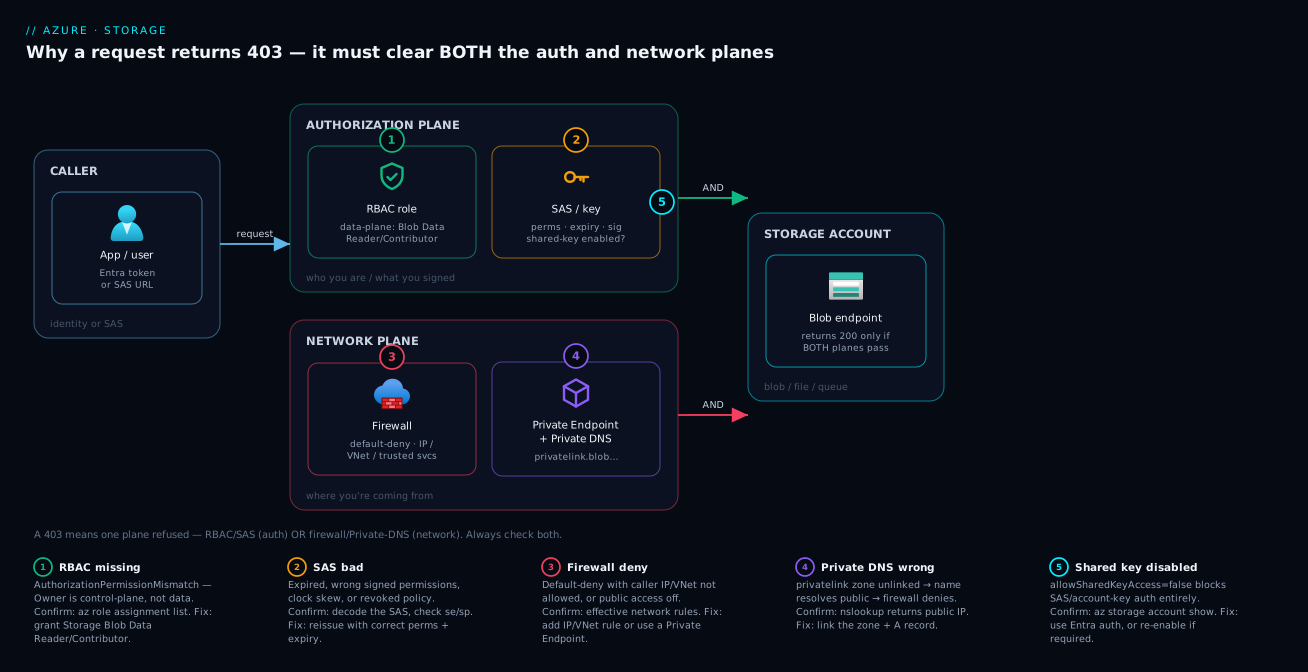
Mapping the diagram’s four arrows back to the colour, code and the one command that confirms each:
| Diagram arrow | Colour | Error code | Owns | Confirm command |
|---|---|---|---|---|
| Missing data role | Green | AuthorizationPermissionMismatch |
Identity | az role assignment list --assignee <oid> --scope <id> |
| Bad SAS | Amber | AuthenticationFailed |
SAS | echo "$SAS" | tr '&' '\n' |
| Firewall deny | Red | AuthorizationFailure |
Network | az storage account show --query networkRuleSet |
| Private DNS wrong | Violet | AuthorizationFailure |
DNS | nslookup <acct>.blob.core.windows.net |
Real-world scenario
NimbusCart, a mid-market e-commerce platform (~40 engineers, ~₹18 lakh/month Azure spend), ran its order-events pipeline through one Standard general-purpose v2 account, stnimbuscartprod, in Central India. An Azure Function (consumption, system-assigned identity) wrote ~2.4M order-event blobs/day into an events container; Azure Data Factory copied them nightly into Synapse; a service minted SAS URLs so partners could pull reconciliation files from a recon container. It ran cleanly for eleven months.
On a Tuesday, the security team hardened the account ahead of a PCI audit: firewall default action Deny, office + Synapse subnet allow-listed, allowSharedKeyAccess=false, and a private endpoint for blob with publicNetworkAccess=Disabled. Within an hour, three different 403s erupted — and three engineers started “fixing” them three wrong ways.
Failure 1 — the Function poison-queued every event with KeyBasedAuthenticationNotPermitted (its binding used the account key). The instinct was to flip allowSharedKeyAccess back to true — which would have failed the audit. Instead they read the code, switched the binding to the identity-based connection (AzureWebJobsStorage__accountName + …__credential=managedidentity), and granted the identity Storage Blob Data Contributor on events. Cause 1 + 2.
Failure 2 — Data Factory failed with AuthorizationFailure despite a managed identity with the data role. Pure network: ADF reaches Storage from Microsoft’s backbone, not the allow-listed Synapse subnet, and publicNetworkAccess=Disabled made IP/VNet rules moot. Fix: a resource-instance rule for the ADF instance plus the trusted services bypass (firewall), combined with the data role it already held (authorization). Cause 5.
Failure 3 — partner SAS downloads returned AuthenticationFailed: they were account SAS signed by the key, now disabled. Reissued as user-delegation SAS (Entra-signed, scoped to a dedicated SP’s Storage Blob Data Reader on recon, 1-hour, https), which work with shared-key off and auto-expire, plus a 1-hour sasPolicy. Cause 4.
The hidden trap surfaced two days later: a subset of partner pulls intermittently 403’d. The privatelink.blob.core.windows.net zone was linked to the app VNet, but the partner-facing proxy ran in a peered VNet whose custom DNS forwarded most queries to 168.63.129.16 yet kept a stale core.windows.net forwarder pointing at an on-prem resolver returning the public IP — so half the resolver pool answered privately, half publicly into the default-deny firewall. They fixed the forwarder and flushed caches. Cause 6. Total time lost: ~six hours, most of it from changing settings before reading the error code. NimbusCart’s post-incident rule is this article’s spine: read the code, confirm the layer, fix the one thing.
The incident as a timeline, because the order of the (wrong) moves is the lesson:
| Time | Symptom | Wrong reflex avoided | Actual fix | Cause |
|---|---|---|---|---|
| T+0:05 | Function poison-queues, KeyBasedAuthenticationNotPermitted |
Re-enable shared key (audit fail) | Identity-based binding + Storage Blob Data Contributor | 1+2 |
| T+0:20 | ADF nightly copy AuthorizationFailure, role present |
Re-assign the data role again | Resource-instance rule + bypass=AzureServices |
5 |
| T+0:40 | Partner SAS downloads AuthenticationFailed |
Mint a new account SAS | User-delegation SAS + 1-h sasPolicy |
4 |
| T+2 days | Subset of partner pulls intermittently 403 | Blame “flaky storage” | Fix stale DNS forwarder; flush caches | 6 |
Advantages and disadvantages
The trade-off is between security posture and operational 403 surface: every lock-down that improves security adds a way to get a 403, and every convenience that removes 403s usually weakens posture.
| Approach | Advantages | Disadvantages |
|---|---|---|
| Entra ID + data-plane RBAC | No secrets to leak or rotate; scoped + conditioned access; full audit trail; works with managed identities | RBAC propagation delay (~5 min); token caching confuses testing; requires understanding data vs control roles |
| Account/Service SAS (key-signed) | Simple, shareable, no identity setup; works for anonymous external callers | Tied to the all-powerful key; not revocable without key rotation; breaks if shared-key disabled; easy to over-scope/over-extend |
| User-delegation SAS | Entra-signed (no key); bounded by signer’s RBAC; revocable; survives shared-key=false | Blob/Data Lake only (not Files SMB/Queue/Table the same way); needs an Entra credential to mint; still time-boxed |
Disable shared key (allowSharedKeyAccess=false) |
Eliminates the worst credential; forces auditable identity-based access | Breaks every key/SAS-by-key caller at once; must migrate apps first; partner integrations may need rework |
| Firewall default-deny + IP/VNet rules | Real network isolation; blocks the public internet; cheap | New 403 surface; IP rules useless for private-egress callers; service endpoints need both halves; cross-region caveats |
Private endpoint + publicNetworkAccess=Disabled |
Strongest isolation; traffic on Microsoft backbone; blocks data exfiltration | DNS complexity is the #1 outage cause; per-service zones; on-prem/hub-spoke resolution is fiddly; cost per endpoint |
| Allow trusted Microsoft services bypass | Unblocks Backup/Monitor/ADF/ARM without opening IPs | Coarse; still needs resource-instance rules + data roles for full access; can feel like a security hole if misunderstood |
When does each matter? Internal app-to-storage → Entra ID + data RBAC + private endpoint (no secrets, no public exposure, DNS discipline a one-time cost). External/partner hand-offs without an Entra identity → a short-lived, narrowly-scoped user-delegation SAS (stored-access-policy service SAS only when you need revocability without Entra). Reserve raw account keys/account SAS for break-glass and rare anonymous-public scenarios. The choice by scenario, as a decision table:
| Scenario | Best auth | Best network | Why |
|---|---|---|---|
| App/Function → its own storage | Managed identity + data role | Private endpoint | No secrets; off the internet |
| Spark/Databricks → data lake | Managed identity / UD SAS | Service endpoint or PE | Scales; auditable |
| ADF/Synapse → storage | Managed identity + resource-instance rule | Bypass + instance rule | First-party from the backbone |
| Partner download (no Entra) | User-delegation SAS (short) | Public + firewall or PE proxy | Revocable, expiring, no key |
| Public website assets | Anonymous (read) | Public, scoped container | Genuinely public |
| Admin break-glass | Account key from Key Vault | Temporary IP allow | Logged, time-boxed exception |
Hands-on lab
Reproduce the two headline 403s — a missing data role and a firewall deny — and fix each, in Azure Cloud Shell (Bash). A few rupees of storage for minutes, fully torn down; needs rights to create a storage account and assign roles.
Step 1 — variables and a hardened-ish account.
RG=rg-403-lab; LOC=centralindia
SA=st403lab$RANDOM
az group create -n $RG -l $LOC -o table
az storage account create -n $SA -g $RG -l $LOC \
  --sku Standard_LRS --kind StorageV2 \
  --allow-shared-key-access false --default-action Allow -o table   # start permissive
SA_ID=$(az storage account show -n $SA -g $RG --query id -o tsv)
Step 2 — create a container with your own Entra identity (proves data RBAC works for you):
az storage container create --account-name $SA -n input --auth-mode login -o table
Expected "created": true (as creator you hold a data role; if this 403s, you just reproduced Cause 1 against yourself).
Step 3 — a fresh identity 403s, then fix it with a data role. A service principal with no data role gets AuthorizationPermissionMismatch on any data call (even if you later make it subscription Reader/Contributor); granting the data role at container scope fixes it after ~5-min propagation:
APP_ID=$(az ad sp create-for-rbac -n sp-403-lab --query appId -o tsv)
SP_OID=$(az ad sp show --id "$APP_ID" --query id -o tsv)
az role assignment create --assignee-object-id "$SP_OID" --assignee-principal-type ServicePrincipal \
  --role "Storage Blob Data Contributor" \
  --scope "$SA_ID/blobServices/default/containers/input" -o table
Step 4 — reproduce the firewall 403, then fix it. Default-deny blocks your (now non-allow-listed) Cloud Shell with AuthorizationFailure; allow-listing its egress IP restores access:
az storage account update -n $SA -g $RG --default-action Deny -o none
az storage blob list --account-name $SA -c input --auth-mode login -o table || echo ">>> Expected 403"
MYIP=$(curl -s ifconfig.me)
az storage account network-rule add -g $RG --account-name $SA --ip-address "$MYIP" -o none
sleep 20
az storage blob list --account-name $SA -c input --auth-mode login -o table   # succeeds now
You’ve now reproduced and fixed both a data-plane RBAC 403 and a firewall 403, and seen that disabling shared key doesn’t stop Entra-ID/--auth-mode login access. The lab steps mapped to the cause each one proves:
| Step | What you did | Reproduces / proves | Real-world analogue |
|---|---|---|---|
| 2 | Create a container with your identity | You hold a data role (creator) | First container in a new account |
| 3 | Fresh SP gets AuthorizationPermissionMismatch |
Cause 1 — control-plane ≠ data-plane | New managed identity, no data role |
| 3 (fix) | Grant Storage Blob Data Contributor at container scope | The minimal correct fix | Granting an app least-privilege data access |
| 4 | Default-deny blocks Cloud Shell | Cause 5 — network refuses the source | “Works from laptop, not the VM” |
| 4 (fix) | Allow-list the egress IP | Network fix is separate from auth | NAT-GW/office CIDR allow rule |
Teardown (deleting the RG removes the account and all data; net cost ~nil):
az ad sp delete --id "$APP_ID"
az group delete -n $RG --yes --no-wait
Common mistakes & troubleshooting
The section to keep open during an incident. Read the error code, find the row, run Confirm before touching anything, then apply Fix. Ordered by the triage flow (RBAC → SAS → network → state → tooling).
| # | Symptom | Root cause | Confirm (command / portal path) | Fix |
|---|---|---|---|---|
| 1 | Subscription Owner still 403s reading a blob | Owner is control-plane; data reads need a data role | az role assignment list --assignee <you> --scope <acctId> shows Owner, no Storage Blob Data *; portal IAM → Check access |
Assign Storage Blob Data Reader/Contributor at the narrowest scope; wait ~5 min |
| 2 | Role assigned, still 403 for minutes | RBAC propagation lag and/or cached OAuth token with stale claims | Assignment exists (az role assignment list) but call still fails right after |
Wait ~5–10 min; force a fresh token (restart the app/Function; re-fetch the VM identity token). Don’t re-assign in a panic |
| 3 | KeyBasedAuthenticationNotPermitted on a conn-string/account-SAS client |
allowSharedKeyAccess=false |
az storage account show -n <sa> --query allowSharedKeyAccess |
Migrate to Entra ID + data role, or user-delegation SAS; re-enable shared key only as a logged break-glass with a revert date |
| 4 | SAS worked yesterday, today AuthenticationFailed/signature mismatch |
Account key rotated (old-key SAS dies) or SAS expired | Decode URL, compare se to UTC now; activity log for …/regenerateKey/action; the error prints the string-to-sign — diff it |
Regenerate with the current key, or move to user-delegation SAS so rotation can’t silently break it |
| 5 | SAS read works but upload/list/delete 403s | sp omits the verb, or sr/srt scope wrong (account SAS srt=o can’t list; needs c) |
echo "$SAS" | tr '&' '\n' | grep -E '^(sp|sr|srt|ss)=' |
Regenerate with the full permission set and correct resource scope |
| 6 | Intermittent AuthenticationFailed at token start |
Clock skew — signing client ahead of UTC | date -u on the client vs real UTC; check NTP/chronyd/Windows Time |
Sync the clock; backdate st by 5–15 min when minting SAS |
| 7 | A stored-access-policy SAS suddenly fails | Container stored access policy (si) edited/deleted |
az storage container policy list --account-name <sa> -c <c> --auth-mode login |
Restore the policy (accidental) or reissue under a current one (intended revocation) |
| 8 | Works from laptop, 403 from VM/Function | Firewall default-deny; server-side egress not allow-listed | az storage account show --query "networkRuleSet.{def:defaultAction,ip:ipRules,vnet:virtualNetworkRules}"; portal Networking |
Add the caller’s public egress IP, or its subnet as a VNet rule, or front it with a private endpoint |
| 9 | Service endpoint enabled, VM still 403s | Only half done — endpoint on subnet but no VNet rule on account (or vice-versa) | az network vnet subnet show --query serviceEndpoints and az storage account show --query networkRuleSet.virtualNetworkRules |
Add the missing half (--service-endpoints Microsoft.Storage and network-rule add --subnet) |
| 10 | First-party service (Backup/Monitor/ADF/ARM) 403s after lock-down | Default-deny with no trusted-services bypass; service comes from Microsoft’s network | az storage account show --query networkRuleSet.bypass; portal Networking → Exceptions |
--bypass AzureServices; some services also need a resource-instance rule and a data role |
| 11 | In-VNet client 403s despite a healthy private endpoint | DNS resolves the public IP (missing/unlinked privatelink zone, no A record, custom DNS not forwarding to 168.63.129.16) |
nslookup <sa>.blob.core.windows.net returns 20.x/52.x not 10.x; az network private-dns record-set a list; Private endpoint → DNS configuration |
Create/link the privatelink.blob… zone, ensure the A record (privateDnsZoneGroup), forward to 168.63.129.16, flush DNS cache |
| 12 | Everything 403s even allow-listed IPs/subnets after “disable public access” | publicNetworkAccess=Disabled — public endpoint off; IP/VNet rules ignored |
az storage account show -n <sa> --query publicNetworkAccess |
Re-enable public access (rely on firewall) or move all callers to private endpoints — pick one |
| 13 | Selective 403 — some blobs/containers allowed, others not, role present | ABAC condition on the assignment evaluates false (tag/path/prefix) | az role assignment list --assignee <oid> --scope <id> --query "[?condition!=null].condition"; IAM → assignment → Condition |
Correct/broaden/remove the condition, or tag the target so it matches |
| 14 | App authenticates fine elsewhere but 403s on this account | Cross-tenant token — issued by a different directory than the account | Decode token tid vs az account show --query tenantId |
Acquire a token for the account’s tenant; add the principal + data role in that tenant |
| 15 | KeyVaultEncryptionKeyNotFound / account-wide errors |
Account CMK in Key Vault deleted/rotated/blocked | az storage account show --query encryption.keyVaultProperties; vault access |
Restore/rotate the key; fix vault firewall + the account’s identity access |
| 16 | It’s a 409, not a 403 | A lease (LeaseIdMissing/…Present) or immutability/WORM blocks the operation |
az storage blob show --query properties.lease (status locked); az storage container immutability-policy show |
Break/release the lease (az storage blob lease break) or wait out the policy — roles won’t help |
| 17 | It’s a 404, not a 403 | Wrong account/container/blob name, or DNS doesn’t resolve | nslookup <sa>.blob.core.windows.net; az storage container exists |
Fix the name/path; the account name is globally unique |
| 18 | AzCopy 403 but cause is opaque | AzCopy hides the body by default | azcopy copy … --log-level=DEBUG; inspect ~/.azcopy/<job>.log for x-ms-request-id + code |
Branch on the code per this table; use azcopy login to test the RBAC path without a SAS |
19 — Confirm against the service’s own logs. When client logs are ambiguous, enable diagnostic settings → StorageBlobLogs to a Log Analytics workspace and query the failure by request id:
StorageBlobLogs
| where TimeGenerated > ago(1h)
| where StatusCode == 403
| project TimeGenerated, OperationName, AuthenticationType, StatusCode, StatusText,
          CallerIpAddress, RequesterObjectId, Uri, _ResourceId
| order by TimeGenerated desc
AuthenticationType (OAuth/SAS/AccountKey) plus StatusText pinpoints the subsystem from the server’s perspective — the final word when client logs are ambiguous. What each StorageBlobLogs column tells you in a 403 hunt:
| Column | Tells you | Use it to |
|---|---|---|
AuthenticationType |
OAuth / SAS / AccountKey | Confirm which of the three paths the caller actually used |
StatusText |
The deny reason text | Map to the cause (network vs auth) |
RequesterObjectId |
The Entra principal (OAuth) | Verify it’s the identity you granted |
CallerIpAddress |
Source IP the firewall saw | Check it against your IP rules |
Uri |
Exact blob/container/op | Confirm scope (container vs blob) |
OperationName |
The REST op (e.g. GetBlob, ListBlobs) |
Match the SAS sp/sr to the op |
The diagnostic toolkit: exact paths
Knowing where to look is half the battle. The tools matrix — what each shows, how to reach it, and what it’s best for:
| Tool | What it shows | How to access | Best for |
|---|---|---|---|
az … --auth-mode login / --auth-mode key |
Whether the Entra or key path is the failing one | CLI / Cloud Shell | Isolating auth path; reading ErrorCode |
--debug flag |
Raw HTTP, headers, x-ms-request-id, body code |
CLI | The actual error code behind a toast |
| Diagnose and solve problems | Pre-correlated 403 / network troubleshooters | Account blade → Diagnose and solve | Fast second opinion; firewall vs RBAC |
| Effective network rules | The account’s live IP/VNet/instance rules + defaults | az storage account show --query networkRuleSet |
Confirming the network layer |
az role assignment list |
The identity’s roles + scopes + conditions | CLI | Cause 1/2 — missing/narrow/conditioned role |
nslookup / Resolve-DnsName |
What the hostname resolves to from the client | Client shell | Cause 6 — public vs private IP |
StorageBlobLogs (Monitor) |
Server-side AuthenticationType, StatusText, caller |
Log Analytics / KQL | The server’s view; final word |
Storage Analytics logs ($logs) |
Classic per-request logs in $logs container |
Storage account $logs |
Legacy accounts without diagnostic settings |
azcopy --log-level=DEBUG |
The hidden error code/body for AzCopy jobs | ~/.azcopy/<job>.log |
Opaque AzCopy 403s |
| Activity log | Control-plane ops (regenerateKey, network rule changes) |
Subscription / RG → Activity log | “Who rotated the key / changed the firewall” |
The az --auth-mode flag is itself the fastest diagnostic — it forces a single path so a green/red result pins the layer:
--auth-mode value |
Forces | If it works | If it 403s |
|---|---|---|---|
login |
Entra ID (OAuth) | RBAC path is fine; check key/SAS callers | Missing data role (Cause 1) or network (Cause 5) |
key |
Shared Key | Key path is fine; check Entra callers | Shared key disabled (Cause 2) or network |
| (SAS in URL) | The SAS as written | SAS is valid from this source | SAS field wrong (Cause 3) or network |
| (default, no flag) | CLI’s best guess (often key) | — | Ambiguous — set the flag explicitly |
Best practices
- Read the error code before changing anything.
AuthorizationPermissionMismatch≠AuthenticationFailed≠AuthorizationFailure≠KeyBasedAuthenticationNotPermitted. The code is the diagnosis. - Default to Entra ID + data-plane RBAC. Set
defaultToOAuthAuthentication=true, assign Storage Blob Data Reader/Contributor at the narrowest scope, stop shipping account keys, and disable shared key (allowSharedKeyAccess=false) once apps are migrated. - Prefer user-delegation SAS for any short-lived URL — Entra-signed, RBAC-bounded, revocable, surviving shared-key=false. Always backdate
st5–15 min, keep lifetimes short, enforce a max withsasPolicy, and back revocable SAS with a stored access policy. - Treat private-endpoint DNS as a first-class deliverable. Use a
privateDnsZoneGroup, link theprivatelink.<service>.core.windows.netzone to every VNet that needs it, and make on-prem/hub resolvers forward*.core.windows.netto168.63.129.16. - Pick one network model per account: firewall-with-public-endpoint or private-endpoint-only (
publicNetworkAccess=Disabled). Don’t half-disable public access and add IP rules that get ignored. - Remember trusted-services bypass is network-only. It gets first-party services through the firewall; they still need a data role and often a resource-instance rule.
- Turn on
StorageBlobLogsbefore you need them;AuthenticationType/StatusTextend most arguments. - Never panic-enable shared key or disable the firewall “to test.” Reproduce in a lab; confirm the layer; apply the minimal fix.
- Distinguish 403 from 409 and 404 in your runbooks so on-call doesn’t grant roles to fix a lease, immutability policy, or a typo’d name.
A compact “good vs bad” reference for the settings people get wrong most often:
| Setting | Bad (causes 403 / weak posture) | Good (secure + diagnosable) |
|---|---|---|
| Authorization | Account key in config | Managed identity + data role |
| SAS kind | Year-long account SAS, rwdl, no policy |
1-hour user-delegation SAS, exact sp |
st (SAS start) |
Now (skew failures) | Now minus 5–15 min |
allowSharedKeyAccess |
true everywhere |
false after migration |
| Network model | Public off and IP rules (ignored) | One model: firewall-public or PE-only |
| Private DNS | Manual A records, one VNet | privateDnsZoneGroup, all VNets linked |
| Logging | None until incident | StorageBlobLogs on, sampled |
Security notes
A 403 is your security controls working — the goal is to fix access without dismantling them.
- Least privilege on the data plane. The specific data role (Reader/Contributor/Owner) for the specific service at the narrowest scope — container over account — with ABAC conditions by tag/path where it matters. Avoid
Storage Account Contributorfor app identities (it reads keys). - Kill account keys where you can. Disable shared key; where a key must exist, read it at runtime from Key Vault, never from source-controlled config. Rotate on a schedule and after any suspected exposure (rotation invalidates all SAS by that key — by design).
- SAS hygiene. Short expiries,
https-only (spr=https),siprestriction where feasible, exact permission letters (no blanketrwdl), and user-delegation SAS so the token can’t exceed the signer’s RBAC and is revocable. - Network isolation as defence-in-depth. Default-deny firewall plus private endpoints keep data off the internet and curb exfiltration;
publicNetworkAccess=Disabledis the strongest stance, paired with NSG/route discipline. - Encryption is on regardless (SSE); add customer-managed keys for regulated data and infrastructure encryption for double-encryption — not a 403 cause directly, but a misconfigured CMK (
KeyVaultEncryptionKeyNotFound) is, so monitor the key’s health. - Audit access.
StorageBlobLogsplus the activity log give who/what/which-auth-type and every 403 — alert onAuthorizationFailurespikes (probing) and unexpectedregenerateKey.
The security control matrix — each lock-down, what it defends, and the 403 it can introduce if half-done:
| Control | Defends against | 403 it can introduce | Mitigation |
|---|---|---|---|
allowSharedKeyAccess=false |
Leaked keys, static creds | KeyBasedAuthenticationNotPermitted |
Migrate callers first; UD SAS |
| Data-role least privilege + ABAC | Over-broad access | Selective AuthorizationPermissionMismatch |
Scope/condition match the real workload |
| Firewall default-deny | Public internet exposure | AuthorizationFailure |
Allow-list the real callers |
| Private endpoint + public off | Exfiltration | AuthorizationFailure (DNS) |
privateDnsZoneGroup, forwarders |
| CMK encryption | Key custody | KeyVaultEncryptionKeyNotFound |
Soft-delete + purge protection; key health alert |
https-only + min TLS |
Downgrade/cleartext | AuthorizationProtocolMismatch (SAS over HTTP) |
spr=https; HTTPS endpoints only |
Cost & sizing
A 403 is free; the fixes carry modest, mostly-network costs:
- Private endpoints — billed per endpoint-hour plus per-GB processed (a few USD/endpoint/month plus low single-digit cents/GB; think low hundreds of rupees/endpoint/month). You need one per sub-resource type (blob, file, queue, table, dfs); consolidate where sensible.
- Private DNS zones — a tiny per-zone/month charge plus per-million queries — rounding error, but you pay per zone, one per service type.
- Diagnostic logs (
StorageBlobLogs) — billed per GB ingested/retained; on a high-traffic account this can dwarf everything, so log selectively (capture 4xx/5xx and a sample of success) and use Basic Logs/archive tiers for high-volume, low-query data. This is the genuine cost lever. - Service endpoints and firewall rules are free — no per-rule charge, the cheapest network control, weaker than Private Link.
- NAT gateway (often added to give app subnets a stable allow-listable egress IP) — billed per hour plus per-GB; the hidden cost of “just allow our IP.”
There is no SKU to “size” for 403s — right-size the logging and consolidate endpoints/zones. An Azure free account’s storage allowance covers the lab easily; its only conceivable charge is a few minutes of a Standard account, negligible. The fix-cost cheat-sheet:
| Fix / control | Billed on | Rough INR / month | Cost lever |
|---|---|---|---|
| Private endpoint | Per endpoint-hour + per-GB | ~₹350–700 each | Consolidate sub-resources |
| Private DNS zone | Per zone + per-million queries | < ₹50 each | Reuse zones across accounts |
StorageBlobLogs |
Per GB ingested/retained | ₹0–thousands (traffic-driven) | Sample; Basic Logs; capture 4xx/5xx |
| Service endpoint + firewall rule | Free | ₹0 | The cheapest network control |
| NAT gateway (stable egress) | Per hour + per-GB | ~₹1,500–3,000 | Only if you must allow-list an IP |
Interview & exam questions
1. Why does a subscription Owner get 403 reading a blob via Entra ID, and how do you fix it? Owner is a control-plane role with no …/blobs/read action; with --auth-mode login it gets a clean 403 (it can only read data via the account key). Fix by assigning Storage Blob Data Reader/Contributor/Owner at account or container scope. (AZ-500, SC-300)
2. Distinguish AuthorizationPermissionMismatch from AuthorizationFailure. The former is a data-plane RBAC denial (authenticated with Entra ID, no data role); the latter is a network denial (firewall refused the source regardless of credentials). Different subsystems, different fixes — grant a role vs add a network rule. (AZ-500)
3. What is the effect of allowSharedKeyAccess=false, and what still works? It disables Shared Key and any SAS signed by the key (account/service SAS), surfacing KeyBasedAuthenticationNotPermitted. Entra ID + data RBAC and user-delegation SAS still work — they don’t use the account key. (AZ-500)
4. Compare account SAS, service SAS, and user-delegation SAS. Account/service SAS are key-signed (service SAS can bind a stored access policy for revocability); user-delegation SAS is Entra-signed, bounded by the signer’s RBAC, works when shared-key is disabled, and is revocable. Prefer user-delegation SAS for Blob. (AZ-500)
5. How do you revoke an already-issued SAS before it expires? Service SAS with a stored access policy: edit/delete the policy. User-delegation SAS: revoke the delegation key or the signer’s role. Ad-hoc SAS with no policy: only by rotating the account key, which kills all SAS signed by it. (AZ-500)
6. A VM in your VNet gets 403 despite a healthy private endpoint. Most likely cause? DNS resolves the public IP because the privatelink.blob.core.windows.net zone is missing/unlinked or custom DNS isn’t forwarding to 168.63.129.16, so the request hits the default-deny firewall. Fix the zone/link/A-record. (AZ-700, AZ-500)
7. Service endpoint vs private endpoint for Storage — key difference? A service endpoint allows a subnet via a VNet rule but the account keeps its public IP; a private endpoint gives the account a private IP in your subnet and lets you disable the public endpoint entirely (stronger isolation, plus exfiltration protection). (AZ-700)
8. What does “Allow trusted Microsoft services” actually grant? It lets first-party services (Backup, Monitor, ADF, ARM) bypass the network firewall because they connect from Microsoft’s backbone. It does not grant data authorization — they still need a data role and sometimes a resource-instance rule. (AZ-500)
9. You enabled a service endpoint but the VM still 403s. Why? It needs two changes: the endpoint on the subnet and a matching VNet rule on the account. Only one leaves the firewall denying the subnet. (AZ-104)
10. Where do you confirm why Storage returned 403, server-side? Enable diagnostic settings → StorageBlobLogs and query by x-ms-request-id; AuthenticationType and StatusText reveal the auth path and deny reason. Diagnose and solve problems does the correlation for you. (AZ-500)
11. After granting a data role, the call still 403s for a few minutes. Why? RBAC propagation (~5–10 min) plus cached OAuth tokens with stale claims. Wait and force a fresh token (restart the process) rather than re-assigning. (SC-300)
12. You see a 409 BlobImmutableDueToPolicy on a delete. Is granting Owner the fix? No — that’s an object-state (WORM/immutability) refusal, not authorization; even an account Owner can’t override a locked policy. Wait out the retention period or clear an unlocked legal hold. (AZ-500)
A compact cert-mapping for revision:
| Question theme | Primary cert | Objective area |
|---|---|---|
| Control vs data plane, data roles | AZ-500 / SC-300 | Authorize data access |
allowSharedKeyAccess, SAS types/revocation |
AZ-500 | Storage security & SAS |
| Firewall, service endpoint, resource-instance rules | AZ-104 / AZ-700 | Configure storage networking |
| Private endpoint + Private DNS | AZ-700 | Private Link & name resolution |
| ABAC conditions, managed identities | SC-300 | Entra ID access control |
| 403 vs 409 vs 404, server-side logs | AZ-500 | Troubleshoot & audit storage |
Quick check
- A managed identity that is subscription Contributor gets 403 with
AuthorizationPermissionMismatchwriting a blob. What is wrong and what role fixes it? - Your partner’s download SAS started returning
AuthenticationFailedthis morning; nothing in the SAS changed. Name two plausible root causes and how you’d confirm each. - You disabled
publicNetworkAccessand added your office IP as a firewall rule, but everything still 403s. Why? - From a VNet VM,
nslookup stprod.blob.core.windows.netreturns20.60.40.5. What’s broken and what’s the fix? - A delete on a blob returns 409 with
BlobImmutableDueToPolicy. Is this an authorization problem? What do you do?
Answers
- Contributor is control-plane with no data actions. Assign Storage Blob Data Contributor (write, not Reader) at container/account scope, then wait for propagation.
- (a) The account key was rotated, killing every SAS by it — check the activity log for
regenerateKey. (b) The SAS expired — decode the URL, compareseto UTC. (Third: a referenced stored access policy changed —az storage container policy list.) publicNetworkAccess=Disabledturns the public endpoint off, so IP/VNet rules are ignored — only private endpoints work. Re-enable public access (rely on the firewall) or route all callers via a private endpoint.- DNS resolves the account to its public IP, hitting the default-deny firewall. The
privatelink.blob.core.windows.netzone is missing/unlinked, lacks the A record, or custom DNS isn’t forwarding to168.63.129.16. Create/link the zone (privateDnsZoneGroup), ensure the A record, fix forwarding, flush DNS. - No — 409 immutability is an object-state (WORM) refusal; even an owner can’t override an active locked policy. Wait out the retention period or clear the unlocked policy/legal hold — roles change nothing.
Glossary
- 403 Forbidden — the request was authenticated/received but refused by policy (authorization or network); never a transient error.
- Control plane — Azure Resource Manager management of the storage account resource (create, firewall, listKeys); governed by Owner/Contributor/Reader.
- Data plane — the
*.core.windows.netendpoints that serve blobs/files/queues/tables; governed by data-plane RBAC, SAS, or Shared Key. - The 403 error codes —
AuthorizationPermissionMismatch(missing data role),AuthenticationFailed(SAS/key signature or window),AuthorizationFailure(network firewall refused the source),KeyBasedAuthenticationNotPermitted(allowSharedKeyAccess=false),AuthorizationResourceTypeMismatch/…ProtocolMismatch(SAS scope/protocol),InsufficientAccountPermissions(ABAC false). - Storage Blob Data Reader/Contributor/Owner — the data-plane RBAC roles that actually grant blob read / read-write-delete / full+ACL access (parallel roles exist for File, Queue, Table).
- Shared Key — request signed with the account’s 512-bit access key; full, unscoped “root” access.
- SAS (Shared Access Signature) — a signed, time-boxed, scope-limited URL; account, service, or user-delegation.
- Account SAS / Service SAS — SAS signed by the account key (service SAS can bind a stored access policy for revocability).
- User-delegation SAS — SAS signed by an Entra ID user-delegation key; RBAC-bounded, revocable, works with shared-key disabled.
- SAS fields —
sv(version),sr/srt/ss(scope),sp(permissions),st/se(start/expiry, UTC),sip(IP range),spr(protocol),si(stored-policy id),sig(signature). - Stored access policy — a container-level policy a service SAS references (
si) so its permissions/expiry can be changed or revoked centrally. - Clock skew — client/server UTC drift that invalidates a SAS near its start; mitigated by backdating
st. - ABAC condition — an attribute rule on a role assignment (blob tag/path) that can deny otherwise-permitted requests.
- Firewall default action —
AlloworDeny; withDeny, only matching IP/VNet/resource/private sources get through. - Service endpoint — subnet feature (
Microsoft.Storage) + VNet rule that lets a subnet reach the account’s public endpoint over the backbone. - Resource-instance rule — admits a specific Azure resource (ADF, Logic App) through the firewall by identity, regardless of network.
- Trusted Microsoft services bypass —
bypass=AzureServices; lets first-party services through the network (not authorization). publicNetworkAccess=Disabled— public endpoint off; only private endpoints work, IP/VNet rules ignored.- Private endpoint — a NIC with a private IP in your subnet mapping to the account; keeps traffic off the internet.
- Private DNS zone (
privatelink.*.core.windows.net) — must resolve the account hostname to the private-endpoint IP; one per service (blob/file/queue/table/dfs/web). 168.63.129.16— Azure’s wire-server DNS; custom DNS must forward*.core.windows.nethere for private resolution.KeyVaultEncryptionKeyNotFound— the account’s customer-managed encryption key is unreachable/deleted; an account-wide failure, not an RBAC one.- 409 Conflict — an object-state refusal (lease, immutability/WORM), distinct from a 403 authorization/network refusal.
Next steps
You can now triage and fix any Storage 403 by error code. Deepen the surrounding skills:
- Next: Azure Private Endpoint vs Service Endpoint: Secure PaaS Access — the network model that prevents the Cause 5–6 failures by design.
- Related: Azure Private Link & Private DNS for PaaS — the
privatelinkzones, hub-and-spoke resolution, on-prem forwarding. - Related: Azure Storage Account Fundamentals — accounts, kinds, redundancy and tiers under everything above.
- Related: Azure Key Vault: Secrets, Keys & Certificates — store the keys you should no longer paste into config, and back the account’s CMK.
- Related: Azure Monitor & Application Insights: Observability at Scale — wire
StorageBlobLogsto a workspace and alert onAuthorizationFailurespikes. - Related: Troubleshooting Azure VNet Connectivity: NSGs, UDRs & Network Watcher — when the network half of a 403 is actually a routing/NSG problem.