A storage account is the single most-used resource in all of Azure, and the one most teams understand least. Almost every other service leans on it: your VM’s OS disk is a page blob, your Function’s code runs from a blob package, your App Service diagnostics, your Terraform state, your container registry layers, your backups, your data lake — all of it lands in a storage account. So when a team treats “the storage account” as one undifferentiated bucket and stuffs application logs, configuration files, small lookup tables and inter-service messages all into blob containers because “it all works,” everything technically does work — slowly, expensively, and with concurrency bugs that only show up under load. The fix is almost never a bigger account. It’s matching the right service — Blob, Files, Queue or Table — and the right redundancy SKU and access tier to the shape of the data.
An Azure Storage account is a namespace and a billing-and-security envelope that bundles four distinct storage services under one DNS name and one set of credentials. Each service has its own protocol, its own endpoint (acct.blob.core.windows.net, acct.file.core.windows.net, acct.queue.core.windows.net, acct.table.core.windows.net), its own performance profile, its own pricing model, and its own hard limits. They share the account’s redundancy (how many copies of your data exist and where), its access tiers (Hot/Cool/Cold/Archive for blobs), its network rules, its encryption, and its identity model. Understanding where the account boundary ends and the service boundary begins is the whole game — it determines your durability, your bill, your blast radius, and whether that 403 at 2 a.m. is a missing role assignment or a firewall rule.
By the end of this article you will stop reaching for blob containers by reflex. You will know which of the four services fits a given workload, which redundancy SKU buys which disaster-recovery guarantee (and which one silently loses data on failover), what every access tier costs to store versus to read, how the three ways to authenticate (Entra RBAC, account keys, SAS) differ and which to prefer, and how to read the limits and error codes so you can right-size from day one instead of discovering the ceiling in production. Because this is a reference you will return to, every concept, option, limit and failure mode is laid out as a scannable table alongside the prose and the az/Bicep you actually run.
What problem this solves
Applications need many kinds of storage, and they are not interchangeable. You have unstructured objects (images, video, backups, logs, Parquet files for a data lake). You have shared file systems that legacy apps expect to mount as a drive letter or a POSIX path. You have asynchronous work that must survive a worker crash — “resize this image,” “send this email” — handed between components without a database transaction. And you have small, fast key-value lookups (device state, session metadata, feature config) that a relational database is overkill for. Force all of these into one mechanism and each one is wrong in a different way: queries are slow, concurrency is racy, costs are inflated, and durability is mis-set.
What breaks without this knowledge is concrete and common. A team uses a single blob to coordinate work between two services and gets lost updates because blobs have no queue semantics. Another stores a million tiny entities as individual blobs and pays a fortune in transaction charges (storage billing is per-operation, not just per-GB). A third sets the whole account to GRS thinking it buys high availability, then loses the last few seconds of writes when an unplanned failover fires — because geo-replication is asynchronous, a DR feature with a non-zero RPO, not an HA feature. A fourth puts compliance archives in the Archive tier and is shocked when reads fail with 409 InvalidBlobTier because archived blobs are offline until rehydrated over hours. None of these are exotic. They are the default outcomes of not knowing the model.
Who hits this: essentially every Azure workload, because the storage account is unavoidable. It bites hardest on cost-sensitive teams (the per-transaction and per-tier-read charges are invisible until the bill arrives), on teams running lift-and-shift file servers (the SMB/identity/limit details of Azure Files are unforgiving), on anyone wiring up Entra-based access (the “I’m Owner on the account but still get 403 on the data” trap is near-universal), and on anyone who locks down networking without fixing DNS (private-endpoint 403s). The cure is to learn the four services, the SKUs, the tiers, the auth model and the limits once — which is exactly what follows.
To frame the whole field before the deep dive, here is every service the account bundles, the workload it fits, the protocol it speaks, and the single most common mistake teams make with it:
| Service | Best for | Protocol / API | Endpoint suffix | Most common mistake |
|---|---|---|---|---|
| Blob | Unstructured objects: images, backups, logs, data lake | REST/HTTPS (+ DFS for HNS) | .blob / .dfs |
Using it as a database or message queue |
| Files | SMB/NFS shares, lift-and-shift file servers, app config on a share | SMB 3.x (445) / NFS 4.1 (2049) / REST | .file |
Ignoring IOPS/throughput limits per share |
| Queue | Durable async work hand-off between components | REST/HTTPS | .queue |
Putting payloads > 64 KB in the message |
| Table | Schema-less key-value / wide-column NoSQL | REST/HTTPS (OData) | .table |
Expecting SQL joins / secondary indexes |
| Data Lake (Gen2) | Analytics over hierarchical, POSIX-ACL’d blobs | DFS/HTTPS (HNS on) | .dfs |
Enabling HNS by accident (or forgetting to) |
Learning objectives
By the end of this article you can:
- Explain what the storage account boundary owns (namespace, redundancy, network, encryption, identity) versus what each service owns (protocol, performance, limits, pricing), and pick the right service for a given workload.
- Choose the correct account kind (
StorageV2/ Premium BlockBlob / FileStorage / Page Blob) and know when each is mandatory. - Choose the correct redundancy SKU — LRS, ZRS, GRS, RA-GRS, GZRS, RA-GZRS — and explain exactly which failure each survives, the RPO/RTO implications, and the cost multiplier.
- Place blob data in the right access tier (Hot / Cool / Cold / Archive) by reasoning about storage cost versus read cost and minimum-retention penalties, and automate movement with lifecycle management.
- Authenticate the right way: Entra ID RBAC vs account keys vs SAS (account / service / user-delegation), and explain why “Owner on the account” does not grant data access.
- Secure an account with HTTPS-only, firewall + VNet rules or private endpoints + private DNS, encryption options and soft delete, and diagnose the resulting 403s.
- Read the real limits (account capacity, per-service request rates, queue message size, Files IOPS, Table entity size) and the common error codes (403, 404, 409, 412, 429/503) so you size and debug from first principles.
- Map all of this to the AZ-900 and AZ-104 exam objectives.
Prerequisites & where this fits
You should be comfortable with the Azure basics: a resource group holds resources, a region is a datacentre location, and you can run az in Cloud Shell, read JSON output, and deploy a small Bicep template. You should know what a REST endpoint and an HTTP status code are, and have a rough idea of what “an object store” versus “a file system” versus “a message queue” means in the abstract — this article makes all three concrete on Azure.
This sits at the foundation of the Storage & Data track and is upstream of almost everything. The resource it creates is referenced by compute, networking and data services alike; the Azure Resource Hierarchy Explained shows where the account sits in management group → subscription → resource group, and Azure Regions & Availability Zones Explained is the substrate that the redundancy SKUs (ZRS = zones, GRS = paired regions) build on. Once you are comfortable here, the natural next layers are the auth and network deep-dives — Azure Key Vault: Secrets, Keys & Certificates for managing the keys and SAS this article warns you about, Azure Private Endpoint vs Service Endpoint and Azure Private Link & Private DNS for PaaS for locking the account down, and when it goes wrong, Troubleshooting Azure Storage: 403s, Firewall, Private Endpoint, RBAC & SAS.
A quick map of which layer owns which decision, so you know where to look when something is wrong:
| Layer | What it owns | Set at | Failure it causes if wrong |
|---|---|---|---|
| Subscription / region | Where the account physically lives | Account create | Latency, data-residency violations |
| Account | Namespace, redundancy, network, encryption, identity defaults | Account properties | Account-wide 403, wrong durability, geo-failover scope |
| Service (Blob/Files/Queue/Table) | Protocol, performance class, service-level features | Per service | Wrong tool for the data shape |
| Container / share / queue / table | The data unit + its access level (blob public access) | Per object | Accidental anonymous public read |
| Blob / file / message / entity | The actual data + its tier/metadata | Per item | Archive read 409; oversized queue message |
Core concepts
Six mental models make every later decision obvious.
The account is an envelope; the service is the tool. One storage account exposes up to four service endpoints under one name. The account decides redundancy (how many copies, where), network rules, encryption, the default identity posture and the bill’s container. Each service — Blob, Files, Queue, Table — decides protocol, performance and its own limits. When you “create a storage account” you are renting the envelope; the data you put in chooses the tool. Most “storage is slow/expensive/buggy” problems are a tool mismatch, not an envelope problem.
Billing is per-operation, not just per-gigabyte. This surprises everyone. You pay for capacity (GB-months), but also for transactions (every read, write, list — priced per 10,000 operations), for data egress out of the region, and for tier-specific data-retrieval charges. A workload of a billion tiny objects can cost more in transactions than in storage. The tier you choose changes the ratio: cheaper storage tiers (Cool/Cold/Archive) cost more per transaction and add retrieval fees, so a cold tier on frequently-read data is more expensive, not less.
Redundancy is durability, and geo is async DR — not HA. Every SKU keeps at least three copies (eleven nines of durability). LRS = three copies in one datacentre. ZRS = three copies across three availability zones (survives a datacentre/zone loss). GRS/GZRS add an asynchronous copy in the paired region hundreds of kilometres away. Crucially, geo-replication is asynchronous — there is a replication lag, so an unplanned failover can lose the most recent writes (non-zero RPO), and it flips the whole account at once. Treat GRS as disaster recovery you invoke deliberately, not as automatic high availability.
Blob access tiers trade storage price for access price. Blobs (and only blobs) live in Hot, Cool, Cold or Archive tiers. Hot is cheapest to access, dearest to store; Archive is nearly free to store but offline — you cannot read an archived blob until you rehydrate it (hours), and reads otherwise fail with 409 InvalidBlobTier. Each cooler tier adds a minimum retention period (delete early and you still pay for the minimum) and rising per-GB retrieval charges. The tier is a bet on access frequency.
Three ways to prove who you are, with very different blast radii. You can authenticate to data with Entra ID (RBAC) — an OAuth token mapped to a data-plane role like Storage Blob Data Contributor; with the account keys — two 512-bit shared secrets that are god-mode over the whole account; or with a SAS (Shared Access Signature) — a signed URL granting scoped, time-boxed access. The trap that bites everyone: the management-plane roles Owner/Contributor grant no data access — you can manage the account but get 403 on the blobs until you also hold a Data role. Prefer Entra RBAC; treat keys as break-glass; scope and expire every SAS.
Networking defaults to open, and locking it down breaks DNS if you forget. A new account is reachable from the public internet (over HTTPS). You harden it with a firewall (allow specific IPs/VNets), service endpoints, or — the gold standard — a private endpoint that gives the account a private IP inside your VNet. The classic failure: you add a private endpoint but the caller still resolves the public IP because you didn’t wire the private DNS zone (privatelink.blob.core.windows.net), and every call 403s or times out.
The vocabulary in one table
Before the deep sections, pin down every moving part. The glossary at the end repeats these for lookup; this is the mental model side by side:
| Concept | One-line definition | Where it lives | Why it matters |
|---|---|---|---|
| Storage account | The namespace + redundancy/network/encryption envelope | Resource group | Sets durability, blast radius, the bill container |
| Account kind | StorageV2/Premium variant |
Account property | Gates which services/tiers/performance you get |
| Redundancy SKU | LRS/ZRS/GRS/GZRS (+RA) | Account sku |
How many copies, where, and failover behaviour |
| Blob | One unstructured object in a container | Blob service | Images, backups, logs, data-lake files |
| Container | A flat namespace of blobs + public-access level | Blob service | Accidental anonymous read lives here |
| Access tier | Hot/Cool/Cold/Archive | Per blob (default per account) | Storage-vs-access cost trade-off |
| File share | An SMB/NFS-mountable share | Files service | Lift-and-shift drives; app config |
| Queue | Durable FIFO-ish message store | Queue service | Async work hand-off (≤64 KB/msg) |
| Table | Schema-less key-value entities | Table service | Fast PK+RK NoSQL lookups |
| Account key | One of two god-mode shared secrets | Account | Break-glass; rotate; avoid in apps |
| SAS | Signed, scoped, time-boxed URL | Generated | Delegated access without sharing keys |
| Entra RBAC (data) | OAuth role like Blob Data Contributor |
IAM on account | The preferred auth; note Owner ≠ data |
| Private endpoint | Account on a private IP in your VNet | Networking | Removes public exposure (needs private DNS) |
| HNS | Hierarchical namespace → Data Lake Gen2 | Account (create-time) | Real directories + POSIX ACLs; mostly immutable choice |
The four services in depth
The account bundles four services. They are genuinely different tools — choosing among them is the highest-leverage decision you make. First, the comparison side by side; then each in detail with its real limits.
| Dimension | Blob | Files | Queue | Table |
|---|---|---|---|---|
| Data unit | Blob (object) in a container | File in a share | Message in a queue | Entity (row) in a table |
| Access pattern | Random/sequential object I/O | File-system (mount) | FIFO-ish dequeue | Key lookup by PK+RK |
| Protocol | REST/HTTPS (+DFS) | SMB/NFS/REST | REST/HTTPS | REST/HTTPS (OData) |
| Max item size | ~190.7 TiB (block blob) | 4 TiB (file, std) | 64 KiB (message) | 1 MiB (entity) |
| Tiers | Hot/Cool/Cold/Archive | Transaction-optimized/Hot/Cool (std) + Premium | n/a | n/a |
| Indexing | Prefix + optional blob index tags | Path | None (FIFO) | PartitionKey + RowKey only |
| Consistency | Strong (single region) | Strong | Strong | Strong |
| Typical use | Backups, media, logs, data lake | Lift-and-shift, shared config | Decoupling, retries | Device/session state |
Blob storage — the object store everything leans on
Blob (Binary Large OBject) storage holds unstructured objects in containers (a flat namespace; “folders” in a blob name are just / in the key unless you enable HNS). There are three blob types, and picking the wrong one is a real bug:
| Blob type | Optimized for | Max size | Written by | Used for |
|---|---|---|---|---|
| Block blob | Large objects, streaming upload | ~190.7 TiB (50k × ~4000 MiB blocks) | Upload in blocks, then commit | Files, media, backups, data lake — the default |
| Append blob | Append-only writes | ~195 GiB (50k × 4 MiB) | Append operations only | Logs, audit trails |
| Page blob | Random read/write, 512-byte pages | 8 TiB | Random page writes | VHDs / managed-disk backing |
Block blobs carry an access tier (next section). Containers have a public access level — Private (default and correct), Blob (anonymous read of blobs), or Container (anonymous read + list). Anonymous public access has caused countless data leaks; modern accounts can disable it entirely at the account level (allowBlobPublicAccess=false). Create a container and upload, using Entra auth (note the --auth-mode login):
# Create the account (StorageV2, ZRS, HTTPS-only, public blob access disabled)
az storage account create \
  --name stkvdemo01 --resource-group rg-storage-demo --location centralindia \
  --sku Standard_ZRS --kind StorageV2 \
  --https-only true --min-tls-version TLS1_2 \
  --allow-blob-public-access false

# Create a container and upload a blob using YOUR Entra identity (no keys)
az storage container create --name media --account-name stkvdemo01 --auth-mode login
az storage blob upload --account-name stkvdemo01 --auth-mode login \
  --container-name media --name logo.png --file ./logo.png
resource sa 'Microsoft.Storage/storageAccounts@2023-05-01' = {
  name: 'stkvdemo01'
  location: location
  sku: { name: 'Standard_ZRS' }
  kind: 'StorageV2'
  properties: {
    supportsHttpsTrafficOnly: true
    minimumTlsVersion: 'TLS1_2'
    allowBlobPublicAccess: false
    allowSharedKeyAccess: true   // set false to force Entra-only data access
  }
}

resource blobSvc 'Microsoft.Storage/storageAccounts/blobServices@2023-05-01' = {
  parent: sa
  name: 'default'
  properties: {
    deleteRetentionPolicy: { enabled: true, days: 7 }     // blob soft delete
    containerDeleteRetentionPolicy: { enabled: true, days: 7 }
    isVersioningEnabled: true
  }
}
The blob settings you will actually touch, with defaults and the gotcha for each:
| Setting | What it does | Default | When to change | Gotcha |
|---|---|---|---|---|
allowBlobPublicAccess |
Permits anonymous container/blob access at all | true (legacy) / often false | Set false unless you serve truly public assets | One mis-set container = data leak |
| Container public access level | Private / Blob / Container | Private | Blob only for a public CDN origin |
Container also leaks the listing |
| Blob soft delete | Recover deleted blobs for N days | off | Always enable in prod (1–365 days) | Adds storage cost for retained data |
| Versioning | Keep a version per overwrite | off | Protect against overwrite/ransomware | Each version is billed |
| Change feed | Ordered log of blob changes | off | Event-driven processing, audit | Stored as blobs (cost) |
| Access tier (default) | Default tier for new blobs | Hot | Cool/Cold for archival-leaning accounts | Per-blob tier overrides this |
| Hierarchical namespace (HNS) | Real directories + POSIX ACLs (Data Lake) | off | Analytics workloads | Create-time only — hard to undo |
Azure Files — a managed SMB/NFS share
Azure Files presents a fully managed file share you mount over SMB 3.x (TCP 445) on Windows/Linux/macOS or NFS 4.1 (TCP 2049, Premium only) on Linux. It is the lift-and-shift answer: an app that expects a \\server\share UNC path or a /mnt/data POSIX mount keeps working with the share as the backing store. Two performance classes exist, and they differ in where the limits bind:
| Tier | Media | Billing model | Max share size | Baseline performance | Use when |
|---|---|---|---|---|---|
| Standard (transaction-optimized / Hot / Cool) | HDD (GPv2) | Pay per used GB + transactions | 100 TiB (large file shares on) | Scales with provisioned/used size | General shares, cost-sensitive |
| Premium | SSD (FileStorage kind) | Provisioned GiB (you pay for size) | 100 TiB | IOPS/throughput scale with provisioned GiB | Latency-sensitive, high IOPS |
The limits that catch people are per-share, not per-account:
| Limit (Standard share) | Value | What hitting it looks like |
|---|---|---|
| Max share size | 100 TiB (requires “large file shares”) | Writes fail when full |
| Max single file | 4 TiB | Large file write rejected |
| Max IOPS per share | up to ~20,000 | Throttling (429) under load |
| Max throughput per share | up to ~300 MiB/s (region-dependent) | Saturated copy jobs stall |
| Max open handles per share/file | large but bounded | “Sharing violation”/handle errors |
| SMB Multichannel | Premium only | Single-channel throughput cap |
Authentication to Files is its own topic: you mount with the storage account key, with Entra ID Domain Services / AD DS identity-based auth for SMB, or via a SAS for REST. Mount and create:
# Create a Premium file share (FileStorage kind) and an SMB share
az storage account create -n stfiles01 -g rg-storage-demo -l centralindia \
  --sku Premium_LRS --kind FileStorage --https-only true
az storage share-rm create --storage-account stfiles01 -g rg-storage-demo \
  --name appdata --quota 256   # provisioned GiB on Premium

# Linux SMB mount (key-based; prefer identity-based AuthN in production)
sudo mount -t cifs //stfiles01.file.core.windows.net/appdata /mnt/appdata \
  -o vers=3.1.1,credentials=/etc/smb-cred,serverino,nosharesock,actimeo=30
resource files 'Microsoft.Storage/storageAccounts@2023-05-01' = {
  name: 'stfiles01'
  location: location
  sku: { name: 'Premium_LRS' }
  kind: 'FileStorage'
  properties: { supportsHttpsTrafficOnly: true, minimumTlsVersion: 'TLS1_2' }
}
resource share 'Microsoft.Storage/storageAccounts/fileServices/shares@2023-05-01' = {
  name: '${files.name}/default/appdata'
  properties: { shareQuota: 256 }   // GiB provisioned (Premium)
}
The Files knobs worth knowing:
| Setting | What it does | Default | When to change |
|---|---|---|---|
| Protocol | SMB or NFS | SMB | NFS for Linux POSIX workloads (Premium) |
| Share quota | Max/provisioned size (GiB/TiB) | varies | Premium: this sets your IOPS/throughput |
| Large file shares | Raises Standard cap to 100 TiB | off (on new often on) | Shares > 5 TiB on Standard |
| Identity-based auth | AD DS / Entra DS for SMB ACLs | off | Replace key-based mounts in prod |
| Soft delete (shares) | Recover deleted shares | on (7 days) | Tune retention |
| SMB Multichannel | Multiple connections per session | Premium on | High-throughput single client |
Queue storage — durable async work hand-off
Queue storage is a simple, massively scalable message store for decoupling components: a producer enqueues a message (e.g. “resize blob X”), a worker dequeues it, does the work, and deletes it. If the worker crashes mid-work, the message becomes visible again after a timeout and another worker retries it — that at-least-once delivery is the whole point. The non-negotiable limit is the 64 KiB message ceiling; large payloads use the claim-check pattern (put the payload in a blob, put the blob’s URL in the message).
| Queue property / limit | Value | Note |
|---|---|---|
| Max message size | 64 KiB (UTF-8 after base64) | Use blob + claim-check for bigger |
| Max time-to-live (TTL) | 7 days default; up to infinite (-1) |
Expired messages auto-deleted |
| Visibility timeout | 30 s default; up to 7 days | Time a dequeued message is hidden |
| Max messages per receive | 32 | Batch dequeue |
| Dequeue count | Tracked per message | Use to detect poison messages |
| Throughput | up to ~2,000 messages/s per queue | Shard across queues for more |
| Ordering | Best-effort FIFO, not guaranteed | Use Service Bus sessions for strict order |
Queue storage is the simple option; when you need strict ordering, transactions, topics/subscriptions, dead-letter queues or larger messages, that is Azure Service Bus, not Queue storage. Send and receive:
az storage queue create --name jobs --account-name stkvdemo01 --auth-mode login
az storage message put --queue-name jobs --content "resize:media/logo.png" \
  --account-name stkvdemo01 --auth-mode login --time-to-live 3600
# Worker side: get (hides it for the visibility timeout), then delete after success
az storage message get --queue-name jobs --account-name stkvdemo01 --auth-mode login \
  --visibility-timeout 60
Queue vs Service Bus, since people reach for the wrong one constantly:
| Need | Queue storage | Azure Service Bus |
|---|---|---|
| Simple, cheap, huge scale | Yes | Overkill |
| Message size > 64 KB (up to 100 MB/1 MB) | No (claim-check) | Yes |
| Strict FIFO / sessions | No | Yes |
| Topics / pub-sub fan-out | No | Yes |
| Dead-letter queue | Manual (poison handling) | Built-in |
| Transactions across messages | No | Yes |
| Duplicate detection | No | Yes |
Table storage — schema-less key-value at scale
Table storage is a NoSQL key-value / wide-column store: rows (“entities”) with a PartitionKey and a RowKey that together form the only index. Entities in the same partition are stored together and can be batch-transacted; lookups by exact PartitionKey + RowKey are extremely fast and cheap; anything else is a table scan. It has no joins, no secondary indexes and no server-side aggregation — design the keys around your query or pay for scans.
| Table property / limit | Value | Note |
|---|---|---|
| Max entity size | 1 MiB | Sum of all properties |
| Max properties per entity | 255 (incl. PK, RK, Timestamp) | Schema-less per entity |
| Indexed by | PartitionKey + RowKey only | No secondary indexes |
| Batch (“entity group transaction”) | up to 100 entities, same PartitionKey, ≤4 MiB | Atomic within a partition |
| Throughput target | up to ~20,000 entities/s per account; ~2,000/s per partition | Hot-partition risk |
| Query without PK | Full table scan | Slow + costly at scale |
| API compatibility | Azure Table API ↔ Cosmos DB Table API | Lift to Cosmos for global/throughput |
The key-design rules that separate a fast table from a slow one:
| Goal | Do | Avoid |
|---|---|---|
| Fast point reads | Query exact PartitionKey + RowKey |
Querying on a non-key property |
| Even load | Spread writes across many partitions | One hot partition (e.g. PK = today’s date) |
| Atomic multi-row writes | Keep them in one partition (batch ≤100) | Cross-partition transactions (unsupported) |
| Range scans | Encode order into RowKey (e.g. inverted ticks) | Relying on insertion order |
| Global distribution / SLA | Migrate to Cosmos DB Table API | Stretching Table storage geographically |
When the workload needs global distribution, single-digit-ms SLAs, secondary indexes or much higher throughput, the migration target is Azure Cosmos DB via its drop-in Table API — same code, a different (and far more scalable) engine underneath.
Account kinds and performance tiers
Before redundancy and access tiers, you choose an account kind and a performance tier. Most workloads want StorageV2 (general-purpose v2) Standard, but the special kinds are mandatory in specific cases.
| Account kind | Performance | Services | Use when | Notable limit |
|---|---|---|---|---|
| StorageV2 (GPv2) | Standard | Blob, Files, Queue, Table | The default for nearly everything | Standard latency/IOPS |
| Premium BlockBlobs | Premium (SSD) | Block/append blob only | Low-latency, high-TPS blob (small objects, analytics) | No Cool/Archive tiers |
| Premium FileStorage | Premium (SSD) | Files only | High-IOPS SMB/NFS shares | Provisioned billing |
| Premium PageBlobs | Premium (SSD) | Page blob only | Unmanaged disks / specialized VHD | Page blob only |
| StorageV1 (GPv1) | Standard | Blob, Files, Queue, Table | Legacy only — do not create new | No access tiers, older pricing |
| BlobStorage | Standard | Block/append blob only | Legacy block-blob-only | Superseded by GPv2 |
Standard vs Premium is a different axis from redundancy and tiers — it is about latency and the media:
| Axis | Standard | Premium |
|---|---|---|
| Media | HDD-backed | SSD-backed |
| Latency | Milliseconds | Single-digit ms / sub-ms |
| Billing | Pay for used capacity + transactions | Provisioned capacity (you pay for size) |
| Tiers | Hot/Cool/Cold/Archive (blob) | No access tiers |
| Best for | General-purpose, cost-sensitive | Latency/IOPS-critical, chatty small I/O |
| Redundancy options | LRS/ZRS/GRS/GZRS (+RA) | LRS/ZRS (geo limited) |
The account also has scalability targets — soft and hard limits you should know before you size, because hitting them shows up as throttling (429/503 ServerBusy), not a clean error. These are the headline numbers (Standard GPv2; check the current docs for exact, region-specific values):
| Account-level target | Typical limit | What hitting it looks like | How to get more |
|---|---|---|---|
| Max capacity per account | ~5 PiB | Writes fail when full | Spread across accounts |
| Max ingress (write) | up to ~60 Gbps (region/redundancy-dependent) | Saturated uploads throttle | More accounts; request increase |
| Max egress (read) | up to ~120 Gbps | Saturated reads throttle | More accounts; CDN |
| Max request rate (account) | ~20,000 requests/s | 503 ServerBusy under burst |
Back off; shard across accounts |
| Max storage accounts per subscription/region | ~250 (raisable) | create fails |
Request quota increase |
| Single blob max throughput | per-blob target | One hot blob bottlenecks | Spread reads across blobs/CDN |
| Single queue throughput | ~2,000 messages/s | Queue throttles | Shard across queues |
| Single Table partition | ~2,000 entities/s | Hot-partition throttling | Spread the PartitionKey |
| Files share IOPS (Standard) | up to ~20,000 | SMB throttling | Premium / provision more |
Redundancy: LRS, ZRS, GRS, GZRS and the RA variants
Redundancy is the account’s durability and disaster-recovery posture, set by the SKU. Every option stores at least three synchronous copies and targets eleven nines of durability; they differ in where those copies are and whether there is an async geo-copy. This is the single most consequential and most-misunderstood storage choice.
| SKU | Copies & placement | Survives | RPO / failover | Read from secondary | Relative cost |
|---|---|---|---|---|---|
| LRS (Locally-redundant) | 3 copies, one datacentre | Disk/node/rack failure | n/a (single DC) | No | 1.0× (baseline) |
| ZRS (Zone-redundant) | 3 copies across 3 availability zones | A full datacentre/zone outage | n/a (synchronous across zones) | No | ~1.25× |
| GRS (Geo-redundant) | LRS in primary + async LRS in paired region | Region-wide disaster | Async RPO (minutes lag); failover is account-wide | No (until you fail over) | ~2× |
| RA-GRS | GRS + read-only secondary endpoint | Region disaster; read during primary outage | Async RPO; read -secondary anytime |
Yes (acct-secondary) |
~2× + read cost |
| GZRS | ZRS in primary + async LRS in paired region | Zone outage and region disaster | Async RPO; account-wide failover | No (until failover) | ~2.5× |
| RA-GZRS | GZRS + read-only secondary | Best of both + secondary reads | Async RPO; read -secondary anytime |
Yes | ~2.5× + read cost |
Three things people get wrong, stated plainly:
| Misconception | Reality |
|---|---|
| “GRS gives me high availability” | No — geo is async DR. The secondary is not writable; an unplanned failover can lose recent writes (non-zero RPO) and flips the whole account. |
| “ZRS and GRS are the same kind of thing” | No — ZRS is synchronous across zones in one region (true HA against a datacentre loss). GRS is async across regions (DR). GZRS gives you both. |
| “RA-GRS means I can write to the secondary” | No — the -secondary endpoint is read-only until a failover promotes it. |
Decision table — match the requirement to the SKU:
| If you need… | Choose | Why |
|---|---|---|
| Cheapest, single-region, non-critical (dev, scratch, easily-recreated data) | LRS | Lowest cost; survives hardware faults |
| HA against a datacentre/zone loss, single region | ZRS | Synchronous across 3 zones |
| Survive a regional disaster, can tolerate minutes of RPO | GRS / GZRS | Async copy in the paired region |
| The above plus read access during a primary outage | RA-GRS / RA-GZRS | Read-only secondary endpoint |
| Highest resilience (zone HA + regional DR) | GZRS / RA-GZRS | Combines ZRS + geo |
| Compliance forbids data leaving a geography | LRS / ZRS (in-region) | No cross-region replication |
Set and change redundancy:
# Create geo-zone-redundant with read-access secondary
az storage account create -n stcritical01 -g rg-storage-demo -l centralindia \
  --sku Standard_RAGZRS --kind StorageV2 --https-only true

# Change redundancy live (some conversions are online; geo changes may take time)
az storage account update -n stcritical01 -g rg-storage-demo --sku Standard_GZRS

# Read the geo-replication health and the all-important Last Sync Time
az storage account show -n stcritical01 -g rg-storage-demo \
  --query "{sku:sku.name, status:statusOfPrimary, geo:statusOfSecondary, lastSync:geoReplicationStats.lastSyncTime}" -o table
resource crit 'Microsoft.Storage/storageAccounts@2023-05-01' = {
  name: 'stcritical01'
  location: location
  sku: { name: 'Standard_RAGZRS' }   // zone HA + regional DR + read secondary
  kind: 'StorageV2'
  properties: { supportsHttpsTrafficOnly: true, minimumTlsVersion: 'TLS1_2' }
}
The Last Sync Time metric is the one number to watch on a geo account: it tells you how far behind the secondary is, i.e. your worst-case data loss if you failover now.
Access tiers and lifecycle management
Block blobs (not Files/Queue/Table) live in one of four access tiers. The tier trades storage price against access price and adds a minimum-retention penalty as you go cooler. Choosing a tier is a bet on how often the data is read.
| Tier | Storage cost | Access (read) cost | Min. retention | First-byte latency | Use for |
|---|---|---|---|---|---|
| Hot | Highest | Lowest | none | ms | Active data, frequently read |
| Cool | Lower | Higher | 30 days | ms | Infrequent access, ≥30-day retention |
| Cold | Lower still | Higher still | 90 days | ms | Rarely accessed, ≥90-day retention |
| Archive | Lowest (near-free) | Highest + rehydrate | 180 days | hours (offline) | Compliance/long-term, rarely if ever read |
Two rules people violate and pay for:
| Rule | Why it bites |
|---|---|
| Cooler tiers cost more per read | Put frequently-read data in Cool/Cold and the access charges exceed the storage saving — you lose money “saving money.” |
| Early deletion still pays the minimum | Delete a Cool blob after 5 days and you are billed for the full 30; Cold = 90; Archive = 180. Tier only data that will stay. |
Archive is offline. An archived blob cannot be read directly — attempting it returns 409 InvalidBlobTier. You must rehydrate it to Hot/Cool/Cold first, which takes up to ~15 hours (Standard priority) or ~1 hour (High priority, smaller blobs), and you pay a rehydration charge. Plan for this latency in any retrieval design.
| Rehydration priority | Typical SLA | Cost | Use when |
|---|---|---|---|
| Standard | up to ~15 hours | Lower | Bulk, non-urgent restores |
| High | as low as ~1 hour (<10 GiB) | Higher | A specific blob needed soon |
Set a blob’s tier, and automate movement with a lifecycle management policy (one policy per account, ≤100 rules, evaluated about once a day):
# Set one blob to Cool
az storage blob set-tier --account-name stkvdemo01 --auth-mode login \
  --container-name media --name old-report.pdf --tier Cool

# Apply a lifecycle policy: Hot→Cool@30d, Cool→Archive@90d, delete@2555d (7y)
az storage account management-policy create --account-name stkvdemo01 \
  -g rg-storage-demo --policy @lifecycle.json
{
  "rules": [
    {
      "enabled": true,
      "name": "tier-and-expire",
      "type": "Lifecycle",
      "definition": {
        "filters": { "blobTypes": ["blockBlob"], "prefixMatch": ["media/"] },
        "actions": {
          "baseBlob": {
            "tierToCool":    { "daysAfterModificationGreaterThan": 30 },
            "tierToArchive": { "daysAfterModificationGreaterThan": 90 },
            "delete":        { "daysAfterModificationGreaterThan": 2555 }
          }
        }
      }
    }
  ]
}
The lifecycle actions you can express:
| Action | On | Trigger conditions | Note |
|---|---|---|---|
tierToCool / tierToCold / tierToArchive |
base blob, versions, snapshots | days after modification / last access | Last-access tracking must be enabled to use it |
delete |
base blob, versions, snapshots | days after modification/creation | Permanent (unless soft delete catches it) |
enableAutoTierToHotFromCool |
base blob | on access | Re-warms data that gets read again |
A full data-protection stack — versioning, soft delete, point-in-time restore and WORM immutability — layers on top of tiers and is what makes a tiered account safe to delete from; pair it with Azure Backup & Site Recovery for protection when the data warrants a managed backup vault on top of the account’s own recovery controls.
The access and identity model
There are exactly three ways to prove who you are to the data plane, and they have wildly different blast radii. Getting this right is the difference between a secure account and a breach.
| Method | What it is | Scope | Lifetime | Blast radius if leaked | Prefer? |
|---|---|---|---|---|---|
| Entra ID RBAC | OAuth token → data-plane role | Per-scope, per-role | Token TTL (short) | Limited to the role | Yes — default |
| Account keys | Two 512-bit shared secrets | Whole account, full control | Until rotated | Total account compromise | Break-glass only |
| SAS | Signed URL with scoped permissions | What you signed | Until se= expiry (or revoked) |
Whatever the SAS granted, until expiry | Yes, scoped + short |
Entra ID RBAC — the preferred path, and the trap
Data access via Entra ID maps an identity (user, service principal, managed identity) to a data-plane role. The trap that bites everyone once: the management-plane roles Owner, Contributor and Reader let you manage the account (keys, networking, lifecycle) but grant no access to the data inside. You can be Owner and still get 403 reading a blob until you also hold a Data role.
| Role | Plane | Grants | Does NOT grant |
|---|---|---|---|
| Owner / Contributor | Management | Manage account, read keys (Contributor can), networking | Reading/writing blob/queue/table data |
| Reader | Management | View account config | Any data access |
| Storage Blob Data Owner | Data | Full blob data + POSIX ACLs (HNS) | Management of the account |
| Storage Blob Data Contributor | Data | Read/write/delete blob data | Management |
| Storage Blob Data Reader | Data | Read blob data | Write/delete; management |
| Storage Queue Data Contributor | Data | Process queue messages | Blob/table |
| Storage Table Data Contributor | Data | Read/write table entities | Blob/queue |
| Storage File Data SMB Share Contributor | Data | SMB share read/write | Management |
Assign a Data role (note the scope is the account, and it can be narrowed to a container):
# Grant a managed identity read/write on blob DATA (not management)
PRINCIPAL=$(az identity show -n id-app -g rg-storage-demo --query principalId -o tsv)
SCOPE=$(az storage account show -n stkvdemo01 -g rg-storage-demo --query id -o tsv)
az role assignment create --assignee "$PRINCIPAL" \
  --role "Storage Blob Data Contributor" --scope "$SCOPE"
resource dataRole 'Microsoft.Authorization/roleAssignments@2022-04-01' = {
  name: guid(sa.id, principalId, 'blob-data-contrib')
  scope: sa
  properties: {
    // Storage Blob Data Contributor
    roleDefinitionId: subscriptionResourceId('Microsoft.Authorization/roleDefinitions',
      'ba92f5b4-2d11-453d-a403-e96b0029c9fe')
    principalId: principalId
    principalType: 'ServicePrincipal'
  }
}
Account keys and shared-key auth — break-glass only
Every account has two access keys (so you can rotate one while the other serves traffic). A key is god-mode over the entire account — any leak is a total compromise. Treat keys as break-glass: rotate regularly, keep them in Key Vault, and where possible disable shared-key auth entirely (allowSharedKeyAccess=false) to force Entra-only access.
az storage account keys list -n stkvdemo01 -g rg-storage-demo -o table   # the two keys
az storage account keys renew -n stkvdemo01 -g rg-storage-demo --key primary
# Force Entra-only data access (no shared key / SAS-from-key)
az storage account update -n stkvdemo01 -g rg-storage-demo --allow-shared-key-access false
SAS — scoped, time-boxed, three flavours
A Shared Access Signature is a signed query string granting delegated access without sharing a key. There are three kinds, and user-delegation SAS is the one to prefer because it is signed with an Entra credential (not the account key) and is therefore revocable and auditable:
| SAS type | Signed with | Scope | Revocable | Prefer |
|---|---|---|---|---|
| User-delegation SAS | Entra ID user-delegation key | Blob service | Yes (revoke the delegation key / role) | Yes |
| Service SAS | Account key | One service (blob/file/queue/table), one resource | Via stored access policy | Only if no Entra option |
| Account SAS | Account key | Multiple services, account-level ops | Hard (rotate key) | Avoid |
The SAS fields that decide its safety:
| Field | Meaning | Safe practice |
|---|---|---|
sp (permissions) |
r/w/d/l/a/c… | Least privilege — only what’s needed |
se (expiry) |
Expiry timestamp | Short — hours, not years |
st (start) |
Start time | Set to avoid clock-skew issues |
sip (IP range) |
Allowed caller IPs | Pin to known ranges |
spr (protocol) |
https only | Always https |
sr/sv |
Resource / service version | Latest version |
# User-delegation SAS for ONE blob, read-only, valid 1 hour, https only
EXP=$(date -u -d '1 hour' '+%Y-%m-%dT%H:%MZ')
az storage blob generate-sas --account-name stkvdemo01 --auth-mode login \
  --as-user --container-name media --name logo.png \
  --permissions r --expiry "$EXP" --https-only --full-uri
A stored access policy (defined on the container/share/queue/table) lets you revoke a service SAS without rotating keys — the SAS references the policy, and deleting the policy kills every SAS that used it.
Networking, encryption and data protection
By default an account is reachable over the public internet (HTTPS). You harden it in layers; the layers stack, and getting the order wrong produces the most common 403 in all of Azure storage.
Network access controls
| Control | What it does | Effect | Gotcha |
|---|---|---|---|
| HTTPS-only | Reject HTTP | Encryption in transit enforced | Set supportsHttpsTrafficOnly=true always |
| Min TLS version | Reject old TLS | Blocks weak clients | TLS1_2 (or TLS1_3) baseline |
| Public network access = Disabled | No public reachability | Only private endpoints work | Forgetting breaks all public callers |
| Firewall — IP rules | Allow specific public IPs/CIDRs | Default-deny + allowlist | Your own NAT IP must be added |
| Firewall — VNet rules (service endpoint) | Allow a subnet | Traffic over Azure backbone | Still uses the public endpoint/IP |
| Private endpoint | Private IP in your VNet | Removes public exposure | Needs private DNS zone or it 403s |
| Trusted Microsoft services | Let first-party services through the firewall | e.g. Backup, Monitor | Exception, not a blanket allow |
The classic private-endpoint failure deserves its own statement: a private endpoint gives the account a private IP, but the caller still resolves acct.blob.core.windows.net to the public IP unless you wire the private DNS zone privatelink.blob.core.windows.net so the name resolves privately. Without it, packets go to the public endpoint, which is now firewalled off → 403/timeout. Confirm with nslookup of the endpoint and the Azure Private Link & Private DNS for PaaS walkthrough.
# Default-deny, then allow a specific VNet subnet, and disable public network access
az storage account update -n stkvdemo01 -g rg-storage-demo --default-action Deny
az storage account network-rule add -n stkvdemo01 -g rg-storage-demo \
  --vnet-name vnet-app --subnet snet-workloads
az storage account update -n stkvdemo01 -g rg-storage-demo --public-network-access Disabled
properties: {
  supportsHttpsTrafficOnly: true
  minimumTlsVersion: 'TLS1_2'
  publicNetworkAccess: 'Disabled'
  networkAcls: {
    defaultAction: 'Deny'
    bypass: 'AzureServices'
    virtualNetworkRules: [ { id: subnetId, action: 'Allow' } ]
  }
}
Encryption
All data is encrypted at rest by default with 256-bit AES (Storage Service Encryption) — there is no way to turn it off, and it is free. What you choose is who holds the key:
| Encryption option | Key held by | Use when | Note |
|---|---|---|---|
| Microsoft-managed keys (MMK) | Microsoft | Default — fine for most | Zero management |
| Customer-managed keys (CMK) | You, in Key Vault | Compliance requires key control/rotation | You manage rotation; lose the key, lose the data |
| Infrastructure (double) encryption | Microsoft, two layers | Defense-in-depth mandates | Create-time only |
| Encryption in transit | TLS | Always | Enforced by HTTPS-only |
Data protection (recovery)
The recovery controls that turn “oops I deleted it” from a disaster into an undo. These complement redundancy (which protects against infrastructure loss, not accidental deletion):
| Control | Protects against | Default | Recommended |
|---|---|---|---|
| Blob soft delete | Deleting/overwriting a blob | off | 7–30 days in prod |
| Container soft delete | Deleting a whole container | off | 7–30 days |
| Share soft delete (Files) | Deleting a file share | on (7 days) | keep on |
| Versioning | Overwrite/ransomware | off | on for critical data |
| Point-in-time restore | Bulk accidental change (block blob) | off | on with versioning + change feed |
| Resource lock (CanNotDelete) | Deleting the account | none | Add to production accounts |
Architecture at a glance
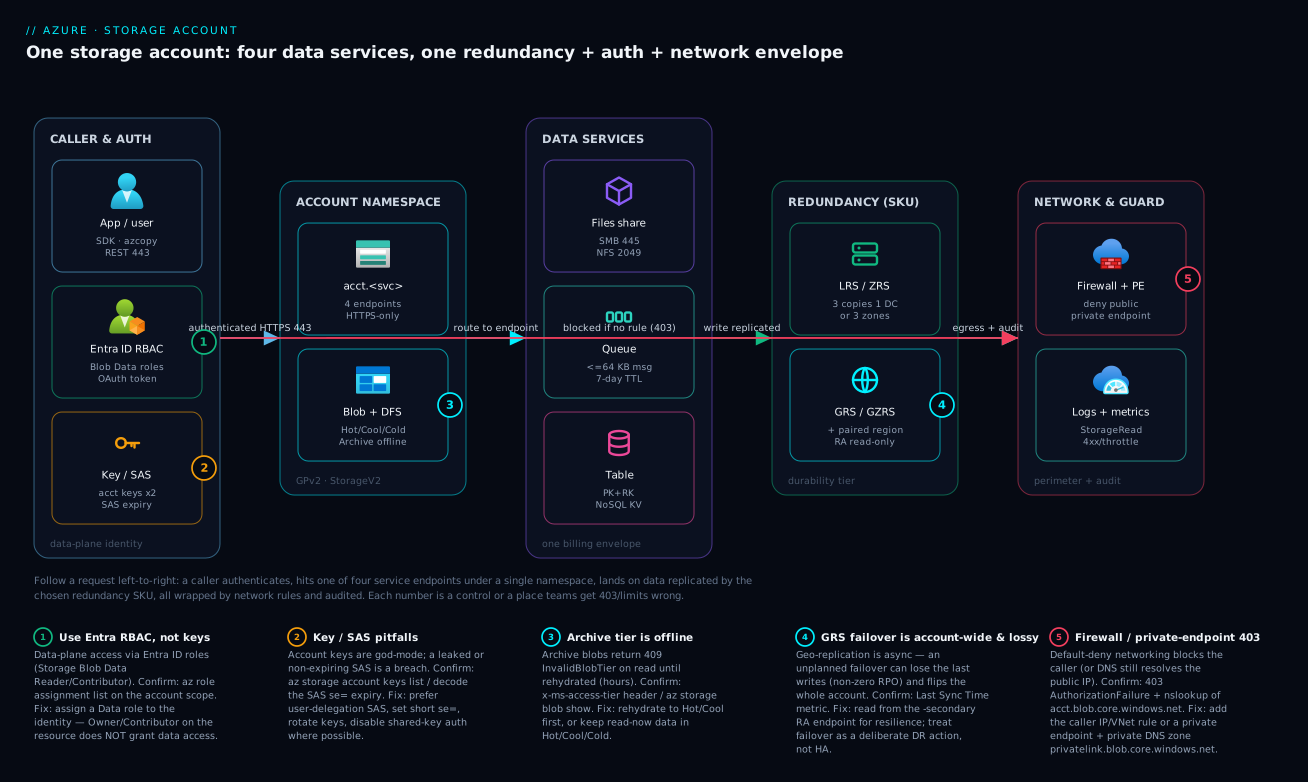
The diagram traces a request as it actually flows through a single storage account, left to right, and pins the five places teams most often get it wrong. Start at CALLER & AUTH: an app or azcopy reaches the account over HTTPS on 443, and proves identity one of three ways — an Entra ID OAuth token mapped to a data-plane role (badge 1: use this, not keys, and remember Owner ≠ data), or one of the two god-mode account keys / a SAS URL (badge 2: keys are total compromise if leaked, SAS must be scoped and short-lived). That request lands on the ACCOUNT NAMESPACE — one acct.<service> name exposing four endpoints, HTTPS-only — and is routed to one of the four DATA SERVICES: Blob (with its Hot/Cool/Cold/Archive tiers, where badge 3 warns that Archive is offline and returns 409 until rehydrated), Files over SMB 445 / NFS 2049, Queue with its 64 KB message ceiling, or Table keyed only by PartitionKey + RowKey.
The write is then persisted by the REDUNDANCY (SKU) tier — three synchronous copies in one datacentre (LRS) or across three zones (ZRS), optionally with an asynchronous copy in the paired region (GRS/GZRS), where badge 4 flags the crucial subtlety: geo-replication is async, so an unplanned, account-wide failover can lose the last writes (watch the Last Sync Time). Wrapping all of it is the NETWORK & GUARD zone: a firewall and private endpoint enforce default-deny (badge 5 — the infamous 403 when the caller isn’t allow-listed, or when DNS still resolves the public IP because the privatelink zone isn’t wired), while Azure Monitor captures StorageRead/4xx/throttle telemetry so you can prove what happened. Read it as a single sentence: authenticate → route to the right service → persist at the chosen durability → all behind a network perimeter you must open deliberately and audit. The legend narrates each numbered control as symptom, how to confirm it, and the fix.
Real-world scenario
Pixelforge Studios runs a user-generated-content platform: members upload photos, the platform generates thumbnails and watermarked variants, and a web app serves galleries. The team is three engineers, the workload is in Central India, and at launch they did the obvious thing — one StorageV2 account, LRS, everything in blob containers: original uploads, generated variants, application logs, a “jobs” container where the web app dropped a small JSON file per upload for the workers to pick up, and a “state” container of tiny JSON files tracking each job’s status. It worked in the demo. Then it met production.
Three problems surfaced in the first month. First, the bill. They were storing 40 TB and assumed storage dominated, but the line item that ballooned was transactions: the workers polled the “jobs” container by listing it every two seconds across many instances, and the “state” container held two million tiny status blobs that were read and rewritten constantly. List and small-read operations, billed per 10,000, dwarfed the GB cost. Second, lost work: two workers occasionally grabbed the same job file (a blob has no dequeue-with-visibility semantics), double-processing uploads and racing on the status blob. Third, a 403 storm after they enabled a firewall to stop hot-linking — they added a private endpoint but forgot the privatelink.blob.core.windows.net DNS zone, so the web app (resolving the now-firewalled public IP) started failing every gallery load.
The redesign was a textbook application of “right service for the data shape.” The jobs moved to Queue storage — workers now dequeue with a 60-second visibility timeout, so a crash re-delivers the message and two workers never grab the same job; polling-by-listing disappeared and with it ~90% of the transaction charges. The job status moved to Table storage keyed by PartitionKey = userId, RowKey = jobId, turning two million list-and-read operations into cheap point reads. The original uploads stayed in Blob but gained a lifecycle policy (Hot for 30 days, then Cool, then Archive after a year for originals members rarely re-download) plus versioning and 7-day soft delete to undo accidental deletes. They moved the account to ZRS so a single Central India datacentre outage wouldn’t take galleries down, and kept a separate RA-GZRS account for the irreplaceable originals so a regional disaster wouldn’t lose member photos. Finally, they wired the private DNS zone, and the 403s vanished.
The numbers told the story. Monthly storage spend fell from about ₹95,000 to ₹38,000 — almost entirely from killing transaction churn, not from storing less. Double-processing went to zero. p95 status-read latency dropped from ~120 ms (a blob list + read) to ~8 ms (a Table point read). And the platform now survives a datacentre loss (ZRS) with the originals protected against a regional one (RA-GZRS). The lesson the lead wrote on the wall: “One account, four tools. Stuffing everything into blobs isn’t simpler — it’s a transaction bill and a race condition wearing a trench coat.”
The redesign mapped to services like this:
| Data | Was (wrong) | Now (right) | Why it’s right |
|---|---|---|---|
| Job hand-off | Blob “jobs” container, polled by listing | Queue (visibility timeout) | At-least-once delivery; no double-grab; no list churn |
| Job status | 2M tiny “state” blobs, listed+read | Table (PK=userId, RK=jobId) | Cheap point reads; no scans |
| Original photos | Blob LRS, Hot forever | Blob RA-GZRS + lifecycle + versioning | DR for irreplaceable data; tiering cuts storage cost |
| Generated variants | Blob LRS Hot | Blob ZRS, Hot→Cool lifecycle | Regenerable; zone HA; cheap |
| App logs | Blob “logs” container | Append blob + lifecycle to Cool/Archive | Append semantics; aged out cheaply |
Advantages and disadvantages
The bundled-account model is powerful, but its very generality is also its sharpest edge. Weigh it honestly:
| Advantages (why the model helps) | Disadvantages (why it bites) |
|---|---|
| One namespace, one bill, one security envelope for four different storage tools | Four services with four very different semantics under one name invites tool-mismatch (everything-in-blobs) |
| Eleven-nines durability with three synchronous copies on every SKU, free | Geo-redundancy is async DR, not HA — silent data loss on unplanned failover surprises teams |
| Tiering (Hot→Archive) and lifecycle automation can slash storage cost | Cooler tiers raise access cost + min-retention penalties — easy to lose money “saving” it |
| Entra RBAC gives least-privilege, token-based, auditable access | Owner/Contributor grant no data access — the universal first 403 |
| Encryption at rest is on by default, free, with optional CMK | Networking defaults to public; locking it down 403s you if DNS/firewall is wrong |
| Massive scale: petabytes, billions of objects, high request rates | Per-service and per-partition limits (queue 64 KB, Table partition throughput, Files IOPS) bite under load |
| Billing is granular and pay-per-use | Granular billing means transactions can exceed storage cost on chatty/tiny-object workloads |
| Works as the substrate for nearly all Azure services (disks, Functions, ACR, backups) | That ubiquity makes a misconfigured account a wide blast radius |
The model is right when you embrace its four-tool nature: pick Blob/Files/Queue/Table by data shape, set redundancy by your DR requirement, tier by access frequency, and authenticate with Entra. It bites teams that treat the account as one undifferentiated bucket, that confuse geo-redundancy with high availability, or that lock down networking without fixing DNS. Every disadvantage above is manageable — but only if you know it exists, which is the entire point of learning the model before you ship.
Hands-on lab
Create an account, use all four services, see the auth model and tiering in action, then tear it down. Free-tier-friendly (a few rupees; delete at the end). Run in Cloud Shell (Bash).
Step 1 — Variables and resource group.
RG=rg-storage-lab
LOC=centralindia
SA=stlab$RANDOM          # must be globally unique, 3-24 lowercase alphanumerics
az group create -n $RG -l $LOC -o table
Step 2 — Create a hardened StorageV2 account (ZRS, HTTPS-only, no public blob access).
az storage account create -n $SA -g $RG -l $LOC \
  --sku Standard_ZRS --kind StorageV2 \
  --https-only true --min-tls-version TLS1_2 \
  --allow-blob-public-access false -o table
Expected: a row with sku.name = Standard_ZRS, kind = StorageV2.
Step 3 — Grant YOUR identity a data role (so you can use --auth-mode login).
ME=$(az ad signed-in-user show --query id -o tsv)
SCOPE=$(az storage account show -n $SA -g $RG --query id -o tsv)
az role assignment create --assignee "$ME" --role "Storage Blob Data Contributor" --scope "$SCOPE"
az role assignment create --assignee "$ME" --role "Storage Queue Data Contributor" --scope "$SCOPE"
az role assignment create --assignee "$ME" --role "Storage Table Data Contributor" --scope "$SCOPE"
# Wait ~30-60s for role propagation before the data calls below
This is the lab’s key lesson: without these Data roles you would get 403 even as the subscription Owner.
Step 4 — Blob: container, upload, tier.
echo "hello blob" > sample.txt
az storage container create -n media --account-name $SA --auth-mode login
az storage blob upload --account-name $SA --auth-mode login \
  -c media -n sample.txt -f sample.txt
az storage blob set-tier --account-name $SA --auth-mode login -c media -n sample.txt --tier Cool
az storage blob show --account-name $SA --auth-mode login -c media -n sample.txt \
  --query "{name:name, tier:properties.blobTier}" -o table
Expected: blobTier = Cool.
Step 5 — Queue: enqueue and dequeue.
az storage queue create -n jobs --account-name $SA --auth-mode login
az storage message put --queue-name jobs --account-name $SA --auth-mode login \
  --content "resize:media/sample.txt" --time-to-live 3600
az storage message get --queue-name jobs --account-name $SA --auth-mode login --visibility-timeout 30 \
  --query "[].{msg:content, dequeueCount:dequeueCount}" -o table
Expected: your message content, dequeueCount = 1.
Step 6 — Table: insert and point-read an entity.
az storage table create -n jobstate --account-name $SA --auth-mode login
az storage entity insert --table-name jobstate --account-name $SA --auth-mode login \
  --entity PartitionKey=user42 RowKey=job001 Status=Completed Variants=3
az storage entity show --table-name jobstate --account-name $SA --auth-mode login \
  --partition-key user42 --row-key job001 -o jsonc
Expected: the entity with Status=Completed.
Step 7 — See the redundancy and (would-be) geo health.
az storage account show -n $SA -g $RG \
  --query "{sku:sku.name, primary:statusOfPrimary, httpsOnly:enableHttpsTrafficOnly}" -o table
Expected: sku = Standard_ZRS, primary = available, httpsOnly = True.
Validation checklist. You created a hardened account, proved that Data roles (not Owner) gate data access, and exercised all four services — blob (with a tier change), queue (with a dequeue count), and table (a point read). No account keys were used anywhere. The lab steps mapped to the concepts:
| Step | What you did | What it proves |
|---|---|---|
| 2 | Created ZRS, HTTPS-only, no public blob | Hardened defaults are one flag each |
| 3 | Assigned Data roles | Owner ≠ data; you must grant a Data role |
| 4 | Upload + set tier Cool | Tiers are per-blob; access via Entra |
| 5 | Enqueue/dequeue | Queue gives at-least-once hand-off |
| 6 | Insert/point-read entity | Table keys (PK+RK) are the only index |
| 7 | Read SKU/health | Redundancy is an account property |
Cleanup (avoid lingering charges).
az group delete -n $RG --yes --no-wait
Cost note. A few small objects on Standard ZRS for an hour is well under ₹20; deleting the resource group stops everything.
Common mistakes & troubleshooting
This is the part you bookmark. First the scannable playbook — symptom → root cause → confirm → fix — then the detail on the entries that bite hardest. Most “storage is broken” tickets are one of these.
| # | Symptom | Root cause | Confirm (exact cmd / portal path) | Fix |
|---|---|---|---|---|
| 1 | 403 AuthorizationPermissionMismatch reading a blob, even as Owner |
Holding a management role, not a Data role | az role assignment list --assignee <id> --scope <acct id> shows no Data role |
Assign Storage Blob Data Reader/Contributor at the right scope |
| 2 | 403 AuthorizationFailure after enabling firewall/PE; calls time out |
Default-deny blocks caller, or DNS resolves the public IP | nslookup acct.blob.core.windows.net returns public IP; check networkAcls |
Add IP/VNet rule; wire privatelink.blob.core.windows.net private DNS zone |
| 3 | 409 InvalidBlobTier reading a blob |
Blob is in Archive (offline) | az storage blob show --query properties.blobTier = Archive |
Rehydrate to Hot/Cool first (hours), then read |
| 4 | Storage bill dominated by “transactions”, not GB | Chatty tiny-object workload / polling by listing | Cost analysis → group by Meter (LRS/Hot Write/Read/List ops) | Move hand-off to Queue, state to Table; stop list-polling |
| 5 | Cost went up after moving data to Cool/Cold | Cooler tier on frequently-read data | Compare access ops × per-op cost vs storage saving | Move hot-read data back to Hot; tier only cold data |
| 6 | Charged for blobs you deleted days ago | Min-retention penalty (Cool 30 / Cold 90 / Archive 180) | You deleted before the minimum | Tier only data that will stay past the minimum |
| 7 | Two workers process the same item; lost updates | Using a blob for work hand-off (no queue semantics) | Duplicate processing in logs | Use Queue (visibility timeout) for hand-off |
| 8 | RequestBodyTooLarge / message rejected on enqueue |
Queue message > 64 KiB | Message size check | Claim-check: payload to blob, URL in the message |
| 9 | 429/503 ServerBusy (throttling) under load |
Exceeded request rate / partition target / Files IOPS | Metrics: Transactions by ResponseType=ServerBusy |
Back off + retry; shard; scale Premium/provision IOPS |
| 10 | SMB mount fails / port 445 blocked |
ISP/NSG blocks 445, or wrong auth | nc -vz acct.file.core.windows.net 445; check NSG/firewall |
Use VPN/ExpressRoute or PE; correct credentials/identity auth |
| 11 | Accidentally public blob found by a scanner | Container public access = Blob/Container | az storage container show --query properties.publicAccess |
Set Private; allowBlobPublicAccess=false account-wide |
| 12 | Data “lost” after an unplanned geo-failover | Async geo-replication RPO; last writes weren’t replicated | Last Sync Time before failover (geoReplicationStats.lastSyncTime) |
Accept RPO; for stricter, use sync ZRS in-region + app-level dual-write |
| 13 | AuthenticationFailed with a SAS URL |
Expired (se=), clock skew, or revoked policy |
Decode the SAS; check se= vs now; stored access policy |
Regenerate with a future se= and st=; prefer user-delegation SAS |
| 14 | Table query is slow and costly | Querying a non-key property → full scan | Query lacks PartitionKey |
Redesign keys; encode the query into PK/RK |
| 15 | Can’t enable Hierarchical Namespace on an existing account | HNS is create-time | az storage account show --query isHnsEnabled = false |
Create a new HNS account and migrate (azcopy) |
| 16 | Account deletion blocked / accidental deletion | Resource lock present / none present | Locks blade | Add a CanNotDelete lock to production accounts |
The expanded reasoning for the ones that cost the most time and money:
1. 403 AuthorizationPermissionMismatch even though you’re Owner. The single most common storage 403. Root cause: you hold a management-plane role (Owner/Contributor/Reader) which manages the account but grants no data access. Confirm: az role assignment list --assignee <principalId> --scope <account-id> shows no Storage *Data* role. Fix: assign the appropriate Data role (Storage Blob Data Contributor, etc.) at the account/container scope, and wait for propagation. Code that uses keys won’t hit this — only Entra (--auth-mode login) callers do, which is the right direction anyway.
2. 403/timeout after locking down networking. Root cause: either the firewall is default-deny and the caller’s IP/VNet isn’t allow-listed, or you added a private endpoint but the name still resolves to the public IP because the private DNS zone privatelink.blob.core.windows.net isn’t linked to the caller’s VNet. Confirm: nslookup acct.blob.core.windows.net from the caller — a public IP means DNS isn’t private; check networkAcls.defaultAction and the private DNS zone records. Fix: add the IP/VNet rule, or create + link the privatelink zone with an A record for the endpoint. This is the topic of Troubleshooting Azure Storage 403s.
3. 409 InvalidBlobTier reading a blob. Root cause: the blob is in Archive, which is offline. Confirm: az storage blob show --query properties.blobTier returns Archive. Fix: you must rehydrate it to an online tier first — set tier to Hot/Cool/Cold and wait (Standard up to ~15 h, High ~1 h for small blobs), then read. Design retrieval flows to expect this latency; never put read-now data in Archive.
4. The transaction bill. Root cause: storage billing is per-operation, and chatty patterns — polling a container by listing it, reading/rewriting millions of tiny blobs — generate enormous operation counts that dwarf GB cost. Confirm: Cost analysis grouped by Meter shows large Write/Read/List Operations lines. Fix: use the right tool — Queue for hand-off (no listing), Table for tiny state (point reads), batch where possible, and never poll-by-list.
9. Throttling (429/503 ServerBusy). Root cause: you exceeded a scalability target — the per-account request rate, a per-partition target (Table/Blob), or a Files share’s IOPS/throughput cap. Confirm: the Transactions metric split by ResponseType = ServerBusy/SuccessWithThrottling. Fix: implement exponential-backoff retries (the SDKs do this by default), shard across partitions/queues/accounts, and for Files provision more (Premium) or raise the share size that governs IOPS.
12. Data loss after an unplanned geo-failover. Root cause: geo-replication is asynchronous; whatever hadn’t replicated when the primary failed is gone (your RPO). Confirm: the Last Sync Time immediately before failover tells you the worst case. Fix: there is no fix after the fact — prevent it by understanding GRS is DR, not HA; for stricter durability use synchronous ZRS in-region and/or application-level dual-writes for the truly irreplaceable.
Best practices
- Pick the service by data shape, not by habit. Blob for objects, Files for mountable shares, Queue for async hand-off, Table for key-value state. Stuffing everything into blobs is the root of most cost and concurrency pain.
- Default to Entra ID RBAC for data access; treat account keys as break-glass. Assign least-privilege Data roles (
Storage Blob Data Reader/Contributor), keep keys in Key Vault, rotate them, and setallowSharedKeyAccess=falsewhere the workload allows. - Remember Owner/Contributor grant no data access. Always assign a Data role for data-plane callers — this is the universal first 403.
- Scope and expire every SAS; prefer user-delegation SAS. Short
se=, least permissions,httpsonly, pinned IPs, and a stored access policy so you can revoke. Never hand out an account SAS with a far-future expiry. - Choose redundancy by your DR requirement, and know geo is async. LRS for recreatable data, ZRS for in-region HA, GRS/GZRS for regional DR — and watch Last Sync Time because failover can lose recent writes.
- Tier by access frequency, and let lifecycle policies do it. Hot for active, Cool/Cold for infrequent, Archive only for rarely-read data that will stay past the minimum retention. Automate transitions and expiry with a lifecycle policy.
- Enable soft delete and (for critical data) versioning. Redundancy protects against infrastructure loss, not accidental deletion — soft delete + versioning are your undo button.
- Harden networking, but fix DNS in the same change. HTTPS-only, min TLS 1.2, default-deny firewall or private endpoints — and always wire the
privatelinkprivate DNS zone so you don’t 403 yourself. - Disable anonymous public blob access account-wide (
allowBlobPublicAccess=false) unless you are deliberately serving public assets, and even then scope it to one container. - Watch transactions, not just capacity. Alert on operation counts and
ServerBusythrottling; chatty/tiny-object patterns cost more in transactions than in GB. - Put a
CanNotDeleteresource lock on production accounts. The account is the blast radius; make accidental deletion impossible. - Separate accounts by blast radius and lifecycle. Hot production data, cold analytics/backup, and Terraform state belong in different accounts with different redundancy and access policies.
Security notes
- Identity over secrets. Use managed identities + Entra RBAC (or Key Vault-stored, rotated keys as a fallback). Least privilege means a Data role scoped to a container, not
Storage Blob Data Owneron the whole account. - Kill anonymous public access. Set
allowBlobPublicAccess=false; if you must serve public assets, scopeBlobaccess to one container and front it with a CDN — neverContainer(which leaks the listing). - Private by default for sensitive data. Use private endpoints +
publicNetworkAccess=Disabledso the account is unreachable from the internet, and wire the private DNS zone so callers resolve the private IP. See Azure Private Endpoint vs Service Endpoint. - Enforce encryption in transit.
supportsHttpsTrafficOnly=trueandminimumTlsVersion=TLS1_2(or 1.3) — reject cleartext and weak TLS. - Customer-managed keys where compliance demands it. CMK in Key Vault gives you key rotation and revocation — but you own the consequence: lose the key, lose the data. Pair with Key Vault soft delete + purge protection.
- Constrain SAS hard. Prefer user-delegation SAS (Entra-signed, revocable); set short expiry, least permissions, IP and protocol restrictions; use stored access policies for revocation; rotate account keys if a key-signed SAS leaks.
- Audit with diagnostic logging. Send StorageRead/Write/Delete logs and metrics to Log Analytics; alert on anomalous delete/list volume and on
AuthorizationFailurespikes (an attacker probing) — covered in Azure Monitor & Application Insights for observability. - Lock the account against deletion. A
CanNotDeletelock plus least-privilege management roles prevents both accidental and malicious account removal.
The security knobs that also prevent operational incidents — secure and resilient pull the same way here:
| Control | Setting / mechanism | Secures against | Also prevents |
|---|---|---|---|
| Entra RBAC data roles | Storage *Data* role assignments |
Over-broad/key-based access | The Owner-≠-data 403 confusion |
| Disable shared key | allowSharedKeyAccess=false |
Leaked-key total compromise | SAS-from-key sprawl |
| Disable public blob | allowBlobPublicAccess=false |
Accidental data leak | Scanner-found public containers |
| Private endpoint + private DNS | PE + privatelink.* zone |
Internet exposure | DNS-mismatch 403s (when wired right) |
| HTTPS-only + min TLS | supportsHttpsTrafficOnly, minimumTlsVersion |
Cleartext/downgrade | “Temporary” TLS-off mistakes |
| Soft delete + versioning | blob/container delete retention | Ransomware/accidental delete | Irreversible data loss |
| Resource lock | CanNotDelete |
Malicious/accidental account deletion | Wide-blast-radius outages |
Cost & sizing
Storage cost has four drivers, and capacity is rarely the one that surprises you. Sizing means reasoning about all four together.
| Cost driver | What you pay for | Rough scale (INR) | What changes it | Watch-out |
|---|---|---|---|---|
| Capacity | GB-month stored | ~₹1.5–2 / GB-month (Hot LRS) | Tier (Cool/Cold/Archive far cheaper) + redundancy multiplier | The visible cost; often not the biggest |
| Transactions | Per 10,000 operations (read/write/list) | fractions of ₹ per 10k, but volume multiplies | Chatty patterns, list-polling, tiny objects | The hidden cost that dominates chatty workloads |
| Data retrieval | Per-GB read from Cool/Cold/Archive | rises as tier cools | Reading cold-tier data | Cool/Cold reads + Archive rehydrate add up fast |
| Egress | Per-GB out of the region/Azure | ~₹7–9 / GB (region-dependent) | Cross-region/internet traffic | Serving media to users; use a CDN |
The redundancy multiplier stacks on capacity (and on geo, on transactions too): LRS = 1×, ZRS ≈ 1.25×, GRS/GZRS ≈ 2–2.5×, plus read-secondary read charges for RA-variants. And the tier changes the storage-vs-access ratio:
| Tier (Hot=baseline) | Storage cost | Read/transaction cost | Net cheaper when |
|---|---|---|---|
| Hot | 1.0× | lowest | Read frequently |
| Cool | ~0.5× storage | higher per-op + retrieval | Read < ~monthly, kept ≥30 days |
| Cold | lower still | higher still | Read rarely, kept ≥90 days |
| Archive | ~0.1× storage | highest + rehydrate fee | Read almost never, kept ≥180 days |
Right-sizing rules of thumb:
| If… | Then | Because |
|---|---|---|
| Data is recreatable (caches, variants, scratch) | LRS, Hot, short lifecycle | Cheapest; you can rebuild it |
| Data is read constantly | Hot (don’t “save” with Cool) | Cooler tiers cost more to read |
| Data is write-once read-rarely, must keep | Cool→Cold→Archive via lifecycle | Storage savings dominate when reads are rare |
| Data is irreplaceable | RA-GZRS + versioning + soft delete | DR + accidental-delete protection worth the multiplier |
| Workload is chatty/tiny-object | Re-architect to Queue/Table | Kill transaction cost, not GB cost |
Free tier & limits: new Azure accounts include limited free storage allowances (e.g. a small Hot LRS blob quota and transaction allowance) for 12 months; beyond that it is pay-as-you-go. There is no perpetual free storage account, but a few GB and a handful of operations cost rupees, not thousands. A rough monthly picture for a small app: ~50 GB Hot LRS (~₹100) + modest transactions (~₹50–200 depending on chattiness) + a little egress — well under ₹1,000 if you avoid list-polling and tier cold data. The Pixelforge case showed the real lever: their bill fell 60% by re-architecting transactions away, not by storing less. For systematic cost control, see Azure FinOps & Cost Management at Scale.
Interview & exam questions
1. What does a storage account bundle, and what’s the difference between the account and a service? A storage account is a namespace plus a redundancy/network/encryption/identity envelope that bundles four services — Blob, Files, Queue, Table — each with its own endpoint, protocol, performance and limits. The account sets durability (SKU), network rules, encryption and identity defaults; each service sets protocol and its own scalability targets. You pick the account once and the service per workload.
2. Explain LRS vs ZRS vs GRS vs GZRS. LRS keeps 3 copies in one datacentre (survives hardware faults). ZRS keeps 3 copies across 3 availability zones in one region (survives a datacentre/zone loss — true HA). GRS adds an asynchronous copy in the paired region (regional DR, non-zero RPO). GZRS combines ZRS in-region with an async geo copy. RA-variants add a read-only secondary endpoint. Geo is async DR, not HA.
3. A developer is Owner of the storage account but gets 403 reading a blob. Why? Owner/Contributor are management-plane roles — they manage the account but grant no data-plane access. The developer needs a Data role like Storage Blob Data Reader/Contributor assigned at the account or container scope. This is the most common storage 403.
4. When do you use Queue storage vs Azure Service Bus? Use Queue storage for simple, cheap, massively scalable async hand-off with ≤64 KB messages and best-effort ordering. Use Service Bus when you need strict FIFO/sessions, messages > 64 KB, topics/pub-sub, dead-letter queues, duplicate detection or transactions across messages. Queue = simple decoupling; Service Bus = enterprise messaging.
5. Why might moving data to the Cool tier increase your bill? Cooler tiers cost less to store but more per transaction and add data-retrieval charges, plus a minimum-retention penalty (Cool 30 days). If the data is read frequently, the higher access cost outweighs the storage saving; and deleting before 30 days still bills the minimum. Cool is for genuinely infrequently-accessed data kept past the minimum.
6. What happens when you try to read a blob in the Archive tier? It fails with 409 InvalidBlobTier because Archive is offline. You must rehydrate it to Hot/Cool/Cold first — up to ~15 hours at Standard priority, ~1 hour at High for small blobs — and pay a rehydration charge. Never store read-now data in Archive.
7. What are the three ways to authenticate to storage data, and which is preferred? Entra ID RBAC (OAuth token → data-plane role; preferred — least privilege, auditable, no shared secret), account keys (two god-mode shared secrets; break-glass only), and SAS (signed, scoped, time-boxed URLs — prefer user-delegation SAS signed by Entra). Default to RBAC; treat keys as break-glass; scope and expire SAS.
8. A team adds a private endpoint to lock down storage and immediately gets 403/timeouts. Most likely cause? DNS. The private endpoint gives the account a private IP, but callers still resolve the public IP unless the private DNS zone privatelink.blob.core.windows.net is created and linked to the caller’s VNet. Confirm with nslookup; fix by wiring the private DNS zone (or, if public is intended, adding a firewall IP/VNet rule).
9. How is Table storage indexed, and what’s the design implication? Only by PartitionKey + RowKey — there are no secondary indexes, joins or server-side aggregation. Queries by exact PK+RK are fast and cheap; anything else is a full table scan. You must design the keys around your query (and spread writes to avoid a hot partition). For global distribution/SLA, migrate to the Cosmos DB Table API.
10. What’s the difference between redundancy and soft delete for protecting data? Redundancy (LRS/ZRS/GRS) protects against infrastructure loss — disk, datacentre, region — by keeping copies. Soft delete (and versioning) protect against accidental or malicious deletion/overwrite by retaining deleted/old data for a window. You need both: GRS won’t bring back a blob you delete-d, and soft delete won’t survive a regional disaster.
11. Why can the transaction bill exceed the storage bill, and how do you fix it? Billing is per-operation (read/write/list per 10,000), so chatty patterns — polling a container by listing, reading/rewriting millions of tiny objects — rack up huge operation counts. Fix by using the right tool: Queue for hand-off (no listing), Table for tiny state (point reads), batching, and never poll-by-list.
12. Which account kind do you choose, and when do you need a special one? StorageV2 (GPv2) Standard is the default for nearly everything. Use Premium BlockBlobs for low-latency/high-TPS blob, Premium FileStorage for high-IOPS SMB/NFS, and Premium PageBlobs for specialized page-blob/VHD workloads. Avoid the legacy GPv1/BlobStorage kinds for new accounts.
These map to AZ-900 (Azure Fundamentals) — describe Azure storage services, redundancy options, tiers and account types — and AZ-104 (Administrator) — configure storage accounts, blob lifecycle, network access, redundancy and identity-based access. The security/identity angle touches AZ-500. A compact cert-mapping for revision:
| Question theme | Primary cert | Objective area |
|---|---|---|
| Account vs services, kinds | AZ-900 | Describe Azure storage services |
| LRS/ZRS/GRS/GZRS redundancy | AZ-900 / AZ-104 | Storage redundancy; configure replication |
| Access tiers & lifecycle | AZ-104 | Manage blob storage / lifecycle |
| RBAC data roles, keys, SAS | AZ-104 / AZ-500 | Configure identity-based & key access |
| Networking, private endpoints | AZ-104 / AZ-700 | Configure storage network access |
| Queue vs Service Bus, Table design | AZ-204 | Develop solutions that use storage |
Quick check
- You are the subscription Owner but get
403 AuthorizationPermissionMismatchreading a blob. Why, and what’s the fix? - Your app needs to survive a single datacentre outage within one region with no data loss. Which redundancy SKU, and why not GRS?
- True or false: moving frequently-read data to the Cool tier always saves money.
- You enqueue a 200 KB JSON payload to Queue storage and the call fails. What’s the limit and the pattern to work around it?
- A team adds a private endpoint to a storage account and immediately gets 403s from an app that worked a minute ago. What’s the most likely cause?
Answers
- Owner is a management-plane role and grants no data access. Assign a Data role —
Storage Blob Data Reader(read) orStorage Blob Data Contributor(read/write) — at the account or container scope, and wait for propagation. - ZRS (zone-redundant) — it keeps three synchronous copies across three availability zones in the region, so a datacentre/zone loss is survived with no data loss. GRS is the wrong choice because geo-replication is asynchronous (regional DR with a non-zero RPO), not synchronous in-region HA.
- False. Cool costs less to store but more per transaction and adds retrieval charges plus a 30-day minimum retention. For frequently-read data the access cost outweighs the storage saving — Cool can cost more. Tier only genuinely infrequently-accessed data.
- Queue messages are capped at 64 KiB. Use the claim-check pattern: store the 200 KB payload as a blob and put the blob’s URL (a small reference) in the queue message; the worker reads the blob.
- DNS. The private endpoint gives the account a private IP, but the app still resolves the public IP unless the private DNS zone
privatelink.blob.core.windows.netis created and linked to the app’s VNet. Wire the private DNS zone (confirm withnslookup).
Glossary
- Storage account — a namespace plus a redundancy/network/encryption/identity envelope bundling the Blob, Files, Queue and Table services under one DNS name and bill.
- Account kind — the account type (
StorageV2/GPv2, Premium BlockBlobs/FileStorage/PageBlobs, legacy GPv1/BlobStorage) that gates which services, tiers and performance you get. - Blob — an unstructured object (block/append/page) stored in a container; the object-storage primitive most Azure services use.
- Container — a flat namespace of blobs with a public-access level (Private/Blob/Container).
- Access tier — Hot/Cool/Cold/Archive; trades storage price against access price (Archive is offline).
- Rehydrate — the process of moving an Archive blob back to an online tier (Hot/Cool/Cold) before it can be read; takes hours.
- Azure Files — a managed SMB/NFS file share you mount as a drive/path.
- Queue — a durable message store for async work hand-off; messages ≤64 KiB, at-least-once delivery via visibility timeout.
- Table — a schema-less key-value/wide-column NoSQL store indexed only by PartitionKey + RowKey.
- PartitionKey / RowKey — the two-part primary key (and only index) of a Table entity; same-partition entities can be batch-transacted.
- Redundancy SKU — LRS/ZRS/GRS/GZRS (+RA variants); defines how many copies exist, where, and the failover/RPO behaviour.
- LRS / ZRS / GRS / GZRS — locally / zone / geo / geo-zone redundant storage; from 3 copies in one datacentre to zone-spread plus an async paired-region copy.
- RPO (Recovery Point Objective) — the maximum data loss window; non-zero for async geo-replication (GRS/GZRS).
- Last Sync Time — the metric showing how far a geo-secondary lags the primary; your worst-case data loss on failover.
- Account key — one of two 512-bit shared secrets granting full account control; break-glass only.
- SAS (Shared Access Signature) — a signed, scoped, time-boxed URL; user-delegation (Entra-signed), service, or account SAS.
- Entra RBAC (data role) — an OAuth-token-based role like
Storage Blob Data Contributorthat grants data-plane access (distinct from management Owner/Contributor). - Private endpoint — a private IP for the account inside your VNet; requires the
privatelinkprivate DNS zone to resolve correctly. - Hierarchical namespace (HNS) — the create-time option that turns Blob into Data Lake Storage Gen2 with real directories and POSIX ACLs.
- Soft delete / versioning — recovery controls that retain deleted/overwritten data, protecting against accidental deletion (distinct from redundancy).
- Lifecycle management — an account policy that automatically tiers/expires blobs by age or last access.
Next steps
You can now pick the right service, redundancy, tier and auth model for any storage workload. Build outward:
- Next: Azure Key Vault: Secrets, Keys & Certificates — manage the keys, SAS and customer-managed encryption keys this article warned you about.
- Related: Azure Private Endpoint vs Service Endpoint and Azure Private Link & Private DNS for PaaS — lock the account down without 403-ing yourself.
- Related: Troubleshooting Azure Storage: 403s, Firewall, Private Endpoint, RBAC & SAS — the diagnostic playbook for when access breaks.
- Related: Azure Backup & Site Recovery for Protection — managed backup and DR on top of the account’s own redundancy and soft delete.
- Related: Azure Virtual Network, Subnets & NSGs — the network the private endpoint and VNet rules in this article plug into.
- Related: Azure FinOps & Cost Management at Scale — keep the transaction and egress bill under control.