A B2B SaaS platform that tracks IoT telemetry for industrial clients has a single problem with three faces. Their primary events collection on a MongoDB Atlas replica set just crossed 6 TB, the dedicated M60 it lives on is pinned at 80% disk and write latency is climbing during peak ingest, and finance is unhappy that they are paying hot-tier NVMe prices to store four-year-old sensor readings that nobody queries but a once-a-year audit insists they retain. Meanwhile the platform’s own security team has flagged that application traffic from the production VPC reaches Atlas over a public-internet TLS endpoint behind an IP access list — technically encrypted, but a public attack surface their auditors keep circling.
The fix for all three is the same project: shard the cluster so writes and storage spread horizontally across independent replica sets, enable Online Archive so cold documents tier down to cheap object storage while staying queryable through a federated endpoint, and front the whole thing with PrivateLink so application traffic never traverses the public internet. Each of those is a one-paragraph feature description and a fifty-decision implementation. The shard key you pick is close to irreversible in operational terms; the archive rule you write decides whether audit queries cost cents or hundreds of dollars; the private endpoint has a DNS gotcha that silently breaks half of first-time deployments.
This guide is the full build. You will provision a two-shard M40 sharded cluster with the Terraform mongodbatlas provider, choose and validate a shard key with MongoDB 7.0’s analyzeShardKey, configure an Online Archive rule with partition fields that keep cold scans cheap, stand up AWS PrivateLink (with the Azure Private Link equivalent alongside), wire continuous backup with point-in-time restore, set the alert baseline that pages you before a shard fills, and validate every plane with the Atlas CLI and mongosh. The hands-on lab at the centre is copy-pasteable end to end, including teardown. This is an implementation guide written from the scars: every table enumerates the options, limits, and failure modes you otherwise discover in production.
What problem this solves
Vertical scaling on Atlas ends. The largest general tiers stop at roughly 4 TB of NVMe-backed storage per node and a fixed ceiling of vCPU and RAM; a single replica set also funnels every write through one primary, so past a certain ingest rate you are queueing on one node’s WiredTiger cache and one oplog no matter how big the box is. Storage-heavy, append-mostly workloads — telemetry, clickstreams, orders, logs — hit three independent walls that happen to arrive together:
| Pressure | What it looks like in metrics | Why scaling up stops working | The lever in this guide |
|---|---|---|---|
| Write throughput | Primary CPU pinned at ingest peaks, opcounters.insert flat while queues grow, replication lag on secondaries |
One primary per replica set; one oplog; WiredTiger cache eviction thrashes | Sharding — N primaries, N oplogs, writes split by shard key |
| Storage volume | Disk % climbing ~1%/week, auto-scale storage events, tier bumps for disk not CPU | Per-node storage ceiling (~4 TB standard); you pay compute for disk | Sharding (storage splits across shards) + Online Archive (cold data leaves NVMe entirely) |
| Cost of cold data | 70–90% of documents older than the query window, storage line dominating the Atlas invoice | Hot NVMe priced into the tier, whether data is read or not | Online Archive — cold docs move to object storage at a fraction of the rate, still queryable |
| Public attack surface | Auditors flag mongodb.net public endpoints; access list churn as NAT IPs change |
IP allowlists authenticate networks, not identities; public DNS + public IP = scannable surface | PrivateLink — traffic rides the cloud backbone to an ENI in your subnet |
Without this project, the failure sequence is predictable. The team bumps M60 → M80 → M200, roughly doubling spend each time while the write bottleneck (one primary) stays exactly where it was. Disk auto-scaling quietly grows storage until it hits the tier maximum, and the next incident is an emergency tier bump during peak traffic. Someone proposes deleting old data; legal says no. Someone exports old data to S3 with a nightly job; now there are two query paths, the export job breaks silently, and the audit takes three weeks instead of an afternoon. And the security finding stays open for another year.
Who hits this: any team past ~1 TB on a single Atlas replica set with retention requirements measured in years, any platform with tenant-skewed write traffic, and every enterprise whose security review requires private connectivity to managed data stores. If that is you, the three levers here are the standard playbook — and the ordering matters, because sharding an unarchived 6 TB collection moves terabytes you were about to tier away anyway.
Learning objectives
By the end of this article you can:
- Pick the right cluster tier for a sharded workload, enable compute and disk auto-scaling with sane bounds, and explain exactly when Atlas scales up, down, and storage-out.
- Choose a shard key using cardinality/frequency/monotonicity analysis and
analyzeShardKey(), decide hashed vs ranged vs compound, and name the failure mode of every bad-key pattern. - Use zone sharding for data-residency and tiered-hardware layouts, and change a bad key with
refineCollectionShardKeyorreshardCollection— knowing the cost of each. - Configure Online Archive with date or custom criteria, partition fields that match cold-query filters, and query hot + cold through the federated connection strings; articulate when Atlas Data Federation with
$outis the better tool. - Stand up AWS PrivateLink and Azure Private Link to Atlas with Terraform, explain the DNS model (public names, private IPs), and defend PrivateLink vs VPC peering vs IP access lists in an architecture review.
- Configure Cloud Backup with a policy schedule and continuous point-in-time restore, and run a restore for each of the three restore paths.
- Set the monitoring and alert baseline for a sharded cluster and drive the whole estate with the Atlas CLI and Terraform provider as the only two write paths.
- Run the end-to-end lab: cluster, shard key, archive, private endpoint, backup, alerts, validation, teardown.
Prerequisites & where this fits
You should be comfortable with MongoDB fundamentals — documents, replica sets, indexes, the oplog, read/write concerns — and with Terraform at the level of providers, state, and plan/apply. On the cloud side you need working knowledge of VPC networking (subnets, security groups, ENIs) for the PrivateLink half. Nothing here requires prior sharding experience; everything assumes you have run a production database before.
Concretely, the build needs:
| Requirement | Minimum | Notes / where it bites |
|---|---|---|
| Atlas organization + project | Project Owner role | The API key needs Project Owner to create clusters and endpoints |
| Atlas programmatic API key | Org/project key pair | Store in Vault/Secrets Manager; scope to the project; never in tfvars |
| Cluster tier | M30+ for sharding | Sharding is dedicated-tier only; M0/Flex tiers cannot shard, archive, or use PrivateLink |
| Terraform | 1.6+, mongodb/mongodbatlas ~> 1.18 |
1.18+ supports per-shard replication_specs (independent shard scaling) |
| AWS account | VPC + 2 private subnets (2 AZs) + rights to create Interface Endpoints | PrivateLink endpoints are zonal; one subnet per AZ you serve |
| Atlas CLI + mongosh | atlas v1.22+, mongosh 2.x |
The CLI drives validation; mongosh drives collection-level sharding |
| MongoDB version | 7.0 in this guide | analyzeShardKey needs 7.0+; moveCollection/unshardCollection need 8.0 |
| Identity for humans | SSO (Okta/Entra ID) federation on the Atlas org | Local Atlas passwords for operators fail most security reviews |
Where this fits: this is the third rung of a data-platform ladder. Below it sit single-store operational guides like Configure PostgreSQL Continuous Archiving and Point-in-Time Recovery with pgBackRest to S3 — same disaster-recovery muscles, relational store. Beside it sit the other horizontally-scaled data planes: Deploy ClickHouse Cluster with ReplicatedMergeTree and ClickHouse Keeper for analytics and Configure Confluent Cloud Cluster Linking and Tiered Storage for Multi-Region Kafka for streaming — Kafka’s tiered storage is the same hot/cold economics you are about to apply to MongoDB. Above it sits multi-store architecture: when to use Atlas at all versus a cloud-native store is the territory of AWS Databases: RDS, DynamoDB and Aurora — Choose the Right Store.
Core concepts
Six mental models carry every decision in this guide.
Atlas is a control plane over cloud primitives you don’t own. Every Atlas cluster is a set of cloud VMs, NVMe/EBS volumes, and load-balancer plumbing in an AWS/Azure/GCP account owned by MongoDB, managed through the Atlas API. This is why PrivateLink works the way it does (Atlas publishes an endpoint service from its account into yours), why backup snapshots are cloud-disk snapshots, and why you never SSH anywhere. Your write paths to this control plane are the UI, the Admin API, the Atlas CLI, and the Terraform provider — the last two are the only ones that belong in production change management.
A sharded cluster is N replica sets behind a router fleet. Each shard is a full three-node replica set holding a subset of the data. A separate config server replica set (CSRS) stores the cluster’s metadata — which chunk of the key space lives on which shard. mongos routers hold no data; they consult cached config metadata and route each operation to the right shard(s). Atlas runs a mongos on every cluster node and the SRV connection string load-balances across the fleet, so you never pin an application to a single router.
The shard key is a permanent contract with your query patterns. Documents are partitioned into chunks — contiguous ranges of shard-key values (128 MB default). A query that includes the shard key is targeted to one shard; a query without it is scatter-gather to all shards, and its latency is the slowest shard’s latency. Writes route by the key value of each document. Every property of the cluster — write distribution, query fan-out, balancer churn — is downstream of this one choice.
Online Archive is tiering, not backup, and it is one-way in practice. An archive rule moves qualifying documents off the cluster’s NVMe into Atlas-managed cloud object storage. They stop costing cluster storage and stop being writable; they remain readable through federated endpoints powered by Atlas Data Federation. Deleting the archive deletes the data. Getting documents back into the cluster is an explicit $merge job you write, not a toggle.
PrivateLink is provider-side service publishing, not network joining. Unlike VPC peering (which merges route tables and exposes CIDRs both ways), PrivateLink projects Atlas’s endpoint service as an ENI with a private IP inside your subnet. Traffic is unidirectional (you → Atlas), no CIDR coordination, no transitive exposure. The subtle part is DNS: Atlas’s PrivateLink hostnames are public DNS records that resolve to your private ENI IPs — resolvable from anywhere, connectable only from inside your VPC.
Backups are per-shard snapshots plus a continuous oplog stream. Cloud Backup takes cloud-provider disk snapshots of every shard and the config servers on a policy schedule; Continuous Cloud Backup additionally tails each shard’s oplog so you can restore a sharded cluster to a specific minute, not just a snapshot boundary.
The moving parts you will meet, in one table:
| Component | What it is | Where it runs | Why it matters here |
|---|---|---|---|
| Shard | A replica set owning a slice of the data | 3 nodes per shard, Atlas account | Unit of horizontal scale; each adds a primary + oplog |
| Config server (CSRS) | Replica set holding chunk→shard metadata | Provisioned by Atlas with the cluster | Its health gates all routing; Atlas manages sizing |
mongos |
Stateless query router | Every Atlas node | SRV string balances across the fleet |
| Chunk | Contiguous shard-key range (~128 MB default) | Metadata in CSRS, data on a shard | Unit the balancer migrates |
| Balancer | Background chunk migrator | Runs on CSRS primary | Evens data across shards; can be windowed |
| Online Archive | Rule-driven tiering to object storage | Atlas-managed S3/Blob | Removes cold data from NVMe |
| Data Federation | Query engine over cluster + object storage | Atlas regional endpoints | Serves the archive’s read path |
| Private endpoint | ENI in your subnet fronting Atlas’s endpoint service | Your VPC/VNet | Private data path; kills the public endpoint |
| Cloud Backup | Snapshot + oplog backup system | Atlas account | PIT restore for the sharded cluster |
Atlas Search / mongot |
Lucene sidecar per node (or dedicated Search Nodes) | Cluster nodes / S-tier nodes | Full-text + vector search without an external ES |
And because half of all “it doesn’t work” tickets on this stack are connection-string confusion, pin these five down early:
| Connection string | Shape | Resolves to | Use it for |
|---|---|---|---|
| Standard SRV | mongodb+srv://<cluster>.<hash>.mongodb.net |
Public IPs of all mongos routers |
Public-path access (pre-PrivateLink); allowlisted only |
| PrivateLink SRV | mongodb+srv://<cluster>-pl-0.<hash>.mongodb.net |
Private ENI IPs in your VPC (unique port per node) | All application traffic after this guide |
| Archive-only (federated) | mongodb://atlas-online-archive-...-archive.<region>.a.query.mongodb.net |
Data Federation front end | Reading only archived documents |
| Cluster-and-archive (unified) | mongodb://atlas-online-archive-....<region>.a.query.mongodb.net |
Data Federation front end | One query spanning hot + cold (audits, analytics) |
| Data Federation endpoint | mongodb://<federated-db>.a.query.mongodb.net |
Data Federation front end | Ad-hoc federation, $out to S3, cross-source joins |
The unified string is the quiet hero of this build: the four-year audit query runs unchanged against it while 90% of the data no longer lives on the cluster.
Cluster tiers, topology, and auto-scaling
Everything in Atlas hangs off the tier. Tiers set vCPU, RAM, default and maximum storage, IOPS, and the per-node connection ceiling — and three features in this guide (sharding, Online Archive on dedicated economics, PrivateLink) gate on being at a dedicated tier at all.
The tier ladder
Representative AWS values (regions vary slightly; Azure/GCP tiers differ in RAM/storage detail but follow the same ladder):
| Tier | vCPU | RAM | Default storage | Max storage (std) | Max connections/node | Sharding? | Realistic role |
|---|---|---|---|---|---|---|---|
| M0 / Flex | shared | shared | 5 GB | 5 GB | 500 | No | Prototypes only |
| M10 | 2 | 2 GB | 10 GB | 128 GB | 1,500 | No | Dev/staging replica sets |
| M20 | 2 | 4 GB | 20 GB | 255 GB | 3,000 | No | Small prod replica sets |
| M30 | 2 | 8 GB | 40 GB | 512 GB | 3,000 | Yes (min tier) | Entry prod; smallest shard tier |
| M40 | 4 | 16 GB | 80 GB | 1 TB | 6,000 | Yes | The workhorse shard tier |
| M50 | 8 | 32 GB | 160 GB | 4 TB | 16,000 | Yes | Write-heavy shards |
| M60 | 16 | 64 GB | 320 GB | 4 TB | 32,000 | Yes | Where our scenario’s replica set topped out |
| M80 | 32 | 128 GB | 750 GB | 4 TB | 96,000 | Yes | Heavy single-shard alternatives |
| M200 | 64 | 256 GB | 1.5 TB | 4 TB+ (extended opts) | 128,000 | Yes | Rarely better than more M40/M50 shards |
| M300+ | 96+ | 384–768 GB | 2–4 TB | extended options | 128,000 | Yes | Last resort before/alongside sharding |
Two readings of that table matter. First, the connection ceiling is per node — a two-shard cluster of M40s gives your mongos fleet far more aggregate headroom than one M80, which is one of several reasons “more medium shards” usually beats “one giant node”. Second, storage tops out around 4 TB on standard configs: the 6 TB collection in our scenario cannot fit a single node’s standard storage — sharding is not optional at that size, it is arithmetic.
Also know the node types inside a cluster, because they appear in replication_specs and in read-preference routing:
| Node type | Votes/elects? | Takes writes? | Purpose | Config block |
|---|---|---|---|---|
| Electable | Yes | Primary does | The 3 (or 5, 7) core members per shard | electable_specs |
| Read-only | No | No | Regional read offload; never a primary | read_only_specs |
| Analytics | No | No | Isolate BI/aggregation load; own tier size | analytics_specs + analytics_auto_scaling |
| Search Nodes | n/a | n/a | Dedicated mongot for Atlas Search (S30 etc.) |
mongodbatlas_search_deployment |
Auto-scaling: what Atlas actually does
Atlas auto-scaling is deliberately conservative, and you should know its exact triggers before trusting it with a production sharded cluster:
| Dimension | Trigger up | Trigger down | Bounds you set | Gotchas |
|---|---|---|---|---|
| Compute (tier) | Avg CPU or memory > 75% over the last hour | CPU and memory < 50% sustained ~24 h, and target tier fits the data | compute_min_instance_size / compute_max_instance_size |
Scale-down requires opt-in (compute_scale_down_enabled); each step is one tier; a step is a rolling node replacement |
| Storage | Disk ≥ 90% used | Never (storage never auto-shrinks) | disk_gb_enabled = true |
On AWS/GCP it grows online; shrinking requires manual tier/disk change; watch cost creep |
| IOPS (AWS provisioned) | With tier changes or explicit disk_iops |
Manual | disk_iops, ebs_volume_type = "PROVISIONED" |
Only relevant if you outrun the default IOPS band for the disk size |
| Analytics nodes | Same rules, separate config | Same | analytics_auto_scaling block |
Lets BI spikes scale without touching operational nodes |
Since provider 1.18+, each shard is its own replication_specs element, so shards can auto-scale independently — a hot shard can sit at M50 while the others idle at M40. That is a feature and a smell: if one shard persistently scales above its siblings, your shard key is skewed, and the fix is in the next section, not in the auto-scaler.
# Auto-scaling inside a region_config — the settings that matter
auto_scaling {
  disk_gb_enabled            = true    # grow storage at 90% used
  compute_enabled            = true
  compute_min_instance_size  = "M40"   # floor: never scale below the working-set tier
  compute_max_instance_size  = "M60"   # ceiling: cap the bill blast radius
  compute_scale_down_enabled = true    # opt in to off-peak savings
}
# Watch auto-scaling and other cluster events as they happen
atlas events projects list --projectId "$ATLAS_PROJECT_ID" \
  --type "COMPUTE_AUTO_SCALE_INITIATED,DISK_AUTO_SCALE_INITIATED" -o json
Set the floor at the tier whose RAM holds your working set — auto-scale is for absorbing peaks, not for discovering your baseline. And remember the oplog: on tier changes and node replacements, a too-small oplog window turns routine maintenance into initial syncs. Atlas defaults the oplog to 5% of disk (capped); check atlas clusters describe and raise oplog_size_mb in advanced_configuration if your write rate gives you less than 24–48 h of oplog window.
Sharding: keys, strategies, zones, and resharding
Sharding is the only part of this build you cannot cheaply undo. Provisioning the cluster is Terraform; the shard key is architecture.
What makes a good shard key
A shard key is evaluated on three axes, and a weakness on any one of them produces a specific, nameable production failure:
| Property | Question it answers | Good looks like | Weak looks like | Failure it causes |
|---|---|---|---|---|
| Cardinality | How many distinct values exist? | Millions (deviceId, userId) |
Dozens (region, status) |
Chunks can’t split below one-value granularity → jumbo chunks, capped scale-out |
| Frequency | Are values evenly used? | No value dominates | One tenant = 40% of documents | One shard carries the whale tenant; balancer can’t help |
| Monotonicity | Do inserted values only increase? | Random/hashed distribution | ObjectId, timestamps, sequences |
Every insert lands on the max-key chunk → one hot shard takes 100% of writes |
The fourth, unwritten axis is query alignment: the best-distributed key in the world is a failure if your dominant queries don’t include it, because every read becomes scatter-gather. In practice you are optimising the pair (write distribution, read targeting), and compound keys are how you buy both.
MongoDB 7.0 lets you measure instead of guess. analyzeShardKey samples reads/writes (via configureQueryAnalyzer) and reports cardinality, frequency of the most common values, and monotonicity for a candidate key before you commit:
// 7.0+: sample the live workload, then score a candidate key
db.adminCommand({
  configureQueryAnalyzer: "telemetry.events",
  mode: "full",
  samplesPerSecond: 5
})

// ...let it sample production traffic for a few hours, then:
db.adminCommand({
  analyzeShardKey: "telemetry.events",
  key: { tenantId: 1, ts: 1 },
  keyCharacteristics: true,
  readWriteDistribution: true
})
// Inspect: cardinality, mostCommonValues[], monotonicity.type
// ("monotonic" on {ts:1} alone is your hot-shard warning)
Hashed vs ranged (vs compound)
| Dimension | Ranged key | Hashed key | Compound ranged ({tenantId:1, ts:1}) |
|---|---|---|---|
| Write distribution | Follows value distribution — monotonic values hot-spot | Uniform by construction | Spread across tenants; monotonic within a tenant (bounded by tenant write rate) |
| Equality reads | Targeted | Targeted | Targeted on tenantId (+ range on ts) |
Range reads (ts > X) |
Targeted to few shards | Scatter-gather always | Targeted per tenant — the sweet spot |
| Sort on key | Can use shard ordering | No | Within-tenant sorts efficient |
| Zone sharding | Full support, intuitive ranges | Supported but ranges are hash values (painful) | Full support (zone on leading field) |
| Chunk pre-splitting | Manual | Automatic at creation (numInitialChunks) |
Manual |
| Best for | Naturally well-distributed business keys | Monotonic single-field keys (_id, device serials), point-read workloads |
Multi-tenant time-series — this guide’s pick |
| The trap | Monotonic insert → one hot chunk | Every time-range query fans out to all shards | A whale tenant still concentrates on one shard |
The decision procedure that survives contact with production: start from your top five queries. If they all carry a high-cardinality equality filter (deviceId = X) and you rarely range-scan, hash that field and be done. If they carry a tenant/customer/device dimension plus a time range — the telemetry shape — use a compound ranged key that leads with the tenant dimension. Only fall back to a pure hashed timestamp when there is no better leading field, and accept that every read fans out.
For our events collection the key is { tenantId: 1, ts: 1 }: writes spread across tenants, a tenant’s data is co-located and time-ordered (cheap dashboards), and the residual risk — a whale tenant — is a known quantity you monitor (getShardDistribution()) and, if needed, isolate with a zone.
The bad-key hall of fame
Every one of these has a distinct signature; know them before the post-mortem, not after:
| # | Bad key pattern | Why it fails | Production signature | Escape route |
|---|---|---|---|---|
| 1 | { ts: 1 } / { _id: 1 } (monotonic) |
All inserts hit the max-key chunk | One shard at 95% CPU on ingest, others idle; balancer migrating constantly behind the hot edge | reshardCollection to hashed or compound key |
| 2 | { status: 1 } (low cardinality) |
Six values = six indivisible ranges | Jumbo chunks the balancer refuses to move; sh.status() shows jumbo: true |
Reshard; nothing else helps |
| 3 | { tenantId: 1 } with a whale tenant (frequency skew) |
One value = one shard’s burden | One shard 3–5× siblings’ data/ops in getShardDistribution() |
Refine key to {tenantId:1, ts:1} (splits the whale’s chunks), or zone the whale onto bigger hardware |
| 4 | Key absent from hot queries | Reads can’t target | Every query SHARD_MERGE across all shards in explain(); p99 = slowest shard |
Reshard to a query-aligned key |
| 5 | Hashed key + heavy range scans | Hash destroys locality | Fan-out on every time-window query; mongos merge CPU high |
Reshard to compound ranged |
| 6 | Mutable field in the key | Updates that change the key = delete+insert (potentially cross-shard) | Elevated write latency, distributed-txn overhead in profiler | Choose immutable fields; reshard |
Two structural notes. Jumbo chunks (pattern 2) are the least fixable state in sharding: a chunk spanning a single key value cannot be split, so once it outgrows the migration ceiling the balancer skips it forever — low cardinality is the one property no amount of hardware repairs. And pattern 3’s escape hatch matters: refineCollectionShardKey (4.4+) can only add suffix fields — it changes future chunk boundaries without moving existing data, so it fixes granularity but not existing skew; full redistribution needs a reshard.
Zone sharding
Zones pin shard-key ranges to named groups of shards. Three patterns cover nearly all real use:
| Pattern | Zone design | Example | Why |
|---|---|---|---|
| Data residency | Leading key field = region code; zone per geography | { region: 1, tenantId: 1, ts: 1 }, EU zone → Frankfurt shards |
GDPR/DPDP: EU documents provably live on EU shards |
| Tiered hardware | Recent range → NVMe-heavy shards; old range → cheap shards | ts ranges by month |
Poor man’s tiering — mostly superseded by Online Archive, still useful pre-archive |
| Whale isolation | Specific tenant range → dedicated shard(s) | acme → zone-whale |
The 40% tenant stops starving everyone else |
// Isolate the whale: dedicate shard 1 to tenant "acme"
sh.addShardToZone("atlas-abc123-shard-1", "whale")
sh.updateZoneKeyRange(
  "telemetry.events",
  { tenantId: "acme", ts: MinKey },
  { tenantId: "acme", ts: MaxKey },
  "whale"
)
sh.status()   // confirm the zone range; balancer honours it on next rounds
In Atlas, multi-region Global Cluster templates automate the residency pattern; for a single-region cluster you drive zones from mongosh as above. One warning: a zone whose range outgrows its shards’ capacity cannot borrow space from other shards — capacity-plan each zone as its own mini-cluster.
Changing your mind: refine, reshard, unshard
| Method | Version | What it does | Data movement | Downtime | When |
|---|---|---|---|---|---|
refineCollectionShardKey |
4.4+ | Adds suffix field(s) to the key | None (metadata only) | None | Key too coarse (whale chunks unsplittable) but prefix correct |
reshardCollection |
5.0+ | Full rewrite to a new key | Entire collection copies shard-to-shard | None, but sub-second write blocks at cutover; needs ≥ 1.2× free storage per shard and oplog headroom | Wrong key entirely (monotonic, misaligned) |
moveCollection / unshardCollection |
8.0 | Move an unsharded collection between shards / collapse a sharded collection to one shard | Collection copies | Minimal | Over-sharded small collections; consolidation |
| Dump/restore to a new cluster | any | Rebuild from scratch | Everything, over the wire | Cutover window | Last resort; also your version-pinning escape hatch |
reshardCollection on 7.0 is dramatically cheaper than the 5.0 original (index builds during the clone phase, SHARDING_INDEX_CATALOG-aware) but the operational envelope still applies: run it off-peak, confirm free disk ≥ 1.2× collection size per shard, and watch sh.status() / currentOp for the resharding operation’s progress. Budget hours-to-days for multi-TB collections.
// 7.0: fix a monotonic key without rebuilding the cluster
sh.reshardCollection("telemetry.events", { tenantId: 1, ts: 1 })

// Track progress (estimated remaining time, bytes copied):
db.getSiblingDB("admin").aggregate([
  { $currentOp: { allUsers: true, localOps: false } },
  { $match: { type: "op", "originatingCommand.reshardCollection": { $exists: true } } }
])
The balancer and chunk mechanics
Defaults changed materially in 6.0+; stale blog posts will mislead you:
| Parameter / behaviour | Default (6.0+) | Range / options | Why you’d touch it |
|---|---|---|---|
| Chunk (range) size | 128 MB | 1–1024 MB (config.settings) |
Smaller = finer balancing, more metadata; larger = fewer migrations |
| Balancing trigger | Data diff between shards > ~3× chunk size (≈ 384 MB) per collection | n/a | Explains why small collections “never balance” — they’re under threshold |
| Balancing unit | Data size per collection (not chunk count) | n/a | 6.0 change; chunk counts in sh.status() are no longer the health metric |
| Auto-split | On write path, transparent | n/a | Pre-split manually only for bulk-load onto ranged keys |
| Balancer window | Always on | db.settings activeWindow e.g. 01:00–05:00 |
Keep migrations out of ingest peaks |
_secondaryThrottle / wait for delete |
Off / async | On per-migration | Constrain migration impact on lagging secondaries |
// Balance only in the 01:00–05:00 UTC window (run against the config db via mongos)
use config
db.settings.updateOne(
  { _id: "balancer" },
  { $set: { activeWindow: { start: "01:00", stop: "05:00" } } },
  { upsert: true }
)
sh.getBalancerState()          // still true — window only constrains *when* it runs
sh.balancerCollectionStatus("telemetry.events")  // balanced: true/false, per collection
Online Archive: tiering cold data without losing it
Online Archive is a rule engine: documents matching your criteria are copied to Atlas-managed object storage (S3 or Azure Blob in the cluster’s region), verified, then deleted from the live collection. Reads against the archive are served by Atlas Data Federation — the archive is a federated data source Atlas manages for you.
The rule: criteria, partitioning, schedule
Every archive rule is three decisions, and each has a wrong answer that costs real money:
| Setting | Options | Default | The wrong answer | The right answer |
|---|---|---|---|---|
| Criteria type | DATE (age off a date field) or CUSTOM (any query) |
— | CUSTOM for what is really an age rule (loses date-optimised partitioning) |
DATE whenever a date field drives coldness |
date_field + date_format |
ISODATE, EPOCH_SECONDS, EPOCH_MILLIS, EPOCH_NANOSECONDS |
ISODATE |
Declaring ISODATE for an epoch-int field — rule matches nothing, silently |
Match the stored BSON type exactly |
expire_after_days |
1–N days | — | Archiving inside your operational query window (dashboards suddenly read cold data) | Operational window + safety margin (we use 180) |
| Partition fields | Up to 2 besides the date field (DATE type) |
none | Partitioning on fields your cold queries never filter on | Mirror the archived-read filters: tenantId, then ts |
| Data expiration | data_expiration_rule.expire_after_days 7–9,215 days |
unset = keep forever | Setting it casually — Atlas deletes from the archive past this age | Set only with legal sign-off; omit for audit retention |
| Schedule window | DAILY/WEEKLY/MONTHLY + start/end |
continuous (rule runs as data qualifies) | Letting archival I/O compete with peak ingest | Off-peak window, e.g. 02:00–05:00 |
Partition fields deserve the extra paragraph because they are the cost lever. Archived data lands in object storage physically organised by partition fields, in order. A federated query filtering on tenantId against an archive partitioned (tenantId, ts) opens only that tenant’s partitions; the same query against an archive partitioned (ts) alone scans every file in the time range across all tenants. Data Federation bills per data processed — the partition layout is the difference between kilobytes and terabytes scanned by the same query. Order matters too: put the most selective, most-used filter first, and remember you cannot change partition fields after creation — you delete and re-create the archive rule (the already-archived layout persists for old data).
# archive.tf — the production rule for telemetry.events
resource "mongodbatlas_online_archive" "events_cold" {
  project_id   = var.atlas_project_id
  cluster_name = mongodbatlas_advanced_cluster.events.name
  db_name      = "telemetry"
  coll_name    = "events"

  criteria {
    type              = "DATE"
    date_field        = "ts"
    date_format       = "ISODATE"
    expire_after_days = 180          # tier out past the 6-month operational window
  }

  partition_fields {                  # cold reads filter tenant-first, then time
    field_name = "tenantId"
    order      = 0
  }
  partition_fields {
    field_name = "ts"
    order      = 1
  }

  # No data_expiration_rule block: archived docs are retained forever (audit).
  # To purge from the archive after e.g. 4 years, add:
  #   data_expiration_rule { expire_after_days = 1460 }   # min 7, max 9215

  schedule {                          # archival passes only in the off-peak window
    type       = "DAILY"
    start_hour = 2
    start_minute = 0
    end_hour   = 5
    end_minute = 0
  }
}
# Watch the rule work: state, oldest un-archived doc, bytes moved
atlas onlineArchives list --clusterName events-prod --projectId "$ATLAS_PROJECT_ID" -o json \
  | jq '.results[] | {state, dbName, collName, criteria, sizeBytes: .sizeArchivedBytes?}'
# States: PENDING -> ARCHIVING -> IDLE (healthy loop); PAUSED; ORPHANED (cluster deleted)
Reading archived data: the three paths
| Path | Connection string | Sees | Writes? | Use for |
|---|---|---|---|---|
| Live cluster | standard / PrivateLink SRV | Hot documents only | Yes | The application, unchanged |
| Archive-only | ...-archive.<region>.a.query.mongodb.net |
Cold documents only | No | Verifying tiering; archive-only analytics |
| Unified (cluster + archive) | ....<region>.a.query.mongodb.net (federated) |
Hot ∪ cold, one namespace | No | Audits, BI, “all of history” queries |
The unified endpoint is a Data Federation virtual database that unions the live collection with the archive’s object storage. Aggregations work; $match on partition fields prunes object-storage reads; $out/$merge from it can write results elsewhere. What it is not: transactional, writable, or latency-comparable to the cluster — expect seconds, not milliseconds, when cold partitions are touched. Applications keep the cluster SRV; only reporting/audit paths get the federated strings.
// Against the UNIFIED endpoint: four years of one tenant's history in one query.
// Hot rows come from the shards, cold rows from object storage — transparently.
db.getSiblingDB("telemetry").events.aggregate([
  { $match: { tenantId: "acme", ts: { $gte: ISODate("2022-07-01") } } },
  { $group: { _id: { $year: "$ts" }, readings: { $sum: 1 } } },
  { $sort: { _id: 1 } }
])
Pulling data back (the one-way door, and the crowbar)
Archival is not reversible by toggle. Pausing or deleting the rule stops future tiering; documents already in the archive stay there. The crowbar is an explicit federated $merge back into the live cluster — run it before deleting the archive, because deleting the archive deletes the data:
// From the ARCHIVE-ONLY endpoint: rehydrate one tenant's 2023 data into a staging collection
db.getSiblingDB("telemetry").events.aggregate([
  { $match: { tenantId: "acme", ts: { $gte: ISODate("2023-01-01"), $lt: ISODate("2024-01-01") } } },
  { $merge: { into: { db: "telemetry", coll: "events_rehydrated" }, whenMatched: "keepExisting" } }
])
Online Archive vs Atlas Data Federation vs rolling your own
These three get conflated constantly; they solve adjacent but different problems:
| Dimension | Online Archive | Atlas Data Federation | DIY export (mongoexport/Spark → S3) |
|---|---|---|---|
| What it is | Managed tiering rule on a cluster collection | Query engine over many sources (clusters, S3 buckets, archives, HTTP) | Your pipeline, your bucket |
| Data ownership | Atlas-managed bucket (you can’t touch the objects) | Your S3 bucket for $out; read from your buckets |
Yours entirely |
| Moves data out of cluster | Yes (that’s the point) | Only if you $out and then delete yourself |
Yes, plus a delete job you write |
| Query hot+cold together | Yes (unified endpoint, automatic) | Yes (you compose the virtual collection) | No — two systems, app-side unions |
| Format control | Managed (partitioned by your fields) | Your choice: Parquet/CSV/BSON via $out |
Your choice |
| Other engines (Athena/Spark) can read it | No — federated endpoint only | Yes — it’s your bucket, use Parquet | Yes |
| Cost model | Archive storage + per-data-processed on reads | Per-data-processed + your S3 costs | Compute + S3 + engineering time |
| Pick when | Age/rule-based tiering of a live collection, MQL access forever | Lake-house patterns, sharing data with non-Mongo engines, cross-source joins | Almost never — the failure modes (silent export gaps) outweigh control |
Rule of thumb: if the requirement is “this collection is too big and old data must stay queryable in MongoDB terms”, Online Archive. The moment the requirement mentions Parquet, Athena, Spark, or “our data platform reads it too”, switch to Data Federation with scheduled $out to your own bucket — archive lock-in to a bucket only MQL can read is a real architectural cost.
Limits and gotchas that survive to production
| Limit / behaviour | Value | Consequence |
|---|---|---|
| Minimum tier | M10+ (dedicated) | No archives on Flex/M0 |
| Partition fields | ≤ 2 (+ date field), immutable after create | Plan cold-query filters before enabling |
| Writes to archived docs | Impossible | An UPDATE that must touch old data means rehydrate-first |
| Unique indexes spanning hot+cold | Not enforceable | Uniqueness is a live-cluster-only guarantee post-archive |
| Archive latency | Minutes–hours after qualifying (schedule-dependent) | Not a real-time tier; don’t archive at the query-window edge |
| Deleting the archive | Deletes archived data | $merge back first, always |
data_expiration_rule |
7–9,215 days | This is deletion, not tiering — legal sign-off territory |
| Consistency during archival run | Doc exists in exactly one tier; brief dual-visibility on unified reads is possible | Idempotent readers; avoid exactly-once assumptions on the federated path |
Private connectivity: PrivateLink vs peering vs IP access lists
Atlas gives you three network front doors. Security reviews in 2026 accept exactly one of them for regulated production traffic, but you should be able to argue all three:
| Dimension | IP access list | VPC/VNet peering | PrivateLink / Private Link |
|---|---|---|---|
| Data path | Public internet (TLS) | Private, routed via peering connection | Private, ENI in your subnet |
| Atlas endpoint exposure | Public IPs, public DNS | Cluster nodes get private IPs in Atlas’s VPC | Endpoint service projected into your VPC |
| CIDR coordination | None | Required — Atlas CIDR must not overlap yours (and can’t change later) | None (that’s the killer feature) |
| Transitive access | n/a | Peering is non-transitive; hub-spoke needs per-VPC peering | Endpoint per VPC; works from peered/TGW VPCs with DNS+route work |
| Direction of initiation | Any allowlisted IP → Atlas | Bidirectional routing (broader than needed) | Unidirectional: you → Atlas only |
| Blast radius if misconfigured | Public exposure (0.0.0.0/0 incidents are real) |
Route-table exposure of Atlas’s whole CIDR both ways | One ENI, one SG — smallest surface |
| Cloud support in Atlas | All | AWS, GCP, Azure (dedicated tiers) | AWS PrivateLink, Azure Private Link, GCP Private Service Connect |
| Cost | Free | Free from Atlas (cloud data transfer applies) | Endpoint-hours + per-GB (AWS ~$0.01/AZ-hr + ~$0.01/GB) |
| Audit posture | Weakest — a network claim, not an identity | Medium — private but broad | Strongest — private, narrow, one-way |
Peering’s fatal flaw in enterprises is the CIDR clause: the Atlas-side VPC CIDR must be disjoint from every VPC you’ll ever peer it with, decided at project network creation, immutable after. PrivateLink sidesteps address planning entirely — the only IPs involved are ENIs in your subnets — which is why it wins by default in any org with more than a handful of VPCs.
AWS PrivateLink: the two-sided handshake
The build is a strict sequence — Atlas publishes an endpoint service, you attach an interface endpoint to it, then you register your endpoint ID back with Atlas:
| Step | Side | Resource | Output you carry forward | Typical wait |
|---|---|---|---|---|
| 1 | Atlas | mongodbatlas_privatelink_endpoint |
endpoint_service_name (com.amazonaws.vpce.<region>.vpce-svc-...), private_link_id |
3–5 min |
| 2 | AWS | aws_vpc_endpoint (Interface, ≥ 2 subnets) + SG |
VPC endpoint ID (vpce-...) |
1–2 min |
| 3 | Atlas | mongodbatlas_privatelink_endpoint_service |
Status → AVAILABLE; -pl-0 SRV string appears |
5–10 min |
# privatelink.tf — all three steps, dependency-ordered
resource "mongodbatlas_privatelink_endpoint" "this" {
  project_id    = var.atlas_project_id
  provider_name = "AWS"
  region        = "AP_SOUTH_1"
}

resource "aws_security_group" "atlas_pl" {
  name_prefix = "atlas-privatelink-"
  vpc_id      = var.vpc_id

  ingress {
    description     = "App tier to Atlas mongos/mongod ports on the endpoint ENIs"
    from_port       = 1024          # Atlas assigns each node a unique port >= 1024 on the endpoint
    to_port         = 65535
    protocol        = "tcp"
    security_groups = [var.app_sg_id]
  }
  egress {
    from_port   = 0
    to_port     = 0
    protocol    = "-1"
    cidr_blocks = ["0.0.0.0/0"]
  }
}

resource "aws_vpc_endpoint" "atlas" {
  vpc_id              = var.vpc_id
  service_name        = mongodbatlas_privatelink_endpoint.this.endpoint_service_name
  vpc_endpoint_type   = "Interface"
  subnet_ids          = var.private_subnets            # >= 2 AZs; endpoint is zonal
  security_group_ids  = [aws_security_group.atlas_pl.id]
  private_dns_enabled = false   # REQUIRED false: Atlas publishes its own -pl-0 hostnames
}

resource "mongodbatlas_privatelink_endpoint_service" "this" {
  project_id          = var.atlas_project_id
  private_link_id     = mongodbatlas_privatelink_endpoint.this.private_link_id
  endpoint_service_id = aws_vpc_endpoint.atlas.id
  provider_name       = "AWS"
}
Three details carry the whole thing. Ports: a sharded cluster multiplexes many nodes through one ENI by giving each node a distinct high port (1024+) — hence the wide SG range; narrowing it to 27017 breaks the cluster in a way that looks like random node outages. DNS: private_dns_enabled stays false because Atlas’s -pl-0 hostnames live in public DNS resolving to your ENI’s private IPs; enabling AWS private DNS on the endpoint conflicts and breaks resolution — the single most common Atlas PrivateLink defect. Zonal spread: the endpoint places one ENI per subnet/AZ; two AZs minimum or an AZ event severs your database path.
The status machine you watch while it builds:
Status (atlas privateEndpoints aws describe) |
Meaning | If stuck |
|---|---|---|
INITIATING |
Atlas building the endpoint service / binding your endpoint | > 15 min: check the endpoint ID you registered |
PENDING_ACCEPTANCE |
AWS endpoint awaiting Atlas’s accept | Almost always auto-resolves; else re-register |
AVAILABLE |
Live — -pl-0 SRV string is usable |
Done |
FAILED |
Bind rejected (wrong ID, deleted endpoint, region mismatch) | Delete the endpoint-service binding; redo step 2–3 |
DELETING |
Teardown in progress | Wait before removing the AWS endpoint |
Azure Private Link: the differences that bite
Same model, four differences. Azure endpoints are approved rather than auto-accepted (is_manual_connection = true with a request_message), you must pass the endpoint’s private IP back to Atlas explicitly, the region enum is Azure-shaped (AZURE_REGION), and there is no SG — NSGs on the subnet govern reachability.
resource "mongodbatlas_privatelink_endpoint" "az" {
  project_id    = var.atlas_project_id
  provider_name = "AZURE"
  region        = "INDIA_CENTRAL"
}

resource "azurerm_private_endpoint" "atlas" {
  name                = "pe-atlas-events-prod"
  location            = var.azure_location
  resource_group_name = var.resource_group
  subnet_id           = var.subnet_id

  private_service_connection {
    name                           = "atlas-events-prod"
    private_connection_resource_id = mongodbatlas_privatelink_endpoint.az.private_link_service_resource_id
    is_manual_connection           = true
    request_message                = "Atlas events-prod private endpoint"
  }
}

resource "mongodbatlas_privatelink_endpoint_service" "az" {
  project_id                  = var.atlas_project_id
  private_link_id             = mongodbatlas_privatelink_endpoint.az.private_link_id
  endpoint_service_id         = azurerm_private_endpoint.atlas.id
  private_endpoint_ip_address = azurerm_private_endpoint.atlas.private_service_connection[0].private_ip_address
  provider_name               = "AZURE"
}
One more cross-cloud rule: multi-region and global sharded clusters need regionalized private endpoints (mongodbatlas_private_endpoint_regional_mode with enabled = true on AWS) so each region’s nodes get their own endpoint-aware SRV records — enabling it changes the cluster’s private connection strings, so schedule it with an app-config rollout, not casually.
Backup, point-in-time restore, and Atlas Search
Cloud Backup on a sharded cluster
Atlas Cloud Backup snapshots every shard and the config servers using cloud-provider disk snapshots, coordinated so the cluster-wide snapshot is causally consistent. Continuous Cloud Backup adds oplog tailing per shard, buying restore-to-a-minute inside the restore window. The policy is a set of frequency/retention items you should set deliberately rather than accept silently:
| Policy item | Default | Configurable to | Keep in mind |
|---|---|---|---|
| Hourly snapshot | every 6 h, retain 2 days | 1–23 h frequency | Biggest driver of snapshot storage cost |
| Daily snapshot | daily, retain 7 days | up to 365 d retention | The workhorse tier |
| Weekly snapshot | Saturday, retain 4 weeks | day + up to 52 w | Align to your change-freeze cadence |
| Monthly snapshot | last day, retain 12 months | up to 36 m | Audit/compliance anchor |
| Yearly snapshot | off | up to 10 y | Only if legal demands snapshots, not just data (the archive already holds old data) |
| Continuous backup (PIT) | off | restore_window_days 1–7 (default 7 when enabled) |
Oplog storage scales with write rate; the fat-finger insurance |
| Snapshot distribution | same region | copy to other regions | DR for region loss; doubles snapshot storage on copied tiers |
# backup.tf — explicit policy instead of defaults
resource "mongodbatlas_cloud_backup_schedule" "events" {
  project_id   = var.atlas_project_id
  cluster_name = mongodbatlas_advanced_cluster.events.name

  reference_hour_of_day    = 2      # snapshot passes off-peak, like the archive window
  reference_minute_of_hour = 30
  restore_window_days      = 7      # continuous PIT over the last 7 days

  policy_item_hourly  { frequency_interval = 6  retention_unit = "days"   retention_value = 2 }
  policy_item_daily   { frequency_interval = 1  retention_unit = "days"   retention_value = 7 }
  policy_item_weekly  { frequency_interval = 6  retention_unit = "weeks"  retention_value = 4 }
  policy_item_monthly { frequency_interval = 40 retention_unit = "months" retention_value = 12 }
}
Three restore paths, three different blast radii:
| Restore path | Command | Target | RTO shape | Use when |
|---|---|---|---|---|
| Automated snapshot restore | atlas backups restores start automated --snapshotId ... |
Same or another Atlas cluster (same topology class) | Minutes–hours (size-dependent); replaces target data | Full-cluster recovery, cluster cloning to staging |
| Point-in-time restore | atlas backups restores start pointInTime --pointInTimeUTCSeconds ... |
Atlas cluster | Snapshot restore + oplog replay to the second | The 14:37 bad deploy; ransomware timeline |
| Download | atlas backups restores start download |
Tarball per shard, restore yourself | Yours to engineer | Off-Atlas copies, air-gap requirements, surgical single-collection recovery via mongorestore |
The sharded-cluster caveats that surprise people: a PIT restore of a sharded cluster restores the whole cluster to the timestamp (no per-shard cherry-picking); the target cluster must have a compatible topology (matching shard count for automated restores); and the balancer should be considered part of the story — Atlas quiesces it around snapshots, but your own mongodump-based side backups on a sharded cluster are not consistent unless you stop the balancer, which is exactly why you use Cloud Backup instead. Test the restore quarterly; an untested backup is a hypothesis. The mechanics mirror what you’d build by hand on other engines — see Automate MySQL Hot Backups with Percona XtraBackup and Binlog Point-in-Time Recovery for the self-managed contrast.
Atlas Search in one section
You get a Lucene engine (mongot) beside every mongod, fed by change streams — full-text and vector search without running Elasticsearch. On a sharded cluster, each shard indexes its own documents and $search fans out through mongos. What you need to know at this article’s altitude:
| Aspect | Reality on a sharded cluster |
|---|---|
| Index definition | Per collection: analyzers, mappings (dynamic or typed), synonyms; created via UI/CLI/mongodbatlas_search_index |
| Query surface | $search / $searchMeta aggregation stages; $vectorSearch for embeddings |
| Placement | mongot co-resident on data nodes by default — search load competes with operational RAM/CPU |
| Search Nodes | Dedicated S-tier nodes (mongodbatlas_search_deployment) isolate search; required posture for serious workloads |
| Sharding interaction | Index is sharded with the collection; $search is scatter-gather unless the query also targets by shard key |
| Archive interaction | Archived documents leave the search index — Atlas Search covers live data only |
That last row is the integration trap in this build: if product search must span history beyond 180 days, either lengthen the archive threshold for searched collections or accept a split search path (Search for hot, federated $match for cold).
Monitoring, alerting, and the automation toolchain
The metrics that predict incidents
A sharded cluster fails in more interesting ways than a replica set; the per-shard dimension is everything. Watch these, per shard, not cluster-averaged:
| Metric (Atlas name) | Healthy | Investigate at | It predicts |
|---|---|---|---|
| Normalized system CPU | < 60% sustained | > 75% (auto-scale trigger) | Tier exhaustion; hot shard if one shard only |
| Disk space used % | < 70% | 80%+ | Auto-scale events; archive rule falling behind |
| WiredTiger cache dirty % | < 5% | > 20% | Checkpoint pressure; write stalls next |
| Read/write tickets available | ~128 | Near 0 | Storage-engine saturation; queueing begins |
| Replication lag (per shard) | < 10 s | Minutes | Secondary reads staleness; failover data-loss window |
| Oplog window (per shard) | > 48 h | < 24 h | Node maintenance becomes initial-sync roulette |
| Connections % of tier limit | < 70% | > 80% | Driver pool leak or tier undersized |
| Query targeting (scanned/returned) | < 1000:1 | Climbing | Missing indexes; scatter-gather creep |
| Page faults / disk IOPS vs provisioned | Within band | At cap | Disk-bound tier; raise IOPS or tier |
| Chunk migrations (balancer activity) | Episodic | Continuous for days | Shard-key skew — balancer treadmill |
The alert baseline
Atlas ships default alerts; production wants this explicit set (each maps to mongodbatlas_alert_configuration):
| Alert | Threshold | Notify | Why this number |
|---|---|---|---|
| Disk space used | > 80% for 15 min | Page | Past 90% auto-scale may still lose the race to a write burst |
| System CPU | > 85% for 10 min | Page | Above the auto-scale trigger — means scaling isn’t keeping up |
| Replication lag | > 60 s for 5 min | Page | Election during lag = rollback risk |
| Oplog window | < 24 h | Ticket | Maintenance safety margin gone |
| Connections | > 85% of limit | Page | Next spike refuses connections app-wide |
| Primary election occurred | any | Ticket | Should be rare and explainable |
| Backup / snapshot failure | any | Page | Your RPO is silently growing |
Online Archive job failure / ORPHANED |
any | Ticket | Disk keeps filling while you assume tiering |
Private endpoint not AVAILABLE |
any | Page | The only app path is degraded |
| Query targeting ratio | > 1000:1 sustained | Ticket | Scatter-gather or missing index tax accruing |
# alerts.tf — one exemplar; repeat the pattern per row above
resource "mongodbatlas_alert_configuration" "disk_80" {
  project_id = var.atlas_project_id
  event_type = "OUTSIDE_METRIC_THRESHOLD"
  enabled    = true

  metric_threshold_config {
    metric_name = "DISK_PARTITION_SPACE_USED_DATA"
    operator    = "GREATER_THAN"
    threshold   = 80
    units       = "RAW"
    mode        = "AVERAGE"
  }

  notification {
    type_name     = "PAGER_DUTY"
    service_key   = var.pagerduty_service_key
    delay_min     = 0
  }
  notification {
    type_name     = "GROUP"          # project members, email
    delay_min     = 15
    email_enabled = true
  }
}
Third-party integrations (project-level, also Terraformable via mongodbatlas_third_party_integration): Datadog, Prometheus (scrape endpoint with per-process metrics), PagerDuty, Opsgenie, Splunk On-Call, Microsoft Teams, Slack, and generic webhooks. If you already run Prometheus/Grafana, wire the Prometheus integration and keep Atlas alerts for the platform-level events (backup failure, endpoint state) that your scrape can’t see.
Terraform provider + Atlas CLI: the two write paths
Everything in this guide maps onto a short list of provider resources — this table is the module manifest for the lab:
| Concern | Terraform resource | CLI equivalent (read/verify) |
|---|---|---|
| Project | mongodbatlas_project |
atlas projects list |
| Sharded cluster | mongodbatlas_advanced_cluster (cluster_type = "SHARDED") |
atlas clusters describe |
| Backup policy / PIT | mongodbatlas_cloud_backup_schedule |
atlas backups snapshots list |
| On-demand snapshot | mongodbatlas_cloud_backup_snapshot |
atlas backups snapshots create |
| Online Archive | mongodbatlas_online_archive |
atlas onlineArchives list/describe/pause |
| PrivateLink (Atlas side) | mongodbatlas_privatelink_endpoint |
atlas privateEndpoints aws list |
| PrivateLink (bind) | mongodbatlas_privatelink_endpoint_service |
atlas privateEndpoints aws describe |
| Regionalized endpoints | mongodbatlas_private_endpoint_regional_mode |
atlas privateEndpoints regionalModes describe |
| DB users | mongodbatlas_database_user |
atlas dbusers list |
| IP access list | mongodbatlas_project_ip_access_list |
atlas accessLists list |
| Alerts | mongodbatlas_alert_configuration |
atlas alerts settings list |
| Integrations | mongodbatlas_third_party_integration |
atlas integrations list |
| Search index / nodes | mongodbatlas_search_index / mongodbatlas_search_deployment |
atlas clusters search indexes list |
| Maintenance window | mongodbatlas_maintenance_window |
atlas maintenanceWindows describe |
What Terraform does not manage: anything inside the database — sh.shardCollection, indexes (outside search), zones, users’ actual data. That split is the operating model: Terraform owns the platform, mongosh owns the schema, and the Atlas CLI is the read-mostly glue for validation and break-glass ops (with atlas auth login for humans, API keys for CI). The CLI verbs you will actually type, as a reference card:
atlas auth login                                              # human SSO auth
atlas clusters list --projectId "$P" -o json                  # inventory
atlas clusters describe events-prod --projectId "$P"          # topology, state, versions
atlas metrics processes <host:port> --granularity PT1M \
  --period P1D --type CACHE_DIRTY_BYTES --projectId "$P"      # raw metric pulls
atlas performanceAdvisor suggestedIndexes list --projectId "$P" --processName <host:port>
atlas backups snapshots create events-prod --desc "pre-reshard" --projectId "$P"
atlas backups restores start pointInTime --clusterName events-prod \
  --pointInTimeUTCSeconds 1780560000 --targetClusterName events-prod --projectId "$P"
atlas privateEndpoints aws list --projectId "$P"
atlas onlineArchives describe <archiveId> --clusterName events-prod --projectId "$P"
atlas events projects list --projectId "$P" --type CLUSTER_UPDATE_COMPLETED
Architecture at a glance
Read the diagram in three planes, left to right. The network plane starts in your AWS VPC: application instances in private subnets resolve the -pl-0 SRV name and connect to the interface endpoint’s ENIs (one per AZ), each Atlas node reachable on its own high port through the endpoint; traffic crosses the PrivateLink attachment into Atlas’s AWS account without touching an IGW, NAT, or public IP. The data plane inside Atlas is the sharded cluster: the mongos fleet (one per node) consults the three-node config server replica set and routes each operation by shard key to shard 0 or shard 1 — each a three-node M40 replica set with its own primary, oplog, and backup snapshots. The archive plane hangs off the cluster: the Online Archive job evaluates the 180-day rule during its nightly window, moving qualifying documents into partitioned object storage, while Atlas Data Federation exposes the archive-only and unified endpoints that analytics and audit clients query — returning hot rows from the shards and cold rows from object storage in a single result set.
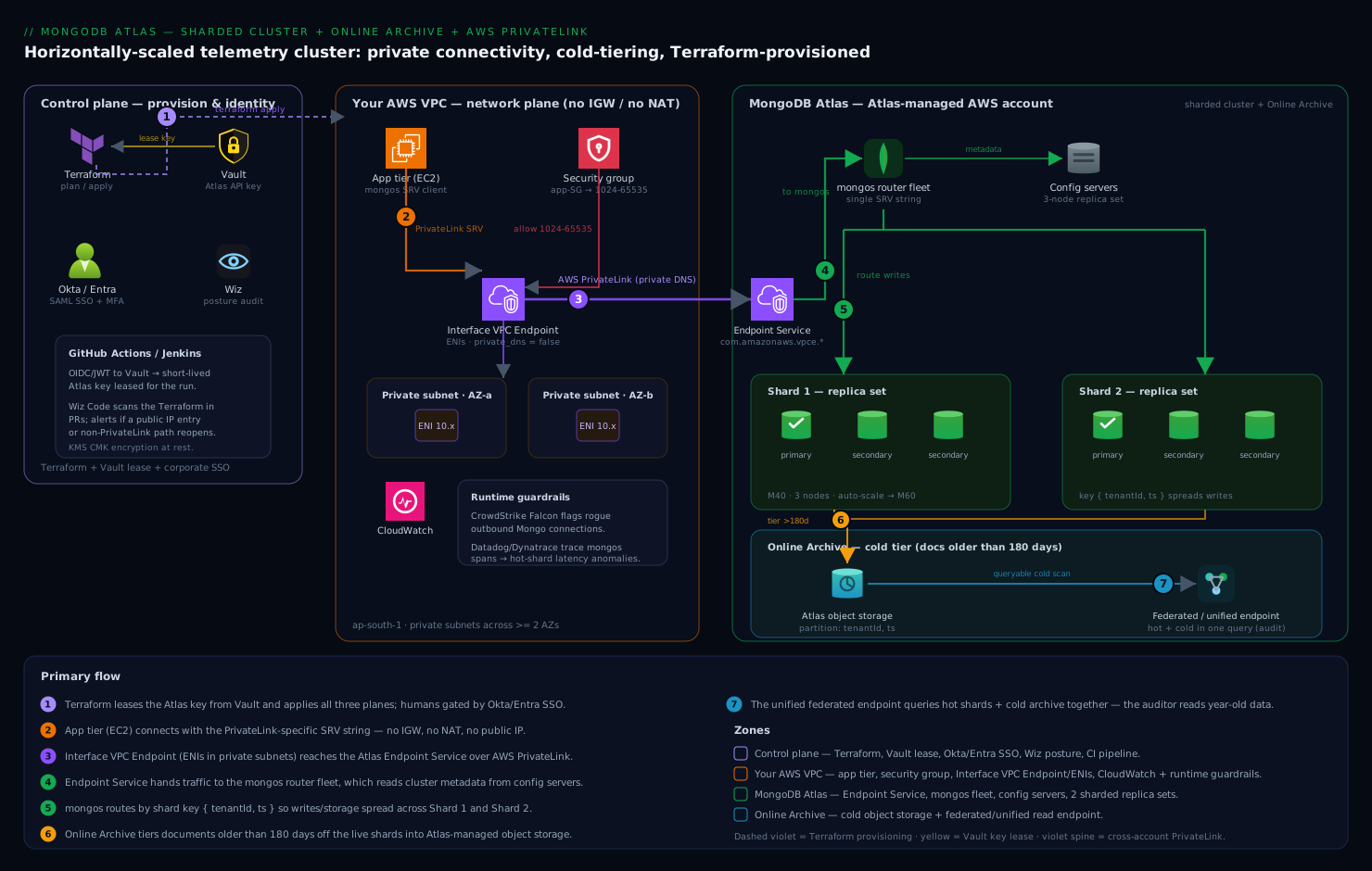
Trace one write and two reads to make it concrete. A sensor reading for tenant acme enters through the endpoint ENI, lands on a mongos, routes by {tenantId, ts} to the shard owning acme’s current chunk range, and commits with w: majority inside that shard’s replica set. A dashboard query for acme’s last 24 hours takes the same path and touches exactly one shard (targeted read). The auditor’s four-year query enters through the unified federated endpoint instead: Data Federation fans the $match across the live collection and the archive’s tenantId=acme partitions, merging both into one cursor. Three different consumers, three different paths, one system of record.
Real-world scenario
Sensorline (fictional but faithful) runs industrial-IoT telemetry for 240 manufacturing customers: 55,000 devices posting readings every 15 seconds — a steady ~3,600 inserts/s into telemetry.events, peaking at 9,000/s during shift changes. By month 40 the numbers had converged on the wall: 6.2 TB on an M60 replica set (81% of its 4 TB-max storage after an emergency extension), p99 insert latency up from 12 ms to 140 ms at peak, WiredTiger dirty cache hitting 19%, and an Atlas bill of about $8,400/month for the cluster — of which, by their own analysis, 71% of stored bytes were older than 180 days and served zero application queries. The security review had also expired: the app reached Atlas over the public endpoint behind a 34-entry IP access list that changed every time the platform team rotated NAT gateways.
The rebuild followed this guide’s order deliberately. Week 1: enabled Online Archive on the existing replica set (ts older than 180 days, partitioned tenantId/ts, 02:00–05:00 window). Tiering drained 4.4 TB over eleven nights; the cluster settled at 1.8 TB — which changed the sharding math from “migrate 6.2 TB” to “migrate 1.8 TB”. Week 3: stood up the two-shard M40 cluster via Terraform, ran analyzeShardKey on candidates — the data killed their first instinct ({deviceId: "hashed"}, which would have destroyed their per-tenant dashboard range scans) in favour of {tenantId: 1, ts: 1}, with one flagged risk: tenant helvex at 9% frequency. Live-migrated with mongosync, cut over with a 40-second write pause at 02:10. Week 4: PrivateLink endpoint into the app VPC, one incident during rollout — the first connect storm failed because a platform engineer had “tightened” the endpoint SG to port 27017; the wide 1024–65535 rule went back in with a comment block explaining why. Week 5: deleted every public access-list entry, closed the security finding, enabled continuous backup with a 7-day window.
Ninety days later: p99 insert latency 11 ms at peak (writes split ~52/48 across shards; helvex monitored, not yet zoned), disk at 24% per shard, the audit team ran their first four-year query through the unified endpoint in 4 minutes instead of a three-week export project. The bill: two M40 shards ≈ $2,300, archive storage + federated reads ≈ $260, PrivateLink ≈ $35 — ≈ $2,600/month against the prior $8,400, a 69% reduction while capacity headroom went from months to years. The write-up that mattered internally was one line: the archive paid for the entire re-architecture before the sharding even landed.
Advantages and disadvantages
| Advantages | Disadvantages |
|---|---|
| Horizontal write/storage scale with no application rewrite — the SRV string hides the topology | Shard key is a near-permanent decision; a bad one is a days-long reshardCollection to fix |
| Cold data costs object-storage rates yet stays MQL-queryable through one unified endpoint | Archive is one-way in practice; archived docs are read-only and leave Atlas Search |
| PrivateLink removes the public attack surface with zero CIDR coordination | Per-endpoint cost and a DNS/port model that misleads first-timers (private_dns_enabled, high ports) |
| Per-shard auto-scaling + PIT backup = elastic capacity with a minute-level RPO | Sharded clusters ≈ 3× replica-set node count: config servers, more alerts, more balancer ops to understand |
| Everything is Terraformable — reviewable, repeatable, auditable platform changes | Provider/schema churn (e.g. num_shards → per-shard replication_specs) demands version discipline |
| Targeted queries keep single-digit-ms reads at any total data size | Any query missing the shard key pays scatter-gather tax across all shards forever |
The honest framing for an architecture review: this stack buys capacity and posture at the price of operational surface. If your data fits an M50 with five years of headroom and your security model tolerates peering, a replica set with an archive rule is the simpler win — sharding is the tool you reach for when the arithmetic (storage ceiling, single-primary write ceiling) says you must, not a badge.
Hands-on lab: the end-to-end build
This lab builds the entire system — sharded cluster, shard key, archive, PrivateLink, backup, alerts — validates each plane, and tears it all down. Budget ~2.5 hours wall-clock (most of it waiting on provisioning) and roughly $3–5 of Atlas/AWS spend if you tear down promptly; M30 shards keep the cost floor down (swap M40 for production shapes). Run it in a sandbox Atlas project and a non-production VPC.
| Phase | What you build | Tool | Wall-clock |
|---|---|---|---|
| 0 | Auth + variables | Atlas CLI, env | 5 min |
| 1 | Terraform skeleton + providers | Terraform | 5 min |
| 2 | Two-shard cluster + backup policy | Terraform | ~20 min provisioning |
| 3 | Shard the collection + seed + verify distribution | mongosh | 20 min |
| 4 | Online Archive + federated query proof | Terraform + mongosh | 20 min (+ archive pass) |
| 5 | AWS PrivateLink + DNS/connectivity proof | Terraform + shell | 20 min |
| 6 | Lock the front door + alerts | Terraform + CLI | 10 min |
| 7 | Restore drill (PIT) | Atlas CLI | 15 min |
| 8 | Teardown (ordered) | Terraform + CLI | 15 min |
Phase 0 — authenticate and pin variables.
atlas auth login                                   # browser SSO for you as operator
export ATLAS_PROJECT_ID=$(atlas projects list -o json | jq -r '.results[] | select(.name=="atlas-lab").id')
# API key for Terraform (create in UI/CLI with Project Owner on the lab project):
export MONGODB_ATLAS_PUBLIC_KEY="xxxx"             # from your secret store, never tfvars
export MONGODB_ATLAS_PRIVATE_KEY="xxxx"
export AWS_REGION=ap-south-1
export TF_VAR_atlas_project_id="$ATLAS_PROJECT_ID"
export TF_VAR_vpc_id="vpc-0abc..." TF_VAR_app_sg_id="sg-0def..."
export TF_VAR_private_subnets='["subnet-0aaa...","subnet-0bbb..."]'
Phase 1 — skeleton. One directory, five files: versions.tf (providers mongodb/mongodbatlas ~> 1.18, hashicorp/aws ~> 5.40; the provider reads the MONGODB_ATLAS_* env vars, so no credentials block), variables.tf (the five vars above), then cluster.tf, archive.tf, privatelink.tf, backup.tf, alerts.tf exactly as written in the sections above — with cluster.tf as follows, using the 1.18+ per-shard schema:
# cluster.tf — two shards, each its own replication_specs (independent scaling)
resource "mongodbatlas_advanced_cluster" "events" {
  project_id             = var.atlas_project_id
  name                   = "events-prod"
  cluster_type           = "SHARDED"
  backup_enabled         = true
  mongo_db_major_version = "7.0"

  replication_specs {                    # shard 0
    region_configs {
      provider_name = "AWS"
      region_name   = "AP_SOUTH_1"
      priority      = 7
      electable_specs { instance_size = "M30" node_count = 3 }
      auto_scaling {
        disk_gb_enabled            = true
        compute_enabled            = true
        compute_min_instance_size  = "M30"
        compute_max_instance_size  = "M50"
        compute_scale_down_enabled = true
      }
    }
  }
  replication_specs {                    # shard 1 — identical today, independent tomorrow
    region_configs {
      provider_name = "AWS"
      region_name   = "AP_SOUTH_1"
      priority      = 7
      electable_specs { instance_size = "M30" node_count = 3 }
      auto_scaling {
        disk_gb_enabled            = true
        compute_enabled            = true
        compute_min_instance_size  = "M30"
        compute_max_instance_size  = "M50"
        compute_scale_down_enabled = true
      }
    }
  }

  advanced_configuration { oplog_size_mb = 2048 }   # explicit oplog: ~48h window at lab write rates

  tags { key = "owner"       value = "platform-data" }
  tags { key = "cost-center" value = "telemetry" }
}

resource "mongodbatlas_database_user" "app" {
  project_id         = var.atlas_project_id
  username           = "app_events"
  password           = var.app_db_password           # sensitive var; rotate to AWS IAM auth in prod
  auth_database_name = "admin"
  roles { role_name = "readWrite" database_name = "telemetry" }
  scopes { name = mongodbatlas_advanced_cluster.events.name type = "CLUSTER" }
}
Phase 2 — build the cluster.
terraform init
terraform apply -target=mongodbatlas_advanced_cluster.events \
                -target=mongodbatlas_database_user.app \
                -target=mongodbatlas_cloud_backup_schedule.events
# ~15-25 min. Meanwhile, watch it come up:
atlas clusters watch events-prod --projectId "$ATLAS_PROJECT_ID"
# Expected end state:
atlas clusters describe events-prod --projectId "$ATLAS_PROJECT_ID" -o json \
  | jq '{state: .stateName, type: .clusterType, shards: (.replicationSpecs | length)}'
# { "state": "IDLE", "type": "SHARDED", "shards": 2 }
Add your workstation IP temporarily (the lab validates the public path first, then closes it in phase 6): atlas accessLists create --currentIp --projectId "$ATLAS_PROJECT_ID".
Phase 3 — shard the collection, seed, verify. Terraform stops at the cluster boundary; the schema is yours:
// mongosh "mongodb+srv://app_events:<pw>@events-prod.<hash>.mongodb.net/"
sh.enableSharding("telemetry")
db.getSiblingDB("telemetry").events.createIndex({ tenantId: 1, ts: 1 })   // key index FIRST
sh.shardCollection("telemetry.events", { tenantId: 1, ts: 1 })

// Seed 1M synthetic readings across 50 tenants and 400 days (so some qualify for the archive)
const tenants = Array.from({length: 50}, (_, i) => `tenant-${String(i).padStart(3,"0")}`)
let batch = []
for (let i = 0; i < 1_000_000; i++) {
  batch.push({
    tenantId: tenants[i % 50],
    deviceId: `dev-${i % 5000}`,
    ts: new Date(Date.now() - Math.floor(Math.random() * 400) * 864e5),
    temp: 40 + Math.random() * 60,
    vibration: Math.random()
  })
  if (batch.length === 10_000) { db.getSiblingDB("telemetry").events.insertMany(batch, {ordered:false}); batch = [] }
}

// Verify: distribution and targeting
db.getSiblingDB("telemetry").events.getShardDistribution()
// Expect two shards, each ~50% docs (±15% while the balancer settles)
db.getSiblingDB("telemetry").events
  .find({ tenantId: "tenant-007", ts: { $gte: new Date(Date.now() - 7*864e5) } })
  .explain("executionStats").queryPlanner.winningPlan.stage
// Expect "SINGLE_SHARD" (targeted), NOT a merge across both
Phase 4 — archive and prove the federated read.
terraform apply -target=mongodbatlas_online_archive.events_cold
atlas onlineArchives list --clusterName events-prod --projectId "$ATLAS_PROJECT_ID" -o json \
  | jq '.results[].state'          # "PENDING" then "ARCHIVING" then "IDLE"
# Grab the federated connection strings from the archive's data source:
atlas dataFederation list --projectId "$ATLAS_PROJECT_ID" -o json \
  | jq -r '.[] | {name, hostnames: .hostnames}'
For the lab, temporarily set expire_after_days = 60 in archive.tf so ~85% of the seed qualifies, and remove the schedule block so archiving starts immediately; after the first pass (tens of minutes for 1M docs):
// Against the LIVE cluster: only recent docs remain
db.getSiblingDB("telemetry").events.countDocuments({})            // ~150k
// Against the UNIFIED federated endpoint: history intact
// mongosh "mongodb://<user>:<pw>@atlas-online-archive-...a.query.mongodb.net/?tls=true"
db.getSiblingDB("telemetry").events.countDocuments({})            // 1,000,000
db.getSiblingDB("telemetry").events.countDocuments({ ts: { $lt: new Date(Date.now()-90*864e5) } })  // > 0: cold rows readable
That pair of counts — small on the cluster, full via the unified endpoint — is the acceptance test for the whole archive plane.
Phase 5 — PrivateLink.
terraform apply    # creates privatelink endpoint, SG, VPC endpoint, and the binding
watch -n 20 "atlas privateEndpoints aws list --projectId $ATLAS_PROJECT_ID -o json | jq -r '.[].status'"
# INITIATING -> AVAILABLE (5-10 min)

# From an instance INSIDE the VPC:
dig +short events-prod-pl-0.<hash>.mongodb.net    # SRV base resolves; A records -> 10.x.x.x (your ENI IPs)
mongosh "mongodb+srv://app_events:<pw>@events-prod-pl-0.<hash>.mongodb.net/telemetry" \
  --eval 'db.runCommand({ ping: 1 })'             # { ok: 1 }

# From OUTSIDE the VPC (your laptop): the names still resolve to 10.x — public DNS, private IPs —
# but the TCP connect must time out. Resolution succeeding off-VPC is EXPECTED, not a leak.
mongosh "mongodb+srv://app_events:<pw>@events-prod-pl-0.<hash>.mongodb.net/telemetry" \
  --eval 'db.runCommand({ ping: 1 })'             # MongoServerSelectionError after timeout = correct
Phase 6 — close the public door and arm the alerts.
terraform apply -target=mongodbatlas_alert_configuration.disk_80   # plus your other alert rows
atlas accessLists delete "$(curl -s ifconfig.me)/32" --projectId "$ATLAS_PROJECT_ID" --force
atlas accessLists list --projectId "$ATLAS_PROJECT_ID" -o json | jq '.results'   # [] or VPC CIDR only
# Re-verify the app path still works from in-VPC via the -pl-0 string before walking away.
Phase 7 — restore drill. A backup you have never restored is a rumour:
atlas backups snapshots create events-prod --desc "lab-drill" --projectId "$ATLAS_PROJECT_ID"
atlas backups snapshots list events-prod --projectId "$ATLAS_PROJECT_ID" -o json | jq '.results[0].id'
# Point-in-time restore back onto the same cluster, 10 minutes ago:
atlas backups restores start pointInTime --clusterName events-prod \
  --pointInTimeUTCSeconds $(( $(date +%s) - 600 )) \
  --targetClusterName events-prod --targetProjectId "$ATLAS_PROJECT_ID" --projectId "$ATLAS_PROJECT_ID"
atlas backups restores watch <restoreJobId> --clusterName events-prod --projectId "$ATLAS_PROJECT_ID"
# Validate: counts match the pre-restore snapshot of reality; app reconnects (drivers retry on the SRV).
Phase 8 — teardown, in dependency order. Breaking this order strands resources or locks you out:
# 1. Restore your own access first (you closed the public path in phase 6):
atlas accessLists create --currentIp --projectId "$ATLAS_PROJECT_ID"
# 2. Rehydrate anything you need from the archive ($merge) — deleting the archive deletes the data.
# 3. Unbind and remove PrivateLink (binding -> AWS endpoint -> Atlas endpoint):
terraform destroy -target=mongodbatlas_privatelink_endpoint_service.this \
                  -target=aws_vpc_endpoint.atlas \
                  -target=aws_security_group.atlas_pl \
                  -target=mongodbatlas_privatelink_endpoint.this
# 4. Archive rule (pause is reversible; destroy is not):
terraform destroy -target=mongodbatlas_online_archive.events_cold
# 5. Final snapshot if anything might matter, then the cluster and the rest:
atlas backups snapshots create events-prod --desc "final" --projectId "$ATLAS_PROJECT_ID"
terraform destroy
# 6. Confirm nothing bills on:
atlas clusters list --projectId "$ATLAS_PROJECT_ID"          # empty
atlas privateEndpoints aws list --projectId "$ATLAS_PROJECT_ID"   # empty
aws ec2 describe-vpc-endpoints --filters Name=vpc-id,Values=$TF_VAR_vpc_id \
  --query 'VpcEndpoints[].State'                             # no lingering endpoints
Common mistakes & troubleshooting
The playbook, ordered by how often each one burns a team:
| # | Symptom | Root cause | Confirm | Fix |
|---|---|---|---|---|
| 1 | One shard hot (CPU/inserts), siblings idle | Monotonic shard key (ts, ObjectId leading) |
getShardDistribution() skewed; analyzeShardKey reports monotonic |
reshardCollection to compound/hashed key |
| 2 | -pl-0 SRV string never connects in-VPC |
private_dns_enabled = true on the AWS endpoint fighting Atlas’s DNS |
aws ec2 describe-vpc-endpoints shows PrivateDnsEnabled: true |
Set it false; re-apply; wait for DNS TTL |
| 3 | PrivateLink works, then “random” node unreachable errors | Endpoint SG narrowed to 27017; Atlas nodes use unique high ports | SG rules vs nslookup+nc -zv <eni> <port> per node port |
Restore TCP 1024–65535 from the app SG |
| 4 | sh.shardCollection fails: “Please create an index that starts with the proposed shard key” |
Shard-key index missing on a non-empty collection | db.events.getIndexes() |
Create {tenantId:1, ts:1} index, retry |
| 5 | Archive state IDLE but disk keeps filling |
date_format mismatch (epoch ints declared ISODATE) — rule matches nothing |
atlas onlineArchives describe: archived bytes ≈ 0; sample doc’s BSON type |
Recreate rule with the correct date_format |
| 6 | Federated audit query slow and expensive | Partition fields don’t match cold-query filters | Data Federation query profile: bytes scanned ≈ whole archive | Recreate archive partitioned on the filtered fields |
| 7 | Balancer migrating continuously for days | Frequency-skewed key (whale tenant) or tiny chunk size | sh.balancerCollectionStatus(); migration counts in config.changelog |
Zone the whale; or accept skew; reshard if structural |
| 8 | Every query fans out (SHARD_MERGE) though data is balanced |
Queries don’t include the shard key | .explain() shows all-shard stages |
Add key to query filters or reshard to query-aligned key |
| 9 | App connect storms after failover through PrivateLink | Driver pool sized over per-node connection limits (M30 = 3,000/node) | Atlas Connections metric vs tier limit at incident time | Cap driver maxPoolSize; raise tier only if genuinely needed |
| 10 | Terraform wants to destroy/recreate the cluster on a no-op change | Legacy num_shards schema vs 1.18+ per-shard replication_specs drift |
terraform plan diff shows spec reshaping |
Migrate config to per-shard schema deliberately; pin provider |
| 11 | reshardCollection aborts |
Insufficient free disk (< ~1.2× collection per shard) or oplog too small | Reshard op error in sh.status()/logs; disk metrics |
Grow disk/oplog; run off-peak; retry |
| 12 | Locked out of cluster after “hardening” | Public access list emptied before PrivateLink verified (or teardown step 1 skipped) | No reachable path: public denied, endpoint absent | Re-add --currentIp via Atlas CLI/UI (control plane ≠ data plane) |
| 13 | Jumbo chunks pinned to one shard | Low-cardinality key value bigger than max chunk size | sh.status() shows jumbo flags |
Only a reshard to a higher-cardinality key clears it |
| 14 | Unified endpoint missing new writes | Querying the archive-only string by mistake | Compare hostnames against atlas dataFederation list |
Point BI at the unified string; reserve archive-only for verification |
Best practices
- Archive before you shard when both are due — tiering first can shrink the migration by 50–80%, as in the scenario above.
- Measure the key before committing:
configureQueryAnalyzer+analyzeShardKeyon real traffic beats every whiteboard argument. - Lead compound keys with the dimension your queries filter on; accept bounded per-tenant monotonicity rather than global fan-out.
- Two shards is a fine start. Scale-out later is routine; un-sharding (pre-8.0) is not. Over-sharding buys cost and balancer churn, not safety.
- Pin the Terraform provider and adopt the per-shard
replication_specsschema deliberately — never let a provider upgrade reshape a production cluster as a side effect. - Auto-scale with a floor at your working-set tier and a ceiling one or two tiers up; auto-scaling absorbs peaks, it doesn’t do capacity planning.
- Keep the balancer inside a window aligned with your archive and backup windows — one off-peak maintenance corridor.
- Treat the archive rule as a data-lifecycle contract: partition fields mirror audit queries, no
data_expiration_rulewithout legal sign-off. - PrivateLink SG stays wide (1024–65535) from the app SG only — narrow the source, never the port range.
- Terraform owns the platform,
mongoshowns the schema, CLI verifies — three roles, no portal-clicking drift. - Restore quarterly — a PIT drill into a scratch cluster, timed, with the runbook updated from what actually happened.
- Alert on the leading indicators (oplog window, dirty cache, targeting ratio), not just the lagging ones (disk full, CPU pinned).
Security notes
Defence in depth around this stack has four rings. Network: PrivateLink as built here, public access list empty, and the archive/federated endpoints noted in your data-flow diagram — federated reads traverse Atlas’s Data Federation service, which supports its own private endpoints on AWS if the audit path must also be private. Identity: humans federate into Atlas through SSO (Okta/Entra ID SAML) with MFA — no local Atlas passwords; applications should graduate from SCRAM passwords to AWS IAM authentication (mongodbatlas_database_user with aws_iam_type = "ROLE") so app credentials are ephemeral STS tokens, not strings in config; Terraform’s API key lives in Vault/Secrets Manager, scoped to one project, rotated. Data: Atlas encrypts at rest by default; regulated workloads add customer-managed keys (AWS KMS via mongodbatlas_encryption_at_rest) — noting CMK covers cluster storage and backups, and archived data is encrypted in Atlas’s object storage — plus Client-Side Field-Level Encryption/Queryable Encryption for fields that must be opaque even to Atlas. Audit: enable database auditing (mongodbatlas_auditing) for auth events and DDL on dedicated tiers, ship Atlas project events to your SIEM via the events API, and let your CSPM (Wiz, Defender for Cloud) alert on drift — the specific drift that matters here is a public access-list entry reappearing, which should page, because with PrivateLink in place there is no legitimate reason for one.
Cost & sizing
What actually drives the bill, in the order it usually surprises people:
| Line item | Driver | Order of magnitude (AWS ap-south-1, indicative) | Lever |
|---|---|---|---|
| Shard compute | tier × 3 nodes × N shards, per hour | M30 ≈ $390/mo, M40 ≈ $780/mo per shard | Right-size + scale-down auto-scaling; fewer, busier shards |
| Cluster storage | GB provisioned per shard (NVMe/EBS) | Included in tier baseline; extensions extra | Online Archive — the single biggest lever on storage-heavy workloads |
| Backup | Snapshot GB + PIT oplog retention | Grows with churn and policy depth | Trim hourly retention; question yearly snapshots |
| Online Archive storage | GB archived per month | Object-storage rates ≈ cents/GB-month (vs NVMe baked into tiers) | Archive more, sooner |
| Federated reads | Data processed per query (≈ $5/TB band) | Audit query on good partitions: MBs; on bad: the whole archive | Partition fields = the query bill |
| PrivateLink | endpoint-hours/AZ + per-GB processed (~$0.01 each) | 2 AZs ≈ $15–40/mo + volume | Usually offsets NAT data-processing it replaces |
| Data transfer | Cross-AZ/region/egress | Workload-dependent | Same-region app+cluster; PrivateLink keeps traffic in-region |
Sizing worked example (the scenario’s end state, ~₹83/USD): two M40 shards ≈ $1,560–2,300/mo (auto-scaling band), backup ≈ $150, archive of 4.4 TB ≈ $110–220 storage + $30–80 federated reads, PrivateLink ≈ $35 → ≈ $2,100–2,800/mo (₹1.75–2.3 L) versus $8,400/mo (₹7 L) on the pinned M60 — with the structural point that the sharded system’s cost now scales with hot data while history grows at object-storage rates. Sizing rules: shards = ceil(hot working set ÷ tier RAM × comfort factor 1.3) checked against ceil(hot storage ÷ 70% of tier max storage), whichever is larger; connections = peak app instances × pool size < 60% of per-node limit × node count.
Interview & exam questions
1. Why does a monotonically increasing shard key defeat sharding, and what are two fixes? All inserts target the current max-key chunk, so one shard takes 100% of write load regardless of shard count. Fix by hashing the key (uniform distribution, loses range locality) or, better for time-series, a compound key led by a high-cardinality non-monotonic field like {tenantId:1, ts:1}.
2. refineCollectionShardKey vs reshardCollection — what does each actually move? Refine only appends suffix fields and rewrites future chunk boundaries — zero data movement, so it fixes unsplittable chunks but not existing skew. Reshard rewrites the collection under a brand-new key, copying every document between shards; it needs ~1.2× free storage per shard and finishes with a sub-second write block at cutover.
3. What is a jumbo chunk and why can’t the balancer fix it? A chunk that exceeds the migration size ceiling but spans a single shard-key value, so it cannot be split. The balancer marks it jumbo and skips it permanently. It is the signature of a low-cardinality key, and only resharding to a higher-cardinality key clears it.
4. A query includes the shard key on a two-shard cluster; explain targeted vs scatter-gather and the p99 implication. With the key, mongos routes to only the owning shard(s) — latency is that shard’s latency. Without it, the query runs on every shard and merges — p99 becomes the slowest shard’s p99, and one degraded shard degrades every untargeted query cluster-wide.
5. Online Archive vs Atlas Data Federation — when is each correct? Online Archive is a managed tiering rule for one collection: age/rule-based, Atlas-owned storage, automatic unified querying — right when cold data must stay MQL-queryable cheaply. Data Federation is a general query engine over clusters and your object storage with $out format control (e.g. Parquet) — right when other engines must read the data or you need cross-source queries.
6. Why must private_dns_enabled be false on the AWS VPC endpoint for Atlas, and what does correct DNS look like? Atlas publishes its -pl-0 hostnames in public DNS resolving to your endpoint’s private ENI IPs; AWS Private DNS would try to own resolution for the service and conflicts. Correct behaviour: the name resolves to 10.x addresses from anywhere, but TCP connects only succeed inside the VPC.
7. Why does the Atlas PrivateLink security group need ports 1024–65535 open? One interface endpoint multiplexes the whole cluster: each node is exposed on a unique high port on the same ENIs. Restricting to 27017 blocks most nodes and presents as intermittent server-selection failures rather than a clean error.
8. PrivateLink vs VPC peering for Atlas — give the architectural argument. Peering joins address spaces: it requires non-overlapping CIDRs (immutable, planned up front), exposes routes bidirectionally, and is non-transitive across hubs. PrivateLink projects a one-way endpoint into your subnet with no CIDR coordination and a one-ENI blast radius — which is why multi-VPC enterprises standardise on it.
9. How does point-in-time restore work on a sharded cluster? Continuous Cloud Backup pairs coordinated per-shard snapshots with continuously captured oplogs; restore replays each shard’s oplog from the nearest snapshot to the requested timestamp, cluster-wide. The whole cluster restores to one instant — you cannot PIT-restore a single shard.
10. Where does auto-scaling stop helping and shard-key work begin? Auto-scaling responds to sustained >75% CPU/memory by raising the tier — symmetric relief for symmetric load. If one shard persistently scales above its siblings, load is key-skewed: the auto-scaler is buying hardware to mask a data-model problem, and the durable fix is zoning or resharding.
11. What happens to Atlas Search when Online Archive tiers a document out? The document leaves the live collection, so it leaves the search index — $search covers hot data only. Search-over-history requires either a longer archive threshold on searched collections or a dual path (Search for hot, federated queries for cold).
12. Your Terraform plan shows the sharded cluster being reshaped after a provider upgrade. What happened? The provider’s sharding schema moved from replication_specs.num_shards to one replication_specs element per shard (1.18+). An unpinned upgrade reinterprets the config and plans topology changes. Pin provider versions and migrate the schema as an explicit, reviewed change.
Quick check
- Your top query is
{ deviceId: X, ts: { $gte: ... } }and inserts are timestamp-ordered. Rank{ts:1},{deviceId:"hashed"}, and{deviceId:1, ts:1}as shard keys and justify in one line each. - The archive rule has been
IDLEfor a week, archived bytes ≈ 0, andtsis stored as an epoch-millis long. What’s wrong? - From your laptop,
events-prod-pl-0...resolves to10.20.3.41— is your PrivateLink setup leaking? - Name the teardown ordering rule that prevents (a) lockout and (b) data loss.
- One shard has auto-scaled to M50 while its sibling idles at M30. What do you investigate before celebrating that auto-scaling “worked”?
Answers
{deviceId:1, ts:1}best — targeted device reads and time locality per device;{deviceId:"hashed"}second — perfect write spread, but time-range reads per device stay targeted while cross-device ranges fan out;{ts:1}worst — monotonic hot shard on every insert.date_formatmismatch: the rule declaresISODATE(or defaulted to it) while the field isEPOCH_MILLIS, so no document ever qualifies — recreate the rule with the correct format.- No. Atlas serves those names from public DNS resolving to your private ENI IPs by design; the security boundary is routability (connects fail off-VPC), not resolvability.
- Re-add your own IP to the access list before dismantling PrivateLink (lockout), and rehydrate/
$mergeanything needed from the archive before deleting the archive rule, since deleting it deletes archived data (loss). - Shard-key skew: compare
getShardDistribution()and per-shard insert rates; look for a whale tenant (frequency) or partial monotonicity. Auto-scaling masked a data-model problem — consider zoning the whale or resharding.
Glossary
- Shard — one replica set owning a subset of a sharded collection’s data; the unit of horizontal scale.
- Config server (CSRS) — the replica set storing chunk→shard routing metadata for the cluster.
mongos— the stateless router that targets operations using cached config metadata; Atlas runs one per node.- Chunk (range) — a contiguous span of shard-key values, default 128 MB, the balancer’s unit of movement.
- Jumbo chunk — an unsplittable over-sized chunk spanning one key value; the permanent scar of a low-cardinality key.
- Balancer — the background process evening data across shards, driven by per-collection size deltas (~3× chunk size threshold).
- Zone sharding — pinning shard-key ranges to named shard groups, for residency, tiering, or whale isolation.
analyzeShardKey/configureQueryAnalyzer— 7.0 commands that sample a live workload and score a candidate key’s cardinality, frequency, and monotonicity.reshardCollection— 5.0+ online rewrite of a collection under a new shard key; full data movement, sub-second cutover block.- Online Archive — Atlas’s rule-driven tiering of cold documents to managed object storage, readable via federated endpoints.
- Partition fields — up to two fields (plus the date field) that physically organise archived data; the determinant of federated scan cost.
- Atlas Data Federation — the query engine over clusters, archives, and your object storage; powers the archive’s read path and
$outto S3. - Unified connection string — the federated endpoint that unions live and archived data into one queryable namespace.
- PrivateLink / Private Link — cloud-provider endpoint services projecting Atlas into your VPC/VNet as private ENIs; one-way, no CIDR coordination.
- Regionalized private endpoints — per-region endpoint mode required for multi-region/global sharded clusters over PrivateLink.
- Continuous Cloud Backup — snapshot + oplog capture enabling point-in-time restore within the restore window (1–7 days).
- Oplog window — how far back the oplog reaches; below ~24 h, node recovery risks full initial syncs.
- WiredTiger cache dirty % — unflushed modified cache; sustained >20% signals write pressure ahead of stalls.
Next steps
- Contrast this managed-sharding operating model with hand-rolled distribution: Deploy ClickHouse Cluster with ReplicatedMergeTree and ClickHouse Keeper runs the same shard/replica topology where you are the control plane.
- The hot/cold economics generalise — see tiered storage on the streaming side in Configure Confluent Cloud Cluster Linking and Tiered Storage for Multi-Region Kafka.
- Backup-and-PITR muscles transfer directly to relational estates: Configure PostgreSQL Continuous Archiving and Point-in-Time Recovery with pgBackRest to S3 and Automate MySQL Hot Backups with Percona XtraBackup and Binlog Point-in-Time Recovery.
- Zoom out to store selection — when Atlas is and isn’t the right primary database: AWS Databases: RDS, DynamoDB and Aurora — Choose the Right Store.
- Shore up the VPC fundamentals the PrivateLink build assumed: AWS VPC, Subnets and Security Groups Explained.