The architecture review stalls on one slide: “Which database?” Someone says “just use Postgres,” someone else says “DynamoDB scales infinitely,” and a third says “Aurora is faster.” All three are right and all three are dangerous, because the question was never which database is best — there is no best. The question is which store fits this workload’s data model, access pattern, scale curve and consistency requirement, and on AWS three managed services cover the overwhelming majority of that space: Amazon RDS (managed relational engines you already know — PostgreSQL, MySQL, MariaDB, Oracle, SQL Server), Amazon Aurora (AWS’s cloud-native relational engine that speaks MySQL and PostgreSQL wire protocols but rebuilds the storage layer underneath), and Amazon DynamoDB (a fully managed, serverless key-value and document store built for single-digit-millisecond latency at any scale).
Pick wrong and you pay for it for years. Force relational, join-heavy, ad-hoc-query data into DynamoDB and you end up scanning tables, fanning out reads in application code, and rewriting access patterns every time the product changes. Force a write-heavy, 100,000-events-per-second firehose onto a single RDS instance and you drown in read replicas, replica lag and vertical-scaling ceilings. Run Aurora when a db.t4g.micro RDS instance would do and you burn money on capacity you never touch. This article is the decision framework a 22-year architect uses to get it right the first time — and to recognise, fast, when an existing choice has gone wrong.
By the end you will choose data-model-first, not hype-first. You will know exactly what RDS gives you that Aurora does not (and vice versa), why DynamoDB’s single-digit-millisecond promise depends entirely on your partition key, what each service’s real limits are (connections, IOPS, item size, RU/s, storage ceilings), how the consistency models actually differ, and what each one costs. Because this is a reference you will return to mid-design and mid-incident, every comparison — engines, instance classes, capacity modes, indexes, endpoints, limits, failure modes — is laid out as a scannable table. Read the prose once; keep the tables open when the decision is live.
What problem this solves
Choosing a database is a one-way door dressed up as a two-way door. Migrating between relational engines is painful; migrating from relational to NoSQL (or back) is a re-architecture, because the data model, the access patterns and half your application code change with it. The cost of a wrong pick is not a config tweak — it is months of remodelling, a scaling wall hit during your biggest traffic event, or a bill that grows faster than revenue.
What breaks without a clear framework: teams default to “the database we know” and put everything on one RDS instance, then discover at 10× scale that vertical scaling has a ceiling and read replicas don’t help writes. Or they over-rotate on “NoSQL scales” and put relational, reporting-heavy data on DynamoDB, then bolt on a second system (often back to a SQL store, or OpenSearch, or Athena over S3) to answer the queries DynamoDB can’t. Or they reach for Aurora reflexively for a tiny internal app and pay a premium for a cluster they’ll never stress. Each of these is a data-model mistake wearing a service-selection costume.
Who hits this: every team standing up a new service, every monolith being decomposed (where one database becomes several, each fitted to its bounded context), and every product that succeeds — because success is exactly when the under-considered database choice fails. The fix is a disciplined decision: name the data model, enumerate the access patterns, project the scale curve, state the consistency requirement, then map those four facts to the store that fits.
To frame the whole field before the deep dive, here is the one-glance summary — the four facts that decide it and what each service answers:
| Deciding factor | RDS | Aurora | DynamoDB |
|---|---|---|---|
| Data model | Relational (normalised, joins, transactions) | Relational (same SQL, cloud-native storage) | Key-value / document (denormalised, access-pattern-shaped) |
| Query style | Ad-hoc SQL, joins, aggregates, reports | Ad-hoc SQL at higher throughput | Known key lookups; queries via designed keys/indexes only |
| Scale ceiling | Vertical (instance size) + read replicas | Higher write throughput; 15 read replicas; storage to 128 TiB | Horizontal, effectively unbounded if keys are well-distributed |
| Consistency | Strong (ACID, single-writer) | Strong (ACID); reader nodes near-real-time | Eventually consistent by default; strongly consistent reads optional |
| Latency profile | Good; degrades with load/locks | Better at scale; sub-10 ms reads on replicas | Single-digit ms at any scale (with the right key) |
| Ops model | You patch/size/tune; managed backups/HA | More managed (storage auto-grows); you size compute | Serverless: no instances, no patching, no capacity tuning (on-demand) |
| Pick it when | Existing SQL app; lift-and-shift; commodity relational | High-throughput SQL; MySQL/PG compatibility + scale/HA | Massive scale; predictable latency; well-defined access patterns |
Learning objectives
By the end of this article you can:
- Choose between RDS, Aurora and DynamoDB from four facts — data model, access patterns, scale curve and consistency requirement — and defend the choice.
- Enumerate what each RDS engine gives you, pick the right instance class and storage type, and configure Multi-AZ vs read replicas for the right reason.
- Explain Aurora’s decoupled compute/storage architecture, choose between provisioned and Serverless v2 capacity, and use the right cluster endpoint (writer / reader / custom) for each workload.
- Design a DynamoDB table around access patterns — partition/sort keys, GSIs vs LSIs, on-demand vs provisioned capacity, and consistency — and avoid hot partitions.
- Reason about each service’s real limits (connections, IOPS, item size, RU/s, storage ceilings) and recognise when you’ve hit one.
- Diagnose the common production failures — replica lag, connection exhaustion, hot partitions, throttling, runaway costs — with the exact CLI/console path to confirm and fix each.
- Right-size and cost-model each option in INR/USD, including free-tier limits, and pick the cheapest store that meets the requirement.
Prerequisites & where this fits
You should be comfortable with core AWS concepts: a VPC with private subnets, security groups, IAM roles and policies, and the difference between the AWS Management Console, the aws CLI and infrastructure-as-code. Basic SQL (SELECT/JOIN/transaction) and the idea of an index help for the relational half; familiarity with key-value thinking (a hash map at planet scale) helps for DynamoDB. You do not need prior Aurora or DynamoDB experience — that’s what this builds.
This sits in the Data & Storage track and is upstream of almost every application design. It assumes the networking foundation from Amazon VPC: Subnets, Route Tables & Security Groups (databases live in private subnets, reachable only through security groups) and the account/identity foundation from AWS Organizations & IAM Foundations. It pairs with AWS Storage: S3 Storage Classes & Lifecycle (S3 is the data-lake target DynamoDB and Aurora export to), with AWS Compute: EC2 vs Lambda vs ECS vs EKS (what connects to these databases), and with AWS Backup & Disaster-Recovery Strategies (how you protect them). The front-door choice in ALB vs NLB vs API Gateway often sits in front of the same compute that talks to these stores.
A quick map of who owns what during a design or an incident, so you pull in the right person:
| Layer | What lives here | Who usually owns it | What it decides / can break |
|---|---|---|---|
| Application / data access | ORM, queries, access patterns, connection pool | App / dev team | Wrong store choice; connection exhaustion; N+1 queries |
| Database engine | RDS engine / Aurora / DynamoDB table | DBA / platform team | Schema, indexes, capacity mode, consistency |
| Storage layer | EBS (RDS), Aurora distributed storage, DynamoDB partitions | AWS (managed) | IOPS, throughput, storage ceiling, replication |
| Network | VPC, subnets, security groups, endpoints | Network team | Reachability; private access; SNAT-free PrivateLink |
| Identity | IAM roles, DB auth, KMS keys | Security team | Who can connect; encryption; least privilege |
| Cost / FinOps | Instance size, RU/s, storage, I/O, backups | FinOps + owners | The bill; over-provisioning; runaway on-demand |
Core concepts
Six mental models make every later decision obvious.
Data model first, service second. The single most consequential property is how your data is shaped and queried. Relational data — entities with relationships, queried with joins, aggregates and ad-hoc filters you can’t fully predict — wants RDS or Aurora. Key-value/document data — accessed by a known identifier with a small, well-defined set of patterns — wants DynamoDB. Everything else (latency, scale, cost) is a second-order tie-breaker. Pick the model wrong and no amount of tuning saves you.
RDS is managed engines; Aurora is a re-engineered engine. RDS takes the database engines you already run (PostgreSQL, MySQL, MariaDB, Oracle, SQL Server) and operates them for you — provisioning, patching, backups, Multi-AZ failover. The engine is the same software you’d run on a server, on EBS storage. Aurora keeps the MySQL/PostgreSQL wire protocol and SQL but replaces the storage engine with a purpose-built, distributed, log-structured store that spreads six copies of your data across three Availability Zones and lets storage grow automatically. Aurora is “RDS-compatible SQL with a different, faster, more available storage layer,” not a drop-in for every extension and quirk of vanilla Postgres/MySQL.
DynamoDB is a partitioned hash map, and the partition key is everything. DynamoDB stores items (rows) in partitions chosen by hashing the partition key. A read or write goes straight to the partition for that key — O(1), single-digit milliseconds, at any table size. The catch: throughput is per partition, so if your access concentrates on one key (a “hot partition”), you throttle even though the table as a whole is far under capacity. Every DynamoDB design decision — keys, indexes, item collections — exists to spread load evenly across partitions. Get the key right and it scales forever; get it wrong and it throttles at modest load.
Consistency is a spectrum you choose, not a given. RDS and Aurora are ACID: a single writer, strong consistency, transactions. Aurora reader endpoints serve reads from replicas that lag the writer by milliseconds (near-real-time but not the writer’s exact instant). DynamoDB defaults to eventual consistency (a read may not reflect the most recent write for a short window, because it might hit a replica that hasn’t caught up) and offers strongly consistent reads as an opt-in (more RCU, only on the base table, not GSIs). Knowing which guarantee each store gives — and which your workload actually needs — prevents both correctness bugs and over-paying for consistency you don’t require.
Capacity is sized differently per service. RDS capacity is an instance class (vCPU + RAM, e.g. db.r6g.xlarge) plus a storage type (gp3/io2) — you pick the box. Aurora is the same instance idea, but storage auto-scales; Aurora Serverless v2 even scales the compute in fine-grained ACUs (Aurora Capacity Units) with load. DynamoDB capacity is read/write units — on-demand (pay per request, no planning) or provisioned (you set RCU/WCU, optionally with auto-scaling). Knowing the unit each service bills in is how you size and cost it.
Managed ≠ zero-ops, except where it is. RDS and Aurora still need you to choose instance sizes, manage connection pools, tune parameters, schedule maintenance windows and watch metrics — AWS manages the infrastructure, you manage the database. DynamoDB on-demand is the closest to genuinely serverless: no instances, no patching, no capacity tuning, scaling handled for you — your only job is the data model and the keys. The further right you go (RDS → Aurora → Aurora Serverless v2 → DynamoDB on-demand), the less operational surface you own.
The vocabulary in one table
Before the deep sections, pin down every moving part. The glossary at the end repeats these for lookup; this table is the mental model side by side:
| Term | One-line definition | Which service | Why it matters |
|---|---|---|---|
| Engine | The database software (PostgreSQL, MySQL, …) | RDS | Decides SQL dialect, features, licensing |
| DB instance | The compute box (class = vCPU + RAM) running the engine | RDS / Aurora | Capacity ceiling; cost; failover unit |
| Multi-AZ | A synchronous standby in another AZ for failover | RDS / Aurora | HA; standby is not readable (RDS classic) |
| Read replica | An async copy serving read-only traffic | RDS / Aurora | Scales reads; can lag the primary |
| Cluster | Aurora’s writer + readers sharing one storage volume | Aurora | The unit you create; endpoints point into it |
| Cluster endpoint | DNS that routes to writer / readers / custom set | Aurora | Send writes vs reads to the right node |
| ACU | Aurora Capacity Unit (≈2 GiB RAM + CPU/network) | Aurora Serverless v2 | The fine-grained scaling/billing unit |
| Partition key | The attribute hashed to place an item | DynamoDB | Distribution; hot-partition risk |
| Sort key | Second key for ordering within a partition | DynamoDB | Range queries; item collections |
| RCU / WCU | Read / Write Capacity Unit (one unit of throughput) | DynamoDB | Provisioned capacity + billing unit |
| GSI / LSI | Global / Local Secondary Index | DynamoDB | Query by non-key attributes |
| Item | One record (≤ 400 KB) | DynamoDB | The unit of storage and capacity math |
| PITR | Point-in-time recovery | All three | Restore to any second in the window |
The service comparison reference
Before the per-service deep dives, here is the master comparison you scan first — every dimension that separates the three, side by side. The non-obvious rows are failover time (Aurora is much faster than RDS classic Multi-AZ), read scaling (DynamoDB and Aurora beat RDS), and operational surface (which shrinks left to right).
| Dimension | RDS | Aurora | DynamoDB |
|---|---|---|---|
| Type | Managed relational | Cloud-native relational | Managed NoSQL (key-value/doc) |
| Engines / API | PostgreSQL, MySQL, MariaDB, Oracle, SQL Server | MySQL-compatible, PostgreSQL-compatible | DynamoDB API (PartiQL optional) |
| Storage model | EBS volume per instance | Distributed, 6 copies / 3 AZs, auto-grow | Partitioned, replicated across 3 AZs |
| Max storage | 64 TiB (gp3, varies by engine) | 128 TiB per cluster | Unbounded (per-item ≤ 400 KB) |
| Write scaling | Vertical (bigger instance) | Vertical; higher ceiling per instance | Horizontal (add partitions automatically) |
| Read scaling | Up to 5 (15 some engines) read replicas | Up to 15 low-lag reader replicas | Horizontal; eventually-consistent reads cheap |
| Replica lag | Async, seconds possible | Typically < 100 ms (shared storage) | N/A (eventual reads ~ms behind) |
| Failover time | 60–120 s (Multi-AZ classic) | Typically < 30 s (often < 15 s) | Transparent (no failover concept) |
| Consistency | Strong (ACID) | Strong (ACID) | Eventual (default) / strong (opt-in) |
| Transactions | Full, multi-statement | Full, multi-statement | Limited (TransactWrite/Get, ≤ 100 items) |
| Joins / ad-hoc queries | Yes | Yes | No (design keys/indexes up front) |
| Global / multi-region | Cross-region read replicas | Aurora Global Database (< 1 s lag) | Global Tables (active-active) |
| Backups | Automated + snapshots, PITR | Continuous to S3, PITR, fast clone | Continuous PITR (35 days), on-demand |
| Scaling effort | Resize instance (downtime/replica) | Resize / Serverless v2 auto | On-demand: none; provisioned: auto-scaling |
| Pricing unit | Instance-hour + storage + I/O | Instance-hour (or ACU-hr) + storage + I/O | Per-request (on-demand) or RCU/WCU + storage |
| Best fit | Lift-and-shift, commodity SQL | High-throughput SQL, HA, MySQL/PG compat | Massive scale, predictable latency, key access |
| Worst fit | Web-scale writes; unpredictable spikes | Tiny apps (overkill); niche engine features | Relational/reporting; ad-hoc analytics |
And the decision as a data-model-first flow in table form — start at the top, stop at the first row that matches:
| If your data / workload is… | …then the right store is | Because |
|---|---|---|
| An existing PostgreSQL/MySQL/Oracle/SQL Server app to migrate with minimal change | RDS (same engine) | Lift-and-shift; keep the engine, gain management |
| Relational, but you need higher write throughput, faster failover, or 5–15 replicas | Aurora | Same SQL, cloud-native storage & HA |
| Relational with spiky/unpredictable load you don’t want to size | Aurora Serverless v2 | Compute auto-scales in ACUs |
| Key-value or document, accessed by a known ID, at large or unpredictable scale | DynamoDB | O(1) partitioned access, serverless scale |
| Time-series / event firehose at very high write rate | DynamoDB (or purpose-built TS store) | Horizontal writes; no replica sprawl |
| Heavy ad-hoc analytics / joins over big data | Redshift / Athena (not these three) | OLAP, not OLTP — different tool |
| In-memory caching / leaderboards / sub-ms | ElastiCache in front of any of the above | Cache layer, not the system of record |
Amazon RDS, option by option
RDS is the safe default for relational data: pick the engine you know, the box that fits, the storage that performs, and let AWS run it. Every choice below is a lever.
Engine choice
RDS runs five engines; the choice is driven by your existing app, licensing, and feature needs. What each gives you and the gotcha:
| Engine | Pick it when | Licensing | Key strength | Gotcha |
|---|---|---|---|---|
| PostgreSQL | Modern apps; rich SQL, extensions (PostGIS, JSONB) | Open-source (no licence) | Extensions, standards-compliance, JSON | Major-version upgrades need care |
| MySQL | LAMP-style apps, broad ecosystem | Open-source | Ubiquity, tooling, replication | Some features lag Postgres |
| MariaDB | MySQL drop-in, prefer the fork | Open-source | MySQL-compatible, some extra engines | Smaller managed-feature parity |
| Oracle | Existing Oracle estate, PL/SQL, specific features | BYOL or License-Included | Enterprise features, compatibility | Cost; licence complexity |
| SQL Server | .NET shops, T-SQL, SSRS/SSAS-adjacent | License-Included (editions) | Windows/.NET integration | Cost; edition limits (RAM/cores) |
# Create a PostgreSQL RDS instance in private subnets (gp3, Multi-AZ)
aws rds create-db-instance \
  --db-instance-identifier orders-prod \
  --engine postgres --engine-version 16.4 \
  --db-instance-class db.r6g.large \
  --allocated-storage 100 --storage-type gp3 \
  --multi-az --no-publicly-accessible \
  --master-username appadmin --manage-master-user-password \
  --db-subnet-group-name db-private --vpc-security-group-ids sg-0abc123
# Terraform: the same instance, with secrets in Secrets Manager
resource "aws_db_instance" "orders" {
  identifier              = "orders-prod"
  engine                  = "postgres"
  engine_version          = "16.4"
  instance_class          = "db.r6g.large"
  allocated_storage       = 100
  max_allocated_storage   = 500          # storage autoscaling ceiling
  storage_type            = "gp3"
  multi_az                = true
  publicly_accessible     = false
  db_subnet_group_name    = aws_db_subnet_group.private.name
  vpc_security_group_ids  = [aws_security_group.db.id]
  manage_master_user_password = true     # AWS-managed master secret
  backup_retention_period = 14
  storage_encrypted       = true
  deletion_protection     = true
}
Instance classes
The instance class is the box: vCPU, RAM, network. Families differ in CPU/RAM ratio and price. Match the workload:
| Family | Profile | RAM:vCPU | Pick it for | Avoid for |
|---|---|---|---|---|
| db.t4g / t3 | Burstable (CPU credits) | ~4:1 | Dev/test, low/spiky steady load | Sustained high CPU (credits run out) |
| db.m6g / m7g | General purpose | ~4:1 | Balanced OLTP workloads | Memory-bound big working sets |
| db.r6g / r7g | Memory-optimised | ~8:1 | Large buffer pool, cache-heavy | Pure CPU-bound compute |
| db.x2g | Extra memory-optimised | ~16:1 | Very large in-memory data sets | Cost-sensitive small apps |
| Graviton (g) | ARM-based, better price/perf | — | Almost everything (cheaper) | Engine/version not yet supporting ARM |
A burstable db.t4g runs on CPU credits: cheap at idle, but a sustained workload exhausts credits and throttles (or bills for surplus credits). The first scaling mistake on RDS is leaving production on a t-class and hitting the credit wall under load. The fix is the right class and, where you can, Graviton for the price/performance.
# Resize the instance class (incurs a brief failover on Multi-AZ)
aws rds modify-db-instance --db-instance-identifier orders-prod \
  --db-instance-class db.r6g.xlarge --apply-immediately
Storage types
RDS storage is EBS underneath; the type decides IOPS and throughput characteristics and cost:
| Storage type | IOPS model | Throughput | Pick it for | Limit / note |
|---|---|---|---|---|
| gp3 (general purpose SSD) | 3,000 baseline, provisionable to 16,000 | 125–1,000 MB/s | The default for most OLTP | Decouples IOPS from size — cheaper than gp2 |
| gp2 (legacy SSD) | 3 IOPS/GB (burst to 3,000) | Scales with size | Legacy; migrate to gp3 | IOPS tied to volume size |
| io2 Block Express | Provisioned, up to 256,000 | Very high | Latency-sensitive, high-IOPS OLTP | Highest cost; for demanding workloads |
| Magnetic | Low | Low | Never for production | Legacy only |
The classic storage mistake is sizing gp2 and discovering your IOPS are capped by volume size, not by need — a 100 GB gp2 volume gives ~300 baseline IOPS. gp3 decouples IOPS from size, so you provision the IOPS you need without inflating storage. Watch the ReadIOPS/WriteIOPS and DiskQueueDepth CloudWatch metrics — a rising queue depth means you’re IOPS-starved.
Multi-AZ vs read replicas — two different jobs
These are constantly confused. Multi-AZ is for availability (a hot standby that takes over on failure); read replicas are for read scaling (extra readable copies). They solve different problems and you often want both:
| Property | Multi-AZ (instance) | Multi-AZ DB cluster | Read replica |
|---|---|---|---|
| Purpose | Failover / HA | HA + 2 readable standbys | Scale reads |
| Standby readable? | No | Yes (2 readers) | Yes (it’s a replica) |
| Replication | Synchronous | Semi-sync to 2 readers | Asynchronous |
| Failover time | 60–120 s | Often < 35 s | Promote manually (minutes) |
| Cross-region? | No (same region) | No | Yes |
| Data loss risk | None (sync) | Minimal | Possible (async lag) |
| Cost | ~2× (standby) | ~3× (two extra) | Per-replica instance |
| Use when | Any production DB | HA + some read offload | Read-heavy; reporting; cross-region DR |
# Add a read replica (can be in another region for DR)
aws rds create-db-instance-read-replica \
  --db-instance-identifier orders-prod-replica-1 \
  --source-db-instance-identifier orders-prod \
  --db-instance-class db.r6g.large
A read replica replicates asynchronously, so it can lag the primary — reads from it may be stale by seconds under write load. Never route a read-your-own-write flow (user updates a profile, immediately reloads it) to a lagging replica without thought. Watch ReplicaLag; if it climbs, the replica is undersized or the write rate is too high.
Parameters, options and maintenance
RDS exposes engine tuning through parameter groups (engine settings like max_connections, work_mem) and option groups (engine add-ons). The settings you change most and why:
| Setting / control | What it does | Default | When to change | Trade-off / gotcha |
|---|---|---|---|---|
max_connections |
Cap on concurrent connections | Formula of instance RAM | App opens too many; or limit a noisy app | Too high → memory pressure; use a pooler |
work_mem (PG) |
Memory per sort/hash op | Modest | Heavy analytical queries | Too high × many connections → OOM |
| Backup retention | Days of automated backups + PITR | 7 (1 disables) | Compliance / recovery window | Storage cost; 0 disables PITR |
| Maintenance window | When patches/upgrades apply | AWS-assigned | Align to low-traffic hours | Patches can cause brief failover |
| Performance Insights | Captures wait events / top SQL | Off (enable it) | Always in prod | Small cost; huge diagnostic value |
| Deletion protection | Blocks accidental delete | Off | Always in prod | Must disable before intended delete |
| Storage autoscaling | Grows storage on the fly | Off | Avoid full-disk outages | Set a max_allocated_storage ceiling |
| IAM DB authentication | Auth via IAM tokens, not passwords | Off | Centralise auth; rotate-free | Token TTL ~15 min; pooling considerations |
RDS limits and quotas
The real numbers that bite. These are the ones you hit in production:
| Limit | Typical value | What hitting it looks like | Mitigation |
|---|---|---|---|
| Max storage (gp3) | 64 TiB (engine-dependent) | Can’t grow further | Archive/shard; consider Aurora (128 TiB) |
| Max connections | RAM-derived (hundreds–few thousand) | “too many connections” errors | RDS Proxy / app pooler; bigger instance |
| Read replicas | 5 (15 for MySQL/MariaDB) | Can’t add another | Aurora (15) or cache layer |
| Provisioned IOPS (io2) | Up to 256,000 | I/O-bound; high DiskQueueDepth |
More IOPS; faster storage; query tuning |
| Backup retention | 0–35 days | Can’t restore beyond window | Snapshot to longer-term; export to S3 |
| Instance RAM (largest) | Hundreds of GB (e.g. x2g) | Working set won’t fit | Memory-optimised class; or partition data |
| DB name / identifier rules | Engine-specific length/charset | Create fails | Follow naming constraints |
Amazon Aurora, the cloud-native relational engine
Aurora keeps the SQL you know and rebuilds everything beneath it. Understand the storage architecture first; the rest follows.
The decoupled storage architecture
In classic RDS, one instance owns one EBS volume. Aurora splits compute (the DB instances) from storage (a shared, distributed volume). The storage layer keeps six copies of every 10 GB segment across three AZs and is log-structured — instances ship redo log records to storage, which materialises pages. The consequences are the whole point of Aurora:
| Architectural property | What it gives you | Contrast with RDS classic |
|---|---|---|
| 6 copies / 3 AZs | Survives an AZ + one more failure with no data loss | Single EBS volume per instance |
| Shared storage volume | All replicas read the same data — low lag | Each replica has its own copy (more lag) |
| Storage auto-grows | Up to 128 TiB, no pre-provisioning | You set/extend allocated_storage |
| Log-structured (ship redo) | Less network/IO amplification, faster writes | Full-page writes over the network |
| Fast failover | Replica is promoted in seconds (shared storage) | 60–120 s standby promotion |
| Fast clone / backtrack | Copy-on-write clones; rewind in time | Restore from snapshot (slower) |
Cluster endpoints — send the right traffic to the right node
An Aurora cluster has one writer and up to 15 readers sharing storage. You don’t connect to instances directly; you connect to endpoints that route for you. Using the wrong endpoint is a common, silent mistake (sending reads to the writer wastes its capacity; sending writes to a reader fails):
| Endpoint | Routes to | Use for | Behaviour on failover |
|---|---|---|---|
| Cluster (writer) endpoint | Current writer | All writes; read-after-write | Auto-points to the new writer |
| Reader endpoint | Load-balanced across readers | Read-only traffic, reports | Drops failed readers; balances rest |
| Custom endpoint | A chosen subset of instances | Isolate (e.g. analytics on big readers) | You define membership |
| Instance endpoint | One specific instance | Debugging a single node | Doesn’t move on failover |
# Create an Aurora PostgreSQL cluster, then add a reader
aws rds create-db-cluster --db-cluster-identifier shop-aurora \
  --engine aurora-postgresql --engine-version 16.4 \
  --master-username appadmin --manage-master-user-password \
  --db-subnet-group-name db-private --vpc-security-group-ids sg-0abc123
aws rds create-db-instance --db-instance-identifier shop-aurora-1 \
  --db-cluster-identifier shop-aurora --engine aurora-postgresql \
  --db-instance-class db.r6g.large
aws rds create-db-instance --db-instance-identifier shop-aurora-reader-1 \
  --db-cluster-identifier shop-aurora --engine aurora-postgresql \
  --db-instance-class db.r6g.large
Capacity modes — provisioned vs Serverless v2
Aurora compute comes two ways. Provisioned = you pick instance classes (like RDS). Serverless v2 = the cluster scales compute up and down in fine-grained ACUs (each ACU ≈ 2 GiB RAM with proportional CPU/network) based on live load. Choose by predictability:
| Capacity mode | How it scales | Billing | Pick it when | Watch-out |
|---|---|---|---|---|
| Provisioned | You resize the instance class | Per instance-hour | Steady, predictable load | Pay for peak even at idle |
| Serverless v2 | Auto, in 0.5-ACU steps, near-instant | Per ACU-hour (min…max you set) | Spiky / unpredictable / dev | Set min ACU > 0 to avoid cold-ish ramp; cost if always-busy |
# Serverless v2: set the ACU range on the cluster
aws rds modify-db-cluster --db-cluster-identifier shop-aurora \
  --serverless-v2-scaling-configuration MinCapacity=0.5,MaxCapacity=16
resource "aws_rds_cluster" "shop" {
  cluster_identifier = "shop-aurora"
  engine             = "aurora-postgresql"
  engine_mode        = "provisioned"     # Serverless v2 uses provisioned mode + scaling config
  serverlessv2_scaling_configuration {
    min_capacity = 0.5
    max_capacity = 16
  }
  storage_encrypted   = true
  deletion_protection = true
}
Aurora replication and global reach
Within a region you add up to 15 readers with sub-100 ms lag (they read shared storage). Across regions, Aurora Global Database replicates with typically < 1 s lag and supports a fast managed failover for DR/low-latency global reads:
| Feature | Lag | Region scope | Use for | Note |
|---|---|---|---|---|
| Reader replicas (in-region) | < 100 ms (shared storage) | Same region | Read scaling, HA | Up to 15 |
| Aurora Global Database | < 1 s typical | Secondary regions | Global reads, DR | Managed cross-region failover |
| Cross-region snapshot copy | N/A (point-in-time) | Any | Compliance, migration | Not continuous |
| Backtrack (MySQL-compat) | N/A (rewind) | Same cluster | Undo bad writes fast | Set retention window |
Aurora limits
| Limit | Value | Note |
|---|---|---|
| Max cluster storage | 128 TiB | Auto-grows; no pre-provisioning |
| Reader replicas | 15 per cluster | Shared storage → low lag |
| Serverless v2 ACUs | 0.5 up to 128 ACU | ≈ 1 GiB to 256 GiB RAM range |
| Global Database secondary regions | Multiple (region-dependent) | Add for DR / locality |
| Connections | Instance-class dependent | Use RDS Proxy for pooling at scale |
| Engine compatibility | MySQL 5.7/8.0-compat; PostgreSQL versions | Not every extension/feature of vanilla |
Amazon DynamoDB, designed around access patterns
DynamoDB inverts relational design: you don’t model entities and then query them; you enumerate the queries and design keys so those queries are O(1). Get this right and it scales without limit; get it wrong and you scan, throttle and overpay.
Keys, partitions and the hot-partition trap
Every item has a partition key (hashed to choose a partition). Optionally a sort key gives ordering within a partition and enables range queries — items sharing a partition key form an item collection. The cardinal rule: spread load evenly across partition keys, because throughput is per-partition. Key-design choices and their consequences:
| Key design | Distribution | Query power | Risk | Use when |
|---|---|---|---|---|
High-cardinality PK (e.g. userId) |
Even | Get one item by key | Low | Per-entity lookups |
PK + sort key (e.g. userId + timestamp) |
Even (per user) | Range/sorted within user | Hot if one user dominates | Time-ordered per entity |
Low-cardinality PK (e.g. status) |
Skewed → hot partition | Limited | High — throttles | Almost never |
| Composite / synthetic key (sharding suffix) | Even (forced) | Needs fan-out read | Read complexity | Unavoidably hot keys |
| Single-table design (overloaded keys) | Even (by design) | Many patterns, one table | Modeling complexity | Microservice owning many patterns |
A hot partition is the number-one DynamoDB failure: one partition key takes disproportionate traffic and throttles while the table is far under total capacity. The fix is key design — write sharding (append a calculated suffix to spread writes), choosing a higher-cardinality attribute, or restructuring item collections. Adaptive capacity absorbs mild imbalance automatically, but it is not a substitute for an evenly distributed key.
# Create a table: PK=PK (string), SK=SK (string), on-demand billing, PITR + encryption
aws dynamodb create-table --table-name shop-events \
  --attribute-definitions AttributeName=PK,AttributeType=S AttributeName=SK,AttributeType=S \
  --key-schema AttributeName=PK,KeyType=HASH AttributeName=SK,KeyType=RANGE \
  --billing-mode PAY_PER_REQUEST \
  --sse-specification Enabled=true
aws dynamodb update-continuous-backups --table-name shop-events \
  --point-in-time-recovery-specification PointInTimeRecoveryEnabled=true
resource "aws_dynamodb_table" "shop_events" {
  name         = "shop-events"
  billing_mode = "PAY_PER_REQUEST"
  hash_key     = "PK"
  range_key    = "SK"
  attribute { name = "PK" type = "S" }
  attribute { name = "SK" type = "S" }
  point_in_time_recovery { enabled = true }
  server_side_encryption { enabled = true }
}
Capacity modes — on-demand vs provisioned
Two ways to pay for throughput. On-demand scales automatically and bills per request — zero capacity planning. Provisioned sets RCU/WCU (optionally auto-scaled) — cheaper for steady, predictable traffic. Choose by predictability and spikiness:
| Capacity mode | Scaling | Billing | Pick it when | Watch-out |
|---|---|---|---|---|
| On-demand | Instant, automatic | Per read/write request | Spiky, unpredictable, new, dev | More expensive per-request at high steady volume |
| Provisioned | You set RCU/WCU (+ auto-scaling) | Per provisioned unit-hour | Steady, predictable load | Under-provision → throttling; over → waste |
| Provisioned + auto-scaling | Target-utilisation tracking | Per unit-hour | Predictable with gentle ramps | Can’t react to instant flash spikes |
| Reserved capacity | N/A (commitment) | Discounted RCU/WCU | Large stable provisioned baseline | 1/3-yr commitment |
The capacity-unit math you must know: 1 WCU = one write/sec of an item up to 1 KB; 1 RCU = one strongly consistent read/sec up to 4 KB, or two eventually-consistent reads/sec of 4 KB. Bigger items and strong reads cost more units. Mis-estimating this is the second-most-common throttling cause after hot keys.
| Operation | Item size | Consistency | Capacity consumed |
|---|---|---|---|
| Write | 1 KB | — | 1 WCU |
| Write | 3.5 KB | — | 4 WCU (round up per KB) |
| Read | 4 KB | Strong | 1 RCU |
| Read | 4 KB | Eventual | 0.5 RCU |
| Read | 12 KB | Eventual | 1.5 RCU |
| Transactional write | 1 KB | — | 2 WCU |
| Transactional read | 4 KB | — | 2 RCU |
Secondary indexes — GSI vs LSI
Indexes let you query by non-key attributes. The two kinds differ sharply; choosing wrong forces a redesign:
| Property | Global Secondary Index (GSI) | Local Secondary Index (LSI) |
|---|---|---|
| Partition key | Any attribute (different from base) | Same as base table PK |
| Sort key | Any attribute | Different attribute |
| When created | Any time (add/remove later) | Only at table creation |
| Consistency | Eventual only | Strong or eventual |
| Capacity | Its own RCU/WCU (or on-demand) | Shares base table capacity |
| Count limit | 20 per table (default) | 5 per table |
| Item-collection size | Independent | 10 GB cap per partition key |
| Use when | Query by a totally different key | Alternate sort within same PK |
The big traps: an LSI can only be created with the table (you cannot add one later — you’d rebuild the table), and an LSI ties you to a 10 GB per-partition-key item-collection limit. GSIs are flexible (add anytime, own capacity) but eventually consistent only. Most designs favour GSIs.
# Add a GSI on an existing table (GSIs can be added later; LSIs cannot)
aws dynamodb update-table --table-name shop-events \
  --attribute-definitions AttributeName=GSI1PK,AttributeType=S AttributeName=GSI1SK,AttributeType=S \
  --global-secondary-index-updates \
  '[{"Create":{"IndexName":"GSI1","KeySchema":[{"AttributeName":"GSI1PK","KeyType":"HASH"},{"AttributeName":"GSI1SK","KeyType":"RANGE"}],"Projection":{"ProjectionType":"ALL"}}}]'
Consistency and read options
DynamoDB lets you choose per read. Knowing the matrix prevents both stale-read bugs and over-paying:
| Read type | Returns | Cost | Where allowed | Use when |
|---|---|---|---|---|
| Eventually consistent (default) | May miss the most recent write (~ms) | 0.5 RCU / 4 KB | Base table + GSI | Default; high-volume reads |
| Strongly consistent | Latest committed write | 1 RCU / 4 KB | Base table + LSI (not GSI) | Read-after-write correctness |
| Transactional (TransactGetItems) | Snapshot-isolated set | 2 RCU / 4 KB | Base table | All-or-nothing reads |
Streams, TTL and the feature set
DynamoDB’s surrounding features turn it from a key-value store into an event source and a self-pruning store. The ones you’ll actually use:
| Feature | What it does | Why it matters | Note |
|---|---|---|---|
| DynamoDB Streams | Ordered change log of item modifications | Event-driven pipelines; CDC; replication | 24 h retention; triggers Lambda |
| TTL | Auto-deletes items past an epoch attribute | Free expiry of sessions/events | Deletes within ~48 h of expiry (not exact) |
| Global Tables | Multi-region active-active replication | Low-latency global writes; DR | Last-writer-wins conflict resolution |
| DAX | In-memory cache in front of DynamoDB | Microsecond reads for hot items | Only after proving DynamoDB is the bottleneck |
| PITR | Continuous backup, restore to any second | 35-day recovery window | Enable on every prod table |
| PartiQL | SQL-like query syntax | Familiar syntax over DynamoDB | Still bound by key/index design |
| Export to S3 | Full-table export without consuming capacity | Analytics in Athena/Redshift | Point-in-time; no RCU burn |
| Contributor Insights | Most-accessed keys / throttled keys | Find hot partitions | Turn on when diagnosing skew |
DynamoDB limits and quotas
The hard numbers that shape designs:
| Limit | Value | What hitting it means | Mitigation |
|---|---|---|---|
| Max item size | 400 KB | Write rejected | Split item; store blob in S3, pointer in item |
| Partition key length | 1–2048 bytes | Validation error | Shorten key |
| Sort key length | 1–1024 bytes | Validation error | Shorten key |
| GSIs per table | 20 (default, raisable) | Can’t add another | Consolidate access patterns |
| LSIs per table | 5 (creation-time only) | Can’t add | Rethink at design time |
| Item-collection (LSI) | 10 GB per partition key | Writes blocked for that key | Avoid LSI for large collections; use GSI |
| Query/Scan page | 1 MB per call | Paginated results | Paginate with LastEvaluatedKey |
| Transaction items | 100 items / 4 MB | Transaction rejected | Smaller batches |
| BatchWriteItem | 25 items / 16 MB | Batch rejected | Chunk the batch |
| On-demand throughput | Scales to high default ceilings | Sudden 2× spike may briefly throttle | Pre-warm or use provisioned + scaling |
| Throughput (provisioned) | Per-table/account RCU/WCU quotas | ProvisionedThroughputExceeded |
Raise capacity / quota; fix hot key |
Consistency, transactions and durability across the three
This is the dimension teams under-think. Side by side, what each guarantees and how to reason about it:
| Property | RDS | Aurora | DynamoDB |
|---|---|---|---|
| Default read consistency | Strong (from primary) | Strong (writer); ~ms-lag (reader) | Eventual |
| Strong read option | Always (primary) | Always (writer) | Opt-in (ConsistentRead=true) |
| Transactions | Full ACID, multi-statement | Full ACID, multi-statement | TransactWrite/Get, ≤ 100 items |
| Isolation levels | Engine-configurable | Engine-configurable | Serializable (within a transaction) |
| Durability | Multi-AZ sync (if enabled) | 6 copies / 3 AZs | 3-AZ replication, always |
| Cross-region consistency | Async replica (lag) | Global DB < 1 s | Global Tables (last-writer-wins) |
| Read-your-own-write | Yes (primary) | Yes (writer endpoint) | Yes only with strong read on base table |
The practical rule: if your correctness depends on reading exactly what you just wrote, read from the RDS/Aurora primary/writer or use a DynamoDB strongly consistent read on the base table (never a GSI). If “a few milliseconds stale” is fine (most read-heavy traffic), use replicas/reader endpoints and DynamoDB eventual reads — they’re cheaper and scale further.
Backup, recovery and DR across the three
How you protect each store, and how fast you recover:
| Mechanism | RDS | Aurora | DynamoDB |
|---|---|---|---|
| Automated backups | Daily + transaction logs | Continuous to S3 | Continuous (PITR) |
| PITR window | 0–35 days | Up to 35 days | Up to 35 days |
| On-demand snapshot | Yes | Yes (fast) | Yes (instant, no capacity burn) |
| Restore speed | Provisions a new instance (minutes+) | Fast; clone is near-instant (CoW) | New table from backup |
| Cross-region copy | Snapshot copy / cross-region replica | Snapshot copy / Global DB | Backup copy / Global Tables |
| RPO (typical) | Seconds (PITR) | Seconds (PITR) | Seconds (PITR) |
| RTO (typical) | Minutes (restore/failover) | < 30 s failover; minutes restore | Seconds (multi-region) |
For the full strategy — vaults, cross-account isolation, tested restores — see AWS Backup & Disaster-Recovery Strategies. The rule that saves you: a backup you have never restored is a hope, not a plan — schedule restore drills.
Architecture at a glance
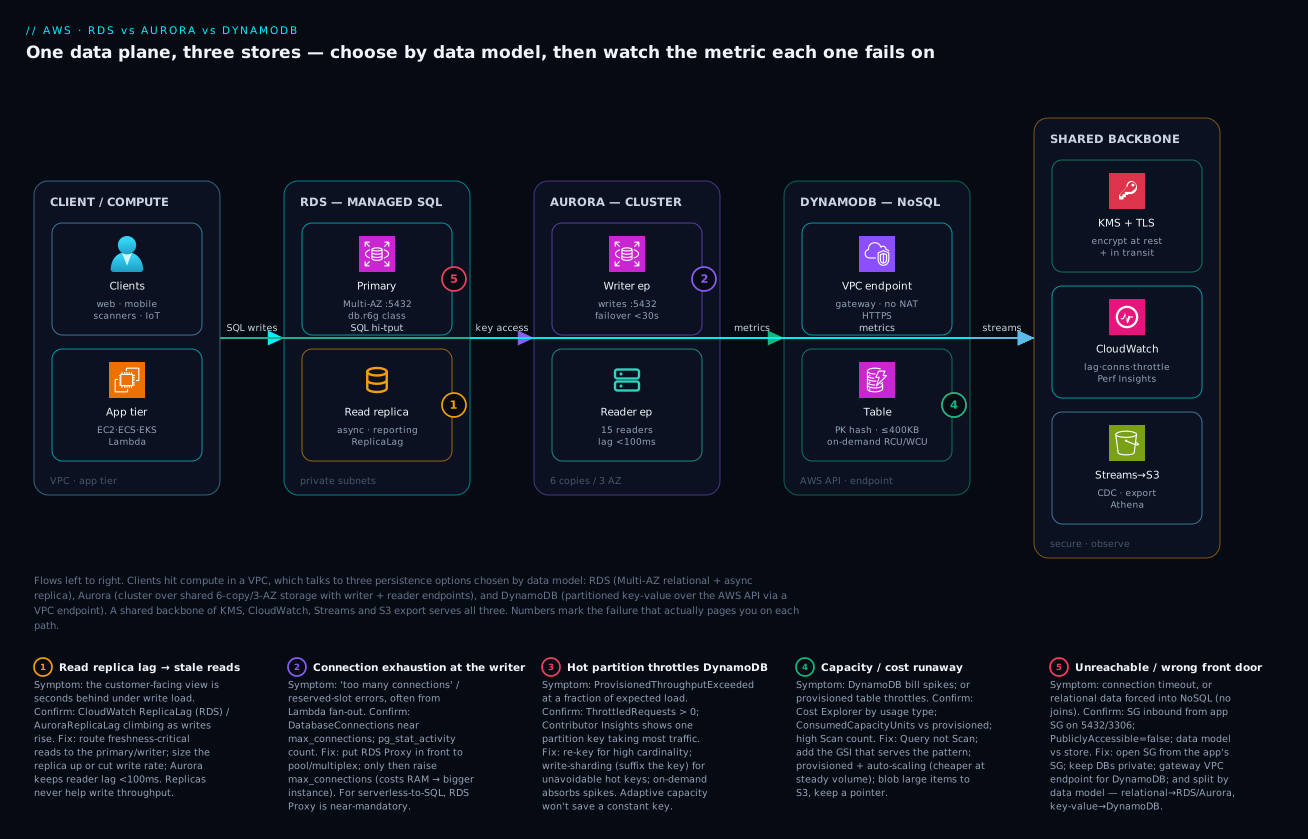
The diagram traces one application’s data plane left to right and shows where each store fits and where each one bites. Read it from the left: clients reach compute (EC2/ECS/EKS/Lambda — see AWS Compute: EC2 vs Lambda vs ECS vs EKS) inside the VPC, and that compute talks to three persistence options chosen by data model. Amazon RDS sits in private subnets as a Multi-AZ primary with a read replica — the writer takes transactional writes, the replica absorbs read-heavy reporting (and can lag, badge 1). Amazon Aurora is the same SQL but as a cluster: a writer plus reader endpoint over a shared 6-copy/3-AZ storage volume, so failover is seconds and reader lag is sub-100 ms (badge 2 marks the connection-pool ceiling you hit at scale). Amazon DynamoDB is reached over the AWS API (often via a VPC endpoint, no SNAT) as partitioned key-value storage — O(1) by partition key, but throttling if one key runs hot (badge 3). A fourth zone shows the shared backbone every store leans on: KMS encryption, CloudWatch metrics/alarms, DynamoDB Streams and S3 export feeding analytics.
Notice the convergence: whichever store you pick, the operational truth lives in the same instruments — CloudWatch metrics (ReplicaLag, DatabaseConnections, ThrottledRequests), Performance Insights for the SQL engines, and Contributor Insights for DynamoDB hot keys. The badges map the four failures that actually page you (replica lag, connection exhaustion, hot partition, and a runaway capacity/cost spike) onto the exact node where each bites, and the legend narrates each as symptom · confirm · fix. The whole method is: localise the workload to the right store by data model, then watch the one metric that store fails on.
Real-world scenario
Trackwise Logistics runs a parcel-tracking platform across India: a web/mobile front end, a fleet of delivery scanners emitting events, and a back office for billing and reporting. The platform team is six engineers; the original design put everything on a single RDS PostgreSQL db.r6g.xlarge Multi-AZ instance in ap-south-1 (Mumbai), with two read replicas. Monthly database spend was about ₹95,000 and climbing.
The trouble started as the business grew. Scanner events — “parcel X scanned at hub Y at time Z” — reached 40,000 writes per second at peak, all hammering one PostgreSQL primary. The team’s reflex was vertical: bigger instance, then more read replicas. But replicas don’t help writes, and the primary’s WriteIOPS and DiskQueueDepth were pinned. ReplicaLag on the reporting replica climbed to 45 seconds during peaks, so the customer-facing “where is my parcel” page — which read from a replica — showed stale locations and generated support tickets. Adding a fifth replica was both expensive and useless for the write bottleneck. The architecture had a data-model mismatch wearing a scaling costume: a high-velocity, append-only, key-accessed event stream was living in a normalised relational table.
The breakthrough was separating concerns by data model. Tracking events are key-value, write-heavy, accessed by tracking ID — a textbook DynamoDB workload. Orders, invoices and financial reports are relational, transactional, join-heavy — they belong in SQL. The team split the system:
- DynamoDB for shipment events: partition key
trackingId, sort keyeventTimestamp, on-demand capacity (the load was spiky around delivery windows). Item collections per tracking ID gave instant, sorted event history with a singleQuery. A GSI onhubId + timestampanswered “all events at hub Y in the last hour” for operations. TTL auto-expired events older than 18 months. Streams fed a Lambda that updated a materialised “current status” item. - Aurora PostgreSQL (migrated from RDS) for orders, invoices and reports: a writer plus two reader endpoints, with the reporting workload isolated on a custom endpoint pointing at the larger readers. Aurora’s sub-100 ms reader lag killed the stale-report problem, and faster failover improved availability.
- ElastiCache Redis in front of the “current status” lookups for sub-millisecond reads on the hottest tracking IDs.
The early DynamoDB design had one scare: an initial key of partition = "EVENT" (a constant) created a catastrophic hot partition — everything hashed to one place and throttled at a fraction of expected load. Contributor Insights showed a single partition key taking 100% of traffic. The fix was the proper high-cardinality key (trackingId), and throughput problems vanished.
The outcome: tracking-page latency fell from “up to 45 s stale” to single-digit milliseconds and always current; the event firehose scaled with zero replica management; and total database spend dropped to about ₹78,000/month because DynamoDB on-demand replaced four over-sized RDS instances and Aurora right-sized the relational core. The lesson on the wall: “Don’t scale the wrong database harder — move the workload to the database that fits its data model.”
The migration as a timeline, because the order of moves is the lesson:
| Phase | Symptom | Action taken | Effect | What it should have been |
|---|---|---|---|---|
| Baseline | One RDS instance, all workloads | (original design) | Works at small scale | Split by data model from day one |
| Growth | Writes pinned, replica lag 45 s | Scale up the instance | Brief relief, recurs | Don’t scale up to mask a model mismatch |
| Growth | Stale tracking page | Add a 5th read replica | No help (writes bottleneck) | Move events off relational |
| Redesign | Events identified as key-value | DynamoDB, PK=trackingId |
Firehose absorbed | The correct move |
| Redesign | DynamoDB throttling early | Found constant PK = hot partition | Fix to high-cardinality key | Design keys for distribution first |
| Redesign | Relational core still on RDS | Migrate to Aurora + custom endpoint | Sub-100 ms reports, fast failover | — |
| Steady state | — | ElastiCache for hottest reads | Sub-ms current status | Cache last, after proving the need |
Advantages and disadvantages
Each store earns its place by fitting a data model — and each bites when forced outside it. Weigh them honestly:
| Service | Advantages | Disadvantages |
|---|---|---|
| RDS | Familiar engines (Postgres/MySQL/Oracle/SQL Server); full SQL, joins, transactions; easy lift-and-shift; mature tooling; managed backups/HA | Vertical write-scaling ceiling; replicas lag and don’t help writes; licensing cost (Oracle/SQL Server); you size/tune/patch the box |
| Aurora | Higher throughput than open-source RDS; 6-copy/3-AZ durability; sub-100 ms reader lag; fast failover; storage auto-grows to 128 TiB; Serverless v2 auto-scaling; fast clones/backtrack | Not 100% feature-parity with vanilla Postgres/MySQL (some extensions/quirks differ); overkill (and cost) for tiny apps; still vertical write-scaling per writer |
| DynamoDB | Serverless; single-digit-ms latency at any scale; no patching/sizing (on-demand); horizontal scale; Global Tables; Streams for CDC; per-request pricing | No joins/ad-hoc queries — access patterns up front; hot-partition risk; limited transactions (≤ 100 items); query inflexibility forces redesigns; cost surprises if access patterns are wrong |
When each matters: RDS is right when you have an existing relational app and want management without re-architecture, or when commodity SQL with joins and transactions is genuinely the model. Aurora is right when that same relational model needs more throughput, faster failover, more replicas, or auto-scaling compute — and you can live within its compatibility envelope. DynamoDB is right when the data is key-value/document, the access patterns are known and stable, and the scale or latency requirement exceeds what a single SQL writer can give. The recurring mistake is using scale or familiarity as the deciding factor instead of data model — that’s how relational data ends up throttling in DynamoDB and event firehoses end up drowning a Postgres primary.
Hands-on lab
Stand up one of each — a tiny RDS PostgreSQL instance, an Aurora Serverless v2 cluster, and an on-demand DynamoDB table — observe the difference, then tear it all down. Uses free-tier-eligible / minimal sizes; delete everything at the end to avoid charges. Run in CloudShell (Bash) with a default VPC, or set --db-subnet-group-name to your private subnet group.
Step 1 — Variables.
export AWS_PAGER=""                 # stop the CLI opening a pager
RG=db-lab
SG=$(aws ec2 describe-security-groups --filters Name=group-name,Values=default \
  --query "SecurityGroups[0].GroupId" --output text)
echo "Using default security group $SG"
Step 2 — A small RDS PostgreSQL instance (free-tier class).
aws rds create-db-instance \
  --db-instance-identifier ${RG}-rds \
  --engine postgres --db-instance-class db.t4g.micro \
  --allocated-storage 20 --storage-type gp3 \
  --master-username labadmin --manage-master-user-password \
  --no-publicly-accessible --vpc-security-group-ids $SG
Expected: a JSON block with "DBInstanceStatus": "creating". It takes a few minutes to become available.
Step 3 — An Aurora PostgreSQL Serverless v2 cluster.
aws rds create-db-cluster --db-cluster-identifier ${RG}-aurora \
  --engine aurora-postgresql --engine-mode provisioned \
  --master-username labadmin --manage-master-user-password \
  --serverless-v2-scaling-configuration MinCapacity=0.5,MaxCapacity=4 \
  --vpc-security-group-ids $SG
aws rds create-db-instance --db-instance-identifier ${RG}-aurora-1 \
  --db-cluster-identifier ${RG}-aurora --engine aurora-postgresql \
  --db-instance-class db.serverless
Expected: a cluster, then a db.serverless instance that scales between 0.5 and 4 ACUs.
Step 4 — A DynamoDB table (on-demand, PITR on).
aws dynamodb create-table --table-name ${RG}-events \
  --attribute-definitions AttributeName=PK,AttributeType=S AttributeName=SK,AttributeType=S \
  --key-schema AttributeName=PK,KeyType=HASH AttributeName=SK,KeyType=RANGE \
  --billing-mode PAY_PER_REQUEST
aws dynamodb wait table-exists --table-name ${RG}-events
aws dynamodb update-continuous-backups --table-name ${RG}-events \
  --point-in-time-recovery-specification PointInTimeRecoveryEnabled=true
Step 5 — Write and read a DynamoDB item (note: no schema, no instance).
aws dynamodb put-item --table-name ${RG}-events --item \
  '{"PK":{"S":"TRACK#1001"},"SK":{"S":"EVT#2026-06-23T10:00"},"hub":{"S":"BLR"},"status":{"S":"in_transit"}}'
aws dynamodb query --table-name ${RG}-events \
  --key-condition-expression "PK = :pk" \
  --expression-attribute-values '{":pk":{"S":"TRACK#1001"}}'
Expected: the item comes back instantly — a single-partition Query, no joins, no capacity planning.
Step 6 — Watch the metric that each store fails on.
# DynamoDB: throttling (should be zero on this tiny load)
aws cloudwatch get-metric-statistics --namespace AWS/DynamoDB \
  --metric-name ThrottledRequests --dimensions Name=TableName,Value=${RG}-events \
  --start-time $(date -u -d '15 min ago' +%FT%TZ 2>/dev/null || date -u -v-15M +%FT%TZ) \
  --end-time $(date -u +%FT%TZ) --period 300 --statistics Sum

# RDS: connections (once available)
aws cloudwatch get-metric-statistics --namespace AWS/RDS \
  --metric-name DatabaseConnections --dimensions Name=DBInstanceIdentifier,Value=${RG}-rds \
  --start-time $(date -u -d '15 min ago' +%FT%TZ 2>/dev/null || date -u -v-15M +%FT%TZ) \
  --end-time $(date -u +%FT%TZ) --period 300 --statistics Maximum
Validation checklist. You created a relational instance (you size it), a cloud-native cluster that auto-scales compute (you set a range), and a serverless NoSQL table (you size nothing) — and queried DynamoDB by key with zero schema. That contrast is the lesson: the operational surface shrank from RDS → Aurora → DynamoDB. The steps mapped to what each proves:
| Step | What you did | What it proves |
|---|---|---|
| 2 | Create RDS with an instance class | You choose the box (vCPU/RAM) |
| 3 | Create Aurora Serverless v2 with an ACU range | Compute auto-scales between bounds |
| 4–5 | Create + query DynamoDB by key | No schema, no instance, O(1) by PK |
| 6 | Read the per-store failure metric | Each store fails on a different signal |
Cleanup (avoid lingering charges — do this).
aws dynamodb delete-table --table-name ${RG}-events
aws rds delete-db-instance --db-instance-identifier ${RG}-aurora-1 --skip-final-snapshot
aws rds delete-db-cluster --db-cluster-identifier ${RG}-aurora --skip-final-snapshot
aws rds delete-db-instance --db-instance-identifier ${RG}-rds --skip-final-snapshot
Cost note. A db.t4g.micro and a minimal Serverless v2 cluster left running for an hour are a few rupees; DynamoDB on-demand for a handful of requests is effectively free. The risk is forgetting to delete — RDS/Aurora bill per hour whether you use them or not, so run the cleanup.
Common mistakes & troubleshooting
This is the playbook — the part you bookmark. First as a scannable table you can read mid-incident, then the entries that bite hardest with the full confirm-and-fix detail.
| # | Symptom | Root cause | Confirm (exact path / command) | Fix |
|---|---|---|---|---|
| 1 | Reads return stale data; “where is my X” is behind | Read replica / reader lag under write load | CloudWatch ReplicaLag (RDS) / AuroraReplicaLag; rising under writes |
Read critical paths from primary/writer; reduce write rate; bigger replica; Aurora (lower lag) |
| 2 | App errors “too many connections” / “remaining connection slots reserved” | Connection exhaustion (no pooling; serverless fan-out) | RDS DatabaseConnections near max_connections; PG pg_stat_activity |
RDS Proxy or app pooler; raise max_connections (carefully); bigger instance |
| 3 | DynamoDB ProvisionedThroughputExceededException / throttling |
Hot partition (low-cardinality PK) or under-provisioned RCU/WCU | ThrottledRequests > 0; Contributor Insights shows one hot key |
Re-key for high cardinality / write-sharding; on-demand or raise capacity |
| 4 | DynamoDB bill spikes unexpectedly | On-demand × inefficient access (scans, large items, missing index) | Cost Explorer by usage type; ConsumedReadCapacityUnits; Scan count |
Query not Scan; add the right index; provisioned + auto-scaling for steady load |
| 5 | RDS/Aurora slow under load; high disk queue | IOPS-starved storage or unindexed/expensive queries | DiskQueueDepth high; Performance Insights top SQL/waits |
gp3 → more IOPS / io2; add indexes; fix N+1; cache |
| 6 | Can’t connect to the DB at all (timeout) | Security group / subnet / public-access misconfig | Test from a host in-VPC; check SG inbound on DB port; PubliclyAccessible |
Open SG from app SG on 5432/3306; private subnet routing; VPC endpoint for DynamoDB |
| 7 | Storage full → RDS read-only / outage | allocated_storage exhausted, autoscaling off |
FreeStorageSpace near zero; instance in storage-full |
Enable storage autoscaling with a ceiling; grow now; archive data |
| 8 | DynamoDB strong-read returns “not supported on GSI” | Strongly consistent read attempted on a GSI | Code uses ConsistentRead=true against a GSI |
Strong reads only on base table/LSI; design around it |
| 9 | Tried to add an LSI to an existing table — can’t | LSIs are creation-time only | update-table rejects LSI add |
Recreate the table with the LSI, or use a GSI instead |
| 10 | Aurora reads not load-balancing; one node hot | App connects to a single instance endpoint | Connection string targets an instance, not the reader endpoint | Use the reader endpoint (or a custom endpoint) for read traffic |
| 11 | RDS failover took ~2 minutes; users saw errors | Multi-AZ classic failover time + no app retry | Failover event in console; app has no reconnect logic | Aurora (faster failover) or Multi-AZ cluster; add connection retry/backoff |
| 12 | Item write rejected: “item size has exceeded the maximum” | Item > 400 KB | Write fails with size error | Split the item; store the blob in S3, keep a pointer in DynamoDB |
| 13 | DynamoDB query returns partial data | 1 MB page limit; not paginating | Results truncated; LastEvaluatedKey present |
Paginate using LastEvaluatedKey; narrow the query |
| 14 | Burstable RDS throttles after a while under load | db.t-class CPU credits exhausted |
CPUCreditBalance hits zero; CPU throttled |
Move to m/r class; or accept surplus-credit billing |
The expanded form, for the entries that cost the most time:
1. Reads return stale data; the customer-facing view is behind.
Root cause: A read replica (RDS) or reader (Aurora) lags the primary under write load, and you routed a read-your-own-write or freshness-sensitive read to it.
Confirm: CloudWatch ReplicaLag (RDS) or AuroraReplicaLag climbing as writes rise; the reader returns data that’s seconds old.
Fix: Route freshness-critical reads to the primary/writer; reduce the write rate or size the replica up; on RDS, consider Aurora whose shared storage keeps reader lag sub-100 ms. Don’t add more replicas to fix write pressure — replicas don’t help writes.
2. “FATAL: too many connections” / connection-slot errors.
Root cause: Connection exhaustion — too many app connections (no pooling), or a serverless/Lambda fleet each opening its own connection, against the instance’s max_connections.
Confirm: RDS DatabaseConnections near the limit; in Postgres, SELECT count(*) FROM pg_stat_activity;.
Fix: Put RDS Proxy (or a client-side pooler like PgBouncer) in front to multiplex connections; only then consider raising max_connections (each connection costs RAM, so a bigger instance may be needed). For Lambda at scale, RDS Proxy is almost mandatory.
# Create RDS Proxy to pool connections (needs an IAM role + secret)
aws rds create-db-proxy --db-proxy-name orders-proxy \
  --engine-family POSTGRESQL --role-arn arn:aws:iam::111122223333:role/rds-proxy \
  --auth '[{"AuthScheme":"SECRETS","SecretArn":"arn:aws:secretsmanager:...:secret:orders","IAMAuth":"DISABLED"}]' \
  --vpc-subnet-ids subnet-aaa subnet-bbb
3. DynamoDB throttling — ProvisionedThroughputExceededException.
Root cause: A hot partition (a low-cardinality or constant partition key concentrates traffic) or genuinely under-provisioned RCU/WCU.
Confirm: CloudWatch ThrottledRequests / ReadThrottleEvents > 0; turn on Contributor Insights to see the most-accessed key — a single key taking the bulk of traffic is the smoking gun.
Fix: Re-key for high cardinality; apply write sharding (suffix the key to spread writes) for unavoidably hot keys; switch to on-demand (absorbs spikes) or raise provisioned capacity. Adaptive capacity helps mild skew but won’t save a constant key.
4. DynamoDB bill spikes unexpectedly.
Root cause: On-demand billing multiplied by inefficient access — full-table Scans, oversized items, or a missing index forcing reads of more data than needed.
Confirm: Cost Explorer grouped by usage type; ConsumedReadCapacityUnits far above expectation; a high Scan count in CloudWatch.
Fix: Replace Scan with Query (key/index-based); add the GSI that serves the pattern; for steady high volume, move to provisioned + auto-scaling (cheaper per request than on-demand); store large blobs in S3, not in items.
5. RDS/Aurora slow under load, high disk queue.
Root cause: IOPS-starved storage (gp2 capped by size, or insufficient provisioned IOPS) or expensive/unindexed queries.
Confirm: DiskQueueDepth elevated; Performance Insights shows the top SQL and wait events (e.g. IO:DataFileRead).
Fix: Move to gp3 and provision the IOPS you need (or io2 for very high demand); add the missing indexes; fix N+1 query patterns; add ElastiCache for hot reads. Throwing a bigger instance at an unindexed query just delays the wall.
6. Can’t connect at all (timeout).
Root cause: Security group / subnet / public-access misconfiguration — the DB isn’t reachable from the app.
Confirm: From a host inside the VPC, test the port (nc -zv <endpoint> 5432); check the DB security group allows inbound from the app’s SG on the DB port; check PubliclyAccessible and route tables.
Fix: Add an inbound rule from the app security group to the DB port (5432/3306); keep the DB in private subnets; for DynamoDB from a private subnet, add a VPC gateway endpoint so traffic doesn’t need a NAT.
# Allow the app SG to reach Postgres on 5432
aws ec2 authorize-security-group-ingress --group-id $DB_SG \
  --protocol tcp --port 5432 --source-group $APP_SG
# Gateway VPC endpoint for DynamoDB (no NAT, no data-transfer cost)
aws ec2 create-vpc-endpoint --vpc-id vpc-0abc --service-name com.amazonaws.ap-south-1.dynamodb \
  --route-table-ids rtb-0def
7. Storage full → RDS goes read-only.
Root cause: allocated_storage exhausted with storage autoscaling off.
Confirm: FreeStorageSpace near zero; the instance shows storage-full.
Fix: Enable storage autoscaling with a max_allocated_storage ceiling so it grows before it fills; grow storage now; archive or purge old data. Aurora avoids this entirely (storage auto-grows to 128 TiB).
8–14 are covered crisply in the table above: strong reads aren’t allowed on GSIs (design around it); LSIs are creation-time only (use a GSI or rebuild); use the reader endpoint for Aurora read balancing; add connection retry/backoff for failovers; respect the 400 KB item cap (blob to S3); paginate past the 1 MB page limit; and move off db.t burstable classes when sustained load exhausts CPU credits.
Best practices
- Choose data-model-first, every time. Name the model (relational vs key-value/document), enumerate the access patterns, project the scale curve, state the consistency need — then pick the store. Never let “the database we know” or “NoSQL scales” make the call.
- Put databases in private subnets, reachable only via security groups. No public accessibility for production data stores; reference the app’s security group, not CIDRs, for inbound.
- Pool connections for SQL stores. Use RDS Proxy (especially for Lambda/serverless fan-out) or a client pooler; connection exhaustion is the most common avoidable SQL outage.
- Enable Multi-AZ and tested backups on every production SQL database. Multi-AZ for failover, PITR for recovery, and practise the restore — an untested backup is a hope.
- Turn on Performance Insights (SQL) and Contributor Insights (DynamoDB). They turn a two-hour mystery into a two-minute lookup: top SQL/waits for RDS/Aurora, hottest keys for DynamoDB.
- Design DynamoDB around access patterns, not entities. High-cardinality partition keys, the right GSIs, write-sharding for hot keys; favour
QueryoverScan; remember LSIs are creation-time only. - Right-size capacity to the load curve. On-demand DynamoDB and Aurora Serverless v2 for spiky/unpredictable load; provisioned (with auto-scaling / reserved capacity) for steady, predictable volume to cut cost.
- Use gp3 and provision IOPS for what you need. Don’t let gp2’s size-coupled IOPS throttle you; watch
DiskQueueDepth. - Encrypt at rest with KMS and in transit with TLS. Enable storage encryption at creation (you can’t add it in place easily later); enforce TLS connections.
- Use IAM authentication and Secrets Manager instead of long-lived passwords where possible; rotate managed master secrets.
- Alert on the leading indicators, not just “database down”:
ReplicaLag,DatabaseConnections,DiskQueueDepth,FreeStorageSpace, DynamoDBThrottledRequestsand consumed-capacity vs provisioned. - Add a cache (ElastiCache/DAX) last — only after proving the database itself is the latency bottleneck, never as the first reflex.
The alarms worth wiring before the next incident — the leading indicators per store:
| Alert on | Store | Metric | Threshold (starting point) | Why it’s leading |
|---|---|---|---|---|
| Replica lag | RDS / Aurora | ReplicaLag / AuroraReplicaLag |
> 5 s sustained | Stale reads before users complain |
| Connection pressure | RDS / Aurora | DatabaseConnections |
> 80% of max_connections |
Predicts connection-exhaustion errors |
| Storage exhaustion | RDS | FreeStorageSpace |
< 10% free | Prevents read-only / outage |
| IOPS starvation | RDS / Aurora | DiskQueueDepth |
> 5 sustained | Slow queries before timeouts |
| DynamoDB throttling | DynamoDB | ThrottledRequests |
> 0 sustained | Hot key / under-capacity early |
| Capacity vs provisioned | DynamoDB | Consumed vs Provisioned | > 80% of provisioned | Pre-empts throttling on provisioned tables |
| CPU credits (burstable) | RDS | CPUCreditBalance |
trending to 0 | Predicts t-class throttle |
Security notes
- Encryption at rest with KMS. Enable storage encryption when you create RDS/Aurora and DynamoDB (DynamoDB encrypts by default; choose an AWS-owned, AWS-managed, or customer-managed key). Adding encryption to an existing unencrypted RDS instance means a snapshot-copy-and-restore, so do it from the start.
- Encryption in transit (TLS). Enforce TLS to RDS/Aurora (require SSL in the parameter group / connection string); DynamoDB and its VPC endpoint use HTTPS.
- Least-privilege IAM. Scope DynamoDB access to specific tables and actions (
dynamodb:Queryontable/shop-events, notdynamodb:*on*). Use IAM database authentication for RDS/Aurora to issue short-lived tokens instead of static passwords where it fits. - Network isolation. Databases in private subnets; inbound only from the application’s security group on the DB port; VPC gateway/interface endpoints for DynamoDB so traffic never leaves the AWS network (and you skip NAT cost).
- Secrets management. Store credentials in Secrets Manager with rotation (RDS managed master password); never hard-code connection strings.
- Auditing. Enable engine audit logs (RDS) and CloudTrail for control-plane and DynamoDB data-plane events; ship logs to CloudWatch/S3. See AWS CloudTrail, Config & Audit Compliance.
- Deletion protection + backups. Turn on deletion protection for production stores and keep PITR enabled so an accidental drop or a bad deploy is recoverable.
The security controls mapped to what each defends and how to set it:
| Control | Setting / mechanism | Defends against | How to enable |
|---|---|---|---|
| Encryption at rest | KMS key on RDS/Aurora/DynamoDB | Disk/snapshot exposure | --storage-encrypted (set at create); DynamoDB SSE |
| Encryption in transit | Require SSL / HTTPS | Network sniffing / MITM | rds.force_ssl param; TLS in connection string |
| Network isolation | Private subnets + SG + VPC endpoint | Direct internet access | SG inbound from app SG; gateway endpoint for DynamoDB |
| Least-privilege access | Scoped IAM policies; IAM DB auth | Over-broad credentials | Resource-level ARNs; rds-db:connect |
| Secrets rotation | Secrets Manager managed secret | Leaked/static passwords | --manage-master-user-password; rotation schedule |
| Deletion protection | deletion_protection = true |
Accidental drop | Flag on RDS/Aurora; PITR on DynamoDB |
| Audit trail | CloudTrail + engine audit logs | Undetected access/change | Enable trails; export DB logs to CloudWatch |
Cost & sizing
What drives the bill, per store, and how to right-size:
- RDS / Aurora bill on instance-hours + storage + I/O + backups + data transfer. The instance class dominates; you pay for it whether busy or idle (unless Serverless v2). Multi-AZ roughly doubles the compute cost (the standby); each read replica is another instance. Right-size by watching CPU/RAM/IOPS utilisation and Performance Insights — don’t run prod on an oversized
r-class “to be safe.” - Aurora Serverless v2 bills per ACU-hour between your min and max — cheaper for spiky load (scales down at quiet times) but potentially more than a right-sized provisioned instance if you’re always busy at high ACUs.
- DynamoDB on-demand bills per read/write request + storage — zero capacity planning, ideal for spiky or new workloads, but more per-request than provisioned at high steady volume. Provisioned (with auto-scaling and optionally reserved capacity) is markedly cheaper for predictable load. Watch for Scan-driven and large-item costs.
- Reserved Instances (RDS/Aurora) and reserved capacity (DynamoDB) cut steady-state cost substantially for 1- or 3-year commitments — apply them once load is stable.
- Free tier: RDS gives 750 hours/month of a
db.t2/t3/t4g.micro+ 20 GB storage for 12 months; DynamoDB has a perpetual free tier (25 GB storage + 25 WCU/25 RCU provisioned, or a generous on-demand allowance). Aurora has no free tier — the cheapest path to “try Aurora” is a minimal Serverless v2 cluster, deleted after.
A rough monthly picture (ap-south-1, illustrative — always price for your region/usage):
| Configuration | What you pay for | Rough INR / month | Fits | Watch-out |
|---|---|---|---|---|
RDS db.t4g.micro (free tier) |
One burstable instance + 20 GB | ~₹0 (12 mo) then ~₹1,200 | Dev / tiny apps | Credit throttle under load |
RDS db.r6g.large Multi-AZ |
2× memory-opt instance + gp3 | ~₹35,000–45,000 | Steady production OLTP | Standby doubles compute |
Aurora db.r6g.large writer + 1 reader |
2 instances + storage + I/O | ~₹40,000–55,000 | High-throughput SQL + HA | Per-instance cost adds up |
| Aurora Serverless v2 (0.5–8 ACU) | ACU-hours between bounds | ~₹8,000–60,000 (load-driven) | Spiky / dev SQL | Always-busy = pricey |
| DynamoDB on-demand (moderate) | Per-request + storage | ~₹5,000–30,000 | Spiky key-value at scale | Scans/large items inflate it |
| DynamoDB provisioned + auto-scale | RCU/WCU-hours + storage | ~₹3,000–20,000 | Steady predictable load | Under-provision → throttle |
| DAX / ElastiCache (optional) | Cache node-hours | ~₹6,000–20,000 | Sub-ms hot reads | Only after proving the need |
The Trackwise lesson on cost: moving the event firehose off four oversized RDS instances onto DynamoDB on-demand, and right-sizing the relational core to Aurora, lowered the bill from ₹95,000 to ₹78,000 — proof that the cheapest store is usually the one that fits, not the smallest instance of the wrong one.
Interview & exam questions
1. How do you choose between RDS, Aurora and DynamoDB? Data-model first: relational data with joins/transactions/ad-hoc queries goes to RDS (existing engine, lift-and-shift) or Aurora (same SQL, higher throughput, faster failover, more replicas, auto-scaling). Key-value/document data with known access patterns at large or unpredictable scale goes to DynamoDB. Scale, latency and cost are tie-breakers after the model decides.
2. What does Aurora change versus RDS for the same engine? Aurora keeps the MySQL/PostgreSQL wire protocol and SQL but replaces the storage layer with a distributed store that keeps six copies across three AZs and auto-grows to 128 TiB. Consequences: faster failover (seconds vs 60–120 s), sub-100 ms reader lag (replicas read shared storage), up to 15 readers, and higher write throughput — at the cost of not being 100% feature-parity with vanilla Postgres/MySQL.
3. Why does DynamoDB’s single-digit-millisecond latency depend on the partition key? DynamoDB hashes the partition key to place items in partitions, and throughput is per partition. A well-distributed (high-cardinality) key spreads load evenly and gives O(1) access at any scale; a low-cardinality or constant key creates a hot partition that throttles even when the table is far under total capacity. Key design is the whole game.
4. Difference between a GSI and an LSI, and when do you use each? A GSI can have any partition/sort key, can be added or removed anytime, has its own capacity, but is eventually consistent only (max 20). An LSI shares the table’s partition key with a different sort key, must be created with the table, can be strongly consistent, shares the table’s capacity, and is bound by a 10 GB per-partition-key item-collection limit (max 5). Use a GSI for a different access key; an LSI for an alternate sort within the same partition key — decided at design time.
5. Multi-AZ vs read replicas on RDS — what’s the difference? Multi-AZ is for availability: a synchronous standby in another AZ that takes over on failure (the standby is not readable in classic Multi-AZ). Read replicas are for read scaling: asynchronous, readable copies that can lag the primary and don’t help write throughput. They solve different problems and you often deploy both.
6. DynamoDB on-demand vs provisioned capacity — how do you choose? On-demand scales automatically and bills per request — pick it for spiky, unpredictable, or new workloads with zero capacity planning. Provisioned (with auto-scaling and optionally reserved capacity) sets RCU/WCU and is markedly cheaper for steady, predictable load. The trade is convenience/spike-handling (on-demand) vs cost-efficiency at stable high volume (provisioned).
7. What’s the difference between eventually and strongly consistent reads in DynamoDB, and the cost? An eventually consistent read may not reflect the most recent write for a short window (it might hit a not-yet-caught-up replica) and costs 0.5 RCU per 4 KB. A strongly consistent read returns the latest committed write and costs 1 RCU per 4 KB — but is not available on GSIs. Use strong reads only where read-after-write correctness matters; eventual elsewhere to scale and save.
8. An RDS read replica is showing 30-second lag and users see stale data. What’s happening and what do you do? Replicas replicate asynchronously, so under heavy write load they lag — ReplicaLag climbs and reads from the replica are stale. Route freshness-critical reads to the primary, reduce write pressure or size the replica up, and consider Aurora (shared storage keeps reader lag sub-100 ms). Adding more replicas won’t fix it — they don’t help write throughput.
9. Your Lambda functions exhaust RDS connections under load. Fix? Each Lambda invocation opening its own connection overwhelms max_connections. Put RDS Proxy in front to pool and multiplex connections across invocations (it’s effectively required for serverless-to-RDS at scale); only then consider a larger instance to raise max_connections. Confirm via DatabaseConnections near the limit.
10. What is Aurora Serverless v2 and when is it the right call? Serverless v2 auto-scales Aurora compute in fine-grained ACUs (≈ 2 GiB RAM each) between a min and max you set, near-instantly with load, billing per ACU-hour. It’s right for spiky, unpredictable, or intermittent SQL workloads (dev/test, variable traffic) where a fixed instance would be over- or under-provisioned. For always-busy steady load, a right-sized provisioned instance can be cheaper.
11. How do DynamoDB Global Tables and Aurora Global Database differ for multi-region? Global Tables give multi-region active-active writes with last-writer-wins conflict resolution — any region can write. Aurora Global Database has one primary region (writes) and read-only secondary regions with < 1 s replication and managed failover for DR/locality. Active-active multi-master (Global Tables) vs single-writer-with-fast-DR (Aurora Global).
12. When is none of these three the right answer? For heavy ad-hoc analytics/joins over large data, use Redshift or Athena (OLAP), not these OLTP stores. For sub-millisecond caching/leaderboards, use ElastiCache in front of the system of record. For graph or time-series at scale, AWS has purpose-built stores. Don’t bend RDS/Aurora/DynamoDB into an analytics warehouse or a cache.
These map to AWS Certified Solutions Architect – Associate (SAA-C03) — design resilient, high-performing, cost-optimised architectures, including selecting databases — and to the Database Specialty / Data Engineer Associate scope for the deeper RDS/Aurora/DynamoDB internals. A compact cert-mapping for revision:
| Question theme | Primary cert | Objective area |
|---|---|---|
| Service selection by data model | SAA-C03 | Design resilient & high-performing architectures |
| RDS Multi-AZ vs replicas, failover | SAA-C03 | High availability & fault tolerance |
| Aurora internals, endpoints, Serverless v2 | DBS / Data Engineer | Database design & operations |
| DynamoDB keys, GSI/LSI, capacity | DBS / Data Engineer | NoSQL design & throughput |
| Consistency models & transactions | DBS / SAA-C03 | Data consistency & integrity |
| Cost optimisation (on-demand vs provisioned, RIs) | SAA-C03 | Cost-optimised architectures |
| Encryption, IAM, network isolation | SCS / SAA-C03 | Secure architectures |
Quick check
- You’re migrating an existing Oracle application with complex joins and stored procedures to AWS with minimal change. Which store, and why not DynamoDB?
- Your DynamoDB table throttles at a fraction of expected load, and Contributor Insights shows one partition key taking nearly all traffic. What is this called and how do you fix it?
- True or false: adding more RDS read replicas is the right fix for an app whose writes are bottlenecked.
- You need a strongly consistent read in DynamoDB but the attribute you query on is only on a GSI. What’s the problem, and what do you do?
- A relational workload has wildly spiky, unpredictable traffic and you don’t want to size a fixed instance. Which AWS option fits, and what unit does it scale/bill in?
Answers
- RDS (Oracle engine). It’s the same engine you already run, so it’s a lift-and-shift with full SQL, joins, transactions and PL/SQL — DynamoDB is wrong because it has no joins or ad-hoc queries and would force a complete re-architecture of the data model and application.
- A hot partition: a low-cardinality (or constant) partition key concentrates traffic on one partition, which throttles even though the table is far under total capacity. Fix by re-keying for high cardinality and/or write sharding (a calculated suffix to spread writes); on-demand or more capacity won’t help a constant key.
- False. Read replicas only scale reads and replicate asynchronously; they do nothing for write throughput. A write bottleneck needs a bigger writer (scale up), Aurora’s higher write ceiling, or moving the write-heavy workload to a horizontally-scaling store like DynamoDB.
- Strongly consistent reads aren’t supported on GSIs (GSIs are eventually consistent only). Either accept eventual consistency for that query, or redesign so the attribute is the base-table key (or an LSI, which can be strongly consistent) — decided at table-creation time.
- Aurora Serverless v2 (for the relational model). It auto-scales compute in ACUs (≈ 2 GiB RAM each) between a min and max you set, billing per ACU-hour, so it shrinks at quiet times and grows for spikes without you sizing a fixed instance.
Glossary
- Amazon RDS — managed relational database service running PostgreSQL, MySQL, MariaDB, Oracle or SQL Server; AWS handles provisioning, patching, backups and Multi-AZ failover, you run the same engine you would on a server.
- Amazon Aurora — AWS’s cloud-native relational engine, MySQL- and PostgreSQL-compatible, with a distributed storage layer (six copies across three AZs, auto-grow to 128 TiB), fast failover and low-lag readers.
- Amazon DynamoDB — fully managed serverless key-value and document database delivering single-digit-millisecond latency at any scale via partitioned storage.
- DB instance / instance class — the compute box (vCPU + RAM, e.g.
db.r6g.large) running an RDS/Aurora engine; the capacity ceiling and failover unit. - Multi-AZ — a synchronous standby in a second Availability Zone for automatic failover (availability), distinct from read scaling.
- Read replica — an asynchronous, readable copy of an RDS/Aurora database used to scale reads; can lag the primary.
- Aurora cluster — a writer plus up to 15 readers sharing one distributed storage volume; the unit you create in Aurora.
- Cluster endpoint (writer / reader / custom) — DNS names that route to the current writer, load-balance across readers, or target a chosen subset of Aurora instances.
- ACU (Aurora Capacity Unit) — the fine-grained scaling/billing unit of Aurora Serverless v2 (≈ 2 GiB RAM with proportional CPU/network).
- Partition key — the DynamoDB attribute hashed to choose an item’s partition; high cardinality spreads load, low cardinality creates hot partitions.
- Sort key — an optional second DynamoDB key that orders items within a partition and enables range queries and item collections.
- Hot partition — a partition key taking disproportionate traffic, throttling even when the table is under total capacity; fixed by key design / write sharding.
- RCU / WCU — Read / Write Capacity Unit: one strongly-consistent 4 KB read/sec (RCU) or one 1 KB write/sec (WCU); the provisioned-capacity and billing unit.
- GSI (Global Secondary Index) — a DynamoDB index with any partition/sort key, addable anytime, own capacity, eventually consistent only.
- LSI (Local Secondary Index) — a DynamoDB index sharing the table’s partition key with a different sort key; creation-time only, can be strongly consistent, 10 GB per-partition-key limit.
- On-demand vs provisioned (DynamoDB) — pay-per-request auto-scaling capacity (on-demand) versus pre-set RCU/WCU with optional auto-scaling (provisioned).
- Serverless v2 (Aurora) — Aurora capacity mode that auto-scales compute in ACUs with load, billing per ACU-hour.
- PITR (point-in-time recovery) — continuous backup allowing restore to any second within the retention window (up to 35 days) on RDS, Aurora and DynamoDB.
- DynamoDB Streams — an ordered change log of item modifications (24 h retention) for CDC and event-driven pipelines.
- Global Tables — multi-region active-active DynamoDB replication with last-writer-wins conflict resolution.
- RDS Proxy — a managed connection pooler that multiplexes application connections to RDS/Aurora, preventing connection exhaustion (key for serverless).
- DAX (DynamoDB Accelerator) — an in-memory cache in front of DynamoDB for microsecond reads on hot items.
Next steps
You can now choose RDS, Aurora or DynamoDB by data model and defend it. Build outward:
- Next: AWS Backup & Disaster-Recovery Strategies — protect whichever store you chose: snapshots, PITR, cross-region copy, and tested restores.
- Related: Amazon VPC: Subnets, Security Groups & Network Design — put databases in private subnets reachable only through security groups, with VPC endpoints for DynamoDB.
- Related: AWS Compute: EC2 vs Lambda vs ECS vs EKS — the compute that connects to these stores, and why Lambda needs RDS Proxy.
- Related: AWS Storage: S3 Storage Classes & Lifecycle — the data-lake target you export DynamoDB and Aurora data to for analytics.
- Related: AWS CloudTrail, Config & Audit Compliance — audit data-plane and control-plane access to your databases.