The management group hierarchy is the load-bearing wall of an enterprise-scale landing zone. Get it right and governance scales for free: every new subscription inherits the correct guardrails the moment it lands in the tree, and onboarding the two-hundredth workload costs the platform team exactly as much effort as the second. Get it wrong and you spend the next two years untangling policy assignments, exemptions, and one-off RBAC grants that nobody dares to touch, because nobody can predict what breaks when they do. This is the part of the platform you change least and reason about most, so it deserves to be designed deliberately, not grown organically.
Azure Landing Zones (ALZ) — the architecture pattern the Cloud Adoption Framework (CAF) calls enterprise-scale — answers this with an opinionated, battle-tested shape: a single intermediate root under the Tenant Root Group, a Platform branch split into Identity, Management and Connectivity, a Landing Zones branch split into Corp and Online archetypes, plus Sandbox and Decommissioned at the edges. Onto that skeleton it layers roughly forty default Azure Policy assignments — a curated mix of Deny guardrails and DeployIfNotExists auto-remediation — an RBAC model built on a handful of personas, and a subscription vending pipeline that turns “we need a new environment” into a twenty-minute automated operation instead of a three-week ticket queue.
This article is the full design treatment. You will work through the hierarchy node by node, the exact policy assignments the ALZ library places at each scope and why, the mechanics of DINE remediation identities, the RBAC and Privileged Identity Management (PIM) model, subscription vending with the lz-vending Terraform module and the subscription alias API, the hub-spoke versus Virtual WAN decision inside the connectivity subscription, the identity subscription that still runs your domain controllers, the accelerator/Bicep/Terraform implementation options and precisely what to customize versus keep, brownfield migration of a live estate, and the anti-patterns I have been paid to dismantle. Real az, real Bicep, real Terraform throughout — this is the reference I wish someone had handed me before my first hundred-subscription tenant.
What problem this solves
Without a designed hierarchy, an Azure tenant converges on the same failure state every time. Subscriptions accumulate directly under the Tenant Root Group, each one governed by whatever ad-hoc policies someone remembered to assign. Security baseline drift becomes unmeasurable because there is no single scope that provably covers everything. Network isolation between internet-facing and internal workloads exists only by convention. Every new subscription request triggers a bespoke setup ritual — assign these roles, create that VNet, remember the diagnostic settings — performed slightly differently each time by whoever picks up the ticket. Two years in, an auditor asks “show me that no production workload can expose a public endpoint” and the honest answer is a shrug.
The costs are concrete and they compound:
| Failure without a designed hierarchy | How it shows up | Typical blast radius |
|---|---|---|
| No provable baseline | Audit findings; failed ISO 27001 / RBI / PCI evidence requests | Whole tenant; weeks of manual evidence gathering |
| Snowflake subscriptions | Each subscription configured by hand, differently | Every incident becomes archaeology |
| Org-chart governance | Policy scoped to departments, reorg breaks scoping | Re-plumbing assignments after every restructure |
| Manual subscription setup | 2–6 week lead time per environment | Teams bypass the platform, shadow IT in personal tenants |
| Guardrails bolted on late | Deny policies flipped on over live workloads |
Production deployment outages caused by governance |
| RBAC sprawl | Owner grants at subscription scope to unblock tickets | Privilege escalation paths nobody can enumerate |
| No decommissioning path | “Dead” subscriptions with live credentials and old VMs | Breach entry points; zombie spend |
The management group hierarchy solves this by making governance a property of position in the tree. A subscription placed under corp is — by construction, not by checklist — denied public IPs on NICs, wired into central logging, backed up, monitored by Defender for Cloud, and restricted to approved regions. The platform team stops configuring subscriptions and starts placing them. That single shift is what lets a four-person platform team govern 400 subscriptions, and it is why this design is the highest-leverage decision in your entire Azure estate.
Who hits this problem: any organisation past roughly ten subscriptions, any regulated industry that must evidence uniform controls, any platform team fielding subscription requests faster than it can hand-craft them, and — most painfully — any brownfield estate that grew for five years before anyone said the words “landing zone”.
Learning objectives
By the end of this article you can:
- Draw the canonical ALZ management group hierarchy from memory, justify every node, and defend the
Platform/Landing Zonessplit against the org-chart alternative. - Explain the five enterprise-scale design principles — especially subscription democratization and policy-driven governance — and trace each one to a concrete structural decision.
- Enumerate what the ALZ policy baseline assigns at every scope (intermediate root, platform branch, landing zones, corp, online, sandbox, decommissioned), which effects it uses, and which parameters you must supply.
- Operate
DeployIfNotExistsandModifyassignments correctly: managed identities,roleDefinitionIds, remediation tasks, and enforcement-mode staging. - Design the RBAC model: personas mapped to built-in and ALZ custom roles at the right scopes, with PIM for anything privileged.
- Build a subscription vending pipeline with the subscription alias API and the
Azure/lz-vending/azurermTerraform module, covering EA and MCA billing scopes. - Choose between hub-spoke and Virtual WAN for the connectivity subscription, and size the identity subscription that carries domain controllers.
- Select an implementation vehicle — portal accelerator, ALZ-Bicep, or the Terraform AVM pattern modules — and customize it through library overlays without forking upstream.
- Migrate a brownfield estate into the hierarchy with audit-first staging, and recognise the nine anti-patterns that make hierarchies fail.
Prerequisites & where this fits
This is an Expert-level article. You should already be fluent in Azure management groups fundamentals (what a management group is, inheritance mechanics), subscription types and billing boundaries, Azure Policy effects, and RBAC roles, scopes and assignments. You should have Owner-equivalent rights in a test tenant for the lab — a Microsoft 365 developer tenant or a Visual Studio subscription tenant works.
In the Cloud Adoption Framework this material sits in the Ready phase (see Azure CAF Ready) and feeds directly into Govern (Azure CAF Govern). The ALZ conceptual architecture is organised into eight design areas; this article owns design area C and touches most of the others:
| Design area | Scope | Where this article covers it |
|---|---|---|
| A — Billing and Entra tenant | EA/MCA structure, tenant strategy | Subscription vending billing scopes; see Azure landing zone billing and tenant design |
| B — Identity and access management | RBAC, PIM, identity resources | RBAC model section; identity subscription |
| C — Resource organisation | Management groups and subscriptions | The entire hierarchy design — this article’s core |
| D — Network topology and connectivity | Hub-spoke vs vWAN | Connectivity subscription section; deep dive in Enterprise-scale connectivity subscription hub design |
| E — Security | Defender for Cloud, baselines | Policy baseline (MDFC assignments), security notes |
| F — Management | Logging, monitoring, backup | Management subscription; see Azure landing zone management |
| G — Governance | Policy-driven guardrails | Policy layering sections; see Azure Policy governance at scale |
| H — Platform automation and DevOps | IaC, pipelines, vending | Accelerator/Bicep/Terraform and vending sections |
Core concepts
The five design principles, and what each one forces
Enterprise-scale is not a diagram; it is five principles that generate the diagram. Every structural argument in this article resolves by appeal to one of them:
| # | Principle | What it means | Structural consequence |
|---|---|---|---|
| 1 | Subscription democratization | Subscriptions are the unit of management, scale and isolation — hand them out liberally to workload teams | You need vending automation and archetype MGs, because manual per-subscription setup cannot scale |
| 2 | Policy-driven governance | Guardrails are Azure Policy at management-group scope, not documents or review boards | The tree must be shaped by policy difference, not org structure; compliance is queryable, not asserted |
| 3 | Single control and management plane | One way in: Azure Resource Manager. No wrapper portals that hide ARM | IaC and pipelines target ARM directly; the hierarchy is expressible entirely in Bicep/Terraform |
| 4 | Application-centric service model | Govern by workload archetype (corp/online), not by technology or department | Landing Zones children are archetypes; there is no SAP-MG or Finance-MG in the canonical tree |
| 5 | Azure-native design and roadmap alignment | Prefer platform-native services (Policy, Monitor, Defender) over third-party governance layers | The baseline leans on built-in policies and Azure-native tooling that Microsoft keeps evolving |
Principle 1 is the one that changes organisational behaviour. Pre-landing-zone, subscriptions are scarce and precious, so teams cram unrelated workloads into shared subscriptions and fight over quotas, RBAC and networking. Democratization inverts this: a subscription costs nothing, carries hard isolation for identity, network, policy, billing and quota — so default to a new subscription per workload per environment. This is only safe because principle 2 means every subscription is born governed. The two principles are a matched pair; adopting democratization without policy-driven governance is how you get four hundred snowflakes instead of forty.
The vocabulary in one table
| Concept | One-line definition | Why it matters here |
|---|---|---|
| Tenant Root Group | Built-in root management group; ID equals the Entra tenant ID | Never assign day-to-day policy here; it governs even future platform MGs |
| Intermediate root | Your single top-level MG (e.g. contoso) under the tenant root |
The scope for org-wide, non-negotiable guardrails |
| Management group (MG) | A container for subscriptions/MGs that scopes policy and RBAC | The only reason an MG should exist is a distinct policy or RBAC need |
| Archetype | An MG plus the policy set and RBAC model attached to it | Subscriptions are placed into archetypes, never individually configured |
| Landing zone | A subscription provisioned into an archetype with baseline plumbing | The unit workload teams receive |
| Platform subscription | Runs shared services (hub network, logging, identity) | Different owners, different policies — hence a separate branch |
| Policy assignment | A policy/initiative applied at a scope, with parameters | Inherited by everything below; the layering mechanism |
| Initiative (policy set) | A versioned group of policy definitions assigned as one unit | Keeps assignment count manageable against the 200/scope limit |
| DINE | DeployIfNotExists — policy that deploys missing configuration |
How the platform self-heals instead of raising tickets |
| Subscription vending | Automated creation + placement + baseline of subscriptions | Democratization made operational |
| ALZ library | Microsoft’s versioned set of ALZ policy definitions/assignments/archetypes | The upstream you consume and overlay, never fork |
| Canary hierarchy | A parallel mini-tree for testing platform changes | The only safe way to test policy changes before production scopes |
The limits that shape the design
Management groups and Azure Policy have hard service limits. None of them bites a well-designed tree; several of them bite badly-designed ones:
| Limit | Value | Design implication |
|---|---|---|
| Management groups per tenant | 10,000 | Effectively unlimited — depth, not count, is your constraint |
| Tree depth | 6 levels (excluding tenant root and subscriptions) | ALZ uses 3–4; if you need 6 you have modelled the org chart |
| Parents per MG or subscription | Exactly 1 | No subscription can live in two archetypes — pick one |
| Policy/initiative assignments per scope | 200 | Assign initiatives, not loose policies, or corp+inherited blows the budget |
| Policy definitions per initiative | ~1,000 (current documented cap) | One “corp baseline” initiative can carry the whole archetype |
| Custom policy definitions per scope | 500 | Store definitions once at the intermediate root, not per-MG |
| Role assignments per subscription | 4,000 | Vending must not spray direct user assignments; use groups |
| Role assignments per management group | 500 | Another reason personas are groups, not individuals |
| MG ID (name) | Immutable after creation, max 90 chars | Get naming right on day one; display names can change, IDs cannot |
Two mechanics deserve emphasis because everything later builds on them. First, inheritance is a union: a subscription under corp is evaluated against every assignment on corp, landingzones, contoso, and the Tenant Root Group, plus its own direct assignments. There is no override — a lower scope cannot relax a higher Deny; it can only be carved out with an exemption. Second, evaluation is positional and near-immediate for new requests: move a subscription and, within about thirty minutes (usually faster), every new ARM request in it is evaluated against the destination tree’s assignments. Existing-resource compliance data refreshes on the next evaluation cycle (up to 24 hours, or on demand with az policy state trigger-scan). Governance really is a property of position.
Where new subscriptions land, and hierarchy protection
Two tenant-level settings are part of the core model and almost universally forgotten. By default, any subscription created in the tenant lands in the Tenant Root Group — outside your governed tree. And by default, any Entra user can create management groups, which lets a random developer graft ungoverned branches onto your hierarchy. Fix both on day one:
TENANT_ID=$(az account show --query tenantId -o tsv)

# 1. Default new subscriptions into a governed holding MG (here: sandbox),
#    and require MG-write permission to create new management groups.
az account management-group hierarchy-settings create \
  --name "$TENANT_ID" \
  --default-management-group "/providers/Microsoft.Management/managementGroups/contoso-sandbox" \
  --require-authorization true

# Equivalent raw API if your CLI build lacks the command group:
az rest --method put \
  --url "https://management.azure.com/providers/Microsoft.Management/managementGroups/${TENANT_ID}/settings/default?api-version=2023-04-01" \
  --body '{"properties":{"defaultManagementGroup":"/providers/Microsoft.Management/managementGroups/contoso-sandbox","requireAuthorizationForGroupCreation":true}}'
The first setting means even a subscription created outside your vending process is born inside guardrails (sandbox-grade ones, which is the right default for an unknown workload). The second closes the ungoverned-branch hole. Together they make the tree total: nothing exists outside it.
The canonical hierarchy, node by node
The full canonical tree, with every node’s reason to exist:
| Node | Parent | Purpose | Typical subscriptions | Distinct policy posture | Distinct RBAC |
|---|---|---|---|---|---|
| Tenant Root Group | — | Built-in anchor; ID = tenant GUID | None (keep it empty) | None assigned day-to-day | Root elevation only, break-glass |
contoso (intermediate root) |
Tenant Root | Org-wide non-negotiables | None directly | MCSB audit, Defender config, activity-log DINE, deny classic/unmanaged-disk | Platform owner (PIM-eligible) |
platform |
contoso |
Shared services umbrella | None directly | Platform monitoring DINEs | Platform team only |
identity |
platform |
Identity infrastructure | 1 identity subscription (per region-pair) | Deny public IP, deny mgmt ports, deny subnet w/o NSG, VM backup DINE | Identity/AD team |
management |
platform |
Logging, monitoring, automation | 1 management subscription | Log Analytics DINE | Ops/observability team |
connectivity |
platform |
Hub network, DNS, edges | 1+ connectivity subscriptions | DDoS DINE on VNets | Network team (NetOps) |
landingzones |
contoso |
All workload archetypes | None directly | The big workload baseline (deny + DINE set) | Nothing broad — per-sub below |
corp |
landingzones |
Internal, hub-connected workloads | Most workload subscriptions | Deny public endpoints/IPs, private DNS DINE | Workload teams per subscription |
online |
landingzones |
Internet-facing workloads | Public web/API subscriptions | Inherits LZ baseline; public ingress allowed | Workload teams per subscription |
sandbox |
contoso |
Experimentation | Per-team/per-person sandboxes | Loosened, but no hybrid connectivity | Sandbox owners, time-boxed |
decommissioned |
contoso |
Retirement holding pen | Subscriptions being wound down | Deny new deployments; deallocate VMs | Read-mostly, platform-controlled |
The tenant root and the intermediate root
The Tenant Root Group exists whether you like it or not, and every management group and subscription ultimately descends from it. The canonical guidance is to leave it alone: no policy assignments, no broad RBAC. Two reasons. First, anything at tenant root hits everything forever, including the platform itself and any future branch (a canary hierarchy, an acquired company’s estate) that you may need to govern differently — you lose the ability to have any scope in the tenant that differs. Second, operationally it is where subscriptions land by default from outside your process (until you change the default, above), and you want the freedom to treat those as ungoverned quarantine rather than instantly subjecting them to deny policies that might strand a migration.
The intermediate root (contoso here; alz in the reference implementations) is your real root. Everything you consider non-negotiable for the entire organisation — allowed regions, security baseline auditing, central activity logging, Defender for Cloud enablement — is assigned here exactly once. One intermediate root also gives you a clean lift point: tenant migrations and canary testing both become “stand up a second intermediate root”, which is impossible if you built directly under the tenant root.
The platform branch: identity, management, connectivity
The platform / landingzones split is the most important boundary in the design. Platform subscriptions run services that workloads depend on but must never administer: the hub network, the DNS zones, the central Log Analytics workspace, the domain controllers. They are owned by the platform team, carry different guardrails (an identity subscription legitimately runs VMs with domain-controller network profiles that would violate corp policy), and their failure domain is the whole estate. The three children are not decoration — each has a genuinely different policy-and-RBAC contract, which per the design rules is precisely what justifies a management group:
identityholds the subscription(s) running Active Directory Domain Services domain controllers (or Entra Domain Services), Entra Connect/cloud sync staging servers, and identity-adjacent PKI. Policy here is deny-heavy (no public IPs, no exposed management ports, mandatory NSGs, mandatory backup) because compromise of this subscription is compromise of everything.managementholds the observability estate: the central Log Analytics workspace, data collection rules, automation, alerting. Everything else in the tenant DINEs its diagnostics into this subscription, so its availability and retention settings are platform decisions.connectivityholds hub networking — hub VNets or Virtual WAN hubs, ExpressRoute/VPN gateways, Azure Firewall, central Private DNS zones. The network team owns it; workload teams never touch it.
The landing zones branch: corp and online archetypes
landingzones carries the baseline every workload gets. Its children are archetypes, and the canonical two are:
corp— internal, private, hub-connected workloads. No public ingress; PaaS reached over private endpoints; egress via the hub firewall. The default placement — when in doubt, corp.online— workloads that legitimately terminate internet traffic. The corp deny-public set is absent; compensating controls (WAF, DDoS, stricter app-layer policy) take its place.
The discipline that keeps this working: archetypes are a small fixed menu, extended only by deliberate platform change. Common legitimate extensions are confidential-corp / confidential-online (regulatory: confidential-computing SKUs, customer-managed keys, tighter residency) and occasionally an arc/edge archetype for hybrid estates. What is never legitimate is a per-team or per-application archetype — that is the org chart sneaking back in.
| Design question | Add a management group? | Instead use |
|---|---|---|
| Different policy set needed (e.g. confidential workloads) | Yes — new archetype under landingzones |
— |
| Different environment (dev/test/prod) | No | Separate subscriptions in the same archetype; tags + parameterised policy where needed |
| Different business unit | No | Tags for cost attribution; RBAC at subscription scope |
| Different region | No | Allowed-locations policy parameters; region is a resource property |
| Different app team | No | One subscription per app per environment, same archetype |
| Acquired company with different rules (transitional) | Yes — temporary sibling branch under the intermediate root | Merge into archetypes as remediation completes |
Sandbox and decommissioned: the edges of the lifecycle
sandbox gives experimentation a sanctioned home so it stops happening in production subscriptions (or worse, personal tenants). Policy is deliberately loose — audit rather than deny for most of the baseline — with two hard exceptions: no hybrid connectivity (deny VPN/ExpressRoute gateways, deny peering toward the corp estate) so a sandbox mistake cannot reach corp data, and cost controls (budgets with automation). decommissioned is the other end: when a workload retires, its subscription moves here and inherits an initiative that denies new deployments and deallocates running VMs, so a dead subscription cannot quietly resurrect. Both nodes exist because both lifecycle states have — again — a genuinely distinct policy posture.
Naming: IDs are forever
Management group IDs are immutable; only display names can change. The ALZ implementations default to a prefix scheme you should adopt or consciously replace on day one:
| Node | ALZ-Bicep default ID | Display name | Note |
|---|---|---|---|
| Intermediate root | alz |
Azure Landing Zones | Most orgs substitute their brand: contoso |
| Platform | alz-platform |
Platform | Prefixing prevents collisions — IDs are tenant-unique |
| Identity | alz-platform-identity |
Identity | |
| Management | alz-platform-management |
Management | |
| Connectivity | alz-platform-connectivity |
Connectivity | |
| Landing zones | alz-landingzones |
Landing Zones | |
| Corp | alz-landingzones-corp |
Corp | |
| Online | alz-landingzones-online |
Online | |
| Sandbox | alz-sandbox |
Sandbox | |
| Decommissioned | alz-decommissioned |
Decommissioned |
Provisioning the skeleton by hand is a handful of az calls (ARM PUT semantics — safe to re-run):
# Intermediate root under the tenant root group
az account management-group create --name contoso --display-name "Contoso"

# Platform branch
az account management-group create --name contoso-platform     --display-name "Platform"     --parent contoso
az account management-group create --name contoso-identity     --display-name "Identity"     --parent contoso-platform
az account management-group create --name contoso-management   --display-name "Management"   --parent contoso-platform
az account management-group create --name contoso-connectivity --display-name "Connectivity" --parent contoso-platform

# Landing zones branch
az account management-group create --name contoso-landingzones --display-name "Landing Zones" --parent contoso
az account management-group create --name contoso-corp         --display-name "Corp"          --parent contoso-landingzones
az account management-group create --name contoso-online       --display-name "Online"        --parent contoso-landingzones

# Lifecycle edges
az account management-group create --name contoso-sandbox        --display-name "Sandbox"        --parent contoso
az account management-group create --name contoso-decommissioned --display-name "Decommissioned" --parent contoso
The same skeleton in Bicep, deployed at tenant scope (this is what the ALZ-Bicep managementGroups module does under the hood):
targetScope = 'tenant'

param parPrefix string = 'contoso'

resource mgRoot 'Microsoft.Management/managementGroups@2023-04-01' = {
  name: parPrefix
  properties: {
    displayName: 'Contoso'
  }
}

resource mgPlatform 'Microsoft.Management/managementGroups@2023-04-01' = {
  name: '${parPrefix}-platform'
  properties: {
    displayName: 'Platform'
    details: {
      parent: { id: mgRoot.id }
    }
  }
}

resource mgLandingZones 'Microsoft.Management/managementGroups@2023-04-01' = {
  name: '${parPrefix}-landingzones'
  properties: {
    displayName: 'Landing Zones'
    details: {
      parent: { id: mgRoot.id }
    }
  }
}
// ...identity/management/connectivity/corp/online/sandbox/decommissioned follow the same shape

// Deploy with rights at '/':
//   az deployment tenant create --location centralindia --template-file managementGroups.bicep
One bootstrap gotcha: to create the intermediate root under the tenant root, and to manage hierarchy settings, you need rights at root scope /. A Global Administrator gets them by elevating access (az rest --method post --url "/providers/Microsoft.Authorization/elevateAccess?api-version=2016-07-01"), granting themselves User Access Administrator at / — do it, delegate properly to the platform identity, then remove the elevation. Leaving elevated access lying around is a standing audit finding.
Policy layering: what the ALZ baseline assigns at every scope
Policy in this model is layered: each level adds guardrails, and a subscription is governed by the union of every assignment from the tenant root down. Assigning at the right scope is the entire game — too high and you over-constrain the platform (or worse, break it); too low and you repeat yourself and leave gaps. The layering rules:
| Rule | Statement | Rationale |
|---|---|---|
| 1 | Assign initiatives, not loose policies | 200-assignment limit per scope; auditability; parameter management in one place — see initiatives vs definitions |
| 2 | Assign at the highest scope where the rule is universally true | True for all workloads → landingzones; true for the whole org → intermediate root; corp-only → corp |
| 3 | Prefer DINE/Modify over Deny where remediation is possible | Deny creates tickets; DINE fixes silently. Reserve Deny for must-never-exist |
| 4 | Store custom definitions once, at the intermediate root | Definitions are visible to all descendant scopes; per-MG copies drift |
| 5 | Never assign day-to-day policy at the Tenant Root Group | You lose the ability to have any differing scope, including canary |
| 6 | Parameterise, don’t fork | One definition, different parameter values per assignment scope |
| 7 | Every Deny gets a nonComplianceMessage |
The engineer who hits it should learn the fix from the error itself |
What the ALZ library assigns where
The ALZ policy library ships (order of magnitude) 100+ custom definitions, a dozen initiatives, and ~40 default assignments distributed across the tree. Assignment names below are the library’s own; the library is versioned and evolves — pin a release and review its changelog rather than tracking main. At the intermediate root:
| Assignment | Effect | What it does | Parameters you must supply |
|---|---|---|---|
Deploy-ASC-Monitoring |
Audit | Assigns the Microsoft cloud security benchmark (built-in initiative 1f3afdf9-d0c9-4c3d-847f-89da613e70a8) — the compliance yardstick for the whole estate |
None (defaults) |
Deploy-MDFC-Config |
DINE | Enables and configures Defender for Cloud plans, security contacts, and export to Log Analytics | Security contact email; central LA workspace ID |
Deploy-AzActivity-Log |
DINE | Routes every subscription’s activity log to the central Log Analytics workspace | Central LA workspace resource ID |
Deploy-Resource-Diag |
DINE (initiative) | Deploys diagnostic settings for dozens of resource types to central logging | Central LA workspace resource ID |
Deny-Classic-Resources |
Deny | Blocks classic (ASM) deployment-model resources | None |
Deny-UnmanagedDisk |
Deny | Blocks VMs/VMSS using unmanaged disks | None |
Note what is absent: allowed-locations is deliberately not assigned by default (Microsoft cannot guess your regions) — adding it at the intermediate root, parameterised with your approved regions plus the resource-group variant (e56962a6-4747-49cd-b67b-bf8b01975c4c and e765b5de-1225-4ba3-bd56-1ac6695af988), is the first customization almost everyone makes.
Down the platform branch:
| Scope | Assignment | Effect | What it does |
|---|---|---|---|
platform |
AMA monitoring set (Deploy-VM-Monitoring, Deploy-VMSS-Monitoring, change-tracking DINEs — 2024+ library refresh) |
DINE | Installs Azure Monitor Agent + data collection rules on platform VMs |
platform |
DenyAction-DeleteUAMIAMA (recent releases) |
DenyAction | Blocks deletion of the user-assigned managed identity AMA depends on |
identity |
Deny-Public-IP |
Deny | No public IPs in the identity subscription, full stop |
identity |
Deny-MgmtPorts-Internet |
Deny | No NSG rule may open RDP/SSH/management ports from Internet |
identity |
Deny-Subnet-Without-Nsg |
Deny | Every subnet must carry an NSG — DCs never sit on open subnets |
identity |
Deploy-VM-Backup |
DINE | Auto-enrols identity VMs (your DCs) into Azure Backup |
management |
Deploy-Log-Analytics |
DINE | Deploys the central Log Analytics workspace if absent |
connectivity |
Enable-DDoS-VNET |
Modify/DINE | Associates VNets with the central DDoS Network Protection plan |
The landingzones scope carries the heart of the workload baseline — everything true for every workload, corp and online alike:
| Assignment | Effect | What it does |
|---|---|---|
Deny-IP-Forwarding |
Deny | NICs may not enable IP forwarding (no rogue NVAs in workload subs) |
Deny-MgmtPorts-Internet |
Deny | No RDP/SSH exposed to Internet in any workload |
Deny-Subnet-Without-Nsg |
Deny | Every workload subnet carries an NSG |
Deny-Storage-http |
Deny | Storage accounts must enforce HTTPS (404c3081-a854-4457-ae30-26a93ef643f9 built-in underneath) |
Enforce-TLS-SSL (initiative) |
Deny/DINE mix | TLS-in-transit enforcement across PaaS (SQL, storage, web) |
Deploy-VM-Backup |
DINE | Every workload VM enrolled in backup automatically |
Enable-DDoS-VNET |
Modify/DINE | Workload VNets join the DDoS plan |
Deploy-AKS-Policy |
DINE | Installs the Azure Policy add-on on every AKS cluster |
Deny-Priv-Esc-AKS / Deny-Priv-Containers-AKS |
Deny (K8s) | Blocks privilege escalation and privileged containers in AKS |
Enforce-AKS-HTTPS |
Deny (K8s) | AKS ingress must be HTTPS |
| SQL security set (auditing/threat-detection/TDE DINEs) | DINE | SQL databases get auditing, Defender, encryption without asking |
Then the archetypes diverge. corp adds the private-by-default posture; online adds nothing by default — its identity is the absence of the corp denies; sandbox and decommissioned get their lifecycle initiatives:
| Scope | Assignment | Effect | What it does |
|---|---|---|---|
corp |
Deny-Public-Endpoints (initiative) |
Deny | PaaS services may not enable public network access |
corp |
Deploy-Private-DNS-Zones (initiative) |
DINE | Private-endpoint DNS zone groups auto-wire into the central private DNS zones in connectivity |
corp |
Deny-Public-IP-On-NIC |
Deny | NICs may not attach public IPs (83a86a26-fd1f-447c-b59d-e51f44264114 built-in) |
corp |
Audit-PeDnsZones (recent releases) |
Audit | Flags private endpoints wired to non-central DNS zones |
online |
— (empty by default) | — | Public ingress permitted; add WAF/DDoS audit policies as your own overlay |
sandbox |
Enforce-ALZ-Sandbox (initiative) |
Deny | No VPN/ER gateways, no peering toward the corp estate — sandboxes stay islands |
decommissioned |
Enforce-ALZ-Decomm (initiative) |
Deny + DINE | Denies new deployments; deallocates running VMs |
Read the whole table stack top-to-bottom for any subscription and you get its effective contract. A corp subscription is evaluated against ~6 assignments from the intermediate root, ~11 from landingzones, ~4 from corp, plus anything direct — call it two dozen assignments carrying a few hundred policy definitions. This is why initiative-based assignment is non-negotiable: as loose policies it would breach the 200-assignment limit before you added a single custom rule.
Assigning policy with real tooling
The corp NIC guardrail as a raw CLI assignment:
CORP_ID=$(az account management-group show --name contoso-corp --query id -o tsv)

az policy assignment create \
  --name "Deny-Public-IP-On-NIC" \
  --display-name "Corp: network interfaces must not have public IPs" \
  --scope "$CORP_ID" \
  --policy "83a86a26-fd1f-447c-b59d-e51f44264114" \
  --enforcement-mode Default
The same assignment expressed properly — Bicep at management-group scope, with a non-compliance message so the deny teaches its own fix:
targetScope = 'managementGroup'

resource denyNicPip 'Microsoft.Authorization/policyAssignments@2022-06-01' = {
  name: 'Deny-Public-IP-On-NIC'
  properties: {
    displayName: 'Corp: network interfaces must not have public IPs'
    policyDefinitionId: '/providers/Microsoft.Authorization/policyDefinitions/83a86a26-fd1f-447c-b59d-e51f44264114'
    enforcementMode: 'Default'
    nonComplianceMessages: [
      {
        message: 'Corp workloads are private-by-default. Public ingress belongs in the online archetype, or via the hub. See the platform wiki: /docs/archetypes.'
      }
    ]
  }
}
// az deployment mg create --management-group-id contoso-corp \
//   --location centralindia --template-file corpDeny.bicep
And in Terraform with azurerm:
resource "azurerm_management_group_policy_assignment" "deny_nic_pip" {
  name                 = "Deny-Public-IP-On-NIC"
  display_name         = "Corp: network interfaces must not have public IPs"
  management_group_id  = azurerm_management_group.corp.id
  policy_definition_id = "/providers/Microsoft.Authorization/policyDefinitions/83a86a26-fd1f-447c-b59d-e51f44264114"
  enforce              = true

  non_compliance_message {
    content = "Corp workloads are private-by-default. Use the online archetype for public ingress."
  }
}
Policy effects in anger: DINE, Modify, Deny, DenyAction and enforcement staging
Every effect in the engine, and where it belongs in a landing zone:
| Effect | Evaluation moment | What it does | Landing-zone role | Gotcha |
|---|---|---|---|---|
| Deny | Request time (before ARM writes) | Rejects the request with RequestDisallowedByPolicy |
Must-never-exist rules (public IP in corp, classic resources) | Blocks pipelines mid-deploy; always pair with a non-compliance message |
| DenyAction | Request time, on DELETE | Blocks deletion of matched resources | Protecting diagnostic settings, AMA identity, hub plumbing | Only delete action supported; not a resource lock replacement |
| Audit | Post-evaluation | Marks non-compliant, changes nothing | Baselines (MCSB), brownfield staging, sandbox | Compliance noise if never acted on |
| AuditIfNotExists | After deployment, checks related resource | Non-compliant if the companion resource is missing | “VM has no AMA extension” style checks | Existence check runs against related resources — scope carefully |
| DeployIfNotExists | ~10–15 min after create/update | Deploys an ARM template when the companion is missing | Diagnostics, backup, agents, DNS wiring — the self-healing layer | Needs a managed identity with roles; existing resources need remediation tasks |
| Modify | Request time (mutates request) | Adds/replaces properties or tags in flight | Tag stamping, enabling flags (DDoS association) | Alias must support modify; conflicts surface as deployment errors |
| Append | Request time | Adds fields to the request (legacy Modify) | Older NSG/storage rules | Prefer Modify; Append can’t remediate |
| Manual | Human attestation | Compliance state set by attestation workflow | Regulatory controls that automation can’t verify | Someone must own the attestation queue |
| Disabled | Never | Definition present, effect off | Parameterised effects (effect: Disabled per-scope) |
Useful with Allowed values effect parameters |
DINE mechanics: the part everyone gets wrong
A DeployIfNotExists assignment is a small deployment machine, and it fails silently when mis-plumbed. The moving parts:
| Step | What happens | What you must provide | Failure mode if missing |
|---|---|---|---|
| 1. Assignment | Policy assigned with an identity | --mi-system-assigned (or user-assigned) + --location |
Assignment succeeds; nothing ever deploys |
| 2. Authorization | Identity needs the definition’s roleDefinitionIds at scope |
Role assignment(s) at the assignment scope | Remediation deployments fail with AuthorizationFailed |
| 3. Trigger | New/updated resources evaluated ~10–15 min later | Nothing — automatic | — |
| 4. Existing estate | Old resources are not touched automatically | A remediation task per assignment | Compliance shows non-compliant forever |
| 5. Remediation | ARM deployment runs as the identity | Optionally --resource-discovery-mode ReEvaluateCompliance |
Stale compliance data remediates the wrong set |
The full, correct sequence for the central-diagnostics DINE at landingzones scope:
LZ_ID=$(az account management-group show --name contoso-landingzones --query id -o tsv)
LAW_ID="/subscriptions/<mgmt-sub>/resourceGroups/rg-logging/providers/Microsoft.OperationalInsights/workspaces/law-platform-prod"

# 1. Assign with a system-assigned managed identity (location is mandatory with an identity)
az policy assignment create \
  --name "Deploy-AzActivity-Log" \
  --display-name "Landing zones: route activity logs to central Log Analytics" \
  --scope "$LZ_ID" \
  --policy "$(az policy definition list --query "[?displayName=='Configure Azure Activity logs to stream to specified Log Analytics workspace'].name | [0]" -o tsv)" \
  --params "{ \"logAnalytics\": { \"value\": \"$LAW_ID\" } }" \
  --mi-system-assigned \
  --location centralindia

# 2. Grant the identity its roles at the assignment scope
#    (the CLI does NOT auto-create these; the portal does)
az policy assignment identity assign \
  --name "Deploy-AzActivity-Log" \
  --scope "$LZ_ID" \
  --system-assigned \
  --role "Log Analytics Contributor" \
  --identity-scope "$LZ_ID"

az policy assignment identity assign \
  --name "Deploy-AzActivity-Log" \
  --scope "$LZ_ID" \
  --system-assigned \
  --role "Monitoring Contributor" \
  --identity-scope "$LZ_ID"

# 3. Remediate the existing estate (new resources self-heal; old ones do not)
az policy remediation create \
  --name "rem-activity-log-initial" \
  --management-group contoso-landingzones \
  --policy-assignment "Deploy-AzActivity-Log" \
  --resource-discovery-mode ReEvaluateCompliance
Grant exactly the roles listed in the policy definition’s details.roleDefinitionIds — no more. A DINE identity with Owner at landingzones is a privilege-escalation machine hiding in plain sight (anyone who can edit the initiative’s template content can make that identity deploy arbitrary role assignments). Remediation-task behaviour at scale is its own discipline — Azure Policy remediation tasks with managed identities covers the queueing, throttling and retry semantics.
Enforcement modes and exemptions: the staging levers
Two levers make policy operable over a live estate rather than a demolition tool:
| Lever | Values | What it changes | When to use |
|---|---|---|---|
| Enforcement mode | Default / DoNotEnforce |
DoNotEnforce evaluates and reports compliance but denies nothing and auto-deploys nothing (manual remediation still allowed) |
Brownfield staging; testing new assignments against real traffic |
| Exemption — Waiver | Scoped object, optional expiry | “We accept this risk here” | Approved exceptions (an online-style app stuck in corp pending re-platform) |
| Exemption — Mitigated | Scoped object, optional expiry | “The control is met another way” | NVA provides the control instead of the native feature |
| notScopes / excluded scopes | Assignment property | Silently removes scopes from evaluation | Almost never — invisible in compliance data; prefer exemptions |
Exemptions are first-class auditable objects with categories and expiry dates — the governed alternative to carving holes in assignments (the full comparison lives in exemptions vs exclusions):
# Exempt one resource group from the corp NIC deny, with an expiry and a reason
az policy exemption create \
  --name "exempt-legacy-vdi-pip" \
  --display-name "Legacy VDI: public IP until AVD migration (change CHG0042871)" \
  --exemption-category Waiver \
  --policy-assignment "/providers/Microsoft.Management/managementGroups/contoso-corp/providers/Microsoft.Authorization/policyAssignments/Deny-Public-IP-On-NIC" \
  --scope "/subscriptions/<sub-id>/resourceGroups/rg-legacy-vdi" \
  --expires-on "2026-12-31T23:59:59Z"
Expiring exemptions are the platform team’s forcing function: when the waiver lapses, the deny re-engages automatically. An exemption without an expiry date is just technical debt with a signature.
The RBAC model: personas, custom roles and PIM
Policy answers “what may exist”; RBAC answers “who may act”. The two are deliberately separated in this design — you govern resources with policy at MG scope and grant people the narrowest workable role at the lowest workable scope. The persona model:
| Persona | Role(s) | Scope | Standing or PIM-eligible? | Notes |
|---|---|---|---|---|
| Platform owner | Owner (or custom equivalent) | Intermediate root | PIM-eligible only | The nuclear key; 2–4 humans, approval + MFA to activate |
| Platform engineers | Contributor | platform |
PIM-eligible | Day-to-day platform work via pipelines, not portal |
| NetOps | Network Contributor (+ custom platform-wide read) | connectivity |
PIM for write, standing read | Owns hubs, gateways, firewall, DNS |
| SecOps | Security Admin + Security Reader | Intermediate root | Standing read, PIM for admin | Needs estate-wide visibility by definition |
| Identity ops | Contributor | identity |
PIM-eligible | DCs and identity plumbing only |
| Landing-zone (workload) team | Contributor or custom “subscription owner” | Their subscription(s) only | Standing (that’s the democratization) | Never at any MG scope |
| Vending pipeline SPN | Owner | Target subscription (during vend) + Microsoft.Management/managementGroups/subscriptions/write on archetype MGs |
Standing, workload-identity federated | The only identity that routinely writes MG membership |
| Policy DINE identities | Exactly the definition’s roleDefinitionIds |
Assignment scope | Standing (system-managed) | Audit these — they are your largest silent grant surface |
| Break-glass accounts | Owner | Tenant root | Standing, monitored | Excluded from CA policies; alert on any use |
Three rules carry most of the security value. First, workload teams get subscription scope, never management-group scope. The entire point of democratization is that a team can be Owner-equivalent inside their blast-radius boundary without any ability to affect the platform. Second, humans get groups, groups get roles. With 500 role assignments per MG and 4,000 per subscription as hard caps, per-user assignment is both a limit risk and an audit nightmare. Third, anything above subscription scope is PIM-eligible, not standing. Activation with MFA, justification, approval for the root scopes, max 8-hour activation, quarterly access reviews — the full treatment is in Entra PIM for roles.
The ALZ reference ships sample custom role definitions for the persona gaps that built-ins miss:
| ALZ custom role | Built on | Key NotActions / restrictions | Intended persona |
|---|---|---|---|
| Subscription owner (landing-zone edition) | Owner | Cannot write route tables, vWAN/VPN/ER resources, or peerings — network plumbing stays with NetOps | Workload team “owner” inside their subscription |
| Network management (NetOps) | Custom | Platform-wide network read/write, nothing else | Central network team |
| Security operations (SecOps) | Custom | Estate-wide read + security actions, */read, Defender/Sentinel write |
Security team |
| Application owners (DevOps/AppOps) | Contributor-ish | No RBAC write, no network write | App teams in shared subscriptions |
A representative custom role — a subscription owner who cannot re-plumb networking (the mechanics of Actions/NotActions are covered in Azure RBAC custom roles):
{
  "Name": "Landing Zone Subscription Owner",
  "Description": "Owner within a landing zone subscription, minus platform networking and RBAC-sprawl actions.",
  "Actions": ["*"],
  "NotActions": [
    "Microsoft.Network/vpnGateways/*",
    "Microsoft.Network/expressRouteCircuits/*",
    "Microsoft.Network/routeTables/write",
    "Microsoft.Network/routeTables/delete",
    "Microsoft.Network/virtualNetworks/peer/action",
    "Microsoft.Network/vpnSites/*"
  ],
  "AssignableScopes": [
    "/providers/Microsoft.Management/managementGroups/contoso-landingzones"
  ]
}
az role definition create --role-definition lz-subscription-owner.json

# Assign to the workload team's group at THEIR subscription only
az role assignment create \
  --assignee-object-id "<entra-group-object-id>" \
  --assignee-principal-type Group \
  --role "Landing Zone Subscription Owner" \
  --scope "/subscriptions/<workload-sub-id>"
Setting AssignableScopes to contoso-landingzones is a quiet but important control: the role physically cannot be assigned inside the platform branch, so a fat-fingered grant cannot give a workload team keys to the hub.
Subscription vending: democratization as a pipeline
Subscription democratization is a promise (“you get your own subscription, quickly”), and vending is the machinery that keeps it. A vend is not just creation — it is creation, placement, and baseline, as one idempotent pipeline run:
| Stage | What happens | Tooling | Typical duration |
|---|---|---|---|
| 1. Request | Team submits workload name, archetype, environment, cost centre, owner group | ITSM form / Git PR — see ServiceNow-gated self-service landing zones | Minutes (the approval is the slow part) |
| 2. Create | Subscription alias API creates the subscription against a billing scope | az account alias create / lz-vending module |
1–5 min |
| 3. Place | Subscription moved into the archetype MG — governance attaches here | az account management-group subscription add / module |
Seconds |
| 4. Baseline | Tags, budgets, RP registration, spoke VNet + hub peering, RBAC to the owner group, workload identity for CI/CD | lz-vending module |
5–15 min |
| 5. Handover | Team receives subscription ID, VNet CIDR, pipeline identity — and nothing else to do | Automation output | — |
The create step needs a billing scope, and its format depends on your agreement type — this is where vending projects stall for weeks if nobody located the billing owner early:
| Agreement | Billing scope format | Who can create subscriptions | Practical note |
|---|---|---|---|
| EA | /providers/Microsoft.Billing/billingAccounts/{enrollment}/enrollmentAccounts/{account} |
Enrollment Account Owner (grantable to an SPN) | The classic enterprise path; dev/test offer via --workload DevTest |
| MCA | .../billingAccounts/{account}/billingProfiles/{profile}/invoiceSections/{section} |
“Azure subscription creator” on the invoice section | Grant the vending SPN the role on one dedicated invoice section |
| MPA (CSP) | .../billingAccounts/{account}/customers/{customer} |
Partner Admin Agents | You often can’t self-serve; the partner runs the create step |
Raw CLI for a one-off vend:
# Create the subscription against an EA enrollment account
az account alias create \
  --name "sub-corp-payments-prod-01" \
  --display-name "Payments Production" \
  --billing-scope "/providers/Microsoft.Billing/billingAccounts/8611537/enrollmentAccounts/301852" \
  --workload "Production"

# Place it — this is the moment governance attaches
az account management-group subscription add \
  --name contoso-corp \
  --subscription "sub-corp-payments-prod-01"
The mover needs Microsoft.Management/managementGroups/subscriptions/write on the target MG plus owner-level rights on the subscription — scope the vending SPN to exactly the archetype MGs (corp, online, sandbox) so it can never place anything into platform.
In production you run this through the Azure/lz-vending/azurerm Terraform module, which wraps create + place + baseline as one declarative unit per landing zone:
module "lz_payments_prod" {
  source  = "Azure/lz-vending/azurerm"
  version = "~> 4.1"

  location = "centralindia"

  # Stage 2: create
  subscription_alias_enabled = true
  subscription_alias_name    = "sub-corp-payments-prod-01"
  subscription_display_name  = "Payments Production"
  subscription_billing_scope = "/providers/Microsoft.Billing/billingAccounts/8611537/enrollmentAccounts/301852"
  subscription_workload      = "Production"

  # Stage 3: place
  subscription_management_group_association_enabled = true
  subscription_management_group_id                  = "contoso-corp"

  # Stage 4: baseline
  subscription_tags = {
    workload   = "payments"
    env        = "prod"
    costCenter = "CC-4410"
    owner      = "payments-platform@contoso.com"
    archetype  = "corp"
  }

  virtual_network_enabled = true
  virtual_networks = {
    spoke = {
      name                            = "vnet-payments-prod-ci-01"
      address_space                   = ["10.60.24.0/24"]
      resource_group_name             = "rg-payments-network"
      hub_peering_enabled             = true
      hub_network_resource_id         = local.hub_vnet_id
      hub_peering_use_remote_gateways = true
    }
  }

  role_assignments = {
    team_owner = {
      principal_id   = var.payments_team_group_id
      definition     = "Landing Zone Subscription Owner"
      relative_scope = ""            # subscription root
    }
  }

  # CI/CD workload identity, federated for GitHub OIDC — no secrets to rotate
  umi_enabled             = true
  umi_name                = "umi-payments-deploy"
  umi_resource_group_name = "rg-payments-identity"
  umi_federated_credentials_github = {
    main = {
      organization = "contoso"
      repository   = "payments"
      value        = "environment:production"
    }
  }
}
What the module covers versus what stays yours:
| Capability | In lz-vending? |
Note |
|---|---|---|
| Subscription creation (alias) / adopt existing | Yes | Works with EA/MCA/MPA scopes, or subscription_id for existing subs |
| MG placement | Yes | Idempotent association |
| Tags, resource provider registration | Yes | RP list is configurable; defaults cover the usual suspects |
| Spoke VNet + peering (hub-spoke and vWAN) | Yes | hub_peering_enabled or vWAN connection per network |
| Role assignments | Yes | To groups/SPNs at subscription or relative scope |
| User-assigned MI + OIDC federation | Yes | GitHub/generic federated credentials for pipelines |
| Budgets | Yes (recent v4 releases) | Pair with action groups you own |
| CIDR allocation (IPAM) | No | Bring your own — a simple allocation table beats collisions at sub #80 |
| Naming standards, archetype menu, approvals | No | That is your process wrapped around the module |
One design note on CIDRs: vending is where address-space discipline lives or dies. Allocate spokes from a plan (e.g., corp prod gets 10.60.0.0/16 carved into /24s, one per landing zone) and record allocations in the vending data itself — the Terraform state is your IPAM if every spoke goes through it.
Platform subscriptions: identity, management and the connectivity choice
The identity subscription: yes, you still run domain controllers
Most enterprises still carry AD DS through their cloud decade, and those domain controllers belong in a dedicated identity subscription under platform/identity — not scattered through workload subscriptions, and not in the hub. A typical layout per primary region:
| Component | Sizing / choice | Rationale |
|---|---|---|
| Domain controllers | 2× Standard_D2s_v5 (or D4s_v5 for >5k users), zone-separated |
AD is latency-tolerant; small SKUs suffice. Two zones, two DCs minimum |
| Identity spoke VNet | Small dedicated /24, peered to hub |
DCs never live in the hub; peering carries LDAP/Kerberos/DNS |
| Disks | Premium SSD; no host caching on the NTDS/SYSVOL data disk | AD database consistency requirement |
| Backup | Azure Backup with the Deploy-VM-Backup DINE + system-state awareness |
Restoring AD is a directory operation, not just a disk restore |
| DNS integration | DCs as custom DNS on the identity spoke, or forwarders behind Private DNS Resolver | Hybrid name resolution; resolver keeps you PaaS-first |
| Alternative | Entra Domain Services (managed AAD DS) | Only when no schema extensions/GPO depth needed; it is not a DC replacement for legacy trust topologies |
| Guardrails | Identity MG deny set (no public IPs, no open mgmt ports, NSGs mandatory) | Compromised DC = compromised estate; the policy layer enforces the perimeter |
Access to DCs goes through the hub Bastion with PIM-activated identity-ops roles — no direct RDP path exists, and the Deny-MgmtPorts-Internet assignment makes creating one impossible rather than merely forbidden.
The management subscription: one workspace to rule them all
The management subscription hosts the observability estate the DINE layer feeds:
| Component | Decision | Default answer |
|---|---|---|
| Log Analytics workspace | One central workspace vs per-team | One central (law-platform-prod); split only for hard data-boundary or table-plan reasons |
| Retention | Interactive retention vs archive tiers | 90 days interactive for platform tables; archive to 1–2 years for audit tables |
| Agents | AMA + data collection rules | The 2024+ ALZ library deploys AMA via DINE; the legacy MMA/automation-account pattern is retired |
| Sentinel | Same workspace vs dedicated | Same workspace is simplest; dedicate one if SecOps RBAC must be hard-separated |
| Alerting | Azure Monitor Baseline Alerts (AMBA) | A policy-driven alert pack assigned at MG scopes — alerts deploy with the estate, not after it |
| Access | Resource-context RBAC | Workload teams query their own resources’ logs in the central workspace without workspace-level rights |
The central workspace resource ID is the single most-referenced parameter in the whole policy baseline — Deploy-AzActivity-Log, Deploy-Resource-Diag, and Deploy-MDFC-Config all take it. Deploy management first, capture the ID as an output, feed it to the policy assignment layer. Every implementation option below encodes that ordering.
The connectivity subscription: hub-spoke or Virtual WAN
The connectivity subscription carries the estate’s network core, and the structural decision inside it — traditional hub-spoke or Azure Virtual WAN — deserves its own article (hub-spoke vs Virtual WAN enterprise topology and the connectivity subscription deep dive). The decision matrix as it affects the landing zone:
| Dimension | Hub-spoke (self-managed) | Virtual WAN (Microsoft-managed) |
|---|---|---|
| Hub | Your VNet; you place firewall, gateways, Bastion, DNS | Managed virtual hub; you attach services to it |
| Routing | UDRs you author and maintain; transitive spoke-spoke via firewall | Managed route tables + routing intent; any-to-any by default |
| Multi-region | You build hub-per-region + global peering + UDR mesh | Hubs interconnect automatically over the Microsoft backbone |
| Spoke scale | Bounded by 500 peerings/VNet and your UDR discipline | Designed for large fan-out; hub router scales via routing infrastructure units (~2–50 RIUs, ≈3–50 Gbps) |
| NVA support | Anything — full control | Curated NVA/SaaS integrations in-hub; less freedom |
| Branch connectivity (S2S/P2S/ER at scale) | Manual per-gateway | The core vWAN use case; thousands of branches |
| DNS | Private DNS zones + resolver in hub — full control | Private DNS still lives in a spoke/services VNet you manage |
| Cost profile | Gateways + firewall + peering; no hub premium | Hub hourly + data processing on top of gateways/firewall |
| IaC maturity | Fully mature everywhere | Mature (AVM avm-ptn-virtualwan); some features portal-first at release |
| Choose when | <3 regions, heavy NVA/DNS customisation, cost-sensitive | Many regions/branches, SD-WAN integration, small network team |
Two facts anchor the choice. The management-group design is identical either way — connectivity MG, connectivity subscription(s), same policy assignments; only the resources inside differ, so you are not locked at the hierarchy level. And vending abstracts the difference: lz-vending peers a spoke to a hub VNet or connects it to a vWAN hub with a parameter change, so workload teams never know which topology they are on. India-specific note: a Central India + South India pair with hub-spoke and zone-redundant firewalls remains the common pattern; vWAN earns its premium when branch counts climb past a few dozen sites.
Deploying it: accelerator, ALZ-Bicep and Terraform — and what to customize vs keep
Never hand-build this in the portal beyond a lab. Three supported implementation vehicles:
| Vehicle | What it is | Deploys | Best for | Watch out |
|---|---|---|---|---|
| ALZ Portal Accelerator | Microsoft’s guided portal deployment of the full conceptual architecture | MG tree, policies, logging, hub or vWAN connectivity, identity | Proof-of-value in days; small teams without IaC muscle | Output is not source-controlled; day-2 changes drift unless you adopt IaC after |
| ALZ-Bicep + Accelerator bootstrap | Modular Bicep (managementGroups, customPolicyDefinitions, alzDefaultPolicyAssignments, logging, hubNetworking, vwanConnectivity, subscriptionPlacement, orchestration modules) with a bootstrap that scaffolds repo + pipelines |
Everything, as pipeline-driven Bicep | Bicep-first shops; tight ARM alignment | You own module-version upgrades; read release notes each bump |
| Terraform (AVM pattern modules) | Azure/avm-ptn-alz (MGs + policy from the versioned ALZ library, via the alz provider) + avm-ptn-alz-management + avm-ptn-hubnetworking / avm-ptn-virtualwan + lz-vending, bootstrapped by the ALZ Terraform Accelerator |
Everything, as state-managed Terraform | Terraform shops; multi-cloud platform teams | State for the platform is crown jewels; protect the backend |
Legacy: Azure/caf-enterprise-scale |
The original Terraform ES module (archetype lib/ overlay pattern) |
MGs + policy + management + connectivity | Existing deployments | In maintenance; new builds should start on avm-ptn-alz |
The Terraform current-generation core, with the customization mechanism visible — the library overlay:
terraform {
  required_providers {
    azurerm = { source = "hashicorp/azurerm", version = "~> 4.0" }
    alz     = { source = "Azure/alz", version = "~> 4.0" }
  }
}

provider "alz" {
  # The ALZ library is versioned content (definitions, assignments, archetypes).
  # Pin the upstream release, then merge YOUR deltas on top — never fork upstream.
  library_references = [
    { path = "platform/alz", ref = "2025.02.0" },  # upstream, pinned
    { custom_url = "${path.root}/lib" }             # your overlay: deltas only
  ]
}

data "azurerm_client_config" "core" {}

module "alz" {
  source  = "Azure/avm-ptn-alz/azurerm"
  version = "~> 0.12"

  architecture_name  = "contoso"   # your archetype map from lib/, or "alz" stock
  parent_resource_id = data.azurerm_client_config.core.tenant_id
  location           = "centralindia"

  # Feed platform outputs into policy parameters estate-wide
  policy_default_values = {
    log_analytics_workspace_id = jsonencode({ value = module.management.log_analytics_workspace.id })
    ddos_protection_plan_id    = jsonencode({ value = module.hub.ddos_protection_plan.id })
  }
}
Your lib/ overlay holds only deltas: an architectures/contoso.alz_architecture_definition.json describing your tree, an extra initiative, a tightened parameter, an added archetype (confidential-corp). When Microsoft ships a new library release you bump ref, run terraform plan, and read the diff — upstream improvements arrive as a reviewable change-set while your customisations persist. This diff-and-merge discipline is the single biggest operational difference between platforms that stay current and platforms stranded on a 2023 snapshot. (If policy lifecycle at real scale becomes its own programme, EPAC — Enterprise Policy as Code — is the dedicated alternative for the policy layer, consuming the same ALZ library content.)
What to customize versus keep, explicitly:
| Item | Keep / customize | Guidance |
|---|---|---|
| Tree shape (platform + landingzones + sandbox + decommissioned) | Keep | Deviating breaks the assumption every ALZ tool and doc makes |
| MG IDs / prefix | Customize once, day one | IDs are immutable; pick contoso-* and never look back |
| Corp/online archetype split | Keep | Add siblings (confidential-*) rather than mutating these |
| Default policy assignments | Keep, tune parameters | Locations, retention, security contacts, workspace IDs are meant to be set |
| Enforcement of specific denies | Customize deliberately | E.g., relax Deny-Public-IP-On-NIC to audit during migration waves — then re-tighten |
| DDoS Network Protection | Customize (cost) | ~US$2,944/month; small estates often waive it with a documented risk acceptance |
| The ALZ library content | Never fork | Overlay only; forks strand you on a snapshot |
| Policy at Tenant Root Group | Never add | Canary and quarantine depend on the root staying clean |
| Extra hierarchy depth (BU/env/region MGs) | Never add | The anti-pattern section explains the failure modes |
Custom archetypes under landingzones |
Add when a distinct policy contract exists | Reviewed platform change, not a team request |
| Sandbox guardrails (budget caps, SKU limits) | Customize | Stock sandbox is looser than most orgs want |
| Blueprints-based governance | Do not adopt | Azure Blueprints retires July 11, 2026 — this month; deployment stacks + template specs + policy replace it |
Brownfield adoption: moving a live estate into the tree
Greenfield is easy. The real job — the one consultancies bill seven figures for — is brownfield: moving existing, live subscriptions full of running workloads into the hierarchy without breaking them. The failure mode is obvious and common: someone moves a busy subscription under corp, the deny set applies instantly to new requests, and the next pipeline run fails at 2 a.m. on a resource it has deployed successfully two hundred times.
The mechanics you must internalise first — exactly what changes at the moment a subscription moves:
| Dimension | What happens on move | Latency | Operational implication |
|---|---|---|---|
| Policy assignments | Source-tree assignments stop applying; destination-tree assignments start | New requests: near-immediate (allow up to ~30 min) | Denies can start rejecting pipeline deployments the same hour |
| Compliance data | Re-evaluated against the new assignment set | Next evaluation cycle (≤24 h) or az policy state trigger-scan |
Don’t judge the move until a scan completes |
| Inherited RBAC | Roles inherited from the source MG chain vanish; destination’s apply | Immediate | Users can silently lose access on move — inventory inherited roles first |
| Direct RBAC | Role assignments at subscription scope and below | Unchanged | Your workload team’s access survives |
| Resources, tags, billing | Nothing moves, nothing re-deploys, invoice unchanged | — | An MG move is a control-plane re-parenting, not a migration |
| Deny assignments / locks | Unchanged (they live on resources/scopes below) | — | — |
| Tenant | Must be the same Entra tenant | — | Cross-tenant estates are a different (much harder) programme |
With that understood, run the migration as a staged pipeline. The proven sequence:
| Phase | Action | Exit criteria |
|---|---|---|
| 0. Deploy the platform | Full tree + policy in place, but archetype denies at DoNotEnforce; platform subscriptions live |
Hierarchy verified; central logging receiving |
| 1. Inventory | Enumerate every subscription, its current MG, inherited RBAC, and public-facing resources | A spreadsheet nobody disputes |
| 2. Classify | Assign each subscription a target archetype (corp/online/sandbox/decommissioned) | Named owner per subscription confirms |
| 3. Soft-land | Move subscriptions in waves into target MGs while denies are DoNotEnforce |
Wave moved; nothing broke (nothing can — no enforcement yet) |
| 4. Measure | Trigger compliance scans; build the violation backlog per subscription | Compliance report stable for ~1 week |
| 5. Remediate | Fix violations, run DINE remediation tasks, grant expiring exemptions for accepted cases | Backlog at zero-or-exempted |
| 6. Enforce | Flip assignments to Default, one assignment at a time, deny-riskiest last |
One week of clean pipeline runs per flip |
| 7. Steady state | New subscriptions only via vending; hierarchy settings lock the tree | Vending live; default-MG setting active |
The commands that carry phases 1, 4 and 6:
# Phase 1 — every subscription and where it currently sits
az account management-group entities list \
  --query "[?type=='/subscriptions'].{name:displayName, id:name, parent:parent.id}" -o table

# Phase 4 — force evaluation, then read the violation backlog per assignment
az policy state trigger-scan --subscription "<sub-id>" --no-wait
az policy state summarize --management-group contoso-corp \
  --query "policyAssignments[].{assignment:policyAssignmentId, nonCompliant:results.nonCompliantResources}" -o table

# Phase 6 — flip one assignment to enforcing (repeat per assignment, riskiest last)
az policy assignment update \
  --name "Deny-Public-IP-On-NIC" \
  --scope "$(az account management-group show --name contoso-corp --query id -o tsv)" \
  --enforcement-mode Default
Two refinements separate smooth migrations from painful ones. First, the canary hierarchy: ALZ guidance is to run a parallel mini-tree (contoso-canary with the same children) holding one or two disposable subscriptions. Every policy change — new assignment, parameter change, library version bump — deploys to canary first, where a broken deny costs nothing. This is the answer to “how do you test policy?”, because there is no staging tenant for governance. Second, classification is where the value hides: in every brownfield I have run, the audit phase reveals that 15–25% of subscriptions were misclassified by their owners — “internal” apps with public endpoints that actually belong in online, or abandoned subscriptions that belong straight in decommissioned. Let the compliance data, not the interviews, make the final call.
Anti-patterns: the hierarchies that fail
Every one of these is real, encountered in the field, and expensive to unwind. The test for all of them is the same question: does this management group exist because of a distinct policy or RBAC contract? If not, it should not exist.
| # | Anti-pattern | Why it feels right | Why it fails | Do instead |
|---|---|---|---|---|
| 1 | Org-chart tree (MG per BU/department) | Mirrors how the company thinks | Reorgs outpace security baselines; policy differences don’t follow reporting lines; every restructure re-parents live subscriptions | Archetypes; tags for BU attribution |
| 2 | Environment MGs (dev/test/prod branches) |
“Prod needs stricter policy” | Doubles/triples the tree; most policy is identical across envs; env is a subscription property | Env-per-subscription in the same archetype; parameterise the few env-differences |
| 3 | Region MGs | “EU data must stay in EU” | Region is a resource property, not a governance contract | Allowed-locations parameters per assignment |
| 4 | Six-level depth | Maximum granularity | Nobody can compute effective policy; assignment sprawl; hits the depth cap | 3–4 levels; parameterise instead of subdividing |
| 5 | Policy at Tenant Root Group | “Applies to everything, forever” | Kills canary hierarchies, quarantine, and future branches; a bad deny at root can lock the whole tenant including your fix path | Intermediate root carries the non-negotiables |
| 6 | Per-team archetype negotiation | “Our workload is special” | Fifty bespoke policy sets = no baseline at all; audit answers become per-team | Small fixed menu; new archetypes only as reviewed platform changes |
| 7 | Forking the ALZ library | “We just need one small edit” | Stranded on a snapshot; upstream fixes and new policies never arrive | Overlay (lib/ deltas) + pinned upstream ref |
| 8 | MGs as cost-reporting structure | Finance asks for it | Cost analysis pivots on tags and scopes fine without MGs; you warp governance to fit invoices | Tag strategy for cost allocation |
| 9 | The mega-subscription | “Easier to manage one” | No blast-radius isolation; quota contention; RBAC knife-fights; policy can’t differentiate | Democratization — subscription per workload per env |
Anti-pattern 5 deserves its war story. A platform team assigned an allowed-locations deny at the Tenant Root Group, forgot the Microsoft.Resources/resourceGroups exclusion nuance they had at lower scopes, and discovered that their own recovery automation — which created a resource group in a paired region during a DR test — was blocked everywhere, including the subscription they would have used to fix it. The intermediate root exists precisely so that “everything” has an exit hatch above it.
Architecture at a glance
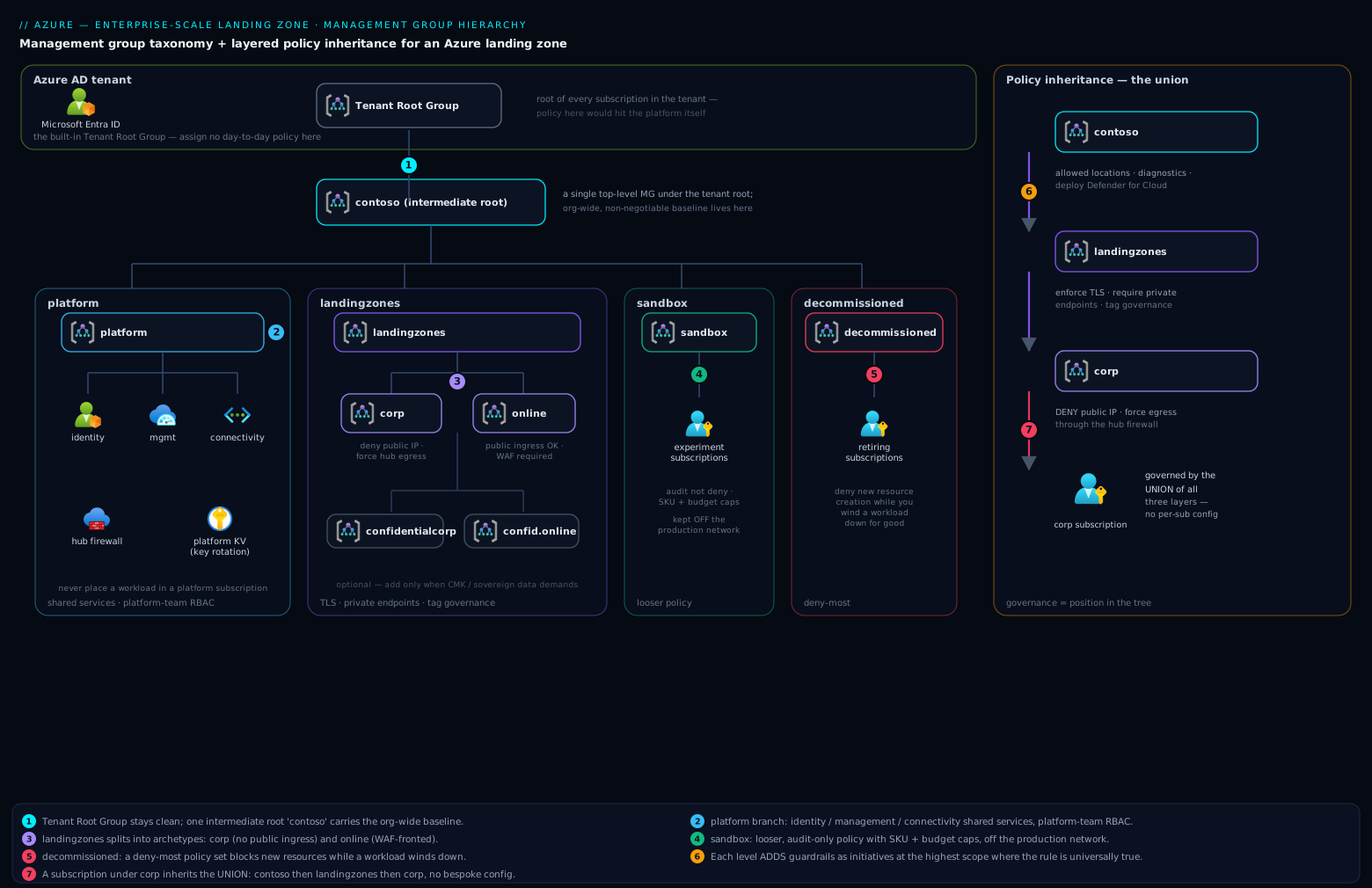
Read the diagram top-to-bottom, then left-to-right. The top lane is the containment chain: Tenant Root Group (kept empty of day-to-day policy) → the single contoso intermediate root → the four structural children. The platform branch fans into identity, management and connectivity, each holding exactly one specialised subscription: domain controllers and identity plumbing; the central Log Analytics workspace and monitoring stack; the hub network with firewall, gateways and private DNS. The landingzones branch fans into the corp and online archetypes where workload subscriptions actually land, while sandbox and decommissioned sit at the edges as lifecycle states — loose-but-isolated experimentation on one side, deny-everything wind-down on the other.
The right-hand lane is the part to internalise: policy inheritance as a layered union. A workload subscription placed under corp is evaluated against the intermediate root’s org-wide assignments (security benchmark, Defender config, central activity logging, classic-resource denies), plus the landingzones workload baseline (NSG/TLS/backup/AKS guardrails), plus corp’s private-by-default set (deny public endpoints and public-IP NICs, private-DNS DINE wiring) — every layer additive, nothing overridable, exemptions as the only sanctioned carve-out. Position in the tree is the governance contract.
Real-world scenario
A financial-services platform team inherited 140 subscriptions accumulated over five years — every one parked directly under the Tenant Root Group, governed by nothing but ad-hoc per-subscription policy assignments (they counted 396 of them, no two alike). The trigger was an RBI-aligned audit finding: no demonstrable uniform control plane, and no way to prove that internet-facing workloads were segregated from core-banking-adjacent ones. Constraints: zero workload downtime, a six-month regulator deadline, and a platform team of five.
They deployed the platform first — the contoso tree via the Terraform AVM modules, management subscription with a central workspace (their 140 subscriptions turned out to emit ~38 GB/day of activity and resource logs once the DINEs ran), and a Central India hub with zone-redundant firewall. All archetype denies went in at DoNotEnforce. Then the waves: subscriptions moved in batches of ten per week into their classified archetypes, each batch left in audit for a full week while az policy state summarize built the remediation backlog.
The classification data earned its keep immediately. Owners had self-declared 12 subscriptions as internet-facing; the compliance reports (public-IP-on-NIC and public-endpoint violations against the corp deny set, evaluated in report-only mode) found 31. Nineteen “internal” applications had quietly grown public endpoints over the years — three of them with management ports open to the internet, which became the security team’s problem that same afternoon and validated the entire programme to the CISO. Those 31 were re-pointed to online; 9 abandoned subscriptions went straight to decommissioned, whose deny-deployments initiative promptly caught a forgotten cron-driven pipeline still deploying nightly builds into one of them.
Remediation ran eight weeks: 4,100 non-compliant resources at peak, burned down through DINE remediation tasks (diagnostics and backup enrolment fixed themselves — about 70% of the backlog), code fixes for the rest, and 23 expiring waivers with change-ticket references. Enforcement flipped one assignment at a time over three weeks, Deny-Public-IP-On-NIC last. Total: 22 weeks, zero workload downtime, and the audit closed on a single artefact — the hierarchy itself, exported with az account management-group show --expand --recursive, because “where does this subscription sit?” had become a complete answer to “how is it governed?”.
Advantages and disadvantages
| Advantages | Disadvantages |
|---|---|
| Governance scales with zero marginal effort — subscription #400 costs what #4 cost | Meaningful up-front design and platform investment before the first workload lands |
| Provable, queryable compliance (one compliance API over one tree) | Policy layering has a learning curve; effective-policy reasoning is non-trivial |
| Blast-radius isolation by default (subscription = boundary) | Platform team becomes a hard dependency — under-staff it and vending queues form |
| Workload teams get real autonomy inside guardrails | DINE magic can mask broken team practices (“the platform will fix my diagnostics”) |
| Brownfield estates get a deterministic adoption path | A bad deny at high scope is a high-blast-radius outage — testing discipline required |
| Upstream ALZ library keeps improving underneath you | Library upgrades are a recurring operational duty (review, canary, roll) |
| Tooling ecosystem (accelerators, AVM, vending, AMBA) is mature | Terraform/Bicep state and pipelines for the platform are themselves crown-jewel assets to secure |
The honest summary: this architecture trades up-front structure for marginal-cost-zero governance. Below ~10 subscriptions the ceremony can outweigh the benefit — a single well-policied subscription with rigorous tagging is defensible. Past ~20 subscriptions the trade inverts hard, and past 50 the absence of this structure is itself the biggest risk on the register.
Hands-on lab
Build a working miniature of the whole model — tree, layered policy, DINE identity, a governed subscription, a bitten deny — in a test tenant. Management groups and policy are free; the only step that could cost money is denied by design. You need Global Administrator (for one elevation) and an Owner-level subscription you can safely re-parent.
Step 1 — Elevate and verify root access (one-time bootstrap).
az rest --method post --url "/providers/Microsoft.Authorization/elevateAccess?api-version=2016-07-01"
az role assignment list --scope "/" --query "[?principalName=='$(az account show --query user.name -o tsv)'].roleDefinitionName" -o tsv
Expected output: User Access Administrator. (Remove this at teardown — it is a standing finding otherwise.)
Step 2 — Create the tree. Nine idempotent calls:
az account management-group create --name lab --display-name "Lab Root"
for mg in platform landingzones sandbox decommissioned; do
  az account management-group create --name "lab-$mg" --display-name "Lab ${mg}" --parent lab
done
for mg in identity management connectivity; do
  az account management-group create --name "lab-$mg" --display-name "Lab ${mg}" --parent lab-platform
done
for mg in corp online; do
  az account management-group create --name "lab-$mg" --display-name "Lab ${mg}" --parent lab-landingzones
done
Validate the shape:
az account management-group show --name lab --expand --recursive \
  --query "{root:displayName, children:children[].{name:displayName, children:children[].displayName}}" -o json
Expected: Lab platform (with three children), Lab landingzones (with two), Lab sandbox, Lab decommissioned.
Step 3 — Layer the policy. MCSB audit at the lab root, allowed-locations at the lab root, the NIC deny at corp:
LAB_ID=$(az account management-group show --name lab --query id -o tsv)
CORP_ID=$(az account management-group show --name lab-corp --query id -o tsv)

# Org-wide: Microsoft cloud security benchmark (audit-only initiative)
az policy assignment create --name "mcsb-baseline" \
  --display-name "Lab: MCSB baseline" --scope "$LAB_ID" \
  --policy-set-definition "1f3afdf9-d0c9-4c3d-847f-89da613e70a8"

# Org-wide: allowed locations (deny)
az policy assignment create --name "allowed-locations" \
  --display-name "Lab: allowed locations" --scope "$LAB_ID" \
  --policy "e56962a6-4747-49cd-b67b-bf8b01975c4c" \
  --params '{ "listOfAllowedLocations": { "value": ["centralindia", "southindia"] } }'

# Corp-only: NICs must not have public IPs (deny)
az policy assignment create --name "deny-nic-pip" \
  --display-name "Lab corp: no public IPs on NICs" --scope "$CORP_ID" \
  --policy "83a86a26-fd1f-447c-b59d-e51f44264114" \
  --enforcement-mode Default
Step 4 — Place a subscription and watch governance attach.
SUB_ID=$(az account show --query id -o tsv)
ORIG_MG=$(az account management-group entities list \
  --query "[?name=='$SUB_ID'].parent.id | [0]" -o tsv)   # note this for teardown
az account management-group subscription add --name lab-corp --subscription "$SUB_ID"

# The subscription now sees assignments from lab AND lab-corp (union via inheritance)
az policy assignment list --scope "/subscriptions/$SUB_ID" --disable-scope-strict-match \
  --query "[].{name:displayName, scope:scope}" -o table
Expected output: all three assignments, with scope showing two different management groups — the layering made visible.
Step 5 — Prove the deny bites. Public IP creation is allowed (the policy targets NICs); attaching it is not:
az group create -n rg-lab-deny -l centralindia
az network vnet create -g rg-lab-deny -n vnet-lab --address-prefix 10.99.0.0/24 \
  --subnet-name snet-a --subnet-prefix 10.99.0.0/26
az network public-ip create -g rg-lab-deny -n pip-lab --sku Standard   # succeeds — teaching moment

az network nic create -g rg-lab-deny -n nic-should-fail \
  --vnet-name vnet-lab --subnet snet-a --public-ip-address pip-lab
Expected error (this exact code is what your pipelines will surface):
{
  "code": "RequestDisallowedByPolicy",
  "message": "Resource 'nic-should-fail' was disallowed by policy. Policy identifiers:
   [{\"policyAssignment\":{\"name\":\"Lab corp: no public IPs on NICs\", ... }]"
}
Also try a wrong-region deploy (az group create -n rg-wrong -l eastus succeeds — resource groups are exempt from the resource-location policy; az network vnet create inside it in eastus fails). That nuance — why allowed-locations needs its resource-group companion policy e765b5de-1225-4ba3-bd56-1ac6695af988 — is a classic interview probe.
Step 6 — Read compliance like the platform team does.
az policy state trigger-scan --subscription "$SUB_ID" --no-wait
az policy state summarize --management-group lab \
  --query "policyAssignments[].{assignment:policyAssignmentId, nonCompliant:results.nonCompliantResources}" -o table
Expected: MCSB shows a non-zero non-compliant count (it always does — it is a benchmark, not a gate); the deny assignments show zero because the deny prevented the violation from ever existing.
Step 7 — Exempt, observe, and clean up the exemption.
az policy exemption create --name "lab-waiver" \
  --display-name "Lab waiver: pip allowed in this RG until Friday" \
  --exemption-category Waiver \
  --policy-assignment "$CORP_ID/providers/Microsoft.Authorization/policyAssignments/deny-nic-pip" \
  --scope "/subscriptions/$SUB_ID/resourceGroups/rg-lab-deny" \
  --expires-on "$(date -v+2d -u +%Y-%m-%dT%H:%M:%SZ)"

# Retry step 5's NIC create — it now succeeds inside the exempted RG
az network nic create -g rg-lab-deny -n nic-now-allowed \
  --vnet-name vnet-lab --subnet snet-a --public-ip-address pip-lab
Step 8 — Teardown. Reverse order: resources, exemption, assignments, subscription placement, MGs bottom-up (an MG must be empty to delete), elevation:
az group delete -n rg-lab-deny --yes --no-wait
az policy exemption delete --name "lab-waiver" --scope "/subscriptions/$SUB_ID/resourceGroups/rg-lab-deny" 2>/dev/null
for a in mcsb-baseline allowed-locations; do az policy assignment delete --name "$a" --scope "$LAB_ID"; done
az policy assignment delete --name "deny-nic-pip" --scope "$CORP_ID"
az account management-group subscription remove --name lab-corp --subscription "$SUB_ID"
# If you noted an original parent in step 4: az account management-group subscription add --name <orig> --subscription "$SUB_ID"
for mg in lab-corp lab-online lab-identity lab-management lab-connectivity \
          lab-landingzones lab-platform lab-sandbox lab-decommissioned lab; do
  az account management-group delete --name "$mg"
done
az role assignment delete --assignee "$(az account show --query user.name -o tsv)" --scope "/" --role "User Access Administrator"
Common mistakes & troubleshooting
The operational playbook — symptom to fix, in the order these actually turn up:
| # | Symptom | Root cause | Confirm | Fix |
|---|---|---|---|---|
| 1 | New subscriptions appear outside the tree | Default management group never set | az account management-group hierarchy-settings list --name $TENANT_ID |
Set --default-management-group to sandbox/onboarding MG |
| 2 | Pipeline fails with RequestDisallowedByPolicy after a subscription move |
Destination archetype deny the workload violates | Error body names the assignment; az policy assignment show |
Correct archetype, remediate the workload, or expiring exemption |
| 3 | DINE assignment exists, nothing ever deploys | Assignment has no managed identity | az policy assignment show --name X --query identity returns null |
Recreate with --mi-system-assigned --location; grant roles; remediate |
| 4 | Remediation tasks fail with AuthorizationFailed |
Identity missing the definition’s roleDefinitionIds at scope |
Deployment error in remediation task details | az policy assignment identity assign --role ... --identity-scope ... |
| 5 | Existing resources stay non-compliant despite DINE | DINE only fires on create/update | az policy state list shows old resources untouched |
Create a remediation task with ReEvaluateCompliance |
| 6 | Deny works in portal test but pipelines bypass it | Assignment at wrong scope; pipeline deploys to a sibling MG’s subscription | az policy assignment list --scope <sub> --disable-scope-strict-match |
Re-scope assignment to the correct archetype MG |
| 7 | Users lost access after subscription move | Inherited RBAC from the old MG chain vanished on re-parent | Compare az role assignment list --all before/after |
Recreate needed grants at destination scope (groups, not users) |
| 8 | Cannot create the intermediate root | No rights at root scope / |
az role assignment list --scope "/" is empty for you |
Global Admin elevates access; delegate; then remove elevation |
| 9 | az account management-group delete fails |
MG still has children or subscriptions | az account management-group show --name X --expand |
Empty it first; delete leaf-to-root |
| 10 | Policy evaluates but compliance page looks stale | Evaluation cycle hasn’t run since your change | Timestamps in az policy state list |
az policy state trigger-scan; wait for completion |
| 11 | Assignment creation fails: limit reached | 200 assignments per scope exceeded (loose-policy sprawl) | Count assignments at the scope | Consolidate into initiatives; delete redundant loose assignments |
| 12 | Workload team suddenly can’t peer their VNet | That’s the design — peering is NetOps-only via custom role NotActions | Role definition’s NotActions include virtualNetworks/peer/action |
Route the request through vending/NetOps, don’t grant the action |
| 13 | Sandbox workload can reach corp data | Sandbox guardrails missing or peering created before Enforce-ALZ-Sandbox |
az network vnet peering list in the sandbox sub |
Assign the sandbox initiative; remove the peering; audit egress |
| 14 | Two “identical” corp subscriptions behave differently | Direct subscription-scope assignments drifted (pre-vending legacy) | az policy assignment list --scope <sub> (without strict-match disable) shows locals |
Remove local assignments; policy belongs at MG scope |
The meta-mistake behind at least half of these rows: treating a policy change like a config change instead of a production deployment. Policy at management-group scope has a larger blast radius than almost any application release — it deserves the same pipeline, review, canary and rollback discipline.
Best practices
- One intermediate root, nothing at tenant root. Every future escape hatch — canary, quarantine, acquisition — depends on it.
- An MG exists only for a distinct policy/RBAC contract. Three to four levels; if you cannot name the contract, delete the node.
- Initiatives at the highest universally-true scope. Definitions stored once at the intermediate root; parameters do the per-scope variation.
- DINE/Modify over Deny wherever remediation is possible. Deny is for must-never-exist. Every Deny carries a
nonComplianceMessage. - Pin the ALZ library version and overlay your deltas. Upgrades become reviewable diffs; forks become archaeology.
- Canary every policy change in a parallel mini-hierarchy before it touches
landingzones. There is no staging tenant for governance except the one you build. - Vend, never hand-craft. Every subscription enters through the pipeline: create → place → baseline. Manual placements are drift by definition.
- Set the default-MG and hierarchy-protection settings on day one. The tree must be total; rogue subscriptions and rogue MGs are both closable holes.
- Groups get roles; humans get group membership; privileged scopes get PIM. Standing access above subscription scope is the exception you document, not the norm.
- Expiry-date every exemption. A waiver without an expiry is permanent risk acceptance wearing a temporary badge.
- Audit DINE identities quarterly. They are your largest silent permission surface; grants must match
roleDefinitionIdsexactly. - Export and visualise the tree regularly (Azure Governance Visualizer / AzGovViz renders hierarchy + policy + RBAC as one artefact) — it doubles as your audit evidence pack.
Security notes
The hierarchy is itself a security boundary system; treat its own controls as tier-0:
| Control | Threat it counters | Implementation |
|---|---|---|
| PIM-only Owner at intermediate root | Standing global compromise via one phished account | Eligible assignment, MFA + approval, 8 h max activation, alerts on activation |
Hierarchy protection (requireAuthorizationForGroupCreation) |
Rogue ungoverned MG branches | Hierarchy settings on the tenant root |
| Default-MG = sandbox/quarantine | Out-of-band subscriptions landing ungoverned | Hierarchy settings; sandbox guardrails apply instantly |
| Scoped vending SPN | Pipeline compromise placing subs into platform |
MG-subscriptions-write on archetype MGs only; OIDC-federated, no secrets |
| DINE identity least-privilege | Policy pipeline as privilege-escalation path | Roles = roleDefinitionIds exactly; quarterly audit; protect who can edit definitions |
AssignableScopes on custom roles |
Workload roles leaking into platform branch | Scope custom roles to landingzones |
| DenyAction on platform plumbing | Tampering with diagnostic settings / AMA identity | DenyAction-DeleteUAMIAMA-style assignments at platform |
| MG activity-log diagnostics | Silent hierarchy/policy tampering | MG-level diagnostic settings to the central workspace; alert on policyAssignments/delete, MG move operations |
| Break-glass pair excluded from CA | Locked out of your own tenant | Two monitored cloud-only accounts, Owner at tenant root, alert on any sign-in |
That MG-level diagnostic setting is obscure and valuable — management groups have their own activity log, and deleting a policy assignment at corp is exactly the kind of event that should page someone:
az rest --method put \
  --url "https://management.azure.com/providers/Microsoft.Management/managementGroups/contoso/providers/microsoft.insights/diagnosticSettings/mg-to-law?api-version=2020-01-01-preview" \
  --body "{\"properties\":{\"workspaceId\":\"$LAW_ID\",\"logs\":[{\"category\":\"Administrative\",\"enabled\":true},{\"category\":\"Policy\",\"enabled\":true}]}}"
Cost & sizing
The hierarchy itself is free — management groups, policy definitions, assignments, exemptions and compliance evaluation carry no charge. The bill lives in the platform subscriptions the hierarchy mandates, and in what the DINE layer switches on estate-wide:
| Cost driver | Where | Typical monthly (USD ≈ INR) | Lever |
|---|---|---|---|
| Log Analytics ingestion | Management sub | ~$2.75–3.00/GB → 40 GB/day ≈ $3,400 (≈ ₹2.9L) | Commitment tiers from 100 GB/day (~15%+ off); DCR filtering; archive tiers |
| Azure Firewall Standard | Connectivity sub | ~$1.25/h + $0.016/GB ≈ $900+ (≈ ₹78k) | Basic SKU for small estates; Premium only for TLS inspection needs |
| VPN / ExpressRoute gateways | Connectivity sub | VpnGw1 ~$140 (≈ ₹12k); ER gateways more | Right-size; consolidate via hub |
| DDoS Network Protection | Connectivity sub | ~$2,944 flat, covers 100 public IPs (≈ ₹2.5L) | The classic waive-with-risk-acceptance item below ~₹2L of exposed estate |
| Defender for Cloud plans | Every sub (via Deploy-MDFC-Config) |
Servers P2 ~$15/server (≈ ₹1,250); P1 ~$7 | Choose plans per resource type deliberately — this parameter is estate-wide |
| Azure Bastion | Connectivity sub | Standard ~$140 + per-hour scaling (≈ ₹12k) | Shared via hub, not per-spoke |
| Identity DCs | Identity sub | 2× D2s_v5 + disks ≈ $180 (≈ ₹15k) | Entra Domain Services (~$110 base) where AD DS depth isn’t needed |
Backup (via Deploy-VM-Backup) |
Every sub | ~$10/VM + storage (≈ ₹850/VM) | Tune the policy’s inclusion filters; exclude ephemeral fleets |
A worked example for a mid-size Indian enterprise — 60 subscriptions, ~350 VMs, Central India primary, hub-spoke:
| Item | Sizing | Monthly ≈ |
|---|---|---|
| Central Log Analytics | 25 GB/day, 90-day interactive | ₹1.9L |
| Hub network (Firewall Std, VpnGw2, Bastion Std, peering egress) | 1 region + DR stub | ₹1.5L |
| Defender for Servers P1 (deliberate choice over P2) | 350 VMs | ₹2.1L |
| Identity subscription | 2 DCs + backup | ₹18k |
| DDoS Network Protection | Waived, documented risk acceptance | ₹0 |
| Platform total | ≈ ₹5.7L/month (~$6,800) |
The sizing insight: platform cost is a step function, not linear — that ₹5.7L serves 60 subscriptions or 200 with barely a change (log volume aside). Which is also the FinOps argument for the whole architecture: governance cost per workload falls as the estate grows. Show the platform as a per-subscription levy in showback (₹9.5k/sub at 60 subs, falling to ₹3k at 200) and the conversation with finance gets much easier.
Interview & exam questions
Mapped to AZ-305 (primary), AZ-104 and AZ-500 where noted.
- Why does ALZ use a single intermediate root instead of assigning policy at the Tenant Root Group? (AZ-305) — The tenant root governs everything forever, including future branches that must differ: canary hierarchies, quarantine MGs, acquired estates. An intermediate root carries the org-wide baseline while preserving an “above everything” escape hatch. It also keeps default-landed subscriptions from instantly inheriting denies mid-migration.
- A subscription needs both corp privacy rules and internet ingress. Where does it go? (AZ-305) — Nowhere as-is: one parent only, and archetypes don’t blend. Split the workload (private tier in corp, public edge in online), or place it in online and apply the needed corp-style controls as workload-level policy. The forcing of that decision is a feature — ambiguous exposure is what audits flag.
- Deny vs DeployIfNotExists — how do you choose per control? (AZ-305/AZ-500) — Deny for must-never-exist states (public IP on a corp NIC); DINE where a missing configuration can be added safely (diagnostics, backup, agents). Deny fails deployments and creates tickets; DINE fixes silently but needs identity/role plumbing and remediation tasks for existing estate.
- What exactly changes when you move a subscription between management groups? (AZ-104) — Policy context (source assignments stop, destination’s start — new requests near-immediately, compliance data on next scan) and inherited RBAC (source-chain roles vanish instantly). Resources, direct role assignments, tags and billing are untouched. Same-tenant only.
- Why must a DINE assignment have a managed identity, and what goes wrong via CLI? (AZ-104) — The remediation deployment executes as that identity, authorized by the definition’s
roleDefinitionIds. The portal auto-creates the role assignments;az policy assignment createdoes not — assignment without granted roles yields silent non-remediation orAuthorizationFailedremediation tasks. - How do you test a policy change when there’s no staging tenant? (AZ-305) — A canary management-group hierarchy: a parallel mini-tree with disposable subscriptions receiving every library bump and assignment change first, plus
DoNotEnforcestaging on production scopes before flipping toDefault. - Where do environment differences (dev/prod) live if not in the tree? (AZ-305) — In subscriptions within the same archetype. Environment is a subscription property; the guardrail delta between dev and prod is small enough for parameters and, where truly needed, subscription-scope assignments — not a doubled tree.
- Why are workload teams denied VNet peering writes in the custom subscription-owner role? (AZ-500) — A peering is a network trust decision: it can bypass the hub inspection path or bridge into the corp estate. Egress/ingress topology belongs to NetOps; vending creates the sanctioned peering at birth.
- What limits make initiative-based assignment mandatory at scale? (AZ-104) — 200 policy/initiative assignments per scope, with inheritance stacking several scopes deep; ~1,000 definitions fit in one initiative. Loose-policy assignment exhausts the budget and destroys auditability.
- Sandbox subscriptions are “loose” — what two controls stay hard, and why? (AZ-500) — No hybrid connectivity/peering toward the estate (a sandbox mistake must not reach corp data) and cost guardrails (budgets/SKU caps). Freedom inside an island.
- How does subscription vending assign network addressing without collisions? (AZ-305) — It doesn’t, natively — the module peers whatever CIDR you pass. You bring an allocation plan (e.g., /16 per archetype-region carved into /24 spokes) tracked in the vending data/state, which effectively becomes your IPAM.
- An auditor asks you to prove no corp workload can expose a public endpoint. What’s the artefact? (AZ-500) — The
Deny-Public-Endpoints/Deny-Public-IP-On-NICassignments at the corp MG (enforcementDefault), the compliance state for the corp scope, and the exemption list with expiries — three API calls, not a spreadsheet exercise.
Quick check
- Which two tenant-level hierarchy settings should be configured on day one, and what does each prevent?
- A subscription under
corpviolatesDeny-Storage-http. At which scope is that assignment actually made? - Name the three platform management groups and the one subscription type each holds.
- Your DINE assignment shows compliant new VMs but hundreds of old non-compliant ones. What’s missing?
- Why should the vending service principal not have
managementGroups/subscriptions/writeon theplatformMG?
Answers
- Default management group for new subscriptions (prevents ungoverned subscriptions landing at tenant root) and
requireAuthorizationForGroupCreation(prevents arbitrary users creating rogue management groups). landingzones— it is true for every workload, corp and online alike, so it sits at the highest universally-true scope, not oncorp.identity(identity subscription: DCs, identity plumbing),management(central Log Analytics/monitoring subscription),connectivity(hub network subscription).- A remediation task — DINE only auto-fires on create/update; existing resources need
az policy remediation create(ideally withReEvaluateCompliance). - So a compromised vending pipeline can never place a subscription into — or move one out of — the platform branch; its write scope is the archetype MGs only.
Glossary
| Term | Definition |
|---|---|
| Enterprise-scale / ALZ | The CAF-aligned reference architecture and tooling for a governed, subscription-democratized Azure estate |
| Tenant Root Group | The built-in root management group; ID equals the Entra tenant GUID; kept free of day-to-day policy |
| Intermediate root | Your single top-level MG under tenant root; scope of org-wide non-negotiables |
| Archetype | A management group plus its policy initiative set and RBAC contract; subscriptions are placed into archetypes |
| Corp / Online | The two canonical workload archetypes: private hub-connected vs internet-facing |
| Platform subscriptions | Identity, management and connectivity subscriptions delivering shared services under the platform branch |
| Subscription democratization | Design principle: subscriptions as the cheap, isolated unit of scale, handed to teams by default |
| Policy-driven governance | Design principle: guardrails as Azure Policy at MG scope rather than process documents |
| DINE | DeployIfNotExists: policy effect that deploys missing companion configuration via a managed identity |
| DenyAction | Policy effect blocking DELETE operations on matched resources |
| Enforcement mode | Assignment property: Default (enforced) vs DoNotEnforce (evaluate/report only) |
| Exemption | Scoped, categorised (Waiver/Mitigated), expiring carve-out from an assignment |
| Subscription vending | Automated create → place → baseline pipeline for new subscriptions |
| ALZ library | Microsoft’s versioned repository of ALZ policy definitions, assignments, archetypes and architectures |
| Canary hierarchy | Parallel mini management-group tree for testing platform and policy changes |
| AMBA | Azure Monitor Baseline Alerts: policy-driven alert baseline assigned at MG scopes |
Next steps
- Design the hub side of the estate in depth: Enterprise-scale connectivity subscription hub design, and settle the topology choice with Hub-spoke vs Virtual WAN enterprise topology.
- Go deeper on the governance engine: Azure Policy effects explained and Azure Policy governance at scale.
- Wire the intake process to the vending machinery: ServiceNow-gated self-service landing zones.
- Revisit the money and tenant plumbing underneath it all: Azure landing zone billing and tenant design.
- See the whole pattern applied end-to-end as a case study: Enterprise architecture: Azure landing zone.