In a nutshell
A shipping container is the same box whether it rides a truck, a train, or a ship — you pack it once and any carrier can move it without knowing what’s inside. A Docker container is that box for software: your app plus everything it needs to run, sealed so it behaves the same on a laptop and in production. Amazon ECS (Elastic Container Service) is the dispatcher that decides where those boxes run, keeps the right number of them running, and restarts any that fall over. AWS Fargate is the part where you don’t own the trucks: you hand AWS a box and say “run two of these,” and the machines to run it appear on demand, run your container, and bill you by the second — no garage to rent, no mechanics to hire, no servers to patch or SSH into.
That is the whole promise of this lesson. Instead of hand-building a server, installing your app on it, and logging in to deploy (the setup that caused the outage in the story below), you package the app as an image once and let AWS run it as managed tasks behind a load balancer, across two data centers, replacing anything that dies. It is the on-ramp to production containers that does not require you to learn Kubernetes first.
Level: Junior — beginner-friendly, but production-honest · Time: ~43 min
Before this lesson, it helps to know: what a Docker image is; the basics of a VPC, subnets, and a load balancer; and what an IAM role does. If any of those are fuzzy, skim ECS & ECR fundamentals and IAM fundamentals: users, roles, policies first — this lesson leans on both.
After working through it, you will be able to:
- Read and write a Fargate task definition and explain what every field does — image, CPU/memory, the two IAM roles, secrets, and log configuration.
- Pick a valid CPU/memory task size (Fargate only allows specific combinations) and right-size a task instead of guessing.
- Explain why there are two IAM roles — the execution role and the task role — and scope each with least privilege.
- Wire a service to an ALB target group with health checks, and reason precisely about a rolling deployment, the two “percent” knobs, and the deployment circuit breaker.
- Turn on target-tracking auto scaling (CPU or ALB request count) and a Fargate Spot mix to follow traffic and cut cost.
- Choose deliberately between Fargate, the EC2 launch type, EKS, and App Runner for a given workload — and say why.
A regional logistics company — think parcel sorting and last-mile delivery across a few states — has a small platform team and one looming problem: their driver-tracking API runs on a single hand-built EC2 instance that someone SSHes into to deploy. When that instance’s disk filled up during the holiday peak, deliveries went dark for ninety minutes, and the post-incident review had exactly one finding worth acting on: stop deploying by logging into a server. The team has three engineers, no Kubernetes experience, and a directive from their head of engineering: get this service onto something that redeploys cleanly, scales with the morning dispatch surge, and survives a single machine dying — without hiring a platform specialist they cannot afford. This article is the reference architecture for exactly that move: a containerized service on AWS ECS Fargate, the on-ramp to production containers that does not require you to learn Kubernetes first.
The pressures here are the ordinary ones, not exotic ones, which is the whole point. Reliability means a single failed instance can no longer take down driver tracking. Scale means the 6–9 AM dispatch window has ten times the traffic of midnight, and the service should follow that curve instead of being sized for the peak all day. Operability means a junior engineer can ship a fix on their second week without a runbook full of SSH commands. And cost means a small company paying in real money cannot run a fleet of always-on servers at 5% utilization. Containers on Fargate satisfy all four: you package the app once as an image, AWS runs it as managed tasks with no servers for you to patch, and a load balancer plus an auto-scaling policy handle the dispatch surge automatically.
Why Fargate, and why not the obvious alternatives
It is worth naming the roads not taken, because someone on the team will propose each one.
Keep deploying to EC2 by hand is the status quo that caused the outage: snowflake servers, drift between “what’s running” and “what’s in git,” and a deploy process that lives in one person’s head. Run your own Kubernetes (EKS) is the over-correction — EKS is powerful and is where this company might land in three years, but it asks a three-person team to own a control plane, node groups, networking add-ons, and upgrades, which is a second full-time job they do not have. ECS on EC2 keeps Amazon’s simpler orchestrator but still hands you the servers to patch, scale, and secure. Fargate is the sweet spot for a first container deployment: you bring a container image and a task definition, and AWS runs the container with no host to manage, no SSH, no OS patching, billed per vCPU-second and GB-second the task actually uses.
| Option | Who manages servers | Learning curve | Best fit |
|---|---|---|---|
| Hand-built EC2 | You (and it shows) | Low to start, high to operate | The thing we are escaping |
| ECS on EC2 | You (patch, scale hosts) | Moderate | Steady, dense workloads where you want host control |
| ECS Fargate | AWS (serverless tasks) | Low | First containers, spiky traffic, small teams |
| EKS (Kubernetes) | You (control plane + nodes) | High | Large platforms, multi-team, portability needs |
Fargate’s tradeoff is real and stated up front: you give up host-level control and pay a small premium per unit of compute versus a fully-packed EC2 fleet, in exchange for never touching a server. For this team, that trade is obviously worth it.
Architecture overview
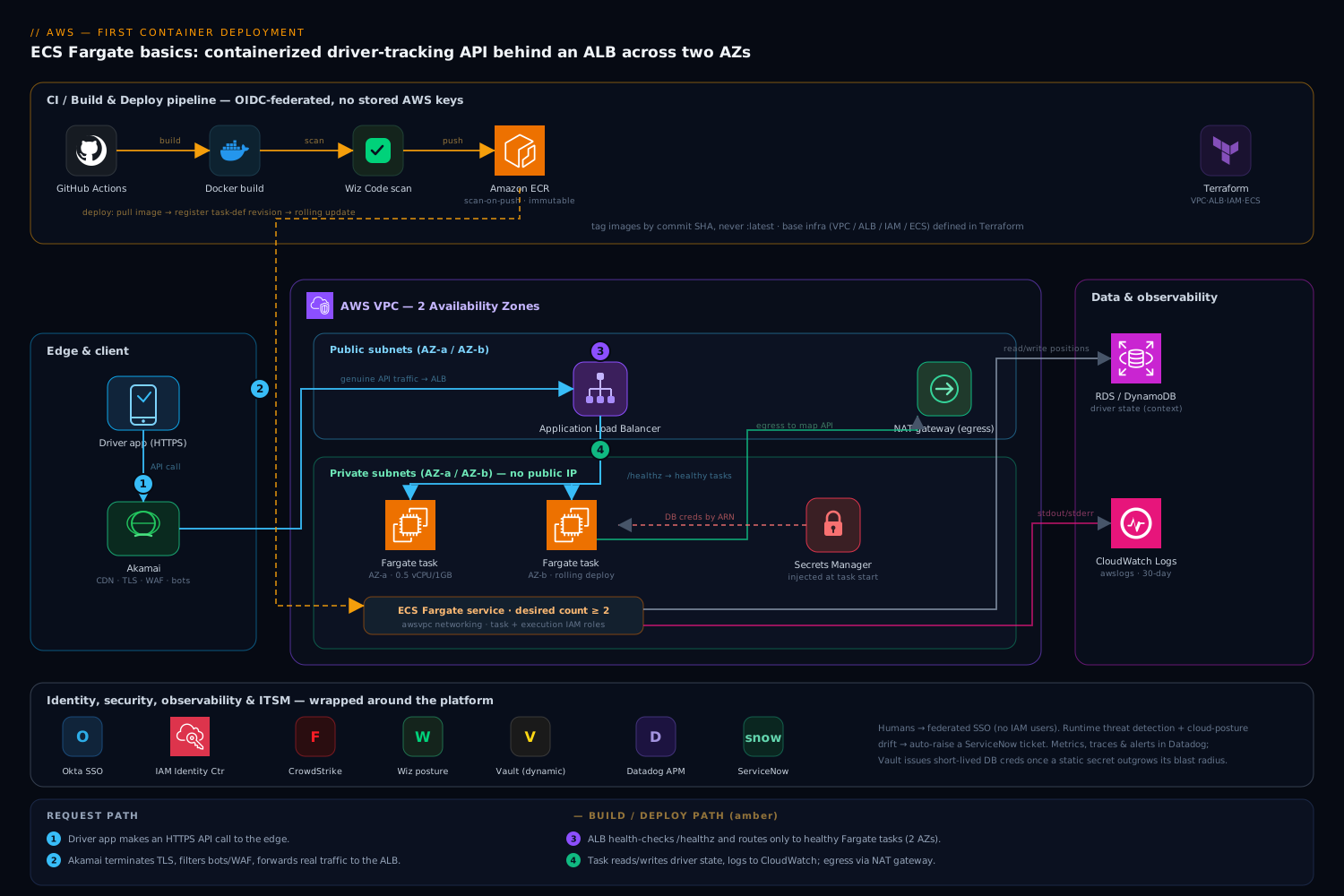
The whole system is a short, legible path from a developer’s commit to a running container serving a driver’s phone. Read it as two flows that meet at the registry: a build/deploy flow that turns code into a running task, and a request flow that turns a driver’s API call into a response.
The defining property of the design is that nothing runs on a server you manage and nothing is deployed by hand. The image is built by CI, stored in a registry, and run by ECS as immutable tasks across two Availability Zones behind a load balancer. If a task dies, ECS replaces it; if a whole AZ has a bad day, the other one keeps serving.
Request path, following the traffic:
- A driver’s app makes an HTTPS call. Akamai sits at the edge as CDN and WAF — it terminates TLS close to the user, caches static map tiles and the driver app’s assets, and filters bot and injection traffic before any request reaches AWS. Only genuine API calls are forwarded to the origin.
- The request lands on an Application Load Balancer (ALB) in public subnets, spanning two Availability Zones. The ALB terminates TLS again with an ACM certificate, runs health checks against each task’s
/healthzendpoint, and only routes to tasks that report healthy. - The ALB forwards to one of several ECS Fargate tasks running the driver-tracking container in private subnets. The tasks have no public IP; the only way in is through the load balancer, and their only way out is a NAT gateway for things like calling the mapping provider.
- The task handles the request, reading and writing driver positions from the database (an RDS instance or DynamoDB table, outside this article’s scope but shown for context), and returns the response back up through the ALB and Akamai to the driver.
Build/deploy path, triggered by a git push:
- An engineer merges to
main. GitHub Actions (the team’s CI) checks out the code, builds the Docker image, and runs tests. It authenticates to AWS using OIDC — a short-lived federated token, no long-lived AWS keys stored in GitHub, which is the single most important security choice in the whole pipeline. - The pipeline pushes the tagged image to Amazon ECR (Elastic Container Registry), the private image registry. Wiz Code (and an ECR-native scan) inspect the image for vulnerable OS packages and known-bad dependencies; a critical finding fails the build before the image is ever deployable.
- The pipeline registers a new ECS task definition revision pointing at the new image tag and updates the ECS service, which performs a rolling deployment — start new tasks, wait for them to pass ALB health checks, then drain and stop the old ones. A bad image never fully replaces a healthy one because the new tasks never go healthy.
- The base infrastructure — VPC, subnets, ALB, ECR repo, ECS cluster, IAM roles — is defined in Terraform and applied by the same OIDC-federated pipeline, so the environment itself is in version control, not clicked together in the console.
Component breakdown
Every piece here earns its place. The table is the map; the paragraphs after it explain the choices juniors most often get wrong.
| Component | Service / tool | Role here | Key configuration |
|---|---|---|---|
| Edge | Akamai | CDN, TLS, WAF, bot filtering at the perimeter | Cache app assets; WAF rules; origin = ALB DNS |
| Load balancing | Application Load Balancer | TLS termination, health checks, routing to tasks | Target group on container port; /healthz check; 2 AZs |
| Compute | ECS Fargate | Runs the container as serverless tasks | awsvpc networking; 0.5 vCPU / 1 GB; desired count + autoscaling |
| Image registry | Amazon ECR | Private store for built images | Immutable tags; scan-on-push; lifecycle policy |
| App packaging | Docker | Reproducible image of the service | Multi-stage build; non-root user; small base image |
| Secrets | AWS Secrets Manager | DB credentials, API keys injected at task start | Referenced by ARN in task def secrets block |
| Logs | CloudWatch Logs | Container stdout/stderr, retention, queries | awslogs driver; log group per service; 30-day retention |
| Identity (humans) | Okta + AWS IAM Identity Center | Engineer SSO into the AWS console/CLI | SAML/OIDC federation; permission sets, no IAM users |
| Secrets (advanced) | HashiCorp Vault | Dynamic DB creds for apps that outgrow static secrets | Optional; AWS auth method; short-lived leases |
| Image security | Wiz / Wiz Code | Scan images and cloud posture for risk | Fail build on critical CVE; alert on public-exposure drift |
| Runtime security | CrowdStrike Falcon | Threat detection on running containers | Fargate sensor; detections to the SOC |
| Observability | Datadog | Metrics, traces, dashboards, alerting | ECS integration; APM tracing; alert on p95 + error rate |
| ITSM | ServiceNow | Change records and incident tickets | Deploy change record; auto-ticket on alert |
| CI / IaC | GitHub Actions + Terraform | Build, scan, deploy; infra as code | OIDC to AWS; rolling ECS deploy; no stored keys |
A few of these deserve the why, because they are the decisions a first-time team fumbles.
Why the task definition is the heart of it. The task definition is a JSON document that tells ECS everything about how to run your container: which image, how much CPU and memory, which port, which IAM role, which secrets to inject, and where logs go. Each change creates a new immutable revision — you never edit a running task, you register a new revision and roll forward. That immutability is what makes deploys boring and rollbacks trivial (point the service back at the previous revision). A minimal shape makes the model concrete:
{
  "family": "driver-tracking",
  "networkMode": "awsvpc",
  "requiresCompatibilities": ["FARGATE"],
  "cpu": "512",
  "memory": "1024",
  "executionRoleArn": "arn:aws:iam::123456789012:role/driver-tracking-exec",
  "taskRoleArn": "arn:aws:iam::123456789012:role/driver-tracking-task",
  "containerDefinitions": [{
    "name": "app",
    "image": "123456789012.dkr.ecr.ap-south-1.amazonaws.com/driver-tracking:sha-9f3a21",
    "portMappings": [{ "containerPort": 8080 }],
    "secrets": [{
      "name": "DB_PASSWORD",
      "valueFrom": "arn:aws:secretsmanager:ap-south-1:123456789012:secret:driver-db-AbCdEf"
    }],
    "logConfiguration": {
      "logDriver": "awslogs",
      "options": {
        "awslogs-group": "/ecs/driver-tracking",
        "awslogs-region": "ap-south-1",
        "awslogs-stream-prefix": "app"
      }
    }
  }]
}
Why there are two IAM roles, not one. This is the single most common point of confusion, so be precise about it. The execution role is used by the Fargate agent — the AWS-managed machinery that starts your task. It needs permission to pull the image from ECR, fetch the secret from Secrets Manager, and write to CloudWatch Logs. The task role is assumed by your application code at runtime, and it should grant only what the app itself calls — read a specific DynamoDB table, put an object in one S3 bucket, publish to one SQS queue. Keeping them separate is least privilege in action: the platform’s right to start a container is not the same as the app’s right to touch your data, and you should be able to widen one without widening the other. Pin the task role tightly and resist the urge to attach a broad managed policy “to make it work.”
Why secrets are injected, never baked in. A junior’s instinct is to put the database password in an environment variable in the task definition, or worse, in the Docker image. Both are wrong — the task definition is readable by anyone with ecs:DescribeTaskDefinition, and an image layer can be pulled and inspected. Instead, store the secret in AWS Secrets Manager and reference it by ARN in the task definition’s secrets block; Fargate resolves it at task start and injects it as an environment variable the app reads, while the value itself never appears in the task definition or the image. As the platform matures and apps need credentials that rotate frequently, HashiCorp Vault with its AWS auth method can issue dynamic, short-lived database credentials per task — a step up from static Secrets Manager values, and worth it once a static secret’s blast radius starts to worry you. Start with Secrets Manager; reach for Vault when you outgrow it.
Sizing a task: CPU, memory, ephemeral storage, and platform versions
The task definition above set cpu: "512" and memory: "1024", and a beginner reasonably asks: can I put any numbers there? No — and this is the first place first-timers get a cryptic RegisterTaskDefinition error. Fargate only runs a fixed menu of CPU/memory combinations. You do not size the host (there is no host to size); you size the task, and AWS finds capacity that matches.
The units trip people up, so pin them down. CPU is expressed in CPU units where 1024 units = 1 vCPU (so 512 is half a vCPU). Memory is in MiB (so 1024 is 1 GB). Here is the full, current menu:
| Task CPU | = vCPU | Allowed memory (task-level) |
|---|---|---|
256 |
0.25 | 512 MB, 1 GB, 2 GB |
512 |
0.5 | 1 GB → 4 GB, in 1 GB steps |
1024 |
1 | 2 GB → 8 GB, in 1 GB steps |
2048 |
2 | 4 GB → 16 GB, in 1 GB steps |
4096 |
4 | 8 GB → 30 GB, in 1 GB steps |
8192 |
8 | 16 GB → 60 GB, in 4 GB steps (platform version ≥ 1.4.0) |
16384 |
16 | 32 GB → 120 GB, in 8 GB steps (platform version ≥ 1.4.0) |
Worked example — is 512 / 512 legal? No. At 0.5 vCPU the smallest allowed memory is 1 GB (1024 MiB), so cpu:"512", memory:"512" is rejected before the task ever launches. The driver-tracking service uses 512 / 1024 — half a vCPU, 1 GB — which is a valid combo and a sensible starting point for a modest JSON API. If profiling later shows it pinned at 90% CPU under the dispatch surge, the next legal step up on the same memory is 1024 / 1024 (a full vCPU), or 512 / 2048 if it is memory-bound instead. Right-size to observed p95, then move one rung — do not jump to 4 vCPU “to be safe,” because Fargate bills every vCPU-second whether you use it or not.
Task-level vs container-level CPU/memory. For a single-container task, set CPU and memory at the task level (the top-level fields) and leave the container’s own cpu/memory unset — the container gets the whole task. When a task packs several containers (say the app plus a log-forwarder sidecar), the task-level numbers are the total Fargate provisions and bills, and you can optionally sub-divide with per-container cpu and a hard memory limit. If a container exceeds its hard memory limit it is OOM-killed (exit code 137) — a classic “why did my task restart?” that is really “I under-sized memory or have a leak.”
Ephemeral storage — scratch space, not a disk. Every Fargate task gets 20 GB of ephemeral storage by default (on platform version 1.4.0+), and you can raise it from 21 up to 200 GB with an ephemeralStorage block. It is encrypted by default (AES-256) and it is wiped when the task stops — it is scratch for temp files, image layers, and caches, never a home for data that must survive. Anything durable belongs in S3, a database, or an EFS volume mounted into the task.
{
  "family": "driver-tracking",
  "cpu": "512",
  "memory": "1024",
  "ephemeralStorage": { "sizeInGiB": 40 },
  "runtimePlatform": {
    "cpuArchitecture": "X86_64",
    "operatingSystemFamily": "LINUX"
  }
}
Platform versions — AWS patches the floor, not you. A Fargate platform version pins the underlying runtime (kernel, container agent, and feature set). For Linux, LATEST currently resolves to 1.4.0, which is the version that gave us the 20 GB default ephemeral storage, encryption-by-default, ENI trunking for higher task density, and faster image pulls. You almost never pin a specific version — leave LATEST and AWS keeps the platform patched underneath your tasks, which is precisely the OS-patching burden Fargate lifts off your team. The runtimePlatform block above is also where you flip a task to ARM64 (Graviton) for ~20% cheaper compute, provided you build a matching image (more on that in Going deeper).
Networking a task: the awsvpc ENI model up close
The architecture said tasks run in private subnets with their own security group, and that is worth slowing down on, because Fargate’s networking is stricter and cleaner than what EC2-based containers usually get. On Fargate, awsvpc is the only network mode — there is no bridge or host mode to choose. In awsvpc mode, every task gets its own Elastic Network Interface (ENI) with a real private IP drawn from your subnet. A Fargate task is a first-class citizen on your VPC, not a process hidden behind a host’s IP.
That single fact drives everything else:
- Security groups attach to the task, not to a shared host. Because the ENI belongs to the task, its security group is per service: you can say “the driver-tracking task accepts inbound TCP 8080 from the ALB’s security group and nothing else,” and no other workload shares that rule surface. This is far cleaner than EC2 bridge mode, where many containers hide behind one host security group.
- No host-port remapping.
containerPort: 8080is simply the port on the task’s own ENI. There is no dynamic host-port juggling and no port collisions between tasks — each task has the whole port range to itself. - Containers in the same task share the network namespace and reach each other over
localhost. Containers in different tasks do not — they talk across the VPC by IP or DNS, which is exactly what Service Connect (below) is for. - Each task consumes one subnet IP. A service scaling to 200 tasks consumes 200 private IPs. Size your subnets for peak: a
/24yields 251 usable addresses, so a busy multi-service cluster can exhaust a small subnet and throwCannotCreateNetworkInterfaceError. Plan CIDRs for peak task count across all services, plus the ALB and other consumers. - Private by default, with two ways out. Production tasks sit in private subnets with no public IP. To pull the image and read secrets they either egress through a NAT gateway or — better and cheaper — use VPC interface endpoints for ECR (
ecr.api+ecr.dkr), Secrets Manager, and CloudWatch Logs, plus the S3 gateway endpoint (ECR stores image layers in S3). Endpoints keep that traffic on the AWS backbone and off the metered NAT. SettingassignPublicIp: ENABLEDis only for the rare task that genuinely lives in a public subnet.
The security-group pairing is small enough to hold in your head:
| Security group | Inbound | Outbound |
|---|---|---|
| ALB SG | TCP 443 from the internet (or Akamai ranges) | TCP 8080 → Task SG |
| Task SG | TCP 8080 from ALB SG only | TCP 443 → endpoints / NAT |
Referencing security groups by group (from ALB SG) rather than by CIDR is the trick that keeps this correct as IPs churn — the rule follows the load balancer, not a brittle address range.
Building and shipping the image
The container itself should be small, reproducible, and not running as root. A multi-stage Dockerfile keeps build tooling out of the final image, which shrinks attack surface and pull time both:
# build stage
FROM node:20-slim AS build
WORKDIR /src
COPY package*.json ./
RUN npm ci
COPY . .
RUN npm run build

# runtime stage — small, no build tools, non-root
FROM node:20-slim
RUN useradd --create-home appuser
WORKDIR /home/appuser/app
COPY --from=build /src/dist ./dist
COPY --from=build /src/node_modules ./node_modules
USER appuser
EXPOSE 8080
HEALTHCHECK CMD node dist/healthcheck.js || exit 1
CMD ["node", "dist/server.js"]
The CI flow that ships it is deliberately short. GitHub Actions authenticates to AWS via OIDC (no stored AWS_SECRET_ACCESS_KEY anywhere — the workflow exchanges its GitHub identity token for short-lived AWS credentials), then builds, scans, pushes, and deploys:
permissions:
  id-token: write        # required for OIDC
  contents: read
jobs:
  deploy:
    runs-on: ubuntu-latest
    steps:
      - uses: actions/checkout@v4
      - uses: aws-actions/configure-aws-credentials@v4
        with:
          role-to-assume: arn:aws:iam::123456789012:role/gha-deploy
          aws-region: ap-south-1
      - uses: aws-actions/amazon-ecr-login@v2
      - run: |
          IMAGE=123456789012.dkr.ecr.ap-south-1.amazonaws.com/driver-tracking:sha-${GITHUB_SHA::8}
          docker build -t "$IMAGE" .
          docker push "$IMAGE"
      # Wiz Code scans the pushed image; a critical CVE fails the job here
      - run: aws ecs update-service --cluster prod --service driver-tracking --force-new-deployment
Two non-negotiables hide in that file. Tag images by commit SHA, not latest — latest is a moving target that makes “what is actually running in prod” unanswerable and rollbacks impossible. And scan before deploy: Wiz Code inspects the image (and the IaC) in the pipeline for vulnerable packages and misconfigurations, and a critical finding fails the build so a known-CVE image never reaches ECR. ECR’s own scan-on-push is a useful second layer. Pair this with an ECR lifecycle policy that expires untagged and old images so the registry does not grow without bound.
The service, the scheduler, and how a deploy really works
The CI snippet ended with aws ecs update-service --force-new-deployment, and that one command hides the most important machine in the whole system. Let’s open it up, because “the service does a rolling deployment” is the sentence a junior repeats without being able to explain — and explaining it is the difference between a deploy that self-heals and one that pages you at 6 AM.
Start with the three nouns, because people blur them:
- A cluster is a logical grouping and namespace for your tasks and services. On Fargate it is not a set of machines you manage — it is a boundary for names, permissions, and capacity providers. A small team can run everything in one cluster; many split by environment (
prod,staging). - A task is one running instance of a task definition — one or more containers scheduled together as a unit. You can launch a standalone task for a one-off batch job (
aws ecs run-task), but a long-running API wants a service. - A service keeps a target number of tasks — the desired count — running at all times. It replaces failed tasks, spreads them across Availability Zones, registers them with a load balancer target group, and orchestrates deployments.
The quiet hero is the ECS service scheduler: a control loop that constantly compares running count to desired count and acts to close the gap. Set desired to 3, kill a task, and the scheduler notices and launches a replacement — no cron, no human. Set desired to 6 for the surge and it starts three more, registering each with the ALB only once it passes health checks. This reconciliation loop is why “a task died” is a non-event.
The two percentages that govern a rolling deploy
A native ECS rolling deployment replaces tasks gradually, and its behavior is controlled by exactly two knobs:
minimumHealthyPercent— the floor of healthy tasks during a deploy, as a percentage of desired. For a service behind a load balancer this defaults to 100%, meaning ECS must keep full capacity the whole time, so it starts new tasks before draining old ones.maximumPercent— the ceiling on total (old + new) tasks running at once, defaulting to 200%.
Make it concrete. With desired = 4, min = 100%, max = 200%, ECS may run up to 8 tasks briefly: it launches 4 new ones, waits for them to pass the ALB health check, then drains and stops the 4 old ones — capacity never dips below 4. Change to min = 50%, max = 200% and ECS is allowed to stop up to 2 old tasks first (down to 2 serving) to make room — cheaper, at the cost of running at half capacity for a moment. The pattern to remember: behind a load balancer, keep max at 200% (or min below 100%) so there is room to bring up new tasks before killing old ones. Setting max = 100% and min = 100% deadlocks a deploy — there is no headroom to start anything new.
Three “health checks” that are not the same thing
“Health check” is overloaded, and conflating the three causes real outages:
- The ALB target-group health check (e.g.
HTTP GET /healthz) decides whether the load balancer routes traffic to a task, and whether a freshly launched task counts as healthy during a deploy. This is the gate the rollout waits on. - The container health check (
HEALTHCHECKin the Dockerfile / task def) is ECS-level: if it fails, ECS marks the container unhealthy and recycles the task. - The service/deployment state is derived from the two above plus the desired-count reconciliation.
Give the app a cheap, dependency-light /healthz that returns 200 when the process is alive and can serve — a liveness check. The classic self-inflicted outage is a health check that queries the database “to be thorough”: a brief DB blip then fails every task’s health check at once, the ALB pulls them all out of service, and ECS starts recycling healthy app tasks over a dependency wobble. Keep liveness cheap; check heavy dependencies on a separate readiness path if you need to. And set healthCheckGracePeriodSeconds so a slow-booting app isn’t killed before it finishes starting.
The deployment circuit breaker — turn it on
Here is the single setting that turns “a bad image quietly pins my service in a failing deploy” into “ECS rolls back on its own”: the deployment circuit breaker. When enabled, if a deployment can’t reach a steady state — new tasks keep crashing or failing health checks — ECS stops the deployment, and with rollback set it automatically reverts the service to the last known-good task-definition revision.
resource "aws_ecs_service" "driver_tracking" {
  name            = "driver-tracking"
  cluster         = aws_ecs_cluster.prod.id
  task_definition = aws_ecs_task_definition.driver_tracking.arn
  desired_count   = 3
  launch_type     = "FARGATE"

  deployment_minimum_healthy_percent = 100
  deployment_maximum_percent         = 200

  deployment_circuit_breaker {
    enable   = true
    rollback = true            # auto-revert to the last healthy revision
  }

  network_configuration {
    subnets          = var.private_subnet_ids
    security_groups  = [aws_security_group.task.id]
    assign_public_ip = false
  }

  load_balancer {
    target_group_arn = aws_lb_target_group.driver_tracking.arn
    container_name   = "app"
    container_port   = 8080
  }

  health_check_grace_period_seconds = 30
}
That load_balancer block is what wires the service to the ALB: ECS registers each task’s ENI IP in the target group and deregisters it on drain, so scaling and deploys keep the ALB’s backend list correct automatically.
Rolling vs blue/green (CodeDeploy)
Native rolling is the right default. When you need traffic-shifting control, switch the service’s deployment controller to AWS CodeDeploy for blue/green:
| Rolling (ECS controller) | Blue/green (CodeDeploy controller) | |
|---|---|---|
| How | Replace tasks in place, one target group | Stand up a full green task set on a second target group, shift ALB traffic from blue → green |
| Traffic shift | Gradual as tasks swap | All-at-once, canary, or linear (e.g. 10% for 5 min, then 100%) |
| Rollback | Re-deploy previous revision (or circuit breaker) | Instant — shift the listener back to blue |
| Extra resources | None | Two target groups, a test listener, a CodeDeploy app + deployment group |
| Cost during deploy | Up to +100% briefly | ~Double capacity while both sets run |
| Reach for it when | Most services | You need canary %, pre-cutover validation hooks, or zero mixed-version window |
Blue/green gives you a validation window and one-click reversal, but it is more moving parts and double the capacity mid-deploy. Start with rolling + the circuit breaker; adopt blue/green when a service genuinely needs canaries or instant cutover.
Service Connect and Service Discovery
Everything so far is one service behind a public ALB, which is the whole story for the driver-tracking API. The moment a second service appears — say the API needs to call an internal ETA-estimation service — you hit a new question: how does one task find another? There is no fixed IP; tasks come and go. Three answers, roughly in order of maturity:
- An internal load balancer per service. Put an internal ALB/NLB in front of the ETA service and call its DNS name. Solid and familiar, but every east-west hop is now a load balancer you pay for and operate.
- ECS Service Discovery (AWS Cloud Map). ECS registers each healthy task’s IP in Cloud Map under a DNS name like
eta.internal; callers resolve DNS to a task IP. Simple and load-balancer-free, but it is client-side DNS load balancing, with DNS caching quirks to reason about. - ECS Service Connect (the newer, recommended path). You give the service a logical name and port, and ECS injects a lightweight Envoy proxy sidecar into each task. Your app just calls
http://eta, and Service Connect load-balances across healthy tasks, retries transient failures, and emits per-request metrics (traffic, errors, latency) to CloudWatch — all keyed off a Cloud Map namespace, with no internal ALB to run.
Rule of thumb: keep an ALB at the edge for public ingress, and prefer Service Connect for service-to-service (east-west) traffic once you have more than one service. The trade-offs between these — and the resilience behavior of each — are their own deep topic, covered in ECS Service Connect vs load balancers.
Enterprise considerations
Security and least privilege. The posture is straightforward to reason about because the surface is small. Tasks run in private subnets with no public IP — the ALB is the only ingress, and a per-task security group allows inbound only from the ALB’s security group on the container port, nothing else. Egress goes through a NAT gateway so you can lock down where tasks may call out. Human access to AWS is federated through Okta into AWS IAM Identity Center: engineers log in with their corporate Okta identity and conditional-access policies, receive a permission set scoped to what their role needs, and there are no long-lived IAM users or access keys to leak — the same lesson, applied to people, that OIDC applies to the pipeline. On the running containers, CrowdStrike Falcon’s Fargate sensor provides runtime threat detection, feeding suspicious behavior to the company’s SOC, while Wiz runs continuous cloud-posture scanning and raises an alert the moment something drifts toward public exposure or an over-broad IAM policy. When Wiz or Falcon flags something material, it auto-raises a ServiceNow incident so security works a ticket, not a buried log line.
Cost. Fargate bills per vCPU-second and GB-second a task runs, which rewards right-sizing and punishes over-provisioning — so the levers are about running the right amount of compute, not buying servers.
| Lever | Mechanism | Typical effect |
|---|---|---|
| Right-size the task | Set CPU/memory to observed p95, not a guess | Stops paying for idle headroom every second |
| Autoscale to traffic | Scale task count up at dispatch peak, down at night | Follows the curve instead of sizing for peak all day |
| Fargate Spot | Run non-critical / batch tasks on Spot capacity | Up to ~70% off for interruption-tolerant work |
| Compute Savings Plan | Commit to a baseline of steady Fargate usage | Discount on the always-on floor |
| ECR lifecycle + log retention | Expire old images; cap CloudWatch retention | Trims storage drag that quietly accrues |
Watch the NAT gateway too — its per-GB data-processing charge surprises teams whose tasks chat constantly with external APIs; a VPC endpoint for ECR and Secrets Manager keeps that AWS-bound traffic off the NAT entirely. Pipe the cost and utilization metrics into Datadog so right-sizing is driven by data, not vibes.
Scaling. This is where Fargate earns the migration. Attach an Application Auto Scaling target-tracking policy to the ECS service — for example, hold average CPU at 60%, or scale on ALB requests-per-target so task count tracks actual load rather than a lagging CPU signal. The dispatch surge then provisions tasks automatically at 6 AM and releases them by mid-morning. Because Fargate has no hosts, there is no node pool to grow first — new tasks just start, typically in under a minute. Spread tasks across two or more Availability Zones (the ALB and subnets already span them) so capacity and resilience scale together.
resource "aws_appautoscaling_policy" "cpu" {
  name               = "driver-tracking-cpu60"
  service_namespace  = "ecs"
  resource_id        = "service/prod/driver-tracking"
  scalable_dimension = "ecs:service:DesiredCount"
  policy_type        = "TargetTrackingScaling"
  target_tracking_scaling_policy_configuration {
    target_value       = 60
    predefined_metric_specification {
      predefined_metric_type = "ECSServiceAverageCPUUtilization"
    }
  }
}
Failure modes, named before they page you. The value of a small architecture is that the failure list is short and each item has an obvious mitigation.
- A bad image deploys — the new container crashes or fails its health check. ECS keeps the old tasks serving because the new ones never pass the ALB health check; you roll back by pointing the service at the previous task-definition revision. Mitigation: a real
/healthzendpoint and a minimum-healthy-percent that forbids dropping below full capacity mid-deploy. - A task or an AZ dies — ECS notices the task is unhealthy and launches a replacement; if an entire AZ is impaired, the tasks in the other AZ keep serving. Mitigation: desired count ≥ 2, spread across ≥ 2 AZs — the default you should never skip.
- The app silently fills up or hangs — the original outage, reborn. Mitigation: health checks catch a hung task and ECS recycles it; CloudWatch and Datadog alarms on error rate and p95 latency catch the slow burn before users do.
- Secrets Manager or ECR is unreachable at task start — the task fails to launch because the execution role cannot fetch what it needs. Mitigation: correct execution-role permissions and VPC endpoints so the dependency path does not traverse the public internet.
- A throttled or throttling dependency — the database or mapping API rejects calls under surge. Mitigation: autoscale the right tier, add timeouts and retries with backoff in the app, and alert on dependency error rates.
Observability. Containers are opaque until you make them legible, so wire this on day one. The awslogs driver ships every container’s stdout/stderr to CloudWatch Logs, one log group per service with a sane retention (30 days here, not infinite). Layer Datadog over the top via its ECS integration for metrics (CPU, memory, task count), APM traces through the request, and dashboards the team actually watches; alert on p95 latency, 5xx error rate, task count vs. desired, and deployment failures, routing pages to on-call and auto-opening a ServiceNow incident for anything customer-impacting. The goal a junior should internalize: you should be able to answer “is it healthy, is it fast, and what changed” from a dashboard, never from SSH — because there is no SSH.
Reliability and DR. For a first deployment, “reliability” mostly means the two-AZ, desired-count-≥-2, health-checked baseline above, which already removes the single-machine failure that started this. If the business later needs to survive a whole-region event, the same task definition and Terraform redeploy into a second region behind Akamai (or Route 53) health-checked failover, with the database’s cross-region replication as the real recovery guarantee — but resist building multi-region until a clear requirement, and the budget, demand it. State your numbers honestly: a small service like this can target RTO of minutes within a region (ECS self-heals) and accept a longer RTO for the rare cross-region event, with RPO set by the database’s replication, not by Fargate.
Explicit tradeoffs
Accept these or pick a different tool. Fargate trades host control for simplicity: you cannot SSH into the host, install a custom kernel module, or pack many small containers onto one big machine for maximum density — and per unit of raw compute you pay a premium over a fully-utilized EC2 fleet. Cold-ish start matters too: a new task takes tens of seconds to a minute to pull, start, and pass health checks, so scaling is fast but not instant; size autoscaling thresholds with that lag in mind. And the model assumes a stateless app — driver state lives in the database, never on the task’s ephemeral disk — because a task can be replaced at any moment. For this stateless, spiky, small-team service, every one of those trades is the right call.
When something else wins. If you are running steady, dense, cost-sensitive workloads and have the appetite to manage hosts, ECS on EC2 reclaims the density and per-compute savings Fargate gives up. If you genuinely need Kubernetes — multiple teams, a rich ecosystem of operators, portability across clouds, or you are standardizing on Argo CD GitOps and Helm across a large platform — EKS is the destination, and a team that starts on Fargate buys itself the time to learn Kubernetes deliberately instead of in a panic. If the service is tiny and event-driven rather than a long-running API, AWS Lambda may beat a container outright. And Terraform here is interchangeable with CloudFormation or CDK; the principle that matters is not which tool, but that the VPC, ECR, ALB, IAM roles, and ECS service are code in version control, applied by an OIDC-federated pipeline, never clicked together by hand.
Going deeper
The lesson so far gets a real service into production. This section is for the reader who has done that and wants the internals — the parts that decide cost, resilience, and how you debug at 2 AM.
Capacity providers and Fargate Spot, precisely
The cost table mentioned Fargate Spot; here is the mechanism. A capacity provider tells a service where to get capacity, and on Fargate there are exactly two: FARGATE (on-demand) and FARGATE_SPOT. A capacity provider strategy blends them with two fields — base (a fixed minimum number of tasks pinned to one provider) and weight (the relative share of everything above the base):
"capacityProviderStrategy": [
  { "capacityProvider": "FARGATE",      "base": 2, "weight": 1 },
  { "capacityProvider": "FARGATE_SPOT", "base": 0, "weight": 4 }
]
Read that as: always keep 2 tasks on reliable on-demand (the floor that must never disappear), then split every additional task roughly 1:4 on-demand:Spot. Fargate Spot is spare capacity at up to ~70% off, with one catch: AWS can reclaim it, sending a SIGTERM followed by a two-minute window before the task is force-stopped. That makes Spot ideal for stateless, interruption-tolerant work (async jobs, batch, queue workers) and wrong for anything that can’t be yanked mid-request. Handle it well by trapping SIGTERM: stop accepting new work, drain in-flight requests, and exit before the window closes — and set the task’s stopTimeout (up to 120s) to match. Keep a base of on-demand so a Spot capacity gap can never take the service fully down.
The task lifecycle and reading a stopped task
When a task misbehaves, you read its stopped reason, and knowing the lifecycle tells you where it broke. A task moves PROVISIONING (creating the ENI) → PENDING (pulling the image) → RUNNING → DEPROVISIONING → STOPPED. The most common stopped reasons and their real cause:
| Stopped reason | What it actually means | Fix |
|---|---|---|
CannotPullContainerError |
No route to ECR, or the execution role lacks ECR pull, or a wrong image tag | Add NAT/VPC endpoints; grant ecr:GetDownloadUrlForLayer etc.; verify the tag |
ResourceInitializationError: unable to pull secrets |
Execution role can’t reach Secrets Manager/SSM, or no endpoint | Grant secretsmanager:GetSecretValue; add the interface endpoint |
OutOfMemoryError / exit 137 |
Container exceeded its memory hard limit | Raise task memory to a valid combo, or fix the leak |
Task failed ELB health checks |
App not listening on containerPort, wrong /healthz, or grace period too short |
Fix the port/path; raise healthCheckGracePeriodSeconds |
CannotCreateNetworkInterfaceError |
Subnet out of IPs or ENI limit hit | Use a larger subnet; spread tasks across more subnets |
When you need to look inside a running task, there is no SSH — and you don’t want one. ECS Exec opens an audited shell over AWS Systems Manager:
aws ecs execute-command --cluster prod \
  --task 1a2b3c4d... --container app \
  --interactive --command "/bin/sh"
It requires enableExecuteCommand on the service and a task role that allows the SSM Messages actions (ssmmessages:CreateControlChannel, CreateDataChannel, OpenControlChannel, OpenDataChannel). Every session is logged through CloudTrail/SSM — you get debugging access without a bastion, without opening port 22, and without a long-lived key. This is the “there is no SSH” promise made good: you can get a shell, through the audited front door.
Secrets Manager vs SSM Parameter Store
The task-def secrets block accepts both a Secrets Manager ARN and an SSM Parameter Store SecureString ARN — they are interchangeable at the injection point, so choose on cost and features, not habit:
"secrets": [
  { "name": "DB_PASSWORD", "valueFrom": "arn:aws:secretsmanager:ap-south-1:123456789012:secret:driver-db-AbCdEf" },
  { "name": "FEATURE_FLAGS_URL", "valueFrom": "arn:aws:ssm:ap-south-1:123456789012:parameter/driver-tracking/flags" }
]
Parameter Store standard parameters are free and perfect for configuration and low-churn secrets. Secrets Manager costs per secret plus per API call, and earns it with native rotation, cross-account resource policies, and versioned staging labels. The rule: config and rarely-changing values → Parameter Store; credentials that rotate → Secrets Manager (and dynamic, per-task database creds → Vault, as the original notes). Either way, the execution role — not the task role — needs read permission, because the Fargate agent fetches the value before your code runs.
Cost, worked to real numbers
Fargate bills per vCPU-second and GB-second, so cost is arithmetic, not mystery. Using representative x86 rates of roughly $0.04048 per vCPU-hour and $0.004445 per GB-hour (check the Fargate pricing page for your exact region — rates vary and change), a 0.5 vCPU / 1 GB task running 24×7 costs:
- vCPU:
0.5 × $0.04048 × 730 h ≈ $14.78 - Memory:
1 × $0.004445 × 730 h ≈ $3.24 - ≈ $18/month per always-on task → ~$36/month for the desired-count-of-2 HA baseline, with autoscaling adding tasks only during the dispatch surge.
Two levers cut that materially. Graviton (ARM64) Fargate is ~20% cheaper per unit — build a multi-arch image and set runtimePlatform.cpuArchitecture = "ARM64" to flip it on. Fargate Spot on the surge/batch tasks trims the peak by up to ~70%. And as the original warned, watch NAT data-processing charges for chatty tasks — VPC endpoints for ECR/Secrets Manager/Logs keep that AWS-bound traffic off the metered NAT entirely. (Representative figures — model your own region and traffic.)
Quotas and scale limits that bite
At scale, a handful of default quotas show up before you expect them: the Fargate On-Demand and Spot vCPU-based service quotas (raised via Service Quotas), tasks-per-service and services-per-cluster limits, RunTask API rate limits during a thundering-herd scale-out, and — most sneakily — subnet IP exhaustion, since every task consumes one IP. Size subnet CIDRs for peak tasks across all services and request quota increases before a known surge, not during it.
ECS vs EKS vs App Runner
The original weighs ECS/EC2 against EKS and Lambda; the fourth option worth naming is AWS App Runner, which sits above Fargate on the abstraction ladder:
| App Runner | ECS on Fargate | EKS | |
|---|---|---|---|
| You provide | An image or a source repo | Image + task def + service + networking | Image + Kubernetes manifests + a managed cluster |
| It manages | Build, TLS, load balancing, autoscale-to-zero | Tasks, scheduling, ALB wiring, scaling | The control plane; you run the rest |
| Control you keep | Little (managed networking) | VPC, ALB rules, sidecars, Spot, Service Connect | Everything Kubernetes offers |
| Best fit | One team, a simple public web service/API | This lesson: real VPC, multi-service, cost control | Kubernetes ecosystem, multi-team, portability |
App Runner is the fastest path from “I have a container” to “it’s serving HTTPS on the internet,” and it can scale to zero — great for a simple service by a single team. You graduate to ECS/Fargate the moment you need the VPC, per-service security groups, ALB routing rules, Spot capacity, or service-to-service Service Connect that this architecture relies on — and to EKS only when you genuinely need Kubernetes. The production-grade version of everything here — task networking, autoscaling, and deployment strategy tuned for scale — is the subject of ECS Fargate in production.
The shape of the win
For the logistics company, the payoff is not “we use containers now.” It is that an engineer fixes a driver-tracking bug, opens a pull request, and on merge the change is built, scanned by Wiz Code, pushed to ECR, and rolled out across two AZs by GitHub Actions — with the old version still serving until the new one is provably healthy, no one logging into a server, and the whole thing redeployable from Terraform if the account were lost tomorrow. When the 6 AM dispatch surge hits, task count climbs on its own and settles back by ten; when a task dies, ECS replaces it before anyone notices; and the next outage review has nothing to say about disk space on a snowflake server, because there is no snowflake server. That is the real upgrade — from a machine someone babysits to a service the platform runs for you. Start here, keep it boring, and graduate to EKS the day you have a reason to, not a day before.
Practice challenges
Work these in order — they climb from “read the docs” to “make a production call.” Try each before opening the solution.
1. (Beginner) Legal task sizes. Your task definition sets cpu: "512". A teammate proposes memory: "512" to save money. Will RegisterTaskDefinition accept it? What is the smallest legal memory here, and why does the menu exist at all?
<details><summary>Solution</summary>
Rejected. At 512 CPU (0.5 vCPU) the smallest allowed memory is 1 GB (1024); the legal set is 1/2/3/4 GB. Fargate only provisions a fixed menu of CPU/memory combinations, so any off-menu pair fails validation before launch. Why it matters: sizing is a lookup against the allowed combos, not a free-form dial.
</details>
2. (Beginner) Find the leak. A container definition contains "environment": [{ "name": "DB_PASSWORD", "value": "S3cr3t!" }]. What is wrong, and what is the fix?
<details><summary>Solution</summary>
The password is in plaintext in the task definition, readable by anyone with ecs:DescribeTaskDefinition. Move it to a secrets entry that references a Secrets Manager (or SSM SecureString) ARN, so Fargate injects the value at task start without it ever appearing in the definition or the image. Why it matters: environment values are world-readable to anyone who can read the task def; secrets keeps the value out of it.
</details>
3. (Intermediate) A bad deploy. A service runs desired = 3, min = 100%, max = 200% behind an ALB. The new revision’s image crashes on boot. What happens to the running service, and which single setting makes ECS revert automatically?
<details><summary>Solution</summary>
The new tasks never pass the ALB health check, so ECS keeps the old 3 serving — capacity is never lost. To auto-revert, enable the deployment circuit breaker with rollback = true; ECS stops the stuck deployment and returns the service to the last healthy revision. Why it matters: without the circuit breaker a failing deploy sits stuck; with it, rollback is automatic.
</details>
4. (Intermediate) Lock the network. Tasks run in private subnets with no NAT gateway. Write the security-group intent so only the ALB reaches the task on 8080, and list what lets the task still pull its image and read a secret.
<details><summary>Solution</summary>
Task SG: inbound TCP 8080 from the ALB SG only; outbound 443. ALB SG: inbound 443 from the internet, outbound 8080 to the Task SG. For pulls with no NAT, add VPC interface endpoints for ecr.api, ecr.dkr, secretsmanager, and logs, plus the S3 gateway endpoint (ECR layers live in S3). Why it matters: SG-to-SG references beat brittle CIDRs, and endpoints keep image/secret traffic on the AWS backbone.
</details>
5. (Advanced) Cheap batch. A nightly reprocessing job needs ~2 vCPU / 8 GB, tolerates interruption, and should cost as little as possible while guaranteeing at least one reliable task. Give a valid task size and a capacity-provider strategy.
<details><summary>Solution</summary>
Task size cpu: "2048" / memory: "8192" (a valid 2 vCPU combo). Strategy: FARGATE base=1 weight=1 + FARGATE_SPOT base=0 weight=4, so one task is pinned to on-demand and the rest run ~70%-cheaper Spot. Trap SIGTERM to checkpoint within the 2-minute interruption window. Why it matters: base guarantees a floor of reliable capacity while weight pushes the bulk onto Spot for the discount.
</details>
6. (Advanced) Canary release. The driver API must ship with a 5% canary for 10 minutes, then 100%, and be able to revert instantly. Which deployment type, which extra AWS resources, and what is the main trade-off?
<details><summary>Solution</summary>
Blue/green via AWS CodeDeploy (deployment_controller { type = "CODE_DEPLOY" }). It needs two target groups, a production and a test listener, and a CodeDeploy application + deployment group using a canary/linear config (e.g. CodeDeployDefault.ECSCanary10Percent5Minutes as the nearest built-in, or a custom canary). Trade-off: ~double capacity during the shift and more moving parts than native rolling. Why it matters: CodeDeploy shifts ALB listener traffic between blue/green task sets and reverts instantly by shifting back.
</details>
Common beginner mistakes
These are misconceptions, not symptoms — the wrong mental model that produces a whole class of bugs. (The symptom-to-fix table lives under “Failure modes” above.)
- “Fargate is serverless, so I don’t set CPU/memory.” Fargate removes the host, not capacity planning. You still pick a task size — from a fixed menu — and you still right-size to observed load. Serverless means no server to patch, not no numbers to choose.
- “One IAM role is enough.” The execution role is the Fargate agent’s identity (pull the image, fetch secrets, write logs) and the task role is your application’s identity (its own AWS calls). Different purposes, different blast radius — collapsing them into one over-privileges your app.
- “Make the health check thorough — have it query the database.” A liveness check should be cheap and dependency-free. If it calls the DB, a brief DB blip fails every task’s health check at once, the ALB drains them all, and ECS recycles healthy app tasks over a dependency wobble. Check heavy dependencies elsewhere.
- “Tag the image
latest.”latestis a moving target: you can’t answer “what’s running in prod?” and you can’t roll back to a specific build. Tag by immutable commit SHA and enable ECR immutable tags so a tag can never be overwritten. - “A task in a private subnet can always pull its image.” Only if it has a route — a NAT gateway or VPC endpoints. Without one, the task dies in PENDING with
CannotPullContainerError. Private does not mean magically connected. - “Ephemeral storage persists, so I’ll cache uploads there.” It is scratch space, wiped when the task stops (which can happen any time — a deploy, a scale-in, a Spot reclaim). Anything durable goes to S3, a database, or EFS.
- “
min = 100%andmax = 100%behind a load balancer is fine.” With max at 100% there is no headroom to start new tasks before stopping old ones, so the rolling deploy can’t make progress (or must drop capacity). Behind an LB, usemax = 200%orminbelow 100%. - “I’ll SSH into the task to debug.” There is no SSH and no host to log in to. Use ECS Exec (
aws ecs execute-command …) for an audited shell over SSM, and read CloudWatch Logs for everything else.
Glossary
- Cluster — a logical grouping and namespace for ECS tasks and services. On Fargate it manages no machines; it is a boundary for names, permissions, and capacity providers.
- Task definition — the immutable JSON blueprint for running a container: image, CPU/memory, IAM roles, ports, secrets, and log config. Each edit creates a new revision.
- Task — one running instance of a task definition (one or more containers scheduled together as a unit).
- Service — the controller that keeps a desired count of tasks running, replaces failures, registers them with a load balancer, and orchestrates deployments.
- Desired count — the number of task copies a service should keep running at all times.
- Service scheduler — the ECS control loop that continuously reconciles running count toward desired count and spreads tasks across AZs.
- Launch type — where tasks run: Fargate (serverless, no hosts) or EC2 (your own instances). Fargate is this lesson’s choice.
- Fargate — the serverless launch type: you supply an image and a task size; AWS provides and patches the compute, billed per vCPU-second and GB-second.
- Fargate Spot — spare Fargate capacity at up to ~70% off that AWS can reclaim with a 2-minute warning; for interruption-tolerant work.
- Capacity provider — the source of task capacity (
FARGATEorFARGATE_SPOT); a strategy blends them withbaseandweight. awsvpcnetwork mode — the only Fargate networking mode: each task gets its own ENI and private VPC IP.- ENI (Elastic Network Interface) — the virtual NIC attached per task, carrying its private IP and security group.
- Execution role — the IAM role the Fargate agent assumes to start a task: pull from ECR, read secrets, write logs.
- Task role — the IAM role your application code assumes at runtime for its own AWS API calls; scoped to least privilege.
- Platform version — the pinned Fargate runtime (kernel, agent, features). Linux
LATESTcurrently resolves to 1.4.0; AWS patches it underneath you. - Ephemeral storage — per-task scratch disk, 20 GB by default (up to 200 GB), encrypted, and wiped when the task stops.
- ECR (Elastic Container Registry) — AWS’s private image registry; supports immutable tags, scan-on-push, and lifecycle policies.
- Immutable tag — an ECR setting that forbids overwriting a tag, so a build (e.g. a commit SHA) always points at the same image.
- Rolling deployment — the default ECS deploy: replace tasks gradually, governed by
minimumHealthyPercentandmaximumPercent. - Blue/green deployment — a CodeDeploy-driven deploy that shifts ALB traffic from an old (blue) to a new (green) task set, enabling canaries and instant rollback.
- Deployment circuit breaker — a service setting that stops a failing deployment and (with
rollback) auto-reverts to the last healthy revision. - Target group — the ALB’s list of backends; ECS registers/deregisters each task’s IP here as it scales and deploys.
- Health check grace period — seconds ECS waits after a task starts before acting on health-check failures, so slow-booting apps aren’t killed early.
- Target-tracking scaling — an auto-scaling policy that adds/removes tasks to hold a metric (CPU %, or ALB requests-per-target) at a set value.
- Service Connect — ECS service-to-service networking via an injected Envoy sidecar and a Cloud Map namespace, with built-in load balancing, retries, and metrics.
- Service Discovery (Cloud Map) — DNS-based discovery: ECS registers each task’s IP under a name callers resolve.
- ECS Exec — an audited interactive shell into a running task over AWS Systems Manager — the SSH replacement, with no open port 22.
- App Runner — a higher-level AWS service that runs a container image with managed build, TLS, load balancing, and scale-to-zero; less control than Fargate.