In a nutshell
Picture a large language model taking an open-book exam. On its own it answers from memory, and when memory runs out it makes something up — a hallucination. Retrieval-Augmented Generation (RAG) hands it the open book: before the model answers, you retrieve the handful of passages that actually address the question and paste them into the prompt, so the model answers from the page in front of it, not from vibes.
Azure AI Search is the librarian in that exam. Given a question, it finds the right pages two ways at once — by keyword (the exact words: an error code, a product name) and by meaning (a passage that says the same thing in different words) — fuses the two lists, reranks them so the genuinely most-relevant page sits on top, and hands the winners to the model. Better librarian, better answer. Most RAG systems fail right here, in retrieval, long before the model is the problem.
This lesson is that retrieval layer end to end: how the index is shaped (vector + keyword fields), how documents are chunked and embedded automatically, how a query blends keyword and vector search, how the semantic reranker earns its keep, and the security, scale, and cost decisions that bite in production.
Level: Advanced · Time: ~40 min
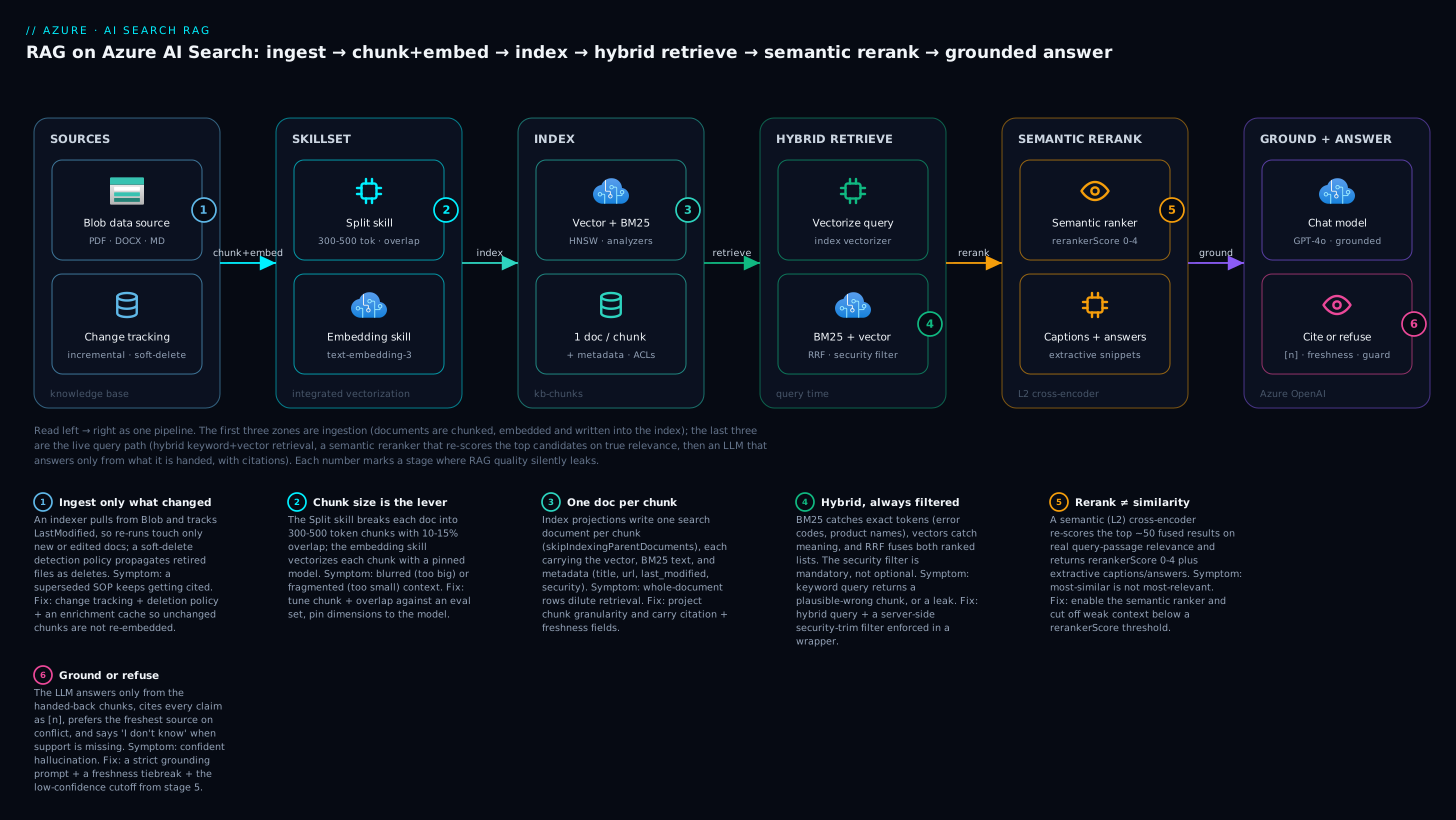
The diagram traces the whole pipeline left to right: documents flow through a skillset that chunks and embeds them into the index (stages 1-3), then each question runs hybrid retrieval, a semantic rerank, and a grounded, cited answer (stages 4-6) — with the six numbered points marking exactly where retrieval quality tends to leak.
Prerequisites
- Comfort with REST/JSON and a little scripting (the examples use
curland Python). - A working mental model of embeddings and Azure OpenAI — if that is fuzzy, read Generative AI & Azure OpenAI fundamentals first.
- Basic Azure identity: managed identities and RBAC roles (Entra ID, formerly Azure AD).
- Helpful platform context: Azure OpenAI enterprise landing zone and Enterprise RAG platform with private endpoints.
After this lesson you will be able to:
- Design a chunk-level vector index with the right
dimensions, HNSW parameters, and analyzers. - Stand up integrated vectorization so the indexer chunks and embeds for you — no embedding code in your app path.
- Write hybrid (BM25 + vector) queries fused with RRF and reranked by the semantic ranker, and read
rerankerScoreas a confidence signal. - Enforce document-level security so a query can never return content the caller is not allowed to see.
- Size replicas and partitions for SLA, QPS, and cost, and evaluate retrieval quality with a golden set.
The demo RAG app that worked on twelve PDFs falls apart at fifty thousand documents. Pure vector search returns plausible-but-wrong chunks for keyword-heavy queries (“error code 0x80070057”), the LLM hallucinates because retrieval missed the one relevant paragraph, and nobody can answer “is this answer based on the current SOP or last year’s?” The retrieval layer is where most RAG systems silently fail, and Azure AI Search is the component that earns its keep there — if you design the index, chunking, and ranking deliberately.
This guide builds a production retrieval layer end to end: vector index schema with HNSW tuning, integrated vectorization so you never run an embedding pipeline yourself, hybrid search fused with RRF, semantic reranking, indexers with change tracking, and the security and scaling decisions that bite at the SLA. Examples use the 2024-07-01 stable REST API (generally available; the surface used here is stable across the 2024 GA line).
Mental model: the LLM is the reasoning layer; AI Search is the retrieval layer. Grounding quality is bounded by what retrieval surfaces. Spend your effort here.
1. Index schema: vector fields, HNSW, and analyzers
An index for RAG holds chunks, not whole documents. Each document in the index is one chunk plus the metadata you need for filtering, citation, and freshness. The schema below pairs a searchable text field (for BM25) with a vector field (for similarity), and carries a parent_id, title, url, and last_modified for grounding.
{
  "name": "kb-chunks",
  "fields": [
    { "name": "chunk_id", "type": "Edm.String", "key": true, "filterable": true,
      "sortable": true, "analyzer": "keyword" },
    { "name": "parent_id", "type": "Edm.String", "filterable": true },
    { "name": "title", "type": "Edm.String", "searchable": true, "filterable": true },
    { "name": "url", "type": "Edm.String", "filterable": true },
    { "name": "security_group", "type": "Collection(Edm.String)", "filterable": true },
    { "name": "last_modified", "type": "Edm.DateTimeOffset", "filterable": true, "sortable": true },
    { "name": "content", "type": "Edm.String", "searchable": true,
      "analyzer": "en.microsoft" },
    { "name": "content_vector", "type": "Collection(Edm.Single)",
      "searchable": true, "dimensions": 1536,
      "vectorSearchProfile": "hnsw-profile" }
  ],
  "vectorSearch": {
    "algorithms": [
      { "name": "hnsw-algo", "kind": "hnsw",
        "hnswParameters": { "m": 4, "efConstruction": 400, "efSearch": 500, "metric": "cosine" } }
    ],
    "profiles": [
      { "name": "hnsw-profile", "algorithm": "hnsw-algo", "vectorizer": "aoai-vectorizer" }
    ],
    "vectorizers": [
      { "name": "aoai-vectorizer", "kind": "azureOpenAI",
        "azureOpenAIParameters": {
          "resourceUri": "https://my-aoai.openai.azure.com",
          "deploymentId": "text-embedding-3-large",
          "modelName": "text-embedding-3-large"
        }
      }
    ]
  }
}
Decisions that matter:
dimensionsmust match the embedding model.text-embedding-3-smallis 1536;text-embedding-3-largeis 3072 by default but supports shortened dimensions via thedimensionsrequest parameter. Pick one and pin it — changing it later means a reindex. The example above sets 1536 with the large model only if you also passdimensions: 1536at embed time; otherwise use 3072.- HNSW
mis the bidirectional link count per node. Highermimproves recall at the cost of index size and memory. The service default ism: 4;m: 4to8is plenty for most KBs.efConstruction(default 400) trades build time for graph quality;efSearch(default 500) trades query latency for recall. metric: cosinematches how OpenAI embeddings are trained. Do not switch todotProductunless your model is normalized and documented for it.- Analyzer choice drives BM25 quality.
en.microsoftdoes lemmatization (so “running” matches “run”);en.luceneis lighter. Use the Microsoft analyzer for natural-language content andkeywordfor IDs you want matched verbatim.
If you store vectors you never return to the client (you usually do not — they are large), set "stored": false on the vector field to cut index size substantially. The field stays searchable; it just is not retrievable.
2. Chunking and integrated vectorization with skillsets
The single biggest quality lever is chunk size. Too large and embeddings blur multiple topics, hurting precision; too small and you fragment context the LLM needs. Start at 300-500 tokens per chunk with ~10-15% overlap, then tune against your eval set.
You can chunk and embed yourself, but integrated vectorization lets the indexer do both via a skillset. The SplitSkill chunks; the AzureOpenAIEmbeddingSkill embeds each chunk; an index projection writes one search document per chunk. This means at query time you can send raw text and the index vectorizer embeds it for you — no embedding code in your application path.
{
  "name": "kb-skillset",
  "skills": [
    {
      "@odata.type": "#Microsoft.Skills.Text.SplitSkill",
      "textSplitMode": "pages",
      "maximumPageLength": 2000,
      "pageOverlapLength": 250,
      "unit": "characters",
      "context": "/document",
      "inputs": [{ "name": "text", "source": "/document/content" }],
      "outputs": [{ "name": "textItems", "targetName": "pages" }]
    },
    {
      "@odata.type": "#Microsoft.Skills.Text.AzureOpenAIEmbeddingSkill",
      "resourceUri": "https://my-aoai.openai.azure.com",
      "deploymentId": "text-embedding-3-large",
      "modelName": "text-embedding-3-large",
      "dimensions": 1536,
      "context": "/document/pages/*",
      "inputs": [{ "name": "text", "source": "/document/pages/*" }],
      "outputs": [{ "name": "embedding", "targetName": "vector" }]
    }
  ],
  "indexProjections": {
    "selectors": [
      {
        "targetIndexName": "kb-chunks",
        "parentKeyFieldName": "parent_id",
        "sourceContext": "/document/pages/*",
        "mappings": [
          { "name": "content", "source": "/document/pages/*" },
          { "name": "content_vector", "source": "/document/pages/*/vector" },
          { "name": "title", "source": "/document/title" },
          { "name": "url", "source": "/document/metadata_storage_path" },
          { "name": "last_modified", "source": "/document/metadata_storage_last_modified" }
        ]
      }
    ],
    "parameters": { "projectionMode": "skipIndexingParentDocuments" }
  }
}
projectionMode: skipIndexingParentDocuments is the key flag: it tells the indexer to index only the chunk projections, not the original parent document, so your index contains exactly the chunk granularity you want. The AzureOpenAIEmbeddingSkill should authenticate with a managed identity (assign the search service’s identity the Cognitive Services OpenAI User role on the AOAI resource) rather than an API key — set authIdentity or rely on the system-assigned identity.
textSplitMode: pages is a misnomer — it means “fixed-size chunks,” not literal document pages. There is also a markdown mode (textSplitMode: markdown) that splits on header structure, which is excellent for documentation sites.
3. Hybrid search: BM25 + vectors with RRF
Vector search wins on semantics (“how do I roll back a release”); BM25 wins on exact tokens (product names, error codes, acronyms). Hybrid search runs both and fuses them with Reciprocal Rank Fusion (RRF) — a parameter-free method that ranks by sum(1 / (k + rank)) across result sets. You almost always want hybrid for RAG.
A hybrid query sends both a search (text) and a vectorQueries block. With an index-level vectorizer you can pass text and let the service embed it (kind: text):
curl -X POST \
  "https://my-search.search.windows.net/indexes/kb-chunks/docs/search?api-version=2024-07-01" \
  -H "Content-Type: application/json" \
  -H "api-key: $SEARCH_QUERY_KEY" \
  -d '{
    "search": "how do I roll back a failed deployment",
    "vectorQueries": [
      {
        "kind": "text",
        "text": "how do I roll back a failed deployment",
        "fields": "content_vector",
        "k": 50
      }
    ],
    "select": "chunk_id,title,url,content,last_modified",
    "top": 10
  }'
Notes that change behavior:
kon the vector query is the number of nearest neighbors retrieved before fusion, distinct fromtop(final result count). Over-retrieve (k: 50) then let RRF and semantic ranking trim totop: 10.exhaustive: trueforces a brute-force KNN scan instead of the HNSW approximation — useful for evaluating recall offline, far too slow for production.- Add a
filterto scope by metadata (security, freshness, source). With hybrid + filters you get the precision of keyword search and the recall of vectors, scoped to what the user is allowed to see.
4. Semantic ranker: reranking and tradeoffs
RRF gives a good first-pass ordering, but the top result is not always the most relevant — it is the most similar. Semantic ranking sends the top ~50 fused results to a cross-encoder model that re-scores them on actual query-passage relevance, and it can return captions (highlighted snippets) and extractive answers. This is the single highest-ROI feature for grounding quality.
Configure a semantic configuration on the index, naming which fields the reranker reads:
{
  "semantic": {
    "configurations": [
      {
        "name": "kb-semantic",
        "prioritizedFields": {
          "titleField": { "fieldName": "title" },
          "prioritizedContentFields": [{ "fieldName": "content" }],
          "prioritizedKeywordsFields": []
        }
      }
    ]
  }
}
Then enable it on the query:
{
  "search": "how do I roll back a failed deployment",
  "vectorQueries": [
    { "kind": "text", "text": "how do I roll back a failed deployment",
      "fields": "content_vector", "k": 50 }
  ],
  "queryType": "semantic",
  "semanticConfiguration": "kb-semantic",
  "captions": "extractive",
  "answers": "extractive|count-3",
  "top": 10
}
Tradeoffs to internalize:
- Latency: semantic ranking adds tens to low-hundreds of milliseconds. It reranks at most the top 50 documents (the fused candidate set), so it does not scale with index size — but it is not free.
- Cost and quota: semantic ranking is billed and rate-limited (queries per second). It is a separate plan tier you enable per service. Budget it; do not enable it on every autocomplete keystroke.
@search.rerankerScoreranges 0-4. It is a far better confidence signal than the raw similarity score. A practical pattern: if the toprerankerScoreis below ~1.5, treat retrieval as “no good answer” and have the LLM say so instead of grounding on weak context.
5. Indexers, data sources, and change tracking
Indexers pull from a data source, run the skillset, and write to the index — on a schedule, incrementally. For Blob Storage, the indexer tracks LastModified automatically. For SQL or Cosmos DB, configure a high-water-mark change-detection policy so only changed rows are re-pulled.
{
  "name": "kb-datasource",
  "type": "azureblob",
  "credentials": { "connectionString": "ResourceId=/subscriptions/.../storageAccounts/kbsa;" },
  "container": { "name": "documents" },
  "dataDeletionDetectionPolicy": {
    "@odata.type": "#Microsoft.Azure.Search.NativeBlobSoftDeleteDeletionDetectionPolicy"
  }
}
Using a ResourceId= connection string (no account key) lets the search service authenticate to Blob with its managed identity — assign it Storage Blob Data Reader. The NativeBlobSoftDeleteDeletionDetectionPolicy makes soft-deleted blobs propagate as deletes into the index, so retired documents stop grounding answers.
{
  "name": "kb-indexer",
  "dataSourceName": "kb-datasource",
  "targetIndexName": "kb-chunks",
  "skillsetName": "kb-skillset",
  "schedule": { "interval": "PT2H" },
  "parameters": {
    "configuration": {
      "dataToExtract": "contentAndMetadata",
      "parsingMode": "default",
      "indexedFileNameExtensions": ".pdf,.docx,.md,.html"
    }
  }
}
schedule.interval uses ISO 8601 duration (PT2H = every 2 hours; minimum is PT5M). For incremental enrichment economics, enable an enrichment cache (set a cache with a storage connection on the indexer) so unchanged documents are not re-embedded on every run — embeddings are the expensive part, and re-vectorizing unchanged content is pure waste.
6. Security: private endpoints, RBAC, and document-level filtering
Three layers, all of which a regulated tenant will require:
Network. Disable public access and reach the service over a private endpoint; the indexer reaches Blob/AOAI over a shared private link.
az search service update \
  --name my-search --resource-group rg-search \
  --public-network-access disabled

az search shared-private-link-resource create \
  --name spl-aoai --service-name my-search --resource-group rg-search \
  --group-id openai_account \
  --resource-id "/subscriptions/<sub>/resourceGroups/rg-aoai/providers/Microsoft.CognitiveServices/accounts/my-aoai" \
  --request-message "indexer access to AOAI"
Identity, not keys. Enable RBAC for the data plane and turn off API keys entirely once callers use Entra tokens:
az search service update \
  --name my-search --resource-group rg-search \
  --auth-options aadOrApiKey --aad-auth-failure-mode http403
# After migrating callers to Entra tokens, tighten to RBAC-only:
az search service update \
  --name my-search --resource-group rg-search \
  --disable-local-auth true
Use built-in roles: Search Index Data Reader for query-only app identities, Search Index Data Contributor for ingestion, Search Service Contributor for control-plane changes. Application backends should hold Data Reader and nothing more.
Document-level security. AI Search has no row-level security, so you enforce it in the query with a filter on a field carrying the user’s allowed groups. Stamp each chunk with security_group (the AD groups that may see it), then filter at query time using search.in for an efficient set match:
{
  "search": "quarterly revenue",
  "filter": "security_group/any(g: search.in(g, 'finance-readers,exec-team', ','))",
  "queryType": "semantic",
  "top": 10
}
The app must derive that group list from the caller’s validated token, never from client input. This is the standard “security trimming” pattern — there is no server-side identity join, so a missing filter is a data-leak bug, not a feature gap.
7. Scaling: replicas, partitions, and latency
Capacity is replicas x partitions search units (SUs), billed as their product.
- Partitions shard the index — they add storage and write/ingestion throughput, and improve query latency on large indexes by parallelizing the scan. Add partitions when the index outgrows one partition or queries are scan-bound.
- Replicas are full copies — they add query QPS and are required for the query SLA (the 99.9% read SLA needs >= 2 replicas; writes need >= 3). Add replicas when you are QPS-bound or need the SLA.
az search service update \
  --name my-search --resource-group rg-search \
  --partition-count 2 --replica-count 3
Latency levers, in order of impact:
- Lower
efSearchon the HNSW profile if recall headroom allows — it is the direct query-time vs. recall knob. selectonly the fields you need. Never returncontent_vectorto the client; it inflates payload and serialization time. Setstored: falseon it.- Keep
kandtopmodest. Over-retrieval feeds semantic ranking but costs bandwidth and rerank time. - Right-size chunks. Fewer, well-sized chunks mean a smaller graph and faster traversal than millions of tiny fragments.
Scaling is not instant — adding partitions reprovisions and can take time, and you cannot reduce partitions and replicas in the same operation as some other changes. Provision ahead of launch, not during the incident.
8. Grounding into Azure OpenAI with citations and freshness
Now wire retrieval into the LLM. Two paths:
Path A — “On Your Data” (managed). Azure OpenAI’s chat completions accept a data_sources block pointing at your index; the service runs hybrid+semantic retrieval and injects grounding automatically, returning citations in the response. Lowest code, less control over the prompt.
Path B — explicit RAG (recommended for control). You retrieve, you build the prompt, you own the citation format. This is where freshness and provenance live:
# 1) Retrieve (hybrid + semantic) via the Search SDK, then:
sources = "\n\n".join(
    f"[{i+1}] (updated {d['last_modified']}) {d['content']}\nURL: {d['url']}"
    for i, d in enumerate(results)
)

system = (
    "Answer ONLY from the sources below. Cite every claim as [n]. "
    "If the sources do not contain the answer, say you don't know. "
    "Prefer sources with the most recent 'updated' date when they conflict."
)
messages = [
    {"role": "system", "content": system},
    {"role": "user", "content": f"{question}\n\nSources:\n{sources}"},
]
# 2) Call chat.completions; render [n] -> d['url'] in the UI.
The freshness rule earns its place when an SOP changes: stamp last_modified into every chunk (Section 2 mapped it), surface it in the prompt, and instruct the model to prefer recent sources on conflict. Combined with the soft-delete deletion policy from Section 5, retired content stops grounding answers and current content wins ties — which is exactly the “is this the current SOP?” question that sinks naive RAG.
Enterprise scenario
A financial-services platform team ran a single shared “all-knowledge-base” index for an internal copilot across legal, HR, and trading-desk content. Two failures surfaced in the same week. First, a compliance audit found that an HR analyst’s query had surfaced a trading-desk memo in the citations — the app filtered on department only when the request included it, and one code path omitted the filter, leaking restricted content. Second, the copilot kept citing a superseded trading SOP because the old PDF and its replacement both sat in the index with near-identical embeddings, and pure similarity ranked the longer (older) document first.
The constraint: they could not split into per-department services (cost and operational sprawl across twelve business units), and they could not afford another audit finding.
The fix was two changes, both at the retrieval layer. They made the security filter non-optional by moving it into a thin retrieval wrapper that every caller had to go through — the wrapper derived groups from the validated Entra token and always appended security_group/any(g: search.in(...)), so no application code could issue an unfiltered query. And they enabled semantic ranking plus a freshness tiebreak so the current SOP won.
{
  "search": "margin call escalation procedure",
  "filter": "security_group/any(g: search.in(g, 'trading-desk', ',')) and is_current eq true",
  "vectorQueries": [
    { "kind": "text", "text": "margin call escalation procedure",
      "fields": "content_vector", "k": 50 }
  ],
  "queryType": "semantic",
  "semanticConfiguration": "kb-semantic",
  "select": "chunk_id,title,url,content,last_modified",
  "top": 8
}
An is_current boolean was stamped by the ingestion pipeline (set false on the prior version when a replacement landed), turning “prefer recent” into a hard filter rather than a soft hope. Zero unfiltered queries could leave the wrapper, and the superseded-SOP citations disappeared. No new services, no per-team indexes — just the two retrieval-layer guarantees that the naive design had left to chance.
Verify
Confirm each layer behaves before you point an LLM at it.
# Index exists with the expected fields and vector profile
curl -s "https://my-search.search.windows.net/indexes/kb-chunks?api-version=2024-07-01" \
  -H "api-key: $ADMIN_KEY" | jq '.fields[].name, .vectorSearch.profiles'

# Indexer ran and produced documents (check status + counts)
curl -s "https://my-search.search.windows.net/indexers/kb-indexer/status?api-version=2024-07-01" \
  -H "api-key: $ADMIN_KEY" | jq '.lastResult.status, .lastResult.itemsProcessed, .lastResult.errors'

# Document count is non-zero
curl -s "https://my-search.search.windows.net/indexes/kb-chunks/docs/\$count?api-version=2024-07-01" \
  -H "api-key: $ADMIN_KEY"
- Run an exact-token query (an error code) and a semantic query (“how do I undo a release”) against the same hybrid endpoint; both should return relevant chunks. If the token query misses, your analyzer or BM25 field is wrong.
- Inspect
@search.rerankerScoreon a known-good query — it should be high (>2). On an off-topic query it should be low, proving your low-confidence cutoff will fire. - Issue a query as a user who should not see restricted content and confirm the filter excludes it. Then remove the filter and confirm the restricted doc would have appeared — proving the trim is doing real work.
- Soft-delete a blob, let the indexer run, and confirm the chunk disappears from the index.
Checklist
Going deeper
The eight sections above are the working system. This section is the layer underneath — the internals, the knobs the defaults hide, and the newer surface (some of it preview) that changes the calculus. Read it once you have the basic pipeline running; it is where the last twenty points of quality and half the cost live.
The index schema, one layer down: profiles, algorithms, compression
The vectorSearch block in Section 1 has three named collections — algorithms, profiles, and vectorizers — and the indirection between them is deliberate. A field points at a profile; a profile binds one algorithm and (optionally) one vectorizer and one compression. Splitting them means two vector fields can share an algorithm but use different compressions, or a field can carry a query-time vectorizer while another does not.
HNSW vs exhaustive KNN. hnsw builds an approximate-nearest-neighbour proximity graph — fast, sub-linear, and the right default above a few thousand vectors. exhaustiveKnn is brute-force: it scans every vector and returns the mathematically exact nearest neighbours. Use it for a tiny index, or — more usefully — as ground truth when you measure recall: run the same queries against an exhaustive field and see how many of the true top-k your HNSW field missed. You do not even need a second field for a one-off check; set "exhaustive": true on an individual vector query to force a full scan on demand.
"algorithms": [
  { "name": "hnsw-algo", "kind": "hnsw",
    "hnswParameters": { "m": 4, "efConstruction": 400, "efSearch": 500, "metric": "cosine" } },
  { "name": "eknn-algo", "kind": "exhaustiveKnn",
    "exhaustiveKnnParameters": { "metric": "cosine" } }
]
What the HNSW knobs actually do. m is the number of bidirectional links each node keeps — the graph’s connectivity. efConstruction is the size of the candidate list held while building the graph; efSearch is the candidate list size while querying. A bigger efSearch explores more of the graph before returning, so recall climbs and latency rises — it is your single most direct recall-vs-latency dial at query time, and unlike m/efConstruction it can be tuned without a rebuild. The whole graph is held in memory, so vector RAM — not disk — is usually the real capacity ceiling on a partition, which is exactly what compression relieves.
Compression: buy back memory with quantization. A 1536-dimension Collection(Edm.Single) vector is 1536 × 4 bytes ≈ 6 KB before overhead; a few million of them is real memory. AI Search can compress vectors with scalar quantization (32-bit floats → 8-bit ints, ~4× smaller) or binary quantization (→ 1 bit per dimension, up to ~28× smaller), configured in a compressions block that a profile references. Quantization loses precision, so you pair it with oversampling + rescoring: retrieve extra candidates against the compressed vectors, then re-score the finalists against full-precision copies. For text-embedding-3 models you can also shorten vectors with truncationDimension (Matryoshka representation learning — the dimensions are ordered by importance, so a prefix is still a good vector). These features live on newer API versions than the 2024-07-01 stable used elsewhere in this lesson (scalar quantization and the stored property GA’d; binary quantization and truncationDimension arrived on the 2024-09/2024-11 preview line) — confirm support against the exact api-version you target.
"compressions": [
  { "name": "bq-compression", "kind": "binaryQuantization",
    "rescoringOptions": { "enableRescoring": true, "defaultOversampling": 10 },
    "truncationDimension": 1024 }
],
"profiles": [
  { "name": "hnsw-profile", "algorithm": "hnsw-algo",
    "vectorizer": "aoai-vectorizer", "compression": "bq-compression" }
]
Hybrid, precisely: the RRF constant, weights, and recall size
Section 3 called RRF “parameter-free”; here is the parameter it hides. AI Search fuses ranked lists with score = Σ 1 / (k + rank) where k is a fixed constant of 60. That constant flattens the contribution of any single list so no one retriever dominates — a document ranked #1 by BM25 and #3 by vector beats one ranked #1 by vector but #40 by BM25. You do not set k, but you can tilt the blend: give a vectorQueries[].weight above 1 to lean on semantics, below 1 to lean on keywords. You can also send multiple vector queries and multiple search terms in one request, and RRF fuses them all.
Two recall knobs are worth knowing: the vector side’s k (nearest neighbours per vector query, before fusion) and — on recent API versions — maxTextRecallSize, which caps how many BM25 hits feed the fusion. Over-retrieve on both, then let RRF and the semantic ranker trim to top. Under-set them and a relevant chunk can be filtered out before ranking ever sees it — a silent recall bug that no prompt change will fix.
The semantic ranker as a real second stage (and query rewriting)
It helps to see retrieval as two stages. L1 is what you have built: BM25 + vector, fused by RRF — cheap, run over the whole index, returning up to ~1,000 candidates. L2 is the semantic ranker: a machine-reading cross-encoder (the same family that powers Bing’s ranking) that reads the query and each passage together and scores true relevance — far more accurate than cosine similarity, but expensive, so it only ever sees the top ~50 from L1. That 50-document window is why semantic ranking does not scale with index size, and also why it cannot rescue bad L1 retrieval: if the right chunk never makes the top 50, the reranker never sees it.
Beyond ordering, L2 emits captions (the most relevant extractive snippet per result, optionally highlighted) and answers (a short extractive span that directly answers the query, when one exists) — both gold for a citations UI. @search.rerankerScore runs 0-4 and is a genuine relevance signal, not a similarity artefact, which is why it makes a dependable confidence cutoff.
Query rewriting (preview) closes the recall gap on the input side: with queryRewrites the service uses a small language model to generate paraphrases of the user’s query — “roll back a release” also searches “revert a deployment” and “undo a rollout” — and merges the results before ranking. It rides on the semantic pipeline and, like it, is billed and preview-gated; enable it where recall on messy natural-language queries matters more than the extra latency.
{
  "search": "how do I roll back a failed deployment",
  "vectorQueries": [
    { "kind": "text", "text": "how do I roll back a failed deployment",
      "fields": "content_vector", "k": 50, "weight": 1.0 }
  ],
  "queryType": "semantic",
  "semanticConfiguration": "kb-semantic",
  "queryLanguage": "en-us",
  "queryRewrites": "generative|count-3",
  "captions": "extractive",
  "answers": "extractive|count-1",
  "top": 10
}
Integrated vectorization, end to end
The moving parts, in order: an indexer reads a data source, runs a skillset, and writes to an index (optionally also to a knowledge store). Section 2 built the skillset; here is the rest of the assembly and the pieces worth knowing.
- Split skill modes.
textSplitMode: pagesmeans fixed-size chunks (the “pages” name is historical);sentencessplits on sentence boundaries;markdown(a newer mode) splits on header structure and is excellent for docs sites because a chunk aligns to a section.unitchooses whethermaximumPageLength/pageOverlapLengthcount characters or tokens — recent API versions add anazureOpenAITokensunit so your chunk budget matches the embedding model’s tokenizer instead of a rough character estimate. - Index projections are what turn one source doc into many chunk documents.
parentKeyFieldNamelinks each chunk back to its parent for citation, andprojectionMode: skipIndexingParentDocumentskeeps the parent out of the index so you store pure chunk granularity. - Knowledge store is a second output: the same enrichments can be projected into Azure Storage as tables, objects, or files for analytics and inspection — separate from the query index. Reach for it when you want to reuse or audit the enriched data downstream, not to serve queries.
- Enrichment cache. Set a
cache(a storage connection) on the indexer and unchanged documents skip re-enrichment on the next run. Embeddings are the expensive step; re-embedding content that has not changed is pure spend. Pair it with change tracking. - Debug sessions. When a skillset misbehaves, a debug session in the portal replays one document through the skill graph and shows every input and output — the fastest way to find a broken
sourcepath in a mapping.
Chunking that survives real documents
Chunk size is the highest-leverage quality knob, and “300-500 tokens with 10-15% overlap” is a starting point, not a law. The reasoning: an embedding is a single point in space for the whole chunk, so a chunk that spans two topics lands between them and matches neither well; a chunk too small to hold a complete thought forces the LLM to stitch fragments. Overlap exists so a definition or step that straddles a boundary survives intact in at least one chunk.
Beyond size, three things decide whether retrieval works:
- Structure-aware splitting. Splitting a table or a numbered procedure on a blind character count shreds it. Markdown mode (or pre-parsing to markdown) keeps sections whole.
- Parent-child / context expansion. Embed and match on small chunks for precision, but hand the LLM the surrounding text (the parent section) for context. Store a
parent_idand fetch neighbours, or duplicate a little context into each chunk. - The metadata you carry is not optional. Every chunk needs
titleandurlfor citations,last_modifiedfor freshness, a security field for trimming, and often a page or section number so a citation lands the reader on the right paragraph. Retrieval that returns a perfect chunk with no way to cite it is not production RAG.
Security: from query-time trimming to native document-level access
Section 6 built security trimming by hand: stamp each chunk with the groups allowed to see it, and always append security_group/any(g: search.in(g, ...)) derived from the caller’s validated Entra token. That pattern is correct and portable, and the one rule that matters is that the filter is mandatory — enforced in a retrieval wrapper every caller must pass through, never an optional query parameter, because a missing filter is a silent data leak.
Newer document-level access control (preview) pushes the enforcement into the service. You add permission fields to the index and populate them with ACLs or Entra group object IDs — for ADLS Gen2 sources the indexer can pull the source’s ACLs automatically — then send the caller’s token in an x-ms-query-source-authorization header and the service trims results to what that identity may see, no hand-built filter required. It is preview and gated to specific API versions; treat it as the direction of travel while keeping the mandatory-filter wrapper as today’s dependable default. (For the source side of this — soft delete, immutability, lifecycle — see Blob Storage lifecycle, immutability & soft delete.)
On the data plane, keep the least-privilege roles from Section 6 (Search Index Data Reader for query apps, Data Contributor for ingestion, Service Contributor for the control plane), prefer managed identity over keys, and set disableLocalAuth once callers hold Entra tokens.
The accuracy levers — and how to actually measure them
When answers are wrong, resist the urge to change the prompt first. In rough order of impact, the levers are: retrieval config (hybrid + semantic on, k/top sane) → chunking (size, overlap, structure) → embedding model and dimensions → filters/freshness → the grounding prompt. Prompt tuning is real, but it is the last few points, not the first fifty.
You cannot tune what you do not measure, so build a golden set: 50-200 real questions, each tagged with the source chunk(s) that should answer it. Then measure two things separately:
- Retrieval quality — did the right chunk come back, and how high? Recall@k (was it in the top k at all), MRR (how high — reciprocal of its rank), and nDCG (rank-weighted, for multiple relevant chunks). If recall@k is low, generation cannot recover; fix retrieval, not the prompt.
- Generation quality — given good context, is the answer right and supported? Groundedness (every claim traceable to a source), relevance, fluency. The Azure AI Foundry evaluation SDK ships groundedness/relevance/retrieval evaluators (and integrates Ragas-style metrics) so you can score a run programmatically instead of eyeballing it.
The loop is disciplined: change one lever, re-run the golden set, compare the numbers. Online, keep the rerankerScore cutoff from Section 4 as a live guardrail — below ~1.5, refuse rather than ground on weak context.
Scale and cost: search units, tiers, and what each knob costs
Capacity is replicas × partitions = search units (SU), and you are billed for the product. What each buys:
- Partitions add storage and ingestion throughput and parallelize the scan, so they help large or write-heavy indexes. For vectors specifically, the HNSW graph lives in memory, so vector RAM per partition is the real ceiling — partitions (or quantization) are how you make room.
- Replicas are full copies: they add query QPS and satisfy the SLA (the 99.9% read SLA needs ≥ 2 replicas; read-write needs ≥ 3). They do nothing for relevance — a common misread.
Tier sets the shape of the box: Free (tiny, shared, for learning), Basic (small production; semantic ranker available), Standard S1/S2/S3 (+ S3 HD) (the workhorses, up to 12 partitions × 12 replicas), and Storage Optimized L1/L2 (cheap capacity, higher latency). Vector limits and per-partition storage scale with the tier, and you cannot change tier in place — you create a new service and reindex. Cost lines to watch: the SU count itself, the semantic ranker (a free monthly allotment, then billed per 1,000 queries — do not fire it on every autocomplete keystroke), and the Azure OpenAI embedding tokens burned at ingest (the enrichment cache is what keeps a re-run from re-paying that bill). Provision partitions and replicas ahead of launch — scaling reprovisions and is not instant.
Practice challenges
Work these against the schemas and queries above — try each before opening the solution. They escalate from beginner to advanced.
1. Match the dimensions (beginner)
You switch your embedding deployment from text-embedding-3-small to text-embedding-3-large with default settings but keep "dimensions": 1536 on the vector field. What breaks, and what are the two ways to fix it?
<details> <summary>Show solution</summary>
text-embedding-3-large returns 3072 dimensions by default, so it no longer matches the field’s 1536 and indexing fails on a dimension mismatch. Fix it either by setting the field (and the embedding skill) to 3072, or by keeping 1536 and passing "dimensions": 1536 to the large model at embed time (it supports shortened output via MRL). Why: the field’s dimensions is a hard contract with the model — a mismatch is rejected, and changing it later forces a full reindex.
</details>
2. Hybrid over-retrieve, trim to top (beginner-intermediate)
Write the query body that runs hybrid search for “reset MFA for a locked account”, retrieves 50 vector neighbours, returns the 10 best, and selects only citation fields.
<details> <summary>Show solution</summary>
{
  "search": "reset MFA for a locked account",
  "vectorQueries": [
    { "kind": "text", "text": "reset MFA for a locked account",
      "fields": "content_vector", "k": 50 }
  ],
  "select": "chunk_id,title,url,content,last_modified",
  "top": 10
}
Why: k over-retrieves candidates before fusion; top trims the final list; select keeps the heavy content_vector out of the payload. The search text drives BM25 while vectorQueries drives similarity, and RRF fuses the two.
</details>
3. Make the security filter non-optional (intermediate)
Your app derives ["hr-readers","all-staff"] from the caller’s token. Write the filter that trims to those groups, and state where in the code it must live.
<details> <summary>Show solution</summary>
"filter": "security_group/any(g: search.in(g, 'hr-readers,all-staff', ','))"
It must be appended inside a mandatory retrieval wrapper that every caller passes through and that reads the groups from the validated token — never accepted from client input, never an optional parameter. Why: AI Search has no row-level security, so a code path that omits the filter is a data leak; the only safe design makes an unfiltered query impossible to issue. </details>
4. Skillset for a docs site (intermediate-advanced)
Sketch the two skills for an integrated-vectorization skillset over a documentation site: split on header structure, embed at 1536 dimensions, and wire the context paths so the embedding runs once per chunk.
<details> <summary>Show solution</summary>
"skills": [
  { "@odata.type": "#Microsoft.Skills.Text.SplitSkill",
    "textSplitMode": "markdown", "unit": "characters",
    "maximumPageLength": 2000, "pageOverlapLength": 300,
    "context": "/document",
    "inputs": [{ "name": "text", "source": "/document/content" }],
    "outputs": [{ "name": "textItems", "targetName": "pages" }] },
  { "@odata.type": "#Microsoft.Skills.Text.AzureOpenAIEmbeddingSkill",
    "resourceUri": "https://my-aoai.openai.azure.com",
    "deploymentId": "text-embedding-3-small", "modelName": "text-embedding-3-small",
    "dimensions": 1536, "context": "/document/pages/*",
    "inputs": [{ "name": "text", "source": "/document/pages/*" }],
    "outputs": [{ "name": "embedding", "targetName": "vector" }] }
]
Why: markdown mode keeps a chunk aligned to a section (much better than a blind character cut); the embedding skill’s context of /document/pages/* makes it run once per chunk; index projections (Section 2) then write one document per chunk. markdown mode and the token-based unit are newer API-version features — confirm against the version you target. On recent versions, prefer unit: azureOpenAITokens so the 300-500 budget is measured in the model’s tokens.
</details>
5. Low-confidence refusal + freshness (advanced)
Design the retrieval-and-answer rule that (a) refuses when the best result is weak and (b) prefers the current version of a document. Name the field(s) and the threshold.
<details> <summary>Show solution</summary>
Retrieve with queryType: semantic and a filter is_current eq true (an ingestion-stamped boolean), then read @search.rerankerScore on the top result: if it is below ~1.5, skip grounding and have the model reply that it does not have a confident answer. Also surface last_modified in the prompt and instruct the model to prefer the most recent source on conflict. Why: rerankerScore (0-4) is a true relevance signal, so it makes a reliable cutoff; is_current turns “prefer fresh” from a soft hope into a hard filter, and the freshness instruction breaks ties among the remaining current docs.
</details>
6. Build the evaluation loop (advanced)
You have a golden set of 120 Q→source pairs. Retrieval config A (vector-only) scores recall@5 = 0.71; config B (hybrid + semantic) scores 0.89 but adds 90 ms at p50. Which do you ship, and what do you measure next?
<details> <summary>Show solution</summary>
Ship B. An 18-point recall gain is the difference between grounding on the right chunk and hallucinating, and ~90 ms is well within a chat budget — retrieval recall caps everything downstream. Next, measure groundedness/relevance on B’s answers (good retrieval can still be let down by chunking or the prompt) and watch the online rerankerScore distribution to tune the refusal cutoff. Why: recall@k bounds the achievable answer quality, so you optimise it first; the generation metrics and the live confidence signal then tell you where the remaining errors come from. Change one lever at a time and re-run the set.
</details>
Common beginner mistakes
Traps that look reasonable and quietly wreck retrieval quality — each is a misconception, then the model to replace it with.
- “Vector search alone is enough.” Pure similarity fumbles exact tokens — error codes, SKUs, acronyms, people’s names — because those carry little semantic signal. Right model: hybrid. BM25 nails the literal match, vectors nail the meaning, RRF fuses them. Vector-only is the most common cause of “it can’t find the thing I literally typed.”
- “Bigger chunks give the model more context, so they’re better.” A big chunk spanning several topics produces one blurred embedding that matches none of them well, tanking precision. Right model: 300-500 tokens with 10-15% overlap, tuned on an eval set; give the LLM more context by expanding around a small, precise match — not by embedding a wall of text.
- “Turn on the semantic ranker and retrieval is solved.” The ranker only reorders the top ~50 that L1 already surfaced; if the right chunk is not in that set, reranking cannot conjure it. Right model: fix L1 recall first (hybrid, chunking, filters), then let L2 put the best of a good set on top.
- “I’ll set the vector dimensions later.”
dimensionsis a hard contract with the embedding model; changing it means dropping and rebuilding the index. Right model: choose the model and dimensions up front and pin them; treat any change as a planned reindex. - “The security filter is just another query option.” If any code path can issue a query without the filter, restricted content will eventually surface in a citation — there is no server-side row-level security to catch it. Right model: a mandatory retrieval wrapper builds the filter from the validated token, so an unfiltered query cannot be expressed.
- “Return the full document (and its vector) so the app has everything.” Whole documents dilute retrieval granularity, and shipping
content_vectorto the client bloats every response. Right model: index and return chunks, setstored: falseon the vector, andselectonly citation fields. - “One big index sorted by similarity is fine.” When an old doc and its revision both sit in the index, similarity happily cites the stale one. Right model: stamp freshness (
last_modified,is_current), propagate deletes, and break ties toward current content. - “More replicas will make the answers better.” Replicas add QPS and SLA headroom, nothing else. Right model: replicas for throughput, partitions for size and scan, and relevance from retrieval design — hybrid, chunking, reranking — not from raw capacity.
Glossary
- RAG (Retrieval-Augmented Generation) — answering with an LLM by first retrieving relevant source passages and grounding the model on them, instead of relying on model memory.
- Grounding — constraining the model to answer from supplied sources, so claims are traceable and hallucination drops.
- Chunk — a small slice of a document (here 300-500 tokens) that becomes one searchable document with its own embedding and metadata.
- Embedding / vector — a fixed-length array of floats that positions text in semantic space; nearby vectors mean similar meaning.
- Dimensions — the length of that vector (e.g. 1536, 3072); must match between the field and the embedding model.
- BM25 — the classic keyword ranking function, scoring documents by term frequency and rarity. Great at exact tokens.
- Vector / similarity search — ranking by distance (cosine) between the query vector and stored vectors. Great at meaning.
- HNSW — Hierarchical Navigable Small World, the approximate-nearest-neighbour graph AI Search uses for fast vector search.
- ANN / exhaustive KNN — approximate vs exact nearest-neighbour search; exhaustive KNN brute-forces every vector (exact, slow) and is used for ground-truth recall.
- m / efConstruction / efSearch — HNSW knobs: links per node, build-time candidate list, query-time candidate list;
efSearchis the main recall-vs-latency dial. - Hybrid search — running BM25 and vector search together and fusing the two ranked lists.
- RRF (Reciprocal Rank Fusion) — the fusion method,
Σ 1/(k+rank)with a fixed k=60, that merges hybrid result lists without tuning. - Semantic ranker (L2) — a cross-encoder that re-scores the top ~50 fused results on true query-passage relevance.
- rerankerScore — the semantic ranker’s 0-4 relevance score; a reliable confidence signal for a refusal cutoff.
- Caption / extractive answer — the relevant snippet, and a short directly-answering span, that the semantic ranker returns for a result.
- Integrated vectorization — letting the indexer chunk and embed via a skillset, so no embedding runs in your app path.
- Skillset / Split skill / AzureOpenAIEmbeddingSkill — the enrichment pipeline; the skill that chunks, and the skill that embeds each chunk.
- Indexer / data source — the scheduled component that pulls from a source (Blob, SQL, Cosmos) and writes the index, with change tracking.
- Index projection — the mapping that writes one search document per chunk (
skipIndexingParentDocuments) and links it to its parent. - Knowledge store — an optional second output that projects enriched data to Azure Storage tables/objects/files for analytics.
- Enrichment cache — indexer cache that skips re-enriching (re-embedding) unchanged documents on a re-run.
- Quantization (scalar / binary) — compressing vectors (to int8 or 1-bit) to cut memory, paired with oversampling + rescoring to preserve recall.
- truncationDimension (MRL) — shortening
text-embedding-3vectors to a prefix that is still a good vector. - Query rewriting — a preview feature that generates paraphrases of the query to lift recall.
- Security trimming — filtering results to the groups the caller may see, enforced server-side in a mandatory wrapper.
- Replica / partition / search unit (SU) — copies for QPS and SLA / shards for size and scan / their product, the billed capacity unit.
- Managed identity — an Entra identity Azure manages for a resource, so the search service reaches Blob/AOAI without keys.