In a nutshell
Picture a brand-new hire who happens to be a genius. You would not sit them at a desk in the public lobby with the company chequebook open. You would give them a locked office inside the building — a private network no stranger can reach — put a receptionist at the door who checks every visitor’s badge, logs who asked for what, and turns people away once they have used up their meeting time, and keep cameras and a ledger running so Finance can see exactly who used the genius’s time and bill it back.
That is an Azure OpenAI enterprise landing zone. Azure OpenAI on its own is just the genius: enormously capable, but by default reachable over the public internet with a shared API key that anyone who copies it can use. A landing zone is the office, the receptionist, and the cameras built around it so that many teams can share one powerful model safely, fairly, and accountably.
The three moving parts map one-to-one onto this lesson: a private network (Private Endpoint + public access disabled) so the model is unreachable from the internet; an API Management “AI gateway” — the receptionist — that authenticates callers, meters and enforces per-team token budgets, and load-balances across regions so no team can starve another; and monitoring (Azure Monitor / Log Analytics) that turns every prompt into a metered, attributable, auditable event. Get those three right and “five teams want GPT-4o by next sprint” becomes a config change, not a fire drill.
Level: Advanced · Time: ~40 min
Prerequisites — you will get the most from this if you have already met:
- Azure OpenAI basics — models, deployments, tokens: Generative AI & Azure OpenAI fundamentals.
- Private Endpoints and Private DNS: Private Endpoints & Private DNS at scale.
- The APIM policy engine: API Management & the self-hosted gateway.
- Landing-zone thinking (hub-and-spoke, management groups, the CAF platform) from the landing-zone lessons in this course.
After this lesson you will be able to:
- Stand up private-only Azure OpenAI accounts (Private Endpoint,
publicNetworkAccess=Disabled, the correctprivatelink.openai.azure.comDNS zone) and explain the double-DNS-record trap. - Put APIM in front of Azure OpenAI as an AI gateway that authenticates with managed identity (no keys) and enforces per-team token budgets.
- Choose between PTU and pay-as-you-go, plan regional quota, and wire priority-based failover across regions.
- Attach content filtering / RAI policies, reason about abuse monitoring and data residency, and decide what prompt/completion content is safe to log.
- Attribute cost per team from emitted token metrics and defend a chargeback bill with Finance.
- Extend the gateway into a private RAG platform with Azure AI Search and understand where AI Foundry fits.
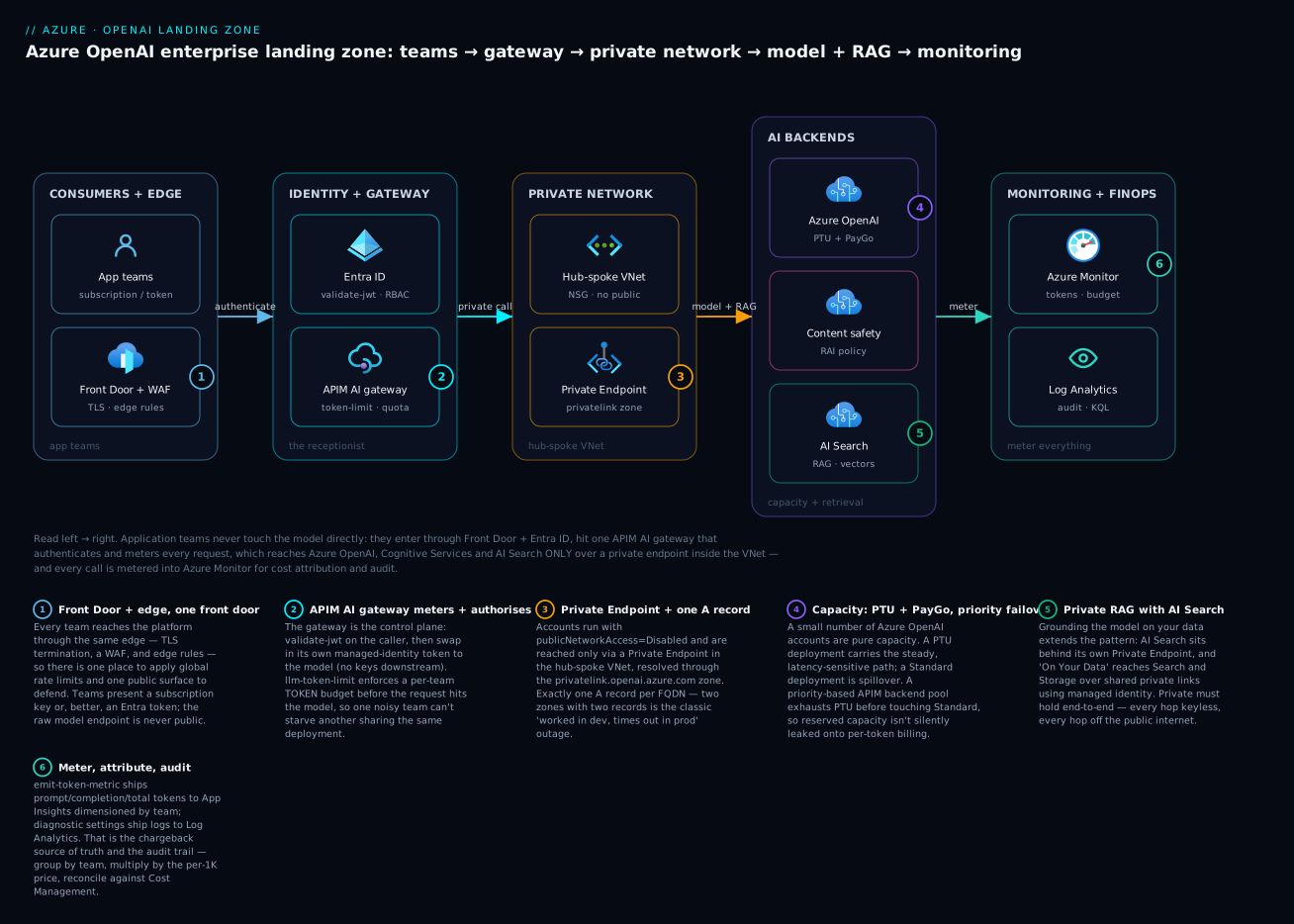
Read it left to right: application teams enter through Front Door and Entra ID, hit the APIM AI gateway that meters and authorises every call, which then reaches the Azure OpenAI, Cognitive Services, and AI Search backends only over a private endpoint inside the VNet — while every request is metered into Azure Monitor for cost attribution and audit.
When five product teams all want GPT-4o “by next sprint,” the failure mode is predictable: a sprawl of Cognitive Services accounts, public endpoints, hard-coded API keys in app settings, and a single noisy team draining the regional token quota at 9am every day. This guide builds the alternative — a shared Azure OpenAI platform with private networking, an API Management (APIM) gateway for auth and throttling, quota planning, and per-team chargeback — the way it’s done in a regulated enterprise.
The shared-service problem
Three constraints make Azure OpenAI different from a normal PaaS rollout:
- Quota is regional and per-model. Tokens-per-minute (TPM) and requests-per-minute (RPM) are allocated to your subscription per region, per model, per deployment. There is no infinite tap. If team A deploys
gpt-4owith 300K TPM in East US, that draws from the same regional pool team B wants. - 429s are a capacity signal, not a bug. Pay-as-you-go deployments throttle hard under burst. Without a gateway and a multi-region strategy, every consumer feels another consumer’s spike.
- Keys leak. A model that ships its own account key to every app is a credential-sprawl incident waiting to happen, and it makes chargeback impossible — you cannot attribute spend to a key everyone shares.
The platform pattern that solves all three: a small number of Azure OpenAI accounts (one or two per region for redundancy), private-only, fronted by one APIM instance that authenticates callers, enforces token budgets, load-balances across backends, and emits usage telemetry per consumer.
Mental model: Azure OpenAI accounts are capacity. APIM is the control plane — auth, quota, routing, observability. Application teams never touch the accounts directly; they hold an APIM subscription key (or, better, a token) and call the gateway.
Step 1 — Private-only Azure OpenAI accounts
Create the account, disable public access, and reach it only over a private endpoint. The kind is OpenAI; the SKU is S0.
RG=rg-aoai-platform
LOC=eastus
ACCT=aoai-platform-eus

az cognitiveservices account create \
  --name "$ACCT" \
  --resource-group "$RG" \
  --location "$LOC" \
  --kind OpenAI \
  --sku S0 \
  --custom-domain "$ACCT" \
  --yes
A custom subdomain (--custom-domain) is mandatory for private endpoints and for Entra ID (AAD) token auth — the default *.cognitiveservices.azure.com shared domain does not support either. Now lock it down:
az resource update \
  --resource-group "$RG" \
  --name "$ACCT" \
  --resource-type "Microsoft.CognitiveServices/accounts" \
  --set properties.publicNetworkAccess=Disabled \
       properties.networkAcls.defaultAction=Deny
Private endpoint and DNS
The account now resolves to a private IP inside your hub-and-spoke network. Two pieces: a private endpoint in a subnet, and a Private DNS zone so the account’s FQDN resolves privately. The correct zone for Cognitive Services / Azure OpenAI is privatelink.openai.azure.com.
resource "azurerm_private_endpoint" "aoai" {
  name                = "pe-aoai-platform-eus"
  resource_group_name = azurerm_resource_group.platform.name
  location            = "eastus"
  subnet_id           = azurerm_subnet.privatelink.id

  private_service_connection {
    name                           = "psc-aoai"
    private_connection_resource_id = azurerm_cognitive_account.aoai.id
    subresource_names              = ["account"]
    is_manual_connection           = false
  }
}

resource "azurerm_private_dns_zone" "aoai" {
  name                = "privatelink.openai.azure.com"
  resource_group_name = azurerm_resource_group.platform.name
}

resource "azurerm_private_dns_zone_virtual_network_link" "aoai" {
  name                  = "link-aoai-hub"
  resource_group_name   = azurerm_resource_group.platform.name
  private_dns_zone_name = azurerm_private_dns_zone.aoai.name
  virtual_network_id    = azurerm_virtual_network.hub.id
}

resource "azurerm_private_endpoint" "aoai_dns" {
  # attach the zone to the endpoint so the A record is auto-created
  name                = azurerm_private_endpoint.aoai.name
  resource_group_name = azurerm_resource_group.platform.name
  location            = "eastus"
  subnet_id           = azurerm_subnet.privatelink.id

  private_service_connection {
    name                           = "psc-aoai"
    private_connection_resource_id = azurerm_cognitive_account.aoai.id
    subresource_names              = ["account"]
    is_manual_connection           = false
  }

  private_dns_zone_group {
    name                 = "default"
    private_dns_zone_ids = [azurerm_private_dns_zone.aoai.id]
  }
}
Pitfall: if you centralize DNS in a connectivity-hub subscription (the CAF pattern), do not also create a
private_dns_zone_groupon the spoke — link the zone once in the hub and resolve via the hub’s DNS. Two A records for the same FQDN in different zones is the single most common “it worked in dev, times out in prod” failure with private OpenAI.
Step 2 — Deploy models and plan quota
A Cognitive Services account is empty until you create a deployment — a named instance of a model with an allocated capacity. The --sku-capacity value depends on the SKU type.
az cognitiveservices account deployment create \
  --resource-group "$RG" \
  --name "$ACCT" \
  --deployment-name gpt-4o-prod \
  --model-name gpt-4o \
  --model-version "2024-08-06" \
  --model-format OpenAI \
  --sku-name Standard \
  --sku-capacity 100
For a Standard (pay-as-you-go) deployment, --sku-capacity is expressed in units of 1,000 TPM — so 100 here means 100K tokens-per-minute, drawn from your regional quota for that model. RPM is derived from TPM at a fixed ratio per model.
PTU vs. pay-as-you-go
| Dimension | Standard (PayGo) | Provisioned (PTU) |
|---|---|---|
| Billing | Per token consumed | Per provisioned unit per hour |
| Latency | Variable under load | Predictable, reserved |
| 429 behavior | Throttles on burst vs. quota | Throttles only past provisioned throughput |
| Best for | Spiky / dev / unpredictable | Steady, latency-sensitive production |
| Commitment | None | Reservation gives the real discount |
Provisioned Throughput Units (PTUs) reserve dedicated capacity. You pay hourly whether or not you use it, so PTUs only pay off for predictable, sustained workloads — and the steep discount comes from a reservation (monthly or yearly), not the on-demand PTU price. Use Microsoft’s capacity calculator in the AI Foundry / portal to convert “this workload does ~X input + Y output tokens at Z RPM” into a PTU count; do not guess, because the minimum deployable PTU and the per-PTU throughput differ by model.
A pragmatic split for a multi-team platform:
- PTU deployment for the latency-sensitive production path (
gpt-4o-prodabove, but--sku-name ProvisionedManaged). - Standard deployment as spillover for burst and for dev/test, so a spike does not exhaust the reserved PTUs.
We will wire APIM to fail over from PTU to Standard in Step 5.
Step 3 — The gateway: API Management in front of OpenAI
APIM is the seam. Deploy it into the VNet (Developer or Premium SKU for VNet injection; Standard v2 supports VNet integration) so it can reach the private endpoint, then import the Azure OpenAI REST surface.
Give APIM a system-assigned managed identity and grant it the Cognitive Services OpenAI User role on the account — this is how the gateway calls OpenAI without any key:
APIM=apim-aoai-platform
APIM_MI=$(az apim show -g "$RG" -n "$APIM" --query identity.principalId -o tsv)
ACCT_ID=$(az cognitiveservices account show -g "$RG" -n "$ACCT" --query id -o tsv)

az role assignment create \
  --assignee-object-id "$APIM_MI" \
  --assignee-principal-type ServicePrincipal \
  --role "Cognitive Services OpenAI User" \
  --scope "$ACCT_ID"
Inside the API, the inbound policy authenticates to the backend with that managed identity and forwards the token as a bearer credential. The Azure AD audience for Cognitive Services is https://cognitiveservices.azure.com:
<inbound>
  <base />
  <authentication-managed-identity
      resource="https://cognitiveservices.azure.com"
      output-token-variable-name="aoai-token" />
  <set-header name="Authorization" exists-action="override">
    <value>@("Bearer " + (string)context.Variables["aoai-token"])</value>
  </set-header>
</inbound>
Now no application — and no developer — ever holds an Azure OpenAI key. The key surface area of the whole platform collapses to APIM subscription keys, which we can rotate and attribute.
Step 4 — Per-team chargeback and token throttling
Model each consuming team as an APIM product with its own subscription. The subscription key identifies the caller; the product carries the policy (quota, priority). This is the unit of chargeback.
APIM ships a purpose-built policy for LLM cost control: llm-token-limit (and the matching emit policy below). It throttles on tokens, not just requests, which is what actually maps to OpenAI spend.
<inbound>
  <base />
  <!-- per-subscription token budget; counter keyed by the caller's sub key -->
  <llm-token-limit
      counter-key="@(context.Subscription.Id)"
      tokens-per-minute="20000"
      estimate-prompt-tokens="true"
      remaining-tokens-header-name="x-tokens-remaining"
      tokens-consumed-header-name="x-tokens-consumed" />
</inbound>
estimate-prompt-tokens="true" lets APIM enforce the limit before dispatching to the backend, returning a 429 from the gateway instead of burning model capacity. Each team’s product gets a different tokens-per-minute, which is your throttling-as-allocation lever: team A buys 20K TPM of platform budget, team B buys 60K.
Why this beats native quota: Azure OpenAI’s own TPM quota is per-deployment and blind to who is calling. APIM’s token limit is per-subscription, so one team can never starve another even though they share the same backend deployment.
Step 5 — Load-balancing across regions to dodge 429s
The point of multiple accounts (East US + Sweden Central, say) is resilience against regional throttling. APIM expresses this with a backend pool plus a retry policy. Define backends with circuit-breaker rules, group them into a pool, and let APIM round-robin / fail over.
# create individual backends (one per region/deployment) with a circuit breaker,
# then a load-balanced pool referencing them
az apim backend create -g "$RG" -n "$APIM" \
  --backend-id aoai-eus \
  --url "https://aoai-platform-eus.openai.azure.com/openai" \
  --protocol http

az apim backend create -g "$RG" -n "$APIM" \
  --backend-id aoai-swc \
  --url "https://aoai-platform-swc.openai.azure.com/openai" \
  --protocol http
Group them into a Pool-type backend (priority + weight are set on the pool members so PTU is tried first, Standard/secondary region is the fallback). Then the inbound policy targets the pool and the backend section retries on 429/5xx:
<inbound>
  <base />
  <set-backend-service backend-id="aoai-pool" />
</inbound>
<backend>
  <retry condition="@(context.Response.StatusCode == 429 || context.Response.StatusCode >= 500)"
         count="2" interval="1" first-fast-retry="true">
    <forward-request buffer-request-body="true" />
  </retry>
</backend>
When aoai-eus returns a 429, the circuit breaker trips that backend, the pool routes to aoai-swc, and the retry re-issues the request — invisibly to the caller. Honor the Retry-After header OpenAI returns rather than retrying instantly in a tight loop; interval="1" with a small count is a sane default that respects backend backpressure.
Pitfall: retries multiply load. Cap
countat 2-3 and keepfirst-fast-retryfor the transient case only. An aggressive retry storm across a backend pool turns one region’s throttling into a self-inflicted outage across all of them.
Step 6 — Guardrails: no keys, content safety, PII
Three controls turn a working gateway into a governed one:
- Managed identity, no keys (done in Step 3). As a belt-and-braces measure, disable local (key) auth on the account so even an account key cannot be used:
az resource update -g "$RG" -n "$ACCT" \
  --resource-type "Microsoft.CognitiveServices/accounts" \
  --set properties.disableLocalAuth=true
- Content safety. Azure OpenAI applies a default content filter; for an enterprise platform, attach a custom content filter / RAI policy to each deployment tuned to your risk tolerance (e.g. stricter on hate/self-harm, with annotate-and-block on jailbreak attempts). APIM can additionally enforce structural guardrails (max prompt size, blocked patterns) at the edge before a request ever reaches the model.
- PII and prompt logging. Decide deliberately what you log. Logging full prompts/completions is gold for debugging and abuse investigation but is a data-residency and privacy liability. A common stance: log metadata and token counts always, log content only to a restricted workspace with short retention, and run an APIM policy to redact obvious PII (emails, card numbers) from anything that lands in general logs.
Step 7 — Observability and FinOps
Spend is invisible until you measure tokens per consumer. APIM’s emit-token-metric (a.k.a. azure-openai-emit-token-metric) publishes prompt/completion/total tokens to Application Insights, dimensioned by whatever you choose — make one dimension the subscription/team so the same data drives the chargeback report.
<inbound>
  <base />
  <emit-token-metric namespace="openai">
    <dimension name="Team"          value="@(context.Subscription.Name)" />
    <dimension name="Deployment"    value="@(context.Request.MatchedParameters.GetValueOrDefault("deployment-id",""))" />
    <dimension name="ApiId"         value="@(context.Api.Id)" />
  </emit-token-metric>
</inbound>
Pair that with diagnostic settings shipping APIM and Cognitive Services logs to Log Analytics, and a budget with alerts so Finance is paged before, not after, the overrun:
az monitor diagnostic-settings create \
  --name diag-aoai \
  --resource "$ACCT_ID" \
  --workspace "$LAW_ID" \
  --logs    '[{"categoryGroup":"audit","enabled":true},{"categoryGroup":"allLogs","enabled":true}]' \
  --metrics '[{"category":"AllMetrics","enabled":true}]'

az consumption budget create \
  --budget-name bd-aoai-platform \
  --amount 15000 \
  --category Cost \
  --time-grain Monthly \
  --start-date 2026-06-01 \
  --end-date 2026-12-31
A token-per-team dashboard (KQL over the emitted metric in App Insights) is the artifact that ends the “who is spending all the money” argument. Group by your Team dimension, sum total tokens, multiply by the published per-1K price for the model, and you have a defensible internal bill.
Enterprise scenario
A retail bank ran the exact pattern above: private accounts in East US 2 + Sweden Central behind one Premium APIM, a gpt-4o PTU deployment for the production fraud-summarization path, Standard as spillover. Two weeks after go-live, the production path started seeing intermittent 429s even though the PTU dashboard showed utilization under 60%. The retry policy then failed over every throttled request to the Standard backend, which quietly inflated the monthly bill by ~40%.
The gotcha: their set-backend-service targeted the pool, but the pool members had equal weight and no priority, so APIM round-robined PTU and Standard instead of treating Standard as fallback. Worse, the PTU “429s” were actually the deployment’s own dynamic spillover behavior interacting with a too-low tokens-per-minute on the llm-token-limit policy — the gateway was rejecting bursts the PTU could have absorbed.
Fix was two-part. Set explicit priority on the pool so PTU is exhausted before Standard is touched:
az apim backend create -g "$RG" -n "$APIM" \
  --backend-id aoai-pool --type Pool \
  --pool-services '[{"id":"/backends/aoai-ptu-eus2","priority":1,"weight":100},
                    {"id":"/backends/aoai-std-swc","priority":2,"weight":100}]'
Then they raised the per-team llm-token-limit to match real PTU throughput and added azure-openai-emit-token-metric split by Backend so spillover became visible. After that, Standard carried only genuine overflow, the 40% leak disappeared, and the fraud path held p95 latency under its SLA. Priority-based pools plus a backend dimension on token metrics are non-negotiable when PTU and PayGo share a gateway.
Verify
Walk the data path end to end:
# 1. From a peered VNet host, the account FQDN must resolve to a PRIVATE IP.
nslookup aoai-platform-eus.openai.azure.com
# -> 10.x.x.x  (a public IP here means DNS is wrong)

# 2. Public access is refused from outside the VNet (run from your laptop):
curl -s -o /dev/null -w "%{http_code}\n" \
  https://aoai-platform-eus.openai.azure.com/openai/deployments?api-version=2024-10-21
# -> 403 (Forbidden / blocked by network ACL)

# 3. A team calls THROUGH apim with only its subscription key (no AOAI key):
curl -s https://apim-aoai-platform.azure-api.net/openai/deployments/gpt-4o-prod/chat/completions?api-version=2024-10-21 \
  -H "api-key: $TEAM_SUBSCRIPTION_KEY" \
  -H "Content-Type: application/json" \
  -d '{"messages":[{"role":"user","content":"ping"}]}' -i | grep -i "x-tokens-remaining"
# -> x-tokens-remaining: <number>   (proves token throttling + gateway path)
Then confirm telemetry: in App Insights, the customMetrics namespace openai should show token counts split by your Team dimension within a minute or two of the call above.
Going deeper
The seven steps get a platform running. This section is the depth an experienced engineer needs to run it in a regulated enterprise: the DNS internals behind the classic outage, the sharp edges of the AI-gateway policies, the quota and residency nuances, and where AI Foundry fits. None of it re-teaches the steps above — it is the “why” and the failure modes underneath them.
The DNS internals behind “it works in dev, times out in prod”
Step 1’s callout warned about double A records; here is the mechanism, because it is the single most common private-OpenAI outage. When you disable public access, the account FQDN (<name>.openai.azure.com) still exists in public DNS — but as a CNAME that ultimately points at a privatelink.openai.azure.com name. Whether a caller reaches the model depends entirely on how that privatelink name resolves from where the caller sits:
- Inside a VNet linked to a Private DNS zone that holds the A record → private IP → works.
- Anywhere else (or a VNet linked to a second zone with a stale A record) → public IP or the wrong private IP →
403or a TCP timeout.
The failure modes to internalise:
- Two zones, two A records. A spoke creates its own
private_dns_zone_groupand the hub has a central zone. The account now has an A record in two zones and resolution is a coin flip. Centralise: one zone, linked to every VNet that must resolve, populated by exactly one endpoint’s zone group. Azure PolicyDeployIfNotExistsis the CAF way to enforce “every private endpoint registers in the central zone, and only there.” - On-prem callers. A datacentre resolver has no idea about your private zone. You need a DNS Private Resolver (or a conditional forwarder to one) so on-prem queries for
*.openai.azure.comare forwarded into Azure and answered from the private zone. - The Foundry twist. The newer multi-service Azure AI Services resource (
kind=AIServices) and AI Foundry hubs resolve over additional zones —privatelink.cognitiveservices.azure.comandprivatelink.services.ai.azure.com— not justprivatelink.openai.azure.com. Miss one and the portal chat playground works while the SDK call hangs, or vice-versa.
APIM as an AI gateway: the policies that matter, and their sharp edges
The lesson uses llm-token-limit and emit-token-metric. Two clarifications that trip people up:
- Two families of policy exist. The Azure-OpenAI-specific pair is
azure-openai-token-limit/azure-openai-emit-token-metric; the vendor-neutral pair (works for Azure OpenAI and third-party / self-hosted models behind APIM) isllm-token-limit/llm-emit-token-metric. They are functionally equivalent for Azure OpenAI. Pick thellm-*family if you expect to front non-Azure models too, and stay consistent so your dashboards read one metric namespace. - Streaming breaks naïve token counting. When a client sends
"stream": true, the model returns Server-Sent Events and, by default, no usage object. APIM estimates streamed tokens unless the caller also sends"stream_options": {"include_usage": true}, which makes the model emit a final usage chunk. If your token budgets look mysteriously low on chat UIs, this is why — enforceinclude_usageat the gateway with a policy that rewrites the request body, or accept that streamed counts are estimates.
Subscription keys vs Entra. An APIM subscription key is a bearer secret in a header (Ocp-Apim-Subscription-Key, or the OpenAI-style api-key) — simple, but it is a shared secret you must rotate and that can leak. The stronger posture is to make callers present an Entra ID token and have APIM validate-jwt it (checking issuer, audience, and an app-role or group claim) before the gateway swaps in its own managed-identity token to the backend. Subscription keys then become an identifier for metering and products, not the security boundary. For workload-to-workload calls, the caller uses its own managed identity and there is no key anywhere in the chain.
Give APIM inbound something like this to require an Entra token from callers:
<inbound>
  <base />
  <validate-jwt header-name="Authorization" failed-validation-httpcode="401">
    <openid-config url="https://login.microsoftonline.com/<TENANT_ID>/v2.0/.well-known/openid-configuration" />
    <required-claims>
      <claim name="aud">
        <value>api://aoai-gateway</value>
      </claim>
    </required-claims>
  </validate-jwt>
</inbound>
<TENANT_ID> is a placeholder — never hard-code a real tenant GUID in a policy you commit to source control.
PTU, pay-as-you-go, and the quota you actually get
Beyond the PTU-vs-PayGo table in Step 2, four production realities:
- Deployment types are more than two now.
StandardandProvisionedManagedare the classic pair, butGlobalStandard/GlobalProvisionedManaged(Microsoft routes to any region with capacity — highest throughput, but a request may be processed outside your geography) andDataZoneStandard/DataZoneProvisioned(processing pinned to a data zone, e.g. EU or US — the residency middle ground) now exist. RegionalStandardkeeps processing in one region but carries the tightest quota. - Quota is a pre-flight limit, not a bill. TPM quota gates how large a deployment you can create in a region; it is not what you pay. You can request increases per subscription / region / model, and quota for a hot model in a popular region is itself a scarce resource. Treat “can we get 2M TPM of GPT-4o in West Europe” as a capacity question to answer before you design around it.
- PTU has a spillover story. A Provisioned deployment can be configured to spill overflow to a paired Standard deployment. That is a feature, but as the Enterprise scenario showed, it silently converts reserved-capacity workloads into per-token spend — you must make spillover visible (a
Backenddimension on the token metric) or it becomes an invisible cost leak. - The discount lives in the reservation. On-demand PTU pricing is deliberately unattractive; the real economics come from an Azure Reservation (1-month or 1-year) on the PTU count. Never model PTU cost from the on-demand rate.
Managed identity, in depth
Step 3 grants APIM’s identity Cognitive Services OpenAI User. The nuances that matter:
- User vs Contributor.
Cognitive Services OpenAI Userallows inference;Cognitive Services OpenAI Contributoradditionally allows creating deployments and fine-tunes. Grant User to the gateway; keep Contributor for the platform-automation pipeline only. - System-assigned vs user-assigned. A system-assigned identity dies with the resource — clean for a single gateway. A user-assigned identity is reusable and survives redeploys; prefer it when several resources (APIM, a Function, a Container App doing RAG) all need the same OpenAI access, so you assign the role once and attach the identity everywhere.
- The audience is not the endpoint. The token audience for data-plane calls is
https://cognitiveservices.azure.com(scope.../.default), not the account’s own hostname. Getting this wrong yields a confusing401with a token that looks valid. - RBAC is eventually consistent. A fresh role assignment can take a few minutes to propagate; a gateway that returns
403immediately afterterraform applyis usually not misconfigured, just early.
Content filtering, abuse monitoring, and data residency
- RAI policies are per-deployment. The default content filter blocks the four harm categories at “medium”. For a platform you attach custom RAI policies (created at the account, referenced by name on each deployment) so, say, a customer-facing bot runs stricter filters than an internal analytics job. Prompt Shields (jailbreak / indirect-injection detection) and protected-material filters are opt-in layers on top.
- Asynchronous content filtering trades a safety property for latency: filtering runs in parallel with generation so streamed tokens arrive faster, at the cost of a few tokens potentially streaming before a block lands. Enable it knowingly, not by default.
- Abuse monitoring stores prompts. By default, Azure OpenAI may retain prompts and completions for up to 30 days for Microsoft’s abuse monitoring, where authorised reviewers can inspect flagged content. Regulated customers can apply for modified abuse monitoring / data-logging opt-out (a Limited Access gate) so that data is neither stored nor human-reviewed — often a compliance prerequisite. Pair this with Data Zone deployments when the requirement is “processing and data stay in the EU.”
Private RAG with Azure AI Search
The gateway pattern extends cleanly to Retrieval-Augmented Generation. The trap is that “private” must hold end to end:
- Put a Private Endpoint on the AI Search service too (the
privatelink.search.windows.netzone) and disable its public access, exactly as you did for the model. - Azure OpenAI On Your Data must reach Search and the source Storage account. Over private networking that means shared private links from the Azure OpenAI resource to Search and Storage, plus enabling “allow trusted Microsoft services” on Search / Storage so the managed-identity path is permitted through their firewalls.
- Use managed identity for every hop — app → gateway → OpenAI → Search → Storage — so no leg of the RAG chain carries a key. The dedicated build is covered in the enterprise private-endpoint RAG platform; the retrieval and indexing side (vectors, hybrid, semantic ranking) is its own lesson in this course.
Logging, cost attribution, and where the money actually is
Two distinct logging planes, and they are not interchangeable:
- Gateway plane (APIM):
emit-token-metric→ App InsightscustomMetrics, dimensioned by team / deployment. This is your chargeback source of truth, because it is keyed to the caller’s subscription. APIM diagnostic logs (to Log Analytics) additionally capture request metadata, latency, and status. - Model plane (Cognitive Services): diagnostic settings ship
RequestResponse,Audit, andTracecategories to Log Analytics. Enabling request/response logging here can capture prompt and completion content — powerful for debugging and abuse investigation, and a privacy liability if left broad. The disciplined stance from Step 6 holds: metadata and token counts always; content only to a restricted, short-retention workspace, redacted at the gateway.
Cost attribution maths: sum the total token metric grouped by your Team dimension, split input vs output (they price differently), multiply by the published per-1K price for each model / deployment type, and you have a defensible internal bill. Reconcile monthly against Cost Management’s actual Azure OpenAI charges — a gap means a deployment is being called outside the gateway, which should be impossible if public access is truly disabled.
Treat gateway policy as code
The APIM policies above are your platform’s security and economics — they belong in Git with review and CI, not clicked into the portal. A minimal pipeline that pushes reviewed policy XML into APIM, keylessly, via OIDC federation:
name: apim-policy-deploy
on:
  push:
    branches: [ main ]
    paths: [ "apim/policies/**" ]
permissions:
  id-token: write        # OIDC federation to Azure — no stored secret
  contents: read
jobs:
  deploy:
    runs-on: ubuntu-latest
    steps:
      - uses: actions/checkout@v4
      - name: Azure login (OIDC)
        uses: azure/login@v2
        with:
          client-id: ${{ secrets.AZURE_CLIENT_ID }}
          tenant-id: ${{ secrets.AZURE_TENANT_ID }}
          subscription-id: ${{ secrets.AZURE_SUBSCRIPTION_ID }}
      - name: Deploy reviewed API policy (Bicep)
        run: |
          az deployment group create \
            --resource-group rg-aoai-platform \
            --template-file apim/policy.bicep \
            --parameters policyXml=@apim/policies/aoai-inbound.xml
id-token: write gives the pipeline a short-lived GitHub token it federates for an Entra token — so the pipeline holds no stored Azure secret, the same keyless principle the gateway itself uses. A Bicep Microsoft.ApiManagement/service/apis/policies resource with format: 'rawxml' applies the file idempotently.
The AI Foundry / Hub angle
“Azure OpenAI account” is the classic resource. Azure AI Foundry (renamed from Azure AI Studio in late 2024) adds a hub + project layer: the hub is a collaboration and governance boundary — shared connections, compute, storage, and networking — and projects hang off it. A Foundry hub can bring a Managed VNet that auto-manages the private endpoints for its dependencies (Search, Storage, the AI Services resource), which is attractive because it removes a lot of hand-wired networking. But it is a different isolation model than dropping resources into your own hub-and-spoke VNet, so decide deliberately which one owns your network policy. For a pure “gateway in front of raw model capacity” platform, a standalone Azure OpenAI (or AIServices) resource behind your own VNet — the pattern in this lesson — stays the simplest thing that is fully under your network governance.
Platform readiness checklist
Pitfalls and next steps
The three mistakes that sink these platforms: double DNS records for the private FQDN (Step 1’s callout), retry storms amplifying a single region’s throttling into a global one (Step 5), and logging full prompts everywhere until a privacy review forces an emergency rollback (Step 6). Design around all three from day one.
From here, treat the gateway as the place to add capability without touching consumers: semantic caching in APIM to cut token spend on repeated prompts, prompt-shield / jailbreak detection policies, and an internal model catalog so teams choose a logical name (chat-default, embeddings) that the gateway maps to the current best deployment. The accounts are capacity; APIM is where your platform’s policy, economics, and safety actually live.
Practice challenges
Work these against the platform you have (or a scratch resource group). Each solution is hidden in a collapsible block — expand it for the answer and a one-line note on why it matters. They escalate from beginner to advanced.
Challenge 1 (beginner) — Prove an account is private. Given an account $ACCT in $RG, show the single property value that proves public network access is off.
<details> <summary>Solution</summary>
az cognitiveservices account show -g "$RG" -n "$ACCT" \
  --query "properties.publicNetworkAccess" -o tsv
# -> Disabled   (representative)
Why: Disabled is the network boundary. If this reads Enabled, the private endpoint is decoration and the model is still reachable from the internet.
</details>
Challenge 2 (beginner) — Name the DNS zone. Which Private DNS zone must exist for <name>.openai.azure.com to resolve to a private IP, and how many A records for that FQDN are correct?
<details> <summary>Solution</summary>
Zone: privatelink.openai.azure.com. Exactly one A record for the FQDN, in exactly one zone linked to the caller’s VNet. (A newer AIServices / Foundry resource additionally uses privatelink.cognitiveservices.azure.com and privatelink.services.ai.azure.com.)
Why: two A records in two zones is the number-one “worked in dev, times out in prod” failure, and the zone name is service-specific and easy to guess wrong. </details>
Challenge 3 (intermediate) — Keyless backend auth. Write the APIM inbound fragment that lets the gateway call Azure OpenAI with its managed identity instead of a key.
<details> <summary>Solution</summary>
<authentication-managed-identity
    resource="https://cognitiveservices.azure.com"
    output-token-variable-name="aoai-token" />
<set-header name="Authorization" exists-action="override">
  <value>@("Bearer " + (string)context.Variables["aoai-token"])</value>
</set-header>
Why: the audience is https://cognitiveservices.azure.com (not the account hostname); getting it wrong yields a 401 with a token that “looks fine”. The identity also needs Cognitive Services OpenAI User on the account.
</details>
Challenge 4 (intermediate) — Per-team token budget. A team’s product should get 30,000 TPM, enforced before the request hits the model, with the remaining budget returned in a header. Write the policy.
<details> <summary>Solution</summary>
<llm-token-limit
    counter-key="@(context.Subscription.Id)"
    tokens-per-minute="30000"
    estimate-prompt-tokens="true"
    remaining-tokens-header-name="x-tokens-remaining" />
Why: estimate-prompt-tokens="true" makes APIM reject over-budget calls at the gateway (a 429 from APIM) instead of burning model capacity; keying on context.Subscription.Id makes the budget per-team, which native per-deployment quota cannot do.
</details>
Challenge 5 (advanced) — PTU-first failover. You have a PTU backend aoai-ptu-eus2 and a Standard backend aoai-std-swc. Configure a pool so Standard is touched only when PTU is exhausted.
<details> <summary>Solution</summary>
az apim backend create -g "$RG" -n "$APIM" \
  --backend-id aoai-pool --type Pool \
  --pool-services '[{"id":"/backends/aoai-ptu-eus2","priority":1,"weight":100},
                    {"id":"/backends/aoai-std-swc","priority":2,"weight":100}]'
Why: equal priority round-robins PTU and Standard, quietly leaking reserved workloads onto per-token billing (the Enterprise scenario’s 40% overrun). Distinct priority values make Standard a true fallback.
</details>
Challenge 6 (advanced) — Per-team spend in KQL. Write a KQL query over the emitted token metric in App Insights that returns total tokens per team for the last 24 hours.
<details> <summary>Solution</summary>
customMetrics
| where name == "Total Tokens" and timestamp > ago(24h)
| extend team = tostring(customDimensions["Team"])
| summarize total_tokens = sum(valueSum) by team
| order by total_tokens desc
Why: valueSum (not value) is the aggregate the metric SDK stores; grouping by the Team custom dimension is exactly the chargeback artifact — multiply total_tokens by the model’s per-1K price for the internal bill.
</details>
Common beginner mistakes
These are misconceptions about the model of an OpenAI landing zone, distinct from the symptom-to-fix pitfalls above.
- “The API key in app settings is fine — it’s in Key Vault.” Even vaulted, a shared account key means any holder can call the model as anyone, you cannot attribute spend, and rotation breaks every app at once. Right model: no key anywhere — each workload uses its own managed identity to the gateway, the gateway uses its managed identity to the model, and keys are disabled with
disableLocalAuth=true. - “
publicNetworkAccess=Disabledmakes it private — done.” Disabling public access without a Private Endpoint and theprivatelink.openai.azure.comzone does not make the model reachable privately; it makes it reachable from nowhere, or (with a stale public DNS answer) still resolvable to a blocked public IP that returns 403. Right model: private access = Private Endpoint plus the correct private DNS zone plus exactly one A record; the three travel together. - “PTU is the enterprise option, so we’ll buy PTU.” PTU is dedicated capacity billed hourly whether idle or not; for spiky or low-volume workloads it is far more expensive than pay-as-you-go. Right model: PTU for steady, latency-sensitive paths (and only via a reservation for the discount); PayGo for burst, dev, and spillover.
- “APIM’s token limit and Azure OpenAI’s TPM quota are the same throttle.” They live at different layers: OpenAI quota is per-deployment and blind to the caller; APIM’s
llm-token-limitis per-subscription / team. Relying on model quota alone lets one noisy team drain the shared deployment. Right model: model quota sizes the deployment; the gateway budget fairly divides it between teams. - “Log every prompt and completion — we’ll want them for debugging.” Full prompt / completion logging is a data-residency and privacy liability (and, via default abuse monitoring, prompts may already be retained 30 days). Right model: log metadata and token counts always; log content only to a restricted, short-retention workspace with PII redaction, and apply for modified abuse monitoring where compliance requires it.
- “429s mean we should retry harder.” Aggressive retries turn one region’s throttling into a synchronized load spike across every backend — a self-inflicted outage. Right model: bounded retries (
count2-3), honourRetry-After, and fail over to a different region / deployment via a priority pool rather than hammering the throttled one. - “One big Azure OpenAI account for the whole company is simplest.” Quota is regional and per-model, and a single account is a single blast radius, a single throttle pool, and a single audit boundary. Right model: a small number of accounts (one or two per region), private, fronted by one gateway that does the fan-out and fairness.
Glossary
- Azure OpenAI account — the Cognitive Services resource (
kind=OpenAI) that hosts model deployments. The “capacity”, not a control plane. - Deployment — a named instance of a model (e.g.
gpt-4o-prod) with an allocated capacity, created inside an account. You call the deployment, not the raw model. - Token — the unit models read and bill in (roughly three-quarters of a word). Prompt tokens (input) and completion tokens (output) price differently.
- TPM / RPM — Tokens-Per-Minute / Requests-Per-Minute; the rate limits Azure allocates per region, per model, per deployment.
- Quota — the ceiling on TPM you may deploy for a model in a region / subscription. A pre-flight limit on deployment size, not a bill.
- PTU (Provisioned Throughput Unit) — reserved, dedicated model capacity billed hourly; predictable latency, and it pays off only for steady load and only via a reservation.
- Standard / PayGo — pay-as-you-go, billed per token consumed; throttles under burst against quota.
GlobalStandardandDataZoneStandardare routing / residency variants. - APIM (API Management) — the gateway that fronts the model: authenticates callers, enforces token budgets, load-balances, and emits telemetry. The platform’s control plane.
- AI gateway — the role APIM plays for LLM traffic: token-aware throttling, multi-backend routing, and per-caller metering, via LLM-specific policies.
- Product / Subscription (APIM) — a Product bundles APIs and policy for a consuming team; a Subscription is that team’s key / identity and the unit of chargeback.
llm-token-limit/azure-openai-token-limit— APIM policies that throttle on tokens (not just requests) per counter key; the vendor-neutral vs Azure-OpenAI-specific variants.emit-token-metric— APIM policy that publishes prompt / completion / total token counts to Application Insights, dimensioned by team / deployment for chargeback.- Managed identity — an Entra identity Azure manages for a resource so it can authenticate without a secret. System-assigned (tied to one resource) or user-assigned (reusable across resources).
- Cognitive Services OpenAI User — the RBAC role granting data-plane inference on an account; the Contributor variant additionally allows creating deployments and fine-tunes.
- Private Endpoint — a network interface with a private IP inside your VNet that maps to the PaaS resource, so traffic never traverses the public internet.
- Private DNS zone — the zone (
privatelink.openai.azure.comfor Azure OpenAI) that resolves the resource FQDN to its private IP for VNet callers. publicNetworkAccess/disableLocalAuth— account switches that turn off internet reachability and key-based auth respectively; both set toDisabled/truefor a locked-down platform.- RAI policy / content filter — the Responsible AI policy attached per deployment that blocks harmful categories; customisable in strictness, with optional Prompt Shields and protected-material filters.
- Abuse monitoring — Microsoft’s process that may store prompts / completions up to 30 days for human review of misuse; a data-logging opt-out (modified abuse monitoring) is available under Limited Access.
- Data zone — a residency boundary (e.g. EU, US) that
DataZone*deployments pin processing to, sitting between single-region and global routing. - RAG (Retrieval-Augmented Generation) — grounding model answers in your own data retrieved at query time, typically via Azure AI Search over a vector / hybrid index.
- Azure AI Search — the search / retrieval service used as the R in RAG; itself placed behind a Private Endpoint and reached via managed identity in a locked-down platform.
- Log Analytics / Application Insights — the Azure Monitor stores for diagnostic logs and custom metrics respectively; where token metrics, prompt logging, and audit trails land.
- Backend pool / circuit breaker — APIM constructs that group multiple model backends and trip a failing one out of rotation, enabling priority failover (PTU → Standard, region → region).
- Reservation — a 1-month or 1-year commitment that provides the real PTU discount over on-demand PTU pricing.
- Entra ID — Microsoft’s identity platform (formerly Azure AD); issues the tokens that managed identities and
validate-jwtpolicies rely on. - Azure AI Foundry — the hub / project platform (formerly Azure AI Studio) for building AI apps; a hub can bring a Managed VNet that auto-wires private endpoints for its dependencies.
- Semantic caching — returning a stored answer for a semantically similar prompt (APIM’s
azure-openai-semantic-cache-*policies plus an embeddings backend and a vector cache) to cut token spend on repeats.