In a nutshell
Picture Blob Storage as a giant self-storage facility for your data. Durability is the promise that the building won’t collapse and lose your boxes — Azure keeps at least three copies, so a failed disk never costs you a byte. But that promise says nothing about you tossing the wrong box into the shredder, a clerk mis-filing your archive, or a regulator demanding proof a box was never opened. Data protection is the set of safeguards you bolt on for exactly those moments — and this lesson is the tour of every one of them.
Map each control to something physical and it stops being abstract:
- Access tiers — which floor you rent. The ground floor (Hot) is instant but pricey; the deep off-site vault (Archive) is dirt-cheap, but you wait hours to get a box back.
- Lifecycle management — a clerk who automatically shifts aging boxes to cheaper floors and shreds them on a set schedule, so you don’t have to do it by hand.
- Versioning + soft delete — a photocopier that keeps the old copy every time you overwrite, plus a “recently shredded” bin you can fish items back out of for a set number of days.
- Point-in-time restore — a time machine that rewinds a whole aisle to exactly how it looked last Tuesday.
- Immutable storage (WORM) — a legally-sealed vault where, once locked, nobody — not even the facility owner — can open or shred a box until the sealed date passes.
The one idea to carry through the whole lesson: these are separate switches, not one big “protect me” button. Each covers a different disaster, each costs something, and a couple of them fight each other if you turn them on in the wrong order or with mismatched settings. Learn what each one is for, and the rest is just wiring.
Level: Intermediate (with a beginner on-ramp) · Time: ~60 min read + ~20 min hands-on lab
You’ll need first: comfort with the idea that a storage account contains containers which contain blobs, and a way to run az in Cloud Shell. The Prerequisites & where this fits section below links the fundamentals if any of that is shaky — data protection sits on top of the account-level basics, so start there if account kinds and redundancy are new to you.
After this you can: pick the right tier for a workload without triggering surprise penalties; turn on versioning, soft delete and point-in-time restore in the one order that actually works; author a lifecycle rule that fires instead of silently matching nothing; and lock a compliance vault WORM-tight without accidentally sealing it for a decade by mistake.
Most Blob Storage incidents are not ransomware or region outages. They are a service principal with Storage Blob Data Contributor running a del against the wrong prefix, a lifecycle rule that tiered hot data to archive because someone got a filter wrong, or a compliance auditor asking for the WORM evidence that nobody actually enabled. Data protection on Azure Blob Storage — the object store underneath nearly every Azure workload — is not one feature. It is a stack of independent controls that each cover a different failure mode: access tiers trade cost for latency, lifecycle management moves and expires data on a schedule, versioning and soft delete make accidental overwrites and deletes recoverable, point-in-time restore (PITR) rolls thousands of objects back to a timestamp, and immutable WORM policies make data legally undeletable. They interact — sometimes they fight — and they bite you if you enable them in the wrong order.
This is the engineer’s reference for the whole stack. You will learn what each control actually does, the exact az/Bicep to turn it on, the precise dependency order (PITR is the strict one), and the gotchas that cost real money: the early-deletion penalty that makes aggressive tier-down cost more, the prefixMatch that silently matches nothing because you omitted the container, the locked immutability policy that blocks a lifecycle delete and quietly inflates your bill for years. Because this is a document you return to mid-incident and mid-design-review, every moving part is laid out as a scannable table — the option matrices, the limits, the error catalogue, and a symptom→cause→confirm→fix playbook — with the prose explaining and the code showing.
By the end you will be able to stand up a complete data-protection posture on a general-purpose v2 account, validate every recovery path (including the immutable delete that is supposed to fail), reconcile lifecycle expiry with WORM retention so they don’t collide, and put a hard cost number on the protection before you flip it on. The whole stack assumes a general-purpose v2 or premium block blob account; most recovery features require the account to be not HNS-enabled (Data Lake Gen2), so that is the first thing you check.
What problem this solves
Blob Storage is durable — eleven nines on the bytes themselves with LRS, far more with geo-redundancy — but durability is not protection. Durability means Azure will not lose the bytes to a failed disk. It says nothing about an operator, a script, or an attacker intentionally destroying or corrupting them, and it says nothing about cost. The pain this stack addresses is everything that durability ignores: a bad delete, a bad overwrite, a bad bulk job, a runaway storage bill from data sitting in the wrong tier, and a regulator who needs proof that records cannot be altered.
What breaks without it: an engineer runs az storage blob delete-batch against prod instead of staging and the objects are simply gone, because nothing was retaining them. A nightly ETL job overwrites a curated dataset with a corrupt build and the previous good copy is unrecoverable, because versioning was off. A six-figure storage bill creeps up because logs that should have aged to cool are sitting in hot, or — the cruel inverse — because a lifecycle rule is tiering down short-lived data and paying early-deletion penalties on every object. A FINRA audit asks for the immutable trade archive and the team discovers the “compliance” container has no policy on it at all. Each of those is a different control in this article, and each is cheap to enable before the incident and impossible to retrofit after it.
Who hits this: every team that stores anything that matters in Blob — which is every team. It bites hardest on workloads with high-churn blobs (state files, manifests, ML checkpoints) where versioning multiplies storage; on cost-sensitive log/backup workloads where tiering is the whole point; and on any regulated workload (finance, healthcare, legal) where WORM is a hard requirement and getting the lock wrong is a multi-year mistake. The fix is almost never “buy more storage” — it is “enable the right control, in the right order, and lock the switches so nobody can quietly turn them off.”
Before the deep dive, here is the entire field on one page — each control, the failure it covers, the one prerequisite that trips people, and where it lives:
| Control | Failure mode it covers | Hard prerequisite | Scope | Cost shape |
|---|---|---|---|---|
| Access tiers | Overpaying for cold data / latency surprise | GPv2 or premium block blob | Per blob | Storage vs access/retrieval trade |
| Lifecycle management | Manual tiering/cleanup doesn’t scale | None (versions/snapshots for those blocks) | Account (1 policy) | Transactions for moves/deletes |
| Versioning | Bad overwrite destroys prior content | None | Account | One billed copy per version |
| Change feed | No ordered audit trail of changes | None | Account ($blobchangefeed) |
Log proportional to writes |
| Blob soft delete | Accidental single-blob delete/overwrite | None | Account | Storage for retention window |
| Container soft delete | Accidental whole-container delete | None | Account | Storage for retention window |
| Point-in-time restore | Bad bulk job across many objects | Versioning + change feed + soft delete | Account | Restore reads; data overwrite |
| Time-based immutability | Tampering / required retention | GPv2 (VLW for per-version) | Container or version | Blocks delete until interval ends |
| Legal hold | Litigation, unknown end date | GPv2 | Container or version | Blocks delete until tag cleared |
Learning objectives
By the end of this article you can:
- Choose the right access tier (Hot / Cool / Cold / Archive) per blob against real access patterns, and explain why aggressive tier-down on short-lived data costs more because of early-deletion charges and Archive’s rehydration latency.
- Author a production lifecycle management policy with correct, container-inclusive
prefixMatch, age conditions on last-modified / last-access / creation, and independent actions on base blobs, versions and snapshots — and explain the engine’s eventual-consistency timing. - Build the recovery foundation with blob versioning and the change feed, restore a prior version, and cap the version tail with a lifecycle rule so versioning doesn’t multiply your bill.
- Configure blob and container soft delete, choose a retention window for your detect-to-remediate loop, and recover an accidentally deleted blob or container.
- Enable point-in-time restore in the exact dependency order and respect the
restore-days < delete-retention-daysconstraint that fails deployments when violated. - Apply immutable WORM storage — time-based retention and legal hold, unlocked-then-locked — for SEC 17a-4 / FINRA / CFTC requirements, and explain why locking is irreversible and how it collides with lifecycle expiry.
- Validate every recovery path in non-prod (soft delete, version restore, PITR, and a rejected immutable delete), put a cost number on the protection from change-feed/version volume, and lock down the settings so the protection can’t be silently disabled.
Prerequisites & where this fits
You should already understand the Blob basics: an Azure Storage account is the top-level namespace and billing/redundancy boundary; inside it, containers hold blobs (block, append, or page). You should know the redundancy options at a high level (LRS / ZRS / GRS / GZRS — local, zonal, geo, geo-zonal) because geo-redundancy is the prerequisite for some restore scenarios, and you should be comfortable running az in Cloud Shell and reading JSON output. If those are shaky, start with Azure Storage Account Fundamentals and the full Azure Storage Accounts Deep Dive, which cover account kinds, redundancy and networking that sit underneath everything here.
This sits in the Storage & Data Protection track. It assumes the account-level fundamentals above and the encryption story from Encryption at Rest with Customer-Managed Keys (data protection and encryption are orthogonal — you want both). It pairs with Azure Key Vault: Secrets, Keys & Certificates when you bring your own keys, and with the platform-backup story in Azure Backup & Site Recovery Deep Dive and Ransomware-Resilient Immutable Backup & Isolated Recovery — Blob-native protection and a backup vault are complementary layers, not substitutes. When the protection fails to behave — a 403 on a recovery operation, a firewall blocking your restore — Troubleshooting Azure Storage 403s is the companion playbook.
A quick map of who owns and confirms each layer, so you call the right person fast during an incident:
| Layer | What lives here | Who usually owns it | What it can cause |
|---|---|---|---|
| Account kind / HNS | GPv2 vs ADLS Gen2, redundancy | Platform / storage team | PITR unavailable (HNS); restore scope limits |
| Access tiers | Hot/Cool/Cold/Archive per blob | App + FinOps | Cost surprises; rehydration latency |
| Lifecycle policy | Tier/expire automation | Platform + app | Wrong-prefix no-ops; silent expiry |
| Versioning / change feed | Overwrite history, audit log | App + platform | Storage growth; PITR prerequisite gaps |
| Soft delete | Recovery window | Platform | Cost for retention; false sense of safety on containers |
| Immutability / legal hold | WORM, compliance | Compliance + platform | Undeletable data; lifecycle/teardown collisions |
| RBAC / locks | Who can change protection | Security / platform | Protection silently disabled by an over-privileged principal |
Core concepts
Five mental models make every later decision obvious.
Durability protects bytes; this stack protects intent. Azure guarantees it won’t lose the data to hardware. It will faithfully replicate your delete, your overwrite, and your bad lifecycle rule to every replica. Everything in this article exists to add a recovery or prevention layer on top of durability so that a human or programmatic mistake — or a malicious actor — does not become permanent loss.
The features are independent and order-sensitive. Versioning, change feed, soft delete, PITR and immutability are separate toggles, each with its own retention and its own cost. They are not a single “data protection” switch. Crucially, PITR has hard prerequisites that must be enabled first and in order (versioning → change feed → soft delete → PITR), and immutability composes with everything but overrides deletes — a locked WORM policy will block a lifecycle delete and a soft-delete purge alike.
Tier is a per-blob property, and Archive is offline. Hot/Cool/Cold are online — millisecond reads, you just pay more per read as you go colder. Archive is offline: a blob in archive cannot be read at all until you rehydrate it (up to ~15 hours at standard priority). The account “default access tier” only applies to blobs that never had a tier set explicitly. Every tier change is a billable transaction, and tiering down before a minimum-retention period elapses triggers an early-deletion charge.
Recovery has three granularities. Versioning recovers a single blob’s prior content after an overwrite or delete. Soft delete recovers a single deleted blob (blob-level) or an entire deleted container (container-level) within a window. PITR recovers a range of block blobs (by container/prefix) to their state at a chosen timestamp — the “undo the last hour across thousands of objects” button. You pick the tool by the blast radius of the mistake.
When you’re staring at a requirement and don’t know which control to reach for, this decision table maps need → control:
| If you need to… | Reach for | Because |
|---|---|---|
| Recover a single bad overwrite | Versioning | Prior content kept automatically as a version |
| Recover a single accidental delete | Blob soft delete | Deleted blob retained for the window |
| Recover a whole deleted container | Container soft delete | Blob soft delete won’t cover it |
| Undo a bad bulk job across many objects | PITR | Rolls a prefix back to a timestamp |
| Make records legally undeletable for N years | Time-based immutability (locked) | WORM blocks delete until interval ends |
| Hold data for litigation (unknown end) | Legal hold | WORM until the tag is cleared |
| Cut storage cost on aging data | Lifecycle + tiers | Auto-tier down by age/access |
| Prove what changed and when | Change feed | Ordered, durable audit log |
| Stop an admin disabling protection | RBAC least privilege + lock | The settings, not the data, are the target |
Immutability is prevention, not recovery, and it is one-way once locked. WORM (Write Once, Read Many) makes data un-modifiable and un-deletable by anyone — admin, subscription owner, anyone — until the policy releases it. An unlocked policy is for testing and can be edited or removed. A locked policy is the real compliance control and cannot be shortened or deleted, ever — only extended. Treat locking like signing a contract.
The vocabulary in one table
Pin down every moving part before the deep sections. The glossary repeats these for lookup; this is the mental model side by side:
| Concept | One-line definition | Where it lives | Why it matters |
|---|---|---|---|
| Access tier | Cost/latency class of a blob | Per blob (or account default) | Wrong tier = overpay or rehydrate delay |
| Rehydration | Bringing an archived blob back online | Archive → Hot/Cool/Cold | Up to ~15 h; plan in restore runbooks |
| Early-deletion charge | Min-retention penalty on tier-down | Cool/Cold/Archive | Aggressive tiering of short data costs more |
| Lifecycle policy | JSON rules that tier/expire blobs | Account (1 policy, ≤100 rules) | Automates cost + cleanup; runs ~daily |
prefixMatch |
Filter on container+path prefix | Lifecycle rule filter | Must include container name or matches nothing |
| Versioning | Auto-snapshot on overwrite/delete | Account toggle | Recovery foundation; multiplies storage |
| Change feed | Ordered, durable log of changes | $blobchangefeed container |
Audit trail + PITR input |
| Blob soft delete | Retain deleted/overwritten blobs | Account toggle | Recover single blobs in a window |
| Container soft delete | Retain a deleted container | Account toggle | Recover a whole container |
| PITR | Restore block blobs to a timestamp | Account toggle | Bulk rollback after a bad job |
| Immutability (time-based) | WORM for N days | Container or version | Blocks delete until interval ends |
| Legal hold | WORM until a tag is cleared | Container or version | Litigation, unknown end date |
| VLW | Version-level immutability support | Account/container flag | Per-blob WORM instead of per-container |
A point people conflate: redundancy is not protection. The redundancy SKU governs where copies live (durability against hardware/region loss); it does nothing about an intentional delete. Know which is which:
| Redundancy | Copies | Protects against | Does NOT protect against | Relevance here |
|---|---|---|---|---|
| LRS | 3 in one datacenter | Disk/rack failure | Datacenter/region loss; bad delete | Cheapest; fine with this stack for recovery |
| ZRS | 3 across zones in a region | Zone failure | Region loss; bad delete | Zonal resilience |
| GRS | LRS + async copy to paired region | Region loss | Bad delete (replicated to secondary) | Enables read from secondary on failover |
| GZRS | ZRS + async copy to paired region | Zone + region loss | Bad delete | Highest durability |
| RA-GRS / RA-GZRS | Geo + read access to secondary | Region loss; adds read-secondary | Bad delete | Read secondary without failover |
And the account-kind / HNS gate that determines which recovery features you even have — check this first on any account:
| Feature | GPv2 (non-HNS) | Premium block blob | ADLS Gen2 (HNS) | Note |
|---|---|---|---|---|
| Access tiers (Hot/Cool/Cold) | Yes | Hot only (premium) | Yes | Archive on standard GPv2 |
| Lifecycle management | Yes | Limited | Yes | Core feature |
| Versioning | Yes | No | No | Recovery foundation |
| Change feed | Yes | No | No | PITR input |
| Blob soft delete | Yes | Yes | Yes | Universal seatbelt |
| Container soft delete | Yes | Yes | Yes | Whole-container recovery |
| Point-in-time restore | Yes | No | No | Needs versioning+feed+soft delete |
| Immutability (WORM) | Yes | Yes | Yes | Container or version level |
Access tiers and the cost/retrieval trade-off
Blob Storage has four storage tiers, and the entire economic model is a trade between storage cost and access cost plus retrieval latency. Get this backwards and you either overpay for cold data or pay rehydration penalties on data you read weekly. Three of the four are online (millisecond reads); one — Archive — is offline and must be rehydrated before a single byte can be read.
| Tier | Storage cost | Access (read) cost | Min retention | Retrieval latency | Online? |
|---|---|---|---|---|---|
| Hot | Highest | Lowest | None | Milliseconds | Yes |
| Cool | Lower | Higher | 30 days | Milliseconds | Yes |
| Cold | Lower still | Higher still | 90 days | Milliseconds | Yes |
| Archive | Lowest | Highest | 180 days | Hours (rehydrate) | No |
The rules that actually trip teams up, then the numbers behind them:
- Cool and cold are online. You read them at millisecond latency like hot — you just pay more per read and per-GB transaction. They are for infrequently accessed data, not unreachable data.
- Archive is offline. A blob in archive cannot be read until you rehydrate it back to hot/cool/cold, which takes up to ~15 hours at Standard priority (faster at High priority, for a fee). Plan for that latency in any restore runbook.
- Early-deletion charges are real. Move a blob to cool and delete it (or re-tier it) before 30 days and you are billed as if it sat there the full 30. Cold bills the full 90, Archive the full 180. This is the single most common surprise on a lifecycle bill — aggressive tier-down on short-lived data costs more, not less.
- Tier is set at the blob level. The account “default access tier” only applies to blobs that have never had an explicit tier set.
Set or read a tier directly:
# Set a single blob to Cool
az storage blob set-tier --account-name kvstgprod --container-name app-data \
  --name report-2026-q1.parquet --tier Cool

# Read the current tier and archive status
az storage blob show --account-name kvstgprod --container-name app-data \
  --name report-2026-q1.parquet \
  --query "{tier:properties.blobTier, status:properties.rehydrationStatus}" -o json
Rehydrate an archived blob (the operation is asynchronous — you poll for completion):
# Rehydrate from Archive to Cool at High priority (faster, costs more)
az storage blob set-tier --account-name kvstgprod --container-name archive \
  --name 2024-ledger.bin --tier Cool --rehydrate-priority High
The two rehydration priorities, and what each buys you:
| Priority | Typical time to online | Cost | When to use |
|---|---|---|---|
| Standard | Up to ~15 hours | Lower | Planned restores, batch recall, DR drills |
| High | Often < 1 hour (objects < a few GB) | Higher | Urgent, single-object recall during an incident |
A worked cost intuition — why tier-down is not free money:
| Scenario | What you’d expect | What actually happens | Lesson |
|---|---|---|---|
| Tier 1 TB of 10-day-old temp data to Cool, delete day 11 | Save on storage | Billed full 30 days of Cool storage (early-deletion) + transaction cost | Don’t tier data you’ll delete before the minimum |
| Archive logs you read monthly for an audit | Cheapest storage | Pay High-priority rehydration + read cost every audit | Cool/Cold fit “read occasionally”; Archive fits “almost never” |
| Tier active dataset to Cool to “save money” | Lower bill | Read costs dwarf the storage saving | Tier on access pattern, not age alone |
| Archive a DR copy you hope to never read | Cheapest | Correct — but factor ~15 h into RTO | Archive belongs in the DR plan, not the hot restore path |
Rule of thumb: tier down only data you are confident you will not read before the minimum retention elapses. For data you might restore, Archive’s rehydration latency means it belongs in your DR plan, not your hot path.
Not every blob type can sit in every tier — the three blob types behave differently, and tiering applies to block blobs:
| Blob type | Written by | Tierable? | Versioned? | PITR? | Typical use |
|---|---|---|---|---|---|
| Block blob | Most uploads | Hot/Cool/Cold/Archive | Yes | Yes | Files, logs, backups, media |
| Append blob | Logging/append | Hot/Cool only (no Archive) | Yes | No | Append-only logs, audit streams |
| Page blob | Disks/random IO | No tiering | No | No | VHDs, unmanaged disks |
The tier choice trades storage rate against transaction and read rates — the relative cost moves in opposite directions as you go colder:
| Cost component | Hot | Cool | Cold | Archive |
|---|---|---|---|---|
| Per-GB storage | Highest | Lower | Lower still | Lowest |
| Read / retrieval per-GB | Lowest | Higher | Higher | Highest (+ rehydrate) |
| Write transactions | Lowest | Higher | Higher | Higher |
| Minimum retention | None | 30 days | 90 days | 180 days |
| Read latency | ms | ms | ms | hours (offline) |
Authoring lifecycle management rules
Lifecycle management is a single JSON policy on the account that the platform evaluates roughly once per day. It moves or deletes blobs based on age (last modified, last accessed, or creation time) and filters (prefix, blob type, index tags). There is one policy per account, with up to 100 rules.
Here is a production-shaped policy: tier logs down to cool then cold then archive, expire them, and clean up old versions and snapshots independently.
{
  "rules": [
    {
      "enabled": true,
      "name": "tier-and-expire-logs",
      "type": "Lifecycle",
      "definition": {
        "filters": {
          "blobTypes": [ "blockBlob" ],
          "prefixMatch": [ "logs/app/" ]
        },
        "actions": {
          "baseBlob": {
            "tierToCool":    { "daysAfterModificationGreaterThan": 30 },
            "tierToCold":    { "daysAfterModificationGreaterThan": 90 },
            "tierToArchive": { "daysAfterModificationGreaterThan": 180 },
            "delete":        { "daysAfterModificationGreaterThan": 2555 }
          },
          "snapshot": {
            "delete": { "daysAfterCreationGreaterThan": 90 }
          },
          "version": {
            "tierToCool": { "daysAfterCreationGreaterThan": 30 },
            "delete":     { "daysAfterCreationGreaterThan": 365 }
          }
        }
      }
    }
  ]
}
Apply it with the CLI, or as code with Bicep:
az storage account management-policy create \
  --account-name kvstgprod \
  --resource-group rg-storage-prod \
  --policy @lifecycle-policy.json
resource lifecycle 'Microsoft.Storage/storageAccounts/managementPolicies@2023-05-01' = {
  name: 'default'                 // the only allowed name
  parent: storageAccount
  properties: {
    policy: {
      rules: [ {
        enabled: true
        name: 'tier-and-expire-logs'
        type: 'Lifecycle'
        definition: {
          filters: { blobTypes: [ 'blockBlob' ], prefixMatch: [ 'logs/app/' ] }
          actions: {
            baseBlob: {
              tierToCool:    { daysAfterModificationGreaterThan: 30 }
              tierToArchive: { daysAfterModificationGreaterThan: 180 }
              delete:        { daysAfterModificationGreaterThan: 2555 }
            }
            version: { delete: { daysAfterCreationGreaterThan: 365 } }
          }
        }
      } ]
    }
  }
}
The full set of action conditions you can put in a rule, what each anchors to, and the catch:
| Action | Applies to | Age condition options | What it does | Gotcha |
|---|---|---|---|---|
tierToCool |
baseBlob, version | modification / lastAccess / creation | Moves to Cool | Early-deletion if re-tiered/deleted < 30 d |
tierToCold |
baseBlob, version | modification / lastAccess / creation | Moves to Cold | Early-deletion < 90 d |
tierToArchive |
baseBlob, version | modification / lastAccess / creation | Moves to Archive (offline) | Early-deletion < 180 d; rehydrate to read |
enableAutoTierToHotFromCool |
baseBlob | lastAccess | Promotes back to Hot on read | Needs last-access tracking on |
delete |
baseBlob, version, snapshot | modification / creation | Permanently deletes | Soft delete must catch it; blocked by WORM |
The age conditions you can choose from, and when to use each:
| Condition | Anchored to | Requires | Best for |
|---|---|---|---|
daysAfterModificationGreaterThan |
Last write to the blob | Nothing | Most tiering/expiry by age |
daysAfterLastAccessTimeGreaterThan |
Last read or write | Last-access tracking enabled | Tier on usage, not just age |
daysAfterCreationGreaterThan |
Blob/version/snapshot creation | Nothing (versions/snapshots exist) | Versions and snapshots (no “modify”) |
Key behaviors to internalize, then the filter rules in a table:
prefixMatchincludes the container name.logs/app/matches containerlogs, prefixapp/. This is the number-one reason a rule “does nothing” — people omit the container.- Use
daysAfterLastAccessTimeGreaterThanto tier on read activity instead of modification, but you must first enable last-access tracking. It adds a small per-transaction cost. - Lifecycle actions on
versionandsnapshotrequire versioning (or snapshots) to exist. Without them those blocks are inert. - The engine is eventually consistent and runs daily. A rule with a 30-day threshold acts up to ~24 hours after day 30, not at the stroke of midnight. Do not build tight SLAs on lifecycle timing.
- Lifecycle
deleteis permanent unless soft delete (next section) catches it. Always pair an expiry rule with soft delete.
Enable last-access tracking before you use the access-time condition:
az storage account blob-service-properties update \
  --account-name kvstgprod --resource-group rg-storage-prod \
  --enable-last-access-tracking true
The filter knobs and their limits:
| Filter | Values | Limit / note |
|---|---|---|
blobTypes |
blockBlob, appendBlob |
Page blobs not tierable; required field |
prefixMatch |
Up to 10 prefixes per rule | Must include container name |
blobIndexMatch |
Tag key/value conditions | Requires blob index tags; AND-combined |
Why lifecycle “does nothing” — the failure-to-fire matrix:
| Symptom | Likely cause | Confirm | Fix |
|---|---|---|---|
| Rule never tiers anything | prefixMatch omits container name |
Read the policy JSON | Prefix container/path/, not path/ |
| Version/snapshot block inert | Versioning/snapshots not enabled | blob-service-properties show |
Enable versioning first |
| Tiering “late” by a day | Engine runs ~daily, eventually consistent | Wait a full cycle | Don’t SLA on lifecycle timing |
| Access-time rule no-ops | Last-access tracking off | --query lastAccessTimeTrackingPolicy |
Enable tracking, re-wait |
| Delete fails silently on some blobs | WORM/immutability still active | Check container policy state | Reconcile expiry with retention |
Versioning and change feed: the recovery foundation
Blob versioning automatically creates an immutable, read-only snapshot of a blob every time it is overwritten or deleted, identified by a version ID. This is the bedrock of recovery: with versioning on, an overwrite never destroys the prior content — it just demotes it to a previous version that you can promote back.
az storage account blob-service-properties update \
  --account-name kvstgprod \
  --resource-group rg-storage-prod \
  --enable-versioning true
The change feed is a complementary, ordered, durable transaction log of every create/update/delete in the account, written as Avro into a system container ($blobchangefeed). It is the audit trail and the input to point-in-time restore.
az storage account blob-service-properties update \
  --account-name kvstgprod \
  --resource-group rg-storage-prod \
  --enable-change-feed true \
  --change-feed-retention-days 90
resource blobSvc 'Microsoft.Storage/storageAccounts/blobServices@2023-05-01' = {
  name: 'default'
  parent: storageAccount
  properties: {
    isVersioningEnabled: true
    changeFeed: { enabled: true, retentionInDays: 90 }
  }
}
These three mechanisms are easy to conflate — versions, snapshots and the change feed are different things:
| Mechanism | Created by | Mutable? | Read-back | Primary use | Billed as |
|---|---|---|---|---|---|
| Version | Automatic on overwrite/delete | No (read-only) | By versionId |
Recover prior content automatically | Full blob copy (delta-optimized) |
| Snapshot | Manual (snapshot create) |
No (read-only) | By snapshot timestamp | Point-in-time copy you chose | Full blob copy (delta-optimized) |
| Change feed | Automatic, account-wide | No (append log) | Read the Avro log | Audit, ETL, PITR input | Log proportional to writes |
What to know, then the operations:
- Versioning has a cost shape: every version is billed storage. A blob overwritten frequently accumulates versions fast. Always pair versioning with a lifecycle
version.deleterule to cap the tail. - Listing a prior version and promoting it back is a copy operation — you copy the old version over the current blob.
- Versioning and change feed are both prerequisites for point-in-time restore. Enable both before you can turn PITR on.
Find versions and restore one:
# List versions of a blob
az storage blob list \
  --account-name kvstgprod --container-name app-data \
  --prefix config.json --include v \
  --query "[].{name:name, versionId:versionId, current:isCurrentVersion}" -o table

# Restore a specific version by copying it over the current blob
az storage blob copy start \
  --account-name kvstgprod \
  --destination-container app-data --destination-blob config.json \
  --source-uri "https://kvstgprod.blob.core.windows.net/app-data/config.json?versionId=2026-06-01T10:15:30.1234567Z"
The cost-control levers for versioning — pick at least one before you turn it on for a high-churn prefix:
| Lever | Mechanism | Effect | Trade-off |
|---|---|---|---|
version.delete lifecycle rule |
Expire versions after N days | Caps the version tail | Lose deep history past N days |
version.tierToCool/Archive |
Tier old versions down | Cheaper version storage | Archive versions need rehydrate |
| Separate high-churn data | Put it in its own account | Versioning settings isolated | Operational split |
| Reduce overwrite frequency | App-side change (write-if-changed) | Fewer versions minted | App work |
Soft delete for blobs and containers
Soft delete is the seatbelt. With it enabled, a deleted blob (or an overwritten one, if versioning is off) is retained in a recoverable state for a retention window instead of being purged. There are two independent soft-delete features, and you want both, because they cover different blast radii.
# Blob-level soft delete: recovers individual deleted/overwritten blobs
az storage account blob-service-properties update \
  --account-name kvstgprod \
  --resource-group rg-storage-prod \
  --enable-delete-retention true \
  --delete-retention-days 14

# Container-level soft delete: recovers an entire deleted container
az storage account blob-service-properties update \
  --account-name kvstgprod \
  --resource-group rg-storage-prod \
  --enable-container-delete-retention true \
  --container-delete-retention-days 14
The two features side by side — the distinction is the whole point:
| Feature | Recovers | Granularity | Does NOT cover | Retention range | Recover with |
|---|---|---|---|---|---|
| Blob soft delete | Deleted/overwritten blobs | Single blob | A deleted container (blobs go with it) | 1–365 days | az storage blob undelete |
| Container soft delete | A deleted container | Whole container | Recovering a single blob from a soft-deleted container | 1–365 days | az storage container restore |
The distinction matters: blob soft delete does not save you if someone deletes the whole container — the blobs go with it. Container soft delete covers that, but only the container as a unit (you cannot restore a single blob from a soft-deleted container; you restore the container, then recover blobs).
Choosing a retention window:
| Window | Fits | Cost implication |
|---|---|---|
| 1–6 days | Fast detect-to-remediate, cost-sensitive dev | Lowest retention cost; little margin for slow detection |
| 7–14 days | The common operational sweet spot (caught within a sprint) | Moderate |
| 30 days | Slower detection loops, light compliance | Higher; everything deleted bills for 30 d |
| 90–365 days | Strong recovery posture / regulatory pressure | Highest; pair with lifecycle to bound growth |
- 7–14 days is the common sweet spot for operational recovery.
- 30+ days if your detection-to-remediation loop is slow or compliance demands it. Longer windows cost storage for everything deleted in that window.
- Retention is per-account and applies uniformly; you cannot set different windows per container.
Recover an undeleted blob, or list and restore a soft-deleted container:
# Recover a single soft-deleted blob
az storage blob undelete \
  --account-name kvstgprod --container-name app-data --name important.parquet

# List soft-deleted containers, then restore one (needs its version)
az storage container list --account-name kvstgprod --include-deleted \
  --query "[?deleted].{name:name, version:version, deletedOn:properties.deletedTime}" -o table
az storage container restore --account-name kvstgprod \
  --name app-data --deleted-version <version-from-list>
Soft delete protects against deletion, not against a malicious actor with permission to change the retention setting. Lock down
Microsoft.Storage/storageAccounts/blobServices/writewith Azure RBAC and a resource lock so the seatbelt cannot be quietly unbuckled. (See Security notes.)
Point-in-time restore (PITR)
PITR restores a set of block blobs (by container/prefix) to their state at a chosen timestamp in the past. It is your “undo the last hour across thousands of objects” button — exactly what you reach for after a bad bulk job. It works by reading the change feed and reverting via versions, which is why both are hard prerequisites.
The dependency chain, enabled in this order:
| Step | Enable | Why it’s required for PITR | Constraint |
|---|---|---|---|
| 1 | Blob versioning | PITR reverts blobs to prior versions | None |
| 2 | Change feed | PITR reads the change log to know what to revert | None |
| 3 | Blob soft delete | PITR must reach deleted blobs within the window | None |
| 4 | PITR (restore-policy) |
The feature itself | restore-days < delete-retention-days |
az storage account blob-service-properties update \
  --account-name kvstgprod \
  --resource-group rg-storage-prod \
  --enable-restore-policy true \
  --restore-days 13
resource blobSvc 'Microsoft.Storage/storageAccounts/blobServices@2023-05-01' = {
  name: 'default'
  parent: storageAccount
  properties: {
    isVersioningEnabled: true
    changeFeed: { enabled: true, retentionInDays: 30 }
    deleteRetentionPolicy: { enabled: true, days: 14 }
    restorePolicy: { enabled: true, days: 13 }   // MUST be < deleteRetentionPolicy.days
  }
}
The constraint that fails deployments: restore-days must be less than delete-retention-days. Set soft delete to 14 and PITR to 13, not 14. PITR cannot restore past the soft-delete horizon because the deleted blobs it needs would already be purged.
Run a restore (this reverts the prefix to the state two hours ago):
az storage blob restore \
  --account-name kvstgprod \
  --resource-group rg-storage-prod \
  --time-to-restore "2026-06-08T08:00:00Z" \
  --blob-range container-name="app-data" start-blob="orders/" end-blob="orders/zzz"
Operational limits worth knowing, as a reference:
| Limit / property | Value / behavior | Implication |
|---|---|---|
| Blob types restored | Block blobs only | Append/page blobs, snapshots, metadata-only changes excluded |
| Direction | Forward, overwrites current state for the range | Destructive to anything written after the restore point |
| HNS (Data Lake Gen2) | Not supported | On ADLS Gen2, fall back to versioning + soft delete |
restore-days vs soft delete |
Strictly less than delete-retention-days |
Deployment fails if violated |
| Operation type | Asynchronous | Poll the operation for large ranges |
| Scope | Container + blob-name range | Scope tightly — it’s a git reset --hard |
- PITR restores block blobs only. Append/page blobs, snapshots, metadata-only changes, and container operations are out of scope.
- A restore is a forward operation that overwrites current state for the range — treat it like a
git reset --hard: scope the range tightly. - PITR is incompatible with HNS (Data Lake Gen2) accounts. If you are on ADLS Gen2, this feature is not available — versioning plus soft delete is your fallback.
- The restore is asynchronous and can take a while for large ranges; poll the operation.
Immutable storage: time-based retention and legal hold
Immutability is a different concern from recovery. It is WORM (Write Once, Read Many): once set, data cannot be modified or deleted by anyone — not an admin, not the subscription owner — until the policy releases it. This is what satisfies SEC 17a-4, FINRA, CFTC, and similar regulatory retention mandates.
There are two policy types, and they compose:
| Policy type | Immutable for | Released when | Use case | Can coexist with the other? |
|---|---|---|---|---|
| Time-based retention | N days from creation/policy time | The interval elapses | Known retention period (e.g. 7-year records) | Yes |
| Legal hold | Indefinitely | Every hold tag is cleared | Litigation/investigation, unknown end date | Yes |
Immutability policies are scoped to a container, or — in newer accounts with version-level immutability (VLW) enabled — to individual blob versions. Enable VLW support on the account/container first if you want per-blob control:
# Versioning underpins version-level immutability
az storage account blob-service-properties update \
  --account-name kvstgprod --resource-group rg-storage-prod \
  --enable-versioning true

# Container with version-level immutability support enabled
az storage container-rm create \
  --storage-account kvstgprod --resource-group rg-storage-prod \
  --name compliance-archive --enable-vlw true
Container-level vs version-level immutability — pick the scope deliberately:
| Aspect | Container-level | Version-level (VLW) |
|---|---|---|
| Scope of policy | Whole container | Individual blob versions |
| Prerequisite | None | Versioning + VLW enabled |
| Granularity | All blobs share the period | Per-version retention |
| Best for | Uniform retention (a log archive) | Mixed retention in one container |
| Set on existing data | Applies to all current+future blobs | Can target specific versions |
Set an unlocked time-based policy (5 years) on the container so you can test before committing:
az storage container immutability-policy create \
  --account-name kvstgprod \
  --resource-group rg-storage-prod \
  --container-name compliance-archive \
  --period 1825 \
  --allow-protected-append-writes true
Apply and clear a legal hold:
az storage container legal-hold set \
  --account-name kvstgprod --resource-group rg-storage-prod \
  --container-name compliance-archive --tags "litigation-2026-0481"

# Clear it when released:
az storage container legal-hold clear \
  --account-name kvstgprod --resource-group rg-storage-prod \
  --container-name compliance-archive --tags "litigation-2026-0481"
The two append-write flags people confuse, and what each permits under an active policy:
| Flag | Permits | Blocks | Use for |
|---|---|---|---|
allow-protected-append-writes |
Appends to existing append blobs | Overwrite/delete of committed data | Log/append workloads under WORM |
allow-protected-append-writes-all |
Appends to append and block blobs | Overwrite/delete of committed data | Block-blob append-style ingestion |
| (neither set) | Nothing — fully immutable | All writes incl. appends | Pure archive, no further writes |
allow-protected-append-writes is the pragmatic flag for log/append workloads: it lets you keep appending to existing append blobs while still blocking overwrites and deletes of committed data. Without it, even an append is rejected once the policy is on.
Locking policies and the implications for deletion
An unlocked time-based policy can be edited or deleted by an authorized user — it is for testing and ramp-up. A locked policy is the real compliance control, and locking is irreversible.
# Lock the policy. This requires the policy's current etag and CANNOT be undone.
ETAG=$(az storage container immutability-policy show \
  --account-name kvstgprod --resource-group rg-storage-prod \
  --container-name compliance-archive --query etag -o tsv)

az storage container immutability-policy lock \
  --account-name kvstgprod --resource-group rg-storage-prod \
  --container-name compliance-archive \
  --if-match $ETAG
Unlocked vs locked — read this before you ever run lock:
| Capability | Unlocked policy | Locked policy |
|---|---|---|
| Shorten the retention period | Yes | Never |
| Extend the retention period | Yes | Yes (limited number of times) |
| Delete the policy | Yes | Never |
| Delete blobs inside the interval | No | No |
| Delete the container | Only if empty | Not while it holds immutable blobs |
| Delete the storage account | Yes | Blocked while a locked policy exists |
| Intended use | Test, ramp-up, validation | Production compliance |
What locking means in practice — the consequences as a table, then the warnings:
| Consequence | Why | What it surprises |
|---|---|---|
| Retention can only be extended, never shortened | The point of WORM | A 10-year typo = 10 years immutable |
| Blobs cannot be deleted until their interval elapses | WORM guarantee | “Just delete the test data” — you can’t |
Lifecycle delete fails/skips inside the window |
Delete vs retention conflict | Silent expiry failure, growing bill |
| Container cannot be deleted while holding immutable blobs | WORM guarantee | Environment teardown fails on one container |
| Storage account deletion blocked | WORM guarantee | Test-subscription cleanup fails |
- Once locked, you can never shorten the retention period or delete the policy. You can only extend it. There is no support escalation that undoes a locked policy. If you set 10 years by mistake, that container is immutable for 10 years.
- A locked immutability policy can block lifecycle expiry. A lifecycle
deleteaction and a WORM retention interval are in tension: the delete will fail (or be skipped) for blobs still inside their immutable window. Reconcile your lifecycle expiry thresholds with your retention period so they do not fight. - Deleting the storage account is blocked while a locked policy exists. This is the correct, regulator-friendly behavior, but it surprises teams doing environment teardown.
Treat locking like signing a contract. In code review, a PR that locks an immutability policy should require the same scrutiny as one that deletes a database — because it is just as irreversible, in the opposite direction.
Architecture at a glance
The diagram traces a single blob through the entire protection stack, left to right, and pins each independent control to the point where it bites. Read it as a journey. A blob is written into a general-purpose v2 account (HNS off) and lands in an access tier — Hot for active data, Cool/Cold for infrequent, Archive (offline) for almost-never. The lifecycle engine evaluates it roughly daily against your prefixMatch and age conditions, moving it down the tiers and eventually issuing an expire/delete. That delete does not fall off a cliff: the recovery stack catches it — versioning has been keeping every prior overwrite, soft delete retains the deleted object for its window, and PITR can roll the whole prefix back to a timestamp by replaying the change feed. For regulated data, the immutability / WORM zone overrides everything destructive: a locked time-based policy or a legal hold makes the blob un-deletable — and notice the red flow back from the lifecycle engine, the delete BLOCKED by WORM collision that silently fails and inflates your bill if you don’t reconcile the thresholds. Finally the observe & guard zone closes the loop: StorageBlobLogs in Log Analytics record every Delete/Put/SetTier, and RBAC + a resource lock stop an over-privileged principal from quietly disabling the seatbelts.
The numbered badges narrate the five controls as purpose · confirm · gotcha: tier economics (1), the lifecycle prefix trap (2), the recovery foundation and its strict dependency order (3), the irreversible WORM floor (4), and guarding the switches themselves (5). The single most important thing the picture teaches is the order: tiering is a cost optimization, recovery is the undo path, immutability overrides deletes, and none of it matters if the settings aren’t locked down — read the path left to right and you have the whole posture.
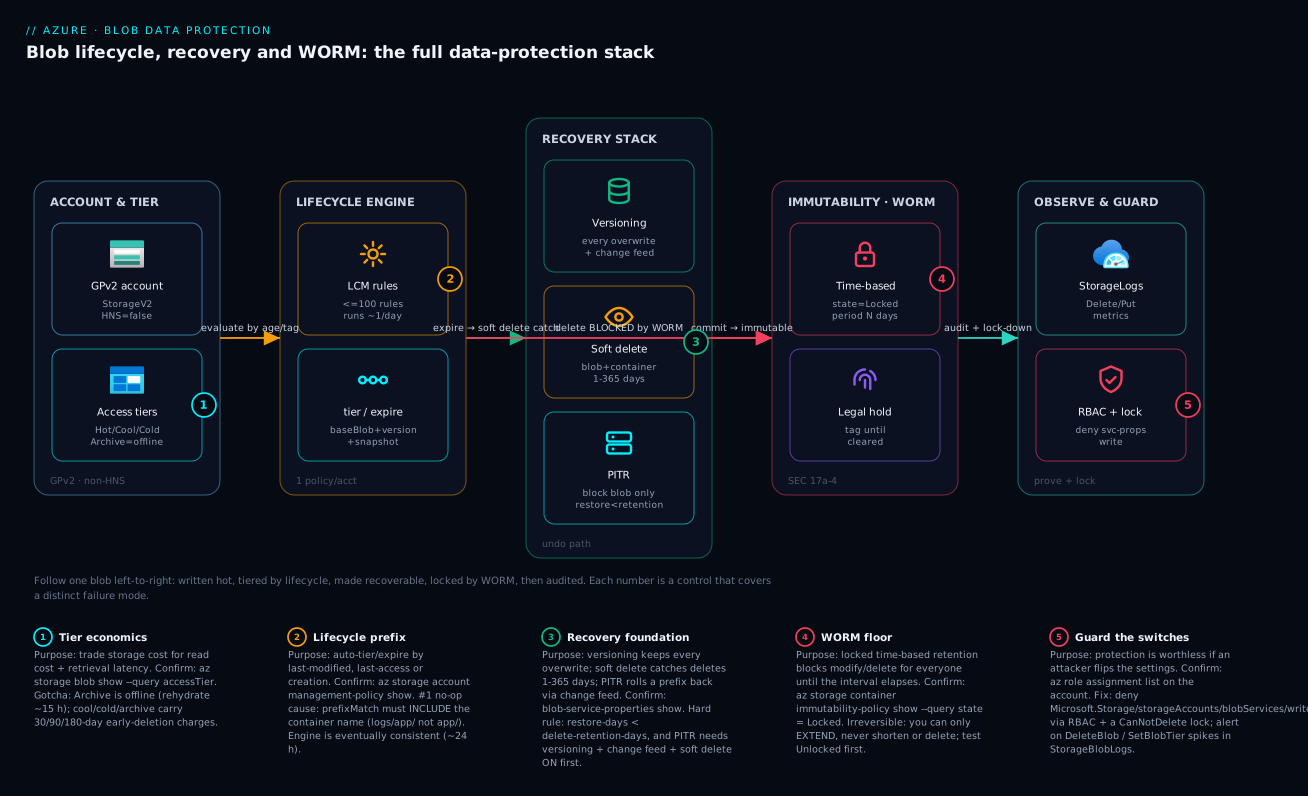
Going deeper
The core sections above cover every switch you flip on one account. This section is for the reader who already knows those and wants the mechanics that only show up at scale or in a design review: a second account for isolation, the two features that quietly overlap, the rehydration method most people don’t reach for, what the change feed actually is on disk, and lifecycle that filters on business meaning instead of paths.
Object replication: an asynchronous, isolated second copy
Everything so far protects data within one account. Object replication (OR) is the control that copies block blobs from a source container to a destination container in a different account — potentially a different region, subscription, or tenant. It is asynchronous (best-effort, no completion SLA), so it is not a synchronous-RPO tool; it is how you put a copy near compute to cut read latency, spread read load, or — the reason it belongs in a data-protection lesson — stand up an isolated, independently-locked copy for ransomware resilience.
OR has two hard prerequisites that trip people: blob versioning must be on for both the source and the destination account, and change feed must be on the source (OR reads the feed to know what changed). A replication policy names the two accounts and holds rules mapping a source container to a destination container, each with an optional prefix and a min-creation-time that decides how far back to backfill:
# On the SOURCE account (versioning + change feed already enabled); the
# DESTINATION account needs versioning too. Account names are placeholders.
az storage account or-policy create \
  --account-name kvstgsrc --resource-group rg-storage-prod \
  --destination-account kvstgdst \
  --source-container app-data --destination-container app-data-replica \
  --min-creation-time "2026-01-01T00:00:00Z"
What OR does not do is the part to internalize: it replicates block blobs only (append/page blobs and snapshots are excluded), it copies data written after the policy time unless you backfill with min-creation-time, and the destination is an ordinary writable account — replication alone gives you a copy, not an immutable one. The isolation pattern that satisfies “an attacker who compromised the source can’t reach the copy” is: replicate into a destination in a separate subscription/tenant with its own RBAC, then put a locked, version-level immutability policy on the destination container so the copy is WORM even if the source is wiped. Replication + WORM on the destination is the Blob-native half of an isolated-recovery design.
When versioning and soft delete overlap (the subtle one)
Beginners enable versioning and conclude they no longer need soft delete. They interact more subtly than that. With versioning off, blob soft delete is what saves both a delete and an overwrite — the overwritten bytes go into the soft-delete retention window. With versioning on, an overwrite no longer needs soft delete at all: the prior bytes become an ordinary noncurrent version you can promote back any time, with no window to race against. So what is soft delete for once versioning is on? Two things. First, it protects the versions themselves — an explicit delete of a version (or a lifecycle version.delete) is caught by soft delete instead of being permanent. Second, it is a hard prerequisite for point-in-time restore, which cannot be enabled without it.
The trap hides in what “delete the blob” means once versioning is on. Deleting the current blob without naming a version doesn’t erase history — it moves the current version to a noncurrent version and leaves the blob with no current version (it disappears from a default list, but --include v still shows the versions). You recover by promoting a version back over the root, exactly as with an overwrite. The mental correction: versioning changes delete into “make the current version noncurrent,” and soft delete is the second net under the versions. Run both.
Two ways to rehydrate — and why copy usually wins
The core section rehydrates in place with set-tier. There is a second method that is often the better one. Rehydration has two shapes:
| Method | Command | Effect on the Archive copy | Best when |
|---|---|---|---|
| In-place | az storage blob set-tier --tier Cool ... |
The blob leaves Archive; reads fail until it finishes; a later re-tier can trigger early-deletion | You want the object online and out of Archive |
| Copy to a new online blob | az storage blob copy start --tier Cool --rehydrate-priority ... |
The Archive original stays archived; you get a fresh online copy under a new name | You need a temporary readable copy but want the archived original untouched |
The copy method wins for one-off recalls (a DR drill, an auditor’s request) because it leaves the archived source in place — no early-deletion reset on the 180-day clock, and the original is still cheaply archived when you’re done. One more lever people miss: a rehydration already running at Standard priority can be upgraded to High mid-flight by re-issuing set-tier with --rehydrate-priority High — useful when a “we’ll wait 15 hours” recall suddenly becomes urgent. You cannot downgrade High back to Standard.
What the change feed actually is on disk
“Ordered, durable log” is accurate but under-specifies it. The change feed is written as Apache Avro files into the system container $blobchangefeed, laid out as dated segments (roughly one per hour) with a manifest that lists which segments are finalized. It is append-only, immutable, and eventually consistent: a record for an event can appear a few minutes after the event, and the current hour’s segment stays open (unfinalized) until the hour closes — so never treat “the last few minutes” as complete. You don’t parse the Avro by hand; you read it with the change-feed processor in the SDK (azure-storage-blob-changefeed), which yields records carrying fields like eventType, subject (the blob URL), eventTime, api, etag, contentLength and blobType. Retention is governed by change-feed-retention-days; omit it and the feed is kept until you delete it. Because it captures every mutation in order, it is both your audit trail and the exact input PITR replays to reconstruct a prefix at a timestamp — which is why PITR simply cannot exist without it.
Lifecycle by blob index tag, not just prefix
prefixMatch filters by path, which forces your retention policy to mirror your folder layout. Blob index tags break that coupling. An index tag is a key/value attribute the service indexes (so you can query it with Find Blobs by Tags), and a lifecycle rule can filter on one with blobIndexMatch — meaning a rule can target every blob tagged stage == cold-eligible regardless of where it lives:
"filters": {
  "blobTypes": [ "blockBlob" ],
  "blobIndexMatch": [
    { "name": "stage", "op": "==", "value": "cold-eligible" }
  ]
}
The mechanics and caveats to know before you lean on it: the only operator is ==, multiple tag conditions are AND-combined, and you can freely combine blobIndexMatch with prefixMatch in one filter. Index tags are not the same as metadata — they cost a small monthly fee per tag and a per-operation charge, a blob may carry up to 10 index tags, and they are not available on HNS (Data Lake Gen2) accounts. Setting them is a data-plane action, so the writer needs the tag permission, not just ...Data Contributor’s default. Used well, tag-based lifecycle lets a data-classification label — not the accident of which container something landed in — drive tiering and expiry, which is how large estates keep one policy sane across hundreds of teams.
Real-world scenario
Meridian Capital, a mid-size capital-markets platform team, ran trade-confirmation archives on Blob Storage with what looked like a clean SEC 17a-4 design: a compliance-archive container on a GPv2 account in Central India, GRS-replicated, with a locked, 7-year time-based immutability policy and allow-protected-append-writes for the confirmation stream. Monthly Blob spend was about ₹140,000, and the team was four engineers plus a compliance lead. The design had passed an external audit. Then, months later, their FinOps automation flagged the account: storage was growing ~4% a month with no corresponding business growth, and the bill was on track to roughly double inside a year.
The first cause was a lifecycle rule meant to expire confirmations after 7 years. It was firing daily, attempting delete on blobs that were still inside their 7-year immutable window, silently failing on every run, and doing nothing while the data accumulated. The team had assumed “lifecycle delete + WORM” would just wait politely for the interval to pass; instead the rule’s threshold (daysAfterModificationGreaterThan: 2555) was being evaluated against blobs whose creation-anchored WORM interval hadn’t elapsed, so every targeted delete was rejected. Confirming it took one query — az storage account management-policy show to read the rule, then a StorageBlobLogs lookup showing DeleteBlob operations with immutability failures:
StorageBlobLogs
| where TimeGenerated > ago(30d)
| where OperationName == "DeleteBlob"
| where StatusText has "immutab" or StatusCode == 409
| summarize attempts = count() by bin(TimeGenerated, 1d)
| order by TimeGenerated desc
The second cause was worse and entirely self-inflicted. A different team, needing somewhere fast to land data, had pointed a high-churn manifest writer at the same account with versioning on and no version.delete rule. Every manifest rewrite — thousands a day — minted a permanent version. With versioning enabled account-wide, the compliance container’s strict settings and the operational data’s churn were sharing one blob service, and the version tail was growing without bound.
The constraint was hard: the immutable policy was locked, so they could not shorten retention or delete anything early — non-negotiable and, legally, exactly correct. The fix was twofold. First, they reconciled the lifecycle delete threshold with the WORM period so the expiry rule only targeted blobs past their 7-year interval, ending the daily no-op failures and letting genuinely-expired data clear. Second, they isolated the high-churn manifests into a separate, non-immutable account and added a tight version-cleanup rule:
{
  "rules": [ {
    "enabled": true,
    "name": "cap-manifest-versions",
    "type": "Lifecycle",
    "definition": {
      "filters": { "blobTypes": [ "blockBlob" ], "prefixMatch": [ "manifests/" ] },
      "actions": {
        "version": {
          "tierToCool": { "daysAfterCreationGreaterThan": 7 },
          "delete":     { "daysAfterCreationGreaterThan": 30 }
        }
      }
    }
  } ]
}
Within two cycles the growth flattened: the manifest account’s version tail capped at 30 days, and the compliance account stopped accumulating un-deletable expiry attempts. They also wired a destructive-operation alert on the compliance account so any future StopProtection/SetImmutabilityPolicy/DeleteBlob spike paged the compliance lead. The lessons that stuck, written on the team wall: a lifecycle delete and a locked WORM policy will collide, and the collision is silent — the delete just fails and your bill keeps climbing; and immutable compliance data and high-churn operational data do not belong in the same account, because the protection settings you want for one are wrong for the other.
Advantages and disadvantages
The “stack of independent controls” model is what makes Blob data protection both powerful and easy to get wrong. Weigh it honestly:
| Advantages (why the model helps you) | Disadvantages (why it bites) |
|---|---|
| Each control is independent — enable exactly the protection a workload needs, no more | They’re separate toggles with separate retention and cost; “data protection” is not one switch |
| Recovery has three granularities (version, soft delete, PITR) — right tool for any blast radius | You must know which to reach for; reaching for the wrong one wastes the recovery window |
| Lifecycle automates tiering and cleanup at scale — set once, runs daily | Eventual-consistency timing and the prefixMatch trap make “it does nothing” common |
| Immutable WORM satisfies SEC 17a-4 / FINRA with platform-native locking — no third party | Locking is irreversible; a wrong period is a multi-year mistake with no support escape |
| Protection is data-plane native — no separate backup infrastructure to run | It only protects this account; a backup vault is still a separate, complementary layer |
| Defaults are safe-ish (versioning/soft delete off but cheap to enable) | Off-by-default means an un-hardened account has no recovery — easy to ship unprotected |
| Every operation is a metric/log you can alert on (StorageBlobLogs) | Without RBAC + locks, an over-privileged principal can disable every control silently |
The model is right for nearly every Blob workload: enable versioning + soft delete as a baseline everywhere, add lifecycle where cost matters, add PITR where bulk jobs run, and add WORM only where regulation demands. It bites hardest where teams mix workloads in one account (compliance + churn), where lifecycle filters are authored carelessly, and where nobody locked down the settings — so the disadvantages are all manageable, but only if you know they exist, which is the point of this article.
Hands-on lab
Stand up the full recovery stack on a fresh GPv2 account, prove each path works (including a rejected immutable delete), then tear it down — free-tier-friendly (a few rupees of storage; delete at the end). Run in Cloud Shell (Bash).
Step 1 — Variables and resource group.
RG=rg-blobprotect-lab
LOC=centralindia
SA=kvblobprot$RANDOM          # must be globally unique, lowercase
az group create -n $RG -l $LOC -o table
Step 2 — Create a GPv2 account (HNS off, so PITR is available).
az storage account create -n $SA -g $RG -l $LOC \
  --sku Standard_LRS --kind StorageV2 --hierarchical-namespace false -o table
Expected: a row with kind: StorageV2, isHnsEnabled: false.
Step 3 — Enable the recovery stack in the required order.
az storage account blob-service-properties update -n $SA -g $RG \
  --enable-versioning true \
  --enable-change-feed true --change-feed-retention-days 7 \
  --enable-delete-retention true --delete-retention-days 7 \
  --enable-container-delete-retention true --container-delete-retention-days 7 \
  --enable-restore-policy true --restore-days 6        # MUST be < 7
Note --restore-days 6 against --delete-retention-days 7 — violate that and the command errors.
Step 4 — Create a container and a probe blob, then overwrite it.
az storage container create --account-name $SA -n app-data --auth-mode login
echo "v1 good" > probe.txt
az storage blob upload --account-name $SA -c app-data -n probe.txt -f probe.txt --auth-mode login --overwrite
echo "v2 BAD"  > probe.txt
az storage blob upload --account-name $SA -c app-data -n probe.txt -f probe.txt --auth-mode login --overwrite
Step 5 — Prove versioning recovers the good copy.
az storage blob list --account-name $SA -c app-data --prefix probe.txt --include v \
  --auth-mode login --query "[].{ver:versionId, current:isCurrentVersion}" -o table
# Copy the older versionId back over the current blob (paste the v1 versionId):
az storage blob copy start --account-name $SA \
  --destination-container app-data --destination-blob probe.txt \
  --source-uri "https://$SA.blob.core.windows.net/app-data/probe.txt?versionId=<V1_VERSION_ID>"
Expected: after the copy, downloading probe.txt yields v1 good.
Step 6 — Prove blob soft delete recovers a deletion.
az storage blob delete --account-name $SA -c app-data -n probe.txt --auth-mode login
az storage blob undelete --account-name $SA -c app-data -n probe.txt --auth-mode login
az storage blob show --account-name $SA -c app-data -n probe.txt --auth-mode login --query name -o tsv
Expected: the blob is back.
Step 7 — Prove an immutable delete is REJECTED (a passing test is a failed delete).
az storage container create --account-name $SA -n compliance --auth-mode login
echo "record" > rec.bin
az storage blob upload --account-name $SA -c compliance -n rec.bin -f rec.bin --auth-mode login
# Short UNLOCKED policy so the lab can clean up afterwards
az storage container immutability-policy create --account-name $SA -g $RG \
  -c compliance --period 1
# This delete SHOULD fail with an immutability/409 error — that is success:
az storage blob delete --account-name $SA -c compliance -n rec.bin --auth-mode login
Expected: the delete is rejected. If it succeeds, your WORM control isn’t protecting anything.
Step 8 — Confirm the whole posture in one read.
az storage account blob-service-properties show -n $SA -g $RG \
  --query "{versioning:isVersioningEnabled, changeFeed:changeFeed.enabled, \
            blobSoftDelete:deleteRetentionPolicy.enabled, pitr:restorePolicy.enabled, \
            pitrDays:restorePolicy.days, softDeleteDays:deleteRetentionPolicy.days}" -o json
Expected: all true; pitrDays (6) strictly less than softDeleteDays (7). The post-deploy gate — what each field must read in a hardened production account:
| Posture field | Expected value | Fails the gate if… |
|---|---|---|
isVersioningEnabled |
true |
false → no overwrite recovery |
changeFeed.enabled |
true |
false → PITR can’t work |
deleteRetentionPolicy.enabled |
true |
false → no delete recovery |
containerDeleteRetentionPolicy.enabled |
true |
false → container delete unrecoverable |
restorePolicy.enabled |
true |
false → no bulk rollback |
restorePolicy.days |
< deleteRetentionPolicy.days |
≥ → invalid / deploy fails |
Immutability state (compliance) |
Locked |
Unlocked → not enforceable for audit |
Each step mapped to what it proves:
| Step | What you did | What it proves | Real-world analogue |
|---|---|---|---|
| 3 | Enable stack in order | The dependency chain + restore < delete constraint |
Onboarding a prod account safely |
| 5 | Restore a prior version | Overwrites are recoverable | Undo a bad ETL overwrite |
| 6 | Delete then undelete | Accidental deletes are recoverable | The wrong-prefix del |
| 7 | Rejected immutable delete | WORM actually blocks deletion | Proving the compliance control |
| 8 | One-shot posture read | Post-deploy verification gate | CI/CD compliance check |
Cleanup. The unlocked, 1-day policy lets you delete; if it hasn’t expired, remove the policy first.
az storage container immutability-policy delete --account-name $SA -g $RG -c compliance 2>/dev/null || true
az group delete -n $RG --yes --no-wait
Cost note. A few MB of LRS storage for an hour is a fraction of a rupee; deleting the resource group stops everything. (Had you locked the immutability policy in Step 7, this teardown would be blocked — which is exactly why the lab uses an unlocked, 1-day policy.)
The full command map for this stack — the one-liner you reach for per operation, so you don’t hunt the docs mid-incident:
| Operation | Command | Notes |
|---|---|---|
| Enable versioning | az storage account blob-service-properties update --enable-versioning true |
Account-level |
| Enable change feed | ... --enable-change-feed true --change-feed-retention-days N |
PITR prerequisite |
| Enable blob soft delete | ... --enable-delete-retention true --delete-retention-days N |
1–365 days |
| Enable container soft delete | ... --enable-container-delete-retention true --container-delete-retention-days N |
1–365 days |
| Enable PITR | ... --enable-restore-policy true --restore-days N |
N < soft-delete days |
| List versions | az storage blob list --include v |
Shows versionIds |
| Restore a version | az storage blob copy start --source-uri "...?versionId=..." |
Copies over current |
| Undelete a blob | az storage blob undelete |
Within window |
| Restore a container | az storage container restore --deleted-version <v> |
Get version from list |
| Run PITR | az storage blob restore --time-to-restore <ts> --blob-range ... |
Async; block blobs only |
| Set a tier | az storage blob set-tier --tier Cool/Cold/Archive |
Per blob |
| Rehydrate | az storage blob set-tier --tier Cool --rehydrate-priority High |
Async; ~15 h Standard |
| Apply lifecycle | az storage account management-policy create --policy @file.json |
1 policy/account |
| Create immutability policy | az storage container immutability-policy create --period N |
Unlocked first |
| Lock immutability policy | az storage container immutability-policy lock --if-match <etag> |
Irreversible |
| Set legal hold | az storage container legal-hold set --tags "..." |
WORM until cleared |
| Confirm posture | az storage account blob-service-properties show |
One-shot read |
Common beginner mistakes
The troubleshooting playbook below is symptom-to-fix. These are earlier than that — the wrong mental models that produce the symptoms. Each is a belief a newcomer holds, why it’s wrong, and the model to replace it with.
-
“Versioning is my backup.” It isn’t. Versions live in the same account, under the same RBAC, behind the same settings; an admin who can turn versioning off, or delete the account, takes the versions with it. Right model: versioning is one recovery layer against overwrites. Real resilience is versioning + soft delete + a resource lock +, for anything critical, a copy in a separate account (object replication) or a backup vault.
-
“Geo-redundancy (GRS) protects me from a bad delete.” Redundancy copies bytes to more places; it faithfully copies your delete to every one of them. Right model: durability defends against hardware and region loss; data protection (soft delete, versioning, PITR, WORM) defends against intent. They’re orthogonal — you need both, for different reasons.
-
“Archive is just cheaper storage I can still read.” Archive is offline. A read against an archived blob fails until you rehydrate it, which takes up to ~15 hours at Standard priority. Right model: Hot/Cool/Cold are “read at millisecond latency, pay more as you go colder”; Archive is “almost never read, and budget hours when you do.” Put it in the DR plan, never the hot path.
-
“Turning on versioning means I can skip soft delete.” Soft delete still does two jobs versioning doesn’t: it protects the versions themselves from an explicit version delete, and it is a hard prerequisite for point-in-time restore. Right model: enable both — versioning for overwrite history, soft delete as the net under the versions and the gateway to PITR.
-
“The lifecycle rule runs the moment a blob crosses the age threshold.” The engine is a daily, eventually-consistent sweep, so a 30-day rule acts up to ~24 hours after day 30, not at midnight on the dot. Right model: lifecycle is a background housekeeper, not a real-time trigger — never build a tight SLA (or a security control) on its timing.
-
“Locking an immutability policy can be undone by support if I get it wrong.” There is no escape hatch — a locked policy can only be extended, never shortened or deleted, by anyone, ever. A 10-year typo is 10 years of un-deletable data. Right model: treat a
locklike signing a contract or dropping a database — test the policy unlocked first, and give the PR that locks it the same scrutiny.
Common mistakes & troubleshooting
This is the playbook — the part you bookmark. First as a scannable table you read mid-incident, then the full confirm-command detail for the entries that bite hardest.
| # | Symptom | Root cause | Confirm (exact cmd / portal path) | Fix |
|---|---|---|---|---|
| 1 | Lifecycle rule “does nothing” | prefixMatch omits the container name |
az storage account management-policy show --query "policy.rules[].definition.filters.prefixMatch" |
Prefix container/path/, not path/ |
| 2 | Storage bill quietly doubling | Versioning on, no version.delete rule (version tail) |
blob-service-properties show (versioning true); capacity by blob count |
Add version.delete lifecycle rule; isolate high-churn data |
| 3 | Lifecycle delete never removes data |
Blobs inside a locked WORM interval | az storage container immutability-policy show --query state = Locked |
Reconcile expiry threshold with retention period |
| 4 | PITR deployment fails | restore-days ≥ delete-retention-days |
blob-service-properties show (compare the two days) |
Set restore-days strictly less than soft delete |
| 5 | PITR feature unavailable | Account is HNS (Data Lake Gen2) | az storage account show --query isHnsEnabled = true |
Use versioning + soft delete; not PITR on ADLS Gen2 |
| 6 | “Restored” version but blob unchanged | Listed versions without --include v; or copied wrong versionId |
az storage blob list --include v shows versionIds |
Copy the correct older versionId over current |
| 7 | Undelete fails / blob already gone | Soft delete off, or window already elapsed | --query deleteRetentionPolicy enabled/days |
Enable soft delete; widen window; (if container deleted, restore container first) |
| 8 | Deleted a whole container, blobs gone | Blob soft delete doesn’t cover container delete | az storage container list --include-deleted |
az storage container restore; enable container soft delete |
| 9 | Archived blob “missing” on read | Archive is offline; not rehydrated | az storage blob show --query properties.blobTier = Archive |
Rehydrate (Standard ~15 h / High faster), then read |
| 10 | Big early-deletion charges | Tiered short-lived data below min retention | Cost analysis: early-deletion line; tier-change logs | Only tier data older than the minimum; review rule ages |
| 11 | Access-time lifecycle rule no-ops | Last-access tracking never enabled | --query lastAccessTimeTrackingPolicy |
--enable-last-access-tracking true; re-wait a cycle |
| 12 | Can’t delete the storage account | A locked immutability policy exists | immutability-policy show --query state = Locked |
Wait out retention (no override exists by design) |
| 13 | Someone disabled soft delete in prod | Over-privileged principal with blobServices/write |
az role assignment list --scope <acct id> |
Tighten RBAC; add a CanNotDelete lock; alert on changes |
| 14 | 403 on a recovery operation | Firewall / private endpoint / missing data-plane RBAC | Storage 403 playbook; check networking + role | Add caller IP/PE; assign Storage Blob Data role |
Before the expanded entries, the error / status-code reference you scan first — the HTTP status and error code Blob returns on a protection-related failure, what it means, and the fix:
| Status / error code | Meaning | Likely cause | How to confirm | Fix |
|---|---|---|---|---|
409 BlobImmutableDueToPolicy |
Write/delete blocked by WORM | Time-based retention still active | immutability-policy show --query state |
Wait out interval; can’t shorten if locked |
409 BlobImmutableDueToLegalHold |
Write/delete blocked by legal hold | A hold tag is still set | legal-hold show |
Clear every hold tag (if authorized) |
409 ContainerBeingDeleted |
Container op during soft-delete restore | Restore in flight | container list --include-deleted |
Wait for restore to complete |
409 SnapshotOperationRateExceeded |
Too many version/snapshot ops | High-churn overwrite storm | Capacity / op metrics | Throttle writes; add version.delete |
404 BlobNotFound (archived) |
Read of an offline blob | Blob is in Archive | blob show --query properties.blobTier |
Rehydrate, then read |
403 AuthorizationFailure |
Data-plane access denied | Missing Storage Blob Data role / SAS |
role assignment list |
Assign the data role; fix SAS |
403 AuthorizationFailure (network) |
Blocked by firewall/PE | IP/private-endpoint rule | Networking blade | Add caller IP / private endpoint |
400 InvalidHeaderValue (restore) |
PITR config invalid | restore-days ≥ soft-delete days |
blob-service-properties show |
restore-days strictly less |
409 FeatureNotSupportedForAccount |
PITR/versioning on HNS | Account is Data Lake Gen2 | account show --query isHnsEnabled |
Use soft delete + versioning fallback |
412 ConditionNotMet (lock) |
Lock failed on etag | Stale --if-match etag |
immutability-policy show --query etag |
Re-read etag, retry lock |
The expanded form, with the reasoning for the entries that cost the most time and money:
1. A lifecycle rule “does nothing.”
Root cause: prefixMatch omits the container name — the rule targets a path that matches no blobs.
Confirm: az storage account management-policy show --query "policy.rules[].definition.filters.prefixMatch" — if it reads app/ not logs/app/, that’s it.
Fix: Always prefix with the container: logs/app/ matches container logs, prefix app/.
2. The storage bill is quietly doubling.
Root cause: Versioning is on, every overwrite mints a permanent version, and there’s no version.delete rule to cap the tail — high-churn blobs (state files, manifests, checkpoints) multiply storage.
Confirm: blob-service-properties show shows versioning enabled; capacity metrics show object count climbing far faster than logical data.
Fix: Add a version.delete (and optionally version.tierToCool) lifecycle rule; move high-churn data to its own account so its settings are independent.
3. A lifecycle delete never actually removes anything.
Root cause: The targeted blobs are inside a locked WORM retention interval; the delete is rejected (or skipped) on every daily run, silently.
Confirm: az storage container immutability-policy show --query "{state:state, period:immutabilityPeriodSinceCreationInDays}" shows Locked and a period longer than your lifecycle age.
Fix: Reconcile the lifecycle delete threshold so it only targets blobs past their immutable interval; you cannot shorten a locked policy.
4. The PITR deployment fails outright.
Root cause: restore-days is greater than or equal to delete-retention-days — PITR can’t restore past the soft-delete horizon.
Confirm: blob-service-properties show — compare restorePolicy.days to deleteRetentionPolicy.days.
Fix: Set restore-days strictly less (14 soft delete → 13 PITR).
5. PITR isn’t available at all.
Root cause: The account is HNS-enabled (Data Lake Gen2); PITR isn’t supported there.
Confirm: az storage account show --query isHnsEnabled returns true.
Fix: Use versioning + soft delete as the recovery story on ADLS Gen2; PITR is a GPv2 (non-HNS) feature.
9. An archived blob looks “missing” when you read it.
Root cause: Archive is offline — the blob exists but cannot be read until rehydrated.
Confirm: az storage blob show --query "{tier:properties.blobTier, rehydrate:properties.rehydrationStatus}" shows Archive.
Fix: az storage blob set-tier --tier Cool --rehydrate-priority High (or Standard), then read once rehydration completes (~15 h Standard).
13. Someone disabled soft delete (or versioning) in production.
Root cause: A principal with Microsoft.Storage/storageAccounts/blobServices/write (often via a broad role like Contributor) turned the protection off — accidentally or maliciously.
Confirm: az role assignment list --scope <account-id> shows over-broad assignments; the activity log shows the blobServices write.
Fix: Tighten RBAC to least privilege, add a CanNotDelete resource lock, and alert on protection-setting changes (see Security notes).
Best practices
- Enable versioning + blob soft delete + container soft delete as a baseline on every account that holds anything you’d miss. They’re cheap, off by default, and the difference between a five-minute recovery and permanent loss.
- Always pair versioning and expiry with a lifecycle cleanup rule. A
version.deletecaps the version tail; pairing abaseBlob.deletewith soft delete means an aggressive expiry can still be undone. - Author
prefixMatchwith the container name, every time. It’s the number-one reason lifecycle rules silently no-op. - Tier on access pattern, not age alone, and respect minimum retention. Aggressive tier-down on short-lived data triggers early-deletion charges and costs more; reserve Archive for DR, never the hot path.
- Enable PITR in the exact order — versioning → change feed → soft delete → PITR — and keep
restore-days < delete-retention-days. Manage it as Bicep so the constraint is reviewed in PRs. - Keep immutable compliance data and high-churn operational data in separate accounts. Their ideal protection settings are opposites; mixing them causes the silent-collision class of bug.
- Test an immutability policy unlocked first, then lock only after deliberate review. Locking is irreversible; a wrong period is a multi-year mistake. Treat a “lock” PR like a “drop database” PR.
- Reconcile lifecycle expiry thresholds with WORM retention so a
deletenever fights a locked policy and fails silently. - Lock down who can change protection settings. RBAC least privilege on
blobServices/writeplus aCanNotDeleteresource lock so the seatbelts can’t be quietly unbuckled. - Validate every recovery path in non-prod that mirrors prod settings — soft delete, version restore, PITR, and a rejected immutable delete — before you rely on them.
- Alert on destructive operations (DeleteBlob spikes, SetImmutabilityPolicy, soft-delete disablement) from
StorageBlobLogs, so even a successful change pages someone. - Model the protection cost before flipping it on from change-feed and version volume; tighten lifecycle thresholds rather than disabling protection when the number is uncomfortable.
The leading-indicator alerts worth wiring before the next incident:
| Alert on | Signal (StorageBlobLogs / metric) | Threshold (starting point) | Why it’s leading |
|---|---|---|---|
| Mass delete | DeleteBlob / DeleteBatch count |
> N× baseline in 5 min | Catches a wrong-prefix delete in progress |
| Protection disabled | Set blob-service properties (versioning/soft delete off) | Any occurrence | The seatbelt being unbuckled |
| Immutability change | SetImmutabilityPolicy / lock |
Any occurrence | A lock is irreversible — review every one |
| Capacity growth | BlobCapacity |
> X% week-over-week | Version-tail or silent-expiry-failure bloat |
| Tier-change storm | SetBlobTier count |
> N× baseline | A mis-scoped lifecycle rule mass-tiering |
| Rehydration backlog | Archive read attempts failing | Any sustained | Restore runbook hitting offline data |
Security notes
Data protection and security overlap heavily here — the controls that recover your data are worthless if an attacker can switch them off, and the encryption that protects confidentiality is orthogonal to all of it.
- Lock down the protection switches. The real attack on this stack isn’t deleting data — it’s disabling soft delete/versioning then deleting. Grant
Microsoft.Storage/storageAccounts/blobServices/writeto as few principals as possible (avoid handing out Contributor broadly), and add aCanNotDeleteresource lock on the account.
# Resource lock so the account/protection can't be casually removed
az lock create --name no-delete-blobprot --lock-type CanNotDelete \
  --resource-group rg-storage-prod \
  --resource $SA --resource-type Microsoft.Storage/storageAccounts
- Use data-plane RBAC, not account keys, for blob access. Prefer
Storage Blob Data Reader/Contributorwith Entra identities over shared keys or broad SAS; account keys bypass the granular controls and are a single point of compromise. - Encryption is a separate, mandatory layer. All Blob data is encrypted at rest with Microsoft-managed keys by default; for regulated data bring customer-managed keys (CMK) in Key Vault — see Encryption at Rest with Customer-Managed Keys and Azure Key Vault. Encryption protects confidentiality; this article’s controls protect against deletion/tampering — you need both.
- Immutability is your anti-ransomware control. A locked time-based policy means even a fully-compromised admin cannot delete or encrypt-in-place the protected blobs until the interval elapses — the WORM floor holds against an identity compromise that soft delete (which can be disabled) does not.
- Network-isolate the account. Use private endpoints / firewall so recovery operations come from trusted networks; when a recovery op returns 403, the cause is usually networking or missing data-plane RBAC — see Troubleshooting Storage 403s.
- Alert on destructive control-plane operations, not just data deletes:
SetImmutabilityPolicy, disabling soft delete, and key regeneration are the high-signal events.
The least-privilege RBAC roles for each operation — grant the narrowest that works, and note which actions are control-plane (account settings) vs data-plane (the blobs):
| Operation | Plane | Built-in role (least privilege) | Why not broader |
|---|---|---|---|
| Read a blob / list versions | Data | Storage Blob Data Reader |
No write/delete needed |
| Restore a version / undelete | Data | Storage Blob Data Contributor |
Needs write; not Owner |
| Set a blob tier | Data | Storage Blob Data Contributor |
Tier is a data-plane op |
| Change soft delete / versioning | Control | Storage Account Contributor (scoped) |
Avoid subscription Contributor |
| Set / lock immutability policy | Control | Storage Account Contributor (scoped) |
Lock is irreversible — restrict tightly |
| Run lifecycle policy changes | Control | Storage Account Contributor (scoped) |
Mass tier/expire impact |
| Account key access | Control | (avoid) — keys bypass RBAC | Single point of compromise |
The security controls that also harden this stack — secure and resilient pull the same direction:
| Control | Mechanism | Secures against | Also prevents |
|---|---|---|---|
| Least-privilege RBAC | Storage Blob Data * roles, scoped |
Broad Contributor disabling protection | Accidental setting changes |
| Resource lock | CanNotDelete on the account |
Casual/accidental account deletion | Teardown wiping protected data |
| Locked immutability | WORM time-based, state=Locked | Ransomware encrypt/delete-in-place | Insider deletion of records |
| CMK encryption | Key Vault key + identity | Confidentiality / key control | Data exposure if keys mishandled |
| Private endpoint + firewall | Network isolation | Exfiltration over public endpoint | Untrusted-network recovery ops |
| Destructive-op alerts | StorageBlobLogs + alert rules |
Silent disablement / mass delete | Late detection of an incident |
Cost & sizing
The bill on a protected account is the base storage plus the cost of each protection layer. The drivers, in rough order of impact:
- Versions and snapshots: every overwrite of a frequently-changed blob is a new billed copy. High-churn blobs (state files, manifests, checkpoints) can multiply storage 5–10× without a
version.deletelifecycle rule. This is usually the biggest surprise. - Soft-delete retention: everything deleted in the window keeps billing for the window length. A workload that writes-then-deletes a lot of temp data pays for all of it for
delete-retention-days. - Tier choice and transactions: storage cost falls Hot→Cool→Cold→Archive, but read/transaction cost rises the other way, and every lifecycle move is a billable transaction.
- Change feed: a transaction log proportional to write volume, retained for
change-feed-retention-days. Cheap relative to data, but non-zero. - Early-deletion penalties: aggressive lifecycle tier-down on short-lived data, as covered earlier.
The cost drivers and what each one buys you:
| Cost driver | What you pay for | Rough scale | What it fixes | Watch-out |
|---|---|---|---|---|
| Base storage (Hot) | Per-GB hot storage | Baseline | — | Tier idle data down |
| Cool/Cold storage | Lower per-GB, higher per-read | ~½–⅓ of hot per-GB | Infrequent-access cost | Read costs + early-deletion |
| Archive storage | Lowest per-GB | ~⅒ of hot per-GB | Almost-never data | Offline; rehydrate latency/cost |
| Versions | One billed copy per version | 5–10× on high churn | Overwrite recovery | Cap with version.delete |
| Soft-delete retention | Storage for deleted data in window | × retention days | Accidental-delete recovery | Window length × delete volume |
| Change feed | Append log per write | Small | Audit + PITR input | Proportional to write rate |
| Lifecycle transactions | Per tier-move/delete operation | Small per op | Automated cost optimization | Mass re-tier storms |
A rough monthly picture for a 10 TB workload: base Hot storage is the floor; tiering 6 TB of it to Cool/Cold can cut storage cost meaningfully, but only if read patterns justify it. Versioning on a 1 TB high-churn prefix with no cleanup can add several TB of version storage within weeks — which is why the version.delete rule pays for itself almost immediately.
Audit current consumption with a metrics query (Log Analytics / Azure Monitor) to model what versioning and soft delete will add:
StorageBlobLogs
| where TimeGenerated > ago(7d)
| where OperationName in ("PutBlob", "PutBlock", "DeleteBlob", "CopyBlob")
| summarize Operations = count(), Bytes = sum(RequestBodySize)
    by OperationName, bin(TimeGenerated, 1d)
| order by TimeGenerated desc
Use the operation/byte profile to model the add: roughly, extra storage ≈ (overwrite + delete volume) × retention/version lifetime. If the number is uncomfortable, tighten the lifecycle version.delete threshold rather than disabling protection. For the broader cost-engineering discipline, see Azure FinOps Cost-Engineering Guide. Free-tier note: there is no meaningful free allowance for Blob at production scale, but the protection features themselves carry no per-feature fee — you pay only for the storage and transactions they generate, so the cost is entirely a function of your version/delete/retention volume.
Practice challenges
Six exercises that escalate from “flip the two baseline switches” to “diagnose a silent WORM/lifecycle collision.” Each has a worked solution and a one-line why. Do them against a throwaway GPv2 account (the Hands-on lab’s teardown applies); every command uses placeholder names.
1. Baseline recovery in one shot (beginner). Enable blob versioning and blob soft delete on an account, then confirm both with a single read.
<details> <summary>Solution</summary>
az storage account blob-service-properties update -n kvstgprod -g rg-storage-prod \
  --enable-versioning true --enable-delete-retention true --delete-retention-days 14
az storage account blob-service-properties show -n kvstgprod -g rg-storage-prod \
  --query "{versioning:isVersioningEnabled, softDelete:deleteRetentionPolicy.enabled}" -o json
Both fields should read true.
Why: versioning + soft delete is the cheap, off-by-default baseline that turns permanent loss into a five-minute recovery on every account you care about. </details>
2. Read the tier, and predict the bill (beginner). Set a blob to Cool, read its tier back, then answer: what are you billed if you delete it on day 5?
<details> <summary>Solution</summary>
az storage blob set-tier --account-name kvstgprod -c app-data -n report.parquet --tier Cool
az storage blob show --account-name kvstgprod -c app-data -n report.parquet \
  --query "properties.blobTier" -o tsv     # -> Cool
Deleting on day 5 still bills the full 30 days of Cool storage — the early-deletion charge — because Cool’s minimum retention is 30 days.
Why: tiering down data you’ll delete before the minimum costs more, not less; tier on access pattern, not age alone. </details>
3. A lifecycle rule that actually fires (intermediate). Write a rule that tiers the app/ prefix inside a container named logs to Cool at 30 days and deletes it at 365 — with a prefix that matches something.
<details> <summary>Solution</summary>
{ "rules": [ {
  "enabled": true, "name": "logs-tier-expire", "type": "Lifecycle",
  "definition": {
    "filters": { "blobTypes": [ "blockBlob" ], "prefixMatch": [ "logs/app/" ] },
    "actions": { "baseBlob": {
      "tierToCool": { "daysAfterModificationGreaterThan": 30 },
      "delete":     { "daysAfterModificationGreaterThan": 365 }
    } }
  } } ] }
The prefix is logs/app/ — container name included. app/ alone matches nothing.
Why: prefixMatch is container-inclusive; omitting the container name is the number-one reason a rule silently no-ops.
</details>
4. Enable PITR without a failed deployment (intermediate). Soft delete is set to 14 days. Enable point-in-time restore correctly — name the order and the restore-days value.
<details> <summary>Solution</summary>
Order: versioning → change feed → soft delete → PITR. Then:
az storage account blob-service-properties update -n kvstgprod -g rg-storage-prod \
  --enable-restore-policy true --restore-days 13    # strictly < 14
restore-days must be strictly less than delete-retention-days, so 13 against 14 — not 14.
Why: PITR reverts through versions the change feed points at, and it can’t reach past the soft-delete horizon, so the constraint is enforced at deploy time. </details>
5. An isolated, un-deletable replica (advanced). Design a Blob-native second copy that survives a full compromise of the source account. What replicates it, what two prerequisites does it need, and what makes the copy un-deletable?
<details> <summary>Solution</summary>
Object replication copies block blobs from the source container to a container in a separate destination account (ideally a different subscription/tenant with its own RBAC). Prerequisites: blob versioning on both accounts and change feed on the source. The destination is writable by default, so make the copy WORM by putting a locked, version-level immutability policy on the destination container.
az storage account or-policy create --account-name kvstgsrc -g rg-storage-prod \
  --destination-account kvstgdst \
  --source-container app-data --destination-container app-data-replica
# then, on the destination, create + LOCK a time-based immutability policy (VLW)
Why: replication gives you an off-account copy; a locked immutability policy on the destination is what stops a compromised identity from deleting or encrypting-in-place that copy. </details>
6. Diagnose a silent WORM/lifecycle collision (advanced). A compliance-archive container has a locked 7-year policy and a lifecycle delete at daysAfterModificationGreaterThan: 2555 that “isn’t working” while the bill climbs. Confirm the cause and fix it without shortening the policy.
<details> <summary>Solution</summary>
Confirm the delete attempts are being rejected, then confirm the lock:
StorageBlobLogs
| where OperationName == "DeleteBlob"
| where StatusText has "immutab" or StatusCode == 409
| summarize attempts = count() by bin(TimeGenerated, 1d)
az storage container immutability-policy show --account-name kvstgprod \
  -g rg-storage-prod -c compliance-archive --query "{state:state}"   # -> Locked
Fix: reconcile the lifecycle delete threshold so it only targets blobs past their 7-year interval (and move any high-churn writers off this account). You cannot shorten a locked policy — you can only stop the daily no-op failures.
Why: a lifecycle delete and a locked WORM interval collide silently — the delete just fails each run while data (and cost) accumulates with no error.
</details>
Interview & exam questions
1. What’s the difference between durability and data protection on Blob Storage? Durability (eleven nines on LRS, more with geo-redundancy) means Azure won’t lose the bytes to hardware failure — but it faithfully replicates your deletes, overwrites and bad lifecycle rules. Data protection (versioning, soft delete, PITR, immutability) adds a recovery or prevention layer on top so a human/programmatic mistake or an attacker doesn’t become permanent loss.
2. Why can aggressive lifecycle tier-down cost more than leaving data in Hot? Cool, Cold and Archive have minimum retention periods (30/90/180 days). Tier a blob down and delete or re-tier it before the minimum and you’re billed the early-deletion charge as if it sat the full period, plus the tier-change transaction. For short-lived data this exceeds the storage saving.
3. A lifecycle rule isn’t doing anything. What’s the first thing you check? The prefixMatch — it must include the container name (logs/app/, not app/). Omitting the container is the number-one cause of a rule matching no blobs. Also confirm the engine has had a full ~daily cycle (it’s eventually consistent) and that version/snapshot actions have versioning/snapshots enabled.
4. What are the exact prerequisites for point-in-time restore, and in what order? Blob versioning → change feed → blob soft delete → PITR, in that order. PITR reverts via versions and reads the change feed, so both must exist; and restore-days must be strictly less than delete-retention-days or the deployment fails.
5. Difference between blob soft delete and container soft delete? Blob soft delete recovers individual deleted/overwritten blobs; it does not save you if someone deletes the whole container (the blobs go with it). Container soft delete recovers the container as a unit — but you can’t pull a single blob out of a soft-deleted container; you restore the container first, then recover blobs. You want both enabled.
6. What does PITR not cover? Block blobs only — append and page blobs, snapshots, metadata-only changes, and container operations are out of scope. It’s also unavailable on HNS (Data Lake Gen2) accounts and is a forward, overwriting operation, so it’s destructive to anything written after the restore point — scope the range tightly.
7. What is WORM immutability and what does locking change? WORM (Write Once, Read Many) makes data un-modifiable and un-deletable by anyone — admin included — until the policy releases it (time-based interval elapses, or every legal-hold tag is cleared). An unlocked policy can be edited/deleted (testing); a locked policy is irreversible — you can only extend it, never shorten or delete, and it blocks deleting the container and the storage account.
8. How can a lifecycle policy and an immutability policy collide? A lifecycle delete and a locked WORM retention interval are in tension: the delete is silently rejected for blobs still inside their immutable window. The data accumulates, the bill grows, and nothing errors loudly. Fix by reconciling the lifecycle expiry threshold so it only targets blobs past their retention interval.
9. How do you recover a blob that was accidentally overwritten with bad content? If versioning is on, the prior content is retained as a previous version. List versions (az storage blob list --include v), then copy the correct older versionId over the current blob. If versioning is off but soft delete is on, the overwrite is recoverable via undelete within the retention window.
10. An attacker has Contributor on a storage account. Which protections still hold? A locked time-based immutability policy holds — even a full admin cannot delete or encrypt-in-place the protected blobs until the interval elapses. Soft delete and versioning do not hold, because Contributor can disable blobServices/write settings first. This is why immutability is the anti-ransomware control and why you should lock down blobServices/write and add a resource lock.
11. Archive is “missing” data when read — what’s happening? Archive is an offline tier; the blob exists but can’t be read until you rehydrate it to Hot/Cool/Cold (up to ~15 h at Standard priority, faster at High for a fee). Plan for that latency in any restore runbook; reserve Archive for data you’ll almost never read.
12. How do you put a cost number on enabling versioning before you turn it on? Query StorageBlobLogs for overwrite/delete volume over a week, then estimate extra storage ≈ (overwrite + delete volume) × version lifetime. If it’s uncomfortable, add a version.delete lifecycle rule to bound the tail rather than skipping protection.
These map to AZ-104 (Administrator) — configure Azure Storage, lifecycle management, soft delete, redundancy — AZ-204 (Developer) — develop solutions that use Blob Storage, versioning, change feed — and AZ-500 (Security) — secure data, immutability, RBAC, encryption. A compact cert-mapping for revision:
| Question theme | Primary cert | Exam objective area |
|---|---|---|
| Access tiers, lifecycle, redundancy | AZ-104 | Configure and manage storage |
| Versioning, change feed, PITR | AZ-204 | Develop for Azure storage |
| Soft delete & recovery paths | AZ-104 | Manage storage; data protection |
| Immutability / WORM compliance | AZ-500 | Secure data and applications |
| RBAC, locks, anti-ransomware | AZ-500 | Manage security operations |
| Cost/tier economics | AZ-104 / FinOps | Optimize Azure storage cost |
Quick check
- A lifecycle rule with
prefixMatch: ["app/"]on a container namedlogstiers nothing. Why, and what’s the fix? - You enable PITR with
restore-days 14anddelete-retention-days 14and the deployment fails. What’s the rule you violated? - True or false: scaling redundancy from LRS to GRS protects you from an accidental
delete-batchagainst the wrong prefix. - Someone deleted an entire container. Blob soft delete is enabled but container soft delete is not. Can you recover the blobs?
- Your
compliance-archivecontainer has a locked 7-year policy and a lifecycledeleteat 2555 days that “isn’t working.” What’s happening?
Answers
- The
prefixMatchomits the container name — it must belogs/app/, notapp/. The rule as written targets a path that matches no blobs. Prefix every lifecycle filter with the container name. restore-daysmust be strictly less thandelete-retention-days. PITR can’t restore past the soft-delete horizon, so 14/14 is invalid — set PITR to 13.- False. Geo-redundancy protects against hardware/region loss; it faithfully replicates your delete to the secondary. Recovery from an accidental delete comes from soft delete / versioning / PITR, not redundancy.
- Not as blobs from the container — blob soft delete doesn’t cover a whole-container deletion, and container soft delete (which would) wasn’t enabled. The blobs went with the container. This is exactly why you enable both soft-delete features.
- The lifecycle
deleteis being silently rejected because the targeted blobs are still inside their locked 7-year immutable interval. Nothing errors loudly; the data accumulates and the bill grows. Reconcile the lifecycle threshold to only target blobs past their retention interval — you cannot shorten a locked policy.
Glossary
- Access tier — the cost/latency class of a blob: Hot, Cool, Cold (online) or Archive (offline); set per blob, with an account default for un-tiered blobs.
- Rehydration — bringing an Archive (offline) blob back to an online tier so it can be read; up to ~15 h at Standard priority, faster at High.
- Early-deletion charge — a penalty billed when a blob is deleted or re-tiered before the tier’s minimum retention (Cool 30 / Cold 90 / Archive 180 days), as if it had stayed the full period.
- Lifecycle management — a single JSON policy per account (≤100 rules) that tiers or deletes blobs based on age and filters; evaluated roughly daily, eventually consistent.
prefixMatch— a lifecycle filter on container+path prefix; must include the container name or it matches nothing.- Versioning — automatic creation of a read-only previous version every time a blob is overwritten or deleted, identified by a version ID; the recovery foundation.
- Change feed — an ordered, durable Avro log of every create/update/delete in the account (
$blobchangefeed); the audit trail and PITR input. - Blob soft delete — retains deleted/overwritten blobs in a recoverable state for a window (1–365 days); recover with
az storage blob undelete. - Container soft delete — retains a deleted container for a window so the whole container can be restored; does not allow single-blob restore from within.
- Point-in-time restore (PITR) — restores a range of block blobs to their state at a chosen timestamp; requires versioning + change feed + soft delete and
restore-days < delete-retention-days. - Immutable storage (WORM) — Write Once, Read Many: data can’t be modified or deleted by anyone until the policy releases it; satisfies SEC 17a-4 / FINRA / CFTC.
- Time-based retention — a WORM policy making blobs immutable for N days; unlocked (editable) or locked (irreversible — extend only).
- Legal hold — a WORM policy making blobs immutable indefinitely until every named hold tag is cleared; for litigation with an unknown end date.
- VLW (version-level immutability) — account/container support for applying immutability to individual blob versions rather than the whole container.
- HNS (hierarchical namespace) — the Data Lake Gen2 flag; PITR is unavailable on HNS accounts, so versioning + soft delete is the recovery story there.
allow-protected-append-writes— a flag that permits appends to existing append blobs under a time-based policy while still blocking overwrites/deletes of committed data.- Object replication (OR) — asynchronous copy of block blobs from a source container to a destination container in another account; requires versioning on both accounts and change feed on the source. Only block blobs; no completion SLA.
- Noncurrent version — a prior blob version created automatically when the current blob is overwritten or deleted (with versioning on); recover by promoting it back over the root blob.
- Snapshot — a manual, read-only point-in-time copy of a blob you create explicitly (unlike a version, which the service mints automatically), addressed by its snapshot timestamp.
- Blob index tag (
blobIndexMatch) — an indexed key/value attribute on a blob, queryable via Find Blobs by Tags and usable as a lifecycle filter (operator==only, AND-combined); not available on HNS accounts. $blobchangefeed— the system container holding the change feed as append-only, eventually-consistent Avro segments (roughly one per hour); read with the change-feed SDK, retained perchange-feed-retention-days.
Next steps
You can now engineer the full Blob data-protection stack — tier for cost, recover with versioning/soft delete/PITR, lock down with WORM, and prove it. Build outward:
- Next: Azure Storage Accounts Deep Dive: Every Option — the account-level redundancy, networking and performance settings that sit underneath every control here.
- Related: Encryption at Rest with Customer-Managed Keys & Double Encryption — the orthogonal confidentiality layer you enable alongside data protection.
- Related: Ransomware-Resilient Immutable Backup & Isolated Recovery — how Blob-native immutability fits a broader ransomware-recovery design.
- Related: Azure Backup & Site Recovery Deep Dive — the platform-backup layer that complements (not replaces) Blob-native protection.
- Related: Troubleshooting Azure Storage 403s: Firewall, Private Endpoint, RBAC & SAS — the companion playbook when a recovery operation is denied.