Most organizations “have Defender for Cloud” the way they have a smoke detector with the battery removed: it is enabled, the dashboard is green-ish, and nobody can tell you whether last month’s posture was better or worse than this month’s. This article is about closing that gap. We will treat Defender for Cloud as a program with owners, SLAs, enforcement, and a number that goes up.
In a nutshell
Cloud Security Posture Management (CSPM) is a continuous home inspector for your cloud. Instead of walking through the house once a year, it re-checks every room every few hours — are the doors locked, is the wiring to code, is a window left open onto the street — and it hands you two things: a single safety score for the whole house, and a prioritized fix-it list ordered by how dangerous each problem actually is. Microsoft Defender for Cloud is Azure’s version of that inspector, and it inspects not just Azure but AWS and GCP too.
The safety score is Secure Score. The fix-it list is recommendations, and the smartest entries on it are attack paths — chains the inspector traces from the front door to the valuables (“this internet-facing VM has an unpatched flaw and a key that opens the vault”). The whole point of this lesson is to stop treating that inspector as a wall decoration and turn it into a program: enable it correctly, read the score honestly, enforce the fixes with policy instead of tickets, and review the trend every month so the number actually moves.
Everything above the diagram is the mental model; everything below it is the principal-engineer version — how you operationalize that loop at estate scale.
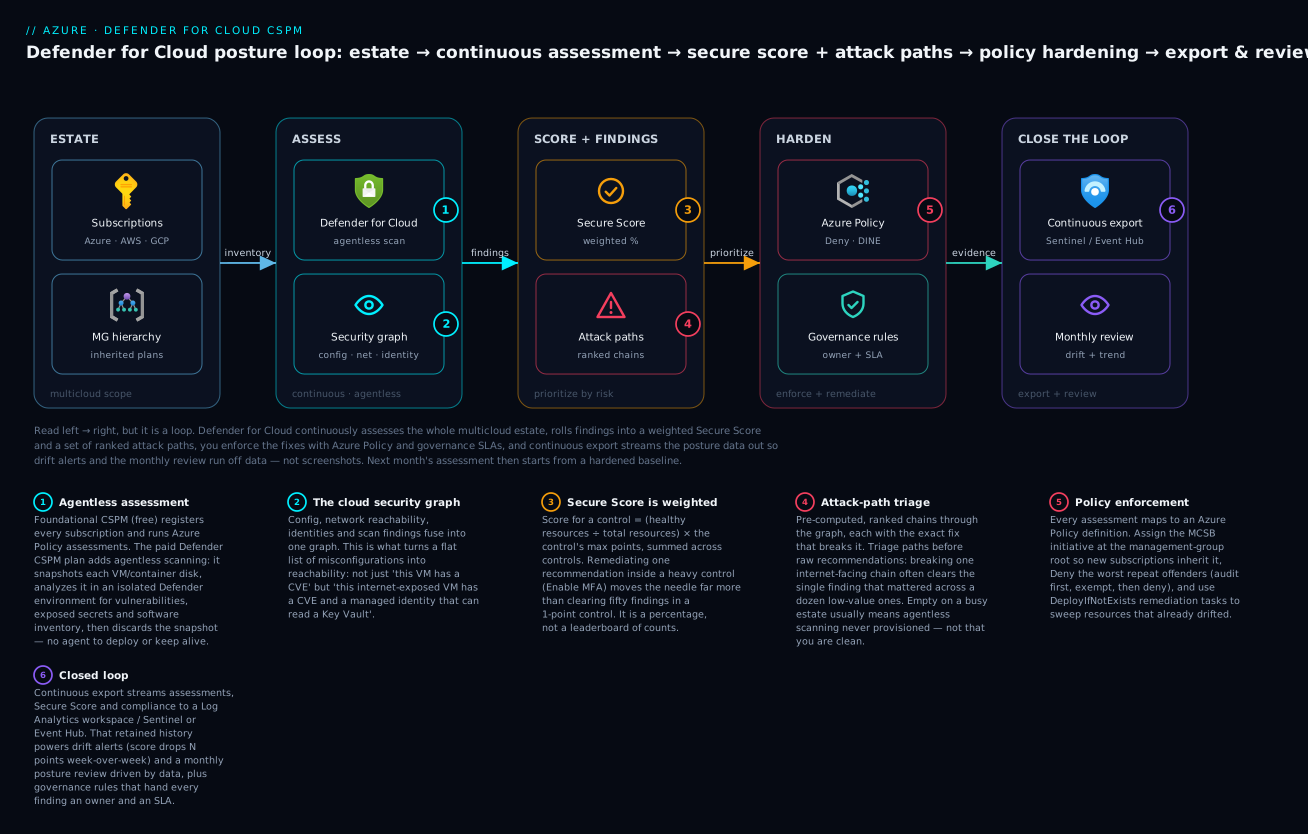
The loop, left to right: Defender for Cloud continuously and agentlessly assesses your whole multicloud estate, fuses the findings into a cloud security graph, rolls them up into a weighted Secure Score plus ranked attack paths, you enforce the fixes with Azure Policy and governance SLAs, and continuous export streams the posture data to Sentinel so next month’s review starts from a hardened, measurable baseline.
Level: Advanced · Time: ~40 min
Prerequisites — you’ll get the most from this if you already understand:
- Azure RBAC and how scope inheritance works (subscription vs management group). See Entra RBAC governance.
- Azure Policy basics — definitions, initiatives, and effects. See Azure Policy as code.
- What a Log Analytics workspace and Microsoft Sentinel are for. See Microsoft Sentinel deployment.
- Ideally the workload-protection companion, since CSPM and CWPP are two halves of one platform: CWPP — Defender for Servers, Containers & Databases.
What you’ll be able to do — after this you can:
- Distinguish foundational CSPM (free), Defender CSPM (paid posture), and the workload plans (paid runtime), and enable each at the right scope.
- Read Secure Score as a weighted percentage and prioritize by points-at-risk × exploitability, not by raw finding count.
- Triage attack paths before recommendations, and diagnose an empty attack-paths blade.
- Enforce posture with Azure Policy (
Deny,DeployIfNotExists) and remediation tasks, rolled out safely via audit-then-deny. - Onboard AWS and GCP so one Secure Score and one attack-path queue cover the whole footprint.
- Wire continuous export + governance rules so every finding has an owner, an SLA, and a trend line, and run a monthly posture review with automated drift detection.
1. Foundation vs Defender CSPM: know what you are actually paying for
Defender for Cloud ships two posture tiers. Foundational CSPM is free and always on once the subscription is registered with Microsoft.Security. It gives you Secure Score, the recommendation engine, asset inventory, and Azure Policy-based assessments. Defender CSPM is a paid plan that unlocks the parts that actually let you hunt risk: agentless machine scanning (vulnerabilities, secrets, software inventory without an agent), the cloud security graph, attack path analysis, and the cloud security explorer.
The distinction matters because the free tier tells you what is misconfigured while the paid tier tells you which misconfiguration is reachable from the internet and lands on a VM with a domain admin token. That second sentence is the whole reason to operationalize this.
Enable the foundation everywhere first. Register the provider and confirm auto-provisioning intent before turning on paid plans.
# Register the resource provider (idempotent)
az provider register --namespace Microsoft.Security

# Confirm Defender for Cloud sees the subscription
az security pricing list --query "value[].{plan:name, tier:pricingTier}" -o table
Then enable the Defender CSPM plan at the subscription scope. The plan name in the pricing API is CloudPosture.
az security pricing create \
  --name CloudPosture \
  --tier Standard
Callout: Defender CSPM and the workload plans are billed per subscription. Use Azure Policy at the management-group scope (Section 4) to enable them so new subscriptions inherit protection instead of joining the estate naked.
2. Workload protection plans: enable them deliberately, not reflexively
The workload plans are runtime threat detection (the “Defender for X” alerts), distinct from CSPM’s posture work. Turn on what maps to real assets. Here is what each plan earns its keep on:
Plan (az security pricing name) |
Protects | Representative detections |
|---|---|---|
VirtualMachines |
IaaS + Arc servers | Fileless attacks, suspicious process trees, crypto-mining, reverse shells |
StorageAccounts |
Blob/Files | Malware upload (hash + on-upload scan), anomalous access, public exposure of containers |
Containers |
AKS, Arc-enabled K8s, ACR | Image vuln findings, runtime threats (crypto-miner pods), exposed Kubernetes dashboard |
SqlServers / SqlServerVirtualMachines |
Azure SQL, SQL on VM | SQL injection, brute force, anomalous data exfiltration |
KeyVaults |
Key Vault | Anomalous secret access, access from suspicious IPs/Tor, unusual app identity bursts |
Api |
API Management | OWASP-class abuse, anomalous traffic, exposure of sensitive endpoints |
Enable the set you need in one pass:
for plan in VirtualMachines StorageAccounts Containers SqlServers KeyVaults; do
  az security pricing create --name "$plan" --tier Standard
done
For Defender for Servers specifically, choose the sub-plan. Plan 2 adds agentless scanning, file integrity monitoring, and just-in-time VM access; Plan 1 is core EDR integration only. Set it with the sub-plan property:
az security pricing create \
  --name VirtualMachines \
  --tier Standard \
  --subplan P2
Defender for Servers integrates Microsoft Defender for Endpoint automatically; you do not deploy MDE separately on Azure/Arc VMs once Plan 1 or 2 is on. Confirm the auto-provisioning of the required components after enabling.
3. Read Secure Score correctly: it is a percentage, not a leaderboard
Secure Score is the single most misused metric in Azure security. Two facts change how you use it:
- It is weighted, not a raw count. Each security control carries a maximum point value (the published “max score”). Your score for a control is
(healthy resources / total resources) * max points. Remediating one recommendation inside a heavily weighted control (e.g., “Enable MFA”) moves the needle far more than clearing fifty findings in a 1-point control. - Recommendations roll up into controls; controls roll up into the score. Chasing individual recommendation counts is how teams burn a sprint and move the score by 0.4%.
Pull the current score and the per-control breakdown via the REST API (the CLI surface here is thin, so query directly):
SUB=$(az account show --query id -o tsv)

# Overall secure score
az rest --method get \
  --url "https://management.azure.com/subscriptions/$SUB/providers/Microsoft.Security/secureScores/ascScore?api-version=2020-01-01" \
  --query "properties.score"

# Per-control contribution, sorted by points you are leaving on the table
az rest --method get \
  --url "https://management.azure.com/subscriptions/$SUB/providers/Microsoft.Security/secureScores/ascScore/secureScoreControls?api-version=2020-01-01&\$expand=definition" \
  --query "sort_by(value[].{control:properties.displayName, current:properties.score.current, max:properties.score.max, gap:properties.score.max}[?max>\`0\`], &gap)" -o table
The correct prioritization is not “highest count” or even “highest max points” in isolation. It is points-at-risk weighted by exploitability. A control worth 6 points where the unhealthy resource sits on an internet-facing attack path beats a 10-point control buried behind three network hops with no public exposure. That is exactly what attack paths (Section 6) let you decide.
4. Drive remediation at scale with Azure Policy, not tickets
Manual remediation does not survive contact with a real estate. Defender for Cloud is built on Azure Policy: every assessment maps to a policy definition inside the Microsoft cloud security benchmark (MCSB) initiative. You get leverage three ways: assign initiatives broadly, use deny to stop drift at the source, and use remediation tasks to fix what already exists.
Assign the benchmark at the management group scope
Assign at the highest scope that makes sense so new subscriptions inherit it. The MCSB is the default initiative Defender uses to compute Secure Score.
# The built-in Microsoft cloud security benchmark initiative
MCSB="/providers/Microsoft.Authorization/policySetDefinitions/1f3afdf9-d0c9-4c3d-847f-89da613e70a8"

az policy assignment create \
  --name "mcsb-mg-root" \
  --display-name "Microsoft cloud security benchmark" \
  --policy-set-definition "$MCSB" \
  --scope "/providers/Microsoft.Management/managementGroups/contoso-root" \
  --location eastus \
  --mi-system-assigned
The managed identity is required because deployIfNotExists and modify policies need permissions to act. Grant it the appropriate role at the assignment scope (the policy definitions declare the roles they need; for the MCSB, Contributor at the assigned scope is the simplest correct grant).
Use deny effects to stop the bleeding
Posture improves fastest when you stop creating new violations. Pick the handful of policies that map to your worst recurring findings and assign them with the Deny effect via a parameter override. Example: deny storage accounts that allow public blob access.
# Built-in: Storage account public access should be disallowed
POLICY="/providers/Microsoft.Authorization/policyDefinitions/4fa4b6c0-31ca-4c0d-b10d-24b96f62a751"

az policy assignment create \
  --name "deny-storage-public" \
  --policy "$POLICY" \
  --scope "/providers/Microsoft.Management/managementGroups/contoso-root" \
  --params '{ "effect": { "value": "Deny" } }'
Callout: Roll out
denyin audit mode first. Set the effect toAudit, watch the compliance results for a sprint to find the legitimate exceptions, encode those as policy exemptions, then flip toDeny. Flipping straight toDenyon a live estate is how you become the reason a deployment pipeline is red at 2 a.m.
Bulk-remediate existing resources
For deployIfNotExists/modify policies, create a remediation task to sweep resources that already violate the rule (new assignments only auto-remediate going forward).
az policy remediation create \
  --name "remediate-diag-settings" \
  --policy-assignment "mcsb-mg-root" \
  --definition-reference-id "deployDiagnosticSettings" \
  --resource-discovery-mode ReEvaluateCompliance
Many Defender recommendations also expose a one-click “Fix” in the portal that wires this up for you; for scale and auditability, prefer declaring it in IaC so the remediation is reviewable in a PR.
5. Regulatory compliance: map to standards and export the evidence
The Regulatory compliance dashboard projects your assessments onto named standards. MCSB is on by default. Add the ones your auditors care about; common built-in standards include CIS Microsoft Azure Foundations, NIST SP 800-53, and PCI DSS. You add a standard by assigning its policy initiative (Defender surfaces it on the compliance dashboard automatically once assigned), or directly from the dashboard’s “Manage compliance policies”.
# Example: assign a CIS Azure Foundations initiative at a subscription scope.
# Resolve the exact definition ID for the version your auditor requires:
az policy set-definition list \
  --query "[?contains(displayName, 'CIS Microsoft Azure Foundations')].{name:displayName, id:name}" -o table
The operational win is exporting evidence on a schedule rather than screenshotting the dashboard during an audit. Two durable patterns:
- Continuous export to a Log Analytics workspace or Event Hub (Section 7) gives you queryable, retained assessment and compliance history.
- A PDF/CSV compliance report can be generated from the dashboard for point-in-time auditor packages.
For programmatic evidence, query assessment state from the workspace once continuous export is flowing. The data lands in the SecurityRecommendation and SecurityRegulatoryCompliance tables (Sentinel/Log Analytics), which you can pin to a workbook your auditors get read access to.
6. Investigate attack paths and hunt with the cloud security explorer
This is where Defender CSPM stops being a checklist. The cloud security graph ingests resource configuration, network reachability, identities, and agentless scan findings (vulnerabilities, exposed secrets) into a single graph. Attack paths are pre-computed, ranked chains through that graph: “Internet-exposed VM with a high-severity CVE has a managed identity with write access to a Key Vault holding a storage key.” Each path comes with a risk level and the exact remediation that breaks the chain.
Triage attack paths before raw recommendations. Breaking one path often clears the single recommendation that matters across a dozen low-value findings.
The cloud security explorer lets you query the graph ad hoc, KQL-style but graph-shaped, in the portal. High-value hunting queries to standardize on:
- Internet-exposed VMs with a critical/high vulnerability (your patch SLA escapees).
- VMs containing plaintext secrets that authenticate to another cloud resource.
- Storage accounts allowing public access and containing data classified as sensitive.
- Identities (managed or user) with permissions to subscriptions they should never touch.
Pull the attack-path inventory programmatically to feed your risk register:
SUB=$(az account show --query id -o tsv)

az rest --method get \
  --url "https://management.azure.com/subscriptions/$SUB/providers/Microsoft.Security/attackPaths?api-version=2023-11-01-preview" \
  --query "value[].{name:properties.displayName, risk:properties.riskLevel}" -o table
Callout: Attack paths require the Defender CSPM plan (Section 1) and agentless scanning to be active. If your attack-paths list is empty on a busy subscription, check that agentless scanning provisioned, not that you have nothing to fix.
7. Continuous export and governance rules with owner SLAs
A finding nobody owns is a finding nobody fixes. Two mechanisms turn Defender into a closed loop.
Continuous export to Sentinel / Event Hub
Stream recommendations, alerts, secure score, and compliance data out continuously. Use Event Hub when you have a SIEM other than Sentinel or need fan-out; use the Log Analytics workspace target when Sentinel is your SIEM. Configure it as an automation resource so it is reviewable in IaC:
resource export 'Microsoft.Security/automations@2019-01-01-preview' = {
  name: 'export-to-sentinel'
  location: location
  properties: {
    isEnabled: true
    scopes: [
      { scopePath: subscription().id }
    ]
    actions: [
      {
        actionType: 'Workspace'
        workspaceResourceId: logAnalyticsWorkspaceId
      }
    ]
    sources: [
      { eventSource: 'Assessments' }
      { eventSource: 'Alerts' }
      { eventSource: 'SecureScores' }
      { eventSource: 'RegulatoryComplianceAssessment' }
    ]
  }
}
The native Microsoft Defender for Cloud data connector in Sentinel also pulls alerts; continuous export is what gets you the posture data (assessments, secure score, compliance) for trend analysis, not just the alerts.
Governance rules: assign owners and SLAs to recommendations
Governance rules (a Defender CSPM feature) auto-assign an owner and a due date to recommendations matching a filter, and can notify owners and their managers on overdue items. This is the difference between a backlog and a program. Build rules like:
- High-severity recommendations on production-tagged resources -> owner = resource owner tag, due in 14 days.
- Internet-exposed attack-path remediations -> owner = platform security team, due in 7 days.
- Everything else -> due in 90 days.
Configure governance rules in the portal under Environment settings; they emit an Unassigned/Overdue status you can export and report on. Pair them with the continuous export above so the SLA breach shows up in Sentinel, not just in a UI nobody opens.
Going deeper
The seven sections above are the operating procedure. This section is the “why it works that way” — the internals, the money, the multicloud story, and the mechanics that separate someone who runs Defender for Cloud from someone who has merely enabled it.
The distinction to memorize: posture vs protection
Everything in Defender for Cloud falls into one of two buckets, and conflating them is the root of most confusion:
CSPM is about configuration (posture) — what could go wrong. The workload plans (the “Defender for X”) are about behavior (protection) — what is going wrong right now. CSPM finds the unlocked window; Defender for Servers catches the burglar climbing through it. You want both, enabled at different scopes for different reasons: CSPM broad and cheap-then-paid, workload plans deliberate and per-asset.
That single sentence resolves questions like “why is my Secure Score high but I still got an alert?” (score measures posture; alerts come from workload protection) and “do I need Defender for Servers if I have Defender CSPM?” (yes — one is agentless posture, the other is runtime detection with an EDR agent).
Foundational CSPM vs Defender CSPM: the feature line
| Capability | Foundational CSPM (free) | Defender CSPM (paid) |
|---|---|---|
| Secure Score + recommendations | Yes | Yes |
| Asset inventory | Yes | Yes |
| Azure Policy assessments (MCSB) | Yes | Yes |
| Regulatory compliance — MCSB | Yes | Yes |
| Regulatory compliance — CIS / NIST / PCI + custom | No (MCSB only) | Yes |
| Agentless machine scanning (vulns, secrets, software) | No | Yes |
| Agentless container vulnerability assessment | No | Yes |
| Cloud security graph | No | Yes |
| Attack path analysis | No | Yes |
| Cloud security explorer | No | Yes |
| Data-aware security posture (DSPM) | No | Yes |
| External attack surface (EASM) insights | No | Yes |
| Governance rules (owners + SLAs) | No (needs a paid plan) | Yes |
Two footnotes that trip people up. First, agentless scanning is also included with Defender for Servers Plan 2 — so if a VM is covered by P2 you get the disk scan even without Defender CSPM, but you only get the graph and attack paths that connect those findings from Defender CSPM. Second, adding any compliance standard beyond MCSB (CIS, NIST, PCI, or a custom one) requires at least one paid Defender plan on the subscription; Defender CSPM satisfies that requirement.
Agentless scanning: how it sees inside a VM without an agent
Agentless scanning is the feature people find hardest to believe, so it is worth understanding the mechanism. Defender takes a snapshot of the managed disk, mounts a copy in an isolated, Microsoft-managed scanning environment, analyzes the filesystem for OS/library CVEs, plaintext secrets (keys, tokens, connection strings), and installed software, then deletes the snapshot. Nothing runs inside your VM: there is no agent to install, patch, or troubleshoot, and no runtime CPU/memory hit.
The trade-offs follow directly from the mechanism:
- Freshness. Agentless is periodic (roughly daily), not real-time. Pair it with the agent-based runtime signals from Defender for Servers when you need “right now” detection.
- Permissions. A Defender-owned identity needs to read and snapshot disks in your subscriptions. This is where the classic failure lives: if a
Denypolicy blocks snapshot creation — a restricted-region rule, a disallowed-resource-type rule — scanning silently produces nothing, and your attack-paths blade stays empty on your busiest workloads. That is the single most common reason a large estate shows zero attack paths, and it is exactly the trap the Enterprise scenario below hit.
The lesson: when the graph looks empty, suspect provisioning before you celebrate.
Secure Score, worked out with real numbers
The weighting is easy to state and easy to forget under sprint pressure, so here is the arithmetic. Suppose the control “Enable MFA” has a max of 10 points and applies to 4 privileged accounts, 1 of which already has MFA. Its contribution is:
(1 healthy / 4 total) * 10 max = 2.5 points
Enable MFA on the other three and it becomes (4 / 4) * 10 = 10 — a +7.5 swing from three changes. Now suppose the control “Storage soft delete” is worth 1 point and has 50 unhealthy accounts: it contributes (0 / 50) * 1 = 0, and fixing all fifty earns exactly +1. The overall Secure Score is:
Secure Score % = sum(all control current scores) / sum(all control max scores) * 100
Three MFA toggles beat fifty storage fixes by 7.5× on the score — and the graph then tells you which of those three privileged accounts actually sits on an attack path, so you fix that one first. This is the mechanical proof of “it is a percentage, not a leaderboard”: count-based prioritization is not just suboptimal, it is arithmetically backwards.
Data-aware security posture (DSPM)
Data-aware security posture extends the graph with one extra dimension: sensitivity. Defender CSPM discovers and classifies sensitive data (PII, secrets, and similar) in supported stores — Azure Storage and managed databases — and feeds that classification into attack paths and the cloud security explorer. The difference is stark. Without DSPM you get “this storage account is public.” With DSPM you get “this public storage account contains data classified as sensitive and is reachable from the internet.” The second finding reorders your entire backlog, because it is the one that turns a misconfiguration into a breach headline. DSPM is the flagship reason the paid plan exists.
Multicloud: onboarding AWS and GCP
Defender for Cloud is a multicloud CNAPP. The same Secure Score, recommendations, agentless scanning, and attack-path analysis extend to AWS accounts and GCP projects through security connectors (Microsoft.Security/securityConnectors). You onboard from Environment settings → Add environment:
- AWS — Defender guides you to deploy a CloudFormation stack (or Terraform) that creates an IAM role Defender assumes read-only, plus roles for agentless scanning and, optionally, sensitive-data discovery. No access keys are stored; Defender uses role assumption.
- GCP — onboarding uses workload identity federation, so again no long-lived service-account keys leave GCP.
Once connected, MCSB has AWS and GCP equivalents, attack paths span clouds (an internet-exposed EC2 instance shows up in the same ranked queue as an exposed Azure VM), and the cloud security explorer queries all three from one console. The strategic payoff is one posture number and one attack-path queue for the whole footprint — not three separate consoles argued over in three separate meetings.
Regulatory compliance: from built-in standards to custom ones
Beyond the built-ins, you can express your own standard. There are two routes:
- Build an Azure Policy initiative (policy set) that groups the definitions your standard requires, and assign it — Defender surfaces it on the compliance dashboard automatically.
- Use the custom standards experience in Defender to compose a standard directly from existing recommendations.
Custom standards are how you encode an internal control framework (“the KloudVin baseline”) or a contractual requirement that no public benchmark matches. And custom recommendations — built on your own KQL over the security graph, a Defender CSPM capability — feed those custom standards, closing the gap between “what the benchmark happens to check” and “what our organization actually requires.” The companion lesson Defender for Cloud: attack paths, custom recommendations & governance goes deep on authoring those.
The Microsoft cloud security benchmark (MCSB) up close
The MCSB is the default initiative Defender uses to compute Secure Score. It is a control framework organized into families — Network security, Identity management, Privileged access, Data protection, Asset management, Logging & threat detection, Incident response, Posture & vulnerability management, Endpoint security, Backup & recovery, DevOps security, and Governance & strategy — and each MCSB control is cross-mapped to CIS, NIST SP 800-53, and PCI DSS.
That mapping is the quiet superpower. Because the named standards share underlying assessments with MCSB, improving MCSB posture moves your CIS/NIST/PCI numbers at the same time. Treat MCSB as the spine and the named standards as views onto it, rather than as five independent programs competing for the same engineers.
Governance rules and remediation mechanics
Governance rules turn recommendations into accountable work. A rule matches recommendations by severity, resource tag, or a specific recommendation, then assigns an owner (a named user/group, or by resource tag — read the owner tag straight off the resource) and a remediation timeframe (the SLA — e.g., 14 days). The mechanics worth knowing:
- Grace period. During the SLA window the recommendation does not count against Secure Score, so owners are not punished for work that is legitimately in flight. After the window lapses, the finding flips to
Overdue. - Notifications. Owners get email; managers can be looped in on overdue items via a weekly digest.
- Apply to existing. A new rule can back-fill onto current recommendations, not only ones raised after the rule exists.
Pair governance with remediation for the mechanical fixes. DeployIfNotExists (DINE) and modify policies auto-fix new resources going forward, and a remediation task sweeps the ones that already drifted — because a new assignment does not retroactively fix existing resources; the remediation task is the sweep. In one line: governance rules decide who and by when; remediation is the machine that actually does it.
Enterprise scenario
A retail platform team I worked with flipped on Defender CSPM across a 140-subscription estate and immediately tried to “Fix” their way down the recommendation list. Secure score barely moved, and Finance flagged a five-figure spend jump. Two things had gone wrong. First, they had enabled CloudPosture per subscription by hand, so the dozen subscriptions onboarded that quarter were unprotected and silently dragging the org score. Second, agentless scanning had never provisioned because a pre-existing deny policy on the management group blocked the scanner’s snapshot disks in a restricted region, so the attack-paths blade was empty on their busiest workloads. They were optimizing a number computed over a graph that did not exist.
The fix was to stop clicking and move enablement to policy at the MG root, then exempt the scanner’s resource group from the offending deny so snapshots could be created.
# Enable Defender CSPM estate-wide via the built-in DINE policy at the MG root
az policy assignment create \
  --name "enable-cspm-mg" \
  --policy "/providers/Microsoft.Authorization/policyDefinitions/689f7782-ef2c-4270-a6d0-7664869076bd" \
  --scope "/providers/Microsoft.Management/managementGroups/contoso-root" \
  --location eastus --mi-system-assigned

# Carve the agentless scanner out of the blocking deny so snapshots provision
az policy exemption create \
  --name "allow-defender-scanner-snapshots" \
  --policy-assignment "deny-snapshots-restricted-region" \
  --exemption-category Mitigated \
  --scope "/subscriptions/$SCANNER_SUB/resourceGroups/DefenderForCloud-Scanner"
Within a week attack paths populated, three internet-exposed chains surfaced that no single recommendation had ranked, and the score climbed once new subscriptions inherited the plan instead of joining the estate naked.
Verify
Confirm the program is actually wired, not just toggled.
SUB=$(az account show --query id -o tsv)

# 1. CSPM + workload plans are Standard
az security pricing list \
  --query "value[?pricingTier=='Standard'].name" -o tsv

# 2. Secure score is being computed (returns a number 0-100)
az rest --method get \
  --url "https://management.azure.com/subscriptions/$SUB/providers/Microsoft.Security/secureScores/ascScore?api-version=2020-01-01" \
  --query "properties.score.percentage"

# 3. The MCSB assignment exists at the management group
az policy assignment list \
  --scope "/providers/Microsoft.Management/managementGroups/contoso-root" \
  --query "[?displayName=='Microsoft cloud security benchmark'].name" -o tsv

# 4. Continuous export automation is enabled
az rest --method get \
  --url "https://management.azure.com/subscriptions/$SUB/providers/Microsoft.Security/automations?api-version=2019-01-01-preview" \
  --query "value[].{name:name, enabled:properties.isEnabled}" -o table
In the portal, confirm: Attack paths shows ranked chains (proves the graph and agentless scanning are live), Regulatory compliance shows your assigned standards with passing/failing controls, and at least one governance rule shows assigned owners with due dates.
Operational checklist
Measuring success: drift detection and a monthly cadence
A posture program is a trend line, not a snapshot. Because continuous export retains secure score and assessment history, you can detect drift the moment it happens: a sudden drop in a control’s healthy-resource ratio means someone deployed around your guardrails (and tells you which deny policy you still need to promote out of audit mode). Build a Sentinel/Log Analytics query that alerts when secure score drops more than N points week-over-week, or when a previously-zero attack-path category becomes non-empty.
Run a monthly posture review with a fixed agenda: secure score delta vs last month, attack paths opened/closed, governance SLA breaches by owner, new Deny candidates from audit-mode findings, and compliance control regressions. The meeting’s output is a short list of policy changes and ownership reassignments, not admiration of the dashboard.
Pitfalls to avoid
- Optimizing the number, not the risk. Clearing 200 one-point findings while an internet-facing attack path stays open is theater. Triage paths first.
Denywithout a bake-in. Always audit, exempt, then deny. Skipping this breaks pipelines and burns your credibility with engineering.- Enabling plans without provisioning. A workload plan toggled on but with auto-provisioning disabled produces no agentless data and empty attack paths. Verify provisioning, not just the toggle.
- Per-subscription sprawl. Enable plans and assign initiatives at the management-group scope so new subscriptions are born protected; per-subscription clicking guarantees gaps.
- No owner, no SLA. Findings without governance rules age into a permanent backlog. The owner and the due date are the program.
Practice challenges
Work these in order — they escalate from “see what you have” to “prove the graph is real.” Every command is schema-correct and current; outputs shown in the solutions are representative. Replace <...> placeholders with your own IDs. None of these commands were run against a live subscription here.
1. See what’s actually on (beginner). Without changing anything, register the security provider and list which Defender plans are Standard vs Free on your current subscription.
<details> <summary>Solution</summary>
az provider register --namespace Microsoft.Security
az security pricing list \
  --query "value[].{plan:name, tier:pricingTier}" -o table
Why: you cannot operationalize what you cannot see; the pricingTier column tells you whether each plan is Free (foundational only) or Standard (paid) before you touch anything.
</details>
2. Prove foundational CSPM is already scoring you (beginner). Foundational CSPM is free and on once the provider is registered. Confirm Secure Score is being computed and read the percentage.
<details> <summary>Solution</summary>
SUB=$(az account show --query id -o tsv)
az rest --method get \
  --url "https://management.azure.com/subscriptions/$SUB/providers/Microsoft.Security/secureScores/ascScore?api-version=2020-01-01" \
  --query "properties.score.percentage"
Why: a returned number (0–100) proves the recommendation engine and MCSB assessments are already running for free — you are getting posture data before spending a rupee on the paid plan. </details>
3. Turn on the paid posture plan and verify (intermediate). Enable Defender CSPM (CloudPosture) and the Storage workload plan at Standard, then confirm both show up as Standard.
<details> <summary>Solution</summary>
az security pricing create --name CloudPosture   --tier Standard
az security pricing create --name StorageAccounts --tier Standard
az security pricing list \
  --query "value[?pricingTier=='Standard'].name" -o tsv
Why: CloudPosture unlocks the graph, attack paths, and agentless scanning; StorageAccounts is a runtime workload plan — enabling both in one exercise makes the CSPM-vs-workload split concrete, and the filter confirms the toggle took.
</details>
4. Make new subscriptions inherit the benchmark (intermediate). Assign the MCSB initiative at a management-group root with a system-assigned identity. Then explain, in one sentence, why the identity is required.
<details> <summary>Solution</summary>
MCSB="/providers/Microsoft.Authorization/policySetDefinitions/1f3afdf9-d0c9-4c3d-847f-89da613e70a8"
az policy assignment create \
  --name "mcsb-mg-root" \
  --display-name "Microsoft cloud security benchmark" \
  --policy-set-definition "$MCSB" \
  --scope "/providers/Microsoft.Management/managementGroups/<mg-root>" \
  --location <region> \
  --mi-system-assigned
# then grant the identity a role at the scope (Contributor is the simplest correct grant for the MCSB)
Why: the MCSB contains deployIfNotExists/modify policies, and those effects need a managed identity with permission to act on resources — without the role grant, remediation silently no-ops.
</details>
5. Stop the bleeding without breaking prod (advanced). Roll out a Deny on public blob access the safe way: assign it in Audit first, then a second assignment in Deny, and carve out one legitimate exception as a policy exemption.
<details> <summary>Solution</summary>
POLICY="/providers/Microsoft.Authorization/policyDefinitions/4fa4b6c0-31ca-4c0d-b10d-24b96f62a751"
SCOPE="/providers/Microsoft.Management/managementGroups/<mg-root>"

# Phase 1 — observe
az policy assignment create --name "audit-storage-public" \
  --policy "$POLICY" --scope "$SCOPE" \
  --params '{ "effect": { "value": "Audit" } }'

# ...bake for a sprint, document exceptions, then Phase 2 — enforce
az policy assignment create --name "deny-storage-public" \
  --policy "$POLICY" --scope "$SCOPE" \
  --params '{ "effect": { "value": "Deny" } }'

# Legitimate exception (e.g., a public static-website account)
az policy exemption create --name "allow-public-static-site" \
  --policy-assignment "deny-storage-public" \
  --exemption-category Waiver \
  --scope "/subscriptions/<sub-id>/resourceGroups/<rg>"
Why: flipping straight to Deny on a live estate turns unknown-but-legitimate usage into 2 a.m. pipeline failures; audit-first surfaces those exceptions so you can exempt them before enforcing — keeping engineering’s trust intact.
</details>
6. Prove the graph is real, not empty (advanced). Pull the attack-path inventory via REST. If it returns nothing on a busy subscription, state the first thing you would check and why.
<details> <summary>Solution</summary>
SUB=$(az account show --query id -o tsv)
az rest --method get \
  --url "https://management.azure.com/subscriptions/$SUB/providers/Microsoft.Security/attackPaths?api-version=2023-11-01-preview" \
  --query "value[].{name:properties.displayName, risk:properties.riskLevel}" -o table
Why: an empty list on a busy estate almost never means “nothing to fix” — check that agentless scanning provisioned (Defender CSPM enabled and no Deny policy blocking the scanner’s disk snapshots); no snapshots means no graph, which means no attack paths.
</details>
Common beginner mistakes
These are conceptual traps — the wrong mental model — distinct from the operational pitfalls listed above.
- “Defender for Cloud is one product with one price.” It is three things billed separately: foundational CSPM (free), Defender CSPM (paid posture), and per-resource workload plans (paid runtime — the “Defender for X”). Right model: enable foundational everywhere, Defender CSPM broadly, workload plans per real asset class.
- “A high Secure Score means we’re secure.” Secure Score is weighted coverage of controls, not proof that no attack path is open. You can score 75% and still have an internet-exposed VM holding a domain-admin token. Right model: score is for the trend; attack paths are for the risk.
- “Empty attack paths means we’re clean.” Far more often it means agentless scanning never provisioned — the plan is off, or a
Denypolicy is blocking the scanner’s snapshots. Right model: verify provisioning before you believe an empty blade. - “I’ll just click Fix on each recommendation.” One-click Fix is fine for a handful, but it does nothing to stop the next violation. Right model: enforce at the source with Azure Policy
Deny/DINE at the management-group scope; reserve Fix for the long tail. - “Secure Score and Regulatory Compliance are the same thing.” Secure Score is the MCSB-weighted posture number; the Compliance dashboard projects the same assessments onto named standards (CIS/NIST/PCI/custom). Same data, two lenses — and auditors want the second one.
- “Defender for Cloud is the antivirus (Microsoft Defender).” Different product. Defender for Cloud is a cloud posture + workload-protection platform (a CNAPP); it integrates Microsoft Defender for Endpoint for servers, but it is not the endpoint AV itself.
- “More security is always better — turn on every plan everywhere.” Workload plans are billed per resource and add up quickly; a plan with no matching assets is pure cost. Right model: CSPM broad, workload plans deliberate, both enabled by policy at MG scope so new subscriptions inherit the right set.
Glossary
- CSPM (Cloud Security Posture Management) — Continuous checking of cloud configuration against best practice; the “is it set up safely?” half of the platform.
- CWPP (Cloud Workload Protection Platform) — Runtime threat detection for workloads (VMs, containers, databases); the “is something attacking it right now?” half — the “Defender for X” plans.
- CNAPP (Cloud-Native Application Protection Platform) — The umbrella category that combines CSPM + CWPP into one platform. Defender for Cloud is a CNAPP.
- Foundational CSPM — The free tier: Secure Score, recommendations, asset inventory, MCSB assessments. On once
Microsoft.Securityis registered. - Defender CSPM — The paid posture plan (
CloudPosture): agentless scanning, cloud security graph, attack path analysis, cloud security explorer, and data-aware posture. - Secure Score — A weighted percentage summarizing posture:
sum(control scores) ÷ sum(max points). Higher is better; a trend metric, not a leaderboard of counts. - Security control — A group of related recommendations with a maximum point value (e.g., “Enable MFA”). Controls roll up into Secure Score.
- Recommendation — A single actionable finding (“this storage account allows public access”). Recommendations roll up into controls.
- Assessment — The evaluated result of one policy against one resource (healthy/unhealthy); the raw material recommendations are built from.
- MCSB (Microsoft cloud security benchmark) — The default Azure Policy initiative Defender uses to compute Secure Score; organized into control families and cross-mapped to CIS/NIST/PCI.
- Azure Policy initiative (policy set) — A named bundle of policy definitions assigned together; MCSB and each compliance standard are initiatives.
- Effect — What a policy does when a resource matches:
Audit(log only),Deny(block),DeployIfNotExists/Modify(remediate). - DeployIfNotExists (DINE) — A policy effect that deploys a missing configuration (e.g., diagnostic settings) when it is absent; needs a managed identity with permission to act.
- Deny (effect) — Blocks non-compliant resource creation/update outright, stopping drift at the source. Roll out audit-first.
- Policy exemption — A scoped, documented carve-out from an assignment for a legitimate exception (categories:
Waiver,Mitigated). - Remediation task — A one-off sweep that applies a DINE/modify fix to resources that already violate a rule (new assignments only fix things going forward).
- Agentless scanning — Reads inside a VM/container by snapshotting its disk and analyzing a copy in a Microsoft-managed environment — no agent installed. Periodic, not real-time.
- Cloud security graph — The unified graph of configuration, network reachability, identity, and scan findings that powers attack paths and the explorer.
- Attack path — A pre-computed, ranked chain through the graph from an entry point to an asset of value, with the exact fix that breaks it.
- Cloud security explorer — Ad-hoc, graph-shaped querying of the security graph in the portal (KQL-like) for proactive hunting.
- DSPM (Data-aware security posture) — Defender CSPM capability that discovers and classifies sensitive data and feeds that sensitivity into attack paths and the explorer.
- Regulatory compliance dashboard — The view that projects your assessments onto named standards (MCSB, CIS, NIST, PCI, custom).
- Governance rule — A Defender CSPM rule that auto-assigns an owner and an SLA (remediation timeframe, with a grace period) to matching recommendations.
- Continuous export — Streams assessments, Secure Score, alerts, and compliance to Log Analytics/Sentinel or Event Hub for retention, trend analysis, and drift alerts.
- Auto-provisioning — The setting that deploys the components a plan needs (agents, extensions, the scanner); a plan toggled on without provisioning produces no data.
- Security connector — The
Microsoft.Security/securityConnectorsresource that onboards an AWS account or GCP project for multicloud posture and protection. - JIT (Just-in-time) VM access — A Defender for Servers feature that keeps management ports closed and opens them on request, for a limited time, from approved sources.