In a nutshell
Think of ordinary Azure compute as a hot desk in a shared open-plan office: cheap, instantly available, and you sit wherever there’s room next to strangers (other tenants), kept apart by good soundproofing (the hypervisor). That’s the right choice for almost everything. This lesson is about the six times it isn’t — and the specialized primitive Azure gives you for each:
- Dedicated Hosts are like leasing a whole private floor of the building: nobody else works on your floor, you can prove it to an auditor, you can license the floor by its actual desks (BYOL), and you decide when the cleaners come in (maintenance control). The catch: you pay for the whole floor even when half the desks are empty.
- Proximity placement groups are insisting your team sit at adjacent desks so they can talk without picking up a phone — the lowest possible latency between them — at the risk that there’s no free adjacent desk for a latecomer (allocation failure).
- Spot VMs are the standby seats an airline sells cheap: you fly for a fraction of the price, but you can be bumped at the gate with barely a moment’s notice (30-second eviction). Perfect for a flexible traveller (a batch job), useless for someone who must be on that flight (a database).
- Confidential VMs are a soundproof, windowless room even building security can’t see into (data-in-use encryption), plus a signed certificate proving the room is genuine before you carry the documents in (attestation).
- HPC families with InfiniBand wire the team together with a private high-speed intercom instead of shouting across the room — that’s RDMA, and it’s what lets a simulation scale to hundreds of nodes.
- Azure Batch and CycleCloud are a temp agency: they hire exactly as many workers as the job needs, then send everyone home (autoscale to zero) so you pay only while work happens.
Level: Advanced · Time: ~40 min. Before you start, be comfortable with standard VMs, disks, availability zones and scale sets (the Prerequisites section below names the earlier lessons). After it, you’ll be able to hear a requirement — “PCI-isolated”, “sub-millisecond hops”, “500 cores overnight”, “the operator must not read the data” — and reach for the right primitive without hesitation. The sections that follow give each the full architect’s treatment; skim the nutshell, then dig in.
Most Azure compute lessons stop at the standard virtual machine — pick a size, attach a disk, put it in an availability zone, done. But a surprising amount of real architecture lives in the specialized compute territory beyond that default: the workloads that need a whole physical server to themselves for compliance, the trading systems that measure success in microseconds of network latency, the batch pipelines that want ten thousand cores for twenty minutes and nothing the rest of the day, the regulated data that must stay encrypted even while the CPU is processing it, and the engineering simulations that only run fast if the nodes are wired together with InfiniBand. Azure has a distinct feature or service for each of these, and a senior architect is expected to know not just that they exist but when each is the right answer, what it costs, and where the sharp edges are.
This lesson is the map of that territory. We cover Azure Dedicated Hosts and host groups (single-tenant physical servers you control, for isolation, bring-your-own-licence economics and maintenance scheduling); proximity placement groups (forcing VMs physically close together to shave network latency); Spot Virtual Machines (Azure’s deeply discounted spare capacity, and the eviction model you must design around); Confidential VMs and confidential containers (hardware-based memory encryption with AMD SEV-SNP and Intel TDX, plus remote attestation — confidential computing, the third state of data protection); the HPC VM families (HB, HC, HX, ND) and the InfiniBand/RDMA fabric that makes tightly-coupled parallel jobs scale; Azure Batch and Azure CycleCloud (two different ways to run large-scale job scheduling on pools of VMs that grow and shrink automatically); and Scheduled Events, the in-VM signal that lets any application become maintenance-aware. Each gets the architect’s treatment — what it is, the choices, the defaults, when to pick it, the trade-off, the limits and the cost lever.
By the end you will be able to look at an unusual compute requirement — “this has to be PCI-isolated”, “this trading engine needs sub-millisecond hops”, “we want to run this CFD model on 500 cores overnight”, “the regulator says the data can’t be readable even to Microsoft” — and reach confidently for the right Azure primitive.
Learning objectives
By the end of this lesson you can:
- Explain Azure Dedicated Hosts and host groups — physical isolation, host SKUs and capacity, automatic vs manual placement, maintenance control, and the bring-your-own-licence (Azure Hybrid Benefit) economics that justify them.
- Use proximity placement groups (PPGs) to co-locate VMs for low latency, and explain how PPGs interact with availability zones and availability sets (and the trade-off).
- Design for Spot VMs: choose an eviction policy (Deallocate vs Delete) and eviction type (capacity vs price), set a max price, and architect workloads that tolerate eviction.
- Choose between Confidential VMs, confidential containers on AKS/ACI, and standard compute — and explain AMD SEV-SNP, Intel TDX, and remote attestation in the data-in-use protection story.
- Match an HPC workload to the right HPC VM family (HB/HC/HX/ND) and explain why InfiniBand + RDMA and the right MPI matter for tightly-coupled jobs.
- Select between Azure Batch and Azure CycleCloud for large-scale scheduling, and configure pools, jobs/tasks, and autoscale.
- Make any VM maintenance-aware by consuming Scheduled Events, and distinguish planned from unplanned maintenance.
Prerequisites
You should be comfortable with the standard Azure virtual machine — sizes and families, disks, availability zones, availability sets and scale sets — covered in the Azure Virtual Machines deep dive and the VM resilience deep dive. You should know the subscription → resource group → resource hierarchy, how to run az in Cloud Shell, and the basics of reservations and Azure Hybrid Benefit, because the licensing economics return here. This lesson sits in the Compute module of the Azure Zero-to-Hero course as the “everything beyond the standard VM” capstone, immediately after the compliance and sovereignty lesson (confidential computing is a sovereignty control) and before we close the compute track. No prior HPC or confidential-computing experience is assumed — every term is defined.
Core concepts
Before the individual features, fix five mental models. They explain why this whole family exists.
Standard VMs are multi-tenant by design; sometimes you must opt out of that. On a normal VM, Microsoft’s fabric places your virtual machine on whatever physical host has room, alongside other customers’ VMs (strongly isolated by the hypervisor, but sharing the silicon). For the vast majority of workloads that is correct and economical. Dedicated Hosts exist for the minority that must not share a physical server — for a compliance mandate, a software licence that is bound to physical cores, or a need to control exactly when the host is patched. You are trading away the efficiency of shared infrastructure for isolation and control, and you pay for that with the host whether you fill it or not.
Latency is physics; placement is the lever. Two VMs in the same region might be in different datacentres several kilometres apart — fine for almost everything, but a problem for a chatty, latency-sensitive cluster (think a trading matching engine and its feed handlers, or HPC nodes exchanging data every millisecond). A proximity placement group tells Azure “put these VMs as physically close as possible”, typically in the same datacentre and ideally the same network spine, trading some allocation flexibility for the lowest possible network latency between them.
Spare capacity is cheap if you can give it back. At any moment Azure has unused compute that would otherwise sit idle. Spot VMs let you rent that spare capacity at a steep discount — often 60-90% off pay-as-you-go — on one condition: Azure can evict (reclaim) the VM with as little as 30 seconds’ notice when it needs the capacity back (or when your max price is exceeded). This is the single most important cost lever in compute if and only if your workload can survive an instance vanishing — batch jobs, dev/test, stateless web tiers behind a scale set, CI agents.
There is a third state of data, and confidential computing protects it. We routinely protect data at rest (disk encryption) and data in transit (TLS). But while a CPU is actually processing data, that data sits in plain memory, readable in principle by anyone with sufficient access to the host — including, in the threat model that matters for the most sensitive regulated workloads, the cloud operator. Confidential computing closes that gap: the CPU encrypts the VM’s (or container’s) memory with a key the hardware holds and the host OS/hypervisor never sees, and remote attestation lets you cryptographically prove the workload is genuinely running inside such a protected, unmodified environment before you release secrets to it. This is data-in-use protection.
Tightly-coupled HPC is a network problem, not a CPU problem. A parallel simulation split across many nodes is only as fast as the slowest communication step between them. Ordinary Ethernet (even accelerated) adds microseconds of latency and CPU overhead per message; at scale, that overhead dominates and the job stops scaling — adding nodes makes it slower. The HPC VM families solve this with InfiniBand and RDMA (Remote Direct Memory Access), a fabric that lets one node write directly into another node’s memory, bypassing the OS and CPU, at single-digit-microsecond latency. That is what lets an MPI job scale to hundreds of nodes.
Key terms used throughout: dedicated host (a single-tenant physical server), host group (the container/collection of hosts, the zonal/fault-domain boundary), fault domain (a rack-level isolation boundary), PPG (proximity placement group), eviction (reclamation of a Spot VM), TEE / enclave (trusted execution environment — the hardware-protected memory region), attestation (proving a TEE’s identity/integrity), RDMA / InfiniBand (the low-latency HPC fabric), MPI (Message Passing Interface — the programming model for tightly-coupled HPC), pool (a managed, autoscaling group of compute nodes in Batch), and Scheduled Event (an in-VM notification of imminent maintenance).
Azure Dedicated Hosts & host groups
A standard VM lives on a physical host that Microsoft chooses and shares among customers. An Azure Dedicated Host flips that: you provision an entire physical server that is yours alone, and you place your VMs onto it. Nobody else’s workload runs on that silicon.
Why dedicated hosts exist
Three drivers justify the premium:
- Physical isolation / compliance. Some regulatory regimes and security policies require that workloads run on hardware not shared with other tenants. A dedicated host gives you a single-tenant boundary you can attest to.
- Bring-your-own-licence (BYOL) economics. Many per-physical-core software licences (Windows Server and SQL Server via Azure Hybrid Benefit, and some third-party products) are far cheaper when you control the underlying physical cores. On a dedicated host you can see and licence the actual cores, sockets and host type, often making the host cheaper overall than the equivalent fully-licensed standard VMs.
- Maintenance control. On standard VMs, Microsoft decides when host maintenance happens (within an SLA). On a dedicated host you can use maintenance control to defer and self-schedule platform updates within a rolling window — critical for systems with strict change windows.
Host groups, fault domains and zones
You don’t create a host directly into thin air — you create a host group first, then add hosts to it. The host group is the resilience and placement boundary.
| Concept | What it is | Choices / defaults | Notes |
|---|---|---|---|
| Host group | The container/collection that holds one or more dedicated hosts | Created per region; can be pinned to a single availability zone or left zoneless | The host group’s zone is fixed at creation — you cannot move it later |
| Fault domains | Rack-level isolation within the host group; hosts in different FDs sit on separate racks (power/network) | 1–5 (you choose at host-group creation; default 1) | Spread hosts across FDs so a single rack failure doesn’t take out all of them |
| Availability zone | A physically separate datacentre group within the region | Optional; one zone per host group | For zone resilience, deploy multiple host groups, one per zone |
| Host (the resource) | The physical server itself, of a specific host SKU | e.g. Dsv5-Type1, Esv5-Type1, Fsv2-Type1 |
The SKU family must match the VM series you intend to place |
A common production pattern for a resilient dedicated-host estate: one host group per availability zone, each with 2-3 fault domains, hosts spread across the FDs, and VMs balanced across the hosts. That gives you both rack-level (FD) and datacentre-level (zone) resilience on single-tenant hardware.
Host SKUs and capacity
Each host SKU corresponds to a VM family and a fixed amount of physical capacity — a set number of physical cores, a memory size, and therefore a number of VMs of a given size it can hold. For example a host of the Dsv5-Type1 family exposes a fixed pool of physical cores; you can pack it with any mix of Dsv5 VM sizes until the cores are exhausted (one large VM, or many small ones, the cores are the limit). You pay for the whole host per hour regardless of how many VMs you place on it — so the economics only work when you fill the host or when BYOL savings outweigh the unused capacity.
Automatic vs manual placement
When you create the host group you choose how VMs land on hosts:
| Placement mode | Behaviour | When to use |
|---|---|---|
| Manual placement (default) | You explicitly assign each VM to a named host via --host. If you forget, the VM fails to deploy |
Maximum control; small estates; when you must guarantee exactly which host a VM is on |
| Automatic placement | Azure chooses a host within the group with room and places the VM for you (you target the host group, not a host) | Larger estates; scale sets on dedicated hosts; less operational toil |
Automatic placement is the modern default recommendation for anything beyond a handful of VMs, and it is required for placing a Virtual Machine Scale Set on a host group.
Maintenance control
Maintenance control is the headline operational benefit. You create a maintenance configuration (scope = Host), assign it to the host group (or individual hosts), and Azure then holds back all non-zero-impact platform updates for those hosts. You apply pending updates on your schedule (a recurring window, or on-demand), one fault domain at a time, so you control exactly when reboots/live-migrations touch your isolated hardware. Without maintenance control, Microsoft applies host updates on its own cadence (still within SLA, but not on your clock).
Limits and gotchas
- You cannot mix VM families on a single host — the host is bound to one SKU family.
- A host group’s zone and fault-domain count are immutable after creation. Plan them up front.
- Some VM features (e.g. certain ephemeral-OS or specialized SKUs) aren’t supported on dedicated hosts; check the host SKU’s supported sizes.
- You pay for the host, not the VMs on it — an empty host still bills. This is the most common bill-shock surprise.
- Reserved Instances and savings plans apply to the host, materially lowering the cost for steady-state estates.
# Create a zonal host group with 2 fault domains and automatic placement
az vm host group create \
  -g rg-dedicated -n hg-prod-z1 \
  --location centralindia --zone 1 \
  --platform-fault-domain-count 2 \
  --automatic-placement true

# Add a dedicated host of a specific SKU into fault domain 0
az vm host create \
  -g rg-dedicated --host-group hg-prod-z1 -n host-dsv5-0 \
  --sku Dsv5-Type1 --platform-fault-domain 0

# Create a VM that auto-places onto the host group (Hybrid Benefit for Windows)
az vm create \
  -g rg-dedicated -n vm-app-1 --image Win2022Datacenter \
  --host-group hg-prod-z1 --zone 1 \
  --size Standard_D4s_v5 --license-type Windows_Server
Proximity placement groups (low latency)
Two VMs in the same region can be far enough apart that the network round-trip between them is a meaningful fraction of a millisecond. For most applications that is irrelevant. For a latency-sensitive, chatty cluster — a stock-exchange matching engine and its order gateways, a SAP application tier and its database, HPC nodes exchanging boundary data — it can be the difference between meeting an SLA and missing it.
A proximity placement group (PPG) is a logical grouping that tells Azure: place every VM in this group as physically close together as possible — same datacentre, and where possible the same network spine. The result is the lowest and most consistent network latency Azure can offer between those VMs.
How it works and the trade-off
You create an empty PPG, then deploy VMs (and scale sets) into it. The first VM you start “anchors” the PPG to a specific datacentre; every subsequent VM is placed near that anchor. That is also the catch:
| Aspect | Detail |
|---|---|
| Benefit | Lowest, most consistent inter-VM network latency (single-digit microseconds within the group) |
| Anchor behaviour | The first allocated VM pins the location; later VMs must fit there |
| Allocation risk | The smaller the target region/datacentre, the higher the chance a needed VM size isn’t available at the anchor location → allocation failure |
| Mitigation | Deploy the largest / rarest VM sizes first so the anchor lands somewhere that can host them; deploy all PPG VMs together |
| Zones interaction | A PPG is, by nature, a single physical location — so it is effectively within one availability zone. You cannot have one PPG span zones (that would defeat the purpose). For zone resilience you run one PPG per zone |
| Availability sets | An availability set can be aligned to a PPG, combining low latency with fault/update-domain spread within that location |
The core architectural tension: PPG pulls VMs together (latency); availability zones push them apart (resilience). You cannot have both maximally — so you decide per tier. A latency-critical compute cluster might accept single-zone placement in a PPG and rely on a second PPG in another zone for DR; a web tier that doesn’t need microsecond latency stays zone-redundant.
az ppg create -g rg-lowlat -n ppg-trading --location centralindia
# Deploy the rarest/largest size first to anchor well, then the rest
az vm create -g rg-lowlat -n vm-engine --ppg ppg-trading \
  --size Standard_F32s_v2 --image Ubuntu2204
az vm create -g rg-lowlat -n vm-gateway --ppg ppg-trading \
  --size Standard_F8s_v2 --image Ubuntu2204
Spot Virtual Machines & eviction
Spot VMs rent Azure’s unused capacity at a deep discount — frequently 60-90% below pay-as-you-go, varying by region, size and demand. The deal is simple and asymmetric: you get cheap compute, and Azure can take it back (“evict” it) at any time with as little as 30 seconds’ notice (delivered via a Scheduled Event — see below) when it needs the capacity for full-price customers or when your price cap is exceeded.
Spot is the highest-leverage cost optimization in compute — for the right workloads. It is wrong for anything that must stay up; it is excellent for anything interruptible.
Eviction type: capacity vs price
When you create a Spot VM you choose why it can be evicted:
| Eviction type | What triggers eviction | Behaviour |
|---|---|---|
Capacity only (set max price = -1) |
Azure needs the capacity back | You pay the current Spot price (capped at the pay-as-you-go rate) and are only ever evicted for capacity, never for price. The common choice |
Price or capacity (set a max price, e.g. 0.05) |
The Spot price rises above your max price, or Azure needs capacity | You also get evicted if market price exceeds your cap — useful to enforce a hard budget ceiling |
Setting max price = -1 means “I’ll pay up to the standard pay-as-you-go price, just don’t evict me on price” — this is what most batch/HPC users want.
Eviction policy: Deallocate vs Delete
Separately, you choose what happens to the VM when it is evicted:
| Eviction policy | On eviction | Cost while evicted | When to use |
|---|---|---|---|
| Deallocate (default) | VM is stopped (deallocated); OS/data disks kept; you can restart it later when capacity returns | You still pay for the disks (and any static IP) while deallocated | Stateful-ish workloads you want to resume; you keep the VM identity and disks |
| Delete | VM and (optionally) its disks are deleted | Nothing (resources gone) | Truly ephemeral nodes, especially in Spot scale sets, where you want capacity to come and go cleanly with no lingering disk bills |
Designing for eviction
Spot only works if the workload tolerates a node disappearing. Patterns that make it safe:
- Checkpoint frequently. Long-running jobs should write progress so an evicted node loses minutes, not hours. Azure Batch and many HPC schedulers do this for you.
- Use a Spot scale set with Delete policy for stateless fleets (CI agents, render farms, stateless web behind a load balancer). The orchestrator simply replaces evicted instances.
- Mix Spot and regular in one scale set (a base of on-demand instances + Spot for burst) so you keep a guaranteed floor of capacity.
- Consume the eviction Scheduled Event (
Preempt) to drain gracefully in the 30-second window — finish or checkpoint the current unit of work, deregister from the load balancer. - Never put a database, a domain controller, a stateful singleton, or anything with an SLA on Spot.
# Spot VM: capacity-only eviction (max price -1), Delete on eviction
az vm create -g rg-batch -n vm-spot-worker --image Ubuntu2204 \
  --size Standard_D4s_v5 \
  --priority Spot --eviction-policy Delete --max-price -1

# Check current eviction rate / pricing signal for a size before committing
az vm list-skus --location centralindia --size Standard_D4s_v5 --output table
Confidential VMs & confidential containers
Disk encryption protects data at rest; TLS protects data in transit. Confidential computing protects the third state — data in use, while it is being processed in memory — by running the workload inside a hardware-based Trusted Execution Environment (TEE). The CPU encrypts the VM’s or container’s memory with a key generated and held inside the processor, never exposed to the host OS, the hypervisor, or the cloud operator. Even an administrator with full access to the physical host cannot read the workload’s live memory.
The hardware: AMD SEV-SNP and Intel TDX
Azure Confidential VMs are built on two CPU technologies; the VM size family tells you which:
| Technology | Vendor | What it does | Azure VM families |
|---|---|---|---|
| AMD SEV-SNP (Secure Encrypted Virtualization – Secure Nested Paging) | AMD EPYC | Encrypts VM memory per-VM with a hardware key; SNP adds integrity protection against the hypervisor | DCasv5/DCadsv5, ECasv5/ECadsv5 (and newer) |
| Intel TDX (Trust Domain Extensions) | Intel Xeon | Creates hardware-isolated “trust domains” with encrypted, integrity-protected memory | DCesv5/DCedsv5, ECesv5/ECedsv5 (and newer) |
Both deliver the same architectural promise — a confidential VM whose entire memory is hardware-encrypted — using different silicon. You choose the family; the size letter scheme is the standard one (D = general purpose, E = memory-optimized; the C denotes confidential).
Attestation: proving the TEE is real
Encryption alone isn’t enough — you must be able to prove a workload is genuinely running inside a legitimate, unmodified TEE before you trust it with secrets. That is remote attestation: the hardware produces a signed attestation report describing the TEE’s identity and measurements (firmware, boot state), and a verifier checks it. On Azure this is the job of Microsoft Azure Attestation (MAA), a managed service that validates the evidence and issues a token. A typical confidential pattern: the workload boots, attests via MAA, and only on a valid token does Key Vault / Managed HSM release the keys the workload needs (secure key release). For confidential VMs, the OS disk can also be confidential-encrypted with keys bound to the VM’s TEE.
Confidential containers
You don’t need a whole VM to get a TEE. Azure offers confidential containers in two forms:
| Form | Where | Model |
|---|---|---|
| Confidential containers on AKS | AKS with confidential VM node pools or Confidential Containers (Kata) | Pod-level isolation in a hardware-backed enclave; for lift-and-shift of standard containers into a TEE |
| Confidential containers on ACI | Azure Container Instances | Serverless confidential containers backed by SEV-SNP, with an enforced security policy and attestation |
These let you protect data-in-use for containerized workloads — useful for multi-party data analytics (several organizations compute over combined data that none can read), confidential AI inference, and processing regulated PII where even the operator must be excluded from the trust boundary.
When to use (and the trade-offs)
| Aspect | Detail |
|---|---|
| Use when | Regulatory/contractual requirement to exclude the cloud operator from the trust boundary; multi-party computation; highly sensitive PII/financial/health data; sovereignty controls |
| Cost | Confidential families carry a premium over equivalent standard sizes |
| Performance | Small overhead from memory encryption; generally modest for typical workloads |
| Constraints | Limited region/family availability vs standard VMs; specific supported OS images; some features differ |
| Not a silver bullet | Protects memory confidentiality/integrity — it is not a substitute for patching, network security, or identity controls |
# Create a Confidential VM (AMD SEV-SNP family) with a confidential OS disk
az vm create -g rg-conf -n cvm-1 \
  --size Standard_DC4as_v5 \
  --image "Canonical:0001-com-ubuntu-confidential-vm-jammy:22_04-lts-cvm:latest" \
  --security-type ConfidentialVM \
  --os-disk-security-encryption-type DiskWithVMGuestState \
  --enable-vtpm true --enable-secure-boot true \
  --admin-username azureuser --generate-ssh-keys
HPC VM families & InfiniBand
High-Performance Computing (HPC) workloads — computational fluid dynamics, weather and climate models, molecular dynamics, finite-element crash simulation, seismic processing, large-scale AI training — split one big problem across many nodes that must constantly exchange data. As noted in the core concepts, the bottleneck for these tightly-coupled jobs is the inter-node network, not the CPUs. Azure’s HPC VM families pair fast, HPC-grade CPUs/GPUs with a back-end InfiniBand fabric and RDMA, which is what lets a job scale efficiently to hundreds of nodes.
The families
| Family | Optimized for | Interconnect | Typical workloads |
|---|---|---|---|
| HB-series (HBv3, HBv4) | Memory-bandwidth-bound HPC | InfiniBand (NDR/HDR) | CFD, weather, explicit FEA, fluid dynamics |
| HC-series | Compute / dense-FP HPC (high clock, all cores) | InfiniBand | Implicit FEA, molecular dynamics, computational chemistry |
| HX-series | Very large memory HPC | InfiniBand | EDA (chip design), large structural/mechanical models |
| ND-series (NDv2/v4/v5 and newer) | GPU HPC & large-scale AI training | InfiniBand between GPU nodes (e.g. NVIDIA, GPUDirect RDMA) | Distributed deep-learning training, GPU simulation |
| NC / NV-series | GPU compute / visualization (often not InfiniBand-coupled) | Ethernet (typically) | Single-node GPU compute, inference, remote viz |
The H-prefix families (HB/HC/HX) and the InfiniBand-equipped ND families are the tightly-coupled HPC SKUs. The N-series without InfiniBand are for single-node or loosely-coupled GPU work (one big inference box, visualization), where node-to-node RDMA isn’t needed.
InfiniBand, RDMA and MPI
Three ingredients make tightly-coupled HPC scale, and you need all three:
- InfiniBand fabric — a dedicated, low-latency, high-bandwidth (HDR/NDR, hundreds of Gbps) back-end network separate from the normal Ethernet NIC. Only the HPC families have it.
- RDMA (Remote Direct Memory Access) — lets one node read/write another node’s memory directly, bypassing the OS kernel and CPU, at single-digit-microsecond latency. This is the magic that removes per-message overhead.
- MPI (Message Passing Interface) — the programming/runtime model HPC apps use to coordinate across nodes. To exploit InfiniBand you run an RDMA-capable MPI (HPC-X, Intel MPI, MVAPICH2, Open MPI) over the fabric.
To use the fabric you also need the right OS image and drivers: the Azure HPC marketplace images (AlmaLinux-HPC / Ubuntu-HPC) ship with the InfiniBand drivers, RDMA stack and tuned MPI pre-installed — strongly preferred over hand-installing on a base image. For predictable performance, HPC nodes are typically placed in a proximity placement group (often within a single scale set) so they sit on the same InfiniBand spine.
A classic interview point: why does a parallel job sometimes get slower when you add nodes? Because past a point, communication overhead grows faster than the compute you’ve added (Amdahl’s law plus network cost). InfiniBand/RDMA pushes that point much further out — which is exactly why the HPC families exist.
Azure Batch & CycleCloud
Running one HPC job by hand on a few VMs is easy. Running thousands of jobs, or a job across hundreds of nodes that you only want to exist while the job runs, needs a scheduler that provisions compute, queues and dispatches work, scales the fleet up and down, and tears it all down afterwards. Azure gives you two distinct services for this, aimed at two different audiences.
Azure Batch
Azure Batch is a fully managed, cloud-native job-scheduling service. You don’t manage a scheduler or head node — Azure does. The model is three nested concepts:
| Concept | What it is |
|---|---|
| Pool | A managed, autoscaling collection of compute nodes (VMs of a chosen size/image). The pool can grow and shrink on a formula, and can be Spot (low-priority) nodes for cheap throughput |
| Job | A logical container for work, attached to a pool |
| Task | A unit of work (a command line, with input files and output handling) that runs on a node. Tasks can be many thousands; Batch dispatches them across the pool |
Batch shines for embarrassingly parallel and HPC workloads: rendering (every frame a task), Monte-Carlo and financial risk runs, genomics/parametric sweeps, media transcoding, and MPI multi-node jobs (Batch supports multi-instance tasks over InfiniBand). Its autoscale formula is the key cost lever: you write an expression (based on pending tasks, time of day, etc.) and Batch resizes the pool — including scaling to zero when idle, so you pay only while work runs. Combine that with Spot nodes and Batch becomes extremely cheap per unit of work.
# Create a Batch account, then an autoscaling Spot pool
az batch account create -g rg-batch -n kvbatch$RANDOM -l centralindia
az batch account login -g rg-batch -n <account>
# (pool/job/task creation continues via `az batch pool create`, `job create`, `task create`)
Azure CycleCloud
Azure CycleCloud is an orchestration tool for deploying and managing traditional HPC cluster schedulers on Azure. Where Batch replaces the scheduler with a managed service, CycleCloud lets HPC teams keep the scheduler they already know — Slurm, PBS Pro/OpenPBS, LSF, Grid Engine — and run it on Azure with autoscaling, cost controls and a familiar cluster experience. You install CycleCloud (often from the Marketplace), point it at your subscription, and it provisions head nodes and dynamically autoscaling execute nodes, mounts shared filesystems, and presents the cluster exactly as on-prem HPC users expect.
| Azure Batch | Azure CycleCloud | |
|---|---|---|
| Model | Managed job-scheduling service (no scheduler to run) | Orchestrator that deploys your HPC scheduler (Slurm/PBS/LSF/GE) |
| Audience | Developers building scalable batch into apps; cloud-native pipelines | HPC teams lifting traditional clusters to the cloud; researchers used to Slurm |
| You manage | Pools/jobs/tasks via API/SDK | A familiar cluster (queues, the scheduler), with autoscale handled |
| Best for | Embarrassingly parallel, render/transcode, parametric sweeps, app-integrated batch | Tightly-coupled MPI HPC where users want their existing scheduler/workflow |
| Autoscale | Built-in formula on the pool (to zero) | Scheduler-driven autoscale of execute nodes (to zero) |
The decision is largely cultural and architectural: build batch into an application → Azure Batch; bring an existing HPC cluster and its users → CycleCloud. Both autoscale to zero and both can use Spot for the worker fleet.
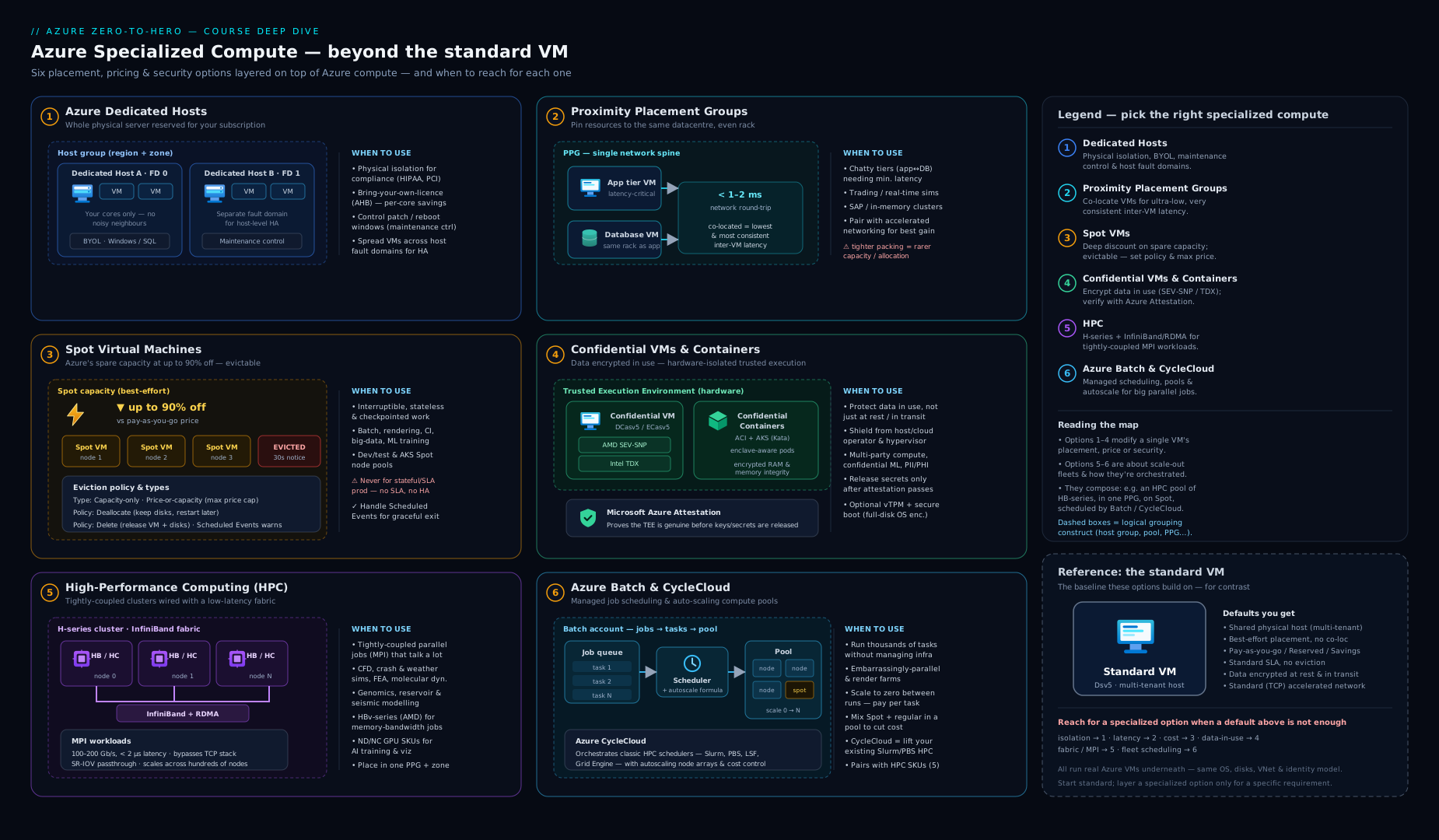
The diagram lays out the specialized-compute landscape — Dedicated Hosts and host groups for isolation, PPGs for latency, Spot for cheap interruptible capacity, Confidential VMs/containers for data-in-use, the HPC families on InfiniBand, and Batch/CycleCloud orchestrating pools — so you can see at a glance which primitive answers which requirement.
Scheduled events & maintenance awareness
Every VM, no matter how special, eventually faces maintenance — and the difference between a graceful workload and an outage is whether the application knew it was coming. Azure exposes that knowledge through Scheduled Events.
Planned vs unplanned maintenance
| Type | What it is | Impact |
|---|---|---|
| Unplanned (unexpected) | A hardware failure on the host | Azure auto-recovers the VM (typically a few minutes of downtime as it restarts on healthy hardware). Availability zones/sets limit the blast radius |
| Planned | Routine platform updates (host OS, firmware) | Often zero-impact via live migration (the VM is moved with a brief pause of a few seconds); some updates need a reboot. Maintenance control (above) lets you self-schedule these on eligible resources |
Scheduled Events: the in-VM signal
Scheduled Events is part of the Azure Instance Metadata Service (IMDS) — a non-routable endpoint (169.254.169.254) reachable only from inside the VM. The VM polls it to learn about imminent maintenance affecting that VM, with advance warning (typically up to 15 minutes for planned operations, but as little as ~30 seconds for a Spot eviction), giving the application time to react — drain connections, fail over, checkpoint, deregister from a load balancer.
Event types you’ll see in the payload include:
| EventType | Meaning | Typical reaction |
|---|---|---|
| Reboot | The VM will be rebooted for maintenance | Flush state, checkpoint, quiesce |
| Redeploy | The VM will be moved to another host | Same — expect a brief outage |
| Freeze | The VM is paused briefly (e.g. live migration) | Usually nothing, but pause time-sensitive ops |
| Preempt | A Spot VM is being evicted (~30s notice) | Checkpoint, deregister, save work now |
| Terminate | The VM (often scale-set instance) is being deleted | Graceful shutdown of the app |
A maintenance-aware app polls the Scheduled Events endpoint, and on seeing a relevant event for its own node, performs its drain/checkpoint logic and then acknowledges (approves) the event to let Azure proceed immediately rather than waiting out the timer. This is exactly how a Spot scale set drains an evicted node, and how a clustered database fails over before a reboot instead of after.
# From inside a Linux VM: read pending Scheduled Events via IMDS
curl -s -H "Metadata:true" \
  "http://169.254.169.254/metadata/scheduledevents?api-version=2020-07-01" | jq .
# To acknowledge an event, POST its EventId back to the same endpoint.
Going deeper
The sections above are the decision map. This one is for the reader who will actually operate these primitives — the internals, the sharp edges, and the current (2026) features that separate a textbook answer from a production one.
Dedicated hosts: host types, instance view, and the capacity-reservation confusion
A host SKU name like Dsv5-Type1 carries a hidden dimension: the -Type1 / -Type2 suffix is a hardware generation, and a given VM series may only be certified on one of them in a region (Type2 usually maps to a newer CPU stepping with more usable cores). Query what a host currently holds and how much room is left with the host instance view:
az vm host get-instance-view -g rg-dedicated --host-group hg-prod-z1 -n host-dsv5-0 \
  --query "instanceView.{available:availableCapacity, statuses:statuses[].code}" -o jsonc
Two things beginners conflate:
- Dedicated Host is not a Capacity Reservation. A capacity reservation guarantees that N cores of a size are available to you on demand in a zone — but the VMs still run on shared, multi-tenant hosts. It buys availability certainty, not isolation. A dedicated host buys isolation (single-tenant silicon) and incidentally guarantees capacity because the hardware is already yours. “Guarantee I can scale out on Black Friday” → capacity reservation; “no other tenant on my silicon” → dedicated host.
- A host auto-heals. If the physical host fails, Azure’s
autoReplaceOnFailurebehaviour provisions a replacement host and restarts the VMs on it — you don’t lose the host resource, but the VMs reboot, which is why you still spread across fault domains and, ideally, zones.
Reserved instances and savings plans apply to the host, and a stopped-but-allocated host keeps billing — there is no “deallocate the host to save money” move the way there is for a VM.
Spot: the eviction signal, simulate-eviction, and priority mix
Two current capabilities turn Spot from “cheap but scary” into something you can engineer around:
az vm simulate-evictionforces Azure to evict a Spot VM on demand, so you test your drain/checkpoint path in CI instead of praying it works when a real eviction lands at 3 a.m.:
az vm simulate-eviction -g rg-batch -n vm-spot-worker
# then read the Preempt event the app should already be polling for via IMDS
- Spot Priority Mix (Flexible-orchestration scale sets) lets one VMSS hold a guaranteed floor of on-demand instances plus a Spot majority above it, so a capacity crunch degrades throughput instead of taking the fleet to zero:
az vmss create -g rg-fleet -n vmss-mix --orchestration-mode Flexible \
  --image Ubuntu2204 --instance-count 10 --priority Spot --eviction-policy Delete \
  --regular-priority-count 2 --regular-priority-percentage 20
Here two instances are always regular priority, and 20% of everything above that base is regular too. Pair it with spotRestorePolicy so the scale set automatically re-creates evicted Spot instances when capacity returns. On AKS the same idea is a Spot node pool — but it comes with a taint (kubernetes.azure.com/scalesetpriority=spot:NoSchedule) and matching label, so only pods that explicitly tolerate Spot ever land there; your stateful pods stay on the regular pool by default. Spot also draws from a separate regional quota (e.g. “Standard Dv5 Family Spot vCPUs”) from your standard quota — a fleet can fail to grow because the Spot quota, not the standard one, is exhausted. The VM Scale Sets deep dive covers the orchestration modes this builds on.
Confidential: Trusted Launch is not a Confidential VM, and the two disk modes
The single most common confusion here: Trusted Launch is not a Confidential VM. Trusted Launch (now the default on many sizes) gives you Secure Boot + a virtual TPM (vTPM) — it protects the boot chain and measures integrity, but the VM’s memory is not hardware-encrypted and the operator remains inside the trust boundary. A Confidential VM adds SEV-SNP / TDX memory encryption on top, removing the operator. If a requirement says “protect against a malicious hypervisor”, only the confidential family qualifies.
When you create a Confidential VM you also choose an OS-disk security type:
| OS-disk security type | What is confidential | Use |
|---|---|---|
VMGuestStateOnly |
Only the guest state (vTPM state) is confidential; the OS disk is standard platform-encrypted | Lower overhead; when the OS image itself isn’t sensitive |
DiskWithVMGuestState |
The full OS disk is confidential-encrypted with a key bound to the VM’s TEE | Highest assurance; the OS disk can’t be read off the TEE |
Attestation is the load-bearing step: the guest emits a signed report, Microsoft Azure Attestation (MAA) validates it against a policy and returns a JWT, and only that token unlocks secure key release from Key Vault / Managed HSM. Confidential compute now reaches GPUs too — the NCC H100 v5 family runs an NVIDIA H100 in confidential mode for protected AI inference — and containers via confidential containers on ACI, whose enforced security policy you generate with the az confcom extension. For the analytics and governance framing see confidential computing for sensitive analytics and the secure key release deep dive.
HPC: SR-IOV InfiniBand, GPUDirect, and feeding the cluster
Modern HPC images expose InfiniBand via SR-IOV, which hands the VM a virtual function of the physical IB adapter for near-bare-metal RDMA — verify the fabric is actually up inside the node with ibstat (look for State: Active and the link rate) before blaming your MPI. Three operational details decide whether a job scales:
- Pin and don’t oversubscribe. Tightly-coupled MPI wants one rank per physical core, pinned, usually with SMT/hyper-threading off, so ranks don’t migrate across NUMA nodes mid-exchange.
- GPUDirect RDMA on ND-series lets one GPU write straight into a remote GPU’s memory across InfiniBand, bypassing both host CPUs — essential for multi-node deep-learning training.
- Feed the cluster. Hundreds of RDMA-connected nodes will starve on a slow shared filesystem; pair them with a parallel filesystem — Azure Managed Lustre, or BeeGFS/NFS on fast disks — not a single file server.
Batch: the autoscale formula and multi-instance MPI tasks
Batch’s cost lever is a small autoscale formula DSL evaluated on a schedule. A representative formula that tracks pending work and scales cheap low-priority nodes to a cap, deallocating only after a task finishes:
// representative Batch autoscale formula
$pending = max($PendingTasks.GetSample(TimeInterval_Minute * 5));
$TargetLowPriorityNodes = min($pending, 20);
$TargetDedicatedNodes   = 0;
$NodeDeallocationOption  = taskcompletion;
taskcompletion means a node is only removed once its current task ends, so scale-down never kills work mid-flight. For MPI, Batch uses a multi-instance task: a coordination command brings up the ring across N nodes over InfiniBand, then the application command runs across them. Choose the user-subscription pool allocation mode (rather than the default Batch-service mode) when pools must live in your VNet or use confidential/quota-sensitive sizes.
Failure modes worth pre-empting
- PPG anchor drift. If you deallocate every VM in a PPG and later restart them, the anchor can re-pin to a different datacentre — and a large size that fit before may now fail to allocate. Keep at least one anchor VM running, or redeploy largest-first.
- Confidential/HPC regional scarcity. These families exist in a subset of regions and can be capacity-constrained; treat “region + family + size available” as a design assumption to verify, not a given.
- Host maintenance is per-fault-domain. With maintenance control you apply updates one fault domain at a time — so a host group with a single fault domain gives you no rolling window to hide behind.
Hands-on lab
In this lab you exercise three of the most practical specialized-compute features from Cloud Shell — a proximity placement group, a Spot VM with an eviction policy, and reading Scheduled Events from inside the VM. (Dedicated hosts, confidential VMs and full HPC clusters incur real cost and quota; they are described above rather than provisioned here.) Everything below runs on standard, low-cost sizes and is fully torn down at the end.
Step 1 — Resource group, region and a proximity placement group.
RG=rg-spec-compute-lab
LOC=centralindia
az group create -n $RG -l $LOC
az ppg create -g $RG -n ppg-lab --location $LOC
Expected: the PPG is created ("proximityPlacementGroupType": "Standard").
Step 2 — Deploy a small Spot VM into the PPG with a Delete eviction policy.
az vm create -g $RG -n vm-spot-lab \
  --image Ubuntu2204 --size Standard_B2s \
  --ppg ppg-lab \
  --priority Spot --eviction-policy Delete --max-price -1 \
  --admin-username azureuser --generate-ssh-keys
Expected: the VM deploys with "priority": "Spot" and "evictionPolicy": "Delete". (If you get a Spot allocation error, that region/size has no spare capacity right now — try --size Standard_B1s or a different region.)
Step 3 — Confirm the Spot and PPG settings.
az vm show -g $RG -n vm-spot-lab \
  --query "{priority:priority, eviction:evictionPolicy, ppg:proximityPlacementGroup.id}" -o jsonc
Validation: priority is Spot, eviction is Delete, and ppg references ppg-lab — proving the VM is both a Spot instance and pinned to the proximity placement group.
Step 4 — Read Scheduled Events from inside the VM.
# SSH in (the IMDS endpoint is only reachable from inside the VM)
ssh azureuser@$(az vm show -d -g $RG -n vm-spot-lab --query publicIps -o tsv)

# Inside the VM:
curl -s -H "Metadata:true" \
  "http://169.254.169.254/metadata/scheduledevents?api-version=2020-07-01"
exit
Expected: a JSON document {"DocumentIncarnation": N, "Events": []} — an empty Events array means no maintenance is currently scheduled for this VM. (When Azure later schedules maintenance, or evicts this Spot VM, an event with EventType such as Preempt or Reboot would appear here, which a real app would poll for and act on.)
Step 5 (read-only) — Inspect what a host group would look like. Without creating one, you can list the host SKUs available in the region to see what dedicated-host families you could deploy:
az vm list-skus --location $LOC --resource-type hostGroups/hosts -o table 2>/dev/null \
  || echo "Host SKUs vary by region/subscription; check the portal Dedicated Hosts blade."
Cleanup.
az group delete -n $RG --yes --no-wait
Cost note (INR): the lab’s only running cost is the Spot B2s VM, billed per second at the Spot price — typically a fraction of the already-low B-series pay-as-you-go rate, so a 20-30 minute lab is on the order of a rupee or two, plus a few paise for the small OS disk while it exists. The PPG, the Scheduled Events endpoint and listing SKUs are free. az group delete removes everything (with --eviction-policy Delete the disk goes too), returning the cost to zero. Note that dedicated hosts and confidential VMs are materially more expensive and were deliberately not provisioned here — never leave a dedicated host running idle, as it bills for the whole physical server.
Practice challenges
Six escalating exercises. Everything uses low-cost, low-risk resources; the dedicated-host and confidential steps are described rather than run because they bill for real hardware. Placeholders (<...>) are yours to fill.
1 (Beginner) — Create and inspect a proximity placement group. Make a resource group and a PPG, then confirm its type.
<details><summary>Solution</summary>
az group create -n rg-spec-practice -l centralindia
az ppg create -g rg-spec-practice -n ppg-p1 -l centralindia
az ppg show -g rg-spec-practice -n ppg-p1 --query proximityPlacementGroupType -o tsv
Expect Standard. Why: a PPG is free and empty until a VM anchors it — creating one commits you to nothing, which is exactly why you scaffold it before deploying the latency-sensitive tier.
</details>
2 (Beginner) — Deploy a capacity-only Spot VM and prove its settings. Launch a small Spot VM with Delete eviction, then read back its priority and policy.
<details><summary>Solution</summary>
az vm create -g rg-spec-practice -n vm-spot-p2 --image Ubuntu2204 --size Standard_B2s \
  --priority Spot --eviction-policy Delete --max-price -1 \
  --admin-username azureuser --generate-ssh-keys
az vm show -g rg-spec-practice -n vm-spot-p2 \
  --query "{priority:priority, eviction:evictionPolicy}" -o jsonc
Expect Spot / Delete. Why: --max-price -1 is capacity-only eviction at up to the pay-as-you-go rate — the setting most batch users actually want.
</details>
3 (Intermediate) — Lay out a resilient host group. Write the commands to create a zonal host group with 3 fault domains and automatic placement, then add one Dsv5-Type1 host into fault domain 0. Explain why the SKU family is a one-way door.
<details><summary>Solution</summary>
az vm host group create -g rg-spec-practice -n hg-p3 -l centralindia --zone 1 \
  --platform-fault-domain-count 3 --automatic-placement true
az vm host create -g rg-spec-practice --host-group hg-p3 -n host-0 \
  --sku Dsv5-Type1 --platform-fault-domain 0
Why: a host group’s zone and fault-domain count are immutable, and a host is bound to one SKU family — you cannot later put Esv5 VMs on a Dsv5 host, so the family choice must match the workload up front. (Delete the host immediately if you run this — it bills for the whole physical server.)
</details>
4 (Intermediate) — Test the eviction drain path without waiting. You have a Spot VM. Force an eviction on demand and confirm the reclaim, instead of hoping your checkpoint code works during a real eviction.
<details><summary>Solution</summary>
az vm simulate-eviction -g rg-spec-practice -n vm-spot-p2
# a running node would surface a Preempt event on the IMDS Scheduled Events endpoint:
# curl -s -H "Metadata:true" \
#   "http://169.254.169.254/metadata/scheduledevents?api-version=2020-07-01"
Why: simulate-eviction is the only way to exercise the ~30-second Preempt path deterministically — untested drain logic is the usual reason a “Spot-safe” job still loses work.
</details>
5 (Advanced) — Write a Batch autoscale formula. For a pool of low-priority nodes, scale from 0 up to 50 based on pending tasks, and never remove a node mid-task.
<details><summary>Solution</summary>
$pending = max($PendingTasks.GetSample(TimeInterval_Minute * 5));
$TargetLowPriorityNodes = min($pending, 50);
$TargetDedicatedNodes   = 0;
$NodeDeallocationOption  = taskcompletion;
Apply with az batch pool autoscale enable --pool-id <pool> --auto-scale-formula "<formula>". Why: taskcompletion drains a node before removing it, and scaling low-priority (Spot) nodes to zero means you pay only while tasks actually run.
</details>
6 (Advanced) — Add a Spot node pool to AKS that only interruptible pods use. Design the node pool and describe how you keep stateful pods off it.
<details><summary>Solution</summary>
az aks nodepool add --cluster-name <aks> -g <rg> -n spotpool \
  --priority Spot --eviction-policy Delete --spot-max-price -1 \
  --enable-cluster-autoscaler --min-count 0 --max-count 10
AKS automatically taints the pool kubernetes.azure.com/scalesetpriority=spot:NoSchedule and labels it kubernetes.azure.com/scalesetpriority=spot. Only pods with a matching toleration (plus, ideally, a nodeSelector/affinity on the label) schedule there; everything else stays on the regular pool. Why: the taint is a default-deny — you opt in interruptible workloads, so a database pod can never accidentally land on Spot.
</details>
Common beginner mistakes
These are conceptual traps — wrong mental models rather than broken commands (those live in the troubleshooting table below).
“A Dedicated Host is just a bigger, faster VM.” It isn’t a VM at all — it’s the physical server. You still create ordinary VMs and place them onto the host, and you’re billed for the host whether it holds one VM or twenty. The right model: a dedicated host is an empty rack slot you’ve leased; the VMs are what you rack into it, and an empty slot is pure cost.
“Trusted Launch means my VM is confidential.” The most expensive misunderstanding on the exam and in design reviews. Trusted Launch (Secure Boot + vTPM) protects the boot chain; the running memory is still visible to the hypervisor and the operator. Only a Confidential VM (SEV-SNP / TDX) encrypts memory and removes the operator from the trust boundary. If the requirement mentions the cloud operator as part of the threat model, Trusted Launch does not satisfy it.
“A proximity placement group improves availability because it groups my VMs.” Exactly backwards. A PPG deliberately concentrates VMs into one physical location, which reduces fault isolation. It is a latency tool, never an availability tool. High availability comes from spreading across availability zones — the opposite motion. When you need both, you run one PPG per zone and accept that each zone’s cluster is internally low-latency but the zones are independent.
“Spot is just a cheaper tier I can switch on for anything.” Spot capacity can vanish with ~30 seconds’ notice. It is superb for batch, CI, render farms and stateless fleets, and actively dangerous for databases, domain controllers, quorum members, or any stateful singleton. “Cheaper” is only true if the workload can lose a node mid-run without harm.
“--max-price -1 means free, or means unlimited spending.” Neither. -1 means “I’ll pay up to the pay-as-you-go price, and I only want to be evicted when Azure needs the capacity back — never on price.” It’s a ceiling equal to on-demand, which paradoxically minimizes price-based evictions. You still pay the (discounted) Spot rate in effect at the time.
“A deallocated Spot VM costs nothing.” Only the compute stops. With the Deallocate policy you keep paying for the OS/data disks and any static public IP for as long as the VM sits stopped. If you want zero cost between runs, use the Delete eviction policy (typically in a scale set) so the disks go with the VM.
“Any VM can do HPC if I install MPI on it.” MPI will run on any VM, but without an InfiniBand fabric it falls back to Ethernet, where per-message latency and CPU overhead make tightly-coupled jobs stop scaling — often running slower as you add nodes. Real scaling needs an HB/HC/HX/ND family, the HPC marketplace image with the RDMA drivers, and an RDMA-capable MPI. Two of the three isn’t enough.
“Confidential computing means I can drop my other encryption and patching.” It protects exactly one thing: data in use, in memory. You still need encryption at rest (disks) and in transit (TLS), and you still have to patch the guest, secure the network, and manage identity. Confidential compute narrows the trust boundary; it does not replace the rest of the stack.
“Batch and CycleCloud compete — I should pick the newer one.” They serve different people. Azure Batch is a managed service (pools → jobs → tasks) for developers wiring scalable batch into an application. CycleCloud orchestrates the HPC scheduler you already run (Slurm/PBS/LSF) so a research team keeps its familiar workflow. The right question isn’t “which is newer” but “does someone want to write to a scheduling API, or bring an existing cluster.”
Common mistakes & troubleshooting
| Symptom | Likely cause | Fix |
|---|---|---|
| Dedicated-host bill far higher than expected | You pay for the whole host whether or not VMs fill it; an idle/under-packed host still bills | Right-size and pack hosts; apply a reserved instance to the host; delete hosts you aren’t using |
| VM fails to deploy onto a dedicated host | Host group is in manual placement and you didn’t specify --host (or the host is full / wrong SKU family) |
Specify the target host, or switch the group to automatic placement; check the host has free cores and matches the VM family |
| PPG deployment fails with allocation error | The PPG’s anchor location can’t host the requested size | Deploy the largest/rarest size first; deploy all PPG VMs together; try another zone/region |
| Spot VM keeps getting evicted | Volatile capacity for that size/region, or your max price is below market | Use --max-price -1 (capacity-only); pick a less contested size/region; spread across sizes; mix Spot + regular in a scale set |
| Spot eviction caused data loss | Workload wasn’t checkpointing and ignored the Preempt event | Consume Scheduled Events; checkpoint frequently; use Deallocate policy if you must keep disks, or design the job to resume |
| HPC job doesn’t scale past a few nodes | Not using InfiniBand/RDMA (wrong VM family, base image without drivers, or non-RDMA MPI) | Use an HB/HC/HX/ND family + the HPC marketplace image + an RDMA-capable MPI; place nodes in a PPG/scale set |
| Confidential VM won’t boot a given image | The OS image isn’t a supported confidential-VM image, or the family isn’t available in the region | Use a marketplace confidential-VM image; check region/family availability; verify --security-type ConfidentialVM and vTPM/secure-boot settings |
| App got rebooted with no warning | The application never polled Scheduled Events, so it didn’t drain before planned maintenance | Poll the IMDS Scheduled Events endpoint; react to and acknowledge events; for control over timing on eligible resources, apply maintenance control |
Best practices
- Reach for specialized compute only when the requirement demands it. Standard VMs in availability zones cover most needs cheaply; dedicated hosts, confidential VMs and HPC SKUs all carry a premium — justify each with isolation, compliance, latency or scale requirements.
- For dedicated hosts, pack and reserve. The economics only work when you fill the host or capture BYOL savings; apply reserved instances/savings plans to the host and use maintenance control for change-window discipline. Spread hosts across fault domains and use one host group per zone for resilience.
- Use Spot aggressively for interruptible work, never for stateful singletons. Default to
--max-price -1(capacity-only) and Delete policy in scale sets; checkpoint; mix Spot with a small on-demand base for a guaranteed floor. - Treat confidential computing as a sovereignty/compliance control. Pair Confidential VMs/containers with attestation (MAA) and secure key release so secrets only reach a verified TEE; remember it protects memory, not your patching or network posture.
- For tightly-coupled HPC, use the HPC images and a PPG. The InfiniBand families plus the tuned HPC marketplace image plus an RDMA MPI plus proximity placement is the combination that actually scales.
- Pick the scheduler that fits the team: Azure Batch for cloud-native, app-integrated batch (autoscale to zero, Spot nodes); CycleCloud when users want their existing Slurm/PBS/LSF workflow on autoscaling Azure capacity.
- Make every important workload maintenance-aware. Poll Scheduled Events and drain/checkpoint/fail over in the warning window — this is the single cheapest resilience improvement you can make.
Security notes
- Confidential computing is the strongest data-in-use control Azure offers — use it when the threat model must exclude the cloud operator (multi-party computation, sovereign/regulated PII). Always attest before releasing secrets; encrypt the OS disk with TEE-bound keys (DiskWithVMGuestState) and enable vTPM + secure boot.
- Dedicated hosts give single-tenant physical isolation for compliance regimes that forbid shared hardware — but isolation at the hardware layer does not replace network security, identity, patching or disk encryption; layer those on as usual.
- Spot VMs share the same security model as standard VMs, but design assuming a node can vanish — never store the only copy of sensitive data on a Spot instance; checkpoint to durable, encrypted storage.
- HPC clusters often run privileged MPI and shared filesystems — restrict the InfiniBand/cluster subnet with NSGs, put the head/login node behind Bastion rather than a public IP, and keep the HPC images patched.
- Keep maintenance control and Scheduled Events handling in code review — a mis-handled drain can be the difference between a clean failover and a customer-visible outage; treat the drain path as production-critical.
- Govern specialized SKUs with Azure Policy — you may want to restrict who can deploy expensive dedicated hosts / HPC families, and require confidential security types for designated sensitive subscriptions.
Interview & exam questions
1. When would you choose an Azure Dedicated Host over standard VMs? When you need single-tenant physical isolation (compliance/regulatory mandate), bring-your-own-licence economics (per-physical-core licences like SQL/Windows via Hybrid Benefit are cheaper on hardware you control), or maintenance control (self-scheduling host updates within a change window). You trade shared-infrastructure efficiency for isolation and control, and you pay for the whole host regardless of utilization.
2. What is the difference between a host group and a dedicated host? A dedicated host is the physical server; a host group is the container that holds one or more hosts and defines the placement boundary — its availability zone and fault-domain count (both fixed at creation). You create the host group first, then add hosts into its fault domains.
3. Automatic vs manual placement on dedicated hosts? Manual (default) requires you to assign each VM to a named host (--host); automatic lets Azure choose a host within the group. Automatic is recommended at scale and is required to put a scale set on a host group.
4. What does a proximity placement group do, and what’s the trade-off? It forces VMs to be physically co-located for the lowest, most consistent inter-VM network latency. The trade-off is allocation flexibility: the first VM anchors the location and later VMs must fit there, so rare/large sizes can fail to allocate — mitigate by deploying the largest size first. A PPG is effectively within a single zone, so it pulls against zone resilience.
5. Explain Spot VM eviction — the two “types” and the two “policies”. Eviction type = why it’s evicted: capacity-only (max price -1, evicted only when Azure needs capacity) or price-or-capacity (a max price; also evicted if market price exceeds it). Eviction policy = what happens: Deallocate (stop, keep disks, resume later — you still pay for disks) or Delete (remove the VM/disks, no further cost). Notice comes via a Preempt Scheduled Event with ~30 seconds’ warning.
6. What is confidential computing and which CPU technologies back it on Azure? Hardware-based protection of data in use: the CPU encrypts VM/container memory with a key the host/hypervisor never sees, inside a Trusted Execution Environment. On Azure it’s AMD SEV-SNP (DCas/ECas families) and Intel TDX (DCes/ECes families). It complements at-rest and in-transit encryption — the “third state”.
7. What is remote attestation and why does it matter for confidential workloads? It’s the process of cryptographically proving a workload is genuinely running in a legitimate, unmodified TEE before trusting it. The hardware emits a signed attestation report; Microsoft Azure Attestation verifies it and issues a token, which gates secure key release from Key Vault/Managed HSM — so secrets only ever reach a verified enclave.
8. Why do HPC VM families have InfiniBand, and what is RDMA? Tightly-coupled HPC is limited by inter-node communication, not CPU. InfiniBand is a dedicated low-latency, high-bandwidth back-end fabric; RDMA lets one node access another’s memory directly, bypassing the OS/CPU at single-digit-microsecond latency. Together with an RDMA-capable MPI, they let parallel jobs scale to hundreds of nodes instead of stalling on communication overhead.
9. Azure Batch vs Azure CycleCloud — when each? Azure Batch is a managed job-scheduling service (pools → jobs → tasks, autoscale to zero, Spot nodes) for cloud-native, app-integrated, embarrassingly-parallel and HPC work — you don’t run a scheduler. CycleCloud orchestrates a traditional HPC scheduler (Slurm/PBS/LSF/Grid Engine) on autoscaling Azure capacity for teams who want to bring their existing cluster and workflow. Build batch into an app → Batch; lift an existing HPC cluster → CycleCloud.
10. What are Scheduled Events and how does an application use them? A part of the Instance Metadata Service (169.254.169.254, reachable only inside the VM) that warns of imminent maintenance (Reboot/Redeploy/Freeze/Preempt/Terminate) with advance notice. A maintenance-aware app polls the endpoint, drains/checkpoints/fails over when it sees an event for its node, then acknowledges the event to let Azure proceed immediately.
11. Planned vs unplanned maintenance — what’s the difference in impact? Unplanned is a hardware failure: Azure auto-recovers the VM with a few minutes’ downtime (zones/sets limit blast radius). Planned is routine platform updates, often zero-impact via live migration (brief pause) or sometimes a reboot; on eligible resources you can self-schedule these with maintenance control.
12. How do you architect a cost-efficient render farm on Azure? Use Azure Batch with an autoscaling pool of Spot nodes (each frame a task), set --max-price -1 and Delete eviction policy so capacity comes and goes cleanly, scale the pool to zero when idle, and consume Preempt events to requeue interrupted frames. You pay only while frames render, at the deep Spot discount.
Quick check
- You must run a workload on a server not shared with any other tenant, and licence SQL Server by physical core as cheaply as possible. Which compute option?
- A trading cluster needs the lowest possible network latency between its VMs. What do you create, and what’s the main risk?
- You want the cheapest compute for an interruptible batch job and want no lingering disk cost after eviction. Which
--priority,--eviction-policyand--max-price? - Your regulator requires that even Microsoft cannot read the data while it’s being processed. Which class of compute, and what proves the environment is genuine?
- An MPI simulation stops scaling past 8 nodes. Name the three things that must all be in place for it to scale.
Answers
- Azure Dedicated Host — single-tenant physical isolation, and you can licence the actual physical cores (BYOL / Azure Hybrid Benefit), usually making it cheaper than fully-licensed standard VMs for steady-state SQL.
- A proximity placement group — the main risk is allocation failure, because the first VM anchors the physical location and later (especially large/rare) sizes may not fit there; deploy the largest size first and all VMs together.
--priority Spot --eviction-policy Delete --max-price -1— Spot for the deep discount, Delete so the VM and disks vanish on eviction (no further cost), max price-1for capacity-only eviction at up to the pay-as-you-go rate.- Confidential VMs / confidential containers (AMD SEV-SNP or Intel TDX) protect data in use; remote attestation (verified by Microsoft Azure Attestation) cryptographically proves the workload runs in a genuine, unmodified TEE before secrets are released.
- An InfiniBand-equipped HPC VM family (HB/HC/HX/ND), the HPC marketplace image with the RDMA drivers, and an RDMA-capable MPI — plus, ideally, a proximity placement group so the nodes share the InfiniBand spine.
Exercise
Design (on paper or in Bicep) a resilient, cost-aware specialized-compute estate for a quantitative-research firm with three needs. (1) A regulated risk-calc tier that, per the compliance team, must run on single-tenant hardware with self-scheduled patching — specify the host group layout (zones, fault domains, placement mode), the maintenance configuration, and how you’d apply a reserved instance to control cost. (2) An overnight Monte-Carlo batch that should cost as little as possible — choose between Azure Batch and CycleCloud, justify it, and specify the pool sizing, Spot settings (eviction type/policy/max price) and the autoscale-to-zero behaviour, plus how tasks survive eviction. (3) A tightly-coupled CFD model the engineers run on ~100 cores — pick the HPC VM family, the image, the interconnect/MPI, and the placement strategy, and explain in two sentences why this combination scales where standard VMs wouldn’t. Finish with a short note on which tiers (if any) should use Confidential VMs and why.
Certification mapping
This lesson supports the compute-specialization corners of both major Azure certifications:
- AZ-104 (Azure Administrator) — Deploy and manage Azure compute resources: configuring VM sizes and priority (Spot), availability options, dedicated hosts, and understanding maintenance behaviour. Spot priority, dedicated hosts and proximity placement groups are named compute concepts an administrator is expected to configure and operate.
- AZ-305 (Solutions Architect Expert) — Design compute solutions: choosing the right compute for isolation (dedicated hosts, confidential computing), latency (PPGs), cost (Spot), and scale (Batch/HPC). The “which compute primitive for which requirement” decisions here are core architecture-design material, as is positioning confidential computing as a data-protection/sovereignty control.
- AZ-700 / specialty awareness — the InfiniBand/RDMA networking and proximity placement concepts touch HPC networking; the confidential computing + attestation material aligns with security/sovereignty design discussed in SC-100.
Glossary
- Dedicated Host — a single-tenant physical server you provision and place your VMs onto.
- Host group — the container for dedicated hosts; defines the availability zone and fault-domain placement boundary (both immutable after creation).
- Fault domain — a rack-level isolation boundary (separate power/network); spread hosts across FDs for resilience.
- Maintenance control — a feature to defer and self-schedule platform updates on eligible resources (e.g. dedicated hosts) within your change window.
- Azure Hybrid Benefit (BYOL) — using existing per-core Windows/SQL licences on Azure; especially valuable on dedicated hosts where you control physical cores.
- Proximity placement group (PPG) — a logical grouping that co-locates VMs physically for the lowest inter-VM network latency.
- Spot VM — a VM running on Azure’s spare capacity at a deep discount that can be evicted with short notice.
- Eviction type — why a Spot VM can be evicted: capacity-only (max price -1) or price-or-capacity (a max price cap).
- Eviction policy — what happens on eviction: Deallocate (stop, keep disks) or Delete (remove VM/disks).
- Confidential computing — hardware-based protection of data in use by encrypting VM/container memory inside a TEE.
- TEE (Trusted Execution Environment) / enclave — the hardware-isolated, memory-encrypted region a confidential workload runs in.
- AMD SEV-SNP / Intel TDX — the AMD and Intel CPU technologies, respectively, that underpin Azure Confidential VMs.
- Remote attestation — cryptographically proving a workload runs in a genuine, unmodified TEE; verified by Microsoft Azure Attestation (MAA).
- Secure key release — releasing keys from Key Vault/Managed HSM only to a workload that has passed attestation.
- InfiniBand — the dedicated low-latency, high-bandwidth back-end fabric on HPC VM families.
- RDMA (Remote Direct Memory Access) — direct node-to-node memory access bypassing the OS/CPU, at microsecond latency.
- MPI (Message Passing Interface) — the programming/runtime model for tightly-coupled HPC; needs an RDMA-capable implementation to exploit InfiniBand.
- HPC VM families (HB/HC/HX/ND) — memory-bandwidth, compute, large-memory and GPU HPC sizes with InfiniBand.
- Azure Batch — a managed job-scheduling service organized as pools → jobs → tasks with autoscale and Spot nodes.
- Azure CycleCloud — an orchestrator that deploys and autoscales traditional HPC schedulers (Slurm/PBS/LSF/Grid Engine) on Azure.
- Pool — an autoscaling collection of compute nodes in Azure Batch.
- Scheduled Events — the Instance Metadata Service feature that warns a VM of imminent maintenance/eviction so it can react.
- Instance Metadata Service (IMDS) — the in-VM-only metadata endpoint at
169.254.169.254. - Host SKU (Type1 / Type2) — the family plus hardware-generation of a dedicated host (e.g.
Dsv5-Type1); the suffix denotes the CPU generation and constrains which VM sizes fit. - Capacity reservation — a guarantee of on-demand capacity for a size in a zone, on shared hosts; buys availability certainty, not isolation (unlike a dedicated host).
- Anchor VM — the first VM started in a PPG, which pins the group’s physical location; later VMs must fit there.
- Live migration — moving a running VM to another host with only a brief pause, used for many planned maintenance events.
- Trusted Launch — Secure Boot plus vTPM protecting a VM’s boot chain and integrity; not memory encryption and not confidential computing.
- vTPM (virtual TPM) — a virtualized Trusted Platform Module holding boot measurements and keys; required for Trusted Launch and Confidential VMs.
- Secure Boot — firmware check that only signed boot components load, blocking boot-level rootkits/bootkits.
- DiskWithVMGuestState / VMGuestStateOnly — the two Confidential-VM OS-disk security types: full confidential OS disk vs guest-state-only.
- Spot Priority Mix — a Flexible-orchestration VMSS policy blending a guaranteed on-demand base with Spot instances above it.
- spotRestorePolicy — a VMSS setting that automatically re-creates evicted Spot instances when capacity returns.
- Low-priority / Spot node — a Batch pool node drawn from spare capacity at a discount that can be reclaimed; the pool’s cheap-throughput tier.
- Multi-instance task — a Batch task that spans several nodes (with a coordination command) to run an MPI job over InfiniBand.
- Autoscale formula — a small Batch expression (e.g. over
$PendingTasks) that resizes a pool on a schedule, including down to zero. - SR-IOV — hardware virtualization that gives a VM a direct virtual function of a physical NIC/InfiniBand adapter for near-bare-metal RDMA.
- GPUDirect RDMA — direct GPU-to-GPU memory transfer across nodes over InfiniBand, bypassing host CPUs; used by ND-series multi-node training.
- Azure Managed Lustre (AMLFS) — a managed parallel filesystem that feeds large HPC clusters fast shared storage.
- Simulate eviction —
az vm simulate-eviction, which forces a Spot eviction on demand to test drain/checkpoint logic. - Spot vCPU quota — a regional quota for Spot cores, separate from standard vCPU quota; can block Spot scale-out independently.
Next steps
- Go back to the foundation with the Azure Virtual Machines deep dive: every creation & post-creation setting — the standard VM that all of this builds on.
- Revisit resilience in the Azure VM resilience deep dive: availability sets, zones & scale sets — fault/update domains and zones, which dedicated host groups and PPGs interact with directly.
- Scale stateless fleets with Azure VM Scale Sets: flexible orchestration, image builder, Compute Gallery & rolling upgrades — the natural home for Spot capacity.
- For GPU at scale on Kubernetes, see AKS GPU workloads: KAITO, inference & node-pool autoscaling.
- Place confidential computing in its governance context with Azure compliance, sovereignty & regulated cloud.