In a nutshell
If you have ever eaten at a food court, you already understand this architecture. A food court is one building shared by many independent stalls. Each stall — the noodle bar, the coffee kiosk, the burrito counter — cooks its own menu, hires its own staff, and can renovate or reprice without shutting the whole court down. What they share is the building: one entrance everyone walks through, one security team, one set of utilities (power, water, waste), and one landlord who owns the premises and sets the house rules.
Microservices on AKS are exactly that. The building is one Azure Kubernetes Service (AKS) cluster. Each stall is a microservice, living in its own namespace, owned by one team, shipped and scaled on its own schedule. The shared entrance is the ingress and Azure Front Door that every request comes through. The shared security is the service mesh that encrypts and authorizes every hop, plus a per-service identity so no stall can reach into another’s till. The shared utilities are the cluster’s common services — the container registry, Key Vault, monitoring — that every stall plugs into. And the landlord is the platform team: it owns the building and the guardrails; the app teams (the tenants) own what happens inside their stalls.
The whole point is independence on shared infrastructure. One team can redecorate its stall — deploy a new version, autoscale for the lunch rush, roll back a bad dish — at 2pm on a Tuesday without asking anyone, and without the noodle bar’s fryer fire spreading to the coffee kiosk. This lesson is the reference architecture for building that food court on Azure so it is safe: secret-less identities, encrypted internal traffic, a trusted supply chain, and delivery that flows through Git so every change is reviewed and reversible.
If that sounds like a lot of machinery for a few services — it is, and that honesty is part of the lesson. A single stall does not need a food court; it needs a counter. The closing section is blunt about when a whole cluster is the wrong answer.
Level: Advanced · Time: ~43 min
Before this lesson, be comfortable with: containers and the basics of Kubernetes (pods, deployments, services, namespaces); how Workload Identity and Key Vault take secrets out of Azure workloads; the Zero Trust multi-layer security model; and — so you know when not to reach for a cluster — the lighter Azure Container Apps (Dapr/KEDA) alternative.
After working through it you will be able to:
- Explain the three planes — traffic, identity, delivery — and why keeping them separate is what makes a shared cluster safe rather than a shared liability.
- Stand up the load-bearing AKS add-ons (OIDC issuer + workload identity, the managed Istio mesh, the Key Vault CSI provider, managed Prometheus) from IaC, and say what each one buys you.
- Give each service its own secret-less Azure identity with least-privilege RBAC, and mount the few unavoidable secrets from Key Vault instead of baking them into images.
- Pick the right scaling primitive — HPA vs KEDA vs Cluster Autoscaler vs Node Autoprovisioning — for a given workload, and explain which one moves pods and which one moves nodes.
- Make Kubernetes-version and node upgrades a non-event using probes, Pod Disruption Budgets, availability zones, and progressive delivery.
- Judge when this platform is right — and when Container Apps or App Service is the honest, cheaper answer.
Most “we run microservices on Kubernetes” stories are really “we run a distributed monolith on a cluster nobody is sure how to upgrade.” The pods are there, the YAML is there, but the cluster has one giant flat namespace, secrets are baked into images, traffic between services is plaintext, deploys happen by kubectl apply from a laptop, and the security team has quietly given up on auditing any of it. This reference architecture is about the other thing: a production-grade Azure Kubernetes Service (AKS) platform where dozens of microservices owned by many teams share a cluster safely — every pod has its own least-privilege Azure identity with no stored secrets, every service-to-service hop is mutually authenticated and encrypted, every image is signed and scanned before it can run, and every change to what’s deployed arrives through Git, not a human with cluster-admin. It scales down to a ten-service startup on one cluster and up to a regulated enterprise running hundreds of services across a fleet — the same component set serves both; what changes is the number of node pools and the strictness of the policy, not the diagram.
This article follows the format of the major architecture centers: the scenario, the end-to-end request and delivery flow, a component-by-component breakdown, concrete implementation and IaC wiring, the enterprise concerns (security, cost, reliability, observability, governance), a named worked example with real numbers, and an honest section on when not to build this.
The business scenario
Picture an engineering organization that has outgrown a single deployable. It might be a Series-B SaaS company with four squads, or a bank’s digital channel with forty. The shape of the pain is the same at both ends:
- Teams are blocked on each other’s release trains. A monolith means one deploy pipeline, one rollback blast radius, and a change-freeze that stops everyone. The business wants squads to ship independently, multiple times a day, without a cross-team change-approval meeting.
- The cluster has become a shared-fate liability. Everything runs in
default. One team’s runaway pod starves another team’s service; one compromised container can read every secret in the namespace; nobody can prove who can talk to what. The security and platform teams cannot sign off on putting customer data behind it. - Secrets and identity are a mess. Connection strings live in environment variables and
Secretobjects; service principals with client secrets are shared across services and rotated “annually, in theory.” An auditor asking “which workload accessed this database, and with what credential” gets a shrug. - Delivery is artisanal and unauditable. Deploys are
kubectlorhelm installrun by whoever is on call, against whatever image they built locally. There is no single source of truth for what should be running, so drift between environments is constant and the question “is prod actually what’s in Git?” has no answer. - Upgrades are terrifying. The cluster is a pet. Nobody wants to touch the Kubernetes version because the last upgrade broke ingress, so the fleet sits two versions behind and out of support.
The problem this architecture solves is precise: let many teams run many services on shared AKS infrastructure with hard security and tenancy boundaries, zero stored secrets, encrypted and authorized service-to-service traffic, a trusted software supply chain, and a fully auditable Git-driven delivery path — while keeping the cluster a disposable, continuously-upgradable cattle node rather than a pet. The non-goals matter too: this is not “Kubernetes for a single app” (that is over-engineering — use Container Apps or App Service), and it is not a multi-cluster service-mesh federation (a different, heavier article). It is the smallest coherent platform that makes a shared AKS cluster safe for real multi-team production.
Architecture overview
The organizing idea is a paved-road platform: the platform team owns one (or a small fleet of) hardened, private AKS clusters and a set of golden guardrails; application teams own namespaces and the Git repos that describe what runs in them. Three planes are kept deliberately separate — the traffic plane (how requests get in and move between services), the identity plane (how workloads prove who they are without secrets), and the delivery plane (how desired state becomes running state). Get those three right and the cluster becomes boring in the best way.
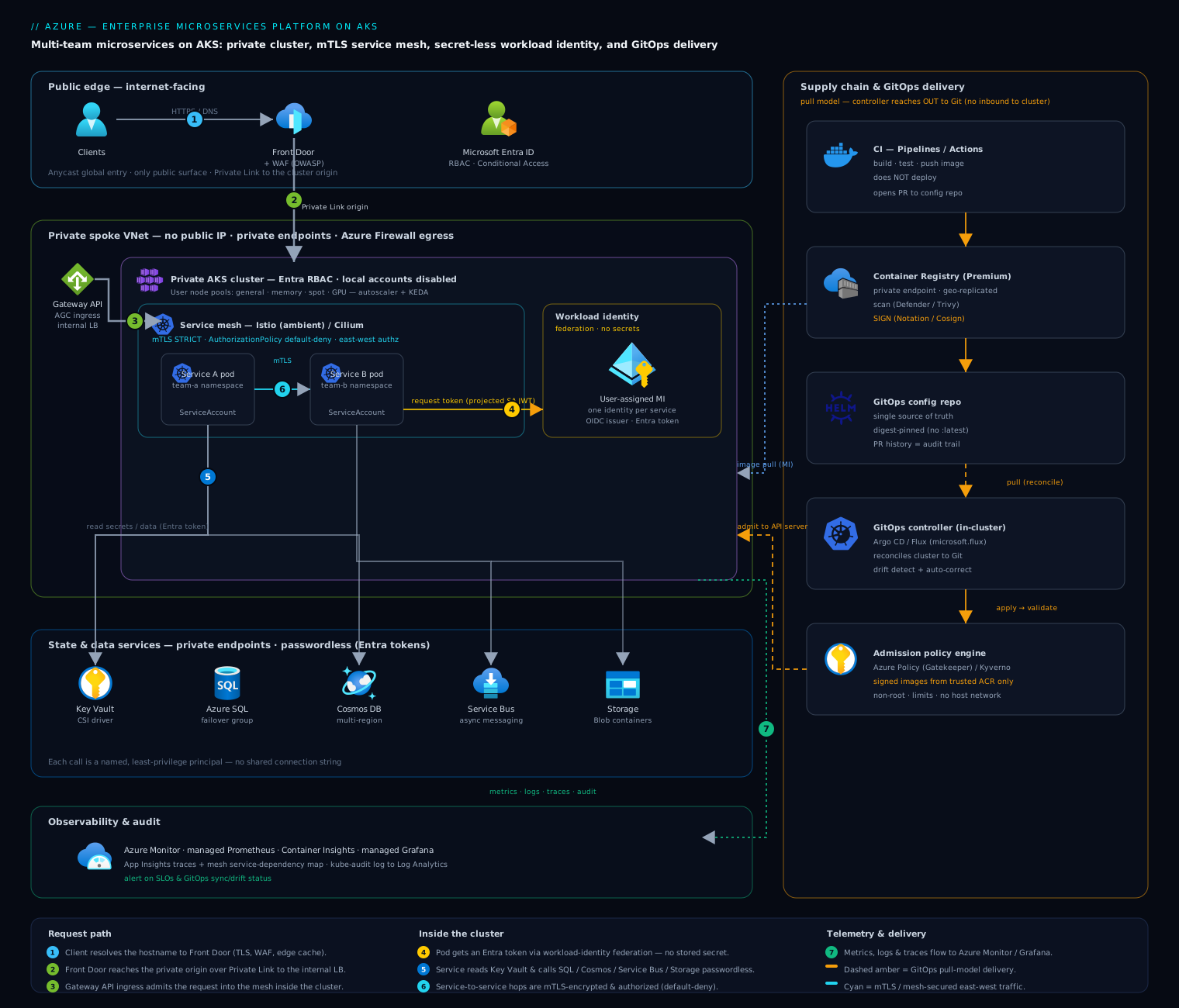
The request path, end to end, for external traffic hitting a service:
- A client resolves the application hostname to Azure Front Door (anycast edge, TLS termination, WAF with OWASP managed rules, bot and rate-limit policies, edge caching for static assets). For dynamic requests Front Door selects the cluster’s regional origin over a Private Link origin, so the cluster is never directly reachable from the internet.
- The request lands on the cluster’s ingress — the AKS-managed Application Gateway for Containers (AGC) or an Istio ingress gateway exposed via an internal Azure Load Balancer. Ingress is implemented through the Kubernetes Gateway API (
Gateway+HTTPRoute), not legacy Ingress, so routing is portable and expressive. - Inside the cluster the request enters the service mesh. Two production-supported choices on AKS: Istio (the AKS-managed Istio add-on, increasingly in ambient/sidecar-less mode) for rich L7 traffic management, or Cilium (Azure CNI powered by Cilium) with Cilium service mesh / Hubble for an eBPF-based data plane with identity-aware L3/L4 network policy at near-zero overhead. Either way, the first hop into a workload is mutual TLS — the calling identity is cryptographically verified, not trusted by IP.
- The target microservice pod runs in its team namespace, scheduled onto a user node pool appropriate to its workload class (general, memory-optimized, spot, or GPU). It has a Kubernetes ServiceAccount federated to an Azure Managed Identity via Workload Identity Federation — so when it needs to call Azure, it requests a token using the OIDC issuer projected into the pod, with no client secret anywhere.
- The service reads its configuration and secrets from Azure Key Vault through the Secrets Store CSI Driver (mounted as a tmpfs volume and/or synced to a
Secret), authenticating with that same workload identity over a private endpoint. It calls Azure data services — Azure SQL, Cosmos DB, Service Bus, Storage — using the workload identity’s Microsoft Entra token, so the database sees a named, least-privilege principal, not a shared connection string. - Service-to-service calls (service A → service B) stay inside the mesh: mTLS encrypts the hop, an AuthorizationPolicy (Istio) or CiliumNetworkPolicy decides whether A is allowed to call B at all, and the mesh records the call. East-west traffic that is not explicitly allowed is denied by default.
- Telemetry flows out continuously: Azure Monitor managed Prometheus scrapes metrics, Container Insights / Azure Monitor collects logs and the control-plane audit log, managed Grafana dashboards it, and the mesh emits distributed traces and a live service-dependency map.
The delivery path, end to end, for getting a change into the cluster:
- A developer merges to the app repo. Azure Pipelines / GitHub Actions builds the container, runs tests, pushes the image to Azure Container Registry (ACR), and the registry scans it (Microsoft Defender for Containers / Trivy) and signs it (Notation / Cosign).
- The pipeline does not deploy. Instead it opens a pull request against a GitOps config repo that bumps the image digest in the service’s manifests/Helm values.
- A GitOps controller running in the cluster — Argo CD or Flux (available as the AKS GitOps add-on,
microsoft.flux) — continuously reconciles cluster state to that repo. When the PR merges, the controller pulls the change and applies it. Git is the single source of truth; the cluster converges to it; drift is detected and (optionally) auto-corrected. - Before anything runs, an admission policy engine — Azure Policy for AKS (Gatekeeper) or Kyverno — validates the manifests: only images from the trusted ACR with a valid signature are admitted, every pod must set non-root and resource limits, host networking is forbidden, and so on. A non-conforming deploy is rejected at the API server, before scheduling.
The mental model: Front Door and the Gateway get traffic in; the mesh moves and authorizes it with mTLS; workload identity removes every secret from the picture; ACR + signing + admission control guarantees only trusted code runs; and GitOps makes the whole thing converge to Git, auditable commit by commit.
Component breakdown
| Component | Azure service / project | What it does | Key configuration choices |
|---|---|---|---|
| Cluster | Azure Kubernetes Service (AKS) | Managed Kubernetes control plane + nodes | Private cluster (no public API endpoint) or API-server VNet integration with authorized IP ranges; Azure CNI Overlay (or CNI powered by Cilium) for IP efficiency; auto-upgrade channel = stable with planned maintenance windows; Uptime SLA / Standard tier for the control plane; system node pool tainted CriticalAddonsOnly |
| Node pools | AKS user node pools + VMSS | Run workloads, segmented by class | Separate pools for general / memory / spot / GPU; cluster autoscaler per pool + KEDA for event-driven scale; ephemeral OS disks; Azure Linux (Mariner) nodes; taints/labels so workloads land on the right pool |
| Ingress / Gateway | App Gateway for Containers (AGC) or Istio ingress gateway | North-south entry, L7 routing, TLS | Gateway API (Gateway/HTTPRoute) over legacy Ingress; WAF at Front Door (and optionally AGC); internal LB so origin is private behind Front Door Private Link |
| Service mesh | AKS-managed Istio add-on or Cilium (Azure CNI Powered by Cilium) | mTLS, L7 traffic mgmt, authz, observability | Istio: prefer ambient mode (ztunnel + waypoints) to drop per-pod sidecar cost; PeerAuthentication: STRICT mTLS; AuthorizationPolicy default-deny. Cilium: eBPF dataplane, CiliumNetworkPolicy (identity-aware), Hubble for flow visibility; mutual auth via SPIFFE |
| Registry | Azure Container Registry (Premium) | Stores & secures images and Helm/OCI charts | Premium for private endpoints, geo-replication, content trust / Notation signing; quarantine pattern: image scanned before promotion; ACR Tasks for base-image patching; pull via workload/kubelet managed identity, not admin user (which is disabled) |
| Secrets | Azure Key Vault + Secrets Store CSI Driver | Source of truth for secrets/certs | Key Vault with RBAC authorization + private endpoint; CSI SecretProviderClass mounts secrets as files; rotation enabled; prefer passwordless (Entra tokens) over storing connection strings at all |
| Workload identity | Microsoft Entra Workload Identity Federation | Pods get Azure tokens with no secret | OIDC issuer enabled on AKS; federated credential binds ServiceAccount ↔ User-Assigned Managed Identity; annotate SA + label pod azure.workload.identity/use: "true"; one identity per service, scoped RBAC |
| Delivery (GitOps) | Argo CD or Flux (microsoft.flux AKS add-on) |
Reconciles cluster to a Git repo | App-of-apps / Flux Kustomizations; digest-pinned images (no :latest); progressive delivery via Argo Rollouts / Flagger (canary, blue-green); separate app repo vs config repo |
| Admission / policy | Azure Policy for AKS (Gatekeeper) or Kyverno | Enforces guardrails at the API server | Image-source + signature verification, non-root, read-only rootfs, required limits/requests, no host network, allowed registries; built-in Azure Policy initiative for AKS baseline |
| Edge | Azure Front Door + WAF | Global entry, TLS, WAF, caching | OWASP managed ruleset, bot manager, rate limiting; Private Link origin to the internal LB |
| Observability | Azure Monitor managed Prometheus, Container Insights, managed Grafana, Application Insights | Metrics, logs, traces, dashboards, audit | Managed Prometheus scrape configs; control-plane diagnostic logs (kube-audit) to Log Analytics; mesh traces + service map; Grafana dashboards as code |
A few choices deserve the “why,” because they are where teams most often go wrong.
Why a private cluster. A public AKS API endpoint is a standing internet-facing attack surface for the most powerful credential in your platform. A private cluster (or API-server VNet integration) means the control plane is reachable only from your network; CI reaches it through a self-hosted agent in the VNet or via the GitOps pull model (which needs no inbound access to the cluster at all — the controller reaches out to Git). Pair it with local accounts disabled and Entra + Azure RBAC for Kubernetes authorization, so cluster access is governed by Entra groups and Conditional Access, and cluster-admin is a break-glass PIM-elevated role, not a kubeconfig on a laptop.
Why ambient-mode Istio (or Cilium) instead of classic sidecars. The sidecar model puts an Envoy proxy in every pod — real CPU/memory tax per replica, and a coupling between app and proxy lifecycle that complicates upgrades. Istio ambient mode moves mTLS and L4 to a per-node ztunnel and only deploys an L7 waypoint proxy where you actually need L7 policy, cutting mesh overhead substantially. Cilium takes a different route entirely: mTLS-equivalent identity and policy enforced in the eBPF datapath in the kernel, no userspace proxy on the hot path at all. Choose Istio when you need rich L7 traffic shaping (header-based canaries, retries/timeouts, fault injection) mesh-wide; choose Cilium when you want high-throughput identity-aware L3/L4 security with minimal overhead and great flow visibility via Hubble. Both give you the non-negotiable: encrypted, authenticated, default-deny east-west traffic.
Why workload identity federation, emphatically. This is the single highest-leverage security decision in the architecture. The legacy alternatives — pod-identity, or a service principal with a client secret in a Secret — both end with a long-lived credential somewhere on the cluster that can be exfiltrated. Federation means the pod presents its projected Kubernetes service-account token (a short-lived OIDC JWT) to Entra and receives a short-lived Azure access token in exchange. There is no secret to steal, rotate, or leak. One managed identity per service, each with exactly the Azure RBAC it needs (this service reads this Key Vault and writes that Storage container — nothing else), gives you per-workload least privilege and a clean audit trail.
Implementation guidance
Provision in layers, each with its own IaC stack and state, so the platform team owns the cluster and app teams own their namespaces. Terraform is the common choice on Azure; Bicep is equally valid and avoids state management. The layering matters more than the tool.
- Layer 0 — Landing zone (platform team). Resource groups, the hub-spoke VNet, private DNS zones (
privatelink.vaultcore.azure.net,privatelink.azurecr.io,privatelink.<region>.azmk8s.io), and policy assignments. This is your existing Azure landing zone; the cluster is a spoke. - Layer 1 — Platform (platform team). ACR (Premium, private endpoint), Key Vault, Log Analytics + managed Prometheus + managed Grafana, the AKS cluster itself with the add-ons enabled, and the system identities.
- Layer 2 — Cluster bootstrap (platform team, but via GitOps). The mesh, the GitOps controller, the policy engine, ingress, and shared CRDs. Bootstrap GitOps once with IaC, then let GitOps manage everything else — including itself.
- Layer 3 — Workloads (app teams). Namespaces, manifests/Helm charts in the config repo, reconciled by the GitOps controller.
A representative Terraform skeleton for Layer 1 — note the add-ons that turn a bare cluster into this architecture (OIDC issuer + workload identity, the managed Istio mesh, monitoring, and key-vault secrets provider):
resource "azurerm_kubernetes_cluster" "prod" {
  name                      = "aks-prod-eus2"
  resource_group_name       = azurerm_resource_group.platform.name
  location                  = "eastus2"
  dns_prefix                = "aks-prod"
  kubernetes_version        = "1.31"          # track n-1 of latest stable
  sku_tier                  = "Standard"       # control-plane Uptime SLA
  oidc_issuer_enabled       = true             # required for workload identity
  workload_identity_enabled = true
  azure_policy_enabled      = true             # Gatekeeper guardrails
  local_account_disabled    = true             # Entra-only access

  # Private cluster: no public API server
  private_cluster_enabled   = true

  default_node_pool {
    name                 = "system"
    vm_size              = "Standard_D4ds_v5"
    auto_scaling_enabled = true
    min_count            = 3
    max_count            = 5
    only_critical_addons_enabled = true        # taint: CriticalAddonsOnly
    zones                = [1, 2, 3]
    os_sku               = "AzureLinux"
  }

  network_profile {
    network_plugin      = "azure"
    network_plugin_mode = "overlay"            # CNI Overlay for IP efficiency
    network_policy      = "cilium"             # or "azure"; mesh handles mTLS
    load_balancer_sku   = "standard"
  }

  # AKS-managed Istio service mesh add-on
  service_mesh_profile {
    mode      = "Istio"
    revisions = ["asm-1-23"]
  }

  key_vault_secrets_provider {
    secret_rotation_enabled = true
  }

  oms_agent {
    log_analytics_workspace_id  = azurerm_log_analytics_workspace.platform.id
    msi_auth_for_monitoring_enabled = true
  }

  azure_active_directory_role_based_access_control {
    azure_rbac_enabled = true                  # Azure RBAC for Kubernetes
    tenant_id          = data.azurerm_client_config.current.tenant_id
  }

  identity { type = "UserAssigned"
             identity_ids = [azurerm_user_assigned_identity.cluster.id] }
}

# Spot + GPU + general user pools added as azurerm_kubernetes_cluster_node_pool ...
Wire the workload identity for one service — this is the pattern every microservice repeats. Create a user-assigned identity, grant it only the Azure RBAC it needs, federate it to the service’s Kubernetes ServiceAccount, then annotate the ServiceAccount:
resource "azurerm_user_assigned_identity" "orders" {
  name                = "id-orders-svc"
  resource_group_name = azurerm_resource_group.platform.name
  location            = "eastus2"
}

# Least-privilege Azure RBAC: this service reads ONLY its own KV secrets
resource "azurerm_role_assignment" "orders_kv" {
  scope                = azurerm_key_vault.orders.id
  role_definition_name = "Key Vault Secrets User"
  principal_id         = azurerm_user_assigned_identity.orders.principal_id
}

# Federate the K8s ServiceAccount -> the managed identity (no secret)
resource "azurerm_federated_identity_credential" "orders" {
  name                = "orders-fed"
  resource_group_name = azurerm_resource_group.platform.name
  parent_id           = azurerm_user_assigned_identity.orders.id
  issuer              = azurerm_kubernetes_cluster.prod.oidc_issuer_url
  subject             = "system:serviceaccount:orders:orders-sa"
  audience            = ["api://AzureADTokenExchange"]
}
apiVersion: v1
kind: ServiceAccount
metadata:
  name: orders-sa
  namespace: orders
  annotations:
    azure.workload.identity/client-id: "<id-orders-svc client id>"
---
# In the Deployment pod template:
#   labels: { azure.workload.identity/use: "true" }
#   serviceAccountName: orders-sa
# The Azure SDK in the pod now gets tokens via the projected SA token — no secret.
Networking and identity wiring, the load-bearing rules:
- Cluster networking: Azure CNI Overlay gives pods routable-within-cluster IPs without burning your VNet space; pod CIDRs are NAT’d, so a
/24of node IPs supports thousands of pods. Use Cilium as the dataplane if you want network policy enforced in eBPF. - Private endpoints everywhere: ACR, Key Vault, SQL, Storage, and the cluster API all have private endpoints in the spoke VNet, with the corresponding private DNS zones linked. No platform dependency is reachable over the public internet.
- Ingress is private: the cluster’s ingress LB is internal; the only public surface is Front Door, connected to that internal LB by a Private Link origin. The cluster has no public IP.
- Egress is controlled: route node egress through Azure Firewall (or a NAT gateway) and allow-list the FQDNs AKS needs (
*.azurecr.io,*.hcp.<region>.azmk8s.io, Ubuntu/Mariner package mirrors). This is also where you contain a compromised pod’s ability to call out. - Authorization is layered and default-deny: (1) Azure RBAC decides who (which Entra user/group/identity) can do what on the cluster API; (2) Kubernetes RBAC scopes app teams to their namespaces; (3) the mesh AuthorizationPolicy / CiliumNetworkPolicy decides which service may call which; (4) admission policy decides what may run at all. Four gates, each closed by default.
Progressive delivery: wire Argo Rollouts or Flagger so a new digest rolls out as a canary — 5% of traffic, watch the mesh’s success-rate and latency metrics from managed Prometheus, auto-promote if healthy, auto-rollback if not. The mesh provides the traffic-splitting primitive; the rollout controller provides the analysis and the abort.
Enterprise considerations
Security and Zero Trust. This architecture is a Zero Trust implementation for compute, applied at four layers. Identity: every workload has its own short-lived, secret-less Entra identity (workload identity federation) and every Azure data call is a named principal with least-privilege RBAC — there is no shared credential to compromise. Network: default-deny east-west via the mesh/CNI, mTLS on every hop, private endpoints for every dependency, and a private API server — a pod can only reach what policy explicitly allows. Supply chain: images are scanned (Defender for Containers / Trivy) and signed, and admission control refuses to run anything unsigned or from an untrusted registry; this closes the “someone pushed a malicious image” path that most clusters leave wide open. Runtime: Defender for Containers provides runtime threat detection (crypto-miner, reverse-shell, suspicious exec) on the nodes; pods run non-root, read-only-rootfs, with dropped capabilities, enforced by policy. Pull CIS AKS benchmark and Microsoft cloud security baseline assessments into Defender for Cloud and treat the findings as a backlog, not a one-time audit.
Cost optimization (FinOps). A shared cluster is itself the biggest cost lever — bin-packing many services onto common nodes beats a VM-per-service estate. Beyond that: (1) Spot node pools for stateless, interruptible, and batch workloads — often 60–90% cheaper, with KEDA/PDBs to handle eviction gracefully; (2) right-size with the VPA recommender and set requests from real usage, because over-requested pods waste reserved capacity even when idle; (3) cluster autoscaler + scale-to-zero node pools and KEDA so capacity tracks demand, plus the AKS Stop/Start feature for non-prod overnight; (4) Savings Plans / Reserved Instances for the steady-state baseline node count; (5) ambient-mode mesh to remove the per-pod sidecar tax across hundreds of replicas; (6) OpenCost / Microsoft Cost Management + Kubernetes cost views to show each team a per-namespace bill, which is the single most effective behavior change. Showback by namespace turns “the cluster is expensive” into “your service is expensive,” which is actionable.
Scalability. Four independent axes: pods scale via HPA (CPU/memory) and KEDA (queue depth, event rate, custom metrics) including scale-to-zero; nodes scale via the cluster autoscaler per pool and the faster Node Autoprovisioning (Karpenter for AKS) where available; the cluster itself has generous limits (thousands of nodes), and the platform scales by adding clusters to a fleet managed by Azure Kubernetes Fleet Manager when one cluster’s blast radius or limits become the constraint. Design services stateless so any of these can scale them freely; push state to Azure data services.
Reliability and DR (RTO/RPO). Inside a region: node pools span availability zones, Pod Disruption Budgets keep minimum replicas during upgrades and node churn, topology spread constraints avoid single-node concentration, and planned maintenance windows + surge upgrades make Kubernetes-version and node-image upgrades routine and non-disruptive — the cluster stays current and in support by construction. Region loss: the cluster is stateless and rebuildable — that is the whole point of GitOps. Your RTO is “how fast can IaC stand up a cluster in the paired region and the GitOps controller reconcile every service onto it” — realistically 15–45 minutes for a warm-standby cluster (pre-provisioned, GitOps paused) or longer for cold. Your RPO is governed entirely by the data tier, not the cluster: it is the replication lag of Cosmos DB (multi-region writes, seconds), Azure SQL failover groups, or geo-replicated Storage — the cluster holds no durable state to lose. Geo-replicate ACR so the standby region can pull images during a primary outage. The reliability win of this architecture is that DR is git apply against a fresh cluster, which you can — and must — rehearse on a schedule.
Observability. Three signals plus audit. Metrics: Azure Monitor managed Prometheus scrapes app and mesh metrics; managed Grafana dashboards them (golden signals per service, mesh success-rate/latency, node and cost views). Logs: Container Insights collects stdout and the control-plane kube-audit log to Log Analytics — the audit log is your “who changed what on the cluster” record. Traces: the mesh emits distributed traces to Application Insights, and Istio/Hubble draw a live service-dependency map so you can see, not guess, who calls whom. Alert on SLOs (error budget burn), not raw CPU. The mesh and GitOps controller both expose health you should alert on: mesh mTLS coverage and GitOps sync/drift status (a service that has drifted from Git, or a failed reconcile, is an incident).
Governance. Enforce, do not document. Azure Policy for AKS (Gatekeeper) applies the org’s guardrails cluster-wide — allowed registries, required labels/limits, no privileged pods, no host network — and reports compliance into Azure Policy. Kyverno covers mutation and finer policy (auto-inject securityContext, enforce image-digest pinning). Microsoft Entra + Azure RBAC for Kubernetes ties cluster access to Entra groups and PIM so cluster-admin is time-bound and approved. The GitOps repo’s PR history is your change-management record — every production change is a reviewed, attributed, revertable commit, which is exactly what auditors want and exactly what kubectl apply from a laptop never provides.
Reference enterprise example
Northwind Mobility is a (fictional) mid-market mobility-and-logistics SaaS: a driver app, a shipper portal, and a partner API, serving ~120,000 daily active users across the US, run by six squads. They started as a Django monolith on App Service. By 2025 the monolith’s single release train was the bottleneck — squads waited days for each other’s changes, a payments hotfix required a full-app deploy, and a SOC 2 audit flagged shared service-principal secrets and plaintext internal traffic. They decided to decompose into ~28 services on AKS, deliberately as a platform, not a pile of pods.
What they built. One production AKS cluster in East US 2 (Standard tier, private API server, Azure CNI Overlay with Cilium), with a warm-standby cluster in Central US kept current by the same IaC and a paused GitOps controller. Node pools: a 3-node zonal system pool, a general user pool (D-series, autoscaling 6→30), a spot pool for the trip-pricing batch and notification fan-out (saving ~70% on that bursty compute), and a small GPU pool for their ETA-prediction model. They chose the AKS-managed Istio add-on in ambient mode because the squads wanted header-based canaries and per-route retries, and ambient kept the mesh tax low across ~400 pods. Each of the 28 services got its own user-assigned managed identity federated to its ServiceAccount — zero client secrets remained anywhere; the SOC 2 finding closed itself. Secrets that genuinely had to exist (a third-party payment-gateway key) came from Key Vault via the CSI driver over a private endpoint; everything else (SQL, Service Bus, Blob) went passwordless via Entra tokens. Delivery moved to Flux (the microsoft.flux add-on) with an app repo / config repo split and Flagger canaries; Azure Policy for AKS enforced “only signed images from northwind.azurecr.io, non-root, limits required.” Front Door + WAF fronted the cluster’s internal ingress over a Private Link origin.
The numbers and decisions. Roughly $6,800/month all-in for the production cluster: ~$4,100 compute (heavily offset by spot and a 1-year Savings Plan on the baseline nodes), ~$700 ACR Premium + geo-replication, ~$900 Front Door + WAF, ~$1,100 Azure Monitor/Prometheus/Grafana/Log Analytics ingestion. The warm-standby cluster added ~$1,500 (mostly its idle baseline nodes). They debated classic Istio sidecars vs ambient and chose ambient, saving an estimated ~$900/month in sidecar CPU/memory at their replica count. They debated a cluster-per-squad model and rejected it as six times the platform toil for tenancy they could get with namespaces + mesh policy + Azure RBAC.
The outcome. Deploy frequency went from ~3/week (whole monolith) to 40+/day across squads, each squad shipping independently behind canaries. Mean time to recovery for a bad deploy dropped to under 4 minutes (Flagger auto-rollback on success-rate dip). They ran a region-loss game day: failed Front Door to Central US, un-paused the standby cluster’s Flux controller, and had all 28 services reconciled and serving in 31 minutes (RTO), with RPO of seconds because Cosmos DB multi-region writes and the SQL failover group held the state — the cluster held none. The SOC 2 auditor’s “credential management” and “encryption in transit (internal)” findings were both closed by workload identity and mesh mTLS respectively. The platform team’s recurring nightmare — Kubernetes upgrades — became a scheduled, automated, non-event via the stable auto-upgrade channel and surge upgrades within maintenance windows. Net: independent team velocity and a defensible security posture, on shared infrastructure, for under $8.5k/month.
When to use it
Use this architecture when you have multiple teams shipping multiple services that must release independently, you need a defensible security and tenancy boundary on shared infrastructure (encrypted/authorized east-west traffic, per-workload secret-less identity, a trusted supply chain), and you want auditable, Git-driven delivery with a cluster you can upgrade and rebuild without fear. It scales cleanly from one cluster running a dozen services to a Fleet-managed estate running hundreds; the diagram is the same, only the number of clusters and the strictness of policy change. The prerequisite is operational maturity: a platform team that owns the paved road, and app teams willing to live on it.
Trade-offs to accept going in. Kubernetes, a service mesh, GitOps, workload identity, and policy-as-code are a substantial amount of platform to learn and operate. You are buying enormous flexibility and a strong security posture, and paying for it in platform complexity and a real platform team. If you have one or two services and a single squad, this is over-engineering — the operational surface will cost you more than it returns.
Anti-patterns that quietly defeat the design:
- The shared-cluster-without-boundaries trap. AKS with everything in
default, no mesh policy, no admission control, andcluster-adminkubeconfigs floating around is not this architecture — it is a distributed monolith with worse security than the monolith had. The boundaries are the architecture. - Secrets in
Secretobjects “for now.” The moment a connection string or client secret lives in a KubernetesSecret, you have re-created the credential-leak path workload identity was meant to remove. Go passwordless; pull the unavoidable exceptions from Key Vault via CSI. kubectl applyalongside GitOps. A human applying changes out-of-band defeats the single-source-of-truth model, causes drift the controller will fight or revert, and erases the audit trail. Once GitOps owns a namespace, all changes go through Git.:latesttags and unsigned images. Mutable tags make rollbacks ambiguous and let an attacker swap an image under a tag you already approved. Pin digests; sign; enforce signatures at admission.- A mesh with permissive mTLS and no AuthorizationPolicy. Installing Istio/Cilium and leaving mTLS in
PERMISSIVEwith allow-all policy gives you the cost of a mesh and none of the security. GoSTRICTand default-deny, or you have bought a dashboard, not a boundary. - The pet cluster. Refusing to upgrade because the last upgrade hurt means sitting out-of-support and accumulating risk. With zones, PDBs, surge upgrades, and a
stablechannel, upgrades are routine — and GitOps means worst case you rebuild from Git.
Alternatives, in increasing capability and operational cost: (1) Azure Container Apps — managed, serverless Kubernetes-without-the-cluster, with built-in Dapr, KEDA, and ingress; the right choice for a small-to-medium set of microservices that do not need full cluster control, custom operators, or a specific mesh. Most teams should start here and graduate only when they hit its ceiling. (2) App Service / Functions — for a handful of web apps and event handlers, no orchestration needed. (3) A single AKS cluster, namespace-per-team (this article) — the default for real multi-team production at moderate scale. (4) AKS Fleet (multi-cluster) — when one cluster’s blast radius, scale limits, or hard regulatory isolation forces a fleet; same components, federated. Pick the lowest tier that meets your team count and isolation requirements; most organizations reach for AKS when Container Apps would have done, and pay for cluster operations they did not need. The platform you can actually operate beats the platform you merely deployed.
Going deeper
The article above is the what and the why. This section is the how it actually works underneath — the mechanics an on-call engineer needs when the diagram is not enough. Nothing here replaces what you read above; it goes a layer below it.
The traffic plane: ingress, the mesh, and mTLS up close
Ingress has four viable shapes on AKS, and they are not interchangeable. (1) Application Gateway for Containers (AGC) — the newer managed L7 entry that speaks the Kubernetes Gateway API (Gateway/HTTPRoute) natively; prefer it for greenfield. (2) Application Gateway Ingress Controller (AGIC) — the older controller that programs a classic Application Gateway v2 from Ingress objects; still supported, but Gateway-API is where the ecosystem is heading. (3) The managed NGINX offered by the AKS application routing add-on, when you want a plain in-cluster ingress with an internal load balancer. (4) The Istio ingress gateway when you want the same Envoy config language at the edge and inside the mesh. Whatever you pick, the origin should be an internal load balancer fronted by Front Door over a Private Link origin — the cluster keeps no public IP.
Inside the mesh, “mTLS” is not a checkbox — it is an identity system. Istio issues every workload a SPIFFE identity of the form spiffe://cluster.local/ns/<namespace>/sa/<serviceaccount>, derived from the pod’s Kubernetes ServiceAccount, and bakes it into a short-lived X.509 certificate the proxy rotates automatically. When service A calls service B, B’s proxy verifies A’s certificate and hands the mesh a named caller — which is what makes authorization meaningful. Two objects do the work: PeerAuthentication decides whether plaintext is even allowed, and AuthorizationPolicy decides who may call whom. Set them explicitly; the defaults are more permissive than most people assume.
apiVersion: security.istio.io/v1
kind: PeerAuthentication
metadata:
  name: default
  namespace: orders
spec:
  mtls:
    mode: STRICT           # reject any non-mTLS traffic into this namespace
---
apiVersion: security.istio.io/v1
kind: AuthorizationPolicy
metadata:
  name: orders-allow-from-web
  namespace: orders
spec:
  selector:
    matchLabels: { app: orders }
  action: ALLOW
  rules:
    - from:
        - source:
            principals: ["cluster.local/ns/web/sa/web-sa"]   # only the web SA
      to:
        - operation:
            methods: ["GET", "POST"]
Because an AuthorizationPolicy with action: ALLOW and a selector makes that workload default-deny (anything not matched is refused), this pair is the east-west equivalent of a firewall allow-list. The ambient vs sidecar decision the article mentions is, mechanically, where this enforcement runs: in classic mode an Envoy sidecar sits in every pod (real per-replica CPU/RAM, and app-and-proxy lifecycle coupling); in ambient mode L4 mTLS moves to a per-node ztunnel using the HBONE tunnel protocol, and an L7 waypoint proxy is deployed only for namespaces that actually need L7 policy. Ambient is generally available in upstream Istio; on the AKS managed add-on, confirm which mode your cluster supports before you design around it, and note that L7 features (header routing, retries) require a waypoint even in ambient.
The three L7 resilience features worth wiring at the mesh, not in code: timeouts (cap how long B may take before A gives up), retries (retry idempotent calls on transient 5xx, with a per-try timeout so retries do not stack), and outlier detection (eject an endpoint that keeps failing — the mesh’s circuit breaker). Put these in the mesh and every language gets them for free; put them in code and every team reinvents them differently.
Workload identity, under the hood
The article calls federation “the single highest-leverage security decision.” Here is the actual handshake, because when it breaks you must be able to read the error. AKS runs an OIDC issuer — a public HTTPS endpoint publishing a JWKS (the cluster’s signing keys). A projected ServiceAccount token is mounted into the pod as a signed JWT whose issuer is that URL and whose subject is system:serviceaccount:<ns>:<sa>. A mutating webhook (enabled by the workload-identity add-on) injects three things into any pod whose ServiceAccount is annotated and whose pod template carries the azure.workload.identity/use: "true" label: the env vars AZURE_CLIENT_ID, AZURE_TENANT_ID, AZURE_AUTHORITY_HOST, and AZURE_FEDERATED_TOKEN_FILE (the path to that projected JWT). The Azure SDK reads the file, presents the JWT to Entra ID with audience api://AzureADTokenExchange, Entra matches it against the federated identity credential you registered (issuer + subject must match exactly), and returns a short-lived Azure access token for the user-assigned managed identity. No secret is stored, transmitted, or rotated by you — the projected token defaults to a one-hour lifetime and is refreshed by the kubelet.
The failure modes are almost always in the match: AADSTS70021: No matching federated identity record found means the subject on the federated credential does not equal system:serviceaccount:<ns>:<sa> (wrong namespace or SA name), or the issuer does not equal the cluster’s live OIDC issuer URL (it changes if the cluster is recreated), or the pod forgot the use: "true" label, or the Deployment forgot serviceAccountName. One managed identity per service, each with only the RBAC it needs, is the whole discipline — resist the “one identity for the namespace” shortcut, because it collapses your per-workload audit trail.
Config and secrets: how the CSI mount actually works
The Secrets Store CSI Driver with the Azure Key Vault provider does not put secrets in etcd. A SecretProviderClass lists which Key Vault objects to fetch; at pod start the driver authenticates with the pod’s workload identity, pulls the objects over Key Vault’s private endpoint, and mounts them as files on a tmpfs volume (memory-backed, never on disk). Rotation is a poll, not a push: the driver re-reads Key Vault on an interval (the add-on’s --rotation-poll-interval, two minutes by default) and updates the mounted files — but note the sharp edge: if you also secretObjects-sync into a native Kubernetes Secret for an env var, the file rotates while the env var does not (env vars are set once at container start). The clean pattern is to read the mounted file and reload, or better, go passwordless entirely and skip the secret — for SQL, Service Bus, Storage, and Cosmos DB, the same workload identity gets an Entra token and the data service authorizes a named principal. Reserve the CSI mount for the genuinely unavoidable third-party key.
Scaling: four controllers, and which one moves what
The single most common confusion in AKS is thinking one knob scales everything. There are four independent controllers, and they move different things:
| Controller | Moves | Trigger | Scales to zero? |
|---|---|---|---|
| HPA (Horizontal Pod Autoscaler) | Pod replica count | CPU/memory or custom metrics (via metrics-server / Prometheus adapter) | No (min 1) |
| KEDA | Pod replica count | Event source depth — queue length, event lag, cron, 60+ scalers | Yes (min 0) |
| Cluster Autoscaler | Node count within fixed pools | Pods stuck Pending for want of capacity |
Pool can reach 0 |
| Node Autoprovisioning (NAP) | Nodes and node shapes (Karpenter-based) | Pending pods; picks the cheapest VM size that fits | Yes |
The loop is: HPA/KEDA add pods → pods go Pending because no node has room → Cluster Autoscaler (or NAP) adds a node → pods schedule. HPA is a Deployment reconcile loop with a default 15-second sync and stabilization windows (300s down, 0s up) to damp flapping. KEDA is what unlocks scale-to-zero and event-driven work: a ScaledObject names a trigger (say, Service Bus queue depth) and KEDA drives the underlying HPA, spinning the deployment from 0→1 the moment a message arrives (the activation threshold) and 1→N as depth grows (the scaling threshold). Cluster Autoscaler scales predefined pools and scales a node down only when it has been under its utilization threshold (default 0.5) for scale-down-unneeded-time (default 10 minutes) and its pods can move elsewhere — which a too-strict PDB can veto. NAP (AKS’s Karpenter) removes the “predefined pools” constraint: it provisions right-sized nodes on demand and consolidates workloads onto fewer/cheaper nodes, including spot. Confirm NAP’s GA status for your region before you depend on it in production.
Resilience mechanics: probes, PDBs, and non-disruptive upgrades
Three probes, three different questions — conflating them is the classic outage:
# Deployment pod-spec excerpt — three probes, three jobs
startupProbe:      # "has it finished booting?" — gates the other two
  httpGet: { path: /healthz/startup, port: 8080 }
  failureThreshold: 30
  periodSeconds: 5
readinessProbe:    # "should it receive traffic right now?" — flips it in/out of Endpoints
  httpGet: { path: /healthz/ready, port: 8080 }
  periodSeconds: 10
livenessProbe:     # "is it wedged and beyond saving?" — a failure RESTARTS the pod
  httpGet: { path: /healthz/live, port: 8080 }
  periodSeconds: 10
  failureThreshold: 3
The trap: making the liveness probe do a deep check (hit the database, call a dependency). When the database blips, every replica fails liveness at once and Kubernetes restarts all of them — you have converted a brief dependency hiccup into a full outage. Keep liveness shallow (is the process responsive?); put dependency checks in readiness (take me out of rotation, do not kill me).
Pod Disruption Budgets protect availability during voluntary disruption — node drains for upgrades, autoscaler scale-down. A minAvailable: 2 (or maxUnavailable: 1) tells the eviction API “never voluntarily take me below this.” The counter-intuitive failure: maxUnavailable: 0 (or minAvailable: 100%) means the drain can never evict a pod, so a node upgrade hangs forever. Pair a sane PDB with surge upgrades (AKS brings up an extra node, moves pods, then removes the old one) so version and node-image upgrades roll through without dropping below your budget. Add availability zones on the node pools and topology spread constraints so replicas are not all on one node or in one zone, and the same PDB now also survives a zone loss. This is the machinery that turns the article’s “pet cluster” into cattle: with probes, PDBs, zones, and surge, the stable auto-upgrade channel makes staying in-support a background task, not a project.
Distributed data: the patterns nobody warns you about
Splitting a monolith into services splits the database too — each service owns its own store; no service reaches into another’s tables. That is what enables independent deploys, and it is also where the genuinely hard problems live, none of which the happy-path diagram shows.
- The dual-write problem. A service that must both write its DB and publish an event (“order placed”) cannot do both atomically — a crash between them loses the event or lies about the write. The fix is the transactional outbox: write the business row and an
outboxrow in one local transaction, then a relay (a poller, or change-data-capture) publishes the outbox rows to Service Bus and marks them sent. The database is the source of truth; the event is guaranteed to follow. - Sagas for cross-service transactions. There is no distributed
BEGIN TRANSACTIONacross services. A multi-step business operation (reserve inventory → charge card → schedule delivery) becomes a saga: a sequence of local transactions, each with a compensating action to undo it if a later step fails. Choreography (services react to each other’s events) is simple but hard to trace; orchestration (a coordinator drives the steps) is easier to reason about and observe. Either way, every handler must be idempotent — messaging is at-least-once, so the same “charge card” event will arrive twice, and processing it twice must not double-charge. - Eventual consistency is a product decision, not just a technical one. If the shipping service learns about an order a few seconds after the order service commits it, someone has to decide whether that is acceptable UX. It usually is — but say so on purpose.
The twelve-factor principles map almost one-to-one onto this platform: config from the environment (Key Vault/CSI, not baked in), backing services as attachable resources (Entra-auth’d Azure data services), stateless processes (state pushed to the data tier — which is exactly what makes the cluster rebuildable), disposability (fast startup, graceful SIGTERM handling so a pod drains in-flight work before it dies), and logs as event streams (stdout to Container Insights). A service that violates these — keeps session state in memory, writes to local disk — breaks the “any replica, any node, rebuild from Git” promise the whole architecture rests on.
Network policy and the private cluster
The mesh authorizes L7 by identity; NetworkPolicy authorizes L3/L4 by pod selector, and you want both (defense in depth — a compromised sidecar should still hit a network wall). Start every namespace default-deny and open only what is needed:
apiVersion: networking.k8s.io/v1
kind: NetworkPolicy
metadata:
  name: default-deny-ingress
  namespace: orders
spec:
  podSelector: {}              # selects every pod in the namespace
  policyTypes: ["Ingress"]     # with no ingress rules below, nothing is allowed in
Enforce these with Cilium (eBPF CiliumNetworkPolicy, identity-aware, near-zero overhead) or Azure NPM. On networking itself, Azure CNI Overlay gives pods addresses from a private overlay CIDR that is NAT’d behind node IPs, so a /24 of nodes supports thousands of pods without burning VNet space — a real constraint at scale that flat Azure CNI hits fast.
A private cluster has no public API endpoint; the kube-apiserver is reachable only inside the VNet (via a private FQDN in a privatelink.<region>.azmk8s.io zone) or through API Server VNet Integration. The practical consequence people trip on: you cannot kubectl from your laptop over the open internet — you need line-of-sight (a jumpbox/Bastion in the VNet, a peered network, or the az aks command invoke run-command). This is also why the GitOps pull model is such a good fit for private clusters: the Flux/Argo controller reaches out to Git, so delivery needs no inbound path to the API server at all. Lock egress down too — route node traffic through Azure Firewall and allow-list only the FQDNs AKS needs; that is your containment boundary if a pod is compromised.
Cost internals: requests, limits, and the sidecar tax
Three mechanics drive most of the bill. First, requests vs limits: the scheduler reserves the request (over-request and you pay for idle reserved capacity on every replica), while the CPU limit is enforced by the Linux CFS quota — a pod that hits its CPU limit is throttled, not killed, which shows up as mysterious tail-latency, not an error. Right-size from real usage (the VPA recommender in off mode is a good source) rather than padding “to be safe.” Second, bin-packing: the shared cluster wins because many right-sized pods pack onto common nodes; the win evaporates if every team over-requests, because the scheduler cannot pack reservations it must honor. Third, the sidecar tax: an Envoy sidecar in every one of several hundred pods is real, multiplied CPU/RAM — which is the concrete reason the article prefers ambient-mode mesh and spot pools for interruptible work. Give each team a per-namespace showback (Microsoft Cost Management’s Kubernetes view or OpenCost) and “the cluster is expensive” becomes “your service is expensive,” which is the only version anyone can act on.
Practice challenges
Work these in order — they escalate from “turn the feature on” to “make it production-safe.” Commands assume the Azure CLI (az aks extensions current); every identifier in angle brackets is a placeholder. No live subscription is used here, so the outputs are representative — the value is in wiring the pieces, not the exact strings.
1. (Beginner) Turn on the two switches workload identity needs. On an existing cluster, enable the OIDC issuer and the workload-identity add-on, then print the issuer URL you will federate against.
<details> <summary>Solution</summary>
az aks update -g <rg> -n <aks-name> \
  --enable-oidc-issuer \
  --enable-workload-identity

az aks show -g <rg> -n <aks-name> \
  --query oidcIssuerProfile.issuerUrl -o tsv
# representative: https://eastus2.oic.prod-aks.azure.com/<tenant-guid>/<cluster-guid>/
Why: the issuer URL is the issuer value on every federated credential; without the OIDC issuer there is no public JWKS for Entra to validate the pod’s token against.
</details>
2. (Beginner→Intermediate) Federate one ServiceAccount to one managed identity — and prove no secret exists. Create a user-assigned identity, federate the orders:orders-sa ServiceAccount to it, and grant it read on just its own Key Vault.
<details> <summary>Solution</summary>
az identity create -g <rg> -n id-orders-svc
CID=$(az identity show -g <rg> -n id-orders-svc --query clientId -o tsv)

az identity federated-credential create \
  --name orders-fed -g <rg> --identity-name id-orders-svc \
  --issuer "<oidc-issuer-url>" \
  --subject "system:serviceaccount:orders:orders-sa" \
  --audience api://AzureADTokenExchange

az role assignment create --assignee "$CID" \
  --role "Key Vault Secrets User" \
  --scope "$(az keyvault show -n kv-orders-prod --query id -o tsv)"
Then annotate the SA with azure.workload.identity/client-id: <CID> and label the pod template azure.workload.identity/use: "true".
Why: the --subject must equal system:serviceaccount:<ns>:<sa> exactly and the audience must be api://AzureADTokenExchange; get either wrong and Entra returns AADSTS70021: No matching federated identity record found. Note there is no client secret anywhere — that is the entire win.
</details>
3. (Intermediate) Mount a single Key Vault secret over CSI with rotation. Write the SecretProviderClass that pulls payment-gateway-key using the workload identity, mounted as a file (not synced to a Kubernetes Secret).
<details> <summary>Solution</summary>
apiVersion: secrets-store.csi.x-k8s.io/v1
kind: SecretProviderClass
metadata:
  name: orders-kv
  namespace: orders
spec:
  provider: azure
  parameters:
    usePodIdentity: "false"
    useVMManagedIdentity: "false"
    clientID: "<id-orders-svc client id>"   # the workload-identity client id
    keyvaultName: "kv-orders-prod"
    tenantId: "<tenant id>"
    objects: |
      array:
        - |
          objectName: payment-gateway-key
          objectType: secret
Reference it from the pod as a CSI volume with secretProviderClass: orders-kv, mounted read-only.
Why: mounting a file on tmpfs (rather than syncing to a Secret for an env var) means the driver’s rotation poll actually updates the running value — an env var is set once at container start and never rotates.
</details>
4. (Intermediate) Scale a queue consumer to zero with KEDA. The trip-pricing consumer should idle at 0 replicas and wake on Service Bus depth, authenticating with workload identity.
<details> <summary>Solution</summary>
apiVersion: keda.sh/v1alpha1
kind: ScaledObject
metadata:
  name: pricing-consumer
  namespace: pricing
spec:
  scaleTargetRef:
    name: pricing-consumer         # the Deployment to scale
  minReplicaCount: 0               # idle at ZERO — no pod, no cost
  maxReplicaCount: 50
  cooldownPeriod: 300              # wait 5 min of empty before scaling back to 0
  pollingInterval: 15
  triggers:
    - type: azure-servicebus
      metadata:
        queueName: trip-pricing
        namespace: sb-northwind-prod
        messageCount: "20"         # aim for ~20 messages per replica
      authenticationRef:
        name: keda-wi-auth         # TriggerAuthentication via workload identity
Why: only KEDA scales to zero — plain HPA has a floor of 1. messageCount is the per-replica target, so 200 queued messages asks for ~10 replicas; cooldownPeriod stops it flapping back to zero the instant the queue drains.
</details>
5. (Advanced) Make a node upgrade non-disruptive — without deadlocking it. Add a Pod Disruption Budget so orders never drops below 2 ready pods during a drain, and explain the setting that would break the upgrade instead.
<details> <summary>Solution</summary>
apiVersion: policy/v1
kind: PodDisruptionBudget
metadata:
  name: orders-pdb
  namespace: orders
spec:
  minAvailable: 2                  # eviction API refuses to go below 2 ready
  selector:
    matchLabels: { app: orders }
Combine with maxSurge on the node pool (surge upgrade brings up a spare node first), readiness probes (so a rescheduled pod only counts as “available” once it truly is), and topology spread across zones.
Why: minAvailable: 2 lets the drain evict one pod at a time while keeping two serving. The anti-pattern is maxUnavailable: 0 (equivalently minAvailable: 100%): the eviction API can then never remove a pod, so the node drain — and the whole cluster upgrade — hangs indefinitely.
</details>
6. (Advanced) Close the supply-chain and east-west gaps at once. State what stops an unsigned image from an untrusted registry from ever running, and what stops a pod in orders from receiving traffic it was never meant to.
<details> <summary>Solution</summary>
Two independent gates, both default-deny:
- Admission: assign the built-in Azure Policy for AKS initiative (Gatekeeper) restricting allowed container registries to
northwind.azurecr.io, requiring non-root, resource limits, and no host network; add image-signature verification (Notation/Ratify or a KyvernoverifyImagesrule) so an unsigned or tampered image is rejected at the API server, before scheduling. - East-west: a namespace
default-deny-ingressNetworkPolicyplus an IstioAuthorizationPolicy(action: ALLOWwith aprincipalslist) soordersaccepts calls only from the specific ServiceAccounts allowed to reach it.
Why: signing + admission blocks the “someone pushed a malicious image” path most clusters leave open, while default-deny network + mesh policy blocks lateral movement — a compromised pod can neither be untrusted code nor freely reach its neighbours. </details>
Common beginner mistakes
These are misconceptions, not symptoms — the wrong mental model that produces the bug, and the right one to replace it with. (The anti-patterns section above is about architecture choices; this is about the traps you hit while wiring it up.)
-
“Workload identity is the same as AAD Pod Identity.” It is the replacement for it. AAD Pod Identity (and the old aad-pod-identity project) is deprecated and had node-level races; Workload Identity Federation is the current, GA approach and is entirely different mechanically (OIDC token exchange, no NMI daemonset). If a tutorial mentions
AzureIdentity/AzureIdentityBindingCRDs, it is out of date. -
“I set the pod label, so identity will work.” Federation needs four things aligned: the ServiceAccount annotated with the client id, the pod template labelled
azure.workload.identity/use: "true", the pod actually referencing that SA viaserviceAccountName, and a federated credential whosesubjectandissuermatch exactly. Miss any one and you getAADSTS70021. It is a chain, not a switch. -
“mTLS means the traffic is secure, so I don’t need network or authorization policy.” Encryption is not authorization. mTLS proves who is calling and hides the bytes on the wire; it does nothing to stop a caller that should not be calling at all. You still need an
AuthorizationPolicy/NetworkPolicyto decide whether A may talk to B. A mesh inPERMISSIVEmTLS with allow-all policy is a dashboard, not a boundary. -
“Make the liveness probe check the database so we restart on real problems.” This is how a dependency blip becomes a full outage: when the DB blips, every replica fails liveness simultaneously and Kubernetes restarts them all. Liveness must be shallow (is the process wedged?); dependency health belongs in readiness (take me out of rotation, don’t kill me).
-
“Set requests = limits and make them generous to be safe.” Over-large requests reserve capacity you are not using on every replica — you pay for idle, and the scheduler can no longer bin-pack. A too-low CPU limit silently throttles the container (CFS quota), which looks like inexplicable latency, not an error. Right-size from observed usage; do not pad.
-
“HPA will spin up more nodes when we’re busy.” HPA (and KEDA) add pods, not nodes. If no node has room, the new pods sit
Pendinguntil the Cluster Autoscaler or Node Autoprovisioning adds a node. Two controllers, two jobs — pods first, nodes in response. -
“It’s a private cluster, I’ll just
kubectlfrom my laptop.” A private cluster has no public API endpoint, so your laptop over the open internet cannot reach it. You need line-of-sight into the VNet (Bastion/jumpbox, peering, VPN) oraz aks command invoke. This is a feature — it is also why GitOps (which pulls out to Git) needs no inbound access at all. -
“
:latestis fine — it’s just the newest image.” Mutable tags make rollbacks ambiguous (which build was:latestyesterday?) and let an attacker swap the image under a tag you already approved. Pin the digest (@sha256:…), sign the image, and enforce signatures at admission. -
“One big namespace is simpler than many.” A flat namespace with shared
cluster-adminis the “distributed monolith with worse security” the article warns about — one compromised pod reads every secret, and no one can prove who may call what. Namespace-per-team + RBAC + mesh policy is the boundary that makes the shared cluster safe; it is not optional overhead.
Glossary
- AKS (Azure Kubernetes Service) — Azure’s managed Kubernetes: Microsoft runs the control plane; you run the worker nodes and workloads.
- Node pool — a group of identical VMs (a VM Scale Set) in the cluster. Pools are segmented by workload class: system, general, spot, GPU.
- Namespace — a virtual partition inside one cluster; the “stall” each team owns, with its own RBAC, quotas, and policies.
- Pod — the smallest deployable unit: one or more containers that share a network identity and lifecycle.
- Service mesh — an infrastructure layer (Istio or Cilium) that transparently encrypts, authorizes, retries, and observes service-to-service traffic without app code changes.
- mTLS (mutual TLS) — both sides of a connection present certificates, so each cryptographically proves its identity; the mesh does this on every hop.
- SPIFFE identity — a standard workload identity (
spiffe://…/ns/<ns>/sa/<sa>) the mesh derives from a pod’s ServiceAccount and embeds in its certificate. - Sidecar / ambient — two ways the mesh runs. Sidecar: an Envoy proxy in every pod. Ambient: a per-node
ztunnel(L4 mTLS over the HBONE tunnel) plus an on-demandwaypointproxy for L7 — lower per-pod cost. - Workload Identity Federation — pods obtain short-lived Azure tokens by exchanging a projected OIDC ServiceAccount token with Entra ID. The GA replacement for the deprecated AAD Pod Identity. No stored secret.
- OIDC issuer — the cluster’s public endpoint publishing signing keys so Entra can validate a pod’s ServiceAccount token.
- Federated identity credential — the Entra registration binding one Kubernetes ServiceAccount (
issuer+subject) to one managed identity. - User-assigned managed identity — an Azure identity you create and grant RBAC to; one per service is the least-privilege pattern.
- Passwordless — authenticating to Azure data services (SQL, Service Bus, Storage, Cosmos DB) with an Entra token instead of a stored connection string or key.
- Secrets Store CSI Driver / SecretProviderClass — the driver that mounts Key Vault secrets into a pod as tmpfs files; the
SecretProviderClassdeclares which objects to fetch and how. - Key Vault — Azure’s managed store for secrets, keys, and certificates, reached here over a private endpoint with RBAC authorization.
- GitOps — a delivery model where a controller reconciles live cluster state to a Git repo; Git is the single source of truth, and divergence is drift.
- Flux / Argo CD — the two GitOps controllers. Flux ships as the
microsoft.fluxAKS add-on; Argo CD is self-managed. - Admission controller — a gate at the Kubernetes API server that validates or mutates objects before they persist. Gatekeeper (Azure Policy for AKS) and Kyverno are the policy engines.
- Gateway API — the modern Kubernetes standard for ingress (
Gateway+HTTPRoute), replacing legacyIngress. - AGC / AGIC — Application Gateway for Containers (Gateway-API-native, newer) vs the Application Gateway Ingress Controller (programs a classic App Gateway from
Ingress). - HPA (Horizontal Pod Autoscaler) — scales pod replicas on CPU/memory or custom metrics; floor of 1.
- KEDA — event-driven autoscaling with 60+ scalers (queue depth, event lag, cron); the only option that scales to zero.
- Cluster Autoscaler — adds/removes nodes within predefined pools when pods cannot schedule or nodes sit underused.
- Node Autoprovisioning (NAP) — AKS’s Karpenter-based provisioner that picks right-sized node shapes on demand and consolidates workloads. Verify GA status per region.
- PDB (Pod Disruption Budget) — a floor of available replicas the eviction API must respect during voluntary disruption (drains, scale-down).
- Probes (startup / readiness / liveness) — health checks answering “booted yet?”, “route traffic?”, and “restart it?” respectively. Keep liveness shallow.
- Topology spread / availability zone — constraints and physical fault domains that keep replicas from concentrating on one node or in one datacentre.
- Private cluster — an AKS cluster whose API server has no public endpoint; reachable only from within the VNet or via run-command.
- Private endpoint — a private IP inside your VNet for an Azure PaaS service (ACR, Key Vault, SQL), so it is never exposed to the public internet.
- Azure CNI Overlay — a networking mode giving pods addresses from a private overlay CIDR NAT’d behind node IPs, conserving VNet address space at scale.
- Cilium / eBPF — an in-kernel dataplane enforcing identity-aware network policy (
CiliumNetworkPolicy) with near-zero overhead; Hubble provides flow visibility. - NetworkPolicy — Kubernetes L3/L4 allow-rules by pod selector; start default-deny and open only what is needed.
- Front Door / WAF — Azure’s global anycast edge with TLS termination, a Web Application Firewall (OWASP rules), and caching, fronting the private cluster over a Private Link origin.
- ACR (Azure Container Registry) — the registry storing images and OCI charts; Premium adds private endpoints, geo-replication, and signing.
- Image signing (Notation / Cosign) — cryptographically signing images so admission can refuse anything unsigned or from an untrusted registry.
- Defender for Containers — Microsoft Defender’s container plan: image scanning plus runtime threat detection on nodes.
- Saga — a cross-service “transaction” built from local transactions, each with a compensating action to undo it on failure (choreography or orchestration).
- Transactional outbox — writing a business row and an event row in one local transaction, then relaying the event, to solve the dual-write problem reliably.
- Idempotency — designing a handler so processing the same message twice has the same effect as once — required because messaging is at-least-once.
- Twelve-factor — the app methodology (config in the environment, stateless processes, disposability, logs as streams) that makes services rebuildable and cluster-portable.
- Fleet Manager — Azure Kubernetes Fleet Manager: coordinates upgrades and workloads across many clusters when one cluster’s blast radius or limits become the constraint.