In a nutshell
Picture a city’s water system. Rain and runoff pour in from everywhere, but you do not pump all of it into the expensive treated-water reservoir – you screen out the mud and debris at the intake grate first, because you pay to store and purify every litre that gets past it. Once clean water sits in the reservoir, two things watch it: pressure gauges that trip an alarm the instant a pipe bursts, and inspectors who take a sample on a schedule and flag anything off. And when a crew is doing planned maintenance, you mute the alarms for that zone so the whole control room does not light up over work you already knew about.
Azure Monitor is that water system for your telemetry, and every part of this lesson maps onto it:
- The intake grate is a Data Collection Rule (DCR) with an ingestion transformation – it decides what telemetry to let in, and drops the mud (chatty
Information-level logs, health-probe noise) before you pay to store it, because a Log Analytics workspace bills mostly by the gigabyte ingested. - The reservoir is the Log Analytics workspace, and each table plan (Analytics / Basic / Auxiliary) is how clean-and-hot vs. cheap-and-cold you keep each pool.
- The pressure gauges are metric alerts (instant, cheap, near-real-time); the scheduled inspectors are scheduled-query (log) alerts (KQL on a timer – more expressive, but slower and priced per run).
- The alarm distribution list is an action group; the “mute this zone during maintenance” switch is an alert processing rule.
The one rule that ties it all together, and that this lesson repeats until it is muscle memory: filter low, alert high. Shape and trim data down at the intake where discarding is free, and raise clean, per-thing signals up at the top from the cheap stream that remains.
Level: Advanced · Time: ~75 min
Prerequisites. You will move fastest if you already know what a Log Analytics workspace is, can read basic KQL (where, summarize, project), and can run az in Cloud Shell and read its JSON. If any of that is shaky, skim the Prerequisites & where this fits section just below – it names the earlier lessons to catch up on. No prior alerting experience is assumed; we build the metric-vs-log split from the ground up.
What you will be able to do after this: author a DCR and endpoint as code, permanently cut a Log Analytics bill with an ingestion transform, place each table on the right plan, build a reusable workbook, fire per-entity metric and log alerts instead of one flapping storm, and wire an action group to automation that fixes the problem without waking anyone at 3am.
Most “we have Azure Monitor” stories fall apart under two questions: what exactly are you collecting, and what is it costing you per GB per month? The answer is usually a shrug, a legacy MMA agent nobody dares remove, and a Log Analytics bill that grew 40% last quarter with no new workloads. The modern stack fixes this by making collection an explicit, versioned artifact – a Data Collection Rule (DCR) – and by letting you drop or reshape data before you pay to ingest it. This piece builds the whole chain as code: DCRs and endpoints feeding the Azure Monitor Agent, ingestion-time transformations that trim cost, a workspace and table design that matches your retention economics, workbooks that turn KQL into something an on-call engineer can actually read, metric and log alerts that scale across resources, and action groups that hand off to automation instead of paging a human at 3am.
Azure Monitor is not one product; it is a pipeline with a collection plane (DCRs, DCEs, the Azure Monitor Agent, the Logs Ingestion API) that decides what lands in a table and in what shape, and a signal plane (metric alerts, scheduled-query alerts, action groups, alert processing rules) that decides what humans and automation hear about. Teams that conflate the two end up alerting on raw firehose data they should have filtered at ingestion. The rule that governs the whole article: filter low, alert high. Shape and trim at the collection plane where it is free to discard; raise signals at the top from the clean, cheap stream that remains.
By the end you will stop guessing about cost and noise. You will know exactly which DCR feeds which table, what each ingestion transform drops, which table plan each high-volume stream sits on, which alerts fire per-entity instead of as one flapping storm, and which action group fans out to which automation. You will be able to walk into a six-figure Log Analytics bill and turn “what do we collect and what does it cost” from a quarterly autopsy into a reviewed pull request.
Mental model. Azure Monitor has a collection plane and a signal plane. The collection plane (DCRs, DCEs, the Azure Monitor Agent, the Logs Ingestion API) decides what lands in a table and in what shape. The signal plane (metric alerts, scheduled-query alerts, action groups, alert processing rules) decides what humans and automation hear about. Teams that conflate the two end up alerting on raw firehose data they should have filtered at ingestion. Filter low, alert high.
What problem this solves
The pain is concrete and it shows up on an invoice. A Log Analytics workspace bills primarily on ingested GB, and the default posture of every agent-based estate is collect everything. After the migration from the legacy agent, nobody revisits the config, so a chatty Syslog stream at Information level, a verbose application diagnostic table, and health-probe 200-OK lines pour into the same expensive Analytics-plan tables you use for alerting – and almost none of it is ever queried. The bill grows with log volume, not with business value, and it grows silently.
What breaks without an explicit collection plane: you cannot answer “what are we collecting” without reverse-engineering a retired agent’s config; you cannot reduce cost without fear of deleting a signal you will wish you had during an incident; and you cannot scope access, because a workspace-per-team sprawl was the only access-control tool anyone reached for. On the signal side, the failure mode is an alert storm – one rule that fires a single giant alert that flaps as 400 VMs flicker, paging a human at 3am for something that should have auto-remediated or been suppressed during a patch window.
Who hits this: every team past the toy stage. Platform teams running fleets of VMs and AKS, security teams with regulatory retention requirements they cannot violate, and on-call engineers drowning in undifferentiated pages. The fix is almost never “turn off monitoring” – it is “make collection a versioned artifact, transform before you pay, place each table on the plan its query pattern deserves, and let the processing layer decide who gets paged and when.”
To frame the whole pipeline before the deep dive, here is every stage, what it decides, and the single highest-leverage control at that stage:
| Stage | Plane | What it decides | Highest-leverage control | Cost / noise lever |
|---|---|---|---|---|
| Azure Monitor Agent + DCR | Collection | What to read from a machine and where to send it | The DCR dataSources/dataFlows |
Collect less at source |
| Ingestion transformation | Collection | The shape of each row before billing | transformKql on a data flow |
Drop rows/columns pre-bill |
| Workspace + table plan | Collection | Where data rests and how it is queried | Analytics / Basic / Auxiliary plan | Per-GB ingest + retention |
| Workbook | Signal (read) | How a human reads the data | Parameter cascade + template | None (read path) |
| Metric alert | Signal | Fast threshold on a pre-aggregated stream | Multi-resource scope + dynamic threshold | Near-zero per rule |
| Scheduled-query alert | Signal | Threshold on a KQL result over logs | Dimensions + evaluation frequency | Query cost + noise |
| Action group | Signal | Who/what is notified | Reused group + common alert schema | Notification fan-out |
| Alert processing rule | Signal | Who hears it and when | Suppression + add-action-group | Page volume |
Learning objectives
By the end of this article you can:
- Author a Data Collection Rule and Data Collection Endpoint as code, associate them at fleet scale via Azure Policy, and explain when a DCE is mandatory versus optional.
- Write an ingestion-time
transformKqlthat drops rows and columns before billing, preservingTimeGeneratedand matching the destination table schema, to cut ingest cost permanently. - Design a few-workspaces / many-tables topology and place each table on the correct Analytics / Basic / Auxiliary plan with deliberate interactive-vs-total retention.
- Build a reusable workbook with a time-range + scope parameter cascade and publish it as a shared gallery template via Bicep.
- Create metric alerts with multi-resource scope and dynamic thresholds, and scheduled-query alerts with dimensions that fire per-entity instead of as one flapping alert.
- Centralise action groups, enable the common alert schema, and insert alert processing rules for maintenance-window suppression and central action-group attachment.
- Wire alerts to Logic Apps and Functions for idempotent, fast-ack auto-remediation, and reason about the cost and limits of every stage.
Prerequisites & where this fits
You should already understand the basics of a Log Analytics workspace (the store and query engine behind Azure Monitor Logs), be comfortable reading and writing KQL (where, summarize, project, bin), and know how to run az in Cloud Shell and read JSON output. Familiarity with ARM/Bicep helps, because every artifact here is a first-class ARM resource. You do not need prior alerting experience – we build it from the metric/log split up.
This sits at the centre of the Observability track. It assumes the telemetry fundamentals from Azure Monitor & Application Insights for Observability and goes one layer deeper than the survey in Azure Monitor Deep Dive: Every Option. It pairs with Azure Monitor with Managed Prometheus & Managed Grafana for AKS when your metrics live in Prometheus, and it is the upstream of every troubleshooting playbook – the data this pipeline collects is what you query in Troubleshooting Azure App Service: 502/503 Errors, Cold Starts & Restart Loops and Azure Diagnostics with Network Watcher, Resource Health & KQL.
A quick map of who owns what across the pipeline, so you route a change to the right team:
| Layer | What lives here | Who usually owns it | Failure class it causes if wrong |
|---|---|---|---|
| DCR / DCE / AMA | What is collected, in what shape | Platform / observability | Missing data, or runaway ingest cost |
| Ingestion transform | Row/column shape pre-bill | Platform + data owner | Dropped TimeGenerated, schema mismatch |
| Workspace / table plan | Where data rests, query model | Platform / FinOps | Alert can’t read archived table |
| Workbook | How humans read it | Each app/SRE team | Hardcoded step ignores parameters |
| Metric / log alert | When a signal fires | App + SRE team | Alert storm or missed incident |
| Action group | Who is notified | On-call / SRE lead | Wrong team paged; no fan-out |
| Alert processing rule | Who hears it, when | Platform / on-call lead | Patch window pages 400 VMs |
| Automation (LA/Func) | What happens without a human | App + platform | Duplicate remediation, retries |
Core concepts
Six mental models make every later section obvious.
Collection is a versioned artifact, not an agent setting. The legacy Log Analytics agent (MMA/OMS) is retired as of 31 August 2024; the replacement is the Azure Monitor Agent (AMA), and AMA does nothing on its own – it is driven entirely by Data Collection Rules associated to a machine. A DCR is an ARM resource declaring dataSources (what to read), destinations (where to send), and dataFlows (which source maps to which destination table, plus an optional transform). The DCR is the unit of intent: change collection by changing a reviewed file, for one machine or ten thousand.
The endpoint is the ingestion door. A Data Collection Endpoint (DCE) is the entry point for ingestion. You need an explicit DCE for the Logs Ingestion API (custom logs pushed over REST) and for Private Link ingestion via an Azure Monitor Private Link Scope (AMPLS). For plain AMA collection over public networking a DCE is optional, but standardising on one keeps Private Link a config change rather than a re-architecture.
Transform before you pay. A transformation is a KQL snippet attached to a dataFlow that runs at ingestion time, before data is billed and stored. It operates on a pipeline variable named source, can drop rows and columns and redact PII, and must project columns matching the destination table schema. Because billing is on ingested volume, a transform that drops 60% of chatty Information-level syslog is a permanent line-item reduction at zero query-experience cost.
The table plan is the cost dial. Azure Monitor Logs offers three table plans – Analytics (hot, full KQL), Basic (high-volume, KQL subset, per-query billed), and Auxiliary (very high-volume, lowest ingest, limited KQL). Combined with two retention dials – interactive retention (queryable without restore) and total retention (interactive + cheap archive) – the plan is how you match each table to its real query pattern instead of paying Analytics rates for logs you read twice a year.
Metrics and logs are different planes with different physics. Metric alerts evaluate pre-aggregated, near-real-time numeric streams: cheap, fast, stateful, and capable of multi-resource scope (one rule over every VM in a scope) and dynamic thresholds (a learned band instead of a fixed number). Scheduled-query (log) alerts run KQL on a schedule against the logs store: more expressive, but they pay query latency and must be tamed with dimensions so they fire per-entity rather than as one storm.
The processing layer decouples firing from paging. An action group is the reusable fan-out target (email, SMS, push, webhook, Logic App, Function, Runbook, ITSM). An alert processing rule sits between alerts and action groups and, without touching a single alert rule, can suppress notifications on a schedule (a maintenance window) or add an action group across a scope. This is how a noisy estate stays humane: rules stay armed; processing decides who hears them and when.
The vocabulary in one table
Before the deep sections, pin every moving part side by side. The glossary at the end repeats these for lookup:
| Concept | One-line definition | Plane | Why it matters |
|---|---|---|---|
| Azure Monitor Agent (AMA) | The agent that reads machine telemetry | Collection | Does nothing without a DCR |
| Data Collection Rule (DCR) | ARM resource: sources → flows → destinations | Collection | The unit of collection intent |
| Data Collection Endpoint (DCE) | Ingestion entry point | Collection | Required for Logs Ingestion API / Private Link |
Transformation (transformKql) |
KQL on a data flow, runs at ingestion | Collection | Drops/reshapes rows before billing |
| Logs Ingestion API | REST push of custom logs | Collection | Needs a DCE + custom-log DCR |
| Table plan | Analytics / Basic / Auxiliary | Collection | Cost-vs-queryability per table |
| Interactive retention | Days queryable without restore | Collection | Alerts can only read this |
| Total retention | Interactive + cheap archive | Collection | Long-term keep for compliance |
| Workbook | Parameterised JSON report of KQL steps | Signal (read) | Reusable, not a screenshot |
| Metric alert | Threshold on a pre-aggregated metric | Signal | Fast, stateful, multi-resource |
| Dynamic threshold | ML-learned band over metric history | Signal | For metrics whose normal varies |
| Scheduled-query rule | KQL alert on a schedule | Signal | For signals only in logs |
| Dimension | Grouping column splitting one rule into many alerts | Signal | Per-entity firing, no storm |
| Action group | Reusable notification + action bundle | Signal | One place for routing |
| Alert processing rule | Suppress / add-AG across a scope | Signal | Maintenance windows, central AG |
| Common alert schema | One JSON envelope for all alert types | Signal | One parser downstream |
Data Collection Rules, endpoints, and the Azure Monitor Agent
The DCR is the heart of the collection plane. It declares three things and arms the agent only once you associate it to a resource. The shape of a DCR maps directly to those three declarations, and each carries choices worth enumerating.
What a DCR declares, field by field
| DCR element | What it is | Example value | Default / note | Gotcha |
|---|---|---|---|---|
location |
Region of the DCR resource | eastus |
Must match (or pair with) the workspace region | Cross-region association has rules |
dataCollectionEndpointId |
Linked DCE | a DCE resource id | Optional for AMA-public | Required for custom logs / Private Link |
dataSources |
What to read | perf counters, syslog, events | At least one required | Stream names are fixed (Microsoft-Perf) |
destinations |
Where to send | one or more Log Analytics workspaces | At least one required | Can fan one source to many dests |
dataFlows |
Source → destination map | Microsoft-Perf → la-platform |
Each flow maps streams to dests | Carries the optional transformKql |
streamDeclarations |
Custom-log column schema | Custom-AppLogs |
Only for Logs Ingestion API | Must match the table schema |
The built-in dataSources you reach for most, with their stream names and the dial that controls volume:
| Data source | streams name |
Volume dial | Lands in table | When to use |
|---|---|---|---|---|
| Performance counters | Microsoft-Perf |
samplingFrequencyInSeconds, counter list |
Perf |
VM CPU/mem/disk metrics in logs |
| Syslog (Linux) | Microsoft-Syslog |
facilityNames, logLevels |
Syslog |
Linux daemon/auth logs |
| Windows event logs | Microsoft-Event |
XPath query per channel | Event |
Windows system/application/security |
| Windows perf counters | Microsoft-Perf |
counter specifiers | Perf |
Windows performance |
| IIS logs | Microsoft-W3CIISLog |
log directory | W3CIISLog |
Web server access logs |
| Text / JSON logs | Custom-* (declared) |
file glob + transform | custom *_CL |
App log files on disk |
| Custom (REST) | Custom-* (declared) |
the Logs Ingestion API | custom *_CL |
Push from anywhere |
Register the providers and create the endpoint first:
az provider register --namespace Microsoft.Insights
az provider register --namespace Microsoft.OperationalInsights

# Data Collection Endpoint -- the ingestion entry point
az monitor data-collection endpoint create \
  --name dce-platform-eastus \
  --resource-group rg-observability \
  --location eastus \
  --public-network-access Enabled
When you actually need a DCE – the decision table that saves a re-architecture:
| If you are… | Do you need a DCE? | Why |
|---|---|---|
| Collecting perf/syslog via AMA over public network | Optional | AMA can ingest without an explicit DCE |
| Pushing custom logs via the Logs Ingestion API | Required | The API endpoint is the DCE |
| Ingesting over Private Link (AMPLS) | Required | DCE is the private ingestion target |
| Standardising for future Private Link | Recommended | Make it a config change later, not a redesign |
| Collecting from a region with no workspace | Region-paired | DCE/DCR region rules apply |
Authoring the DCR
This DCR collects a focused set of Linux perf counters and syslog, sending them to a workspace. Note the fixed streams names:
{
  "location": "eastus",
  "properties": {
    "dataCollectionEndpointId": "/subscriptions/<sub>/resourceGroups/rg-observability/providers/Microsoft.Insights/dataCollectionEndpoints/dce-platform-eastus",
    "dataSources": {
      "performanceCounters": [
        {
          "name": "perf-core",
          "streams": ["Microsoft-Perf"],
          "samplingFrequencyInSeconds": 60,
          "counterSpecifiers": [
            "\\Processor(_Total)\\% Processor Time",
            "\\Memory\\Available MBytes",
            "\\LogicalDisk(_Total)\\% Free Space"
          ]
        }
      ],
      "syslog": [
        {
          "name": "syslog-warn",
          "streams": ["Microsoft-Syslog"],
          "facilityNames": ["auth", "daemon", "syslog"],
          "logLevels": ["Warning", "Error", "Critical", "Alert", "Emergency"]
        }
      ]
    },
    "destinations": {
      "logAnalytics": [
        {
          "name": "la-platform",
          "workspaceResourceId": "/subscriptions/<sub>/resourceGroups/rg-observability/providers/Microsoft.OperationalInsights/workspaces/law-platform"
        }
      ]
    },
    "dataFlows": [
      { "streams": ["Microsoft-Perf"],   "destinations": ["la-platform"] },
      { "streams": ["Microsoft-Syslog"], "destinations": ["la-platform"] }
    ]
  }
}
Create it and associate machines. Association is what actually arms the agent:
az monitor data-collection rule create \
  --name dcr-linux-platform \
  --resource-group rg-observability \
  --location eastus \
  --rule-file ./dcr-linux-platform.json

# Bind the DCR to a VM (repeat per machine, or drive via Policy at scale)
az monitor data-collection rule association create \
  --name dcra-vm-app-01 \
  --rule-id "/subscriptions/<sub>/resourceGroups/rg-observability/providers/Microsoft.Insights/dataCollectionRules/dcr-linux-platform" \
  --resource "/subscriptions/<sub>/resourceGroups/rg-fleet/providers/Microsoft.Compute/virtualMachines/vm-app-01"
At fleet scale you never run that association by hand. Use the built-in Azure Policy initiative that installs AMA and creates the association from a DCR parameter, assigned at a management-group scope with a DeployIfNotExists effect and a managed identity for remediation. One machine or ten thousand, the same DCR is the unit of intent. The ways to associate, ranked by scale, in Bicep for the policy assignment:
resource dcrAssoc 'Microsoft.Insights/dataCollectionRuleAssociations@2023-03-11' = {
  name: 'dcra-vm-app-01'
  scope: vm
  properties: {
    dataCollectionRuleId: dcr.id
    description: 'Associate platform DCR to the VM'
  }
}
| Association method | Scale | Effort | When to use |
|---|---|---|---|
az ... association create |
1 machine | Manual | Spot fixes, labs |
Bicep dataCollectionRuleAssociations |
A known set | IaC | Per-workload modules |
Azure Policy DeployIfNotExists |
Whole MG/sub | One assignment | Fleets; the default at scale |
| Arc-enabled servers + Policy | Hybrid/on-prem | Arc onboarding | Non-Azure machines |
The most common reasons data does not land after association – the symptom→cause→confirm→fix table for the collection plane:
| Symptom | Likely cause | Confirm | Fix |
|---|---|---|---|
No rows in Perf/Syslog after association |
AMA not installed on the VM | az vm extension list for AzureMonitorLinuxAgent |
Install AMA (extension or Policy remediation) |
| Some machines collect, others don’t | Association missing on those VMs | List associations per resource | Add association / run Policy remediation |
| Rows arrive but timestamps are flat | Transform dropped TimeGenerated |
Inspect transformKql project list |
Keep TimeGenerated in the projection |
| Custom logs rejected | DCE missing or schema mismatch | Ingestion API 4xx; streamDeclarations |
Add DCE; match declared columns |
| Private network, no data | No AMPLS / DCE not private | AMPLS scoping; DCE network access | Add DCE to AMPLS; set private access |
| Wrong table populated | dataFlows maps stream to wrong dest |
Read dataFlows mapping |
Correct stream→destination map |
Ingestion-time transformations and KQL filtering for cost control
This is the highest-leverage feature in the whole platform and the one most teams have never enabled. A transformation is a KQL snippet attached to a dataFlow that runs at ingestion time, before data is billed and stored. You can drop rows, drop columns, redact PII, and project new computed fields. Because billing is on ingested volume, a transformation that filters 60% of chatty Information-level syslog is a direct, permanent line-item reduction.
The transform operates on a pipeline variable named source and must project the columns that match the destination table’s schema. Add a transformKql to the relevant data flow:
"dataFlows": [
  {
    "streams": ["Microsoft-Syslog"],
    "destinations": ["la-platform"],
    "transformKql": "source | where SeverityLevel != 'info' | where ProcessName !in ('CRON','sudo') | project TimeGenerated, Computer, Facility, SeverityLevel, SyslogMessage"
  }
]
What you can do in a transform, and what it costs
| Transform operation | KQL pattern | Effect on bill | Risk |
|---|---|---|---|
| Drop rows | where SeverityLevel != 'info' |
Lower (fewer rows) | Dropping a row you needed in an incident |
| Drop columns | project A, B, C (omit the rest) |
Lower (narrower rows) | Omitting a column the table requires |
| Redact PII | extend Email = "[redacted]" |
Neutral | Over-redaction loses forensic value |
| Compute a field | extend Severity = case(...) |
Slightly higher per row | Logic bug mis-classifies severity |
| Parse free text | parse Message with ... |
Neutral | Brittle parser on format drift |
Route by _IsBillable shaping |
filter then narrow | Lower | None if schema preserved |
A few rules that bite people:
- The transform output schema must match the target table. If you
projectaway a column the table requires, ingestion silently drops or nulls it – validate against the table schema, not your assumptions. TimeGeneratedmust survive the transform. If you drop it, every row gets stamped at ingestion time and your time-series goes flat.- Transformations apply to a specific stream into a specific destination. To redact across many sources you attach a transform to each data flow; there is no single global filter.
The classic transform mistakes, as a confirm/fix table:
| Mistake | Symptom | Confirm | Fix |
|---|---|---|---|
Dropped TimeGenerated |
Flat time-series; all rows same time | `Syslog | summarize min(TimeGenerated), max(TimeGenerated)` |
| Schema mismatch | Column nulls or rows dropped | Compare project to table schema |
Match the destination columns exactly |
| Filter too aggressive | A signal vanished from an incident | Diff row counts before/after | Loosen the where; keep the slice |
| Transform on wrong flow | No volume change | Check which dataFlows has it |
Move transformKql to the chatty flow |
Expensive extend per row |
Ingest latency creeps | Watch ingestion latency | Simplify the computed field |
For custom logs over the Logs Ingestion API, the transform is even more powerful because you control the input shape. A common pattern is to send fat JSON and let the transform split it into a normal column and a DynamicJson blob, or to compute a severity from a free-text message:
source
| extend Severity = case(
    Message has_cs "ERROR", "Error",
    Message has_cs "WARN",  "Warning",
    "Information")
| where Severity != "Information"
| project TimeGenerated = todatetime(EventTime), Computer, Severity, Message
Cost rule of thumb. Filter at ingestion for volume you will never query (debug chatter, health-probe 200s). Use a cheaper table plan (next section) for volume you query rarely but must retain. Never solve a cost problem by turning off collection you will wish you had during an incident.
A rough sense of what each filter buys, so you target the fattest stream first:
| Stream pattern | Typical share of volume | Filter to apply | Expected reduction |
|---|---|---|---|
Information/debug syslog |
40-60% | where SeverityLevel !in ('info','debug','notice') |
Often >50% of syslog |
| Health-probe 200s in IIS/app logs | 10-30% | drop probe paths / 200 status | 10-30% of web logs |
Chatty processes (cron, kubelet) |
5-20% | where ProcessName !in (...) |
Removes recurring noise |
| Verbose app diagnostic columns | varies | project only needed columns |
Narrows every row |
| Duplicate/redundant fields | small | drop in project |
Marginal but free |
Log Analytics workspace design, tables, and table-level plans
Two workspace decisions dominate the bill: how many workspaces you run, and the table plan on each table. The modern guidance is few workspaces, many tables, per-table plans – one regional platform workspace per major boundary rather than a workspace per team, because cross-workspace KQL (workspace()/union) is awkward and access control is now solvable at the table and row level.
Few workspaces or many?
| Topology | Pro | Con | Use when |
|---|---|---|---|
| One workspace per team | Simple ownership/billing split | Cross-team KQL is painful; sprawl | Hard billing isolation is mandatory |
| One per region per boundary (recommended) | Easy union, central queries |
Needs table/row RBAC to scope access | The default for most estates |
| One global workspace | Simplest queries | Data-residency and blast-radius concerns | Single-region, small estate |
| Per-environment (prod/non-prod) | Clean prod isolation | Duplicated config | Strong prod/non-prod separation |
Table plans, side by side
Azure Monitor Logs offers three table plans:
| Plan | Use for | Query | Ingest cost | Retention model |
|---|---|---|---|---|
| Analytics | Hot, frequently queried signals (alerts, dashboards) | Full KQL, fast | Highest | Interactive retention (up to long term) |
| Basic | High-volume, occasionally queried logs (verbose app/network logs) | KQL subset, per-query billed | Lower | Short interactive + long-term archive |
| Auxiliary | Very high-volume, low-fidelity (raw audit, verbose firewall) | Limited KQL, lowest ingest | Lowest | Long-term, cheapest ingest |
The capability differences that decide which plan a table can tolerate – read this before you move an alerting table to Basic:
| Capability | Analytics | Basic | Auxiliary |
|---|---|---|---|
| Full KQL (joins, all operators) | Yes | Subset | Limited |
| Source for alert rules | Yes | No (not for alerting) | No |
| Source for workbooks/dashboards | Yes | Limited | Limited |
| Per-query billing | No | Yes | Yes |
| Interactive retention max | Long | Short (then archive) | Short |
| Best for | Hot signals | Rarely-queried logs | Raw, cheap, kept |
Set retention with two dials: interactive retention (queryable without restore) and total retention (interactive + cheap long-term archive). Alert rules and dashboards must read from interactive retention; archived data needs a search job or restore first.
| Retention dial | What it controls | Lower bound | Upper bound | Watch-out |
|---|---|---|---|---|
| Interactive retention | Days you can query directly | days | long term | Alerts/workbooks need data inside this |
| Total retention | Interactive + archive | interactive | very long (years) | Archive needs restore/search job to query |
| Workspace default | Applies to tables without an override | configurable | – | Per-table override beats the default |
# Create the workspace
az monitor log-analytics workspace create \
  --resource-group rg-observability \
  --workspace-name law-platform \
  --location eastus \
  --retention-time 90

# Move a chatty custom table to the Basic plan and set retention split
az monitor log-analytics workspace table update \
  --resource-group rg-observability \
  --workspace-name law-platform \
  --name AppVerbose_CL \
  --plan Basic \
  --retention-time 30 \
  --total-retention-time 365
Pair this with table-level RBAC so an app team sees its own *_CL tables but not the platform security tables, instead of minting a workspace per team just to scope access. A decision table for placing any new high-volume table:
| If the table is… | Query pattern | Place it on… | Retention split |
|---|---|---|---|
| Alert/dashboard source | Frequent, interactive | Analytics | Long interactive |
| Verbose app log, rare queries | Occasional, incident-only | Basic | 30d interactive / 365d total |
| Raw firewall/audit firehose | Almost never, kept for compliance | Auxiliary | Short interactive / years total |
| Regulated auth/audit events | Alerted + 1-year keep | Analytics | Interactive ≥ retention requirement |
| Health-probe noise | Never queried | (don’t ingest) | Drop in transform |
Workbooks: parameters, queries, and reusable visual templates
A workbook is a JSON template (an ARM resource of type Microsoft.Insights/workbooks) that combines parameters, KQL query steps, text, and visualisations. The feature that makes them reusable – rather than a screenshot with extra steps – is parameters: a parameter is itself usually a KQL query, and downstream steps interpolate it with {ParamName}.
Parameter types you actually use
| Parameter type | type value |
Source | Interpolates as | Typical use |
|---|---|---|---|---|
| Time range | 4 | Picker | where TimeGenerated {TimeRange} |
Top-of-workbook range |
| Resource picker | 5 | ARM query | resource ids | Scope to selected resources |
| Subscription | 6 | ARG/KQL | subscription ids | Cross-subscription scoping |
| Dropdown (query) | 2 | KQL summarize by |
a value | Pick a Computer / app |
| Text | 1 | Free text | a string | Ad-hoc filter |
| Multi-value | 2 (multi) | KQL | comma list | “all of these machines” |
The pattern that scales: a top-of-workbook time-range parameter plus a resource/subscription picker, then every query references both. Here is the parameter-and-query skeleton inside the workbook items array:
{
  "type": 9,
  "content": {
    "parameters": [
      {
        "name": "TimeRange",
        "type": 4,
        "isRequired": true,
        "value": { "durationMs": 3600000 }
      },
      {
        "name": "Subscription",
        "type": 6,
        "query": "summarize by subscriptionId",
        "queryType": 1,
        "crossComponentResources": ["value::all"]
      }
    ]
  }
}
A query step that consumes them. Note {TimeRange} expands into a full where TimeGenerated ... clause and the time-brush feeds the chart automatically:
Perf
| where TimeGenerated {TimeRange}
| where CounterName == "% Processor Time" and InstanceName == "_Total"
| summarize avg(CounterValue) by Computer, bin(TimeGenerated, 5m)
| render timechart
Visualisations and when to reach for each
| Visual | render / step type |
Best for | Avoid when |
|---|---|---|---|
| Time chart | render timechart |
Trends over time | Categorical comparison |
| Bar/column | render barchart |
Top-N by category | Time on the x-axis |
| Grid (table) | grid step | Per-entity detail rows | Dense trend data |
| Tiles | tiles step | KPI headline numbers | Many categories |
| Stat / big number | the “1” visualization | A single SLO number | Distribution detail |
| Map | map step | Geo-distributed signal | Non-geographic data |
Two practices keep workbooks maintainable. First, pin parameter queryType and crossComponentResources so the same template works whether it is scoped to one resource or an entire subscription. Second, template it, then publish as a gallery template via Bicep so every team gets the same “service health” workbook rather than forking ten copies:
resource wb 'Microsoft.Insights/workbooks@2023-06-01' = {
  name: guid('platform-health-workbook')
  location: location
  kind: 'shared'
  properties: {
    displayName: 'Platform Health'
    category: 'workbook'
    sourceId: workspaceResourceId
    serializedData: loadTextContent('./workbooks/platform-health.json')
  }
}
The workbook mistakes that turn a “reusable template” back into a screenshot:
| Mistake | Symptom | Fix |
|---|---|---|
Step ignores {TimeRange} |
Chart never changes with the picker | Add where TimeGenerated {TimeRange} to the step |
| Hardcoded resource id | Template works in only one sub | Use a resource/subscription parameter |
crossComponentResources unset |
Scope picker has no effect | Set it on parameters and queries |
| Workbook saved per-team | Ten forks drift apart | Publish one shared/gallery template via Bicep |
| Heavy query on every load | Slow workbook | Narrow the default range; pre-aggregate |
Metric alerts, dynamic thresholds, and multi-resource scoping
Metric alerts evaluate platform metrics (or custom metrics) on a near-real-time, pre-aggregated stream – they are cheap, fast, and stateful. Two capabilities make them scale. Multi-resource scope lets one alert rule watch every VM in a resource group or subscription of the same type, so you author one rule instead of one-per-VM. Dynamic thresholds replace a hand-picked number with a machine-learned band over the metric’s history, which is the only sane choice for metrics whose “normal” varies by time of day.
The metric-alert setting matrix
| Setting | Values | Default | When to change | Trade-off / limit |
|---|---|---|---|---|
| Scope | single / multi-resource | single | Author one rule over a fleet | Multi-resource limited to same type/region |
| Aggregation type | avg / min / max / total / count | avg | Match the metric’s meaning | Wrong agg hides spikes |
| Operator | >, <, >=, <= |
– | Direction of the breach | – |
| Threshold type | static / dynamic | static | Dynamic when normal varies | Dynamic needs history to learn |
| Window size | 1m-24h | 5m | Smooth noise vs react fast | Bigger window = slower to fire |
| Evaluation frequency | 1m-1h | 1m | Cost vs responsiveness | Too frequent = noisier |
| Sensitivity (dynamic) | low / medium / high | medium | High = tighter band | High = more false positives |
| Violations (dynamic) | N of M periods |
– | 4 of 4 cuts noise |
1 of 1 flaps |
| Severity | Sev0-Sev4 | Sev3 | Page-worthiness | Routing depends on it |
| Auto-mitigate | on / off | on | Stateful resolve | Off means manual close |
A static, multi-resource CPU alert over an entire resource group:
az monitor metrics alert create \
  --name "vm-cpu-high" \
  --resource-group rg-observability \
  --scopes "/subscriptions/<sub>/resourceGroups/rg-fleet" \
  --target-resource-type "Microsoft.Compute/virtualMachines" \
  --target-resource-region eastus \
  --condition "avg Percentage CPU > 85" \
  --window-size 5m \
  --evaluation-frequency 1m \
  --severity 2 \
  --action "/subscriptions/<sub>/resourceGroups/rg-observability/providers/Microsoft.Insights/actionGroups/ag-platform-oncall"
For dynamic thresholds the condition uses the dynamic operator with a sensitivity and a violation count (4 violations out of 4 periods is far less noisy than 1 of 1):
az monitor metrics alert create \
  --name "vm-cpu-dynamic" \
  --resource-group rg-observability \
  --scopes "/subscriptions/<sub>/resourceGroups/rg-fleet" \
  --target-resource-type "Microsoft.Compute/virtualMachines" \
  --target-resource-region eastus \
  --condition "avg Percentage CPU >< dynamic medium 4 of 4" \
  --window-size 5m \
  --evaluation-frequency 5m \
  --severity 2 \
  --action "/subscriptions/<sub>/resourceGroups/rg-observability/providers/Microsoft.Insights/actionGroups/ag-platform-oncall"
Static vs dynamic, decided by the shape of the metric:
| If the metric… | Use | Why |
|---|---|---|
| Has a hard SLA limit (disk 90%) | Static | The line is a real contract |
| Has a clear daily/weekly rhythm | Dynamic | A fixed line either over- or under-fires |
| Is brand new (no history) | Static first | Dynamic needs weeks to learn |
| Is bursty but bounded | Dynamic + high violations | Rides spikes, catches sustained shifts |
| Is a count of rare events | Static (low threshold) | Dynamic band collapses near zero |
Auto-mitigation matters. Metric alerts are stateful: a fired alert auto-resolves when the condition clears (default behaviour), and the action group is notified of resolved as well as fired. Do not build alert logic that assumes you must manually close alerts – wire your downstream automation to handle the resolved signal too.
The standard severity ladder, so routing and suppression have a consistent contract:
| Severity | Meaning | Example | Routing |
|---|---|---|---|
| Sev0 | Critical, customer-impacting outage | Region down, all instances 5xx | Page on-call immediately |
| Sev1 | Severe, imminent impact | Capacity nearly exhausted | Page on-call |
| Sev2 | Error, degraded | One node CPU pinned | Ticket + notify |
| Sev3 | Warning | Approaching a threshold | Notify, business hours |
| Sev4 | Informational | A scale event happened | Log only |
Scheduled query (log) alerts and stateful alert processing
When the signal lives in logs rather than a metric – “more than 20 5xx responses from one pod in 5 minutes,” “a privileged role was assigned” – you need a scheduled query rule (Microsoft.Insights/scheduledQueryRules, API version 2023-12-01 and later, sometimes called Log Alerts v2). It runs KQL on a schedule, compares an aggregated result to a threshold, and fires.
The scheduled-query setting matrix
| Setting | Values | Default | When to change | Gotcha |
|---|---|---|---|---|
| Query | any KQL returning an aggregate | – | Always | Must aggregate to a number per dimension |
| Threshold operator | >, >=, <, <=, = |
– | Direction of breach | – |
Window (--window-size) |
5m-2d | 5m | Match the signal’s burst length | Must cover data latency |
| Evaluation frequency | 1m-1d | 5m | Cost vs responsiveness | Set ≥ data latency |
| Dimensions | grouping columns | none | Per-entity firing | Each value = a separate alert |
autoMitigate |
true/false | true | Stateful resolve | False leaves alerts open |
| Number of violations | N of M |
1 of 1 | Cut flapping | Higher = slower to fire |
| Severity | Sev0-Sev4 | Sev3 | Page-worthiness | Drives routing |
| Mute actions (per rule) | duration | none | After-fire cooldown | Suppresses re-notify |
The two settings that separate a good log alert from an alert storm are stateful alerts (autoMitigate) and dimensions. Dimensions split one rule into one alert per value of a grouping column – so a rule grouped by Computer fires a separate, independently-resolving alert per machine, instead of one giant alert that flaps.
az monitor scheduled-query create \
  --name "syslog-error-burst" \
  --resource-group rg-observability \
  --scopes "/subscriptions/<sub>/resourceGroups/rg-observability/providers/Microsoft.OperationalInsights/workspaces/law-platform" \
  --condition "count 'errs' > 20" \
  --condition-query errs='Syslog | where SeverityLevel in ("err","crit","alert","emerg")' \
  --dimension "Computer" \
  --window-size 5m \
  --evaluation-frequency 5m \
  --severity 2 \
  --auto-mitigate true \
  --action-groups "/subscriptions/<sub>/resourceGroups/rg-observability/providers/Microsoft.Insights/actionGroups/ag-platform-oncall"
Three principal-level rules for log alerts:
- Aggregate inside the query, not in your head. The rule compares a single aggregated number per dimension to the threshold.
summarize count() by Computer, bin(TimeGenerated, 5m)keeps the evaluation deterministic. - Keep
evaluation-frequency>= the data latency. Log ingestion has minutes of latency; evaluating every 1 minute against data that arrives every 3 produces false negatives and duplicate fires. Match frequency to reality. - Read from interactive retention only. Alert queries cannot reach archived (long-term) data without a restore. If a table is on the Basic/Auxiliary plan with short interactive retention, your alert window must fit inside it.
Metric vs scheduled-query alert – pick the cheaper, faster plane whenever the signal exists there:
| Dimension | Metric alert | Scheduled-query alert |
|---|---|---|
| Data source | Pre-aggregated metric stream | KQL over the logs store |
| Latency to fire | Seconds to ~1 min | Minutes (ingest + eval) |
| Cost | Near-zero per rule | Query cost per evaluation |
| Expressiveness | Single metric + dims | Full KQL (joins, parsing) |
| Multi-resource | Native (one rule, many resources) | Via query scope |
| Per-entity firing | Dimensions on the metric | Dimensions on the query |
| Best for | CPU/mem/latency thresholds | “20 5xx from one pod”, audit events |
The log-alert failure modes you will actually hit:
| Symptom | Cause | Confirm | Fix |
|---|---|---|---|
| Duplicate fires every few minutes | evaluation-frequency < data latency |
Compare ingest delay to frequency | Raise frequency to ≥ latency |
| One giant flapping alert | No dimensions | Rule has no grouping column | Add --dimension for per-entity |
| Alert never fires though data exists | Query doesn’t aggregate to a number | Run the KQL manually | summarize to one value per dim |
| Alert returns nothing after retention change | Table archived / short interactive | Check table plan + interactive days | Widen interactive or window |
| Threshold always breached | Window too long, accumulates | Inspect window vs frequency | Shorten window; use rate |
Action groups, alert processing rules, and suppression
An action group is the reusable fan-out target: a named bundle of notifications (email, SMS, push, voice) and actions (webhook, Logic App, Function, Automation Runbook, ITSM connector). Every alert type – metric, log, activity log, Service Health – points at the same action group resource, so you manage on-call routing in one place.
Action types in a group
| Action type | Delivery | Latency | Idempotent by design? | Best for |
|---|---|---|---|---|
| Inbox | Seconds-minutes | N/A | Humans, low urgency | |
| SMS | Text | Seconds | N/A | On-call escalation |
| Push (Azure mobile app) | Notification | Seconds | N/A | On-call awareness |
| Voice | Phone call | Seconds | N/A | Sev0 wake-up |
| Webhook | HTTP POST | Seconds | You must make it so | Custom integrations |
| Logic App | Workflow | Seconds | Build idempotently | Orchestration, approvals |
| Azure Function | HTTP/queue | Seconds | You must make it so | Code remediation |
| Automation Runbook | Job | Seconds-minutes | You must make it so | VM/OS actions |
| ITSM / event hub | Connector | Varies | Connector-dependent | ServiceNow, SIEM |
| Secure webhook | HTTP + Entra | Seconds | You must make it so | Authenticated callouts |
az monitor action-group create \
  --name ag-platform-oncall \
  --resource-group rg-observability \
  --short-name pltoncall \
  --action email oncall-lead [email protected] \
  --action webhook pagerduty https://events.pagerduty.com/integration/<key>/enqueue \
  --action logicapp incident-workflow \
    "/subscriptions/<sub>/resourceGroups/rg-observability/providers/Microsoft.Logic/workflows/wf-incident" \
    "/subscriptions/<sub>/resourceGroups/rg-observability/providers/Microsoft.Logic/workflows/wf-incident/triggers/manual/paths/invoke"
The piece teams miss is the alert processing rule (Microsoft.AlertsManagement/actionRules). It sits between alerts and action groups and does two jobs without touching a single alert rule:
- Suppression – mute notifications across a scope on a schedule (a maintenance window) so 400 VMs being patched do not page anyone.
- Add action groups – bolt an action group onto every alert in a scope (e.g., add the SecOps action group to all
Sev0/Sev1alerts in production) centrally.
Alert processing rule types and filters
| Rule type | Effect | Typical scope | Schedule? |
|---|---|---|---|
RemoveAllActionGroups |
Suppress notifications | A resource group during patching | Yes (recurring window) |
AddActionGroups |
Attach an AG to matching alerts | All Sev0/1 in prod → SecOps | Optional (always-on) |
| Filtered by severity | Apply only to chosen severities | Sev2/Sev3 only | Either |
| Filtered by resource type | Apply to one service | All Microsoft.Compute/* |
Either |
| Filtered by alert context | Apply by signal/monitor service | Only platform metrics | Either |
Maintenance-window suppression across a resource group:
az monitor alert-processing-rule create \
  --name "suppress-maint-window" \
  --resource-group rg-observability \
  --scopes "/subscriptions/<sub>/resourceGroups/rg-fleet" \
  --rule-type RemoveAllActionGroups \
  --filter-severity Equals Sev2 Sev3 \
  --schedule-recurrence-type Weekly \
  --schedule-start-time "02:00:00" \
  --schedule-end-time "04:00:00" \
  --schedule-recurrence Sunday \
  --description "Mute Sev2/Sev3 during Sunday patch window"
This is how you keep a noisy estate humane: the alert rules stay armed and the processing layer decides who hears them and when. The decision table for routing and muting:
| If you want to… | Use | Not |
|---|---|---|
| Mute pages during a patch window | Alert processing rule (RemoveAllActionGroups, scheduled) |
Disabling the alert rules |
| Add SecOps to every prod Sev0/1 | Alert processing rule (AddActionGroups) |
Editing every alert rule |
| Change who is on-call | Edit the action group once | Editing each alert |
| Stop one rule entirely | Disable that alert rule | A processing rule (overkill) |
| Cool down re-notification after fire | Per-rule mute / suppression duration | Deleting the alert |
Automation hooks to Logic Apps, Functions, and webhooks
The point of all of the above is to do something without a human. An action group can call a Logic App, an Azure Function, or a raw webhook, passing the alert as JSON. Use the common alert schema so every downstream gets the same envelope regardless of whether a metric or log alert fired – otherwise your Function has to parse three different payload shapes.
The common alert schema envelope
| Field path | Holds | Why you read it |
|---|---|---|
data.essentials.alertRule |
The rule name | Logging / routing |
data.essentials.severity |
Sev0-Sev4 | Decide how hard to act |
data.essentials.monitorCondition |
Fired / Resolved |
Act only on Fired |
data.essentials.alertTargetIDs |
Affected resource ids | What to remediate |
data.essentials.signalType |
Metric / Log |
Branch if needed |
data.essentials.firedDateTime |
When it fired | Dedup window |
data.alertContext |
Signal-specific detail | Thresholds, dimensions |
A Function that auto-remediates by parsing the common schema and restarting a service (sketch, Node.js):
module.exports = async function (context, req) {
  const alert = req.body?.data?.essentials;
  if (!alert) { context.res = { status: 400, body: "no alert payload" }; return; }

  context.log(`Alert ${alert.alertRule} is ${alert.monitorCondition} (${alert.severity})`);

  // Only act on a freshly fired alert, ignore the auto-resolve callback
  if (alert.monitorCondition === "Fired") {
    const target = alert.alertTargetIDs?.[0];
    context.log(`Remediating ${target}`);
    // ... call ARM / Az SDK to restart/scale the resource ...
  }
  context.res = { status: 202, body: "accepted" };
};
The two non-negotiables for automation handlers:
- Idempotency. Alerts can fire, resolve, and re-fire; an action group may retry on a non-2xx. Your handler must tolerate being invoked twice for the same incident without doubling the action.
- Fast ack, async work. Return
202quickly and push slow remediation onto a queue. A webhook that blocks for 90 seconds will be retried, producing duplicate work.
For richer orchestration – approvals, multi-step runbooks, ServiceNow tickets – a Logic App is the better target: enable the common alert schema on the action, and the trigger body is the same well-known structure, no custom parsing. (See Azure Logic Apps Standard: Stateful Workflows, VNet & B2B/EDI and Azure Functions: Serverless Patterns for building the handlers.) Choosing a target:
| Target | Reach for it when | Avoid when |
|---|---|---|
| Raw webhook | A third party expects a POST (PagerDuty) | You need orchestration/state |
| Azure Function | Code remediation, fast and cheap | You need a human approval step |
| Logic App | Approvals, ServiceNow, multi-step | A 5-line restart is enough |
| Automation Runbook | OS/VM-level PowerShell actions | Pure cloud-resource API calls |
The automation failure modes that turn auto-remediation into an incident of its own:
| Symptom | Cause | Confirm | Fix |
|---|---|---|---|
| Action runs twice per incident | Non-idempotent handler + retry | Logs show two invocations | Dedup on alertId/firedDateTime |
| Remediation fires on resolve too | Not checking monitorCondition |
Payload shows Resolved |
Gate on Fired only |
| Webhook retried, duplicate work | Handler blocked >ack timeout | Long duration in logs | Return 202, queue the work |
| Function can’t act on the resource | Managed identity lacks RBAC | az role assignment list |
Grant least-privilege role |
| Three parsers for three alert types | Common alert schema not enabled | Payload shapes differ | Enable common alert schema on the action |
Going deeper
Everything above is the standard pipeline. Production estates run into a set of internals and second-order features the survey never reaches – the machinery behind the knobs. This section is for the reader who already ships DCRs and now needs the edges.
Two kinds of DCR: standard vs. workspace-transformation
Every DCR you authored above was a standard DCR (kind: "Linux" or "Windows"): it has dataSources, an optional DCE, and is associated to machines. But a large amount of telemetry never flows through a standard DCR at all – diagnostic settings, platform resource logs, the legacy HTTP Data Collector API, and some connector paths write straight into workspace tables. You cannot attach a transformKql to those with a standard DCR, so the volume is uncontrollable exactly where it is often fattest.
The answer is the workspace-transformation DCR (kind: "WorkspaceTransforms"): a single special DCR, one per workspace, with no dataSources and no DCE, associated to the workspace itself. Its data flows use built-in stream names of the form Microsoft-Table-<TableName> and carry a transformKql that reshapes rows arriving through those non-DCR paths before billing.
| Aspect | Standard DCR | Workspace-transformation DCR |
|---|---|---|
kind |
Linux / Windows |
WorkspaceTransforms |
Has dataSources? |
Yes | No |
| Needs a DCE? | Optional (required for custom logs / Private Link) | No |
| Associated to | VMs / Arc machines | The workspace (one per workspace) |
| Stream names | Microsoft-Perf, Microsoft-Syslog, Custom-* |
Microsoft-Table-<TableName> |
| Transforms | The agent’s own collection | Diagnostic settings, resource logs, legacy paths |
{
  "location": "eastus",
  "kind": "WorkspaceTransforms",
  "properties": {
    "destinations": {
      "logAnalytics": [
        { "name": "clv2ws1", "workspaceResourceId": "/subscriptions/<sub>/resourceGroups/rg-observability/providers/Microsoft.OperationalInsights/workspaces/law-platform" }
      ]
    },
    "dataFlows": [
      {
        "streams": ["Microsoft-Table-Syslog"],
        "destinations": ["clv2ws1"],
        "transformKql": "source | where SeverityLevel !in ('info','debug') | project TimeGenerated, Computer, Facility, SeverityLevel, SyslogMessage"
      }
    ]
  }
}
The catch is the one per workspace rule: to transform more built-in tables you add more dataFlows entries (Microsoft-Table-SecurityEvent, Microsoft-Table-AzureDiagnostics, …) to the same DCR – you do not create a second workspace-transformation DCR. Treat it as the workspace’s shared “shape everything else” file.
DCR internals: immutableId, kind, versioning, and the migration path
A DCR carries an immutableId (looks like dcr-a1b2c3...) that is generated at creation and never changes, even if you rename the resource. That id is load-bearing: the Logs Ingestion API URL is {DCE-logs-ingestion-endpoint}/dataCollectionRules/{immutableId}/streams/{stream}?api-version=2023-01-01. Rename freely; the ingestion contract keeps working.
Because a DCR is an ARM resource, an edit is an ARM PUT – and a single bad PUT can silently change collection for every machine associated to it. Two disciplines follow: version DCRs in source control and review them like any production change, and prefer a new DCR + phased re-association over an in-place edit when the blast radius is a whole fleet.
Migration off the retired legacy agent is where most estates still have work. The Log Analytics agent (MMA/OMS) reached end of support on 31 August 2024; the replacement is AMA driven by DCRs. Microsoft ships two tools that turn this from archaeology into a script:
- The AMA Migration Helper workbook – inventories which machines still run MMA and surfaces the legacy workspace configuration behind them.
- The DCR Config Generator (a PowerShell script) – reads a workspace’s legacy agent configuration (performance counters, event logs, syslog facilities) and emits the equivalent DCR JSON.
The trap during cutover is double ingestion: run AMA and MMA side by side to validate parity and you pay for both streams until you remove the old agent – so keep the overlap short and confirm the legacy extension is uninstalled, not merely stopped. At fleet scale, drive the AMA install and association from Azure Policy as Code with a DeployIfNotExists effect, and onboard non-Azure machines through Azure Arc-enabled servers so the same DCR governs on-prem and cloud alike.
The exact log-alert knobs the CLI abbreviates
The 4 of 4 you passed to a metric alert, and the flapping control on a log alert, are two named ARM fields under the criterion, not one setting:
| ARM field | CLI flag | Meaning | Example |
|---|---|---|---|
numberOfEvaluationPeriods |
--number-of-evaluation-periods |
M – how many recent evaluations to look back over | 5 |
minFailingPeriodsToAlert |
--min-failing-periods-to-alert |
N – how many of those M must breach to fire | 3 |
dimensions[] |
--dimension |
Grouping column(s); one alert per value | Computer |
muteActionsDuration |
--mute-actions-duration |
Cooldown after firing before re-notifying | PT30M |
autoMitigate |
--auto-mitigate |
Stateful resolve when the condition clears | true |
Two clarifications that trip people. First, “3 of 5” means the rule fires only when at least minFailingPeriodsToAlert of the last numberOfEvaluationPeriods evaluations breach – that is what rides a two-evaluation flicker without paging. Second, the portal’s “Split by dimensions” toggle on a metric alert is not a special field: it is a dimensions entry with values: ["*"] on the criterion, which tells the rule to emit one alert per series (per VM, per instance) instead of collapsing them. dimensions on the criterion is the single mechanism behind per-entity firing on both metric and log alerts.
Prometheus rule groups: alerting when metrics live in Managed Prometheus
If your metrics are in Managed Prometheus – an Azure Monitor workspace (Microsoft.Monitor/accounts), which is a different resource from a Log Analytics workspace – you do not write metric or scheduled-query alerts against it. You write Prometheus rule groups (Microsoft.AlertsManagement/prometheusRuleGroups) in PromQL, with two rule kinds in one group: recording rules (record) that precompute an expensive expression into a new series, and alert rules (alert + expression + for) that fire into the same action groups you already built.
{
  "type": "Microsoft.AlertsManagement/prometheusRuleGroups",
  "apiVersion": "2023-03-01",
  "properties": {
    "scopes": ["/subscriptions/<sub>/resourceGroups/rg-observability/providers/Microsoft.Monitor/accounts/amw-platform"],
    "rules": [
      { "record": "job:node_cpu:avg", "expression": "avg by (job) (rate(node_cpu_seconds_total[5m]))" },
      { "alert": "HighPodRestart", "expression": "increase(kube_pod_container_status_restarts_total[15m]) > 5",
        "for": "PT10M", "severity": 3,
        "actions": [ { "actionGroupId": "/subscriptions/<sub>/resourceGroups/rg-observability/providers/Microsoft.Insights/actionGroups/ag-platform-oncall" } ] }
    ]
  }
}
The mental hook: recording rules are the Prometheus cousin of an ingestion transform (compute once, reuse cheaply), and alert rules are the cousin of a scheduled-query alert (a threshold over a time series). See Managed Prometheus & Managed Grafana for AKS for the collection side.
Getting data back from Basic, Auxiliary, and the archive
The lesson’s rule is that alerts and dashboards read only interactive retention – so how do you ever query the cheap tables and the archive? Two asynchronous, separately-billed mechanisms:
| Mechanism | What it does | Output | Reach for it when |
|---|---|---|---|
| Search job | Runs an async KQL over Basic / Auxiliary / archived data | A new *_SRCH table on the Analytics plan |
Hunting across long-retention low-fidelity logs |
| Restore | Rehydrates an archived time range back to hot | A new *_RST table, full interactive KQL |
You need fast repeated queries over a known window |
# Async search job over a Basic/Auxiliary/archived table -> results land in a new *_SRCH table
az monitor log-analytics workspace table search-job create \
  -g rg-observability --workspace-name law-platform -n Incident_SRCH \
  --search-query "AppVerbose_CL | where Message has 'timeout'" \
  --start-search-time "2026-05-01T00:00:00Z" --end-search-time "2026-05-08T00:00:00Z" --no-wait
Both are things you plan for – a compliance investigation, a post-incident deep dive – not something you run in a panic mid-incident, because each spins up a job and bills for the data scanned or restored. This is the real cost of putting an alerting-relevant table on Basic to save money: you trade a permanent per-GB saving for an on-demand search-job bill every time you actually need the data.
Autoscale is an Azure Monitor consumer too
Microsoft.Insights/autoscaleSettings reads the same metric stream to scale VM Scale Sets, App Service plans, and more – so it belongs to this pipeline even though it never pages anyone. Each profile has a capacity (min/max/default) and rules pairing a metricTrigger with a scaleAction that has a cooldown. The classic production trap is flapping: set scale-out at CPU > 70 and scale-in at CPU < 65 and the pool oscillates, adding and removing instances every few minutes. Give it a wide deadband (out at 75, in at 40) and a cooldown long enough for a new instance to warm up and shed load before the next decision.
Cost at scale: commitment tiers and dedicated clusters
The Cost section covered the four everyday levers – collect less, table plan, retention, alert frequency. One more matters once volume is real. Beyond pay-as-you-go per-GB, a workspace can buy a commitment tier (a.k.a. capacity reservation): you commit to a daily ingestion volume – 100, 200, 300, 400, 500, 1000, 2000, or 5000 GB/day – for a meaningful per-GB discount over PAYG. Above roughly a few hundred GB/day, a dedicated cluster pools a commitment across several workspaces and unlocks customer-managed keys and Availability Zones.
The order of operations is the whole point: transform to drop noise first (free), place tables on the right plan second, set retention third, and only then size a commitment tier on the volume that remains. Buying a commitment tier before you filter is paying a volume discount on garbage – cheaper garbage is still garbage.
Private ingestion access modes (AMPLS)
An Azure Monitor Private Link Scope has two independent access modes – ingestion and query – each set to Open or Private Only. Private Only forces that traffic through Private Link and blocks the public endpoint; Open allows both, which is what you want during migration. The sequencing that avoids an outage: add every DCE and workspace to the AMPLS first, confirm private name resolution, and only then flip ingestion to Private Only – flip it while a DCE is still outside the scope and you cut off collection for everything behind it.
Architecture at a glance
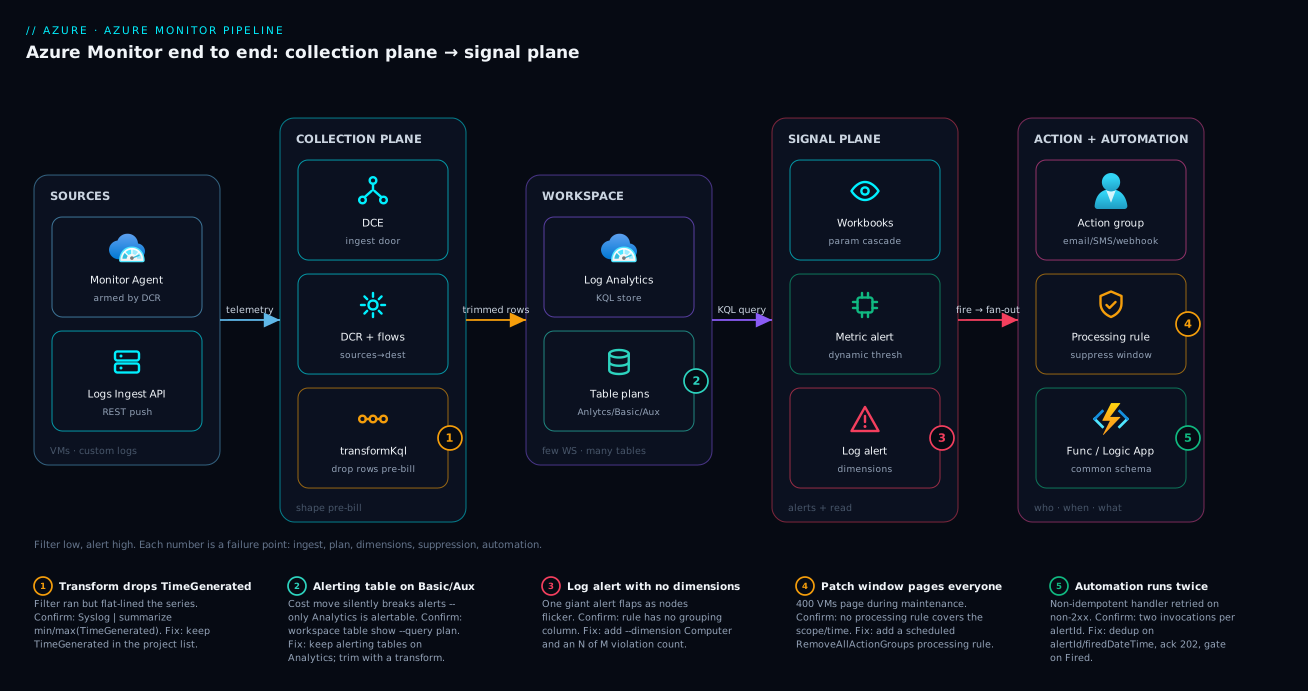
Read the diagram left to right as the data and signal pipeline it is. On the collection plane (left), the Azure Monitor Agent on each VM is armed by a Data Collection Rule and pushes through a Data Collection Endpoint; custom logs arrive at the same DCE via the Logs Ingestion API. At the DCR’s data flow, an ingestion transformation (transformKql) drops Information-level rows and noisy processes before anything is billed – badge ❶ marks this as the first failure point, because a transform that drops TimeGenerated flat-lines every downstream chart. The clean stream lands in the Log Analytics workspace, where each table sits on the plan its query pattern deserves: hot Analytics tables for alerting, Basic for verbose app logs, Auxiliary for the raw firehose (badge ❷ – put an alerting table on Basic and the alert silently can’t read it).
From the workspace the signal plane (right) reads two ways. Metric alerts evaluate the pre-aggregated stream with multi-resource scope and dynamic thresholds; scheduled-query alerts run KQL with dimensions so they fire per-entity instead of as one flapping storm (badge ❸). Both point at a single reusable action group, but an alert processing rule sits in front of it (badge ❹) to suppress pages during a patch window or bolt on the SecOps group centrally. The action group fans out to humans and to Logic Apps / Functions that auto-remediate using the common alert schema – and badge ❺ marks the automation hop, where a non-idempotent handler double-acts on a retry. The whole picture is the article’s one rule made visual: shape and trim low on the left where it is free, and raise clean, per-entity signals high on the right.
Real-world scenario
Paywave Systems runs a payments platform: roughly 1,400 VMs plus AKS across three regions (Central India primary, with Southeast Asia and West Europe), all funnelling telemetry into a single regional Log Analytics workspace per region. The platform team is six engineers; observability is one slice of their remit. Over two quarters the combined Log Analytics spend crossed a six-figure annual run rate with no new workloads to explain it – the classic silent-growth curve.
The forensic finding came from a single Usage-table query: a chatty Syslog stream and one verbose application diagnostic table accounted for roughly 70% of ingested volume, and almost none of it was ever queried. It existed because the retired MMA config had collected everything, and nobody revisited it after the AMA migration. The constraint was hard: the security team had a regulatory requirement to retain authentication and audit events for one year, so “just stop collecting” was off the table for that slice – and the on-call team was simultaneously drowning, because a single scheduled-query rule on Syslog errors fired one giant flapping alert every time a handful of nodes flickered during nightly batch.
They fixed it on the collection plane and the processing layer, not the bill. The breakdown of the change:
| Workstream | Before | Change | After |
|---|---|---|---|
| Syslog volume | All levels, all processes | transformKql drops info/debug + cron/health noise |
~50%+ less syslog, zero query loss |
| Verbose app table | Analytics plan, 90d | Move to Basic, 30d interactive / 365d total | Sharp per-GB ingest drop |
| Regulated auth/audit | Mixed in the firehose | Split to own Analytics table, 1y retention | Security alerts + retention untouched |
| Syslog error alert | One rule, no dimensions | Add --dimension Computer, 4 of 4 violations |
Per-node alerts, no storm |
| Patch-window pages | 400 VMs paged nightly | Alert processing rule, Sun 02:00-04:00 suppress | On-call sleeps through patching |
| Change process | Quarterly autopsy | DCR/table/alert as reviewed PRs | “What do we collect” = a diff |
The net was a ~45% reduction in monthly ingestion cost with no loss of any signal anyone actually used, and the nightly alert storm went silent. The load-bearing change was a few lines of KQL on a data flow:
source
| where SeverityLevel !in ("info", "debug", "notice")
| where ProcessName !in ("CRON", "systemd", "kubelet-health")
| project TimeGenerated, Computer, Facility, SeverityLevel, SyslogMessage
The 3am page that used to fan out across 400 machines now fires one alert per genuinely-affected node, auto-resolves when the node recovers, and stays muted entirely during the Sunday patch window. The lesson the team took away: in Azure Monitor, cost and noise are collection and processing design decisions, not billing surprises and not the alert rules’ fault. Once the DCR was the unit of intent and the processing rule owned the patch window, “what do we collect, what does it cost, and who gets paged” became three pull requests instead of two quarterly autopsies.
Advantages and disadvantages
The DCR-plus-processing model both causes the cost/noise problems and gives you the levers to fix them. Weigh it honestly:
| Advantages (why this model helps you) | Disadvantages (why it bites) |
|---|---|
| Collection is a versioned ARM artifact – “what do we collect” is a reviewable diff | The default posture is collect everything; you must opt into trimming |
| Ingestion transforms cut cost before billing at zero query-experience loss | A bad transform (dropped TimeGenerated, schema mismatch) silently breaks data |
| Per-table plans match each stream to its real query pattern | An alerting table mis-placed on Basic/Auxiliary silently can’t be alerted on |
One DCR scales to a whole fleet via Policy DeployIfNotExists |
Per-VM association by hand doesn’t scale and drifts |
| Metric alerts are cheap, fast, stateful, multi-resource | The signal must exist as a metric; otherwise you pay for log queries |
| Dimensions fire one alert per entity, killing the storm | Forget dimensions and one rule flaps as a single giant alert |
| Action groups centralise routing; processing rules mute/route without editing rules | The processing layer is invisible until you know it exists – teams disable rules instead |
| Common alert schema gives one envelope for all alert types | Skip it and every downstream parses three payload shapes |
The model is right for any estate past the toy stage that wants cost and noise under engineering control rather than at the mercy of defaults. It bites hardest on teams that migrated off MMA and never revisited collection, that alert on raw firehose data, and that reach for “disable the alert” or “another workspace” instead of the transform, the table plan, and the processing rule. Every disadvantage is manageable – but only if you know the lever exists, which is the entire point of this article.
Hands-on lab
Stand up a workspace, create a custom table fed by the Logs Ingestion API through a DCE and DCR with a transform, and fire a scheduled-query alert into an action group – all free-tier-friendly (Log Analytics has a generous free ingestion allowance; delete at the end). Run in Cloud Shell (Bash).
Step 1 – Variables and resource group.
RG=rg-monitor-lab
LOC=eastus
WS=law-lab-$RANDOM
az group create -n $RG -l $LOC -o table
Step 2 – Create the Log Analytics workspace.
az monitor log-analytics workspace create \
  -g $RG -n $WS -l $LOC --retention-time 30 -o table
WS_ID=$(az monitor log-analytics workspace show -g $RG -n $WS --query id -o tsv)
Expected: a workspace row; WS_ID populated.
Step 3 – Create a Data Collection Endpoint.
az monitor data-collection endpoint create \
  -g $RG -n dce-lab -l $LOC --public-network-access Enabled -o table
Expected: a DCE with a logsIngestion endpoint URL in its properties.
Step 4 – Create a custom table for the logs. A *_CL table to receive pushed rows:
az monitor log-analytics workspace table create \
  -g $RG --workspace-name $WS -n LabEvents_CL \
  --columns TimeGenerated=datetime Computer=string Severity=string Message=string
Expected: the table LabEvents_CL is created on the Analytics plan.
Step 5 – Create a DCR with a transform that drops Information rows. Author a minimal custom-log DCR (dcr-lab.json) with a streamDeclarations matching the table and a transformKql that filters, then create it. The key line is the transform:
# transformKql inside the data flow:
#   source | where Severity != 'Information' | project TimeGenerated, Computer, Severity, Message
az monitor data-collection rule create \
  -g $RG -n dcr-lab -l $LOC --rule-file ./dcr-lab.json -o table
Expected: a DCR whose data flow carries the transform; note its immutableId and the DCE’s ingestion URL for the push.
Step 6 – Push two rows and watch the transform drop one. POST one Information and one Error row to the ingestion endpoint (using the DCE URL, the DCR immutableId, and a bearer token from az account get-access-token --resource https://monitor.azure.com). Then query:
LabEvents_CL
| where TimeGenerated > ago(15m)
| project TimeGenerated, Computer, Severity, Message
Expected: only the Error row appears – the transform dropped the Information row before ingestion, which is the entire cost-control mechanism in miniature.
Step 7 – Create an action group and a scheduled-query alert.
az monitor action-group create -g $RG -n ag-lab --short-name lab \
  --action email me [email protected]

az monitor scheduled-query create -g $RG -n "lab-error-burst" \
  --scopes "$WS_ID" \
  --condition "count 'errs' > 0" \
  --condition-query errs='LabEvents_CL | where Severity == "Error"' \
  --dimension "Computer" \
  --window-size 5m --evaluation-frequency 5m --severity 3 \
  --auto-mitigate true \
  --action-groups $(az monitor action-group show -g $RG -n ag-lab --query id -o tsv)
Expected: the rule fires per Computer when error rows arrive, emails the action group, and auto-resolves.
Validation checklist. You built the whole chain: a DCE entry point, a DCR with an ingestion transform that dropped a row before billing, a custom table, and a per-entity scheduled-query alert into an action group. The steps mapped to the concepts:
| Step | What you did | What it proves |
|---|---|---|
| 3-5 | DCE + DCR + transform | Collection is a versioned artifact; transform runs pre-bill |
| 6 | Push 2 rows, 1 survives | The transform is a real, permanent cost cut |
| 7 | Scheduled-query with --dimension |
Per-entity firing, not one storm |
| 7 | Action group + auto-mitigate |
Centralised routing + stateful resolve |
Cleanup (avoid lingering ingestion/retention charges).
az group delete -n $RG --yes --no-wait
Cost note. Log Analytics includes a free ingestion allowance and the lab pushes a handful of rows; an hour of this lab is effectively free, and deleting the resource group stops the workspace, DCE, and DCR.
Practice challenges
Work these top to bottom – they escalate from a one-liner to a full cost-and-noise design, and each leans on a mental model from the sections above. Solutions are illustrative: every id is a placeholder and nothing here was run against a live subscription, so read the commands for shape, not as copy-paste-and-ship.
1. (Beginner) Find your fattest stream. Before you trim anything, you need to know what to trim. Write the KQL that ranks ingested volume by table over the last 7 days so you optimise the biggest line-item first.
<details> <summary>Solution</summary>
Usage
| where TimeGenerated > ago(7d)
| summarize IngestedGB = sum(Quantity) / 1000 by DataType
| order by IngestedGB desc
The top one or two DataType rows almost always dominate the bill.
Why: you cannot cut cost you have not measured – the Usage table turns “the bill grew” into a ranked target list, and the fattest stream is where a transform pays off most.
</details>
2. (Beginner) Arm the agent. A VM shows the AzureMonitorLinuxAgent extension as installed, but the Perf table has no rows for it. Give the single command that actually makes data flow.
<details> <summary>Solution</summary>
az monitor data-collection rule association create \
  --name dcra-vm-app-01 \
  --rule-id "/subscriptions/<sub>/resourceGroups/rg-observability/providers/Microsoft.Insights/dataCollectionRules/dcr-linux-platform" \
  --resource "/subscriptions/<sub>/resourceGroups/rg-fleet/providers/Microsoft.Compute/virtualMachines/vm-app-01"
Why: the Azure Monitor Agent is inert until a DCR is associated to the resource – the installed extension is necessary but collects nothing on its own. The association is what arms it. </details>
3. (Intermediate) Trim before you pay. Write a transformKql for a Microsoft-Syslog data flow that drops info/debug rows and the noisy cron process, without breaking the time-series.
<details> <summary>Solution</summary>
source
| where SeverityLevel !in ('info', 'debug')
| where ProcessName != 'cron'
| project TimeGenerated, Computer, Facility, SeverityLevel, SyslogMessage
Why: the where clauses drop rows before billing (a permanent cut), and keeping TimeGenerated in the project is what stops every downstream chart from flat-lining at one timestamp.
</details>
4. (Intermediate) Kill the storm. A scheduled-query rule fires one flapping alert across the whole fleet every night during batch. Turn it into per-node alerts that ride a brief flicker – fire only when it breaches 3 of the last 5 evaluations.
<details> <summary>Solution</summary>
az monitor scheduled-query create -g rg-observability -n "syslog-error-burst" \
  --scopes "/subscriptions/<sub>/resourceGroups/rg-observability/providers/Microsoft.OperationalInsights/workspaces/law-platform" \
  --condition "count 'errs' > 20" \
  --condition-query errs='Syslog | where SeverityLevel in ("err","crit","alert","emerg")' \
  --dimension "Computer" \
  --number-of-evaluation-periods 5 --min-failing-periods-to-alert 3 \
  --window-size 5m --evaluation-frequency 5m --severity 2 --auto-mitigate true
Why: --dimension Computer splits one rule into one independently-resolving alert per node, and 3 of 5 (minFailingPeriodsToAlert of numberOfEvaluationPeriods) rides a transient flicker instead of paging on it.
</details>
5. (Advanced) Transform data that never touches a standard DCR. Diagnostic-settings logs from a PaaS resource are chatty and you are paying to store all of it. There is no agent and no standard DCR in that path. How do you drop ~40% of it before billing?
<details> <summary>Solution</summary>
Create a workspace-transformation DCR (kind: "WorkspaceTransforms") – no dataSources, no DCE – with a data flow on the built-in stream for the target table and a filtering transform, then associate it to the workspace:
"dataFlows": [
  {
    "streams": ["Microsoft-Table-AzureDiagnostics"],
    "destinations": ["clv2ws1"],
    "transformKql": "source | where Category != 'HealthProbe' and ResultType != 'Success'"
  }
]
Why: diagnostic settings, resource logs, and legacy paths bypass standard DCRs entirely – the workspace-transformation DCR is the only place to attach a transformKql to that traffic, and there is exactly one per workspace.
</details>
6. (Advanced) Right-size the bill in the right order. You inherit a 1.2 TB/day workspace on pay-as-you-go, and an alert that reads a table someone moved to Basic “to save money” now reports no data. List the ordered moves to cut cost without breaking alerting, and name the field that proves the alerting table is mis-placed.
<details> <summary>Solution</summary>
- Move the alerting table back to Analytics (Basic/Auxiliary cannot source alerts). Confirm the mis-placement first:
az monitor log-analytics workspace table show ... --query planreturnsBasic. - Attach
transformKqlto the fattest data flows to drop noise pre-bill (free). - Move genuinely rarely-queried tables to Basic/Auxiliary.
- Set interactive vs. total retention per table to match its query pattern.
- Only then size a commitment tier on the volume that remains.
Why: filtering, plan placement, and retention are the large free-to-cheap savings; a commitment tier only discounts whatever is left – and you never trade alerting for a plan change or buy a discount on noise you should have filtered. </details>
Common beginner mistakes
These are wrong mental models, not runtime errors – the symptom-driven Common mistakes & troubleshooting table below handles the “it’s broken, here’s the fix” cases. Correct the model here and most of those symptoms never appear in the first place.
-
“Installing the Azure Monitor Agent starts collecting data.” It does not. AMA is a delivery truck with no route – it collects exactly nothing until a DCR is associated to the machine. The DCR is the intent; the agent is only the executor. First thing to check when a table is empty is not the agent, it is the association.
-
“A transformation cleans up my data after it’s stored so my queries are simpler.” Backwards, and it is the expensive way to be wrong.
transformKqlruns at ingestion, before billing – the entire point is that dropped rows are never stored and never paid for. If you are filtering noise in your saved queries to control cost, you have already paid to store every row you are hiding. -
“More workspaces means better isolation.” That is the old reflex, and it sprawls. Cross-workspace KQL is awkward and a workspace-per-team estate becomes ungovernable. The modern model is few workspaces, many tables, with table-level RBAC for isolation – you get the separation without the sprawl or the painful
unionacross workspaces. -
“Basic and Auxiliary are just cheaper Analytics, so move everything there.” They are cheaper because they give up capability: you cannot run an alert rule against a Basic or Auxiliary table, and their KQL is a subset. Move a table there only if nothing alerts or dashboards off it – an alerting table on Basic does not error, it fails silently, which is worse.
-
“Dynamic thresholds are smarter, so use them everywhere.” A dynamic threshold learns a band from history. On a brand-new metric there is nothing to learn yet, and on a hard SLA line (disk at 90%) the “learned normal” is not what you care about – the contract is. Use static for contracts and cold starts; use dynamic for metrics with a real daily or weekly rhythm.
-
“One alert rule over the whole fleet keeps things simple.” It keeps things quiet right up until it does not. Without dimensions, one rule collapses the entire fleet into a single alert that flaps as any one node flickers. Add a dimension and you get one independently-firing, independently-resolving alert per entity – which is the “simple” you actually wanted.
-
“To stop the 3am pages during patching, disable the alerts.” Then you are blind if something genuinely breaks mid-window, and inevitably someone forgets to switch them back on. The right lever is an alert processing rule that suppresses notifications on a schedule: the rules stay armed and evaluating, only the paging is muted, and it re-arms itself when the window closes.
-
“Auto-remediation fired twice, so the automation is buggy.” Usually the automation logic is fine and the handler is not idempotent. Alerts fire, resolve, and re-fire, and action groups retry on any non-2xx response – so a correct handler dedupes on
alertId/firedDateTime, acts only whenmonitorCondition == "Fired", and returns202fast so it is never retried for being slow.
Common mistakes & troubleshooting
This is the playbook – the part you bookmark. First as a scannable table you can read mid-incident, then the entries that bite hardest expanded with the full confirm-command detail.
| # | Symptom | Root cause | Confirm (exact cmd / portal path) | Fix |
|---|---|---|---|---|
| 1 | Log Analytics bill grew with no new workloads | Collect-everything legacy config; chatty stream never trimmed | `Usage | summarize sum(Quantity) by DataType |
| 2 | No rows after DCR association | AMA not installed on the VM | az vm extension list --query "[?name=='AzureMonitorLinuxAgent']" |
Install AMA via extension or Policy remediation |
| 3 | Every chart is a flat line at one time | Transform dropped TimeGenerated |
`Syslog | summarize min(TimeGenerated), max(TimeGenerated)` |
| 4 | Custom-log push returns 4xx | DCE missing or streamDeclarations mismatch |
Ingestion API response body; compare schema to table | Add DCE; align declared columns to the table |
| 5 | Alert rule “can’t find data” after a cost change | Alerting table moved to Basic/Auxiliary | az monitor log-analytics workspace table show --query plan |
Keep alerting tables on Analytics |
| 6 | One giant alert flaps as nodes flicker | Scheduled-query rule has no dimensions | Inspect the rule; no grouping column | Add --dimension Computer; N of M violations |
| 7 | Duplicate alert fires every minute | evaluation-frequency < ingestion latency |
Compare ingest delay to the rule frequency | Raise frequency to ≥ data latency |
| 8 | 400 VMs page during the patch window | No suppression on the maintenance window | No alert processing rule covers the scope/time | Add RemoveAllActionGroups processing rule, scheduled |
| 9 | Automation runs twice per incident | Non-idempotent handler + action-group retry | Function/Logic App logs show two invocations | Dedup on alertId/firedDateTime; ack 202 fast |
| 10 | Remediation fires on the resolve callback too | Handler ignores monitorCondition |
Payload data.essentials.monitorCondition = Resolved |
Gate the action on Fired only |
| 11 | Dynamic-threshold alert never fires (new metric) | No history for the band to learn | Rule created on a brand-new metric | Use a static threshold until weeks of history exist |
| 12 | Alert query returns nothing after retention cut | Data archived / interactive retention too short | Table interactive days vs the alert window | Widen interactive retention or shorten the window |
| 13 | Workbook step ignores the time picker | Hardcoded range, no {TimeRange} |
The step’s KQL lacks where TimeGenerated {TimeRange} |
Interpolate the parameter into the step |
| 14 | Volume didn’t drop after adding a transform | transformKql on the wrong data flow |
Which dataFlows entry carries it |
Move the transform onto the chatty stream |
The expanded form, for the entries that cost the most when missed:
1. Log Analytics bill grew with no new workloads.
Root cause: A legacy collect-everything config keeps pouring a chatty Syslog stream and a verbose app table into expensive Analytics tables nobody queries.
Confirm: Usage | where TimeGenerated > ago(7d) | summarize sum(Quantity) by DataType | order by sum_Quantity desc – the top one or two DataTypes usually dominate.
Fix: Attach a transformKql to drop the noise pre-bill, and move rarely-queried tables to Basic/Auxiliary with a sane interactive/total retention split. Keep regulated tables on Analytics.
3. Every chart and time-series is a flat line stamped at one moment.
Root cause: The ingestion transform dropped TimeGenerated, so every row is stamped at ingestion time.
Confirm: Syslog | summarize min(TimeGenerated), max(TimeGenerated) shows a near-zero spread, or all rows share one timestamp.
Fix: Add TimeGenerated back into the transform’s project list (or set it from the source field, e.g. project TimeGenerated = todatetime(EventTime), ...).
5. An alert rule reports it can’t find data right after a cost-optimisation change.
Root cause: The table was moved to Basic or Auxiliary, which cannot be a source for alert rules.
Confirm: az monitor log-analytics workspace table show -g rg-observability --workspace-name law-platform -n <Table> --query plan returns Basic/Auxiliary.
Fix: Keep any table that feeds an alert or dashboard on Analytics; trim its volume with a transform instead of changing its plan.
6. A single alert flaps loudly as a handful of nodes flicker.
Root cause: The scheduled-query rule has no dimensions, so it evaluates one aggregate across the whole fleet and fires/resolves as one giant alert.
Confirm: Inspect the rule – there is no grouping column; the alert summary names many resources at once.
Fix: Add --dimension Computer (or the right grouping column) so it fires per entity, and add an N of M violation count to ride brief flickers.
8. Hundreds of VMs page on-call during a planned patch window.
Root cause: The alert rules are correctly armed, but nothing suppresses notifications during maintenance.
Confirm: No alert processing rule with RemoveAllActionGroups covers the scope and the time window.
Fix: Create a scheduled processing rule (--rule-type RemoveAllActionGroups, recurring window) over the patched scope and the chosen severities – the rules stay armed; nobody is paged.
9. Auto-remediation acts twice for the same incident.
Root cause: The handler is not idempotent and the action group retried on a non-2xx, or the alert fired and re-fired.
Confirm: The Function/Logic App logs show two invocations with the same alertId/firedDateTime.
Fix: Deduplicate on alertId/firedDateTime, return 202 immediately, and push the slow work onto a queue so the call never exceeds the ack timeout.
Best practices
- Make the DCR the unit of intent. Author every DCR as code (Bicep/ARM), review it in PRs, and associate at fleet scale with Azure Policy
DeployIfNotExists– never per-VM by hand. - Transform before you pay. Attach a
transformKqlto every chatty data flow to drop rows and columns you will never query; it is a permanent, free-of-query-cost ingestion reduction. - Always preserve
TimeGeneratedin any transform, and validate the output schema against the destination table before you ship it. - Few workspaces, many tables, per-table plans. One regional workspace per boundary; scope access with table-level RBAC instead of minting a workspace per team.
- Place each table on the plan its query pattern deserves. Analytics for hot/alerting tables, Basic for rarely-queried verbose logs, Auxiliary for the raw firehose – never put an alerting table on Basic/Auxiliary.
- Set interactive and total retention deliberately, and keep an alert’s window inside the table’s interactive retention.
- Prefer metric alerts when the signal exists as a metric – they are cheaper, faster, stateful, and multi-resource. Reach for scheduled-query alerts only when the signal lives in logs.
- Always use dimensions on log alerts so they fire per entity, and tune
N of Mviolations to cut flapping. - Match
evaluation-frequencyto data latency so you never evaluate faster than data arrives. - Centralise action groups and enable the common alert schema so routing lives in one place and every downstream parses one envelope.
- Use alert processing rules for maintenance-window suppression and central action-group attachment – keep the alert rules armed and let processing decide who hears them.
- Make every automation handler idempotent and fast-acking (
202, queue the work, gate onFired), and grant its identity least privilege.
Security notes
- Managed identity, never secrets. AMA, DCR remediation, and automation handlers should authenticate with a system- or user-assigned managed identity; never embed workspace keys or connection strings. See Azure Key Vault: Secret Rotation with Managed Identity for the rotation pattern.
- Least-privilege roles. Grant
Monitoring Contributorfor authoring,Monitoring Readerfor consumers, and scope automation identities to exactly the resources they remediate – not subscription-wide Contributor. - Private ingestion where it matters. Use a DCE inside an Azure Monitor Private Link Scope (AMPLS) so telemetry never traverses the public internet; pair with the patterns in Azure Private Endpoints & Private DNS at Scale.
- Redact PII at ingestion. A
transformKqlcan strip or mask sensitive fields before they are stored, which is cheaper and safer than scrubbing after the fact. - Table-level RBAC for sensitive data. Keep security and audit tables in the shared workspace but restrict them with table-level access so app teams see their
*_CLtables and not the security stream. - Protect the regulated retention slice. Split auth/audit events into their own Analytics table with retention that meets the compliance requirement, and never let a cost change touch it.
- Secure the automation webhook. Prefer secure webhooks (Entra-authenticated) for callouts, validate the payload, and ensure the handler’s identity can only perform the specific remediation.
The security controls that also keep the pipeline cheap and correct – secure and well-built pull the same way here:
| Control | Mechanism | Secures against | Also prevents |
|---|---|---|---|
| Managed identity for AMA/automation | System/user-assigned MI | Leaked workspace keys | Broken rotation taking collection down |
| Private ingestion | DCE + AMPLS | Telemetry on the public internet | Re-architecture to add Private Link later |
| PII redaction in transform | transformKql masking |
Storing sensitive data | Extra storage cost for data you must scrub |
| Table-level RBAC | Per-table access | Over-broad data access | Workspace-per-team sprawl |
| Least-privilege automation | Scoped role assignment | A handler over-acting | Accidental cross-resource remediation |
Cost & sizing
The bill is driven almost entirely by the collection plane, so that is where you control it:
- Ingested GB dominates. Every Analytics-plan GB is billed at ingestion; the single biggest lever is collect less via DCR scoping and
transformKql, not buying anything. A transform that drops 50% of the fattest stream is a 50% cut on that stream, permanently. - Table plan is the second lever. Moving a rarely-queried table from Analytics to Basic sharply lowers per-GB ingest (you pay per-query instead), and Auxiliary is cheaper still for the raw firehose you only keep for compliance.
- Retention is the third lever. Long interactive retention costs more than archive (total) retention. Keep interactive short for tables you query only during incidents, with a long total-retention archive behind it.
- Alerts are cheap; queries are not free. Metric alerts cost essentially nothing per rule. Scheduled-query alerts pay for each evaluation’s query, so a 1-minute frequency on a heavy KQL across a huge table is a real recurring cost – match frequency to need.
- Action groups and notifications have small per-notification costs (SMS/voice more than email); the automation targets (Functions/Logic Apps) bill on their own meters.
A rough monthly picture for a mid-size estate, and what each lever buys:
| Cost driver | What you pay for | Rough INR / month (illustrative) | Lever to reduce it | Watch-out |
|---|---|---|---|---|
| Analytics ingestion | Per-GB hot ingest | the bulk of the bill | transformKql + DCR scoping |
Don’t drop a signal you’ll need |
| Basic-plan tables | Lower ingest, per-query billed | fraction of Analytics per GB | Move rarely-queried tables here | Can’t alert off Basic |
| Auxiliary-plan tables | Cheapest ingest, kept long | lowest per GB | Raw firehose for compliance | Very limited KQL |
| Interactive retention | Days queryable directly | scales with GB × days | Keep short; archive the rest | Alerts need data inside it |
| Archive (total) retention | Cheap long-term keep | low per GB-month | Long keep without hot cost | Restore/search job to query |
| Scheduled-query evaluations | Query cost per run | depends on frequency × size | Slower frequency; narrower query | Too slow misses incidents |
| Notifications + automation | SMS/voice + Func/LA meters | small | Email for low-urgency; idempotent handlers | Retries multiply automation cost |
Paywave landed at roughly a 45% lower monthly ingestion bill purely from a transform, two table-plan moves, and a retention split – proof the cheapest fix is almost always collect and keep less of what nobody queries, not a smaller anything.
Interview & exam questions
1. The legacy Log Analytics agent is retired – what replaced it and how is it configured? The Azure Monitor Agent (AMA) replaced MMA/OMS (retired 31 Aug 2024). AMA collects nothing on its own; it is driven entirely by Data Collection Rules that declare dataSources, destinations, and dataFlows, associated to each machine (by hand, by Bicep, or at fleet scale via Azure Policy DeployIfNotExists).
2. What is an ingestion-time transformation and why is it the highest-leverage cost control? A transformKql snippet attached to a data flow that runs before data is billed, operating on a source variable to drop rows/columns or redact fields. Because billing is on ingested volume, dropping chatty Information-level rows is a permanent, query-cost-free reduction – you never pay to store data you filtered at the door.
3. When do you need a Data Collection Endpoint? A DCE is required for the Logs Ingestion API (the endpoint is the DCE) and for Private Link ingestion via an AMPLS. For plain AMA collection over public networking it is optional, but standardising on one makes Private Link a later config change rather than a re-architecture.
4. Explain the three table plans and which can source an alert. Analytics (hot, full KQL, highest ingest) – the only plan that can source alerts and dashboards. Basic (high-volume, KQL subset, per-query billed) for rarely-queried logs. Auxiliary (lowest ingest, limited KQL) for the raw firehose kept for compliance. Putting an alerting table on Basic/Auxiliary silently breaks the alert.
5. Difference between interactive and total retention? Interactive retention is the window you can query directly; total retention is interactive plus a cheap long-term archive. Alert rules and dashboards can only read interactive retention – archived data needs a search job or restore first, so an alert’s window must fit inside interactive retention.
6. When do you choose a metric alert over a scheduled-query alert? Whenever the signal exists as a metric: metric alerts are cheaper, near-real-time, stateful, and natively multi-resource with optional dynamic thresholds. Use a scheduled-query alert only when the signal lives in logs (e.g. “20 5xx from one pod”, a privileged role assignment) – it is more expressive but pays query latency and cost.
7. What do dimensions do for a log alert, and why do they matter? A dimension is a grouping column that splits one rule into one independently-firing, independently-resolving alert per value – so a rule grouped by Computer fires per machine instead of one giant alert that flaps as nodes flicker. Without dimensions you get an alert storm collapsed into one noisy, unhelpful alert.
8. Why must evaluation-frequency be at least the data latency? Log ingestion has minutes of latency. Evaluating every minute against data that arrives every three minutes produces false negatives and duplicate fires. Matching frequency to real ingestion latency keeps evaluations deterministic and avoids re-firing on the same window.
9. What is an alert processing rule and what two jobs does it do? A rule (Microsoft.AlertsManagement/actionRules) that sits between alerts and action groups. It can suppress notifications across a scope on a schedule (mute a patch window so 400 VMs don’t page) or add an action group to every matching alert (attach SecOps to all prod Sev0/1) – all without editing a single alert rule.
10. Why use the common alert schema for automation? It gives every alert type (metric, log, activity log) the same JSON envelope, so a Function or Logic App parses one shape instead of three. You read data.essentials.monitorCondition to act only on Fired, and alertTargetIDs to know what to remediate.
11. What are the two non-negotiables for an alert-triggered automation handler? Idempotency (alerts fire/resolve/re-fire and action groups retry, so the handler must tolerate double invocation without doubling the effect) and fast ack / async work (return 202 immediately and queue slow remediation, or a blocking webhook gets retried and duplicates work).
12. A team’s Log Analytics bill grew 40% with no new workloads – how do you diagnose and fix it? Query Usage | summarize sum(Quantity) by DataType to find the fattest stream (usually one chatty Syslog or app table). Add a transformKql to drop the noise pre-bill, move rarely-queried tables to Basic/Auxiliary, split regulated data to its own Analytics table, and ship it all as reviewed DCR/table changes.
These map to AZ-104 (Administrator) – monitor and maintain Azure resources, configure Log Analytics, alerts, and action groups – and AZ-204 (Developer) – instrument, monitor, and troubleshoot solutions, custom logs and automation. The design-and-cost angle touches AZ-305 (Solutions Architect). A compact cert mapping for revision:
| Question theme | Primary cert | Objective area |
|---|---|---|
| AMA, DCR, DCE, association | AZ-104 | Configure & manage monitoring |
| Ingestion transforms, table plans, retention | AZ-104 / AZ-305 | Design a logging/cost strategy |
| Metric vs log alerts, dimensions | AZ-104 | Configure alerts & action groups |
| Action groups, processing rules, suppression | AZ-104 | Manage alerts at scale |
| Custom logs, automation handlers | AZ-204 | Instrument & troubleshoot solutions |
| Private ingestion, identity, RBAC | AZ-305 / AZ-500 | Secure observability |
Quick check
- The Azure Monitor Agent is collecting nothing from a freshly onboarded VM even though the extension is installed. What is the one thing that actually arms the agent?
- Your verbose app table was moved to the Basic plan to save money, and now an alert that reads it reports “no data.” Why, and what’s the fix?
- A scheduled-query rule fires one giant alert that flaps every night during batch. What single setting fixes it?
- After adding an ingestion transform, every chart on that table is a flat line at one timestamp. What did the transform almost certainly drop?
- 400 VMs page on-call every Sunday during the patch window even though the alerts are “correct.” What do you add, and to which layer?
Answers
- A Data Collection Rule association. AMA does nothing until a DCR is associated to the resource (by hand, Bicep, or Policy). The installed extension is necessary but inert without the association.
- Basic (and Auxiliary) tables cannot be a source for alert rules – only Analytics can. Move the table back to Analytics and trim its volume with a
transformKqlinstead of changing its plan. - Add a dimension (e.g.
--dimension Computer) so the rule fires one independently-resolving alert per entity instead of a single aggregate that flaps; aN of Mviolation count further rides brief flickers. TimeGenerated– the transform dropped it, so every row is stamped at ingestion time. AddTimeGeneratedback to theproject(or set it from the source event time).- An alert processing rule of type
RemoveAllActionGroupson a recurring schedule, added at the processing layer (between alerts and action groups) over the patched scope – the alert rules stay armed; nobody is paged during the window.
Glossary
- Azure Monitor Agent (AMA) – the agent that reads VM/host telemetry; does nothing without a DCR association. Replaced the retired MMA/OMS agent.
- Data Collection Rule (DCR) – the ARM resource declaring
dataSources,destinations, anddataFlows; the versioned unit of collection intent. - Data Collection Endpoint (DCE) – the ingestion entry point; required for the Logs Ingestion API and Private Link, optional for plain AMA collection.
- Logs Ingestion API – the REST endpoint for pushing custom logs into a custom table via a DCE and DCR.
- Transformation (
transformKql) – a KQL snippet on a data flow that runs at ingestion time, before billing, operating on thesourcevariable. - Stream – the named shape of a data source (
Microsoft-Perf,Microsoft-Syslog,Custom-*); maps a source to a destination table. - Table plan – Analytics (hot, full KQL, alertable), Basic (verbose, KQL subset, per-query billed), or Auxiliary (firehose, lowest ingest); set per table.
- Interactive retention – the window of data you can query directly; the only data alerts and dashboards can read.
- Total retention – interactive retention plus a cheap long-term archive; archived data needs a restore/search job to query.
- Workbook – a parameterised JSON report (
Microsoft.Insights/workbooks) of KQL steps and visuals; reusable via parameters and gallery templates. - Metric alert – a stateful, near-real-time threshold on a pre-aggregated metric; supports multi-resource scope and dynamic thresholds.
- Dynamic threshold – an ML-learned band over a metric’s history, used instead of a fixed number when “normal” varies by time.
- Scheduled-query (log) alert – a KQL alert (
scheduledQueryRules) run on a schedule against the logs store; tamed with dimensions. - Dimension – a grouping column that splits one rule into one independently-firing alert per value, preventing alert storms.
- Action group – a reusable bundle of notifications and actions (email, SMS, webhook, Logic App, Function, Runbook, ITSM) that any alert type can target.
- Alert processing rule – a rule between alerts and action groups that suppresses notifications on a schedule or adds an action group across a scope.
- Common alert schema – a single JSON envelope for every alert type, so one downstream parser handles metric, log, and activity-log alerts.
- AMPLS – Azure Monitor Private Link Scope; binds DCEs/workspaces to a Private Link for private ingestion and query.
- Workspace-transformation DCR – the single special DCR per workspace (
kind: WorkspaceTransforms, no data sources) that applies atransformKqlto data arriving through non-DCR paths – diagnostic settings, resource logs, legacy custom logs – viaMicrosoft-Table-<TableName>streams. - DCR association – the link (
dataCollectionRuleAssociations) that binds a DCR to a resource (a VM, an Arc machine, or the workspace itself); the thing that actually arms collection, separate from installing the agent. - immutableId – a DCR’s unchanging identifier (
dcr-...) generated at creation; used in the Logs Ingestion API URL and stable across renames. - Search job – an asynchronous KQL run over Basic, Auxiliary, or archived data that writes its results into a new
*_SRCHtable on the Analytics plan. - Restore – rehydrating an archived time range back into a hot
*_RSTtable for full interactive KQL; billed and asynchronous. - Prometheus rule group – a
prometheusRuleGroupsresource holding PromQL recording and alert rules over Managed Prometheus metrics, routed to the same action groups. - Recording rule – a Prometheus rule that precomputes an expensive PromQL expression into a new, cheaply-queried series.
- Commitment tier (capacity reservation) – a committed daily ingestion volume (e.g. 100/500/1000 GB/day) bought at a per-GB discount over pay-as-you-go; size it only on the volume left after filtering.
- Autoscale setting –
autoscaleSettings; scales a resource on metric or schedule rules, with a cooldown and a deadband to prevent flapping. - AMPLS access mode – the independent ingestion and query access settings (Open or Private Only) on an Azure Monitor Private Link Scope.
Next steps
You can now build the whole Azure Monitor pipeline as code and control cost and noise at the right layer. Build outward:
- Next: Azure Monitor & Application Insights for Observability – the application-telemetry side that feeds the same workspace and alerting plane.
- Related: Azure Monitor Deep Dive: Every Option – the full option surface behind every knob in this article.
- Related: Azure Monitor with Managed Prometheus & Managed Grafana for AKS – when your metrics live in Prometheus and you alert from there.
- Related: Azure Logic Apps Standard: Stateful Workflows, VNet & B2B/EDI – build the orchestrated remediation an action group hands off to.
- Related: Azure Diagnostics with Network Watcher, Resource Health & KQL – the diagnostic queries you run against the data this pipeline collects.