The platform team becomes the bottleneck the moment a subscription request turns into a ticket, a meeting, and three days of someone hand-running scripts. Subscription vending is the fix: a workload owner requests a landing zone, and a pipeline mints a governed Azure subscription — peered to the hub, policy-bound, RBAC-scoped, budget-capped — in minutes, with zero clickops. This is how I build that machine so it scales to hundreds of subscriptions without scaling the platform team.
In a nutshell
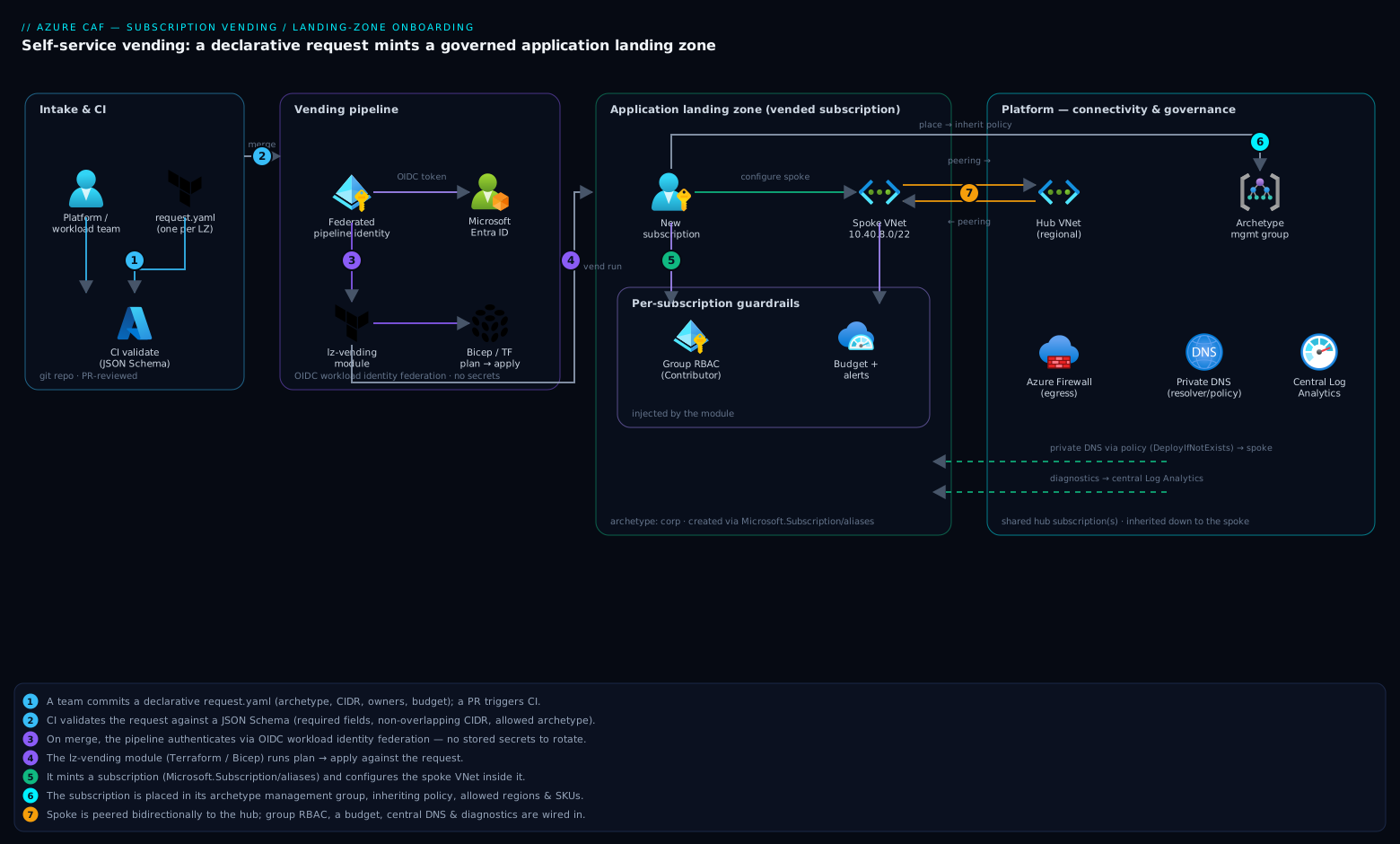
Think of subscription vending as a vending machine for cloud accounts. A team walks up, presses a button — “I need a production landing zone for the orders API” — and out drops a fully governed Azure subscription: networked into the corporate hub, bound to policy, scoped with the right roles, and capped with a budget. No engineer reaches into the machine to assemble the account by hand; the machine is stocked once (the module and the pipeline) and then stamps out identical, compliant units on demand.
The thing being vended is a subscription — Azure’s unit of billing, quota, RBAC, and isolation — pre-wired to everything the Cloud Adoption Framework says a workload needs. The “machine” is three parts working together: a declarative request (a small YAML file the team fills in), a pipeline that validates and applies it, and a vending module (Azure/lz-vending for Terraform, or its Bicep twin) that does the actual provisioning. Get those three right and onboarding a new workload goes from a multi-day ticket to a reviewed pull request that merges in minutes.
Why a beginner should care: this is the pattern that lets a small platform team support hundreds of application teams without becoming the bottleneck. It is where “infrastructure as code” graduates from provisioning a resource to provisioning a whole governed environment — the capstone skill of Azure platform engineering.
Level: Expert · Time: ~34 min
Prerequisites: you should already understand the CAF platform-vs-application split, the management-group hierarchy, and hub-and-spoke networking (see CAF landing zones deep dive); be comfortable reading Terraform or Bicep; and know what a management group, an Azure Policy assignment, and an Entra security group are.
After this lesson you can: describe the application landing-zone contract a platform makes to every workload; author a declarative vending request and validate it in CI; run the lz-vending module (Terraform or Bicep) to mint a subscription with networking, RBAC, budget, and policy inheritance; wire an OIDC-federated pipeline as the only privileged path to Azure; keep PIM, DNS, and drift handling correctly outside the create-time module; and operate the whole thing as a versioned internal product with decommission and re-baselining runbooks.
Why manual subscription onboarding breaks the cloud operating model
The Cloud Adoption Framework (CAF) draws a clean line between the platform (management groups, connectivity, identity, governance) and application landing zones (the subscriptions where workloads live). The model assumes the landing zone is a commodity — fast, identical, disposable. Manual onboarding breaks that in three ways:
- It does not scale. Every request consumes a senior engineer. At 20 subscriptions a quarter you are underwater, and the work is pure toil.
- It drifts. Two engineers onboarding two subscriptions produce two subtly different results — different policy assignments, a forgotten DNS link, an over-broad role grant. Drift is a security and audit problem, not a tidiness one.
- It centralises risk. A human with
Ownerat a management group, running ad-hoc scripts, is your blast radius. The pipeline identity should be the only thing holding that power, with every action in source control.
The mental shift: a subscription is not a project, it is a deployable artifact. You version it, test it, and roll it out like any other. If you cannot recreate a landing zone from code, you do not have a landing zone — you have a pet.
Step 1 — The application landing zone contract: what every workload gets
Before any pipeline, write the contract. This is the single most important artifact, because it is the promise the platform makes to every workload and the surface you have to keep stable. Mine, by default:
| Capability | What is provisioned |
|---|---|
| Subscription | Created via alias under the right billing scope, placed in the correct management group |
| Networking | A spoke virtual network, peered bidirectionally to the regional hub, with platform-managed DNS |
| Identity | RBAC role assignments for the workload’s groups; PIM-eligible, not standing, for privileged roles |
| Governance | Inherited Azure Policy from the management group, plus a deny on disallowed regions/SKUs |
| Cost | A consumption budget with alert thresholds wired to the owning team |
| Observability | Diagnostic settings routed to the central Log Analytics workspace |
Two design rules keep this maintainable. First, the spoke inherits, it does not redefine. Policy, DNS, and logging come down from the management group and connectivity subscription; the vending module only attaches the spoke to them. Second, archetypes, not snowflakes. Offer a small fixed set — corp (routed to on-prem via the hub), online (internet-facing, no corp routing), maybe sandbox. Each archetype maps to a management group with its own policy set. Resist per-team customisation.
Step 2 — Designing the vending pipeline and request intake
The machine has three moving parts: intake, the module, and the pipeline that glues them. Keep intake dumb and declarative — a structured request that a human or a service-desk integration can produce, validated before it ever touches Azure.
# requests/orders-api-prod.yaml — one file per landing zone, PR-reviewed
landingZone:
  name: orders-api-prod
  archetype: corp            # corp | online | sandbox
  billingScope: "/providers/Microsoft.Billing/billingAccounts/1234567/enrollmentAccounts/567890"
  managementGroupId: mg-corp
  location: westeurope
  owners:
    - groupObjectId: "11111111-1111-1111-1111-111111111111"  # Entra security group
      role: Contributor
  network:
    addressSpace: "10.40.8.0/22"
    hubResourceId: "/subscriptions/<conn-sub>/resourceGroups/rg-hub-we/providers/Microsoft.Network/virtualNetworks/vnet-hub-we"
  budget:
    amount: 5000
    contactGroups: ["team-checkout"]
The flow I run on every merge to main:
- Validate the YAML against a JSON Schema (required fields, CIDR is a valid non-overlapping block, archetype is allowed, owners reference real group object IDs).
- Plan the module against the request and post the plan to the PR for review.
- Apply on merge, using a pipeline identity that authenticates with OIDC workload identity federation — no stored secrets to rotate.
- Record the resulting subscription ID into an inventory (state, a CMDB, or a simple table) so lifecycle operations have a source of truth.
The identity is the crux. The pipeline’s federated identity needs Owner at the parent management group (to create and move subscriptions and assign roles) plus billing-scope rights (Subscription Creator on the EA enrollment account or MCA billing profile). That is a lot of power; it is acceptable only because every action is gated by a reviewed pull request and the identity has no interactive login.
Step 3 — Provisioning with the subscription-vending module
Do not write subscription creation from scratch. The CAF program ships a maintained, opinionated module that does the hard parts — alias creation, management-group placement, peering, role assignments, budgets — in one pass. It exists for both toolchains: Azure/lz-vending/azurerm on the Terraform Registry, and the Bicep module published to the public registry as br/public:lz/sub-vending.
Under the hood, subscription creation is the Microsoft.Subscription/aliases resource, which requires a billing scope (EA enrollment account, MCA billing profile, or MPA). You cannot vend a subscription without one, and that scope dictates the rights your pipeline identity needs.
Idempotency note: a subscription alias is keyed by its alias name, not by display name. Re-running with the same alias is a no-op; it does not create a duplicate. But deleting the alias resource does not delete the subscription — it only removes the pointer. Treat subscription deletion as a deliberate, separate lifecycle step (Step 6).
Terraform
module "orders_api_prod" {
  source  = "Azure/lz-vending/azurerm"
  version = "~> 5.0"

  location = "westeurope"

  # --- Subscription creation ---
  subscription_alias_enabled = true
  subscription_alias_name    = "orders-api-prod"
  subscription_display_name  = "orders-api-prod"
  subscription_billing_scope = "/providers/Microsoft.Billing/billingAccounts/1234567/enrollmentAccounts/567890"
  subscription_workload      = "Production"

  # --- Management group placement (governance inheritance) ---
  subscription_management_group_association_enabled = true
  subscription_management_group_id                  = "mg-corp"

  # --- Spoke networking, peered to the hub ---
  virtual_network_enabled = true
  virtual_networks = {
    spoke = {
      name                    = "vnet-orders-api-prod"
      address_space           = ["10.40.8.0/22"]
      resource_group_name     = "rg-orders-api-prod-network"
      hub_peering_enabled     = true
      hub_network_resource_id = "/subscriptions/<conn-sub>/resourceGroups/rg-hub-we/providers/Microsoft.Network/virtualNetworks/vnet-hub-we"
    }
  }

  # --- RBAC: workload owners get Contributor on the new subscription ---
  role_assignment_enabled = true
  role_assignments = {
    owners = {
      principal_id   = "11111111-1111-1111-1111-111111111111" # Entra group object ID
      definition     = "Contributor"
      relative_scope = "" # empty = subscription root
    }
  }

  # --- Budget guardrail ---
  budget_enabled = true
  budgets = {
    monthly = {
      amount     = 5000
      time_grain = "Monthly"
      notifications = {
        actual80 = {
          enabled        = true
          operator       = "GreaterThan"
          threshold      = 80
          threshold_type = "Actual"
          contact_groups = ["/subscriptions/<sub>/resourceGroups/rg-platform/providers/microsoft.insights/actionGroups/ag-team-checkout"]
        }
      }
    }
  }
}
The Terraform variant has a subtle but critical wrinkle: the AzureRM provider it uses to configure the spoke must target a subscription that does not exist until apply time. The module solves this with subscription_use_azapi = true, which uses the subscription-agnostic AzAPI provider for the creation step so a single apply both mints the subscription and configures inside it. Enable it; it removes the classic two-phase apply.
Bicep
targetScope = 'managementGroup'

module orders_api_prod 'br/public:lz/sub-vending:5.2.1' = {
  name: 'vend-orders-api-prod'
  params: {
    subscriptionAliasEnabled:  true
    subscriptionAliasName:     'orders-api-prod'
    subscriptionDisplayName:   'orders-api-prod'
    subscriptionBillingScope:  '/providers/Microsoft.Billing/billingAccounts/1234567/enrollmentAccounts/567890'
    subscriptionWorkload:      'Production'
    subscriptionManagementGroupAssociationEnabled: true
    subscriptionManagementGroupId: 'mg-corp'

    virtualNetworkEnabled:      true
    virtualNetworkName:         'vnet-orders-api-prod'
    virtualNetworkLocation:     'westeurope'
    virtualNetworkResourceGroupName: 'rg-orders-api-prod-network'
    virtualNetworkAddressSpace: ['10.40.8.0/22']
    virtualNetworkPeeringEnabled: true
    hubNetworkResourceId:       '/subscriptions/<conn-sub>/resourceGroups/rg-hub-we/providers/Microsoft.Network/virtualNetworks/vnet-hub-we'

    roleAssignmentEnabled: true
    roleAssignments: [
      {
        principalId:   '11111111-1111-1111-1111-111111111111'
        definition:    'Contributor'
        relativeScope: ''
      }
    ]
  }
}
Deploy a management-group-scoped Bicep file with az deployment mg create:
az deployment mg create \
  --name "vend-orders-api-prod" \
  --management-group-id "mg-platform" \
  --location "westeurope" \
  --template-file ./vend-orders-api-prod.bicep
Step 4 — Auto-wiring networking, peering, and DNS to the platform
Peering is the part people get wrong because it is bidirectional and crosses a subscription boundary. The spoke side is created by the vending module; the hub side must also be created, in the connectivity subscription. The lz-vending module’s hub_peering_enabled handles both directions, but it needs rights in the hub subscription to do so — give the pipeline identity at least Network Contributor on the hub resource group, or the spoke-to-hub link will succeed while the return link silently does not, and traffic will black-hole.
DNS is the second trap. In a hub-and-spoke, workloads must resolve Private Link records (privatelink.blob.core.windows.net, privatelink.vaultcore.azure.net, and friends) through the platform’s private DNS zones. Do not create per-spoke private DNS zones — that fractures resolution. Pick one of:
- Azure DNS Private Resolver (or central forwarders) in the hub, with spoke VNets using the resolver IPs as their DNS servers. This is my default now; it scales without per-zone link sprawl.
- Central private DNS zones in the connectivity subscription, with a
Microsoft.Network/privateDnsZones/virtualNetworkLinksfrom each new spoke to each zone — driven by an Azure Policy withDeployIfNotExists, not the vending module, so links self-heal even for VNets created outside the pipeline.
Either way, the vending module sets the spoke’s DNS servers to the hub resolver, and policy handles the zone links. Keeping DNS-zone management in policy rather than the per-spoke module is what stops it from rotting.
Step 5 — Injecting policy, RBAC, PIM, and budget guardrails at creation
The elegant thing about the CAF model is how little of this the vending module does — the heavy guardrails live at the management group, and the subscription inherits them the instant it is placed there (Step 3’s subscription_management_group_id). That single association pulls in every policy assigned to mg-corp and its ancestors: allowed locations and SKUs, required tags, deny of public IPs, mandatory diagnostic settings. You assign those once per archetype, not per subscription.
What the vending module does inject per-subscription is the workload-specific layer:
- RBAC — group-based role assignments (shown above). Assign to Entra groups, never users, never broader than the workload needs.
- Budgets — the consumption budget and its alert thresholds.
- Subscription-level deny/audit — any policy that must be scoped to this single subscription (rare; prefer the management group).
PIM is the one piece to deliberately keep outside the create-time module. The vending module grants standing role assignments; privileged access should be eligible, activated just-in-time. The clean separation: the module assigns the day-to-day role (e.g. Contributor to the dev group), and a separate process configures PIM eligibility for elevated roles (Owner, User Access Administrator) via the Microsoft.Authorization/roleEligibilityScheduleRequests API or the azurerm_pim_eligible_role_assignment resource. Mixing JIT elevation into the bulk vending run couples two things that change on very different cadences and tempts you toward standing privilege.
Guardrail philosophy: prevent at the management group with
deny, detect everywhere withauditandDeployIfNotExists, and grant least privilege at the subscription. The vending module is the attachment point, not the policy author.
Step 6 — Lifecycle: decommissioning, drift detection, and re-baselining
Vending is the easy half. A platform that can only create is a platform that accumulates. Three lifecycle operations matter:
Decommission. Removing the request file and applying does not delete an Azure subscription — by design, both toolchains leave it intact to prevent catastrophic accidental deletion. Decommissioning is a deliberate runbook: cancel the subscription (az account subscription cancel --id <sub-id> moves it to Disabled, recoverable for up to 90 days), strip role assignments, remove the hub peering, then drop it from inventory. Automate the runbook, but gate it behind explicit approval — never a side effect of a file deletion.
Drift detection. Run terraform plan (or az deployment mg what-if) for every managed landing zone on a schedule — nightly is fine — and alert on any non-empty diff. Drift means someone clickopsed a change: an opened NSG, a deleted peering, a hand-edited budget. You want to know within a day, not at audit time.
# Nightly drift sweep across all vended landing zones (CI scheduled job)
for lz in $(ls requests/*.yaml | xargs -n1 basename | sed 's/.yaml//'); do
  terraform plan -detailed-exitcode -var-file="requests/${lz}.tfvars" \
    || echo "DRIFT DETECTED in ${lz}"   # exit code 2 = changes present
done
-detailed-exitcode is the key flag: it returns 0 for no changes, 2 for a non-empty plan, and 1 for an error — so the loop distinguishes drift from failure.
Re-baselining. When the contract evolves — a new mandatory policy, a tighter budget default, an added DNS zone — you must roll the change across every existing subscription, not just new ones. This is why the contract being code matters: bump the module version, run the plan sweep, review the aggregate diff, apply. Re-baselining 200 subscriptions is a for loop, not a project, precisely because they were all vended identically.
Step 7 — Operating the platform: versioning, testing, and team enablement
Version the module like the product it is. Pin consumers to a minor range (~> 5.0), publish a changelog, and never make a breaking change to the contract without a major bump and a migration note. Your “customers” are other engineering teams; treat the interface with the same discipline you would a public API.
Test before you ship a version. The cheapest insurance against vending a broken landing zone to 50 teams:
- Static —
terraform validate/bicep build, plustflintand policy linting (Checkov,az policywhat-if) on every PR. - Contract —
terraform test(HCL native test framework) asserting the module produces the right resource shape from a representative request, on every push without touching Azure. - End-to-end — nightly, vend a real landing zone into a disposable canary billing scope, assert peering and policy compliance are live, then decommission it. This is the only test that catches billing-scope and cross-subscription peering failures, which never show up in a plan.
Enable the teams. The platform succeeds when workload owners self-serve without reading your Terraform. Ship a one-page “how to request a landing zone” doc, a commented request template, and a Backstage (or equivalent IDP) form that emits the request YAML so the average developer never writes HCL or Bicep. The pipeline, not the platform team, is the interface.
Enterprise scenario
A retail platform team I worked with vended ~180 subscriptions cleanly, then started getting sporadic “subscription quota exceeded” failures from the pipeline — but only for corp archetype tenants, and only intermittently. The plan was green every time; the apply died at the Microsoft.Subscription/aliases step. The trap: an EA enrollment account has a hard cap on subscriptions, and they were brushing it. Worse, every failed alias still consumed quota until garbage-collected, so retries dug the hole deeper. The actual fix had two parts. First, they spread vending across multiple enrollment accounts and selected the billing scope per-archetype in intake, so a single account never saturated. Second — the real lesson — they added a pre-flight quota gate to the pipeline that hard-fails before touching the alias resource:
# Pre-flight: refuse to vend if the target enrollment account is near its cap
BILLING="/providers/Microsoft.Billing/billingAccounts/1234567/enrollmentAccounts/567890"
USED=$(az rest --method get \
  --url "https://management.azure.com${BILLING}/billingSubscriptions?api-version=2024-04-01" \
  --query "length(value)" -o tsv)
LIMIT=5000   # confirm with your EA agreement; raise via support, not retries
if [ "$USED" -ge $((LIMIT - 20)) ]; then
  echo "FAIL: enrollment account at ${USED}/${LIMIT} — route to another scope"; exit 1
fi
The broader principle: subscription-level resources have tenant-wide quotas that no plan or what-if will surface, because they are evaluated at the control plane, not in your template. Treat billing-scope capacity as a first-class input to intake, alarm on it well before the ceiling, and never let the pipeline retry into a quota wall.
Going deeper
The seven steps above are the operating model. This section is the machinery underneath — the API primitives, the billing plumbing, and the ecosystem the module lives in — plus the parts experienced platform teams still get wrong at scale.
The primitive beneath the module: Microsoft.Subscription/aliases
The vending module is a convenience wrapper. The actual subscription-creation primitive is a single ARM resource, Microsoft.Subscription/aliases, and you can drive it directly with the CLI when you want to understand — or debug — what the module does for you:
# The raw creation call the module makes on your behalf
az account alias create \
  --name "lz-orders-api-prod" \
  --billing-scope "/providers/Microsoft.Billing/billingAccounts/1234567/enrollmentAccounts/567890" \
  --display-name "orders-api-prod" \
  --workload "Production"          # Production | DevTest

# Read it back — the alias record carries the resulting subscriptionId
az account alias show --name "lz-orders-api-prod" \
  --query "{alias:name, sub:properties.subscriptionId, state:properties.provisioningState}" -o table
Two properties of the alias resource explain behaviours you will otherwise find mysterious. First, the alias name is the idempotency key — re-creating with the same --name returns the existing subscription rather than minting a second one, which is exactly what makes the pipeline safe to re-run. Second, the alias is a pointer, not the subscription: az account alias delete removes the record and leaves the subscription live and billed (the Step 6 decommission trap, seen from the API). You can also pass --subscription-id to wrap an existing subscription in an alias — the supported way to bring hand-created subscriptions under management.
Billing scope is the input everything hinges on
You cannot vend without a billing scope, and its shape depends on your commercial agreement. The scope string is also what dictates the RBAC your pipeline identity needs — get it wrong and every apply fails at the alias step with an authorization error, never a plan error.
| Agreement | Billing-scope shape (abridged) | What the pipeline identity needs |
|---|---|---|
| EA (Enterprise Agreement) | …/billingAccounts/{ea}/enrollmentAccounts/{account} |
Owner on the enrollment account (the SPN added as an account owner) |
| MCA (Microsoft Customer Agreement) | …/billingAccounts/{mca}/billingProfiles/{profile}/invoiceSections/{section} |
Azure subscription creator billing role on the invoice section |
| MPA (Microsoft Partner Agreement) | …/billingAccounts/{mpa}/customers/{customer} |
Partner (CSP) admin rights on the customer |
The practical consequence: billing-scope permissions and capacity are a first-class input to intake, not an afterthought. The enterprise scenario above — the EA subscription cap — is the same lesson seen from the quota side. Model the billing scope per archetype in the request so the pipeline both selects the right one and pre-flights its remaining capacity.
Where a new subscription actually lands — and the default-MG trap
A freshly minted subscription does not appear in the management group you expect unless you tell it to. Absent an explicit association, it lands in the tenant root management group — or in whatever you have configured as the tenant’s default management group for new subscriptions (a tenant-level setting under Microsoft.Management). Two failure modes follow:
- With no default set, subscriptions pile up at tenant root, inheriting none of your archetype policy until someone moves them. A workload can run non-compliant for days before anyone notices.
- The move itself is a distinct operation (
az account management-group subscription add) that the module performs after creation, so ordering matters. That is why the module exposessubscription_management_group_association_enabledas its own switch.
Best practice: set the tenant’s default management group to a locked-down quarantine (or sandbox) MG with deny-heavy policy, so a subscription created by any path is safe-by-default until it is deliberately placed in its real archetype.
The module ecosystem: lz-vending, the ALZ accelerator, and AVM
The module the lesson uses is one piece of a larger, consolidating ecosystem — worth knowing so you pin the right thing and follow the right upgrade path:
Azure/lz-vending— the focused subscription-vending module, on the Terraform Registry (Azure/lz-vending/azurerm) and the Bicep public registry (br/public:lz/sub-vending). This is the workhorse most teams start with. Pin a minor range and read the changelog before a major bump; the module has shipped breaking majors (v3 → v4 → v5), so confirm the current major on the registry rather than trusting a number in a blog post.- The ALZ accelerator — the end-to-end “Azure Landing Zones” accelerator that bootstraps the whole platform: the management-group hierarchy, the policy library, the connectivity hub, and the CI/CD scaffolding that runs vending. Vending is one stage of it. Reach for the accelerator when you are standing up the platform from zero, not just adding subscriptions to one that already exists.
- Azure Verified Modules (AVM) — Microsoft’s program that unifies the sprawl of community and CAF modules under one verified, supported standard. Subscription vending has a pattern module here:
avm-ptn-lz-sub-vending(Terraform:Azure/avm-ptn-lz-sub-vending/azurerm; Bicep:br/public:avm/ptn/lz/sub-vending). The classiclz-vendingmodule is being aligned under AVM, so a new platform should evaluate the AVM pattern module and treat AVM as the long-term home. See Azure Verified Modules for platform Terraform.
A version caveat worth flagging for Terraform users: azurerm v4 made the provider’s subscription_id mandatory on the provider block. That collides head-on with vending, where the target subscription does not exist until apply. The module’s subscription_use_azapi = true sidesteps it by creating the subscription through the subscription-agnostic AzAPI provider, so a single apply both mints and configures. If you hit a v4 “subscription_id is required” error on a fresh vend, this is why — keep the AzAPI path on.
Guardrails as code: assign at the management group, once
Step 5 covered what the subscription inherits. The mechanics worth internalising: you assign policy at the management group, and every subscription placed under it inherits the assignment automatically — you never re-assign per subscription. A minimal archetype guardrail in Terraform:
# Assigned ONCE at the archetype MG; every vended sub inherits it
resource "azurerm_management_group_policy_assignment" "allowed_locations" {
  name                 = "allowed-locations"
  management_group_id  = "/providers/Microsoft.Management/managementGroups/mg-corp"
  policy_definition_id = "/providers/Microsoft.Authorization/policyDefinitions/e56962a6-4747-49cd-b67b-bf8b01975c4c" # built-in "Allowed locations"
  parameters = jsonencode({
    listOfAllowedLocations = { value = ["westeurope", "northeurope"] }
  })
}
This is the whole point of archetypes: deny guardrails live at the MG as a small, reviewed, versioned set, and vending merely places the subscription so inheritance does the rest. Keeping policy at the MG — not in the per-spoke module — is what lets you re-baseline 200 subscriptions by editing one assignment. For the full policy-as-code loop, see Azure Policy as code pipeline.
The identity and PIM baseline
Two identity layers matter and they belong in different places. The pipeline identity is a workload identity (an app registration) federated to your CI via OIDC — no client secret, Owner at the archetype MG, and billing-scope rights. It is the only thing with standing power, and it has no interactive login. The human access to a vended subscription should be eligible, not standing: the module grants a day-to-day role (e.g. Contributor) to the workload’s Entra group, and a separate PIM process makes elevated roles (Owner, User Access Administrator) activatable just-in-time, with approval and time-boxing.
# PIM eligibility — configured OUTSIDE the create-time vend, on its own cadence
resource "azurerm_pim_eligible_role_assignment" "owner_jit" {
  scope              = "/subscriptions/${var.subscription_id}"
  role_definition_id = data.azurerm_role_definition.owner.id
  principal_id       = var.platform_admins_group_object_id
  justification      = "JIT Owner for platform admins"

  schedule {
    expiration {
      duration_days = 365
    }
  }
}
Keeping this out of the vend is not fussiness: JIT-elevation policy changes on a security cadence, vending on a workload cadence, and coupling them tempts you back toward standing privilege. See PIM for Azure resources.
ITSM intake: ServiceNow in front, the same pipeline behind
In most enterprises the request does not start life as a YAML file a developer writes — it starts as a ServiceNow (or other ITSM) catalog item. The correct integration keeps ITSM as a front-end that emits the same declarative request, and never gives it a privileged path of its own:
- A developer fills a ServiceNow catalog item (“Request a landing zone”) with archetype, region, owner group, and budget.
- The ITSM approval workflow runs — manager sign-off, platform review, cost-centre check.
- On approval, ServiceNow does not touch Azure. It emits the request: opens a pull request to the vending repo with the generated YAML, or calls the pipeline’s trigger API — feeding the same validated, PR-reviewed pipeline every other request goes through.
- The pipeline records the resulting subscription ID back into the ITSM ticket and the CMDB, closing the loop.
The anti-pattern to refuse: giving ServiceNow its own service principal with subscription-creation rights so it can “just do it.” That creates a second privileged path outside source control and code review — precisely the blast radius the whole model exists to eliminate. ITSM produces intent; the pipeline remains the only actuator.
A concrete pipeline: OIDC-federated GitHub Actions
The lesson describes the flow in prose; here it is as a runnable skeleton, showing the federated-identity login with no stored secret:
# .github/workflows/vend.yml — validate on PR, apply on merge to main
name: subscription-vending
on:
  pull_request:
    paths: ["requests/**", "modules/**"]
  push:
    branches: [main]
    paths: ["requests/**"]

permissions:
  id-token: write        # REQUIRED for OIDC federation — no client secret
  contents: read
  pull-requests: write   # to post the plan back to the PR

jobs:
  plan-and-apply:
    runs-on: ubuntu-latest
    steps:
      - uses: actions/checkout@v4
      - uses: azure/login@v2
        with:
          client-id: ${{ secrets.AZURE_CLIENT_ID }}   # app registration id, not a secret value
          tenant-id: ${{ secrets.AZURE_TENANT_ID }}
          allow-no-subscriptions: true                 # vending has no target subscription yet
      - uses: hashicorp/setup-terraform@v3
      - run: terraform init && terraform validate
      - name: Plan on PR, apply on merge
        run: |
          if [ "${{ github.event_name }}" = "pull_request" ]; then
            terraform plan -input=false
          else
            terraform apply -input=false -auto-approve
          fi
The id-token: write permission and allow-no-subscriptions: true are the two lines people miss: the first enables the OIDC token exchange that replaces a stored credential, the second lets the login succeed even though the identity’s power lives at the tenant / management-group level, not in any one subscription.
Verify
After vending a landing zone, confirm the contract was actually fulfilled — do not trust a green pipeline alone:
SUB_ID="<new-subscription-id>"

# 1. Subscription exists, is enabled, and sits in the right management group
az account subscription show --id "$SUB_ID" --query "{name:displayName,state:state}" -o table
az account management-group subscription show --name mg-corp --subscription "$SUB_ID" -o table

# 2. Spoke peering is Connected in BOTH directions (run against each side)
az network vnet peering list \
  --resource-group rg-orders-api-prod-network \
  --vnet-name vnet-orders-api-prod \
  --subscription "$SUB_ID" \
  --query "[].{name:name,state:peeringState,gateway:useRemoteGateways}" -o table

# 3. Inherited policy is present and the subscription is compliant
az policy state summarize --subscription "$SUB_ID" \
  --query "value[0].results.{nonCompliant:nonCompliantResources,policies:policyAssignments}" -o json

# 4. Budget and its alert thresholds exist
az consumption budget list --subscription "$SUB_ID" -o table

# 5. RBAC is group-scoped, not user-scoped or over-broad
az role assignment list --subscription "$SUB_ID" --include-inherited \
  --query "[].{principal:principalName,role:roleDefinitionName,type:principalType,scope:scope}" -o table
The peering check is the one to watch: peeringState must read Connected from both the spoke and the hub. If the spoke says Connected but the hub side is missing, your pipeline identity lacked rights in the connectivity subscription — the most common silent failure here.
Platform readiness checklist
Pitfalls
- Assuming alias deletion deletes the subscription. It does not. Removing the request leaves a live, billed subscription. Decommissioning is a separate, deliberate runbook.
- One-directional peering. The pipeline identity lacking
Network Contributorin the connectivity subscription produces a half-built peering that plans clean but black-holes traffic. Verify both sides. - Per-spoke private DNS zones. They fracture resolution and multiply maintenance. Centralise DNS in the hub and link via policy.
- Standing privileged access baked into vending. Granting
Ownerat create time defeats zero-standing-privilege. Keep day-to-day roles in the module and elevated roles in PIM. - Skipping the end-to-end canary. Billing-scope permission gaps and cross-subscription peering failures only surface on a real apply. A nightly vend-and-destroy is the only test that catches them before a team does.
Get the contract right, make the pipeline the only path, and verify the boring things — peering direction, policy inheritance, least-privilege RBAC — and landing zones become a commodity that scales with a for loop.
Practice challenges
Work these in order; each builds on the last. Try before opening the solution.
1. Read a billing scope (beginner). You are handed this scope string and asked which agreement it belongs to and what the pipeline identity needs:
/providers/Microsoft.Billing/billingAccounts/8f3a.../billingProfiles/QR7X-.../invoiceSections/5T2M-...
<details><summary>Show solution</summary>
It is an MCA (Microsoft Customer Agreement) scope — the tell is billingProfiles/…/invoiceSections/…. The pipeline identity needs the Azure subscription creator billing role on that invoice section. (EA scopes end in enrollmentAccounts/…; MPA scopes end in customers/….)
Why: the scope shape encodes both the agreement and the required RBAC — reading it correctly is the difference between a clean vend and an authorization failure at the alias step. </details>
2. Author a minimal request (beginner). Write the smallest sensible vending request YAML for an internet-facing API called shop-web-prod in the online archetype, region northeurope, owned by group 22222222-2222-2222-2222-222222222222, budget €3,000.
<details><summary>Show solution</summary>
landingZone:
  name: shop-web-prod
  archetype: online
  billingScope: "/providers/Microsoft.Billing/billingAccounts/1234567/enrollmentAccounts/567890"
  managementGroupId: mg-online
  location: northeurope
  owners:
    - groupObjectId: "22222222-2222-2222-2222-222222222222"
      role: Contributor
  network:
    addressSpace: "10.50.0.0/22"
  budget:
    amount: 3000
    contactGroups: ["team-shop"]
Why: online maps to mg-online (no corp routing), and the request stays declarative — the developer supplies intent (name, archetype, owner, budget), never hand-crafted resource IDs beyond the billing scope and owner group.
</details>
3. The subscription with no policy (intermediate). A subscription you vended is running non-compliant workloads; you find it sitting in the tenant root group, not mg-corp. What went wrong, and what are the two fixes?
<details><summary>Show solution</summary>
The management-group association was not applied — either subscription_management_group_association_enabled was false/omitted, or the move step failed after creation. Fixes: (1) set subscription_management_group_association_enabled = true with the correct subscription_management_group_id and re-apply; (2) as a backstop, configure the tenant’s default management group for new subscriptions to a locked-down quarantine MG so anything created outside the pipeline is safe-by-default until placed.
Why: a subscription inherits policy only from its MG ancestry — an unplaced subscription inherits nothing and can run non-compliant for days. </details>
4. Alert before the money is spent (intermediate). Extend the Terraform budget block so the team is warned at 100% of forecast — not just 80% of actual spend.
<details><summary>Show solution</summary>
Add a second notification keyed on Forecasted, alongside the existing actual80:
forecast100 = {
  enabled        = true
  operator       = "GreaterThan"
  threshold      = 100
  threshold_type = "Forecasted"
  contact_groups = ["/subscriptions/<sub>/resourceGroups/rg-platform/providers/microsoft.insights/actionGroups/ag-team-checkout"]
}
Why: Actual alerts fire after the spend has happened; Forecasted warns while there is still time to act — which is the entire point of a budget guardrail.
</details>
5. Half-built peering (advanced). A vend reports success; the spoke’s peering reads Connected, but traffic to the hub black-holes. az network vnet peering list on the hub side shows no matching peering. Root cause and fix?
<details><summary>Show solution</summary>
The pipeline identity lacked Network Contributor in the connectivity (hub) subscription, so the hub-to-spoke return peering was never created. The spoke-to-hub link succeeded (the identity had rights in the new subscription) while the return link silently failed. Fix: grant the pipeline identity Network Contributor on the hub resource group (or connectivity subscription) and re-apply; the module’s hub_peering_enabled then completes both directions.
Why: peering is bidirectional and crosses a subscription boundary — a green plan never surfaces the missing return link because it is a runtime permission gap in a different subscription. </details>
6. Front-end without a back door (advanced). Design a ServiceNow intake for landing-zone requests without giving ServiceNow any subscription-creation rights of its own. Sketch the flow.
<details><summary>Show solution</summary>
ServiceNow catalog item captures the request → ITSM approval workflow runs → on approval, ServiceNow opens a pull request to the vending repo (or calls the pipeline’s trigger API) emitting the standard request YAML → the existing OIDC pipeline validates, plans, reviews, and applies → the pipeline writes the new subscription ID back to the ticket and CMDB. ServiceNow holds git/PR or trigger access only — never an Azure service principal with billing or MG rights.
Why: ITSM should produce intent, not actuate. A second privileged path outside code review re-creates the exact blast radius the vending model exists to remove. </details>
Common beginner mistakes
These are misconceptions about the model — distinct from the runtime traps in Pitfalls above. Get the mental model right and the traps mostly disappear.
-
“A subscription is basically a big resource group.” No — a subscription is the unit of billing, quota, RBAC scope, and policy scope; resource groups live inside it. Vending exists because standing up that boundary correctly (billing, limits, governance) is precisely what you cannot express with a resource group. Right model: subscription = governed environment, resource group = a container within it.
-
“Vending is just a bash script that runs a bunch of
azcommands.” That is the thing vending replaces. The design is declarative request → module → pipeline: intent in a reviewed file, provisioning in a versioned module, execution in a gated pipeline. A hand-rolled script is imperative, unreviewed, and drifts — the exact problems the model removes. -
“OIDC is less secure than a client secret because there’s no password.” Backwards. The stored client secret is the thing that leaks, expires, and needs rotating. OIDC workload identity federation exchanges a short-lived, audience-scoped token per run and stores nothing — it is the more secure option, which is why it is the baseline here.
-
“A management group is a folder for my resource groups.” No — management groups sit above subscriptions, not inside them. The hierarchy is management group → subscription → resource group, and policy and RBAC inherit down that chain. Placing a subscription in the right MG is what pulls in the archetype’s guardrails; it has nothing to do with resource groups.
-
“Grant access to whichever users need it.” Assign roles to Entra security groups, never individual users, and prefer eligible (PIM) activation over standing assignment for anything privileged. The module grants the day-to-day group role; JIT elevation lives in PIM. User-scoped grants and standing
Ownerare the two RBAC anti-patterns vending is meant to prevent. -
“A green plan means the vend will work.” A
terraform plan/what-ifvalidates your template, not the control plane. Billing-scope quota, cross-subscription peering rights, and the management-group move are evaluated at apply time and never appear in a plan — which is why the model insists on a nightly end-to-end canary and a pre-flight quota gate.
Glossary
- Subscription vending — the automated pattern of provisioning a fully governed Azure subscription (the “landing zone”) from a declarative request, on demand, via a pipeline and a reusable module.
- Application landing zone — a subscription pre-wired with the networking, identity, governance, cost, and observability a workload needs; the unit a workload team receives and deploys into.
- Platform landing zone — the shared foundation (management groups, connectivity hub, identity, governance) that application landing zones plug into; the platform half of the CAF platform-vs-application split.
- Cloud Adoption Framework (CAF) — Microsoft’s guidance for adopting Azure at scale, including the landing-zone architecture this lesson automates.
- Archetype — a fixed landing-zone type (e.g.
corp,online,sandbox), each mapped to a management group with its own policy set; the alternative to per-team snowflakes. - Management group (MG) — a container above subscriptions used to apply policy and RBAC that subscriptions inherit; the hierarchy is MG → subscription → resource group.
- Subscription alias (
Microsoft.Subscription/aliases) — the ARM resource that creates a subscription, keyed by an immutable alias name (its idempotency key). Deleting the alias does not delete the subscription. - Billing scope — the EA enrollment account, MCA invoice section, or MPA customer under which a subscription is created and billed; required to vend, and it dictates the pipeline identity’s rights.
- EA / MCA / MPA — Enterprise Agreement / Microsoft Customer Agreement / Microsoft Partner Agreement: the three commercial agreements, each with a differently-shaped billing scope.
lz-vending— the maintained CAF subscription-vending module, available for Terraform (Azure/lz-vending/azurerm) and Bicep (br/public:lz/sub-vending).- Azure Verified Modules (AVM) — Microsoft’s unified, supported module standard; the long-term home for CAF modules, including the
avm-ptn-lz-sub-vendingpattern module. - ALZ accelerator — the end-to-end Azure Landing Zones accelerator that bootstraps the whole platform (MG hierarchy, policy, connectivity, and vending CI/CD).
- Hub-and-spoke — the network topology where a central hub subscription hosts shared connectivity and each spoke (workload VNet) peers to it bidirectionally.
- VNet peering — the bidirectional link between two virtual networks; must read
Connectedon both sides or traffic black-holes. - OIDC workload identity federation — a way for a CI pipeline to authenticate to Azure using a short-lived, exchanged token instead of a stored client secret.
- PIM (Privileged Identity Management) — Entra’s just-in-time elevation: privileged roles are eligible and activated on demand with approval and time-boxing, rather than held standing.
- DeployIfNotExists (DINE) — an Azure Policy effect that auto-remediates by deploying a missing resource (e.g. a private-DNS zone link) so configuration self-heals.
- Drift — divergence between deployed state and the code; detected by a scheduled
terraform plan/what-ifand a non-empty diff (-detailed-exitcodereturns2). - Re-baselining — rolling a contract change (new policy, tighter budget default, added DNS zone) across every existing landing zone, not just new ones.