Most “cost optimization” efforts die because they are a quarterly spreadsheet, not a system. FinOps only works when the data is trustworthy, the allocation is defensible, and the optimization is automated enough to survive contact with a busy engineering org. This is the operational practice I build on Azure: tagging you can actually enforce, showback finance and engineering both believe, and optimization that runs without anyone remembering to run it.
In a nutshell
Imagine every engineering team had two things they don’t have today: a live utility bill that shows exactly what their services cost — updated daily, broken down the way they think about their work — and a thermostat they can turn down without filing a ticket. That is what a FinOps practice does. It turns cloud cost from a quarterly surprise that lands on a finance director’s desk into a design input engineers see while they build, the same way they already see latency or error rate.
“FinOps” is short for Financial Operations: a way of working (not a product you buy) where engineering, finance, and product share one trustworthy picture of cloud spend and act on it continuously. On Azure specifically it means tagging every resource so cost can be attributed to a team, using Microsoft Cost Management to see and export that spend, setting budgets that alert before the money is gone, buying the right discounts (reservations, savings plans, spot), switching off what’s idle, and catching an expensive change in the pull request — before it ships.
The trap this lesson exists to help you avoid is doing cost work as a one-off spreadsheet cleanup that regresses within a quarter. Everything below is built to keep running without anyone remembering to run it — a live bill and a thermostat wired into the platform, not a report someone dreads producing.
Level: Advanced · Time: ~38 min
Before you start, it helps to know:
- The Azure resource hierarchy — management groups → subscriptions → resource groups → resources — because allocation and policy both hang off it.
- What Azure Policy does (assign a rule at a scope; effects like
deny,audit,modify) and what a managed identity is. The Azure Policy as Code lesson is the companion here. - Comfort reading
azCLI, a little Terraform (azurerm), and YAML. You don’t need a subscription or to run anything — every command here is illustrative and none is executed for you.
After this lesson you’ll be able to:
- Design a mandatory tag taxonomy and enforce it at write time with Azure Policy (inherit-from-RG + deny), not by after-the-fact reports.
- Allocate shared costs (a hub firewall, one AKS cluster shared by many teams) defensibly, and explain the difference between showback and chargeback.
- Stand up budgets, forecasted alerts, and anomaly detection that route to the team that can act, not to a mailbox everyone mutes.
- Choose between reservations, savings plans, spot, autoscale, right-sizing, and Azure Hybrid Benefit for a given workload — and know which ones stack.
- Export cost data in the FOCUS schema and build unit-economics dashboards (cost per order / tenant / request).
- Put a cost gate in CI/CD so an expensive or untagged change is caught in the PR, not discovered on next month’s invoice.
The FinOps lifecycle: inform, optimize, operate
The FinOps Foundation frames the discipline as three iterating phases, and it is worth anchoring to because each phase has a different failure mode.
- Inform — make spend visible and allocatable. Failure mode: untagged resources and shared costs nobody owns, so every report is contested.
- Optimize — rightsize, shut down idle resources, and commit to discounts. Failure mode: one-off manual cleanups that regress within a quarter.
- Operate — bake cost into daily engineering and the org’s processes. Failure mode: cost stays a finance concern, never a deploy-time one.
You build them in order. Optimization recommendations are noise until allocation is solid, and “operate” gates are resented until the numbers behind them are trusted. The rest of this article is that order, made concrete.
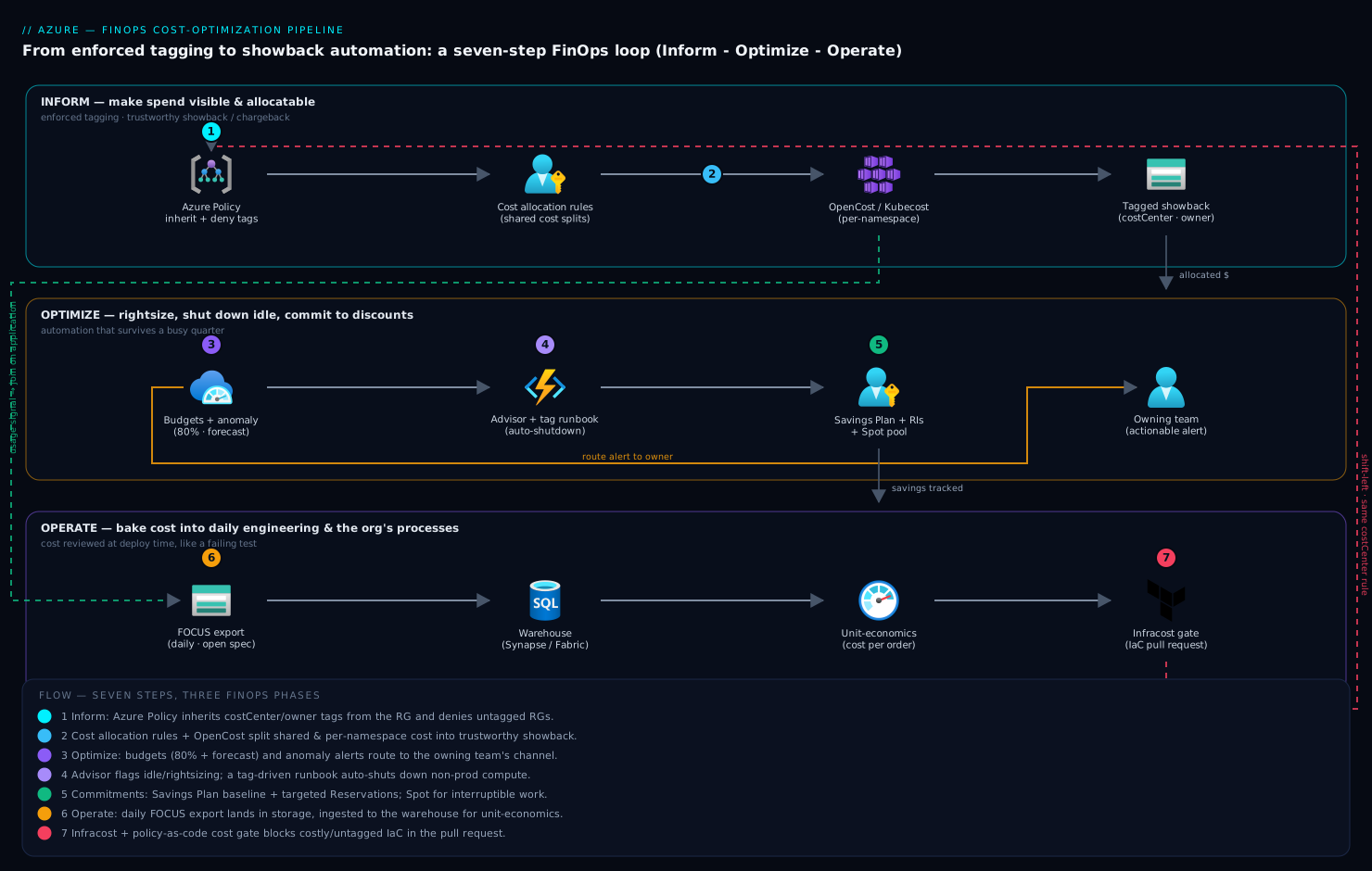
Step 1 — A tagging taxonomy and enforcing it with Azure Policy
Allocation lives and dies on tags. Decide a small mandatory set first; resist the urge to mandate fifteen. My default mandatory tags:
| Tag | Purpose | Example |
|---|---|---|
costCenter |
Maps to the finance GL/cost center | CC-4815 |
owner |
Accountable team alias, not a person | team-checkout |
environment |
Drives policy and showback splits | prod |
application |
The product/service the resource serves | orders-api |
Two structural decisions matter more than the tag list. First, mirror the taxonomy onto subscriptions and resource groups via a management group hierarchy, so allocation has a fallback when individual resources slip through. Second, enforce at write time with Azure Policy, not with after-the-fact reports.
The key trick: combine an inherit tag from the resource group modify policy with a deny on resource groups that lack the tag. This way humans only have to tag the resource group, and resources inherit automatically. Use the built-in policy definitions by their stable GUIDs.
# Built-in: "Inherit a tag from the resource group if missing"
INHERIT_DEF="cd3aa116-8754-49c9-a813-ad46512ece54"

# Built-in: "Require a tag on resource groups"
RG_REQUIRE_DEF="96670d01-0a4d-4649-9c89-2d3abc0a5025"

MG="mg-platform"   # management group scope

az policy assignment create \
  --name "inherit-costcenter" \
  --display-name "Inherit costCenter from RG" \
  --policy "$INHERIT_DEF" \
  --scope "/providers/Microsoft.Management/managementGroups/$MG" \
  --location eastus \
  --mi-system-assigned \
  --params '{ "tagName": { "value": "costCenter" } }'

az policy assignment create \
  --name "require-rg-costcenter" \
  --display-name "Require costCenter on resource groups" \
  --policy "$RG_REQUIRE_DEF" \
  --scope "/providers/Microsoft.Management/managementGroups/$MG" \
  --params '{ "tagName": { "value": "costCenter" } }'
The
inheritpolicy uses amodifyeffect, which means it needs a managed identity and a role assignment to write tags.--mi-system-assignedprovisions the identity; you still must grant itTag Contributor(orContributor) at the scope. Runaz policy remediation createafterward to backfill existing resources — new assignments only act on new writes until you remediate.
Repeat the inherit assignment for owner, environment, and application. For the dimensions that must never be wrong (environment, costCenter), back them with a deny policy on the resources themselves in production management groups, accepting a small amount of developer friction in exchange for clean data. Keep deny out of sandbox subscriptions — there, audit plus a weekly compliance nudge is enough.
Step 2 — Cost allocation, shared costs, and building showback/chargeback
Once tags exist, the genuinely hard part is shared cost — the things no single team provisions but everyone uses: an AKS cluster’s system node pool, a shared Application Gateway, Log Analytics ingestion, NAT Gateway egress, hub firewall. If you ignore these, your showback under-reports by 15-40% and finance stops trusting it.
There are two defensible allocation strategies; pick one per cost type and document it:
- Proportional — split a shared cost by each team’s share of a driver (their compute spend, their namespace’s CPU requests, their request count). Good for genuinely fungible shared infra.
- Even/fixed — split equally or by a negotiated fixed key. Good for “tax” services like security tooling where usage-based splits invite gaming.
Azure has a native primitive for this: Cost allocation rules in Cost Management, which let you redistribute costs from a source (subscription, resource group, or tag) to targets proportionally or by a fixed percentage. They are created in the portal under Cost Management > Cost allocation; the resulting splits then flow into Cost Analysis and exports as if the target teams had incurred them. This is the cleanest path for subscription-level shared services.
For intra-cluster allocation (one AKS cluster, many teams by namespace), allocation rules are too coarse — you need usage data Azure does not see. Run OpenCost (the CNCF project; Kubecost is the commercial build) in the cluster to attribute node cost down to namespace and workload based on resource requests and actual usage.
helm repo add opencost https://opencost.github.io/opencost-helm-chart
helm repo update
helm install opencost opencost/opencost \
  --namespace opencost --create-namespace
The distinction between showback and chargeback is organizational, not technical: showback reports each team’s cost for visibility; chargeback actually moves budget. Start with showback for at least one full quarter. Chargeback before the data is trusted turns every month-end into a dispute and poisons the whole program.
Step 3 — Budgets, anomaly detection, and actionable cost alerts
Budgets in Azure are not spending caps — they are alerting thresholds. Create them per cost center or per environment, and wire the action group to something a human owns, not a shared mailbox that everyone mutes.
az consumption budget create \
  --budget-name "cc-4815-monthly" \
  --amount 25000 \
  --category cost \
  --time-grain Monthly \
  --start-date 2026-06-01 \
  --end-date 2027-06-01 \
  --resource-group rg-orders-prod
Set thresholds at 80% (actual), 100% (actual), and crucially a forecasted threshold around 100-110%. Forecasted alerts fire early in the month when you can still act; actual alerts at 100% fire when the money is already spent. Budget notifications can target both email recipients and an action group, which is what lets you fan out to Teams, PagerDuty, or a webhook that opens a ticket.
Two thresholds is not anomaly detection, though — a budget can’t catch a service that doubled while staying under budget. Azure Cost Management has a built-in anomaly detection model that flags unusual daily spend patterns per subscription. Surface it programmatically with the Cost Management forecast/anomaly APIs, or subscribe to scheduled anomaly alerts (configured under Cost alerts > Anomaly alerts). The signal you want is “this resource group’s run-rate changed in a way the model didn’t predict,” routed to the owning team, not aggregated to a director who can’t act on it.
Step 4 — Rightsizing and shutdown automation for idle resources
Recommendations without automation are a backlog that never clears. Split this into advisory (act with judgment) and mechanical (just do it on a schedule).
Advisory — Azure Advisor cost recommendations. Advisor identifies idle and underutilized VMs, idle disks, unused public IPs, and rightsizing candidates based on actual utilization. Pull them as data so they land in a dashboard and a backlog, not a portal blade nobody opens.
az advisor recommendation list \
  --category Cost \
  --query "[].{resource:impactedValue, problem:shortDescription.problem, savings:extendedProperties.savingsAmount}" \
  -o table
Mechanical — auto-shutdown of non-prod compute. Idle dev/test VMs running nights and weekends are pure waste. The native, zero-infrastructure approach is the VM auto-shutdown feature (DevTest Labs surfaces it per-VM, but it exists on standalone VMs too):
# Schedule daily auto-shutdown for a non-prod VM at 19:00 IST
az vm auto-shutdown \
  --resource-group rg-dev \
  --name vm-build-01 \
  --time 1900 \
  --location eastus
For anything fleet-wide or with start/stop logic, drive it from tags so the schedule is self-service. Tag VMs with shutdown=2200 / startup=0700, then run a scheduled job (Azure Automation runbook or a Function on a timer trigger) that queries Resource Graph for the tag and acts:
# Find VMs opted into scheduled shutdown via tag, across subscriptions
az graph query -q "
Resources
| where type == 'microsoft.compute/virtualmachines'
| where isnotempty(tags['shutdown'])
| project name, resourceGroup, subscriptionId, shutdownAt = tags['shutdown']
"
Auto-shutdown deallocates the VM, so you stop paying for compute but still pay for the OS and data disks. That is the intended trade-off for dev/test. For idle managed disks and orphaned public IPs that Advisor flags, deletion (after a grace period and a snapshot for disks) is where the real recurring savings hide.
Step 5 — Commitment strategy: reservations vs savings plans vs spot
Once usage is steady, commitment discounts are the largest single lever. The three instruments are not interchangeable.
| Instrument | Discount vs PAYG | Flexibility | Best for |
|---|---|---|---|
| Reserved Instances | Highest (up to ~72%) | Locked to a VM family/region (with instance-size flexibility) | Stable, predictable workloads you won’t re-platform |
| Savings Plans | High (slightly below RIs) | Hourly $/hr commit, flexible across VM family, region, and OS | Dynamic compute that shifts shape over time |
| Spot VMs | Up to ~90% | None — can be evicted with 30s notice | Interruptible, stateless, checkpointable batch/CI |
The decision rule I use: cover the stable baseline of your compute with a 1- or 3-year Savings Plan for flexibility, top up with Reservations only where a workload is genuinely pinned to a family (large stateful databases, fixed SKUs), and push interruptible work — CI runners, batch, dev clusters — onto Spot. Aim to cover 60-80% of steady-state on commitments, never 100%; you want headroom so a re-platform doesn’t strand a commitment.
Use the Reservation and Savings Plan recommendation APIs (also surfaced in Cost Management > Reservations) — they model your actual usage and recommend commit amounts and break-even. Treat their “look-back” window carefully: a 7-day window over-commits if last week was a spike. Validate against a 30/60-day view before purchasing.
Spot is a scheduling decision. On AKS, a dedicated spot node pool with the right taint keeps spot-tolerant work isolated:
az aks nodepool add \
  --resource-group rg-aks \
  --cluster-name aks-prod \
  --name spotpool \
  --priority Spot \
  --eviction-policy Delete \
  --spot-max-price -1 \
  --enable-cluster-autoscaler \
  --min-count 0 --max-count 20 \
  --node-taints "kubernetes.azure.com/scalesetpriority=spot:NoSchedule"
--spot-max-price -1 means “pay up to the on-demand price,” which maximizes availability while still capturing the spot discount.
Step 6 — Exporting cost data and building unit-economics dashboards
The portal is for browsing; a real practice needs cost data as a queryable artifact. Configure a scheduled Cost Management export to a storage account in FOCUS format — the FinOps Foundation’s open cost-and-usage spec — so your pipeline isn’t coupled to Azure’s proprietary column layout and can ingest other clouds the same way.
az costmanagement export create \
  --name "daily-focus-export" \
  --scope "/subscriptions/<sub-id>" \
  --storage-account-id "/subscriptions/<sub-id>/resourceGroups/rg-finops/providers/Microsoft.Storage/storageAccounts/stfinopsexports" \
  --storage-container "cost-exports" \
  --storage-directory "focus" \
  --recurrence Daily \
  --recurrence-period from="2026-06-01T00:00:00Z" to="2027-06-01T00:00:00Z" \
  --definition-type ActualCost \
  --dataset-granularity Daily
From there, ingest into your warehouse (Microsoft Fabric, Synapse, Databricks, or BigQuery if you’re multi-cloud) and join cost to a business metric. The number leadership actually cares about is unit economics: cost per tenant, per order, per active user, per GB processed. A flat “$48k on compute” tells no one whether you’re efficient; “$0.021 per order, down from $0.027” drives decisions.
The join key is the same tagging taxonomy from Step 1. application and environment let you slice cost to a service; a metrics table keyed by the same application gives you the denominator. Build the unit-cost trend, not just the absolute, and put it where engineers see it.
Step 7 — Embedding cost gates into IaC and CI/CD
This is the “operate” phase, and it is what makes the practice durable: cost becomes a property reviewed at deploy time, like a failing test. The tool I reach for is Infracost, which estimates the monthly delta of a Terraform/Bicep change in the pull request.
# .github/workflows/cost-gate.yml
name: Cost Gate
on: [pull_request]

jobs:
  infracost:
    runs-on: ubuntu-latest
    steps:
      - uses: actions/checkout@v4

      - name: Setup Infracost
        uses: infracost/actions/setup@v3
        with:
          api-key: ${{ secrets.INFRACOST_API_KEY }}

      - name: Generate cost estimate baseline
        run: |
          infracost breakdown --path=. \
            --format=json --out-file=/tmp/infracost-base.json

      - name: Post cost diff to PR
        run: |
          infracost comment github --path=/tmp/infracost-base.json \
            --repo=$GITHUB_REPOSITORY \
            --pull-request=${{ github.event.pull_request.number }} \
            --github-token=${{ secrets.GITHUB_TOKEN }}
Pair the estimate with policy-as-code so the gate has teeth. Infracost integrates with OPA/Conftest, or you can run Conftest directly against the Terraform plan to fail PRs that, say, provision an untagged resource or a VM SKU above an approved tier:
terraform plan -out=tfplan
terraform show -json tfplan > plan.json
conftest test plan.json --policy ./policy
Keep the IaC gate aligned with the Azure Policy from Step 1 — the same costCenter/owner requirement, caught earlier and cheaper in the PR instead of denied at terraform apply. Two layers, same rule, shift-left.
Enterprise scenario
A retail platform team I worked with ran the FOCUS export from Step 6 into Synapse and built clean per-application showback. It held for everything except their largest line item: AKS. One shared production cluster ran twelve teams across namespaces, and the daily cost export attributed the entire node-pool spend to the single subscription that owned the cluster — roughly 22% of the monthly bill landing in one “platform” bucket nobody would claim. Finance refused to sign off on chargeback while a fifth of spend was unallocated.
The gotcha: Azure cost allocation rules redistribute at the subscription/RG/tag grain, but they cannot see inside a cluster. Node cost is real-time bin-packing of pods Azure has no visibility into, so no native primitive could split it by namespace.
The fix was OpenCost for the usage signal, exported as Prometheus metrics, joined to the FOCUS data on application in the warehouse. The critical detail everyone misses: split node cost by CPU/memory requests, not actual usage, otherwise a team that under-requests freeloads on a team that reserves headroom. OpenCost exposes both, so be explicit:
# Per-namespace cost weighted by resource requests (allocation = requests)
curl -G "http://opencost.opencost.svc:9003/allocation/compute" \
  --data-urlencode "window=7d" \
  --data-urlencode "aggregate=namespace" \
  --data-urlencode "idle=true" \
  | jq '.data[] | {namespace: .name, cpuCost, ramCost, totalCost}'
Surfacing idle=true separately mattered too: it exposed that unallocatable idle capacity was 18% of cluster cost, which became a rightsizing target instead of a hidden tax. Within two months unallocated spend dropped below 3% and chargeback went live.
Going deeper
The seven steps above are the practice. This section is the machinery underneath them — the parts that bite in production, the version caveats, and the mental models an experienced engineer needs to defend design choices to a finance partner.
Cost Management internals: scopes, exports, and the FOCUS schema
Microsoft Cost Management is a data plane layered on the billing system, and the shape of that data depends on your agreement. An Enterprise Agreement (EA) and a Microsoft Customer Agreement (MCA) expose different billing scopes (billing account, billing profile, invoice section) above the familiar management-group / subscription / resource-group scopes. Cost Analysis in the portal is fine for browsing, but a real practice never queries the portal — it works off exports.
Two things about exports are worth internalising:
- The Power BI Cost Management connector is on its way out. It still works, but it is in maintenance mode and no longer being invested in; Microsoft’s guidance is to export to a storage account and pull that into Power BI via the ADLS Gen2 connector or Microsoft Fabric. This scales past the connector’s row limits and gives you the complete, latest dataset. Microsoft’s open-source FinOps toolkit ships prebuilt Power BI reports that point straight at exported storage — start there rather than hand-building a semantic model.
- Prefer the FOCUS export type. The older export (
--definition-type ActualCost/AmortizedCost, as in Step 6) emits Azure’s proprietary column layout. The newer “Cost and usage details (FOCUS)” export type emits the FinOps Foundation’s open schema and, importantly, combines actual and amortized cost in one dataset, so you don’t run two exports and join them. FOCUS is what makes the same pipeline ingest AWS or GCP later without a rewrite.
The two FOCUS columns that matter most:
| FOCUS column | What it is | Use it for |
|---|---|---|
BilledCost |
The amount that actually lands on the invoice for the period | Invoice reconciliation, finance sign-off |
EffectiveCost |
Cost after commitment discounts are amortised across their term (a 3-yr RI’s upfront payment spread over the hours it covers) | Trend analysis, showback, unit economics |
Standardise your dashboards on EffectiveCost — otherwise a reservation purchase looks like a spend spike in the month you bought it and a “free” run afterwards, which tells engineers nothing. Other columns you’ll lean on: ChargeCategory (Usage / Purchase / Tax / Credit), ServiceName, ResourceId, SubAccountId (the subscription), RegionId, CommitmentDiscountId, and the tag columns. Edge cases to know: FOCUS exports do not support the management-group scope (export per billing account / subscription and union in the warehouse), and exports retain up to seven years of data, so a first full-history export can be large — schedule it off-peak.
Tagging in Terraform: azurerm has no default_tags
If you come from AWS you will reach for the provider’s default_tags block and find it missing. The azurerm provider (through v4.x) has no provider-level default_tags — it is one of the longest-standing open feature requests in the provider. Every resource carries its own tags, so people either forget tags or copy-paste them and drift. Three correct patterns, in order of reach:
- A
localsmap merged into every resource — the idiomatic azurerm workaround:
locals {
  common_tags = {
    costCenter  = var.cost_center
    owner       = var.owner_team
    environment = var.environment
    application = var.application
  }
}

resource "azurerm_resource_group" "app" {
  name     = "rg-orders-${var.environment}"
  location = var.location
  tags     = local.common_tags
}

resource "azurerm_storage_account" "app" {
  name                     = "storders${var.environment}"
  resource_group_name      = azurerm_resource_group.app.name
  location                 = azurerm_resource_group.app.location
  account_tier             = "Standard"
  account_replication_type = "LRS"
  tags                     = merge(local.common_tags, { tier = "data" })
}
- The
AzAPIprovider, which does exposedefault_tagsat the provider level — useful when you’re already using AzAPI for preview resources. - Azure Policy tag inheritance (Step 1) — the only backstop that also catches resources created by ClickOps, the CLI, other IaC tools, or a different team’s pipeline. IaC tags cover only IaC-managed resources; Policy covers everything written to the subscription. Run both:
merge()for clean intent in code, Policymodify/denyfor universal enforcement. That belt-and-braces is what keeps allocation coverage above ~97% instead of decaying every time someone bypasses Terraform.
Budgets, action groups, and the anomaly model
Budgets (Step 3) are alert thresholds, never spending caps — nothing halts at 100%. The piece worth understanding is what a budget can reach: it fans out through an action group, a reusable object that bundles receivers (email, SMS, push, voice) and actions (webhook, Logic App, Azure Function, ITSM/ServiceNow connector, Automation runbook, event hub). That indirection is the whole game — point the budget at an action group whose webhook opens a ticket or posts to the owning team’s channel, and the alert becomes actionable instead of an email nobody opens. (The Azure Monitor action groups lesson covers the receiver plumbing in depth.)
# One reusable action group; every budget/anomaly alert routes through it
az monitor action-group create \
  --resource-group rg-finops \
  --name ag-finops-oncall \
  --short-name finops \
  --action webhook opsgenie "https://api.example.com/finops/hook"
Forecasted thresholds are the ones that save you: they use Cost Management’s forecasting model to project month-end run-rate, so a threshold at ~110% forecast fires early enough to act, while an actual threshold at 100% fires only once the money is spent. Anomaly detection is a different instrument — an unsupervised model over daily spend that flags a pattern the forecast didn’t predict (a service that doubled while staying under budget). Key caveat: anomaly detection operates at the subscription/scope grain, not per resource, so the signal is “this scope’s run-rate moved” and you triage down to the resource group with Cost Analysis or Resource Graph. Route it to the owning team, never aggregate it up to a director who can’t act.
The savings levers, ranked — and how they stack
Step 5 covered the three commitment instruments. The full lever set is larger, and the ordering matters: do the free, architectural levers before you spend money on discounts.
- Eliminate — delete idle disks, unattached public IPs, and orphaned resources; deallocate stopped VMs. Free, and usually the biggest mechanical win.
- Right-size (Advisor) — move over-provisioned VMs/SKUs down a tier based on real utilisation. Free. Advisor is the data source; see the Advisor + Resource Graph lesson.
- Autoscale & schedule — match capacity to demand instead of paying for peak 24/7: VMSS autoscale rules, the AKS cluster autoscaler (plus KEDA for event-driven pod scaling), App Service autoscale, and auto-shutdown of non-prod. This is architecture, not procurement, and it compounds with everything below.
- Spot — up to ~90% off for interruptible, checkpointable work that tolerates a 30-second eviction notice.
- Commit — reservations for workloads pinned to a VM family, savings plans for compute that shifts shape. Cover 60–80% of steady-state, never 100%.
- License: Azure Hybrid Benefit — the lever most teams forget, and it stacks with all the above.
Azure Hybrid Benefit (AHB) lets you bring on-prem Windows Server and SQL Server licences with active Software Assurance (or subscription licences) to Azure, dropping the licence premium baked into the pay-as-you-go rate. On its own it saves roughly 36% on Windows Server VMs and ~29% on SQL Server on average; SQL Managed Instance can drop ~55% before any reservation. Crucially it is orthogonal to the compute commitment — AHB removes the licence cost while a reservation or savings plan removes the compute premium, so stacking AHB on a 3-year reservation routinely reaches 80%+ off on-demand list (Microsoft advertises up to ~85% when you add Extended Security Updates). It’s a per-resource flag you can toggle on existing eligible VMs with no redeploy:
# Enable Azure Hybrid Benefit on an already-running eligible Windows VM
az vm update \
  --resource-group rg-orders-prod \
  --name vm-orders-01 \
  --set licenseType=Windows_Server
The trap: AHB requires licences you actually own with Software Assurance — it’s a licensing decision finance and your Microsoft agreement must bless, not a free switch. Audit eligibility before you assume the savings.
The cost-guardrail pipeline, end to end
Steps 1, 3, 4, and 7 are really one control loop with three stages. Seeing them as a single guardrail is what turns a pile of scripts into a durable practice:
- Prevent (shift-left). Azure Policy
denyon untagged resources and above-tier SKUs at write time; the same rules run earlier and cheaper as Infracost + Conftest/OPA in the PR. Catch it in review, not atterraform apply, and never on the invoice. - Detect. Forecasted budgets and anomaly alerts routed to owners; daily FOCUS export feeding the unit-economics dashboard so a regression shows up as a rising cost-per-unit.
- Correct. Scheduled right-size / auto-shutdown runbooks and Policy remediation tasks that backfill drift. Automate the boring correction so it survives a busy quarter.
The “correct” stage is just a scheduled job. A GitHub Actions cron (or an Automation runbook / timer-triggered Function) that pulls Advisor into a backlog and deallocates tagged non-prod compute keeps the thermostat turning itself down:
# .github/workflows/scheduled-rightsize.yml
name: Scheduled Rightsize
on:
  schedule:
    - cron: "0 2 * * 1"   # 02:00 UTC every Monday
  workflow_dispatch: {}

jobs:
  rightsize:
    runs-on: ubuntu-latest
    permissions:
      id-token: write   # OIDC federated login, no stored client secret
      contents: read
    steps:
      - uses: actions/checkout@v4
      - name: Azure login (OIDC)
        uses: azure/login@v2
        with:
          client-id: ${{ secrets.AZURE_CLIENT_ID }}
          tenant-id: ${{ secrets.AZURE_TENANT_ID }}
          subscription-id: ${{ secrets.AZURE_SUBSCRIPTION_ID }}
      - name: Snapshot Advisor cost recommendations into the backlog
        run: |
          az advisor recommendation list --category Cost \
            --query "[].{resource:impactedValue, problem:shortDescription.problem}" \
            -o json > advisor-cost.json
Note the OIDC login (azure/login@v2 with id-token: write) — a federated credential on a workload-identity app registration, so there’s no long-lived secret in the repo. That’s the current best practice for CI touching Azure; a leaked AZURE_CLIENT_SECRET is its own cost incident.
The FinOps Framework: phases, capabilities, maturity
Inform → Optimize → Operate (the article’s spine) are the Framework’s phases, but the FinOps Foundation also structures the discipline into four Domains — Understand Usage & Cost, Quantify Business Value, Optimize Usage & Cost, Manage the FinOps Practice — and roughly two dozen Capabilities underneath them. Knowing the vocabulary lets you map your work and talk to a FinOps team without hand-waving:
| This lesson’s step | FinOps Capability | Phase |
|---|---|---|
| Tagging + allocation (1–2) | Data Ingestion, Allocation | Inform |
| Budgets + anomaly alerts (3) | Budgeting, Anomaly Management, Forecasting | Inform → Operate |
| Right-size + shutdown (4) | Workload Optimization | Optimize |
| Reservations / SP / Spot / AHB (5) | Rate Optimization | Optimize |
| FOCUS export + unit economics (6) | Reporting & Analytics, Unit Economics | Inform → Operate |
| Cost gate in CI/CD (7) | Cloud Policy & Governance | Operate |
The Framework also defines a Crawl / Walk / Run maturity model — you are not expected to run every capability at once. Crawl is basic tagging and monthly showback; Walk adds enforced policy, forecasted budgets, and commitment coverage; Run is anomaly automation, unit economics on a dashboard engineers watch, and cost gates in every pipeline. And it names personas (engineering, finance, product, leadership) because FinOps fails when it’s owned by one of them alone — the whole point is the shared picture.
Unit economics: from “the bill” to cost-per-request
Absolute spend is almost useless as a KPI because it moves with growth. The number leadership can actually act on is unit cost: fully-loaded cost divided by a business denominator — per order, per tenant, per active user, per 1,000 requests, per GB processed. Compute it by allocating a service’s direct spend plus its share of platform and shared cost (via the Step 1 tags) and dividing by the request/transaction count from your metrics store, joined on the same application key.
Two distinctions separate a real unit-economics practice from a vanity chart:
- Marginal vs fully-loaded. Marginal cost answers “what does one more request cost right now” (drives autoscale and caching decisions); fully-loaded cost amortises reservations, shared infra, and idle headroom (drives pricing and product decisions). Report the fully-loaded trend, but keep marginal handy for capacity work.
- The bill can rise while efficiency improves. If total spend is up 20% but cost-per-order is down 15%, you are winning — you’re serving more orders more cheaply. A dashboard that only shows the absolute bill will get an efficient, fast-growing team scolded. Put the unit-cost trend where engineers see it, not just the total.
Watch the denominator: retries, health-check traffic, and cache hits can inflate “requests” and hide a real per-request regression. Define the denominator as deliberately as the numerator, and tie it to an SLO — an error budget has a cost dimension, and “we spent ₹X per successful order” is the sentence that makes cost a design input.
Verify
Confirm each layer is actually working before you declare victory:
# 1. Tag enforcement: list non-compliant resources for the inherit policy
az policy state list \
  --filter "PolicyAssignmentName eq 'inherit-costcenter' and ComplianceState eq 'NonCompliant'" \
  --query "[].{resource:resourceId, policy:policyDefinitionName}" -o table

# 2. Allocation coverage: cost of UNTAGGED resources should trend to near-zero
az graph query -q "
Resources
| where isnull(tags['costCenter']) or tags['costCenter'] == ''
| summarize untaggedResources = count() by type
| order by untaggedResources desc
"

# 3. Budgets exist where they should
az consumption budget list --query "[].{name:name, amount:amount, grain:timeGrain}" -o table

# 4. Export is running and dropping files
az storage blob list \
  --account-name stfinopsexports \
  --container-name cost-exports \
  --prefix "focus/" --query "[].name" -o tsv | tail -5
For the CI gate, open a throwaway PR that adds an untagged resource and confirm the pipeline fails and the Infracost comment posts.
Checklist
Pitfalls
- Tagging by report instead of by policy. If tags are not enforced at write time, allocation coverage decays the moment you stop nagging. Modify-effect inheritance plus a deny on the highest-value dimensions is the only thing that holds.
- Chargeback before trust. Moving real budget on contested numbers turns FinOps into a finance-vs-engineering fight. Earn a quarter of believed showback first.
- Over-committing on a spike. Reservation/Savings Plan recommendations using a 7-day look-back over-buy after a busy week. Validate against 30-60 days and cap coverage below 100%.
- Alert fatigue. Budgets and anomalies routed to a shared mailbox get muted within a month. Route to the owning team’s real channel, and make sure the alert says what changed and what to do, not just that it changed.
- Orphaned resources hiding the savings. The biggest mechanical wins are usually idle disks, unattached IPs, and stopped-but-not-deallocated VMs — not heroic rightsizing. Automate the boring cleanup first.
Practice challenges
Work these top to bottom — they escalate from a single policy assignment to a full shift-left gate. Every command is illustrative; swap the placeholders (<mg-id>, <sub-id>, tags) for your own. No subscription is required to reason through them.
1 (Beginner) — Require an environment tag on resource groups. Assign the built-in “Require a tag on resource groups” policy at a management group so new resource groups can’t be created without environment.
<details> <summary>Solution</summary>
az policy assignment create \
  --name "require-rg-environment" \
  --display-name "Require environment on resource groups" \
  --policy "96670d01-0a4d-4649-9c89-2d3abc0a5025" \
  --scope "/providers/Microsoft.Management/managementGroups/<mg-id>" \
  --params '{ "tagName": { "value": "environment" } }'
Why: the require-on-RG built-in uses a deny effect and needs no managed identity (it only blocks, it doesn’t write). Pair it with the inherit-from-RG modify policy so resources get the tag automatically.
</details>
2 (Beginner) — A budget that warns you before the money is gone. Create a monthly budget with a forecasted threshold, not just an actual one.
<details> <summary>Solution</summary>
az consumption budget create \
  --budget-name "cc-4815-monthly" \
  --amount 25000 --category cost --time-grain Monthly \
  --start-date 2026-08-01 --end-date 2027-08-01 \
  --resource-group rg-orders-prod
Then add thresholds at 80% actual, 100% actual, and ~110% forecasted, each notifying an action group. Why: the forecasted threshold fires early in the month when you can still act; a 100% actual alert fires only after the spend has happened. </details>
3 (Intermediate) — Tag every resource without default_tags. In Terraform, apply costCenter/owner/environment/application to every resource in a module, given that azurerm has no provider-level default tags.
<details> <summary>Solution</summary>
locals {
  common_tags = {
    costCenter  = var.cost_center
    owner       = var.owner_team
    environment = var.environment
    application = var.application
  }
}

resource "azurerm_storage_account" "app" {
  # ...
  tags = merge(local.common_tags, { tier = "data" })
}
Why: azurerm (through v4.x) has no default_tags block like AWS’s provider — the idiomatic fix is a locals map merged into each resource, backed by Azure Policy inheritance so ClickOps-created resources are covered too.
</details>
4 (Intermediate) — Find the deallocation candidates. Write a Resource Graph query to list every VM opted into scheduled shutdown via a shutdown tag, across subscriptions, and decide what Advisor findings you’d delete vs shut down.
<details> <summary>Solution</summary>
az graph query -q "
Resources
| where type == 'microsoft.compute/virtualmachines'
| where isnotempty(tags['shutdown'])
| project name, resourceGroup, subscriptionId, shutdownAt = tags['shutdown']
"
Why: shut down (deallocate) reversible dev/test compute on a schedule; delete truly orphaned assets — idle managed disks (snapshot first) and unattached public IPs — because those bill continuously and won’t come back. </details>
5 (Advanced) — Size the commitments, then stack a licence lever. For a steady Windows-VM fleet plus a spiky batch tier, decide reservation vs savings plan vs spot coverage, then apply Azure Hybrid Benefit to the eligible Windows VMs.
<details> <summary>Solution</summary>
Cover ~70% of the steady baseline with a savings plan (flexible across family/region), add reservations only for VMs pinned to a family, push the interruptible batch tier to Spot, and leave ~30% on-demand headroom. Then stack AHB:
az vm update -g rg-orders-prod -n vm-orders-01 \
  --set licenseType=Windows_Server
Why: AHB removes the licence premium and the savings plan removes the compute premium — they stack, reaching 80%+ off list — but AHB requires licences with Software Assurance you actually own, so confirm eligibility with finance first. </details>
6 (Advanced) — Fail a PR that adds an untagged resource. Write a Conftest/OPA policy that denies a Terraform plan creating a resource without costCenter, and wire it into the existing cost-gate workflow so the rule is caught in review, not at apply.
<details> <summary>Solution</summary>
package main

deny[msg] {
  rc := input.resource_changes[_]
  rc.change.actions[_] == "create"
  not rc.change.after.tags.costCenter
  msg := sprintf("%s is missing required tag costCenter", [rc.address])
}
Run it against the plan JSON the article already produces:
terraform plan -out=tfplan
terraform show -json tfplan > plan.json
conftest test plan.json --policy ./policy
Why: it’s the same costCenter rule as the Step 1 Azure Policy, enforced one layer earlier and cheaper — shift-left, so the deploy never even reaches the deny at terraform apply.
</details>
Common beginner mistakes
These are misconceptions, not operational slip-ups — the wrong mental model that quietly undermines the whole practice. (For the strategic traps, see Pitfalls above; these are the beginner-level ones.)
-
“A budget will stop the spending at 100%.” It won’t. An Azure budget is an alerting threshold — nothing halts, throttles, or blocks when you cross it. The right model: budgets tell you; Azure Policy, quotas, and
denyrules are what actually prevent. If you need a hard stop, build automation on the alert (a runbook that scales something down), and understand there is no native “spend cap.” -
“I’ll just set
default_tagson the provider like in AWS.” Theazurermprovider has no such block. Reaching for it and finding nothing is a rite of passage. The right model: use alocalsmap withmerge()on every resource for IaC-created things, and lean on Azure Policy tag inheritance for universal coverage — the two together, because code-level tags never see ClickOps or CLI-created resources. -
“I stopped the VM, so I’ve stopped paying for it.” Stopping a VM from inside the guest OS leaves it Stopped (allocated) — you still pay full compute. Only Stopped (deallocated) — via
az vm deallocate, auto-shutdown, or the portal Stop button — releases the compute charge. And even deallocated, you still pay for the OS and data disks and any reserved public IP. The savings hide in deleting orphaned disks and IPs, not in stopping VMs. -
“Spot VMs are just cheaper VMs.” They’re cheaper because Azure can evict them with ~30 seconds’ notice when it needs the capacity back. Put a stateful database or a long uninterruptible job on Spot and you’ll learn this the hard way. The right model: Spot is for interruptible, checkpointable, stateless work — CI runners, batch, dev clusters — with taints/tolerations so only spot-tolerant pods land there.
-
“Reservations are a risky three-year lock-in.” They’re far more flexible than they sound: reservations have instance-size flexibility within a family, can be exchanged or refunded (within policy limits), and savings plans exist precisely for workloads whose shape shifts. The right model: commit to the stable baseline (60–80%), not the peak, and keep on-demand headroom so a re-platform never strands a commitment.
-
“The monthly bill going up means we’re doing FinOps wrong.” Not if you’re growing. Absolute spend is a vanity metric. The right model is unit economics: a bill up 20% while cost-per-order is down 15% is a win — you’re serving more, more cheaply. Judge efficiency by the unit-cost trend, and put that trend, not the raw total, in front of engineers.
-
“Advisor emailed me recommendations, so cost is handled.” Recommendations without automation are a backlog that never clears; the portal blade nobody opens is where savings go to die. The right model: pull Advisor and anomaly signals as data into a backlog and a dashboard, route them to the owning team, and automate the mechanical cleanups (auto-shutdown, orphan deletion) so they happen without anyone remembering.
Glossary
- FinOps — Financial Operations: a shared, continuous practice (not a tool) where engineering, finance, and product manage cloud cost together, treating it as a design input rather than a quarterly report.
- FinOps Framework — the FinOps Foundation’s model of the discipline: the phases (Inform, Optimize, Operate), four Domains, ~two dozen Capabilities, and a Crawl/Walk/Run maturity model.
- Inform / Optimize / Operate — the three iterating phases: make spend visible and allocatable; rightsize and commit to discounts; bake cost into daily engineering.
- Cost Management — Microsoft’s native cost data plane (Cost Analysis, budgets, exports, anomaly detection, alerts) layered over the billing system.
- Showback — reporting each team’s cost for visibility, without moving any budget. Start here.
- Chargeback — actually moving budget so a team pays for what it consumes. Only credible once showback numbers are trusted.
- Allocation — attributing every cost to a team/service, including shared cost (infra everyone uses but no one solely provisions — a hub firewall, a shared cluster).
- Tag — a key/value label on an Azure resource; the join key that maps spend to a
costCenter,owner,environment, orapplication. - Tag inheritance — an Azure Policy
modifyeffect that copies a tag from the resource group onto resources that lack it, so humans tag once at the RG. - Azure Policy — the governance engine that evaluates rules at a scope; relevant effects here are
deny(block the write),audit(flag only), andmodify(write/patch, e.g. inherit a tag). - Remediation task — an Azure Policy job that backfills existing non-compliant resources; new assignments only act on new writes until you remediate.
- Managed identity — an Azure-managed service principal a
modifypolicy uses to write tags; it needs a role assignment (e.g. Tag Contributor) at the scope. - Budget — a Cost Management alert threshold (not a spending cap) at a scope, with actual and forecasted trigger points.
- Forecasted alert — a budget threshold on the projected month-end run-rate, so it fires early enough to act.
- Action group — a reusable set of receivers (email/SMS/push) and actions (webhook, Logic App, Function, runbook, ITSM) that budgets and anomaly alerts route through.
- Anomaly detection — an unsupervised model flagging unusual daily spend at the subscription/scope grain, catching spikes that stay under budget.
- Advisor — Azure Advisor’s Cost category: recommendations for idle/underutilised VMs, idle disks, unused IPs, and rightsizing candidates based on real utilisation.
- Right-sizing — moving an over-provisioned resource to a smaller SKU/tier to match actual usage. Free; do it before buying discounts.
- Autoscale — adding/removing capacity to track demand (VMSS rules, AKS cluster autoscaler, KEDA, App Service autoscale) instead of paying for peak 24/7.
- Deallocate — releasing a VM’s compute (Stopped-deallocated) so you stop paying compute; disks and reserved IPs still bill.
- Reservation (Reserved Instance / RI) — a 1- or 3-year commitment to a VM family/region for the deepest discount (~up to 72%); best for stable, pinned workloads.
- Savings Plan — an hourly $/hr compute commitment, flexible across family/region/OS; best for compute that shifts shape.
- Spot VM — deeply discounted (up to ~90%) surplus capacity that Azure can evict with ~30s notice; only for interruptible, checkpointable work.
- Azure Hybrid Benefit (AHB) — bringing owned Windows Server / SQL Server licences (with Software Assurance) to Azure to drop the licence premium; stacks with reservations/savings plans.
- FOCUS — FinOps Open Cost and Usage Specification: an open, cross-cloud schema for cost/usage data, exportable natively from Azure.
- BilledCost — the FOCUS column for the amount that lands on the invoice; use for reconciliation.
- EffectiveCost — the FOCUS column for cost after commitment discounts are amortised over their term; use for trends, showback, and unit economics.
- Amortisation — spreading a prepaid commitment (e.g. an upfront reservation) across the hours it covers, instead of booking it as one lump in the purchase month.
- Unit economics — fully-loaded cost divided by a business denominator (cost per order/tenant/request/GB); the KPI leadership can act on, unlike the absolute bill.
- Infracost — a tool that estimates the monthly cost delta of a Terraform/Bicep change and comments it on the pull request.
- Policy-as-code (OPA / Conftest) — machine-checked rules (Rego) run against a Terraform plan to fail a PR that violates cost/tag/SKU policy — the shift-left twin of Azure Policy.
- OpenCost / Kubecost — the CNCF project (and its commercial build) that attributes shared Kubernetes node cost down to namespace/workload by resource requests — the intra-cluster allocation Azure can’t see.
A FinOps practice is not a dashboard you build once. It is a loop: inform with trustworthy tagged data, optimize with automation that survives without you, and operate by pushing cost left into the PR. Get the tagging and allocation right, and every later step becomes a small, defensible increment instead of a quarterly fight.