In a nutshell
Every architecture decision in the cloud is a dial, and almost every dial trades money for something else you care about: uptime, speed, safety, or how easy the system is to run. Add a second region and your bill climbs, but a whole datacentre can go dark without waking you at 3 a.m. Move old logs to cheap “archive” storage and you save real money, but getting them back now takes hours. The Well-Architected cost pillar is not the skill of spending less. It is the skill of knowing exactly what each dial buys and what it costs, so you turn each one on purpose instead of by reflex.
The cleanest mental model is insurance. Reliability spending is a premium you pay to remove a risk. Nobody insures a $50 phone case for $40 a year, and nobody leaves a $2M house uninsured. The whole game is matching the premium to the value of the thing, and the cloud hands you a hundred little policies at once, redundancy, backups, bigger SKUs, premium tiers, all billing every month whether or not you ever “claim” on them. Overpay everywhere and you bleed budget for risks that never mattered; underpay everywhere and one bad day takes out something that did. Both are failures. This lesson teaches you to price the tradeoff so you land in the middle on purpose.
The output of doing this well is not a spreadsheet of savings. It is a short, written record, a tradeoff decision record (TDR), that says “we gave up X reliability to save $Y on this tier-2 workload, and here is when to revisit it.” A tradeoff you wrote down is a decision. A tradeoff you did not is an accident you have not had yet.
Level: Advanced · Time: ~35 min
Prerequisites
- A working feel for the five Well-Architected pillars. Start with the Azure Well-Architected Framework deep dive if the pillars are new to you.
- Comfort reading
azCLI, a little Terraform (azurerm), and JSON policy. You will see all three, but every snippet is explained in place. - Rough familiarity with SLOs / error budgets and RPO / RTO (recovery targets). Plain-language definitions are in the Glossary at the end.
After this lesson you can
- Name the pillar a cost change trades against, and quantify both sides in comparable units (dollars per month vs minutes of risk).
- Bind SKU and redundancy defaults to a fixed workload-criticality taxonomy, and enforce it with Azure Policy and Resource Graph.
- Judge where spot, autoscale, scale-to-zero, storage tiering, and reservations are safe, and where they quietly break an SLO.
- Write a defensible TDR and run a FinOps review cadence that re-validates it against real spend and real incidents.
The Well-Architected cost pillar is the one everyone quotes when they want to cut something, and the one nobody quotes when they want to defend it. The result is the same predictable failure mode: a cost sprint trims redundancy on instinct, an incident follows, and the organization swings back to over-provisioning everything “to be safe.” Both states are unmanaged. The job of a principal architect is not to minimize cost or maximize reliability; it is to make the tradeoff between them explicit, quantified, and reversible. This is the framework I use to do that, ending in a tradeoff decision record you can actually defend in a review.
Why pillar tradeoffs are unavoidable and how to make them explicit
The five Well-Architected pillars (Cost Optimization, Reliability, Performance Efficiency, Security, Operational Excellence) are not independent dials. They are coupled, and the strongest couplings are between cost and the other four:
- Cost vs Reliability — redundancy, multi-zone, multi-region, backup retention all cost money. Less spend means a wider blast radius.
- Cost vs Performance — bigger SKUs, premium storage, and reserved headroom buy latency and throughput.
- Cost vs Security — premium tiers gate features like private endpoints, dedicated HSMs, and longer log retention.
Cloud vendors publish this as guidance. Azure’s WAF explicitly frames cost optimization as a balancing act against the other pillars, and AWS says the same. The mistake teams make is treating “optimize cost” as an unconditional good. It is a tradeoff, and a tradeoff has a counterparty.
The fix is procedural, not heroic. Every cost change that touches a reliability, performance, or security control must (1) name the pillar it is trading against, (2) quantify both sides in the same units where possible (dollars/month vs minutes of risk/recovery), and (3) be tied to a workload criticality tier so the decision is anchored to business value rather than the loudest engineer in the room. The rest of this article is the mechanism for each of those.
A tradeoff you did not write down is not a decision, it is an accident you have not had yet. The deliverable of this whole process is the TDR in Step 6. Steps 1-5 just generate the numbers that go in it.
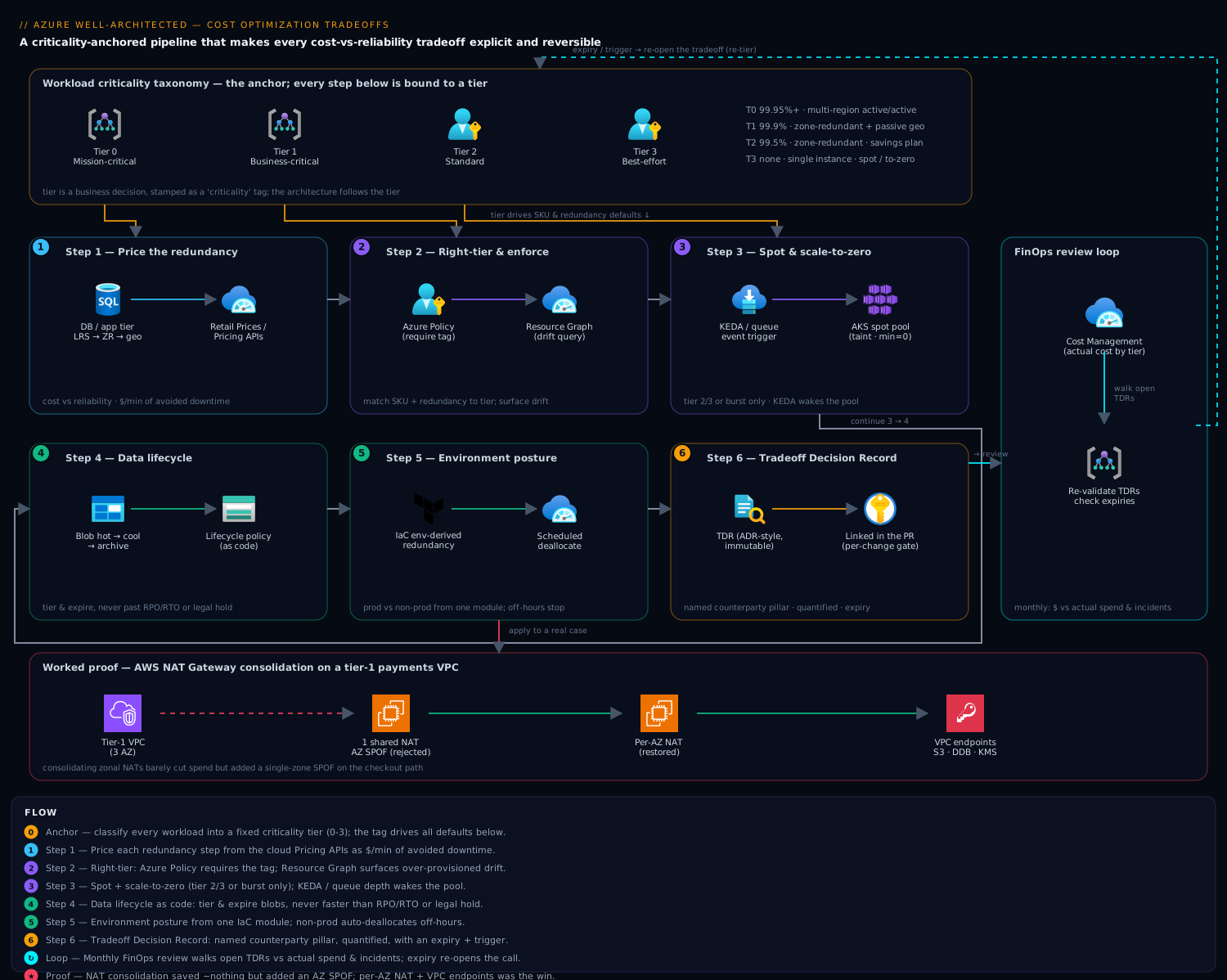
Step 1 — Quantify the cost of redundancy per reliability tier
You cannot trade cost against reliability until you can price reliability. Start by pricing the marginal cost of each redundancy step for the components in your critical journey. (If you have not mapped that journey and classified dependencies as hard or soft yet, do that first; I covered it in the reliability pillar deep dive.)
Take a concrete pair: a database tier under increasing redundancy, and an app tier going single-region to active-active. For each step, record the delta cost and the failure mode it removes.
| Redundancy step | Removes failure mode | Cost delta (illustrative) |
|---|---|---|
| Single instance -> zone-redundant | Single-zone outage | + storage/compute for ZR SKU |
| Zone-redundant -> geo-replicated (passive) | Regional outage (RPO minutes) | + read replica + egress |
| Passive geo -> active-active multi-region | Regional outage (near-zero RTO) | + full second stack + global routing + cross-region data |
The point is not the exact numbers, it is the shape: each step typically multiplies a portion of the bill while removing a less-frequent, higher-impact failure. Use the cloud pricing APIs to get real deltas instead of guessing. The Azure Retail Prices API needs no auth and is the fastest way to diff two SKUs:
# Compare a zone-redundant vs locally-redundant managed disk price in one region
curl -s "https://prices.azure.com/api/retail/prices?\$filter=serviceName eq 'Storage' and armRegionName eq 'eastus' and skuName eq 'P30 LRS'" \
  | jq -r '.Items[0] | "\(.skuName): \(.retailPrice) \(.currencyCode)/\(.unitOfMeasure)"'
# AWS: list On-Demand pricing dimensions for an RDS instance class
aws pricing get-products \
  --region us-east-1 \
  --service-code AmazonRDS \
  --filters "Type=TERM_MATCH,Field=instanceType,Value=db.r6g.large" \
            "Type=TERM_MATCH,Field=deploymentOption,Value=Multi-AZ" \
  --query 'PriceList[0]' --output text | head -c 800
Now convert reliability into the same conversation by pairing each step with the downtime it buys back. An error budget for a 99.9% SLO is roughly 43 minutes per 30 days. If a regional-failover step removes a failure mode that historically costs you two 4-hour outages a year, that is 480 minutes of risk against, say, a known monthly cost. That ratio, dollars per minute of avoided downtime, is the unit that makes the tradeoff arguable instead of emotional.
Step 2 — Right-tiering: matching SKUs and redundancy to workload criticality
Most overspend is not waste in the FinOps sense (idle resources); it is mis-tiering, paying mission-critical prices for tier-3 workloads. Define a small, fixed criticality taxonomy and bind each tier to a default reliability and SKU posture. Three or four tiers is plenty.
| Tier | Example workload | Target | Redundancy default | Compute posture |
|---|---|---|---|---|
| 0 - Mission critical | Checkout, auth | 99.95%+ | Multi-region active/active | Reserved + on-demand burst |
| 1 - Business critical | Core API, primary DB | 99.9% | Zone-redundant + passive geo | Reserved baseline |
| 2 - Standard | Internal tools, reporting | 99.5% | Zone-redundant | On-demand / savings plan |
| 3 - Best effort | Batch, dev jobs | none | Single instance | Spot / scale-to-zero |
The discipline is that a workload’s tier is a business decision, recorded as a tag, and the architecture follows from the tier rather than the other way around. Enforce it so drift is visible. In Azure, a policy can require the tag and (optionally) deny resources that exceed the tier’s allowed SKUs:
{
  "if": {
    "allOf": [
      { "field": "tags['criticality']", "exists": "false" }
    ]
  },
  "then": { "effect": "deny" }
}
# Surface workloads paying for zone redundancy without a criticality tag (drift check)
az graph query -q "
Resources
| where type =~ 'microsoft.sql/servers/databases'
| where properties.zoneRedundant == true
| where isnull(tags['criticality']) or tags['criticality'] in ('2','3')
| project name, resourceGroup, tier=tags['criticality']
" -o table
That Resource Graph query is the single highest-leverage thing in this article. It finds tier-2/tier-3 databases paying for tier-0/1 redundancy, which is almost always pure savings with zero reliability loss because you are removing protection the business never asked to pay for.
Step 3 — Spot, autoscale, and scale-to-zero without breaking SLOs
Spot/preemptible capacity is the largest single compute discount available, often 60-90% off on-demand. The tradeoff is eviction: the platform can reclaim the node with little notice. The rule that keeps this safe is simple, spot is a tier-2/tier-3 tool, or a burst-only tool for tier 0/1. Never put a stateful, hard-dependency, single-replica workload on spot.
On AKS, isolate spot into its own node pool with a taint so only tolerant workloads land there:
az aks nodepool add \
  --resource-group rg-prod \
  --cluster-name aks-prod \
  --name spotpool \
  --priority Spot \
  --eviction-policy Delete \
  --spot-max-price -1 \
  --enable-cluster-autoscaler --min-count 0 --max-count 20 \
  --node-taints "kubernetes.azure.com/scalesetpriority=spot:NoSchedule"
# Only batch/stateless workloads tolerate the spot taint and prefer the pool
spec:
  tolerations:
    - key: "kubernetes.azure.com/scalesetpriority"
      operator: "Equal"
      value: "spot"
      effect: "NoSchedule"
  affinity:
    nodeAffinity:
      preferredDuringSchedulingIgnoredDuringExecution:
        - weight: 100
          preference:
            matchExpressions:
              - key: "kubernetes.azure.com/scalesetpriority"
                operator: In
                values: ["spot"]
The --min-count 0 is what enables scale-to-zero: when no tolerant pods are pending, the autoscaler drains the pool to nothing and you pay zero. Pair it with event-driven scaling (KEDA) so a queue depth or cron schedule wakes the workload. Scale-to-zero is free money for bursty, latency-tolerant work and a reliability hazard for anything serving live user traffic, because the cold start is added latency on the critical path. That is the tradeoff: you are trading p99 latency and a small availability risk for cost. Keep it off tier-0 request paths.
For the steady-state baseline that must always be on, do not use spot at all. Commit it. Reserved Instances and savings plans discount the predictable floor; let on-demand and spot absorb the variable top. The composite posture for a tier-1 service is: reserved baseline + on-demand autoscale for normal peaks + spot for batch side-work.
Step 4 — Data tiering and lifecycle policies vs recovery requirements
Storage is where cost optimization quietly trades against recovery, and the bill compounds because data only grows. The tradeoff has two distinct axes that teams conflate:
- Access tiering (hot -> cool -> cold -> archive) trades retrieval latency and cost for storage cost. Archive retrieval can take hours.
- Retention/lifecycle (delete after N days) trades storage cost directly against your recovery point and compliance obligations.
The hard constraint that bounds both: a lifecycle rule must never delete or archive data faster than your RPO/RTO and legal hold allow. Archiving backups you might need for a fast restore turns a 15-minute RTO into a multi-hour one. I have seen a “cost win” that moved DR backups to archive tier and silently broke the recovery runbook nobody re-tested.
Encode lifecycle as policy so it is reviewable, not a console click:
{
  "rules": [
    {
      "name": "logs-tier-and-expire",
      "enabled": true,
      "type": "Lifecycle",
      "definition": {
        "filters": { "blobTypes": ["blockBlob"], "prefixMatch": ["logs/"] },
        "actions": {
          "baseBlob": {
            "tierToCool":    { "daysAfterModificationGreaterThan": 30 },
            "tierToArchive": { "daysAfterModificationGreaterThan": 90 },
            "delete":        { "daysAfterModificationGreaterThan": 365 }
          }
        }
      }
    }
  ]
}
az storage account management-policy create \
  --account-name stproddata \
  --resource-group rg-prod \
  --policy @lifecycle.json
The 365-day delete above is appropriate for logs. It is wrong for backups governed by RPO or for anything under legal hold, so those get separate rules (or immutable, versioned containers with no delete action). The reviewable artifact forces the question “what is the recovery requirement for this prefix?” before the cost optimization ships, which is exactly the explicitness this whole framework is after.
Step 5 — Environment-aware architecture: prod vs non-prod cost posture
The fastest, safest cost wins live in non-prod, because non-prod has near-zero reliability SLO and yet frequently inherits prod-grade redundancy by copy-paste IaC. Make environment a first-class input to the architecture so the same module produces a lean dev stack and a hardened prod stack.
locals {
  # Posture is derived from environment, not hand-set per resource
  redundancy = {
    prod    = { sku = "Premium",  zone_redundant = true,  geo_backup = true,  min_replicas = 3 }
    staging = { sku = "Standard", zone_redundant = true,  geo_backup = false, min_replicas = 2 }
    dev     = { sku = "Basic",    zone_redundant = false, geo_backup = false, min_replicas = 1 }
  }
  cfg = local.redundancy[var.environment]
}

resource "azurerm_mssql_database" "app" {
  name        = "appdb"
  server_id   = azurerm_mssql_server.this.id
  sku_name    = local.cfg.sku
  zone_redundant         = local.cfg.zone_redundant
  storage_account_type   = local.cfg.geo_backup ? "Geo" : "Local"
}
The second non-prod lever is time: dev and test environments do not need to run nights and weekends. A scheduled deallocation of VMs, dev databases, and non-prod AKS pools recovers roughly two-thirds of the clock. The tradeoff (engineers occasionally wait for an environment to spin up) is trivial against the savings, provided you exclude anything someone is actively load-testing.
# Tag-driven nightly shutdown of non-prod compute (run from an Automation runbook / scheduled task)
az vm deallocate --ids $(
  az vm list --query "[?tags.env=='dev' || tags.env=='staging'].id" -o tsv
)
Be deliberate about what non-prod is for. A staging environment that exists to validate failover behavior must keep zone redundancy, or you are testing a different system than you ship. “Non-prod is cheap” is a default, not a law; the criticality tier still wins where it matters.
Step 6 — A tradeoff decision record (TDR) template and review cadence
Everything above produces numbers. The TDR is where they become a decision with an owner, a counterparty pillar, and an expiry. Treat it like an ADR (architecture decision record): one Markdown file per material tradeoff, committed next to the code, immutable once accepted, superseded rather than edited. The expiry date and trigger are the parts most teams omit and the parts that prevent yesterday’s good call from becoming tomorrow’s incident.
# TDR-014: Move tier-2 reporting DB from zone-redundant to single-zone

- Status: Accepted
- Date: 2026-06-04
- Owner: platform-team
- Workload tier: 2 (Standard)

## Tradeoff
- Pillar gained: Cost Optimization
- Pillar traded: Reliability

## Decision
Drop zone redundancy on the reporting database (read-only, regenerable
from the OLTP store within ~30 min).

## Quantification
- Cost saved: ~$X/month (ZR SKU premium, from Retail Prices API)
- Reliability cost: exposes single-zone outage. Blast radius = reporting
  only; no impact to checkout/auth (tier 0). Recovery = redeploy + reload.
- SLO impact: reporting has no committed SLO. Error budget unaffected.

## Alternatives considered
- Keep ZR (rejected: paying tier-1 price for tier-2 data)
- Geo-passive (rejected: over-provisioned for regenerable data)

## Review / expiry
- Revisit: 2026-12-04, OR immediately if workload is re-tiered to 1,
  or if reporting becomes a hard dependency of a tier-0 journey.
The review cadence is two-track. Per-change: no cost optimization that touches a reliability, performance, or security control merges without a TDR linked in the PR. Periodic: a monthly or quarterly FinOps review walks open TDRs, checks expiries, and re-validates the numbers against actual spend and actual incidents. The cloud cost-management exports feed this directly:
# Pull last month's actual cost grouped by the criticality tag to validate TDR assumptions
az costmanagement query \
  --type ActualCost --timeframe MonthToDate \
  --scope "/subscriptions/$SUB_ID" \
  --dataset-grouping type=TagKey name=criticality \
  --dataset-aggregation '{"totalCost":{"name":"PreTaxCost","function":"Sum"}}'
Enterprise scenario
A payments platform ran a cost sprint and flagged NAT Gateway egress as a top-five line item. The “win” proposed was collapsing three zonal NAT Gateways (one per AZ) down to a single shared one to drop two $0.045/hr gateways plus their data-processing charges. It shipped to the tier-1 VPC. Six weeks later an AZ partial outage took the NAT-hosting zone offline, and every outbound call to Stripe and the KMS endpoint from the surviving two AZs failed, because a NAT Gateway is zonal and the cross-zone route had no fallback. The blast radius was the entire checkout path, not the modest bill it was meant to trim.
The gotcha: NAT Gateway cost is mostly data processing, not the hourly rate, so consolidating gateways barely moved spend while quietly turning an AZ-redundant design into a single-zone dependency. The real fix was two-fold. First, the durable win was killing NAT data-processing charges for AWS-API traffic entirely via VPC gateway/interface endpoints, which keep S3, DynamoDB, and KMS traffic off the NAT path. Second, restore per-AZ NAT so no cross-zone dependency exists:
resource "aws_vpc_endpoint" "s3" {
  vpc_id            = aws_vpc.prod.id
  service_name      = "com.amazonaws.us-east-1.s3"
  vpc_endpoint_type = "Gateway"            # no NAT, no hourly, no per-GB
  route_table_ids   = aws_route_table.private[*].id
}

resource "aws_nat_gateway" "per_az" {
  for_each      = toset(["a", "b", "c"])   # one NAT per AZ, no shared SPOF
  allocation_id = aws_eip.nat[each.key].id
  subnet_id     = aws_subnet.public[each.key].id
}
The TDR recorded it correctly: the gateway endpoint saved real dollars with zero reliability cost, while NAT consolidation was rejected as paying nothing to add a tier-0 single-zone failure mode.
Verify
A tradeoff framework is only real if it shows up in the running system. Verify:
# 1. Every production-touching resource carries a criticality tier (no untagged drift)
az graph query -q "
Resources
| where subscriptionId == '$SUB_ID'
| where isnull(tags['criticality'])
| summarize untagged=count() by type
| order by untagged desc
" -o table

# 2. Spot is isolated and scales to zero (min-count 0, correct taint)
az aks nodepool show -g rg-prod --cluster-name aks-prod -n spotpool \
  --query "{priority:scaleSetPriority, min:minCount, taints:nodeTaints}" -o json

# 3. Lifecycle policy exists on data accounts and matches retention requirements
az storage account management-policy show \
  --account-name stproddata -g rg-prod \
  --query "policy.rules[].{name:name, delete:definition.actions.baseBlob.delete}" -o json
# 4. Each accepted cost-vs-reliability TDR names a traded pillar and has an expiry
grep -L "Pillar traded" docs/tdr/*.md   # should print nothing
grep -L "Revisit" docs/tdr/*.md          # should print nothing
If the untagged count is non-zero, your right-tiering (Step 2) has gaps. If a TDR lacks a traded pillar or an expiry, it is documentation, not a decision.
Going deeper
The five pillars are one system, and cost couples to all of them
The opening bullets covered cost against reliability, performance, and security. The complete picture includes the fifth pillar and a subtlety most cost sprints miss: Operational Excellence has a two-way relationship with cost. Cheap-but-manual is not cheap once you price the toil and the incidents it causes, and observability itself (Log Analytics ingestion, long metric retention) is a large, easily-ignored line item. Cost optimization is therefore not only “less redundancy” but also “stop paying to store telemetry nobody queries.”
| Pillar | What spend on it buys | How cost tensions with it | Typical Azure lever |
|---|---|---|---|
| Reliability | Uptime, low RPO/RTO | Redundancy is priced per copy (zone, region, replica, backup) | Availability Zones, geo-replication, ZRS/GRS, backup retention |
| Performance Efficiency | Low latency, high throughput | Headroom and premium hardware cost even while idle | SKU size, Premium SSD v2, provisioned throughput (RU/s) |
| Security | Smaller attack surface, compliance | Premium tiers gate private networking, HSM keys, long log retention | Defender plans, Private Link, Key Vault Premium (HSM) |
| Operational Excellence | Faster, safer change | Observability + environment parity are recurring spend; toil is a hidden cost | Log Analytics ingestion, extra non-prod environments, automation |
| Cost Optimization | Every dollar earns its keep | It is the counterparty; it pulls against the four above | Reservations/savings plans, right-sizing, lifecycle, autoscale |
Read the table as a system, not a list. There is no “cost decision” that is not simultaneously a decision about at least one other pillar. That is why the framework insists every cost change names its counterparty.
Score before you cut: the Well-Architected Review and Azure Advisor
Two Microsoft surfaces give you an outside-in read before you start turning dials. The Azure Well-Architected Review is a free, self-service assessment (a questionnaire on the Microsoft Assessments site) that scores a workload against each pillar and returns prioritized, guidance-linked recommendations. It is a point-in-time design review. Azure Advisor is the continuous, data-driven counterpart: it inspects your actual running resources and emits recommendations in five categories that mirror the pillars, Cost, Reliability (still surfaced as High Availability in the Advisor API/CLI enum), Security, Operational Excellence, and Performance.
Advisor’s Cost category is the cheapest bag of wins to harvest first: idle or underutilized VMs, unattached managed disks, idle public IPs, right-size and shutdown suggestions, and reservation / savings-plan purchase advice derived from your own usage. Pull them read-only:
# List Azure Advisor cost recommendations (read-only — inspects resources, changes nothing)
az advisor recommendation list --category Cost \
  --query "[].{impact:impact, problem:shortDescription.problem, resource:impactedValue}" \
  -o table
Treat Advisor as an input, not an authority. It will happily recommend shutting down a VM that is a deliberate warm standby, or buying a reservation for capacity you plan to re-architect away next quarter. Advisor sees utilization; it does not see your criticality tier or your roadmap. Supplying that judgment, tier and roadmap on top of Advisor’s telemetry, is exactly the value this lesson adds.
Two families of savings, and the enabler that makes both safe
Azure WAF’s cost pillar and the wider FinOps community keep re-deriving the same three design principles. Learn them as two families plus an enabler:
- Rate optimization — pay less per unit for the same thing. Reservations and savings plans discount a committed baseline; Azure Hybrid Benefit reuses Windows Server / SQL licenses you already own; spot sells spare capacity cheap; dev/test subscriptions and EA/CSP terms lower the rate further. Nothing about the workload changes, only the price per hour or per GB.
- Usage optimization — consume fewer units. Right-size the SKU to measured load, autoscale to demand, scale-to-zero when idle, delete idle resources, tier cold storage down, and cut metered egress. The unit price is unchanged; you simply buy fewer units.
- Spend-as-you-scale (right resourcing) — make cost track demand automatically. Serverless (Functions Consumption, Container Apps scale-to-zero), consumption plans, and autoscaling mean an idle system costs near-nothing and a busy one scales up predictably. This is the enabler: it removes the standing choice between “provisioned for peak” (over-provisioned) and “provisioned for average” (under-provisioned) by letting the platform follow the curve.
The clean way to express spend-as-you-scale on Kubernetes is KEDA driving a workload to and from zero off a real signal, here Azure Service Bus queue depth:
apiVersion: keda.sh/v1alpha1
kind: ScaledObject
metadata:
  name: resize-worker
spec:
  scaleTargetRef:
    name: resize-worker          # the Deployment to scale
  minReplicaCount: 0             # scale-to-zero when the queue is empty
  maxReplicaCount: 20
  cooldownPeriod: 120            # seconds idle before scaling back to zero
  triggers:
    - type: azure-servicebus
      metadata:
        queueName: resize-jobs
        namespace: sb-prod
        messageCount: "20"        # target backlog per replica
      authenticationRef:
        name: keda-msi            # TriggerAuthentication via managed identity
At minReplicaCount: 0 you pay for compute only while work exists. The tradeoff you accepted is the cold-start latency when the first message arrives, which is why this pattern belongs on tier-2/3 or asynchronous work, never a tier-0 synchronous request path.
The cost tradeoff catalog
Most day-to-day decisions are one of a handful of levers. Keep this catalog next to your design reviews; each row is a tradeoff with a named counterparty, a “safe when,” and a “bites when.”
| Lever | Saves by | Trades against | Safe when | Bites when |
|---|---|---|---|---|
| Reservations / savings plans | Lower rate for a 1–3 yr commit | Flexibility (locked in) | Baseline is predictable and durable | You re-architect or shrink before the term ends |
| Spot / low-priority | 60–90% off on-demand | Availability (eviction) | Tier 2/3, retryable, replicated | Stateful, single-replica, tier-0 path |
| Right-size SKU | Fewer / smaller units | Headroom for spikes | Metrics show sustained low use | Bursty or seasonal load with no autoscale |
| Autoscale / scale-to-zero | Pay for load, not peak | Cold-start latency, complexity | Bursty, latency-tolerant work | On a tier-0 synchronous request path |
| Storage access tiers | Cheaper cold/archive $/GB | Retrieval time and cost | Rarely-read data, no fast-restore need | Backups / DR data with a tight RTO |
| Lifecycle delete / expire | Stop paying to store | Recoverability, compliance | Regenerable or low-value data | Legal hold or RPO-governed data |
| Egress / networking | Keep traffic off metered paths | Design effort | Private endpoints, same-region, CDN-cached | Cross-region / cross-zone chatty traffic |
| Hybrid Benefit / dev-test | License and rate discounts | Eligibility constraints | You own the licenses / it is non-prod | Applied to ineligible or production misuse |
Egress deserves a special mention because it is the line item people forget they can design away. Azure meters outbound internet transfer and cross-region traffic (and cross-zone in some services). Private Link / Private Endpoints, same-region placement, and CDN caching all cut it, exactly what the NAT-Gateway scenario above turned into its durable win.
Where this plugs in: the FinOps loop
FinOps runs a continuous three-phase loop, and this framework’s six steps map cleanly onto it:
- Inform — allocate and show cost by team, workload, and tier. The
criticalitytag plus cost-management exports do this (Step 2 and the Step 6 query). - Optimize — act on the biggest deltas: right-tier, reserve the baseline, spot the burst, tier storage, shut down non-prod (Steps 1–5).
- Operate — govern continuously: TDRs, the monthly review, and Policy + Advisor keeping drift visible (Step 6).
The tradeoff discipline in this lesson is the Optimize phase done responsibly, every optimization carries a named counterparty and an expiry, so the loop can never silently trade away reliability. For the operating model this plugs into (allocation, budgets, showback/chargeback, anomaly alerts), see the Azure FinOps cost engineering guide, and for the commitment instruments in the “rate optimization” family, the reservations, savings plans and Hybrid Benefit strategy.
Flat tyre vs racing slick: the over/under-provisioning model
Picture the two failure modes as tyres. Under-provisioning is a flat tyre: you saved on air, and the car is one pothole from an accident the moment the road gets rough, a traffic spike, an AZ blip, a restore. Over-provisioning is fitting racing slicks to the school-run car: enormous grip you will never use, a fortune in rubber, and you still have to buy new ones next season. Neither is “safe.” Safety is the right tyre for the road: a tier-0 checkout path gets the performance tyre (multi-region, reserved headroom), a tier-3 batch job gets the economy tyre (spot, scale-to-zero).
The criticality taxonomy in Step 2 is just a tyre-fitting chart. And here is the part that surprises people: most real cloud bills are not a garage of flat tyres (genuine waste) but a garage full of racing slicks on cars that never leave the driveway, mis-tiering, not idle resources. That is precisely why the Step 2 Resource Graph query, the one that finds tier-2/3 workloads paying for tier-0/1 redundancy, is the single highest-leverage move in the whole framework.
Practice challenges
Work each one before opening the solution. They escalate from pricing a single tradeoff to defending a commitment decision.
1. Put the tradeoff in one unit (beginner). A regional-failover step costs $600/month and removes a failure mode that historically caused two 4-hour outages a year on a tier-1 API. Express the tradeoff as a single defensible ratio, then say what decides it.
<details> <summary>Solution</summary>
Convert both sides to the same unit, dollars per avoided minute of downtime. Cost = $600 × 12 = $7,200/year. Avoided downtime = 2 × 4 h = 8 h = 480 min/year. Ratio ≈ $15 per avoided minute. Now it is arguable: if a minute of that tier-1 API being down costs the business more than $15 (lost orders, SLA credits, reputation), the failover pays for itself; if less, it may not. Why: a ratio turns an emotional “we need HA” into a number a review can accept or reject.
</details>
2. Right-tier a mis-tiered database (beginner). Finance flags a Premium, zone-redundant Azure SQL database. It turns out to be an internal weekly report, read-only and regenerable from the OLTP store in about 20 minutes. What tier is it, and what changes?
<details> <summary>Solution</summary>
It is tier 2 (Standard) — internal, regenerable, no committed SLO. Actions: drop zone_redundant, right-size the SKU (Premium → Standard/General Purpose), and write a TDR (Pillar gained: Cost; Pillar traded: Reliability; blast radius = reporting only; recovery = redeploy + reload ~20 min; expiry trigger = re-tier to 1, or reporting becomes a tier-0 dependency). Why: this is mis-tiering, paying tier-1 redundancy for tier-2 data, the single biggest source of overspend.
</details>
3. Decide where spot is safe (intermediate). You want spot capacity for two things: a stateless image-resize worker that pulls jobs from a queue, and the primary PostgreSQL of a tier-1 API. Which one gets spot, and how do you make it safe?
<details> <summary>Solution</summary>
Only the resize worker. Isolate it in a dedicated node pool with --priority Spot --min-count 0 and the scalesetpriority=spot:NoSchedule taint; give the worker a matching toleration plus node affinity, and drive it with KEDA on queue depth so it scales to zero when idle. The tier-1 Postgres never goes on spot, it is stateful, single-writer, and a hard dependency. Why: spot is a tier-2/3 or burst-only tool; evicting a stateful primary is an outage, not a discount.
</details>
4. Catch the lifecycle rule that breaks recovery (intermediate). A proposed lifecycle rule archives everything under backups/ after 30 days to cut storage cost. The DR runbook promises a 15-minute RTO. What is wrong, and what is the fix?
<details> <summary>Solution</summary>
Archive-tier retrieval takes hours, so archiving backups/ silently turns the 15-minute RTO into a multi-hour one. Fix: exclude backups from the archive action (a separate rule that keeps them hot/cool inside the RTO window, or immutable/versioned with no aggressive tiering), then re-test the restore runbook. Why: a lifecycle rule must never move data slower-to-recover than RPO/RTO or legal hold allow.
</details>
5. See through the consolidation “win” (advanced). A cost sprint proposes collapsing three zonal NAT Gateways into one shared gateway to save two hourly charges. What do you check first, and what is the durable win instead?
<details> <summary>Solution</summary>
First check that NAT Gateway is zonal: consolidating three into one adds a single-zone dependency for the whole VPC while saving almost nothing, because NAT cost is mostly data processing, not the hourly rate. Durable win: route cloud-API traffic through gateway/interface endpoints (S3, DynamoDB, KMS, or the Azure equivalents via Private Link) to keep it off the NAT path entirely, and keep one NAT per AZ. Record both in a TDR, endpoint = real savings with zero reliability cost, consolidation = rejected. Why: the “saving” bought a tier-0 single-zone failure mode for a rounding error.
</details>
6. Choose the right commitment instrument (advanced). A team wants a 3-year reservation on 40 D-series VMs to cut 60%. But the platform plans to migrate to AKS + spot within about 9 months. What is the tradeoff, and what is the better instrument?
<details> <summary>Solution</summary>
A 3-year reservation on capacity you will abandon in ~9 months is a stranded commitment, you keep paying after the workload is gone. Better: size the commitment to only the durable baseline that survives the migration; prefer a savings plan (a compute-hour commit that floats across VM / AKS / serverless) or a 1-year term over a rigid 3-year reservation; let spot and on-demand absorb everything above the floor. Why: rate optimization must match a baseline you are confident is durable, and commitment length is itself a bet on your own roadmap.
</details>
Common beginner mistakes
- “Cost optimization means spending less.” No, it means every dollar earns its keep. Sometimes the correct move adds spend, buying a reservation, adding a private endpoint, because it returns more than it costs. Right model: optimize cost-per-outcome, not the raw invoice total.
- “The biggest percentage discount wins.” A 40% cut on a $30/month line item is noise next to a mis-tiered Premium database burning thousands. Right model: sort candidate savings by absolute dollars, act top-down.
- “Non-prod is automatically cheap.” Non-prod usually inherits prod-grade redundancy by copy-paste IaC and runs 24/7. Right model: make environment a first-class input, auto-shut-down off-hours, and keep redundancy only where a staging tier genuinely exists to test failover.
- “Reserved instances are always cheaper.” Only if the baseline is durable. A commitment you abandon mid-term is a loss, not a saving. Right model: reserve the floor you are confident survives the term; let spot and on-demand cover the variable top.
- “Advisor said so, so it must be right.” Advisor sees utilization, not your criticality tier or roadmap; its shutdown suggestion may be pointing at a deliberate warm standby. Right model: Advisor is an input, the tier and the TDR are the decision.
- “The savings shipped, so we are done.” A change to redundancy, retention, or tiering can quietly break an untested failover or restore runbook. Right model: every such change triggers a re-test and a dated TDR with an expiry, otherwise you have deferred an outage, not optimized cost.
Tradeoff checklist
Pitfalls
- Optimizing the wrong layer. Chasing a 20% VM discount while a mis-tiered Premium database burns more is a common trap. Sort savings by absolute dollars, not percentage.
- Spot on stateful, single-replica services. The eviction will eventually land at the worst moment. Spot needs replicas and tolerance for restarts.
- Archive tier on recovery data. The retrieval latency turns your RTO into fiction. Tier logs aggressively, tier recoverable backups never.
- Cost wins that silently break untested runbooks. Any change to redundancy, retention, or tiering must trigger a re-test of the affected failover or restore path. If you cannot re-test it, you have not optimized cost, you have deferred an outage.
- TDRs with no expiry. A tradeoff that was correct at tier 2 is wrong the day the workload becomes tier 0. The trigger condition in the TDR is what catches that.
The throughline is the same one that runs through every Well-Architected pillar: replace instinct with numbers, write the decision down, and put an expiry on it. Cost optimization done this way is not the enemy of reliability. It is the discipline that tells you exactly how much reliability you are buying, and lets you prove it was worth the price.
Glossary
- Well-Architected Framework (WAF) — Microsoft’s set of best-practice guidance for the cloud, organized into five pillars for judging a workload’s design.
- Pillar — one of the five WAF lenses: Reliability, Security, Cost Optimization, Operational Excellence, and Performance Efficiency.
- Cost Optimization pillar — the WAF lens focused on getting maximum value per dollar, not on minimizing spend.
- Tradeoff — a decision where improving one pillar costs you on another (more redundancy = more money).
- Counterparty pillar — the pillar a cost change trades against; naming it is the first rule of this framework.
- Criticality tier — a business label (here 0-3) ranking how important a workload is, which drives its default SKU and redundancy.
- Blast radius — the scope of what breaks when a component fails; a key input to how much redundancy a workload deserves.
- Redundancy — running extra copies (zones, regions, replicas, backups) so one failure does not cause an outage; each copy adds cost.
- Availability Zone (AZ) — a physically separate datacentre within a region; zone-redundant resources survive one zone failing.
- LRS / ZRS / GRS — storage replication modes (Locally, Zone, and Geo redundant) with increasing durability and cost.
- SLO (Service Level Objective) — a reliability target the team commits to, for example 99.9% availability.
- Error budget — the small amount of downtime an SLO permits (99.9% ≈ 43 min per 30 days); you “spend” it on incidents and changes.
- RPO / RTO — Recovery Point Objective (how much data you can afford to lose) and Recovery Time Objective (how fast you must be back) after a failure.
- Reservation (Reserved Instance) — a 1- or 3-year commitment to a resource for a large rate discount; great for predictable baselines, risky if abandoned early.
- Savings plan — a commitment to spend a fixed amount per hour on compute for 1-3 years; more flexible than a reservation because it floats across services.
- Azure Hybrid Benefit — reuse existing Windows Server / SQL Server licenses in Azure to cut compute cost.
- Spot (low-priority) capacity — deeply discounted VMs Azure can reclaim (“evict”) at short notice; only safe for interruptible, replicated work.
- Autoscale — automatically adding or removing capacity as load changes, so you pay for demand rather than peak.
- Scale-to-zero — draining a workload to zero instances (and near-zero cost) when idle; adds cold-start latency when it wakes.
- KEDA — Kubernetes Event-Driven Autoscaling; scales pods (including to and from zero) off signals like queue depth or a schedule.
- Access tier — Blob storage’s hot → cool → cold → archive levels; colder tiers cost less to store but more and slower to read.
- Lifecycle policy — rules that automatically move blobs between tiers or delete them after a set number of days.
- Egress — outbound / data-transfer traffic (internet, cross-region, sometimes cross-zone) that Azure meters and bills.
- Private Link / Private Endpoint — a private IP into an Azure service that keeps traffic off the public internet and off metered egress paths.
- Azure Advisor — a free service that continuously inspects your resources and recommends Cost, Reliability, Security, Operational, and Performance improvements.
- Well-Architected Review — a free Microsoft questionnaire that scores a workload against each pillar and lists prioritized recommendations.
- FinOps — the operating model (Inform → Optimize → Operate) that makes cloud cost a shared, continuous engineering responsibility.
- TDR (Tradeoff Decision Record) — a short, committed Markdown file recording a cost-vs-pillar tradeoff, its quantification, alternatives, and an expiry/trigger.
- ADR (Architecture Decision Record) — the general pattern a TDR is based on: one immutable file per significant decision.
- Right-sizing — matching a resource’s SKU or size to its actual measured usage instead of a guessed-high default.