Blue-green deployment promises a release you can roll back in seconds instead of redeploying under pressure. On Azure this is achievable with native primitives — App Service deployment slots for the swap, Azure Front Door for a gradual edge cutover — but the gap between the demo and a safe production pipeline is where teams get burned. This guide builds the full flow: health-gated swaps, weighted traffic shifting, and a one-action rollback, all driven from CI/CD.
In a nutshell
Imagine a theatre with two identical stages side by side and one set of lights. Only the lit stage faces the audience; the other sits in the dark. When you want to premiere a new show, you build and rehearse it fully on the dark stage while the audience keeps watching the current show on the lit one. When the new show is ready, you flip the lights — the dark stage becomes the lit one in an instant, and the audience never sees a gap. If the new show flops, you flip the lights straight back. The old show is still standing, untouched, on what is now the dark stage.
That is blue-green deployment. “Blue” and “green” are just names for the two stages. One is live (serving all your real users); the other is idle (where you deploy and test the new version). You never edit the live one. You deploy to the idle one, warm it up, prove it works, then swap — an atomic flip that moves every user to the new version at once. If something breaks, you swap back in seconds, because the previous version is still sitting right there.
On Azure App Service, the two stages are deployment slots: the production slot (live) and a staging slot (idle candidate). The “flip the lights” moment is the swap. Because the swap only re-points the hostname — it does not redeploy anything — rollback is not a rebuild-under-pressure; it is just another swap. For high-traffic apps you can add Azure Front Door in front to dim the lights gradually (send 10% of the audience to the new stage first), and Traffic Manager to run the same trick across two regions.
Level: Intermediate · Time: ~27 min
Prerequisites: You should know what Azure App Service is and that a staging slot needs a Standard tier plan or higher. Comfort with the az CLI and a basic CI/CD pipeline helps. If blue-green is new to you, skim Secure zero-downtime deployments on App Service first, and Front Door + Traffic Manager global failover for the edge-routing half.
After this lesson you can:
- Explain how blue-green differs from canary and rolling, and when each is the right call.
- Create an App Service staging slot and mark environment-specific config as slot settings so it does not travel during a swap.
- Gate a swap on a real readiness check with
WEBSITE_SWAP_WARMUP_PING_PATHso the cutover is genuinely zero-downtime. - Use swap-with-preview to validate production config before any user traffic moves.
- Ramp traffic gradually with Front Door weighted origins, and run the same pattern cross-region with Traffic Manager.
- Automate the whole flow — deploy, verify, approve, swap — in a pipeline, and rehearse all three rollback levers.
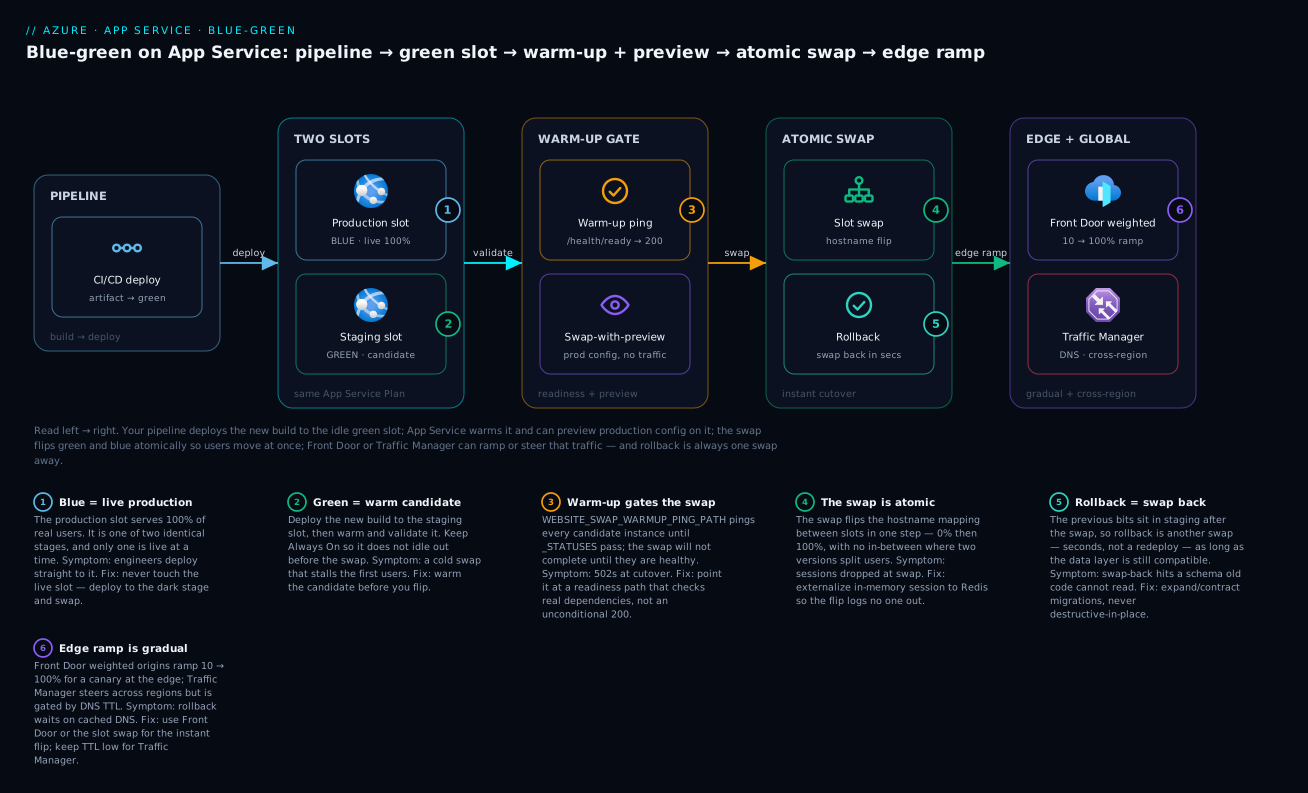
Read left to right: your pipeline deploys the new build to the idle green staging slot, App Service warms it and (optionally) previews production config on it, the swap flips green and blue atomically so users move all at once, and Front Door or Traffic Manager can ramp or steer that traffic — with rollback always one swap away.
1. Blue-green vs canary vs rolling: pick the strategy
These three terms get used interchangeably and they are not the same. The right choice depends on whether your app is stateful and how much blast radius you can tolerate.
| Strategy | How it works | Rollback | Best for |
|---|---|---|---|
| Rolling | Replace instances in batches in place | Roll forward (slow) | Stateless apps where partial-version overlap is fine |
| Canary | Route a small % to the new version, ramp on metrics | Reduce % to zero | High-traffic services with strong telemetry and SLOs |
| Blue-green | Two full environments; cut all traffic at once after validation | Flip back to the old environment | Apps needing a clean version boundary and instant rollback |
Blue-green’s defining property is two complete, parallel environments — only one serves production at a time. That clean boundary is exactly what makes it friendly to stateful apps: there is never a moment when v1 and v2 both own the same in-process session state, because the cutover is atomic.
On App Service, the two environments are the production slot (green, live) and a staging slot (blue, the candidate). The swap is the atomic cutover. Front Door sits in front and lets you turn that binary cutover into a gradual one when you want canary-style risk reduction at the edge — the best of both models.
The most common mistake is treating slot warm-up as optional. A swap without warm-up is a cold start in disguise: production instances start serving while still JIT-compiling and filling caches. Zero-downtime requires the candidate to be warm before traffic moves.
2. Deployment slots deep dive
A staging slot is a full, addressable copy of the app running on the same App Service Plan. You deploy to it, warm it, validate it, then swap. Slots require Standard tier or higher.
az webapp deployment slot create \
  --resource-group rg-app-prod \
  --name app-orders-prod \
  --slot staging
Slot settings: what travels during a swap
This is the single subtlety that breaks more blue-green setups than anything else. By default, app settings and connection strings follow the slot — they move with the code during a swap. That is correct for things that should promote with the release and catastrophic for environment-specific config (you do not want staging’s database connection string becoming production’s).
Mark environment-specific values as slot settings (a.k.a. “deployment slot setting” or “sticky”) so they stay pinned to the slot and do not travel:
az webapp config appsettings set \
  -g rg-app-prod -n app-orders-prod --slot staging \
  --slot-settings \
    ASPNETCORE_ENVIRONMENT=Staging \
    "SqlConnection=@Microsoft.KeyVault(SecretUri=https://kv-orders-prod.vault.azure.net/secrets/sql-conn/)"
| Setting type | Behavior on swap | Use for |
|---|---|---|
| Regular app setting | Travels with the code | Feature flags, tuning that should promote with the release |
| Slot setting (sticky) | Stays pinned to the slot | Environment name, env-specific connection strings, slot-scoped keys |
A useful discipline: connection strings should generally be slot settings, while feature flags and app-version metadata should generally travel. Audit slotSetting: true before every release.
Warm-up so the swap is genuinely zero-downtime
App Service can ping a path on every candidate instance and wait for healthy responses before completing the swap. This is the mechanism that turns a swap from a cold start into a true zero-downtime cutover.
az webapp config appsettings set \
  -g rg-app-prod -n app-orders-prod --slot staging \
  --slot-settings \
    WEBSITE_SWAP_WARMUP_PING_PATH=/health/ready \
    WEBSITE_SWAP_WARMUP_PING_STATUSES="200,202"

# Keep the slot from idling out before a swap
az webapp config set -g rg-app-prod -n app-orders-prod --slot staging --always-on true
WEBSITE_SWAP_WARMUP_PING_PATH and WEBSITE_SWAP_WARMUP_PING_STATUSES gate the swap on your readiness endpoint returning an acceptable status on each instance. The endpoint must check real dependencies — database reachable, Key Vault references resolved, cache primed — not return 200 unconditionally. A trivial health check defeats the entire purpose of warm-up gating.
3. The database and stateful-dependency problem
Blue-green’s atomic cutover does not exempt you from the hardest part: both slots talk to the same backing data. The staging slot is not a parallel database; it is a parallel application pointed at the same SQL, the same cache, the same queues. That has consequences.
Schema changes must be backward compatible across the swap window. During preview and immediately after a swap, both old and new code can hit the database simultaneously. The rule is expand/contract (a.k.a. parallel-change):
- Expand: deploy a schema change that is additive only — new nullable columns, new tables, new optional parameters. Old code ignores them; new code uses them.
- Migrate + swap: ship the new code that reads/writes the new shape. Both versions coexist safely because the old columns still exist.
- Contract: in a later release, once nothing runs the old code, drop the deprecated columns.
Never combine a destructive migration (drop column, rename, tighten a constraint) with the same release that depends on it. If you have to roll back, the old code will hit a schema it no longer understands and your “instant rollback” becomes an outage. Destructive changes are always a separate, later release.
For other stateful dependencies:
- In-process session state is the reason to prefer blue-green here: the atomic swap means no request is ever served by a mix of versions. But sessions held in memory are lost on swap — externalize session to Redis or a distributed cache so a cutover does not log everyone out.
- Background workers / queue consumers keep running on the old code until the swap completes, then the new code picks up the same queue. Make message handlers tolerant of being processed by either version during the overlap (idempotent, schema-version-aware).
- Outbound caches and connection pools are cold on the candidate. The warm-up path should prime them so the first real users do not pay the warm-up tax.
4. Health-gated auto-swap with swap-with-preview
The robust production pattern is swap with preview (a two-phase swap). Phase 1 applies the target (production) configuration to the staging slot and restarts it under production config — without moving any traffic. You validate the slot now running production config, then complete the swap.
# Phase 1: apply production config to staging, no traffic moved yet
az webapp deployment slot swap \
  -g rg-app-prod -n app-orders-prod \
  --slot staging --target-slot production --action preview

# ... run smoke tests against the staging slot, now running prod config ...

# Phase 2: complete the swap (traffic moves atomically)
az webapp deployment slot swap \
  -g rg-app-prod -n app-orders-prod \
  --slot staging --target-slot production --action swap
If smoke tests fail during preview, abort with --action reset and nothing reaches users:
az webapp deployment slot swap \
  -g rg-app-prod -n app-orders-prod \
  --slot staging --action reset
The warm-up ping configured in Step 2 runs automatically as part of the swap operation — App Service will not complete the swap until the warm-up statuses pass. So you get two gates: your explicit smoke tests during preview, and the platform’s warm-up gate during completion.
Distinguish the two health paths and do not conflate them:
- Liveness (
/health/live) — is the process up? Used by App Service Health Check to recycle dead instances. - Readiness (
/health/ready) — are dependencies good? Used by the swap warm-up gate.
Wire Health Check on the liveness path so the platform pulls unhealthy instances out of rotation independently of deploys:
az webapp config set -g rg-app-prod -n app-orders-prod \
  --generic-configurations '{"healthCheckPath": "/health/live"}'
5. Front Door weighted routing for a gradual edge cutover
A slot swap is binary: 0% then 100%. For high-traffic services you often want to ramp — send 10% to the new version, watch error rates, then ramp to 100%. Azure Front Door Standard/Premium does this with weighted origins in an origin group.
The pattern: register both slots as origins in one origin group. The production slot starts at weight 100, the staging slot at weight 1 (effectively off). After the candidate is validated, you shift weights to ramp traffic, then either complete the cutover or pull it back.
Front Door origin weights are relative, not percentages. Weights of 90 and 10 send roughly 90% and 10% of traffic. Latency-based routing can still influence selection within a priority tier, so for deterministic canary splits keep both origins at the same priority and rely on weight.
Add the staging slot as a second origin (the production slot is assumed already registered):
az afd origin create \
  --resource-group rg-app-prod \
  --profile-name afd-orders \
  --origin-group-name og-orders \
  --origin-name origin-staging \
  --host-name app-orders-prod-staging.azurewebsites.net \
  --origin-host-header app-orders-prod-staging.azurewebsites.net \
  --priority 1 \
  --weight 1 \
  --enabled-state Enabled \
  --https-port 443
Ramp traffic by updating weights. Start small:
# 10% to the new version (relative weights 90 / 10)
az afd origin update -g rg-app-prod --profile-name afd-orders \
  --origin-group-name og-orders --origin-name origin-production --weight 90
az afd origin update -g rg-app-prod --profile-name afd-orders \
  --origin-group-name og-orders --origin-name origin-staging --weight 10
Configure health probes on the origin group so Front Door stops routing to an origin that starts failing — this is your automatic safety net during the ramp:
az afd origin-group update \
  -g rg-app-prod --profile-name afd-orders --origin-group-name og-orders \
  --probe-path /health/live --probe-protocol Https \
  --probe-request-type GET --probe-interval-in-seconds 30 \
  --sample-size 4 --successful-samples-required 3
Traffic Manager (DNS-based, with its own weighted routing method) is an alternative when you need cross-region failover or non-HTTP endpoints. But because it works at DNS, cutover and rollback are gated by client DNS TTL caching — Front Door reweights at the edge and takes effect in seconds, which is what you want for canary control. Use Front Door for HTTP apps; reach for Traffic Manager only for the cross-region or protocol cases it uniquely covers.
There are now two complementary cutover mechanisms: the slot swap (atomic, instance-level, the source of truth for “what is production”) and Front Door weights (gradual, edge-level, for risk-managed ramp). A mature flow uses Front Door weights to validate under real traffic, then performs the slot swap to make the new version the true production slot, then resets weights to 100/0 against the (now-swapped) production origin.
6. Automating the full flow in a pipeline
Here is the end-to-end flow as an Azure DevOps multi-stage pipeline using OIDC (workload identity federation via a service connection), so there are no long-lived secrets. The shape maps directly onto GitHub Actions environments if that is your platform.
# azure-pipelines.yml
trigger:
  branches: { include: [main] }

variables:
  rg: rg-app-prod
  app: app-orders-prod
  slot: staging

stages:
- stage: Build
  jobs:
  - job: build
    pool: { vmImage: ubuntu-latest }
    steps:
      - script: |
          dotnet publish -c Release -o $(Build.ArtifactStagingDirectory)/app
        displayName: Build
      - publish: $(Build.ArtifactStagingDirectory)/app
        artifact: app

- stage: DeployStaging
  dependsOn: Build
  jobs:
  - deployment: deploy_blue
    environment: prod-staging-slot
    pool: { vmImage: ubuntu-latest }
    strategy:
      runOnce:
        deploy:
          steps:
            - download: current
              artifact: app
            - task: AzureWebApp@1
              inputs:
                azureSubscription: sc-prod-oidc   # OIDC service connection
                appName: $(app)
                deployToSlotOrASE: true
                resourceGroupName: $(rg)
                slotName: $(slot)
                package: $(Pipeline.Workspace)/app

- stage: Verify
  dependsOn: DeployStaging
  jobs:
  - job: smoke
    pool: { vmImage: ubuntu-latest }
    steps:
      - task: AzureCLI@2
        inputs:
          azureSubscription: sc-prod-oidc
          scriptType: bash
          scriptLocation: inlineScript
          inlineScript: |
            set -euo pipefail
            HOST="https://${APP}-${SLOT}.azurewebsites.net"
            # Readiness must pass on the candidate before we consider swapping
            for i in $(seq 1 10); do
              code=$(curl -s -o /dev/null -w "%{http_code}" "$HOST/health/ready")
              [ "$code" = "200" ] && echo "ready" && exit 0
              echo "attempt $i -> $code"; sleep 15
            done
            echo "candidate never became ready"; exit 1
        env:
          APP: $(app)
          SLOT: $(slot)

- stage: Swap
  dependsOn: Verify
  jobs:
  - deployment: swap_to_green
    environment: prod   # attach a manual approval check on this environment
    pool: { vmImage: ubuntu-latest }
    strategy:
      runOnce:
        deploy:
          steps:
            - task: AzureCLI@2
              inputs:
                azureSubscription: sc-prod-oidc
                scriptType: bash
                scriptLocation: inlineScript
                inlineScript: |
                  set -euo pipefail
                  az webapp deployment slot swap \
                    -g "$RG" -n "$APP" --slot "$SLOT" --target-slot production
              env:
                RG: $(rg)
                APP: $(app)
                SLOT: $(slot)
The approval gate lives on the prod environment (Azure DevOps environment checks, or a GitHub Actions environment with required reviewers). The pipeline deploys to blue, runs automated verification, pauses for human approval, then performs the swap. The warm-up ping gates the swap itself at the platform level, so even an approved swap will not complete against unhealthy instances.
If you want the gradual Front Door ramp inside the pipeline, insert a stage between Verify and Swap that bumps weights to 10/90, runs a timed observation window querying Front Door metrics or Application Insights failure rate, and only proceeds on a clean window.
7. Instant rollback patterns
The whole point of blue-green is that rollback is fast and boring. There are three rollback levers, and which one you reach for depends on when the regression surfaces.
During preview (before completion): abort. Nothing reached users.
az webapp deployment slot swap -g rg-app-prod -n app-orders-prod --slot staging --action reset
During a Front Door ramp (partial traffic): reweight to zero. Takes effect at the edge in seconds, far faster than a swap or redeploy.
az afd origin update -g rg-app-prod --profile-name afd-orders \
  --origin-group-name og-orders --origin-name origin-production --weight 100
az afd origin update -g rg-app-prod --profile-name afd-orders \
  --origin-group-name og-orders --origin-name origin-staging --weight 0
After a completed swap (100% on new version): swap back. The previous production bits are sitting in the staging slot, so rollback is another swap — not a redeploy.
az webapp deployment slot swap -g rg-app-prod -n app-orders-prod --slot staging --target-slot production
What to test first on rollback: confirm the data layer is compatible with the version you are rolling back to. This is why the expand/contract discipline in Step 3 is non-negotiable — if the failed release ran a destructive migration, a swap-back returns the old code to a schema it cannot read, and you have traded a bad deploy for a hard outage. Verify schema compatibility before you trust swap-back as your rollback.
Enterprise scenario
A payments team ran their orders API behind App Service slots with Front Door weighted ramp, and it worked flawlessly in staging. The first production ramp to 10% triggered a flood of duplicate-charge alerts within ninety seconds. The cause was not the deploy mechanics — it was sticky sessions. They had session affinity enabled on the Front Door origin group, so returning users were pinned to the production origin while new sessions scattered across both. A user who began checkout on the old origin and got reweighted mid-flow hit the new code’s idempotency logic, which keyed off a header the old version never set. Two versions, one payment, no shared idempotency key.
The fix had two parts. First, disable affinity for the canary window so the split is honest and every request is independently routable:
az afd origin-group update -g rg-app-prod \
  --profile-name afd-orders --origin-group-name og-orders \
  --enable-session-affinity false
Second — the real lesson — the idempotency key had to be derived from request content, not a server-set header, so it stayed stable across both versions during the overlap. They moved to a client-supplied Idempotency-Key validated server-side, deployed it as a backward-compatible expand release one sprint ahead of the ramp, and only then resumed weighted cutovers.
The principle: blue-green and canary make two versions serve real users simultaneously. Any state that must be consistent across that boundary — idempotency keys, session tokens, cache key shapes — has to be version-agnostic before you split traffic, not after. Affinity hides the problem in test and detonates it in production.
Going deeper
What actually happens during a swap
A swap is not a redeploy and it is not a config copy — it is a carefully ordered dance the platform runs so that production instances are already warm before they take traffic. Roughly, App Service does this:
- Apply the target slot’s slot-specific settings to the source slot. The staging (source) instances receive production’s (target) slot-sticky app settings, connection strings, and auth/CD settings, then restart under that configuration. This is why the candidate ends up validated under production config, not staging config.
- Wait for every source instance to restart. If any instance fails to come back, the swap aborts and reverts the source slot — no traffic has moved.
- Warm up each instance. App Service issues a request to the app root (
/), and if you setWEBSITE_SWAP_WARMUP_PING_PATH/WEBSITE_SWAP_WARMUP_PING_STATUSES, it pings that path and waits for an accepted status on every instance. - Switch the routing rules. Once all instances are warm, the platform exchanges the two slots’ routing — the hostname mapping flips. This is the atomic instant; there is no in-between state where half your users see each version.
- Repeat for the other direction so the now-source slot (holding the previous production bits) settles under its own configuration.
The takeaway: the warm-up and restart-under-target-config steps are the real zero-downtime machinery. A trivial /health that returns 200 unconditionally makes steps 3–4 lie to you — the swap completes, and the first real users pay the cold-start tax the warm-up was supposed to absorb.
Which settings stick, and how to override the defaults
Beyond your own slot settings (the ones you mark sticky), the platform keeps a second category sticky by default whether you asked for it or not. Here is the shape of it:
| Category | Swaps with the release? |
|---|---|
| General settings (framework version, bitness, WebSockets) | Yes |
| App settings & connection strings | Yes — unless marked as slot settings |
| Handler mappings, path mappings, public certificates | Yes |
| Custom domains, TLS/SSL bindings, private certificates | No (sticky) |
| Scale settings, Always On, IP restrictions | No (sticky) |
| Managed identities, VNet integration, CORS | No (sticky) |
| Diagnostic log settings | No (sticky) |
Settings whose name ends in _EXTENSION_VERSION |
No (sticky) unless overridden |
That default-sticky set is usually what you want — you do not want staging’s scale rules, certificates, or managed identity landing on production. Two escape hatches exist when the defaults fight you:
WEBSITE_OVERRIDE_STICKY_EXTENSION_VERSIONS=0— makes the runtime/extension version settings (normally pinned, e.g.WEBSITE_NODE_DEFAULT_VERSION,FUNCTIONS_EXTENSION_VERSION) travel with the swap, so a runtime bump promotes atomically with the code.WEBSITE_OVERRIDE_PRESERVE_DEFAULT_STICKY_SLOT_SETTINGS=0— set in every slot, flips the platform’s default-unswapped list to swappable. It is all-or-nothing; you cannot cherry-pick individual settings. Reach for it rarely and deliberately.
The everyday rule stays: connection strings and environment names are slot settings (sticky); feature flags and build metadata travel. These override switches are for the rarer case where a platform default is the exact thing you need to promote.
The x-ms-routing headers: testing in production
App Service has a native, Front-Door-free way to send a slice of real traffic to a slot: percentage-based routing, a.k.a. testing in production.
# Send 20% of clients to the staging slot; 80% stay on production
az webapp traffic-routing set \
  -g rg-app-prod -n app-orders-prod \
  --distribution staging=20
When this is on, App Service pins each routed client with an x-ms-routing-name cookie so they stay on the slot they were assigned for the whole session — a user is never bounced mid-flow between versions. Two overrides matter:
- A client can force a slot with the query string
?x-ms-routing-name=staging(the slot name) or?x-ms-routing-name=self(production). This is how you QA the candidate directly, or hand a tester a link that always hits the new version. - Your app can read the
x-ms-routing-namecookie so your telemetry can split error rates and latency by which slot served the request.
Clear it when the experiment is done:
az webapp traffic-routing clear -g rg-app-prod -n app-orders-prod
This is a legitimate canary built entirely inside App Service — no Front Door required. Its limits: routing is per-client-random (not metric-driven), it is region-local (one plan), and there is no automatic ramp or auto-rollback. For a canary that reacts to error-rate metrics, or one that spans regions, you still want Front Door.
Auto-swap: swap as the last step, without a pipeline step
Auto-swap tells App Service to swap a slot into production automatically the moment a deployment to that slot finishes warming up. Configure it once and every deploy to staging promotes itself:
az webapp deployment slot auto-swap \
  -g rg-app-prod -n app-orders-prod \
  --slot staging --auto-swap-slot production
It is genuinely hands-off continuous deployment, but with two caveats worth internalizing: auto-swap is Windows App Service only (not supported on Linux App Service or Web App for Containers), and it removes the human approval gate. For anything customer-facing I prefer an explicit pipeline swap behind a manual approval (as in Step 6) over auto-swap — you keep the platform’s warm-up guarantee but also keep a person in the loop for production.
Cross-region blue-green, and the DNS-TTL tax
A slot swap is instant because it flips a hostname mapping inside one region’s App Service. To run blue-green across two regions (blue = East US, green = West Europe), you route at the DNS layer with Traffic Manager weighted routing, or at the edge with Front Door. The difference is entirely about how fast a cutover or rollback takes effect:
| Mechanism | Cutover speed | Why |
|---|---|---|
| Slot swap | Instant | Hostname mapping flips inside the region; no client state involved |
| Front Door weight | Seconds | Reweighted at Anycast edge POPs; clients re-resolve nothing |
| Traffic Manager weight | Minutes | DNS-based — clients cache the answer for the record’s TTL |
That last row is the trap. Traffic Manager hands out DNS answers, and clients (and their resolvers) cache them for the record’s TTL. Drop a region’s weight to zero and users who already resolved it keep hitting it until their cache expires. Lower the TTL (e.g. 30–60s) before a planned cutover so rollback is not gated by a stale cache — but you can never make DNS as instant as a slot swap. The pattern that gives you both: use Traffic Manager or Front Door to steer between regions, and a slot swap within each region for the actual instant version flip.
Blue-green on containers and AKS
Slots are an App Service PaaS convenience — the platform hands you a second environment and an atomic swap for free. On Web App for Containers slots still work, but auto-swap does not, and warm-up matters more because container cold starts are heavier. On AKS there is no slot primitive at all; you rebuild the pattern from Kubernetes objects:
- Two Deployments (
app-blue,app-green) behind one Service; cut over by editing the Service’s label selector fromversion: bluetoversion: green. Instant, but coarse. - Ingress / service-mesh traffic split (NGINX canary annotations, or Istio/Linkerd
VirtualServiceweights) for a gradual percentage ramp — the AKS analogue of Front Door weights. - A progressive-delivery controller — Argo Rollouts or Flagger — to automate the ramp, watch Prometheus metrics, and auto-rollback on a bad SLO. This is where AKS actually surpasses App Service slots: metric-gated automatic rollback is built into the controller.
The mental model transfers cleanly: two identical environments, one live, an atomic (or gradual) switch, and rollback by switching back. Only the machinery differs.
Verify
# Slot settings are sticky (env-specific keys must show slotSetting: true)
az webapp config appsettings list -g rg-app-prod -n app-orders-prod --slot staging \
  --query "[?slotSetting].name" -o tsv

# Candidate readiness passes on the staging slot before any swap
curl -s -o /dev/null -w "%{http_code}\n" \
  https://app-orders-prod-staging.azurewebsites.net/health/ready    # expect 200

# Confirm which version each slot currently serves (expose build SHA at an endpoint)
curl -s https://app-orders-prod.azurewebsites.net/version
curl -s https://app-orders-prod-staging.azurewebsites.net/version

# Front Door origin weights are where you expect during/after a ramp
az afd origin list -g rg-app-prod --profile-name afd-orders \
  --origin-group-name og-orders --query "[].{name:name,weight:weight,priority:priority}" -o table

# Front Door is routing to a healthy origin end to end
curl -s -o /dev/null -w "%{http_code}\n" https://<your-frontdoor-endpoint>/health/live
A swap is correct when production serves the new build SHA, the previous SHA is now in staging (ready for swap-back), and Front Door reports both origins healthy with the expected weights.
Release checklist
Pitfalls nobody documents
- Plan capacity during a swap. Both slots share the App Service Plan. A warm staging slot consumes the same instance pool, so size autoscale
max-countwith headroom or a deploy can starve production of capacity. Keepmin-countat 2+ so production survives an instance recycle mid-swap. - Cost of running two environments. Slots themselves are free, but the warm staging instances are not — they bill against the shared plan. The honest cost of blue-green is the headroom you keep for the candidate, plus Front Door’s request/data charges if you front it.
- Connection draining is not instant. A swap moves the hostname mapping, but in-flight requests on the old instances need to finish. Keep requests short and idempotent; long-running synchronous requests can be cut off at the cutover boundary.
- Forgetting diagnostics on the staging slot. A slot is a distinct resource and does not inherit diagnostic settings or App Insights wiring. Configure them on the slot too, or you go blind exactly when validating a candidate.
- Trusting weights as percentages. Front Door weights are relative and interact with priority and latency routing. For a clean canary split, keep both origins at the same priority and verify the actual split in metrics rather than assuming.
Build the swap-with-preview flow first, make warm-up gate on a readiness check that means something, and rehearse all three rollback levers before you need them. Done that way, a bad release is a non-event: you swap back in seconds and debug at leisure, instead of redeploying into a live incident.
Practice challenges
Work these against a non-production app. Commands are real and schema-correct; this course has no live Azure subscription attached, so treat any output as representative and adapt names/IDs to your environment.
1. Create a staging slot (beginner). You have app-shop-dev in rg-shop-dev on a Standard plan. Add a slot named staging.
<details> <summary>Solution</summary>
az webapp deployment slot create \
  -g rg-shop-dev -n app-shop-dev --slot staging
Why: slots require Standard tier or higher; on Basic/Free the command fails. The slot is a full addressable copy at app-shop-dev-staging.azurewebsites.net.
</details>
2. Keep a connection string from travelling (beginner). Mark the staging slot’s SqlConnection so it stays pinned to the slot during a swap.
<details> <summary>Solution</summary>
az webapp config appsettings set \
  -g rg-shop-dev -n app-shop-dev --slot staging \
  --slot-settings SqlConnection="<staging-conn-string>"
Why: --slot-settings (not --settings) sets slotSetting: true, so the value is sticky and does not swap into production. Environment-specific config should always be a slot setting.
</details>
3. Gate the swap on readiness (intermediate). Make the swap wait until /health/ready returns 200 or 202 on every candidate instance.
<details> <summary>Solution</summary>
az webapp config appsettings set \
  -g rg-shop-dev -n app-shop-dev --slot staging \
  --slot-settings \
    WEBSITE_SWAP_WARMUP_PING_PATH=/health/ready \
    WEBSITE_SWAP_WARMUP_PING_STATUSES="200,202"
Why: these two settings turn the swap into a gated operation — App Service will not complete it until warm-up passes on all instances. The path must check real dependencies, not return 200 blindly.
</details>
4. Preview before you commit (intermediate). Apply production config to staging without moving traffic, then abort the preview cleanly.
<details> <summary>Solution</summary>
# Phase 1: apply prod config to staging, no traffic moved
az webapp deployment slot swap -g rg-shop-dev -n app-shop-dev \
  --slot staging --target-slot production --action preview

# ...smoke test the staging host, now running prod config...

# Abort — nothing ever reached users
az webapp deployment slot swap -g rg-shop-dev -n app-shop-dev \
  --slot staging --action reset
Why: --action preview is a two-phase swap; reset cancels it. You validated the candidate under production config with zero user exposure.
</details>
5. Poor-man’s canary inside App Service (advanced). Send 15% of real users to staging, pin your own browser to the staging slot via URL, then clear the split.
<details> <summary>Solution</summary>
az webapp traffic-routing set -g rg-shop-dev -n app-shop-dev \
  --distribution staging=15
# Force your own browser to the candidate regardless of the 15%:
#   https://app-shop-dev.azurewebsites.net/?x-ms-routing-name=staging
# Force back to production:  ?x-ms-routing-name=self
az webapp traffic-routing clear -g rg-shop-dev -n app-shop-dev
Why: percentage routing pins each client with the x-ms-routing-name cookie; the query string overrides it for testing. No Front Door needed for a region-local canary.
</details>
6. Roll back a completed swap (advanced). Production is now on the bad build. Restore the previous version, and state the one precondition that makes this safe.
<details> <summary>Solution</summary>
az webapp deployment slot swap -g rg-shop-dev -n app-shop-dev \
  --slot staging --target-slot production
Why: after a swap, the previous production bits sit in staging, so rollback is another swap — seconds, not a redeploy. The precondition: the database must still be compatible with the old code (expand/contract discipline). If the bad release ran a destructive migration, swap-back returns old code to a schema it cannot read.
</details>
Common beginner mistakes
- Thinking every app setting is sticky. The misconception: “I set my staging connection string on the staging slot, so it stays there.” Reality: regular app settings travel with the code during a swap. Only settings marked with
--slot-settings(showingslotSetting: true) stay pinned. Get this wrong and staging’s database connection string becomes production’s the instant you swap. The right model: config splits into two buckets — travels with the release (feature flags, build metadata) vs belongs to the environment (connection strings, env name). The second bucket must be slot settings, always. - Warm-up on a health check that means nothing. Beginners point
WEBSITE_SWAP_WARMUP_PING_PATHat a route that returns200unconditionally. The swap then “passes” warm-up while the app is still JIT-compiling and its caches and connection pools are cold. Zero-downtime evaporates for the first wave of users. The readiness path must actually touch dependencies — DB reachable, Key Vault references resolved, cache primed. - Treating the staging slot as a separate database. The slot is a parallel application, not a parallel datastore — both slots hit the same SQL, cache, and queues. That is why destructive schema migrations and blue-green are enemies: follow expand/contract or your instant rollback becomes an outage.
- Forgetting the slot is its own resource. Diagnostic settings, Application Insights wiring, and Health Check do not automatically flow to a new slot. Configure them on the slot too, or you go blind exactly when you are validating a candidate.
- Reading Front Door weights as percentages. Weights are relative.
90and10is roughly 90/10, but priority and latency routing still interact. For a clean split, keep both origins at the same priority and confirm the actual ratio in metrics. - Assuming Always On is already set. If the staging slot idles out before a swap, its instances go cold and warm-up has more work to do (or times out). Enable Always On on the slot so it stays warm and swap-ready.
Glossary
- Blue-green deployment — a release strategy using two identical environments, only one live at a time; you deploy to the idle one and swap traffic atomically, with instant rollback by swapping back.
- Deployment slot — a full, addressable copy of an App Service app running on the same App Service Plan (e.g. a
stagingslot atapp-staging.azurewebsites.net). Requires Standard tier or higher. - Production slot — the live slot serving real users (the “blue”/lit stage). The app’s default slot.
- Staging slot — the idle candidate slot you deploy and validate before a swap (the “green”/dark stage).
- Swap — the atomic operation that exchanges two slots’ routing so the candidate becomes production in one step, after warm-up.
- Swap-with-preview — a two-phase swap: phase 1 applies production config to the staging slot without moving traffic (so you can smoke-test); phase 2 completes the cutover.
- Slot setting (sticky) — an app setting or connection string marked to stay pinned to its slot and not travel during a swap (
slotSetting: true). Use for environment-specific config. - Warm-up — App Service pinging candidate instances (optionally at
WEBSITE_SWAP_WARMUP_PING_PATH) and waiting for healthy responses before completing a swap, so production instances are hot when they take traffic. - Auto-swap — App Service automatically swapping a slot into production after a deployment warms up. Windows App Service only.
- Testing in production — App Service percentage-based routing that sends a slice of real traffic to a slot, with clients pinned by the
x-ms-routing-namecookie. - Front Door weighted origins — Azure Front Door routing a relative-weight share of edge traffic to each origin (e.g. both slots), enabling a gradual, metric-watched canary ramp.
- Traffic Manager — DNS-based global routing (including weighted) for cross-region blue-green and non-HTTP endpoints; cutover is gated by client DNS TTL caching.
- Expand/contract (parallel-change) — a schema-migration discipline: add columns/tables first (expand), ship code that uses them, and only drop old shapes in a later release (contract) — so both versions can coexist during and after a swap.
- Readiness vs liveness — readiness (
/health/ready) checks dependencies and gates the swap; liveness (/health/live) checks the process is up and drives Health Check instance recycling.