A platform team at a mid-size fintech runs roughly 60 Terraform root modules across three AWS accounts and a shared GCP project, and the workflow is exactly the mess you would predict: engineers terraform apply from laptops, two of them once applied conflicting changes to the same VPC inside the same hour, nobody can answer “is production actually what main says it is,” and the security team only finds out a public S3 bucket shipped when Wiz pages them three days later. The mandate from the new head of platform is precise: every change goes through a pull request, no human ever holds long-lived cloud credentials, a machine-readable policy blocks the dangerous changes before they apply, and the platform tells us within an hour when reality drifts from code. This guide configures Spacelift to deliver exactly that — stacks bound to Git, OPA policies that gate plans, reusable contexts that inject secrets from Vault, and scheduled drift detection across the whole estate.
This is a hands-on, advanced guide. You will end with a self-service GitOps pipeline where a merge to main triggers a planned, policy-checked, optionally human-approved apply, and where Spacelift proactively reconciles drift on a schedule. We assume you are comfortable with Terraform, OPA/Rego basics, and OIDC trust relationships.
In a nutshell
A generic CI system — Jenkins, GitHub Actions, GitLab CI — is a general-purpose runway: it will run any script you hand it, and it neither knows nor cares that the script happens to be terraform apply. Spacelift is the control tower built specifically for infrastructure-as-code traffic. It speaks Terraform (and OpenTofu, Pulumi, CloudFormation, Ansible, Kubernetes) natively: it holds your state, understands what a plan is, watches for drift, hands each run short-lived cloud credentials, and — crucially — refuses to clear a “flight” for takeoff when it violates a rule. A runway just runs things; a control tower decides whether they may proceed.
That last part is the point of this whole guide. On a laptop-and-apply workflow, the only thing standing between a typo and production is the human who typed it. Spacelift moves the guardrails into the platform: a merge to Git triggers a run, the run produces a plan, machine-readable policies inspect that plan, a human approves the sensitive ones, and only then does anything change — and afterwards the tower keeps scanning to tell you when reality has drifted away from the code.
A few ideas to hold onto before the details:
- A stack is one Terraform root module (one state) bound to a Git repo, branch, and folder — think “one pipeline for one thing,” not “one environment.”
- A run is a single plan/apply lifecycle Spacelift executes for you on a throwaway worker; it moves through well-defined states you can gate.
- Policies are Open Policy Agent (Rego) rules Spacelift evaluates at fixed points — who may log in, which push triggers what, whether a plan is allowed, who must approve. They read run data and return allow/deny/warn; they never mutate anything.
- Drift detection is a scheduled re-plan: it compares live infrastructure to recorded state and flags (or, if you let it, fixes) the difference.
Level: Advanced · Time: ~34 min
After this guide you will be able to:
- Explain the Spacelift object model — spaces, stacks, contexts, worker pools — and stand each up as Terraform with the Spacelift provider.
- Trace a run through its lifecycle (preparing → planning → unconfirmed → applying) and name where each policy type hooks in.
- Author and attach the seven Rego policy types (login, access, plan, approval, push, trigger, notification) and test them with sampled inputs.
- Wire per-run OIDC cloud access and Vault-backed secrets through reusable contexts and hooks, with zero static credentials.
- Configure scheduled drift detection and choose detect-and-alert versus auto-reconcile deliberately per environment.
- Decide when Spacelift is the right tool versus HCP Terraform (Sentinel) or self-hosted Atlantis.
Prerequisites
- A Spacelift account (a free trial works for the walk-through) and the
spacectlCLI installed (brew install spacelift-io/spacelift/spacectl). - An identity provider for human SSO — Okta or Microsoft Entra ID — where you can register a SAML/OIDC app; this is how engineers log in to Spacelift instead of using local accounts.
- Terraform >= 1.6 and at least one working Terraform root module in a Git repository (GitHub assumed here; GitLab/Bitbucket work identically).
- A cloud account you can grant Spacelift OIDC access to (AWS used for the integration example).
- Admin on the Git repo so you can install the Spacelift VCS app.
- Optional but recommended: a HashiCorp Vault cluster for dynamic cloud credentials, and a ServiceNow instance if you want change-record gating.
Target topology
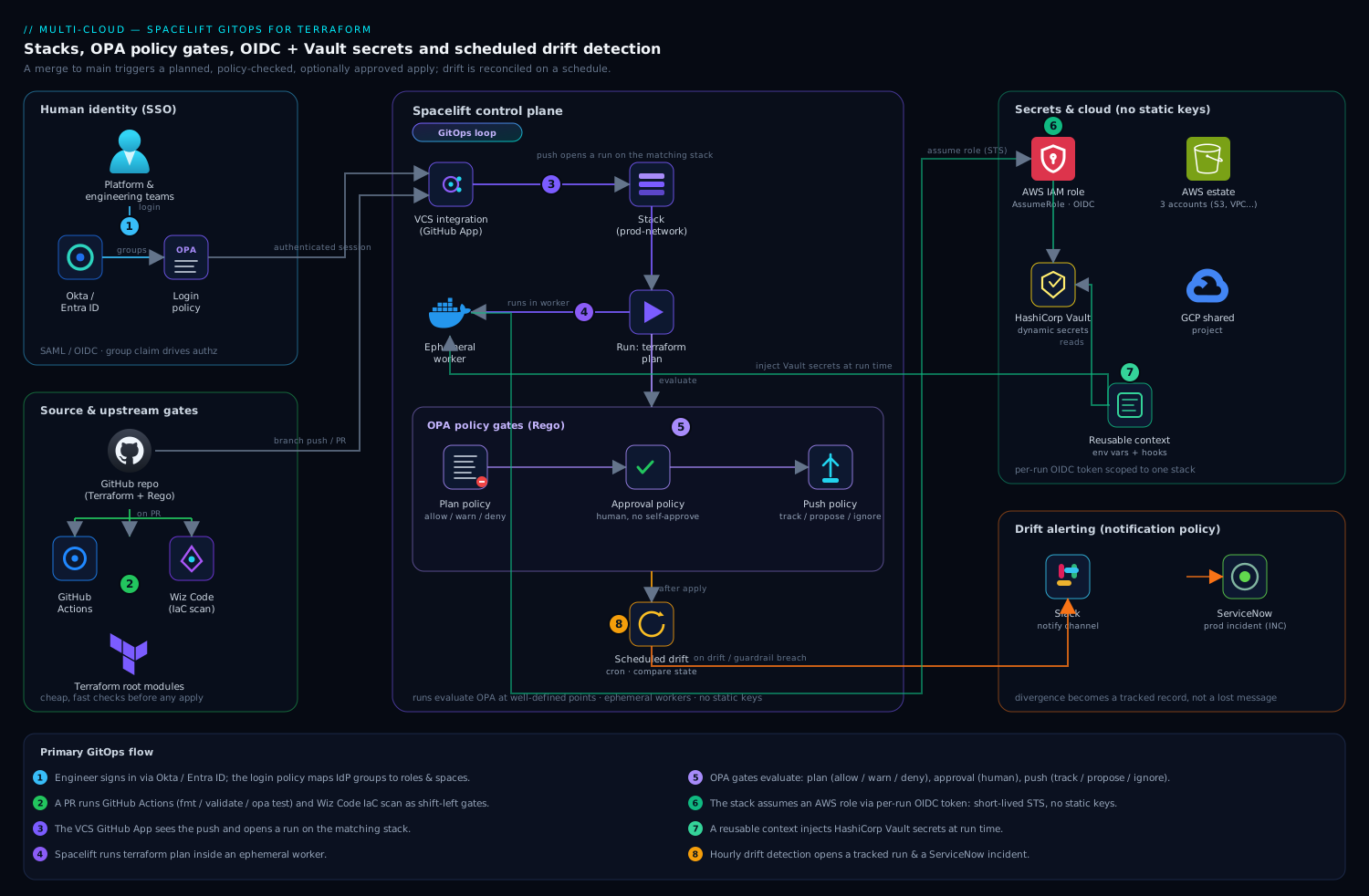
The shape is a GitOps loop. Engineers authenticate to the Spacelift UI through Okta / Entra ID (SAML/OIDC), and a Spacelift login policy maps their IdP groups to Spacelift roles and spaces. Code lives in Git; the Spacelift VCS integration (a GitHub App) watches branches. A push opens a run on the matching stack; Spacelift executes terraform plan inside an ephemeral worker, then evaluates OPA policies of three kinds — plan policies that allow/warn/deny based on the proposed change, approval policies that require a human review on sensitive stacks, and push policies that decide which commits trigger which run type. Cloud credentials are never static: the stack assumes an AWS role via OIDC, and any extra secrets (a Datadog API key, a database password) come from HashiCorp Vault injected through a reusable context. GitHub Actions runs unit tests and terraform validate on every PR before Spacelift ever sees a merge, and Wiz Code scans the same PR for IaC misconfigurations as a parallel gate. After apply, a scheduled drift-detection run on each stack compares real-world state against the recorded state on a cron, opening a tracked run (and, optionally, a ServiceNow incident) when they diverge.
1. Connect human identity: SSO and a login policy
Stop using local Spacelift logins on day one. Wire your account to the corporate IdP so access is centrally governed and offboarding is one click in Okta/Entra.
In the Spacelift UI go to Settings -> Single Sign-On, choose SAML 2.0, and register the application in your IdP. Spacelift gives you the ACS URL and entity ID; Okta (or Entra ID) gives you the IdP metadata URL and, critically, a groups claim. Map that group attribute so Spacelift receives the user’s group memberships on every login — those drive authorization.
Authorization itself is a login policy (a Rego policy of type login). It decides who may log in, whether they are an admin, and which spaces they land in. Create it under Policies -> Create policy -> Login policy:
package spacelift

# Inputs Spacelift provides: input.session.login, input.session.teams (IdP groups), ...

# Platform team are account admins.
admin {
    input.session.teams[_] == "platform-admins"
}

# Anyone in an engineering group may log in (non-admin).
allow {
    input.session.teams[_] == "engineering"
}

# Deny everyone else explicitly.
deny {
    not allow
    not admin
}

# Map IdP groups to Spacelift space access (least privilege).
space_read["prod"]  { input.session.teams[_] == "engineering" }
space_write["prod"] { input.session.teams[_] == "platform-admins" }
Attach the login policy at the account level. From now on, an engineer removed from the engineering group in Okta loses Spacelift access at their next login — no orphaned local accounts.
2. Connect the VCS and create your first stack
Install the Spacelift GitHub App from Settings -> Source code -> GitHub and grant it access to the repos holding your Terraform. This is what lets Spacelift open check runs on PRs and react to pushes.
Now create a stack. You can click through the UI, but treat Spacelift configuration as code too — define stacks in Terraform using the Spacelift provider so the estate is reproducible. Here is a real stack definition for a production network module:
resource "spacelift_stack" "prod_network" {
  name         = "prod-network"
  description  = "Core VPC, subnets, TGW attachments for prod"
  repository   = "infra-terraform"
  branch       = "main"
  project_root = "stacks/prod/network"
  space_id     = "prod"

  terraform_version  = "1.9.5"
  terraform_workflow_tool = "OPEN_TOFU" # or "TERRAFORM_FOSS"

  autodeploy   = false   # require approval gate on prod (see step 4)
  manage_state = true    # Spacelift holds the Terraform state backend
}
Key fields to get right: project_root scopes the stack to one directory so a monorepo hosts many stacks; branch is the tracked branch whose merges produce deployments; autodeploy = false means a successful plan waits for confirmation rather than applying automatically — exactly what you want on production. Apply this with spacectl or a bootstrap pipeline, and the prod-network stack appears, already bound to Git.
3. Inject credentials safely: OIDC role assumption and a Vault context
A stack with no cloud credentials cannot do anything; a stack with static credentials is the leak waiting to happen. Use two mechanisms, neither of which stores a long-lived secret.
Cloud access via OIDC. Spacelift issues a signed OIDC token per run. Configure the AWS integration so the stack assumes a role by federating that token — no access keys anywhere. Create the cloud integration and attach it:
resource "spacelift_aws_integration" "prod" {
  name                           = "aws-prod"
  role_arn                       = "arn:aws:iam::111122223333:role/spacelift-prod"
  generate_credentials_in_worker = true
  space_id                       = "prod"
}

resource "spacelift_aws_integration_attachment" "prod_network" {
  integration_id = spacelift_aws_integration.prod.id
  stack_id       = spacelift_stack.prod_network.id
  write          = true   # this stack may apply, not just plan
}
The IAM role’s trust policy federates https://spacelift.io/... as an OIDC provider and conditions on the stack id, so only the prod-network stack can assume it. Rotating credentials becomes a non-issue: every run gets fresh, short-lived STS credentials.
Application secrets via Vault. For secrets Terraform itself needs — a Datadog API key for a monitor resource, a DB master password — pull them from HashiCorp Vault at run time through a reusable context. A context is a named bundle of environment variables and mounted files you attach to many stacks. Use a hooks-based context that authenticates to Vault with the run’s OIDC token and exports the secret:
resource "spacelift_context" "vault_secrets" {
  name     = "vault-secrets"
  space_id = "prod"
}

resource "spacelift_context_attachment" "net_vault" {
  context_id = spacelift_context.vault_secrets.id
  stack_id   = spacelift_stack.prod_network.id
}
Inside that context’s before_init hooks you run vault login -method=jwt role=spacelift jwt="$SPACELIFT_OIDC_TOKEN" then export TF_VAR_datadog_api_key=$(vault kv get -field=key secret/datadog). The secret lives only in the ephemeral worker’s memory for the life of the run and is never written to state output or logs. This is the clean separation: OIDC for cloud-plane access, Vault for in-config secrets, zero static keys in Spacelift.
4. Gate changes with OPA: plan, approval, and push policies
This is the heart of the mandate — a machine blocking dangerous changes before they apply. Spacelift evaluates Open Policy Agent Rego policies at well-defined points in a run. You will use three types.
Plan policy — evaluated after terraform plan, with the full plan (resource changes, before/after values) as input. It returns deny, warn, or allow. Block the change everyone fears — a publicly readable S3 bucket — and warn on resource deletions:
package spacelift

# Hard-deny any S3 bucket made public.
deny[msg] {
    rc := input.terraform.resource_changes[_]
    rc.type == "aws_s3_bucket_public_access_block"
    rc.change.after.block_public_acls == false
    msg := sprintf("S3 public access blocked must stay on: %s", [rc.address])
}

# Warn (but allow) on any destroy so a human notices.
warn[msg] {
    rc := input.terraform.resource_changes[_]
    rc.change.actions[_] == "delete"
    msg := sprintf("Resource will be DESTROYED: %s", [rc.address])
}

# Block oversized instances to control cost.
deny[msg] {
    rc := input.terraform.resource_changes[_]
    rc.type == "aws_instance"
    forbidden := {"m5.24xlarge", "c5.24xlarge", "x1e.32xlarge"}
    forbidden[rc.change.after.instance_type]
    msg := sprintf("Instance type %s is not allowed: %s",
                   [rc.change.after.instance_type, rc.address])
}
Approval policy — requires named humans to approve before a run proceeds, and lets you encode who. On production stacks, require a platform-admin approval and forbid self-approval:
package spacelift

# Approve once a platform admin (other than the author) clicks Approve.
approve {
    some i
    input.reviews.current[i].state == "APPROVED"
    input.reviews.current[i].session.teams[_] == "platform-admins"
    input.reviews.current[i].session.login != input.run.triggered_by
}

# Reject if anyone with veto rights declines.
reject {
    input.reviews.current[_].state == "REJECTED"
}
Push policy — decides what a Git event does: trigger a tracked run (deploy), a proposed run (plan-only on a PR), or nothing. Use it so only the tracked branch deploys and so doc-only changes are ignored:
package spacelift

# Open a plan-only "proposed" run for pull requests.
propose { input.pull_request != null }

# Deploy only when the tracked branch advances.
track { input.push.branch == input.stack.branch }

# Ignore pushes that touch only markdown/docs.
ignore {
    every f in input.push.affected_files {
        endswith(f, ".md")
    }
}
Attach each policy to the relevant stacks (or to a whole space, which cascades). Now a PR that would expose a bucket fails its check run before merge, a destroy surfaces a warning, and production applies wait for an admin who is not the author. Write Rego tests with opa test and run them in CI so a broken policy never reaches Spacelift.
5. Layer in the CI and security gates around Spacelift
Spacelift owns the apply; keep the cheap, fast checks upstream so bad code never gets that far.
Run GitHub Actions on every pull request to do what Spacelift should not waste a worker on — formatting, validation, and unit tests:
name: terraform-ci
on: pull_request
jobs:
  validate:
    runs-on: ubuntu-latest
    steps:
      - uses: actions/checkout@v4
      - uses: hashicorp/setup-terraform@v3
      - run: terraform fmt -check -recursive
      - run: terraform init -backend=false
      - run: terraform validate
      - run: opa test policies/ -v   # unit-test the Rego from step 4
In parallel, point Wiz Code at the same repository so its IaC scanner inspects the Terraform in the PR for misconfigurations (open security groups, unencrypted volumes, over-broad IAM) and posts findings as PR comments and a status check. Wiz Code is your shift-left security gate; the OPA plan policy in Spacelift is the enforcement gate at apply time — defense in depth, with Wiz also watching the live cloud for posture drift the way it always has. The result: a change must pass GitHub Actions tests, clear Wiz Code, satisfy the OPA plan policy, and (on prod) earn a human approval before a single resource changes.
6. Configure scheduled drift detection across stacks
Drift is the silent failure the team kept getting burned by — someone clicks in the console, reality diverges from code, and nobody knows. Spacelift detects this by running a periodic plan against real infrastructure and comparing it to recorded state. Enable it per stack (define it as code so every stack inherits the policy):
resource "spacelift_drift_detection" "prod_network" {
  stack_id     = spacelift_stack.prod_network.id
  schedule     = ["0 * * * *"]   # hourly, satisfying the one-hour mandate
  reconcile    = false           # detect and alert; do not auto-fix prod
  ignore_state = ["FINISHED"]    # only run when the stack is idle
  timezone     = "UTC"
}
reconcile = false means Spacelift opens a tracked drift run and flags it but does not auto-apply on production — a human decides. For lower environments where you want self-healing, set reconcile = true and Spacelift will re-apply the code to erase the drift automatically. To roll this across the estate, loop the resource over your stacks with for_each so all 60 stacks get hourly detection from one definition.
Wire the alert to your workflow. A notification policy routes drift events to Slack and, for production, opens a ServiceNow incident so the divergence becomes a tracked record with an owner rather than a Slack message that scrolls away:
package spacelift

# On a detected drift run, raise a ServiceNow incident for prod stacks.
incident[msg] {
    input.run.drift_detection
    input.run.state == "UNCONFIRMED"
    input.stack.labels[_] == "env:prod"
    msg := sprintf("Drift detected on %s — open ServiceNow INC", [input.stack.id])
}
Going deeper
The six steps above give you a working GitOps platform. This section is for when you need to reason about why Spacelift behaves the way it does — the object model, the run state machine, the full policy surface, and the pieces (worker pools, dependencies) that separate a demo from a production estate.
The object model: spaces, stacks, and administrative stacks
Three nouns carry most of Spacelift’s model.
A stack is the unit of execution: exactly one IaC root (one Terraform state) bound to a repository, a branch, and a project_root. A monorepo with 60 roots becomes 60 stacks. A stack owns its state backend (manage_state = true), its attached policies, integrations, and contexts, and its run history.
A space is the unit of isolation and RBAC. Spaces form a hierarchy (root at the top), and every stack, context, policy, and worker pool lives in exactly one space. Access is granted per space and inherited down the tree, so “engineering may read prod, platform-admins may write it” is expressed once at the space level rather than stack by stack. space_id = "prod" on the resources above is doing exactly this.
An administrative stack is the bootstrap trick that makes “Spacelift configured as code” real. Set administrative = true and that stack is allowed to manage other Spacelift resources — spacelift_stack, spacelift_policy, spacelift_context, integrations — through the Spacelift Terraform provider. One admin stack, itself in Git, applies the definitions for all the others. This is why step 2 defined the stack in HCL rather than clicking the UI: the admin stack is the single reviewed entry point through which the whole estate is created, changed, and torn down.
resource "spacelift_stack" "admin" {
  name           = "spacelift-admin"
  repository     = "infra-terraform"
  branch         = "main"
  project_root   = "spacelift"        # this dir holds the spacelift_* resources
  administrative = true               # may manage other Spacelift objects
  space_id       = "root"
}
Alongside the platform-side definition, each stack can carry an in-repo .spacelift/config.yml — the runtime configuration that lives next to the Terraform code it governs. It sets the runner image, extra environment, and lifecycle hooks for that root, and it is versioned with the code rather than in Spacelift:
# stacks/prod/network/.spacelift/config.yml
version: "1"
# Custom worker image with vault + extra CLIs baked in.
runner_image: 111122223333.dkr.ecr.us-east-1.amazonaws.com/spacelift-runner:1.9
environment:
  TF_VAR_region: us-east-1
before_init:
  - vault login -method=jwt role=spacelift jwt="$SPACELIFT_OIDC_TOKEN"
before_plan:
  - terraform fmt -check
The rule of thumb: settings that are the stack’s identity (repo, branch, space, policies) belong in the spacelift_stack resource managed by the admin stack; settings that are how this particular root builds (its image, its hooks) can live in .spacelift/config.yml next to the code.
The run lifecycle: preparing → planning → unconfirmed → applying
A run is a state machine, and knowing the states tells you exactly where every gate fires. The core happy path (simplified):
| State | What is happening | What can gate here |
|---|---|---|
| Queued | Waiting for a free worker in the stack’s pool | Concurrency limits |
| Preparing | Worker checks out the commit, pulls dependencies, runs before_init hooks |
Context / hook failures |
| Initializing | terraform init (backend, providers, modules) |
— |
| Planning | terraform plan computes the diff |
before_plan / after_plan hooks |
| Unconfirmed | Plan is done; plan and approval policies have run; run waits | Plan policy deny; approval policy; human confirm |
| Applying | terraform apply executes the confirmed plan |
before_apply / after_apply hooks |
| Finished | Apply succeeded; outputs recorded | Trigger policy fires dependents |
Terminal or off-path states you will also see: Failed (a command errored), Discarded (a human rejected the plan), Stopped / Canceled, and Confirmed (the brief moment between a human clicking Confirm and Applying starting).
Two facts fall straight out of this table. First, autodeploy controls the Unconfirmed → Applying edge only. With autodeploy = false (production) a clean, policy-passing plan still parks at Unconfirmed until a human confirms; with autodeploy = true it auto-confirms — unless an approval policy says otherwise, which still holds it. Second, run type is decided before the run even starts, by the push policy: a tracked run (deploy) follows the tracked branch, a proposed run (plan-only) is what a PR gets, and both traverse the same states except a proposed run never reaches Applying.
Everything as Terraform: spacelift_stack, spacelift_context, spacelift_policy
Step 4 wrote the Rego in the UI; in a real estate you manage the policies themselves as code, attached by the admin stack, so a policy change is a reviewed pull request with opa test in CI — exactly the discipline the “Common pitfalls” section demands. The pattern is a spacelift_policy (Rego in body, a type) plus a spacelift_policy_attachment binding it to a stack or space:
resource "spacelift_policy" "prod_plan_guardrails" {
  name     = "prod-plan-guardrails"
  type     = "PLAN"                       # LOGIN/ACCESS/PLAN/APPROVAL/PUSH/TRIGGER/NOTIFICATION
  body     = file("${path.module}/policies/plan.rego")
  space_id = "prod"
  labels   = ["autoattach:env:prod"]      # auto-attaches to prod-labelled stacks
}

resource "spacelift_policy_attachment" "prod_network_plan" {
  policy_id = spacelift_policy.prod_plan_guardrails.id
  stack_id  = spacelift_stack.prod_network.id
}
The autoattach:<label> label is the scaling trick: instead of one attachment per stack, label the policy autoattach:env:prod and it binds automatically to every stack carrying the env:prod label — one definition, whole-fleet coverage, no for_each over stack IDs. The spacelift_context + spacelift_context_attachment pair from step 3, and spacelift_drift_detection from step 6, are managed identically. The estate becomes a directory of HCL the admin stack applies.
The Rego policy taxonomy — all seven types
Spacelift evaluates Rego at seven distinct decision points. Each type receives a different input document and must define particular boolean/set rules; everything else is ordinary Rego.
| Type | Evaluated when | Key input |
Rules it defines |
|---|---|---|---|
| Login | A user authenticates | input.session (login, name, teams) |
allow, admin, deny, space_read/write/admin[...] |
| Access | Per-stack authorization | input.session, input.stack |
read, write |
| Push | A VCS event arrives | input.push, input.pull_request |
track, propose, ignore, ignore_track |
| Plan | After terraform plan |
input.terraform, input.spacelift |
deny, warn, sample |
| Approval | Run sits Unconfirmed | input.run, input.reviews, input.stack |
approve, reject |
| Trigger | A run changes state | input.run_updated, input.stacks |
trigger[...] |
| Notification | Run event / inbound webhook | input.run_updated, input.webhook |
slack, inbox, pull_request, … |
You already wrote login, plan, approval, and push policies in steps 1–4. The two you have not met:
- Trigger policies are the programmable form of “when stack A finishes, run stack B.” Given the run that just finished (
input.run_updated) and the candidateinput.stacks, thetriggerrule returns the set of stack IDs to kick off — a code-driven dependency graph (there is also a declarativespacelift_stack_dependency, below). - Notification policies route run and webhook events: a
slackrule shapes a Slack message,inboxposts to Spacelift’s in-app inbox,pull_requestwrites a PR comment. This is the real machinery the drift-to-ServiceNow routing in step 6 rides on.
Sampling is the Spacelift analogue of Sentinel’s mocks. Turn on sampling for a policy and Spacelift records the actual input documents it evaluated; you then open a sampled input, drop it into the OPA playground or Spacelift’s policy workbench, and prove the rule accepts good inputs and rejects bad ones against real data instead of a guessed shape. Plan policies can even define a sample rule to capture inputs conditionally (for example, only sample runs that were denied). Author against sampled inputs, not the docs — the same lesson HashiCorp’s mocks teach.
Drift detection and reconciliation runs
Step 6 enabled detection; the mechanics are worth understanding because the “safe on prod” choice hinges on them. A spacelift_drift_detection schedule fires a proposed run on a cron: Spacelift runs terraform plan against live infrastructure and compares it to recorded state. An empty diff means no drift; a non-empty diff means reality moved.
What happens next is the reconcile flag:
reconcile = false(production): Spacelift marks the stack DRIFTED, fires your notification policy, and stops. A human decides whether the out-of-band change was a legitimate emergency fix (adopt it into code) or an accident (revert it). No automatic apply.reconcile = true(lower environments): Spacelift additionally triggers a reconciliation run — a tracked run that re-applies the code to erase the drift.
The subtle, important part: a reconciliation run is a real tracked run, so it traverses the full lifecycle and every attached policy. It is gated by your plan policy and, if one is attached, your approval policy. Auto-reconcile is therefore not a bypass — it is an automated trigger of the same governed pipeline. That is also why reconcile = true on production is dangerous: it can re-apply over a deliberate manual hotfix during an incident, exactly when a human should be in the loop. Detect-and-alert on prod; auto-heal only below it.
Contexts, hooks, and mounted files
A context is a reusable bundle of three things — environment variables, mounted files, and hooks — attached to many stacks so shared configuration is defined once. Attachment carries a priority; when two contexts set the same variable, the lower-priority number wins, which is how you layer a base context under a stack-specific override.
Hooks are shell commands Spacelift runs at fixed lifecycle phases — before_init, after_init, before_plan, after_plan, before_apply, after_apply, before_perform, after_perform, before_destroy, after_destroy, and after_run. The Vault login in step 3 is a before_init hook so the secret is exported into the environment before Terraform ever runs. Hooks can live in a context (shared) or in .spacelift/config.yml (per root).
Mounted files are files Spacelift writes into the worker’s checkout at a path you choose — a CA bundle, a JSON service-account key, a license file. A mounted file can be marked secret (write-only, masked in logs and never returned by the API). Together the three make a context a complete, portable “how this stack is configured” unit:
resource "spacelift_environment_variable" "region" {
  context_id = spacelift_context.vault_secrets.id
  name       = "TF_VAR_region"
  value      = "us-east-1"
  write_only = false
}

resource "spacelift_mounted_file" "ca_bundle" {
  context_id    = spacelift_context.vault_secrets.id
  relative_path = "certs/internal-ca.pem"
  content       = filebase64("${path.module}/files/internal-ca.pem")
  write_only    = true      # secret: masked, not retrievable
}
Worker pools: private runners for production
By default runs execute on Spacelift’s public worker pool — managed infrastructure that is perfect for a trial and wrong for most production estates. A run’s worker sees your source, your plan, your cloud credentials, and your secrets, and it must reach the infrastructure it manages. That drives you to a private worker pool: your own runners (containers or VMs) inside your network, registered to Spacelift.
Reach for a private pool when workers must reach private VPC endpoints, on-prem systems, or a self-hosted VCS; when compliance requires that code and secrets never leave your boundary; or when runs need custom tools baked into the image. You define the pool and pin stacks to it:
resource "spacelift_worker_pool" "private" {
  name     = "prod-private-pool"
  space_id = "prod"
}

# On the stack:
#   worker_pool_id = spacelift_worker_pool.private.id
The spacelift_worker_pool resource issues the pool’s registration material; you run the Spacelift launcher (public.ecr.aws/spacelift/launcher) on your own compute with SPACELIFT_TOKEN and SPACELIFT_POOL_PRIVATE_KEY set from that material, and each launcher process registers as a worker. In practice you run the launcher on an autoscaling group so worker count tracks the run queue. Because the worker lives in your account, the AWS OIDC trust from step 3 can additionally be conditioned on your network, tightening the blast radius further.
Stack dependencies and output handoff
Sixty stacks are not independent — the app stack needs the network stack’s VPC ID. The laptop-era answer was a terraform_remote_state data source reaching into another stack’s backend; Spacelift’s governed answer is an explicit dependency plus a typed output reference:
resource "spacelift_stack_dependency" "app_needs_network" {
  stack_id            = spacelift_stack.prod_app.id
  depends_on_stack_id = spacelift_stack.prod_network.id
}

resource "spacelift_stack_dependency_reference" "vpc_id" {
  stack_dependency_id = spacelift_stack_dependency.app_needs_network.id
  output_name         = "vpc_id"          # output of the network stack
  input_name          = "TF_VAR_vpc_id"   # env var injected into the app stack
}
Now a successful tracked run on prod-network automatically triggers prod-app, and the network’s vpc_id output arrives as TF_VAR_vpc_id in the app run. This is push-based and governed: the downstream never reads the upstream’s state backend, the handoff is a named output (not a brittle state path), and the dependency graph is visible in Spacelift. Trigger policies (above) are the imperative escape hatch when the graph needs logic the declarative resource cannot express.
Spacelift vs. HCP Terraform vs. Atlantis
All three turn “merge a PR” into “governed Terraform run,” but they sit at different points on the managed-versus-DIY and HashiCorp-versus-neutral axes.
| Dimension | Spacelift | HCP Terraform (TFC) | Atlantis |
|---|---|---|---|
| Policy engine | OPA / Rego, native, at 7 points | Sentinel and OPA policy sets | none built in (bolt on conftest) |
| Self-hosted execution | private worker pools | HCP agents / self-hosted TFE | you host the whole server |
| Drift detection | native schedule + reconcile | native (health assessments) | none |
| Multi-IaC | Terraform, OpenTofu, Pulumi, CFN, Ansible, K8s | Terraform / OpenTofu | Terraform only |
| Platform as code | Spacelift provider + admin stacks | tfe provider |
atlantis.yaml + server config |
| Dependencies | native stack dependencies + trigger policies | run triggers / Stacks | none |
| Pricing model | workers + seats | runs (RUM) + seats | free / OSS (you run it) |
| Hosting | SaaS (or self-hosted) | SaaS (or self-hosted TFE) | self-hosted only |
Choose Atlantis when you want free, open-source PR automation and are willing to host and secure the server, provide your own policy layer, and live without drift detection — see Deploy Atlantis for pull-request Terraform. Choose HCP Terraform when you are standardized on HashiCorp and want Sentinel, a private module registry, and a managed service — see HCP Terraform fundamentals. Choose Spacelift when you want native OPA at every decision point, multi-IaC support, strong drift-and-reconcile, self-hosted runners, and the whole platform expressed as Terraform. For the portable policy layer that works across all three, see OPA and conftest policy gates; for drift concepts independent of any platform, Terraform drift detection and reconciliation.
Validation
Confirm each layer actually does its job before you trust it.
- SSO + login policy. Log in as a test user who is only in
engineering; confirm they reachprodread-only and cannot create stacks. Remove them from the group in Okta and confirm the next login is denied. - OIDC, no static keys. Trigger a run and inspect the worker log: it should show STS
AssumeRoleWithWebIdentity, andspacectl stack environment list --id prod-networkshould reveal noAWS_ACCESS_KEY_ID. - Plan policy. Open a PR that flips
block_public_aclstofalse. The Spacelift check must fail with your deny message and the merge must be blocked. - Approval policy. Merge a benign change to a prod stack; the run must pause in “Pending approval” and reject a self-approval by the author.
- Drift detection. Make a deliberate out-of-band change (toggle a tag on the VPC in the AWS console), wait for the top of the hour, and confirm a drift run appears showing exactly that delta — and that a ServiceNow incident was created. Use
spacectl stack list --status DRIFTEDto see drifted stacks programmatically.
# Trigger a run and watch it from the CLI end to end.
spacectl stack deploy --id prod-network
spacectl stack logs --id prod-network
spacectl stack list --status DRIFTED
Rollback and teardown
If a policy is too strict or a run misbehaves, recover cleanly without ripping out the platform.
- Loosen a policy fast: change
denytowarnin the offending Rego and re-attach; Spacelift picks up the new policy on the next run. Keep policies in Git so this is a reviewed revert, not a console hack. - Unblock a stuck run: cancel it with
spacectl stack cancel --id <stack>, or in a true emergency set the stack to autodeploy and bypass — but record why, because you have just stepped around the gate the team built. - Roll back infrastructure: revert the merge in Git and let the normal pipeline plan/apply the previous state — never hand-edit cloud resources, which only creates the drift you are trying to eliminate.
- Tear down a stack:
terraform destroythe workloads via a one-off run, thenspacectl stack delete --id prod-network. If you bootstrapped stacks with the Spacelift provider, simplyterraform destroythe management workspace to remove stacks, contexts, integrations, and policies together. Detach integrations first so dangling AWS roles can be cleaned up.
Common pitfalls
- Forgetting
project_rootin a monorepo makes a stack plan the entire repo and collide with siblings. Always scope it to one directory. autodeploy = trueon production. It feels convenient until an un-reviewed merge applies to prod. Keep prod on approval policies; reserve autodeploy for dev/preview stacks.- Treating Wiz Code and OPA as redundant. They run at different times — Wiz at PR (shift-left), OPA at plan (enforcement). Dropping either leaves a gap.
- Reconciling drift on prod automatically.
reconcile = trueon production can re-apply over a legitimate emergency manual fix. Detect-and-alert on prod; auto-reconcile only below it. - Static credentials “just to get started.” They never get removed. Stand up OIDC from the first stack — retrofitting it after secrets leak is far more painful.
- Unversioned policies. Editing Rego in the console with no Git history and no
opa testmeans a typo can block every run estate-wide. Manage policies as code and test them in GitHub Actions.
Security notes
The design is least-privilege by construction: humans authenticate through Okta / Entra ID with group-mapped roles, machines use per-run OIDC tokens scoped to a single stack so a compromised run cannot pivot to another account, and application secrets come from HashiCorp Vault with short leases instead of stored variables. The OPA plan policy is a hard control that blocks risky changes (public buckets, over-broad IAM, forbidden instance types) before apply, while Wiz Code shifts the same scrutiny left into the PR and Wiz continues to watch the live cloud for posture drift. Pair this with Spacelift’s audit trail — every run, approval, and policy decision is logged — and a guardrail breach can auto-open a ServiceNow record so security has a ticket, not just a notification.
Cost notes
Spacelift bills primarily on the number of concurrent workers and seats, so the largest lever is keeping runs cheap and few. Use push policies to ignore doc-only commits and to keep PRs to plan-only (no wasted applies). Schedule drift detection at a cadence that matches real risk — hourly on production, daily on rarely-changing stacks — because every drift run consumes a worker minute. Put the OPA cost guardrail from step 4 to work blocking oversized instances at plan time, which stops budget overruns before they provision rather than discovering them on the next cloud bill. Finally, run the fast checks (fmt, validate, opa test, Wiz Code) in GitHub Actions, which is far cheaper per minute than a Spacelift worker, so the worker is reserved for the plan/apply it alone can do.
Practice challenges
Work these in order — they escalate from defining one stack to a governed cross-stack handoff. Each has a worked solution, but write yours first. Assume you are editing the HCL an administrative stack applies (the Spacelift provider), and that opa test is available for the Rego.
1 (beginner) — Define a dev stack as code. Write a spacelift_stack for an app in repo infra-terraform, folder stacks/dev/app, tracked branch main, in space dev, that auto-applies a clean plan.
<details> <summary>Solution</summary>
resource "spacelift_stack" "dev_app" {
  name         = "dev-app"
  repository   = "infra-terraform"
  branch       = "main"
  project_root = "stacks/dev/app"
  space_id     = "dev"
  autodeploy   = true    # fine in dev: no prod blast radius
  manage_state = true
}
Why: project_root scopes the stack to one root so a monorepo hosts many stacks without collisions; autodeploy = true is acceptable in dev precisely because the environment carries no production risk — you would flip it to false for prod and gate with an approval policy.
</details>
2 (beginner) — A push policy that keeps PRs plan-only and skips docs. Write a push policy so pull requests get a proposed (plan-only) run, merges to the tracked branch deploy, and commits touching only *.md are ignored.
<details> <summary>Solution</summary>
package spacelift

# Pull requests -> proposed (plan-only) run.
propose { input.pull_request != null }

# Tracked branch advances -> tracked (deploy) run.
track { input.push.branch == input.stack.branch }

# Docs-only pushes -> ignore entirely (no worker spent).
ignore {
    every f in input.push.affected_files {
        endswith(f, ".md")
    }
}
Why: the push policy decides run type before a worker starts, so a doc typo never burns a plan, and only the tracked branch deploys — the cheapest and earliest place to control both cost and blast radius. </details>
3 (intermediate) — Attach a plan policy as Terraform. Instead of pasting Rego in the console, manage the plan guardrails from step 4 as a spacelift_policy in Git and attach it to prod_network.
<details> <summary>Solution</summary>
resource "spacelift_policy" "plan_guardrails" {
  name     = "plan-guardrails"
  type     = "PLAN"
  body     = file("${path.module}/policies/plan.rego")
  space_id = "prod"
}

resource "spacelift_policy_attachment" "net_plan" {
  policy_id = spacelift_policy.plan_guardrails.id
  stack_id  = spacelift_stack.prod_network.id
}
Why: the policy body now lives in a file you can opa test in CI and review in a PR, and the attachment is explicit and reproducible — the “unversioned console policy” pitfall disappears. Label the policy autoattach:env:prod to skip per-stack attachments entirely.
</details>
4 (intermediate) — Approval policy: a non-author admin must approve. Require that a run on a prod stack is approved by a member of platform-admins who is not the person who triggered it, and is rejected if anyone vetoes.
<details> <summary>Solution</summary>
package spacelift

approve {
    some i
    input.reviews.current[i].state == "APPROVED"
    input.reviews.current[i].session.teams[_] == "platform-admins"
    input.reviews.current[i].session.login != input.run.triggered_by
}

reject {
    input.reviews.current[_].state == "REJECTED"
}
Why: comparing session.login to input.run.triggered_by encodes separation of duties in code — the author physically cannot self-approve — which is the control auditors ask for and humans forget.
</details>
5 (advanced) — Per-environment drift, and know why it is safe. Enable hourly drift detection on prod_network with no auto-fix, and daily drift detection on dev_app that self-heals. Then explain, in one line, why the dev auto-fix is still governed.
<details> <summary>Solution</summary>
resource "spacelift_drift_detection" "prod_network" {
  stack_id  = spacelift_stack.prod_network.id
  schedule  = ["0 * * * *"]   # hourly
  reconcile = false           # detect + alert only
  timezone  = "UTC"
}

resource "spacelift_drift_detection" "dev_app" {
  stack_id  = spacelift_stack.dev_app.id
  schedule  = ["0 3 * * *"]   # 03:00 daily
  reconcile = true            # self-heal
  timezone  = "UTC"
}
Why: a reconcile = true fix is a real tracked run, so it still passes every attached plan and approval policy — auto-reconcile automates the trigger, not the bypass. You keep it off prod only because it could re-apply over a deliberate emergency hotfix.
</details>
6 (advanced) — Governed output handoff between stacks. Make prod_app depend on prod_network so it runs after it, and pass the network stack’s vpc_id output into the app stack as TF_VAR_vpc_id — without a terraform_remote_state data source.
<details> <summary>Solution</summary>
resource "spacelift_stack_dependency" "app_after_network" {
  stack_id            = spacelift_stack.prod_app.id
  depends_on_stack_id = spacelift_stack.prod_network.id
}

resource "spacelift_stack_dependency_reference" "vpc_id" {
  stack_dependency_id = spacelift_stack_dependency.app_after_network.id
  output_name         = "vpc_id"
  input_name          = "TF_VAR_vpc_id"
}
Why: the handoff is push-based and named — the app run receives vpc_id as an input variable when the network run finishes, so the downstream never reads the upstream’s state backend and the dependency edge is visible in Spacelift instead of hidden inside a data block.
</details>
Common beginner mistakes
These are conceptual traps — wrong mental models — distinct from the operational pitfalls above.
- “Spacelift is just hosted Jenkins for Terraform.” A generic runner executes any script and is blind to what it runs. Spacelift is IaC-native: it holds state, understands plans, detects drift, mints per-run OIDC credentials, and evaluates plan-aware policies. The right model is a control tower purpose-built for IaC, not a general-purpose runway you happen to point at
terraform apply. - “A policy applies my change / a policy can fix the plan.” Policies are read-only evaluators. A plan policy reads the plan JSON and returns
deny/warn; an approval policy reads reviews and returnsapprove/reject; a push policy reads the Git event and returns a run type. None of them mutate infrastructure — they only decide whether the run may proceed. Fixing the change is always the job of the code and the apply. - “One stack per environment.” A stack is one Terraform root — one state. “Prod” is not a stack; it is a space containing many stacks (network, app, data), each its own root. Cramming an environment into a single giant state recreates the very blast-radius and locking problems Spacelift is meant to shrink.
- “The run reached Unconfirmed / got approved, so the change is safe.” Unconfirmed only means the plan passed the automated gates; an approval only records who clicked Approve, not that the diff is correct. A human still has to read the plan. Policies raise the floor; they do not replace review.
- “Drift detection fixes drift.” Detection only re-plans and flags a difference. Nothing is repaired unless
reconcile = true, and even then the repair is a governed tracked run, not a silent patch. On prod you deliberately stop at “flagged” so a human decides whether the out-of-band change was an accident or an emergency fix worth keeping. - “A context is just a bag of environment variables.” A context also carries hooks (the shell commands that log in to Vault, run
fmt, etc.) and mounted files (certs, keys), and its attachment priority decides which value wins when two contexts collide. Treating it as env-vars-only means you miss where the Vault login and the CA bundle actually live.
Glossary
- Spacelift — a managed platform that runs your infrastructure-as-code (Terraform, OpenTofu, Pulumi, CloudFormation, Ansible, Kubernetes) from Git, with state, secrets, RBAC, and OPA policy built in.
- Stack — the unit of execution: exactly one IaC root (one state) bound to a repository,
branch, andproject_root. A 60-root monorepo becomes 60 stacks. - Space — the unit of isolation and RBAC; a hierarchy (
rootat the top) that every stack, context, policy, and worker pool belongs to. Access is granted per space and inherited. - Administrative stack — a stack with
administrative = trueallowed to manage other Spacelift objects (spacelift_stack,spacelift_policy,spacelift_context, integrations) via the Spacelift provider; the bootstrap through which the estate is defined as code. .spacelift/config.yml— the in-repo runtime configuration for a stack: runner image, environment, and lifecycle hooks, versioned next to the Terraform code.- Run — one plan/apply lifecycle Spacelift executes on an ephemeral worker. A tracked run deploys (tracked branch); a proposed run is plan-only (a PR).
- Run lifecycle — the state machine a run traverses: Queued → Preparing → Initializing → Planning → Unconfirmed → Applying → Finished (plus Failed, Discarded, Stopped/Canceled).
- Unconfirmed — the state where a completed plan waits after plan/approval policies have run, for a human to confirm (or for
autodeployto confirm automatically). autodeploy— the stack flag controlling only the Unconfirmed → Applying edge:falsewaits for a human,trueauto-confirms unless an approval policy blocks.- Policy — a Rego (OPA) rule set Spacelift evaluates at a decision point. Seven types: login, access, push, plan, approval, trigger, notification.
- Login policy — decides who may authenticate, who is admin, and which spaces they access, from
input.session.teams(IdP groups). - Plan policy — evaluated after
terraform plan; reads the plan (input.terraform.resource_changes) and returnsdeny/warn(and optionallysample). - Approval policy — evaluated at Unconfirmed; reads
input.reviewsandinput.runand returnsapprove/rejectto encode who must sign off. - Push policy — decides what a Git event does (
trackdeploy,proposeplan-only,ignore) before a worker starts. - Trigger policy — after a run changes state, returns the set of stack IDs to kick off (
trigger[...]); the imperative form of stack dependencies. - Notification policy — routes run and inbound-webhook events to Slack (
slack), the in-app inbox (inbox), or PR comments (pull_request). - Access policy — grants per-stack
read/writeto users and API keys, complementing space-level access. - Sampling — recording the real
inputdocuments a policy evaluated so you can replay them in the OPA playground / policy workbench; the Spacelift analogue of Sentinel mocks. - Context — a reusable bundle of environment variables, mounted files, and hooks attached to many stacks; attachment
priorityresolves collisions. - Hook — a shell command Spacelift runs at a lifecycle phase (
before_init,before_plan,after_apply,after_run, …); where the Vault login runs. - Mounted file — a file Spacelift writes into the worker checkout (a cert, a key), optionally secret (write-only, masked in logs).
- Drift detection — a scheduled proposed run that re-plans against live infrastructure and compares to recorded state; marks a stack DRIFTED on a non-empty diff.
- Reconciliation run — the tracked run a
reconcile = truedrift schedule triggers to re-apply code and erase drift; still gated by every attached policy. - Worker pool — where runs execute. The public pool is Spacelift-managed; a private pool is your own runners (via the
spacelift/launcher) inside your network for reach, compliance, or custom images. - Stack dependency — a declarative edge (
spacelift_stack_dependency) so an upstream stack’s tracked run triggers a downstream, withspacelift_stack_dependency_referencepassing a named output into a downstream input variable. - OIDC integration — per-run signed token Spacelift exchanges for short-lived cloud credentials (e.g. AWS
AssumeRoleWithWebIdentity), replacing static keys. spacectl— the Spacelift CLI for driving stacks and runs (spacectl stack deploy,... list --status DRIFTED,... environment list).- VCS integration — the Git-side app (e.g. a GitHub App) that lets Spacelift open check runs on PRs and react to pushes.