In a nutshell
Think of Atlantis as a robot teammate that lives in your pull requests. The moment you open a PR that changes Terraform, it runs terraform plan for you and pastes the result straight into the PR as a comment — the way a helpful colleague would lean over and say “here is exactly what this change does to production.” Nothing is applied yet. A reviewer reads the plan, approves the PR, and then leaves a one-line comment: atlantis apply. Only then does the robot run terraform apply and report the outcome back. While it works, it hangs a “do not disturb” sign — a lock — on that piece of infrastructure so a second PR cannot change the same thing at the same time.
That single habit fixes the mess this lesson opens with: Terraform stops running from laptops and starts running in the open, where every change is planned, reviewed, and recorded on the pull request. No engineer needs a copy of the cloud admin keys, and the PR itself becomes the audit log of what changed and who approved it.
The server-side part is the guardrail. Atlantis reads its rules from a repos.yaml file that lives on the server, not in the code repositories it manages. So the rules — which repos are allowed, whether an apply needs an approval, exactly which commands a workflow may run — cannot be weakened by a developer editing a file on a branch. Each managed repo gets only a small atlantis.yaml that can choose from what the server already permits. Server decides the boundary; repo decides the details within it.
Level: Intermediate · Time: ~28 min to read (a first real deployment onto your own cluster is a half-day). This lesson assumes you are comfortable with Terraform state and a remote backend, the basics of Kubernetes (kubectl, Helm, ingress), and how pull requests and reviews work on GitHub — the full Prerequisites are listed just below. After it you will be able to: explain how Atlantis turns a PR into a governed plan/apply gate; read and reason about a server-side repos.yaml versus a repo-side atlantis.yaml; deploy Atlantis on Kubernetes as a StatefulSet whose locks survive restarts; enforce approved + mergeable apply requirements and OPA policy checks; and wire short-lived Vault credentials so no static cloud key ever lives in the cluster.
A 30-engineer platform team has a problem that always arrives the same way: Terraform is run from laptops. Someone applies from a stale branch, someone else exports long-lived cloud keys to a dotfile, two people race on the same state and the lock file lands in a bad place, and the only record of what changed in production is whatever the author remembers to paste in Slack. The fix everyone reaches for is “put Terraform in CI” — but a generic terraform apply step in a pipeline has no review gate, no per-resource plan in the PR, no locking across concurrent PRs, and still needs cloud admin credentials sitting in a CI secret. Atlantis closes exactly that gap: it is a self-hosted server that listens to pull-request webhooks, runs terraform plan automatically, posts the plan back as a PR comment, takes a workspace lock so a second PR cannot plan the same project, and runs terraform apply only after a human approves and types atlantis apply — with the whole workflow defined server-side so individual repos cannot weaken it. This guide stands Atlantis up on Kubernetes with a locked-down server-side repo config, OPA policy checks, and short-lived Vault credentials, so that the pull request becomes the single, audited front door to your infrastructure.
We will deploy to a Kubernetes cluster (the examples use AKS, but EKS/GKE differ only in the credential and ingress lines), wire it to a GitHub organization, and put real guardrails around it. By the end, a developer opens a PR, sees a plan, an approver reviews it, OPA passes or blocks it, and atlantis apply ships it — no laptop, no static keys, full audit trail.
Prerequisites
- A Kubernetes cluster (1.27+) you can
kubectlto, with an ingress controller (NGINX in these examples) and cert-manager for TLS. helm3.12+,kubectl, andterraform1.6+ locally.- A GitHub organization where you can create a bot user and an org/repo webhook (the same flow exists for GitLab, Bitbucket, and Azure DevOps).
- HashiCorp Vault reachable from the cluster, configured with the AWS or Azure secrets engine — Atlantis will fetch short-lived cloud credentials per run instead of holding static keys.
- An identity provider — Okta or Microsoft Entra ID — fronting the Atlantis UI via your ingress (OAuth2 Proxy), so the dashboard and lock list are not open to the internet.
- A remote Terraform state backend already in place (S3 + DynamoDB lock table, or an Azure Storage account with a blob container). Atlantis runs Terraform; it does not replace your backend.
Target topology
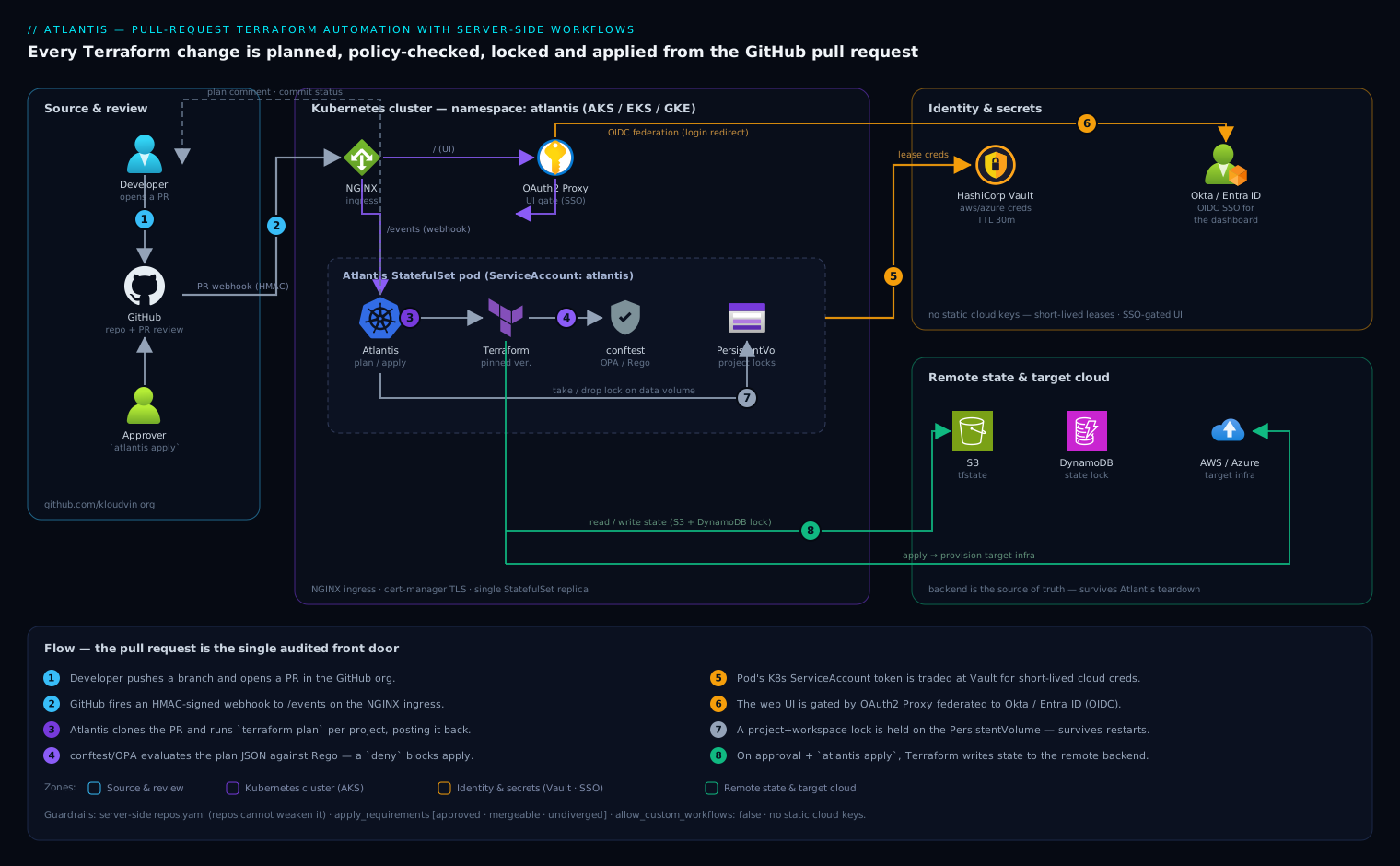
The flow is a loop anchored on the pull request. A developer pushes a branch and opens a PR in the GitHub org. GitHub fires a webhook to the Atlantis server, which runs as a single StatefulSet pod on Kubernetes behind an NGINX ingress with a cert-manager TLS certificate. Atlantis clones the PR, runs terraform plan for each affected project in an isolated working directory, and posts the plan as a PR comment while taking a lock on that project+workspace (the lock is held in Atlantis’s data volume, so it survives pod restarts — hence a StatefulSet with a PersistentVolume, not a Deployment).
Before a plan is accepted, Atlantis runs a policy check stage that invokes conftest/OPA against the plan JSON; a failing Rego policy blocks apply until either the policy passes or an owner overrides it. For credentials, the Atlantis pod authenticates to HashiCorp Vault with its Kubernetes ServiceAccount token and pulls a short-lived AWS/Azure credential for the duration of the run, so no long-lived cloud key ever lives in the cluster. The Atlantis web UI — where the lock list and plan logs live — sits behind OAuth2 Proxy federated to Okta (or Entra ID), so only authenticated engineers can see it. Terraform reads and writes state in the remote backend (S3/DynamoDB or Azure Storage). When an approver reviews the plan and comments atlantis apply, Atlantis runs terraform apply, drops the lock, and writes the outcome back to the PR — which is now the durable audit record of the change.
1. Create the GitHub bot user, token, and webhook secret
Atlantis acts as a GitHub user. Create a dedicated machine user (e.g. kloudvin-atlantis), add it to your org with write access to the repos it will manage, and generate a personal access token. A fine-grained token scoped to the target repos with Contents: read/write, Pull requests: read/write, and Commit statuses: read/write is enough; a classic token needs the repo scope.
Generate a strong webhook secret — this is what lets Atlantis verify that webhook deliveries genuinely came from GitHub:
# 40-char webhook shared secret
openssl rand -hex 20 > /tmp/atlantis-webhook-secret.txt

# Sanity-check the bot token can see the org (replace TOKEN)
curl -sf -H "Authorization: Bearer ghp_xxx" \
  https://api.github.com/orgs/kloudvin/repos?per_page=1 >/dev/null \
  && echo "token OK"
Hold both values for the secret in step 3. Do not commit them.
2. Define the server-side repo config (the real control plane)
The heart of a locked-down Atlantis is repos.yaml — the server-side repo config. Because it lives on the server, not in the managed repositories, developers cannot loosen it from a branch. It decides which repos are allowed, what atlantis.yaml (the repo-side config) may override, whether apply requires approval, and which custom workflow runs.
Create repos.yaml:
repos:
  - id: github.com/kloudvin/.*           # only our org's repos
    branch: /^(main|master)$/            # only PRs targeting main may apply
    apply_requirements:
      - approved                         # a human must approve the PR
      - mergeable                        # no conflicts / failing required checks
      - undiverged                       # branch is up to date with main
    allowed_overrides: [workflow, apply_requirements]
    allow_custom_workflows: false        # repos pick a named workflow, not arbitrary commands
    workflow: kloudvin-default

workflows:
  kloudvin-default:
    plan:
      steps:
        - env:
            name: TF_IN_AUTOMATION
            value: "true"
        - run: ./scripts/vault-creds.sh    # export short-lived cloud creds (step 6)
        - init
        - plan
    policy_check:
      steps:
        - show                             # emit the plan as JSON for OPA
        - policy_check                      # run the conftest policy set (step 5)
    apply:
      steps:
        - run: ./scripts/vault-creds.sh
        - apply
Two design choices matter here. apply_requirements: [approved, mergeable, undiverged] means an atlantis apply is rejected unless the PR is approved by a reviewer, has no merge conflicts or failing required status checks, and is rebased on the latest main — this single line is what turns Atlantis from “remote terraform” into a governed gate. And allow_custom_workflows: false with a fixed workflow is what stops a repo from defining its own run: rm -rf step; repos may only select a named server-side workflow.
A managed repo then carries a minimal atlantis.yaml to declare its projects (so Atlantis plans each independently and locks them separately):
version: 3
projects:
  - name: network
    dir: envs/prod/network
    workspace: default
    autoplan:
      when_modified: ["*.tf", "../../../modules/**/*.tf"]
      enabled: true
  - name: data
    dir: envs/prod/data
    workspace: default
3. Create the Kubernetes namespace and secrets
Put everything in its own namespace and load the sensitive values as a Secret. The repos.yaml from step 2 goes in as a ConfigMap (it is policy, not a secret).
kubectl create namespace atlantis

kubectl -n atlantis create secret generic atlantis-vcs \
  --from-literal=github_token='ghp_xxx' \
  --from-literal=github_secret="$(cat /tmp/atlantis-webhook-secret.txt)"

kubectl -n atlantis create configmap atlantis-repo-config \
  --from-file=repos.yaml=./repos.yaml
4. Deploy Atlantis with the official Helm chart
Add the chart and write a values.yaml. The key decisions: mount the server-side repos.yaml, run policy checks, and persist the data directory so locks survive restarts.
helm repo add runatlantis https://runatlantis.github.io/helm-charts
helm repo update
# values.yaml
orgAllowlist: "github.com/kloudvin/*"   # required: which repos may use this server

github:
  user: kloudvin-atlantis
  # token + webhook secret come from the existing Secret, not plaintext here
existingSecret: "atlantis-vcs"

# Mount the server-side repo config and turn on policy checking
repoConfig: |-
  # placeholder; we override via extraVolumes below to use the ConfigMap
extraArgs:
  - --repo-config=/etc/atlantis/repos.yaml
  - --enable-policy-checks
  - --hide-prev-plan-comments        # keep PRs readable on re-plan
  - --write-git-creds                 # let cloned modules over HTTPS auth as the bot

extraVolumes:
  - name: repo-config
    configMap:
      name: atlantis-repo-config
extraVolumeMounts:
  - name: repo-config
    mountPath: /etc/atlantis
    readOnly: true

# Persist locks + plans across pod restarts (this is why it is a StatefulSet)
dataStorage: 5Gi
storageClassName: managed-csi          # AKS default; use gp3 on EKS, standard-rwo on GKE

# Pin the Atlantis + Terraform versions; never float in production
image:
  tag: v0.28.5
environment:
  ATLANTIS_DEFAULT_TF_VERSION: "1.9.5"

serviceAccount:
  create: true
  name: atlantis                       # referenced by the Vault role in step 6

resources:
  requests: { cpu: 250m, memory: 512Mi }
  limits:   { cpu: "1",  memory: 1Gi }

ingress:
  enabled: true
  ingressClassName: nginx
  annotations:
    cert-manager.io/cluster-issuer: letsencrypt-prod
  host: atlantis.kloudvin.com
  tls:
    - secretName: atlantis-tls
      hosts: [atlantis.kloudvin.com]
Install it:
helm upgrade --install atlantis runatlantis/atlantis \
  -n atlantis -f values.yaml --wait

kubectl -n atlantis rollout status statefulset/atlantis
kubectl -n atlantis get ingress atlantis
5. Add the OPA / conftest policy set
--enable-policy-checks tells Atlantis to run the policy_check workflow stage, but you must supply the policies. Atlantis ships with conftest and evaluates Rego policies against the plan rendered as JSON. Define the policy set in the server-side config and store the Rego in a dedicated repo so it is reviewed like any other code.
Extend repos.yaml with a policies block:
policies:
  owners:
    users: [vinod-kloudvin]            # who may /approve_policies to override a fail
  policy_sets:
    - name: kloudvin-guardrails
      path: /policies                  # Rego files baked into a sidecar/initContainer
      source: local
A representative Rego rule — deny any security group open to the world on 22/3389, and require a cost-center tag:
package main

deny[msg] {
  rc := input.resource_changes[_]
  rc.type == "aws_security_group_rule"
  rc.change.after.cidr_blocks[_] == "0.0.0.0/0"
  rc.change.after.to_port == 22
  msg := sprintf("SSH open to the world in %s", [rc.address])
}

deny[msg] {
  rc := input.resource_changes[_]
  rc.change.after.tags["cost-center"] == ""
  msg := sprintf("missing cost-center tag on %s", [rc.address])
}
When a plan trips a deny, Atlantis marks the policy check failed and blocks apply. Only a listed owner can clear it by commenting atlantis approve_policies — so an exception is an explicit, attributable act recorded on the PR, not a silent bypass.
6. Wire short-lived cloud credentials from Vault
This is the step that removes static cloud keys. The Atlantis pod’s Kubernetes ServiceAccount authenticates to HashiCorp Vault, which mints a short-lived AWS (or Azure) credential scoped to exactly what Terraform needs. Configure the Vault Kubernetes auth role to trust the atlantis ServiceAccount:
vault write auth/kubernetes/role/atlantis \
  bound_service_account_names=atlantis \
  bound_service_account_namespaces=atlantis \
  policies=atlantis-terraform \
  ttl=30m
The vault-creds.sh referenced by the workflow logs in with the pod’s projected token and exports the leased credentials so Terraform inherits them:
#!/usr/bin/env bash
set -euo pipefail
JWT=$(cat /var/run/secrets/kubernetes.io/serviceaccount/token)
export VAULT_ADDR="https://vault.kloudvin.com"

VAULT_TOKEN=$(vault write -field=token auth/kubernetes/login \
  role=atlantis jwt="$JWT")
export VAULT_TOKEN

# AWS secrets engine -> short-lived STS keys (TTL matches the role)
creds=$(vault read -format=json aws/creds/terraform-deployer)
export AWS_ACCESS_KEY_ID=$(echo "$creds"  | jq -r .data.access_key)
export AWS_SECRET_ACCESS_KEY=$(echo "$creds" | jq -r .data.secret_key)
export AWS_SESSION_TOKEN=$(echo "$creds" | jq -r .data.security_token)
Because the lease TTL is short, a credential that somehow leaked from a plan log is useless minutes later. (On Azure, swap in azure/creds/<role> and export ARM_CLIENT_ID/ARM_CLIENT_SECRET/ARM_TENANT_ID/ARM_SUBSCRIPTION_ID.)
7. Put the UI behind Okta / Entra ID SSO
The Atlantis web UI exposes the lock list and full plan output, so it must not be open. Front the ingress with OAuth2 Proxy federated to Okta (or Microsoft Entra ID). Register an OIDC app in your IdP with the callback https://atlantis.kloudvin.com/oauth2/callback, then route unauthenticated requests through the proxy via NGINX auth_url/auth_signin annotations:
ingress:
  annotations:
    nginx.ingress.kubernetes.io/auth-url: "https://atlantis.kloudvin.com/oauth2/auth"
    nginx.ingress.kubernetes.io/auth-signin: "https://atlantis.kloudvin.com/oauth2/start?rd=$escaped_request_uri"
Now only an engineer who has authenticated through Okta/Entra — and is in the allowed group — can reach the dashboard. Webhook deliveries from GitHub hit /events directly and are authenticated by the HMAC webhook secret from step 1, so machine traffic still works while humans go through SSO.
8. Register the webhook in GitHub
Point GitHub at the server. Add a webhook at the org level (so it covers every managed repo) under Settings → Webhooks:
- Payload URL:
https://atlantis.kloudvin.com/events - Content type:
application/json - Secret: the value from
/tmp/atlantis-webhook-secret.txt - Events: Pull requests, Pull request reviews, Issue comments, and Pushes.
After saving, GitHub sends a ping. Confirm Atlantis received it:
kubectl -n atlantis logs statefulset/atlantis | grep -i "ping\|webhook"
Validation
Run an end-to-end PR to prove every gate fires.
# In a managed repo, make a trivial, safe change and open a PR
git checkout -b atlantis-smoke
sed -i 's/desired_capacity = 2/desired_capacity = 3/' envs/prod/data/main.tf
git commit -am "test: bump capacity to validate atlantis" && git push -u origin atlantis-smoke
gh pr create --fill --base main
Within seconds you should observe, on the PR:
- An autoplan comment showing the
terraform plandiff for thedataproject only. - A lock taken — open a second PR touching the same project and confirm Atlantis comments that the project is locked. Verify in the UI at
https://atlantis.kloudvin.com(after SSO) that the lock is listed. - A policy-check result — temporarily add an untagged resource and confirm the OPA
denyblocks apply with the cost-center message. - Apply blocked until approved — comment
atlantis applybefore approval and confirm it is rejected for theapprovedrequirement; then approve the PR and commentatlantis applyagain to watch it run and release the lock.
A quick health probe from outside the cluster:
curl -sf https://atlantis.kloudvin.com/healthz && echo " healthz OK"
Rollback / teardown
Atlantis only orchestrates Terraform; tearing it down does not destroy any infrastructure it created, and the remote state backend remains the source of truth. To remove or revert:
# Roll back to a previous chart revision (e.g. a bad values change)
helm history atlantis -n atlantis
helm rollback atlantis <REVISION> -n atlantis

# Full teardown of the Atlantis server
helm uninstall atlantis -n atlantis
kubectl -n atlantis delete pvc -l app.kubernetes.io/name=atlantis   # drops held locks
kubectl delete namespace atlantis
Then disable the GitHub org webhook (or delete it) so PRs stop trying to reach a dead endpoint, and revoke the bot’s PAT. If a specific apply needs reverting, do it the Atlantis way: open a PR that reverts the Terraform change and let the normal plan/approve/apply loop roll it back, so the rollback is itself reviewed and audited. Because state lives in S3/DynamoDB or Azure Storage, you can always re-deploy Atlantis later and it will pick up exactly where the backend left off.
Common pitfalls
- Using a Deployment instead of a StatefulSet (or no PVC). Locks and in-flight plans live on disk. Without a PersistentVolume, a pod restart drops every lock and orphans plans — the chart’s
dataStorageis not optional in production. - A too-permissive
orgAllowlist.*lets any repo on the internet drive your server. Scope it to your org, and pinbranch:so only PRs targetingmaincan apply. - Forgetting
apply_requirements. Withoutapproved, anyone who can comment can apply unreviewed infrastructure changes. This is the most common security miss. - Letting
allow_custom_workflows: true. That hands repos arbitraryrun:steps on your server. Keep itfalseand expose only named server-side workflows. - Mismatched Terraform versions. A repo init’d at 1.5 and applied at 1.9 can rewrite state. Pin
ATLANTIS_DEFAULT_TF_VERSIONand let repos override per-project only deliberately. - Plans that print secrets. Mark sensitive variables and avoid
terraform outputof secrets in workflow steps, since plan logs land in a public-to-the-org PR comment.
Security notes
The credential model is the headline: no static cloud keys anywhere — the pod trades its Kubernetes ServiceAccount token for a short-lived Vault-issued credential per run (step 6), so the blast radius of a leak is minutes, not forever. The UI is gated by Okta/Entra SSO (step 7) while webhooks are authenticated by an HMAC secret, separating human and machine trust. The server-side repos.yaml is the policy boundary repos cannot weaken, and OPA/conftest turns “don’t open SSH to the world” and “everything must be tagged” into enforced gates rather than review-time hopes (step 5). For defence in depth, run the cluster’s existing CrowdStrike Falcon sensor on the node pool so the Atlantis pod gets runtime threat detection, and let Wiz / Wiz Code scan both the cluster posture and the Terraform/IaC in the managed repos so a misconfiguration is caught before the plan, not after the apply. Restrict egress so the pod can reach only GitHub, Vault, the cloud APIs, and the state backend.
Cost notes
Atlantis itself is nearly free: a single small pod (250m CPU / 512Mi) plus a 5Gi volume — a few dollars a month on any managed Kubernetes. The real saving is indirect and larger: every change is planned and reviewed before it applies, so the class of incident where a fat-fingered apply provisions an oversized cluster or leaves orphaned NAT gateways running is caught in the PR. Pair the OPA policy set with cost-center tagging (enforced above) so the Datadog or Dynatrace cost dashboards can attribute every resource to a team — making spend visible to the people who created it. Keep the pod a single replica (Atlantis is not horizontally scalable — locking assumes one server), and you have a governed, audited, credential-safe front door to your infrastructure for the price of a coffee.
Going deeper
The eight steps above give you a working, locked-down server. This section is the mental model behind it — the server/repo trust split, the workflow engine, how locking and policy actually behave, and where Atlantis stops and a managed platform begins.
Two files, one trust boundary: repos.yaml vs atlantis.yaml
Almost every governance question about Atlantis reduces to where a setting is allowed to live. The server-side repos.yaml (loaded with --repo-config) is authoritative and unreachable from any pull request. The repo-side atlantis.yaml ships inside each managed repository and can only exercise the freedoms the server hands it through allowed_overrides and allow_custom_workflows. If a key is not in allowed_overrides, a repo simply cannot change it — full stop.
A fuller server-side config makes the split explicit. Recent Atlantis (v0.19+) also lets you gate plan and import separately from apply:
repos:
  - id: github.com/kloudvin/.*
    branch: /^(main|master)$/
    plan_requirements:   [mergeable]
    apply_requirements:  [approved, mergeable, undiverged]
    import_requirements: [approved]
    allowed_overrides:   [workflow, apply_requirements]
    allow_custom_workflows: false
    repo_locking: true
    workflow: kloudvin-default
    pre_workflow_hooks:
      - run: ./scripts/generate-atlantis-yaml.sh   # e.g. render projects from Terragrunt
    post_workflow_hooks:
      - run: ./scripts/notify-slack.sh
pre_workflow_hooks / post_workflow_hooks are server-side-only escape hatches that run around the whole workflow — handy for generating an atlantis.yaml on the fly (a common Terragrunt pattern) or emitting a notification, without granting repos any new power. One subtlety worth internalizing: undiverged only works with --checkout-strategy=merge. With the default branch strategy Atlantis never learns that main has moved on, so “is this branch behind?” cannot be answered and the requirement is silently ineffective.
Workflows, built-in steps, and custom run steps
A workflow is a set of stages — plan, apply, policy_check, and (less often) import and state_rm — each a list of steps. Steps are either built-ins (init, plan, apply, import, policy_check, show) or custom (run, env, multienv). Custom steps are where teams inject linting, cost estimation, or credential fetching:
workflows:
  kloudvin-default:
    plan:
      steps:
        - env: { name: TF_IN_AUTOMATION, value: "true" }
        - multienv: ./scripts/vault-creds.sh   # inject creds into EVERY later step
        - init
        - run: tflint --chdir="$DIR" --format compact
        - plan
A subtlety the happy-path config in step 2 glosses over: each run step executes as its own process, so an export inside a script does not survive into the built-in init/plan steps that follow it. Two step types are built to cross that boundary — an env step with a command: (sets one variable to the command’s stdout) and a multienv step (runs a script and injects every NAME=value it prints into all later steps). That is why the robust way to hand Vault credentials to init/plan is a multienv step — with the script printing AWS_ACCESS_KEY_ID=… rather than export-ing it — not a bare run. Atlantis also exposes helper variables inside steps — $DIR, $WORKSPACE, $PROJECT_NAME, $PLANFILE, $SHOWFILE, $BASE_BRANCH_NAME — so a custom step can find the plan file or the project directory.
The comment API: what you type on the PR
Atlantis is driven almost entirely by PR comments. The ones worth memorizing:
| Comment | Effect |
|---|---|
atlantis plan |
Re-plan every project in the PR |
atlantis plan -p network |
Plan only the network project (name from atlantis.yaml) |
atlantis plan -d envs/prod/data -w default |
Plan one directory + workspace |
atlantis plan -- -var 'x=y' |
Pass extra flags to terraform plan after -- |
atlantis apply |
Apply the planned projects (subject to apply_requirements) |
atlantis apply -p network |
Apply a single project |
atlantis approve_policies |
An owner overrides a failed policy check |
atlantis unlock |
Release the PR’s locks (also a button in the UI) |
atlantis import ADDRESS ID |
Run terraform import via the import workflow |
Autoplan fires plan automatically on push; these comments are the manual overrides — re-plan after a dependency merged, plan a single project, or pass a one-off variable.
Autoplan and when_modified
When a PR opens or gets a new commit, Atlantis decides which projects to plan by matching the changed files against each project’s autoplan.when_modified globs. The classic trap is shared modules: a project under envs/prod/network that consumes modules/vpc will not re-plan when only the module changes — unless its globs reach up the tree:
autoplan:
  enabled: true
  when_modified:
    - "*.tf"
    - "*.tfvars"
    - "../../../modules/**/*.tf"   # re-plan when a shared module changes
Set enabled: false to require an explicit atlantis plan — useful for expensive or rarely-touched projects you would rather not plan on every commit.
Projects, workspaces, and lock granularity
A project is one Terraform root — one state file. A workspace is a Terraform workspace within it, the usual way to separate staging from prod state from the same code. Atlantis locks at project + workspace granularity, so data/staging and data/prod can plan concurrently while two PRs touching data/prod cannot. Pin terraform_version per project when different roots are mid-upgrade:
version: 3
projects:
  - name: data-staging
    dir: envs/data
    workspace: staging
    terraform_version: v1.9.5
    autoplan: { when_modified: ["*.tf"], enabled: true }
  - name: data-prod
    dir: envs/data
    workspace: prod
    terraform_version: v1.9.5
Apply requirements, precisely
approved counts GitHub PR approvals (and respects CODEOWNERS when you also turn on branch protection). mergeable means GitHub reports no conflicts and no failing required status checks — so it inherits your branch-protection rules for free. undiverged means the branch is not behind base (and needs the merge checkout strategy, above). These three are the difference between “remote Terraform” and a governed gate: drop approved and anyone who can comment can ship infrastructure.
Locking and the lock UI
The Atlantis lock is not the Terraform state lock — they are different mechanisms solving different problems. Terraform’s state lock (a DynamoDB item or an Azure blob lease) stops two processes from writing state in the same instant. The Atlantis lock stops two pull requests from working the same project across the whole review window, so the plan you are reviewing cannot be silently invalidated by someone else’s apply. It lives in Atlantis’s on-disk BoltDB (which is why the pod needs a PVC). Locks auto-release when the PR merges or closes, or manually via atlantis unlock / the lock list in the web UI.
Policy checks with conftest, and going beyond it
With --enable-policy-checks, the policy_check stage renders the plan to JSON (terraform show -json) and runs conftest against your Rego policy_sets. A deny marks the check failed and blocks apply until a listed owner comments atlantis approve_policies. Policy sets can be source: local (baked into the image) or pulled from a repo, and pinned to a conftest version. For scanners that are not Rego — Checkov, tfsec, Trivy — wire them in as a run step whose non-zero exit fails the stage. This lesson’s OPA gate pairs naturally with the deeper treatment in OPA/conftest policy gates.
Drift: the honest gap
Atlantis has no built-in scheduled drift detection. It reacts to pull requests; it does not wake up nightly to compare live infrastructure against state the way HCP Terraform or Spacelift can. Teams close the gap three ways: a scheduled CI job (cron / GitHub Actions) that forces an atlantis plan on a tracking PR; a community drift-detection tool that diffs state on a timer; or graduating drift-sensitive stacks to a platform with native drift. See Terraform drift detection & reconciliation for the reconciliation patterns.
Webhook and provider auth
Two independent trust paths meet at the server. Inbound, GitHub signs each webhook with the shared secret (HMAC-SHA256 over the payload); Atlantis rejects anything that does not verify, which is why the /events endpoint can safely stay public. Outbound to the VCS, Atlantis authenticates as the bot — a PAT here, but a GitHub App is the production-grade choice (higher rate limits, finer scopes, no consumed user seat, per-repo install). Outbound to the cloud, this guide uses Vault-issued short-lived keys; the equivalent keyless patterns are workload identity — EKS IRSA, GKE Workload Identity, or Azure Workload Identity — where the pod’s ServiceAccount is federated straight to a cloud role with no stored secret at all.
HA and why it is a StatefulSet
Atlantis is single-active by design: working directories (cloned repos, plan files) and, by default, the BoltDB lock database live on local disk, so you run one replica with a PVC — a StatefulSet, not a horizontally-scaled Deployment. You can externalize locks with --locking-db-type=redis, but that does not make Atlantis horizontally scalable; the working directory is still local, so there is still one server doing the work. Disaster recovery is easy precisely because state is external: lose the pod and you restore the PVC (to recover in-flight locks) or simply redeploy — the S3/DynamoDB or Azure backend is untouched and the next plan picks up exactly where it left off.
Atlantis vs HCP Terraform vs Spacelift vs Env0
Atlantis is the free, self-hosted, PR-centric end of a spectrum; the managed platforms trade money and some control for drift detection, scheduled runs, managed state, and richer RBAC.
| Dimension | Atlantis | HCP Terraform (ex-TFC) | Spacelift | Env0 |
|---|---|---|---|---|
| Model | Self-hosted OSS you run | Managed SaaS (self-host = TFE) | SaaS + self-hosted workers | SaaS + self-hosted agents |
| Cost | Free (you pay compute) | Free tier → paid seats/resources | Paid (free tier) | Paid (free tier) |
| State | Your backend (S3/Azure) | Managed state included | Managed or bring-your-own | Managed or bring-your-own |
| Policy as code | conftest/OPA (you wire it) | Sentinel + OPA | OPA (deep) | OPA |
| Drift detection | None built-in | Yes (paid) | Yes | Yes |
| Scheduled runs | No | Yes | Yes | Yes |
| Cost estimation | Add Infracost | Built-in | Built-in | Built-in |
| Multi-tool | Terraform/OpenTofu | Terraform/OpenTofu | TF/OpenTofu/Pulumi/CFN/Ansible/K8s | TF/OpenTofu/Terragrunt/CFN |
| Scaling | Single replica | Managed | Managed | Managed |
| Best when | A free, auditable gate you fully control | Managed state + Sentinel, least ops | Drift + rich policy across many IaC tools | Self-service, TTL environments |
If you already run HCP Terraform or Spacelift, you likely do not need Atlantis as well; its sweet spot is teams that want the PR gate without a SaaS bill and without shipping plans off-prem.
Practice challenges
Work these in order — they climb from a first atlantis.yaml to workspace-aware locking and the drift gap. Try each before opening the solution.
1. (Beginner) Declare two independently-planned projects. In a repo with envs/prod/network and envs/prod/data, write the atlantis.yaml that makes Atlantis plan and lock each on its own.
<details> <summary>Solution</summary>
version: 3
projects:
  - name: network
    dir: envs/prod/network
    workspace: default
  - name: data
    dir: envs/prod/data
    workspace: default
Two projects entries produce two independent plans and two independent locks, so a PR touching only data never re-plans network.
</details>
2. (Beginner) Re-plan on shared-module changes. The network project consumes modules/vpc. Make it autoplan when the module changes, not only when its own .tf files do.
<details> <summary>Solution</summary>
autoplan:
  enabled: true
  when_modified: ["*.tf", "*.tfvars", "../../../modules/**/*.tf"]
The relative glob reaches up to the shared module; without it, a module-only PR shows no plan and silently skips the project — a dangerous false “nothing changed.” </details>
3. (Intermediate) Make the server the boundary. In repos.yaml, require an approval and a mergeable branch before any apply, and stop repos from defining their own run: steps.
<details> <summary>Solution</summary>
repos:
  - id: github.com/kloudvin/.*
    apply_requirements: [approved, mergeable]
    allow_custom_workflows: false
    allowed_overrides: [workflow]
    workflow: kloudvin-default
apply_requirements set server-side cannot be edited from a branch, and allow_custom_workflows: false means repos may only select a named workflow, never inject arbitrary commands.
</details>
4. (Intermediate) Write a tagging policy. Author a Rego rule for the policy_check stage that denies any resource missing an owner tag.
<details> <summary>Solution</summary>
package main

deny[msg] {
  rc := input.resource_changes[_]
  not rc.change.after.tags.owner
  msg := sprintf("%s is missing required tag 'owner'", [rc.address])
}
conftest evaluates this against terraform show -json; because a missing key is undefined, not …tags.owner fires the deny and blocks apply until an owner runs atlantis approve_policies.
</details>
5. (Advanced) Gate the plan on a linter with working credentials. Add a custom step so tflint runs after init and blocks the plan on a violation — and make sure the Vault credentials actually reach init.
<details> <summary>Solution</summary>
workflows:
  kloudvin-default:
    plan:
      steps:
        - env: { name: TF_IN_AUTOMATION, value: "true" }
        - multienv: ./scripts/vault-creds.sh    # printed NAME=value pairs reach later steps
        - init
        - run: tflint --chdir="$DIR" --format compact
        - plan
multienv (not run + export) is what carries the creds across the per-step process boundary into init, and a non-zero tflint exit fails the stage before the plan is ever posted.
</details>
6. (Advanced) Separate workspaces, then close the drift gap. Give staging and prod their own state and locks from one directory, then describe how you would add the drift detection Atlantis lacks.
<details> <summary>Solution</summary>
version: 3
projects:
  - name: data-staging
    dir: envs/data
    workspace: staging
    autoplan: { when_modified: ["*.tf"], enabled: true }
  - name: data-prod
    dir: envs/data
    workspace: prod
    autoplan: { when_modified: ["*.tf"], enabled: true }
Same dir, different workspace gives separate state and separate locks, so staging and prod plan independently. For drift, schedule a job (cron / GitHub Actions) that forces an atlantis plan on a tracking PR, run a community drift tool, or move the stack to a platform with native drift — Atlantis will not detect it on its own.
</details>
Common beginner mistakes
These are conceptual traps — the misconception, then the mental model that replaces it — distinct from the config-level Common pitfalls above.
- “Atlantis stores my state, so it replaces my backend.” It does not. Atlantis runs Terraform; your S3/DynamoDB or Azure Storage backend is still the single source of truth for state. Tear Atlantis down and your infrastructure and state are untouched — Atlantis is the front door, not the vault behind it.
- “My repo’s
atlantis.yamlcontrols security.” The repo file can only spend the budget the server-siderepos.yamlgrants throughallowed_overrides. The real boundary is server-side; if a setting is not inallowed_overrides,atlantis.yamlcannot touch it. Beginners try to tighten security in the repo and are surprised it is the wrong file. - “Autoplan means it auto-applies.” Autoplan runs
planonly. Apply is always a deliberate human comment (atlantis apply) and, withapply_requirements, only after approval. Nothing reaches production without someone typing the apply. - “A GitHub approval automatically gates the apply.” Only if
approvedis inapply_requirements. Without it, the approve button is decorative and anyone who can comment can apply. The gate is the requirement list, not the PR’s approval by itself. - “I’ll run three replicas for high availability.” Atlantis is single-active — locks and working directories are local. A second replica double-plans, races locks, and corrupts in-flight work. Run one replica with a PVC and make it resilient through fast restart, not scale-out.
- “The Atlantis lock is my Terraform state lock.” They are separate. The state lock (DynamoDB/blob) guards a single write; the Atlantis lock guards a project+workspace across the whole PR review so your reviewed plan cannot be invalidated mid-review. Clearing one does not clear the other.
Glossary
- Atlantis — a self-hosted server that automates Terraform through pull-request webhooks: plan on open, apply on comment.
- Server-side repo config (
repos.yaml) — the authoritative config that lives on the Atlantis server (loaded via--repo-config); repos cannot edit it. - Repo-side config (
atlantis.yaml) — per-repository config declaring projects and workflows; may only use freedoms the server grants. allowed_overrides— the server-side list of keys anatlantis.yamlis permitted to change (e.g.workflow,apply_requirements).allow_custom_workflows— whether repos may define their ownrun:steps; keep itfalseso repos only select named server workflows.- Project — one Terraform root / one state file; planned and locked independently.
- Workspace — a Terraform workspace within a project, typically separating
stagingfromprodstate. - Workflow — the named
plan/apply/policy_checkstep sequence a project runs. - Built-in step —
init,plan,apply,import,policy_check,show: the Terraform actions Atlantis runs directly. - Custom step —
run,env,multienv: shell hooks for linting, cost estimation, or credential injection. multienv— a step that runs a script and injects theNAME=valuepairs it prints into all later steps (crossing the per-step process boundary thatexportcannot).- Autoplan — automatic
terraform planwhen a PR changes files matchingwhen_modified. when_modified— the file globs that decide whether a project re-plans on a change.- Apply requirements — preconditions for
atlantis apply:approved,mergeable,undiverged. mergeable— GitHub reports no conflicts and no failing required checks (so it inherits branch protection).undiverged— the PR branch is not behind base; requires--checkout-strategy=mergeto take effect.- Lock — Atlantis’s project+workspace lock preventing two PRs from working the same target; distinct from the Terraform state lock.
atlantis unlock— the comment (or UI action) that releases a PR’s locks.- Policy check — the
policy_checkstage running conftest/OPA over the plan JSON; adenyblocks apply. - conftest / Rego / OPA — the policy engine (
conftest), its language (Rego), and the broader project (OPA) used to gate plans. atlantis approve_policies— an owner’s explicit, attributable override of a failed policy check.- Webhook secret (HMAC) — the shared secret GitHub signs deliveries with so Atlantis can trust them; lets
/eventsstay public. orgAllowlist— the Helm/server setting for which repos may use this Atlantis; scope it to your org, never*.- StatefulSet + PVC — how Atlantis runs on Kubernetes so its on-disk locks and plans survive pod restarts.
- BoltDB — the embedded on-disk database Atlantis stores locks in by default (or Redis via
--locking-db-type). - Pre/post workflow hooks — server-side-only commands that run around a workflow (e.g. generate
atlantis.yaml, notify Slack). - GitHub App — the production-grade alternative to a bot PAT for VCS auth (higher rate limits, scoped, no user seat).
TF_IN_AUTOMATION— the standard env var that tells Terraform it runs non-interactively, tidying its output for CI.