In a nutshell
Imagine you drew up a precise floor plan for a room — sofa here, reading lamp there — and handed it to a decorator. That blueprint is your Terraform configuration: the way things are supposed to be. Now imagine people wander in over the week and quietly rearrange the furniture by hand. Someone drags the sofa to catch better light, a cleaner unplugs the lamp, a visitor stacks the chairs in a corner. Nothing is on fire, but the room no longer matches the plan. That mismatch — reality quietly diverging from the blueprint — is drift.
Drift detection is hanging a camera that takes a photo of the room every night and lays it next to the blueprint. Anything that moved lights up. The camera doesn’t fix anything and it doesn’t shove the furniture back — it just tells you, calmly and before you stub your toe on the relocated sofa in the dark, exactly what changed. In Terraform terms that nightly photo is terraform plan -refresh-only: it reads the live cloud, compares it against what Terraform last recorded, and reports the differences without touching a single real resource.
The reason this deserves a whole lesson is the alternative. If you never take the photo, the first time you discover the furniture moved is when you run a routine terraform apply for some unrelated change and it proposes to “put everything back” — dragging that sofa across the room in the middle of the business day. Detection turns a nasty surprise into a scheduled, deliberate decision: keep the change, revert it, or agree to stop managing that piece. This lesson walks the full loop — see the drift, read it correctly, and reconcile it on purpose, never by accident.
Level: Advanced · Time: ~31 min
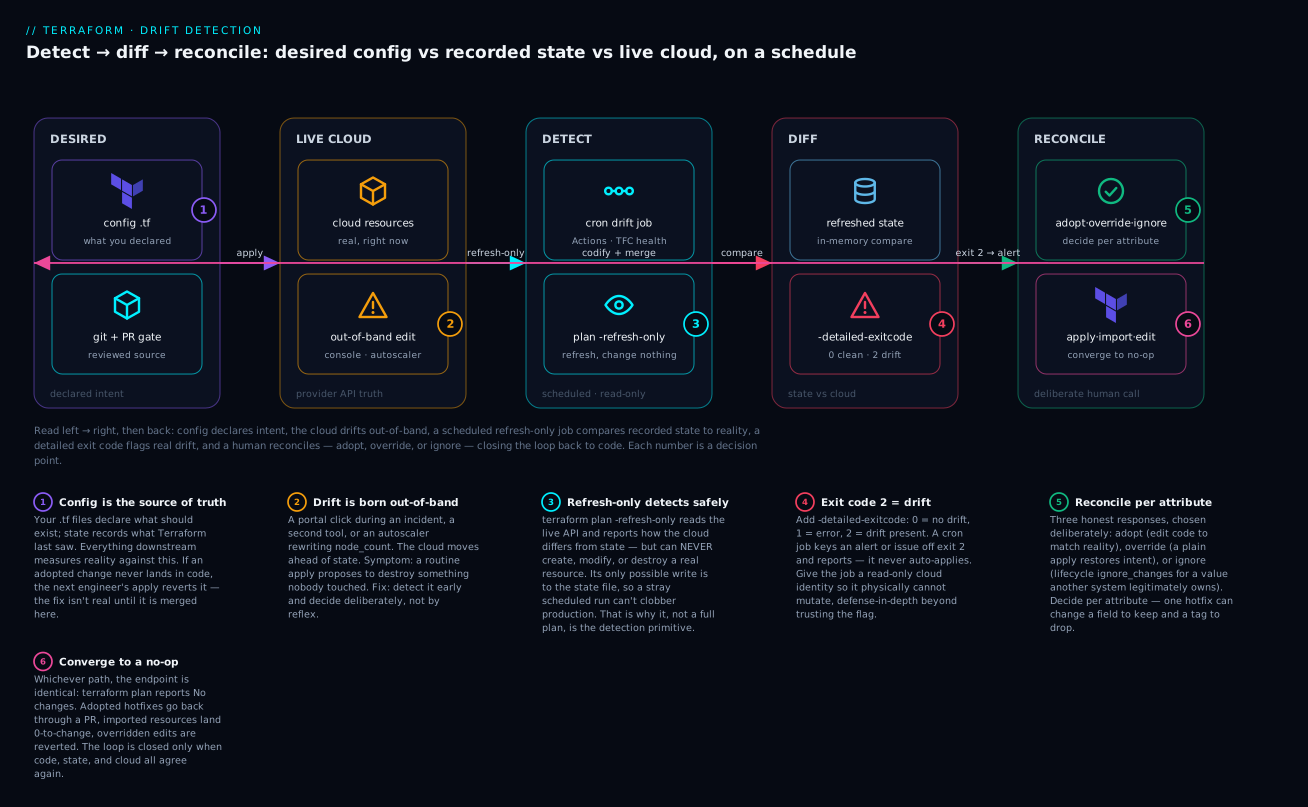
Read the loop left to right and back: your config declares the intended state, an out-of-band edit drifts the live cloud, a scheduled read-only refresh compares recorded state against reality, a -detailed-exitcode of 2 raises an alert instead of clobbering anything, and a human reconciles — adopt, override, or ignore — before merging the decision back into code so the next plan is a clean no-op.
Before you start, you should be comfortable with the Terraform core loop — init, plan, apply — and with how state records what Terraform believes exists (a refresher lives in State deep dive: the file, commands, locking, and sensitive data and the concept-level IaC core concepts: state, drift, idempotency). You should be able to read a terraform plan diff and run a command in CI.
After this lesson you can:
- Explain the three sources of truth — config, state, live cloud — and which gap each command measures.
- Detect drift safely on a schedule with
plan -refresh-onlyand-detailed-exitcode, never a scheduledapply. - Read a drift plan and tell benign provider noise apart from real divergence.
- Adopt out-of-band resources with reviewable
importblocks that land 0-to-change. - Choose deliberately between adopting, overriding, and ignoring a given drift — per attribute, not per resource.
- Prevent most drift at the source with least-privilege RBAC, locks, and policy, and reconcile an incident hotfix without triggering a second outage.
Drift is the silent tax on every Terraform estate. Someone clicks a button in the portal during an incident, an autoscaler rewrites a field Terraform thinks it owns, and three weeks later a routine apply proposes to destroy something nobody meant to touch. This is a practitioner’s guide to seeing drift before it bites, reading a drift plan correctly, and reconciling it without turning a small divergence into an outage.
1. What drift actually is: three things that must agree
There are three sources of truth in any Terraform workflow, and “drift” is any disagreement between them:
- Configuration — your
.tffiles: what you declared should exist. - State —
terraform.tfstate: what Terraform last recorded as existing. - The live cloud — the actual resources, as the provider API reports them right now.
   config  <-- plan compares these two -->  state  <-- refresh compares these two -->  cloud
   (.tf)                                  (.tfstate)                                 (real API)
Two distinct gaps get lumped together as “drift,” and conflating them is the root of most bad reconciliation decisions:
- State-vs-cloud drift — the world changed underneath Terraform. A subnet was deleted in the portal, a tag was added by a governance policy, an SKU was bumped manually. State is stale.
- Config-vs-state drift — your code changed but hasn’t been applied, or someone ran
terraform statecommands by hand. This is just a pending change, not “drift” in the dangerous sense.
The pipeline you build later cares almost entirely about the first kind: detecting state-vs-cloud divergence early, deciding intentionally how to reconcile it, and never letting an apply make that decision for you by accident.
Mental model:
planshows you the gap between config and state. A refresh updates state from the cloud. Real drift detection requires both, in that order.
2. How refresh, plan, and -refresh-only behave
Understanding the exact mechanics here is non-negotiable, because the defaults changed and a lot of folklore is wrong.
terraform plan refreshes by default. Before computing the diff, plan reads every resource from the provider API to update its in-memory view of state, then compares your config against that refreshed view. Crucially, this refresh is in-memory for the plan — it does not persist to the state file. So a normal plan already sees drift; it just folds it into the proposed changes.
-refresh=false skips that API read entirely. Plan trusts whatever is in state. This is faster and is what you want when you’ve just refreshed and don’t want to pay the API round-trips again — but run it blind and you can apply against a stale picture.
-refresh-only is the purpose-built drift detector. It refreshes state from the cloud and reports what changed, but it will never propose to modify, create, or destroy a real resource to match your config. Its only possible action is updating the state file to match reality.
# Pure drift detection: compare state against the live cloud, change nothing real.
terraform plan -refresh-only

# Persist the refreshed reality into state (adopts drift INTO state, not the other way).
terraform apply -refresh-only
The distinction that trips people up: terraform apply -refresh-only does not push your config to the cloud. It does the reverse — it accepts the cloud’s current values as the new contents of state. That’s sometimes right (a manual change you want to keep) and sometimes wrong (one you want to revert). You decide; the flag just makes state agree with reality.
The old standalone
terraform refreshcommand still exists but is deprecated. Useterraform apply -refresh-only, which is the same operation with a plan and an approval prompt in front of it.
Here is the decision in one table:
| Command | Reads cloud? | Can change cloud? | Can change state? | Use for |
|---|---|---|---|---|
plan |
Yes | No | No | Normal change review |
plan -refresh=false |
No | No | No | Fast plan against trusted state |
plan -refresh-only |
Yes | No | No | Detecting drift safely |
apply -refresh-only |
Yes | No | Yes | Adopting reality into state |
apply |
Yes | Yes | Yes | Making the cloud match config |
3. Reading a drift plan: noise versus real divergence
Run terraform plan -refresh-only against a workspace that has drifted and you’ll see a block headed with a note that objects have changed outside of Terraform. The body uses the same diff symbols as a normal plan, but the meaning is inverted: it’s showing how the cloud differs from state, not how your config differs from state.
Note: Objects have changed outside of Terraform

  # azurerm_storage_account.this has changed
  ~ resource "azurerm_storage_account" "this" {
        id                = "/subscriptions/.../storageAccounts/kvprodsa"
      ~ tags              = {
          + "CostCenter" = "FIN-4417"
        }
        # (38 unchanged attributes hidden)
    }
Now the skill: telling benign provider noise apart from real divergence. Not every ~ is a problem.
- Real drift you must address: a changed SKU, a deleted rule, a security setting flipped, a tag your org policy added that your config doesn’t know about. These represent the world disagreeing with your intent.
- Provider normalization noise: the API returns a value in a different but equivalent form than you wrote — a casing difference, an attribute the provider computes and rewrites, an ordering change in a set the provider serializes as a list, a default the API fills in. These aren’t drift; they’re the provider being chatty.
- Perpetual diffs: an attribute that shows up as changed on every single run no matter what you do. That almost always means the resource schema and the API are fighting (an
azurermresource exposing a value also managed by a separate*_associationresource is the classic case), or you’re missing anignore_changes.
The diagnostic question for any drift line is: if I ran terraform apply right now, would the proposed action be correct? If Terraform wants to remove a tag a compliance policy legitimately added, the answer is no — reconcile the config, don’t apply. The -refresh-only plan is safe precisely because it forces that question before anything touches production.
4. Importing existing resources with import blocks
When a resource exists in the cloud but not in state — created by hand, by another tool, or by a different Terraform configuration — you import it. As of Terraform 1.5+, prefer import blocks over the imperative terraform import command: they’re declarative, reviewable in a pull request, and they run as part of plan/apply so you can see exactly what will happen first.
# imports.tf
import {
  to = azurerm_resource_group.hotfix
  id = "/subscriptions/00000000-0000-0000-0000-000000000000/resourceGroups/rg-hotfix"
}
You still need configuration for the resource being imported. Terraform 1.5+ can generate it for you so you don’t hand-write 40 attributes:
# Generate HCL for everything referenced by an import block.
terraform plan -generate-config-out=generated.tf
This writes a best-effort resource block into generated.tf. Treat it as a draft: it often includes read-only or deprecated attributes, won’t carry your variables or for_each, and may need defaults trimmed. Move the cleaned-up resource into your real .tf files, then plan again.
terraform plan   # with import block + config present
# Expect: "1 to import, 0 to add, 0 to change, 0 to destroy"
terraform apply
A clean import shows 0 to change after the import. If the plan wants to change attributes immediately after importing, your config doesn’t yet match the live resource — reconcile the config until the post-import plan is a no-op, then remove the import block (it’s idempotent, but leaving it is clutter).
For bulk or scripted scenarios the imperative form still works and is sometimes more convenient in a loop:
terraform import 'azurerm_resource_group.hotfix' \
  "/subscriptions/00000000-0000-0000-0000-000000000000/resourceGroups/rg-hotfix"
Import IDs are provider- and resource-specific. For AzureRM it’s almost always the full ARM resource ID; for AWS it varies by resource (an instance ID, an ARN, a name). Check the resource’s docs — guessing the ID format is the number one cause of failed imports.
5. Reconciliation strategies: adopt, override, or ignore with intent
Once you’ve identified real drift, there are exactly three honest responses. Pick deliberately; the worst outcome is picking by reflex.
Adopt the change (the world was right). The manual change should stand. Bring it into your configuration so code matches reality, then make state agree. Update the .tf to reflect the new value, run terraform plan and confirm it’s a no-op, and you’re reconciled. If the change is one Terraform can’t express in config (a value the cloud now owns), terraform apply -refresh-only adopts it into state.
Override the change (your config was right). The manual change was a mistake — a hotfix that bypassed review, an unauthorized edit. Leave your config as-is and let Terraform restore the intended state:
terraform plan    # shows Terraform reverting the manual change
terraform apply   # cloud is brought back into compliance with config
This is the case where a normal apply is the correct reconciliation, because here clobbering the drift is the goal. The danger is only doing it accidentally on drift you meant to keep.
Ignore the attribute (it’s legitimately managed elsewhere). Some fields are owned by another system by design: tags applied by Azure Policy, replica counts owned by an autoscaler, a secret rotated by a separate pipeline. Tell Terraform to stop fighting over them with lifecycle { ignore_changes = [...] }.
resource "azurerm_kubernetes_cluster" "this" {
  name                = "kvprod-aks"
  resource_group_name = azurerm_resource_group.this.name
  location            = var.location
  dns_prefix          = "kvprod"

  default_node_pool {
    name       = "system"
    node_count = 3
    vm_size    = "Standard_D4s_v5"
  }

  identity {
    type = "SystemAssigned"
  }

  lifecycle {
    # The cluster autoscaler owns node_count; do not revert it on every apply.
    ignore_changes = [
      default_node_pool[0].node_count,
      tags["CostCenter"],   # applied by Azure Policy, not by us
    ]
  }
}
ignore_changes is a scalpel, not a mute button. Two rules keep it honest: scope it to specific attributes, never all; and comment why every entry exists. An undocumented ignore_changes is how the next engineer learns that Terraform has silently stopped managing a security-relevant field. If you can’t name the system that legitimately owns the attribute, you shouldn’t be ignoring it — you should be adopting or overriding it.
| Strategy | When the drift is… | Mechanism |
|---|---|---|
| Adopt | A change you want to keep | Edit config to match; apply -refresh-only for state-only values |
| Override | An unauthorized or mistaken change | Plain terraform apply restores config’s intent |
| Ignore | Owned by another system by design | lifecycle { ignore_changes = [attr] }, scoped and commented |
6. A scheduled drift-detection pipeline that reports, not clobbers
The point of automation here is to surface drift on a schedule and notify a human — never to auto-apply. An automated reconciliation that runs terraform apply on a cron is how you turn one manual change into a 3 a.m. page.
The mechanism is terraform plan -refresh-only plus the -detailed-exitcode flag, which makes the result machine-readable:
0= no changes (no drift)1= error2= changes present (drift detected)
# .github/workflows/drift-detection.yml
name: drift-detection
on:
  schedule:
    - cron: "0 6 * * 1-5"   # 06:00 UTC, weekdays
  workflow_dispatch: {}

permissions:
  id-token: write           # OIDC to the cloud, no long-lived secrets
  contents: read
  issues: write             # to open a drift report issue

jobs:
  detect:
    runs-on: ubuntu-latest
    steps:
      - uses: actions/checkout@v4

      - uses: hashicorp/setup-terraform@v3
        with:
          terraform_wrapper: false

      # Authenticate to Azure via OIDC (federated credentials), read-only role.
      - uses: azure/login@v2
        with:
          client-id: ${{ secrets.AZURE_CLIENT_ID }}
          tenant-id: ${{ secrets.AZURE_TENANT_ID }}
          subscription-id: ${{ secrets.AZURE_SUBSCRIPTION_ID }}

      - run: terraform init -input=false

      - name: Refresh-only drift check
        id: drift
        run: |
          set +e
          terraform plan -refresh-only -detailed-exitcode -no-color -input=false -out=drift.tfplan
          echo "exitcode=$?" >> "$GITHUB_OUTPUT"
          set -e

      - name: Render drift summary
        if: steps.drift.outputs.exitcode == '2'
        run: terraform show -no-color drift.tfplan > drift-report.txt

      - name: Open or update drift issue
        if: steps.drift.outputs.exitcode == '2'
        uses: actions/github-script@v7
        with:
          script: |
            const fs = require('fs');
            const body = "Drift detected by scheduled refresh-only plan.\n\n```\n"
              + fs.readFileSync('drift-report.txt','utf8').slice(0, 60000)
              + "\n```";
            await github.rest.issues.create({
              owner: context.repo.owner,
              repo: context.repo.repo,
              title: `Terraform drift detected: ${context.workflow} ${new Date().toISOString().slice(0,10)}`,
              body,
              labels: ['drift']
            });

      - name: Fail the run if drift exists
        if: steps.drift.outputs.exitcode == '2'
        run: exit 1
The load-bearing design decisions:
- The cloud credential is read-only. Give the drift job a role with read/list permissions only (Azure
Reader, AWSReadOnlyAccess-equivalent). Even if someone fat-fingers-refresh-onlyout of the command, the identity cannot mutate production. Defense in depth beats trusting the flag. - It reports via an issue/alert, gated behind exit code 2. No diff, no noise. A real diff opens a ticket a human triages.
- It fails the workflow on drift so the red signal is visible in dashboards, not buried in logs.
If you run HCP Terraform / Terraform Cloud, you don’t have to build this. It has native, scheduled drift detection at the workspace level (a Plus feature) that runs refresh-only health assessments and surfaces drift in the UI and via notifications. Use it if you have it; the pipeline above is for everyone self-managing state.
7. Preventing drift at the source: policy and RBAC
Detection is treating the symptom. The cure is making out-of-band changes hard to do in the first place, so Terraform stays the only writer of the resources it owns.
Least-privilege RBAC for humans. People should not hold standing write access to Terraform-managed production. Grant Reader by default and require just-in-time elevation (Azure PIM, or the AWS equivalent via assumed roles with approval) for the rare break-glass write. The only identity with durable write access is the CI/CD service principal that runs apply.
# Humans get Reader on the managed subscription/resource group.
az role assignment create \
  --assignee "<user-or-group-object-id>" \
  --role "Reader" \
  --scope "/subscriptions/<sub-id>/resourceGroups/rg-prod"
Deny-by-policy for the changes that matter. Use cloud-native policy to block the mutations you never want made by hand. Azure Policy with a deny effect, or an Azure resource lock (CanNotDelete / ReadOnly) on critical resources, stops the portal click before it happens.
# A management lock that prevents deletion of a production resource group.
az lock create \
  --name "no-delete-prod" \
  --lock-type CanNotDelete \
  --resource-group "rg-prod"
A
ReadOnlylock blocks Terraform too. UseCanNotDeletefor resources Terraform still manages day-to-day, and reserveReadOnlyfor things that are genuinely frozen. Locks protect against accidents; they are not a substitute for RBAC.
Policy-as-code in the pipeline. Gate apply behind OPA/Conftest or Sentinel so even reviewed changes can’t violate org standards (no public blob, mandatory tags, approved regions). This doesn’t stop manual portal drift, but it stops config drift — the slow rot where each PR bends the rules a little.
The combination is what works: RBAC removes the ability to drift, policy and locks remove the easy path, and the scheduled detector catches whatever slips through (a higher-privileged automation, a break-glass session that wasn’t reverted).
8. Incident playbook: reconciling an emergency hotfix
The realistic scenario: production is down, an engineer with break-glass access changes a setting in the portal to restore service, the incident closes. Now the cloud is ahead of Terraform, and your next apply would revert the fix. Here is the controlled sequence.
# 1. SEE the drift before touching anything. Read-only, never an apply.
terraform plan -refresh-only

# 2. CAPTURE what changed, for the record and the post-mortem.
terraform plan -refresh-only -out=incident.tfplan
terraform show -no-color incident.tfplan > incident-drift.txt
3. Decide per-attribute, not per-resource. The hotfix changed a firewall rule (keep it) and also happened to bump a tag (irrelevant). Adopt the firewall change, ignore the tag.
4. Codify the adopted change in config. Edit the .tf so the firewall rule reflects what the engineer set during the incident. This is the step people skip — and skipping it means the next engineer reverts the hotfix, re-triggering the outage. The fix isn’t real until it’s in code and merged.
# 5. PROVE config now matches reality: the plan must be a no-op for the hotfix.
terraform plan
# Expect: no proposed change to the firewall rule. If Terraform wants to
# modify it, your config still disagrees with the live resource -> keep editing.
# 6. RECONCILE state for any cloud-owned values that aren't expressible in config.
terraform apply -refresh-only
7. Open the PR, get the post-incident review, merge. The drift is only truly closed when the change has gone through the same gate every other change goes through. Until then you’ve got an undocumented hotfix that exists in exactly one person’s memory.
The cardinal rule of incident reconciliation: never run a plain
terraform applyfirst. Your opening move is always-refresh-onlyto observe. A reflexiveapplyagainst a freshly hotfixed production is how the cure becomes the second outage.
Going deeper
The sections above get a drift workflow running. This one is for when you own it — the mechanics that decide whether your detector is trustworthy, cheap, and safe, or a noisy 3 a.m. liability.
What a refresh actually does under the hood
“Refresh” sounds vague; it is a precise operation. For every managed resource in state, Terraform calls that resource’s provider Read function (ReadResource in the plugin protocol), which makes one API round-trip to fetch the object’s current attributes, and writes the result into its in-memory copy of state. Data sources are refreshed the same way via their ReadDataSource call. There is no diffing against your config in this phase — refresh only answers “what does the cloud say this object looks like right now?” The config-vs-state comparison is a separate later phase that a -refresh-only plan deliberately skips.
Two consequences fall out of this. First, refresh is roughly one API call per resource, run concurrently up to -parallelism (default 10). A 2,000-resource workspace makes on the order of 2,000 reads every time you refresh — which is why the cost section below matters. Second, refresh is where Terraform notices a resource was deleted out-of-band: the Read returns “not found,” and a normal plan then proposes to recreate it. In a -refresh-only plan that same deletion shows up as the object having “changed outside of Terraform” (specifically, gone), and reconciling it is a decision — recreate via apply, or terraform state rm if it was meant to go.
Why -refresh-only is the safe primitive (and its exit codes precisely)
-refresh-only has been GA since Terraform 0.15.4, and it exists because a full plan is the wrong tool for unattended detection. A full plan refreshes and computes config-vs-refreshed-state, so its proposed actions include reverting the drift — and an operator who reflexively runs apply on that plan clobbers a change someone may have made on purpose. -refresh-only structurally cannot emit a resource create, update, or destroy; the only mutation it can ever produce is to the state file. So even apply -refresh-only cannot touch the cloud. That property — “the worst case is a state-only write” — is exactly what you want running on a schedule with no human watching.
-detailed-exitcode is what turns the human-readable plan into an automatable signal, and its three values are worth memorizing because CI logic hangs off them:
0— succeeded, no difference found (no drift).1— error (auth failed, provider error, state lock).2— succeeded, a difference is present (drift detected).
The subtlety that catches people: with set -e in a shell, exit 2 aborts the script before you can branch on it. Capture it deliberately.
#!/usr/bin/env bash
set -uo pipefail

# -detailed-exitcode returns 2 on drift, so don't let `set -e` abort the script here.
set +e
terraform plan -refresh-only -detailed-exitcode -no-color -input=false -out=drift.tfplan
code=$?
set -e

case "$code" in
  0) echo "No drift — state matches the cloud." ;;
  2) echo "Drift detected — rendering report and alerting."; terraform show -no-color drift.tfplan ;;
  *) echo "Drift check errored (exit $code) — page the on-call, do not ignore." >&2; exit 1 ;;
esac
Note the third branch: an exit 1 is not “no drift.” Treat an errored detector as a failure that needs a human, otherwise a broken run silently reads as green and you stop noticing drift entirely.
Drift on data sources: the kind you can’t import
Managed resources are not the only thing that moves. Data sources are re-read on every refresh, and a changed data result can quietly cascade into changes on the resources that consume it. The classic trap is an AMI (or image) lookup:
# Non-deterministic: resolves to whatever is newest at plan time.
data "aws_ami" "app" {
  most_recent = true
  owners      = ["amazon"]
  filter {
    name   = "name"
    values = ["al2023-ami-*-x86_64"]
  }
}

# Deterministic: pinned, so a new AMI release is not read as "drift".
data "aws_ami" "app_pinned" {
  owners = ["amazon"]
  filter {
    name   = "image-id"
    values = ["ami-0abc1234def567890"]   # placeholder — pin the exact AMI
  }
}
With most_recent = true, the day Amazon publishes a new image the data source resolves to a different ID, and any aws_instance that references data.aws_ami.app.id now shows a proposed change — often a replacement. This looks like drift but there is nothing to import or override: a data source has no state you own; it is a live read of someone else’s world. The reconciliation is different in kind — you either pin the query (a specific image ID, a fixed version) so the read is stable, or you accept that this input tracks upstream and let the cascade happen on your schedule, not the cloud’s. This is why a -refresh-only drift report that fingers a data source is telling you to fix your query, not to run an import.
ignore_changes and the refresh-only interaction
ignore_changes is a plan-time instruction: it tells Terraform to ignore the difference between config and prior state for the listed attributes, so a normal plan/apply won’t propose to change them back. It does not stop refresh from reading the real value. That produces a subtlety worth internalizing: a -refresh-only plan compares state to the cloud directly, independent of config, so it still reports drift on an attribute you have chosen to ignore. That is not a bug — the detector is doing its job; your normal apply just won’t act on it. The right response is to filter those known-ignored attributes out of the drift report (or accept them as expected), never to widen ignore_changes to silence the detector.
And when you ignore a noisy attribute, keep a guard on the one next to it that must not drift. A check block turns “this invariant must hold” into a continuous warning without reverting anything:
resource "azurerm_linux_web_app" "this" {
  # ... other config ...

  lifecycle {
    # A separate rotation pipeline owns this setting; don't fight it.
    ignore_changes = [app_settings["LAST_ROTATED"]]
  }
}

# But keep a guard on the security-relevant field you refuse to let drift:
check "https_only_holds" {
  assert {
    condition     = azurerm_linux_web_app.this.https_only
    error_message = "web app dropped HTTPS-only enforcement — investigate drift immediately"
  }
}
The mental model: ignore_changes says “I’ve delegated this attribute — don’t revert it,” while a check says “I still care that this other thing is true — warn me if it isn’t.” Delegating the noisy field and guarding the critical one is how you keep a resource quiet without going blind.
Platform-native drift detection: HCP, Spacelift, env0
If you don’t want to hand-roll the cron job in section 6, several platforms run refresh-only detection for you on a schedule — with an important axis of difference: do they only report, or can they reconcile (auto-apply)?
| Platform | How it detects | Auto-reconcile? |
|---|---|---|
| HCP Terraform / TFC | Scheduled health assessments run a refresh-only plan per workspace (Plus tier) | No — surfaces drift in UI + notifications; you apply |
| Spacelift | Scheduled drift detection runs a proposed run on a cron | Optional — reconcile = true triggers a tracked (applying) run |
| env0 | Scheduled drift detection plans per environment | Optional — configurable auto-remediation |
| Atlantis | None native (it is PR-driven) | No — bolt on a scheduled job like section 6 |
On Spacelift the whole thing is a resource, which makes the “report, don’t clobber” choice explicit in code:
resource "spacelift_drift_detection" "prod" {
  stack_id  = spacelift_stack.prod.id
  reconcile = false             # DETECT + notify only — never auto-apply in prod
  schedule  = ["0 6 * * 1-5"]   # 06:00 on weekdays
  timezone  = "UTC"
}
Guidance that survives contact with production: enable auto-reconcile only in low-stakes environments (dev/ephemeral) where an unattended apply reverting drift is harmless. In production, keep reconcile = false and put a human in the loop — the entire thesis of this lesson is that reconciliation is a decision, and a scheduler is not qualified to make it.
The cost of looking: refresh at scale
Detection is not free, and the bill is paid in API calls, wall-clock time, and provider rate limits. Because refresh is ~one Read per resource, a monolithic 3,000-resource workspace refreshed hourly makes ~72,000 reads a day — enough to hit AWS API throttling or Azure ARM request limits, which then surface as intermittent 1 exit codes (errors, not drift) and erode trust in the detector. Four levers keep it sane:
- Tune cadence per environment. Hourly for production, daily or weekly for dev. Drift matters most where downtime costs most.
- Split giant states. Smaller workspaces refresh faster and have a smaller blast radius — the same decomposition that helps everything else helps here too.
- Mind
-parallelism. The default of 10 is a balance; raising it speeds refresh but can cause the throttling you’re trying to avoid. Lower it for touchy providers. - Don’t pay twice. Between detection runs, routine plans can use
-refresh=falseagainst freshly-refreshed state so you’re not re-reading the whole world on every unrelated change.
Resist the urge to reach for -target to “just check one resource.” It works, but it produces a partial, potentially misleading plan and is documented as a break-glass tool, not a routine one. Prefer splitting the workspace over targeting it.
Notifications a human will actually act on
The GitHub Actions job in section 6 opens an issue on every drift. Run that unchanged and by Friday you have five near-identical issues for the same unreconciled drift, and everyone has learned to ignore the label. Two refinements make the signal survive:
- Deduplicate. Key the alert on the workspace (search for an open issue with the
driftlabel for this workspace and update it, rather thanissues.createevery run). One living issue per drift, not one per detection. - Route by severity. Dev drift can be a low-priority Slack message; production drift on a security-relevant resource should page. The
-detailed-exitcode2is binary, but what drifted (from theterraform showoutput) lets you decide the channel. Wire prod drift to PagerDuty, everything else to a Slack webhook, and always link back to the run and the captured plan so the responder starts with context, not a scavenger hunt.
The goal is a detector whose every alert is worth reading. An alert stream people mute is worse than no detector at all, because it manufactures the feeling of coverage without the substance.
Verify
Confirm your drift workflow is sound end to end:
# 1. Refresh-only detects drift and changes nothing real.
terraform plan -refresh-only -detailed-exitcode
echo "exit code: $?"   # 0 = clean, 2 = drift, 1 = error

# 2. An imported resource lands cleanly (no immediate change).
terraform plan        # expect "1 to import ... 0 to change" before apply

# 3. After reconciliation, the workspace is a true no-op.
terraform plan        # expect "No changes. Your infrastructure matches the configuration."

# 4. The drift job's identity genuinely cannot mutate prod (should be denied).
az role assignment list --assignee "<drift-sp-object-id>" \
  --scope "/subscriptions/<sub-id>" -o table
Green means: drift is detected without side effects, imports are non-destructive, reconciliation converges to a no-op, and the detector’s credentials are read-only by construction.
Checklist
Practice challenges
Work these in order — each builds on the last, from a safe read-only check up to reconciling a live incident without a second outage. Try before opening the solution.
<details> <summary><strong>1. (Beginner) Detect drift without changing anything real</strong></summary>
Write the single command that compares state against the live cloud, changes nothing, and returns a machine-readable result — and name the three exit codes.
terraform plan -refresh-only -detailed-exitcode
# exit 0 = no drift · 1 = error · 2 = drift detected
Why: -refresh-only structurally cannot create, modify, or destroy a real resource, and -detailed-exitcode turns the result into something a script (or CI) can branch on safely.
</details>
<details> <summary><strong>2. (Beginner→Intermediate) Adopt a manual tag into state — without pushing config</strong></summary>
Someone added a CostCenter tag in the portal and you want to keep it. Which command accepts that cloud value as the new contents of state, without your config overwriting the cloud?
terraform apply -refresh-only
# Accepts the cloud's current values INTO state. It is the reverse of a normal
# apply — it never pushes your config to the cloud.
Why: the number-one misconception is that apply -refresh-only pushes config to the cloud. It does the opposite: cloud → state. (You’d still edit .tf to reflect the tag so a normal plan stays a no-op.)
</details>
<details> <summary><strong>3. (Intermediate) Import a hand-created resource so the plan is 0-to-change</strong></summary>
A resource group rg-hotfix was created by hand. Write the declarative import and the command that drafts its config, then state what a clean import shows.
# imports.tf
import {
  to = azurerm_resource_group.hotfix
  id = "/subscriptions/00000000-0000-0000-0000-000000000000/resourceGroups/rg-hotfix"
}
terraform plan -generate-config-out=generated.tf   # draft the HCL
terraform plan                                      # expect: 1 to import, 0 to change
Why: import blocks are reviewable in a PR and run as part of plan, so you see the result first; a clean import that shows 0 to change proves your config already matches the live resource.
</details>
<details> <summary><strong>4. (Intermediate→Advanced) Tolerate autoscaler drift correctly</strong></summary>
The cluster autoscaler owns node_count. Stop Terraform reverting it on every apply — scoped and documented — and say what you must not write.
lifecycle {
  # The cluster autoscaler owns node_count; do not revert it on every apply.
  ignore_changes = [default_node_pool[0].node_count]
}
# NEVER: ignore_changes = all  — that abandons management of the whole resource.
Why: ignore_changes is a scalpel — scope it to the named attribute and comment the owning system. = all silently stops Terraform managing every field, including the security-relevant ones.
</details>
<details> <summary><strong>5. (Advanced) Build a scheduled detector that reports, never applies</strong></summary>
Name the three load-bearing decisions that make a scheduled drift job safe, and the command at its core.
1. Core command: terraform plan -refresh-only -detailed-exitcode  (cannot mutate the cloud)
2. Gate the alert on exit code == 2; open/UPDATE one issue, never issues.create per run
3. Give the job a READ-ONLY cloud identity (Azure Reader / AWS ReadOnly) — it physically cannot apply
Why: defense in depth — the read-only identity means even a fat-fingered apply in the job cannot touch production, so safety doesn’t rest on the flag alone. Dedup keeps the alert worth reading.
</details>
<details> <summary><strong>6. (Advanced) Reconcile an incident hotfix without a second outage</strong></summary>
An engineer changed a firewall rule in the portal to end an outage. Put the reconciliation steps in the correct order.
1. terraform plan -refresh-only         # OBSERVE first — never a plain apply
2. terraform show > incident-drift.txt  # CAPTURE for the post-mortem
3. Decide per attribute                 # keep the firewall change; ignore the incidental tag
4. Edit .tf to codify the kept change   # the fix isn't real until it's in code
5. terraform plan                       # PROVE it's a no-op for the hotfix
6. terraform apply -refresh-only        # adopt any cloud-only values into state
7. Open PR → review → merge             # closed only when it's been through the gate
Why: the opening move is always -refresh-only to observe; a reflexive apply reverts the hotfix and re-triggers the outage. The drift is closed only when the change is merged, not when production is back up.
</details>
Common beginner mistakes
- “I’ll just run
terraform applyto fix drift.” A plain apply reverts every out-of-band change — including ones made on purpose during an incident. Right model: observe with-refresh-onlyfirst, decide adopt/override/ignore per attribute, and only then act. - “
apply -refresh-onlypushes my config to the cloud.” It does the exact opposite — it accepts the cloud’s current values into state. Right model:-refresh-onlyis state-only, cloud → state; it can never mutate a real resource. - “Every
~in the drift plan is something broken.” Much of it is provider normalization noise — casing, computed defaults, set-vs-list ordering. Right model: for each line ask “would applying this be correct?” — that separates real divergence from chatter. - “
ignore_changes = allis a quick fix for a noisy resource.” It silently abandons management of every attribute, so real drift on a security field goes unnoticed forever. Right model: scope to the named attribute and comment the system that owns it. - “I’ll schedule a
terraform applyto auto-reconcile.” That turns one manual change into a 3 a.m. page when the cron reverts a hotfix. Right model: schedule-refresh-onlydetection that alerts; a human reconciles. - “The drift job needs write access so it can fix things.” Write access means a bug or a stray flag can clobber production. Right model: the detector holds a read-only identity — detection never mutates, by construction.
- “Data source changes are drift I should import.” A data source has no state you own; it is a live read of someone else’s world. Right model: pin or filter the query (a specific AMI ID, a fixed version) — you can’t
importa read. - “Once I’ve fixed it in the portal, the incident is closed.” Config still disagrees with reality, so the next apply reverts your fix. Right model: codify the change in
.tfand merge it before closing the incident.
Glossary
- Drift — any disagreement between what your config declares, what state records, and what the cloud actually has.
- State-vs-cloud drift — the dangerous kind: the world changed underneath Terraform (a portal edit, another tool, an autoscaler). What detection targets.
- Config-vs-state drift — a pending change: your code moved but hasn’t been applied. Not “drift” in the risky sense.
- Out-of-band change — a modification made to a Terraform-managed resource by anything other than
terraform apply. - Refresh — reading each resource’s live attributes via the provider’s Read call and updating Terraform’s in-memory (or persisted) state; no config comparison happens in this phase.
-refresh-only— a plan/apply mode that reports state-vs-cloud drift and can only ever write to state, never to a real resource. The safe detection primitive (GA since 0.15.4).terraform refresh— the deprecated standalone command; useterraform apply -refresh-onlyinstead (same operation, with a plan and approval).-refresh=false— skip the API read and trust state as-is; faster, but plans against a possibly stale picture.-detailed-exitcode— makesplanreturn0(no changes),1(error), or2(changes present) so CI can branch on drift.- Import block — a declarative
import {}(Terraform 1.5+) that brings an existing resource under management, reviewable in a PR and run as part of plan. -generate-config-out— flag that drafts best-effort HCL for a resource referenced by animportblock; a starting point to clean up, not final config.- Adopt / Override / Ignore — the three reconciliation strategies: edit code to match reality, apply to restore intent, or
ignore_changesfor a value another system owns. ignore_changes— alifecyclesetting that tells a normal plan to stop proposing changes to the listed attributes; scope it, never useall.lifecycleblock — the resource meta-argument block housingignore_changes,prevent_destroy,create_before_destroy, andreplace_triggered_by.checkblock — (1.5+) a non-blocking continuous assertion that emits a warning; used here to guard an invariant you refuse to let drift while ignoring a noisier attribute.- Perpetual diff — an attribute that shows as changed on every run, usually a schema/API conflict or a missing
ignore_changes. - Provider normalization noise — equivalent-but-differently-shaped values the provider rewrites (casing, ordering, computed defaults); looks like drift, isn’t.
- Data source drift — a change in a
datablock’s live result (e.g.most_recentAMI) that cascades into resource changes; fixed by pinning the query, not by import. - Health assessment — HCP Terraform / TFC’s scheduled refresh-only run that surfaces workspace drift in the UI and notifications (Plus tier).
- Reconciliation run — a platform (Spacelift/env0) run that not only detects drift but optionally applies to correct it; keep it off in production.
- Read-only identity — the least-privilege credential (Azure
Reader, AWSReadOnlyAccess) the detector uses so it cannot mutate production even by accident. - Resource lock — an Azure management lock:
CanNotDeleteblocks deletion (Terraform still manages the resource),ReadOnlyfreezes it (blocks Terraform too). - Break-glass access — rare, audited, just-in-time write elevation (Azure PIM or an approved assumed role) for emergencies, instead of standing write access.
- OIDC federation — short-lived, workload-scoped cloud tokens issued to a CI job (
id-token: write) instead of long-lived static keys. - Blast radius — how much a single change (or a single stale state) can affect; smaller workspaces shrink it and make refresh cheaper too.
Pitfalls and next steps
The recurring failure modes are predictable. Running terraform apply as the first response to drift, clobbering a change someone made on purpose. Treating apply -refresh-only as if it pushes config to the cloud, when it does the opposite. Reaching for ignore_changes = all and quietly abandoning resources Terraform should still manage. Auto-applying drift on a schedule and discovering at 3 a.m. that “reconciliation” and “outage” can be the same event. And the slow one: never merging hotfixes back into code, so config and reality diverge a little more with every incident.
From here, wire state-change alerting to the source — Azure Activity Log or AWS CloudTrail alerts on write operations against Terraform-managed resource groups give near-real-time drift signal instead of a daily batch. Layer policy-as-code at the apply gate to stop config drift, and tune detection cadence per environment (hourly for production, daily elsewhere). The end state: drift is rare because it’s hard to create, visible within minutes when it happens, and reconciled by a deliberate human decision — never by an automation that mistakes your production for a thing it’s allowed to overwrite.