State is the one piece of Terraform you cannot regenerate from your .tf files. The configuration is reproducible; the mapping from configuration to real-world resource IDs is not. When that mapping is locked by a dead process, half-truncated by an interrupted apply, or duplicated across two backends that both think they are authoritative, you are no longer doing infrastructure-as-code. You are doing surgery. This guide is the playbook I reach for during a state incident: how to read the patient’s vitals first, then make the smallest precise cut that restores agreement between configuration, state, and reality.
The cardinal rule of state surgery: back up the state before you touch it, every time, no exceptions. A
terraform state pull > backup-$(date +%s).tfstatecosts nothing and is the difference between a recoverable mistake and a rebuild.
In a nutshell
Terraform’s state file is the one organ it cannot regrow. Your .tf code is the blueprint — lose it and you re-clone the repo. State is the living record of which real cloud resource each line of that blueprint currently maps to, and there is no copy of it anywhere else. Repairing a broken state is therefore not editing a config file; it is open-heart surgery on Terraform’s source of truth. The patient — your live infrastructure — stays on the table the whole time, so every cut has to be small, deliberate, and above all preceded by a backup you can transfuse back if the incision goes wrong.
A surgeon reads the vitals before picking up a scalpel. You do the same: pull the state, read its serial and lineage, list what it tracks, and only then decide whether you are unsticking a lock, moving a resource, forgetting a phantom, or rolling back to a saved version. The single habit that separates a thirty-second fix from a lost weekend is the one in the box above — terraform state pull > backup.tfstate before you touch anything. Do that, and the worst mistake becomes an undo instead of a rebuild.
This lesson is a field playbook. Read it top to bottom once so the map is in your head, then come back to the specific section — stuck lock, drift, truncated file, split-brain, total loss — when the pager goes off.
Level: Advanced · Time: ~28 min
Prerequisites — you should already be comfortable with:
- The Terraform state file and its commands — State deep dive: file, commands, locking, sensitive.
- Remote backends and how migration works — Backends deep dive: local, remote, types, migration.
- The declarative refactor blocks — Refactoring with moved, import, and removed blocks.
- Drift and how Terraform reconciles it — Drift detection and reconciliation.
After this lesson you will be able to:
- Read a state file’s
serial,lineage, andversionand say from them whether you are facing drift, a lost write, or a split-brain. - Break a stuck lock safely — confirming the holder is dead first — at the Terraform layer and at each backend (S3/DynamoDB, Azure lease, GCS object).
- Perform surgical
state mv/state rm/import/state replace-provideredits, and reach for the declarativemoved/removed/importblocks when the change should live in code. - Recover a truncated or deleted state from backend versioning with the serial bumped correctly, and rebuild a lost state from nothing with
import. - Decide, on the spot, whether an incident calls for a repair or a full state rebuild — and put the controls in place so it never recurs.
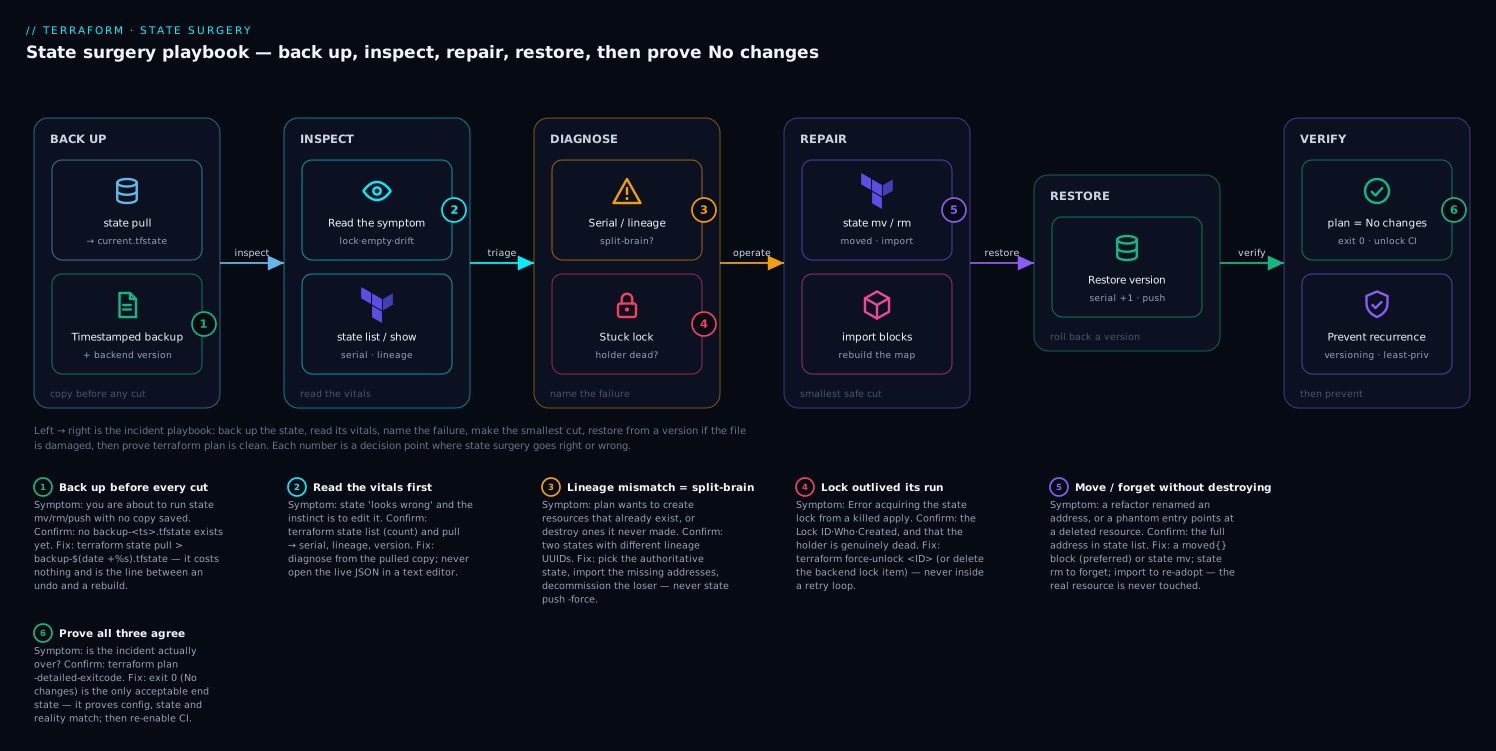
Read it left to right as the incident playbook — back up the state, inspect its vitals (serial, lineage, resource list), name the failure (stuck lock, drift, or split-brain), make the smallest safe cut with state mv/rm/import, restore from a backend version if the file itself is damaged, then prove the repair with a clean terraform plan.
1. Anatomy of the state file: serial, lineage, and resource addressing
Before editing state you must be able to read it. A state file is JSON with a small set of fields that govern correctness. Pull the current state and inspect the top-level keys:
terraform state pull > current.tfstate
jq '{version, terraform_version, serial, lineage}' current.tfstate
{
  "version": 4,
  "terraform_version": "1.9.5",
  "serial": 187,
  "lineage": "8f2a1c9e-4b3d-4a77-9f12-2d6e5a0b1c34"
}
Three fields drive every decision you will make:
| Field | Meaning | Why it matters in an incident |
|---|---|---|
serial |
Monotonic counter, incremented on every write | Backends use it for optimistic locking. A lower serial overwriting a higher one means lost writes. |
lineage |
UUID generated when state is first created | Two states with different lineage are not versions of each other. Pushing across a lineage boundary is the canonical split-brain trigger. |
version |
State format version (4 for Terraform 0.13+) | Do not confuse with terraform_version. Editing the format incorrectly corrupts the file. |
Resource addresses are the coordinates you operate on. The address module.network.aws_subnet.private[0] decomposes into module path (module.network), type (aws_subnet), name (private), and index key ([0] for count, ["a"] for for_each). List every address Terraform currently tracks:
terraform state list
# module.network.aws_vpc.this
# module.network.aws_subnet.private[0]
# module.network.aws_subnet.private[1]
# aws_db_instance.primary
Inspect a single resource to see its real-world id, provider, and attributes:
terraform state show aws_db_instance.primary
You now have the vocabulary. Everything below manipulates these addresses, the serial, or the lineage.
2. Breaking stale locks safely with force-unlock
A lock prevents two operations from writing state simultaneously. When a CI job is killed mid-apply, the lock can survive the process. The next run fails:
Error: Error acquiring the state lock

Lock Info:
  ID:        f4c2b3a1-6d5e-4f8a-9b2c-1e7d3a0f5c91
  Operation: OperationTypeApply
  Who:       runner@ci-agent-07
  Created:   2026-06-08 09:14:22.13 +0000 UTC
Do not reflexively force-unlock. First confirm the holding process is actually dead. If a teammate’s apply is still running and you break their lock, you will get two concurrent writers and corrupt state. Verify the CI job is terminated, the laptop is closed, the pipeline shows failed. Then, and only then:
terraform force-unlock f4c2b3a1-6d5e-4f8a-9b2c-1e7d3a0f5c91
The lock ID comes straight from the error. force-unlock removes the lock entry without modifying state itself, so it is low-risk once you have confirmed no live writer.
Backend-specific lock cleanup
When force-unlock cannot reach the backend (corrupted lock table, deleted lock object), clean the lock at the source.
AWS S3 + DynamoDB. Terraform 1.10+ supports native S3 lockfiles via use_lockfile = true, but the long-standing pattern uses a DynamoDB table. The lock item’s key is <bucket>/<key>-md5:
aws dynamodb delete-item \
  --table-name terraform-locks \
  --key '{"LockID": {"S": "my-tfstate-bucket/prod/network.tfstate-md5"}}'
If you are on native S3 lockfiles, the lock is a sibling object instead:
aws s3 rm s3://my-tfstate-bucket/prod/network.tfstate.tflock
Azure Blob Storage. The lock is a blob lease, not a separate object. Break the lease directly:
az storage blob lease break \
  --account-name tfstateprod \
  --container-name tfstate \
  --blob-name prod/network.tfstate \
  --auth-mode login
Google Cloud Storage. GCS uses a .tflock object alongside the state:
gsutil rm gs://my-tfstate-bucket/prod/network.tfstate.tflock
After clearing the lock, run terraform plan immediately. A plan that succeeds and shows the expected delta confirms the lock was the only problem and state itself is intact.
3. Surgical edits with state mv, rm, replace-provider, and pull/push
These are your scalpels. Every one of them rewrites state, so the backup from the intro is mandatory before each.
state mv — rename or move a resource without destroying it. Use this after a refactor renames a resource or wraps it in a module. It updates the address; the real resource is never touched.
# Resource pulled into a module
terraform state mv aws_s3_bucket.logs module.logging.aws_s3_bucket.this

# count -> for_each conversion: re-key by hand
terraform state mv 'aws_instance.web[0]' 'aws_instance.web["az-a"]'
Note: modern Terraform prefers
moved {}blocks in configuration for refactors, since they are reviewable and apply automatically. Reach forstate mvduring an incident or for one-off corrections that should not live in the config.
state rm — forget a resource without deleting it. This removes the resource from state while leaving the real infrastructure running. Essential when state has a phantom entry whose backing resource was deleted out of band, or when you are handing a resource off to another state.
terraform state rm aws_db_instance.legacy_replica
After rm, Terraform no longer manages that object. If the resource still exists and you want it back under management, you will import it (Section 7).
state replace-provider — rewrite provider source addresses. Needed after the registry namespace of a provider changes (the classic terraform-providers/aws to hashicorp/aws migration), which otherwise blocks init:
terraform state replace-provider \
  registry.terraform.io/-/aws \
  registry.terraform.io/hashicorp/aws
state pull / state push — read and write the raw file. pull emits state to stdout for inspection or backup. push uploads a local file to the backend and is the most dangerous command in Terraform. It enforces the serial and lineage guards by default; never use -force to bypass them unless you have personally reconciled both files and understand exactly what you are overwriting.
terraform state pull > backup.tfstate
# ... edit a local copy with jq, validate it ...
terraform state push edited.tfstate
For targeted attribute surgery, edit a pulled copy with jq rather than a text editor (a text editor invites whitespace and quoting corruption), then bump the serial so the backend accepts it as a newer write:
jq '(.resources[] | select(.type=="aws_db_instance") | .instances[0].attributes.deletion_protection) = true | .serial += 1' \
  backup.tfstate > edited.tfstate
terraform state push edited.tfstate
4. Reconciling state vs reality after out-of-band console changes
Someone changed a resource in the cloud console. Now state disagrees with reality. Terraform calls this drift, and the first move is always to see it, not to clobber it. Refresh state into a separate plan file rather than mutating it:
terraform plan -refresh-only -out=refresh.tfplan
terraform show refresh.tfplan
-refresh-only reconciles state with the provider’s view of the world and shows you exactly which attributes changed, without proposing to revert anything. You then make an explicit decision per attribute:
- Adopt reality (the console change was correct): apply the refresh so state records the new values.
terraform apply -refresh-only - Revert to code (the console change was unauthorized): run a normal
terraform apply, which plans the resource back to its declared configuration. - Ignore a volatile attribute (tags injected by a policy engine, autoscaling-managed capacity): add it to
lifecycle.ignore_changesso it stops generating noise.resource "aws_autoscaling_group" "app" { # ... lifecycle { ignore_changes = [desired_capacity] } }
The trap here is running a bare terraform apply in a panic and reverting a legitimate emergency hotfix that the on-call engineer made at 3 a.m. -refresh-only first, decide second.
5. Recovering a deleted or truncated state from versioning and snapshots
An interrupted apply over a flaky network, or a fat-fingered terraform state rm of the wrong addresses, can leave you with a truncated or emptied state. If your backend has versioning enabled (and it must — see Section 8), recovery is a rollback, not a rebuild.
Detect the damage. A near-empty state with a high serial is the signature of a truncated write:
terraform state pull | jq '{serial, resource_count: (.resources | length)}'
# {"serial": 188, "resource_count": 0}   <- was 40-something yesterday
AWS S3. List object versions newest-first and pull the last good one:
aws s3api list-object-versions \
  --bucket my-tfstate-bucket \
  --prefix prod/network.tfstate \
  --query 'reverse(sort_by(Versions, &LastModified))[:5].[VersionId,LastModified,Size]' \
  --output table

aws s3api get-object \
  --bucket my-tfstate-bucket \
  --key prod/network.tfstate \
  --version-id 3HL4kqC... \
  recovered.tfstate
Azure Blob Storage. With blob versioning enabled, list versions and download the chosen one:
az storage blob list \
  --account-name tfstateprod --container-name tfstate \
  --prefix prod/network.tfstate --include v \
  --query "[].{name:name, version:versionId, modified:properties.lastModified}" -o table

az storage blob download \
  --account-name tfstateprod --container-name tfstate \
  --name prod/network.tfstate --version-id 2026-06-07T22:14:03.1Z \
  --file recovered.tfstate --auth-mode login
Google Cloud Storage. With object versioning, list generations and copy one back:
gsutil ls -a gs://my-tfstate-bucket/prod/network.tfstate
gsutil cp gs://my-tfstate-bucket/prod/network.tfstate#1717797243000000 recovered.tfstate
Validate the recovered file’s resource count and lineage before pushing. The recovered state has an older serial than the truncated one currently in the backend, so a plain push will be rejected by the serial guard. Bump the serial above the current backend value, then push:
CURRENT=$(terraform state pull | jq '.serial')
jq ".serial = $CURRENT + 1" recovered.tfstate > restore.tfstate
terraform state push restore.tfstate
terraform plan   # expect: No changes. Your infrastructure matches the configuration.
A clean plan after restore is the only acceptable end state.
6. Resolving lineage mismatch and split-brain after a bad migration
Split-brain is the worst state incident because nothing is “broken” in an obvious way — two valid state files both claim authority over the same infrastructure. It usually follows a botched backend migration: a terraform init -migrate-state that half-completed, or a team that ran applies against an old backend while another ran against the new one.
Diagnose by lineage. Pull both candidate states and compare:
diff <(jq -r '{lineage, serial, n: (.resources|length)}' a.tfstate) \
     <(jq -r '{lineage, serial, n: (.resources|length)}' b.tfstate)
< {"lineage":"8f2a1c9e-...","serial":187,"n":42}
> {"lineage":"d1b7e4f0-...","serial":35,"n":40}
Different lineage UUIDs confirm split-brain: these are two independent state histories, not two versions of one. The symptom in the wild is Terraform proposing to create resources that already exist (because one state never learned about them) or to destroy resources another state created.
Resolution strategy. You cannot merge by overwriting — a state push -force of one over the other discards everything the loser tracked, and Terraform will then try to recreate or destroy real infrastructure. Instead:
- Pick the authoritative state. Choose the one with the higher resource count and the serial that reflects the most recent real applies. Back up both.
- Identify resources the authoritative state is missing. Diff the address lists:
comm -13 <(terraform state list) <(jq -r '.resources[].instances[] | .attributes.id' other.tfstate | sort) - Bring the missing resources into the authoritative state with
import(Section 7), keyed by their real IDs from the losing state. Do not copy JSON between files by hand; import regenerates the entry correctly under the right lineage. - Decommission the losing state. Once every resource lives in the authoritative state and a plan is clean, delete the orphaned state object so no future run can target it.
The discipline that prevents this: exactly one backend block per state, migrations done with terraform init -migrate-state and verified by a clean plan before any apply touches the new backend, and an immediate freeze on the old backend the moment migration starts.
7. Rebuilding state from scratch with import when backups are gone
Sometimes there is no versioning and no backup — the worst case. The infrastructure is running; the state is gone. You rebuild the mapping resource by resource with import. The configuration in .tf still exists, so you are reconstructing only the state side.
Prefer import blocks (Terraform 1.5+) over the imperative terraform import command. Import blocks are declarative, reviewable in a PR, plannable as a batch, and can generate configuration:
import {
  to = aws_vpc.this
  id = "vpc-0a1b2c3d4e5f67890"
}

import {
  to = aws_subnet.private["az-a"]
  id = "subnet-0123456789abcdef0"
}

import {
  to = aws_db_instance.primary
  id = "prod-primary-db"
}
Plan the imports to preview what will be brought under management without writing state yet:
terraform plan
For resources whose HCL you do not yet have, let Terraform scaffold it (it writes the missing resource blocks to the file you name):
terraform plan -generate-config-out=generated.tf
Review the generated HCL, fold it into your real modules, then apply to commit the import to state:
terraform apply
Each resource type has its own import ID format, and getting it wrong is the main source of friction — an aws_route53_record imports as ZONEID_name_type, an aws_iam_role_policy_attachment as role-name/policy-arn. Check the provider docs’ “Import” section for the exact format per resource before writing the block. Work in dependency order (VPC before subnets before instances) so references resolve. After the last import, the acceptance test is identical to every other recovery: terraform plan reports no changes.
Verify
Run this sequence after any state surgery. All four must pass before you call the incident resolved and unlock the pipeline.
# 1. State is well-formed and non-empty
terraform state pull | jq -e '.resources | length > 0' >/dev/null \
  && echo "OK: state has resources"

# 2. Lineage and serial are sane (single lineage, plausible serial)
terraform state pull | jq '{lineage, serial, version, terraform_version}'

# 3. The decisive check: configuration, state, and reality all agree
terraform plan -detailed-exitcode
#   exit 0 = no changes (clean)   exit 2 = changes pending (investigate)
#   exit 1 = error

# 4. No stale lock remains
terraform plan   # must acquire and release the lock without error
A -detailed-exitcode of 0 is the gold standard: it proves state matches both the code and the live cloud. An exit code of 2 means there is still a delta to reconcile (return to Section 4). Only after a clean plan should you re-enable CI and announce recovery.
Checklist
8. Hardening: versioning, encryption, and access controls
Every incident in this guide is preventable, and the prevention is cheap. The single highest-leverage control is backend versioning — it turns “rebuild from scratch” into “roll back one version.”
AWS S3 backend. Enable versioning and default encryption on the bucket, use native S3 locking, and let the bucket policy enforce TLS:
terraform {
  backend "s3" {
    bucket       = "my-tfstate-bucket"
    key          = "prod/network.tfstate"
    region       = "us-east-1"
    encrypt      = true
    use_lockfile = true        # native S3 locking, Terraform 1.10+
    kms_key_id   = "arn:aws:kms:us-east-1:111122223333:key/abcd-..."
  }
}
aws s3api put-bucket-versioning --bucket my-tfstate-bucket \
  --versioning-configuration Status=Enabled
Azure backend. Enable blob versioning and soft delete on the storage account, and authenticate with Azure AD rather than a shared key:
terraform {
  backend "azurerm" {
    resource_group_name  = "rg-tfstate"
    storage_account_name = "tfstateprod"
    container_name       = "tfstate"
    key                  = "prod/network.tfstate"
    use_azuread_auth     = true
  }
}
Lock down access regardless of cloud:
- Least privilege. The pipeline identity gets read/write on its one state key only — never a wildcard over the whole bucket. A blast-radius limit is what stops one compromised pipeline from corrupting every environment’s state.
- One state per blast radius. Separate state per environment and per bounded component. Small states recover faster and fail in isolation.
- Encryption at rest and in transit. SSE/KMS on the object, TLS enforced by bucket policy. State files contain resource attributes that are frequently sensitive (connection strings, generated passwords), so treat the backend as a secrets store.
- No state in version control, ever.
.tfstateand.tfstate.backupbelong in.gitignore. A state file in a Git history is a credential leak and a split-brain waiting to happen.
The teams that never need this playbook are not lucky. They enabled versioning on day one, scoped their backends tightly, and treated state push -force as a command that does not exist. Do that, and the worst state incident you will ever face is a force-unlock after a killed CI job — a thirty-second fix instead of an afternoon of surgery.
Going deeper
The eight sections above are the procedures. This section is the anatomy and physiology underneath them — the mechanics that explain why each procedure is safe or dangerous, and the edge cases the happy-path playbook glosses over.
The version-4 state format, one instance at a time
terraform state list flattens the file into addresses, but the file itself is a nested document. At the top sit the fields you already met — version, terraform_version, serial, lineage, outputs — and then a resources array. Each element is a resource, and inside it an instances array holds one entry per count/for_each key (or a single entry for a singleton). Pull the file and look at one instance:
terraform state pull \
  | jq '.resources[] | select(.type=="aws_db_instance") | .instances[0] | {index_key, schema_version, status, attr_keys: (.attributes | keys | length)}'
{ "index_key": null, "schema_version": 1, "status": null, "attr_keys": 58 }
(Representative output.) Four fields on that instance matter during surgery:
| Field | What it holds | Why it bites you |
|---|---|---|
schema_version |
The provider schema generation this instance was written against | If it is lower than the installed provider expects, Terraform runs a state upgrader on read. A hand-built instance with the wrong schema_version skips that upgrade and produces bogus diffs. |
index_key |
null (singleton), an integer (count), or a string (for_each) |
This is exactly what state mv 'x[0]' 'x["a"]' rewrites. Get it wrong and the resource re-plans as create + destroy. |
dependencies |
Addresses this instance depends on | Terraform uses it to order destroys. A hand-built import omits it — usually harmless, occasionally the reason a destroy runs in the wrong order. |
attributes.* |
The full resource state, secrets included | A random_password, an RDS password, a generated private key — all sit here in cleartext regardless of sensitive = true. This is why the backend is a secrets store. |
Serial and lock are two different guards — know which one fired
Newcomers conflate the serial with the lock. They protect against different failures:
- The lock stops two runs from writing at all. It is a DynamoDB
LockIDitem, an Azure blob lease, or a GCS/native-S3 lock object. It is advisory —terraform force-unlockor a direct backend delete removes it, and-lock=falseskips it entirely. - The serial is Terraform’s optimistic-concurrency token. On
push, Terraform refuses to overwrite a backend state whoseserialis greater than or equal to the incoming file’s — unless you pass-force. This is precisely why “roll back a version” requires bumping the serial above the current backend value, never back to the value it used to have.
The S3 + DynamoDB backend adds a third guard you will eventually meet: alongside the lock, the table stores an MD5 digest of the last-written state. If the object in S3 and that digest disagree, Terraform errors with a content-mismatch message rather than trusting either. It usually means someone restored an S3 object version out-of-band without letting Terraform rewrite the digest. The fix is to push a known-good file through Terraform (which rewrites both sides), never to edit the DynamoDB item by hand.
terraform refresh is deprecated — use -refresh-only
The standalone terraform refresh command still runs, but it has been deprecated since Terraform 0.15.4 because it mutates state with no plan and no confirmation — exactly the reflex this lesson warns against. It silently writes whatever the provider reports over your state, which can itself discard a resource the provider temporarily fails to return (an eventual-consistency blip becomes a deleted state entry). The supported path is a refresh you can read before you accept:
terraform plan -refresh-only     # show what a refresh WOULD change
terraform apply -refresh-only    # accept it, with the same diff in front of you
Same reconciliation, but gated behind a diff you approve. Treat a bare terraform refresh in a runbook as a bug to fix.
Deposed objects and half-finished applies
Two lesser-known ways state and reality drift apart from inside Terraform:
- Partial apply.
applywrites state incrementally — each resource is committed the instant its API call returns, not in one transaction at the end. Kill an apply halfway (network drop, doubleCtrl-C, a spot node reclaimed) and state is internally consistent but incomplete: it records what was created so far and nothing about the rest. There is no corruption here; the fix is simply to re-runapply, which plans the remaining work. This is also why you never restore an older state after a partial apply — you would orphan the resources it already created. - Deposed objects. With
create_before_destroy, Terraform builds the replacement before destroying the old object. If that destroy fails, the old object is marked deposed and kept in state with a random deposed key — visible in a plan as(deposed object a1b2c3d4). It is real infrastructure still costing money. The nextapplyretries the destroy; if the resource is already gone out of band, the deposed entry is stale tracking you clear so Terraform stops trying to delete nothing.
Workspaces multiply the number of states you can break
A single backend key can hold many states, one per workspace. On the S3 backend, the default workspace lives at your configured key, but every other workspace is stored under env:/<workspace>/<key> — a detail that matters when you go hunting for the right object to version-restore or lock-break. terraform workspace list shows them; terraform workspace show names the one you are in. The classic incident is running surgery against default when production is actually in a prod workspace, so confirm the workspace before the first command — the state you are about to cut may not be the one you think.
Repair or rebuild? A decision table
Not every incident is a repair. Sometimes rebuilding the state from import is faster and safer than untangling a damaged file. Decide deliberately rather than by reflex:
| Situation | Repair in place | Rebuild with import |
|---|---|---|
| A backend version or backup exists | ✅ Roll back — minutes | Overkill |
| Lineage intact, serial sane, a few addresses wrong | ✅ state mv / rm |
No |
| State truncated or emptied, but a good version exists | ✅ Restore the version | No |
| No backup, no versioning, state gone | Not possible | ✅ Rebuild resource by resource |
| Split-brain across two lineages | ✅ Pick one + import the rest | Only the missing side |
| State so mangled you cannot trust any field | Risky | ✅ Rebuild — a clean lineage beats a suspect one |
The tie-breaker: how much do you trust the file in front of you? A state you can no longer reason about is more dangerous than an empty one, because it will confidently propose to destroy real resources. When trust is gone, state rm the doubtful entries (or start a fresh state) and re-import from reality — the one source that never lies.
Version and tooling caveats
- Declarative beats imperative for anything that should persist.
state mvhas no deprecation warning, but HashiCorp steers refactors towardmovedblocks (Terraform 1.1+), removals towardremovedblocks (1.7+), and adoptions towardimportblocks (1.5+) — because a CLI edit vanishes into shell history while a block is reviewed in a PR and re-applies identically in every environment. Keepstate mv/rmfor incident-time, one-off corrections; put durable changes in code. removedblock =state rmyou can review. To forget a resource without destroying it, the modern equivalent ofstate rmis a block:removed { from = aws_db_instance.legacy_replica lifecycle { destroy = false # remove from state only; leave the real resource running } }- OpenTofu can encrypt state client-side. Since OpenTofu 1.7, state (and plan) files can be encrypted before they reach the backend via an
encryptionblock, so the object at rest is ciphertext even to someone who can read the bucket. Terraform relies on backend-side encryption (SSE/KMS) instead. If your threat model includes “someone with bucket read access,” that is a material divergence worth knowing. import/moved/removedblocks run onapply. They are config, so they are workspace- and CI-friendly, but animportblock left in the config after it has done its job is a harmless no-op that still adds noise. Prune them once the resource is under management.
Practice challenges
Work these in order; each assumes a remote backend you can afford to experiment against (a throwaway sandbox, never prod). Try before opening the solution.
Challenge 1 — Take the vitals (beginner)
Pull the current state and print only its serial, lineage, version, and resource count in one command. Say what each number tells you.
<details> <summary>Solution</summary>
terraform state pull | jq '{serial, lineage, version, terraform_version, resources: (.resources | length)}'
serial is the write counter (higher = newer), lineage is the state’s identity UUID (a different lineage means a different history, i.e. split-brain), version is the JSON format (4), and the resource count sanity-checks against what you expect to be managed.
Why: every recovery decision starts from these four numbers — you diagnose before you cut. </details>
Challenge 2 — Unstick a lock without corrupting it (beginner)
A CI job was killed mid-apply and the next run reports Error acquiring the state lock. Write the exact steps, in order, to clear it safely.
<details> <summary>Solution</summary>
- Read the
Lock Infoblock for theID,Who, andCreated. - Confirm the holder is dead — the CI job shows failed/cancelled, the laptop is closed, no apply is running.
- Only then:
terraform force-unlock <LOCK_ID> - Run
terraform plan— a clean plan confirms state itself was fine.
Why: force-unlock only removes the lock entry; the danger is never the command, it is breaking a lock a live second writer still holds and corrupting state with two concurrent pushes.
</details>
Challenge 3 — Rename a resource two ways (intermediate)
You renamed aws_s3_bucket.logs to aws_s3_bucket.audit_logs in code. A plan now wants to destroy the old bucket and create a new one. Fix it (a) as a durable code change and (b) as an incident-time one-off. When is each right?
<details> <summary>Solution</summary>
(a) Durable — a moved block, committed and reviewed:
moved {
  from = aws_s3_bucket.logs
  to   = aws_s3_bucket.audit_logs
}
(b) One-off — a state edit:
terraform state mv aws_s3_bucket.logs aws_s3_bucket.audit_logs
Why: the moved block is reviewable, re-applies in every environment, and needs no state access — the right default. state mv is for corrections you do not want in config, and it only touches the one state you run it against.
</details>
Challenge 4 — Decide on drift, don’t clobber it (intermediate)
An on-call engineer bumped an ASG’s desired_capacity in the console during an incident. Your next plan wants to set it back. Show how to see the drift first, then give the three legitimate responses and when each applies.
<details> <summary>Solution</summary>
terraform plan -refresh-only -out=drift.tfplan
terraform show drift.tfplan
Then choose per attribute:
- Adopt the console value (it was correct):
terraform apply -refresh-only. - Revert to code (the change was unauthorized): a plain
terraform apply. - Ignore a genuinely volatile field:
lifecycle { ignore_changes = [desired_capacity] }.
Why: a bare apply in a panic silently reverts a legitimate 3 a.m. hotfix. -refresh-only turns an implicit clobber into an explicit, per-attribute decision.
</details>
Challenge 5 — Roll back a truncated state (advanced)
terraform state pull shows serial: 205 but resources: 0; yesterday it tracked 40. Backend versioning is on. Recover it — and explain why you cannot just push the old version as-is.
<details> <summary>Solution</summary>
Fetch the last good version (S3 shown), bump its serial above the current backend serial, then push:
CURRENT=$(terraform state pull | jq '.serial')      # 205
aws s3api get-object --bucket my-tfstate-bucket \
  --key prod/network.tfstate --version-id <GOOD_VERSION_ID> recovered.tfstate
jq ".serial = $CURRENT + 1" recovered.tfstate > restore.tfstate
terraform state push restore.tfstate
terraform plan     # expect: No changes.
Why: the good version’s own serial (say 204) is lower than the truncated 205 now in the backend, so the serial guard rejects a plain push. Bumping above the current value makes it a legitimate newer write instead of a forced overwrite. </details>
Challenge 6 — Untangle split-brain (advanced)
Two state files — a.tfstate (lineage 8f2a…, serial 187, 42 resources) and b.tfstate (lineage d1b7…, serial 35, 40 resources) — both claim the same infra after a half-finished backend migration. Plans against each propose to create resources that already exist. Resolve it without push -force.
<details> <summary>Solution</summary>
- Confirm split-brain: different
lineageUUIDs = two histories, not two versions. - Pick the authoritative state —
a(more resources, higher serial reflecting recent applies). Back up both. - List what
ais missing versusb, and bring those addresses in withimportblocks keyed by their real cloud IDs — never by copying JSON between files. - Verify
terraform planis clean againsta, then deleteb’s backend object so nothing can ever target it again.
Why: overwriting one lineage with the other discards everything the loser tracked, and Terraform then tries to recreate or destroy live infrastructure. import rebuilds the missing entries correctly under the single surviving lineage.
</details>
Common beginner mistakes
- “I’ll just edit the
.tfstatein my editor.” The misconception is that state is a config file. It is a serial-guarded, digest-checked document, and a text editor introduces whitespace, quoting, or trailing-comma corruption that turns a small fix into a total loss. The right model: read withjqon a pulled copy, and write only throughterraform statesubcommands or a validatedpush— never the live file, never a text editor. - Reflexively running
force-unlockon the first lock error. The lock is usually telling the truth. Breaking a lock a live teammate’s apply still holds gives you two concurrent writers and the exact corruption you were trying to avoid. Confirm the holder is dead first; the command is safe, breaking a live lock is not. - Restoring the old serial instead of bumping above the current one. Beginners set the recovered file’s serial back to the value it used to have. The backend’s serial has moved on, so the push is rejected — or, if forced, it looks like a lost write to the next run. Always set the serial above the current backend value.
- Fixing split-brain with
state push -force. Forcing one lineage over another feels like “picking a winner,” but it deletes everything the other state tracked, and Terraform then plans to destroy or recreate real resources. Merge byimport, not by overwrite. - Panicking into a bare
terraform applyduring drift. A plain apply reverts every out-of-band change, including the legitimate emergency fix someone made minutes ago.-refresh-onlyfirst, decide per attribute, apply second. - Treating state as non-sensitive. Because
sensitive = truehides values in CLI output, beginners assume they are hidden in state too. They are not — passwords and keys sit inattributesin cleartext. A state file in a screenshot, a Slack paste, or (worst) a Git commit is a credential leak. - Confusing
versionwithterraform_version.versionis the state format (4);terraform_versionis the CLI that last wrote it. Editing the former to “upgrade” the file corrupts it; the latter is informational.
Glossary
- State file (
.tfstate) — The JSON document mapping each configuration address to a real cloud resource ID plus its recorded attributes. The one artifact Terraform cannot regenerate from.tfcode. - Serial — A monotonic counter incremented on every state write. Backends use it for optimistic locking; a lower serial overwriting a higher one is a lost write.
- Lineage — A UUID assigned when a state is first created and carried across all its writes. Two states with different lineages are independent histories — the signature of split-brain.
- Format version (
version) — The state file’s schema version (4 for modern Terraform). Distinct fromterraform_version, the CLI that last wrote the file. - Resource address — The coordinate you operate on, e.g.
module.network.aws_subnet.private["az-a"]: module path, type, name, andcount/for_eachindex key. - Backend — Where state lives and how it is locked (S3, azurerm, gcs, Terraform Cloud, …). A remote backend adds locking, versioning, and encryption.
- State lock — A backend mechanism (DynamoDB item, blob lease, lock object) that admits one writer at a time. Advisory:
force-unlockremoves it. force-unlock— Removes a stuck lock entry without touching state. Safe only once you have confirmed no live process holds it.- Drift — Divergence between recorded state and the real resource, usually from an out-of-band (“ClickOps”) change. Seen with
terraform plan -refresh-only. -refresh-only— A plan/apply mode that reconciles state with reality and shows the delta without proposing to revert anything — the safe replacement for the deprecatedterraform refresh.- Split-brain — Two valid state files (different lineages) both claiming authority over the same infrastructure, typically after a botched backend migration.
importblock — Declarative (Terraform 1.5+) adoption of an existing resource into state, reviewable in a PR and able to generate config with-generate-config-out.movedblock — Declarative resource rename/relocation (1.1+); the reviewable, re-appliable alternative tostate mv.removedblock — Declarative removal (1.7+); withlifecycle { destroy = false }it forgets a resource without destroying it — the code equivalent ofstate rm.- Deposed object — An old resource instance left in state (with a deposed key) when a
create_before_destroyreplacement succeeded but the destroy of the original failed. - State upgrader — Provider code that migrates a resource instance from an older
schema_versionto the current one when Terraform reads it. - Optimistic locking — Concurrency control by version check rather than exclusive hold: the serial guard rejects a write whose serial is not newer than what the backend already has.