Quick take: S3 Standard is not the only S3. Most objects go cold within months, yet teams keep paying the top per-GB rate for data nobody reads. S3 has eight storage classes spanning a roughly 24× price range, and a lifecycle policy moves objects between them automatically by age, prefix or tag. Done right it is the single easiest FinOps win on AWS — done carelessly the retrieval fees, per-class minimums and transition request costs quietly erase the saving. This is the option-by-option playbook for getting it right.
A video platform stored every uploaded clip in S3 Standard forever. After two years, 80% of the objects had not been read once, yet they were billed the highest per-gigabyte rate every month. A single lifecycle rule — move objects to S3 Glacier Flexible Retrieval after 90 days, abort abandoned multipart uploads after 7, expire orphaned renditions after a year — cut their storage spend by roughly 60% with zero engineering changes. The data did not move servers, the application did not change a line, and nobody had to babysit it. That is the promise of S3 storage classes and lifecycle: pay for the access pattern you actually have, and let S3 do the moving.
The trap is that “cheaper per GB” is only half the price. Every colder class trades storage cost for retrieval cost, retrieval latency, a minimum billable object size, and a minimum storage duration — and lifecycle transitions are themselves billed requests. Tier a million 4 KB thumbnails into Standard-IA and you can pay more than you saved, because each one is rounded up to a 128 KB billable floor and each transition is a charged request. Move originals to One Zone-IA and a single Availability Zone failure can lose them outright. Archive to Glacier Deep Archive and a GET returns an error until you issue a restore that can take up to 48 hours. None of this is hidden — it is all in the pricing mechanics — but it is exactly where teams lose the saving they thought they were banking.
This article is the reference you keep open during a cost review. We walk every storage class (Standard, Intelligent-Tiering, Standard-IA, One Zone-IA, Glacier Instant Retrieval, Glacier Flexible Retrieval, Glacier Deep Archive, and the legacy Reduced Redundancy), the lifecycle engine that moves objects between them (transition actions, expiration actions, the abort-incomplete-multipart-upload action, current vs noncurrent versions, the filter grammar), the cost model end to end (per-GB by class, retrieval tiers, request pricing, the minimums that bite), and the failure modes that turn a saving into a regression. Every operation gets both an aws CLI snippet and a Terraform snippet. The class comparisons, the per-class minimums, the retrieval options, the lifecycle actions and the FinOps traps are all laid out as scannable tables — read the prose once, then keep the tables.
By the end you will stop defaulting everything to Standard, and you will stop the opposite mistake of archiving hot data to save a rupee and paying triple in retrieval fees. You will know which class fits each access pattern, how to express the transition as a lifecycle rule, what the minimum-duration and minimum-size floors do to small objects, how versioning doubles the rule set you need, and how to confirm the saving in Cost Explorer and S3 Storage Lens before you celebrate.
What problem this solves
Storage cost on AWS is not a flat number — it is a function of how the data is accessed, and S3 Standard charges as if every object is read constantly. The overwhelming majority of object data is written once and read rarely after the first few weeks: logs, backups, media masters, build artifacts, raw ingest, compliance archives, old user uploads. Keeping all of it on Standard means paying the premium-access price for cold data indefinitely. At petabyte scale that is a six- or seven-figure annual line item that buys nothing.
Without storage classes and lifecycle, the failure is slow and silent. There is no outage, no alert, no broken build — just a bucket that grows monotonically at the top per-GB rate while the access logs show almost no reads. Engineers do not notice because nothing is wrong; the bill is simply larger than it needs to be, every month, forever. When someone finally looks, they find that a one-line lifecycle rule applied months earlier would have saved 50–70% of the bucket’s storage cost.
Who hits this: essentially everyone who stores data on S3 at scale — but it bites hardest on media platforms (huge masters, rare re-reads), data lakes (raw zones that are read once by ETL then never again), backup/DR targets, log archives (write-heavy, read-almost-never), and SaaS products that retain user content for years. The fix is almost never “store less” — it is “store it in the class that matches how it is actually accessed, and let lifecycle move it there automatically.” The discipline is FinOps, the mechanism is storage classes plus lifecycle, and the only real skill is knowing the per-class trade-offs well enough not to trip the retrieval-fee and minimum-duration landmines.
To frame the whole field before the deep dive, here is every access pattern this article covers, the class it argues for, and the one trap to watch:
| Access pattern | What it looks like | Right class | Why | The trap to watch |
|---|---|---|---|---|
| Hot, read constantly | Active site assets, current data | S3 Standard | No retrieval fee, ms latency, no minimum | Paying it for cold data |
| Unknown / changing | New product, mixed objects | Intelligent-Tiering | Auto-moves per object, no retrieval fee | Per-object monitoring fee on tiny objects |
| Warm, read occasionally | Older but live data | Standard-IA | ~Half the storage cost | Retrieval fee + 128 KB / 30-day minimums |
| Reproducible, infrequent | Thumbnails, transcodes | One Zone-IA | ~20% cheaper than Standard-IA | Single AZ — lost if that AZ dies |
| Archive, may need instantly | Compliance kept “just in case” | Glacier Instant Retrieval | ms latency at archive price | 90-day minimum; high retrieval fee |
| Archive, can wait minutes/hours | Backups, old masters | Glacier Flexible Retrieval | Cheap archive, flexible restore | Must restore before read |
| Cold, rarely touched, 7–10 yr | Legal/regulatory retention | Glacier Deep Archive | Cheapest storage on AWS | 180-day min; 12–48 h restore |
Learning objectives
By the end of this article you can:
- Name all eight S3 storage classes, place each on the latency/cost/durability spectrum, and pick the right one for a given access pattern without guessing.
- Read and reason about the per-class minimums — minimum storage duration, minimum billable object size, retrieval fee, retrieval latency — and predict when a colder class will cost more than a warmer one.
- Author lifecycle policies that transition and expire objects by age, prefix and tag, including separate rules for current vs noncurrent versions and the abort-incomplete-multipart-upload action.
- Choose between Intelligent-Tiering (let S3 decide per object) and an explicit lifecycle policy (you decide by age), and explain the monitoring-fee and access-tier mechanics underneath each.
- Restore archived (Glacier Flexible / Deep Archive) objects with the correct retrieval tier (Expedited / Standard / Bulk), and size the restore latency and cost before an incident, not during one.
- Use versioning, Object Lock (WORM, governance vs compliance mode) and lifecycle expiration together for compliance retention without leaking storage cost on stale noncurrent versions.
- Confirm a lifecycle saving with Cost Explorer by storage class and S3 Storage Lens, and avoid the small-object transition-cost regression.
- Map all of this to AWS Certified Solutions Architect – Associate (SAA-C03) and Developer – Associate (DVA-C02) storage-and-cost objectives.
Prerequisites & where this fits
You should already understand S3 basics: a bucket is a regional container; an object is a blob plus metadata addressed by a key; prefixes are the slash-delimited key segments people treat as folders; and S3 gives eleven nines (99.999999999%) of durability on the multi-AZ classes by replicating each object across at least three Availability Zones in the Region. You should know how to run the AWS CLI (aws s3 / aws s3api), read JSON output, and that S3 has versioning (keep every overwrite as a noncurrent version) and server-side encryption on by default. Familiarity with how AWS bills (per-GB-month, per-request, per-GB transfer) helps a lot here, because storage classes are fundamentally a billing decision.
This sits in the Storage & FinOps track. It is upstream of backup and disaster-recovery design — once you can place data in the right class, AWS Backup and Disaster Recovery Strategies builds the retention and cross-Region story on top. It pairs with AWS Regions and Availability Zones Explained, because the One Zone-IA trade-off and the eleven-nines durability guarantee are both AZ-replication facts. Data-lake teams will reach this from Choosing Between RDS, DynamoDB and Aurora when they decide what belongs in object storage versus a database. And the access controls that keep a lifecycle policy from being the weak link sit in AWS Organizations and IAM Foundations.
A quick map of who owns what, so a cost review talks to the right people:
| Layer | What lives here | Who usually owns it | What it can cause |
|---|---|---|---|
| Producers (apps, pipelines) | The PutObject and the class it writes to |
App / data team | Writing cold data straight to Standard forever |
| Bucket configuration | Default class, versioning, encryption | Platform / cloud team | Versioning on without noncurrent expiry → cost leak |
| Lifecycle policy | Transition + expiration rules | Platform + FinOps | Wrong age/filter → premature archive or no saving |
| Retrieval path | RestoreObject, retrieval tier | App / on-call | Surprise retrieval bill; archive-state GET errors |
| Cost & reporting | Cost Explorer, Storage Lens | FinOps | Missing the small-object transition regression |
Core concepts
Six mental models make every later decision obvious.
A storage class is a price/latency/durability contract, not a different place. Every object in a bucket carries a storage class attribute. The bytes live in the same S3 service; the class changes how AWS bills and serves them: the per-GB storage rate, whether a retrieval fee applies, the retrieval latency (milliseconds vs minutes vs hours), the minimum billable object size, the minimum storage duration before deletion is free, and (for One Zone-IA) the number of Availability Zones the copy spans. Choosing a class is choosing a point on those axes — there is no “best” class, only the best fit for an access pattern.
Colder is cheaper to store and more expensive to read. As you move Standard → IA → Glacier → Deep Archive, the per-GB storage rate drops sharply (Deep Archive is roughly 1/24th the Standard rate), but three costs rise: a per-GB retrieval fee appears and grows, retrieval latency goes from milliseconds to hours, and minimum-duration and minimum-size floors get longer/larger. The whole game is matching the floor to the access pattern: if data is genuinely cold for years, the floors never bite and you win big; if you misjudge and read it, the retrieval fee can dwarf the storage saving.
The lifecycle engine moves objects on a schedule you define. A lifecycle configuration is a set of rules, each with a filter (by prefix, by tag, by object size, or the whole bucket) and one or more actions: transition (move to a colder class after N days), expiration (delete after N days), noncurrent-version transition/expiration (the same for old versions under versioning), and abort incomplete multipart upload (clean up half-finished uploads). S3 evaluates the rules asynchronously, once per day — transitions are not instant at the stroke of midnight; the object’s creation date (not last-access) drives the age clock.
Intelligent-Tiering is the “I don’t know the pattern” class. Instead of you deciding by age, S3 Intelligent-Tiering monitors each object’s access and moves it between a Frequent, Infrequent (after 30 days no access), and optional Archive tiers automatically — with no retrieval fees and no per-class transition charges. The cost is a small per-object monthly monitoring-and-automation fee, which is negligible for large objects and ruinous for millions of tiny ones. It is the safe default for unpredictable workloads and the wrong choice for huge counts of small objects.
Durability is eleven nines everywhere except One Zone-IA — availability differs by class. All the multi-AZ classes (Standard, Intelligent-Tiering, Standard-IA, all three Glacier classes) give the same 99.999999999% durability by spreading copies across ≥3 AZs. One Zone-IA keeps a single-AZ copy: same per-object durability given the AZ survives, but no protection against losing that AZ — designed for data you can regenerate. Availability SLAs differ too (Standard 99.9%, IA classes 99%), which matters for read-availability, not data loss.
Archive classes require an explicit restore before you can read them. Objects in Glacier Flexible Retrieval and Glacier Deep Archive are not directly downloadable — a plain GET fails with InvalidObjectState until you issue a RestoreObject that creates a temporary readable copy for a number of days you choose. Glacier Instant Retrieval is the exception: millisecond reads at archive-ish storage price, with a high per-GB retrieval fee. Knowing which archive class needs a restore (and how long that restore takes) is the difference between a planned retrieval and a 3 a.m. surprise.
The vocabulary in one table
Before the deep sections, pin down every moving part. The glossary at the end repeats these for lookup; this table is the mental model side by side:
| Concept | One-line definition | Where it lives | Why it matters to cost |
|---|---|---|---|
| Storage class | Price/latency/durability tier of an object | Per-object attribute | Sets the per-GB rate and retrieval fee |
| Retrieval fee | Per-GB charge to read from a colder class | IA / Glacier classes | Can exceed the storage saving if you read |
| Minimum storage duration | Days you’re billed even if you delete early | 30 / 90 / 180 d by class | Early-delete fee on short-lived data |
| Minimum billable object size | Floor each object is billed at | 128 KB (IA classes) | Tiny objects cost as if 128 KB |
| Lifecycle rule | Filter + action(s) applied daily | Bucket lifecycle config | Automates transitions/expirations |
| Transition action | Move to a colder class after N days | Lifecycle rule | The saving mechanism; each move is billed |
| Expiration action | Delete an object after N days | Lifecycle rule | Stops paying for data you don’t need |
| Noncurrent version | A previous version kept by versioning | Versioned bucket | Silent cost leak without its own rule |
| Abort incomplete MPU | Delete half-finished multipart uploads | Lifecycle rule | Orphaned parts you pay for invisibly |
| RestoreObject | Temporarily un-archive a Glacier object | Glacier Flexible/Deep | Required before read; has latency + cost |
| Intelligent-Tiering | Auto-moves objects by observed access | Storage class | No retrieval fee; per-object monitoring fee |
| Object Lock | WORM retention (governance/compliance) | Bucket + object | Blocks deletion for compliance |
The storage-class reference
Before the per-class detail, here is the lookup table you scan first: every storage class, its design intent, retrieval latency, the durability/AZ story, and the minimums that bite. (Prices move and vary by Region; the relationships — and the minimums — are what you memorise. Treat the rupee figures later as ap-south-1-ish order-of-magnitude, not a quote.)
| Storage class | Designed for | Retrieval latency | Durability / AZs | Min storage duration | Min billable object size | Retrieval fee |
|---|---|---|---|---|---|---|
| S3 Standard | Hot, frequently accessed | Milliseconds | 11 nines / ≥3 AZ | None | None | None |
| S3 Intelligent-Tiering | Unknown / changing access | Milliseconds (Frequent/Infrequent) | 11 nines / ≥3 AZ | None (90 d for Archive tiers) | None (monitoring fee applies) | None for IT tiers |
| S3 Standard-IA | Warm, infrequent, needs ms | Milliseconds | 11 nines / ≥3 AZ | 30 days | 128 KB | Per-GB retrieved |
| S3 One Zone-IA | Reproducible, infrequent | Milliseconds | 11 nines within 1 AZ | 30 days | 128 KB | Per-GB retrieved |
| S3 Glacier Instant Retrieval | Archive, ms access, rare | Milliseconds | 11 nines / ≥3 AZ | 90 days | 128 KB | High per-GB retrieved |
| S3 Glacier Flexible Retrieval | Archive, minutes–hours OK | Minutes to 12 h (by tier) | 11 nines / ≥3 AZ | 90 days | 40 KB (overhead) | Per-GB + per-request by tier |
| S3 Glacier Deep Archive | Cold archive, 7–10 yr | 12–48 h (by tier) | 11 nines / ≥3 AZ | 180 days | 40 KB (overhead) | Per-GB + per-request by tier |
| S3 Reduced Redundancy (legacy) | (deprecated — do not use) | Milliseconds | 4 nines / lower | None | None | None |
Three reading notes that save the most money:
| Distinction | The trap | How to tell them apart |
|---|---|---|
| Glacier Instant vs Flexible vs Deep | All called “Glacier”; wildly different latency | Instant = ms (no restore); Flexible = minutes–12 h (restore); Deep = 12–48 h (restore) |
| One Zone-IA vs Standard-IA | ~20% cheaper looks like a free win | One Zone-IA is a single AZ — lose the AZ, lose the data; only for reproducible data |
| “Cheaper per GB” vs total cost | Colder always looks cheaper on the storage line | Add retrieval fee × expected reads + minimum-duration floor before comparing |
And the relationships that drive every decision, ranked:
| If the data is… | …and you’ll read it… | Then choose | Because |
|---|---|---|---|
| Hot | constantly | S3 Standard | Retrieval fees would dominate any saving |
| Of unknown temperature | unpredictably | Intelligent-Tiering | Auto-optimizes with no retrieval fee |
| Warm | a few times a month | Standard-IA | Half the storage, retrieval fee tolerable |
| Reproducible & warm | rarely | One Zone-IA | Cheapest IA, AZ loss is acceptable |
| Archive but might need now | almost never, but instantly | Glacier Instant Retrieval | ms latency at archive storage price |
| Archive | rarely, can wait | Glacier Flexible Retrieval | Cheap, restore latency acceptable |
| Deep-cold compliance | almost never, hours OK | Glacier Deep Archive | Cheapest storage on AWS |
The durability, availability SLA and AZ story by class — the resilience side, separate from cost (every class is 11 nines durability except One Zone-IA and legacy RRS):
| Storage class | Design durability | Availability SLA | AZs | Loses data if one AZ fails? |
|---|---|---|---|---|
| S3 Standard | 11 nines | 99.9% | ≥ 3 | No |
| S3 Intelligent-Tiering | 11 nines | 99.9% | ≥ 3 | No |
| S3 Standard-IA | 11 nines | 99% | ≥ 3 | No |
| S3 One Zone-IA | 11 nines (within the AZ) | 99.5% (single AZ) | 1 | Yes |
| S3 Glacier Instant Retrieval | 11 nines | 99.9% | ≥ 3 | No |
| S3 Glacier Flexible Retrieval | 11 nines | 99.99% (after restore) | ≥ 3 | No |
| S3 Glacier Deep Archive | 11 nines | 99.99% (after restore) | ≥ 3 | No |
| Reduced Redundancy (legacy) | 4 nines | 99.99% | reduced | Higher risk — migrate off |
And the same logic applied to real workload types you’ll actually meet — keep this as the “what goes where” cheat sheet:
| Workload | Typical access after week 1 | Recommended placement | Lifecycle move |
|---|---|---|---|
| Active website / app assets | Constant | S3 Standard | None (stays hot) |
| User uploads (originals) | Rare re-download | Standard → IA (30 d) → Glacier (120 d) | Age-based transition |
| Transcoded media renditions | Rare, reproducible | One Zone-IA (30 d) | Reproducible → single AZ OK |
| Thumbnails / sprites (tiny) | Occasional | Standard or Intelligent-Tiering | Skip IA (128 KB floor) |
| Application / access logs | Read once by ETL, then never | Standard → Glacier (30 d) → expire (400 d) | Archive then expire |
| Database / EBS backups | Restore rarely, within hours | Standard-IA → Glacier Flexible (90 d) | Tier then archive |
| Data-lake raw zone | Read once by pipeline | Intelligent-Tiering | Auto-tier (unknown re-read) |
| Build / CI artifacts | Hot for days, then dead | Standard → expire (30–90 d) | Expiration only |
| Compliance / legal records | Essentially never; hours OK | Glacier Deep Archive + Object Lock | Direct archive, 7–10 yr |
| Analytics query results | Re-queried for weeks | Standard → Standard-IA (30 d) | Mild tiering |
| Disaster-recovery copies | Read only in a DR event | Glacier Flexible / Deep Archive | Archive, restore on DR |
| Big-data intermediate output | Transient, re-derivable | One Zone-IA or expire fast | Cheap or short-lived |
Class by class: every option, end to end
This is the bulk. For each class: what it is, the access pattern it fits, the minimums that bite, how to write to it (CLI + IaC), and the gotcha that costs people money.
S3 Standard — the default you should stop defaulting to
S3 Standard is the general-purpose, hot class: millisecond first-byte latency, no retrieval fee, no minimum duration, no minimum object size, eleven nines across ≥3 AZs, 99.9% availability SLA. It is correct for data read frequently — current website assets, active application data, the landing zone for new uploads before you know their temperature. Its only failure mode is using it for cold data, which is the most common S3 cost mistake in existence.
Write an object explicitly to Standard (it is also the bucket default):
# PutObject defaults to STANDARD; --storage-class is explicit/optional here
aws s3api put-object --bucket media-prod --key uploads/clip-001.mp4 \
  --body clip-001.mp4 --storage-class STANDARD
There is no per-object minimum to worry about; the discipline is purely “don’t leave cold data here.” The properties that make it the baseline every other class is measured against:
| Property | S3 Standard value | Why it matters |
|---|---|---|
| First-byte latency | Milliseconds | The reference for “fast” |
| Retrieval fee | None | The reason hot data belongs here |
| Minimum storage duration | None | Delete anytime, billed per second of storage |
| Minimum billable object size | None | Tiny objects billed at actual size |
| Availability SLA | 99.9% | Higher than IA classes (99%) |
| Durability / AZs | 11 nines / ≥3 | The multi-AZ baseline |
| Typical relative storage price | 1.0× (baseline) | Everything below is a discount with strings |
S3 Intelligent-Tiering — let S3 decide, for a small fee
S3 Intelligent-Tiering is the answer when you genuinely do not know the access pattern. S3 monitors each object and moves it between access tiers automatically: Frequent Access (default), Infrequent Access after 30 consecutive days with no access, Archive Instant Access after 90 days, and optionally the deeper, opt-in Archive Access (90+ days) and Deep Archive Access (180+ days) tiers. Crucially there are no retrieval fees and no inter-tier transition charges — if an object in Infrequent gets read, it pops back to Frequent for free. You pay a small per-object monthly monitoring-and-automation fee for the tracking.
That fee is the whole story: it is per object, so for a million 2 KB objects it can exceed the storage cost, while for terabyte-scale media it is a rounding error. The Archive opt-in tiers do add restore latency (they behave like Glacier), so enable them only if you accept that.
aws s3api put-object --bucket data-lake --key raw/2026/06/event.json \
  --body event.json --storage-class INTELLIGENT_TIERING
# Opt into the deeper Intelligent-Tiering archive tiers (these add restore latency)
resource "aws_s3_bucket_intelligent_tiering_configuration" "deep" {
  bucket = aws_s3_bucket.data_lake.id
  name   = "archive-after-quarter"

  tiering {
    access_tier = "ARCHIVE_ACCESS"
    days        = 90
  }
  tiering {
    access_tier = "DEEP_ARCHIVE_ACCESS"
    days        = 180
  }
}
The Intelligent-Tiering tiers and what each one is, end to end:
| IT access tier | Object moves here after | Retrieval latency | Retrieval fee | Opt-in? |
|---|---|---|---|---|
| Frequent Access | Default on write / on access | Milliseconds | None | No (default) |
| Infrequent Access | 30 consecutive days no access | Milliseconds | None | No (automatic) |
| Archive Instant Access | 90 consecutive days no access | Milliseconds | None | No (automatic) |
| Archive Access | 90+ days (configurable) | Minutes to hours | None (restore needed) | Yes |
| Deep Archive Access | 180+ days (configurable) | 12 h class | None (restore needed) | Yes |
When Intelligent-Tiering wins, and when it loses:
| Situation | Intelligent-Tiering verdict | Why |
|---|---|---|
| New product, unknown access | Use it | Auto-optimizes; no retrieval-fee risk |
| Mixed bag of object temperatures | Use it | Each object tiers independently |
| Millions of tiny (<128 KB) objects | Avoid | Per-object monitoring fee dominates |
| Predictable, age-based cold-down | Avoid | An explicit lifecycle rule is cheaper (no monitoring fee) |
| Short-lived objects (deleted in days) | Avoid | Never live long enough to benefit |
| Large media, unknown re-read | Use it | Monitoring fee negligible; safe from retrieval fees |
S3 Standard-IA — warm data, with two floors that bite small objects
S3 Standard-Infrequent Access is for data read occasionally but needing millisecond access when it is: older-but-live user files, recent backups you might restore, datasets queried a few times a month. Storage is roughly half of Standard, but three strings attach: a per-GB retrieval fee on every read, a 30-day minimum storage duration (delete or transition earlier and you still pay 30 days), and a 128 KB minimum billable object size (a 4 KB object is billed as 128 KB). Those last two are why Standard-IA is wrong for small or short-lived objects — the floors erase the storage discount.
aws s3api put-object --bucket backups-prod --key db/2026-06-01.dump \
  --body 2026-06-01.dump --storage-class STANDARD_IA
Standard-IA is almost always reached via a lifecycle transition (after 30 days on Standard), not written directly — see the lifecycle section. Its parameters in full:
| Property | Standard-IA value | The bite |
|---|---|---|
| Storage price (relative) | ~0.5× Standard | The headline saving |
| Retrieval fee | Per-GB on every read | Read it often and you lose the saving |
| Minimum storage duration | 30 days | Early delete still billed 30 days |
| Minimum billable object size | 128 KB | Small objects billed as 128 KB |
| First-byte latency | Milliseconds | Same as Standard for reads |
| Durability / AZs | 11 nines / ≥3 | Full multi-AZ protection |
| Availability SLA | 99% | Lower than Standard’s 99.9% |
The arithmetic that decides Standard-IA vs Standard for a class of objects:
| Factor | Favors Standard-IA | Favors Standard |
|---|---|---|
| Object size | ≥ 128 KB (no min-size penalty) | < 128 KB (penalty erases saving) |
| Read frequency | A few times a month or less | Frequently (retrieval fees pile up) |
| Object lifetime | ≥ 30 days | Short-lived (min-duration fee) |
| Access latency need | Milliseconds (IA gives ms) | Milliseconds (either works) |
| Predictability | Known to be warm | Unknown → use Intelligent-Tiering instead |
S3 One Zone-IA — the same as Standard-IA, minus a Region’s worth of safety
S3 One Zone-IA is Standard-IA stored in a single Availability Zone instead of three. It is about 20% cheaper than Standard-IA, with the same millisecond latency, the same 30-day and 128 KB minimums, the same retrieval fee — and one enormous difference: if that AZ is destroyed, the data is gone. The eleven-nines number assumes the AZ survives; there is no cross-AZ copy to fall back on. It is designed exclusively for reproducible or re-derivable data: thumbnails you can regenerate from the master, transcoded renditions, secondary copies, intermediate pipeline outputs.
aws s3api put-object --bucket thumbs-prod --key derived/clip-001-thumb.jpg \
  --body clip-001-thumb.jpg --storage-class ONEZONE_IA
The single decision rule is brutal and simple: never put data here you cannot recreate. Standard-IA vs One Zone-IA, the only comparison that matters:
| Dimension | Standard-IA | One Zone-IA | Verdict |
|---|---|---|---|
| AZ copies | ≥ 3 | 1 | One Zone-IA loses data on AZ failure |
| Storage price | Baseline IA | ~20% cheaper | One Zone-IA only for reproducible data |
| Retrieval fee | Per-GB | Per-GB (same) | No difference |
| Minimums | 30 d / 128 KB | 30 d / 128 KB | No difference |
| Availability SLA | 99% | 99.5%→ effectively lower (single AZ) | Standard-IA more available |
| Right data | Originals, anything irreplaceable | Thumbnails, transcodes, derivatives | Match data replaceability |
S3 Glacier Instant Retrieval — archive price, instant read, steep retrieval fee
S3 Glacier Instant Retrieval (GIR) is the newest archive class and the one people misunderstand: it gives millisecond retrieval with no restore step, like Standard, but at archive-tier storage price (cheaper than Standard-IA). The catch is a 90-day minimum storage duration, a 128 KB minimum object size, and a high per-GB retrieval fee — higher than Standard-IA’s. It is built for archives you access about once a quarter or less but, when you do, need immediately: medical images, news media archives, compliance records pulled on demand.
aws s3api put-object --bucket archive-prod --key records/2025/case-7741.pdf \
  --body case-7741.pdf --storage-class GLACIER_IR
GIR vs Standard-IA is the subtle call — GIR wins on storage, loses on retrieval:
| Property | Glacier Instant Retrieval | Standard-IA | Pick GIR when |
|---|---|---|---|
| Storage price | Lower (archive tier) | Higher | Data is colder than “warm” |
| Retrieval latency | Milliseconds (no restore) | Milliseconds | Either — both instant |
| Retrieval fee per GB | Higher | Lower | You read ≤ ~once/quarter |
| Minimum duration | 90 days | 30 days | Data lives ≥ 90 days |
| Minimum object size | 128 KB | 128 KB | Same |
| Break-even | Few reads/year | More frequent reads | Lower access frequency → GIR |
S3 Glacier Flexible Retrieval — cheap archive, restore in minutes to hours
S3 Glacier Flexible Retrieval (formerly just “S3 Glacier”) is true cheap archive: very low storage cost, a 90-day minimum, and no direct read — you must issue a RestoreObject to create a temporary readable copy, choosing a retrieval tier that trades speed for cost: Expedited (1–5 minutes), Standard (3–5 hours), or Bulk (5–12 hours, cheapest, often free-ish for large jobs). It fits backups, old media masters, and archives where waiting minutes-to-hours to read is fine. Each restore is billed per-GB and per-request by tier, and the restored copy is itself billed for the days you keep it available.
# Transition target (usually via lifecycle), then restore when needed:
aws s3api restore-object --bucket archive-prod --key masters/2024/film.mov \
  --restore-request '{"Days":7,"GlacierJobParameters":{"Tier":"Standard"}}'
# Check whether the restore has completed (Restore header flips to ongoing-request="false")
aws s3api head-object --bucket archive-prod --key masters/2024/film.mov \
  --query 'Restore'
The retrieval tiers — the speed/cost dial you turn at restore time:
| Retrieval tier | Typical restore time | Relative cost | Use when |
|---|---|---|---|
| Expedited | 1–5 minutes | Highest | Urgent, small objects, occasional |
| Standard | 3–5 hours | Medium (default) | Normal restores, no rush |
| Bulk | 5–12 hours | Lowest (often cheapest/free-tier-ish) | Large batch restores, cost-sensitive |
Glacier Flexible parameters and the restore mechanics:
| Property | Value / behaviour | Gotcha |
|---|---|---|
| Storage price | Very low (below GIR) | The reason to archive here |
| Read model | Restore required (not directly readable) | Plain GET fails with InvalidObjectState |
| Minimum duration | 90 days | Early-delete fee under 90 days |
| Restore tiers | Expedited / Standard / Bulk | Pick by urgency vs cost |
| Restored-copy lifetime | You set Days (temporary) |
Billed for the temporary copy too |
| Provisioned capacity | Optional for guaranteed Expedited | Extra cost for predictable urgent restores |
S3 Glacier Deep Archive — the cheapest storage on AWS, measured in hours
S3 Glacier Deep Archive is the floor: the lowest-cost storage AWS offers, intended for data retained 7–10 years for legal or regulatory reasons and almost never read. Storage is roughly 1/24th of Standard. The price of that is a 180-day minimum storage duration and restores measured in hours: Standard retrieval completes within 12 hours, Bulk within 48 hours. There is no millisecond option. It is correct for compliance archives, long-term backups you hope never to touch, and anything where “we might need it in two days, with notice” is acceptable.
aws s3api put-object --bucket compliance-prod --key ledgers/2026/q2.parquet \
  --body q2.parquet --storage-class DEEP_ARCHIVE
# Deep Archive restore (Standard ≤12h, Bulk ≤48h)
aws s3api restore-object --bucket compliance-prod --key ledgers/2020/q1.parquet \
  --restore-request '{"Days":3,"GlacierJobParameters":{"Tier":"Bulk"}}'
Glacier Flexible vs Deep Archive — both need restore; pick by patience and price:
| Dimension | Glacier Flexible Retrieval | Glacier Deep Archive | Choose Deep Archive when |
|---|---|---|---|
| Storage price | Low | Lowest (~1/24× Standard) | Truly cold, multi-year retention |
| Minimum duration | 90 days | 180 days | Data lives ≥ 6 months for sure |
| Fastest restore | Expedited (1–5 min) | Standard (≤ 12 h) | Hours-to-restore is acceptable |
| Slowest/cheapest restore | Bulk (5–12 h) | Bulk (≤ 48 h) | Big batch, no urgency |
| Typical use | Backups, old masters | Compliance, legal hold, 7–10 yr | Regulatory retention |
| Read frequency | A few times a year | Almost never | “Hope we never read it” |
The full retrieval-latency matrix across all three Glacier classes — the single table that answers “if I need it back, how long and via which tier?”:
| Class | Expedited | Standard | Bulk | Restore needed? |
|---|---|---|---|---|
| Glacier Instant Retrieval | n/a (instant) | n/a (instant) | n/a (instant) | No — millisecond GET |
| Glacier Flexible Retrieval | 1–5 minutes | 3–5 hours | 5–12 hours | Yes |
| Glacier Deep Archive | n/a | ≤ 12 hours | ≤ 48 hours | Yes |
And the cost shape of those retrievals (relative, per-GB — exact prices vary by Region; the ordering is the point):
| Retrieval path | Relative retrieval cost | Latency | When it’s the right dial |
|---|---|---|---|
| Glacier IR retrieval | High per-GB, no restore step | Milliseconds | Rare but must-be-instant reads |
| Glacier Flexible — Expedited | Highest of Flexible tiers | 1–5 min | Urgent, small, occasional |
| Glacier Flexible — Standard | Medium | 3–5 h | Default, no rush |
| Glacier Flexible — Bulk | Lowest of Flexible tiers | 5–12 h | Large batch, cost-sensitive |
| Deep Archive — Standard | Higher than Flexible | ≤ 12 h | Compliance pull with notice |
| Deep Archive — Bulk | Lowest absolute | ≤ 48 h | Massive, no-urgency restore |
Legacy: Reduced Redundancy Storage (RRS)
Reduced Redundancy Storage is a deprecated class offering only four nines (99.99%) of durability at a price that is no longer competitive with Standard. AWS recommends against it; there is no scenario in 2026 where you should choose it. If you find objects in RRS, transition them to Standard or an IA class. It appears here only so you recognise and migrate off it:
| Property | RRS (legacy) | What to do |
|---|---|---|
| Durability | 99.99% (4 nines) | Far below the 11-nines norm |
| Price | No longer advantageous | Standard is comparable or cheaper |
| Status | Deprecated | Migrate off it |
| Found in old buckets? | Possible | Lifecycle-transition to STANDARD/STANDARD_IA |
The lifecycle engine: transitions, expirations, and the rules that govern them
Storage classes are the destinations; lifecycle policies are how objects get there without a human moving them. A lifecycle configuration is a list of rules; each rule has a filter (what it applies to) and one or more actions (what happens, and when). S3 evaluates them once per day, asynchronously — an object eligible “after 30 days” transitions on a daily pass at or after day 30, not at a precise instant. The age clock runs from the object’s creation date, not last access (that’s Intelligent-Tiering’s job).
The lifecycle actions, end to end:
| Action | What it does | Applies to | Key parameter |
|---|---|---|---|
| Transition | Move current version to a colder class | Current objects | Days (age) + target class |
| NoncurrentVersionTransition | Same, for previous versions | Noncurrent versions | NoncurrentDays + class |
| Expiration | Delete the current object | Current objects | Days or Date |
| NoncurrentVersionExpiration | Delete old versions | Noncurrent versions | NoncurrentDays (+ keep N newer) |
| AbortIncompleteMultipartUpload | Delete unfinished multipart uploads | In-progress MPUs | DaysAfterInitiation |
| ExpiredObjectDeleteMarker | Clean up dangling delete markers | Versioned buckets | (boolean) |
The fields you actually write in a rule (CLI JSON key / Terraform argument) — the authoring reference:
| Field (CLI / Terraform) | Purpose | Required? | Valid values / form |
|---|---|---|---|
ID / id |
Human name for the rule | Recommended | Unique string per config |
Status / status |
Enable or disable the rule | Yes | Enabled / Disabled |
Filter / filter |
What the rule applies to | Yes (may be empty {}) |
prefix / tag / size / And |
Transitions[].Days / transition.days |
Age before transition | Per transition | Integer days (≥ 30 for IA) |
Transitions[].StorageClass / storage_class |
Target class | Per transition | STANDARD_IA/GLACIER/DEEP_ARCHIVE/… |
Expiration.Days / expiration.days |
Age before delete | Optional | Integer days, or Date |
NoncurrentVersion* / noncurrent_version_* |
Old-version actions | Optional | NoncurrentDays + class/expiry |
AbortIncompleteMultipartUpload |
Sweep stale uploads | Recommended | DaysAfterInitiation integer |
The transition order is constrained — you can only move “downhill,” and some hops require a minimum age. The allowed transitions and their day floors:
| From | Allowed to (downhill only) | Minimum age before this transition | Notes |
|---|---|---|---|
| Standard | Standard-IA, One Zone-IA | 30 days (to IA classes) | Cannot transition to IA before 30 days |
| Standard | Glacier IR / Flexible / Deep Archive | 0+ days (no 30-day floor) | Can archive directly |
| Standard-IA | Glacier IR / Flexible / Deep Archive | After the 30-day IA minimum | Pay IA minimum first |
| One Zone-IA | Glacier Flexible / Deep Archive | After the 30-day minimum | One Zone-IA cannot go to GIR |
| Intelligent-Tiering | Glacier Flexible / Deep Archive | per policy | IT manages its own internal tiers |
| Glacier (any) | (no further transition) | n/a | Glacier is terminal for transitions |
A canonical age-based policy — IA at 30 days, Glacier at 90, expire at a year, abort stale uploads at 7 — as a single JSON document applied via the CLI:
cat > lifecycle.json <<'JSON'
{
  "Rules": [
    {
      "ID": "tier-and-expire-uploads",
      "Filter": { "Prefix": "uploads/" },
      "Status": "Enabled",
      "Transitions": [
        { "Days": 30,  "StorageClass": "STANDARD_IA" },
        { "Days": 90,  "StorageClass": "GLACIER" }
      ],
      "Expiration": { "Days": 365 },
      "AbortIncompleteMultipartUpload": { "DaysAfterInitiation": 7 }
    }
  ]
}
JSON

aws s3api put-bucket-lifecycle-configuration \
  --bucket media-prod --lifecycle-configuration file://lifecycle.json
The same policy as Terraform (the form you actually keep in version control):
resource "aws_s3_bucket_lifecycle_configuration" "media" {
  bucket = aws_s3_bucket.media.id

  rule {
    id     = "tier-and-expire-uploads"
    status = "Enabled"
    filter { prefix = "uploads/" }

    transition {
      days          = 30
      storage_class = "STANDARD_IA"
    }
    transition {
      days          = 90
      storage_class = "GLACIER"
    }
    expiration {
      days = 365
    }
    abort_incomplete_multipart_upload {
      days_after_initiation = 7
    }
  }
}
Filters: prefix, tag, size, or the whole bucket
A rule’s filter decides which objects it touches. You can filter by prefix (logs/), by object tag (archive=true), by object size (ObjectSizeGreaterThan / ObjectSizeLessThan — the modern guard against transitioning tiny objects), or combine them with And. An empty filter means the whole bucket. Tag-based rules are the most flexible: tag objects at write time and let lifecycle act on the tag rather than the key layout.
  rule {
    id     = "archive-tagged-large-only"
    status = "Enabled"
    filter {
      and {
        tags = { archive = "true" }
        object_size_greater_than = 131072   # 128 KB — skip tiny objects
      }
    }
    transition {
      days          = 0
      storage_class = "GLACIER"
    }
  }
The filter options and when to reach for each:
| Filter type | Matches | Use when | Watch-out |
|---|---|---|---|
| Prefix | Keys starting with a string | Folder-style layout (logs/, raw/) |
Re-keying data changes what’s matched |
| Tag | Objects with a tag key=value | Cross-cutting policy independent of path | Must tag at/after write; tag costs apply |
And (prefix+tags+size) |
All conditions | Precise targeting | Every condition must match |
| ObjectSizeGreaterThan | Objects above N bytes | Avoid IA min-size penalty on small objects | Combine with transitions |
| ObjectSizeLessThan | Objects below N bytes | Expire tiny junk; keep big stuff | — |
| (empty) | Entire bucket | Bucket-wide expiry/archive | Easy to over-apply |
Versioning changes everything: current vs noncurrent
Turn on versioning and every overwrite or delete keeps the old bytes as a noncurrent version you still pay for. A lifecycle policy that only addresses current objects leaves a growing pile of noncurrent versions on the expensive class — a classic silent cost leak. Under versioning you generally want two parallel sets of actions: one for current versions, one (NoncurrentVersion*) for the old ones, plus delete-marker cleanup.
  rule {
    id     = "versioned-retention"
    status = "Enabled"
    filter {}

    # Current versions: tier down over time
    transition {
      days          = 30
      storage_class = "STANDARD_IA"
    }

    # Noncurrent versions: keep 3 newest, archive the rest, delete after a year
    noncurrent_version_transition {
      noncurrent_days           = 30
      newer_noncurrent_versions = 3
      storage_class             = "GLACIER"
    }
    noncurrent_version_expiration {
      noncurrent_days           = 365
      newer_noncurrent_versions = 3
    }

    # Tidy up delete markers left with no versions behind them
    expiration {
      expired_object_delete_marker = true
    }
  }
The versioning-specific knobs and what they prevent:
| Setting | What it controls | Default if unset | Cost leak it prevents |
|---|---|---|---|
NoncurrentVersionTransition |
Tier old versions to a colder class | Old versions stay on current class | Paying Standard rate for dead versions |
NoncurrentVersionExpiration |
Delete old versions after N days | Old versions kept forever | Unbounded version accumulation |
NewerNoncurrentVersions |
Keep the N most-recent old versions | All kept | Over-deleting recent history |
ExpiredObjectDeleteMarker |
Remove dangling delete markers | They linger | Wasted list/space + confusion |
AbortIncompleteMultipartUpload |
Clean half-uploaded parts | Parts billed indefinitely | Invisible orphaned-part cost |
How long do transitions actually take, and how do you verify?
Lifecycle runs are asynchronous and daily — submitting a policy does not move objects this second. Newly-eligible objects transition over the next day or so. You verify by checking an object’s current class and by watching the storage-class breakdown in Cost Explorer / Storage Lens shift over days, not minutes.
# What class is this object in right now?
aws s3api head-object --bucket media-prod --key uploads/clip-001.mp4 \
  --query 'StorageClass'

# What does the active lifecycle config say?
aws s3api get-bucket-lifecycle-configuration --bucket media-prod
Expectations vs reality for lifecycle timing:
| You’d expect | What actually happens | Why |
|---|---|---|
| Objects move at midnight on day N | They move on a daily pass at/after day N | Async, batched evaluation |
| Policy applies instantly to all objects | It rolls out over the next day(s) | Background processing at scale |
head-object flips class immediately |
It flips once the transition completes | Eventual, per-object |
| Bill drops the moment you apply | It trends down over the following days | Transitions then prorated billing |
Architecture at a glance
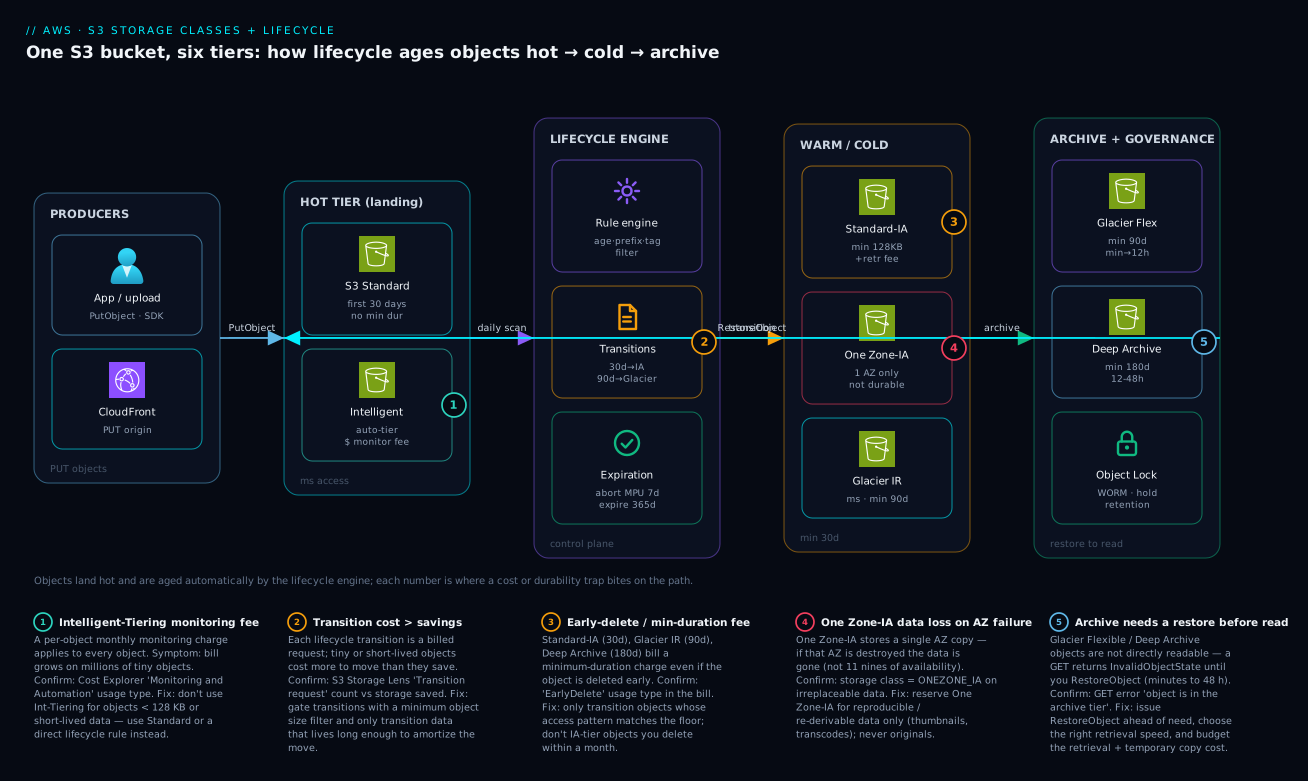
Picture a single S3 bucket as a conveyor that runs left to right. On the far left, producers write objects — an application doing PutObject through the SDK, plus a CloudFront distribution that can serve as a PUT origin — and everything lands in the hot tier: S3 Standard for the first ~30 days, or Intelligent-Tiering if you’d rather let S3 watch each object and decide. That hot tier is where access is cheap to serve and expensive to store, so nothing should sit there longer than its access pattern justifies.
The middle of the diagram is the lifecycle engine — the control plane that makes the rest automatic. Once a day it scans the bucket, applies each rule’s filter (age, prefix, tag, size), and fires the matching transition and expiration actions: move to Standard-IA at 30 days, to Glacier at 90, abort half-finished multipart uploads at 7, expire orphaned objects at 365. Objects flow from there into the warm/cold tier (Standard-IA, One Zone-IA, Glacier Instant Retrieval — all still millisecond-readable) and finally into archive + governance (Glacier Flexible, Glacier Deep Archive, fronted by Object Lock for WORM compliance), where a read first requires a RestoreObject round-trip back toward the hot tier. The five numbered badges mark exactly where money and durability leak: the Intelligent-Tiering monitoring fee on swarms of tiny objects (1), the transition cost exceeding the saving on short-lived data (2), the early-delete / minimum-duration fee when you tier objects you’ll delete too soon (3), One Zone-IA losing data if its single AZ fails (4), and the restore requirement that makes an archive GET fail until you un-archive it (5). Read the path once, then use the legend as your trap checklist.
Real-world scenario
StreamForge (a fictional but representative video-sharing startup) ran a 9 PB bucket — streamforge-media-prod — that had only ever used S3 Standard. Every uploaded clip, every transcoded rendition at five bitrates, every thumbnail, and every abandoned half-upload sat on the hottest, most expensive class from the moment it was written. The monthly S3 storage line had crept to roughly ₹62 lakh (~$74k), and Finance had flagged it as the fastest-growing cloud cost with no corresponding revenue driver.
The platform team pulled an S3 Storage Lens report and an access-log analysis and found the shape everyone eventually finds: of objects older than 90 days, fewer than 4% were read in any 30-day window. Originals were almost never re-downloaded after transcoding; thumbnails and renditions were re-derivable from the master; and a startling ~140 TB of orphaned multipart upload parts — failed or abandoned uploads — were being billed invisibly because nothing ever listed them.
They designed a tag- and prefix-driven lifecycle policy rather than a blunt bucket-wide one. Originals (masters/) transitioned to Standard-IA at 30 days and Glacier Flexible Retrieval at 120 days, since a re-download was rare but had to be possible within hours. Renditions and thumbnails (derived/, reproducible) went to One Zone-IA at 30 days — the ~20% extra saving was worth it because losing an AZ’s worth of derivatives just meant re-transcoding, not data loss. Compliance copies of monetised content (legal/) went straight to Glacier Deep Archive with a 7-year retention and Object Lock in compliance mode. A bucket-wide AbortIncompleteMultipartUpload at 7 days swept the orphaned parts. Crucially, they added an ObjectSizeGreaterThan 128 KB guard on the IA transitions so the millions of tiny thumbnail sprites didn’t trip the 128 KB minimum-size penalty — those tiny ones stayed on Standard or went to Intelligent-Tiering instead.
The rollout was a single put-bucket-lifecycle-configuration plus a Terraform apply, applied to both existing and new objects. Over the following two weeks (lifecycle being asynchronous and daily), Cost Explorer’s storage-class breakdown shifted: Standard dropped from ~100% to ~22% of stored bytes; the rest landed in IA, Glacier Flexible and Deep Archive. The abort-MPU action reclaimed the 140 TB of orphaned parts in the first pass.
What went wrong, and the lesson: their first draft transitioned everything — including a hot live/ prefix of currently-streaming content — to Standard-IA at 30 days. Within a day, retrieval fees on that actively-read content spiked, and the IA storage saving was swamped by per-GB retrieval charges. They caught it in Cost Explorer (a sudden “Requests-Tier2 / retrieval” line jump), excluded live/ from the rule, and the numbers settled. The final state: storage spend fell to about ₹24 lakh (~$29k)/month — a ~61% reduction — with no application change, and a standing rule that hot prefixes are never tiered by age alone. The whole exercise paid for itself in the first month and keeps paying every month after.
Advantages and disadvantages
The honest two-column trade-off, then the prose on when each side matters:
| Advantages | Disadvantages |
|---|---|
| Large storage-cost reduction for cold data (often 50–70%) | Retrieval fees can erase the saving if you misjudge access |
| Zero application changes once the rule is set | Minimum storage durations (30/90/180 d) penalise short-lived data |
| Automatic, hands-off movement by age/prefix/tag | Minimum billable object size (128 KB) penalises tiny objects |
| Eleven-nines durability on all multi-AZ classes | One Zone-IA loses data if its single AZ fails |
| Archive classes are dramatically cheaper (Deep Archive ~1/24×) | Archive classes need an explicit restore (minutes to 48 h) before read |
| Object Lock + lifecycle = compliant WORM retention | Lifecycle is async/daily — not instant, and transitions are billed requests |
| Intelligent-Tiering removes guesswork with no retrieval fee | Intelligent-Tiering’s per-object monitoring fee hurts tiny-object swarms |
| Cost Explorer / Storage Lens make the saving auditable | Misconfigured noncurrent-version rules silently leak cost |
When the advantages dominate: large objects, genuinely cold data, predictable aging, and reproducible derivatives — the classic media/data-lake/backup shape, where the floors never bite and the retrieval is rare. This is where a one-line rule saves crores a year.
When the disadvantages dominate: small objects (the 128 KB floor), short-lived data (the 30-day floor), hot data masquerading as cold (retrieval fees), and irreplaceable data on One Zone-IA. The skill is recognising these before you write the rule — which is exactly what the per-class minimums tables above are for.
Hands-on lab
A free-tier-friendly walk-through: create a bucket, write objects, apply a lifecycle policy, archive one object, restore it, and tear it all down. Use a unique bucket name (S3 names are globally unique).
1. Create a versioned bucket.
BUCKET="kv-lifecycle-lab-$(date +%s)"
aws s3api create-bucket --bucket "$BUCKET" \
  --create-bucket-configuration LocationConstraint=ap-south-1
aws s3api put-bucket-versioning --bucket "$BUCKET" \
  --versioning-configuration Status=Enabled
echo "Bucket: $BUCKET"
2. Write objects to different classes.
echo "hot data"     > hot.txt
echo "warm data"    > warm.txt
echo "archive data" > cold.txt

aws s3api put-object --bucket "$BUCKET" --key hot/hot.txt   --body hot.txt   --storage-class STANDARD
aws s3api put-object --bucket "$BUCKET" --key warm/warm.txt --body warm.txt  --storage-class STANDARD_IA
aws s3api put-object --bucket "$BUCKET" --key cold/cold.txt --body cold.txt  --storage-class GLACIER
Expected: each put-object returns an ETag (and a VersionId since versioning is on).
3. Apply a lifecycle policy.
cat > lab-lifecycle.json <<'JSON'
{
  "Rules": [
    {
      "ID": "lab-tiering",
      "Filter": { "Prefix": "hot/" },
      "Status": "Enabled",
      "Transitions": [
        { "Days": 30, "StorageClass": "STANDARD_IA" },
        { "Days": 90, "StorageClass": "GLACIER" }
      ],
      "AbortIncompleteMultipartUpload": { "DaysAfterInitiation": 7 }
    },
    {
      "ID": "lab-expire-noncurrent",
      "Filter": {},
      "Status": "Enabled",
      "NoncurrentVersionExpiration": { "NoncurrentDays": 30 }
    }
  ]
}
JSON

aws s3api put-bucket-lifecycle-configuration \
  --bucket "$BUCKET" --lifecycle-configuration file://lab-lifecycle.json
aws s3api get-bucket-lifecycle-configuration --bucket "$BUCKET"
Expected: the second command echoes your two rules back. (Actual transitions take ~a day; you won’t see hot.txt move during the lab.)
4. Try to read the Glacier object directly — watch it fail, then restore it.
# This should FAIL with InvalidObjectState — Glacier isn't directly readable
aws s3api get-object --bucket "$BUCKET" --key cold/cold.txt out.txt || \
  echo ">> expected InvalidObjectState: object is in Glacier, restore first"

# Restore it (Bulk = cheapest; small object so it's quick)
aws s3api restore-object --bucket "$BUCKET" --key cold/cold.txt \
  --restore-request '{"Days":1,"GlacierJobParameters":{"Tier":"Bulk"}}'

# Poll restore status — 'ongoing-request="true"' means still restoring
aws s3api head-object --bucket "$BUCKET" --key cold/cold.txt --query 'Restore'
Expected: the GET errors with InvalidObjectState; the restore request is accepted; the Restore header shows an ongoing request that completes within the Bulk window.
5. Inspect the storage-class breakdown.
aws s3api list-objects-v2 --bucket "$BUCKET" \
  --query 'Contents[].{Key:Key,Class:StorageClass,Size:Size}' --output table
Expected: a table showing STANDARD, STANDARD_IA, and GLACIER against the three keys.
6. Tear down (delete all versions, then the bucket).
# Delete every version and delete-marker, then remove the bucket
aws s3api list-object-versions --bucket "$BUCKET" \
  --query '{Objects: Versions[].{Key:Key,VersionId:VersionId}}' --output json > vers.json
aws s3api delete-objects --bucket "$BUCKET" --delete file://vers.json 2>/dev/null || true

aws s3api list-object-versions --bucket "$BUCKET" \
  --query '{Objects: DeleteMarkers[].{Key:Key,VersionId:VersionId}}' --output json > marks.json
aws s3api delete-objects --bucket "$BUCKET" --delete file://marks.json 2>/dev/null || true

aws s3 rb "s3://$BUCKET" --force
rm -f hot.txt warm.txt cold.txt out.txt lab-lifecycle.json vers.json marks.json
echo "Cleaned up $BUCKET"
Expected: the bucket is removed. (Costs are negligible — a few tiny objects for a few minutes — but the Glacier object carries a 90-day minimum-duration charge prorated to almost nothing at this size.)
Common mistakes & troubleshooting
The differentiator. Each failure mode: symptom → root cause → how to confirm (exact command) → fix. Scan the playbook table, then read the detail for the row that matches.
| # | Symptom | Root cause | Confirm with | Fix |
|---|---|---|---|---|
| 1 | Bill rose after a lifecycle rule | Tiny objects hit the 128 KB IA minimum + per-transition request cost | Cost Explorer: “Requests-Tier2” + IA storage up; Storage Lens avg object size | Add ObjectSizeGreaterThan 128 KB; keep small objects on Standard/IT |
| 2 | Big retrieval bill out of nowhere | Hot data tiered to IA/Glacier, then read a lot | Cost Explorer “retrieval” / Tier2 request line spike; map to prefix | Exclude hot prefixes; never tier by age alone for live data |
| 3 | GET on an object returns InvalidObjectState |
Object is in Glacier Flexible / Deep Archive (not readable) | aws s3api head-object --query StorageClass = GLACIER/DEEP_ARCHIVE |
restore-object first; choose retrieval tier by urgency |
| 4 | Restore is “taking forever” | Wrong retrieval tier (Bulk on Deep Archive ≈ 48 h) | head-object --query Restore shows ongoing-request true |
Use Standard/Expedited; size restore SLA up front |
| 5 | Objects not transitioning when expected | Filter prefix/tag doesn’t match, or rule disabled | get-bucket-lifecycle-configuration; check Status + Filter |
Fix the filter; enable the rule; remember it’s daily/async |
| 6 | Versioned bucket cost keeps climbing | Noncurrent versions never expire/tier | list-object-versions shows many versions per key |
Add NoncurrentVersion* rules; keep N newest |
| 7 | Early-delete fee on the bill | Deleted/overwrote IA/Glacier objects before the minimum | Cost Explorer “EarlyDelete” usage type | Only tier data that lives past the floor (30/90/180 d) |
| 8 | Mystery storage you can’t see in the console | Orphaned incomplete multipart upload parts | list-multipart-uploads; Storage Lens “incomplete MPU bytes” |
Add AbortIncompleteMultipartUpload (e.g. 7 days) |
| 9 | One Zone-IA data gone after an AZ event | Single-AZ class on non-reproducible data | list-objects-v2 --query Contents[].StorageClass = ONEZONE_IA |
Move irreplaceable data to a multi-AZ class; regenerate the rest |
| 10 | Intelligent-Tiering bill higher than Standard | Per-object monitoring fee on millions of tiny objects | Cost Explorer “Monitoring and Automation” usage type | Use IT only for large/unknown objects; lifecycle the rest |
| 11 | Transition action rejected/ignored | Illegal transition (uphill, or before the 30-day floor) | API error / no movement; check the allowed-transition table | Respect downhill-only order and the 30-day IA minimum |
| 12 | Cost didn’t drop after applying the policy | Lifecycle is async; movement takes a day+ | head-object --query StorageClass still old; wait + re-check Storage Lens |
Be patient; verify over days, not minutes |
The expanded reasoning for the ones that bite hardest:
1. The bill went up after a lifecycle rule. Root cause: you transitioned millions of objects smaller than 128 KB into Standard-IA/One Zone-IA/Glacier IR; each is now billed at the 128 KB minimum size, and each transition was a billed request, so the request cost plus inflated per-object floor exceeded the storage discount. Confirm: Cost Explorer shows a jump in Tier2 request and IA storage usage; S3 Storage Lens shows a tiny average object size. Fix: gate IA/Glacier transitions with ObjectSizeGreaterThan = 131072 and keep small objects on Standard or Intelligent-Tiering (large objects only).
2. A surprise retrieval bill. Root cause: hot, frequently-read data was tiered to IA or Glacier by an age-only rule, so every read now incurs a per-GB retrieval fee (and, for Glacier, a restore). Confirm: Cost Explorer’s retrieval / Tier2 line spikes; correlate to the prefix that got tiered. Fix: exclude hot prefixes from age-based rules; for genuinely mixed temperatures use Intelligent-Tiering (no retrieval fee) instead of a blunt age rule.
3. InvalidObjectState on a GET. Root cause: the object is in Glacier Flexible Retrieval or Deep Archive, which are not directly readable. Confirm: aws s3api head-object --query StorageClass returns GLACIER/DEEP_ARCHIVE. Fix: issue restore-object with a retrieval tier, wait for it to complete (head-object --query Restore), then GET. For data that must be instantly readable, use Glacier Instant Retrieval instead.
6. Versioned bucket cost climbs forever. Root cause: versioning keeps every overwrite as a noncurrent version, and your policy only addressed current objects, so dead versions pile up on the expensive class. Confirm: aws s3api list-object-versions shows many versions per key. Fix: add NoncurrentVersionTransition and NoncurrentVersionExpiration (keeping the N newest), plus ExpiredObjectDeleteMarker.
8. Storage you can’t see in the console. Root cause: failed/abandoned multipart uploads leave parts that are billed but don’t appear as objects. Confirm: aws s3api list-multipart-uploads --bucket <b>; Storage Lens reports incomplete-MPU bytes. Fix: add AbortIncompleteMultipartUpload with DaysAfterInitiation (7 is a common, safe value) to every bucket’s lifecycle config.
Best practices
- Default new buckets to Intelligent-Tiering unless you know the access pattern. It auto-optimizes with zero retrieval-fee risk; reserve explicit age-based lifecycle for predictable, large-object workloads.
- Always add
AbortIncompleteMultipartUploadto every bucket (e.g. 7 days). Orphaned parts are invisible, billed, and accumulate forever otherwise. - Guard IA/Glacier transitions with a minimum object size (
ObjectSizeGreaterThan128 KB). The single biggest “the rule made it worse” cause is tiny objects hitting the 128 KB floor and per-transition request cost. - Never tier hot prefixes by age alone. Currently-served content read frequently belongs on Standard (or Intelligent-Tiering); age-based IA/Glacier rules on it generate retrieval fees that swamp the saving.
- Match the class minimum to the data lifetime. Don’t put data you’ll delete in two weeks into a 30-day (IA) or 90-day (Glacier) class — you pay the floor regardless.
- Use One Zone-IA only for reproducible data. Thumbnails, transcodes, intermediate outputs — never originals or anything you can’t regenerate.
- Write two rule-sets on versioned buckets — current and noncurrent — and keep the N most-recent noncurrent versions, expiring the rest.
- Choose the archive class by restore SLA, not just price. Glacier Instant (ms, no restore) vs Flexible (minutes–hours) vs Deep Archive (12–48 h) — pick the one whose worst-case restore time you can live with.
- Verify savings in Cost Explorer by storage class and S3 Storage Lens. Lifecycle is asynchronous; confirm the storage-class mix shifted over days before declaring victory.
- Keep lifecycle policies in Terraform, reviewed in PRs. A wrong age or filter is a slow, expensive mistake; version control and review catch it.
- Test restores before you need them. A 3 a.m. incident is the wrong time to discover your Deep Archive restore takes 48 hours.
- Tag at write time for cross-cutting policies. Tag-based filters (
archive=true,tier=cold) decouple lifecycle from key layout and survive re-organisation.
The signals worth watching after you apply a policy — where each one lives and what a bad reading means:
| Signal | Where to find it | Healthy reading | A bad reading means |
|---|---|---|---|
| Storage by class mix | Cost Explorer (group by storage class) | Cold bytes leaving Standard over days | Policy not matching / still async |
| Average object size | S3 Storage Lens | Comfortably > 128 KB on IA-tiered prefixes | Tiny objects hitting the size floor |
| Tier2 / retrieval requests | Cost Explorer usage type | Flat after tiering hot-but-not-cold data | You tiered hot data → retrieval fees |
| Incomplete-MPU bytes | S3 Storage Lens | Near zero | Missing AbortIncompleteMultipartUpload |
| Noncurrent-version bytes | S3 Storage Lens / list-object-versions | Bounded, trending flat | No noncurrent-version rules → leak |
| EarlyDelete usage type | Cost Explorer | Absent | Tiered data deleted before its minimum |
| Monitoring-and-automation fee | Cost Explorer usage type | Tiny vs storage | Intelligent-Tiering on tiny-object swarms |
Security notes
- Least-privilege the lifecycle and bucket configuration.
s3:PutLifecycleConfiguration,s3:PutBucketVersioningands3:PutObjectRetentionare powerful; restrict them to the platform/FinOps roles via IAM and SCPs (see AWS Organizations and IAM Foundations). A bad lifecycle rule can delete data at scale. - Encryption is on by default — keep it across transitions. All classes support SSE-S3 and SSE-KMS; transitions preserve encryption. For regulated data use SSE-KMS with a customer-managed key so you control rotation and can audit decrypts in CloudTrail.
- Object Lock for compliance retention. Pair lifecycle expiration with Object Lock in governance mode (privileged users can override) or compliance mode (no one, including root, can delete until retention elapses) to meet WORM regulatory requirements. Compliance mode is irreversible — apply deliberately.
- MFA Delete on critical versioned buckets. Require MFA to permanently delete versions or change versioning state, so a compromised credential can’t wipe history.
- Block Public Access at the account level. Storage classes don’t change exposure — a Glacier object is as public as its bucket policy allows. Keep S3 Block Public Access on unless a bucket is deliberately a public origin.
- Audit lifecycle changes with CloudTrail. Log
PutBucketLifecycleConfigurationand restore actions so a sudden mass-archive or mass-expire is attributable. Pair with AWS CloudTrail, Config and Audit Compliance. - Restore creates a temporary readable copy — govern it. A restored Glacier object is fully readable for the
Daysyou set; ensure bucket policy and encryption still constrain who can read it during that window.
The security controls that also keep the cost model honest:
| Control | Mechanism | Secures against | Also prevents |
|---|---|---|---|
| Scoped lifecycle IAM | s3:Put*Lifecycle* restricted |
Rogue mass-delete/expire | Accidental data loss |
| SSE-KMS on objects | Customer-managed key | Plaintext at rest | Unauditable access (CloudTrail logs decrypts) |
| Object Lock (compliance) | WORM retention | Tampering / early deletion | Lifecycle expiring data under legal hold |
| MFA Delete | Versioning + MFA | Credential-theft wipes | Accidental version purge |
| Block Public Access | Account/bucket setting | Public exposure | “Archive is safe” false assumption |
| CloudTrail data/management events | API logging | Untraceable changes | Silent policy drift |
Cost & sizing
The bill has four levers, and lifecycle touches all of them:
- Per-GB-month storage by class is the dominant line and the one lifecycle attacks directly. The relative ladder (Standard 1.0× down to Deep Archive ~1/24×) means moving cold data down the ladder is the big win — if the floors and retrieval fees don’t claw it back.
- Request costs are usually small but matter at scale: PUT/COPY/POST/LIST (Tier1) and GET/SELECT (Tier2), plus lifecycle transitions are billed per object moved. A billion-object transition is a real request bill — another reason to gate tiny objects out.
- Retrieval fees are the hidden lever: per-GB to read from IA/Glacier, scaling up as the class gets colder (Deep Archive retrieval is the priciest). Model
retrieval_fee × expected_readsbefore tiering, not after. - Minimum-duration and minimum-size floors are cost you pay whether or not you use the data: a 4 KB object in IA bills as 128 KB; an object deleted on day 10 of a 30-day-minimum class still bills 30 days.
Request pricing by operation class — small per-request, but it dominates at billions of objects and on tiny-object transitions:
| Request type | Example operations | Pricing tier | Relative cost | Notes for lifecycle |
|---|---|---|---|---|
| Write / list | PUT, COPY, POST, LIST | Tier1 | Higher per-1,000 | Initial uploads; lifecycle transitions billed like a COPY |
| Read | GET, SELECT, HEAD | Tier2 | Lower per-1,000 | Reads from any class; retrieval fee is separate |
| Lifecycle transition | (per object moved down a class) | Tier1-like | Per object | The cost that bites tiny-object swarms |
| Glacier restore request | RestoreObject (Expedited/Standard/Bulk) | Per request + per-GB | Varies by tier | Expedited dearest, Bulk cheapest |
| IA/Glacier data retrieval | (per-GB read out of the class) | Retrieval fee | Rises as class gets colder | Model fee × reads before tiering |
| Data transfer out | GET egress to internet | Per-GB transfer | Region-dependent | Independent of storage class |
A rough monthly picture for 100 TB of mostly-cold media (order-of-magnitude, ap-south-1-ish, illustrative — verify with the AWS Pricing Calculator):
| Layout | Where the 100 TB sits | Rough INR / month | Notes |
|---|---|---|---|
| All S3 Standard | 100 TB Standard | ~₹1.9 lakh | The “did nothing” baseline |
| 20% Standard / 80% Standard-IA | 20 TB Std + 80 TB IA | ~₹1.2 lakh | ~35% off; assumes rare reads |
| 20% Standard / 80% Glacier Flexible | 20 TB Std + 80 TB Glacier | ~₹70k | ~63% off; reads need restore |
| 10% Standard / 90% Deep Archive | 10 TB Std + 90 TB Deep | ~₹40k | ~79% off; 12–48 h restore |
| Intelligent-Tiering (large objects) | 100 TB IT, auto-tiered | ~₹0.9–1.3 lakh | No retrieval-fee risk; monitoring fee tiny on big objects |
The cost drivers and what each one buys (or costs) you:
| Cost driver | What you pay for | Direction lifecycle moves it | Watch-out |
|---|---|---|---|
| Per-GB storage by class | Bytes stored per month | Down (colder = cheaper) | The whole point |
| Lifecycle transitions | One billed request per object moved | Up (one-time per move) | Huge on tiny-object swarms |
| Retrieval fees | Per-GB read from IA/Glacier | Up (if you read cold data) | Can exceed the storage saving |
| Minimum duration | Floor days billed (30/90/180) | Up (on short-lived data) | Don’t tier soon-deleted data |
| Minimum object size | 128 KB floor (IA classes) | Up (on small objects) | Gate with ObjectSizeGreaterThan |
| Intelligent-Tiering monitoring | Per-object monthly fee | Up (on tiny-object swarms) | Negligible on large objects |
| KMS decrypts on restore | Per-request KMS | Up (regulated data) | Budget for restore-time decrypts |
Free tier: new AWS accounts get 5 GB of S3 Standard, 20,000 GET and 2,000 PUT requests per month for 12 months — enough for the lab above. There is no free tier for Glacier retrieval beyond the small Bulk allowances, so test restores deliberately.
Interview & exam questions
1. A bucket’s cost increased after applying a lifecycle policy that tiered objects to Standard-IA. Why? Almost certainly the objects are smaller than 128 KB, so each is billed at the IA minimum billable object size of 128 KB, and every transition was a billed request. The request cost plus the inflated per-object floor exceeded the storage discount. Fix by gating the transition with a minimum object size and keeping small objects on Standard or Intelligent-Tiering.
2. When would you choose Intelligent-Tiering over an explicit lifecycle policy? When the access pattern is unknown or changing and objects are reasonably large. Intelligent-Tiering moves each object between tiers based on observed access with no retrieval fees, paying only a small per-object monitoring fee — ideal when you can’t predict temperature. An explicit age-based lifecycle is better when the pattern is predictable (cheaper, no monitoring fee), and Intelligent-Tiering is a poor fit for millions of tiny objects where the per-object fee dominates.
3. Difference between the three Glacier classes? Glacier Instant Retrieval gives millisecond reads with no restore at archive storage price (high retrieval fee, 90-day minimum). Glacier Flexible Retrieval is cheaper but requires a restore (Expedited 1–5 min / Standard 3–5 h / Bulk 5–12 h, 90-day minimum). Glacier Deep Archive is the cheapest storage on AWS, requires a restore measured in hours (Standard ≤12 h, Bulk ≤48 h), with a 180-day minimum — for 7–10-year compliance archives.
4. Why is One Zone-IA cheaper, and what’s the catch? It stores a single-AZ copy instead of replicating across ≥3 AZs, so it’s ~20% cheaper than Standard-IA — but if that Availability Zone is destroyed, the data is lost. Its eleven-nines durability assumes the AZ survives. Use it only for reproducible data (thumbnails, transcodes) you can regenerate, never for originals.
5. A GET on an object returns InvalidObjectState. What happened and what do you do? The object is in Glacier Flexible Retrieval or Deep Archive, which are not directly readable. You must issue a RestoreObject with a retrieval tier, wait for it to complete (poll the Restore header on head-object), then GET the temporary readable copy. If the data must always be instantly readable, use Glacier Instant Retrieval instead, which needs no restore.
6. How do you stop versioning from leaking storage cost? Add noncurrent-version lifecycle actions: NoncurrentVersionTransition to tier old versions to a colder class and NoncurrentVersionExpiration to delete them after N days, typically keeping the N most-recent noncurrent versions, plus ExpiredObjectDeleteMarker cleanup. Without these, every overwrite accumulates billable dead versions on the expensive class.
7. What does the AbortIncompleteMultipartUpload lifecycle action do and why does it matter? It deletes the parts of failed or abandoned multipart uploads after a set number of days. Those parts are billed but invisible in the object list, so they accumulate silently and can hide terabytes of cost. Adding it (commonly 7 days) to every bucket is a free, standing cleanup.
8. Object is deleted on day 10 from Standard-IA. What’s billed? The full 30-day minimum storage duration — Standard-IA bills a minimum of 30 days per object even if deleted earlier (an “early delete” charge for the remaining 20 days). The same logic applies to Glacier (90-day) and Deep Archive (180-day) minimums. Don’t tier data you’ll delete before the floor.
9. Walk through choosing a class for “backups read a few times a year, restore within hours is fine.” That’s archive with tolerant latency → Glacier Flexible Retrieval: very low storage cost, 90-day minimum, restore via Standard (3–5 h) or Bulk (5–12 h). If restores must be instant you’d step up to Glacier Instant Retrieval (ms, higher retrieval fee); if the data is multi-year compliance and hours-to-restore is fine you’d step down to Deep Archive (cheapest, 180-day min, 12–48 h restore).
10. How do you verify a lifecycle policy actually saved money? Lifecycle is asynchronous and daily, so check over days, not minutes. Use Cost Explorer grouped by storage class to watch the mix shift from Standard to colder classes, and S3 Storage Lens for storage-class distribution, average object size, and incomplete-MPU bytes. Watch the retrieval / Tier2 request lines to ensure you didn’t trade storage saving for retrieval fees.
11. Why can’t you transition a Standard object straight to Standard-IA on day 1? S3 enforces a 30-day minimum age before transitioning to the IA classes (Standard-IA / One Zone-IA). You can archive to Glacier classes earlier, but the IA transition specifically has a 30-day floor — reflecting that IA is for data that has already been “warm” for a month. Transitions are also downhill-only (you can’t move from a colder class back to a warmer one via lifecycle).
12. What’s the difference between Object Lock governance and compliance mode? Governance mode blocks deletes/overwrites but lets users with a special permission (s3:BypassGovernanceRetention) override — useful for guardrails you can break in a pinch. Compliance mode blocks deletion by everyone, including the root account, until the retention period elapses — irreversible WORM for strict regulatory requirements. Lifecycle expiration cannot delete an object still under either lock.
These map to AWS Certified Solutions Architect – Associate (SAA-C03) — design cost-optimized storage and resilient architectures — and Developer – Associate (DVA-C02) — S3 storage classes, lifecycle, and the SDK/CLI operations. A compact cert-mapping for revision:
| Question theme | Primary cert | Exam objective area |
|---|---|---|
| Class selection by access pattern | SAA-C03 | Design cost-optimized storage |
| Lifecycle transitions & expirations | SAA-C03 / DVA-C02 | Cost optimization; S3 operations |
| Glacier restore tiers & latency | SAA-C03 / DVA-C02 | Resilient/archival storage |
| One Zone-IA durability trade-off | SAA-C03 | Design resilient architectures |
| Versioning + noncurrent lifecycle | DVA-C02 | Develop with S3; data management |
| Object Lock / compliance retention | SAA-C03 / Security | Governance & compliance |
Quick check
- A lifecycle rule tiers a million 5 KB objects to Standard-IA and the bill goes up. Name the two mechanisms that caused it, and the one filter setting that fixes it.
- True or false: scaling to a colder storage class is always cheaper overall, because the per-GB storage rate is lower.
- A GET on
archive/2020/report.pdfreturnsInvalidObjectState. What class is it in, and what’s the exact next action? - You enabled versioning months ago and bucket cost keeps climbing even though current-object count is flat. What did you forget to configure?
- Pick a class: “compliance ledgers kept for 7 years, read essentially never, and a 24-hour wait to retrieve is fine.” Which class, and what’s its minimum storage duration?
Answers
- (a) Each object hits the 128 KB minimum billable object size, so a 5 KB object is billed as 128 KB; (b) each transition is a billed request. Both can exceed the storage discount. The fix is an
ObjectSizeGreaterThan(e.g. 131072 bytes) filter so tiny objects are excluded from the IA transition. - False. Colder classes add retrieval fees, minimum storage durations (30/90/180 days), and minimum object sizes (128 KB). If you read the data, delete it early, or it’s tiny, total cost can be higher than a warmer class. Always model retrieval and the floors before tiering.
- It’s in Glacier Flexible Retrieval or Glacier Deep Archive (not directly readable). The next action is
aws s3api restore-objectwith a retrieval tier; once the restore completes (poll theRestoreheader viahead-object), GET the temporary copy. For always-instant reads, use Glacier Instant Retrieval instead. - Noncurrent-version lifecycle actions (
NoncurrentVersionTransitionandNoncurrentVersionExpiration, plus delete-marker cleanup). Versioning keeps every overwrite as a billable noncurrent version; without rules for them they accumulate on the expensive class forever. - Glacier Deep Archive — the cheapest storage on AWS, restore in 12–48 hours, with a 180-day minimum storage duration. Pair it with Object Lock (compliance mode) for the 7-year WORM retention.
Glossary
- Storage class — the per-object attribute setting its price, retrieval latency, retrieval fee, minimum duration/size, and AZ replication; choosing a class is choosing a cost/latency/durability point.
- S3 Standard — the hot, general-purpose class: millisecond access, no retrieval fee, no minimums, 11 nines across ≥3 AZs.
- S3 Intelligent-Tiering — auto-moves each object between access tiers by observed access with no retrieval fees; charges a small per-object monitoring fee.
- S3 Standard-IA — warm class at ~half Standard’s storage cost; 30-day minimum duration, 128 KB minimum size, per-GB retrieval fee, millisecond access.
- S3 One Zone-IA — Standard-IA stored in a single AZ (~20% cheaper); lost if that AZ is destroyed — for reproducible data only.
- S3 Glacier Instant Retrieval (GIR) — archive storage price with millisecond reads and no restore; high retrieval fee, 90-day minimum.
- S3 Glacier Flexible Retrieval — cheap archive requiring a restore (Expedited/Standard/Bulk, minutes to 12 h); 90-day minimum.
- S3 Glacier Deep Archive — the cheapest AWS storage; restore in 12–48 hours; 180-day minimum; for 7–10-year compliance archives.
- Retrieval fee — the per-GB charge to read data from an IA or Glacier class; rises as the class gets colder.
- Minimum storage duration — the days an object is billed for even if deleted earlier (30/90/180 by class); the “early delete” charge.
- Minimum billable object size — the 128 KB floor each object in an IA class is billed at, penalising small objects.
- Lifecycle configuration — the set of rules (filter + actions) S3 evaluates daily to transition and expire objects.
- Transition action — a lifecycle action moving an object to a colder class after N days; each move is a billed request.
- Expiration action — a lifecycle action deleting an object after N days (or on a date).
- Noncurrent version — a previous version retained by versioning; needs its own lifecycle actions or it leaks cost.
- AbortIncompleteMultipartUpload — a lifecycle action deleting parts of abandoned multipart uploads; cleans invisible billed storage.
- RestoreObject — the API that creates a temporary readable copy of a Glacier Flexible/Deep Archive object; has a retrieval tier, latency, and cost.
- Object Lock — WORM retention (governance mode, overridable; compliance mode, irreversible) that blocks deletion for a retention period.
- S3 Storage Lens — the analytics dashboard for storage-class distribution, average object size, and incomplete-MPU bytes used to verify lifecycle savings.
Next steps
You can now place any object in the class that matches its access pattern and let lifecycle move it automatically. Build outward:
- Next: AWS Backup and Disaster Recovery Strategies — turn correct storage-class placement into a full retention and cross-Region recovery plan.
- Related: AWS Regions and Availability Zones Explained — the AZ-replication facts behind eleven-nines durability and the One Zone-IA trade-off.
- Related: AWS CloudTrail, Config and Audit Compliance — audit lifecycle and restore actions so a mass-archive or mass-expire is always attributable.
- Related: AWS Organizations and IAM Foundations — least-privilege the powerful lifecycle, versioning and Object Lock permissions.
- Related: Choosing Between RDS, DynamoDB and Aurora — decide what belongs in object storage versus a database before you tier it.