Quick take: An AWS Region is a geographic area (like
ap-south-1); an Availability Zone is one or more physically separate datacenters inside that Region with independent power, cooling and network. Spreading a workload across AZs survives a single datacenter failure for almost no extra money. Spreading across Regions survives a whole-area disaster — at real cost and complexity. Do the first before you pay for the second.
A media startup ran its entire platform in one AWS Region, inside a single Availability Zone, to keep the bill down. A power event took that AZ offline and the site was dark for four hours. The post-mortem was brutal in its simplicity: the application was stateless, the database was a managed service, and the whole thing could have spread across three AZs for almost the same money — the compute capacity would have been identical, just placed in three buildings instead of one. Nobody had told them that an AZ is an independent failure domain, that a subnet lives in exactly one AZ, or that an Auto Scaling group listing one subnet is a single-AZ deployment wearing a multi-AZ costume.
This article is the reference that prevents that outage. We treat Regions and AZs not as trivia for the cloud-practitioner exam but as the resiliency hierarchy every production design rests on: pick the right failure domains, place each tier across them correctly, and know precisely which failures each layer does and does not survive. You will learn what a Region, an AZ, an AZ ID, a Local Zone, a Wavelength Zone and an edge location actually are; how Multi-AZ works for EC2, ALB, RDS, Aurora, EFS, S3 and DynamoDB; how an AZ failure is detected and drained; what cross-AZ traffic costs you; and the handful of misconfigurations that quietly turn “highly available” into “single point of failure.” Every concept comes with the exact aws CLI to confirm it and the CloudFormation/Terraform to set it, and — because this is operational — a symptom → cause → confirm → fix playbook you can open mid-incident.
By the end you will stop guessing about placement. You will know why three AZs beats two for quorum systems, why apse1-az1 in your account may be a different physical building than in mine, why a 60-second RDS failover is normal, what a NAT gateway per AZ saves you when an AZ dies, and when multi-Region is genuinely warranted versus cargo-culted. Resiliency is a hierarchy: master Multi-AZ first, add multi-Region only when the business case is real.
What problem this solves
Every datacenter fails eventually — power, cooling, a network device, a fibre cut, a bad deploy of the facility’s own software. If your whole application lives in one building, that building’s worst day is your worst day. Regions and AZs exist to give you a menu of failure domains so a single failure stops being a single point of failure.
What breaks without this knowledge is depressingly common. A team launches in the default AZ the console happened to pick, scales “out” by adding instances that all land in that same AZ, and ships to production believing the load balancer makes them resilient. Then one AZ degrades: the ALB has no healthy targets, the single-AZ RDS has no standby to promote, the NAT gateway that all egress depended on is gone, and the “highly available” system is down hard. The fix was free and structural — list three subnets instead of one — but nobody designed for the failure domain because nobody understood it was there.
The pain shows up in three distinct shapes, and the whole article maps to them:
- A single AZ fails (the common case, a few times a year somewhere in the fleet). You survive it by spreading every tier across two or three AZs in the same Region. This costs essentially nothing extra and is non-negotiable for production.
- A whole Region fails (rare, but real, and total when it happens). You survive it only by replicating to another Region — at meaningful cost and operational complexity, justified by RTO/RPO requirements, not fashion.
- Users are far from your Region (latency, not availability). You improve it with edge locations (CloudFront, Global Accelerator), Local Zones for metro-proximity compute, and ultimately a second Region near them.
Who hits this: essentially everyone running anything on AWS. It bites hardest on teams who came from a single on-prem datacenter (where “the server room” was one failure domain and that was just life), cost-sensitive startups who read “single AZ is cheaper” and missed that multi-AZ compute is usually the same price, and anyone who built their VPC by clicking “next” without noticing the subnet-to-AZ mapping. The remedy is rarely “spend more” — it is “place what you already pay for across the failure domains that already exist.”
To frame the whole field before the deep dive, here is the resiliency hierarchy as a single table — each tier, the failure it survives, the rough cost delta, and the one thing people get wrong:
| Failure domain | What it survives | What it does NOT survive | Typical cost delta | The classic mistake |
|---|---|---|---|---|
| Single AZ (1 datacenter) | Nothing — it is the blast radius | Any AZ event | Baseline | Running prod here “to save money” |
| Multi-AZ (2 AZs) | One AZ failure | Two-AZ or Region event; loses quorum | ~0% on compute; data-transfer + standby | Two AZs for a 3-node quorum system |
| Multi-AZ (3 AZs) | One AZ failure with quorum intact | Region event | ~0% on compute; more cross-AZ transfer | NAT gateway in one AZ only |
| Multi-Region (active/passive) | A whole-Region disaster | Global control-plane edge cases | High (duplicate stacks + replication) | Building this before Multi-AZ is solid |
| Multi-Region (active/active) | Region disaster + serves global users | Data-consistency complexity you now own | Highest | Underestimating split-brain/conflict handling |
| Edge (CloudFront / GA / Local Zones) | Latency for far users; absorbs L3/4 DDoS | It is not a DR strategy | Per-GB / per-hour | Treating a CDN as availability |
Learning objectives
By the end of this article you can:
- Define a Region, an Availability Zone, an AZ ID, a Local Zone, a Wavelength Zone and an edge location, and explain how each maps to a failure domain and a latency profile.
- Explain why a subnet maps to exactly one AZ, why AZ names are randomized per account (and when to use AZ IDs instead), and how that drives VPC design.
- Place each tier — ALB/NLB, EC2 Auto Scaling, RDS/Aurora, EFS, ElastiCache, NAT gateways, S3, DynamoDB — across AZs correctly, and say exactly what Multi-AZ buys for each.
- Decide two AZs vs three on real grounds (quorum, cost, capacity headroom) rather than habit.
- Diagnose the common “fake HA” failures — single-subnet ALB, ASG pinned to one AZ, single-AZ RDS, single-AZ NAT gateway — with the exact
describe-*command that confirms each. - Quantify and reduce cross-AZ data-transfer cost, and know which traffic is free, which is billed, and how to keep chatty paths same-AZ where it matters.
- Decide when multi-Region is genuinely warranted, choose active/passive vs active/active, and pick a Region against the four real criteria (latency, service availability, data residency, cost).
- Map all of this to the relevant certifications (Cloud Practitioner, Solutions Architect Associate, SysOps) and answer the questions examiners actually ask.
Prerequisites & where this fits
You should be comfortable with the AWS console and aws CLI, understand that a VPC is your private network in a Region and that it is carved into subnets, and know roughly what EC2, an Auto Scaling group (ASG), an Application Load Balancer (ALB) and RDS are. Familiarity with basic networking (CIDR, route tables) and HTTP health checks helps. You do not need prior HA experience — building it correctly is what this article teaches.
This is a foundations piece in the AWS fundamentals track and sits upstream of almost everything else. The networking detail it assumes is covered in Amazon VPC, Subnets and Security Groups Explained — that is where subnets, route tables and the per-AZ structure live. The data-tier resiliency it references in depth is in Amazon RDS vs DynamoDB vs Aurora Compared. The cross-Region story it points at is the subject of AWS Backup and Disaster Recovery Strategies. The compute choices that determine what you are spreading across AZs are in AWS Compute: EC2 vs Lambda vs ECS vs EKS. Where this article ends — “you survived the AZ, now what about the Region?” — those three pick up.
A quick map of who owns what during a placement decision or an incident, so you call the right person fast:
| Layer | What lives here | Who usually owns it | Failure class it can cause |
|---|---|---|---|
| Global edge (Route 53, CloudFront) | DNS routing, CDN, anycast | Frontend / SRE | Misrouting, stale TTL; not an AZ outage |
| Region selection | Latency, residency, service set | Architect / compliance | Wrong Region → latency or legal exposure |
| VPC / subnets | CIDR, AZ-to-subnet mapping | Network team | Single-AZ subnet design → fake HA |
| Load balancing | ALB/NLB subnet attachment, cross-zone | Platform / network | Single-subnet LB → blackhole on AZ loss |
| Compute | ASG AZ list, instance distribution | App / platform | ASG pinned to one AZ → outage |
| Data tier | RDS Multi-AZ, Aurora, replication | DBA / platform | Single-AZ DB → no failover |
| Egress | NAT gateway per AZ, IGW | Network team | Single-AZ NAT → egress dead on AZ loss |
Core concepts
Five mental models make every later decision obvious.
Before the five models, fix one distinction that trips up every beginner: every AWS resource has a scope — global, regional, or zonal (AZ-bound) — and that scope decides what fails with what. Knowing a resource’s scope tells you instantly whether an AZ event can touch it:
| Scope | What it means | Examples | What an AZ failure does to it |
|---|---|---|---|
| Global | Exists outside any single Region | IAM, Route 53, CloudFront, Organizations, WAF (for CloudFront) | Unaffected by an AZ (or single-Region) event |
| Regional | Lives in one Region, spans its AZs | S3, DynamoDB, SQS, SNS, Lambda, ECR, ELB (the service) | Survives one AZ — the service spreads across them |
| Zonal (AZ-bound) | Pinned to a single AZ | EC2 instance, EBS volume, subnet, NAT gateway, RDS instance | Dies with its AZ unless you placed peers elsewhere |
The reading: you achieve HA by taking zonal resources and deploying copies across multiple AZs; regional services do that for you; global services are above the whole concern. Now the five models.
A Region is a geography; an AZ is a building (or buildings) you can fail independently. A Region is a named geographic area — ap-south-1 (Mumbai), us-east-1 (N. Virginia), eu-west-1 (Ireland) — each a fully independent island with its own copy of regional services. Inside a Region are Availability Zones: distinct locations, each one or more physically separate datacenters with independent power, cooling, physical security and network, far enough apart that a fire/flood/power event in one will not take another, yet close enough (typically within ~100 km, single-digit-millisecond latency) that synchronous replication between them is practical. Most Regions have three or more AZs; some have four to six. AZs are interconnected by high-bandwidth, low-latency private fibre — that link is what makes Multi-AZ synchronous databases feasible.
A subnet lives in exactly one AZ — this is the rule that governs all VPC HA. When you create a subnet you choose its AZ, and it never spans two. Therefore “spread across AZs” concretely means “create a subnet in each AZ and place resources in each subnet.” An ALB attached to one subnet is single-AZ. An ASG listing one subnet is single-AZ. A NAT gateway lives in one subnet, hence one AZ. Every resilience decision in a VPC reduces to which subnets (and therefore which AZs) did I list?
AZ names are randomized per account; AZ IDs are stable. The friendly name ap-south-1a is mapped to a different physical AZ in different accounts — AWS shuffles the name-to-hardware mapping so load spreads evenly and so two accounts don’t both pile onto “the first one.” The stable identifier is the AZ ID (e.g. apse1-az1), which refers to the same physical location across every account. This matters when you share resources across accounts (a shared VPC, a cross-account peering, a PrivateLink) and need them in the same physical AZ to avoid cross-AZ charges — you coordinate on the AZ ID, not the name.
Failure domains nest, and you choose how deep to go. A single instance can fail (host issue). A single AZ can fail (datacenter event). A single Region can fail (rare, area-wide). A global edge service can have a control-plane issue (rarer still). Each level up costs more to defend and removes a larger class of failure. The discipline is to defend the level your risk and budget justify — always Multi-AZ for production, multi-Region only when RTO/RPO demands it — and to know what you have not defended, rather than discover it during an incident.
Multi-AZ is mostly free on compute and cheap on data; multi-Region is expensive. Running three EC2 instances across three AZs costs the same as three in one AZ — you pay per instance, not per AZ. The Multi-AZ costs are subtler: cross-AZ data transfer (billed per GB each way), a standby for Multi-AZ RDS (you pay for the standby instance), and a NAT gateway per AZ if you want egress to survive an AZ loss. Multi-Region, by contrast, duplicates whole stacks and adds cross-Region replication bandwidth — a different order of cost. This asymmetry is the entire reason “Multi-AZ first” is the rule.
The vocabulary in one table
Before the deep sections, pin down every moving part. The glossary repeats these for lookup; this table is the mental model side by side:
| Concept | One-line definition | Failure domain | Why it matters |
|---|---|---|---|
| Region | A geographic area of independent infrastructure | Whole area | Latency, residency, service availability, cost |
| Availability Zone (AZ) | 1+ physically separate datacenters in a Region | One datacenter cluster | The unit you spread across for HA |
| AZ ID | Stable cross-account ID for a physical AZ (apse1-az1) |
— | Align shared resources to the same physical AZ |
| Subnet | A CIDR range bound to exactly one AZ | One AZ | “Spread across AZs” = a subnet per AZ |
| Local Zone | AWS compute placed in a metro, tied to a parent Region | Metro extension | Single-digit-ms latency to a specific city |
| Wavelength Zone | Compute embedded in a telco 5G network | Carrier edge | Ultra-low latency for mobile/5G apps |
| Edge location / PoP | CloudFront / Global Accelerator point of presence | Global anycast | CDN caching, DDoS absorption, fast TLS |
| Multi-AZ | Resources running in 2+ AZs in one Region | Survives 1 AZ | The baseline for production HA |
| Multi-Region | Resources running in 2+ Regions | Survives 1 Region | DR and global low-latency serving |
| Quorum | Majority needed for a consistent decision | Spans AZs | Why 3 AZs beats 2 for consensus systems |
| Cross-AZ data transfer | Bytes moving between AZs | — | Billed per GB each way; a real cost line |
The beliefs that cause outages — a decision table
Most single-AZ disasters trace to a handful of wrong beliefs. Map what you think you have to what you actually have, and what to do:
| If you believe… | It’s actually… | Do this |
|---|---|---|
| “I have an ALB, so I’m highly available” | True only if it’s attached to subnets in ≥2 AZs | describe-load-balancers — confirm multiple AZs |
| “Auto Scaling makes me multi-AZ” | True only if VPCZoneIdentifier lists multiple subnets |
List one subnet per AZ; set min ≥ 2–3 |
| “Managed RDS is automatically resilient” | False unless MultiAZ=true |
Enable Multi-AZ; subnet group spans ≥2 AZs |
| “Single AZ is cheaper” | Compute is the same price; you only save a standby/NAT | Spread compute (free); pay only for real HA costs |
| “Two AZs is enough for everything” | False for quorum systems (no majority after one loss) | Use three AZs for stateful/consensus tiers |
| “My CDN makes me available” | False — CloudFront is latency/DDoS, not DR | Fix the origin’s AZ spread |
“ap-south-1a is the same AZ everywhere” |
False — names are per-account randomized | Coordinate on the AZ ID |
| “Multi-Region is the responsible default” | Premature if Multi-AZ isn’t solid first | Nail Multi-AZ, then justify multi-Region by RTO/RPO |
Regions: what they are and how to choose one
A Region is the largest unit of isolation AWS gives you and the first decision you make. Regions are fully independent — ap-south-1 and eu-west-1 share no failure domain, and most regional services (EC2, RDS, SQS, etc.) are scoped to one Region; a resource in one Region is invisible to another unless you explicitly replicate. A handful of services are global (IAM, Route 53, CloudFront, WAF for CloudFront, Organizations) and exist outside any single Region.
List the Regions enabled for your account and inspect one:
# All Regions visible to your account (some are opt-in and disabled by default)
aws ec2 describe-regions \
  --query "Regions[].{Region:RegionName, Endpoint:Endpoint, OptIn:OptInStatus}" \
  --output table

# How many AZs does a Region have, and what are their stable IDs?
aws ec2 describe-availability-zones --region ap-south-1 \
  --query "AvailabilityZones[].{Name:ZoneName, Id:ZoneId, State:State}" \
  --output table
Choosing a Region — the four real criteria
You choose a Region on four axes, roughly in this priority order. Never default to whatever the console shows (often us-east-1):
| Criterion | Why it matters | How to evaluate | Common trap |
|---|---|---|---|
| Latency to users | Round-trip time dominates UX | Measure from user geographies; closer Region wins | Picking us-east-1 for an all-India user base |
| Service availability | Not every service/feature is in every Region | Check the AWS regional services list before committing | Designing for a service the Region lacks |
| Data residency / compliance | Law may require data stay in-country | Map regulatory requirement to Region geography | Storing regulated PII in the wrong jurisdiction |
| Cost | Per-unit prices vary by Region | Compare the same SKU across candidate Regions | Assuming all Regions cost the same |
A worked comparison makes the four criteria concrete. Suppose Streamly (an India-first product) is choosing among three Regions for its primary stack — the grid that drives the call:
| Candidate Region | Latency to Indian users | AZ count | Data residency fit | Relative cost | Verdict |
|---|---|---|---|---|---|
ap-south-1 (Mumbai) |
Lowest (in-country) | 3 | In-India (meets local rules) | Baseline | Chosen — latency + residency |
ap-southeast-1 (Singapore) |
Higher (sea hop) | 3 | Out-of-country | Slightly higher | DR Region candidate |
us-east-1 (N. Virginia) |
Highest (trans-Pacific) | 6 | Out-of-country | Often cheapest | Rejected for primary (latency/residency) |
The lesson the grid teaches: us-east-1 being cheapest and having the most AZs does not make it right — latency to the actual user base and data-residency law decided it. Pick the Region for your users, not the console default.
Region types and their quirks
Not all Regions behave identically. Some are opt-in (disabled by default; you must enable them and they have separate STS endpoints), some are isolated for government/sovereign use, and us-east-1 has a special role as the home of some global control planes:
| Region type | Examples | Enabled by default? | Notable quirk |
|---|---|---|---|
| Standard (commercial) | ap-south-1, eu-west-1, us-west-2 |
Yes (most) | The normal case |
| Opt-in | newer Regions (e.g. some EU/ME/AF Regions) | No — must enable | Separate STS endpoint; IAM must be configured |
us-east-1 (special) |
N. Virginia | Yes | Home of IAM/Route53/CloudFront control planes; some global ops only here |
| GovCloud | us-gov-east-1, us-gov-west-1 |
No (separate accounts) | Physically/logically isolated; US-person access controls |
| China | cn-north-1, cn-northwest-1 |
No (separate partition) | Operated by local partners; separate accounts/credentials |
| Wavelength (region-attached) | carrier 5G zones | No — must opt in | Compute inside a telco network; ultra-low latency |
| Local Zones (region-attached) | us-west-2-lax-1a etc. |
No — must enable | Metro compute tied to a parent Region |
The practical reading notes that save time:
| Distinction | The trap | How to tell them apart |
|---|---|---|
| Region vs AZ | Treating “Mumbai” as a single failure domain | A Region contains multiple independent AZs; design across the AZs |
| Regional vs global service | Expecting EC2 in us-east-1 to appear in eu-west-1 |
Regional services are Region-scoped; only IAM/Route53/CloudFront/Org are global |
us-east-1 outage scope |
Assuming a us-east-1 blip is “just one Region” |
Some global control planes are anchored there; design global services with that in mind |
| Opt-in Region surprises | API calls fail with auth errors in a new Region | Opt-in Regions need enabling and a regional STS endpoint |
Availability Zones: the failure domain that does the work
An Availability Zone is the unit you actually engineer around. Each AZ is isolated — its own power, cooling, networking and physical security — so a failure in one is contained. AZs in a Region are connected by redundant, low-latency private fibre (typically <1–2 ms between them), which is what lets a database in AZ-a synchronously commit to a standby in AZ-b without crippling write latency. AWS designs Regions so that AZs are meaningfully far apart (different flood plains, power grids, often kilometres of separation) while staying close enough for synchronous replication.
Why a subnet is one AZ — and what that forces
Because a subnet is bound to exactly one AZ, your VPC’s AZ coverage is literally the set of subnets you create. The canonical production VPC has, per AZ, a public subnet (for the ALB and NAT gateway) and one or more private subnets (for compute and data). To go Multi-AZ you replicate that subnet set into each AZ you want to use:
# Subnets in a VPC and the AZ each one lives in — your AZ coverage at a glance
aws ec2 describe-subnets --filters "Name=vpc-id,Values=vpc-0abc123" \
  --query "Subnets[].{Subnet:SubnetId, AZ:AvailabilityZone, AZId:AvailabilityZoneId, CIDR:CidrBlock, Public:MapPublicIpOnLaunch}" \
  --output table
# Terraform: a subnet per AZ, driven off the Region's AZ list — the idiomatic Multi-AZ VPC
data "aws_availability_zones" "available" {
  state = "available"
}

resource "aws_subnet" "private" {
  count             = 3
  vpc_id            = aws_vpc.main.id
  cidr_block        = cidrsubnet(aws_vpc.main.cidr_block, 4, count.index)
  availability_zone = data.aws_availability_zones.available.names[count.index]
  tags = { Name = "private-${data.aws_availability_zones.available.names[count.index]}" }
}
Two AZs or three? Decide on quorum and capacity, not habit
The two-vs-three question has real answers. Two AZs survives one AZ failure for stateless tiers and is the minimum for production. But quorum systems — anything using a majority vote for consistency (etcd/control planes, ZooKeeper, Aurora’s storage, many distributed databases) — need three AZs so that losing one still leaves a majority (2 of 3) and the cluster keeps writing. There is also a capacity argument: when one of two AZs fails, the survivor must absorb 100% of load (each AZ must be sized for 2×); with three AZs, a single failure shifts load to two survivors (each sized for 1.5×), which is cheaper headroom.
| Factor | 2 AZs | 3 AZs |
|---|---|---|
| Survives one AZ failure | Yes (stateless) | Yes |
| Quorum after one AZ loss | No (1 of 2 = no majority) | Yes (2 of 3 = majority) |
| Spare capacity each AZ must hold | 100% (size for 2×) | 50% (size for 1.5×) |
| Cross-AZ data transfer | Lower | Slightly higher |
| Cost of idle headroom | Higher per AZ | Lower per AZ |
| Recommended for | Simple stateless web/app tiers | Quorum systems, critical prod, most real workloads |
The rule: default to three AZs for anything stateful or critical; two is acceptable only for simple stateless tiers where you’ve accepted the 2× sizing cost.
What actually happens, second by second, when an AZ fails
For a correctly built Multi-AZ stack, an AZ loss is a sequence of automatic events, not a manual scramble. Knowing the timeline tells you what to expect (and what not to touch):
| ~Time after failure | What happens | Which mechanism | Your action |
|---|---|---|---|
| 0 s | An AZ’s power/cooling/network faults; its hosts stop responding | (the event) | None — don’t restart blind |
| 0–30 s | ALB health checks start failing for that AZ’s targets | ELB health checks | Watch per-AZ HealthyHostCount |
| ~30 s | ALB stops routing to the dead AZ; serves from survivors | ALB target draining | Confirm survivors absorb load |
| 60–120 s | RDS Multi-AZ promotes the standby in another AZ; DNS endpoint flips | RDS automatic failover | Confirm app reconnected (it retries) |
| 1–3 min | ASG marks the AZ’s instances unhealthy, launches replacements in healthy AZs | Auto Scaling + ELB health | Verify capacity recovers |
| Minutes–hours | AWS recovers the AZ | (AWS) | Personal Health Dashboard |
| On recovery | ASG AZ Rebalance re-spreads instances back across all AZs | AZ Rebalance | Watch for brief extra instances |
The single most important row is the first: on a correctly designed stack there is nothing to fix during the event — the platform drains, fails over and replaces automatically. Blind restarts and panic scaling (as Streamly’s first incident showed) only help when the design was wrong to begin with.
AZ IDs and cross-account alignment
When two accounts share infrastructure, the friendly AZ names lie — ap-south-1a is a different building in each. Align on the AZ ID (apse1-az1). The common case is a shared/peered VPC or a PrivateLink endpoint you want to keep same-AZ with the producer to avoid cross-AZ data-transfer charges:
# Map names to stable IDs in THIS account — coordinate cross-account on the Id, not the Name
aws ec2 describe-availability-zones --region ap-south-1 \
  --query "AvailabilityZones[].{Name:ZoneName, Id:ZoneId}" --output table
The settings that govern AZ behaviour, end to end:
| Setting / control | What it does | Default | When to change | Gotcha |
|---|---|---|---|---|
| Subnet AZ | Binds a subnet to one AZ | Chosen at create | One subnet per AZ you use | Cannot be changed after creation |
| AZ ID vs name | Stable physical ID vs per-account name | Name shown in console | Cross-account same-AZ alignment | Names are randomized per account |
| ALB subnets | Which AZs the ALB serves | You choose ≥2 | Always list ≥2 (ideally 3) | One subnet = single-AZ ALB |
| Cross-zone load balancing | LB spreads to targets in all AZs | On for ALB, off for NLB | Turn on for NLB to balance evenly | NLB cross-zone billed as cross-AZ transfer |
| ASG subnets/AZs | Which AZs compute spreads across | You list them | Always list ≥2–3 | One subnet = single-AZ ASG |
| ASG AZ Rebalance | Re-spreads capacity after an AZ recovers | On (managed) | Leave on | Brief extra instances during rebalance |
The numbers and quotas that bound AZ design
Real limits shape what you can build across AZs. The figures that matter (defaults; many are raisable via Service Quotas, some are hard):
| Limit / quota | Typical value | Raisable? | Why it matters for AZ design |
|---|---|---|---|
| AZs per Region | 3–6 (varies; some have 3, a few up to 6) | No (physical) | Caps how wide you can spread in one Region |
| Subnets per VPC | 200 (default) | Yes | Plenty for a subnet-per-AZ-per-tier design |
| VPCs per Region | 5 (default) | Yes | Multi-VPC architectures need an increase |
| NAT gateways per AZ | 5 (default) | Yes | One-per-AZ for HA is well within this |
| Elastic IPs per Region | 5 (default) | Yes | Per-AZ NAT each needs an EIP |
| Route tables per VPC | 200 (default) | Yes | Per-AZ route tables are cheap on this budget |
| RDS DB instances per Region | 40 (default) | Yes | Multi-AZ standby counts toward usage |
| Cross-AZ latency | <1–2 ms typical | No (physics) | Why synchronous Multi-AZ replication works |
| S3 / DynamoDB durability | 11 nines (≥3 AZ) | No (design) | The free multi-AZ baseline you build on |
| RDS Multi-AZ failover | 60–120 s (instance mode) | No | Budget this into RTO and client retries |
WEBSITE/instance boot for ASG replace |
1–3 min typical | No | Survivor capacity must cover the gap |
The takeaways: the platform limits almost never constrain a sane Multi-AZ design (subnets, route tables and NAT quotas are generous), but the physical ones do — you cannot have more AZs than the Region offers, and you cannot make an RDS failover instantaneous. Design within the physics, raise the soft quotas as needed.
Multi-AZ for each tier: what it actually buys
“Multi-AZ” means something slightly different for every service. Knowing exactly what each one gives you — automatic or not, synchronous or not, free or not — is the difference between a design that survives an AZ loss and one that merely looks like it does.
Load balancers — the front door must face every AZ
An ALB/NLB is a regional, AZ-aware service, but only for the AZs whose subnets you attach. Attach it to one subnet and an AZ blip blackholes all inbound traffic; attach it to subnets in every AZ your targets live in and it routes around a dead AZ automatically via target health checks. Cross-zone load balancing (on by default for ALB, off for NLB) lets the LB send traffic to healthy targets in any AZ, smoothing load when AZs hold uneven capacity.
# Confirm the load balancer faces multiple AZs — one entry here is a single point of failure
aws elbv2 describe-load-balancers --names web-alb \
  --query "LoadBalancers[].{Name:LoadBalancerName, Scheme:Scheme, AZs:AvailabilityZones[].ZoneName}" \
  --output json
# CloudFormation: an ALB explicitly across three subnets in three AZs
WebALB:
  Type: AWS::ElasticLoadBalancingV2::LoadBalancer
  Properties:
    Type: application
    Scheme: internet-facing
    Subnets:
      - !Ref PublicSubnetAZa
      - !Ref PublicSubnetAZb
      - !Ref PublicSubnetAZc   # three AZs — never one
    SecurityGroups: [ !Ref AlbSecurityGroup ]
Compute — Auto Scaling across AZs is the whole game
An Auto Scaling group distributes instances across the subnets (AZs) you list and, on an AZ failure, marks instances there unhealthy, launches replacements in the survivors, and (via AZ Rebalance) re-spreads once the AZ recovers. List one subnet and your “auto-scaled, highly available” tier is a single-AZ deployment that dies with its AZ.
# Does the ASG actually span AZs? One AZ here is the classic fake-HA failure
aws autoscaling describe-auto-scaling-groups --auto-scaling-group-names web-asg \
  --query "AutoScalingGroups[].{Name:AutoScalingGroupName, Min:MinSize, Desired:DesiredCapacity, AZs:AvailabilityZones, Subnets:VPCZoneIdentifier}" \
  --output json
# Terraform: ASG across three private subnets (three AZs), min sized for quorum/headroom
resource "aws_autoscaling_group" "web" {
  name                = "web-asg"
  min_size            = 3
  max_size            = 9
  desired_capacity    = 6
  vpc_zone_identifier = aws_subnet.private[*].id   # all three AZ subnets
  health_check_type   = "ELB"
  target_group_arns   = [aws_lb_target_group.web.arn]

  instance_distribution {
    on_demand_base_capacity = 0
  }
}
Data tier — Multi-AZ semantics differ sharply by service
This is where the “what does Multi-AZ mean” question has the most variety. RDS Multi-AZ is a synchronous standby you pay for, with automatic failover. Aurora replicates storage across three AZs inherently. S3 and DynamoDB are multi-AZ by default, for free, with no knob to turn. EFS is multi-AZ when you mount it via per-AZ targets. ElastiCache needs Multi-AZ explicitly enabled. Get this table wrong and you put a single-AZ database behind a three-AZ app:
| Service | Multi-AZ mechanism | Automatic on AZ loss? | Synchronous? | Cost of Multi-AZ | The gotcha |
|---|---|---|---|---|---|
| EC2 | You place instances per AZ (ASG) | Via ASG/ELB health | N/A | ~0% (same instance count) | One subnet = single AZ |
| ALB / NLB | Attach subnets per AZ | Yes (target health) | N/A | Cross-zone transfer (NLB billed) | One subnet = blackhole |
| RDS (Multi-AZ instance) | Synchronous standby in 2nd AZ | Yes (60–120 s failover) | Yes | ~2× DB instance cost | Standby can’t serve reads (instance mode) |
| RDS Multi-AZ DB cluster | 2 readable standbys across 3 AZs | Yes (faster failover) | Yes | ~3 instances | Engine/Region support varies |
| Aurora | Storage replicated across 3 AZs | Yes (replica promotion) | Storage-level | Per-replica compute | No reader = slower failover |
| DynamoDB | Replicated across ≥3 AZs by default | Yes (transparent) | Yes | Free (built in) | Nothing to configure — don’t overthink it |
| S3 (Standard) | ≥3 AZ object replication by default | Yes (transparent) | Yes | Free (built in) | One-Zone-IA is the single-AZ exception |
| EFS (Standard) | Data across multiple AZs; per-AZ mount targets | Yes | Yes | Standard storage price | Need a mount target per AZ to survive |
| ElastiCache (Redis) | Replicas across AZs + Multi-AZ failover | Only if Multi-AZ enabled | Async | Replica node cost | Off by default — enable it |
| NAT gateway | One per AZ (not automatic) | No — manual design | N/A | ~per-AZ hourly + per-GB | One NAT = egress dies with its AZ |
Recovery is not instantaneous, and the time differs sharply by service. Budget for it in your RTO and your client retry logic:
| Service | Recovery mechanism on AZ loss | Typical recovery time | What the client experiences |
|---|---|---|---|
| ALB targets | Health-check draining to survivors | Seconds (health-check interval) | A few failed/retried requests |
| EC2 via ASG | Relaunch in healthy AZs | 1–3 min (boot + warm) | Reduced capacity briefly |
| RDS Multi-AZ instance | Standby promotion + DNS flip | 60–120 s | Connection drop; reconnect succeeds |
| RDS Multi-AZ DB cluster | Promote a readable standby | ~35 s or less | Shorter blip than instance mode |
| Aurora | Promote a reader (or rebuild from storage) | ~30 s with a reader; longer without | Faster with a provisioned reader |
| DynamoDB | Transparent (multi-AZ internally) | ~0 (no visible failover) | Nothing |
| S3 | Transparent (multi-AZ internally) | ~0 | Nothing |
| ElastiCache (Multi-AZ on) | Replica promotion | Tens of seconds | Brief cache unavailability |
Two design consequences fall out of this table: always provision an Aurora reader (failover with no reader is much slower), and make clients retry with backoff — a 60–120 s RDS failover is invisible to a user only if the app reconnects rather than erroring out.
RDS Multi-AZ in CLI and CloudFormation, because it is the single most commonly missed data-tier control:
# Turn on Multi-AZ (synchronous standby + automatic failover) for an existing instance
aws rds modify-db-instance --db-instance-identifier prod-db \
  --multi-az --apply-immediately

# Confirm it stuck
aws rds describe-db-instances --db-instance-identifier prod-db \
  --query "DBInstances[].{Id:DBInstanceIdentifier, MultiAZ:MultiAZ, AZ:AvailabilityZone, Secondary:SecondaryAvailabilityZone}" \
  --output table
# CloudFormation: Multi-AZ RDS from the start (the only correct default for prod)
ProdDB:
  Type: AWS::RDS::DBInstance
  Properties:
    Engine: postgres
    DBInstanceClass: db.r6g.large
    MultiAZ: true                 # synchronous standby in a second AZ
    AllocatedStorage: 100
    DBSubnetGroupName: !Ref DbSubnetGroup   # the subnet group must list ≥2 AZ subnets
A DB subnet group must contain subnets in at least two AZs or RDS refuses to enable Multi-AZ — a frequent first-time error.
Egress — the NAT gateway trap
A NAT gateway is zonal: it lives in one subnet, hence one AZ. If all your private subnets route egress through a single NAT gateway and that AZ fails, every instance in every AZ loses outbound internet — an AZ failure in one zone takes down egress for all of them. The fix is one NAT gateway per AZ, with each AZ’s private route table pointing at its own zone’s NAT:
# How many NAT gateways, and in which AZs? Fewer than your AZ count = a hidden SPOF
aws ec2 describe-nat-gateways --filter "Name=vpc-id,Values=vpc-0abc123" \
  --query "NatGateways[].{Id:NatGatewayId, Subnet:SubnetId, State:State}" \
  --output table
The trade-off is cost: a NAT gateway per AZ multiplies the hourly charge and keeps cross-AZ NAT traffic same-AZ (cheaper and more resilient). For dev environments a single NAT gateway is a reasonable cost saving; for production it is a false economy.
Availability math: what each design actually promises
Resilience choices translate into hard availability numbers, and the AWS SLA depends on how you deploy. The figures that frame the conversation (illustrative SLA tiers and the downtime they imply):
| Design | Representative availability target | Approx. downtime / year | What it survives |
|---|---|---|---|
| Single instance, single AZ | ~99.5% (instance-level) | ~1.8 days | Nothing structural |
| Single-AZ, redundant instances | ~99.9% | ~8.8 hours | Instance/host failures only |
| Multi-AZ (2–3 AZs) | ~99.95–99.99% | ~4.4 h–53 min | One AZ failure |
| Multi-Region (active/passive) | ~99.99%+ | ~53 min or less | One Region failure |
| Multi-Region (active/active) | ~99.999% achievable | ~5 min | Region failure + global serving |
Two honest caveats: these are design targets, not guarantees your app will hit (your code and dependencies matter), and AWS publishes specific SLAs per service — EC2, RDS, S3 each have their own. The point of the table is directional: each rung up the hierarchy removes roughly an order of magnitude of downtime, at increasing cost. Multi-AZ is the rung with the best return.
Who guarantees what — the shared-responsibility split
AWS runs the physical AZ/Region infrastructure; you decide how to deploy across it. Outages happen when teams assume AWS covers a layer they actually own:
| Layer | AWS provides | You own |
|---|---|---|
| Physical AZ (power/cooling/network) | Independent, redundant facilities | Choosing to use more than one |
| Inter-AZ network | Low-latency redundant fibre | Sending traffic across it (and the bill) |
| Regional service durability | S3/DynamoDB multi-AZ by default | Not picking the single-AZ option (One Zone-IA) |
| Managed-service failover | RDS Multi-AZ mechanism | Enabling Multi-AZ; subnet group across AZs |
| Compute placement | Capacity across AZs | Listing multiple subnets on ASG/ALB |
| DNS failover | Route 53 health checks/policies | Configuring failover routing + low TTL |
| Multi-Region | The second Region’s infrastructure | Replicating data, mirroring controls, cutover |
The recurring theme of every outage in this article lives in the right-hand column: AWS gives you independent failure domains; using them is your job.
Cross-AZ data transfer: the cost nobody budgets for
Multi-AZ is cheap, not free, and the line item people miss is data transfer between AZs. AWS bills traffic that crosses an AZ boundary — typically per GB in each direction — while same-AZ traffic (by private IP) and most traffic to/from regional services is free. On a chatty microservice mesh or a high-throughput app↔DB path, cross-AZ bytes become a real monthly number.
What’s free, what’s billed — the rules that actually matter:
| Traffic path | Billed as cross-AZ? | Notes |
|---|---|---|
| EC2 ↔ EC2, same AZ, via private IP | Free | Use private IPs; public-IP hops can route oddly |
| EC2 ↔ EC2, different AZ, private IP | Billed (per GB each way) | The main cross-AZ cost driver |
| EC2 ↔ EC2 via public IP / Elastic IP (same Region) | Billed | Avoid public IPs for internal traffic |
| App ↔ RDS in a different AZ | Billed | Multi-AZ failover may move the active to another AZ |
| Within the same AZ to RDS | Free | Keep read replicas same-AZ as readers where possible |
| App ↔ ElastiCache in a different AZ | Billed | Hot cache paths benefit from same-AZ placement |
| Inter-AZ replication (RDS sync, Aurora storage) | Included in service cost | Not a separate transfer line you control |
| Traffic to S3 / DynamoDB in-Region (via gateway endpoint) | Free | Use a gateway VPC endpoint to also avoid NAT cost |
| Traffic to S3/DynamoDB in-Region without an endpoint (via NAT) | NAT data-processing charge | The hidden cost a gateway endpoint removes |
| Traffic through an interface VPC endpoint (PrivateLink) | Hourly + per-GB | Cheaper than NAT for many AWS-service calls |
| NLB cross-zone load balancing | Billed as cross-AZ | Why NLB cross-zone is off by default |
| ALB cross-zone | Not separately billed | On by default; effectively free to you |
| Data into AWS from the internet | Free | Ingress is generally free |
| Data out to the internet | Billed (per-GB, tiered) | The other big transfer line beyond cross-AZ |
| Cross-Region transfer | Billed (higher rate) | A different, larger cost than cross-AZ |
How to keep the bill sane without sacrificing resilience:
| Technique | What it saves | Trade-off |
|---|---|---|
| Use private IPs for internal traffic | Avoids public-IP routing surcharges | None — just discipline |
| Gateway VPC endpoints for S3/DynamoDB | Removes NAT data-processing + makes S3/DDB free | Endpoint setup; route-table entries |
| Keep chatty app↔cache same-AZ where viable | Cuts cross-AZ GB on hot paths | Reduced AZ spread for that link; balance vs HA |
| AZ-aware service routing (where the app supports it) | Prefers same-AZ targets | App/mesh complexity |
| Right-size 3 AZs vs 2 for actual traffic | Fewer cross-AZ hops if traffic is heavy | Quorum needs may force 3 anyway |
| NAT per AZ | Keeps NAT traffic same-AZ (cheaper + resilient) | More NAT gateways to pay for |
| Interface endpoints for chatty AWS-service calls | Avoids NAT data-processing for those calls | Per-endpoint hourly cost |
| VPC peering / Transit Gateway intra-Region over private IP | Avoids public-IP routing surcharges | TGW per-attachment + data cost |
The honest tension: spreading across AZs adds cross-AZ transfer, and minimizing transfer pushes toward fewer AZs — but never sacrifice the AZ spread your availability target needs to shave a transfer bill. Optimize the paths (private IPs, endpoints, same-AZ for the hottest links), not the AZ count.
Edge, Local Zones and Wavelength: latency, not availability
Three constructs sit in front of or beside Regions and are routinely confused with HA. They are about latency and proximity, not surviving an AZ or Region failure. Using a CDN does not make you available; it makes you fast and absorbs some attacks.
| Construct | What it is | Primary purpose | Failure-domain role | Example |
|---|---|---|---|---|
| Edge location / PoP | CloudFront / Global Accelerator point of presence | Cache content, terminate TLS near users, anycast routing | Absorbs L3/4 DDoS; not a DR strategy | CloudFront cache for static assets |
| Regional edge cache | Larger mid-tier cache behind PoPs | Improve cache-hit ratio | None (performance only) | CloudFront origin shielding |
| Local Zone | AWS compute/storage in a metro, tied to a parent Region | Single-digit-ms latency to a specific city | Metro extension of a Region; not separate DR | us-west-2-lax-1 for LA media workloads |
| Wavelength Zone | Compute embedded in a telco’s 5G network | Ultra-low latency for mobile/5G/edge apps | Carrier-edge; tied to a Region | AR/VR, real-time mobile gaming |
| Outposts | AWS racks in your datacenter | AWS APIs on-prem (residency, latency) | On-prem extension; you own the building’s risk | Low-latency factory floor |
A decision table for which proximity construct fits a given need:
| If you need… | Reach for | Not for |
|---|---|---|
| Cache static/dynamic content near global users | CloudFront | Compute or DR |
| Lowest-latency, static-anycast entry + L3/4 DDoS | Global Accelerator | Caching (use CloudFront) |
| Single-digit-ms compute latency to a specific city | Local Zone | Surviving a Region failure |
| Ultra-low latency inside a 5G/mobile network | Wavelength Zone | General workloads |
| AWS APIs running in your datacenter (residency/latency) | Outposts | Offloading building risk to AWS |
| Survive one datacenter failing | Multi-AZ (not any of the above) | — |
| Survive a whole Region failing | Multi-Region (not any of the above) | — |
The reading note: CloudFront/Global Accelerator improve latency and DDoS posture; Local Zones/Wavelength improve metro/carrier latency; none of them is a substitute for Multi-AZ or multi-Region resilience. If someone says “we’re safe, we have a CDN,” they have confused performance with availability.
Multi-Region: when it’s actually warranted
Multi-AZ survives the common failure. Multi-Region survives the rare, total one — a whole-Region event — and lets you serve users on another continent with low latency. It is also a large step up in cost and operational burden: duplicate stacks, cross-Region replication, DNS failover, and (for active/active) data-consistency problems you now own. The senior judgment is to add it only when RTO/RPO requirements or a global user base demand it — not because it sounds robust.
The patterns, in increasing cost/complexity:
| Pattern | What runs where | RTO | RPO | Cost | When to choose |
|---|---|---|---|---|---|
| Backup & restore | Backups copied cross-Region; rebuild on disaster | Hours–day | Hours | Low | Non-critical; tight budget |
| Pilot light | Core (DB replica) warm in DR; rest off | ~Tens of min | Minutes | Low–medium | Important but cost-sensitive |
| Warm standby | Scaled-down full stack always running in DR | Minutes | Seconds–minutes | Medium–high | Critical workloads, fast recovery |
| Active/active (multi-site) | Full stack live in both, traffic split | ~Zero | ~Zero (with global data) | Highest | Global low-latency + near-zero RTO |
A side-by-side that maps each pattern to the AWS building blocks:
| Concern | Backup & restore | Pilot light | Warm standby | Active/active |
|---|---|---|---|---|
| DB replication | Snapshot copy | Cross-Region read replica | Read replica (promotable) | Global table / Aurora Global DB |
| Compute in DR | None | Minimal | Scaled-down, running | Full, serving traffic |
| DNS strategy | Manual repoint | Route 53 failover | Route 53 failover/health | Route 53 latency/geolocation |
| Data store fit | Any | RDS/Aurora | RDS/Aurora | DynamoDB Global Tables, Aurora Global |
| Main risk | Long RTO | Promotion + scale-out time | Cost of idle stack | Split-brain / conflict resolution |
The DNS layer is what actually steers traffic between Regions, and Route 53 routing policies are the lever. Picking the wrong one is a common multi-Region failure (traffic that won’t fail over, or that ignores latency):
| Routing policy | What it does | Use it for | Watch-out |
|---|---|---|---|
| Failover | Primary; switch to secondary when a health check fails | Active/passive DR | Health check must probe a real endpoint; low TTL |
| Latency | Routes each user to the lowest-latency Region | Active/active global serving | Needs a healthy stack in each Region |
| Geolocation | Routes by the user’s location | Residency / localized content | Define a default for unmatched locations |
| Geoproximity | Routes by geography with a bias “shift” | Tuning traffic between Regions | More complex; needs Traffic Flow |
| Weighted | Splits traffic by assigned weights | Canary / gradual cutover | Weights are coarse; not health-aware alone |
| Multivalue answer | Returns multiple healthy records | Simple client-side spread | Not a substitute for a real LB |
| Simple | One record, no health logic | Single-Region only | No failover — wrong for multi-Region |
The pairing that matters: active/passive DR uses Failover routing with a health check and a low TTL (60 s), while active/active global serving uses Latency or Geolocation with a live stack in every Region. A high record TTL (e.g. 3600 s) will pin resolvers to a dead Region for an hour — set it to 60 s for anything that needs to fail over.
The hard rule and a pointer onward: get Multi-AZ rock-solid first. A multi-Region design built on top of single-AZ tiers is theatre — you’ll fail to the DR Region for an AZ incident you should have absorbed locally, paying a huge RTO for a small failure. The cross-Region mechanics (snapshot copy, Vault Lock, Route 53 cutover, RTO/RPO tiers) are covered in depth in AWS Backup and Disaster Recovery Strategies.
Architecture at a glance
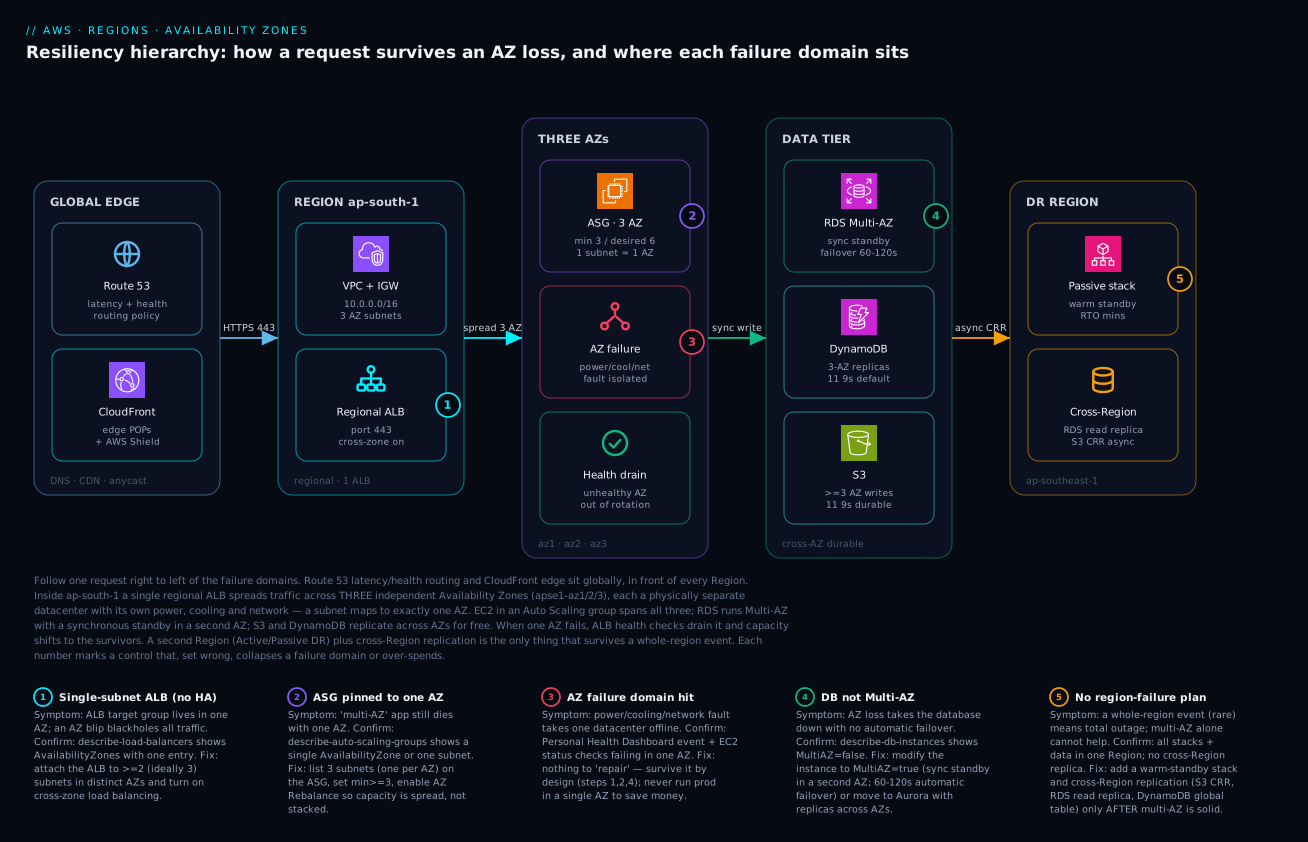
The diagram traces one request through the resiliency hierarchy, left to right, and marks the controls that — set wrong — collapse a failure domain. Start at the global edge: Route 53 applies latency and health-based routing, and CloudFront serves cached content from edge PoPs (with AWS Shield absorbing L3/4 attacks) — both global, in front of every Region. The request lands in Region ap-south-1, enters the VPC (10.0.0.0/16, three AZ subnets) and hits a single regional ALB on port 443 with cross-zone load balancing on. That one ALB fans the request across three independent Availability Zones (apse1-az1/2/3) — each a physically separate datacenter with its own power, cooling and network — where an EC2 Auto Scaling group spans all three (min 3, desired 6, one subnet per AZ). When an AZ’s power/cooling/network faults, it becomes an isolated failure domain; the ALB’s health checks drain the unhealthy AZ and capacity shifts to the survivors.
Behind compute sits the data tier: RDS Multi-AZ with a synchronous standby in a second AZ (60–120 s automatic failover), DynamoDB replicating across three AZs at eleven-nines durability for free, and S3 writing every object to ≥3 AZs, also free. Finally, a second Region (ap-southeast-1) holds a warm-standby passive stack plus cross-Region replication (an RDS read replica and S3 CRR) — the only thing in the picture that survives a whole-Region event. Each numbered badge marks a control that, misconfigured, breaks the chain: a single-subnet ALB (1), an ASG pinned to one AZ (2), the AZ failure domain itself (3), a database that isn’t Multi-AZ (4), and the absence of any region-failure plan (5). Read the legend as symptom · how to confirm · fix for each.
Real-world scenario
Streamly is a fictional but realistic Indian video-streaming startup: a three-tier app (React front end on CloudFront/S3, a Node API on EC2, PostgreSQL on RDS) serving ~250,000 daily users, almost all in India, out of ap-south-1 (Mumbai). The platform team is five engineers; the monthly AWS bill is about ₹6,80,000. To launch fast and cheap they had done what many do: clicked through the console, accepted the default AZ, and built everything in ap-south-1a — one public subnet, one private subnet, one NAT gateway, a single-AZ RDS instance, and an Auto Scaling group whose VPCZoneIdentifier listed exactly one subnet. On paper they had “an ALB, Auto Scaling, and managed RDS” — the vocabulary of high availability. In reality every tier shared one failure domain.
The incident hit on a Saturday evening during a cricket-final livestream — peak traffic. At 20:42 a power/cooling event degraded apse1-az1 (the physical AZ their ap-south-1a mapped to). The symptoms cascaded in seconds. The ALB, attached to one subnet, had no healthy targets and started returning 503. The Auto Scaling group tried to launch replacement instances — into the same dead AZ, because that was the only subnet it knew — and they failed to come up. The RDS instance, single-AZ, had no standby to promote; the database was simply gone. And because the lone NAT gateway lived in that AZ, even the few instances that mattered elsewhere had lost egress. The “highly available” stack was fully down. The on-call engineer’s reflexes — restart the app, scale the ASG — did nothing, because every lever pointed back into the failed AZ.
The breakthrough was diagnostic, not heroic. The senior on-call ran aws elbv2 describe-load-balancers and saw a single entry under AvailabilityZones. aws autoscaling describe-auto-scaling-groups showed one AZ and one subnet. aws rds describe-db-instances showed MultiAZ: false. The picture was unmistakable: this was never a multi-AZ system. There was no fast in-incident fix — you cannot conjure a standby database or new subnets mid-outage — so they waited for AWS to recover apse1-az1, which took about two hours and forty minutes. Total downtime during their highest-revenue window of the quarter.
The remediation, done deliberately over the next two weeks, was almost entirely structural and barely moved the bill. They added public and private subnets in apse1-az2 and apse1-az3, re-attached the ALB to all three public subnets, set the ASG’s VPCZoneIdentifier to all three private subnets with min_size = 3 and AZ Rebalance on, converted RDS to Multi-AZ (a synchronous standby in a second AZ), and deployed a NAT gateway per AZ with per-AZ route tables. The compute cost was unchanged — the same six instances, now spread across three buildings instead of stacked in one. The genuine new costs were the RDS standby (~+₹38,000/mo), two extra NAT gateways (~+₹9,000/mo), and a modest rise in cross-AZ data transfer (~₹12,000/mo) — together under 9% on a bill that had just eaten a multi-hour outage during the cricket final.
Six weeks later, a different AZ in ap-south-1 had a brief network event. This time describe-target-health showed the affected AZ’s targets draining, the ASG launched replacements in the two healthy AZs within minutes, RDS executed an automatic failover to its standby in about 70 seconds, and users saw a blip in buffering, not an outage. The line the team pinned to the wall: “Auto Scaling and Multi-AZ are not features you enable — they are subnets you list. We had the words without the wiring.”
Advantages and disadvantages
Multi-AZ as the default production posture is overwhelmingly the right call, but weigh it honestly:
| Advantages (why Multi-AZ is the baseline) | Disadvantages (the costs and limits) |
|---|---|
| Survives the common failure (a single AZ) — by far the most likely datacenter incident | Does not survive a whole-Region event — multi-Region is a separate, costlier effort |
| Essentially free on compute — same instance count, spread across buildings | Cross-AZ data transfer is billed per GB each way; chatty paths add up |
| Managed services do it for you — S3/DynamoDB are multi-AZ by default, RDS Multi-AZ failover is automatic | A Multi-AZ RDS standby is a paid, idle instance (instance mode can’t even serve reads) |
| Operationally simple — identity, networking and most services stay within one Region | A NAT gateway per AZ for resilient egress multiplies that hourly charge |
| Low-latency HA — AZs are close enough for synchronous replication, so failover is fast and consistent | Quorum systems need three AZs, so two-AZ designs can still lose availability on one failure |
| Health-based draining routes around a dead AZ automatically when wired correctly | Capacity headroom: each AZ must hold spare for a neighbour’s failure (2× for two AZs) |
| AZ Rebalance re-spreads capacity automatically once an AZ recovers | Defaults are unsafe — console-default single-subnet placement looks HA but isn’t |
The model is right for essentially every production workload: you want the common failure absorbed for almost no money, and managed services hand you most of the resilience. It bites when (a) you skip it and run single-AZ “to save money” — the costliest false economy in this article, (b) you build two AZs for a three-AZ quorum need, or © you minimize AZ spread to shave a data-transfer bill and reintroduce a single point of failure. Each disadvantage is manageable once you know it exists — which is the whole point.
Hands-on lab
Build a genuinely Multi-AZ web tier — VPC across three AZs, ALB across three subnets, an Auto Scaling group spanning all three — then prove it by draining an AZ’s targets and watching traffic survive. Free-tier-friendly where possible (t3.micro); delete everything at the end to avoid NAT/ALB charges. Run in CloudShell or any shell with the CLI configured for a three-AZ Region (we use ap-south-1).
Step 1 — Variables and the three AZs.
REGION=ap-south-1
VPC_CIDR=10.20.0.0/16
# Grab the first three AZ names in the Region
mapfile -t AZS < <(aws ec2 describe-availability-zones --region $REGION \
  --query "AvailabilityZones[?State=='available'].ZoneName" --output text | tr '\t' '\n' | head -3)
echo "Using AZs: ${AZS[@]}"   # expect three, e.g. ap-south-1a ap-south-1b ap-south-1c
Step 2 — VPC and an Internet Gateway.
VPC_ID=$(aws ec2 create-vpc --cidr-block $VPC_CIDR --region $REGION \
  --query Vpc.VpcId --output text)
IGW_ID=$(aws ec2 create-internet-gateway --region $REGION \
  --query InternetGateway.InternetGatewayId --output text)
aws ec2 attach-internet-gateway --vpc-id $VPC_ID --internet-gateway-id $IGW_ID --region $REGION
echo "VPC=$VPC_ID IGW=$IGW_ID"
Step 3 — One public subnet per AZ (this is the Multi-AZ part).
SUBNETS=()
for i in 0 1 2; do
  SID=$(aws ec2 create-subnet --vpc-id $VPC_ID --region $REGION \
    --cidr-block 10.20.$((i*10)).0/24 --availability-zone ${AZS[$i]} \
    --query Subnet.SubnetId --output text)
  aws ec2 modify-subnet-attribute --subnet-id $SID --map-public-ip-on-launch --region $REGION
  SUBNETS+=($SID)
  echo "Subnet in ${AZS[$i]} = $SID"
done
Expected: three subnet IDs, one per AZ. This is your AZ coverage.
Step 4 — Route the subnets to the internet.
RT_ID=$(aws ec2 create-route-table --vpc-id $VPC_ID --region $REGION \
  --query RouteTable.RouteTableId --output text)
aws ec2 create-route --route-table-id $RT_ID --destination-cidr-block 0.0.0.0/0 \
  --gateway-id $IGW_ID --region $REGION
for SID in "${SUBNETS[@]}"; do
  aws ec2 associate-route-table --route-table-id $RT_ID --subnet-id $SID --region $REGION
done
Step 5 — Security group, then an ALB across all three subnets.
SG_ID=$(aws ec2 create-security-group --group-name lab-alb-sg --description "lab alb" \
  --vpc-id $VPC_ID --region $REGION --query GroupId --output text)
aws ec2 authorize-security-group-ingress --group-id $SG_ID --protocol tcp --port 80 \
  --cidr 0.0.0.0/0 --region $REGION

ALB_ARN=$(aws elbv2 create-load-balancer --name lab-alb --type application \
  --subnets "${SUBNETS[@]}" --security-groups $SG_ID --region $REGION \
  --query "LoadBalancers[0].LoadBalancerArn" --output text)

# Confirm it faces THREE AZs — the whole point of the lab
aws elbv2 describe-load-balancers --load-balancer-arns $ALB_ARN --region $REGION \
  --query "LoadBalancers[0].AvailabilityZones[].ZoneName" --output table
Expected: a table with three AZ rows. One row would mean a single-AZ ALB — the failure we’re avoiding.
Step 6 — A target group and an Auto Scaling group across all three subnets.
TG_ARN=$(aws elbv2 create-target-group --name lab-tg --protocol HTTP --port 80 \
  --vpc-id $VPC_ID --target-type instance --region $REGION \
  --query "TargetGroups[0].TargetGroupArn" --output text)
aws elbv2 create-listener --load-balancer-arn $ALB_ARN --protocol HTTP --port 80 \
  --default-actions Type=forward,TargetGroupArn=$TG_ARN --region $REGION

# Minimal launch template that serves an AZ-aware hello page
AMI=$(aws ssm get-parameter --region $REGION \
  --name /aws/service/ami-amazon-linux-latest/al2023-ami-kernel-default-x86_64 \
  --query Parameter.Value --output text)
USERDATA=$(printf '#!/bin/bash\ndnf install -y httpd\nAZ=$(curl -s http://169.254.169.254/latest/meta-data/placement/availability-zone)\necho "OK from $AZ" > /var/www/html/index.html\nsystemctl enable --now httpd\n' | base64 -w0)
LT_ID=$(aws ec2 create-launch-template --launch-template-name lab-lt --region $REGION \
  --launch-template-data "{\"ImageId\":\"$AMI\",\"InstanceType\":\"t3.micro\",\"SecurityGroupIds\":[\"$SG_ID\"],\"UserData\":\"$USERDATA\"}" \
  --query "LaunchTemplate.LaunchTemplateId" --output text)

SUBNET_CSV=$(IFS=,; echo "${SUBNETS[*]}")
aws autoscaling create-auto-scaling-group --auto-scaling-group-name lab-asg \
  --launch-template "LaunchTemplateId=$LT_ID" --min-size 3 --max-size 6 --desired-capacity 3 \
  --vpc-zone-identifier "$SUBNET_CSV" --target-group-arns $TG_ARN \
  --health-check-type ELB --region $REGION

# Prove the ASG spans three AZs
aws autoscaling describe-auto-scaling-groups --auto-scaling-group-names lab-asg --region $REGION \
  --query "AutoScalingGroups[0].{AZs:AvailabilityZones, Subnets:VPCZoneIdentifier}" --output json
Expected: AZs lists three zones. After a couple of minutes, curl http://<ALB-DNS>/ (from describe-load-balancers --query LoadBalancers[0].DNSName) returns OK from ap-south-1a/b/c, varying by which instance answered.
Step 7 — Simulate an AZ loss and watch survival. Pull the instances of one AZ out of the target group (a stand-in for that AZ failing) and confirm the ALB keeps serving from the other two:
# Watch target health; deregister one AZ's targets; traffic should continue from the rest
aws elbv2 describe-target-health --target-group-arn $TG_ARN --region $REGION \
  --query "TargetHealthDescriptions[].{Id:Target.Id, AZ:Target.AvailabilityZone, State:TargetHealth.State}" \
  --output table
# (Deregister the instance(s) whose AZ you want to 'fail', then re-run a curl loop against the ALB DNS — it stays up.)
Validation checklist. You built a VPC across three AZs, attached the ALB to three subnets (confirmed three AvailabilityZones), spread an ASG across all three (min 3), and demonstrated that removing one AZ’s targets does not take the service down. No application code resilience was involved — the availability came entirely from which subnets you listed.
| Step | What you did | What it proves | Real-world analogue |
|---|---|---|---|
| 3 | One subnet per AZ | AZ coverage = the subnets you create | The structural HA decision |
| 5 | ALB across 3 subnets | The front door faces every AZ | Avoiding the single-subnet blackhole |
| 6 | ASG VPCZoneIdentifier = 3 subnets |
Compute spreads across AZs | The fix for “fake HA” Auto Scaling |
| 7 | Drain one AZ’s targets | Service survives one AZ loss | An actual AZ incident |
Cleanup (avoid NAT/ALB/instance charges).
aws autoscaling delete-auto-scaling-group --auto-scaling-group-name lab-asg --force-delete --region $REGION
aws elbv2 delete-listener --listener-arn $(aws elbv2 describe-listeners --load-balancer-arn $ALB_ARN --region $REGION --query "Listeners[0].ListenerArn" --output text) --region $REGION
aws elbv2 delete-load-balancer --load-balancer-arn $ALB_ARN --region $REGION
aws elbv2 delete-target-group --target-group-arn $TG_ARN --region $REGION
aws ec2 delete-launch-template --launch-template-id $LT_ID --region $REGION
# Then detach/delete IGW, subnets, route table, SG, and finally the VPC.
aws ec2 detach-internet-gateway --internet-gateway-id $IGW_ID --vpc-id $VPC_ID --region $REGION
aws ec2 delete-internet-gateway --internet-gateway-id $IGW_ID --region $REGION
for SID in "${SUBNETS[@]}"; do aws ec2 delete-subnet --subnet-id $SID --region $REGION; done
aws ec2 delete-vpc --vpc-id $VPC_ID --region $REGION
Cost note. An ALB and three t3.micro instances for an hour run a few tens of rupees; we used no NAT gateway in the lab (public subnets) precisely to keep it cheap. Delete promptly — an ALB left running is the main lingering charge.
Common mistakes & troubleshooting
This is the playbook — the part you bookmark. First a scannable table you can read mid-incident, then the full reasoning for the entries that bite hardest. Every “fake HA” failure has the same shape: a resource that looks spread across AZs but is listed against one.
| # | Symptom | Root cause | Confirm (exact command) | Fix |
|---|---|---|---|---|
| 1 | One AZ degrades and the whole site 503s despite an ALB | ALB attached to a single subnet (one AZ) | aws elbv2 describe-load-balancers --query "LoadBalancers[].AvailabilityZones" shows one entry |
Attach the ALB to subnets in ≥2 (ideally 3) AZs; turn on cross-zone |
| 2 | “Auto-scaled” tier dies entirely with one AZ; replacements won’t launch | ASG VPCZoneIdentifier lists one subnet |
aws autoscaling describe-auto-scaling-groups --query "...AvailabilityZones" shows one AZ |
List a subnet per AZ; set min_size ≥ 2–3; enable AZ Rebalance |
| 3 | AZ loss takes the database down, no failover | RDS is single-AZ (MultiAZ=false) |
aws rds describe-db-instances --query "...MultiAZ" returns false |
modify-db-instance --multi-az (subnet group must list ≥2 AZs) |
| 4 | One AZ fails and ALL instances (every AZ) lose internet egress | Single NAT gateway in the failed AZ | aws ec2 describe-nat-gateways shows fewer NAT GWs than AZs |
One NAT gateway per AZ + per-AZ route tables |
| 5 | Shared/peered resources cost more or can’t co-locate across accounts | Aligned on AZ name not AZ ID | Compare ZoneId across accounts via describe-availability-zones |
Coordinate on the AZ ID (apse1-az1), not ap-south-1a |
| 6 | NLB traffic piles onto one AZ; targets in others idle | NLB cross-zone load balancing is off (default) | aws elbv2 describe-target-group-attributes shows cross-zone false |
Enable cross-zone on the NLB (note: billed as cross-AZ transfer) |
| 7 | Multi-AZ RDS enabled but reads still hammer one instance | Multi-AZ instance standby can’t serve reads | describe-db-instances shows MultiAZ true but one endpoint |
Use Multi-AZ DB cluster or read replicas for read scaling |
| 8 | API call fails with auth/endpoint error in a new Region | Region is opt-in and not enabled / wrong STS endpoint | aws ec2 describe-regions --query "...OptInStatus" |
Enable the Region; use its regional STS endpoint |
| 9 | Surprise data-transfer bill after going Multi-AZ | Heavy cross-AZ traffic (app↔DB, mesh) over private IP | Cost Explorer → data transfer; check inter-AZ GB | Gateway endpoints for S3/DDB; keep hottest paths same-AZ |
| 10 | App still down after failover; can’t reach the internet | NAT per AZ exists but route tables not per-AZ | aws ec2 describe-route-tables — all subnets point at one NAT |
Give each AZ’s private subnet its own route to its AZ’s NAT |
| 11 | “We have a CDN, we’re highly available” — but an AZ event still broke us | Confusing edge/latency with availability | Architecture review: where do origins actually live? | CloudFront is performance/DDoS, not DR; fix origin AZ spread |
| 12 | Two-AZ quorum cluster loses availability when one AZ fails | Quorum needs majority; 1 of 2 is no majority | Cluster shows no quorum / read-only after one AZ down | Run quorum systems across three AZs |
| 13 | One-Zone-IA S3 data lost after an AZ event | S3 One Zone-IA stores in a single AZ |
aws s3api get-bucket... / object storage class is ONEZONE_IA |
Use S3 Standard (≥3 AZ) for anything not reproducible |
| 14 | EFS-backed app loses access in one AZ | No mount target in the surviving AZs | aws efs describe-mount-targets shows targets in <all AZs |
Create an EFS mount target in every AZ the app runs in |
| 15 | ElastiCache cluster has no failover when its AZ dies | Multi-AZ not enabled on the replication group | aws elasticache describe-replication-groups → AutomaticFailover disabled |
Enable Multi-AZ + automatic failover; add a replica in another AZ |
| 16 | RDS won’t enable Multi-AZ (“subnet group must cover 2 AZs”) | DB subnet group lists subnets in only one AZ | aws rds describe-db-subnet-groups --query "...Subnets[].SubnetAvailabilityZone" |
Add a subnet from a second AZ to the DB subnet group |
| 17 | Spot/On-Demand capacity error when one AZ is constrained | All capacity requested in a single AZ | ASG activity history shows InsufficientInstanceCapacity in one AZ |
Spread the ASG across 3 AZs; use mixed instances/capacity-optimized |
| 18 | “Highly available” stack on EBS won’t recover in another AZ | EBS volume is AZ-bound; can’t attach across AZs | aws ec2 describe-volumes --query "...AvailabilityZone" |
Don’t rely on a single EBS volume for HA; use snapshots/EFS/managed stores |
The expanded form, for the failures that cost the most:
1. One AZ degrades and the whole site 503s despite “having an ALB.”
Root cause: The ALB is attached to a single subnet (one AZ). When that AZ’s targets go unhealthy, the ALB has nowhere to route. The presence of an ALB created the illusion of HA.
Confirm: aws elbv2 describe-load-balancers --names <alb> --query "LoadBalancers[].AvailabilityZones[].ZoneName" returns one zone.
Fix: Attach the ALB to subnets in ≥2 (ideally 3) AZs; ensure cross-zone load balancing is on (default for ALB). Re-run the confirm command and expect multiple zones.
2. The “auto-scaled, highly available” tier dies entirely with one AZ; replacements never come up.
Root cause: The ASG’s VPCZoneIdentifier lists one subnet, so it can only ever launch into one AZ — including the replacements it tries to launch during that AZ’s failure.
Confirm: aws autoscaling describe-auto-scaling-groups --auto-scaling-group-names <asg> --query "AutoScalingGroups[].{AZs:AvailabilityZones, Subnets:VPCZoneIdentifier}" shows a single AZ.
Fix: Set VPCZoneIdentifier to one subnet per AZ, min_size at least equal to the AZ count (≥3 for quorum/headroom), and leave AZ Rebalance on so capacity re-spreads after recovery.
3. An AZ loss takes the database down with no failover.
Root cause: Single-AZ RDS — there is no standby to promote, so the database simply disappears with its AZ.
Confirm: aws rds describe-db-instances --db-instance-identifier <db> --query "DBInstances[].MultiAZ" returns false.
Fix: aws rds modify-db-instance --db-instance-identifier <db> --multi-az --apply-immediately. The DB subnet group must contain subnets in ≥2 AZs or the change is rejected. Expect a 60–120 s automatic failover on a real AZ event thereafter.
4. One AZ fails and every instance in every AZ loses outbound internet.
Root cause: A single NAT gateway in the failed AZ that all private subnets route through; when its AZ dies, egress dies fleet-wide — an AZ failure amplified into a Region-wide egress outage.
Confirm: aws ec2 describe-nat-gateways --filter "Name=vpc-id,Values=<vpc>" shows fewer NAT gateways than AZs; aws ec2 describe-route-tables shows multiple AZ subnets pointing at the same NAT.
Fix: Deploy one NAT gateway per AZ and give each AZ’s private subnet its own route table pointing at its own zone’s NAT (see also #10).
5. Shared resources across accounts cost more or can’t be co-located.
Root cause: You aligned on the AZ name (ap-south-1a), which maps to different physical AZs in different accounts, so “same AZ” wasn’t actually same — adding cross-AZ charges or breaking same-AZ placement assumptions.
Confirm: aws ec2 describe-availability-zones --query "AvailabilityZones[].{Name:ZoneName,Id:ZoneId}" in each account and compare the ZoneId.
Fix: Coordinate cross-account placement on the AZ ID (apse1-az1), not the name.
9. A surprise data-transfer bill after going Multi-AZ. Root cause: Correctly spreading across AZs added cross-AZ data transfer on chatty paths (app↔DB, service mesh), billed per GB each way. Confirm: Cost Explorer → filter on data-transfer usage types for inter-AZ; correlate with your hottest internal paths. Fix: Add gateway VPC endpoints for S3/DynamoDB (makes that traffic free and removes NAT processing), keep the hottest links same-AZ where availability allows, and use private IPs. Do not collapse AZ spread to save transfer — optimize paths, not the AZ count.
Best practices
- Spread every production tier across at least two AZs; use three for anything stateful or quorum-based. Two AZs cannot hold a majority after one fails; three can. Default to three.
- Remember the rule: HA is which subnets you list. ALB subnets, ASG
VPCZoneIdentifier, and the DB subnet group must each enumerate multiple AZs. A single subnet anywhere is a single point of failure. - Use Multi-AZ RDS or Aurora for every production database. A single-AZ database has no failover; the standby/replicas across AZs are what give you a ~60–120 s recovery instead of a multi-hour outage.
- Keep state in managed services that are multi-AZ by default — S3 Standard (≥3 AZ), DynamoDB (≥3 AZ) — and avoid the single-AZ exceptions (S3 One Zone-IA) for anything you can’t reproduce.
- Deploy a NAT gateway per AZ with per-AZ route tables in production, so an AZ failure can’t take out egress for the whole VPC.
- Coordinate cross-account placement on AZ IDs, not names.
apse1-az1is stable;ap-south-1ais not. - Size each AZ for a neighbour’s failure. With two AZs, each must hold ~2× steady-state; with three, ~1.5×. Bake the headroom into Auto Scaling minimums.
- Choose the Region on latency, service availability, data residency and cost — never the console default. Measure latency from your real user geographies.
- Treat CloudFront/Global Accelerator and Local Zones as latency/DDoS tools, not DR. They do not replace Multi-AZ or multi-Region.
- Make Multi-AZ rock-solid before investing in multi-Region. Failing to the DR Region for an AZ incident is an expensive way to handle a small failure.
- Monitor at the AZ granularity. Per-AZ target health, the Personal Health Dashboard, and EC2 status checks tell you which AZ is the problem.
- Build and rehearse an AZ-failure runbook. Know in advance what drains, what fails over automatically (RDS), and what you’d touch manually.
The alerts and signals worth wiring before the next AZ event — the leading indicators, not just “site down”:
| Watch | Signal / source | What it tells you | Action |
|---|---|---|---|
| Per-AZ target health | ALB HealthyHostCount by AZ |
An AZ’s targets draining | Confirm AZ event; verify survivors absorb load |
| AWS health events | Personal Health Dashboard | AWS-reported AZ/Region issues | Match symptoms; avoid blind restarts |
| RDS failover | RDS events / DBInstanceClass AZ change |
Standby promoted in another AZ | Confirm app reconnected to the new active |
| Egress reachability | NAT gateway metrics / synthetic egress check | An AZ’s NAT down | Confirm per-AZ NAT routing held |
| Cross-AZ transfer | Cost Explorer inter-AZ usage | Spend creeping on chatty paths | Add endpoints; review hot links |
| Capacity headroom | ASG desired vs max, per-AZ spread | Whether survivors can absorb load | Raise minimums / max if too tight |
| Spot interruptions by AZ | Spot interruption notices | Capacity stress in an AZ | Diversify instance types/AZs |
| Per-AZ error rate | ALB target 5xx by AZ | An AZ degrading before full failure | Pre-emptively drain / investigate |
Security notes
Resilience and security overlap more than they look — placement decisions are also blast-radius decisions.
- Isolate tiers with subnet + security-group design across AZs. Public subnets (ALB, NAT) and private subnets (app, data) per AZ keep the data tier off the internet while staying Multi-AZ; the VPC, subnets and security groups model is the foundation.
- Don’t expose the data tier directly. RDS, ElastiCache and internal services belong in private subnets with no route to an IGW; the ALB in public subnets is the only internet-facing hop.
- Use VPC endpoints (gateway for S3/DynamoDB, interface for others) so internal traffic to AWS services never traverses the public internet — and as a bonus, gateway endpoints remove the cross-AZ/NAT cost for that traffic.
- Encrypt cross-AZ and cross-Region replication. RDS/Aurora replication, S3 CRR and DynamoDB global tables encrypt in transit and at rest with KMS; keep keys scoped per Region (or use multi-Region keys deliberately) so a Region’s compromise doesn’t hand over another’s data.
- Scope IAM and resource policies per Region/account where it limits blast radius. A credential leak should not grant cross-Region or cross-account reach by default; align on AZ/Region IDs in conditions when you constrain placement.
- For multi-Region, mirror your security controls, not just your data. WAF rules, security groups, GuardDuty, and config rules must exist in the DR Region too, or you fail over into a less-defended environment.
- Treat the global control plane realistically. Some global services are anchored in
us-east-1; design so a regional control-plane event degrades gracefully rather than hard-failing your global routing.
The placement-as-security controls in one view:
| Control | Mechanism | Limits blast radius of | Resilience bonus |
|---|---|---|---|
| Private subnets per AZ | Route tables without IGW | Internet exposure of data tier | Multi-AZ without public exposure |
| Gateway VPC endpoints | S3/DynamoDB endpoints | Internet path for AWS-service traffic | Removes cross-AZ/NAT cost for that traffic |
| KMS per-Region keys | Region-scoped CMKs | Cross-Region key compromise | Clean per-Region encryption boundary |
| IAM Region/account scoping | Condition keys, SCPs | Cross-Region/account credential reach | Forces deliberate multi-Region grants |
| Mirrored controls in DR | WAF/SG/GuardDuty in both Regions | A weakly-defended failover target | DR Region is production-equivalent |
Cost & sizing
The bill drivers and how they interact with resilience:
- Compute is unchanged by AZ spread. Three instances across three AZs cost the same as three in one AZ — you pay per instance-hour, not per AZ. There is no compute reason to run single-AZ.
- Cross-AZ data transfer is the line item Multi-AZ adds: billed per GB each way on traffic crossing an AZ boundary. On low-traffic apps it’s negligible; on chatty meshes or heavy app↔DB paths it’s real — mitigate with gateway endpoints and same-AZ hot paths, not by collapsing AZ spread.
- Multi-AZ RDS doubles the database instance cost (you pay for the synchronous standby), and a Multi-AZ DB cluster runs ~3 instances. This is the genuine cost of automatic database failover — and far cheaper than a multi-hour outage.
- NAT gateways per AZ multiply the hourly + per-GB NAT charge. For dev, one NAT gateway is a fine saving; for production, per-AZ NAT is resilient and keeps NAT traffic same-AZ (cheaper transfer).
- Multi-Region is a different order of cost — duplicate stacks plus cross-Region replication bandwidth (a higher per-GB rate than cross-AZ). Justify it with RTO/RPO, not instinct.
A rough monthly picture for a small production three-tier app in ap-south-1, single-AZ vs proper Multi-AZ:
| Cost driver | Single-AZ (don’t) | Multi-AZ (3 AZ) | Notes |
|---|---|---|---|
| Compute (6× app instances) | ~₹X | ~₹X (same) | Spread, not multiplied — identical cost |
| RDS | 1× instance | ~2× (standby) | The price of automatic failover |
| NAT gateways | 1 | 3 | Per-AZ NAT for resilient egress |
| Cross-AZ data transfer | ~0 | small–moderate | Per GB each way; optimize hot paths |
| ALB | 1 (single subnet) | 1 (three subnets) | Same ALB, no extra cost for more AZs |
| EBS volumes | per-AZ, same count | same count | Snapshots are cross-AZ/Region durable |
| Data egress to internet | same | same | Unchanged by AZ spread |
| Net delta of going Multi-AZ | — | standby + 2 NAT + transfer | Typically single-digit % of total bill |
The headline: Multi-AZ is cheap insurance. For Streamly above it was under 9% on the bill, against a multi-hour outage during peak revenue. The expensive choice is single-AZ — it just defers the cost to your worst day. Multi-Region is where real money appears; spend it only when the recovery objectives demand it (the patterns and their cost/RTO/RPO trade-offs are in AWS Backup and Disaster Recovery Strategies).
Interview & exam questions
1. What is the difference between an AWS Region and an Availability Zone? A Region is a geographic area (e.g. ap-south-1) of fully independent infrastructure with its own copy of regional services. An Availability Zone is one or more physically separate datacenters within a Region, with independent power, cooling and network, connected to the other AZs by low-latency private fibre. You design across AZs to survive a datacenter failure and across Regions to survive an area-wide disaster.
2. Why does a subnet belong to exactly one AZ, and why does that matter? A subnet is bound to a single AZ at creation and can’t span two. It matters because your VPC’s AZ coverage is the set of subnets you create — “spread across AZs” concretely means “a subnet per AZ, with resources in each.” An ALB or ASG listing one subnet is single-AZ no matter what else you do.
3. What does RDS Multi-AZ actually provide, and how fast is failover? Multi-AZ provisions a synchronous standby in a second AZ and fails over to it automatically on an AZ or instance failure, typically in 60–120 seconds (faster for Multi-AZ DB clusters). In the classic instance mode the standby doesn’t serve reads — it’s for availability, not read scaling; use read replicas or a Multi-AZ DB cluster for that.
4. Two AZs or three — how do you decide? Two AZs survive one AZ failure for stateless tiers but cannot hold a majority for quorum systems (1 of 2 is no quorum). Three AZs keep a majority (2 of 3) after one failure and require less spare capacity per AZ (1.5× vs 2×). Default to three for anything stateful or consensus-based; two only for simple stateless tiers.
5. Why are AZ names randomized per account, and when do you use AZ IDs? AWS maps the friendly name (ap-south-1a) to a different physical AZ per account to spread load evenly. The AZ ID (apse1-az1) is stable across accounts. Use AZ IDs when coordinating cross-account placement (shared VPCs, PrivateLink, peering) to land resources in the same physical AZ and avoid cross-AZ charges.
6. A team has an ALB, Auto Scaling and managed RDS but still went fully down in an AZ event. What happened? Almost certainly “fake HA”: the ALB was on one subnet, the ASG’s VPCZoneIdentifier listed one subnet, and RDS was single-AZ — every tier shared one AZ. Confirm with describe-load-balancers, describe-auto-scaling-groups and describe-db-instances. The fix is structural — list multiple AZ subnets everywhere and enable Multi-AZ RDS.
7. How is cross-AZ data transfer billed, and what’s free? Traffic crossing an AZ boundary is billed per GB in each direction. Same-AZ traffic by private IP is free, as is in-Region traffic to S3/DynamoDB via gateway endpoints. ALB cross-zone isn’t separately billed; NLB cross-zone is billed as cross-AZ (why it’s off by default). Optimize the hot paths, but never drop the AZ spread you need for availability.
8. Is scaling out across more AZs the fix for a single-AZ NAT gateway outage? No — the issue is that a single NAT gateway in the failed AZ carried all egress. The fix is one NAT gateway per AZ with per-AZ route tables, so each AZ’s private subnets egress through their own zone’s NAT and one AZ’s failure can’t kill fleet-wide egress.
9. When is multi-Region genuinely warranted, and what comes first? When your RTO/RPO requirements exceed what a single Region can offer, or you must serve a global user base with low latency, or meet data-residency rules in another geography. Multi-AZ must be solid first — multi-Region built on single-AZ tiers makes you fail over for small AZ incidents at huge RTO cost.
10. What’s the difference between an edge location, a Local Zone and a Region for resilience? An edge location (CloudFront/Global Accelerator PoP) is for latency and DDoS, not availability. A Local Zone places compute in a metro tied to a parent Region for low latency — still not a separate DR domain. Only a Region (and AZs within it) is a true resilience boundary. Don’t confuse a CDN with high availability.
11. Which AWS data services are multi-AZ by default, and which need configuring? S3 Standard (≥3 AZ) and DynamoDB (≥3 AZ) are multi-AZ for free, automatically. RDS needs Multi-AZ enabled; ElastiCache needs Multi-AZ turned on; EFS needs a mount target per AZ. The single-AZ exception to watch is S3 One Zone-IA, which deliberately stores in one AZ.
12. How do you choose an AWS Region? On four criteria, roughly in order: latency to your users (measure it), service availability (not every service is in every Region), data residency / compliance (legal constraints on where data lives), and cost (per-unit prices vary by Region). Never default to us-east-1 just because the console opens there.
These map cleanly to AWS Certified Cloud Practitioner (CLF-C02) — global infrastructure, Regions/AZs/edge, the shared-responsibility and reliability pillars — and Solutions Architect Associate (SAA-C03) — designing resilient, multi-AZ and multi-Region architectures, choosing Regions, and Multi-AZ data services. The operational confirm-and-fix material maps to SysOps Associate (SOA-C02). A compact cert-mapping for revision:
| Question theme | Primary cert | Objective area |
|---|---|---|
| Region vs AZ vs edge, global infrastructure | CLF-C02 | Cloud concepts; global infrastructure |
| Multi-AZ design, choosing a Region | SAA-C03 | Design resilient architectures |
| Multi-AZ data services (RDS/Aurora/DynamoDB/S3) | SAA-C03 | Design high-availability/storage solutions |
| Multi-Region DR patterns (pilot light/warm standby) | SAA-C03 / SAP-C02 | Design for reliability and DR |
| AZ-failure diagnosis, per-AZ monitoring, NAT routing | SOA-C02 | Reliability and business continuity; networking |
| Cross-AZ cost, data-transfer optimization | SAA-C03 | Cost-optimized architectures |
Quick check
- You have an ALB, an Auto Scaling group and managed RDS, yet a single AZ event took the whole application down. Name the most likely root cause and the one command that confirms it for the ALB.
- True or false: running three EC2 instances spread across three AZs costs significantly more than running three in one AZ.
- Why do quorum-based systems (etcd, ZooKeeper, many distributed databases) need three AZs rather than two?
- Your application loses all outbound internet access — across every AZ — when one AZ fails. What’s the cause and the fix?
- Two AWS accounts both want resources in “the same AZ” to avoid cross-AZ charges, but they keep landing in different physical zones. What are they doing wrong?
Answers
- Fake HA — the ALB, ASG and/or RDS are each pinned to a single AZ (one subnet). Confirm the ALB with
aws elbv2 describe-load-balancers --names <alb> --query "LoadBalancers[].AvailabilityZones[].ZoneName"; one zone means single-AZ. The fix is to attach the ALB to subnets in ≥2 (ideally 3) AZs, list multiple subnets on the ASG, and enable Multi-AZ RDS. - False. You pay per instance-hour, not per AZ — three instances cost the same whether they’re in one AZ or spread across three. The only Multi-AZ costs are cross-AZ data transfer, a paid RDS standby, and (optionally) a NAT gateway per AZ; compute itself is unchanged.
- Quorum needs a majority to make consistent decisions. With two AZs, losing one leaves 1 of 2 — no majority, so the cluster stops accepting writes (or goes read-only). With three AZs, losing one leaves 2 of 3 — a majority — so it keeps operating. Three AZs preserve quorum through a single AZ failure.
- A single NAT gateway in the failed AZ carried egress for every private subnet, so its AZ’s failure killed fleet-wide outbound internet. Fix: deploy one NAT gateway per AZ and give each AZ’s private subnet its own route table pointing at its own zone’s NAT.
- They’re aligning on the AZ name (
ap-south-1a), which AWS maps to a different physical AZ in each account. They should coordinate on the stable AZ ID (apse1-az1), visible viaaws ec2 describe-availability-zones --query "AvailabilityZones[].{Name:ZoneName,Id:ZoneId}".
Glossary
- Region — a named geographic area (e.g.
ap-south-1) of fully independent AWS infrastructure, containing multiple Availability Zones and a local copy of regional services. - Availability Zone (AZ) — one or more physically separate datacenters within a Region, each with independent power, cooling, network and physical security; the failure domain you spread across for HA.
- AZ ID — the stable, cross-account identifier for a physical AZ (e.g.
apse1-az1), as opposed to the per-account-randomized friendly name (ap-south-1a). - Subnet — a CIDR range bound to exactly one AZ; “spreading across AZs” means creating a subnet per AZ.
- Multi-AZ — running a workload’s tiers across two or more AZs in one Region so a single AZ failure is survived.
- Multi-Region — running across two or more Regions to survive a whole-Region disaster or serve global users with low latency.
- Quorum — the majority a consensus system needs to make consistent decisions; why three AZs beat two for such systems.
- Cross-zone load balancing — a load-balancer setting (on for ALB, off for NLB by default) that lets it route to healthy targets in any AZ, smoothing uneven capacity.
- AZ Rebalance — Auto Scaling behaviour that re-spreads instances across AZs after a failed AZ recovers.
- NAT gateway — a zonal (single-AZ) managed NAT for outbound internet from private subnets; production needs one per AZ to keep egress resilient.
- Edge location / PoP — a CloudFront / Global Accelerator point of presence for CDN caching, TLS termination near users, and L3/4 DDoS absorption — a latency/security tool, not DR.
- Local Zone — AWS compute/storage placed in a specific metro and tied to a parent Region for single-digit-millisecond latency.
- Wavelength Zone — AWS compute embedded inside a telco’s 5G network for ultra-low-latency mobile/edge applications.
- DB subnet group — the set of subnets (which must span ≥2 AZs) an RDS instance can place its primary and standby in; required for Multi-AZ.
- RTO / RPO — Recovery Time Objective (how fast you must recover) and Recovery Point Objective (how much data loss is tolerable); these drive whether and how you go multi-Region.
- Pilot light / warm standby / active-active — multi-Region DR patterns of increasing cost and decreasing RTO, from a minimal warm core to a fully live second site.
Next steps
You can now place every tier across AZs correctly and know exactly what each layer survives. Build outward:
- Next: Amazon VPC, Subnets and Security Groups Explained — the per-AZ subnet, route-table and NAT design that is your Multi-AZ wiring.
- Related: Amazon RDS vs DynamoDB vs Aurora Compared — go deep on how each data service handles Multi-AZ, failover, and cross-Region replication.
- Related: AWS Backup and Disaster Recovery Strategies — the cross-Region story: backup & restore, pilot light, warm standby, RTO/RPO, and Route 53 cutover.
- Related: AWS Compute: EC2 vs Lambda vs ECS vs EKS — what you’re actually spreading across AZs, and how each compute model handles AZ placement.
- Related: Amazon S3 Storage Classes and Lifecycle — durability and the One Zone-IA single-AZ exception to use deliberately.
- Related: ALB vs NLB vs API Gateway Compared — the load-balancing front door, cross-zone behaviour, and where each fits in a Multi-AZ design.