You created an Azure Web App, and before it would deploy, Azure asked you to pick an App Service plan with a tier called F1, B1, S1, P1v3 or I1v2. The names look like seat numbers on a budget airline, the price column swings from free to “are you sure?”, and the help text talks about ACUs and “Isolated” without telling you which one you should click. So most people pick whatever the tutorial used and discover the consequences later — when Always On is greyed out, when scaling is missing, when the dev app dies every afternoon, or when the invoice arrives.
This article fixes that. An App Service plan is simply the set of rented VMs (the SKU and the instance count) that your web apps run on — and the tier of that plan decides three things that matter every day: how much CPU and memory each instance has, how (and whether) you can scale and stay highly available, and how isolated your app is from other customers. App Service itself is Azure’s platform-as-a-service (PaaS) for hosting web apps, REST APIs and background web jobs on a managed fleet of Windows or Linux workers — you git push or az webapp up and Azure runs it. The plan is the bill and the box; the app is the thing in the box. Get the box right and cost and uptime fall into place.
By the end you will have a crisp mental model of every tier from Free (F1) to Isolated v2 (Iv2), know exactly what each one buys and withholds (custom domains, TLS, slots, scaling, VNet, dedicated hardware), and be able to choose — and later right-size — the cheapest tier that still meets your requirements. You will reason from the box, not from a price list.
What problem this solves
The pain is almost never “App Service doesn’t work.” It’s “I picked the wrong plan and now something I need is missing — or I’m paying for something I don’t.” That shows up in very specific, recurring ways: a customer site on F1 (Free) that serves 503 every afternoon once the 60-minute-per-day CPU quota runs out; production on a single B1 instance, where every patch and config change is a few seconds of full downtime with no staging slot to swap into; three tiny apps over-provisioned on a P3v3 costing tens of thousands of rupees a month because someone read “Premium = production”; or a team needing the app private inside a VNet who reach for whatever tier they have, not realising single-tenant isolation is the entire point of Isolated v2 and exists nowhere below it.
Who hits this: essentially everyone who runs a web app or API on Azure. The tier choice is one of the first decisions you make and one of the easiest to get wrong, because the differences are invisible at create time and only bite later — a greyed-out toggle, a missing feature, an availability gap, or a bill. The good news: the rules are completely learnable, and once you hold the mental model, the right tier is usually obvious in under a minute. Here is the entire tier family at a glance — the rest of the article expands each row.
| Tier | SKUs | Hardware model | Built for | Headline limitation |
|---|---|---|---|---|
| Free | F1 |
Multi-tenant, shared | Throwaway experiments | 60 CPU-min/day quota; no custom TLS; no Always On |
| Shared | D1 |
Multi-tenant, shared | Tiny hobby sites | 240 CPU-min/day; no scale-out; no Always On |
| Basic | B1–B3 |
Dedicated VM (small) | Dev/test, low-traffic apps | Manual scale only; no deployment slots; no autoscale |
| Standard | S1–S3 |
Dedicated VM | Standard production web apps | No pre-warmed scale-out buffer; v2 hardware |
| Premium v3 | P0v3–P5v3, Pmv3 |
Dedicated, newer VMs | Performance/scale production | Higher hourly rate (offset by savings plans) |
| Isolated v2 | I1v2–I6v2 |
Single-tenant, in your VNet | Network-isolated / compliance | Highest cost; runs inside an App Service Environment |
Learning objectives
By the end of this article you can:
- Explain in one sentence what an App Service plan is and how it relates to a web app, a slot and the underlying VMs.
- Read a tier name (
F1,B2,S3,P1v3,I2v2) and immediately state its hardware model, whether it scales, and what production features it unlocks. - Compare Free, Shared, Basic, Standard, Premium v3 and Isolated v2 across CPU/RAM, scale-out limits, deployment slots, custom domains/TLS, VNet integration and isolation.
- Choose the cheapest tier that meets the requirement using a decision table, instead of defaulting to whatever a tutorial used.
- Distinguish scale up (bigger SKU) from scale out (more instances) and know which tiers allow each, plus where autoscale and pre-warmed instances begin.
- Understand what App Service Environment v3 (ASEv3) adds and when Isolated v2 is genuinely required versus merely expensive.
- Right-size a plan and estimate the bill, including where reserved instances and savings plans cut Premium v3 cost substantially.
Prerequisites & where this fits
You should be comfortable creating resources in the Azure portal or with the az CLI in Cloud Shell, and know roughly what a web app is (an HTTP server you deploy code or a container to). No prior App Service knowledge is assumed — this is the foundational concept article others build on. Familiarity with a VM (cores and RAM) helps, because a plan is, underneath, exactly that: rented VMs.
This sits at the start of the App Service learning path. Once you understand plans and tiers, the natural next steps are operating the platform — and when something breaks, Troubleshooting Azure App Service: 502/503 Errors, Cold Starts & Restart Loops picks up exactly where a tier limitation turns into an incident. If you are still deciding whether App Service is even the right host versus containers or Kubernetes, Azure App Service vs Container Apps vs AKS: Choose the Right Compute is the decision upstream of this one. Plans live inside the broader Azure Resource Hierarchy Explained: Subscriptions, Resource Groups and Resources, and the cost reasoning here connects to Azure FinOps and Cost Management: Controlling Cloud Spend at Scale.
A quick map of the three nouns people constantly confuse, so the rest of the article reads cleanly:
| Noun | What it is | You pay for | Analogy |
|---|---|---|---|
| App Service plan | The rented VMs (SKU + count) + the tier | This — the plan is the billed unit | The apartment building you rent |
| Web app (site) | One app (code/container) running on a plan | Nothing extra — it uses the plan | An apartment in the building |
| Deployment slot | A swappable copy of an app (e.g. staging) | Nothing extra (uses plan capacity) | A show-flat in the same building |
Core concepts
Five mental models make every tier decision obvious. Hold these and you rarely need the spec sheet.
The plan is the VM you rent; the app is just a tenant on it. Creating an App Service plan rents one or more VMs of a given size, and Azure bills you for the plan, per hour, whether or not an app runs on it. You can host many web apps on one plan, sharing its CPU, memory and instance count. So “ten tiny APIs” need not mean “ten bills” — it can mean one plan with ten apps, and the plan’s tier (not the app) is where every capability and cost lives.
The tier sets the box; the SKU sets the size within it. A tier (Free, Shared, Basic, Standard, Premium v3, Isolated v2) decides the hardware model and feature set. Within most tiers, numbered SKUs just scale the size: B1 < B2 < B3, S1 < S2 < S3, P0v3 < … < P5v3. Moving up a number (“scale up”) adds cores/RAM per instance; moving across a tier changes what is possible (slots, scaling, isolation). Two different levers.
Shared versus dedicated is the first fork. Free (F1) and Shared (D1) run on multi-tenant infrastructure with a hard daily CPU quota — you share a VM and are metered in CPU-minutes per day. Everything from Basic up gives dedicated VMs: the instances are yours, billed continuously (not by CPU-minute), with no daily quota. The jump from D1 to B1 — “a metered share” to “your own machine” — is the most consequential upgrade in the lineup.
Scale up versus scale out, and where each begins. Scale up = a bigger SKU (more CPU/RAM per instance), available even on Basic. Scale out = more instances of the same SKU for capacity and HA — beginning at Basic (3), widening at Standard (10) and Premium v3 (30), with autoscale requiring Standard or higher. Free and Shared cannot scale out at all, so every restart is downtime. HA needs at least two instances → at least Basic; production needs slots and autoscale too → at least Standard.
Isolation is a tier, not a checkbox. Most tiers are multi-tenant on the front end: your dedicated workers sit behind a shared Microsoft-managed front-end fleet. Isolated v2 is different — it deploys into an App Service Environment v3 (ASEv3), a single-tenant stamp injected into your virtual network, with no shared front end and very large scale ceilings. You move there for network isolation and compliance, not a small performance bump, and you pay for that privacy. If a requirement says “unreachable from the public internet, inside our VNet, on dedicated hardware,” that is the tier; otherwise it usually is not.
The vocabulary in one table
Before the per-tier detail, pin down every moving part. The glossary repeats these for lookup; this is the mental model side by side.
| Concept | One-line definition | Where it lives | Why it matters to tier choice |
|---|---|---|---|
| App Service plan | Rented VMs (SKU + count) + tier | Resource group | The billed unit; holds the tier |
| Tier / pricing tier | Free/Shared/Basic/Standard/Premium v3/Isolated v2 | Property of the plan | Decides features + hardware model |
| SKU | The size within a tier (B1, S3, P1v3) |
Property of the plan | Cores/RAM per instance; “scale up” |
| Instance / worker | One VM running your app | Inside the plan | More = capacity + HA; “scale out” |
| Scale up | Move to a bigger SKU | Plan setting | More CPU/RAM per instance |
| Scale out | Add more instances | Plan setting | Capacity + availability |
| Autoscale | Rules that add/remove instances | Standard+ | Hands-off elasticity |
| Deployment slot | A swappable copy (staging) | On the plan (Standard+ for real use) | Zero-downtime deploys |
| Always On | Keeps a warm worker resident | Site config (Basic+) | No cold starts from idle |
| VNet integration | App reaches into your VNet | Basic+ (regional) | Private backends |
| App Service Environment v3 | Single-tenant deployment in your VNet | Isolated v2 only | Network isolation |
| ACU / vCPU | Compute unit / virtual core | Per SKU | How fast each instance is |
The tiers, one by one
This is the heart of the article. Each tier below states what it is, the hardware model, what it unlocks, what it withholds, and when to pick it. Read your candidate row; the comparison grids that follow let you scan across all of them.
Free (F1) — for throwaway experiments only
F1 runs on multi-tenant, shared infrastructure capped by a daily CPU quota of about 60 minutes; spend it and the app stops and returns 503 until 00:00 UTC. You get a free *.azurewebsites.net hostname, but no custom-domain TLS, no Always On (so it unloads after ~20 minutes idle and the next request pays a full cold start), no scale-out, no slots. Perfect for a demo or “does my container even start” — unsuitable for anything a real user depends on.
Shared (D1) — a slightly larger hobby box, still metered
D1 is also multi-tenant and quota-metered, but with a larger daily CPU allowance (around 240 CPU-minutes/day) and the ability to add a custom domain (unlike Free). It still has no Always On, no scale-out, no slots, and still stops on quota breach. Most people skip it: once you outgrow Free you usually want a dedicated instance, which means Basic.
Basic (B1–B3) — your first dedicated machine
Basic is the first dedicated tier: the VMs are yours, billed continuously, with no daily CPU quota. It unlocks what real apps need first — Always On, custom domains with TLS, manual scale-out up to 3 instances (basic HA), and regional VNet integration — but still withholds autoscale and deployment slots (so no zero-downtime swap). It is the right home for dev/test and small internal apps where a few seconds of deploy downtime is acceptable and traffic is modest.
Standard (S1–S3) — the baseline for real production
Standard is where most production web apps belong, because it is the minimum tier that gives you HA + autoscale + safe deploys together: on top of Basic it adds autoscale, scale-out to 10 instances, 5 deployment slots (the foundation of zero-downtime deploys), daily backups and Traffic Manager. Its only real limitation versus Premium v3 is older (v2) hardware and no pre-warmed buffer, so a new instance added by autoscale serves its first requests cold.
Premium v3 (P0v3–P5v3, and the memory-optimized Pmv3) — performance and scale
Premium v3 is the modern production tier: newer, faster CPUs and more RAM per core than Standard, scale-out up to 30 instances, 20 deployment slots, pre-warmed instances (a warm buffer so scale-out never exposes a cold worker), zone redundancy (instances spread across availability zones), and the full VNet integration / Private Endpoint story. The downside is a higher hourly rate — but Premium v3 supports 1-/3-year reserved instances and savings plans that cut that rate sharply for steady workloads, which is why many teams run Premium v3 cheaper than an unreserved Standard fleet.
Isolated v2 (I1v2–I6v2) — single-tenant, inside your VNet
Isolated v2 is a different animal: it runs inside an App Service Environment v3 (ASEv3), a single-tenant deployment of App Service injected directly into your virtual network. There is no shared front end — the whole stack is dedicated to you — and the scale ceiling is very high (up to ~100 instances). SKUs I1v2 (2 vCPU / 8 GB) through I6v2 (32 vCPU / 256 GB) size the workers. You choose it for one family of reasons: strict network isolation and compliance — the app must be reachable only from inside your network (or a controlled front door), must not sit on shared infrastructure, and may need to meet regulatory boundaries. It is the most expensive option and adds the overhead of running an ASE, so the rule is simple: pick Isolated v2 when an isolation requirement forces it, never as a generic “faster Premium.”
The big comparison: features by tier
Now scan across. This is the table to keep open when choosing — every capability that differs by tier, in one grid (numbers are the documented per-plan ceilings; treat them as the shape of the offering, and confirm exact current limits in the portal at purchase time).
| Capability | Free F1 |
Shared D1 |
Basic B1–B3 |
Standard S1–S3 |
Premium v3 Pv3 |
Isolated v2 Iv2 |
|---|---|---|---|---|---|---|
| Hardware model | Multi-tenant | Multi-tenant | Dedicated VM | Dedicated VM | Dedicated (newer) | Single-tenant (ASEv3) |
| Daily CPU quota | ~60 min | ~240 min | None | None | None | None |
| Custom domain | No | Yes | Yes | Yes | Yes | Yes |
| Custom-domain TLS | No | No | Yes | Yes | Yes | Yes |
| Always On | No | No | Yes | Yes | Yes | Yes |
| Manual scale-out | No | No | Up to 3 | Up to 10 | Up to 30 | Up to ~100 |
| Autoscale (rules) | No | No | No | Yes | Yes | Yes |
| Deployment slots | 0 | 0 | 0 | 5 | 20 | 20 |
| Pre-warmed instances | No | No | No | No | Yes | Yes |
| Zone redundancy | No | No | No | No | Yes | Yes |
| VNet integration | No | No | Yes | Yes | Yes | Built-in |
| Private Endpoint (inbound) | No | No | No | Yes | Yes | Yes |
| Reserved / savings plan | No | No | No | No | Yes (1/3-yr) | Yes (1/3-yr) |
| Billed by | CPU-minute | CPU-minute | The hour | The hour | The hour | The hour + ASE |
Sizes within the dedicated tiers
Within each dedicated tier the SKU number just scales the box, roughly doubling each step. Pick the smallest that holds your CPU/RAM; the cost table below pairs these with indicative prices.
| Step | Basic / Standard | Premium v3 | Premium v3 mem-opt | Isolated v2 |
|---|---|---|---|---|
| Entry | B1/S1 — 1 vCPU / 1.75 GB |
P0v3 — 1 / 4 GB |
— | I1v2 — 2 / 8 GB |
| Mid | B2/S2 — 2 / 3.5 GB |
P1v3 — 2 / 8 GB |
P1mv3 — 2 / 16 GB |
I2v2 — 4 / 16 GB |
| Larger | B3/S3 — 4 / 7 GB |
P2v3–P3v3 — 4–8 / 16–32 GB |
P3mv3 — 8 / 64 GB |
I3v2 — 8 / 32 GB |
| Top | — | P5v3 — 32 / 256 GB |
P5mv3 — 32 / 512 GB |
I6v2 — 32 / 256 GB |
Scaling: up, out, and automatically
Two independent levers, and the tier gates them. Scale up changes the SKU (every dedicated tier can, S1 → S3 or S1 → P1v3). Scale out changes the instance count of the current SKU — and that is where availability comes from, because two or more instances mean a single one restarting (for a patch or your deploy) no longer takes the whole app down. Autoscale is scale-out driven by rules (CPU%, schedule, queue length) and starts at Standard. Which lever each tier gives you, and the ceiling:
| Tier | Scale up (bigger SKU) | Manual scale out (max) | Autoscale | Pre-warmed buffer |
|---|---|---|---|---|
| Free / Shared | No | No (1 instance) | No | No |
| Basic | Yes (B1→B3) | Yes (3) | No | No |
| Standard | Yes (S1→S3) | Yes (10) | Yes | No |
| Premium v3 | Yes (P0v3→P5v3, Pmv3) | Yes (30) | Yes | Yes |
| Isolated v2 | Yes (I1v2→I6v2) | Yes (~100) | Yes | Yes |
The practical decisions this drives: if you need HA, you need scale-out — so at least Basic, and for production Standard, so you also get autoscale and slots. A single instance, on any tier, is a single point of failure. Note too that scaling happens at the plan level and affects every app on that plan at once — you cannot scale one app on a shared plan independently of its neighbours, a strong reason to give a hungry app its own plan.
App Service Environment v3 and the Isolated tier
Isolated v2 deserves its own section because it changes the deployment model, not just the size. Everything below it runs on shared, Microsoft-managed front-end infrastructure — your workers are dedicated from Basic up, but the front door is multi-tenant. App Service Environment v3 (ASEv3) removes that sharing entirely: it stamps a single-tenant copy of the App Service platform inside your virtual network, so inbound and outbound traffic stays on your network, the front end is yours, and you can lock the whole thing down to private access. Isolated v2 SKUs (I1v2–I6v2) are simply the worker sizes you run inside that environment.
What you gain — and what it costs in money and complexity — decides whether you need it. Use this grid honestly; most apps do not.
| Dimension | Multi-tenant tiers (Basic→Premium v3) | Isolated v2 (ASEv3) |
|---|---|---|
| Front-end infrastructure | Shared, Microsoft-managed | Single-tenant, yours |
| Network placement | App lives on the platform; VNet integration optional | Deployed into your VNet |
| Inbound isolation | Public by default; Private Endpoint to go private | Private/internal by design |
| Max scale | Up to 30 instances (Premium v3) | Up to ~100 in the environment |
| Compliance posture | Strong, but shared front end | Single-tenant; strictest boundaries |
| Cost | Per-instance hourly | Higher per-instance + ASE overhead |
| Operational overhead | Minimal | You operate an environment |
| When to choose | Almost always | Hard network-isolation/compliance mandate |
The decision rule in one line: choose Isolated v2 only when a requirement says the app must be single-tenant and live privately inside your network. “We want it faster” or “more secure-sounding” are not that requirement — Premium v3 with a Private Endpoint already gives private inbound on shared front-end hardware at a fraction of the cost. For that broader pattern, Azure Private Endpoint vs Service Endpoint: Locking Down PaaS Access covers locking down inbound without going Isolated.
Architecture at a glance
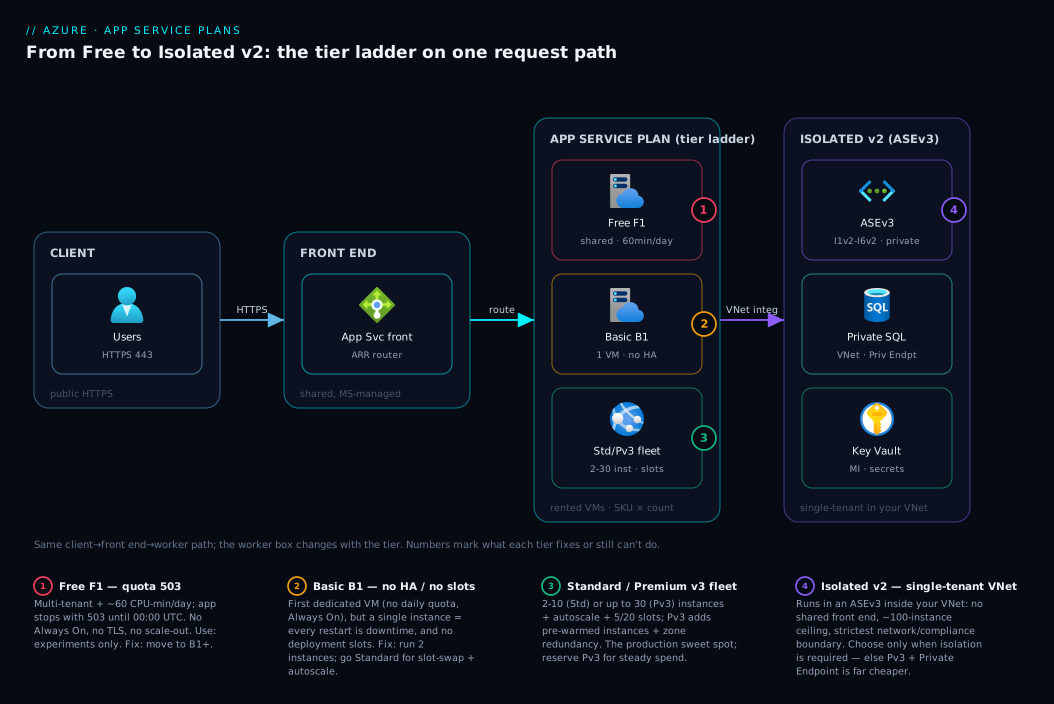
Picture the request path and the billing boundary together, left to right. A user hits your app over HTTPS on port 443. On every tier except Isolated, the request lands first on Azure’s shared App Service front end (the multi-tenant router Microsoft runs for you), which picks one of your plan’s worker instances and proxies to it. The App Service plan is the dashed boundary around those workers — what you pay for — carrying the tier (each worker’s cores/RAM and which features exist) and the instance count (scale-out and availability). One plan can host several web apps and their staging slots, all sharing that capacity. From a worker, the app may reach private backends — SQL, Key Vault, storage — over VNet integration (Basic+) or Private Endpoints (Standard+).
The diagram makes the tier ladder concrete: the same path, but the worker box grows from a metered multi-tenant slice (F1, badge 1), to a single dedicated VM with no HA (B1, badge 2), to a multi-instance autoscaling fleet with slots (S1/P1v3, badge 3), and finally to Isolated v2, where the entire stack including the front end collapses into your own VNet as an ASEv3 (badge 4). Follow the numbered badges against the legend to see what each tier fixes and what it still cannot do.
Real-world scenario
Northwind Retail runs an online storefront and a handful of internal tools, and their App Service bill had quietly become the single largest line on the Azure invoice — about ₹190,000/month — without anyone being able to say why. A new architect (you) was asked to “make the App Service spend make sense” without breaking anything.
The audit found four plans. The public storefront ran on a single P3v3 (8 vCPU / 32 GB) — Premium hardware, but one instance, so no high availability at all: every monthly patch was a brief outage, and with no staging slot, deploys went straight to production with a cold start. A second plan, S3 with three apps, hosted internal tools that together never crossed 20% CPU — massively over-provisioned. A third ran a marketing microsite on F1 that threw 503 to real visitors every afternoon when its quota ran out. The fourth was a forgotten B2 dev plan running nothing.
The fixes mapped one-to-one onto tier reasoning. The storefront moved from a single P3v3 to two P1v3 instances (2 vCPU / 8 GB each): roughly the same total compute, but now genuinely highly available (a restart of one instance is invisible) and with deployment slots for zero-downtime releases — and because the workload was steady, a 3-year savings plan on the Premium v3 family cut that line’s rate by well over half. The three internal tools were consolidated onto a single B1 plan (dev/test-grade traffic, no need for autoscale or slots), collapsing an S3 into one small Basic plan. The marketing microsite moved off Free onto that same B1 plan (no more daily quota). The empty B2 dev plan was deleted.
The result: the bill fell from about ₹190,000 to roughly ₹70,000/month, and the storefront went from zero-HA to two-instance HA with safe deploys. The lesson is the thesis of this article — the right tier is rarely the most expensive one; it is the cheapest one that meets the actual requirement (HA → two instances; safe deploys → slots → Standard+; steady spend → savings plan), and over-provisioning a single big instance is both costlier and less available than a right-sized two-instance fleet.
Advantages and disadvantages
App Service plans, as a model, trade simplicity and managed convenience for some ceiling-and-cost rigidity. Weigh both sides before committing.
| Advantages | Disadvantages |
|---|---|
| Fully managed PaaS — no OS/patching/load-balancer to run | You pay for the plan whether the app is busy or idle |
| Tiers map cleanly to needs (experiment → dev → prod → isolated) | Wrong tier hides features (no slots/autoscale) until you hit the wall |
| Many apps share one plan — great density and cost control | Apps on a shared plan compete for the same CPU/RAM/instances |
| Scale up and out without re-architecting | Per-plan scale ceilings (3 / 10 / 30 instances) cap a single plan |
| Slots + swap give zero-downtime deploys (Standard+) | Slots/zone-redundancy gated behind higher tiers |
| Reserved instances + savings plans cut steady-state cost a lot | Premium v3 list price is high before discounts |
| Isolated v2 offers true single-tenant network isolation | Isolated v2 is costly and adds ASE operational overhead |
When each side matters: the advantages dominate for the vast majority of web apps — HA, safe deploys, autoscale and a private backend story with no infrastructure to manage, and density (many apps per plan) keeps cost reasonable. The disadvantages bite in two cases: a spiky, mostly-idle workload (where you pay for provisioned capacity you rarely use — consider Azure Functions and Serverless Patterns: Event-Driven Compute for scale-to-zero), and a workload needing more isolation than a shared front end provides (where Isolated v2’s cost is the price of the requirement).
Hands-on lab
This walk-through creates a Free plan, sees its limits, scales it up to Basic to unlock Always On, scales out to two instances, and tears everything down. It is free-tier-friendly: F1 costs nothing, and the few minutes on B1 cost a rupee or two. Run it in Cloud Shell (Bash).
1. Set variables and a resource group.
RG=rg-asp-lab
LOC=centralindia
PLAN=plan-asp-lab
APP=app-asp-lab-$RANDOM   # globally unique hostname
az group create --name $RG --location $LOC
2. Create a Free (F1) plan and an app on it.
az appservice plan create --name $PLAN --resource-group $RG \
  --sku F1 --is-linux
az webapp create --name $APP --resource-group $RG --plan $PLAN \
  --runtime "NODE:20-lts"
3. Inspect the plan — confirm the tier, SKU and instance count.
az appservice plan show --name $PLAN --resource-group $RG \
  --query "{tier:sku.tier, sku:sku.name, capacity:sku.capacity, maxWorkers:maximumNumberOfWorkers}" -o table
# Expected: tier=Free, sku=F1, capacity=1
4. Try to turn on Always On — and watch it be unavailable on Free.
az webapp config set --name $APP --resource-group $RG --always-on true
# On F1 this is a no-op/refused: Always On is a Basic+ feature.
az webapp config show --name $APP --resource-group $RG --query alwaysOn -o tsv
# Expected on Free: false
5. Scale UP to Basic (B1) — same plan, bigger box, no daily quota.
az appservice plan update --name $PLAN --resource-group $RG --sku B1
az webapp config set --name $APP --resource-group $RG --always-on true
az webapp config show --name $APP --resource-group $RG --query alwaysOn -o tsv
# Expected now: true  (Always On unlocked on B1)
6. Scale OUT to two instances — basic high availability.
az appservice plan update --name $PLAN --resource-group $RG --number-of-workers 2
az appservice plan show --name $PLAN --resource-group $RG --query "sku.capacity" -o tsv
# Expected: 2  (a restart of one instance no longer zeroes capacity)
7. See the price tier and confirm the app responds.
az webapp show --name $APP --resource-group $RG --query "defaultHostName" -o tsv
# curl the hostname (HTTPS) — you should get the default Node landing page
curl -sI https://$(az webapp show --name $APP --resource-group $RG --query defaultHostName -o tsv) | head -1
8. Tear down — stop billing immediately.
az group delete --name $RG --yes --no-wait
The same flow in Bicep, for the parts that define the plan and app declaratively (you would deploy this instead of steps 2 and 5):
param location string = resourceGroup().location

resource plan 'Microsoft.Web/serverfarms@2023-12-01' = {
  name: 'plan-asp-lab'
  location: location
  sku: {
    name: 'B1'        // tier is inferred from the SKU (F1, B1, S1, P1v3, I1v2…)
    capacity: 2       // scale OUT: number of instances
  }
  kind: 'linux'
  properties: { reserved: true }   // reserved:true => Linux plan
}

resource site 'Microsoft.Web/sites@2023-12-01' = {
  name: 'app-asp-lab-0001'
  location: location
  properties: {
    serverFarmId: plan.id
    siteConfig: {
      linuxFxVersion: 'NODE|20-lts'
      alwaysOn: true   // requires B1+; silently unavailable on F1/D1
    }
  }
}
What you proved: the plan carries the tier, SKU and instance count; Always On is a Basic+ capability absent on Free; scale up (--sku) and scale out (--number-of-workers) are different knobs; and deleting the resource group stops all charges at once.
Common mistakes & troubleshooting
The tier you picked is the hidden cause behind a surprising share of App Service incidents. Each row: the symptom you see, the tier-related root cause, exactly how to confirm it, and the fix.
| # | Symptom | Root cause (tier-related) | How to confirm | Fix |
|---|---|---|---|---|
| 1 | Dev app returns 503 every afternoon, recovers at midnight |
Free/Shared daily CPU quota exhausted | az appservice plan show … --query sku.tier shows Free/Shared; Diagnose-and-solve → Quota |
Move to B1+ (no daily quota) |
| 2 | “Always On” toggle is greyed out / stays false |
Always On is Basic+ only | az webapp config show … --query alwaysOn is false on F1/D1 |
Scale plan to B1 or higher |
| 3 | Every deploy/patch causes a few seconds of downtime | Single instance, and/or no slots below Standard | sku.capacity = 1; tier Basic has 0 slots |
Scale to ≥2 instances; Standard+ for slot-swap deploys |
| 4 | Autoscale rules can’t be created | Autoscale needs Standard+ | Tier is Basic/Free; autoscale blade unavailable |
Move to Standard (or Premium v3) |
| 5 | New instance from autoscale serves first requests cold | No pre-warmed buffer below Premium v3 | Tier Standard; cold latency on scale-out |
Move to Premium v3 (pre-warmed instances) |
| 6 | One app starves the others on the plan | Many apps sharing one plan’s CPU/RAM | Multiple sites on one serverFarmId; plan CPU pinned |
Give the hungry app its own plan; scale up/out |
| 7 | Can’t add a Private Endpoint for inbound | Private Endpoint inbound is Standard+ | Tier Basic; inbound private endpoint unavailable |
Scale to Standard/Premium v3, or Isolated v2 |
| 8 | Premium v3 bill is “too high” for a steady app | No reservation/savings plan purchased | Cost view shows on-demand Premium v3 rate | Buy 1/3-yr reserved instances or savings plan |
| 9 | Need the app fully private in a VNet, can’t get there on Premium | Single-tenant isolation is Isolated v2 only | Requirement = no shared front end / in-VNet | Deploy Isolated v2 (ASEv3) |
| 10 | Scaling up didn’t add instances (still 1 worker) | Confused scale up (--sku) with scale out (--number-of-workers) |
sku.capacity unchanged after --sku change |
Use --number-of-workers to scale out |
The single most common mistake is #3 + #10 combined: running production on one instance and assuming “Premium” means “highly available.” It does not — HA comes from two or more instances, on whatever tier supports scale-out. A two-instance Standard plan is more available than a single-instance Premium v3 plan, for less money.
Best practices
- Never run production on Free or Shared. The daily CPU quota will stop your app; these tiers are for experiments only.
- For any production app, start at Standard. It is the lowest tier with autoscale and deployment slots and scale-out — the three things production needs.
- Run at least two instances for anything that must stay up. A single instance is a single point of failure; every restart is downtime regardless of SKU.
- Deploy via slot-swap, not in-place. Standard+ slots let you warm a staging copy and swap with zero downtime — this alone justifies Standard over Basic for production.
- Pack non-prod and low-traffic apps onto a shared plan. Many small apps on one B1/S1 is far cheaper than a plan each — just keep prod isolated.
- Give a hungry or critical app its own plan. Plan capacity is shared; isolate the app you cannot afford to starve.
- Scale up vs out deliberately. Bigger SKU for per-request CPU/RAM; more instances for throughput and availability — they solve different problems.
- Buy a reservation or savings plan for steady Premium v3 workloads. A 1- or 3-year commitment cuts the rate substantially; on-demand Premium is the expensive way to run a predictable app.
- Right-size with real metrics, not vibes. Check plan
CpuPercentage/MemoryPercentagebefore scaling up; a 20%-CPUP3v3should be a smaller SKU. - Choose Isolated v2 only when isolation is a stated requirement. For private inbound on shared hardware, a Premium v3 plan plus a Private Endpoint is dramatically cheaper.
- Match the OS to the workload at plan creation. A plan is Windows or Linux for its life (
reserved:true= Linux in Bicep); you cannot flip it later — create the right kind.
Security notes
Tier choice has direct security consequences, and a few practices apply across all of them.
- Custom-domain TLS requires Basic or higher. You cannot serve your own domain over HTTPS on Free; never put anything with a login on a tier that can’t present a real certificate.
- Private inbound needs Standard+ (Private Endpoint) or Isolated v2 (in-VNet). If the app must not be reachable from the public internet, use at least a Standard plan with a Private Endpoint, or Isolated v2 for full single-tenant placement.
- Private outbound to PaaS backends needs VNet integration (Basic+). Reach SQL, Storage and Key Vault over the Azure backbone via VNet integration plus Private Endpoints on the targets, not the public internet.
- Use a managed identity, not secrets in app settings. Give the app a system-assigned managed identity, grant it RBAC on Key Vault/SQL/Storage, and pull secrets via Key Vault references. See Azure Key Vault: Secrets, Keys and Certificates Done Right.
- Enforce HTTPS-only and a modern minimum TLS version on the site config, on every tier, so plaintext requests are redirected and old protocol versions refused.
- Isolated v2 is the strongest network boundary, not a substitute for app security. Single-tenant placement controls the network; you still need identity, RBAC, input validation and patching inside the app.
Cost & sizing
What drives the App Service bill is simple: (tier × SKU) × instances × hours, plus ASE overhead on Isolated v2. You pay for the plan’s provisioned capacity continuously — an idle app on a P1v3 costs the same as a busy one. So the levers are: pick the smallest SKU that holds your CPU/RAM, run the fewest instances that give the availability you need, and commit to a reservation for steady workloads.
Rough monthly figures for a single instance (Linux, India region, on-demand — indicative only; always confirm in the pricing calculator):
| Tier / SKU | vCPU / RAM | Rough INR/mo (1 inst.) | Rough USD/mo | Good for |
|---|---|---|---|---|
F1 Free |
shared | ₹0 | $0 | Experiments only |
D1 Shared |
shared | ~₹800 | ~$10 | Hobby sites |
B1 Basic |
1 / 1.75 GB | ~₹4,300 | ~$52 | Dev/test, small internal |
S1 Standard |
1 / 1.75 GB | ~₹5,800 | ~$70 | Small production (HA at 2×) |
P0v3 Premium v3 |
1 / 4 GB | ~₹9,000 | ~$108 | Cost-aware prod on v3 |
P1v3 Premium v3 |
2 / 8 GB | ~₹13,000 | ~$155 | Production baseline |
P1mv3 Premium v3 mem-opt |
2 / 16 GB | ~₹16,000 | ~$190 | Memory-heavy production |
I1v2 Isolated v2 |
2 / 8 GB | ~₹30,000+ ASE | ~$360+ ASE | Isolated/compliance |
Sizing rules that keep the bill honest:
- Two small instances beat one big one for both availability and (often) cost:
2 × P1v3is more available than1 × P3v3and roughly the same compute for less money. - Reserve steady Premium v3. A 3-year savings plan can cut the rate by well over half; for an always-on production app this is the largest single saving available.
- Consolidate non-prod. Five dev apps on one
B1instead of five plans is an ~80% saving on that estate. - Free tier is for learning, not hosting. Its only “cost” is the daily quota stopping your app — fine for a demo, fatal for users.
- Watch for Isolated-by-habit. ASEv3 carries a fixed environment cost on top of the workers; never run it unless an isolation requirement justifies that floor.
Interview & exam questions
These map to AZ-900 (Azure Fundamentals) and AZ-204 (Developing Solutions for Azure), where App Service plans and tiers are recurring topics.
1. What is an App Service plan, and how does it relate to a web app? A plan is the set of rented VMs (a SKU and an instance count) plus a pricing tier; it is the billed unit. One or more web apps run on a plan and share its CPU, memory and instances. The plan holds the capabilities; the app is just a tenant on it.
2. What is the difference between scaling up and scaling out? Scaling up means moving to a larger SKU (more CPU/RAM per instance). Scaling out means running more instances of the same SKU for throughput and availability. They are independent levers; production usually needs both.
3. Which tier is the lowest that gives you deployment slots and autoscale? Standard. Basic has neither (no slots, manual scale only); Standard adds 5 slots and rule-based autoscale, which is why it is the practical minimum for production.
4. Why is a single-instance Premium v3 plan not highly available? High availability comes from multiple instances, not from the SKU. A single instance is a single point of failure — every platform patch or restart is downtime. Two smaller instances are more available than one large one.
5. What is special about the Free and Shared tiers that makes them unsuitable for production? They run on multi-tenant infrastructure with a hard daily CPU quota (~60 min on F1), after which the app returns 503 until midnight UTC. They also lack Always On, scale-out and (on Free) custom-domain TLS.
6. When do you actually need Isolated v2 / an App Service Environment? When you have a network-isolation or compliance requirement: the app must be single-tenant and deployed inside your own VNet with no shared front end. For merely private inbound, a Premium v3 plan with a Private Endpoint is far cheaper.
7. What does “Always On” do and which tiers support it? It sends periodic internal requests to keep a warm worker resident, preventing the ~20-minute idle unload and the cold start that follows. It is available on Basic and higher, not on Free/Shared.
8. What are pre-warmed instances and which tier introduces them? Pre-warmed instances are a warm buffer the platform keeps ready so that scaling out never exposes a cold worker to the first requests. They are a Premium v3 feature.
9. Can you change an App Service plan from Windows to Linux later?
No. The OS is fixed when the plan is created (in Bicep, reserved:true denotes Linux). To switch, you create a new plan of the correct OS and move/redeploy the app.
10. How do reserved instances or savings plans change Premium v3 economics? A 1- or 3-year commitment significantly reduces the hourly rate (often by more than half) in exchange for a usage commitment. For a steady always-on app this is the single biggest cost saving, frequently making a reserved Premium v3 cheaper than an on-demand Standard fleet.
Quick check
- In one sentence, what is an App Service plan, and what does the tier decide?
- Which is the lowest tier that gives you both deployment slots and autoscale?
- Your dev app on
F1returns503every afternoon and recovers at midnight. What is happening and what is the fix? - You moved a plan from
S1toS3but still have one instance. Did you scale up or out, and how do you get high availability? - When is Isolated v2 the right choice, and when is it overkill?
Answers
- An App Service plan is the rented VMs (SKU + instance count) your apps run on; the tier decides the hardware model (shared/dedicated/single-tenant), the scaling and HA you can do, and which production features (slots, Always On, pre-warmed instances, VNet/Private Endpoint) exist.
- Standard — Basic has neither slots nor autoscale; Standard adds 5 slots and rule-based autoscale.
- The Free tier’s ~60-minute daily CPU quota is exhausted, so the app stops and serves
503until the 00:00 UTC reset. Fix: move to B1+ (no daily quota, plus Always On). - You scaled up (bigger SKU). HA needs scale out to two or more instances (
--number-of-workers 2), so one instance restarting doesn’t zero capacity. - Right when a requirement mandates single-tenant, in-VNet, private hosting (compliance/network isolation); overkill when you only need private inbound — Premium v3 + a Private Endpoint is much cheaper.
Glossary
- App Service — Azure’s managed PaaS for hosting web apps, REST APIs and web jobs on Windows or Linux.
- App Service plan — The rented VMs (SKU + instance count) and the pricing tier; the billed unit that apps run on.
- Pricing tier — The category (Free, Shared, Basic, Standard, Premium v3, Isolated v2) that sets the hardware model and feature set.
- SKU / instance — The size within a tier (
B1,S3,P1v3,I1v2) sets cores/RAM per instance (one VM in the plan); more instances = more capacity and availability. - Scale up vs scale out — Scale up = a larger SKU (more CPU/RAM per instance); scale out = more instances of the same SKU (throughput + availability).
- Autoscale — Rules that automatically add/remove instances by metric or schedule; Standard tier and above.
- Deployment slot — A swappable copy of an app (e.g. staging) used for zero-downtime deploys via swap; real use from Standard up.
- Always On — Setting that keeps a warm worker resident to avoid idle unload and cold starts; Basic and above.
- Pre-warmed instances — A warm buffer kept ready so scale-out never serves a cold worker; Premium v3 and above.
- Zone redundancy — Spreading plan instances across availability zones for resilience; Premium v3 and above.
- VNet integration — Lets the app reach into your virtual network for private backends; Basic and above (regional).
- App Service Environment v3 (ASEv3) — A single-tenant deployment of App Service inside your VNet; the home of the Isolated v2 tier.
- Isolated v2 — The single-tenant tier (SKUs
I1v2–I6v2) running on ASEv3 for network isolation and compliance. - Daily CPU quota — The per-day CPU-minute cap on Free/Shared that stops the app (503) until the 00:00 UTC reset.
Next steps
- When a tier limit becomes an incident — quota 503s, cold starts, single-instance downtime — work through Troubleshooting Azure App Service: 502/503 Errors, Cold Starts & Restart Loops.
- Still choosing your compute host? Compare against containers and Kubernetes in Azure App Service vs Container Apps vs AKS: Choose the Right Compute.
- For spiky or mostly-idle workloads that shouldn’t pay for provisioned capacity, read Azure Functions and Serverless Patterns: Event-Driven Compute.
- Lock the app’s secrets and identity down with Azure Key Vault: Secrets, Keys and Certificates Done Right.
- Keep the bill honest as the estate grows with Azure FinOps and Cost Management: Controlling Cloud Spend at Scale.