A folder of logs you will never read again is costing you the same per gigabyte as the product images on your home page. That is the most common and most invisible waste in Azure Storage: every blob sits in an access tier, and if you never change it, every blob sits in the most expensive one. Access tiers are how Azure lets you pay less to store data you rarely touch — Hot for data you read constantly, Cool and Cold for data you keep but seldom open, and Archive for data you must retain for years but expect to read almost never. The catch, and the reason this trips people up, is that the cheaper tiers do not simply cost less. They shift the bill: storage gets cheaper, but reading and writing gets more expensive, and pulling something back out of Archive can take hours and cost real money. Pick the wrong tier and you can pay more than if you had left everything in Hot.
This article gives you the mental model that makes tiering obvious. You will learn what the four tiers actually are, how the four cost levers — storage, write transactions, read transactions and data retrieval/rehydration — move as you go cooler, and what the early-deletion penalty is that quietly punishes data that leaves a cool tier too soon. Then you will learn to decide with a simple rule (how often is this blob read, and how long will it live?), to automate the decision with lifecycle management rules so you are not retiering blobs by hand, and to avoid the handful of mistakes — rehydration surprises, snapshot charges, blob-too-small penalties — that turn a cost-saving exercise into a bigger bill.
By the end you will be able to look at any bucket of data — logs, backups, images, telemetry, compliance archives, video — and say, with numbers behind it, which tier it belongs in, whether it should move there on day 1 or day 30, and what it will cost to read it back when you eventually need it. This is a Basic-level explainer: we lead with the concepts and the decision grids, keep the commands copy-pasteable, and stay out of the deep operational weeds so the mental model lands clean.
What problem this solves
Storage bills creep. A blob container starts small, a pipeline writes to it every day, nobody ever deletes anything, and eighteen months later it is the third-largest line on your Azure invoice — almost entirely full of data nobody has opened since the week it was written. The default behaviour of Azure Storage is to put every block blob you upload into the Hot tier (unless you change the account default), and Hot is priced for data you read all the time. For data you read once a quarter, you are massively overpaying for the storage component while getting no benefit, because the thing Hot optimises for — cheap, fast reads — is something you are not using.
The naive fix — “move the old stuff somewhere cheaper” — has a trap built into it. The cheaper tiers charge you more per read and per write, and they impose a minimum retention period: delete or move a blob out of Cool before 30 days, or out of Archive before 180 days, and you pay a prorated early-deletion fee as if it had stayed the full term. So a tier change that looks like a saving can become a loss if the data is read more often than you assumed, or churns faster than the retention window. People discover this the hard way: they archive a dataset, a downstream job reads it twice the next week, and the read + rehydration charges dwarf the storage they saved.
Who hits this: anyone storing data that has a lifecycle — hot for a while, then cold, then rarely or never touched. Log and telemetry pipelines, backup and snapshot stores, media libraries, IoT capture, financial and healthcare records under multi-year retention, data-lake landing zones. The fix is not “use the cheapest tier”; it is “match each blob’s tier to how it is actually accessed, and let a lifecycle policy move it automatically as that access pattern changes over its life.” That is what this article teaches.
Learning objectives
By the end of this article you can:
- Explain what the four blob access tiers — Hot, Cool, Cold, Archive — are and how they differ in storage price, access price and availability.
- Describe the four cost levers (storage, write, read, retrieval/rehydration) and how each one moves as you go from Hot to Archive.
- Define the minimum retention period and early-deletion penalty for Cool, Cold and Archive, and predict when they will bite.
- Apply a simple decision rule — based on read frequency and data lifetime — to pick the right tier for any dataset.
- Distinguish online tiers (Hot/Cool/Cold, readable instantly) from the offline Archive tier (must be rehydrated, taking up to ~15 hours).
- Set a blob’s tier and the account default tier with both
azCLI and Bicep, and read a blob’s current tier. - Author a lifecycle management policy that moves blobs Hot → Cool → Cold → Archive → delete automatically based on age and last access.
- Avoid the common cost traps: rehydration surprises, the per-blob minimum-size effect, snapshot/version charges, and early-deletion fees.
Prerequisites & where this fits
You should already understand what an Azure Storage account is — the top-level resource that holds blobs, files, queues and tables — and what a blob container and a block blob are. If those are fuzzy, read Azure Storage Account Fundamentals: Blobs, Files, Queues and Tables first; this article assumes you can create a storage account and upload a blob. You should be able to run az in Cloud Shell, read JSON output, and know that storage is billed monthly per GB plus per-operation transaction charges.
Access tiers are one of two big cost-and-resilience dials on a storage account, and they are independent of the other. The other dial is redundancy — how many copies of your data Azure keeps and where (LRS, ZRS, GRS, RA-GRS), which is covered in Azure Storage Redundancy Decoded: LRS vs ZRS vs GRS vs RA-GRS and How to Choose. Tier controls how cheaply you store and how expensively you access; redundancy controls how many copies and how durable. You set both, and they multiply: a Cool blob in GRS is priced as Cool-storage × GRS-multiplier. Keep them separate in your head.
Here is where tiering sits relative to the neighbouring topics, so you call the right lever for the right problem:
| Concern | The lever | Covered in |
|---|---|---|
| “I store data I rarely read — how do I pay less?” | Access tiers (this article) | this article |
| “How many copies, how durable, survives a region loss?” | Redundancy (LRS/ZRS/GRS) | Storage Redundancy Decoded |
| “How do I move blobs between tiers automatically?” | Lifecycle management | this article (overview) |
| “My app gets 403 reading a blob” | Firewall / RBAC / SAS | Fixing Azure Storage 403 Errors |
| “I need point-in-time restore / backup of blobs” | Backup & soft delete | Azure Backup and Site Recovery |
This fits in the Storage & Cost Optimization track. It is upstream of any real FinOps work on a storage-heavy workload and pairs naturally with cost-management basics like Azure Cost Management for Beginners: Budgets, Alerts and Cost Analysis in Your First 30 Days.
Core concepts
Five mental models make every later decision obvious.
A tier is a property of each blob, not of the account. The storage account has a default tier for new block blobs, but every individual blob can be in a different tier, and you can change a single blob’s tier at any time without moving or copying it. Tiering is a metadata operation on the blob — the data does not physically relocate when you switch between the online tiers. This is why you can have product images in Hot and last year’s logs in Archive in the same container.
Tiers only apply to block blobs in a Standard general-purpose v2 (or Blob/BlockBlobStorage) account. Page blobs (the disks behind VMs) and Premium block-blob accounts do not use this Hot/Cool/Cold/Archive model. If you cannot set a tier on something, check whether it is actually a block blob in a Standard StorageV2 account — that is the universe these tiers live in.
Going cooler is a trade, not a discount. Each step from Hot toward Archive lowers the price you pay to store a GB per month and raises the price you pay to read or write a GB. Hot has the highest storage price and the cheapest transactions; Archive has the cheapest storage by far and the most expensive access. The whole game is matching the tier to the ratio of how much you store versus how much you read. Data you store a lot and read a little wins big from a cool tier; data you read constantly loses money there.
There is a tax for leaving a cool tier early. Cool, Cold and Archive each carry a minimum retention period — 30 days for Cool, 90 days for Cold, 180 days for Archive. If a blob is deleted, overwritten, or moved to a different tier before that period elapses, you are charged a prorated early-deletion fee equal to the storage you “would have” paid for the remaining days. This is what punishes churny data placed in a cool tier. The minimum-size rule has a cousin too: cool tiers also bill a small per-blob metadata overhead, so a tier change is rarely worth it for tiny blobs.
Archive is offline — you cannot read it until you rehydrate it. Hot, Cool and Cold are online tiers: a GET returns the bytes immediately (with the read cost of that tier). Archive is offline: the bytes are not directly readable. To read an Archive blob you must first rehydrate it — copy it to an online tier or change its tier back — which takes up to roughly 1 hour at high priority or up to 15 hours at standard priority, and costs both a read/retrieval charge and, if you move it back early, an early-deletion charge. Archive is for “I must keep this but I do not expect to read it”; treat any Archive read as a planned, paid, hours-long event.
The four tiers side by side
This is the table to pin to your monitor. The exact prices vary by region and redundancy and change over time, so the columns below describe direction and order of magnitude relative to Hot, not invoice figures — always confirm current rates on the Azure pricing page for your region.
| Tier | Storage cost | Read/access cost | Min retention | Availability | Online? | Built for |
|---|---|---|---|---|---|---|
| Hot | Highest | Lowest | None | 99.9% (RA-GRS read: 99.99%) | Yes | Data read/written frequently |
| Cool | ~Lower than Hot | Higher than Hot | 30 days | 99% (RA-GRS read: 99.9%) | Yes | Infrequent access, kept ≥30 days |
| Cold | Lower than Cool | Higher than Cool | 90 days | 99% (RA-GRS read: 99.9%) | Yes | Rarely accessed, kept ≥90 days |
| Archive | Lowest by far | Highest (+ rehydration) | 180 days | Offline (rehydrate first) | No | Long-term retention, near-never read |
Read the table as a slope: as you go down, the storage column falls and the access column rises, retention lengthens, and availability drops. The cliff is between Cold and Archive — that is where you cross from “readable now” to “readable in hours after you pay to rehydrate.”
The four cost levers
Every storage bill on these tiers is the sum of four things. Knowing which lever a tier pulls is the whole skill:
| Cost lever | What triggers it | Cheapest tier | Most expensive tier | Notes |
|---|---|---|---|---|
| Data storage | GB-months you keep data | Archive | Hot | The bigger your data, the more this dominates |
| Write transactions | PUT/Create/upload operations | Hot | Archive | Cooler tiers charge more per 10,000 writes |
| Read transactions | GET/Read operations | Hot | Archive | Cooler tiers charge more per 10,000 reads |
| Data retrieval / rehydration | GB read back out of Cool/Cold/Archive | Hot (free) | Archive | Hot has no per-GB retrieval fee; Cool/Cold do; Archive adds rehydration |
The non-obvious lever is the last one. Hot has no per-GB data-retrieval charge — you pay only the transaction. Cool and Cold add a per-GB retrieval fee on top of the transaction whenever you read data back. Archive adds a rehydration charge and a long wait. So a workload that reads a lot of data will see the retrieval lever swamp the storage savings the moment it leaves Hot. That single fact explains almost every “we tiered down and the bill went up” story.
Understanding the four tiers in depth
Hot — the default, for data in active use
Hot is the tier every new block blob lands in unless you set a different account default. It has the highest per-GB storage price and the lowest access prices, and critically it has no minimum retention period and no per-GB retrieval fee. That makes it the only tier that is safe for churny, frequently-read, or short-lived data. If a blob is written and read within days, or read many times, Hot is almost always the cheapest choice despite its storage premium — because you would pay more in transactions and retrieval fees anywhere else.
Use Hot for: website assets, application data read on every request, the active partition of a data lake, anything an app or pipeline touches routinely, and anything you might delete or overwrite within a month.
Cool — infrequent access, kept at least a month
Cool drops the storage price meaningfully below Hot in exchange for higher per-operation costs, a per-GB retrieval fee, and a 30-day minimum retention period. The mental test for Cool is: will I keep this at least 30 days, and will I read it rarely enough that the storage saving beats the read surcharge? Classic fits are short-term backups, recent-but-not-current logs, and datasets you reference occasionally. If you would read the data more than roughly once or twice a month per GB, do the math — the retrieval fees may erase the saving.
Cold — rarely accessed, kept at least a quarter
Cold sits between Cool and Archive: cheaper storage than Cool, higher access costs than Cool, and a longer 90-day minimum retention. It is online — readable instantly, unlike Archive — which makes it the sweet spot for data you almost never read but still need to fetch without a multi-hour rehydration. Think older backups you must be able to restore on demand but rarely do, or compliance data you might be asked for at any moment. Cold is the tier people forget exists; it often beats both Cool (cheaper storage) and Archive (no rehydration wait) for “rarely, but I need it now if I need it.”
Archive — long-term retention you expect never to read
Archive has the cheapest storage by a wide margin and the most expensive everything-else. It is offline: you cannot read an Archive blob directly. To access it you rehydrate — either copy it to an online tier with a new blob, or change its tier back to Hot/Cool/Cold — which takes up to ~1 hour (high priority) or ~15 hours (standard priority) and costs a retrieval charge. Its 180-day minimum retention is the longest, so anything you put here should genuinely live for half a year or more. Archive is right for legal/regulatory retention, long-term backup tiers, raw data you keep “just in case,” and media you might restore once in its lifetime. It is wrong for anything you query, anything you might delete soon, or anything you need on a deadline shorter than a day.
You have two ways to get an Archive blob back, with a priority choice on each — pick by how fast you need it and whether you want to keep the original archived:
| Rehydration method | How | Time (typical) | Keeps the archived copy? | When to use |
|---|---|---|---|---|
| Set tier → online (Standard) | set-tier --tier Hot/Cool/Cold |
Up to ~15 hours | No — the blob moves to the new tier | Cost-sensitive, no deadline |
| Set tier → online (High) | set-tier ... --rehydrate-priority High |
Up to ~1 hour | No — the blob moves | You need it within the hour (costs more) |
| Copy to a new online blob (Standard) | az storage blob copy start to a new name |
Up to ~15 hours | Yes — original stays in Archive | You want the data online and still archived |
| Copy to a new online blob (High) | copy with --rehydrate-priority High |
Up to ~1 hour | Yes | Fast read while keeping the archive (costs more) |
The copy method matters more than people expect: changing tier moves the blob out of Archive (and can trigger early-deletion if it was archived recently), whereas copying leaves the original in Archive and gives you a fresh online copy to read — usually the safer choice for a one-off retrieval.
Here is the decision the four tiers force, framed as a single comparison of the things that actually differ in practice:
| Dimension | Hot | Cool | Cold | Archive |
|---|---|---|---|---|
| Relative storage price | 1.0× (baseline) | ~0.5× of Hot | ~0.35× of Hot | ~0.1× of Hot |
| Per-GB retrieval fee | None | Yes | Yes (higher) | Yes (highest) + rehydrate |
| Min retention (early-delete) | None | 30 days | 90 days | 180 days |
| Time to first byte | Instant | Instant | Instant | 1–15 hours |
| Good for read frequency | Many times/day | A few times/month | A few times/year | Almost never |
| Typical workload | Live app data | Recent backups | Old backups, compliance | Legal hold, deep archive |
(The “~×” multipliers are illustrative ratios to show the slope, not billed prices — confirm your region’s rates.)
The cost model: how the bill actually adds up
The single most useful skill here is being able to estimate a tier’s monthly cost before you commit, because the cheaper-storage headline hides the access charges. The monthly cost of a set of blobs in a given tier is, conceptually:
Monthly cost ≈ (GB stored      × storage rate for the tier)
             + (writes/10,000   × write transaction rate)
             + (reads/10,000    × read transaction rate)
             + (GB read back     × retrieval rate)            # 0 for Hot
             + (early-deletion penalty if moved/deleted early)
             + (redundancy multiplier applied to storage)
You do not need exact numbers to make good decisions — you need the shape. The shape is: storage cost scales with how much you keep; access cost scales with how much you touch. Cool/Cold/Archive win when the first number dwarfs the second. They lose when you touch the data often. Below is how each lever moves across the tiers so you can reason about any dataset.
| Lever | Hot → Cool | Cool → Cold | Cold → Archive | Practical implication |
|---|---|---|---|---|
| Storage (per GB-month) | ↓↓ (big drop) | ↓ (further drop) | ↓↓↓ (cheapest) | The deeper you go, the less you pay to keep data |
| Write transactions | ↑ | ↑ | ↑↑ | Frequent writers should not go deep |
| Read transactions | ↑ | ↑ | ↑↑ | Frequent readers should not go deep |
| Per-GB retrieval | none → charged | ↑ | ↑↑ + rehydrate | Reading data back is the silent killer |
| Min retention | 0 → 30d | 30d → 90d | 90d → 180d | Short-lived data gets penalised deeper down |
The break-even intuition
Think of every tier-down move as paying a higher price per access in return for a lower price per stored GB. There is a break-even access frequency: below it, the cooler tier is cheaper; above it, Hot wins. As a rule of thumb that has held up across many real workloads:
| If a GB is read… | Best tier (typically) | Why |
|---|---|---|
| Multiple times per day | Hot | Read surcharges + retrieval fees of cooler tiers exceed the storage saving |
| A few times per month | Cool | Storage saving beats the modest read surcharge |
| A few times per year | Cold | Cheapest online storage; rare reads keep retrieval small |
| Effectively never (but must retain) | Archive | Rock-bottom storage dominates; the rare read is a planned event |
| Unknown / variable | Hot, with lifecycle | Start safe in Hot, let a policy demote on real age/last-access |
The honest answer when you are unsure is the last row: leave it in Hot and let lifecycle management observe the access pattern and move it down. Guessing wrong upward (too cool) costs you in retrieval and early-deletion; guessing wrong by staying in Hot only costs you a little extra storage while you learn.
Automating the decision with lifecycle management
You should almost never retier blobs by hand at scale — you author a lifecycle management policy once and let the platform apply it. A policy is a set of rules; each rule has filters (which blobs it applies to) and actions (what to do and when). The engine evaluates rules roughly once per day, so changes are gradual, not instant. The vocabulary is small — this table is the whole action/condition surface you need:
| Action | Applies to | Condition keys you can use | Effect |
|---|---|---|---|
tierToCool |
base blob, snapshot, version | daysAfterModificationGreaterThan, daysAfterLastAccessTimeGreaterThan, daysAfterCreationGreaterThan |
Move matching blobs to Cool |
tierToCold |
base blob, snapshot, version | same as above | Move matching blobs to Cold |
tierToArchive |
base blob, snapshot, version | same as above (+ daysAfterLastTierChangeGreaterThan) |
Move matching blobs to Archive |
delete |
base blob, snapshot, version | daysAfterModificationGreaterThan, daysAfterCreationGreaterThan |
Delete matching blobs |
enableAutoTierToHotFromCool |
base blob | (on access) | Auto-promote back to Hot when a Cool blob is read |
The filter side is just as small: blobTypes (almost always blockBlob), an optional prefixMatch array to scope a rule to a path, and optional blob index-tag matches. Two conditions are worth singling out:
| Condition | What it keys on | Requires | Best for |
|---|---|---|---|
daysAfterModificationGreaterThan |
Age since the blob was last written | nothing | Append-only data with a known lifecycle (logs, backups) |
daysAfterLastAccessTimeGreaterThan |
Age since the blob was last read | last-access tracking enabled | Data with unpredictable reads — keeps actively-read blobs warm |
daysAfterCreationGreaterThan |
Age since creation (ignores edits) | nothing | Retention/expiry where edits shouldn’t reset the clock |
daysAfterLastTierChangeGreaterThan |
Days since the last tier change | nothing | Avoiding premature re-tiering loops |
The rule of thumb: use daysAfterModification for data with a predictable lifecycle, and switch to daysAfterLastAccessTime (after enabling last-access tracking) when reads are sporadic and you do not want to demote something that is still being used.
Architecture at a glance
The diagram below traces one blob’s life from creation to deletion across the tiers, and maps the cost levers and failure points onto the exact transitions where they bite. Read it left to right as a lifecycle: a blob is created in Hot by a pipeline (cheap reads, highest storage), it ages, a lifecycle management rule demotes it to Cool after 30 days of no access (storage drops, reads now surcharged), then to Cold after 90 days, then to Archive after 180 days where it is offline. When someone finally needs an archived blob, the rehydration path on the right copies it back to an online tier — the slow, paid step that everyone forgets to budget for. Finally the rule can delete the blob entirely once retention expires.
The numbered badges sit on the moments that cost money or cause incidents: the early-deletion penalty when a blob leaves a cool tier too soon (1), the per-GB retrieval fee charged on every read out of Cool/Cold (2), the rehydration wait and cost when reading from Archive (3), and the lifecycle rule itself being misconfigured so blobs demote (or delete) when you did not intend (4). The legend narrates each as what it is · how to confirm it · how to avoid it.
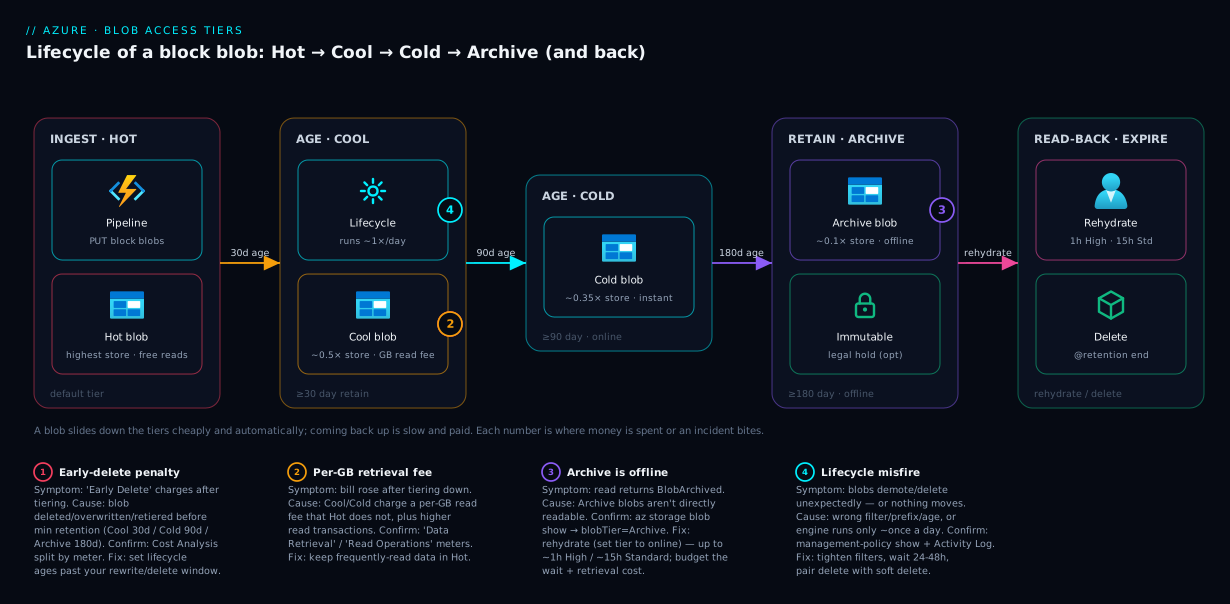
The key insight the diagram encodes: tiering is a one-way slide that is cheap going down and expensive coming back up. Demotion (Hot → Archive) is automatic, near-free, and fast. Promotion — especially out of Archive — is manual or rule-driven, costs retrieval, and for Archive takes hours. Design your lifecycle so data only ever needs to come back up rarely and on a schedule you control.
Real-world scenario
Northwind Telemetry, a fictional but representative IoT company, ingests sensor data from 40,000 field devices into a single Blob container — about 2 TB per month of newline-delimited JSON, written continuously by an Event Hubs capture pipeline. Two consumers read it: a real-time dashboard that reads only the last 7 days, and an analytics batch that reprocesses the last 30 days once a week. Anything older than 30 days is read maybe twice a year for ad-hoc investigations, and regulatory rules require keeping it all for 3 years. On day one, every blob was in Hot. After a year the container held ~24 TB, almost all of it in Hot, and storage was the single biggest line on their Azure bill — even though 95% of the data had not been read in months.
Their first instinct was to move everything older than 7 days to Archive to get the cheapest storage. They piloted it and the bill went up for two weeks. Two problems surfaced. First, the weekly analytics batch reads the last 30 days — so a third of what they had archived was being rehydrated every week, paying retrieval + rehydration charges and waiting hours, which broke the batch’s schedule. Second, blobs were being rewritten by a late-arriving-data correction job within their first month, triggering the Archive 180-day early-deletion penalty on every corrected blob. They had moved churny, recently-read data into the most expensive-to-access tier.
The fix was a staged lifecycle policy that matched the real access pattern instead of the wishful one. They left the newest data in Hot for 30 days (covering both the 7-day dashboard window and the 30-day weekly batch, with no retrieval fees on those frequent reads). At 30 days a lifecycle rule moved blobs to Cool; at 90 days, when the weekly batch no longer touched them, to Cold (cheapest online, instant if an investigation needed it); and at 180 days — well past any rewrite window — to Archive for the remainder of the 3-year retention, then auto-delete at 3 years. The correction job’s rewrites now all happened while blobs were still in Hot, so no early-deletion penalties fired. Net result: storage cost on the cold majority of the data fell by roughly 70–80%, the weekly batch never touched a tier with a retrieval fee, and the rare ad-hoc investigation read from Cold instantly or accepted a planned rehydration from Archive. The lesson Northwind took away: the cheapest tier is not the goal — the cheapest tier that still matches how the data is actually accessed is.
Advantages and disadvantages
Access tiering is one of the highest-leverage cost optimisations in Azure, but only when applied to the right data. The trade-off in one view:
| Advantages | Disadvantages |
|---|---|
| Dramatically cheaper storage for rarely-read data (Archive ~90% off Hot storage) | Cooler tiers charge more per read and per write |
| Per-blob granularity — mix tiers freely in one container | Cool/Cold add a per-GB retrieval fee with no equivalent in Hot |
| Tier change between online tiers is instant metadata, no data move | Archive is offline; reads need rehydration (1–15 hours) and cost money |
| Lifecycle rules automate demotion — set once, runs forever | Early-deletion penalties punish churny or short-lived data placed deep |
| Independent of redundancy — compose tier × redundancy freely | Tiny blobs see little benefit and may cost more due to per-blob overhead |
| Works on the storage you already have — no migration, no new service | Wrong tier choice can increase the bill versus leaving everything Hot |
Where each side matters: the advantages dominate for large, append-only, rarely-read datasets — backups, logs, archives, media — which is exactly the data that grows unbounded and dominates bills. The disadvantages dominate for small, hot, churny data — config blobs, frequently-read assets, anything rewritten or deleted within its retention window. The skill is not “tier everything down”; it is sorting your data into those two buckets and only tiering the first one.
Hands-on lab
This lab is free-tier-friendly: it creates a small storage account, uploads a blob, moves it through the tiers, reads its tier back, and applies a lifecycle policy — then tears everything down. Costs are negligible (a few cents at most) if you delete the resource group at the end. You need an Azure subscription and az (use Cloud Shell to skip local setup).
Step 1 — Create a resource group and a StorageV2 account. Access tiers require a Standard general-purpose v2 (or Blob) account.
RG=rg-blobtiers-lab
LOC=centralindia
SA=sttierlab$RANDOM   # must be globally unique, lowercase, 3-24 chars

az group create --name $RG --location $LOC

# Standard_LRS keeps it cheap; access tiers need StorageV2/Standard
az storage account create --name $SA --resource-group $RG --location $LOC \
  --sku Standard_LRS --kind StorageV2 --access-tier Hot
Note --access-tier Hot sets the account default tier for new block blobs. Expected: the command returns the account JSON with "accessTier": "Hot".
Step 2 — Create a container and upload a blob. Use account-key auth for simplicity in the lab.
KEY=$(az storage account keys list -g $RG -n $SA --query "[0].value" -o tsv)
az storage container create --name archive-test --account-name $SA --account-key "$KEY"

# Make a small file and upload it
echo "old log line from 2024" > sample.txt
az storage blob upload --account-name $SA --account-key "$KEY" \
  --container-name archive-test --name sample.txt --file sample.txt
Expected: upload returns a JSON with the blob’s lastModified and an ETag. The blob is in Hot (the account default).
Step 3 — Read the blob’s current tier. This is the command you will reach for constantly.
az storage blob show --account-name $SA --account-key "$KEY" \
  --container-name archive-test --name sample.txt \
  --query "{name:name, tier:properties.blobTier, tierInferred:properties.blobTierInferred}" -o table
Expected: tier is Hot. tierInferred = True means the blob has no explicitly set tier and is inheriting the account default — a useful distinction when you debug “why is this Hot?”
Step 4 — Move the blob to Cool, then Cold, then Archive. Each is a single metadata operation for the online tiers.
# To Cool
az storage blob set-tier --account-name $SA --account-key "$KEY" \
  --container-name archive-test --name sample.txt --tier Cool

# To Cold
az storage blob set-tier --account-name $SA --account-key "$KEY" \
  --container-name archive-test --name sample.txt --tier Cold

# To Archive (now offline — you cannot read the content until rehydrated)
az storage blob set-tier --account-name $SA --account-key "$KEY" \
  --container-name archive-test --name sample.txt --tier Archive
Re-run the show command from Step 3 after each: tier reports Cool, then Cold, then Archive. After Archive, try to download it — az storage blob download will fail with a BlobArchived error, proving the offline behaviour.
Step 5 — Rehydrate from Archive back to an online tier. Set the tier back to Hot/Cool/Cold; this starts rehydration (it does not complete instantly).
az storage blob set-tier --account-name $SA --account-key "$KEY" \
  --container-name archive-test --name sample.txt --tier Hot \
  --rehydrate-priority Standard

# Check rehydration progress
az storage blob show --account-name $SA --account-key "$KEY" \
  --container-name archive-test --name sample.txt \
  --query "{tier:properties.blobTier, status:properties.archiveStatus, rehydrate:properties.rehydratePriority}" -o table
Expected: archiveStatus shows rehydrate-pending-to-hot while it processes. Standard priority can take up to ~15 hours, so do not wait on it in the lab — just observe the pending status, which is the point.
Step 6 — Apply a lifecycle policy (the real-world way to do this). Instead of hand-tiering, define a rule. Save this JSON as policy.json:
{
  "rules": [
    {
      "enabled": true,
      "name": "tier-down-and-expire",
      "type": "Lifecycle",
      "definition": {
        "filters": { "blobTypes": [ "blockBlob" ], "prefixMatch": [ "archive-test/" ] },
        "actions": {
          "baseBlob": {
            "tierToCool":    { "daysAfterModificationGreaterThan": 30 },
            "tierToCold":    { "daysAfterModificationGreaterThan": 90 },
            "tierToArchive": { "daysAfterModificationGreaterThan": 180 },
            "delete":        { "daysAfterModificationGreaterThan": 1095 }
          }
        }
      }
    }
  ]
}
az storage account management-policy create \
  --account-name $SA --resource-group $RG --policy @policy.json
Expected: the policy JSON is returned. The engine evaluates rules roughly once per day, so nothing moves instantly — but new and existing blobs will now demote on the schedule and delete at ~3 years automatically.
Step 7 — Tear down. One command removes everything and stops all charges.
az group delete --name $RG --yes --no-wait
The equivalent of Steps 1, 6 in Bicep, for when you want this in IaC rather than imperatively:
param location string = resourceGroup().location
param storageName string

resource sa 'Microsoft.Storage/storageAccounts@2023-05-01' = {
  name: storageName
  location: location
  sku: { name: 'Standard_LRS' }
  kind: 'StorageV2'
  properties: {
    accessTier: 'Hot'            // account default tier for new block blobs
    minimumTlsVersion: 'TLS1_2'
    allowBlobPublicAccess: false
  }
}

resource lifecycle 'Microsoft.Storage/storageAccounts/managementPolicies@2023-05-01' = {
  name: 'default'               // the resource name MUST be 'default'
  parent: sa
  properties: {
    policy: {
      rules: [
        {
          enabled: true
          name: 'tier-down-and-expire'
          type: 'Lifecycle'
          definition: {
            filters: { blobTypes: [ 'blockBlob' ] }
            actions: {
              baseBlob: {
                tierToCool:    { daysAfterModificationGreaterThan: 30 }
                tierToCold:    { daysAfterModificationGreaterThan: 90 }
                tierToArchive: { daysAfterModificationGreaterThan: 180 }
                delete:        { daysAfterModificationGreaterThan: 1095 }
              }
            }
          }
        }
      ]
    }
  }
}
Common mistakes & troubleshooting
These are the failure modes that turn a tiering exercise into a bigger bill or a broken job. Each row: the symptom, the root cause, how to confirm it, and the fix.
| # | Symptom | Root cause | How to confirm | Fix |
|---|---|---|---|---|
| 1 | Bill went up after tiering down | Data is read more often than assumed; retrieval fees swamp storage savings | Cost Analysis split by meter: high “Data Retrieval”/“Read Operations” on the account | Move frequently-read data back to Hot; only tier down genuinely cold data |
| 2 | Unexpected “early deletion” charges | Blobs deleted/overwritten/retiered before the min retention (Cool 30d / Cold 90d / Archive 180d) | Cost Analysis meter “Early Delete”; check blob churn vs retention window | Don’t tier down churny data; align lifecycle ages past your rewrite/delete window |
| 3 | BlobArchived error reading a blob |
The blob is in Archive (offline) and was not rehydrated | az storage blob show ... --query properties.blobTier returns Archive |
Rehydrate (set tier to Hot/Cool/Cold) or copy to a new online blob; wait for completion |
| 4 | Rehydration “takes forever” | Standard priority can take up to ~15 hours | archiveStatus shows rehydrate-pending-to-* |
Use --rehydrate-priority High (up to ~1 hour, costs more) when you need it fast |
| 5 | Lifecycle rule “did nothing” yet | The engine runs ~once/day; rules are not instant | Policy exists (management-policy show) but blobs unchanged after minutes |
Wait up to 24–48h for the first pass; verify filters/prefix match the container |
| 6 | A blob shows Hot but you never set it |
tierInferred = true — it inherits the account default |
show --query properties.blobTierInferred is True |
Set an explicit tier, or change the account default; inferred is normal, not a bug |
| 7 | Tiny blobs saved almost nothing | Per-blob overhead + min-size effect; tiering overhead exceeds storage saved | Compare blob sizes; many sub-MB blobs | Aggregate small blobs (e.g. pack logs) before tiering; or leave small/hot data in Hot |
| 8 | Tiering down didn’t shrink the bill as expected | Snapshots/versions still consume storage at their own tier | Account “Blob versioning”/snapshot capacity in metrics | Add lifecycle actions for snapshot/version; expire old versions |
| 9 | Can’t set tier on a blob at all | It’s a page blob, Premium account, or not StorageV2 | az storage account show --query "{kind:kind, sku:sku.name}" |
Tiers apply to block blobs in Standard StorageV2/Blob/BlockBlobStorage only |
| 10 | Lifecycle deleted blobs you wanted to keep | A delete action’s daysAfter... was too aggressive |
Review the policy JSON; check Activity Log for delete operations | Tighten filters/prefixes; enable soft delete so deletes are recoverable |
A few of these deserve a sentence of emphasis. #1 and #2 are the same root mistake seen from two angles — tiering data down without knowing its real access pattern. Always check Cost Analysis split by meter (not just by service) after a tiering change; the retrieval and early-delete meters tell you immediately whether you helped or hurt. #8 (snapshots/versions) catches teams who enabled blob versioning for safety and forgot that every version is billed: lifecycle rules have separate snapshot and version action blocks for exactly this. And #10: always pair an automated delete action with soft delete turned on, so a mistaken rule is recoverable rather than catastrophic.
Best practices
- Default new accounts to Hot, then demote with lifecycle. Hot is the only tier with no retrieval fee and no minimum retention, so it is the safe landing zone. Let a policy move data down once its age proves it is cold.
- Tier on measured access, not hope. Enable last-access-time tracking and base lifecycle rules on
daysAfterLastAccessTimeGreaterThanfor data with unpredictable reads, so a blob that is being read stays warm. - Match lifecycle ages to your churn window. Never set
tierToArchiveearlier than the point past which blobs are no longer rewritten or deleted, or you will pay early-deletion penalties on every change. - Skip the cool tiers for small, hot, or short-lived blobs. Per-blob overhead and access surcharges mean tiny or frequently-touched blobs rarely benefit. Aggregate small files first.
- Use Cold, not Archive, for “rarely but I need it instantly.” Cold is online and cheap; reserve Archive for data where a multi-hour rehydration is genuinely acceptable.
- Budget rehydration before you archive. If a dataset might be read on a deadline, do not archive it — the 1–15 hour rehydration plus cost can break SLAs.
- Tier snapshots and versions explicitly. If versioning or snapshots are on, add
snapshot/versionactions to your lifecycle policy or you will keep paying for old copies at full price. - Compose tier with the right redundancy. Cold archival data rarely needs GRS geo-replication doubling its cost; pick the cheapest redundancy that meets your durability requirement before you also pick a cool tier.
- Always pair automated
deletewith soft delete. A lifecycle rule that deletes is powerful and unforgiving; soft delete (and optionally versioning) makes mistakes recoverable. - Review Cost Analysis by meter monthly. The storage, transaction, retrieval and early-delete meters together tell you whether your tiering strategy is actually saving money.
- Document the policy intent in the rule name. Name rules for what they do (
tier-down-logs-90d) so the next engineer understands the lifecycle without reverse-engineering the JSON.
Security notes
Access tiers change cost and availability, not access control — but a few security points intersect with tiering:
- Tiering does not change permissions or encryption. A blob’s RBAC, SAS, firewall and encryption at rest (always on, Microsoft- or customer-managed keys) are identical across all four tiers. Moving a blob to Archive does not make it more or less secure; it makes it slower and cheaper to store. Reaching a blob still goes through the same identity and network checks — if you get a 403, that is firewall/RBAC/SAS, covered in Fixing Azure Storage 403 Errors: Firewalls, Private Endpoints, RBAC & SAS, not the tier.
- Lifecycle
deleteis a destructive automation — gate it. A misfiring rule can delete production data on a schedule. Enable blob soft delete (and ideally versioning) so deletions are recoverable, restrict who can edit the management policy via RBAC (Storage Account Contributor/Owner), and review delete actions in the Activity Log. - Use managed identity and least privilege for the apps that read tiered data. The lab uses account keys for brevity, but production apps should authenticate with Microsoft Entra ID and a role like
Storage Blob Data Reader, scoped to the container. Account keys grant everything, including the ability to change tiers and delete blobs. - Immutability for compliance archives. For regulatory retention, layer an immutability policy (time-based retention / legal hold) on the container so archived data cannot be deleted or overwritten — by a person or a lifecycle rule — before its retention expires. Tiering to Archive saves money; immutability enforces the legal requirement.
- Watch rehydration as a data-exfiltration signal. A sudden mass rehydration of Archive data is unusual; if you run Microsoft Defender for Storage (see Enabling Defender for Storage: On-Upload Malware Scanning and Sensitive Data Threat Detection), anomalous bulk reads are the kind of thing worth alerting on.
Cost & sizing
What drives the bill on tiered storage, from largest to smallest lever for typical archival workloads:
| Cost driver | Scales with | How to right-size | Rough relative magnitude |
|---|---|---|---|
| Data storage (GB-months) | Total data × tier rate × redundancy | Tier cold data down; pick minimal redundancy | Usually the largest line for big stores |
| Data retrieval / rehydration | GB read back from Cool/Cold/Archive | Keep frequently-read data in Hot; avoid archiving read data | Can dominate if you read tiered data |
| Read transactions | Number of GETs × tier read rate | Cache, batch, reduce read count | Small unless very high request volume |
| Write transactions | Number of PUTs × tier write rate | Batch writes; don’t write directly to cool tiers | Small for most workloads |
| Early-deletion penalties | Churn of blobs in Cool/Cold/Archive | Align lifecycle ages past churn window | Zero if configured right; surprising if not |
Sizing guidance in plain terms:
- The storage saving from tiering is roughly: Cool ≈ half of Hot, Cold ≈ a third, Archive ≈ a tenth — for the storage component only. On a large, rarely-read store, moving from Hot to Archive can cut the storage line by ~90%. Always confirm exact regional rates on the Azure Blob Storage pricing page before you model it.
- Retrieval and rehydration are per-GB charges you pay only when you read cool/cold/archive data. Budget them based on how many GB you realistically read back per month, not the total stored. Archiving 10 TB you never read is nearly free to store; reading 1 TB of it back costs real money.
- Redundancy multiplies storage cost (ZRS, GRS, RA-GRS each add a multiplier). For deep-archive data, ask whether geo-redundancy is justified — often LRS or ZRS suffices, and you avoid doubling the bill on data you keep purely for retention.
- Free-tier reality: there is no meaningful “free tier” for blob storage beyond the new-account credit; the costs here are small in absolute terms but compound at scale. The lab in this article costs cents.
- The biggest cost lever is not the tier — it is deleting data you do not need. Tiering optimises the cost of keeping data; lifecycle
deleteactions and a real retention policy eliminate the cost entirely for data past its useful life. Do both.
For a worked example: 100 TB of logs read only for the first month, kept 3 years. All-Hot ≈ 100 TB at Hot storage rate for 3 years. Staged (Hot 30d → Cool → Cold 90d → Archive 180d) keeps ~97 TB in Archive for most of its life at ~10% of Hot storage — a storage saving in the region of 70–85% overall, with retrieval costs near zero because the data is only read in its first (Hot) month.
Interview & exam questions
These map to AZ-900 (Azure Fundamentals — cost and storage), AZ-104 (Administrator — storage configuration and lifecycle), and AZ-305 (Architect — designing cost-optimised storage).
-
What are the four Azure Blob access tiers and how do they differ? Hot, Cool, Cold, and Archive. Storage cost decreases Hot → Archive while access (read/write/retrieval) cost increases. Hot has no minimum retention or retrieval fee; Cool (30d), Cold (90d) and Archive (180d) have minimum retention and per-GB retrieval fees. Hot/Cool/Cold are online; Archive is offline and must be rehydrated.
-
Why can moving data to a cooler tier increase your bill? Cooler tiers charge more per read/write and add a per-GB retrieval fee, and impose early-deletion penalties. If the data is read frequently or churns faster than the minimum retention period, those charges can exceed the storage savings.
-
What is the early-deletion penalty? If a blob is deleted, overwritten, or moved out of Cool/Cold/Archive before its minimum retention period (30/90/180 days), you are charged a prorated fee as though it had stayed for the full period. It penalises short-lived or churny data placed in a cool tier.
-
What does it mean that Archive is “offline,” and how do you read an Archive blob? Archive blobs cannot be read directly; a
GETreturns aBlobArchivederror. You must rehydrate — change the tier back to an online tier or copy to a new online blob — which takes up to ~1 hour (High priority) or ~15 hours (Standard) and incurs retrieval cost. -
When would you choose Cold over Archive? When data is rarely read but must be retrievable instantly without a multi-hour rehydration. Cold is online and cheaper than Cool for storage; Archive is cheaper still but offline. Cold suits “almost never, but immediately if needed.”
-
How do you automate moving blobs between tiers? With a lifecycle management policy on the storage account: rules with filters (blob type, prefix) and actions like
tierToCool,tierToCold,tierToArchiveanddelete, keyed on days after modification, creation, or last access. The engine evaluates rules about once per day. -
Is the access tier set on the account or the blob? Both exist: the account has a default tier for new block blobs, but each individual blob can have its own explicitly set tier. A blob with no explicit tier shows
blobTierInferred = trueand inherits the account default. -
Do access tiers apply to all storage? No. They apply to block blobs in a Standard StorageV2 (or Blob/BlockBlobStorage) account. Page blobs and Premium block-blob accounts do not use the Hot/Cool/Cold/Archive model.
-
How do access tiers and redundancy relate? They are independent and multiplicative. Tier sets the storage/access price profile; redundancy (LRS/ZRS/GRS/RA-GRS) sets how many copies and where. A Cool-GRS blob is priced as Cool storage times the GRS multiplier.
-
What’s the difference between rehydration priority Standard and High? Standard can take up to ~15 hours and costs less; High prioritises the operation (up to ~1 hour) and costs more. Choose High only when you need the data on a tight deadline.
-
You enabled blob versioning and your bill rose despite tiering down — why? Each blob version is stored and billed separately at its own tier. Tiering the base blob doesn’t tier old versions. Add
version(andsnapshot) actions to the lifecycle policy to expire or tier old versions. -
What’s the safest tiering strategy when you don’t know the access pattern? Keep data in Hot and let a lifecycle policy demote it based on real age or last-access time. Guessing too cool risks retrieval and early-deletion costs; staying in Hot only costs a little extra storage while the access pattern reveals itself.
Quick check
- Which single tier has no minimum retention period and no per-GB data-retrieval fee?
- You need a blob readable instantly but it is accessed only a few times a year. Cool, Cold, or Archive?
- True or false: changing a blob from Hot to Cool physically moves the data to different hardware.
- A blob in Archive returns an error when an app tries to read it. What must happen first, and roughly how long can it take at Standard priority?
- Your lifecycle rule sets
tierToArchiveat 30 days, but a job rewrites blobs at ~45 days old. What charge will you incur and why?
Answers
- Hot. It is the only tier with no minimum retention and no retrieval fee, which is why it is the safe default and the right home for churny or frequently-read data.
- Cold. It is online (instant reads) and has cheaper storage than Cool; Archive would also be cheap but is offline and needs a multi-hour rehydration, which fails the “instantly” requirement.
- False. Switching between online tiers (Hot/Cool/Cold) is a metadata operation — the data does not relocate. (Rehydrating from Archive does involve moving data back to an online tier and takes time.)
- It must be rehydrated — change its tier back to an online tier or copy it to a new online blob. At Standard priority this can take up to ~15 hours (High priority is up to ~1 hour).
- An early-deletion penalty for Archive. Archive’s minimum retention is 180 days; rewriting at ~45 days moves/overwrites the blob far inside that window, so you are charged as if it had stayed the full 180 days. Tier to Archive only after the rewrite window closes.
Glossary
- Access tier — A property of a block blob (Hot, Cool, Cold, or Archive) that sets its storage price and access price profile.
- Hot tier — Highest storage cost, lowest access cost, no minimum retention or retrieval fee; for frequently accessed data.
- Cool tier — Lower storage, higher access cost, 30-day minimum retention and a per-GB retrieval fee; for infrequently accessed data.
- Cold tier — Cheaper storage than Cool, higher access cost, 90-day minimum retention; online (instant reads) for rarely accessed data.
- Archive tier — Cheapest storage, highest access cost, 180-day minimum retention; offline — must be rehydrated before reading.
- Online tier — A tier whose blobs are readable immediately (Hot, Cool, Cold).
- Offline tier — Archive; blobs are not directly readable and must be rehydrated first.
- Rehydration — Bringing an Archive blob back to an online tier (by changing tier or copying), taking up to ~1 hour (High) or ~15 hours (Standard) and incurring retrieval cost.
- Rehydration priority —
Standard(slower, cheaper) orHigh(faster, more expensive) for an Archive read. - Minimum retention period — The time a blob must stay in Cool (30d), Cold (90d) or Archive (180d) before deletion/move avoids a penalty.
- Early-deletion penalty — A prorated charge for the unused portion of the minimum retention period when a blob leaves a cool tier too soon.
- Data retrieval fee — A per-GB charge for reading data back out of Cool/Cold/Archive; Hot has none.
- Lifecycle management — Account-level policy rules that automatically tier or delete blobs based on age or last-access time.
- Last-access-time tracking — An optional feature that records when a blob was last read so lifecycle rules can tier on real access, not just modification date.
- Account default tier — The tier new block blobs inherit unless an explicit tier is set;
blobTierInferred = trueindicates a blob is using it. - Block blob — The blob type these tiers apply to (Standard StorageV2/Blob/BlockBlobStorage accounts); page blobs and Premium are excluded.
Next steps
- Pair tiering with the durability dial: Azure Storage Redundancy Decoded: LRS vs ZRS vs GRS vs RA-GRS and How to Choose — choose the cheapest redundancy that meets your durability need before you also tier down.
- Solidify the container the tiers live in: Azure Storage Account Fundamentals: Blobs, Files, Queues and Tables.
- Turn tiering into a tracked saving: Azure Cost Management for Beginners: Budgets, Alerts and Cost Analysis in Your First 30 Days — watch the storage, retrieval and early-delete meters month to month.
- Lock down access to the data you tier: Fixing Azure Storage 403 Errors: Firewalls, Private Endpoints, RBAC & SAS.
- Add threat detection over your storage: Enabling Defender for Storage: On-Upload Malware Scanning and Sensitive Data Threat Detection.