Your Azure invoice says ₹4,80,000 for the month, and finance asks one reasonable question — “which team spent this, and on what?” — that you cannot answer. Cost Analysis shows line items like Standard_D4s_v5 · 720 hours · ₹38,000, with no way to tell whether that VM is the payments team’s production cluster or an intern’s forgotten experiment. This is the most common governance gap in Azure, and the fix is not a tool you buy. It is tags: small key–value labels you stamp on resources so the bill, alerts, automation and audit can all be sliced by the dimensions you care about — team, environment, cost centre, owner, application.
A tag is a name: value pair (Environment: Production, CostCenter: CC-4471) on a resource, resource group or subscription. Azure does nothing with a tag’s meaning — it does not know “Production” matters — but it lets you group, filter and roll up the bill by any tag you define, turning an opaque ₹4.8 lakh invoice into a table that reads payments-prod ₹2.1L, search-prod ₹1.3L, shared-platform ₹0.8L, sandbox ₹0.6L. Without a schema agreed up front you get the opposite — resources tagged five ways (env, Env, environment, stage) or not at all — and the rollup is noise.
This article gives you a tag schema to adopt today: the handful of tags every resource should carry, a naming convention that prevents the Env vs env mess, how tag inheritance really works (and the trap that it doesn’t flow to resources automatically), and the exact az CLI, Bicep and Azure Policy to apply, enforce and inherit tags. By the end you can split the bill cleanly — by team, environment and cost centre — and prove it with a Cost Analysis view grouped by tag.
What problem this solves
Without a tagging strategy, three things break, and they break quietly until the month you really need them.
You cannot allocate cost. Azure bills by resource, not by team — a flat list of meters (compute hours, GB-months, transactions) with no notion of “the payments team” or “the dev environment.” Untagged, Cost Management can only show cost by service or by resource group, which helps only if your resource groups map cleanly to teams (they rarely do once an app spans networking, data and compute groups). Nobody owns the number, so nobody reduces it, and both showback (telling each team what they spent) and chargeback (actually billing them) become impossible.
You cannot find an owner. A resource is running up cost, failed a security scan, or needs patching at 2 a.m. — and nobody knows whose it is. An Owner and CostCenter tag answers “does anyone own vm-xk29?” in one query instead of a Slack thread.
You cannot automate by intent. Automation acts on categories — “shut down non-production VMs at 8 p.m.”, “back up everything tagged Critical”, “delete resources past their DeleteAfter date.” Those categories exist only if you tag them; otherwise every automation maintains a hand-curated ID list that goes stale immediately.
Who hits this: every team, but hardest the moment a subscription is shared by more than one team or environment, finance asks for a cost split, or an audit asks “who owns this and what data class is it?” Retrofitting tags onto thousands of existing resources is painful and partial; agreeing a schema on day one is nearly free — that asymmetry is why this is a fundamentals topic.
Here is the field in one table — the core questions a tag schema answers and the tag that answers each:
| Question you’ll be asked | Tag that answers it | Example value | Who asks |
|---|---|---|---|
| Which team’s spend is this? | CostCenter / Team |
CC-4471 / payments |
Finance / FinOps |
| Is this safe to change or delete? | Environment |
Production |
On-call / change board |
| Who do I contact about this resource? | Owner |
priya@contoso.com |
SRE / security |
| What app does this belong to? | Application |
checkout-api |
App teams |
| How sensitive is the data here? | DataClassification |
Confidential |
Security / audit |
| Can automation delete this yet? | DeleteAfter |
2026-09-30 |
Platform / FinOps |
Learning objectives
By the end of this article you can:
- Explain what an Azure tag is, what it can and cannot do, and the difference between tagging (a label for grouping) and a resource naming convention (the name itself).
- Design a minimal, practical tag schema — the 6–8 tags every resource should carry — and write a tag dictionary that fixes allowed keys and values.
- State a clear naming convention for both resource names and tag keys/values, and explain why case sensitivity matters for tag rollups.
- Apply tags three ways — portal,
azCLI, and Bicep — and choose the right method for one-off versus repeatable work. - Explain tag inheritance: why a resource group’s tags are visible in Cost Management but do not flow onto the resources inside it, and how to make them flow with Bicep
unionor Azure Policy. - Use Azure Policy to require a tag, default a missing value, and inherit a tag from the resource group — choosing the right policy effect for each.
- Split the bill by a tag in Cost Analysis to produce a real showback view, and recognise the limits (untagged cost, tags-not-retroactive, billing-vs-object tags).
Prerequisites & where this fits
You should be comfortable with the Azure resource model: that a resource (a VM, a storage account) lives in a resource group, which lives in a subscription, which can sit under a management group. If that hierarchy is fuzzy, read Azure Resource Hierarchy Explained: Subscriptions, Resource Groups and Resources first — tagging and inheritance only make sense once the containment model is clear. You should be able to run az commands in Cloud Shell and read JSON output, and have at least Tag Contributor or Contributor rights on a subscription or resource group to follow along.
This sits at the foundation of the Governance and FinOps track: tags are the dimension that cost tooling, policy and automation all hang off. They make the per-team budgets and Cost Analysis views in Azure Cost Management for Beginners: Budgets, Alerts and Cost Analysis in Your First 30 Days meaningful, are enforced with the effects in Azure Policy Effects Decoded: Deny vs Audit vs Modify vs DeployIfNotExists, and scale up into Azure FinOps and Cost Management: Controlling Cloud Spend at Scale.
A quick map of where tags plug into the things you already use, so you see why getting the schema right pays off everywhere:
| Azure surface | How it uses tags | Why your schema matters here |
|---|---|---|
| Cost Management / Cost Analysis | Group and filter cost by any tag | Inconsistent keys split one team into many rows |
| Azure Policy | Require / default / inherit tags | The schema is the policy’s allowed set |
| Budgets & alerts | Scope a budget to a tag filter | Per-team budgets need a clean CostCenter tag |
| Azure Monitor / alerts | Route or group by Owner / Team |
Pages the right person automatically |
| Resource Graph / inventory | Query resources by tag | Find “all prod payments resources” in one query |
| Automation (Logic Apps, runbooks) | Act on tagged sets | “Stop all Environment=Dev VMs at 20:00” |
Core concepts
Five mental models make every later decision obvious.
A tag is a label for grouping, not a setting that changes behaviour. A tag (Environment: Production) is metadata: Azure stores it and lets you filter and roll up by it, but it does not change how the resource runs. The value comes entirely from you and your tooling acting on the label — which is why a schema everyone agrees on beats a clever tag nobody filters by.
Naming and tagging are two different jobs — use both. A resource name (vm-pay-prod-cin-01) is the resource’s identity: unique within its scope, with length/character limits, usually immutable. A tag (Application: payments) is a queryable label you add, change and remove freely. Names are for humans reading a resource list; tags are for machines slicing the bill. A good name encodes the same facts for readability while tags make them filterable — so you need both, and they should agree.
Tags live at three levels, but they don’t flow downhill by themselves. You can tag a subscription, a resource group and a resource. The instinct is that a resource inherits its RG’s tags — and for Cost Management roll-ups that is effectively true — but on the resource object itself tags do not inherit. To put a tag on the object you apply it explicitly (Bicep, CLI) or use the Inherit a tag from the resource group policy. This gap is the most common tagging surprise, and it gets its own section below.
Tag keys and values are case-preserving, and that matters for the bill. Azure treats tag names case-insensitively for uniqueness (no env and Env together) but tag values are fully case-sensitive — so in Cost Analysis, Production and production show up as two different groups, splitting one environment into two rows. A fixed convention — PascalCase keys, defined exact values — prevents this entirely.
Tags are not retroactive, and they have limits. Applying a tag today does not re-tag yesterday’s usage; cost carries the tags a resource had when the usage was recorded, and it can take 24–48 hours for new tags to appear in Cost Management. Hard limits: 50 tags per resource, key up to 512 characters, value up to 256 (storage-account keys cap at 128). And not every resource type supports tags, so some cost always lands in an “untagged” bucket you must account for.
What goes in a tag schema
A tag schema is a short, written agreement: these keys exist, these are their allowed values, and these are mandatory. Keep it small. The failure mode is not “too few tags” — it is fifty inconsistent ones nobody maintains. Start with the six that answer the questions finance, on-call and security actually ask, then add a couple of optional ones for automation.
The mandatory core (apply to everything)
These are the tags worth enforcing. Each maps to a real question and a real consumer:
| Tag key | Purpose | Allowed values (example) | Mandatory? | Consumed by |
|---|---|---|---|---|
Environment |
Lifecycle stage | Production, Staging, Development, Sandbox |
Yes | Cost, automation, change control |
CostCenter |
Who pays | A code, e.g. CC-4471 |
Yes | Finance / chargeback |
Owner |
Who to contact | An email or team alias | Yes | SRE, security, audit |
Application |
What it belongs to | checkout-api, search |
Yes | App teams, cost-per-app |
DataClassification |
Sensitivity | Public, Internal, Confidential, Restricted |
Recommended | Security, compliance |
ManagedBy |
How it was deployed | Terraform, Bicep, Portal |
Recommended | Platform / drift detection |
Optional, automation-driven tags
Add these only where a real automation or report consumes them — an unused tag is just noise to maintain:
| Tag key | Purpose | Example value | When to use it |
|---|---|---|---|
DeleteAfter |
TTL for temporary resources | 2026-09-30 |
Sandboxes, PoCs, short-lived demos |
Criticality |
Drives backup/alert tier | Critical, Standard, Low |
When backup/alerting reads it |
Project |
Finer than Application |
pay-replatform |
Project-based cost tracking |
Schedule |
Auto start/stop window | Weekdays-0800-2000 |
Cost-saving VM shutdown automation |
Compliance |
Regulatory scope | PCI, HIPAA, None |
Regulated workloads |
Version |
App/stack version | 2.4.1 |
Release tracking, blast-radius |
Designing values you can actually roll up
The values are where rollups live or die. Three rules govern them: use a closed set, not free text (a typo like Prdocution becomes a phantom cost group — enforce the list with Policy); pick one canonical spelling and case (Production, never Prod/PROD, because case-sensitive values each form a separate row); and keep stable, low-cardinality keys, letting values carry detail (CostCenter: CC-4471 survives reorgs better than Team: payments-squad-alpha). The table makes the difference concrete — same intent, very different bill:
| Approach | Example values on the fleet | What Cost Analysis shows | Verdict |
|---|---|---|---|
| Free text, no case rule | Prod, prod, Production, PROD |
4 separate “environments” | Unusable rollup |
| Closed set, canonical case | Production everywhere |
1 clean Production row | Correct |
| Per-team keys instead of values | payments: yes, search: yes |
A column per team, sparse | Fragmented, hard to total |
One CostCenter key, coded values |
CC-4471, CC-4480 |
One column, one row per team | Correct and reorg-proof |
Naming conventions: the name and the tags should agree
A tag is queryable; a name is what a human reads first in the resource list. The Cloud Adoption Framework convention encodes the same facts into the name so it is self-describing, while tags make those facts filterable. A common, readable pattern is:
<resource-type>-<workload/app>-<environment>-<region>-<instance>
So vm-pay-prod-cin-01 reads as VM · payments · production · Central India · instance 01, and it should carry tags Application=payments, Environment=Production that agree with the name — the name for eyes, the tags for filters, telling the same story.
A few naming realities to respect — names are far less forgiving than tags:
| Aspect | Resource name | Resource tag |
|---|---|---|
| Changeable after create? | Usually no (immutable) | Yes, anytime |
| Uniqueness | Must be unique in scope (some global, e.g. storage) | No uniqueness requirement |
| Character/length limits | Strict, vary by type (storage 3–24, lowercase) | Key ≤ 512, value ≤ 256 chars |
| Used for grouping the bill? | Only via resource group | Yes, directly |
| Who reads it | Humans in the portal/CLI | Tooling, cost, policy, automation |
Common prefixes keep names scannable — a short, agreed set everyone memorises: rg- (resource group), vm- (VM), st (storage account, no dash, lowercase, ≤24 chars), plan-/app- (App Service plan/web app), kv- (Key Vault), vnet- (virtual network), sql- (SQL server). So rg-pay-prod-cin and app-checkout-prod read at a glance.
The key discipline: the name and the tags must not contradict each other. A resource named ...-prod-... but tagged Environment=Development is worse than untagged, because it makes both the human and the machine wrong. Where they drift, the tag is the source of truth for cost and automation (it’s queryable); the name is the human-readable mirror.
Applying tags: portal, CLI, and Bicep
There are three ways to put a tag on a resource, and the right one depends on whether the work is a one-off or repeatable. The golden rule: anything that ships to production should be tagged in code (Bicep/Terraform), not by hand, so the tags are version-controlled and survive a redeploy.
| Method | Best for | Survives redeploy? | Bulk / repeatable? | Risk |
|---|---|---|---|---|
| Portal | One-off fix, learning | No (next deploy may strip) | No | Easy to typo a value |
az CLI / PowerShell |
Scripted bulk updates, fixes | No (unless in your IaC) | Yes (scriptable) | Easy to overwrite vs merge |
| Bicep / Terraform (IaC) | Everything in production | Yes — tags are in the template | Yes | None; this is the target |
| Azure Policy | Enforcing/defaulting tags org-wide | Yes (re-applied) | Yes (automatic) | Wrong effect can block deploys |
In the portal
On any resource, resource group or subscription, open the Tags blade, add name/value rows, and save. Fine for a single fix or while learning; not how you tag production, because the next infrastructure deployment can overwrite or drop manually-added tags.
With the az CLI
The CLI is ideal for scripted bulk work. The one trap: by default az tag operations on the tags object can replace the whole set, wiping existing tags. Use the operation that merges:
# Apply (MERGE) tags to a single resource by its resource ID
az tag update \
  --resource-id $(az group show -n rg-pay-prod-cin --query id -o tsv) \
  --operation merge \
  --tags Environment=Production CostCenter=CC-4471 Owner=priya@contoso.com
# Tag a specific resource (e.g. a VM) — merge, don't overwrite
az resource tag \
  --ids $(az vm show -n vm-pay-prod-cin-01 -g rg-pay-prod-cin --query id -o tsv) \
  --tags Environment=Production Application=payments \
  --is-incremental    # merge with existing tags instead of replacing
To find what’s missing a required tag (the gap report you run before enforcing), Azure Resource Graph is fastest — the lab below has a ready query.
With Bicep (the production path)
In Bicep, tags are just a property — declare them once and every deployment carries them. Parameterise the schema so each environment passes its own values:
@description('Standard tag set applied to every resource in this template.')
param tags object = {
  Environment: 'Production'
  CostCenter: 'CC-4471'
  Owner: 'priya@contoso.com'
  Application: 'payments'
  ManagedBy: 'Bicep'
}

param location string = resourceGroup().location

resource sa 'Microsoft.Storage/storageAccounts@2023-05-01' = {
  name: 'stpayprodcin01'
  location: location
  sku: { name: 'Standard_LRS' }
  kind: 'StorageV2'
  tags: tags        // the whole schema, applied in one line
}
To make resources inherit the resource group’s tags in Bicep (instead of restating them), read them from the RG and merge with any resource-specific additions using union():
// Inherit the resource group's tags, then add/override a couple
var rgTags = resourceGroup().tags
resource app 'Microsoft.Web/sites@2023-12-01' = {
  name: 'app-checkout-prod'
  location: location
  tags: union(rgTags, { Application: 'checkout-api' })
  properties: { serverFarmId: plan.id }
}
That union(resourceGroup().tags, {...}) pattern is the cleanest way to get true inheritance from code — the resource ends up with both the RG’s tags and its own, on the object itself (which, as we’ll see next, plain RG tagging does not do).
Tag inheritance: the gotcha that catches everyone
This is the section to read twice. The intuitive model — “tag the resource group and everything inside inherits it” — is only half true, and the false half costs people days.
What inheritance does NOT do. Tagging a resource group does not stamp those tags onto the resources inside it. Tag rg-pay-prod-cin with CostCenter=CC-4471, run az resource show on a VM inside it, and the VM has no CostCenter tag — the object only ever has the tags you put on the object, and new resources in that RG don’t pick up its tags either. This surprises nearly everyone, because every other “container” intuition (folders, OUs) implies inheritance.
What inheritance DOES do. Cost Management can roll a resource’s cost up under its resource group’s tags when you enable tag inheritance in Cost Management settings — so for the bill, RG tags effectively apply to the resources’ cost, even when the objects aren’t individually tagged. But it fixes only the cost view: Policy evaluation, Resource Graph queries, automation and security tooling all read the object’s tags, which still aren’t there. That split — bill yes, object no — is the whole trap.
Because of that split, a clean estate uses three complementary mechanisms: Cost Management inheritance so the bill is right immediately (no redeploy), the Bicep union pattern for everything you deploy, and the Policy inherit-tag built-in to catch resources created outside your templates.
| Mechanism | What it does | Reaches the object? | Best for |
|---|---|---|---|
| Cost Management tag inheritance | Rolls cost up under RG tags | No — cost view only | Fixing the bill fast, no redeploy |
az resource show / Resource Graph |
Reads only the object’s own tags | n/a (this is the gotcha) | Verifying what’s actually on the object |
| Azure Policy evaluation / scans | Evaluate the object’s tags | No — needs inherit-tag policy | Why object tags must really be set |
Bicep union(resourceGroup().tags, …) |
Copies RG tags at deploy time | Yes | New/redeployed resources in IaC |
| Policy “Inherit a tag from the RG” | Adds the RG’s tag via Modify |
Yes | Enforcing object tags org-wide |
Enforcing the schema with Azure Policy
Documenting a schema is not enforcing it. Azure Policy is how you make tagging non-optional: require a tag, supply a default if it’s missing, or copy a tag down from the resource group. Each job uses a different effect — if effects are new to you, Azure Policy Effects Decoded: Deny vs Audit vs Modify vs DeployIfNotExists covers them in depth; here’s the short version for tags:
| Goal | Built-in policy | Effect | Behaviour | When to use |
|---|---|---|---|---|
| Block creates without a tag | Require a tag on resources | Deny | Deployment fails if tag absent | Hard requirement (e.g. CostCenter) |
| Add a missing tag with a default | Add a tag if missing | Modify | Stamps a default value | Soft default (e.g. Environment=Sandbox) |
| Copy a tag from the resource group | Inherit a tag from the resource group | Modify | Adds RG’s tag to the resource object | Make RG tags reach the object |
| Report only, don’t block | Audit a tag | Audit | Flags non-compliant, allows deploy | Discovery phase before enforcing |
A pragmatic rollout order avoids breaking everyone’s deployments on day one: start with Audit to see how bad it is, switch the truly mandatory tags (like CostCenter) to Deny, and use Modify to backfill softer tags so nobody is blocked unnecessarily.
Require a tag (Deny)
Assign the built-in Require a tag on resources and pass the tag name. In Bicep:
// Assign the built-in "Require a tag on resources" (Deny) for CostCenter
resource requireCostCenter 'Microsoft.Authorization/policyAssignments@2024-04-01' = {
  name: 'require-costcenter'
  scope: resourceGroup()
  properties: {
    // Built-in definition: "Require a tag on resources"
    policyDefinitionId: '/providers/Microsoft.Authorization/policyDefinitions/871b6d14-10aa-478d-b590-94f262ecfa99'
    parameters: {
      tagName: { value: 'CostCenter' }
    }
  }
}
With this assigned, any attempt to create a resource without a CostCenter tag fails at deploy time with a policy error — which is exactly what you want for the one tag finance can’t live without.
Inherit a tag from the resource group (Modify)
The built-in Inherit a tag from the resource group uses the Modify effect to copy a chosen tag from the RG onto the resource — the policy-driven way to close the inheritance gap. Modify policies need a managed identity with Tag Contributor to write the tag, which you grant via a remediation task:
# Assign the built-in "Inherit a tag from the resource group" for Environment,
# with a system-assigned identity Policy can use to remediate.
az policy assignment create \
  --name inherit-environment \
  --scope $(az group show -n rg-pay-prod-cin --query id -o tsv) \
  --policy "cd3aa116-8754-49c9-a813-ad46512ece54" \
  --params '{ "tagName": { "value": "Environment" } }' \
  --mi-system-assigned --location centralindia

# Remediate existing resources (apply the tag to what's already there)
az policy remediation create \
  --name remediate-env \
  --policy-assignment inherit-environment \
  --resource-group rg-pay-prod-cin
After remediation, the VMs and storage accounts in that RG carry the Environment tag on the object, so Resource Graph, automation and security scans finally see it — not just Cost Management.
Architecture at a glance
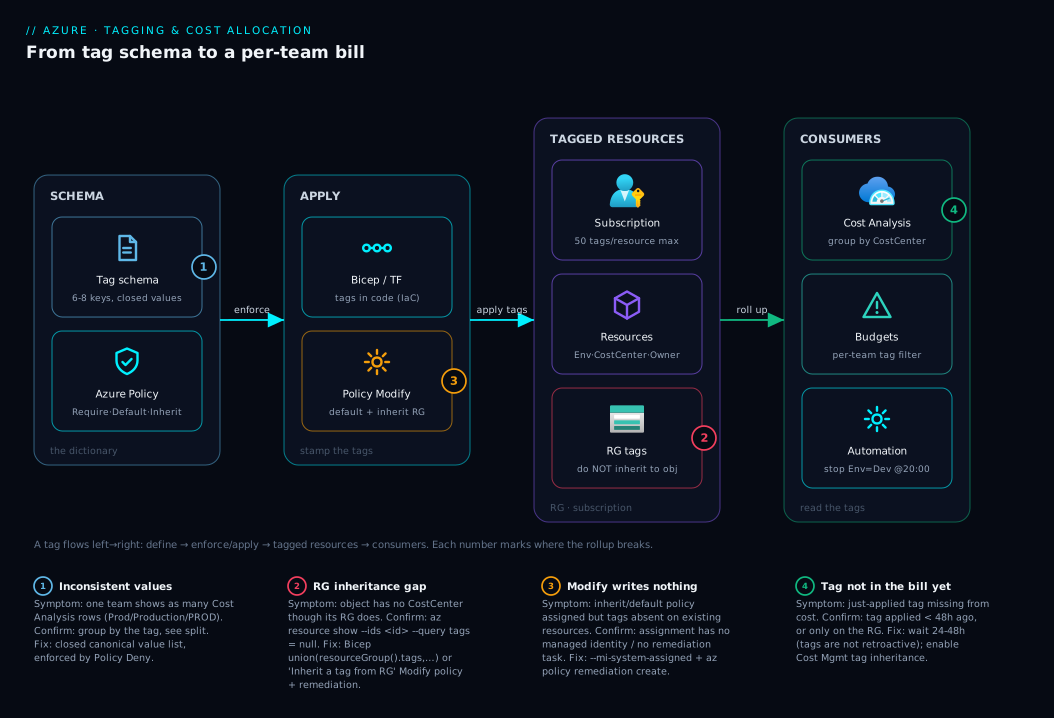
The diagram traces a tag from where it’s defined to where it’s consumed, left to right — because tagging only pays off at the consumer end. On the left, the schema is the agreed dictionary of keys and values living in a doc and, crucially, in Azure Policy as Require/Default/Inherit rules. That schema is applied in the middle: resources get tags from Bicep/Terraform (the production path, tags in code) and from Azure Policy (which defaults missing tags and inherits tags from the resource group onto the object). The tagged resources sit in their resource groups and subscriptions, each carrying the canonical Environment, CostCenter, Owner and Application labels.
On the right, the consumers read those tags: Cost Management groups the bill by CostCenter for per-team showback; budgets scope to a tag filter; and automation acts on tagged sets (stop Environment=Dev VMs at night). The numbered badges mark where the chain breaks — inconsistent values fragmenting the rollup, the inheritance gap leaving objects untagged, a Modify policy that writes nothing without remediation, and the lag before tags reach the bill. The lesson: the whole chain — define, enforce, apply, consume — must hold, and a tag is only as good as the consistency of its values.
Real-world scenario
Northwind Logistics runs one subscription shared by three teams — tracking, billing, and a shared platform group owning networking and identity — with monthly spend around ₹6,20,000 and growing. When finance moved to chargeback and asked each lead to own their number, platform lead Arjun grouped Cost Analysis by Resource group and hit the wall: the RGs were organised by layer (rg-network, rg-data, rg-compute), not by team, so every team’s spend smeared across all three. Grouping by Service was no better — “₹1.4L of SQL” told no one whom to bill.
Rather than reorganise resource groups by team (a huge, risky move-resources project) he reached for tags. The team agreed a six-tag schema in an afternoon (Environment, CostCenter, Owner, Application, DataClassification, ManagedBy) with closed value lists and a CostCenter code per team. The first pass went sideways — engineers tagged Environment as Prod, Production and PROD, so Cost Analysis showed three production environments — cementing rule one: closed, canonical values enforced by Policy, not free text.
The real surprise was inheritance. Arjun had tagged the three RGs with CostCenter and assumed the resources inherited it, but a Resource Graph query showed it empty on every VM and storage account. He fixed it in two moves: enabled tag inheritance in Cost Management (the bill rolled up under RG tags within 48 hours, an immediate answer for finance) and assigned the Inherit a tag from the resource group Policy with a remediation task so Resource Graph, scans and automation saw the tags on the objects too.
Enforcement came last, deliberately: Audit for a week to clear the backlog, then CostCenter flipped to Deny and a Modify policy defaulting Environment=Sandbox for anything created outside the templates. Two weeks in, the residual untagged bucket fell from 41% of spend to under 3% (a few classic resources that don’t support tags, noted as a known exception), and finance got a clean view — tracking ₹2.6L, billing ₹2.1L, shared-platform ₹1.5L — with no resources moved. The whole fix was a schema, three policy assignments, and a Cost Management toggle.
The rollout as a timeline, because the order is the lesson:
| Step | What they did | Effect | What it taught |
|---|---|---|---|
| 1 | Group cost by RG / service | Spend smeared across layers | RGs ≠ teams; need a tag dimension |
| 2 | Agree a 6-tag schema | A shared contract | Keep it small and mandatory |
| 3 | First tagging pass (free text) | 3 “Production” groups appeared | Closed, canonical values only |
| 4 | Query tags via Resource Graph | CostCenter empty on objects |
RG tags don’t inherit to objects |
| 5 | Enable Cost Mgmt tag inheritance | Bill rolls up in 48 h | Fastest path to a correct bill |
| 6 | Policy “Inherit a tag” + remediate | Tags now on the objects | Closes the gap for queries/automation |
| 7 | Audit → Deny (CostCenter) | New resources must be tagged | Enforce only after you’ve backfilled |
Advantages and disadvantages
Tagging is cheap and powerful, but it is a discipline, not a feature you turn on once. Weigh it honestly:
| Advantages (why a tag schema pays off) | Disadvantages / costs (what it demands) |
|---|---|
| Splits the bill by any dimension you choose — team, env, app, cost centre | Only as good as value consistency; one typo creates a phantom cost group |
| Cheap to adopt on day one; works across every service that supports tags | Painful and partial to retrofit onto thousands of existing resources |
| Powers budgets, alerts, automation and inventory off the same labels | Tags are not retroactive — past usage keeps its old (or no) tags |
| Cost Management inheritance gives a correct bill without re-tagging objects | RG tags don’t reach the object — a real gotcha for queries/automation |
| Azure Policy can enforce the schema so it doesn’t decay | Wrong policy effect (Deny too early) can block legitimate deployments |
| No extra cost — tags themselves are free | Ongoing governance needed or the schema drifts within months |
Tagging is right for essentially every Azure estate the moment more than one team or environment shares a subscription; it’s least useful (but harmless) in a tiny single-team, single-environment subscription where the resource group already maps to the team. Every disadvantage is about consistency and timing — adopt early, enforce with Policy, accept a small untagged bucket — so none is a reason to skip tagging, only a reason to do it deliberately.
Hands-on lab
Create a resource group and a resource, prove that RG tags do not inherit to the object, then fix it — all free-tier-friendly (a storage account with no data costs effectively nothing for an hour; we delete it at the end). Run in Cloud Shell (Bash).
Step 1 — Variables and a tagged resource group.
RG=rg-tag-lab
LOC=centralindia
SA=sttaglab$RANDOM   # storage names: lowercase, 3-24 chars, globally unique
az group create -n $RG -l $LOC \
  --tags Environment=Sandbox CostCenter=CC-LAB Owner=you@contoso.com -o table
Expected: the RG is created with three tags shown in the output.
Step 2 — Create a storage account in that RG, with NO tags of its own.
az storage account create -n $SA -g $RG -l $LOC --sku Standard_LRS -o table
Step 3 — Prove the gotcha: the resource did NOT inherit the RG’s tags.
az resource show --ids $(az storage account show -n $SA -g $RG --query id -o tsv) \
  --query tags -o json
Expected output: null (or {}). The storage account has no CostCenter tag, even though its resource group does. This is the inheritance gap, demonstrated.
Step 4 — Apply the tags to the object explicitly (merge, don’t overwrite).
az resource tag --ids $(az storage account show -n $SA -g $RG --query id -o tsv) \
  --tags Environment=Sandbox CostCenter=CC-LAB Application=tag-lab \
  --is-incremental
Re-run the Step 3 query — now you see the three tags on the object.
Step 5 — See the inheritance the other way: assign the “Inherit a tag” Policy. (Optional, shows the automated fix.)
az policy assignment create \
  --name inherit-costcenter-lab \
  --scope $(az group show -n $RG --query id -o tsv) \
  --policy "cd3aa116-8754-49c9-a813-ad46512ece54" \
  --params '{ "tagName": { "value": "CostCenter" } }' \
  --mi-system-assigned --location $LOC -o table
This assigns the built-in Inherit a tag from the resource group; new resources in the RG will get CostCenter copied onto them automatically (existing ones need a remediation task).
Step 6 — Confirm your schema is enforceable: find resources missing a tag.
az graph query -q "
Resources
| where resourceGroup == '$RG'
| extend cc = tostring(tags['CostCenter'])
| project name, type, costCenter = iff(cc == '', 'MISSING', cc)
" -o table
This is the gap report you’d run estate-wide before flipping a Deny policy.
Validation checklist. You created a tagged RG (steps 1–2), proved a child resource did not inherit those tags on its object (step 3 → null), fixed it by tagging the object directly with --is-incremental (step 4), assigned the inherit-tag Policy for future resources (step 5), and ran the Resource Graph gap report you’d use estate-wide before enforcing (step 6). That is the whole real-world sequence in miniature: discover the gap, backfill safely, automate, then audit.
Cleanup (avoid lingering charges and a stray policy).
az policy assignment delete --name inherit-costcenter-lab \
  --scope $(az group show -n $RG --query id -o tsv)
az group delete -n $RG --yes --no-wait
Cost note. An empty Standard_LRS storage account and a policy assignment cost effectively nothing for an hour; deleting the resource group removes everything.
Common mistakes & troubleshooting
Even a simple schema goes wrong in predictable ways. Scan the table, then read the detail for whichever row bit you.
| # | Symptom | Root cause | Confirm (exact cmd / portal path) | Fix |
|---|---|---|---|---|
| 1 | One team shows as several rows in Cost Analysis | Inconsistent case/spelling of a tag value | Cost Analysis → group by the tag → see Prod/Production/PROD |
Pick canonical value; re-tag; enforce with Policy |
| 2 | Resource shows no tags despite RG being tagged | RG tags don’t inherit to the object | az resource show --ids <id> --query tags → null |
Tag the object (Bicep union) or inherit-tag Policy |
| 3 | New tag not visible in the bill yet | Tags aren’t retroactive; 24–48 h lag | Cost Analysis date range vs when tag was applied | Wait 24–48 h; remember past usage keeps old tags |
| 4 | az tag wiped existing tags |
Used a replace operation, not merge | Re-check tags after the command | Use az tag update --operation merge / --is-incremental |
| 5 | Deployment suddenly fails with a policy error | A Deny tag policy was assigned | Activity log → policy denial; cite the tag name | Add the required tag to the template, or scope the policy |
| 6 | Big “untagged” / no-value bucket remains | Resource type doesn’t support tags, or created outside IaC | Cost Analysis → filter tag = (none) | Note unsupported types as exceptions; default via Modify |
| 7 | Tags exist but budgets don’t split by team | Budget scoped to subscription, not a tag filter | Cost Management → Budgets → check filter | Recreate budget with a CostCenter tag filter |
| 8 | Modify/inherit policy assigned but tags don’t appear | No managed identity / no remediation run | Policy → assignment → no identity, or no remediation task | Add --mi-system-assigned; run az policy remediation create |
Two of these dominate real incidents. #2 (inheritance) is the headline gotcha — verify with az resource show on the object, not the RG. #8 is the top policy-tagging failure: a Modify effect needs a managed identity with Tag Contributor, and it only fixes existing resources when you run a remediation task — assigning the policy alone changes nothing for what’s already deployed.
Best practices
- Agree the schema before the first deployment. Six to eight mandatory tags, written down, with closed value lists. Retrofitting is the expensive path.
- Keep it small. Every tag you mandate is a tag someone must maintain forever. Drop any tag no tool actually consumes.
- Enforce, don’t hope. Use Azure Policy: Deny the few non-negotiables (
CostCenter), Modify to default the soft ones, Audit first to discover the gaps. - Tag in code, not by hand. Put tags in Bicep/Terraform so they survive redeploys and live in version control. Portal tagging is for one-off fixes only.
- Fix values, not just keys. Closed lists and one canonical case (
Production, neverProd/PROD) — case-sensitive values are the #1 cause of fragmented rollups. - Close the inheritance gap deliberately. Turn on Cost Management tag inheritance for the bill, and use the inherit-tag Policy (or Bicep
union) so the tags reach the objects. - Make the name and the tags agree. A resource named
...-prod-...should be taggedEnvironment=Production; contradictions make both humans and machines wrong. - Roll out enforcement in stages. Audit → backfill → Deny. Flipping straight to Deny breaks everyone’s pipelines on day one.
- Track the untagged bucket as a metric. Aim to drive “no value” cost below ~5%; accept a small residue for tag-unsupported resource types.
- Review the schema quarterly. Reorgs rename teams; codes (
CC-4471) survive better than names, but the dictionary still needs an owner and a cadence.
Security notes
Tags are governance metadata, and that cuts two ways. On the upside, Owner and DataClassification are security infrastructure — they let a scan answer “who owns this and how sensitive is it?” without a spreadsheet and let you scope backup and alerting to data sensitivity. Make DataClassification mandatory for any subscription holding regulated data, with a closed list (Public/Internal/Confidential/Restricted) the security team owns.
Three cautions. Never put secrets in tags — values are visible to anyone with resource read access and appear in inventory exports, logs and cost reports, so no connection strings, keys or tokens; those belong in Azure Key Vault: Secrets, Keys and Certificates, and you should treat tags as world-readable within your tenant. Writing tags is a permission — the Tag Contributor role lets a principal add/modify tags without other rights, and a Modify policy’s managed identity needs exactly that, so grant it at the narrowest scope that works (whoever can rewrite tags can rewrite the dimension your bill depends on). And scope enforcing policies thoughtfully — a Deny at the management-group root protects everything but can also block a legitimate emergency deploy, so know how to exempt a scope fast.
Cost & sizing
Tags themselves are free — there is no charge to apply, store or query them, and no limit that costs money. What tags change is your ability to see and control the bill, so the “cost” conversation here is really about what a good schema saves.
| Lever | Without tags | With a tag schema |
|---|---|---|
| Per-team cost visibility | Impossible (only by service/RG) | One Cost Analysis view grouped by CostCenter |
| Budgets | One subscription-wide budget | A budget per team via tag filter |
| Idle/sandbox cleanup | Manual hunting | Automation on Environment=Sandbox / DeleteAfter |
| Right-sizing accountability | No owner to ask | Owner tag names the responsible engineer |
| Audit / chargeback | Spreadsheet reconciliation | Direct, auditable per-tag report |
The “untagged bucket” is your real cost-of-imperfection — a few percent of spend with no tag value because the resource type doesn’t support tags or predates your schema; aim to drive it under ~5% rather than to zero. For the broader cost-control workflow tags feed, see Azure Cost Management for Beginners: Budgets, Alerts and Cost Analysis in Your First 30 Days and, at scale, Azure FinOps and Cost Management: Controlling Cloud Spend at Scale.
Interview & exam questions
These map to AZ-900 (Azure Fundamentals — governance and cost management) and the practical FinOps questions in cloud-architect interviews.
1. What is an Azure tag, and what can it do?
A name: value metadata label on a resource, RG or subscription. It doesn’t change behaviour; it lets you group, filter and — most importantly — split cost in Cost Management by any tag dimension.
2. Do resources inherit tags from their resource group?
Not on the object — az resource show shows them absent. Cost Management can roll cost up under RG tags if you enable tag inheritance, but for queries, policy and automation you must put the tag on the object via Bicep union, CLI, or an inherit-tag Policy.
3. Are tag values case-sensitive, and why does it matter?
Yes (the key’s case is preserved but uniqueness is case-insensitive). Production and production become two separate Cost Analysis groups, fragmenting one environment’s spend — hence closed, canonical value lists.
4. How do you enforce that every resource has a CostCenter tag?
Assign the built-in Require a tag on resources with effect Deny and tag name CostCenter, so deployments lacking it fail. Roll out after an Audit phase so you don’t break existing pipelines.
5. A team’s spend is smeared across three resource groups. How do you give finance a per-team number without moving resources?
Apply a CostCenter tag (or enable Cost Management tag inheritance from the RGs), then group Cost Analysis by CostCenter — tagging provides the dimension the resource groups didn’t.
6. What’s the difference between a naming convention and a tagging strategy? A naming convention governs the immutable name (identity, unique in scope, character limits); a tagging strategy governs tags (changeable, queryable labels for grouping and cost). Use both, and make them agree.
7. Why might a tag you just applied not show up in the cost report? Tags aren’t retroactive and there’s a 24–48 hour lag, so only usage recorded after the tag existed is attributed to it — or the tag is on the RG, not the object, with Cost Management inheritance off.
8. What does the Modify policy effect require to actually write a tag? A managed identity with Tag Contributor, plus a remediation task for existing resources. Assigning the policy alone affects only new evaluations until you remediate.
9. Should secrets ever go in tags? Never. Tag values are readable by anyone with resource read access and appear in exports, logs and cost reports. Secrets belong in Key Vault; treat tags as world-readable within the tenant.
10. How would you stage a tagging rollout across a live subscription? Agree a small schema, apply via IaC, run tag policies in Audit to find gaps, backfill via CLI/remediation, then flip the non-negotiable tags to Deny and Modify to default the rest — enforce only after the estate is clean.
Quick check
- Tagging a resource group with
CostCenter=CC-4471— does the VM inside it now have that tag on its object? Where (if anywhere) does the RG tag still help? - Half your fleet is tagged
Environment=Prodand halfEnvironment=Production. What will Cost Analysis show when you group byEnvironment, and why? - Which policy effect would you use to block creating a resource that lacks a
CostCentertag — and which to default a missingEnvironmenttag? - You applied a tag this morning but it’s not in the cost report. Give two reasons.
- Name three places (besides the bill) that read resource tags, and one reason the resource-group inheritance gap matters to them.
Answers
- No — the object has no
CostCentertag; RG tags don’t inherit to objects. The RG tag still helps the bill if Cost Management tag inheritance is on, but not Resource Graph, policy or automation, which read the object. - Two separate rows (
Prod,Production), splitting one environment’s spend, because tag values are case-sensitive — each distinct string is its own group. Fix with a closed canonical value enforced by Policy. - Deny (Require a tag on resources) to block the missing
CostCenter; Modify (Add a tag if missing) to default the missingEnvironment. - (a) Tags are not retroactive with a 24–48 h lag; (b) the tag may be on the RG not the object, with Cost Management inheritance off.
- Any three of Resource Graph, Azure Policy evaluation, automation/runbooks, security scans, alert routing. The gap matters because all read the object’s tags — which RG tags don’t reach — so they treat the resource as untagged.
Glossary
- Tag — A
name: valuemetadata label on a resource, resource group or subscription, used to group, filter and roll up (especially cost). - Tag key (name) — The left side of a tag (
Environment). Case is preserved; uniqueness within a resource is case-insensitive. - Tag value — The right side (
Production). Case-sensitive — different cases are different groups. - Tag schema / dictionary — The agreed, written set of allowed tag keys and values; the contract everyone (and Policy) tags against.
- Naming convention — Rules for resource names (immutable identity, length/character limits), distinct from tags but designed to agree with them.
- Tag inheritance — RG tags appearing in cost roll-ups (yes, when enabled in Cost Management) versus on the resource object (no, unless applied or inherited via Policy/Bicep).
inheritTags/union(resourceGroup().tags, …)— The Bicep pattern that copies the resource group’s tags onto a resource at deploy time.- Cost allocation — Splitting spend by a dimension (e.g.
CostCenter) so each team’s cost is visible. - Showback / chargeback — Reporting each team’s spend (showback) versus actually billing it back to them (chargeback).
- Untagged bucket — The portion of cost with no value for a given tag (unsupported resource types, pre-schema resources); always exists, kept small.
- Tag Contributor — The RBAC role that allows adding/modifying tags without other permissions; required by Modify policy identities.
- Modify (policy effect) — The Azure Policy effect that adds or replaces a tag (e.g. default a missing tag, inherit from the RG); needs a managed identity and remediation.
- Deny (policy effect) — The effect that blocks a deployment that violates a rule (e.g. a missing required tag).
- Cost Analysis — The Cost Management view where you group/filter spend by tag, service, resource group, etc.
- AZ-900 — Azure Fundamentals certification; covers governance, tags and cost management at the level of this article.
Next steps
- Azure Cost Management for Beginners: Budgets, Alerts and Cost Analysis in Your First 30 Days — turn your tags into per-team budgets, alerts and a real showback view.
- Azure Policy Effects Decoded: Deny vs Audit vs Modify vs DeployIfNotExists — go deep on the effects that enforce, default and inherit your tag schema.
- Azure Resource Hierarchy Explained: Subscriptions, Resource Groups and Resources — the containment model that governs where tags live and how they roll up.
- Azure FinOps and Cost Management: Controlling Cloud Spend at Scale — where tagging becomes an organisation-wide cost-accountability practice.
- Azure Subscriptions Explained: Types, Billing Boundaries and When to Create a New One — when a separate subscription (a hard billing boundary) beats a tag for cost separation.