A developer working from home needs to reach a database that lives on a private subnet in Azure — no public IP, locked behind a network security group. You could expose the database to the internet (please don’t), hand out a shared OpenVPN profile with a static certificate that nobody ever revokes, or do the thing that actually scales: stand up a Point-to-Site (P2S) VPN on an Azure VPN Gateway and let each person authenticate with their own Microsoft Entra ID account. When someone leaves the company and their Entra account is disabled, their VPN access dies with it — no certificate to chase, no profile to claw back.
This article is a hands-on implementation guide. A Point-to-Site VPN is a software tunnel from one machine (a laptop, a developer box) into an Azure virtual network, terminated on a managed gateway Azure runs for you. “Point-to-Site” because it connects a single point (the client) to a site (your VNet), as opposed to a Site-to-Site (S2S) VPN that joins an entire on-premises network. We will use the OpenVPN tunnel type because it is the only one that supports Microsoft Entra ID authentication, and Entra auth is what lets you tie tunnel access to real user identities, Conditional Access, and MFA instead of a pile of certificates.
By the end you will have built the whole thing three ways — clicking through the portal, scripting it with the az CLI, and declaring it in Bicep — connected a client with the Azure VPN Client, watched a real packet reach a private VM, and torn it all down so you don’t pay for an idle gateway. We will be concrete throughout: exact SKUs, the address-pool CIDR rules, the three Entra App IDs Azure uses, the commands that confirm a connection, and the handful of mistakes that cause 90% of “I can’t connect” tickets.
What problem this solves
Remote access to private Azure resources is the everyday pain. Your databases, internal APIs, jump boxes, and management endpoints should not have public IPs — but your engineers, on-call staff, and contractors are not in an office on a corporate network. Something has to bridge that gap securely, per person, and be easy to revoke.
Without a P2S VPN, teams reach for bad substitutes. They give a VM a public IP and “restrict the NSG to my home IP” — which breaks the moment their ISP rotates the address and leaves an internet-facing surface meanwhile. They share one OpenVPN config file with an embedded certificate across the whole team, so there is no per-user accountability and revoking one person means re-issuing for everyone. Or they prop open SSH on port 22 and watch the brute-force logs scroll. Each trades a real security boundary for convenience.
A P2S VPN with Entra authentication fixes the model: the gateway sits at the edge of your VNet, clients dial in over an encrypted tunnel, and because the tunnel type is OpenVPN with Entra ID as the authentication source, each connection is a named user signing in with their own credentials — subject to MFA and Conditional Access like any other Entra sign-in. Who hits this: basically every team that runs private workloads in Azure and has people who need to reach them from outside. It bites hardest on small teams without an ExpressRoute or existing VPN concentrator, and on anyone who inherited a tangle of certificate-based profiles nobody can audit.
| Approach | Per-user identity | MFA / Conditional Access | Revocation | Verdict |
|---|---|---|---|---|
| Public IP + NSG allow-list | No | No | Edit NSG rule | Fragile; internet-facing surface |
| Shared OpenVPN profile (one cert) | No | No | Re-issue for everyone | No accountability |
| SSH/RDP open to internet | Per host, weak | No | Rotate keys | Constant attack noise |
| P2S VPN, certificate auth | Per cert (manual) | No | Add cert thumbprint to revocation list | Works, but certs are toil |
| P2S VPN, Entra ID auth (OpenVPN) | Yes (named user) | Yes | Disable the Entra account | The scalable answer |
Learning objectives
By the end of this article you can:
- Explain what a Point-to-Site VPN is, how it differs from Site-to-Site, and where the gateway sits in a VNet.
- Choose the right VPN Gateway SKU and generation for P2S, and explain the connection-count and throughput limits of each.
- Design the two address spaces that matter — the VNet address space and the client address pool — without overlapping anything.
- Pick the OpenVPN tunnel type and configure Microsoft Entra ID as the authentication source, including the three App IDs Azure relies on.
- Build the full stack in the portal, the
azCLI, and Bicep, with expected output and validation at each step. - Install the Azure VPN Client, import the generated profile, connect, and prove a packet reaches a private VM.
- Diagnose the common failure modes — wrong audience App ID, overlapping address pools, missing
GatewaySubnet, DNS not resolving — using exact commands and portal paths. - Estimate the monthly cost of an always-on gateway and decide when a VPN is the wrong tool versus Azure Bastion or Private Link.
Prerequisites & where this fits
You should already understand the Azure basics: a resource group holds related resources, a virtual network (VNet) is your private IP space, and a subnet carves it into segments protected by network security groups (NSGs). If those are fuzzy, read Azure Virtual Network, Subnets and NSGs: Networking Fundamentals first. You need to run az in Cloud Shell or a local shell, and a subscription where you have at least Network Contributor plus the ability to consent to an Entra enterprise app (or a Global / Application Administrator to grant tenant-wide consent the first time).
This sits in the Networking track. It is the single-user counterpart to the site-joining Production Site-to-Site VPN to Azure: Active-Active Gateways with BGP — both ride the same VPN Gateway resource with different connection types. Because we authenticate with Entra, the same Conditional Access engine from Deploying Conditional Access Safely: Report-Only Rollout to Enforcement governs who can dial the tunnel. It is also one of three ways to reach a private workload; Azure Private Endpoint vs Service Endpoint: Secure PaaS Access and Azure Bastion are the alternatives we weigh in Cost & sizing.
Here is where each moving part lives, so the rest of the article has a shared map:
| Layer | Resource | Lives in | Who owns it |
|---|---|---|---|
| Identity | Microsoft Entra tenant + Azure VPN enterprise app | Your tenant | Identity / IT admin |
| Edge | VPN Gateway (virtualNetworkGateways) |
GatewaySubnet of your VNet |
Network team |
| Public entry | Gateway public IP | Resource group | Network team |
| Private space | VNet + workload subnets | Resource group | Network team |
| Client pool | P2S address pool (config, not a subnet) | Gateway config | Network team |
| Client | Azure VPN Client app | The user’s laptop | The user |
Core concepts
A handful of ideas make every later step obvious.
The gateway is a managed appliance that lives inside your VNet, on its own subnet. An Azure VPN Gateway is a pair (or more) of VMs Azure provisions, patches, and runs for you. It must sit in a dedicated subnet named exactly GatewaySubnet — mandatory, case-sensitive, nothing else in it. It has a public IP so internet clients can reach it and an interface on your VNet to route packets inward. You never SSH into it; you configure it through the control plane.
Two address spaces, never overlapping. Your VNet address space (say 10.20.0.0/16) is where Azure resources live. The client address pool (say 172.16.0.0/24) is a separate range the gateway hands out to connecting clients, one IP per connection. These must not overlap each other, and the pool must not overlap any network the client is already on (home Wi-Fi, on-prem LAN), or the route collides and traffic goes nowhere. Getting these two CIDRs right is the make-or-break decision of the build.
The tunnel type determines what authentication you can use. OpenVPN (SSL/TLS over port 443) is the one tunnel type that supports Microsoft Entra ID authentication and works through almost any firewall. IKEv2 (IPsec) is fast but does not support Entra auth; SSTP is Windows-only legacy. Because we want Entra auth, we choose OpenVPN — that single choice cascades through every later step.
Entra authentication replaces certificates with sign-ins. Certificate auth trusts a root certificate you upload; any client with a child cert gets in, and revocation means maintaining a thumbprint blocklist by hand. With Entra ID authentication, the client opens a browser, signs in, MFA fires if policy demands it, and the gateway validates the returned token. Access is now governed by the same identity platform as everything else — disable the user and the tunnel dies. Azure wires this through a pre-registered Azure VPN enterprise application identified by a well-known Application (client) ID.
A connection is one client, one leased IP, one named identity. On connect, the gateway authenticates the user against Entra, leases an address from the pool, and pushes routes for your VNet space (plus any DNS servers you set) into the client’s routing table. Traffic for 10.20.0.0/16 then goes through the tunnel; everything else uses the client’s normal internet path — split tunneling, the default and usually what you want. Disconnect, and the lease and routes go away.
The vocabulary in one table
| Term | One-line definition | Why it matters here |
|---|---|---|
| Point-to-Site (P2S) | A VPN from one client device into a VNet | The thing we are building |
| Site-to-Site (S2S) | A VPN joining a whole on-prem network to a VNet | The other connection type on the same gateway |
| VPN Gateway | Managed VM(s) terminating the tunnel | The edge appliance; lives in GatewaySubnet |
GatewaySubnet |
The mandatory, exactly-named subnet for the gateway | Wrong name → deployment fails |
| Client address pool | The CIDR clients lease an IP from | Must not overlap VNet or client LAN |
| Tunnel type | OpenVPN / IKEv2 / SSTP | OpenVPN is the only one supporting Entra auth |
| Microsoft Entra ID auth | Sign-in-based auth instead of certificates | Ties tunnel access to user identity + MFA |
| Azure VPN Client | Microsoft’s client app for OpenVPN+Entra | What the user installs and imports a profile into |
| VPN client profile | The downloadable config the client imports | Generated from the gateway after Entra is set |
| Split tunneling | Only VNet-bound traffic uses the tunnel | The default; keeps internet traffic local |
Choosing the gateway SKU and generation
The gateway SKU sets the concurrent P2S connection count, aggregate throughput, and whether the gateway is zone-redundant. Choose it up front — changing SKU later may require recreating the gateway. The Basic SKU is legacy and does not support OpenVPN or Entra auth, so ignore it here. Start at VpnGw1 for almost any team; step up only if you need more than ~250 connections or more bandwidth.
| SKU | Max P2S connections | Aggregate throughput (approx) | Zone-redundant variant | Supports OpenVPN + Entra |
|---|---|---|---|---|
Basic (legacy) |
128 | 100 Mbps | No | No — IKEv2/SSTP only |
VpnGw1 / VpnGw1AZ |
250 | 650 Mbps | AZ variant yes |
Yes |
VpnGw2 / VpnGw2AZ |
500 | 1 Gbps | AZ variant yes |
Yes |
VpnGw3 / VpnGw3AZ |
1000 | 1.25 Gbps | AZ variant yes |
Yes |
VpnGw4 / VpnGw4AZ |
5000 | 5 Gbps | AZ variant yes |
Yes |
VpnGw5 / VpnGw5AZ |
10000 | 10 Gbps | AZ variant yes |
Yes |
A few rules that save money and grief:
- The
AZ-suffixed SKUs (VpnGw1AZ, etc.) are zone-redundant — instances spread across availability zones. Prefer theAZvariant in production; it costs a little more but survives a single-zone outage. See Azure Regions and Availability Zones: Designing for Resilience for which regions have zones. - The connection limit is concurrent tunnels, not registered users — size to peak simultaneous connections, not headcount.
- Throughput is shared across all connections (P2S + any S2S on the same gateway). A
VpnGw1is fine for interactive admin and light data; size up only for large datasets.
The generation (Generation1/Generation2) is mostly implied by the SKU — VpnGw2 and above default to Generation2, required for the higher throughput tiers — so you rarely set it explicitly.
Designing the address spaces
This is where most builds go wrong, so we do it deliberately before touching the gateway. You are reserving two non-overlapping CIDR blocks.
The VNet address space is your private network in Azure. For this lab we use 10.20.0.0/16, carved into a workload subnet 10.20.1.0/24 and the mandatory GatewaySubnet. The GatewaySubnet should be at least a /27 (a /29 is the bare minimum but leaves no room for adding S2S/ExpressRoute later, so /27 is the safe default).
The client address pool is a separate range — clients lease from it, and it is never a subnet in your VNet. We use 172.16.0.0/24, which gives ~250 client addresses and lives in RFC 1918 space that rarely collides with home networks. Crucially it does not overlap 10.20.0.0/16.
| Block | Example CIDR | Size | Purpose | Overlap rule |
|---|---|---|---|---|
| VNet address space | 10.20.0.0/16 |
65,536 | Where Azure resources live | Must not overlap client pool or on-prem |
| Workload subnet | 10.20.1.0/24 |
256 | Your VMs / PaaS injection | Inside the VNet space |
GatewaySubnet |
10.20.255.0/27 |
32 | The gateway’s own subnet | Inside the VNet space; reserved name |
| Client address pool | 172.16.0.0/24 |
256 | Leased to connecting clients | Must not overlap VNet or any client’s LAN |
The single most reported P2S failure is a client on a network that happens to use the same range as your client pool getting no route. Pick a pool from a range home and office networks rarely use — 172.16.x.x is a good neutral choice precisely because consumer routers almost never use it.
Setting up Microsoft Entra ID authentication
This step distinguishes the guide from a certificate-based VPN. You register the Azure VPN enterprise application in your tenant once, then point the gateway at Entra with --vpn-auth-type AAD and a well-known audience App ID. Two App IDs come up — both Microsoft-owned, identical in every tenant; you do not create them, you consent to them:
| App ID (well-known) | What it is | You use it for |
|---|---|---|
41b23e61-6c1e-4545-b367-cd054e0ed4b4 |
The Azure VPN client application (manually-registered / older flow) | The audience value on older Entra-auth gateways |
c632b3df-fb67-4d84-bdcf-b95ad541b5c8 |
The Azure VPN Client application (newer, recommended) | The audience for the current Microsoft-registered app flow |
The newer flow is recommended for new gateways: grant admin consent to the Azure VPN enterprise application, then configure the gateway with the c632b3df-... audience. The first person to set this up consents on behalf of the tenant; everyone after just signs in.
Step A — consent to the Azure VPN enterprise application. As a Global Administrator (or Application Administrator), open the admin-consent URL for the Azure VPN app in your tenant, replacing TENANT_ID with your directory (tenant) ID:
# Open this URL in a browser as a tenant admin; it registers the Azure VPN app as an enterprise application
echo "https://login.microsoftonline.com/TENANT_ID/oauth2/authorize?client_id=c632b3df-fb67-4d84-bdcf-b95ad541b5c8&response_type=code&redirect_uri=https://portal.azure.com&nonce=1234&prompt=admin_consent"
Sign in, review the permissions, and click Accept. This creates the Azure VPN service principal in your tenant — confirm it landed:
# Should return one row once consent is granted
az ad sp list --filter "appId eq 'c632b3df-fb67-4d84-bdcf-b95ad541b5c8'" \
  --query "[].{name:displayName, appId:appId}" -o table
Expected output is a single row named Azure VPN. If it is empty, the consent did not complete — re-open the URL and ensure you signed in with an admin account.
Step B — find your tenant ID, which the gateway needs as the Entra tenant to trust:
az account show --query "{tenantId:tenantId, sub:name}" -o table
You now have everything Entra needs: the tenant ID, the audience App ID (c632b3df-...), and a consented enterprise app. The gateway configuration in the next section ties them together.
| Entra value | Where it comes from | Used as |
|---|---|---|
| Tenant ID | az account show |
The --aad-tenant issuer base |
| Audience App ID | Well-known c632b3df-... |
--aad-audience |
| Issuer | https://sts.windows.net/<tenantId>/ |
--aad-issuer |
| Enterprise app consent | Admin-consent URL (once) | Lets users sign in at connect time |
Choosing the tunnel type and protocol
With Entra as the auth source, the tunnel type is effectively decided — OpenVPN — but it is worth seeing the full matrix so you understand the trade-off and can answer for it in a review.
| Tunnel type | Transport / port | OS support | Supports Entra auth | Notes |
|---|---|---|---|---|
| OpenVPN | SSL/TLS, TCP 443 | Windows, macOS, Linux, iOS, Android | Yes | Traverses almost any firewall; required for Entra |
| IKEv2 | IPsec, UDP 500/4500 | Windows, macOS, most platforms | No (cert / RADIUS only) | Fast; can be blocked by restrictive firewalls |
| SSTP | SSL/TLS, TCP 443 | Windows only | No | Legacy; avoid for new builds |
You can enable OpenVPN and IKEv2 together for a mix of Entra users and certificate-based clients; for a clean Entra-only setup, choose OpenVPN only. Because OpenVPN runs over TCP 443 — the same port as HTTPS — it works from coffee-shop Wi-Fi and corporate networks that block IPsec, a real advantage on top of the Entra requirement.
Architecture at a glance
Walk the path a packet takes. A remote user opens the Azure VPN Client (with the imported profile) and it initiates an OpenVPN/TLS tunnel over TCP 443 to the gateway’s public IP. Before the tunnel completes, a browser pops to Microsoft Entra ID; the user signs in, MFA fires if Conditional Access requires it, and Entra returns a token scoped to the Azure VPN audience App ID. The gateway validates the token, leases an address from the client pool (172.16.0.0/24), and pushes routes for the VNet space (10.20.0.0/16) into the client’s routing table.
From then on, a packet to 10.20.1.4 (a private VM) follows the pushed route through the tunnel to the gateway, which forwards it onto the workload subnet — subject to the subnet’s NSG — and the reply retraces the path. Everything not destined for 10.20.0.0/16 skips the tunnel and uses the laptop’s normal internet (split tunneling). The numbered badges below mark the four hops where this most commonly breaks.
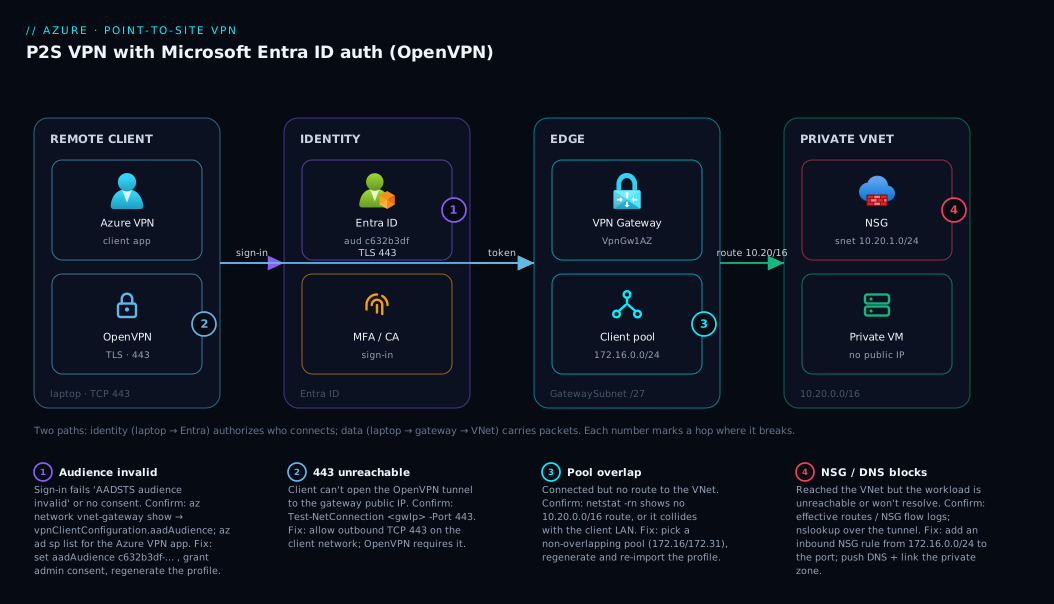
The diagram makes the two-path nature obvious: the identity path (laptop → Entra) authorizes who connects, and the data path (laptop → gateway → VNet) carries packets. Both must be healthy — a token problem stops you at sign-in; a routing or NSG problem lets you sign in but reach nothing. That is exactly why the troubleshooting section splits failures into “can’t connect” versus “connected but can’t reach.”
Real-world scenario
Maplewood Analytics is a 40-person data consultancy. Their workloads — a PostgreSQL flexible server, an internal reporting API, and three analyst jump VMs — all live on a single VNet (10.20.0.0/16) in centralindia, none with public IPs. Until last quarter, analysts reached them through a single shared OpenVPN profile that the founding engineer had set up years ago with a self-signed certificate baked into the config file, passed around on Slack.
The wheels came off when a contractor’s laptop was stolen. The shared profile was on it, the certificate never expired, and there was no way to revoke just that one device without re-issuing for all 40 people and updating every config. They spent a frantic afternoon rotating the certificate and redistributing profiles, and a few analysts were locked out for a day because they missed the message. The post-incident review had one finding: VPN access was not tied to identity, so it could not be revoked per person.
The fix was a P2S gateway with Entra authentication. The network lead deployed a VpnGw1AZ gateway into a new GatewaySubnet, chose OpenVPN only, set the auth type to Entra ID with the standard audience App ID, and granted admin consent to the Azure VPN enterprise app once. The client pool was 172.16.0.0/24 — deliberately not the 192.168.x.x most analysts’ home routers used. Each analyst installed the Azure VPN Client and connected with their normal Entra account; Conditional Access already required MFA for their group, so the VPN inherited MFA for free.
Two things went wrong during rollout, both instructive. Three analysts on a co-working network that happened to use 172.16.x.x couldn’t reach the VNet — classic client-pool overlap; the lead moved the pool to 172.31.0.0/24 and regenerated profiles. And analysts could connect but couldn’t resolve the PostgreSQL server by name, because no custom DNS was set, so the pushed config had no resolver for the private zone — adding the VNet’s DNS to the gateway’s DNS-server list fixed it.
The payoff came two months later when an analyst left. IT disabled her Entra account during offboarding — a step they already did for email — and her VPN access stopped at the next token refresh. No certificate to revoke, no profile to recall, no separate VPN offboarding task at all. The VPN had become just another thing identity governed, which is the entire point of authenticating the tunnel with Entra instead of a certificate.
Advantages and disadvantages
| Advantages | Disadvantages |
|---|---|
| Per-user identity — disable the account, kill the access | Always-on gateway has an hourly cost even when idle |
| Inherits MFA + Conditional Access from Entra | OpenVPN client (Azure VPN Client) must be installed per device |
| No certificate lifecycle to manage | Initial setup needs tenant admin consent (one time) |
| Works over TCP 443 — traverses restrictive firewalls | Throughput capped by SKU; not for bulk data transfer |
| No on-prem VPN appliance required | Provisioning the gateway takes ~30–45 minutes |
| Same gateway can also host S2S connections | Address-pool design mistakes cause silent routing failures |
| Split tunneling keeps internet traffic local and fast | Per-connection limit (250 on VpnGw1) caps concurrency |
The advantages dominate for a distributed team of humans needing occasional, identity-governed access to private resources who already use Entra. The disadvantages bite for high-throughput, machine-to-machine, or always-connected scenarios (use Site-to-Site or ExpressRoute), or admin of a single VM where a whole gateway is overkill (use Azure Bastion). The idle-gateway cost is the most common reason a small team reconsiders — it runs every hour whether one person or fifty connect.
Hands-on lab
This is the centerpiece. We build the full stack three ways. Do it in one of the three (portal, CLI, or Bicep) to provision, then use the validation and teardown steps regardless of which path you chose. Everything uses a single resource group so cleanup is one command.
What you need before you start: an Azure subscription with Network Contributor on it; permission to grant admin consent to an enterprise app (or a Global/Application Administrator to do Step A of the Entra setup above, which you should complete first); the az CLI logged in (az login); and a Windows or macOS machine for the client. Budget ~30–45 minutes of mostly-waiting while the gateway provisions.
Set shared variables once (CLI path):
RG=rg-p2s-lab
LOC=centralindia
VNET=vnet-p2s-lab
GW=vng-p2s-lab
PIP=pip-vng-p2s-lab
TENANT_ID=$(az account show --query tenantId -o tsv)
Part 1 — Network foundation (CLI)
Step 1. Create the resource group.
az group create --name $RG --location $LOC
Expected: JSON with "provisioningState": "Succeeded".
Step 2. Create the VNet and the workload subnet with the address space we designed.
az network vnet create --resource-group $RG --name $VNET \
  --address-prefixes 10.20.0.0/16 \
  --subnet-name snet-workload --subnet-prefixes 10.20.1.0/24
Expected: the VNet JSON shows addressSpace 10.20.0.0/16 and one subnet snet-workload.
Step 3. Create the GatewaySubnet — the name must be exact.
az network vnet subnet create --resource-group $RG --vnet-name $VNET \
  --name GatewaySubnet --address-prefixes 10.20.255.0/27
Expected: subnet GatewaySubnet with prefix 10.20.255.0/27. If you mistype the name, the gateway creation in Step 5 fails with a “GatewaySubnet not found” error.
Step 4. Create the public IP the gateway will use. Standard SKU + Static is required for the AZ (zone-redundant) gateway SKUs.
az network public-ip create --resource-group $RG --name $PIP \
  --sku Standard --allocation-method Static --version IPv4
Expected: a public IP resource; note that no address is bound to anything yet — the gateway attaches it in the next step.
Part 2 — The gateway (CLI)
Step 5. Create the VPN Gateway. This is the long one — 30–45 minutes. It is asynchronous; you can let it run. We pick VpnGw1AZ (zone-redundant), type Vpn, route-based.
az network vnet-gateway create --resource-group $RG --name $GW \
  --location $LOC \
  --public-ip-addresses $PIP \
  --vnet $VNET \
  --gateway-type Vpn --vpn-type RouteBased \
  --sku VpnGw1AZ \
  --no-wait
Expected: the command returns immediately because of --no-wait. Poll until it finishes:
# Re-run until provisioningState is "Succeeded" (takes ~30-45 min)
az network vnet-gateway show --resource-group $RG --name $GW \
  --query "{state:provisioningState, sku:sku.name}" -o table
Do not proceed until you see Succeeded.
Step 6. Configure the P2S address pool, OpenVPN tunnel, and Entra authentication in one update. This is the heart of the lab — it turns a bare gateway into an Entra-authenticated P2S endpoint.
az network vnet-gateway update --resource-group $RG --name $GW \
  --address-prefixes 172.16.0.0/24 \
  --vpn-gateway-generation Generation1 \
  --client-protocol OpenVPN \
  --vpn-auth-type AAD \
  --aad-tenant "https://login.microsoftonline.com/${TENANT_ID}/" \
  --aad-issuer "https://sts.windows.net/${TENANT_ID}/" \
  --aad-audience "c632b3df-fb67-4d84-bdcf-b95ad541b5c8"
Expected: the gateway JSON now shows vpnClientConfiguration with vpnClientAddressPool.addressPrefixes = 172.16.0.0/24, vpnClientProtocols = ["OpenVPN"], and an aadTenant / aadAudience / aadIssuer block. Confirm:
az network vnet-gateway show --resource-group $RG --name $GW \
  --query "vpnClientConfiguration.{pool:vpnClientAddressPool.addressPrefixes, proto:vpnClientProtocols, aud:aadAudience}" -o json
If aadAudience is null, the Entra config did not apply — re-run Step 6 and check the tenant ID expanded correctly.
The parameters in Step 6, what each does, and the gotcha:
| Parameter | Value used | What it sets | Gotcha if wrong |
|---|---|---|---|
--address-prefixes |
172.16.0.0/24 |
The client address pool | Overlap with VNet or client LAN → no route |
--client-protocol |
OpenVPN |
The tunnel type | IKEv2/SSTP here → Entra auth won’t work |
--vpn-auth-type |
AAD |
Use Entra ID, not certificates | Omit → falls back to cert auth, profile won’t sign in |
--aad-tenant |
login.microsoftonline.com/<tid>/ |
The Entra tenant base | Wrong tenant → sign-in fails for your users |
--aad-issuer |
sts.windows.net/<tid>/ |
The token issuer to trust | Mismatch → token validation rejects the login |
--aad-audience |
c632b3df-... |
The audience App ID | Wrong/legacy ID → “audience invalid” at connect |
Part 3 — Download the profile and connect (the client side)
Step 7. Generate and download the VPN client profile. This produces a zip the Azure VPN Client imports.
PROFILE_URL=$(az network vnet-gateway vpn-client generate \
  --resource-group $RG --name $GW --authentication-method EAPTLS -o tsv)
# Download the zip
curl -L "$PROFILE_URL" -o vpnclient.zip && unzip -o vpnclient.zip -d vpnclient
Expected: a vpnclient/AzureVPN/azurevpnconfig.xml file inside the unzipped folder — that XML is what you import into the Azure VPN Client.
Step 8. Install the Azure VPN Client. On Windows, install from the Microsoft Store (“Azure VPN Client”); on macOS, from the Mac App Store. Open it, choose Import, and select the azurevpnconfig.xml from Step 7. A new connection profile named after your gateway appears.
Step 9. Connect. Click the profile, click Connect. A browser window opens to Microsoft Entra ID — sign in with your Azure account; complete MFA if prompted. On success the client shows Connected and displays the leased client IP (something in 172.16.0.x).
| Client step | Action | Expected result |
|---|---|---|
| Import | Load azurevpnconfig.xml |
Profile appears, named after the gateway |
| Connect | Click Connect | Browser opens to Entra sign-in |
| Authenticate | Sign in + MFA | Client shows “Connected” |
| Verify lease | Check client status | An IP from 172.16.0.0/24 is shown |
Part 4 — Validate end to end
Step 10. Confirm the route was pushed. On the client, inspect the routing table; you should see 10.20.0.0/16 routed via the VPN interface.
# macOS / Linux
netstat -rn | grep 10.20
# Windows (PowerShell)
# Get-NetRoute -DestinationPrefix 10.20.0.0/16
Expected: a route for 10.20.0.0/16 pointing at the tunnel interface (not your default gateway).
Step 11. Prove a packet reaches the VNet. The cleanest proof is a private VM on snet-workload. If you have one at 10.20.1.4, ping or SSH it by private IP:
ping 10.20.1.4        # ICMP may be blocked by NSG; SSH/RDP is the real test
ssh azureuser@10.20.1.4
Expected: you reach a resource that has no public IP, purely through the tunnel. If you have no test VM, confirm reachability of the gateway-side at minimum and check the active connection on the gateway:
az network vnet-gateway list-bgp-peer-status --resource-group $RG --name $GW 2>/dev/null
# Or view connected P2S clients in the portal: Gateway → Point-to-site configuration → not shown here,
#   use the VPN client's own "Connected" status as primary confirmation.
Step 12. Confirm the identity side. In the Azure portal, open Microsoft Entra ID → Sign-in logs and filter for the Azure VPN application — your connection appears as a successful interactive sign-in, with the MFA result. This is the proof that access is now identity-governed: the same log that records every other Entra sign-in now records VPN connections.
Part 5 — The same build in Bicep
For repeatable, reviewed infrastructure, declare the whole stack in Bicep. This file creates the VNet, both subnets, the public IP, and the Entra-authenticated P2S gateway. (The gateway still takes ~30–45 minutes to deploy.)
@description('Location for all resources')
param location string = resourceGroup().location

@description('Your Entra tenant (directory) ID')
param tenantId string

var vnetName = 'vnet-p2s-lab'
var gwName = 'vng-p2s-lab'

resource vnet 'Microsoft.Network/virtualNetworks@2023-11-01' = {
  name: vnetName
  location: location
  properties: {
    addressSpace: { addressPrefixes: ['10.20.0.0/16'] }
    subnets: [
      { name: 'snet-workload', properties: { addressPrefix: '10.20.1.0/24' } }
      { name: 'GatewaySubnet', properties: { addressPrefix: '10.20.255.0/27' } }
    ]
  }
}

resource pip 'Microsoft.Network/publicIPAddresses@2023-11-01' = {
  name: 'pip-vng-p2s-lab'
  location: location
  sku: { name: 'Standard' }
  properties: { publicIPAllocationMethod: 'Static' }
}

resource gw 'Microsoft.Network/virtualNetworkGateways@2023-11-01' = {
  name: gwName
  location: location
  properties: {
    gatewayType: 'Vpn'
    vpnType: 'RouteBased'
    sku: { name: 'VpnGw1AZ', tier: 'VpnGw1AZ' }
    ipConfigurations: [
      {
        name: 'gwipconfig'
        properties: {
          privateIPAllocationMethod: 'Dynamic'
          subnet: { id: '${vnet.id}/subnets/GatewaySubnet' }
          publicIPAddress: { id: pip.id }
        }
      }
    ]
    vpnClientConfiguration: {
      vpnClientAddressPool: { addressPrefixes: ['172.16.0.0/24'] }
      vpnClientProtocols: ['OpenVPN']
      vpnAuthenticationTypes: ['AAD']
      aadTenant: 'https://login.microsoftonline.com/${tenantId}/'
      aadIssuer: 'https://sts.windows.net/${tenantId}/'
      aadAudience: 'c632b3df-fb67-4d84-bdcf-b95ad541b5c8'
    }
  }
}
Deploy it:
az deployment group create --resource-group $RG \
  --template-file p2s.bicep \
  --parameters tenantId=$TENANT_ID
Expected: provisioningState: Succeeded after the long gateway create. Then generate the client profile exactly as in Step 7. New to Bicep? Walk through Deploy Your First Bicep File From Scratch for the deployment mechanics.
Part 6 — Teardown
A VPN Gateway bills hourly whether or not anyone connects, so do not leave the lab running. Deleting the resource group removes everything in one shot.
az group delete --name $RG --yes --no-wait
Expected: the command returns immediately; deletion of the gateway takes several minutes in the background. Confirm it is gone:
az group exists --name $RG # should eventually return false
| Teardown action | Command | Why |
|---|---|---|
| Delete everything | az group delete --name $RG --yes |
Gateway + VNet + IP in one call |
| Verify removal | az group exists --name $RG |
Confirms no lingering gateway billing |
| (Keep VNet, drop gateway only) | az network vnet-gateway delete -g $RG -n $GW |
If you want to reuse the network |
Common mistakes & troubleshooting
The failures split cleanly into two buckets: can’t connect at all (the identity/tunnel path is broken) and connected but can’t reach anything (the routing/data path is broken). Find your symptom, confirm with the exact command, apply the fix.
| # | Symptom | Root cause | How to confirm | Fix |
|---|---|---|---|---|
| 1 | Sign-in fails: “AADSTS audience invalid” | Wrong/legacy aadAudience App ID |
az network vnet-gateway show ... --query vpnClientConfiguration.aadAudience |
Set audience to c632b3df-... (or the matching App ID for your flow) and regenerate the profile |
| 2 | Browser sign-in works but client never connects | Admin consent to the Azure VPN app was never granted | az ad sp list --filter "appId eq 'c632b3df-...'" returns empty |
Open the admin-consent URL as a tenant admin |
| 3 | Connects, but no route to 10.20.0.0/16 |
Client address pool overlaps the client’s LAN | netstat -rn shows no 10.20.0.0/16 route, or a conflicting one |
Change the pool (e.g. 172.31.0.0/24), regenerate profile |
| 4 | Connects, route exists, but can’t resolve hostnames | No DNS server pushed; private zone not reachable | nslookup myserver.privatelink... fails over the tunnel |
Add a DNS server to the gateway P2S config; link the private DNS zone to the VNet |
| 5 | Gateway create fails: “GatewaySubnet not found” | Subnet misnamed or missing | az network vnet subnet list ... -o table shows no GatewaySubnet |
Create a subnet named exactly GatewaySubnet (case-sensitive) |
| 6 | Profile won’t import / old format | Downloaded the wrong profile type | Check the zip has AzureVPN/azurevpnconfig.xml |
Generate with --authentication-method EAPTLS; use the Azure VPN Client, not the generic OpenVPN client |
| 7 | Some users connect, others get blocked | Conditional Access policy excludes the VPN app or blocks the location | Entra → Sign-in logs → filter Azure VPN app → see the CA result | Adjust the CA policy scope for the Azure VPN application |
| 8 | Connected but NSG blocks the workload | Subnet NSG has no inbound rule from the client pool | az network nic show-effective-route-table / NSG flow logs |
Add an inbound NSG rule allowing the client pool (172.16.0.0/24) to the workload port |
| 9 | “No more client addresses available” | Client pool exhausted (too many concurrent connections) | Count active connections vs pool size | Enlarge the pool CIDR or raise the SKU’s connection limit |
| 10 | Public IP unreachable on 443 | Standard public IP / network path blocking outbound 443 from client | Test-NetConnection <gwIp> -Port 443 (Windows) |
Ensure the client network allows outbound TCP 443; OpenVPN needs it |
| 11 | Worked yesterday, fails after a config change | Editing P2S config invalidates older downloaded profiles | Compare profile date to last gateway update | Regenerate and re-import the profile after any P2S config change |
| 12 | Gateway stuck “Updating” for a long time | Normal — provisioning/SKU changes are slow | az network vnet-gateway show ... --query provisioningState |
Wait; gateway operations legitimately take 30–45 min |
Two of these account for the bulk of real tickets. Audience App ID (row 1): if sign-in throws an audience error, the fix is almost always aligning aadAudience to the correct well-known App ID and regenerating the client profile — the profile embeds the audience, so an old profile against a new audience fails. Client-pool overlap (row 3): a connection that succeeds but routes nowhere is overlap nine times out of ten — the client’s network shares a range with your pool, the route is ambiguous, and the OS drops it. Choosing an unusual pool (172.16.x.x / 172.31.x.x) up front prevents most of these.
Best practices
- Always pick OpenVPN + Entra auth for human access. Certificates are toil and don’t tie to identity; fall back to IKEv2/certs only for clients that can’t run the Azure VPN Client.
- Choose a client pool from a rarely-used range (
172.16.x.x/172.31.x.x), not192.168.x.xranges that collide with home and corporate LANs. - Use the
AZ(zone-redundant) SKU in production — a small premium buys survival of a single-zone outage. - Make
GatewaySubneta/27, leaving room to add Site-to-Site or ExpressRoute later without recreating the network. - Govern the tunnel with Conditional Access — scope a policy to the Azure VPN app requiring MFA and compliant devices. See Deploying Conditional Access Safely: Report-Only Rollout to Enforcement.
- Regenerate and redistribute the profile after every P2S config change — editing the pool, protocols, or DNS invalidates older profiles silently.
- Keep split tunneling on unless compliance forces all traffic through Azure; forcing internet traffic through the tunnel adds latency and egress cost for no gain.
- Push the right DNS — configure DNS servers on the P2S config and link the private DNS zone to the VNet, or private names won’t resolve over the tunnel.
- Right-size to concurrent connections, not headcount — a
VpnGw1handles 250 simultaneous tunnels. - Tear down lab/dev gateways when idle — they bill hourly regardless of use.
- Audit access through Entra sign-in logs, not VPN-specific logs — every connection is an Entra sign-in to the Azure VPN app.
Security notes
The security story is the whole reason to choose Entra auth. Identity-bound access means the VPN’s lifecycle is the user’s lifecycle — disable the Entra account and the tunnel stops at the next token validation, with no orphaned credential. Layer Conditional Access on the Azure VPN application to require MFA, restrict to compliant or hybrid-joined devices, or block risky sign-ins. For sensitive environments, scope VPN access to a specific Entra security group assigned to the Azure VPN enterprise app, so only members can even attempt to connect.
On the network side, the tunnel terminates at the gateway, not at your workloads — keep NSGs on the workload subnets as a second layer, allowing only the ports the client pool needs (e.g. 5432 to a database, 22/3389 to a jump box), not all traffic. The gateway’s public IP is the only internet-facing surface. The OpenVPN TLS tunnel encrypts in transit; pair it with encryption at rest on the workloads. Treat the client profile XML as low-sensitivity (it holds no user secret — auth is interactive against Entra) but still distribute it through a controlled channel. Finally, review Entra sign-in logs for the Azure VPN app: anomalous locations or failed-MFA spikes are an early signal of credential abuse. The broader identity patterns live in Managed Identities Demystified: System vs User-Assigned and When to Use Each and Designing Conditional Access at Scale: A Persona-Based Policy Framework with Authentication Context and Filters.
Cost & sizing
The dominant cost is the gateway itself, billed per hour it exists, independent of how many clients connect or how much data flows. A VpnGw1/VpnGw1AZ is the OpenVPN+Entra entry point; the AZ variant costs slightly more for zone redundancy. There is a small egress charge for traffic leaving Azure through the tunnel and a negligible hourly cost for the public IP. There is no per-user license — you pay for the gateway, not for connections.
| Cost component | What drives it | Rough monthly (always-on) | Notes |
|---|---|---|---|
Gateway compute (VpnGw1AZ) |
Hours the gateway exists | ~₹X,XXX–₹XX,XXX / ~$130–$190 | The big line item; idle still bills |
| Standard public IP | Hourly + any egress | ~₹250–₹400 / ~$3–$5 | Minor |
| Data egress (tunnel out) | GB leaving Azure | Per-GB after free tier | Split tunneling keeps this low |
| Per-user | — | ₹0 | No P2S connection licensing |
Sizing guidance:
| If you have… | Choose | Why |
|---|---|---|
| < 250 concurrent users, light traffic | VpnGw1AZ |
Cheapest OpenVPN+Entra-capable, zone-redundant |
| 250–500 concurrent, moderate data | VpnGw2AZ |
Doubles connections and throughput |
| Bulk data / high concurrency | VpnGw3AZ+ or rethink |
A VPN may be the wrong tool — consider ExpressRoute |
| Admin of a single VM only | No gateway — use Azure Bastion | Avoid paying for a whole gateway |
| Joining a whole office network | Site-to-Site on the same gateway | P2S is per-device; S2S joins the LAN |
The decision that saves the most money is not deploying a gateway when you don’t need one. For one or two VMs, Azure Bastion gives browser-based RDP/SSH with no gateway or client install; for app-to-PaaS private access, Private Endpoints keep traffic off the public internet without any VPN. Reach for a P2S gateway when multiple humans need identity-governed access to multiple private resources — the sweet spot where its fixed cost is justified. Budget it as an always-on cost: there is no scale-to-zero, so an idle dev gateway bills every hour until you delete it. (Figures are approximate; check the Azure pricing calculator for your region.)
Interview & exam questions
1. Why must you use the OpenVPN tunnel type for Microsoft Entra ID authentication? Entra (Azure AD) authentication is only supported on the OpenVPN protocol; IKEv2 and SSTP support certificate or RADIUS auth but not Entra sign-in. OpenVPN also runs over TCP 443, so it traverses firewalls that block IPsec. Choosing OpenVPN is therefore a prerequisite for the whole Entra-auth design. (Relevant to AZ-700, AZ-104.)
2. What is the difference between Point-to-Site and Site-to-Site VPN? Point-to-Site connects a single client device into a VNet over a software tunnel, authenticating per user/device. Site-to-Site connects an entire on-premises network to a VNet via an IPsec tunnel between the Azure gateway and an on-prem VPN device. They share the same VPN Gateway resource but use different connection types and address whole-network versus single-device access.
3. Why can’t the client address pool overlap the VNet address space? The gateway leases clients addresses from the pool and pushes routes for the VNet space into the client. If the pool and VNet overlap, the client’s routing table has ambiguous or colliding routes for the same range, so traffic either loops or is dropped. The pool must also avoid the client’s own LAN range for the same reason.
4. What is the GatewaySubnet and why is its name significant?
It is the dedicated subnet where Azure provisions the VPN Gateway VMs. The name must be exactly GatewaySubnet (case-sensitive) — Azure looks it up by that literal name, and gateway creation fails if it is missing or misnamed. You place nothing else in it and size it at least /27.
5. How does Entra authentication improve VPN access revocation over certificates? With Entra auth, access is tied to the user’s Entra account; disabling or deleting the account stops VPN access at the next token validation, with no certificate to revoke or profile to recall. Certificate auth requires maintaining a revocation list by thumbprint and re-issuing profiles, which doesn’t scale and isn’t tied to identity lifecycle.
6. Which gateway SKU is the minimum for OpenVPN + Entra, and what does the AZ suffix mean?
VpnGw1 is the minimum; the legacy Basic SKU does not support OpenVPN or Entra. The AZ suffix (e.g. VpnGw1AZ) denotes a zone-redundant gateway whose instances spread across availability zones, surviving a single-zone outage — recommended for production where the region supports zones.
7. A user connects successfully but can’t reach any VNet resource. What’s the first thing you check?
Whether the route for the VNet address space was pushed and whether the client pool overlaps the user’s local network. Inspect the client routing table for a 10.20.0.0/16-style route via the tunnel; if it’s missing or conflicting, the client pool likely overlaps the user’s LAN — change the pool and regenerate the profile.
8. How do you make VPN connections subject to MFA? You don’t configure MFA on the gateway directly — you apply a Conditional Access policy scoped to the Azure VPN application requiring MFA. Because connecting is an Entra sign-in to that app, the CA policy fires during the browser sign-in step, prompting for MFA before the tunnel completes.
9. When is a P2S VPN the wrong tool? For high-throughput or machine-to-machine connectivity (use Site-to-Site or ExpressRoute), for administering a single VM (use Azure Bastion), or for app-to-PaaS private access (use Private Endpoints). P2S fits multiple humans needing identity-governed, occasional access to multiple private resources — outside that, its fixed gateway cost or per-device model is a poor match.
Quick check
- Which tunnel type must you choose to use Microsoft Entra ID authentication, and why?
- You pick
10.20.0.0/16for your VNet. Name a valid client address pool and one invalid one. - What is the exact name the gateway’s subnet must have?
- After changing the client address pool, what must every connected user do?
- Name one scenario where you should not deploy a P2S gateway and what to use instead.
Answers
- OpenVPN — it is the only P2S tunnel type that supports Entra ID authentication (and it runs over TCP 443, traversing most firewalls). IKEv2 and SSTP support only certificate/RADIUS auth.
- Valid:
172.16.0.0/24(no overlap with10.20.0.0/16and unlikely to collide with a home LAN). Invalid:10.20.5.0/24— it overlaps the VNet address space, which breaks routing. GatewaySubnet— exact, case-sensitive; the gateway create fails if it is missing or misnamed.- Regenerate and re-import the VPN client profile. A P2S config change invalidates older profiles, which embed the previous pool/protocol/DNS values.
- Administering a single VM — use Azure Bastion for browser-based RDP/SSH without a gateway. (Also acceptable: high-throughput/site-joining → Site-to-Site or ExpressRoute; app-to-PaaS private access → Private Endpoints.)
Glossary
- Point-to-Site (P2S) VPN — A VPN connecting a single client device into a VNet over a software tunnel, authenticating per user/device.
- Site-to-Site (S2S) VPN — An IPsec VPN joining an entire on-premises network to a VNet via the same VPN Gateway resource.
GatewaySubnet— The mandatory, exactly-named, case-sensitive subnet that hosts the VPN Gateway; recommended size/27.- Client address pool — A CIDR range, separate from the VNet, from which the gateway leases one IP per connecting client.
- OpenVPN — An SSL/TLS VPN protocol over TCP 443; the only tunnel type that supports Entra-authenticated P2S.
- Microsoft Entra ID authentication — Sign-in-based VPN auth tied to user identity, replacing per-device certificates and enabling MFA/Conditional Access.
- Audience App ID — The well-known Application ID of the Azure VPN client app that Entra issues the connection token for (e.g.
c632b3df-...). - Azure VPN Client — Microsoft’s client app that imports the generated profile and connects using OpenVPN + Entra sign-in.
- Split tunneling — The default where only VNet-bound traffic uses the tunnel and other traffic uses the client’s normal internet path.
Next steps
- Join a whole network, not just a device, with Production Site-to-Site VPN to Azure: Active-Active Gateways with BGP.
- Lock the tunnel to your identity posture using Deploying Conditional Access Safely: Report-Only Rollout to Enforcement.
- Reach Azure PaaS privately without a VPN via Azure Private Endpoint vs Service Endpoint: Secure PaaS Access.
- Solidify the networking underneath with Azure Virtual Network, Subnets and NSGs: Networking Fundamentals.
- Place the gateway for resilience using Azure Regions and Availability Zones: Designing for Resilience.