You have created Azure resources by clicking through the portal, and it works — until you need that same storage account, with the same settings, in three more environments, and you cannot remember which checkboxes you ticked. Bicep is Azure’s answer: a small, readable language where you declare the resources you want in a text file, and Azure makes reality match the file. It is Microsoft’s native infrastructure-as-code (IaC) language — a friendlier front end over ARM (Azure Resource Manager) templates — and a .bicep file is the single source of truth you commit to git, review in a pull request, and deploy the same way every time.
This article takes you from an empty editor to a deployed resource and back to a clean subscription, the way you learn it on the job. You will install the tools, write a real main.bicep, transpile it to ARM JSON to see what Bicep actually sends, preview the change with what-if before touching anything, deploy a resource group and a storage account, confirm the result in CLI and portal, then tear it down so it costs nothing. The same file deploys identically from your laptop, Cloud Shell, or a pipeline.
By the end you will have the one mental model that makes Bicep click — you describe the destination, ARM figures out the route — and you will have run the full author → validate → deploy → verify → teardown loop yourself. This is a Basic guide: no prior IaC experience assumed, just a subscription and twenty minutes. The hands-on lab is the heart of it; everything before it makes the lab make sense, and everything after keeps you from the beginner mistakes.
What problem this solves
Clicking in the portal is fine for one-offs; it falls apart the moment you need the same thing twice. Six manual storage accounts quietly differ — one has soft-delete on, one is GRS instead of LRS, one allows public blob access because someone was in a hurry. There is no record of why any setting is what it is, no way to review a change before it happens, and no way to recreate the environment if it is deleted. This is configuration drift, the root of most “works in dev but not in prod” incidents.
Bicep replaces “remember the clicks” with “read the file.” The resource and all its settings live in version-controlled text, so a teammate reviews the diff in a pull request, you deploy dev/test/prod from the same file with different parameters, and you rebuild from scratch in minutes. Because deployments are idempotent — the same file twice produces the same result, not duplicates — you deploy fearlessly: the second run is a no-op if nothing changed.
Who hits the pain without it: anyone past their first week on Azure — solo developers who cannot reproduce last month’s setup, teams whose environments silently diverged, on-call engineers who cannot tell what changed because the change was an unlogged click. Bicep is also the gateway skill for AZ-104 and AZ-204 and for any real DevOps pipeline on Azure. You do not need to be an expert — just ship one file end to end and see the loop. That is exactly what this guide does.
Learning objectives
By the end of this article you can:
- Explain in one sentence what Bicep is, how it relates to ARM templates, and why declarative beats clicking.
- Install and verify the Bicep tooling (
az bicep, the VS Code extension) and confirm your environment is ready to deploy. - Author a valid
main.bicepfrom scratch with parameters, variables, a resource, and an output. - Transpile Bicep to ARM JSON with
bicep buildand read what Azure actually receives. - Preview a deployment with what-if and interpret the
+/~/-change symbols before anything is created. - Deploy a resource group and a storage account three ways — portal,
azCLI, and a parameterised Bicep file — and validate each with exact commands and expected output. - Diagnose the handful of errors every beginner hits (
AuthorizationFailed, name-already-taken, wrong scope, linterBCPwarnings) and fix them. - Tear everything down cleanly so the lab costs nothing.
Prerequisites & where this fits
You need three things: an Azure account (a free Azure account with its credits and spending caps is perfect for this lab), the Azure CLI (az) version 2.20.0 or later installed locally or access to Cloud Shell in the portal (which has everything preinstalled), and basic comfort with a terminal and a text editor. No prior Bicep, ARM, or programming experience is assumed.
It helps — but is not required — to know what a resource group and a subscription are. If those are fuzzy, skim Azure Resource Hierarchy Explained; this guide deploys into a resource group, so knowing it is a folder for related resources is enough. We deploy a storage account; Azure Storage Account Fundamentals goes deeper, but you do not need that depth here.
Where this sits: Bicep is the authoring layer of Azure IaC, one tool in the wider Infrastructure as Code landscape — the main alternative being Terraform, which is cloud-agnostic and uses its own state file. The contrast with the Terraform on Azure remote-state setup is instructive: Bicep stores no state of its own (ARM is the state), removing a whole class of setup. This is the on-ramp; once you ship one file, modules, loops, and pipelines follow naturally.
Here is how the moving parts relate before we go deeper:
| Layer | What it is | Who owns it | You touch it via |
|---|---|---|---|
Bicep file (.bicep) |
Human-readable declaration of resources | You (in git) | A text editor / VS Code |
| ARM JSON (transpiled) | What Bicep compiles to; the wire format | Generated, not hand-edited | bicep build (usually invisible) |
| Azure Resource Manager | The control-plane API that creates resources | Microsoft (platform) | az deployment … |
| Deployment object | A record of one apply, scoped to RG/sub | Created by ARM | az deployment group show |
| Target scope | Resource group / subscription it lands in | You (Contributor on it) | --resource-group flag |
| Resources | The storage account, plan, etc. that result | Azure | az resource list |
Core concepts
Five ideas make everything in the lab obvious.
Declarative, not imperative. You do not write “create this, then that, then configure it” (imperative, like a script). You write “this is what should exist” (declarative), and ARM works out the steps — you describe the destination, ARM plans the route. If the resource already exists and matches, ARM does nothing; if it differs, ARM changes only what is different. That is why re-running a file is safe.
Bicep is a friendly skin over ARM JSON. ARM templates are JSON — powerful but verbose, with [concat(...)] functions everywhere. Bicep is a DSL that transpiles one-to-one into that JSON, doing anything ARM can in a fraction of the characters and with real tooling (IntelliSense, type-checking). On deploy, the tooling compiles your .bicep to JSON and sends that to ARM. ARM has never heard of Bicep; it only sees JSON.
Every deployment has a scope. A resource group is the default and most common — az deployment group create deploys into one. You can also deploy at subscription, management group, or tenant scope (to create resource groups, policies, role assignments). For your first file, think “resource group scope”: resources land in the RG you name.
Incremental mode is the default, and it is what you want. Incremental adds or updates the resources in your file and leaves everything else in the group alone. Complete mode deletes any resource in the group not in your file — a beginner foot-gun. Stay on incremental; we flag where Complete bites.
Idempotent means safe to repeat. Because the file describes desired state, deploying once or ten times converges to the same result: the first run creates, later runs with no changes report success and change nothing — the opposite of a script that appends a resource every run.
Pin the vocabulary before the deep sections — these are the words the rest of the article uses:
| Term | One-line meaning | Where it shows up |
|---|---|---|
| Bicep | Azure’s declarative IaC language | The .bicep file you write |
| ARM | Azure Resource Manager — the deploy API | What actually creates resources |
| Transpile / build | Compile .bicep → ARM JSON |
az bicep build |
| Resource | One Azure thing (a storage account) | resource … { } block |
| Parameter | An input you pass at deploy time | param name string |
| Variable | A computed value inside the file | var combined = … |
| Output | A value the deploy returns to you | output id string = … |
| Scope | Where the deployment lands (RG/sub) | targetScope / CLI flag |
| Mode | Incremental (add/update) vs Complete (also delete) | --mode flag |
| what-if | Dry-run preview of the change | az deployment group what-if |
| Idempotent | Re-running yields the same result | Why repeats are safe |
Anatomy of a Bicep file
A Bicep file is just a few kinds of statement. Here is a minimal one that deploys a single storage account — read it once, then we will dissect each part (the lab in Step 4 uses the full, hardened version):
// main.bicep — deploys one storage account into the current resource group
@description('Globally-unique storage account name (3–24 lowercase letters/numbers)')
@minLength(3)
@maxLength(24)
param storageAccountName string

param location string = resourceGroup().location           // function: inherits the RG region

@allowed([ 'Standard_LRS', 'Standard_GRS', 'Standard_ZRS' ])
param skuName string = 'Standard_LRS'

var tags = { environment: 'lab', managedBy: 'bicep' }       // a variable (fixed in the file)

resource storage 'Microsoft.Storage/storageAccounts@2023-05-01' = {
  name: storageAccountName
  location: location
  sku: { name: skuName }
  kind: 'StorageV2'
  tags: tags
  properties: {
    minimumTlsVersion: 'TLS1_2'           // secure defaults — keep these
    allowBlobPublicAccess: false
    supportsHttpsTrafficOnly: true
  }
}

output primaryBlobEndpoint string = storage.properties.primaryEndpoints.blob
That is a deployable file, and every statement type that matters appears in it. The table below maps each one — the reference you reach for when writing your own:
| Statement | Syntax in the file | What it does | Beginner gotcha |
|---|---|---|---|
| Parameter | param storageAccountName string |
Input supplied at deploy time | Required if no default; deploy fails without it |
| Default value | param skuName string = 'Standard_LRS' |
Used when the param is omitted | Makes the param optional |
| Decorator | @minLength(3), @allowed([...]) |
Validates a param before ARM runs | @allowed rejects anything not listed |
| Variable | var tags = { … } |
Reusable computed value | Cannot be set at deploy time (params for that) |
| Resource | resource storage 'Microsoft.Storage/storageAccounts@2023-05-01' = { … } |
Declares one Azure resource | The @2023-05-01 is the API version — keep it current |
| Symbolic name | storage (after resource) |
In-file handle for references | Not the Azure name; never appears in Azure |
| Resource type | Microsoft.Storage/storageAccounts |
The provider/type |
Typos here cause NoRegisteredProviderFound |
| Output | output storageId string = storage.id |
Value returned after deploy | Great for chaining; shows in deployment results |
A few details beginners trip on, made explicit:
- The string after
resource storage—'Microsoft.Storage/storageAccounts@2023-05-01'— is the resource type and API version (the date suffix). A recent version unlocks newer properties; VS Code autocompletes valid ones. storageis the symbolic name — how you reference the resource within the file (storage.id). It is invisible to Azure; the real Azure name is thename:property.resourceGroup().locationis a function that reads the RG’s location, so the account inherits the group’s region. Others includesubscription(),uniqueString(),resourceId().- The
propertiesblock holds resource-specific settings;allowBlobPublicAccess: falseandminimumTlsVersion: 'TLS1_2'are secure defaults to keep.
Parameters vs variables — when to use which
The most common beginner confusion. Both hold values; the difference is who sets them and when:
| Parameter | Variable | |
|---|---|---|
| Set by | The deployer, at deploy time | The file author, in the file |
| Can change per-environment? | Yes (pass a different value) | No (it is fixed in the file) |
| Use it for | Names, regions, SKUs, env-specific values | Composed strings, tag objects, repeated literals |
| Syntax | param name string |
var name = … |
| Has decorators? | Yes (@allowed, @minLength) |
No |
Rule of thumb: if dev and prod would supply a different value, it is a parameter. If it is the same logic computed once and reused, it is a variable.
From Bicep to ARM: the transpile step
When you deploy, the CLI compiles your .bicep to ARM JSON and sends the JSON. You almost never look at it — but doing so once demystifies the whole system. Run:
# Compile main.bicep -> main.json (ARM template) without deploying anything
az bicep build --file main.bicep
You now have a main.json beside your main.bicep — the same resource expanded into verbose ARM JSON with a $schema, parameters, variables, and resources array. The point is not to read it closely but to internalise that Bicep is a convenience, ARM is the engine. Two practical consequences:
| You see this in Bicep | It becomes this in ARM JSON | Why it matters |
|---|---|---|
param skuName string = 'Standard_LRS' |
A parameters object with defaultValue |
Same concept, more verbose |
var tags = { … } |
A variables object |
Resolved at deploy |
storage.id |
[resourceId('Microsoft.Storage/storageAccounts', …)] |
Bicep hides the resourceId() function |
resource … = { } |
An entry in the resources array |
One-to-one mapping |
| Implicit ordering | Explicit dependsOn arrays |
Bicep infers dependencies for you |
That last row is the quiet superpower: if resource B references resource A (a.id), Bicep auto-adds the dependsOn so ARM creates A first — in raw ARM you write those by hand and get them wrong. You will almost never run bicep build in daily work (az deployment does it for you), but having seen the output, you know exactly what is on the wire.
Validate and preview before you deploy
Two safety gates stand between your file and live Azure. Use both, every time.
Validation checks that the template is well-formed and the parameters resolve, without creating anything — catching syntax errors, missing required parameters, and obvious schema problems. what-if goes further: it asks ARM to compute the exact changes the deployment would make and prints them, again creating nothing — the gate that prevents accidents:
az deployment group validate --resource-group rg-bicep-lab --template-file main.bicep
az deployment group what-if  --resource-group rg-bicep-lab --template-file main.bicep
The what-if output uses symbols. Learn these five — misreading them is how people delete things:
| Symbol | Colour | Meaning | What to do |
|---|---|---|---|
+ |
Green | Create — resource will be added | Expected on a first deploy |
~ |
Purple | Modify — existing resource changes | Read the property diff carefully |
- |
Orange/Red | Delete — resource will be removed | Stop unless you meant it (Complete mode!) |
= |
Grey | No change — already matches | Safe; idempotency at work |
! |
— | Ignore / can’t evaluate | A property what-if can’t predict; usually fine |
On your first deploy you want exactly one + (the storage account). A - means you are almost certainly in Complete mode or pointed at the wrong resource group — investigate first. Validate-then-what-if is cheap insurance; make it a habit and you will never deploy a surprise.
Architecture at a glance
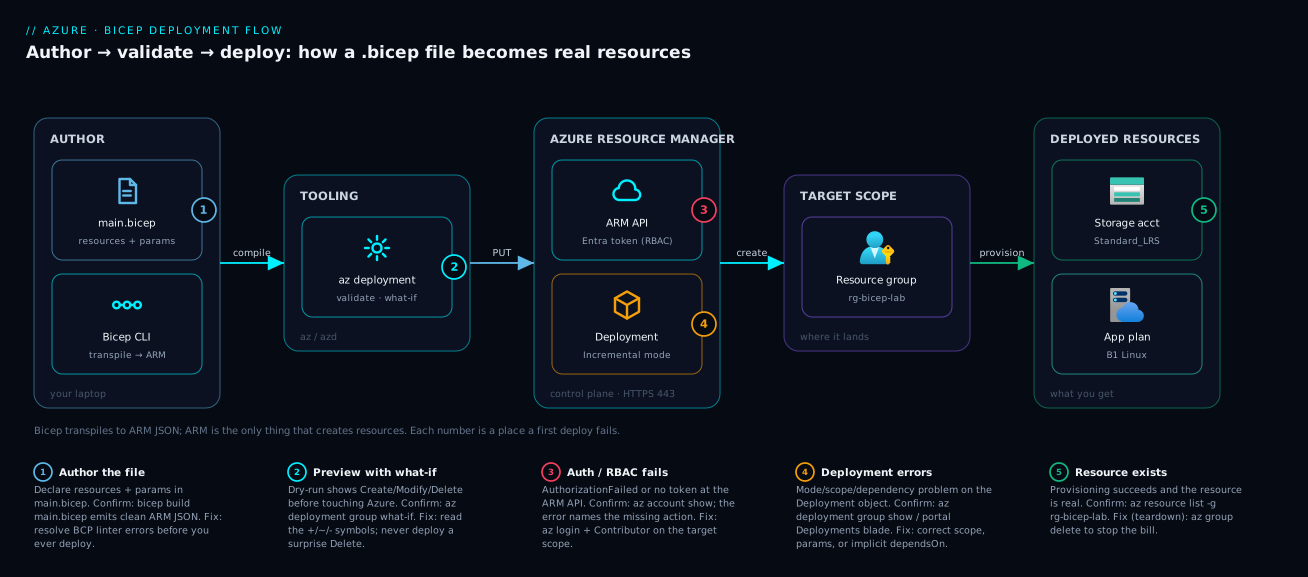
Walk the path a Bicep file travels, left to right — every command in the lab maps onto one hop. You start at AUTHOR (your laptop), where main.bicep is text and the Bicep CLI transpiles it into ARM JSON. That JSON moves into TOOLING: az deployment group runs validate and what-if to preview the change before anything is real. The validated request is sent over HTTPS to AZURE RESOURCE MANAGER — the control-plane API that authenticates your Entra token, checks your RBAC permissions, and creates a Deployment object in Incremental mode. ARM applies it to your TARGET SCOPE (the resource group rg-bicep-lab), producing the DEPLOYED RESOURCES on the right: a Standard_LRS storage account and, in the extended lab, a B1 Linux App Service plan.
The numbered badges mark the five places a first deploy fails or succeeds — authoring the file (1), previewing with what-if (2), the auth/RBAC handshake at the ARM API (3), the Deployment object when a scope or parameter is wrong (4), and the moment the resource exists (5). Read the legend as a mini-runbook: each number pairs the symptom with the command that confirms it and the fix.
Real-world scenario
Northwind Outfitters, a mid-sized apparel retailer, ran their online store on Azure resources three engineers had built by hand in the portal over two years. Dev, staging, and production “matched” only in that someone had tried to replicate the clicks. When a Black Friday load test exposed production storage on Standard_LRS while staging was Standard_ZRS — an undocumented zone-redundancy mismatch — the team drew the line: every shared resource would be defined in Bicep, reviewed in a pull request, and deployed from a pipeline.
They started exactly where this article starts — one engineer, one main.bicep, one storage account. The first attempt failed with AuthorizationFailed: the engineer had Reader, not Contributor, so ARM rejected the create; a two-minute role assignment fixed it. The second failed because the name northwindstorage was already taken globally; a uniqueString()-suffixed name made it deterministic and collision-free. By the third attempt the account deployed in under a minute, and re-running the same file reported no changes — the idempotency promise, proven on their own resource.
The payoff came two weeks later. They had converted roughly forty resources to Bicep, parameterised by environment, when a new hire needed a complete throwaway copy of the stack to test a migration. Previously that meant a day of portal clicking and inevitable drift; with Bicep it was one command against a fresh resource group — the whole environment stood up in eleven minutes, identical to production by construction, and was deleted with one az group delete. The mismatch that started it all became structurally impossible, because the file is the environment, and two environments built from one file with the same parameters cannot silently diverge. Bicep turned “what is actually in production?” from archaeology into a git diff — reviewable, reversible, reproducible — and they got most of that from the very first file, the one you are about to write.
Advantages and disadvantages
Bicep is the right default for native Azure IaC, but it is not free of trade-offs. The honest two-column view:
| Advantages | Disadvantages |
|---|---|
| Native to Azure; day-one support for new resource types | Azure-only — useless for AWS/GCP (Terraform is multi-cloud) |
| No state file to manage or secure (ARM is the state) | No drift detection without re-running / extra tooling |
| Far more readable than ARM JSON; real IntelliSense | Smaller community and module ecosystem than Terraform |
| Idempotent and safe to re-run | Less mature for complex multi-resource orchestration patterns |
Free, built into the az CLI; nothing to install separately |
Learning curve for scopes, loops, and modules beyond the basics |
| what-if preview before applying | what-if is occasionally imperfect for some resource properties |
| One-to-one with ARM, so anything ARM can do, Bicep can | Tied to ARM’s quirks (deployment-name limits, scope rules) |
When each side matters: if your shop is all-Azure and you want the lowest-friction native experience with no state plumbing, Bicep wins decisively — the common case for AZ-104/AZ-204 teams. If you run multiple clouds or have deep Terraform investment, Terraform’s portability and mature modules likely win. The two are not mutually exclusive. For learning IaC on Azure, start with Bicep — there is less to set up and the mental model transfers.
Hands-on lab
This is the centerpiece. You will deploy a storage account three ways — portal, az CLI, and a parameterised Bicep file — validating each, then extend the Bicep file with a second resource, then tear everything down. Budget twenty minutes. Everything here fits comfortably in free-tier credits; the storage account costs effectively nothing while empty, and you delete it at the end.
Step 0 — Prerequisites and environment check
You need a subscription and either Cloud Shell or a local az CLI ≥ 2.20.0. Confirm you are logged in and which subscription is active — deploying into the wrong subscription is the most common silent mistake.
# Who am I and which subscription is active?
az account show --output table
Expected output: a table with your subscription Name, SubscriptionId, and State = Enabled. If it errors or is empty, log in:
az login                       # opens a browser; or `az login --use-device-code`
az account set --subscription "<Your Subscription Name or ID>"
Now ensure the Bicep tooling is present. The CLI bundles Bicep, but pin/upgrade it explicitly:
az bicep install        # installs the Bicep CLI bundled with az (no-op if present)
az bicep version        # expect 0.20+ ; confirms the transpiler is available
az version              # confirm azure-cli >= 2.20.0
Expected output: az bicep version prints something like Bicep CLI version 0.x.x. If you use VS Code, install the official Bicep extension (publisher ms-azuretools) for IntelliSense, validation squiggles, and one-click deploy — it makes authoring far easier, though everything below works from a plain terminal.
This table is your quick environment checklist:
| Check | Command | Expected | If it fails |
|---|---|---|---|
| Logged in | az account show |
Your sub, State=Enabled |
az login |
| Right subscription | az account show --query name |
The intended sub | az account set --subscription … |
| CLI version | az version |
azure-cli ≥ 2.20.0 |
az upgrade |
| Bicep present | az bicep version |
0.x.x |
az bicep install |
| Permission | (see Step 1) | Contributor on scope | Ask an owner for the role |
Step 1 — Create the resource group (CLI)
Resources need a home. Create a resource group — a subscription-scope operation (the RG does not exist yet, so you cannot deploy “into” it). Pick a region near you.
RG="rg-bicep-lab"; LOCATION="centralindia"   # change LOCATION to your nearest region
az group create --name "$RG" --location "$LOCATION" --output table
Expected output: a table showing Name = rg-bicep-lab, your Location, and ProvisioningState = Succeeded. If you get AuthorizationFailed here, you lack permission — you need at least Contributor on the subscription (or a resource group someone created for you); see the troubleshooting section.
Step 2 — Deploy a storage account in the portal (the “before” picture)
Do this once to feel the contrast with code. In the Azure portal: Create a resource → Storage account → select your subscription and the rg-bicep-lab resource group → give it a globally-unique name (lowercase letters/numbers, e.g. stbiceplabportal01) → Region matching your RG → Primary service = Azure Blob Storage → Redundancy = LRS → Review + create → Create. Wait for “Your deployment is complete.”
Notice what you cannot easily reproduce: a dozen defaults were chosen across five tabs, with no artifact recording your choices. That is the problem Bicep solves. (The portal did generate an ARM template behind the scenes — click Download a template for automation to see it.) Now delete the portal-made account so it does not clutter the lab: az storage account delete --name stbiceplabportal01 --resource-group "$RG" --yes.
Step 3 — Deploy the same storage account with the az CLI (imperative)
Before the Bicep version, deploy one imperatively to see what a single command does — the “without IaC” baseline:
STG="stbiceplab$RANDOM"   # names: globally unique, 3–24 lowercase letters/numbers
az storage account create --name "$STG" --resource-group "$RG" --location "$LOCATION" \
  --sku Standard_LRS --kind StorageV2 --min-tls-version TLS1_2 --allow-blob-public-access false -o table
Expected output: a table ending in ProvisioningState = Succeeded. This works, but the settings live only in your shell history. Delete it before the Bicep step so the group is clean: az storage account delete --name "$STG" --resource-group "$RG" --yes.
Step 4 — Author main.bicep (the real thing)
Create main.bicep with the content below — a complete, deployable, parameterised file. The uniqueString() function derives a deterministic suffix from the resource group ID, so the storage name is globally unique and stable across re-runs, solving the name-collision problem cleanly.
// main.bicep
@description('Short prefix for the storage account (3–11 lowercase letters/numbers)')
@minLength(3)
@maxLength(11)
param namePrefix string = 'stbicep'

@description('Azure region; defaults to the resource group location')
param location string = resourceGroup().location

@allowed([ 'Standard_LRS', 'Standard_GRS', 'Standard_ZRS' ])
param skuName string = 'Standard_LRS'

// Deterministic, globally-unique name: prefix + hash of the RG id
var storageAccountName = '${namePrefix}${uniqueString(resourceGroup().id)}'

var tags = {
  environment: 'lab'
  managedBy: 'bicep'
}

resource storage 'Microsoft.Storage/storageAccounts@2023-05-01' = {
  name: storageAccountName
  location: location
  sku: { name: skuName }
  kind: 'StorageV2'
  tags: tags
  properties: {
    minimumTlsVersion: 'TLS1_2'
    allowBlobPublicAccess: false
    supportsHttpsTrafficOnly: true
  }
}

output storageAccountNameOut string = storage.name
output primaryBlobEndpoint string = storage.properties.primaryEndpoints.blob
Step 5 — Transpile and lint (optional but instructive)
See what Bicep sends to ARM, and catch errors before deploying:
az bicep build --file main.bicep # emits main.json; prints BCP warnings/errors if any
Expected output: silence (success) plus a new main.json. Any BCPnnnn messages are linter findings — fix errors (red); warnings (yellow) are advisory. A common first-timer warning is BCP037 for an unexpected property name (a typo in a properties field).
Step 6 — Validate and preview with what-if
Run both safety gates against the file:
az deployment group validate --resource-group "$RG" --template-file main.bicep   # well-formed?
az deployment group what-if  --resource-group "$RG" --template-file main.bicep   # what changes?
Expected output: validate returns JSON with "provisioningState": "Succeeded"; what-if prints a coloured summary ending in Resource changes: 1 to create. with a single green + Microsoft.Storage/storageAccounts/... line. If you see anything other than one create, stop and check your scope and mode before deploying.
Step 7 — Deploy the Bicep file
Now the real deploy. Give the deployment a name so you can find it later (deployment names must be ≤ 64 characters):
az deployment group create \
  --name "deploy-storage-001" \
  --resource-group "$RG" \
  --template-file main.bicep \
  --parameters skuName=Standard_LRS \
  --output table
Expected output: a table with ProvisioningState = Succeeded and the deployment Name. This compiled the .bicep, sent the JSON to ARM, and ARM created the storage account in incremental mode.
Step 8 — Validate the result
Confirm the resource exists — by deployment outputs and by listing the resource:
# Deployment outputs (the generated storage name + blob endpoint)
az deployment group show -n deploy-storage-001 -g "$RG" --query properties.outputs -o json

# The actual resource(s) in the group
az resource list -g "$RG" --query "[].{name:name, type:type}" -o table
Expected output: the outputs JSON shows your generated storageAccountNameOut and a primaryBlobEndpoint URL; the resource list shows one Microsoft.Storage/storageAccounts. In the portal, open rg-bicep-lab → Deployments to see deploy-storage-001 with a green checkmark and its inputs/outputs.
Step 9 — Prove idempotency
Re-run the exact same command from Step 7. Expected output: it succeeds again, but az resource list still shows one storage account, not two; what-if now reports No change (=). That is idempotency made concrete — the file describes desired state, so a second apply is a no-op.
Step 10 — Extend the file with a second resource
Add an App Service plan to main.bicep to see multi-resource deployment. Append this block before the output lines:
@allowed([ 'B1', 'S1', 'P1v3' ])
param planSku string = 'B1'

resource plan 'Microsoft.Web/serverfarms@2023-12-01' = {
  name: '${namePrefix}-plan'
  location: location
  sku: { name: planSku }
  kind: 'linux'
  properties: {
    reserved: true   // 'reserved: true' is REQUIRED for a Linux plan
  }
  tags: tags
}

output planId string = plan.id
Run what-if again — it now shows the storage account as = (no change) and the plan as + (create). Deploy:
az deployment group create --name "deploy-storage-002" --resource-group "$RG" \
  --template-file main.bicep --output table
Expected: Succeeded, and az resource list -g "$RG" -o table now shows two resources — Bicep deployed only what changed, leaving the storage account untouched. Azure App Service Plans Demystified breaks down the tiers; B1 is the cheapest non-free option, fine to delete in a minute.
Step 11 — Teardown (do not skip this)
Delete everything by deleting the resource group — one command removes the RG and every resource in it, stopping all billing:
az group delete --name "$RG" --yes --no-wait
--no-wait returns immediately; the deletion runs in the background. Confirm it is gone:
az group exists --name "$RG" # eventually prints: false
Expected output: false once deletion completes (give it a minute). Your subscription is now exactly as before the lab — that clean teardown is itself a benefit of grouping everything in one resource group.
This table summarises the whole lab as a runbook you can repeat:
| Step | Command (core) | Expected result |
|---|---|---|
| 0 Env check | az account show / az bicep version |
Logged in; Bicep present |
| 1 Resource group | az group create |
Succeeded |
| 2 Portal deploy | (portal UI) | “Deployment complete” |
| 3 CLI deploy | az storage account create |
Succeeded |
| 4 Author file | (write main.bicep) |
File saved |
| 5 Transpile | az bicep build |
main.json emitted |
| 6 what-if | az deployment group what-if |
1 to create |
| 7 Deploy | az deployment group create |
Succeeded |
| 8 Validate | az resource list |
One storage account |
| 9 Idempotency | re-run Step 7 | Still one; No change |
| 10 Extend | add plan, redeploy | Two resources |
| 11 Teardown | az group delete |
az group exists → false |
Common mistakes & troubleshooting
The errors below are the ones every beginner meets in their first hour. For each: the symptom (often the exact error string), the root cause, how to confirm, and the fix.
| # | Symptom / error | Root cause | How to confirm | Fix |
|---|---|---|---|---|
| 1 | AuthorizationFailed (“does not have authorization to perform action”) |
Your identity lacks Contributor on the scope | az role assignment list --assignee <you> --scope <sub/rg> |
Get Contributor on the subscription/RG |
| 2 | StorageAccountAlreadyTaken / name conflict |
Storage names are globally unique | Try a different name; check the error text | Use uniqueString(resourceGroup().id) suffix |
| 3 | InvalidTemplateDeployment / param missing |
A required param had no value and no default |
az deployment group validate … reports it |
Pass --parameters name=value or add a default |
| 4 | Deploys “succeed” but resource not where expected | Wrong scope (deployed to a different RG/sub) | az resource list -g <rg>; check active sub |
Set az account set; pass the right --resource-group |
| 5 | what-if shows - (delete) of unrelated resources |
You ran Complete mode (--mode Complete) |
Re-run with default mode; inspect the - lines |
Drop --mode Complete; use Incremental |
| 6 | BCP037 / BCP036 linter error |
Typo or wrong type in a property name | az bicep build --file main.bicep shows line |
Fix the property name/type (use IntelliSense) |
| 7 | NoRegisteredProviderFound |
The resource provider isn’t registered in the sub | az provider show -n Microsoft.Web --query registrationState |
az provider register --namespace Microsoft.Web |
| 8 | Deployment name error (> 64 chars / invalid) |
--name too long or has bad characters |
Read the error; check your --name value |
Use a short name like deploy-storage-001 |
| 9 | Linux App Service plan fails to create | Missing reserved: true for a Linux plan |
Deployment error mentions kind/reserved mismatch | Set properties: { reserved: true } |
| 10 | LocationNotAvailableForResourceType |
The region doesn’t offer that resource/SKU | az provider show -n Microsoft.Storage --query "resourceTypes[?resourceType=='storageAccounts'].locations" |
Pick a supported region |
| 11 | InvalidResourceLocation on redeploy |
You changed location on an existing resource |
what-if flags it; location is often immutable | Keep location stable, or recreate the resource |
| 12 | Stale main.json deployed instead of edits |
You deployed the built JSON, not the .bicep |
Check which --template-file you passed |
Always deploy --template-file main.bicep |
The two you will hit first are #1 (AuthorizationFailed) and #2 (name taken). For #1, the error string names the missing action (e.g. Microsoft.Storage/storageAccounts/write) and the scope — read it; it tells you exactly what role to request. For #2, never hard-code a storage name you re-deploy; the lab’s uniqueString(resourceGroup().id) pattern is the standard, deterministic fix, so re-runs reuse the same name instead of spawning accounts. And for “succeeded but nothing there” (#4), always check az account show and the --resource-group you passed — a success into the wrong subscription is a context mistake, never a Bicep bug.
Best practices
Crisp rules that keep first files clean and scale to real ones:
- Always
what-ifbeforecreate— and never ignore a-(delete) line. The preview is your seatbelt. - Never hard-code globally-unique names. Derive them with
uniqueString()so deploys are deterministic and collision-free. - Stay in Incremental mode (the default). Reach for Complete only deliberately, knowing it deletes anything not in your file.
- Parameterise what changes per environment (names, regions, SKUs); keep the rest as variables. If dev and prod differ, it is a parameter.
- Pin a recent API version on every resource (the
@2023-…suffix) and bump it intentionally. - Keep secure defaults explicit —
minimumTlsVersion: 'TLS1_2',allowBlobPublicAccess: false, HTTPS-only — so security is visible in the diff. - Use
@descriptiondecorators so the deploy UI andwhat-ifare self-documenting; name deployments meaningfully (deploy-storage-001, ≤ 64 chars). - Commit
.bicepto git; never commit secrets. Pass secrets via Key Vault references or@secure()parameters. - Let Bicep infer dependencies by referencing
resource.id; avoid hand-writingdependsOn. - Tear down lab resources by deleting the resource group — one command, no orphaned billing.
Security notes
Even a first Bicep file has a security posture worth getting right. Three areas matter most.
Least-privilege on the deployer. A deployment runs as your identity (or a pipeline’s service principal/managed identity) and can create only what that identity is permitted to. Give humans Contributor scoped to the resource group, not Owner on the subscription, unless they truly need to assign roles. In pipelines, use a managed identity or service principal with the narrowest scope that works, never a long-lived admin credential.
Never put secrets in the file. A .bicep file lives in git, so a connection string or key in it is a leaked secret. Use the @secure() decorator on sensitive parameters (so they are not logged in history) and reference Azure Key Vault for actual secret values, so the secret never appears in the template or its outputs. Outputs are stored in deployment history — never output a key or password.
Secure the resources you declare. Azure’s defaults are not always the safe ones. The lab explicitly set minimumTlsVersion: 'TLS1_2', disabled allowBlobPublicAccess, and forced HTTPS — make those choices visible in every file so a reviewer sees the security stance in the diff. Beyond a lab, prefer private endpoints over public network access and enable diagnostic logging. That is the security win of IaC: the configuration is reviewable code, not a checkbox someone may have missed.
Cost & sizing
Good news for learning: Bicep and ARM deployments are free — you pay only for the resources you create, and only while they exist. The deployment engine, what-if, validation, and the Bicep CLI cost nothing. What can run up a bill in a lab like this:
| Resource | Free while…? | Rough cost if left running | Lab guidance |
|---|---|---|---|
| Resource group / deployment | Always free | ₹0 | Free; the container itself never bills |
| Storage account (empty, LRS) | Effectively free idle | ~₹0 idle; pennies/GB stored + per-transaction | Safe to keep briefly; delete to be tidy |
| App Service plan B1 | Not free | ~₹1,000–1,300/month (~$13–15) if left up | Delete within the hour — it bills per-hour even idle |
| App Service plan F1 (Free) | Free tier | ₹0 | Use F1 if you want a no-cost plan (limited) |
| Data egress | First GBs free | Per-GB after free tier | Negligible for this lab |
The only thing that actually bills in this lab is the B1 App Service plan in Step 10 — it charges hourly whether or not anything runs on it, so the teardown matters. The empty storage account is effectively free. On a free Azure account it all fits the credit, but the habit to build is deploy, learn, tear down: pick the smallest SKU (Standard_LRS, B1 or F1) and delete promptly. Production sizing trade-offs live in the per-resource deep-dives.
Interview & exam questions
Common questions for AZ-104 / AZ-204 and for any Azure IaC screen, with model answers.
1. What is Bicep and how does it relate to ARM templates? Bicep is Azure’s declarative IaC language — a concise DSL that transpiles one-to-one into ARM JSON. ARM is the deployment engine; Bicep is a friendlier authoring layer that can express anything ARM can, more readably.
2. Declarative vs imperative — which is Bicep, and why does it matter? Bicep is declarative: you describe desired state and ARM determines the steps. Imperative (a script) lists explicit commands. Declarative gives idempotency — re-running converges to the same result rather than duplicating work.
3. What does “idempotent” mean for a Bicep deployment? Deploying the same file multiple times produces the same result: the first run creates, later runs with no changes report success and change nothing. This makes deployments safe to repeat and safe in CI/CD.
4. What is the difference between Incremental and Complete deployment mode? Incremental (default) adds or updates resources in your file and leaves others untouched. Complete deletes any resource in the group not in the file. Use Incremental unless you explicitly intend to prune.
5. What does what-if do and why use it?
az deployment group what-if performs a dry run, computing the exact changes (+ create, ~ modify, - delete, = no-change) without applying them. It is the safety gate that catches unintended deletes before a real deploy.
6. Parameter vs variable in Bicep?
A parameter is set at deploy time (good for per-environment values; supports decorators like @allowed). A variable is computed in the file by the author and is fixed. Rule: if environments differ, it is a parameter.
7. What are deployment scopes, and what is the default? Deployments target a scope: resource group (default), subscription, management group, or tenant. Resource-group scope is most common; subscription scope creates resource groups, policies, and role assignments.
8. Why might a storage account deployment fail with a name error, and how do you fix it?
Storage account names are globally unique, 3–24 lowercase alphanumeric characters, so collisions cause a name-taken error. The standard fix is to derive the name with uniqueString(resourceGroup().id) plus a prefix.
9. How does Bicep handle dependencies between resources?
Implicitly. When one resource references another’s property (plan.id), Bicep auto-adds the dependsOn so ARM orders creation correctly. You rarely write dependsOn by hand, unlike raw ARM.
10. How do you keep secrets out of a Bicep file?
Use the @secure() decorator on sensitive parameters and reference Key Vault for actual values rather than embedding them. Never output a secret — outputs are stored in deployment history.
11. Bicep vs Terraform — when would you choose each? Bicep is Azure-native, needs no state file (ARM is the state), and has day-one resource support — ideal for all-Azure shops. Terraform is multi-cloud with its own state and a large module ecosystem — better when you span clouds or have existing investment.
Quick check
- Bicep transpiles into what format before Azure deploys it?
- Which deployment mode can delete resources not present in your file?
- What command previews changes without applying them?
- Why use
uniqueString(resourceGroup().id)for a storage account name? - What is the difference between a
paramand avar?
Answers
- ARM JSON (an Azure Resource Manager template). Bicep compiles one-to-one to it, and ARM deploys the JSON.
- Complete mode. It deletes any resource in the resource group that is not declared in your file. Incremental (the default) does not.
az deployment group what-if(or--confirm-with-what-ifon a create). It computes and prints the+/~/-/=changes without touching Azure.- Storage account names are globally unique;
uniqueString(resourceGroup().id)derives a deterministic, collision-resistant suffix that stays the same across re-runs, so deploys are repeatable. - A parameter is supplied at deploy time (varies per environment, supports decorators); a variable is computed in the file by the author and is fixed. If dev and prod differ, use a parameter.
Glossary
- Bicep — Azure’s declarative IaC language; a concise DSL that compiles to ARM JSON.
- ARM (Azure Resource Manager) — the control-plane API and engine that actually creates resources.
- Transpile / build — compiling a
.bicepfile into ARM JSON (az bicep build). - Declarative — describing desired state rather than the steps to reach it.
- Idempotent — re-running a deployment yields the same result, not duplicates.
- Resource — one Azure thing (a storage account, a plan), declared in a
resourceblock. - Symbolic name — the in-file handle for a resource (
storage); invisible to Azure. - Parameter — a deploy-time input (
param), often per-environment; supports decorators. - Variable — an author-set value (
var) computed in the file and fixed. - Output — a value the deployment returns (
output), e.g. a resource id or endpoint. - Scope — where a deployment lands: resource group (default), subscription, management group, or tenant.
- Mode — Incremental (add/update; default) vs Complete (also deletes resources not in the file).
- what-if — a dry-run preview of a deployment’s changes before applying.
- Resource provider — the service namespace (
Microsoft.Storage) that must be registered first. - Decorator — a
@-prefixed parameter annotation (@minLength,@allowed,@secure,@description).
Next steps
- Reuse your file as a building block — learn modules and loops, then wire it into a pipeline alongside Infrastructure as Code: Terraform, Pulumi, CDK and Cloud-Native Options.
- Deploy something with more moving parts the same way — follow Your First AKS Cluster: A Side-by-Side Walkthrough with az CLI, the Portal, and Bicep.
- Understand the scope your deployments target with Azure Resource Hierarchy Explained: Subscriptions, Resource Groups and Resources.
- Compare the native approach to the multi-cloud one in Terraform on Azure: Remote State in Blob Storage with State Locking & Workspaces.
- Keep secrets out of templates the right way with Azure Key Vault: Secrets, Keys and Certificates Done Right.