In a nutshell
If you have never run a patch program before, here is the whole idea in one picture. Imagine you are the facilities manager for a large building – and a few annexes down the road you also look after. Every apartment is a server. In the old world each tenant changed their own smoke-detector battery whenever they happened to remember, using whatever brand they liked, and when the fire inspector showed up nobody could say which detectors were dead right now. That is patching by per-team cron jobs and WSUS: no single answer, no schedule anyone trusts.
Azure Update Manager (AUM) is hiring one facilities manager for the whole estate. That manager (1) keeps a maintenance calendar – “third Sunday of the month, 2 a.m.” – instead of reacting to emergencies; (2) works from labels on the door, not a hand-typed tenant list, so a tenant who moved in yesterday is covered automatically; (3) inspects before fixing – an assessment that only reads what is missing – and only then installs; (4) can do the noisy work now but schedule the disruptive part – the reboot – for a quiet hour; and (5) hands the inspector one report for the whole building and the annexes. The annexes – your on-prem datacenter, AWS, GCP – are reached through Azure Arc, which makes an off-Azure machine look like just another apartment on the list.
Two words unlock everything else. Assessment answers “what is missing?” and changes nothing. A maintenance configuration answers “when and how do we fix it?” and is the actual product – most teams only ever click the inspect-and-fix button by hand and wonder why they never escape audit-panic patching. And unlike the retired Automation Update Management it replaces, AUM needs no Log Analytics workspace and no monitoring agent – it rides the agent your VM already has.
Level: Intermediate · Time: ~66 min · You’ll want first: comfort with Azure resource groups, tags, and running az in Cloud Shell (the formal prerequisites and objectives are spelled out just below). By the end you can: put Windows + Linux and Azure + hybrid machines under one tag-driven schedule; prove a patch actually landed before trusting automation; and produce the single compliance query an auditor accepts.
Patching is where good intentions go to die. Every estate I have inherited had a patch “strategy” that was really three strategies – a Windows team on WSUS, a Linux team running unattended-upgrades on a cron, and a cloud team hoping the images were recent enough. Nobody could answer the only question that matters at audit time: which machines are missing which CVEs right now, and when will they be patched? Azure Update Manager (AUM) is Microsoft’s answer, and unlike its predecessor it needs no Log Analytics workspace, no Automation account, and no agent of its own – it is a native VM platform capability that also reaches off-Azure through Azure Arc. This is how to wire it up end to end: assessment, on-demand remediation, recurring maintenance configurations, tag-driven dynamic scopes, pre/post automation, hybrid coverage, hotpatching, and the Azure Policy that keeps it all honest.
Update Manager has two planes, and confusing them is the single most common reason a patch program stalls. The data plane assesses and installs updates on a single machine on demand – it is a button you click. The scheduling plane – maintenance configurations – is what turns one-off actions into a governed, recurring program that runs at 02:00 on the third Sunday whether or not anyone is awake. Most teams treat AUM as a button rather than a schedule to declare, and so they never escape the cycle of manual, panic-driven, audit-deadline patching. The schedule is the product. Everything in this article builds toward a maintenance configuration that targets the right machines, at the right time, with the right reboot behaviour, across Azure and everything you run outside it.
By the end you will be able to put a heterogeneous fleet – Windows and Linux, Azure and on-prem and other-cloud – under one targeting model, prove a patch landed before you trust a schedule, decouple install from reboot so a restart window never blocks a security fix, and produce the single queryable compliance view an auditor actually wants. You will also know the half-dozen silent failure modes (the wrong patchMode, a dynamic scope that resolves to zero machines, a window 10 minutes too short) that make a run look successful while patching nothing, and the exact az/Resource Graph command to confirm each.
What problem this solves
In production, “we patch monthly” is a sentence with no evidence behind it. The pain is concrete: an auditor asks for the current CVE exposure of 900 servers and you cannot produce it without three spreadsheets and a week. A critical zero-day drops and you have no fleet-wide mechanism to assess who is exposed and remediate in a bounded window. A latency-sensitive database reboots at 14:00 because someone’s cron fired, and you take an outage during clinical hours. Each of these is a governance failure dressed up as a tooling failure, and each is exactly what AUM exists to remove.
What breaks without it: patching becomes per-team, per-OS, and per-cloud, so there is no single answer to “are we compliant?” New machines are born unpatched because onboarding into the patch program is manual and gets forgotten. Reboots are uncoordinated because install and restart are welded together. And the legacy answer – Automation Update Management on a Log Analytics workspace plus the MMA/OMS agent – reached end of support on 31 August 2024, so anything still depending on it is running on a retired stack with no security backstop.
Who hits this: anyone operating more than a handful of VMs, and acutely anyone with a hybrid or multicloud estate, a regulated workload with an audit obligation, or a tier that legally or contractually cannot reboot during business hours. The fix is almost never “patch harder by hand” – it is “declare one schedule, target it by tag, let the platform install at run-time, and report from one query.”
To frame the whole field before the deep dive, here is every capability this article covers, the production pain it removes, and the AUM construct that delivers it:
| Capability | Production pain without it | AUM construct that delivers it | First place to look |
|---|---|---|---|
| Fleet assessment | No fleet-wide CVE exposure answer | On-demand + periodic assessment | patchassessmentresources in Resource Graph |
| Out-of-band remediation | Zero-day with no bounded fix mechanism | One-time install-patches run |
Update Manager -> History |
| Recurring program | “We patch monthly” with no evidence | Maintenance configuration (InGuestPatch) |
maintenanceresources |
| Targeting at scale | New machines forgotten at onboarding | Dynamic scopes (ARG tag queries) | resources ARG query on tags |
| Orchestration hooks | Uncoordinated drain/snapshot/validate | Pre/post events via Event Grid | Function/Logic App invocation logs |
| Hybrid + multicloud | Separate patch stack off-cloud | Arc-enabled servers | connectedmachine resources |
| Reboot control | Outage during business hours | rebootSetting + post-event reboot |
installPatches.rebootSetting |
| Born-compliant | Drift the moment a VM is created | Policy DeployIfNotExists enrolment |
Policy compliance blade |
Learning objectives
By the end of this article you can:
- Explain the two planes of Update Manager (assessment/install vs scheduling) and migrate cleanly off the retired Automation Update Management without hand-translating schedules.
- Set every in-scope machine to the correct patch orchestration mode (
AutomaticByPlatform+bypassPlatformSafetyChecksOnUserSchedule = true) and prove it with a Resource Graph query before you trust any schedule. - Run on-demand assessment and one-time install runs with the right classification filters, maintenance window, and reboot policy – and read the results out of Resource Graph at fleet scale.
- Author production-grade maintenance configurations in Bicep (
InGuestPatchscope, window, cadence, reboot, OS-specific include/exclude) and bind machines via dynamic scopes on a governed tag vocabulary rather than static assignments. - Wire pre/post maintenance events to idempotent, fast Event Grid handlers (drain, snapshot, validate) and explain the bounded pre-window contract.
- Extend the identical targeting model to Arc-enabled servers in your datacenter, AWS, or GCP, and reason about hotpatching’s baseline-vs-hotpatch reboot cadence.
- Enforce prerequisites and report drift with Azure Policy at management-group scope, and build a single Azure-plus-Arc compliance view from Resource Graph.
- Diagnose the silent failures – wrong
patchMode, zero-resolving scope, window too short, unreachable update source,DeployIfNotExistswith no managed identity – with the exact command to confirm each.
Prerequisites & where this fits
You should already understand Azure resource basics: subscriptions, resource groups, tags, and how to run az in Cloud Shell and read JSON output. You should know what an Azure VM is and that VMs carry an osProfile with OS-specific configuration. Familiarity with Azure Policy effects (Audit, DeployIfNotExists, Modify) and a passing knowledge of Kusto (KQL) for Resource Graph queries will let you use the reporting sections directly. No prior exposure to the legacy Automation Update Management is required – if anything it is baggage.
This sits in the Governance & Operations track. It assumes the platform foundation from Azure Policy: Governance at Scale (the enforcement engine AUM leans on) and the targeting fundamentals from Azure Resource Hierarchy Explained (management groups are where you assign the policies). It pairs tightly with Azure Arc-Enabled Servers: Machine Configuration & Extended Security Updates, because Arc is what makes the hybrid story work, and with Azure Monitor & Application Insights for Observability for surfacing compliance in workbooks. If you orchestrate pre/post events with serverless, Azure Functions: Serverless Patterns is the layer those handlers live in.
A quick map of who owns what during a patch program, so you route work to the right team:
| Layer | What lives here | Who usually owns it | Failure classes it can cause |
|---|---|---|---|
| Policy / governance | Enrolment, assessment enforcement, drift reporting | Platform / governance team | Machines never enrolled; remediation silently no-ops |
| Maintenance configuration | Window, cadence, reboot, classifications | Platform / ops team | Window too short; wrong reboot setting |
| Targeting (dynamic scope) | Tag vocabulary, ring design | Platform + app owners | Scope resolves to zero; wrong ring patched |
| Machine settings | patchMode, bypass, assessment mode |
VM / app team | Run skipped; platform auto-patches instead |
| Update source | WSUS, distro repos, egress | Network / Linux / Windows teams | Assessment empty; install fails |
| Orchestration hooks | Drain, snapshot, validate handlers | App / SRE team | Un-drained run; pre-event timeout |
Core concepts
Six mental models make every later decision obvious.
Two planes, one product. The data plane – az vm assess-patches and az vm install-patches – acts on one machine, now. The scheduling plane – a maintenance configuration of scope InGuestPatch – declares when to patch, what classifications, and how to reboot, then machines are associated to it. You use the data plane to learn and to prove; you use the scheduling plane to operate. A patch program that only ever uses the data plane is a person clicking buttons forever.
The orchestration mode is the master switch. Every machine has a patch orchestration mode (patchMode). For a maintenance configuration to install anything, the machine must be AutomaticByPlatform (Azure-orchestrated) and carry bypassPlatformSafetyChecksOnUserSchedule = true so the platform does not also apply its own automatic patches on Microsoft’s cadence and collide with your window. Get this wrong and your run is silently skipped – the single most common “it ran but nothing happened.”
Targeting is a query, not a list. A dynamic scope attaches an Azure Resource Graph filter (over subscriptions, resource groups, locations, OS types, and – above all – tags) to a maintenance configuration. Membership is evaluated at run time, so a VM created an hour before the window, carrying the right tag, is patched with zero manual onboarding. Static assignments rot; dynamic scopes scale.
Arc makes off-Azure machines first-class. An Arc-enabled server – on-prem, in AWS, in GCP – is, to AUM, just another machine. It gets the same assessment, the same one-time runs, the same maintenance configurations and dynamic scopes. There is no per-machine charge for AUM on native Azure VMs; Arc-enabled servers carry a small per-server monthly charge. One targeting model spans every cloud.
Install and reboot are separable. rebootSetting has three values – IfRequired, Always, Never. Setting it to Never lets AUM install packages inside a window but restart nothing, so you can drive the reboot later through a controlled post-event – turning “no reboots during business hours” from a blocker into a scheduling detail. Hotpatching takes this further: on supported Windows Server SKUs, security updates apply without a reboot at all for two of every three months.
A window is a hard stop with a tax. A maintenance window has a duration (minimum 1 hour 30 minutes), and the platform reserves the last 10 minutes to finalize, so effective install time is duration - 10m. AUM stops starting new package installs once the window is exhausted; in-flight installs finish, but anything not yet started is deferred to the next window. Size the window for the slowest machine in the batch.
The vocabulary in one table
Before the deep sections, pin down every moving part. The glossary at the end repeats these for lookup; this table is the mental model side by side:
| Concept | One-line definition | Where it lives | Why it matters |
|---|---|---|---|
| Assessment | Read-only scan of missing updates | Per machine; results in Resource Graph | Source of CVE exposure; never installs |
| One-time deployment | Ad-hoc install run | az vm install-patches |
Out-of-band remediation, proving a patch lands |
| Maintenance configuration | The recurring schedule resource | Microsoft.Maintenance/maintenanceConfigurations |
The product – when/what/how to patch |
maintenanceScope |
What the config governs | Config property | Must be InGuestPatch for guest OS patching |
patchMode |
Orchestration mode of the machine | osProfile patch settings |
Must be AutomaticByPlatform or run is skipped |
bypassPlatformSafetyChecks… |
Suppress platform auto-patch | osProfile patch settings |
Must be true so your schedule owns patching |
| Dynamic scope | ARG filter binding machines to a config | Configuration assignment | Membership by tag; scales onboarding to zero |
| Configuration assignment | The binding of a machine/scope to a config | Microsoft.Maintenance/configurationAssignments |
Static (one machine) or dynamic (a query) |
| Pre/post event | Hook fired before/after the window | Event Grid on the config | Drain, snapshot, validate, controlled reboot |
| Arc-enabled server | Off-Azure machine projected into Azure | Microsoft.HybridCompute/machines |
Same patch model off-cloud; billed per server |
| Hotpatching | Reboot-less OS security updates | OS profile (WS Azure Ed / WS 2025) | 4 reboots/yr instead of 12 |
rebootSetting |
Reboot behaviour of a run | installPatches |
Decouple install from restart |
| Classification | Update category to include | windowsParameters/linuxParameters |
Critical/Security vs everything |
| Ring | A wave of the fleet with its own window | Tag value (PatchGroup) |
Canary -> broad -> sensitive sequencing |
Migrating off Automation Update Management
The legacy Automation Update Management (under an Automation account, backed by a Log Analytics workspace) is retired – it reached end of support on 31 August 2024, and the MMA/OMS agent it depended on retired the same month. If any of your patch program still runs on it, migration is overdue, not optional. The two services differ in ways that matter operationally, and the table below is the translation map:
| Concern | Automation Update Management (legacy) | Azure Update Manager | Migration action |
|---|---|---|---|
| Dependencies | Log Analytics workspace + Automation account | None – native to VM/Arc platform | Decommission workspace dependency for patching |
| Agent | Log Analytics agent (MMA/OMS) | No separate agent; VM/Arc extension framework | Remove MMA/OMS after migration |
| Scheduling | Automation schedules + Update Deployments | Maintenance configurations (InGuestPatch) |
Recreate via the portal migration tool |
| Targeting | Saved searches / computer groups | Dynamic scopes (ARG on tags/sub/RG) | Re-express groups as tag filters |
| Off-Azure | Hybrid Runbook Worker | Arc-enabled servers | Onboard servers to Arc |
| Reporting | Log Analytics queries | Resource Graph (patchassessmentresources) |
Rebuild queries/workbooks on ARG |
| Pre/post tasks | Pre/post scripts in the deployment | Event Grid pre/post events | Re-wire to Functions/Logic Apps |
| Cost model | Log Analytics ingestion + Automation | Free on Azure VMs; per-server on Arc | Re-baseline the bill |
Use Microsoft’s portal migration experience and the supplied runbooks that recreate legacy schedules as maintenance configurations – do not hand-translate. The dynamic-scope mapping (turning saved searches into tag filters) is precisely the part teams get wrong by hand, and the tool reduces the error surface. The migration sequence that avoids a coverage gap:
| # | Migration step | Why this order | Verify |
|---|---|---|---|
| 1 | Inventory legacy schedules + groups | Know the target state before you move | Export Update Deployments list |
| 2 | Register AUM resource providers | Prerequisite for any AUM action | az provider show = Registered |
| 3 | Set patchMode/bypass on machines |
Without it the new schedule no-ops | ARG over osProfile patch settings |
| 4 | Run the portal migration tool | Recreates schedules as maint. configs | Configs exist in Microsoft.Maintenance |
| 5 | Validate dynamic scopes resolve | Catch tag-mapping errors pre-cutover | ARG count matches legacy group size |
| 6 | Run a canary window on one ring | Prove the new path before fleet cutover | maintenanceresources shows installs |
| 7 | Disable legacy Update Deployments | Avoid double-patching during overlap | Legacy schedules disabled |
| 8 | Remove MMA/OMS agent | Retired dependency, attack surface | Agent absent; assessment still returns |
Register the resource providers AUM and its scheduling/policy surface depend on:
# Providers AUM and its scheduling/policy surface depend on
az provider register --namespace Microsoft.Maintenance
az provider register --namespace Microsoft.Compute
az provider register --namespace Microsoft.PolicyInsights
az provider register --namespace Microsoft.HybridCompute   # Arc-enabled servers

# Confirm they are Registered before doing anything else
az provider show --namespace Microsoft.Maintenance --query registrationState -o tsv
Patch orchestration mode: the master switch
Update Manager itself requires no enablement resource, but it does require that each machine’s update settings allow the platform to orchestrate. The property that controls this is patchMode on the OS profile, and it is the master switch behind every scheduled patch. For Windows the path is osProfile.windowsConfiguration.patchSettings.*; for Linux it is osProfile.linuxConfiguration.patchSettings.*. Here is every value and what it means operationally:
patchMode value |
OS | Who patches | Works with maintenance config? | When to use |
|---|---|---|---|---|
AutomaticByPlatform |
Win + Linux | The platform, on your schedule (with bypass) | Yes – required for AUM scheduling | Any machine you want AUM to schedule |
AutomaticByOS |
Windows | Windows Update automatically | No (platform owns timing) | Standalone auto-patch, no governance |
Manual |
Windows | You, by hand / your own tooling | No | Fully manual control |
ImageDefault |
Linux | The image’s default (e.g. unattended-upgrades) | No | Legacy/cron patching, not AUM |
The crucial pairing is AutomaticByPlatform plus bypassPlatformSafetyChecksOnUserSchedule = true. The assessmentMode property is separate and controls scanning: set it to AutomaticByPlatform for continuous periodic assessment, or ImageDefault for on-demand only. The full setting matrix you must get right per machine:
| Setting | Values | Default | What it controls | Set it to | Gotcha if wrong |
|---|---|---|---|---|---|
patchMode |
AutomaticByPlatform, AutomaticByOS, Manual, ImageDefault |
varies by image | Who installs updates and when | AutomaticByPlatform |
Any other value -> schedule installs nothing |
bypassPlatformSafetyChecksOnUserSchedule |
true / false |
false |
Suppress platform auto-patch so your schedule owns it | true |
false -> platform patches on its own cadence, collides |
assessmentMode |
AutomaticByPlatform, ImageDefault |
ImageDefault |
Continuous vs on-demand scanning | AutomaticByPlatform |
ImageDefault -> stale exposure data, no periodic scan |
provisionVMAgent (Win) |
true / false |
true |
VM agent present (prerequisite) | true |
false -> no extension framework, no AUM |
enableAutomaticUpdates (Win) |
true / false |
true |
Windows Update service enabled | true (with platform mode) |
false -> WU disabled, install can fail |
Set the orchestration mode explicitly on an existing Linux VM, then hand control to your schedule:
# Put an existing Linux VM into customer-managed scheduled patching
az vm update \
  --resource-group rg-fleet-prod \
  --name vm-app-01 \
  --set osProfile.linuxConfiguration.patchSettings.patchMode=AutomaticByPlatform \
  --set osProfile.linuxConfiguration.patchSettings.assessmentMode=AutomaticByPlatform

# Hand control to YOUR maintenance schedule (suppress platform auto-patching)
az vm update \
  --resource-group rg-fleet-prod \
  --name vm-app-01 \
  --set osProfile.linuxConfiguration.patchSettings.bypassPlatformSafetyChecksOnUserSchedule=true
For Windows, swap to osProfile.windowsConfiguration.patchSettings.patchMode=AutomaticByPlatform. In Bicep, bake it into the VM definition so machines are born correct rather than reconciled later:
// VM born with platform orchestration + bypass so a maintenance config can drive it
properties: {
  osProfile: {
    linuxConfiguration: {
      patchSettings: {
        patchMode: 'AutomaticByPlatform'
        assessmentMode: 'AutomaticByPlatform'
        // bypass lives under automaticByPlatformSettings on some API versions:
        automaticByPlatformSettings: {
          bypassPlatformSafetyChecksOnUserSchedule: true
        }
      }
    }
  }
}
Prove the whole fleet is set correctly with one Resource Graph query – never trust a schedule until this returns clean:
// Machines NOT correctly configured for AUM scheduling (the silent-failure hunt)
resources
| where type in~ ("microsoft.compute/virtualmachines", "microsoft.hybridcompute/machines")
| extend ps = properties.osProfile.linuxConfiguration.patchSettings
| extend pw = properties.osProfile.windowsConfiguration.patchSettings
| extend mode = tostring(coalesce(ps.patchMode, pw.patchMode))
| extend bypass = tobool(coalesce(
    ps.automaticByPlatformSettings.bypassPlatformSafetyChecksOnUserSchedule,
    pw.automaticByPlatformSettings.bypassPlatformSafetyChecksOnUserSchedule))
| where mode != "AutomaticByPlatform" or bypass != true
| project name, type, mode, bypass, resourceGroup
On-demand assessment and one-time deployments
Before scheduling anything, learn what the fleet actually needs. Assessment is read-only: it queries each machine’s update source (Windows Update / WSUS for Windows; the distro package manager for Linux) and reports missing updates by classification and KB/package. It installs nothing. Run it on one machine:
# One-off assessment of a single machine (results land in Update Manager)
az vm assess-patches \
  --resource-group rg-fleet-prod \
  --name vm-app-01
Drive it at fleet scale and read the results out of Azure Resource Graph, the only sane way to query patch state across hundreds of machines. The patchassessmentresources table holds both the per-machine summary and the individual patches children:
// Machines with pending CRITICAL or SECURITY updates, Azure VMs and Arc together
patchassessmentresources
| where type =~ "microsoft.compute/virtualmachines/patchassessmentresults/softwarepatches"
   or type =~ "microsoft.hybridcompute/machines/patchassessmentresults/softwarepatches"
| where properties.classifications has_any ("Critical", "Security")
| where properties.patchState =~ "Available"
| extend machine = tostring(split(id, "/")[8])
| summarize pendingUpdates = count() by machine, tostring(properties.classifications)
| order by pendingUpdates desc
When you need to remediate now – an out-of-band CVE – run a one-time deployment (an install run). Filter by classification, give it an explicit maximum duration in minutes, and choose a reboot policy:
# Install only Critical + Security updates, 120-minute window, reboot only if required
az vm install-patches \
  --resource-group rg-fleet-prod \
  --name vm-app-01 \
  --maximum-duration PT120M \
  --reboot-setting IfRequired \
  --classifications-to-include-linux Critical Security
For Windows, swap to --classifications-to-include-win and you can pin or block specific KBs. Every classification value, per OS, and when to include it:
| Classification | OS | What it covers | Include in scheduled runs? |
|---|---|---|---|
Critical |
Win + Linux | Critical-severity fixes | Always |
Security |
Win + Linux | Security updates | Always |
UpdateRollUp |
Windows | Cumulative roll-ups | Usually |
FeaturePack |
Windows | New feature packages | Rarely – test first |
ServicePack |
Windows | Service packs | Rarely – test first |
Definition |
Windows | AV/defender definitions | Often (fast-moving) |
Tools |
Windows | Utilities | Optional |
Updates |
Windows | Non-security updates | Optional |
Other |
Linux | Distro “other” bucket | Optional |
The az vm install-patches flags you will actually use, with their values and effect:
| Flag | Values | Default | Effect | Gotcha |
|---|---|---|---|---|
--maximum-duration |
ISO 8601 e.g. PT120M |
required | Hard stop on starting new installs | Size for the slowest machine; last bit is reserved |
--reboot-setting |
IfRequired, Always, Never |
IfRequired |
Reboot behaviour | Never decouples install from restart |
--classifications-to-include-win |
Windows classifications | none | What to install (Windows) | Empty = nothing installs |
--classifications-to-include-linux |
Linux classifications | none | What to install (Linux) | Empty = nothing installs |
--kb-numbers-to-include |
KB list | none | Pin specific KBs (Windows) | Overrides classification filter union semantics |
--kb-numbers-to-exclude |
KB list | none | Block known-bad KBs (Windows) | Excludes win even if classification would include |
--packages-to-include |
package names | none | Pin specific packages (Linux) | Distro-specific naming |
--packages-to-exclude |
package names | none | Block packages (Linux) | Use to hold back a problematic package |
The --reboot-setting values decoded – this is the lever the whole reboot-control story hinges on:
--reboot-setting |
Behaviour | Use when |
|---|---|---|
IfRequired |
Reboot only if an installed update needs it | Default; balances currency and disruption |
Always |
Reboot after the run regardless | Force a clean state; maintenance windows that expect it |
Never |
Install, never restart | Restart-sensitive tiers; reboot driven by post-event later |
After any install run, re-assess and confirm the pending count dropped – proving the data plane works before you trust a schedule. The result statuses you will see and what each means:
| Run status | Meaning | Likely cause | Next step |
|---|---|---|---|
Succeeded |
All in-scope updates installed | – | Re-assess to confirm zero pending |
CompletedWithWarnings |
Some updates failed / pending reboot | A KB failed, or window cut it short | Inspect per-update detail; re-run |
Failed |
Run could not complete | Update source unreachable, agent issue | Check egress + agent; see playbook |
InProgress |
Still installing | Long window, large batch | Wait; do not start a second run |
NotStarted / skipped |
Run never began on the machine | patchMode wrong, machine off |
Fix orchestration mode; power on |
Maintenance configurations, schedules, and reboot settings
This is the heart of AUM. A maintenance configuration of scope InGuestPatch is a first-class Azure resource that declares when to patch, what classifications to include, and how to handle reboots. Machines are then associated to it – statically or, far better, via dynamic scopes (next section). Every field that matters, its format, default, and the trap in each:
| Field | Format / values | Default | What it controls | Trap |
|---|---|---|---|---|
maintenanceScope |
InGuestPatch (for OS patching) |
– | What the config governs | Wrong scope = not a guest-patch schedule |
extensionProperties.InGuestPatchMode |
User / Platform |
– | Treats config as a user (AUM) schedule | Omit -> config ignored by AUM |
maintenanceWindow.startDateTime |
YYYY-MM-DD HH:mm |
required | First window start | Local vs UTC confusion |
maintenanceWindow.duration |
HH:mm, min 01:30 |
– | Window length | Last 10 min reserved; effective = duration - 10m |
maintenanceWindow.timeZone |
IANA/Windows TZ name | UTC | Window time zone | DST shifts the wall-clock window |
maintenanceWindow.recurEvery |
1Day, 1Week, Month Third Sunday |
– | Cadence | Monthly expression syntax is exact |
installPatches.rebootSetting |
IfRequired, Always, Never |
IfRequired |
Reboot behaviour | Never needs a post-event to ever reboot |
installPatches.windowsParameters |
classifications + KB include/exclude | – | Windows patch selection | Empty classifications = nothing installs |
installPatches.linuxParameters |
classifications + package include/exclude | – | Linux patch selection | Distro package naming |
The recurEvery cadence expressions, with concrete examples:
| Cadence intent | recurEvery expression |
Notes |
|---|---|---|
| Every day | 1Day |
Aggressive; rings/canaries |
| Every week | 1Week |
Common for non-prod |
| Every N days | 7Days, 14Days |
Numeric multiplier |
| Monthly, nth weekday | Month Third Sunday |
“Patch Tuesday + a week” pattern |
| Monthly, last weekday | Month Last Saturday |
End-of-month window |
| Monthly, specific day | Month day23 |
Calendar-day cadence |
Here is a production-grade monthly Windows configuration in Bicep – patching on the third Sunday at 02:00 UTC with a 3-hour window, blocking a known-bad KB:
resource patchMonthly 'Microsoft.Maintenance/maintenanceConfigurations@2023-10-01-preview' = {
  name: 'mc-win-prod-monthly'
  location: 'eastus2'
  properties: {
    maintenanceScope: 'InGuestPatch'
    extensionProperties: {
      // Required so the config is treated as a guest-patch (AUM) schedule
      InGuestPatchMode: 'User'
    }
    maintenanceWindow: {
      startDateTime: '2026-06-21 02:00'
      duration: '03:00'
      timeZone: 'UTC'
      recurEvery: 'Month Third Sunday'
    }
    installPatches: {
      rebootSetting: 'IfRequired'
      windowsParameters: {
        classificationsToInclude: [
          'Critical'
          'Security'
          'UpdateRollUp'
        ]
        kbNumbersToExclude: [
          'KB5099999'   // block a known-bad KB until validated
        ]
      }
    }
  }
}
Deploy it and you have a schedule with no machines yet – intentionally. Never staple machines into a config by hand at scale; declare the intent (what it patches, when) and let dynamic scopes decide membership. To associate a single machine explicitly when you must, use a configuration assignment:
az maintenance assignment create \
  --resource-group rg-fleet-prod \
  --resource-name vm-app-01 \
  --resource-type virtualMachines \
  --provider-name Microsoft.Compute \
  --configuration-assignment-name assign-vm-app-01 \
  --maintenance-configuration-id "/subscriptions/<sub>/resourceGroups/rg-fleet-prod/providers/Microsoft.Maintenance/maintenanceConfigurations/mc-win-prod-monthly"
Static assignment versus dynamic scope – when to reach for each:
| Dimension | Static assignment | Dynamic scope |
|---|---|---|
| Membership | One named machine | ARG query (tags/sub/RG/OS) |
| New-machine onboarding | Manual, per machine | Automatic on next window |
| Scale | Tens of machines | Hundreds to thousands |
| Drift risk | High – forgotten machines | Low – query-driven |
| Reproducibility | Per-resource assignment | One scope in IaC |
| When to use | A one-off exception | The fleet, every ring |
The most common silent failure: the VM’s
patchModeis notAutomaticByPlatform, orbypassPlatformSafetyChecksOnUserScheduleis false. The maintenance run is skipped with a status that looks benign. Reconcile machine settings to the schedule before you trust the schedule – run the ARG hunt from the previous section.
Dynamic scopes and tag-based targeting at scale
A dynamic scope attaches an Azure Resource Graph filter to a maintenance configuration. Membership is evaluated at run time, so a newly created VM that carries the right tag is patched on the next window with zero manual onboarding. This is the difference between a patch program that scales and one that rots. Filters are expressed over several dimensions; the one you will lean on is tags:
| Filter dimension | Example value | Operator semantics | Notes |
|---|---|---|---|
| Subscriptions | /subscriptions/<id> |
In-list | Scope across multiple subs |
| Resource groups | rg-fleet-prod |
In-list | Narrow to an RG |
| Resource types | microsoft.compute/virtualmachines |
In-list | VMs vs Arc machines |
| Locations | eastus2, centralus |
In-list | Region-bounded windows |
| OS types | Windows, Linux |
In-list | Per-OS configs |
| Tags | PatchGroup=ring1 |
All (AND) or Any (OR) |
The primary targeting axis |
Define a small, governed tag vocabulary up front and bind one configuration per ring. The recommended vocabulary:
| Tag | Values | Purpose | Audit note |
|---|---|---|---|
PatchGroup |
ring0, ring1, ring2, exempt |
Wave / ring membership | exempt routes to no config – audited separately |
Environment |
prod, nonprod, dev |
Environment dimension | Combine with ring for prod-only windows |
OSFamily |
windows, linux |
Optional OS hint | Redundant with OS-type filter but readable |
Owner |
team alias | Accountability | Who to call when a ring fails |
Attach a dynamic scope binding all machines tagged PatchGroup=ring1 in chosen subscriptions and regions:
# Attach a dynamic scope: all machines tagged PatchGroup=ring1
az maintenance assignment create-or-update-subscription \
  --maintenance-configuration-id "/subscriptions/<sub>/resourceGroups/rg-fleet-prod/providers/Microsoft.Maintenance/maintenanceConfigurations/mc-win-prod-monthly" \
  --configuration-assignment-name "scope-ring1" \
  --filter-tags '{"PatchGroup":["ring1"]}' \
  --filter-tags-operator "All" \
  --filter-os-types "Windows" \
  --filter-locations "eastus2" "centralus"
The CLI surface for dynamic scopes has churned across versions; many teams declare scopes in Bicep/ARM alongside the configuration so they are reproducible. The decision that matters is not syntax, it is ring design. The reference ring model:
| Ring | Tag | Membership | Window timing | Reboot posture | Risk tolerance |
|---|---|---|---|---|---|
ring0 (canary) |
PatchGroup=ring0 |
Build agents, a few non-critical app servers | Earliest (e.g. 1st Sat) | IfRequired |
Highest – catch bad patches here |
ring1 (broad) |
PatchGroup=ring1 |
The bulk of the fleet | A few days after ring0 | IfRequired |
Medium |
ring2 (sensitive) |
PatchGroup=ring2 |
Latency/availability-critical tier | Last; off-hours | Never + post-event reboot |
Lowest |
exempt |
PatchGroup=exempt |
Deliberate, time-boxed exceptions | None | n/a | Audited separately |
Validate that a scope resolves to the machines you expect before the window fires, using the same Resource Graph query AUM evaluates – a scope that resolves to zero is the number-one cause of “the schedule ran but nothing happened”:
resources
| where type in~ ("microsoft.compute/virtualmachines", "microsoft.hybridcompute/machines")
| where tags["PatchGroup"] =~ "ring1"
| project name, type, location, resourceGroup, subscriptionId
A scope-design decision table – match the symptom to the cause:
| If you see… | It’s probably… | Do this |
|---|---|---|
| Scope resolves to 0 machines | Tag typo or wrong sub/region in the filter | Run the ARG query manually; fix the filter |
| A machine patched by the wrong ring | Two configs both match its tags | Make tags mutually exclusive; one ring per machine |
| New VM not patched on first window | Tag applied after the window evaluated, or missing | Tag at create time (IaC/Policy), confirm before window |
exempt machine still patched |
A broad scope (e.g. by RG) overrides the tag | Exclude exempt explicitly or avoid RG-wide scopes |
| Arc machine not in scope | Resource type filter excludes hybridcompute | Include microsoft.hybridcompute/machines |
Pre and post maintenance events with automation hooks
Patching is rarely just patching. You drain a load balancer first, you quiesce a database, you snapshot a disk, you re-run smoke tests after. AUM exposes this through pre and post maintenance events delivered via Event Grid on the maintenance configuration. A pre-event fires before the window starts; a post-event after it completes. Subscribe an Azure Function, Logic App, Automation runbook, or webhook and you have orchestration hooks without bolting on a separate scheduler. The two event types and their contract:
| Event type | Fires | Bounded by | Run proceeds when | Use it for |
|---|---|---|---|---|
Microsoft.Maintenance.PreMaintenanceEvent |
Before the window | ~20-minute pre-window | Handler completes or times out | Drain node, snapshot, quiesce DB |
Microsoft.Maintenance.PostMaintenanceEvent |
After the window | (post-completion) | – | Validate health, queue/release reboots |
The handler options, and when each fits:
| Endpoint type | Latency | State / orchestration | Best for |
|---|---|---|---|
| Azure Function | Low | Stateless (or Durable for long flows) | Fast drain/snapshot triggers, validation |
| Logic App | Medium | Visual, connectors, stateful | Multi-step approvals, ticketing integration |
| Automation runbook | Medium | PowerShell/Python, hybrid worker | Existing runbook estates, on-prem actions |
| Webhook | Low | Whatever you build | Custom orchestrators, ChatOps |
Wire a pre-event to a Function that cordons machines and a post-event that validates health:
# Pre-maintenance event -> Function App endpoint
az eventgrid event-subscription create \
  --name pre-maint-drain \
  --source-resource-id "/subscriptions/<sub>/resourceGroups/rg-fleet-prod/providers/Microsoft.Maintenance/maintenanceConfigurations/mc-win-prod-monthly" \
  --endpoint-type azurefunction \
  --endpoint "/subscriptions/<sub>/resourceGroups/rg-ops/providers/Microsoft.Web/sites/fn-patch-orchestrator/functions/PreMaintenanceDrain" \
  --included-event-types Microsoft.Maintenance.PreMaintenanceEvent

# Post-maintenance event -> validation Function
az eventgrid event-subscription create \
  --name post-maint-validate \
  --source-resource-id "/subscriptions/<sub>/resourceGroups/rg-fleet-prod/providers/Microsoft.Maintenance/maintenanceConfigurations/mc-win-prod-monthly" \
  --endpoint-type azurefunction \
  --endpoint "/subscriptions/<sub>/resourceGroups/rg-ops/providers/Microsoft.Web/sites/fn-patch-orchestrator/functions/PostMaintenanceValidate" \
  --included-event-types Microsoft.Maintenance.PostMaintenanceEvent
The contract to internalize: the pre-event handler runs inside a bounded pre-window (on the order of ~20 minutes) and the maintenance run proceeds when it completes or times out. Keep handlers idempotent and fast – this is the wrong place for a 30-minute backup. Use it to call the operation (kick off a snapshot, drain a node) and let the long-running work happen asynchronously, with the post-event reconciling state. Good versus bad handler patterns:
| Handler concern | Do | Don’t | Why |
|---|---|---|---|
| Duration | Trigger async work, return fast | Run a 30-min backup inline | Pre-window is ~20 min; you will time out |
| Idempotency | Make re-runs safe (no double-drain) | Assume exactly-once delivery | Event Grid can redeliver |
| Failure handling | Fail closed for safety-critical drains | Swallow errors silently | A silent failure patches an un-drained node |
| Long work | Snapshot kicked off, reconciled in post | Block the pre-event on completion | Decouple trigger from completion |
| Reboot control | Queue reboots in post, release in window | Reboot mid-business-hours | Post-event is where controlled reboot lives |
Hybrid and multicloud patching via Azure Arc-enabled servers
Update Manager’s real leverage is that an Arc-enabled server is, to AUM, just another machine. Onboard a server in your datacenter, in AWS, or in GCP, and it gets the same assessment, the same one-time deployments, the same maintenance configurations and dynamic scopes. There is no per-machine charge for Update Manager on native Azure VMs; for Arc-enabled servers, Update Manager is billed (a small per-server monthly charge) – budget for it, but it is far cheaper than running a parallel patch stack off-cloud. Native VM versus Arc server, feature by feature:
| Aspect | Native Azure VM | Arc-enabled server |
|---|---|---|
| AUM charge | Free | Small per-server / month |
| Agent | VM agent (built-in) | Connected Machine agent (azcmagent) |
patchMode set via |
az vm update / VM osProfile |
az connectedmachine update / Policy |
| Update source | Windows Update / distro repo | WSUS / internal repo / distro repo |
| Egress requirement | Platform-managed | Outbound 443 to Arc + update endpoints |
| Dynamic scope membership | By tag/sub/RG/OS | Identical – tag at connect time |
| Hotpatching | WS Azure Ed / WS 2025 | WS 2025 (Arc) under subscription |
Connect a Linux server to Arc, tagging it at connect time so an existing scope picks it up:
# On the target server (one-shot install + connect)
sudo azcmagent connect \
  --resource-group "rg-arc-servers" \
  --tenant-id "<tenant-id>" \
  --location "eastus2" \
  --subscription-id "<sub>" \
  --cloud "AzureCloud" \
  --tags "PatchGroup=ring1,Environment=prod"
Because you tagged the machine on connect, your existing ring1 dynamic scope picks it up automatically – no separate onboarding into AUM. That is the whole point: one targeting model spanning Azure, on-prem, and other clouds. The connectivity requirements that bite hybrid fleets, and how to satisfy each:
| Requirement | Why | How to satisfy | Confirm |
|---|---|---|---|
| Outbound 443 to Arc endpoints | Agent heartbeat, config pull | Allow *.his.arc.azure.com, *.guestconfiguration.azure.com etc. |
azcmagent check |
| Proxy support (if behind one) | No direct egress | azcmagent config set proxy.url http://proxy:8080 |
azcmagent show proxy line |
| Reachable update source (Windows) | Assessment + install need it | Point at internal WSUS or Windows Update | Assessment returns rows |
| Reachable distro repos (Linux) | Package manager needs them | Mirror/repo reachable; air-gapped needs a local mirror | apt/yum update succeeds |
patchMode on the machine |
Same master switch applies | az connectedmachine update patch settings |
ARG over osProfile |
Set the orchestration mode on an Arc machine the same way conceptually, via the connected-machine surface:
# Arc machines honour the same patchMode concept; set it via the connectedmachine surface
az connectedmachine update \
  --resource-group rg-arc-servers \
  --name arc-records-01 \
  --set properties.osProfile.windowsConfiguration.patchSettings.patchMode=AutomaticByPlatform
Hotpatching and Windows Server orchestration patterns
For supported Windows Server SKUs, hotpatching installs OS security updates without a reboot by patching in-memory code, dramatically shrinking your reboot-driven maintenance windows. It is available on Windows Server Azure Edition (Datacenter: Azure Edition) and, more recently, on Windows Server 2025 – including, notably, Arc-enabled Windows Server 2025 machines under a subscription. The cadence is the pattern to internalize:
| Month type | Months | What ships | Reboot? |
|---|---|---|---|
| Baseline | Jan, Apr, Jul, Oct | Cumulative update | Yes – required |
| Hotpatch | The two months after each baseline | Security fixes patched in-memory | No |
So a year is four reboots, not twelve, with no loss of security coverage. Where hotpatch is and is not available:
| Platform | Hotpatch support | Notes |
|---|---|---|
| Windows Server Datacenter: Azure Edition | Yes | The original hotpatch SKU |
| Windows Server 2025 (Azure VM) | Yes | Broader availability |
| Windows Server 2025 (Arc, under subscription) | Yes | Hotpatch reaches hybrid |
| Windows Server 2022/2019 Standard/Datacenter | No | Standard cumulative + reboot |
| Linux | N/A | Distro live-patch is separate, not AUM hotpatch |
The orchestration implication: design your maintenance configuration with rebootSetting: IfRequired, and the platform reboots only on baseline months and skips it on hotpatch months automatically. You do not script the calendar; AUM and the hotpatch service handle it. Enable hotpatch on the OS profile:
// Windows Server Azure Edition VM with hotpatch enabled
properties: {
  osProfile: {
    windowsConfiguration: {
      provisionVMAgent: true
      enableAutomaticUpdates: true
      patchSettings: {
        patchMode: 'AutomaticByPlatform'
        enableHotpatching: true
      }
    }
  }
}
Even where hotpatch is not available, the orchestration pattern holds: separate install from reboot using Never on disruption-sensitive tiers, then drive the reboot through a controlled post-event so it lands inside an approved restart window rather than mid-patch. The reboot-decoupling patterns side by side:
| Pattern | How | Reboots/yr | Window disruption | Best for |
|---|---|---|---|---|
Hotpatch (IfRequired + hotpatch on) |
Platform skips reboot on hotpatch months | ~4 | Minimal | WS Azure Ed / WS 2025 |
Install now, reboot later (Never + post-event) |
AUM installs; post-event reboots off-hours | As needed | Deferred to approved window | Restart-sensitive tiers, no hotpatch |
Standard (IfRequired) |
Reboot whenever an update needs it | ~12 | Per window | General fleet |
Always reboot (Always) |
Force clean state every run | Per window | Highest | Machines that must restart to apply config |
Reporting, compliance dashboards, and Policy-driven enforcement
A patch program you cannot report on is a liability. AUM surfaces compliance in the portal, but the durable answer is Azure Policy – it both enforces the prerequisites (so new machines are born compliant) and reports drift across the estate. There are built-in policy definitions for exactly this; assign them at a management group so the whole tenant inherits them:
| Built-in policy | Effect | What it does | Why you need it |
|---|---|---|---|
| Configure periodic checking for missing system updates on Azure VMs | Modify / DINE |
Sets assessmentMode = AutomaticByPlatform |
Continuous exposure data, no stale scans |
| Schedule recurring updates using Azure Update Manager | DeployIfNotExists |
Associates in-scope machines to a maintenance config | New VMs auto-enrol; no forgotten onboarding |
| Configure periodic checking on Arc machines | Modify / DINE |
Assessment mode on Arc servers | Hybrid parity for exposure data |
| Machines should be configured to periodically check for missing updates | Audit |
Reports machines not in periodic assessment | Drift visibility before you enforce |
Enforce periodic assessment tenant-wide via the built-in policy. The critical part is the managed identity – without it, the policy reports but never acts:
# Enforce periodic assessment tenant-wide via the built-in policy
az policy assignment create \
  --name "enforce-periodic-assessment" \
  --display-name "AUM: periodic assessment on all VMs" \
  --scope "/providers/Microsoft.Management/managementGroups/mg-platform" \
  --policy "59efceea-0c96-497e-a4a1-4eb2290dac15" \
  --mi-system-assigned --location eastus2 \
  --role "Contributor"
DeployIfNotExistsandModifypolicies need a managed identity with the right role at the assigned scope. Skip the--mi-system-assigned/--roleand remediation tasks silently fail to deploy – the assignment shows compliant-looking definitions but never acts. Always provision the identity.
The role each policy effect requires at the assigned scope:
| Effect | Needs MI? | Typical role | If omitted |
|---|---|---|---|
Audit |
No | – | Reports only; no change |
Modify |
Yes | Contributor (or scoped role) | Tags/settings never applied |
DeployIfNotExists |
Yes | Contributor + resource-specific | Remediation never deploys; looks compliant |
Deny |
No | – | Blocks non-compliant creates |
Report compliance from Resource Graph so it feeds a workbook or your existing dashboards rather than living only in the AUM blade:
// Fleet patch-compliance rollup: compliant vs non-compliant by environment
patchassessmentresources
| where type =~ "microsoft.compute/virtualmachines/patchassessmentresults"
   or type =~ "microsoft.hybridcompute/machines/patchassessmentresults"
| extend pending = toint(properties.availablePatchCountByClassification.security)
                 + toint(properties.availablePatchCountByClassification.critical)
| extend state = iff(pending == 0, "Compliant", "NonCompliant")
| join kind=leftouter (
    resources
    | project id = tolower(id), env = tostring(tags["Environment"])
  ) on $left.id == $right.id
| summarize machines = count() by state, env
| order by env asc, state asc
The Resource Graph tables you will query for patch reporting, and what each holds:
| Table | Holds | Key columns | Use for |
|---|---|---|---|
patchassessmentresources |
Assessment summary + per-patch children | classifications, patchState, availablePatchCountByClassification |
Exposure, pending counts |
patchinstallationresources |
Install run results + per-patch | installationState, patchName |
What actually installed |
maintenanceresources |
Maintenance config + run history | maintenanceScope, run status |
Did the schedule run? |
resources |
Machines + tags + osProfile |
tags, patchSettings |
Scope validation, patchMode hunt |
Architecture at a glance
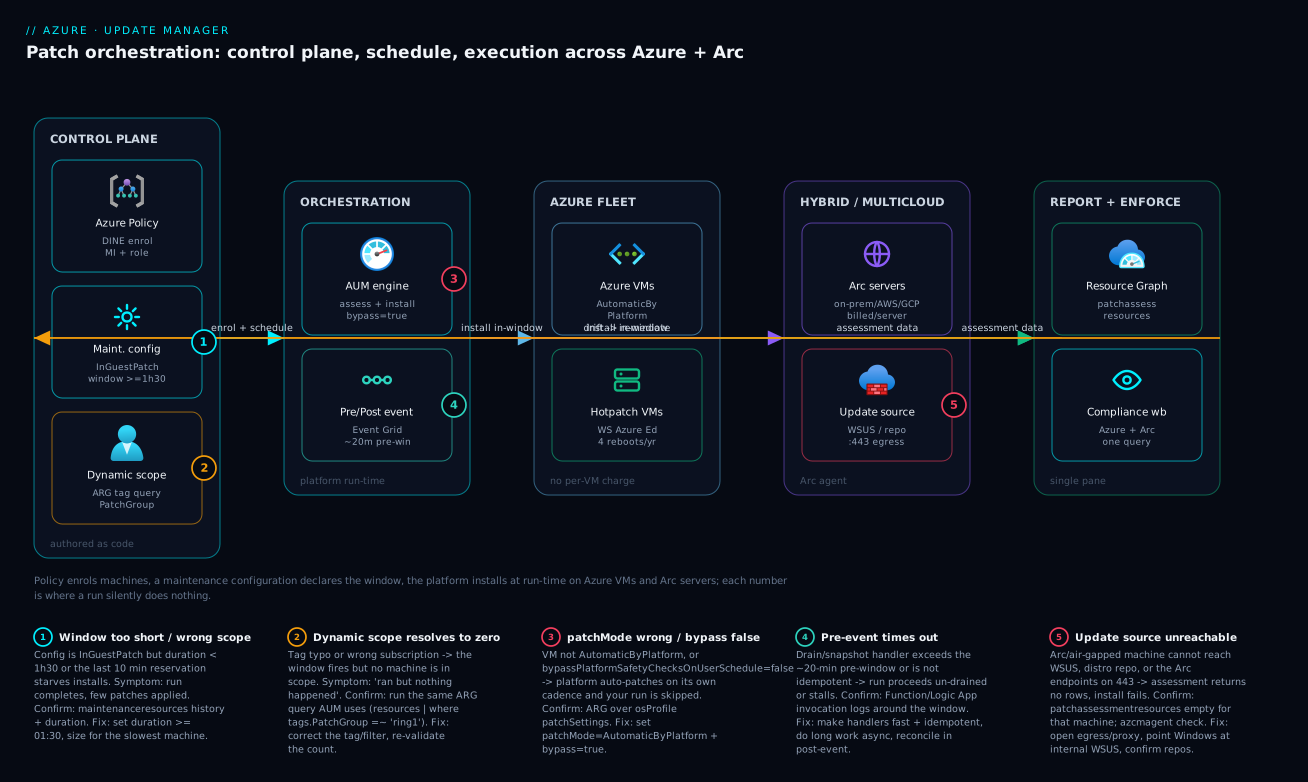
The diagram traces patch orchestration as it actually flows, left to right, across the four planes that make AUM work – and marks the five places a run silently does nothing. Read it as a control loop. On the left, the control plane is authored once as code: Azure Policy enrols machines and enforces assessment, a maintenance configuration (InGuestPatch, window ≥ 1h30m) declares the schedule, and a dynamic scope – an Azure Resource Graph query over the PatchGroup tag – decides membership at run time. That intent flows into the orchestration plane, where the AUM engine assesses and installs (only if the machine is AutomaticByPlatform with bypass = true) and an optional pre/post Event Grid handler drains, snapshots, and validates inside a bounded pre-window.
From orchestration the same schedule fans out to two execution targets: the Azure fleet (no per-VM charge, including hotpatch-capable Windows Server SKUs that take four reboots a year instead of twelve) and the hybrid/multicloud estate of Arc-enabled servers in your datacenter, AWS, or GCP, each of which must reach its update source – WSUS or a distro repo – over outbound 443. Both targets emit assessment data into the report-and-enforce plane, where Resource Graph (patchassessmentresources) and a compliance workbook give one queryable Azure-plus-Arc view, and detected drift loops back to Policy for remediation. The five numbered badges mark the silent failures: a window too short or wrong scope, a dynamic scope that resolves to zero machines, the wrong patchMode/bypass, a pre-event that times out, and an unreachable update source. Each badge in the legend reads as symptom · how to confirm · fix – the same diagnostic loop the playbook below expands.
Real-world scenario
Meridian Health Systems, a healthcare ISV, ran ~900 servers split across Azure (Windows + Linux app tiers) and two on-prem datacenters still hosting a regulated records system that legally could not move to the cloud yet. Their old world was Automation Update Management for the Azure VMs and a hand-maintained WSUS-plus-cron arrangement on-prem. When the legacy service hit end of support, two constraints collided: an external auditor required a single, queryable compliance view across the entire estate, and the on-prem records servers had a hard rule – no unscheduled reboots during clinical hours (06:00-22:00 local), ever.
They solved it with one targeting model. The on-prem servers were onboarded to Arc and tagged PatchGroup=ring2,Environment=prod at connect time, which dropped them straight into an existing dynamic scope – no bespoke onboarding. The Azure app tiers were tagged ring0 (a thin canary of build agents and two non-critical app servers) and ring1 (the broad fleet). Every machine’s patchMode was driven to AutomaticByPlatform with bypass = true by an Azure Policy Modify assignment at the platform management group, so newly created VMs were born correct. The reboot constraint on ring2 was handled by splitting install from restart: the ring2 maintenance configuration used rebootSetting: Never, so AUM installed packages inside a late-evening window but never restarted anything itself. A post-maintenance Event Grid handler then queued required reboots and released them only after 22:00 via a controlled runbook, machine by machine, with health checks between. Finally, all compliance reporting – Azure and Arc alike – came from a single Resource Graph query feeding one workbook, which is exactly the artifact the auditor wanted.
The first scheduled window did not go cleanly, and the failure is instructive. The ring1 run completed with a green status but the pending-update count barely moved. The cause was the classic one: a subset of ring1 VMs had been created from an older image whose patchMode was ImageDefault, and the Policy Modify remediation task had never run because the assignment was created without a managed identity – it reported compliant definitions but never acted. The ARG patchMode hunt surfaced 140 machines in the wrong mode within seconds. They added the system-assigned identity and Contributor role to the assignment, kicked a remediation task, re-validated the hunt to zero, and the next window patched all 900. The reboot-suppressing slice of the ring2 config:
installPatches: {
  rebootSetting: 'Never'   // install in-window; reboots handled by post-event after clinical hours
  windowsParameters: {
    classificationsToInclude: [ 'Critical', 'Security' ]
  }
}
The lessons the team took away: Arc plus dynamic scopes collapsed three patch programs into one; decoupling install from reboot turned a hard compliance constraint into a scheduling detail rather than a blocker; and a DeployIfNotExists/Modify policy without a managed identity is worse than no policy, because it looks like governance while doing nothing.
Advantages and disadvantages
The native-platform, schedule-declared model both removes a huge amount of operational toil and introduces a handful of sharp edges. Weigh it honestly:
| Advantages (why this model helps you) | Disadvantages (why it bites) |
|---|---|
| No Log Analytics workspace, Automation account, or dedicated agent – it is native to the VM/Arc platform | The orchestration mode (patchMode + bypass) is an easy-to-miss prerequisite; get it wrong and runs silently no-op |
| One targeting model (dynamic scopes on tags) spans Azure, on-prem, AWS, GCP via Arc | Off-Azure machines need reachable update sources and 443 egress – air-gapped/WSUS estates need real network work |
| Free on native Azure VMs; only Arc servers carry a small per-server charge | Arc per-server billing must be budgeted; large hybrid fleets add up |
DeployIfNotExists policy makes machines born-compliant and auto-enrolled |
A policy without a managed identity looks compliant but never acts – a dangerous false signal |
Install and reboot are separable (Never + post-event); hotpatch removes most reboots entirely |
Reboot decoupling adds an orchestration handler you must build, test, and keep idempotent |
| Single Resource Graph query gives one Azure+Arc compliance view for audit | Reporting lives in ARG/KQL, not a turnkey dashboard – you build the workbook |
| Dynamic scopes evaluate at run time, so new machines need zero manual onboarding | A scope that resolves to zero (tag typo) fails silently – “ran but nothing happened” |
| Pre/post events integrate drain/snapshot/validate without a separate scheduler | The ~20-minute pre-window forces async design; long inline work times out |
The model is right for any fleet beyond a handful of VMs, and especially for hybrid/multicloud and regulated estates that need one auditable answer. It bites hardest on teams that treat AUM as a button (never declaring a schedule), estates with restrictive egress (Arc machines that cannot reach their update source), and anyone who assigns a remediation policy without the identity that lets it act. Every disadvantage is manageable – but only if you know it exists, which is the point of the playbook below.
Hands-on lab
Stand up a single Linux VM, put it under platform orchestration, prove an assessment and a one-time install work, then attach it to a maintenance configuration – all free-tier-friendly on native Azure VMs (AUM has no per-VM charge; you pay only for the VM). Run in Cloud Shell (Bash) and tear it down at the end.
Step 1 – Variables and resource group.
RG=rg-aum-lab
LOC=eastus2
VM=vm-aum-lab
az group create -n $RG -l $LOC -o table
Step 2 – Register the providers (idempotent; skips if already registered).
az provider register --namespace Microsoft.Maintenance
az provider show --namespace Microsoft.Maintenance --query registrationState -o tsv
# Expected: Registered
Step 3 – Create a small Ubuntu VM born with platform orchestration.
az vm create -g $RG -n $VM --image Ubuntu2204 --size Standard_B1s \
  --admin-username azureuser --generate-ssh-keys \
  --patch-mode AutomaticByPlatform -o table
Expected: a VM row with a public IP. The --patch-mode AutomaticByPlatform flag sets the orchestration mode at create time.
Step 4 – Set the bypass flag so YOUR schedule will own patching.
az vm update -g $RG -n $VM \
  --set osProfile.linuxConfiguration.patchSettings.bypassPlatformSafetyChecksOnUserSchedule=true \
  --set osProfile.linuxConfiguration.patchSettings.assessmentMode=AutomaticByPlatform
Step 5 – Assess the machine and read the result from Resource Graph.
az vm assess-patches -g $RG -n $VM -o table
# Then query the result (may take a minute to surface):
az graph query -q "patchassessmentresources
| where id contains '$VM'
| project name, type, properties" -o jsonc
Expected: an assessment summary with availablePatchCountByClassification. Non-zero counts mean updates are pending.
Step 6 – Run a one-time install of Critical + Security, no reboot.
az vm install-patches -g $RG -n $VM \
  --maximum-duration PT60M \
  --reboot-setting Never \
  --classifications-to-include-linux Critical Security -o table
Expected: a run that returns Succeeded or CompletedWithWarnings. Re-run Step 5’s assessment to confirm the pending count dropped – this proves the data plane before you trust a schedule.
Step 7 – Create a daily maintenance configuration and attach the VM.
MCID=$(az maintenance configuration create -g $RG --resource-name mc-lab-daily -l $LOC \
  --maintenance-scope InGuestPatch \
  --extension-properties InGuestPatchMode=User \
  --duration 01:30 --recur-every 1Day --start-date-time "2026-06-09 03:00" --time-zone "UTC" \
  --reboot-setting IfRequired \
  --query id -o tsv)

az maintenance assignment create -g $RG --resource-name $VM --resource-type virtualMachines \
  --provider-name Microsoft.Compute \
  --configuration-assignment-name assign-lab \
  --maintenance-configuration-id "$MCID" -o table
Expected: the assignment is created. The VM is now associated to a daily schedule; the next window will assess and install per the config.
Step 8 – Verify the association and the machine’s orchestration mode.
az graph query -q "resources
| where name == '$VM'
| extend mode = properties.osProfile.linuxConfiguration.patchSettings.patchMode
| extend bypass = properties.osProfile.linuxConfiguration.patchSettings.automaticByPlatformSettings.bypassPlatformSafetyChecksOnUserSchedule
| project name, mode, bypass" -o jsonc
# Expected: mode = AutomaticByPlatform, bypass = true
Step 9 – Teardown.
az group delete -n $RG --yes --no-wait
This deletes the VM, the maintenance configuration, and the assignment in one shot.
Common mistakes & troubleshooting
This is the differentiator. Patch programs fail quietly – a green status that patched nothing is worse than a red one. The playbook below is the structured map: symptom → root cause → confirm (exact command/portal path) → fix. Scan it first; the prose after expands the worst offenders.
| # | Symptom | Root cause | Confirm (exact command / portal path) | Fix |
|---|---|---|---|---|
| 1 | Run shows green, pending count barely drops | patchMode not AutomaticByPlatform or bypass=false |
ARG patchMode hunt over osProfile patch settings |
Set patchMode=AutomaticByPlatform + bypass=true |
| 2 | “Schedule ran but nothing happened” | Dynamic scope resolves to zero machines | Run the scope’s ARG query manually; count rows | Fix the tag/filter; re-validate count before window |
| 3 | Only some machines in a ring patched | Mixed patchMode across the ring (old image) |
ARG hunt filtered to that ring’s tag | Remediate via Policy Modify; re-run with identity |
| 4 | Most patches skipped, run hit time limit | Window too short for the batch | maintenanceresources run status + duration |
Raise duration (≥ 01:30); size for slowest machine |
| 5 | Assessment returns no rows | Machine can’t reach its update source | patchassessmentresources empty for that machine; azcmagent check (Arc) |
Open 443 egress/proxy; point Windows at WSUS; fix repos |
| 6 | Arc machine not patched | Not in scope (resource-type filter) or agent disconnected | ARG scope query; az connectedmachine show status |
Include microsoft.hybridcompute; reconnect agent |
| 7 | Machine reboots during business hours | rebootSetting = IfRequired/Always on sensitive tier |
Inspect config installPatches.rebootSetting |
Set Never; drive reboot via post-event off-hours |
| 8 | Policy shows compliant but VMs not enrolled | DeployIfNotExists assignment has no managed identity |
Policy assignment -> Identity tab is empty | Add system-assigned MI + role; run remediation task |
| 9 | Pre-event handler errors / run un-drained | Handler exceeds ~20-min pre-window or not idempotent | Function/Logic App invocation logs around window time | Make handler fast + idempotent; do long work async |
| 10 | A known-bad KB keeps installing | KB not excluded in config | Config windowsParameters.kbNumbersToExclude |
Add the KB to kbNumbersToExclude |
| 11 | Two configs patch the same machine | Overlapping scopes (both tag and RG-wide match) | List assignments on the machine | Make tags mutually exclusive; one ring per machine |
| 12 | New VM missed its first window | Tag applied after scope evaluated, or missing | ARG query for the tag at the time | Tag at create (IaC/Policy); confirm before window |
| 13 | Linux install fails on specific package | Held/broken package or repo conflict | default package-manager logs on the host |
Exclude the package; fix the repo; re-run |
| 14 | Hotpatch month still rebooted | Hotpatch not enabled or unsupported SKU | OS profile enableHotpatching; SKU check |
Enable hotpatch on a supported SKU; baseline months still reboot |
The wrong orchestration mode (the #1 silent failure)
A run completes with a benign-looking status and the pending-update count barely changes. The machine’s patchMode is not AutomaticByPlatform, or bypassPlatformSafetyChecksOnUserSchedule is false, so the platform either never installs on your schedule or auto-patches on its own cadence. Confirm with the ARG patchMode hunt from earlier in this article – it returns every misconfigured machine in seconds. Fix: drive the property to AutomaticByPlatform + bypass=true (by az vm update, az connectedmachine update, or a Policy Modify assignment for born-correct machines), then re-run the hunt to confirm zero.
A dynamic scope that resolves to zero
The window fires, the run logs success, and nothing is patched – because the scope’s tag filter matched no machines. A single typo (ring1 vs Ring1, or the wrong subscription in the filter) silently empties the scope. Confirm by running the scope’s exact ARG query manually and counting rows; zero is the smoking gun. Fix: correct the tag or filter, re-validate the count against expectation, and make this validation a pre-window gate – never trust a scope you have not counted.
DeployIfNotExists policy with no managed identity
The Policy compliance blade shows your enrolment policy as compliant, yet new VMs are never associated to a maintenance configuration. The DeployIfNotExists/Modify assignment was created without a managed identity, so it evaluates definitions but never deploys the remediation. Confirm: open the assignment, check the Identity tab – it is empty – and look for a remediation history of zero. Fix: add a system-assigned identity and the required role (Contributor or a scoped equivalent) at the assignment scope, then trigger a remediation task and confirm the deployment runs.
An unreachable update source
Assessment returns no rows for a machine, or installs fail outright – because the machine cannot reach Windows Update / WSUS (Windows) or its distro repos (Linux), or, for Arc, the Arc endpoints on 443. Confirm: the machine is absent from patchassessmentresources; on Arc, azcmagent check flags the failing endpoint. Fix: open the egress/proxy path, point Windows machines at an internal WSUS, confirm Linux repos are reachable (or stand up a local mirror for air-gapped estates), then re-assess.
A window too short for the batch
Most patches are skipped and the run hits its time limit, because the window’s effective install time (duration - 10m) was too small for the slowest machine in the batch. Confirm: maintenanceresources shows the run hitting the time limit; compare duration against the batch’s worst-case install time. Fix: raise duration (minimum 01:30), split a large ring into smaller batches with their own windows, or move slow machines to a dedicated config with a longer window.
Common beginner mistakes
These are conceptual traps, not symptom lookups (the troubleshooting playbook above handles those). Each is a belief that feels right and quietly wrecks a patch program.
“AUM is a screen I open to click Update now.” The one-time assess/install button is real, but it is for learning and out-of-band CVEs, not operations. The product is the maintenance configuration – a declared schedule. If your patch program is a human clicking a button every month, you bought a scheduler and are still doing the scheduling by hand. Right model: declare the schedule once; let the platform run it while everyone sleeps.
“I set patchMode=AutomaticByPlatform, so I’m done.” That one property, alone, enables Automatic Guest Patching on Microsoft’s rolling cadence – not your window. To make your maintenance configuration the owner you also need bypassPlatformSafetyChecksOnUserSchedule=true. Right model: it is two switches, not one – orchestration mode and bypass. Setting only the first is the single most common reason a window “runs but nothing happens.”
“AUM needs a Log Analytics workspace and the monitoring agent, like the old tool did.” That was Automation Update Management, retired 31 August 2024 along with the MMA/OMS agent. AUM rides the VM/Arc guest agent plus a transient patch extension – no workspace, no dedicated agent. Right model: if you are still standing up a workspace “for patching,” you are rebuilding the retired stack.
“Assessment patches the machine.” Assessment is strictly read-only – it reports what is missing and installs nothing. A fleet with beautiful assessment data and no maintenance configuration is fully measured and fully unpatched. Right model: assessment is the thermometer; the maintenance configuration is the medicine.
“Static assignment is simpler – I’ll just add each machine to the config.” It works on Tuesday and rots by Friday, because every VM created after you built the list is born outside the program and nobody remembers to add it. Right model: targeting is a query (a dynamic scope on tags), not a list – a machine tagged PatchGroup=ring1 at creation is in scope on the next window with zero onboarding.
“rebootSetting: Never means it’s patched without a reboot.” Never installs the packages but leaves the machine in a pending-reboot state – kernel and many Windows updates are not fully in effect until it restarts. Only hotpatching genuinely applies (some) security updates with no reboot. Right model: Never defers the reboot to a controlled post-event; it does not eliminate it. Track pending-reboot state and clear it promptly.
“Tagging a machine exempt guarantees it is never patched.” Only if no broader scope also matches it. An RG-wide or subscription-wide dynamic scope will happily patch an exempt-tagged machine, because scopes are additive, not subtractive. Right model: make ring tags mutually exclusive and avoid broad RG/sub scopes that can override an exemption – one machine, one ring.
Best practices
- Declare a schedule, do not click a button. The maintenance configuration is the product; one-time runs are only for proving the data plane and out-of-band CVEs.
- Set
patchMode=AutomaticByPlatform+bypass=trueby Policy, not by hand, so every machine is born correct and the #1 silent failure cannot occur. - Author configs as code (Bicep/ARM): scope
InGuestPatch, window ≥ 01:30, explicit reboot and classification settings, KB/package excludes for known-bad updates. - Target by tag with a governed vocabulary (
PatchGroup = ring0|ring1|ring2|exempt,Environment); never staple machines into a config statically at scale. - Design rings deliberately: a thin canary first, the broad fleet next, latency-sensitive tiers last with reboots decoupled.
- Validate every dynamic scope resolves to the expected count before the first window – make it a pre-window gate.
- Prove a one-time install lands on a canary (re-assess, confirm the count drops) before you trust any schedule.
- Decouple install from reboot (
Never+ post-event) for restart-sensitive tiers; enable hotpatch where supported to cut four reboots from twelve. - Keep pre/post handlers fast and idempotent; trigger long work asynchronously and reconcile in the post-event.
- Onboard off-Azure machines via Arc and tag at connect time so they inherit existing scopes with zero bespoke onboarding.
- Always provision a managed identity for
DeployIfNotExists/Modifyassignments, and verify a non-zero remediation history. - Build one compliance view from Resource Graph (Azure + Arc) and surface it in a workbook for audit; keep exemptions visible, time-boxed, and few.
Security notes
Patching is a security control, but the patch pipeline itself is also an attack surface and a least-privilege problem. Treat it accordingly:
| Concern | Risk | Control |
|---|---|---|
| Policy remediation identity | Over-broad Contributor at MG scope | Scope the role to the minimum (a custom role granting only maintenance-assignment + VM patch settings) where feasible |
| Pre/post handler identity | A Function that drains/reboots needs power | Use a managed identity with the least role; never store credentials in the handler |
| Update source integrity | WSUS/repo poisoning installs malicious “updates” | Use trusted, signed sources; restrict who can publish to internal WSUS/mirrors |
| Arc agent egress | Broad outbound from on-prem to the internet | Allow-list the specific Arc + update endpoints on 443; use a proxy, not open egress |
| Known-bad / supply-chain KBs | A bad patch breaks or backdoors machines | Canary ring first; kbNumbersToExclude/packagesToExclude to hold back; validate before broad rollout |
| Exemptions | exempt machines accumulate unpatched |
Time-box exemptions, audit them separately, require a documented owner and expiry |
| Reboot suppression | Never leaves machines pending-reboot, partially patched |
Track pending-reboot state; drive the controlled reboot promptly via post-event |
| Compliance data exposure | CVE exposure is sensitive | Restrict Resource Graph/workbook access; treat the exposure view as confidential |
| Secrets in handlers | Snapshot/drain handlers touching storage/DB | Reference Key Vault via managed identity; no secrets in app settings |
The throughline: the only identities that can act on the fleet (the remediation MI, the handler MI) should hold the minimum role at the minimum scope, the only sources machines pull from should be trusted and signed, and the only machines left unpatched should be deliberately, visibly, and temporarily exempt.
Cost & sizing
AUM’s pricing model is deliberately simple, and the headline is that it is free on native Azure VMs. The cost surface and rough figures (always verify current rates for your region/currency):
| Cost driver | Native Azure VM | Arc-enabled server | Notes |
|---|---|---|---|
| Update Manager itself | Free | Small per-server / month | The only AUM line item is Arc machines |
| Underlying compute | You pay for the VM | You pay for the on-prem/other-cloud host | AUM does not change compute cost |
| Pre/post handler (Function) | Consumption per execution | Same | Tiny at monthly cadence |
| Event Grid | Per operation | Same | Negligible for patch events |
| Resource Graph queries | Free | Free | No charge for ARG |
| Log Analytics (optional) | Per GB if you route logs there | Same | AUM does not require it; only if you choose to |
Rough INR/USD framing for a hybrid estate:
| Scenario | Machines | AUM cost driver | Rough monthly cost |
|---|---|---|---|
| All-Azure fleet | 200 Azure VMs | AUM free; pay only compute | ₹0 for AUM (compute separate) |
| Small hybrid | 50 Azure + 50 Arc | 50 Arc × per-server charge | ~50 × small fee (USD low single digits each) |
| Large hybrid | 500 Azure + 400 Arc | 400 Arc × per-server charge | 400 × per-server fee – budget explicitly |
| Orchestration overhead | any | Functions + Event Grid at monthly cadence | Effectively rounding error |
Sizing is about windows and batches, not money: size each maintenance window for the slowest machine in its batch (duration - 10m effective), split very large rings into multiple windowed batches to avoid time-limit skips, and prefer hotpatch-capable SKUs where reboot disruption (not licence cost) is the constraint. The one real spend decision is Arc per-server billing on large hybrid fleets – it is far cheaper than running a parallel patch stack, but on 400+ servers it is a line item you must put in the budget, not discover.
Going deeper
The core sections give you a working patch program. This one is for the reader who has to defend it – explain the internals, reason about the edge cases, and stop the surprises before they page you.
How AUM patches with no agent of its own
The “agentless” claim is worth unpacking, because it is what makes the model cheap and low-maintenance. AUM does not ship a resident daemon that scans for updates. It rides infrastructure the machine already has: on an Azure VM, the VM guest agent (WindowsAzureGuestAgent / walinuxagent); on an Arc-enabled server, the Connected Machine agent (azcmagent). When you assess or install, the platform pushes a transient patch extension – Microsoft.CPlat.Core.WindowsPatchExtension or LinuxPatchExtension – which performs the scan or install and reports results back through the control plane into Resource Graph. No Log Analytics workspace sits in that path and there is nothing for you to keep patched, which is exactly why the retired MMA/OMS-based Automation Update Management is not worth resurrecting. The operational consequence: if the guest agent is unhealthy, AUM is blind. A machine with a stopped walinuxagent or a disconnected azcmagent silently drops out of assessment – which is why the troubleshooting playbook checks agent health first, not the schedule.
“Azure-orchestrated” vs your schedule: what bypass actually turns off
patchMode = AutomaticByPlatform is doing double duty, and understanding the two behaviours behind it separates an expert from someone who copied a flag. On its own, AutomaticByPlatform enables Automatic Guest Patching – Microsoft’s Azure-orchestrated patching: the platform assesses every machine and rolls Critical + Security patches out on its own cadence, automatically, in waves across a roughly 30-day period, during each VM’s off-peak hours, gated by platform health signals so a bad patch halts the rollout. That is a genuinely useful “set and forget” mode for machines you do not want to schedule.
The moment you attach a maintenance configuration, two owners collide – the platform wants to patch on its rolling cadence, your config wants the third Sunday. bypassPlatformSafetyChecksOnUserSchedule = true is the switch that resolves it: it tells the platform “stand down, the customer’s schedule owns installs.” That is why the pairing is mandatory and why setting only patchMode leaves you in a confusing middle state where the platform patches on its timetable and your window appears to do nothing. Memorise the two model names for exams and design reviews: Automatic Guest Patching (platform cadence, no config) versus Customer Managed Schedules (your maintenance configuration + bypass).
Periodic assessment: cadence and staleness
Setting assessmentMode = AutomaticByPlatform does not scan continuously – it triggers a periodic assessment roughly every 24 hours for both Azure VMs and Arc machines. That has a direct reporting consequence: the exposure numbers in patchassessmentresources can be up to a day stale, so a machine can read “0 pending” minutes after a new CVE’s KB ships and only flip to non-compliant on the next scan. For zero-day response you therefore run an on-demand az vm assess-patches rather than wait for the periodic scan, and treat periodic data as a fleet trend, not a real-time gauge. When you build the compliance workbook, surface each machine’s last-assessed timestamp next to its pending count – a “compliant” machine last assessed six days ago is not compliant, it is unmonitored.
Extended Security Updates (ESU) through Arc
When a Windows Server release goes out of support (2012 / 2012 R2 already; 2016 / 2019 as they reach end of life), security patches stop shipping through the normal channel – unless you buy Extended Security Updates. Delivered through Azure Arc, ESU is provisioned as a linked license resource on the connected machine; once the ESU license is active and linked, AUM’s assessment and install path picks up the ESU KBs like any other update, with no separate tooling. This is a real reason to onboard legacy on-prem servers to Arc even when you never intend to move them to Azure: it is the supported route to keep an out-of-support estate patched (SQL Server 2012 ESU works the same way). Budget the ESU license separately from the small per-server AUM charge – they are two different line items.
The same schedule as Terraform
The lesson authors configurations in Bicep, but many platform teams standardise on Terraform. The equivalent azurerm resources are azurerm_maintenance_configuration and azurerm_maintenance_assignment_dynamic_scope (illustrative – IDs are placeholders, not for live apply):
resource "azurerm_maintenance_configuration" "win_prod_monthly" {
  name                     = "mc-win-prod-monthly"
  resource_group_name      = "rg-fleet-prod"
  location                 = "eastus2"
  scope                    = "InGuestPatch"
  in_guest_user_patch_mode = "User" # marks it a Customer Managed Schedule

  window {
    start_date_time = "2026-06-21 02:00"
    duration        = "03:00"
    time_zone       = "UTC"
    recur_every     = "Month Third Sunday"
  }
  install_patches {
    reboot = "IfRequired"
    windows {
      classifications_to_include = ["Critical", "Security", "UpdateRollUp"]
      kb_numbers_to_exclude      = ["KB5099999"]
    }
  }
}

resource "azurerm_maintenance_assignment_dynamic_scope" "ring1" {
  name                         = "scope-ring1"
  maintenance_configuration_id = azurerm_maintenance_configuration.win_prod_monthly.id
  filter {
    locations      = ["East US 2", "Central US"]
    os_types       = ["Windows"]
    resource_types = ["Microsoft.Compute/virtualMachines"]
    tag_filter     = "All"
    tags {
      tag    = "PatchGroup"
      values = ["ring1"]
    }
  }
}
One azurerm v4 gotcha to flag: v4 made the provider subscription_id mandatory (set it in the provider block or export ARM_SUBSCRIPTION_ID), so a v3 configuration that “just worked” errors on terraform plan until you supply it. And in_guest_user_patch_mode = "User" is the Terraform equivalent of the Bicep extensionProperties.InGuestPatchMode: 'User' – omit it and the config is not treated as an AUM schedule at all.
Interview & exam questions
These map to AZ-104 (Azure Administrator) and AZ-800/AZ-801 (Windows Server Hybrid); the governance angle touches AZ-305.
-
What are the two planes of Azure Update Manager? The data plane (
assess-patches/install-patches) acts on one machine on demand; the scheduling plane (maintenance configurations of scopeInGuestPatch) declares a recurring, governed program. You prove with the data plane and operate with the scheduling plane. -
Why must a machine be
AutomaticByPlatformwithbypassPlatformSafetyChecksOnUserSchedule = truefor scheduled patching?AutomaticByPlatformlets the platform orchestrate installs;bypass=truestops the platform from also applying its own automatic patches on Microsoft’s cadence, which would collide with your window. Without both, the run is silently skipped. -
What replaced Automation Update Management, and when did it retire? Azure Update Manager replaced it; Automation Update Management reached end of support on 31 August 2024, as did the MMA/OMS agent it depended on.
-
What is a dynamic scope and why prefer it over static assignment? A dynamic scope binds machines to a maintenance configuration via a Resource Graph tag/sub/RG/OS filter evaluated at run time, so new machines carrying the right tag are patched with zero manual onboarding – static assignments rot as the fleet changes.
-
What is the minimum maintenance window duration, and what is the 10-minute caveat? Minimum
01:30; the platform reserves the last 10 minutes to finalize, so effective install time isduration - 10m, and AUM stops starting new installs once the window is exhausted. -
How do you patch an on-prem or AWS/GCP server with AUM? Onboard it as an Arc-enabled server (
azcmagent connect), tag it at connect time, and it inherits the same maintenance configurations and dynamic scopes – billed a small per-server monthly charge, unlike free native Azure VMs. -
How do you patch a machine that cannot reboot during business hours? Set
rebootSetting: Neverso AUM installs but never restarts, then drive the reboot through a controlled post-maintenance Event Grid handler that releases reboots in an approved window. -
What is hotpatching and what is its reboot cadence? On Windows Server Azure Edition / WS 2025, hotpatch installs OS security updates without a reboot. Baseline months (Jan/Apr/Jul/Oct) ship a cumulative update and require a reboot; the two months after each ship hotpatches with no reboot – four reboots a year, not twelve.
-
Which two built-in policies operationalize AUM, and what do they do? “Configure periodic checking for missing system updates” sets
assessmentMode=AutomaticByPlatform; “Schedule recurring updates using Azure Update Manager” usesDeployIfNotExiststo auto-enrol in-scope machines into a maintenance configuration. -
Why does a
DeployIfNotExistspolicy sometimes show compliant but never act? It needs a managed identity with the right role at the assigned scope to deploy the remediation. Without the identity, it evaluates definitions and looks compliant but never deploys anything. -
Where do you query fleet patch compliance for both Azure and Arc? Azure Resource Graph –
patchassessmentresourcesfor exposure,patchinstallationresourcesfor what installed,maintenanceresourcesfor run history – joined toresourcesfor tags; no Log Analytics workspace required. -
What is the bounded contract for a pre-maintenance event handler? It runs inside a ~20-minute pre-window; the maintenance run proceeds when the handler completes or times out, so handlers must be fast and idempotent and trigger long work asynchronously.
Practice challenges
Work these in order – each builds on the last, and every solution is the exact command or manifest with a one-line why. They assume the fleet used throughout (rg-fleet-prod, tags PatchGroup / Environment); every ID is a placeholder. Nothing here needs a live subscription to reason through.
1. (Beginner) Find the machines a schedule will silently skip. Write the Resource Graph query that lists every Azure VM whose patchMode is not AutomaticByPlatform, projecting name and resource group.
<details> <summary>Show solution</summary>
resources
| where type =~ "microsoft.compute/virtualmachines"
| extend patchMode = tostring(coalesce(
    properties.osProfile.linuxConfiguration.patchSettings.patchMode,
    properties.osProfile.windowsConfiguration.patchSettings.patchMode))
| where patchMode != "AutomaticByPlatform"
| project name, patchMode, resourceGroup
Why: the wrong patchMode is the #1 silent failure – this is the query you gate every schedule behind.
</details>
2. (Beginner) Convert an existing Windows VM to customer-managed patching. Using az vm update, put vm-web-07 in rg-fleet-prod into AutomaticByPlatform with periodic assessment, then hand control to your schedule.
<details> <summary>Show solution</summary>
az vm update -g rg-fleet-prod -n vm-web-07 \
  --set osProfile.windowsConfiguration.patchSettings.patchMode=AutomaticByPlatform \
  --set osProfile.windowsConfiguration.patchSettings.assessmentMode=AutomaticByPlatform

az vm update -g rg-fleet-prod -n vm-web-07 \
  --set osProfile.windowsConfiguration.patchSettings.bypassPlatformSafetyChecksOnUserSchedule=true
Why: note the windowsConfiguration path (not linuxConfiguration) – pointing at the wrong OS branch is the most common copy-paste error here.
</details>
3. (Intermediate) Express an awkward cadence and window. Author the maintenanceWindow block for “the last Saturday of every month, 23:00 India time, three-hour window.”
<details> <summary>Show solution</summary>
"maintenanceWindow": {
  "startDateTime": "2026-06-27 23:00",
  "duration": "03:00",
  "timeZone": "India Standard Time",
  "recurEvery": "Month Last Saturday"
}
Why: recurEvery uses the exact Month Last Saturday grammar and timeZone takes a Windows/IANA name – effective install time is still 03:00 - 10m.
</details>
4. (Intermediate) Target Linux non-prod across subscriptions and prove it resolves. Attach a dynamic scope for all Linux machines tagged Environment=nonprod, then write the ARG query that confirms the scope is non-empty before the window.
<details> <summary>Show solution</summary>
az maintenance assignment create-or-update-subscription \
  --maintenance-configuration-id "/subscriptions/<sub-a>/resourceGroups/rg-fleet-prod/providers/Microsoft.Maintenance/maintenanceConfigurations/mc-linux-nonprod" \
  --configuration-assignment-name "scope-nonprod-linux" \
  --filter-tags '{"Environment":["nonprod"]}' \
  --filter-tags-operator "All" \
  --filter-os-types "Linux"
resources
| where type =~ "microsoft.compute/virtualmachines"
| where tostring(properties.storageProfile.osDisk.osType) =~ "Linux"
| where tags["Environment"] =~ "nonprod"
| count
Why: a scope that resolves to zero (tag typo, wrong sub) fails silently – counting rows manually is the only pre-window guarantee the schedule will act. </details>
5. (Advanced) Patch a tier that must never reboot in business hours. Design the config setting plus the event wiring so a database ring installs updates in a late window but reboots only after 22:00.
<details> <summary>Show solution</summary>
Set installPatches.rebootSetting: 'Never' on the ring’s maintenance configuration, then subscribe a Function to its post-event:
az eventgrid event-subscription create \
  --name post-maint-reboot-gate \
  --source-resource-id "/subscriptions/<sub>/resourceGroups/rg-fleet-prod/providers/Microsoft.Maintenance/maintenanceConfigurations/mc-db-ring2" \
  --endpoint-type azurefunction \
  --endpoint "/subscriptions/<sub>/resourceGroups/rg-ops/providers/Microsoft.Web/sites/fn-patch-orchestrator/functions/PostMaintenanceReboot" \
  --included-event-types Microsoft.Maintenance.PostMaintenanceEvent
The Function checks the clock and reboots pending-reboot machines one at a time after 22:00, with a health check between each.
Why: Never decouples install from restart, turning a hard compliance rule into a scheduling detail; the post-event is the only place a controlled reboot belongs.
</details>
6. (Advanced) Diagnose false compliance end to end. A green run left 140 of 900 machines unpatched; the Policy Modify assignment shows “compliant.” Give the sequence of commands that finds the cause and remediates it.
<details> <summary>Show solution</summary>
# 1. Find the machines actually in the wrong mode (expect ~140 rows)
az graph query -q "resources
| where type in~ ('microsoft.compute/virtualmachines','microsoft.hybridcompute/machines')
| extend m = tostring(coalesce(properties.osProfile.linuxConfiguration.patchSettings.patchMode,
                               properties.osProfile.windowsConfiguration.patchSettings.patchMode))
| where m != 'AutomaticByPlatform' | project name, m, resourceGroup"

# 2. The assignment has no managed identity -> add a system-assigned MI + role
az policy assignment identity assign --name enforce-patchmode \
  --scope "/providers/Microsoft.Management/managementGroups/mg-platform" \
  --system-assigned --role Contributor \
  --identity-scope "/providers/Microsoft.Management/managementGroups/mg-platform"

# 3. Kick a remediation task, then re-run step 1 until it returns zero
az policy remediation create --name fix-patchmode \
  --policy-assignment enforce-patchmode \
  --management-group mg-platform
Why: a Modify / DeployIfNotExists assignment without a managed identity evaluates as compliant but never acts – the fix is the identity plus a remediation task, not a new policy.
</details>
Quick check
- Your maintenance run shows a green status but the pending-update count barely moved. What is the single most likely cause and the one command to confirm it?
- You attach a dynamic scope filtering
PatchGroup=ring1and the window fires with nothing patched. What do you check first? - A regulated tier cannot reboot between 06:00 and 22:00. How do you patch it without violating that rule?
- Why is Azure Update Manager free on native Azure VMs but billed on Arc-enabled servers?
- What two
osProfilesettings must be true for a VM, and what is the effect of each?
Answers
- The machine’s
patchModeis notAutomaticByPlatform(orbypass=false), so the run is silently skipped. Confirm with the Resource GraphpatchModehunt overosProfilepatch settings, which returns every misconfigured machine. - Run the scope’s exact ARG query manually and count the rows – a scope resolving to zero (a tag typo or wrong subscription in the filter) is the number-one cause of “ran but nothing happened.” Fix the filter and re-validate the count.
- Set
rebootSetting: Neverso AUM installs packages inside a window but restarts nothing, then drive the reboot through a controlled post-maintenance Event Grid handler that releases reboots only after 22:00. - AUM is a native platform capability for Azure VMs (no extra charge); Arc-enabled servers are off-Azure machines projected into Azure, and AUM coverage for them carries a small per-server monthly charge – still far cheaper than a parallel off-cloud patch stack.
patchMode = AutomaticByPlatform(lets the platform orchestrate installs on your schedule) andbypassPlatformSafetyChecksOnUserSchedule = true(stops the platform from auto-patching on its own cadence and colliding with your window). Both are required or the run is skipped.
Glossary
-
Azure Update Manager (AUM) – Native Azure capability that assesses and installs OS updates on Azure VMs and Arc-enabled servers, with maintenance configurations for scheduling. No Log Analytics workspace or dedicated agent required.
-
Maintenance configuration – A first-class Azure resource (
Microsoft.Maintenance/maintenanceConfigurations) of scopeInGuestPatchdeclaring when to patch, what classifications, and how to reboot. -
maintenanceScope– The kind of maintenance a configuration governs; must beInGuestPatchfor guest-OS patching. -
Patch orchestration mode (
patchMode) – The OS-profile property controlling who patches a machine and when;AutomaticByPlatformis required for AUM scheduling. -
bypassPlatformSafetyChecksOnUserSchedule– OS-profile flag that suppresses platform auto-patching so your maintenance schedule owns patching; must betrue. -
Assessment mode – Controls scanning cadence (
AutomaticByPlatformfor continuous periodic assessment;ImageDefaultfor on-demand only). -
Dynamic scope – An Azure Resource Graph filter (tags/subscriptions/RGs/locations/OS) binding machines to a maintenance configuration, evaluated at run time.
-
Configuration assignment – The binding of a machine (static) or a scope (dynamic) to a maintenance configuration.
-
Pre/post maintenance event – Event Grid events fired before/after a maintenance window for drain, snapshot, validation, or controlled reboot.
-
Arc-enabled server – An off-Azure machine (on-prem, AWS, GCP) projected into Azure via the Connected Machine agent, treated by AUM like any other machine (billed per server).
-
Hotpatching – Reboot-less installation of OS security updates on supported Windows Server SKUs; baseline months require a reboot, hotpatch months do not.
-
Classification – The category of an update (Critical, Security, UpdateRollUp, etc.) used to scope what a run installs.
-
Ring – A wave of the fleet (canary → broad → sensitive) with its own window and reboot posture, expressed as a
PatchGrouptag value. -
rebootSetting– A run’s reboot behaviour:IfRequired,Always, orNever(the lever for decoupling install from restart). -
patchassessmentresources– The Azure Resource Graph table holding per-machine assessment summaries and per-patch detail for Azure VMs and Arc machines. -
Automatic Guest Patching (Azure-orchestrated patching) – The platform-cadence mode that
patchMode=AutomaticByPlatformenables on its own: Azure assesses and installs Critical/Security updates in health-gated waves over ~30 days during each VM’s off-peak hours, with no maintenance configuration. Disabled for a machine bybypass=true. -
Customer Managed Schedules – Microsoft’s name for the model where a maintenance configuration (plus
bypass=true) owns patching on your timetable, as opposed to Automatic Guest Patching. -
One-time deployment – An ad-hoc
az vm install-patchesrun for out-of-band remediation or to prove a patch lands; the data-plane counterpart to a scheduled maintenance configuration. -
Periodic assessment – The ~24-hour recurring scan enabled by
assessmentMode=AutomaticByPlatform; keeps exposure data fresh without installing anything. -
Extended Security Updates (ESU) – Paid security patches for out-of-support Windows Server (2012/2012 R2 and later) or SQL Server, delivered through Azure Arc as a linked license and installed by AUM like any other update.
-
Connected Machine agent (
azcmagent) – The agent that projects an off-Azure server into Azure as an Arc-enabled machine; the hybrid equivalent of the Azure VM guest agent that AUM rides. -
Patch extension – The transient
WindowsPatchExtension/LinuxPatchExtensionthe platform pushes at assess/install time to do the work; not a resident agent. -
Baseline month / hotpatch month – In the hotpatch calendar, baseline months (Jan/Apr/Jul/Oct) ship a cumulative update and reboot; the two months after each ship reboot-less hotpatches.
-
recurEvery– The maintenance-window cadence grammar:1Day,7Days,Month Third Sunday,Month Last Saturday,Month day23. -
Maintenance window – The bounded time a schedule runs in (
duration>= 01:30); the platform reserves the last 10 minutes, so effective install time isduration - 10m. -
patchinstallationresources– The Resource Graph table recording install-run results and per-patch installation state – what actually installed. -
maintenanceresources– The Resource Graph table holding maintenance-configuration definitions and run history – did the schedule run? -
DeployIfNotExists(DINE) – The Azure Policy effect that auto-enrols in-scope machines into a maintenance configuration; requires a managed identity with a suitable role or it looks compliant but never deploys.
Next steps
- Lock down the enforcement engine behind AUM with Azure Policy: Governance at Scale – the
DeployIfNotExistsandModifyassignments that make machines born-compliant. - Extend the hybrid story with Azure Arc-Enabled Servers: Machine Configuration & Extended Security Updates for the off-Azure machine lifecycle.
- Build the compliance workbook and alerting on top of Azure Monitor & Application Insights for Observability.
- Wire your pre/post orchestration handlers using Azure Functions: Serverless Patterns.
- Place these maintenance configurations and policies correctly in the tenant with Azure Resource Hierarchy Explained.