In a nutshell
Level: Intermediate · Time: ~35 min
Imagine your application is a busy restaurant. A single VM is one chef in one kitchen: brilliant until they call in sick, the oven breaks, or the health inspector shuts the room for cleaning — then the restaurant closes. Azure gives you four escalating ways to make sure dinner still gets served, and this lesson is about all four:
- Availability set = several chefs in the same kitchen, deliberately put on different stoves and power sockets (fault domains), and never sent on their coffee break at the same time (update domains). One oven or one socket failing takes out only one chef, and the kitchen keeps cooking. That is 99.95% uptime.
- Availability zones = the same dishes cooked in separate kitchens in separate buildings across the city, each with its own power and water. A fire or blackout in one building doesn’t stop the others. That is 99.99% uptime.
- VM Scale Set = a kitchen that hires and fires chefs automatically as the dinner rush rises and falls — resilience and elasticity in one managed team.
- Region pairs + Site Recovery = a whole second restaurant in another city, ready if the first city floods. That is disaster recovery.
The single most important idea underneath all of it: high availability on Azure comes from running more than one copy, not from making one copy indestructible. No amount of premium hardware makes a single VM as reliable as two cheap VMs spread across failure domains. Everything below is about where Azure puts those copies and what uptime promise each layout earns.
You will meet two terms constantly, so lock them in now with the restaurant picture: a fault domain is a shared-power-and-network boundary (a stove circuit) that protects against accidents Azure didn’t choose, and an update domain is a reboot group (a break rota) that protects against maintenance Azure schedules. Keep the chefs, the buildings, and the second city in mind and the SLAs will make sense.
You should already know what an Azure VM is (sizes, disks, NICs, regions, resource groups) — the companion Azure Virtual Machines Deep Dive covers that. After this lesson you will be able to explain fault vs update domains cold, pick the right layout for a given SLA and budget, read back FD/UD counts with the CLI, and reason about the advanced levers — composite SLA maths, capacity reservations, proximity placement groups, and the modern zones + Scale Set Flexible default shape.
“What happens when the host your VM is running on dies?” is near the top of every production checklist. A single Azure Virtual Machine is a single point of failure: the moment its physical server, rack power feed, top-of-rack switch, or hypervisor needs attention — planned or unplanned — your application goes dark. Azure gives you three escalating tools to fix that — availability sets, availability zones, and VM Scale Sets — and exactly how each one spreads your machines, and what SLA each one buys, is one of the most reliably asked topics in Azure interviews and on the AZ-104 and AZ-305 exams.
This is the deep, no-hand-waving treatment. By the end you can explain fault domains versus update domains without hesitating, know why a single VM gets no uptime guarantee unless it uses Premium disks, choose between zonal and zone-redundant deployments, describe how a Scale Set layers on top, and reason about planned versus unplanned maintenance, live migration, and region pairs for disaster recovery. It assumes you have already met the VM itself in the companion lesson; here we focus entirely on keeping it available.
Learning objectives
By the end of this lesson you can:
- Explain what an availability set is and describe fault domains (FD) and update domains (UD) precisely — defaults, maximums, and how Azure spreads VMs across the FD×UD grid.
- State the SLA for a single VM, an availability set, an availability-zone deployment, and a Scale Set, and explain why each number is what it is.
- Distinguish zonal from zone-redundant deployments.
- Describe how VM Scale Sets (Uniform vs Flexible) combine with fault domains and zones, and how autoscale works.
- Compare single VM vs set vs zone vs Scale Set on SLA, blast radius, and when to use each.
- Explain planned vs unplanned maintenance, live migration, maintenance configurations, and how region pairs provide DR.
- Create an availability set and a zonal VM with
azand read back the FD/UD counts.
Prerequisites & where this fits
You should already understand what an Azure Virtual Machine is and how to create one — sizes, disks, NICs, and the basics of regions and resource groups. If any of that is shaky, read the companion Azure Virtual Machines Deep Dive: Every Creation & Post-Creation Setting first; this lesson assumes that vocabulary and concentrates entirely on resilience. It is a Compute module lesson in the Azure Zero-to-Hero course, sitting immediately after the VM deep-dive and before storage. The concepts here — fault domains, update domains, zones — recur throughout Azure (databases, load balancers, Kubernetes node pools, storage redundancy), so the mental models pay off far beyond VMs. For the lab you need a subscription with permission to create VMs in a region that supports availability zones.
Core concepts: failure domains, SLAs, and blast radius
Before the features, internalise three ideas the whole topic hangs on.
A failure domain is a set of components that share a single point of failure. If a power distribution unit fails, every server it feeds goes down together — that PDU defines a failure domain; if a rack’s top-of-rack switch dies, the whole rack loses connectivity. High availability is spreading replicas across different failure domains so no single failure takes all of them. Azure’s resilience features are, at heart, increasingly large failure-domain boundaries to spread across: different racks (availability sets), different buildings (availability zones), and different regions (region pairs).
An SLA (Service Level Agreement) is a financially backed uptime promise — a monthly availability percentage Microsoft commits to, with service credits if it misses. The numbers look small but the difference is enormous:
| Monthly SLA | Allowed downtime per month | Allowed downtime per year |
|---|---|---|
| 99.9% (“three nines”) | ~43.2 minutes | ~8.77 hours |
| 99.95% | ~21.9 minutes | ~4.38 hours |
| 99.99% (“four nines”) | ~4.38 minutes | ~52.6 minutes |
The crucial subtlety, and a favourite interview trap: a single VM has no availability SLA at all unless every OS and data disk uses Premium SSD or Ultra Disk (and even then it is only 99.9%). With Standard SSD a single VM gets 99.5%; with Standard HDD there is no uptime guarantee. The instant you need a real promise you either put the VM on premium storage (99.9% single instance) or — far better — deploy two or more instances into an availability set (99.95%) or across zones (99.99%). HA on Azure is about redundancy of instances, not making one instance bulletproof.
Blast radius is how much breaks when one thing fails. A single VM has a blast radius of “everything.” An availability set shrinks a rack/power/network fault to a fraction of the fleet; availability zones shrink a whole-datacentre fault; region pairs shrink a regional disaster. Climbing that ladder trades cost and complexity for a smaller blast radius — the architect’s job is to pick the rung that matches the workload’s downtime tolerance.
One last pair of terms used throughout: unplanned maintenance is hardware failing unexpectedly (Azure must react), and planned maintenance is Azure proactively updating the host fleet on its own schedule. The features below keep you running through both — we return to the mechanics later.
Availability Sets: fault domains and update domains
An availability set is a logical grouping you place two or more VMs into so Azure guarantees it spreads them across different physical hardware within a single datacentre. It costs nothing extra — you pay only for the VMs — and its sole job is to ensure a single rack failure or a single wave of host maintenance can never take down all the VMs performing the same role. It is the original datacentre-local HA mechanism, built from two independent kinds of failure domain: fault domains and update domains.
Fault domains (FD) — protection from unplanned hardware failure
A fault domain is a group of physical hardware sharing a common power source and network switch — roughly a server rack. If that rack’s power feed or switch fails, every VM in that fault domain goes down together, but VMs in other fault domains are unaffected. Fault domains protect you from unplanned failures: the dead PSU, the failed switch, the rack that loses power.
| Property | Value |
|---|---|
| What it represents | A rack-level boundary: separate power source + network switch |
| Protects against | Unplanned hardware failure (power, network, server) |
| Default count | 2 |
| Maximum | 3 per region |
| After creation | Fixed at creation; cannot be changed in place |
At creation you choose how many fault domains the set uses, from 2 (default) up to 3 depending on the region (every region supports at least 2; many support 3). Azure then guarantees the VMs you add land in different fault domains, so a single rack failure takes at most a fraction of them. With the default 2 FDs and 2 VMs, the VMs sit on two separate racks — lose one and you still have a VM serving traffic.
Update domains (UD) — protection from planned maintenance reboots
An update domain is a logical group of VMs (and underlying hardware) that can be rebooted together during planned maintenance. When Azure needs an update that requires a reboot, it processes update domains one at a time, sequentially: it reboots everything in UD 0, waits for those VMs to recover (a window historically around 30 minutes), then moves to UD 1, and so on. Because only one update domain is ever down at a time, the rest of the fleet keeps serving. Update domains protect against planned maintenance, not hardware failure.
| Property | Value |
|---|---|
| What it represents | A group rebooted together during planned host maintenance |
| Protects against | Planned maintenance reboots (one UD at a time) |
| Default count | 5 |
| Maximum | 20 |
| After creation | Fixed at creation; cannot be changed in place |
Default is 5 update domains, maximum 20. More update domains means each maintenance wave touches a smaller slice of the fleet (20 UDs and 20 VMs = only 5% reboots at a time), at the cost of maintenance taking longer to roll through. For most workloads the default of 5 is the right balance.
The crucial distinction: fault domain vs update domain
This is the interview question, so commit it to memory. Fault domains are physical and protect against unplanned failure; update domains are logical and protect against planned maintenance. A fault domain is a rack — separate power and network — and a rack dying is an accident Azure did not choose. An update domain is a reboot group Azure deliberately takes down together when it schedules a host update. One is the building burning; the other is the landlord repainting one floor at a time. You need both because availability has two enemies: failures you don’t control and maintenance Azure does.
How VMs spread across the FD×UD grid
Azure places the VMs you add across the two-dimensional grid of fault domains × update domains, striping so no single FD or UD holds a disproportionate share. Picture a default set as a grid 2 FDs wide and 5 UDs tall — Azure increments the update domain and alternates the fault domain per VM, spreading them as evenly as possible across both axes:
| VM | Fault domain | Update domain |
|---|---|---|
| VM 0 | FD 0 | UD 0 |
| VM 1 | FD 1 | UD 1 |
| VM 2 | FD 0 | UD 2 |
| VM 3 | FD 1 | UD 3 |
| VM 4 | FD 0 | UD 4 |
| VM 5 | FD 1 | UD 0 |
The payoff: no single rack failure or maintenance wave takes down more than a known, bounded fraction of your VMs. That is why you must put at least two VMs of the same role into a set — one VM is pointless, since the whole mechanism is about distributing multiple instances. Put a load balancer in front so traffic flows only to healthy instances while one FD or UD is down.
The 99.95% SLA
With two or more VMs in the same availability set, Microsoft guarantees connectivity to at least one instance 99.95% of the time — roughly 22 minutes of allowed downtime per month. Note what it does not promise: it guarantees the set stays reachable (at least one VM up), not that every individual VM stays up. During maintenance one UD’s VMs reboot and are momentarily unavailable, but the set keeps serving — which is why your app must run across multiple instances behind a load balancer, not depend on any single one.
Key constraints and gotchas:
- Same datacentre. All VMs in a set live in one datacentre (one zone). A set survives rack and maintenance failures but not a whole-datacentre outage — for that you need availability zones.
- Set at creation, fixed for life. Set membership and FD/UD counts are chosen at creation; you cannot move an existing VM into or out of a set without recreating it.
- Size consistency. All VMs in a set should be the same or compatible size families; mixing wildly different sizes can cause allocation failures.
- Aligned vs classic. Modern managed (aligned) sets align managed-disk fault domains with the VM’s fault domain so a rack failure doesn’t independently take out compute and storage. Always use managed disks — the unmanaged variant is legacy.
- No combining with zones. A VM (or set) is either in an availability set or pinned to a zone, never both — they are mutually exclusive placement strategies.
Availability Zones: surviving a whole datacentre
An availability set only spreads VMs across racks inside one datacentre. If the whole building loses power, floods, or burns, every VM in the set goes down together. Availability zones raise the failure-domain boundary to the level of the datacentre itself.
An availability zone is one or more physically separate datacentres within an Azure region, each with independent power, cooling, and networking — far enough apart that a localised disaster (fire, flood, power loss) in one zone won’t affect the others, yet close enough (high-bandwidth, low-latency private fibre) that synchronous replication between them is practical. Regions that support zones have at least three, labelled 1, 2, and 3. Placing VMs in different zones lets you survive the loss of an entire datacentre.
Two fundamentally different ways a resource can use zones — telling them apart is another classic exam point:
| Approach | What it means | Example | Failure it survives |
|---|---|---|---|
| Zonal (zone-pinned) | The resource is placed in one specific zone you choose; you deploy multiple copies across zones yourself | A VM created with --zone 1; a zonal public IP |
Loss of a different zone (you must spread copies yourself) |
| Zone-redundant | Azure automatically spreads the single resource across all zones for you | A zone-redundant Standard Load Balancer; ZRS storage; a zone-redundant gateway | Loss of any one zone, transparently |
A zonal resource lives in exactly one zone — a VM is inherently zonal because it runs on hardware physically in one place. For zone resilience you create VMs in different zones (one each in zones 1, 2, 3) and load-balance across them. A zone-redundant resource is one Azure replicates across zones on your behalf so the single logical resource keeps working if a zone fails — Standard Load Balancers, standard public IPs (configured zone-redundant), zone-redundant storage (ZRS), and many PaaS services work this way. The shortcut: zonal = you place copies in zones; zone-redundant = Azure spreads one resource across zones for you.
The 99.99% SLA
Deploy two or more VMs across two or more availability zones and Microsoft raises the SLA to 99.99% — four nines, about 4.4 minutes of allowed downtime per month. This is the highest standard VM availability SLA Azure offers, the gold standard for workloads that must survive a datacentre-level event. The jump from 99.95% (set, same datacentre) to 99.99% (zones, separate datacentres) reflects the larger failure domain you now spread across.
Zones in practice:
- Not every region has zones, and not every service is zonal. Zones exist only in supported regions, and within those only certain VM sizes and services support zonal deployment. Check zone support for both your region and your VM size before designing.
- Inter-zone data transfer can incur charges. Traffic between zones within a region may be billed, so chatty cross-zone communication has a small cost — usually negligible next to the resilience it buys.
- Latency between zones is low but non-zero. A synchronous write replicated across zones pays a small latency tax versus a single zone; for most apps it’s invisible.
- Zones are per-subscription-mapped. Your logical “zone 1” may map to a different physical datacentre than a colleague’s “zone 1” — Azure does this to balance load across physical zones. It doesn’t affect your design.
- Zones and availability sets are mutually exclusive for a given VM — pick one.
VM Scale Sets: resilience plus elasticity
An availability set or zonal layout keeps a fixed set of VMs available. A VM Scale Set (VMSS) keeps a variable set of identical VMs available and automatically grows or shrinks it with demand — the natural choice when you want both high availability and elasticity from one managed group, and how you run stateless web and API fleets on Azure IaaS.
A Scale Set manages a group of VMs from a single configuration, giving you in one resource: automatic spreading across fault domains (and optionally zones), autoscale on metrics or schedule, rolling and automatic OS-image upgrades, and integrated load balancing with health probes. Crucially, Scale Sets come in two orchestration modes that determine how they relate to the fault-domain and zone machinery above.
| Orchestration mode | What the instances are | Fault-domain & zone control | Best for |
|---|---|---|---|
| Uniform | Identical, fungible instances managed via a VMSS proxy object (not standard VM resources) | Spread automatically; large FD ceilings | Very large homogeneous fleets (thousands), Service Fabric |
| Flexible | Real Microsoft.Compute/virtualMachines resources that are members of the set |
Explicit fault-domain count; gives availability-set-style placement with scale machinery | The default for most new workloads; mixed sizes, per-instance ops |
Uniform orchestration is the original model: identical, interchangeable units behind a scale-set proxy, scaling to very large numbers — still the right choice for huge homogeneous fleets and Service Fabric. Flexible orchestration — now the default for most new workloads — makes each instance a real VM resource that belongs to the set, so it behaves like a normal VM for tooling and extensions, supports mixed sizes, and gives explicit fault-domain spreading. In effect Flexible unifies the placement guarantees of an availability set with the scaling and upgrade machinery of a Scale Set.
How Scale Sets combine with fault domains and zones
Within a single region (no zones), a Scale Set spreads instances across fault domains automatically — you set a platformFaultDomainCount and Azure distributes across that many racks, like an availability set but elastic. Deploy a Scale Set across availability zones (list zones 1, 2, 3) and it balances instances across both zones and fault domains — datacentre-level resilience and rack-level resilience and autoscale in one resource. A zone-spanning Scale Set with 2+ instances across 2+ zones earns the same 99.99% SLA as discrete zonal VMs; one within a single datacentre across fault domains earns 99.95%. This is why a zone-redundant Flexible Scale Set is the modern default shape for resilient IaaS fleets.
Autoscale
The defining superpower of Scale Sets is autoscale: rules that add or remove instances automatically. Two styles, often combined:
- Metric-based (reactive) — rules watching a metric (CPU, memory, queue length, a custom Application Insights metric) that scale out past a threshold and back in when it falls. You set a min, max, and default count plus cool-down periods so the set doesn’t thrash. E.g. “average CPU > 70% for 10 min → add 2; < 30% for 10 min → remove 1.”
- Schedule-based (predictive) — rules tied to time for known patterns: scale to 10 at 08:00 weekdays and back to 2 at 20:00, or pre-scale before a sales event. Layer schedule profiles on metric rules so the floor moves with the clock while CPU rules handle spikes.
Always set a sensible minimum (keep redundancy at idle — at least 2 instances across FDs or zones) and a maximum (so a runaway metric or attack can’t scale into a surprise bill). Autoscale turns a Scale Set from “redundant” into “cost-efficient and redundant” — just enough instances for current load while keeping the resilience guarantees.
Comparison: single VM vs availability set vs availability zone vs Scale Set
The table to internalise for interviews and exams — SLA, blast radius, and when to reach for each.
| Option | SLA | Failure-domain boundary | Protects against | Blast radius | Elastic? | When to use |
|---|---|---|---|---|---|---|
| Single VM | 99.9% (Premium/Ultra disks only); 99.5% Standard SSD; none for Standard HDD | None — one host, one rack, one datacentre | Nothing beyond Azure’s best effort | Everything — one failure kills the workload | No | Dev/test, non-critical, or stateful singletons where downtime is acceptable |
| Availability set | 99.95% (2+ VMs) | Racks within one datacentre (FD + UD) | Unplanned rack/power/network failure and planned host maintenance | A fraction of the fleet (bounded by FD/UD striping) | No (fixed size) | Two or more VMs of the same role needing datacentre-local HA without zones |
| Availability zones | 99.99% (2+ VMs across 2+ zones) | Separate datacentres within a region | All of the above plus loss of an entire datacentre | One zone’s worth of instances | No (fixed size unless combined with VMSS) | Production HA that must survive a building/datacentre outage |
| Scale Set (VMSS) | 99.95% single-datacentre; 99.99% across zones | Fault domains, optionally across zones | Rack/maintenance, optionally datacentre — and absorbs load spikes | A fault domain or a zone, depending on layout | Yes — autoscale | Stateless web/API fleets needing HA and elasticity; the modern default |
Read this ladder practically: start at the bottom for anything that can tolerate downtime; move to an availability set the moment you have two instances of a role and want a real SLA without zones; move to availability zones when a single datacentre failure is unacceptable; and reach for a Scale Set across zones when the workload is stateless and its load varies — that one option gives the best SLA, the smallest blast radius for its cost, and elasticity in a single managed resource.
Planned vs unplanned maintenance, and live migration
How Azure maintains its fleet explains why the resilience features are shaped the way they are.
Unplanned maintenance is hardware failing without warning — a disk, memory, CPU, power supply, or network component dies. Azure detects it and reacts: if the host is unrecoverable, your VM is automatically redeployed (recreated) on a healthy host elsewhere — a reboot and a few minutes of downtime for that instance. This automatic recovery is called Service Healing. Fault domains exist precisely so an unplanned failure in one rack doesn’t take your other instances with it: while the failed instance heals onto new hardware, instances in other fault domains keep serving.
Planned maintenance is Azure proactively patching its own infrastructure — host OS/hypervisor patches, firmware, security fixes. Microsoft has made most of this non-impactful: many host updates need no VM reboot, and memory-preserving updates pause the VM only briefly (often under a second). When an update genuinely needs a reboot, that is where update domains come in — Azure walks them one at a time so only a slice of your fleet reboots at once.
Live migration makes most planned maintenance invisible: Azure moves a running VM from one host to another without rebooting it — memory state is copied to the destination and execution resumes with a brief pause (usually well under a second) during switch-over. Not every size or workload is eligible (some specialised, local-temp-disk-dependent, or GPU configurations require a reboot/redeploy instead), but for the great majority of general-purpose VMs it dramatically reduces maintenance impact.
Two mechanisms give visibility and some control:
- Scheduled Events — a metadata endpoint (
http://169.254.169.254/metadata/scheduledevents) the VM polls to learn of imminent maintenance (reboot, redeploy, freeze) seconds-to-minutes ahead, so the app can drain connections, checkpoint state, or fail over before it lands. - Maintenance Configurations (below) — let you, within limits, control when certain maintenance is applied.
Maintenance Configurations
A maintenance configuration is an Azure resource defining a maintenance window — a recurring schedule during which Azure-controlled (and, for some scopes, guest OS) updates are applied — so maintenance lands when you choose, not whenever Azure happens to schedule it. You create it, give it a scope and a schedule (e.g. “Sundays 02:00–04:00”), and assign VMs or Scale Sets to it. The main scopes:
| Maintenance scope | Controls | Notes |
|---|---|---|
| Host | Platform/host updates to the underlying server | Lets you defer host updates to your window; for certain isolated/large VM sizes |
| OS image (Scale Sets) | Rolling OS-image upgrades across VMSS instances | Used with automatic/rolling upgrades |
| Guest | Guest OS and extension updates (via Azure Update Manager) | Patches inside the VM on your schedule |
Maintenance configurations reconcile Azure’s need to keep its fleet patched with your need to control change windows for sensitive workloads. They are covered end-to-end in the Azure Update Manager: Maintenance Configurations & Patch Orchestration lesson.
Region pairs for disaster recovery
Everything above keeps you running within one region. To survive the loss of an entire region — rare but real — you replicate to a second region. Azure organises most regions into region pairs: two regions in the same geography (for data-residency and latency) that Azure treats specially for resilience. Within a pair Microsoft sequences planned platform updates so both halves are never updated at once, prioritises recovery of one region during a broad outage, and replicates certain services (like geo-redundant storage) to the paired region by default. To use a pair for DR you replicate VMs and data across — typically with Azure Site Recovery for VM replication and failover orchestration, plus geo-redundant storage and a tested failover runbook. Region pairs are the DR rung of the ladder, above availability zones; for the deep treatment see Azure Site Recovery: Zone-to-Zone & Region Failover Runbooks and the multi-region lessons linked at the end.
Going deeper
This section is for the reader who already knows fault domains from update domains and now has to design a production estate and defend the numbers in a review — the advanced layer that turns “I know the SLAs” into “I can architect and cost the resilience.”
The SLA is a floor, not a prediction — and it composes by multiplication
The published numbers (99.95%, 99.99%) are contractual floors backed by service credits, not forecasts of how often your app will actually be up. Two consequences matter in design reviews.
First, the mathematical availability of N independent instances is different from the contractual SLA. If a single instance has availability a, then N truly independent instances give a system availability of:
A(system) = 1 − (1 − a)^N
With a premium-disk VM at a = 0.999, two independent copies compute to 1 − (0.001)² = 0.999999 (“six nines”) on paper. Azure does not promise six nines for two VMs — it promises the contractual 99.99% across zones — because real instances aren’t perfectly independent (shared control plane, region services, correlated capacity) and the SLA must also cover the load balancer, DNS, and management fabric. Use the formula for relative reasoning (“a second instance turns three nines of exposure into six”); use the published SLA for anything you sign.
Second, availability composes down a dependency chain by multiplication, and this is where naïve designs lose their nines. A request that must traverse a Standard Load Balancer, a two-zone VM tier, and a zone-redundant database sees:
0.9999 (LB) × 0.9999 (VM tier) × 0.9999 (DB) ≈ 0.9997 → ~99.97%
Every component chained in series subtracts availability, even when each hop is individually excellent — the quantitative argument for short critical paths, zone-redundant dependencies, and pushing state into managed services with their own high SLAs. A single-instance dependency anywhere in the chain quietly caps the whole workload at its SLA.
The modern default has shifted: zones + VMSS Flexible, not availability sets
Availability sets are fully supported and will keep running your existing workloads, but for new designs Microsoft’s own guidance (the Well-Architected reliability pillar and the VM reliability docs) now steers you to availability zones and, for fleets, to VM Scale Sets with Flexible orchestration. Treat availability sets as the legacy, single-datacentre option you reach for only when a region has no zones, or when a workload genuinely cannot tolerate inter-zone latency. Two directional facts to keep current:
- Zones over sets for greenfield. A set caps you at 99.95% and a single datacentre; zones reach 99.99% and survive a building-level event. Newer VM families and several newer platform features assume zonal placement and don’t integrate with availability sets at all, so a sets-first habit slowly paints you into a corner.
- Flexible over Uniform for greenfield fleets. Uniform orchestration still exists and is right for very large homogeneous fleets and Service Fabric, but it is effectively in maintenance mode for new capability — Flexible is where new features land. Flexible makes each instance a real
Microsoft.Compute/virtualMachinesresource (so normal VM tooling, extensions, and per-instance operations work), supports mixed sizes, and gives explicit fault-domain and zone placement. A zone-redundant Flexible Scale Set is the go-forward shape for resilient IaaS.
This is not “availability sets are deprecated” — there is no retirement date, and they remain a valid answer on the exam when zones are unavailable. It is “don’t reach for them first anymore.”
Fault-domain counts in Flexible orchestration, and the spreading nuance
Flexible orchestration exposes platformFaultDomainCount, and the value you want depends on whether you’re spanning zones:
- Zone-spanning Flex set (list zones
1 2 3): set--platform-fault-domain-count 1. The zone spread is your fault isolation; asking for multiple fault domains per zone on top of zone spreading is often unsupported for the region/size and buys little, because a zone already is a huge failure domain. Instances are balanced across the zones you list. - Single-zone or regional (no zones) Flex set: set the count to the region’s maximum (commonly
2or3) so instances stripe across racks exactly like an availability set — this is how you get rack-level HA in a region without zones.
# Zone-redundant Flexible scale set: spread across 3 zones, 1 FD per zone
az vmss create \
  --resource-group $RG \
  --name vmss-web \
  --orchestration-mode Flexible \
  --zones 1 2 3 \
  --platform-fault-domain-count 1 \
  --instance-count 3 \
  --image Ubuntu2204 \
  --vm-sku Standard_D2s_v5 \
  --output none
# Representative: three instances, one per zone, each a real VM resource in the set.
A subtle failure-mode point: because a zone-spanning Flex set balances by zone, an autoscale event that adds one instance to a three-zone set does not guarantee the new instance lands in the currently-weakest zone — Azure balances over time, not on every single add. For strict “always ≥1 per zone” guarantees during scale-in, keep your minimum at or above the zone count (≥3 for three zones) so scale-in can’t empty a zone.
Capacity is a failure mode: reservations and allocation failures
The quietest way a “highly available” design fails is not a crash — it’s an allocation failure: you try to (re)create or scale out a VM size in a zone and Azure replies that there is no capacity right now. This bites hardest exactly when you need it most: during a zonal outage, everyone else’s workloads are also failing over into the surviving zones, and popular sizes can exhaust. Your beautiful three-zone design is worth little if, after losing zone 1, you can’t get capacity in zones 2 and 3.
On-demand Capacity Reservations solve this. A capacity reservation (grouped in a capacityReservationGroup) reserves a specific VM size in a specific zone, held for you whether or not a VM currently occupies it. Key properties architects must know:
- It is zonal — you reserve, say, 10×
Standard_D4s_v5in zone 2 — and it guarantees that capacity is there when you allocate or fail over into it. - You are billed for the reserved capacity at the VM’s pay-as-you-go rate even when it sits empty — it’s insurance, and you pay the premium. Running VMs that consume the reservation are billed normally (you don’t pay twice).
- It composes with zones and Scale Sets: reserve capacity per zone so a failover always has somewhere to land.
Reserve capacity for the failover headroom of anything mission-critical; skip it for elastic best-effort tiers where a brief capacity wait is acceptable. (Don’t confuse this with Reserved Instances / Savings Plans, which are billing commitments for discount and reserve no capacity.) Spot VMs sit at the opposite end — cheap, evictable at any moment with a 30-second Scheduled-Event warning — fine as burst capacity behind autoscale, never for a role that must stay up; see Specialized compute: dedicated hosts, spot, confidential.
Proximity Placement Groups: the latency-vs-spread tension
A Proximity Placement Group (PPG) does the opposite of a resilience feature: it forces the VMs assigned to it to be allocated physically close together — same datacentre, ideally same network spine — to minimise inter-VM latency for chatty, latency-sensitive tiers (think tightly-coupled app+cache, or an HPC/quorum cluster where microseconds matter). The tension is obvious: closeness is the enemy of spread. A PPG that pins everything into one datacentre reduces the failure-domain distance you worked to create.
Reconcile it deliberately:
- PPG + a single zone is the low-latency, lower-resilience corner: pin the latency-critical group tightly, and get your resilience at a different layer (a second such group in another zone, replicating at the app layer).
- Zones without a PPG is the high-resilience, higher-latency corner: spread across three buildings and accept the small inter-zone latency tax.
- You cannot have both maximum spread and minimum latency for the same tier — pick per workload. If you specify a zone for a PPG, every VM in that PPG must be in that same zone (Azure enforces consistency).
Most web/API tiers don’t need a PPG at all; treat it as a specialist tool for a measured latency problem, not a default.
The disk dimension of zonal resilience
VM placement is only half the resilience story — the disk has a zone too. A zonal VM’s managed disk is pinned to that VM’s zone by default (LRS — locally redundant). If the zone is lost, an LRS disk is unavailable until the zone returns. Two levers matter:
- Zone-Redundant Storage (ZRS) managed disks (available for Premium SSD and Standard SSD in supported regions) replicate the disk synchronously across zones, so the disk survives a single zonal outage and can be attached to a VM in another zone — the foundation for fast zonal failover and for shared disks in clustered workloads.
- Ultra Disk and Premium SSD v2 are zonal (LRS) only — highest performance, but they live in one zone, so their resilience must come from zone-level or app-level replication, not from the disk tier.
The takeaway: pairing a zonal VM with an LRS disk gives you compute you can fail over but data stuck in the dead zone. For true zone-survivable state, use ZRS disks, or (better) keep instances stateless and push state into zone-redundant data services — the same rule the Best practices section states, now with the disk-level reason behind it. Disk tiers, caching, and encryption are covered in Azure Managed Disks Deep Dive.
What the SLA does not cover — and how to prove your design
Finally, the honest limits of every number on this page. The VM availability SLA covers platform connectivity to your instances. It does not cover: your own application bugs or bad deployments; data loss (that’s backup/replication, a separate discipline); a control-plane / management outage (you might be unable to create or modify resources even while running VMs stay up); or a global service dependency (DNS, identity) having a bad day. A design that’s “99.99% on paper” can still deliver a bad year if a single-instance dependency, an un-drained deployment, or an untested failover is hiding in the path.
Two production habits close that gap. Ephemeral OS disks and local-temp-disk-dependent or GPU sizes can’t always live-migrate and may be redeployed (reimaged) during maintenance — losing local state — so know your fleet’s live-migration eligibility before you assume maintenance is invisible. And test the failure, don’t assume it: inject zone and instance failures with Azure Chaos Studio and rehearse region failover with Site Recovery (which delivers RPO of seconds-to-minutes and RTO of minutes when its runbooks are actually exercised). An untested resilience design is a hypothesis, not an SLA.
Diagram: the resilience picture
The diagram ties the three local mechanisms together: an availability set’s VMs striped across a grid of fault domains (racks) and update domains (reboot groups), the same workload spread instead across three availability zones (separate datacentres), and a Scale Set layering autoscale over zonal placement.
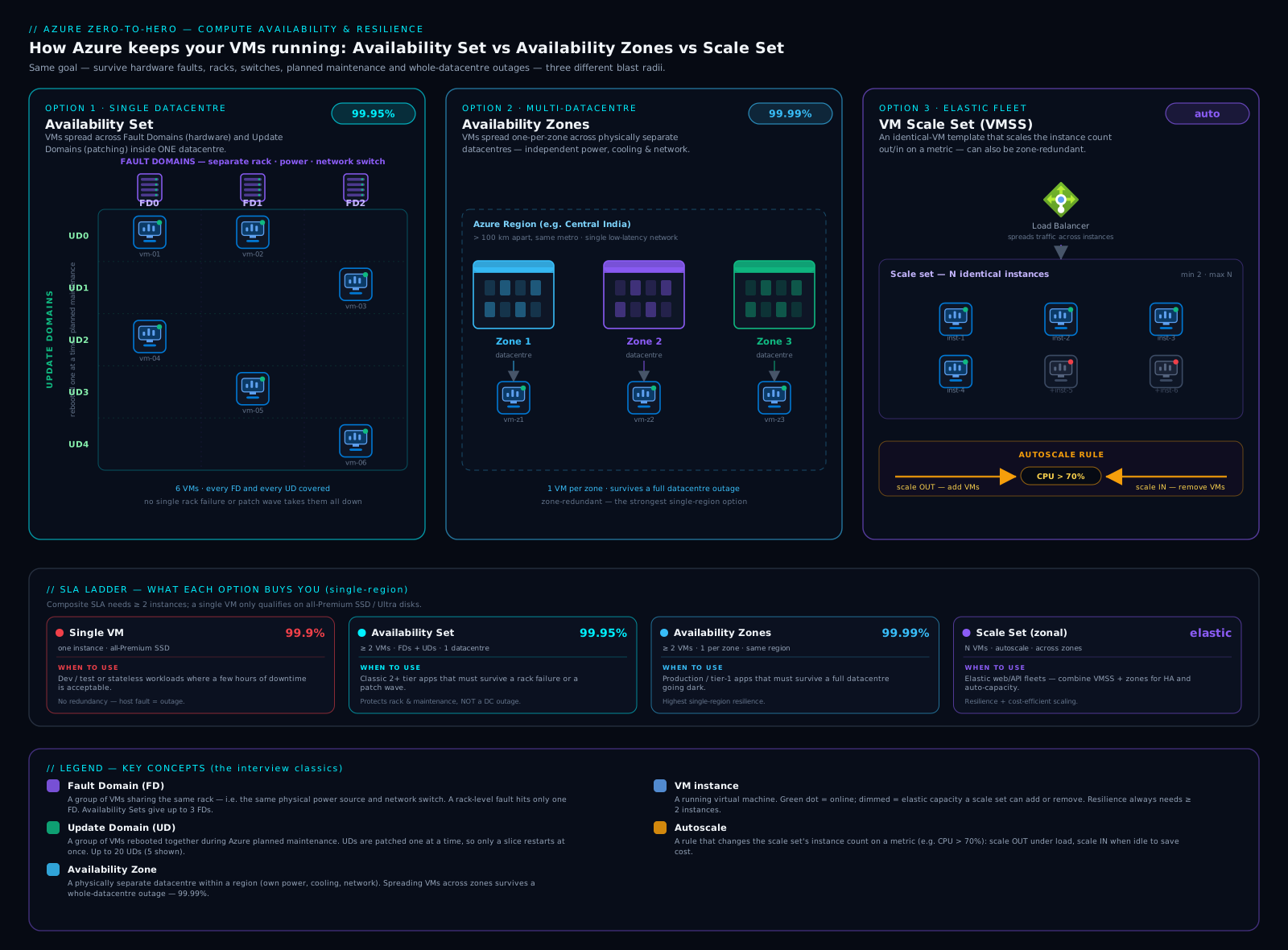
Read it left to right as the ladder of escalating failure-domain boundaries — rack, datacentre, then (off-diagram) region — and note the Scale Set is not a separate boundary but a way of managing placement across fault domains and zones elastically.
Hands-on lab: an availability set and a zonal VM
You will create an availability set, inspect its fault- and update-domain counts, then create a VM pinned to a specific availability zone — both placement strategies side by side. Run everything in Azure Cloud Shell or a local shell where you are logged in with az login, in a region that supports zones (e.g. eastus, westeurope).
Step 1 — Set up variables and a resource group
LOC=eastus
RG=rg-resilience-lab

az group create --name $RG --location $LOC --output table
Expected: a table showing the resource group rg-resilience-lab with provisioningState of Succeeded.
Step 2 — Create an availability set and read its FD/UD counts
az vm availability-set create \
  --resource-group $RG \
  --name avset-web \
  --platform-fault-domain-count 2 \
  --platform-update-domain-count 5 \
  --output table
Now read back the counts to confirm the FD×UD grid:
az vm availability-set show \
  --resource-group $RG \
  --name avset-web \
  --query "{name:name, faultDomains:platformFaultDomainCount, updateDomains:platformUpdateDomainCount, sku:sku.name}" \
  --output table
Expected output (values as configured):
Name       FaultDomains    UpdateDomains    Sku
---------  --------------  ---------------  -------
avset-web  2               5                Aligned
The Aligned SKU confirms this is a managed (aligned) set — the modern variant that aligns disk fault domains with the VM. You now have a 2×5 grid: any VM you add stripes across 2 fault domains and 5 update domains.
Step 3 — Add two VMs to the availability set
for i in 1 2; do
  az vm create \
    --resource-group $RG \
    --name vm-web-$i \
    --availability-set avset-web \
    --image Ubuntu2204 \
    --size Standard_B2s \
    --admin-username azureuser \
    --generate-ssh-keys \
    --public-ip-address "" \
    --nsg "" \
    --output none
done
echo "Two VMs created in the availability set."
--generate-ssh-keys creates a key pair if needed; --public-ip-address "" and --nsg "" keep the lab cheap and private. The two VMs now sit in different fault and update domains — lose a rack or hit a maintenance wave and at most one is affected.
Step 4 — Create a zonal VM (pinned to availability zone 1)
az vm create \
  --resource-group $RG \
  --name vm-zonal \
  --zone 1 \
  --image Ubuntu2204 \
  --size Standard_B2s \
  --admin-username azureuser \
  --generate-ssh-keys \
  --public-ip-address "" \
  --nsg "" \
  --output none

az vm show --resource-group $RG --name vm-zonal \
  --query "{name:name, zone:zones[0], size:hardwareProfile.vmSize}" \
  --output table
Expected:
Name      Zone    Size
--------  ------  -------------
vm-zonal  1       Standard_B2s
The Zone column shows 1 — this VM is pinned to zone 1. For the 99.99% SLA you would add matching VMs in zones 2 and 3 behind a zone-redundant Standard Load Balancer. Note you used --zone here and --availability-set in step 3: a VM is either zonal or in a set, never both — the CLI enforces it.
Step 5 — Validation
Confirm the whole picture:
az vm list --resource-group $RG \
  --query "[].{name:name, zone:zones[0], avset:availabilitySet.id}" \
  --output table
You should see vm-web-1 and vm-web-2 with an Avset value (and no zone), and vm-zonal with Zone 1 (and no availability set) — the two resilience strategies side by side.
Cleanup
Delete the whole resource group to stop all charges in one step:
az group delete --name $RG --yes --no-wait
Cost note
The three Standard_B2s VMs are the only meaningful cost — cheap burstable machines you delete within the lab. Availability sets, zones, fault domains, and update domains cost nothing — they are placement guarantees, not billed resources. The only zone-related production charge is a small inter-zone data-transfer fee. az vm deallocate pauses a VM (stops compute charges; you still pay for disks); delete the resource group when finished to avoid lingering disk costs.
Common mistakes & troubleshooting
| Symptom | Cause | Fix |
|---|---|---|
| Single VM had unexpected downtime; “but Azure has an SLA!” | A single VM has no SLA on Standard HDD, 99.5% on Standard SSD; the 99.9% single-instance SLA requires Premium/Ultra disks | Use Premium disks for 99.9% single-instance, or deploy 2+ VMs in an availability set (99.95%) / across zones (99.99%) |
| Can’t move an existing VM into an availability set | Availability-set membership is fixed at creation | Recreate the VM with --availability-set; you cannot change it in place |
az vm create fails when using both --zone and --availability-set |
A VM is either zonal or in an availability set — mutually exclusive | Choose one placement strategy; remove the conflicting flag |
| Created an availability set with 1 VM and saw no resilience benefit | An availability set only helps with 2+ VMs; one VM has nothing to spread across | Deploy at least two instances of the role into the set, behind a load balancer |
| Wanted to increase fault-domain count after creation | FD and UD counts are fixed at availability-set creation | Create a new availability set with the desired counts and recreate VMs into it |
| Zonal VM creation fails with “zone not supported” | The chosen region or VM size doesn’t support availability zones | Pick a zone-enabled region and a size that supports zones; check support before designing |
| Maintenance still rebooted “all” instances at once | VMs not actually in an availability set/zones, or a load balancer not steering traffic away from rebooting instances | Verify set/zone membership; ensure UD-by-UD maintenance and a health-probed load balancer in front |
| Scale Set scaled into a huge bill | No autoscale maximum set, or a runaway metric/attack | Set a hard --max-count, sensible cool-downs, and alerting on instance count |
Common beginner mistakes
These are conceptual traps — wrong mental models rather than the symptom-to-fix failures in the troubleshooting table above. Fix the model and the symptoms never appear.
-
“Putting my VM in an availability set makes it highly available.” An availability set with one VM does nothing — there is nothing to spread. Right model: HA comes from multiple instances distributed across failure domains; the set is just the distribution rule. Always deploy 2+ instances of a role and load-balance them.
-
“I’ll combine an availability set and zones for double protection.” A given VM is either in an availability set or pinned to a zone — never both; the CLI rejects it. Right model: zones are the bigger failure-domain boundary and supersede sets. Choose zones when the region has them; fall back to a set only when it doesn’t.
-
“99.99% means my app basically never goes down.” The SLA is a credit-backed floor on platform connectivity to your instances — not a prediction, and it says nothing about your code, your deployments, or your data. Right model: the platform can be at 99.99% while your app has a bad night from a broken release or a single-instance dependency. Availability is something you design and test, not something the number hands you.
-
“Zone-redundant means Azure automatically copies my VM across zones.” There is no zone-redundant VM — VMs are always zonal, and you place the copies. Right model: zone-redundant is a property of certain load balancers, public IPs, storage (ZRS), and PaaS, where Azure spreads one logical resource for you. For VMs you deploy one per zone yourself.
-
“More update domains protect me from hardware failure.” Update domains pace planned maintenance (reboot one group at a time); they do nothing for a rack that loses power. Right model: fault domains protect against unplanned hardware failure; update domains protect against planned maintenance. Two different enemies, two different mechanisms.
-
“I’ll switch a running VM into an availability set later if I need to.” Set membership and FD/UD counts are fixed at creation — you cannot move an existing VM in or out, or change the counts, in place. Right model: resilience placement is a day-zero decision; to change it you recreate the VM (or, for greenfield, prefer zones/VMSS Flex which you’d design in from the start).
-
“A three-zone design can always absorb a zone failure.” If your surviving zones have no spare capacity, a failover can hit an allocation failure right when everyone else is failing over too. Right model: guaranteed failover needs capacity reservations (or ample headroom), not just a zonal layout — spreading placement and reserving capacity are two separate jobs.
Best practices
- Always deploy at least two instances of any production role, and put them in an availability set or — better — across availability zones. A single VM is for dev/test or truly disposable workloads.
- Prefer availability zones over availability sets for new designs when the region supports zones; four nines beats two-and-a-half nines, and surviving a datacentre outage is worth the small inter-zone cost.
- Front multi-instance deployments with a load balancer (zone-redundant Standard Load Balancer for zonal designs) with health probes, so traffic only reaches healthy instances during a fault or maintenance wave.
- Use a zone-redundant Flexible VM Scale Set as the default shape for stateless web/API fleets — you get HA, the 99.99% SLA across zones, autoscale, and per-instance operability in one resource.
- Keep instances stateless; store state in zone-redundant or geo-redundant data services (databases, ZRS storage) so that losing an instance, a rack, or a zone never loses data.
- Set FD/UD counts deliberately at creation (defaults 2/5 are right for most), remembering they are immutable afterwards.
- Use managed disks so availability sets are aligned (disk and VM fault domains coordinated).
- Plan DR with region pairs and Azure Site Recovery for anything that must survive a regional disaster, and test the failover — an untested runbook is not a DR plan.
- Subscribe to Scheduled Events in latency- or state-sensitive workloads so the app can drain and checkpoint before a maintenance event.
- Cap autoscale with a maximum and alert on instance count to avoid runaway scaling.
Security notes
Resilience and security overlap more than people expect. Availability is a security property — the “A” in the CIA triad — so a DoS or ransomware event that takes your only instance offline is as much a security failure as a breach; multi-instance, multi-zone designs are part of your security posture. When spreading across zones, keep NSGs, firewalls, and private endpoints consistent across all zones so a failover never lands traffic on an instance with weaker rules. Inter-zone traffic stays on Azure’s private backbone but is still traffic you may want to inspect. For DR, give the secondary region the same security baseline as primary — identical RBAC, policy, encryption, monitoring — so failing over never means failing into a weaker environment, and keep DR backups immutable so an attacker who reaches primary cannot destroy your recovery point.
Cost & sizing
The headline good news: the resilience features themselves are free. Availability sets, fault domains, update domains, and zones add no charge — you pay only for VMs, disks, and networking. The levers that move the bill:
- Number of instances. Redundancy means more than one VM, so HA roughly multiplies compute cost by instance count (two for a set, three for full three-zone coverage). Autoscale keeps this minimal — run the redundancy floor and scale out only under load.
- Inter-zone data transfer. Cross-zone traffic within a region may be billed per GB — usually small, but chatty cross-zone microservices add up; co-locate tightly coupled components where it doesn’t hurt resilience.
- DR replication and the secondary region. Region-pair DR means paying for replication (Site Recovery, geo-redundant storage) and some standing secondary capacity; active-passive with minimal warm capacity is cheaper than active-active.
- Disk tier for single-VM SLA. A single VM with an SLA needs Premium/Ultra disks for 99.9% — often the multi-instance route is better value and more resilient.
Right-sizing for resilience is choosing the cheapest layout that meets the downtime budget: don’t pay for three-zone active-active for something that tolerates an hour of downtime a year, and don’t run a single Standard-HDD VM for something the business cannot live without.
Interview & exam questions
These come up again and again — practise saying the answers out loud.
-
“Difference between a fault domain and an update domain?” A fault domain is physical — hardware sharing a power source and network switch (≈ a rack) — protecting against unplanned failures like a dead PSU or switch (default 2, max 3). An update domain is a logical reboot group Azure cycles through one at a time during planned maintenance, so only a slice is ever down (default 5, max 20). FD = unplanned hardware failure; UD = planned maintenance reboots.
-
“Availability set vs availability zone — when each?” A set spreads VMs across racks within one datacentre (FD + UD) for 99.95% — survives rack/power/network faults and host maintenance but not a datacentre outage. Zones spread VMs across separate datacentres in a region for 99.99% — survives losing an entire datacentre. Use a set for datacentre-local HA (or where zones aren’t available), zones when a building-level outage is unacceptable. Mutually exclusive for a given VM.
-
“What SLA does a single VM get?” None if any disk is Standard HDD; 99.5% with Standard SSD; 99.9% only if all disks are Premium SSD or Ultra. Anything higher needs multiple instances in a set (99.95%) or across zones (99.99%).
-
“How does Azure place VMs across fault and update domains?” It stripes them across the 2-D FD×UD grid — incrementing the UD and alternating the FD per VM — so no single rack failure or maintenance wave takes a disproportionate share. That’s why you need at least two VMs for the set to mean anything.
-
“Can you change FD/UD counts after creating a set?” No — both are fixed at creation; to change them you create a new set and recreate the VMs. Likewise you cannot move an existing VM into or out of a set in place.
-
“Zonal vs zone-redundant?” Zonal = a resource pinned to one zone you choose, and you deploy copies across zones (e.g. a VM with
--zone 1). Zone-redundant = Azure automatically spreads a single resource across zones (e.g. a zone-redundant Standard Load Balancer, ZRS). Zonal = you place copies; zone-redundant = Azure spreads one resource. -
“Uniform vs Flexible orchestration?” Uniform treats instances as identical fungible units behind a VMSS proxy and scales to very large fleets (and Service Fabric). Flexible makes each instance a real VM with explicit fault-domain placement — combining availability-set placement with scale-set machinery — and is the default for most new workloads, being more operable and supporting mixed sizes.
-
“How do you achieve 99.99% availability for a VM workload?” Run 2+ instances across 2+ zones (discrete zonal VMs or a zone-spanning Scale Set), front them with a zone-redundant Standard Load Balancer with health probes, and keep instances stateless with state in zone-redundant data services.
-
“What is live migration and why does it matter?” It moves a running VM to another host without a reboot — memory is copied to the destination and execution resumes with a sub-second pause. It lets Azure do host maintenance with minimal impact, which is why most planned maintenance no longer means a reboot.
-
“Planned vs unplanned maintenance, and how does Azure handle each?” Unplanned is unexpected hardware failure; Azure auto-heals the VM onto healthy hardware (a reboot for that instance) while fault domains keep your other instances up. Planned is Azure proactively patching hosts, using live migration and memory-preserving updates where possible; where a reboot is needed it walks update domains one at a time.
-
“What are region pairs and what do they give you?” Two regions in the same geography that Azure sequences platform updates across, prioritises for recovery, and replicates certain services to by default. You use them for disaster recovery — replicating VMs/data (e.g. via Site Recovery) so you can fail over if an entire region is lost.
-
“Stateless web app with spiky traffic that must survive a datacentre outage — what do you build?” A Flexible Scale Set across three zones with autoscale (metric + schedule, sensible min/max) behind a zone-redundant Standard Load Balancer with health probes — 99.99% availability, datacentre-fault tolerance, elasticity, and a bounded blast radius in one managed resource.
Quick check
- State the default and maximum counts for fault domains and for update domains in an availability set, and say which kind of failure each protects against.
- Your manager insists a single production VM is “covered by Azure’s 99.95% SLA.” Where are they wrong, and what does it actually take to get an SLA on one VM?
- Explain the difference between a zonal and a zone-redundant resource, with one example of each.
- Why must an availability set contain at least two VMs to be useful, and what should sit in front of those VMs?
- You need 99.99% availability and the ability to absorb traffic spikes. Describe the layout you would deploy.
Answers
- Fault domains: default 2, max 3 — protect against unplanned hardware failure (rack power/network). Update domains: default 5, max 20 — protect against planned maintenance, rebooted one group at a time. Physical/unplanned vs logical/planned.
- A single VM has no 99.95% SLA — that requires 2+ VMs in an availability set. A single VM gets at best 99.9%, and only if all disks are Premium/Ultra (Standard SSD 99.5%, Standard HDD none). Use Premium disks, or far better, multiple instances in a set (99.95%) or across zones (99.99%).
- Zonal = pinned to one zone you choose, copies deployed by you (e.g.
--zone 1). Zone-redundant = Azure spreads one resource across zones (e.g. zone-redundant Standard Load Balancer, ZRS). - A set’s only job is to spread multiple instances across FD/UD; with one VM there’s nothing to spread. Put a load balancer with health probes in front so traffic reaches only healthy instances while an FD or UD is down.
- 2+ instances across 2+ zones — ideally a zone-spanning Flexible Scale Set with autoscale (min ≥ 2, capped max, metric + schedule rules) behind a zone-redundant Standard Load Balancer with health probes. That gives 99.99%, datacentre-fault tolerance, and elasticity together.
Exercise
Using the az CLI in a zone-enabled region, build a minimal but real three-zone layout and prove it spreads:
- Create a resource group
rg-resilience-exercise. - Create three small VMs —
vm-z1,vm-z2,vm-z3— each pinned to availability zone 1, 2, and 3 respectively (--zone 1,--zone 2,--zone 3), with no public IP (--public-ip-address ""). - Run
az vm list --resource-group rg-resilience-exercise --query "[].{name:name, zone:zones[0]}" --output tableand confirm you see one VM in each of zones 1, 2, and 3. - As a bonus, create a Standard zone-redundant public IP (
az network public-ip create --sku Standard --zone 1 2 3 ...) and read back its zones to see a zone-redundant resource alongside your zonal VMs. - Delete the resource group with
az group delete --name rg-resilience-exercise --yes --no-wait.
If steps 3 and 4 show three zonal VMs plus a public IP spanning all three zones, you have hands-on proof of the zonal vs zone-redundant distinction and a layout that would earn the 99.99% SLA once load-balanced.
Practice challenges
Work these in order — they climb from “read the SLA table” to “defend an architecture.” Try each before opening the solution. You can run the CLI ones in a zone-enabled region with az login; the design ones need only a whiteboard.
1. (Beginner) Downtime budget. Your SLA target is 99.99%. How many minutes of downtime does that allow per 30-day month, and which of the four layouts in this lesson earns it?
<details> <summary>Solution</summary>
99.99% of a 30-day month (43,200 minutes) allows 43200 × 0.0001 ≈ 4.32 minutes of downtime per month (~52 min/year). It is earned by 2+ VMs across 2+ availability zones (or a zone-spanning Scale Set). Why: four nines is the datacentre-survivable tier, which on Azure means spreading instances across zones, not racks.
</details>
2. (Beginner) Zonal or zone-redundant? A colleague runs az vm create --name vm-a --zone 2 .... Is vm-a zonal or zone-redundant, and what must they add to reach 99.99%?
<details> <summary>Solution</summary>
vm-a is zonal — pinned to exactly one zone (zone 2). VMs are always zonal; there is no “zone-redundant VM.” To reach 99.99% they deploy matching VMs in zones 1 and 3 as well and put a zone-redundant Standard Load Balancer in front. Why: zone-redundant is an Azure-spreads-it-for-you property of LBs/storage/PaaS, not of IaaS VMs — you spread VM copies yourself.
</details>
3. (Intermediate) Build the modern default. Write the az vmss command for the recommended resilient IaaS fleet: a Flexible Scale Set spread across zones 1, 2, 3, with three instances and the correct fault-domain count.
<details> <summary>Solution</summary>
az vmss create \
  --resource-group $RG --name vmss-web \
  --orchestration-mode Flexible \
  --zones 1 2 3 \
  --platform-fault-domain-count 1 \
  --instance-count 3 \
  --image Ubuntu2204 --vm-sku Standard_D2s_v5 \
  --output none
Why: for a zone-spanning Flexible set the zone spread is the fault isolation, so --platform-fault-domain-count 1 is correct — asking for multiple FDs per zone is typically unsupported and unnecessary.
</details>
4. (Intermediate) Compose the chain. A request flows through a Standard Load Balancer (99.99%), a two-zone VM tier (99.99%), and a zone-redundant SQL database (99.99%). What is the end-to-end availability, and what does the result teach you?
<details> <summary>Solution</summary>
Series dependencies multiply: 0.9999 × 0.9999 × 0.9999 ≈ 0.99970, i.e. ~99.97% — noticeably worse than any single component. Why: every hop in a critical path subtracts availability, so the lesson is to keep chains short and make every dependency redundant; one single-instance hop would cap the whole workload at its SLA.
</details>
5. (Advanced) Guarantee failover capacity. Compliance requires that if zone 1 fails, your workload is guaranteed room to fail over into zone 2 — no “out of capacity” surprises. What Azure resource provides this, is it zonal, and how is it billed?
<details> <summary>Solution</summary>
An on-demand Capacity Reservation (inside a capacityReservationGroup), created for the specific VM size in zone 2. It is zonal and guarantees that capacity is held for you; you are billed for the reserved capacity at the pay-as-you-go rate even while it sits empty (running VMs that consume it aren’t billed twice). Why: Reserved Instances/Savings Plans are billing discounts that reserve no capacity — only a capacity reservation guarantees allocation, which is what “no surprises on failover” demands.
</details>
6. (Advanced) Reconcile latency and spread. A stateful 3-node quorum cluster needs (a) to survive a full zone loss and (b) very low inter-node latency. A junior engineer proposes putting all three nodes in one Proximity Placement Group across three zones. What’s wrong, and what would you actually do?
<details> <summary>Solution</summary>
It’s contradictory: a PPG forces physical closeness in one datacentre/zone, and Azure requires every VM in a zone-specified PPG to be in the same zone — so you cannot have one PPG span three zones. You must choose the workload’s priority. Realistic answer: spread the three nodes one-per-zone (no PPG) and accept the small inter-zone latency, because surviving a zone loss is the stated hard requirement and quorum needs the nodes in separate failure domains. Use a PPG only if latency is the true constraint — and then get resilience at another layer (a second cluster in another zone). Why: maximum spread and minimum latency are opposite corners; you cannot have both for the same tier. </details>
Certification mapping
This lesson maps directly to both the administrator and architect exams:
- AZ-104 (Azure Administrator): Deploy and manage Azure compute resources — configure VM availability: availability sets (FD/UD), availability zones, and Scale Sets (orchestration modes, autoscale). Expect questions hinging on the FD-vs-UD distinction and which SLA a given layout earns.
- AZ-305 (Designing Azure Infrastructure Solutions): Design for high availability and disaster recovery — choose between sets, zones, Scale Sets, and multi-region/region-pair designs to meet a stated SLA, RTO, and RPO, reasoning about blast radius and cost. Scenarios give a downtime budget and ask you to pick the right rung.
- It also underpins AZ-900 conceptually (regions, zones, region pairs) and the reliability pillar of the Azure Well-Architected Framework.
Glossary
- Availability set — a logical grouping spreading 2+ VMs across racks (FDs) and reboot groups (UDs) within one datacentre; 99.95% SLA, no extra cost.
- Fault domain (FD) — hardware sharing a power source and network switch (≈ a rack); protects against unplanned failure. Default 2, max 3.
- Update domain (UD) — a logical group rebooted together, one at a time, during planned maintenance. Default 5, max 20.
- Availability zone — physically separate datacentre(s) within a region with independent power/cooling/networking; spreading across zones gives 99.99%.
- Zonal — a resource pinned to one zone you choose; you deploy copies across zones.
- Zone-redundant — a resource Azure spreads across zones for you (e.g. zone-redundant Standard Load Balancer, ZRS).
- VM Scale Set (VMSS) — a managed group of identical VMs with autoscale, rolling upgrades, and FD/zone spreading; Uniform vs Flexible orchestration.
- Autoscale — rules adding/removing Scale Set instances by metric (reactive) or schedule (predictive), within a min/max.
- Planned maintenance — Azure proactively patching its hosts; minimised by live migration, walked UD-by-UD when a reboot is needed.
- Unplanned maintenance — Azure auto-healing (redeploying) a VM after unexpected hardware failure.
- Live migration — moving a running VM to another host without a reboot (sub-second pause).
- Maintenance configuration — an Azure resource defining a maintenance window so updates land on your schedule.
- Region pair — two regions in one geography Azure sequences updates across and prioritises for recovery; used for DR.
- Blast radius — how much fails when one component fails; smaller is better, and is what the resilience ladder reduces.
- SLA — a financially backed monthly uptime commitment, with service credits if missed.
- Composite SLA — the end-to-end availability of a request path, found by multiplying the SLAs of every component in series; always lower than the weakest single component.
- Capacity reservation — a zonal reservation of a specific VM size (grouped in a
capacityReservationGroup) that guarantees allocation capacity is held for you, billed even when empty; distinct from Reserved Instances, which reserve billing discount but no capacity. - Allocation failure — Azure being unable to allocate a requested VM size in a zone because capacity is exhausted; the quiet failure mode that a capacity reservation prevents, especially during a zonal outage.
- Proximity Placement Group (PPG) — a grouping that forces its VMs to be allocated physically close together for low inter-VM latency, at the cost of reduced failure-domain spread; the opposite trade-off to zones.
- Flexible orchestration — the modern default Scale Set mode where each instance is a real
Microsoft.Compute/virtualMachinesresource with explicit fault-domain/zone placement; useplatformFaultDomainCount 1when spanning zones. - ZRS managed disk — a zone-redundant managed disk (Premium/Standard SSD in supported regions) replicated synchronously across zones, so it survives a single zone loss and can attach to a VM in another zone; Ultra and Premium SSD v2 are zonal (LRS) only.
- Ephemeral OS disk — an OS disk stored on the host’s local storage (fast, free, but non-persistent); such VMs may be reimaged/redeployed rather than live-migrated during maintenance, losing local state.
- Service Healing — Azure automatically redeploying a VM onto healthy hardware after an unplanned host failure (a reboot for that instance) while other fault domains keep serving.
Next steps
You now understand every local and regional resilience mechanism Azure offers for VMs and exactly which SLA each one earns — the core of any production IaaS design.
- Next lesson: Azure Managed Disks Deep Dive: Every Disk Type, Caching, Encryption & Performance — durable storage is the other half of a resilient VM, and disk tier is what gives a single VM its SLA.
Related reading to go deeper:
- VM Scale Sets with Flexible Orchestration: Image Builder, Compute Gallery & Rolling Upgrades — operate elastic, self-healing fleets with golden images and health-gated upgrades.
- Azure Multi-Region Active-Active & Disaster Recovery — climb the final rung of the ladder, from zones to full multi-region resilience.