Secure Score tells you that 412 resources are non-compliant. It does not tell you that exactly three of them form a chain from a public load balancer, to a VM with a stale Owner role assignment, to a storage account flagged as holding sensitive data. That chain is the thing an attacker actually walks. This article operationalizes the cloud security graph in Defender for Cloud: reading attack paths, encoding your own risk logic as custom recommendations, then forcing remediation through governance rules with named owners and real SLAs. The goal is a posture program where the number that goes down is reachable, exploitable exposure, not a generic control count.
In a nutshell
Attack path analysis is a map of the shortest routes a burglar could take from an exposed door to your crown jewels — so you can fix the choke points first. A vulnerability scanner hands you a list of every unlocked window, weak lock, and flimsy door in the building, sorted by how flimsy each one is. That list is honest and completely overwhelming: 400 findings, no sense of which one actually gets an intruder to the safe. Attack path analysis draws the routes instead. It shows that of those 400 problems, exactly three line up — the side door onto the street, the hallway with no camera, the unlocked safe room at the end — into one walkable path from the pavement to the diamonds. Fix that path, ideally at the single hallway a dozen different routes all pass through, and you have removed more real risk than clearing 200 unrelated windows ever would.
In Defender for Cloud the building is your cloud estate, the burglar is an attacker, and the map is the cloud security graph — a live model of every resource (nodes) and every relationship an attacker could traverse (edges): “is exposed to the internet,” “can authenticate as,” “can read data from.” Attack paths are the walkable routes the graph finds through that model; choke points are the hallways every route shares; custom recommendations let you add your own rules about what counts as a weak door; and governance rules are the work order that makes a named owner actually go fix it before a deadline. The rest of this lesson turns that map into an operating program: read the paths, rank by what is reachable rather than by raw count, encode your own risk logic, and force remediation with owners and SLAs.
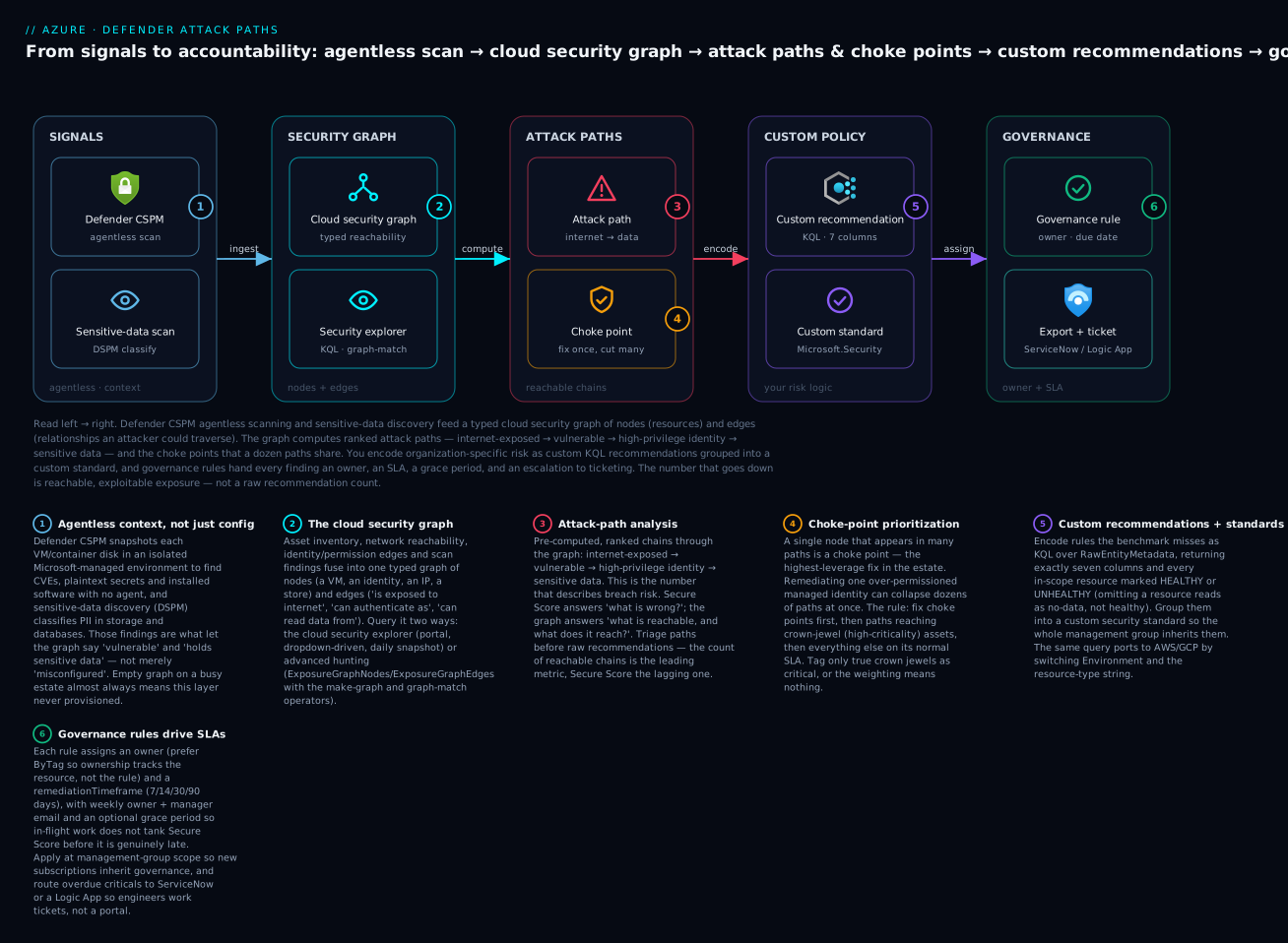
Read left to right: agentless scans and sensitive-data discovery feed a typed cloud security graph; the graph computes ranked attack paths and the choke points that cut the most chains at once; you encode organization-specific risk as custom KQL recommendations rolled into a custom standard; and governance rules hand every finding an owner, an SLA, and an escalation path — turning “what is reachable” into accountable, time-boxed remediation.
Level: Advanced · Time: ~33 min
Prerequisites — you’ll get the most from this if you already understand:
- The Defender for Cloud posture basics — Secure Score, recommendations, and where attack paths come from. Start with the companion Operationalizing Defender for Cloud: CSPM, Secure Score & workload protection.
- KQL fundamentals —
where,project,summarize, and dynamic fields. The advanced-hunting graph queries build directly on them; Defender XDR advanced hunting is the natural warm-up. - Azure Policy definitions, initiatives, and effects, since custom standards are assigned as policy. See Azure Policy as code.
- Azure RBAC and scope inheritance (subscription vs management group) — governance rules and standards are applied at scope. See Entra RBAC governance.
What you’ll be able to do — after this you can:
- Explain how the cloud security graph turns a flat finding list into reachable attack paths, and query it two ways (cloud security explorer + advanced hunting with
make-graph/graph-match). - Write a multi-hop
graph-matchquery for your top exposure pattern (internet → vulnerable → identity → sensitive data) that stays fast by pre-filtering nodes and edges. - Author a custom recommendation in KQL over
RawEntityMetadatathat returns the exact seven-column contract, and roll it into a custom security standard. - Prioritize remediation by choke point and asset criticality instead of raw recommendation count.
- Stand up governance rules at management-group scope with tag-derived owners, severity-tiered SLAs, grace periods, and ServiceNow/Logic App ticketing.
- Port the same controls and governance to AWS and GCP, and track attack-path count as the leading metric alongside Secure Score as the lagging one.
Everything that follows requires the Defender CSPM plan, not foundational CSPM. The graph, attack paths, the cloud security explorer, and KQL-based custom recommendations are all gated behind it.
# Defender CSPM is the plan named "CloudPosture" in the pricing API
az security pricing create --name CloudPosture --tier Standard

# Agentless scanning feeds the graph with vuln/secret/sensitive-data context
az security pricing list --query "value[?name=='CloudPosture'].{plan:name,tier:pricingTier}" -o table
1. How the cloud security graph models exposure
The graph is a context engine. It ingests asset inventory, network reachability, identity and permission relationships, vulnerability findings (from agentless scanning), and data sensitivity (from sensitive-data discovery in Defender CSPM), then connects them as a typed graph of nodes and edges. A node is an entity: a VM, a managed identity, a storage account, an IP address. An edge is a relationship an attacker could traverse: “is exposed to the internet”, “can authenticate as”, “can read data from”, “has permission to”.
This is the leap past Secure Score. A misconfiguration in isolation is a finding. The same misconfiguration on a node one hop from an internet-facing entity and two hops from a sensitive data store is a path. Defender for Cloud computes those paths and surfaces them as attack paths, scored by how much they actually matter.
The mental model: Secure Score answers “what is wrong?” The graph answers “what is reachable, and what does it reach?” You operationalize the second question, because that is where breach risk lives.
Two surfaces sit on top of the same graph:
- Cloud security explorer (in the Defender for Cloud portal) is a visual, dropdown-driven query builder over a daily snapshot. Good for ad-hoc “show me every internet-exposed VM with a high-severity CVE” hunts and for sharing a query link with a teammate.
- Advanced hunting in the Microsoft Defender portal exposes the same exposure graph as the
ExposureGraphNodesandExposureGraphEdgestables, queryable with full KQL including themake-graphandgraph-matchgraph operators. This is where you write reproducible, parameterized path queries and wire them into automation.
2. Reading an attack path: internet to identity to data
Start in the portal under Attack path analysis. Each path reads left to right from an entry point (typically internet exposure) through intermediate hops to a target (sensitive data, a privileged identity, a critical workload). Defender for Cloud groups paths by pattern, for example “Internet exposed VM has high severity vulnerabilities and read permission to a data store.”
To reproduce and extend that logic yourself, drop into advanced hunting. The exposure graph schema is the foundation. ExposureGraphNodes carries NodeId, NodeLabel, Categories, EntityIds, and a dynamic NodeProperties; ExposureGraphEdges carries SourceNodeId, TargetNodeId, EdgeLabel, and the source/target node labels. Before writing a path query, learn the vocabulary of your own tenant:
// What entity types exist?
ExposureGraphNodes
| summarize Count = count() by NodeLabel
| order by Count desc

// What relationships connect them?
ExposureGraphEdges
| summarize Count = count() by EdgeLabel
| order by Count desc
The single most useful starting query is the canonical internet-to-RCE check. Note that exposure flags live under NodeProperties.rawData and category membership is tested with set_has_element against the Categories array:
// Internet-exposed VMs that are also vulnerable to remote code execution.
// Works across Azure, AWS, and GCP once those connectors feed the graph.
ExposureGraphNodes
| where isnotnull(NodeProperties.rawData.exposedToInternet)
| where isnotnull(NodeProperties.rawData.vulnerableToRCE)
| where set_has_element(Categories, "virtual_machine")
The real value is multi-hop traversal. Load the edges into a graph with make-graph, then match a pattern with graph-match. This query finds any path of up to three hops from an IP address to a virtual machine, which is the skeleton of an exposure-to-asset path:
let IPsAndVMs = ExposureGraphNodes
| where set_has_element(Categories, "ip_address") or set_has_element(Categories, "virtual_machine");
ExposureGraphEdges
| make-graph SourceNodeId --> TargetNodeId with IPsAndVMs on NodeId
| graph-match (IP)-[anyEdge*1..3]->(VM)
    where set_has_element(IP.Categories, "ip_address")
      and set_has_element(VM.Categories, "virtual_machine")
    project IpIds = IP.EntityIds, VmIds = VM.EntityIds, VmProps = VM.NodeProperties.rawData
To express the “lands on an identity that reaches data” half, pivot on identity edges. The EdgeLabel values are explicit and matchable, for example Can Authenticate As and CanRemoteInteractiveLogonTo. Filtering edges before make-graph keeps the graph small and the query fast:
let Nodes = ExposureGraphNodes
| where set_has_element(Categories, "identity")
   or (set_has_element(Categories, "device") and isnotnull(NodeProperties.rawData.criticalityLevel));
ExposureGraphEdges
| where EdgeLabel == "Can Authenticate As"
| make-graph SourceNodeId --> TargetNodeId with Nodes on NodeId
| graph-match (Device)-[canAuthAs]->(Identity)
    where set_has_element(Identity.Categories, "identity")
      and set_has_element(Device.Categories, "device")
    project IdentityIds = Identity.EntityIds, DeviceIds = Device.EntityIds
The discipline that matters at principal level: pre-filter nodes and edges to the minimum relevant set before make-graph. The NodeProperties column is large; graphing the whole tenant unfiltered hits memory limits and timeouts. Narrow Categories and EdgeLabel up front, project only the columns you need, then traverse.
3. Writing custom recommendations with KQL
Built-in recommendations cover the Microsoft Cloud Security Benchmark. Your organization always has rules the benchmark does not, for example “every internet-facing data store must have a private endpoint” or “no VM may be missing the Owner tag.” Defender CSPM lets you encode these as custom recommendations in KQL, evaluated across Azure, AWS, and GCP.
The data source is the RawEntityMetadata table, not Azure Resource Graph. Your query filters to a resource type, evaluates a condition, and stamps each in-scope resource with a HealthStatus. The contract is strict: return exactly seven columns and every resource in scope, marking compliant ones HEALTHY and non-compliant ones UNHEALTHY. Omitting a resource reads as “no data,” not as healthy.
// Custom recommendation: Key Vaults must have purge protection enabled.
RawEntityMetadata
| where Environment == 'Azure' and Identifiers.Type =~ 'Microsoft.KeyVault/vaults'
| extend condition = (Record.properties.enablePurgeProtection != true
                      or isnull(Record.properties.enablePurgeProtection))
| extend HealthStatus = iff(condition, 'UNHEALTHY', 'HEALTHY')
| project Id, Name, Environment, Identifiers, AdditionalData, Record, HealthStatus
The pattern is mechanical and worth internalizing, because everything else is a variation on it:
| Column | Type | Role |
|---|---|---|
Id |
string | Resource identifier Defender uses to map the finding |
Name |
string | Display name in the recommendation UI |
Environment |
string | Azure, AWS, or GCP |
Identifiers |
dynamic | Resource type + identifiers, passed through from the record |
AdditionalData |
dynamic | Supplementary metadata, passed through |
Record |
dynamic | Full resource record; properties live under Record.properties.* |
HealthStatus |
string | UNHEALTHY or HEALTHY only (case-sensitive) |
Two rules that will save you a debugging session: properties are reached via Record.properties.* (never bare properties.*), and resource-type comparisons use the case-insensitive =~ operator. To port a check to AWS or GCP, change Environment and swap Identifiers.Type for the corresponding type string.
Author and test in the portal first. Go to Environment settings > the subscription > Security policies > Create custom recommendation, set name/scope/severity/security issue, then Open query editor, paste, and Run query to validate the schema before saving. You need Security Admin to create the recommendation and Owner on the subscription to create the custom standard it gets assigned to. Once validated, you can deploy the same recommendation at scale through the Defender for Cloud API rather than clicking through every subscription.
4. Prioritizing with attack-path and exposure-based scoring
A flat list of 400 unhealthy resources is noise. The graph lets you rank by exposure so remediation effort lands where it removes the most risk. Two levers:
Resource criticality. Tag your crown-jewel assets so the graph weights paths that reach them. Critical assets show up as elevated criticalityLevel in NodeProperties, and attack paths terminating on them are scored higher. Set this deliberately for production data stores, domain controllers, and identity providers; do not let everything be critical, or nothing is.
Choke-point analysis. A single node that appears in many paths is a choke point, the highest-leverage fix in the estate. Remediating one over-permissioned managed identity can collapse dozens of paths at once. Approximate choke-point ranking in KQL by counting how often a node is an intermediate hop:
// Rank intermediate nodes by how many internet-to-VM paths traverse them.
let Scope = ExposureGraphNodes
| where set_has_element(Categories, "ip_address")
   or set_has_element(Categories, "identity")
   or set_has_element(Categories, "virtual_machine");
ExposureGraphEdges
| make-graph SourceNodeId --> TargetNodeId with Scope on NodeId
| graph-match (IP)-[e1]->(Mid)-[e2]->(VM)
    where set_has_element(IP.Categories, "ip_address")
      and set_has_element(Mid.Categories, "identity")
      and set_has_element(VM.Categories, "virtual_machine")
    project MidName = Mid.NodeName, MidId = Mid.NodeId
| summarize PathsThrough = count() by MidName, MidId
| order by PathsThrough desc
The prioritization rule I give teams: fix choke points first (one change, many paths removed), then paths that reach critical assets, then everything else on its normal SLA. Secure Score is a lagging scoreboard; attack-path reduction is the leading metric.
5. Governance rules: owners and remediation SLAs at scale
Finding risk is half the job. Governance rules assign each recommendation an owner and a remediation timeframe (the SLA), with weekly email nudges to owners and their managers, plus an optional grace period so resources do not tank Secure Score until they are actually overdue. This turns a dashboard into an accountable program.
Create a rule with the Defender for Cloud REST API (resource type Microsoft.Security/governanceRules). It targets recommendations by their assessment keys, sets the owner, and sets the SLA. The remediationTimeframe uses a d.hh:mm:ss duration string; valid windows are 7, 14, 30, or 90 days:
az rest --method put \
  --url "https://management.azure.com/subscriptions/<SUB_ID>/providers/Microsoft.Security/governanceRules/critical-internet-exposure?api-version=2022-01-01-preview" \
  --body '{
    "properties": {
      "displayName": "Critical internet-exposure recommendations",
      "description": "Owner-assigned SLA for high-severity exposure findings",
      "rulePriority": 200,
      "isDisabled": false,
      "ruleType": "Integrated",
      "sourceResourceType": "Assessments",
      "isGracePeriod": true,
      "remediationTimeframe": "7.00:00:00",
      "ownerSource": { "type": "Manually", "value": "cloudsec-team@contoso.com" },
      "governanceEmailNotification": {
        "disableManagerEmailNotification": false,
        "disableOwnerEmailNotification": false
      },
      "conditionSets": [
        {
          "conditions": [
            {
              "operator": "In",
              "property": "$.AssessmentKey",
              "value": "[\"b1cd27e0-4ecc-4246-939f-49c426d9d72f\", \"fe83f80b-073d-4ccf-93d9-6797eb870201\"]"
            }
          ]
        }
      ]
    }
  }'
Two design choices make this scale instead of becoming a maintenance burden:
- Derive the owner from a tag, not a hard-coded address. Set
ownerSource.typetoByTagandownerSource.valueto the tag key (for exampleOwner). The rule then routes each finding to whoever owns that resource, so you do not re-edit the rule every reorg. - Apply rules at the management-group scope. Swap the
subscriptions/<SUB_ID>segment forproviders/Microsoft.Management/managementGroups/<MG>. New subscriptions inherit the governance regime automatically instead of joining the estate ungoverned. UseexcludedScopesto carve out sandbox subscriptions.
// ownerSource by tag, so ownership tracks the resource, not the rule
"ownerSource": { "type": "ByTag", "value": "Owner" }
Tier your SLAs to severity: a 7-day window on the critical-exposure rule, 30 days on medium-severity hygiene, 90 days on low. Set isGracePeriod: true on the longer windows so hygiene work does not distort Secure Score before it is genuinely late.
6. Multicloud: AWS and GCP, normalized
The same machinery spans clouds. Connect AWS accounts and GCP projects as security connectors (Microsoft.Security/securityConnectors); once Defender CSPM is enabled on the connector, AWS and GCP assets flow into the same graph and attack paths cross cloud boundaries. Custom recommendations target them by switching Environment to 'AWS' or 'GCP' and matching the native resource type:
// Same control, GCP storage buckets
RawEntityMetadata
| where Environment == 'GCP' and Identifiers.Type =~ 'storage.googleapis.com/Bucket'
| extend condition = (Record.iamConfiguration.uniformBucketLevelAccess.enabled != true)
| extend HealthStatus = iff(condition, 'UNHEALTHY', 'HEALTHY')
| project Id, Name, Environment, Identifiers, AdditionalData, Record, HealthStatus
Governance rules attach to connector scopes too, so an AWS account or GCP project gets the same owner-and-SLA treatment as an Azure subscription:
az rest --method put \
  --url "https://management.azure.com/subscriptions/<SUB_ID>/resourceGroups/<RG>/providers/Microsoft.Security/securityConnectors/<GCP_CONNECTOR>/providers/Microsoft.Security/governanceRules/gcp-critical?api-version=2022-01-01-preview" \
  --body '{
    "properties": {
      "displayName": "GCP critical recommendations",
      "rulePriority": 210,
      "ruleType": "Integrated",
      "sourceResourceType": "Assessments",
      "isGracePeriod": true,
      "remediationTimeframe": "14.00:00:00",
      "ownerSource": { "type": "ByTag", "value": "owner" },
      "governanceEmailNotification": {
        "disableManagerEmailNotification": false,
        "disableOwnerEmailNotification": false
      },
      "conditionSets": [
        { "conditions": [ { "operator": "In", "property": "$.AssessmentKey",
          "value": "[\"b1cd27e0-4ecc-4246-939f-49c426d9d72f\"]" } ] }
      ]
    }
  }'
7. Wiring findings into ticketing and exposure-reduction workflows
Email nudges work for engaged owners; they do not scale to a backlog. Push attack-path findings into the system of record where work actually gets tracked.
- ServiceNow. Governance rules support a
ruleTypeofServiceNowso overdue findings open tickets in your ITSM instance rather than only emailing owners. This is the cleanest path if ServiceNow is your remediation system of record. - Workflow automation. Defender for Cloud’s workflow automation triggers a Logic App on new recommendations or alerts. From there, create Jira issues, post to Teams, or call an internal API. The Logic App receives the recommendation payload including resource ID and severity.
- Continuous export. Stream recommendations and secure-score changes to a Log Analytics workspace or Event Hub for a custom exposure pipeline:
az security automation create \
  --name export-recommendations \
  --resource-group security-rg \
  --location eastus \
  --scopes '[{"description":"sub","scopePath":"/subscriptions/<SUB_ID>"}]' \
  --sources '[{"eventSource":"Assessments","ruleSets":[]}]' \
  --actions '[{"actionType":"Workspace","workspaceResourceId":"/subscriptions/<SUB_ID>/resourceGroups/security-rg/providers/Microsoft.OperationalInsights/workspaces/<WS>"}]'
The architecture I recommend: attack paths and high-severity recommendations route to tickets automatically with the governance SLA as the ticket due date, while everything else stays in the Defender backlog under its grace period. You want engineers working tickets in their normal queue, not logging into a security portal they will forget exists.
8. Tracking remediation velocity and exposure reduction
Measure two things: are findings closing inside SLA (velocity), and is total reachable exposure shrinking (outcome). The governance status API reports per-rule progress, including overdue counts:
# Per-subscription governance progress (open vs. overdue per owner)
az rest --method post \
  --url "https://management.azure.com/subscriptions/<SUB_ID>/providers/Microsoft.Security/governanceRules/default/ruleIdExecuteSingleSubscription?api-version=2022-01-01-preview"

# Trend Secure Score over time as the lagging outcome metric
az security secure-scores list \
  --query "value[].{name:displayName, current:score.current, max:score.max, pct:score.percentage}" -o table
For the leading metric, track attack-path count by pattern week over week from the exposure graph, segmented by severity and by whether the path reaches a critical asset. A program that is working shows a falling path count and a rising on-time remediation rate at the same time. If Secure Score climbs but path count is flat, you are remediating cheap findings and ignoring the reachable ones, the exact failure mode the graph exists to prevent.
Going deeper
Sections 1–8 are the operating procedure. This is the “why it works that way” layer — the graph schema up close, the contract that trips everyone, the governance state machine, the prioritization math, and the API and scale caveats that separate someone who runs attack-path analysis from someone who has merely opened the blade.
The exposure graph schema, up close
Advanced hunting exposes the same graph the portal draws, as two tables. ExposureGraphNodes is one row per entity; the columns that matter are NodeId (the join key), NodeLabel (the cloud-specific type, e.g. microsoft.compute/virtualmachines), Categories (an array of normalized buckets like virtual_machine, identity, ip_address — the cross-cloud abstraction you filter on), EntityIds (native resource IDs), and NodeProperties, a large dynamic bag whose interesting flags live under NodeProperties.rawData (exposedToInternet, vulnerableToRCE, criticalityLevel, containsSensitiveData). ExposureGraphEdges is one row per relationship: SourceNodeId, TargetNodeId, EdgeLabel (e.g. Can Authenticate As, Contains, Routes Traffic To), plus the source/target labels.
Three internals decide whether your queries are correct and fast:
Categories, notNodeLabel, is the portable filter.NodeLabelis cloud-specific;Categoriesnormalizes an Azure VM, an EC2 instance, and a GCE instance all tovirtual_machine. Filter onset_has_element(Categories, "virtual_machine")and the same query spans clouds.make-graphmaterializes the graph in memory. It builds an in-memory graph from the edge rows keyed byNodeId, decorated with the node table you pass viawith. That materialization is exactly why pre-filtering matters so much.- The snapshot is periodic. The graph reflects the last agentless scan and inventory pass (roughly daily), not the live control plane. A resource created an hour ago may not be in the graph yet; a fix applied an hour ago may still show as a path until the next pass.
Cloud security explorer vs advanced hunting: same graph, two surfaces
Both read the one graph; pick by job. The cloud security explorer (Defender for Cloud portal) is a visual, dropdown query builder over a daily snapshot — fast for ad-hoc “internet-exposed VM with a high CVE” hunts and for sharing a query link, but bounded to the shapes the UI exposes. Advanced hunting (Microsoft Defender portal) gives you the raw ExposureGraphNodes/ExposureGraphEdges tables and full KQL, including make-graph/graph-match. Use the explorer to discover a pattern interactively; move it to advanced hunting when you want it parameterized, scheduled as a custom detection, or wired into automation. The explorer is where you find the shape; advanced hunting is where you operationalize it.
Query performance: why you pre-filter before make-graph
NodeProperties is a heavy column and a tenant graph can be enormous, so materializing it unfiltered hits memory limits and query timeouts. The discipline is mechanical: narrow Categories and EdgeLabel to the minimum relevant set before make-graph, and project only the columns you need afterward. Filtering the edge table to a single EdgeLabel (say Can Authenticate As) before graphing can shrink the materialized graph by orders of magnitude. Run schema-exploration queries first (what labels and categories exist), then a tightly scoped traversal — never a whole-tenant make-graph with a where bolted on afterward.
// Schema exploration: which raw exposure flags actually populate in your tenant?
ExposureGraphNodes
| where set_has_element(Categories, "virtual_machine")
| project NodeName,
          exposed = NodeProperties.rawData.exposedToInternet,
          rce     = NodeProperties.rawData.vulnerableToRCE,
          crit    = NodeProperties.rawData.criticalityLevel
| take 50
The custom-recommendation contract, and why omission is not “healthy”
The single rule that separates a working custom recommendation from a silently broken one: return every in-scope resource, marked HEALTHY or UNHEALTHY, across all seven columns. Defender maps findings by presence. A resource your query omits is read as “no data” for this recommendation — it does not default to healthy, and it does not default to unhealthy; it simply falls out of the assessment and out of any compliance rollup that depends on it. That is why the pattern is extend condition = … then extend HealthStatus = iff(condition, 'UNHEALTHY', 'HEALTHY') over the full filtered set, never a where condition that drops the compliant rows.
Two more gotchas that each cost a debugging session: the source is RawEntityMetadata (not Azure Resource Graph), and resource properties live under Record.properties.* — bare properties.* binds to nothing, so every resource evaluates identically and the whole recommendation looks either all-healthy or all-unhealthy. Resource-type comparisons use the case-insensitive =~ (Identifiers.Type =~ 'Microsoft.KeyVault/vaults') so a casing difference in the record does not silently drop half your estate.
Custom standards as assessments and policy
A custom recommendation is a definition; a custom security standard is the container that groups recommendations (built-in and custom) and gets assigned at a scope so results roll up on the compliance dashboard. Under the hood, Defender represents a recommendation’s definition as Microsoft.Security/assessmentMetadata and each per-resource result as a Microsoft.Security/assessments object. The KQL, multicloud custom recommendations are created and grouped through the Defender CSPM custom-standard experience; the classic Azure-only path expresses a custom recommendation as an Azure Policy definition surfaced through assessment metadata and bundled into a custom initiative. Practically: author and validate the KQL in the portal (Environment settings → subscription → Security policies → Create custom recommendation → Open query editor → Run query), attach it to a custom standard, and assign that standard at the management-group scope so every current and future subscription inherits it. You need Security Admin to create the recommendation and Owner on the scope to create and assign the standard.
Governance rules: the state machine
A governance rule is more than an email. It matches recommendations (by assessment key, severity, or tag), then attaches four things: an owner (ownerSource.type = Manually with an address, or ByTag reading an Owner/owner tag straight off the resource), a remediationTimeframe SLA as a d.hh:mm:ss string (valid windows 7/14/30/90 days), an optional grace period (isGracePeriod: true, during which the finding does not count against Secure Score so in-flight work is not punished), and an email cadence (weekly nudges to owners, and to their managers on overdue items, unless disabled). rulePriority orders overlapping rules — lower numbers win, so a broad low-priority default plus a few high-priority specific rules compose cleanly. Overdue items can additionally open tickets when ruleType is ServiceNow. Two scaling choices matter most: derive the owner by tag so you never re-edit the rule after a reorg, and apply the rule at management-group scope with excludedScopes carving out sandboxes, so new subscriptions are born governed. A PUT is idempotent on the rule name, so the whole regime is safe to declare in IaC and re-apply.
Risk-based prioritization that replaces secure-score-only
Secure Score is weighted control coverage — a genuinely useful lagging number, but it does not know reachability. Risk-based prioritization reranks findings by three graph-derived signals: reachability (does a path connect this to an internet entry point?), blast radius / choke-point centrality (how many paths traverse this node?), and asset criticality (does a path terminate on a crown-jewel store?). The operating rule: fix choke points first (one change, many paths gone), then paths reaching critical assets, then the rest on normal SLA. Measure the program with two numbers moving together — attack-path count by pattern (leading) falling while on-time remediation rate (from the governance status API) rises. If Secure Score climbs but path count is flat, you are clearing cheap findings and leaving the reachable ones — the exact failure the graph exists to prevent.
Multicloud: one graph, not three consoles
Connect AWS accounts and GCP projects as security connectors (Microsoft.Security/securityConnectors) with Defender CSPM enabled, and their assets flow into the same graph — attack paths cross cloud boundaries (an internet-exposed EC2 instance can appear in a chain that lands on an Azure identity). Because you filter on normalized Categories, one graph-match spans all three clouds; a custom recommendation ports by switching Environment to 'AWS'/'GCP' and swapping Identifiers.Type for the native type string. Governance rules attach to connector scopes too, so an AWS account or GCP project gets the same owner-and-SLA treatment as an Azure subscription. The payoff is one attack-path queue and one governance regime for the whole footprint, not three separate consoles argued over in three separate meetings.
Preview surfaces and version caveats
Flag the preview edges so a pipeline does not break on a version bump: the governance-rules and attack-paths REST surfaces are still on *-preview api-versions (2022-01-01-preview and 2023-11-01-preview at the time of writing) — pin the version explicitly and expect it to move toward GA. The exposure-graph advanced-hunting tables and the make-graph/graph-match operators are GA in the Microsoft Defender portal. KQL custom recommendations and DSPM sensitive-data discovery are GA under Defender CSPM, but Defender CSPM (and the agentless scanning and DSPM that feed the graph) is billed per resource — enable it at management-group scope deliberately, not reflexively, so the graph you rank against is both complete and accounted for.
Enterprise scenario
A retail platform team ran Defender for Cloud across ~140 Azure subscriptions plus two AWS accounts behind a single management group. Secure Score sat around 68% and had been “improving” for a quarter, yet a red-team engagement walked a path nobody had triaged: a public Application Gateway, to an AKS-hosted VM with a high-severity CVE, to a kubelet-assigned managed identity that held Storage Blob Data Reader on a bucket the sensitive-data scanner had flagged as holding PII. Three findings, each individually low-priority in the flat list, formed one critical exposure path.
The constraint: 140 subscriptions, dozens of owning teams, and no central authority to manually chase remediation. Telling teams to “go fix things” had already failed for a quarter.
The fix had three moves. First, they made the path queryable and continuous, lifting the red-team’s chain into an advanced-hunting graph query so it would resurface the instant a similar shape reappeared.
let Scope = ExposureGraphNodes
| where set_has_element(Categories, "ip_address")
   or set_has_element(Categories, "identity")
   or set_has_element(Categories, "virtual_machine")
   or NodeProperties has "containsSensitiveData";
ExposureGraphEdges
| make-graph SourceNodeId --> TargetNodeId with Scope on NodeId
| graph-match (IP)-[e1*1..2]->(VM)-[e2]->(Identity)-[e3]->(Data)
    where set_has_element(IP.Categories, "ip_address")
      and set_has_element(VM.Categories, "virtual_machine")
        and isnotnull(VM.NodeProperties.rawData.vulnerableToRCE)
      and set_has_element(Identity.Categories, "identity")
      and Data.NodeProperties has "containsSensitiveData"
    project VMName = VM.NodeName, IdentityName = Identity.NodeName, DataName = Data.NodeName
Second, they encoded the policy gap, “no internet-exposed workload may hold a direct data-plane role to a sensitive store,” as a custom recommendation on the RawEntityMetadata pattern and assigned it to a custom standard inherited by the whole management group. Third, they attached a governance rule at the management-group scope with ownerSource.type: ByTag on the existing Owner tag and a 7-day remediationTimeframe, so every finding auto-routed to the owning team with a hard due date and weekly manager escalation, no central chasing required. Critical exposure paths additionally opened ServiceNow tickets via ruleType: ServiceNow.
The choke point turned out to be the AKS identity assignment: removing the over-broad role collapsed not one path but eleven, across different clusters that shared the pattern. Within two months, critical attack paths reaching sensitive data dropped from 11 to 1 (a legacy system with a documented exception and compensating controls), even though Secure Score moved only four points. The point that landed with leadership: the four-point move would have been invisible, but going from 11 reachable PII paths to 1 was the number that actually described risk.
Verify
- The Defender CSPM plan is
Standard:az security pricing show --name CloudPosture --query pricingTier -o tsvreturnsStandard. - Attack paths render under Attack path analysis in the portal, and
ExposureGraphNodes | summarize by NodeLabelreturns rows in advanced hunting. - A custom recommendation runs clean in the query editor and returns all seven required columns with
HealthStatuspopulated for every in-scope resource. - The governance rule exists:
az rest --method get --url ".../governanceRules/critical-internet-exposure?api-version=2022-01-01-preview"returns the rule with yourremediationTimeframeandownerSource. - Owners receive the weekly governance email, and overdue findings appear in the governance status report (or open ServiceNow tickets when
ruleTypeisServiceNow). - Continuous export lands recommendation records in the target workspace or Event Hub.
Checklist
Practice challenges
Work these in order — they escalate from “learn the graph’s vocabulary” to “operationalize a choke point.” Every query and command is schema-correct and current; solution outputs would be representative. Replace <...> placeholders with your own IDs. None of these were run against a live tenant here, and all require the Defender CSPM plan.
1. Learn your tenant’s graph vocabulary (beginner). Before writing any path query, list the entity types and the relationship types that actually exist in your exposure graph.
<details> <summary>Solution</summary>
ExposureGraphNodes | summarize Count = count() by NodeLabel | order by Count desc
ExposureGraphEdges | summarize Count = count() by EdgeLabel | order by Count desc
Why: graph-match patterns match on Categories and EdgeLabel, so you cannot write a correct traversal until you know which labels your tenant actually populates — this is reading the map legend before you read the map.
</details>
2. Find the canonical exposure (beginner). Return internet-exposed VMs that are also vulnerable to remote code execution — the single most useful one-node query.
<details> <summary>Solution</summary>
ExposureGraphNodes
| where isnotnull(NodeProperties.rawData.exposedToInternet)
| where isnotnull(NodeProperties.rawData.vulnerableToRCE)
| where set_has_element(Categories, "virtual_machine")
Why: it proves the graph carries both exposure and vulnerability context (from agentless scanning); if this returns nothing on a busy estate, suspect that Defender CSPM / agentless scanning never provisioned, not that you are clean. </details>
3. Traverse a multi-hop path (intermediate). Find any path of up to three hops from an IP address to a VM, keeping the query fast by scoping the node set first.
<details> <summary>Solution</summary>
let IPsAndVMs = ExposureGraphNodes
| where set_has_element(Categories, "ip_address") or set_has_element(Categories, "virtual_machine");
ExposureGraphEdges
| make-graph SourceNodeId --> TargetNodeId with IPsAndVMs on NodeId
| graph-match (IP)-[anyEdge*1..3]->(VM)
    where set_has_element(IP.Categories, "ip_address")
      and set_has_element(VM.Categories, "virtual_machine")
    project IpIds = IP.EntityIds, VmIds = VM.EntityIds
Why: multi-hop graph-match is the actual value over a flat list; pre-filtering the node set before make-graph keeps the in-memory graph small enough to avoid memory limits and timeouts.
</details>
4. Author a custom recommendation (intermediate). Flag every Key Vault that does not have purge protection enabled, returning the exact seven-column contract.
<details> <summary>Solution</summary>
RawEntityMetadata
| where Environment == 'Azure' and Identifiers.Type =~ 'Microsoft.KeyVault/vaults'
| extend condition = (Record.properties.enablePurgeProtection != true
                      or isnull(Record.properties.enablePurgeProtection))
| extend HealthStatus = iff(condition, 'UNHEALTHY', 'HEALTHY')
| project Id, Name, Environment, Identifiers, AdditionalData, Record, HealthStatus
Why: the contract is strict — every in-scope resource must be returned and marked HEALTHY/UNHEALTHY; a where condition that dropped the compliant vaults would read as “no data,” not “healthy,” and silently break the compliance rollup.
</details>
5. Govern at scale with a tag-derived owner (advanced). Create a governance rule at management-group scope that routes each finding to the resource’s Owner tag with a 7-day SLA and a grace period.
<details> <summary>Solution</summary>
az rest --method put \
  --url "https://management.azure.com/providers/Microsoft.Management/managementGroups/<MG>/providers/Microsoft.Security/governanceRules/critical-exposure?api-version=2022-01-01-preview" \
  --body '{
    "properties": {
      "displayName": "Critical exposure — 7 day SLA",
      "rulePriority": 200,
      "ruleType": "Integrated",
      "sourceResourceType": "Assessments",
      "isGracePeriod": true,
      "remediationTimeframe": "7.00:00:00",
      "ownerSource": { "type": "ByTag", "value": "Owner" },
      "governanceEmailNotification": {
        "disableManagerEmailNotification": false,
        "disableOwnerEmailNotification": false
      },
      "conditionSets": [ { "conditions": [ { "operator": "In",
        "property": "$.AssessmentKey", "value": "[\"<ASSESSMENT_KEY>\"]" } ] } ]
    }
  }'
Why: MG scope means new subscriptions inherit the governance regime automatically, and ownerSource: ByTag routes each finding to whoever owns the resource — so you never re-edit the rule after a reorg; the grace period keeps in-flight work from tanking Secure Score before it is genuinely late.
</details>
6. Rank the choke points (advanced). For internet-to-VM paths that pass through an identity, rank the intermediate identities by how many paths traverse each — highest first.
<details> <summary>Solution</summary>
let Scope = ExposureGraphNodes
| where set_has_element(Categories, "ip_address")
   or set_has_element(Categories, "identity")
   or set_has_element(Categories, "virtual_machine");
ExposureGraphEdges
| make-graph SourceNodeId --> TargetNodeId with Scope on NodeId
| graph-match (IP)-[e1]->(Mid)-[e2]->(VM)
    where set_has_element(IP.Categories, "ip_address")
      and set_has_element(Mid.Categories, "identity")
      and set_has_element(VM.Categories, "virtual_machine")
    project MidName = Mid.NodeName, MidId = Mid.NodeId
| summarize PathsThrough = count() by MidName, MidId
| order by PathsThrough desc
Why: the identity at the top of this list is your highest-leverage fix — removing one over-broad role can collapse dozens of paths at once, which is what “fix choke points first” means in practice. </details>
Common beginner mistakes
These are conceptual traps — the wrong mental model — distinct from the symptom-fix items in Verify and the Checklist.
- “Fewer recommendations means we’re safer.” Raw count is not risk. A 400-item list containing one internet → identity → sensitive-data chain is more dangerous than 800 isolated low-severity findings with no path between them. Right model: rank by reachability (attack paths and choke points), not by how many rows the recommendation list has.
- “Secure Score and attack-path count measure the same thing.” Secure Score is weighted control coverage — a lagging trend number. Attack-path count is reachable exposure — the leading number. You can raise the score four points and still have eleven PII-reaching paths open. Right model: score for the trend, paths for the risk; track both, and worry when they move in opposite directions.
- “An empty attack-paths blade means we’re clean.” On a busy estate it almost always means agentless scanning never provisioned — Defender CSPM is off, or a
Denypolicy is blocking the scanner’s disk snapshots. No snapshots means no graph, which means no paths. Right model: verify provisioning before you believe an empty blade. - “A custom recommendation only needs to return the unhealthy resources.” Omitting a resource reads as “no data,” not “healthy.” Right model: return every in-scope resource across the seven columns and stamp each with
HEALTHYorUNHEALTHY— useiff()over the full set, never awherethat drops the compliant rows. - “I’ll query the custom-rec data with
properties.xor Azure Resource Graph.” The source isRawEntityMetadata, and properties live underRecord.properties.*; bareproperties.*binds to nothing and every resource evaluates identically. Right model:RawEntityMetadata,Record.properties.*, and=~for the resource type. - “Governance rules fix things.” They assign an owner, a due date, and email nudges — they do not remediate anything themselves. Right model: governance decides who and by when; Azure Policy
DeployIfNotExists, a portal “Fix,” or manual work does the actual fixing. - “Make every asset critical so the important ones rank.” If everything is critical, nothing is — criticality loses all weighting power. Right model: tag only genuine crown jewels (production data stores, domain controllers, identity providers) so paths that reach them float to the top.
- “Graph the whole tenant, then filter.” An unfiltered
make-graphover the fullNodePropertieshits memory limits and timeouts. Right model: pre-filterCategoriesandEdgeLabelandprojectonly what you need before materializing the graph.
Glossary
- Cloud security graph — Defender CSPM’s unified, typed graph of your estate: every resource is a node, every attacker-traversable relationship is an edge. The engine behind attack paths and the cloud security explorer.
- Node — An entity in the graph: a VM, a managed identity, an IP address, a storage account. Carries
Categoriesand aNodePropertiesbag. - Edge — A relationship an attacker could traverse between two nodes: “is exposed to the internet,” “can authenticate as,” “can read data from.”
ExposureGraphNodes/ExposureGraphEdges— The two advanced-hunting tables that expose the graph for full KQL (NodeId,Categories,NodeProperties/SourceNodeId,TargetNodeId,EdgeLabel).- Categories — The normalized, cross-cloud type buckets on a node (
virtual_machine,identity,ip_address). Filter on these, notNodeLabel, so a query spans Azure/AWS/GCP. make-graph/graph-match— KQL graph operators:make-graphmaterializes an in-memory graph from edge rows;graph-matchmatches a path pattern (e.g.(IP)-[e*1..3]->(VM)) over it.- Attack path — A pre-computed, ranked chain through the graph from an entry point (usually internet exposure) to a target (sensitive data, a privileged identity, a critical workload), with the fix that breaks it.
- Attack path analysis — Reading and prioritizing those chains — the map of routes an attacker could actually walk — instead of triaging a flat, unranked recommendation list.
- Choke point — A single node many paths pass through; the highest-leverage remediation, because one fix collapses many paths at once.
- Resource criticality — A weight (
criticalityLevel) you set on crown-jewel assets so paths terminating on them score higher. Tag sparingly, or it loses meaning. - Cloud security explorer — The portal’s visual, dropdown-driven query builder over a daily graph snapshot; good for ad-hoc hunts and shareable query links.
- Advanced hunting — The Microsoft Defender portal surface exposing the exposure-graph tables for full, parameterized KQL and automation.
- Reachability — Whether a resource is connected, through graph edges, to an internet entry point. The property that turns a misconfiguration into a path.
- Custom recommendation — An organization-specific check authored as KQL over
RawEntityMetadata, evaluated across Azure/AWS/GCP, returning a strict seven-column result. RawEntityMetadata— The table custom recommendations query; resource properties live underRecord.properties.*(never bareproperties.*).HealthStatus— The custom-recommendation verdict column: exactlyHEALTHYorUNHEALTHY(case-sensitive), stamped on every in-scope resource.- Custom security standard — A container grouping recommendations (built-in + custom), assigned at a scope so results roll up on the compliance dashboard; inherited when assigned at a management group.
- Assessment — The evaluated result of one recommendation against one resource (
Microsoft.Security/assessments); the recommendation’s definition isassessmentMetadata. - Governance rule — A Defender CSPM rule (
Microsoft.Security/governanceRules) that attaches an owner, an SLA (remediationTimeframe), a grace period, and email nudges to matching recommendations. - Remediation timeframe (SLA) — The due window on a governance rule, a
d.hh:mm:ssstring; valid values are 7, 14, 30, or 90 days. - Grace period — A governance-rule setting so a finding does not count against Secure Score until its SLA lapses, so in-flight work is not punished.
ownerSource— How a governance rule picks the owner:Manually(a fixed address) orByTag(read anOwner/ownertag off the resource, so ownership tracks the resource, not the rule).- Security connector — The
Microsoft.Security/securityConnectorsresource that onboards an AWS account or GCP project into the same graph, so attack paths and governance span clouds. - DSPM (data-aware security posture) — Defender CSPM sensitive-data discovery that classifies PII in storage/databases and feeds
containsSensitiveDatainto the graph, so paths can end on “sensitive data.” - Defender CSPM — The paid posture plan (
CloudPosture) that unlocks the graph, attack paths, the cloud security explorer, KQL custom recommendations, and DSPM. Everything in this lesson requires it. - Continuous export / workflow automation — Streams recommendations, alerts, and secure-score changes to Log Analytics/Event Hub, or triggers a Logic App, to wire findings into ticketing and exposure pipelines.