Someone hands you a running Azure Kubernetes Service (AKS) cluster and asks a simple question: “where does my pod actually run, and who is in charge of it?” If you can’t draw that on a whiteboard in thirty seconds, every later decision — which network plugin, how many node pools, why a node went NotReady, why an upgrade took an hour — is guesswork. AKS is Microsoft’s managed Kubernetes: you get upstream Kubernetes without operating the brittle, security-critical brain of the cluster yourself. And “managed” hides one clean split that, once you see it, makes the whole system obvious. The control plane — the API server, scheduler, controller-manager and the etcd datastore — is run, scaled, patched and secured by Microsoft, in a Microsoft-owned subscription, and on the Free and Standard tiers you don’t even pay for the VMs it runs on. The data plane — the node pools of Azure VMs where your containers actually execute — lives in your subscription, your virtual network, on your bill, under your control.
That boundary is the spine of this article. Get it wrong and you’ll hunt for an etcd you can’t reach or try to SSH into a control-plane node that doesn’t exist for you. Get it right and AKS stops being a black box: a deploy flows from kubectl → the managed API server → etcd (desired state) → the scheduler picks a node → the kubelet there tells the container runtime to pull the image from Azure Container Registry (ACR) and start the pod → Azure CNI gives the pod an IP from your subnet → a Service of type LoadBalancer programs an Azure Load Balancer rule so traffic reaches it. Every hop is a real Azure component you can name and reason about. By the end you’ll hold that mental model cold — what each control-plane piece does and why you never touch it, what a node pool is and why you want several, and how AKS plugs into VNet, Entra ID, Azure CNI, Load Balancer, ACR, Key Vault and Azure Monitor — enough to read an architecture diagram, justify a node-pool layout, and answer the AZ-104/AZ-305 shared-responsibility questions. This is the map you keep open while you write the YAML, not the YAML itself.
What problem this solves
Running Kubernetes yourself means you operate the control plane: you scale the API server, run a quorum-based etcd cluster and back it up, rotate its certificates, patch the OS under the master nodes, and secure the most attack-sensitive surface in your platform. That is a full-time job, and one mistake — a corrupted etcd, an expired cluster cert, a control-plane node out of disk — takes down every workload at once. Most teams discover the cluster brain is harder to run well than the apps on top of it. AKS removes that entire burden: Microsoft operates the control plane as a highly available, auto-patched, certificate-rotated service backed by an SLA you can buy. What’s left for you is the part that’s actually yours — the worker nodes and the workloads.
But the abstraction creates a new failure mode: engineers who don’t know where the line sits. They hunt for control-plane logs in the wrong place, expect kubectl get nodes to show the masters, or assume “managed” means “no networking decisions” and get cornered by an IP-exhausted subnet that needed planning on day one. Who hits this: every team adopting containers on Azure that has outgrown a single web app or a few Azure Container Instances — first-time Kubernetes users especially (the control-plane/data-plane split is genuinely non-obvious), and anyone wiring a cluster into existing VNets, DNS and Entra ID without a clear picture of which integration solves which problem. The fix is not more YAML; it’s the correct mental model of the architecture, which is what this article installs.
To frame the whole field before the deep dive, here is the split that everything else hangs off — who owns what, where it lives, and who pays:
| Layer | Concrete components | Who operates it | Where it lives | On your bill? |
|---|---|---|---|---|
| Control plane | API server, scheduler, controller-manager, etcd, cloud-controller |
Microsoft (managed) | Microsoft-owned subscription | No (Free/Standard tier fee only) |
| Data plane (nodes) | Node pools of VMs: kubelet, container runtime, kube-proxy | You (Azure manages the VM lifecycle) | Your subscription + VNet | Yes (per VM-hour + disk) |
| Workloads | Your pods, Deployments, Services, Ingress | You | On your nodes | Yes (the compute they use) |
| Azure integrations | VNet, Load Balancer, ACR, Key Vault, Entra ID, Monitor | Shared (you configure, Azure runs) | Your subscription | Varies per service |
Learning objectives
By the end of this article you can:
- Draw the AKS control-plane / data-plane boundary from memory and state precisely who operates, hosts and pays for each side.
- Name every control-plane component (API server,
etcd, scheduler, controller-manager, cloud-controller-manager) and say what it does and why you never touch it. - Explain what a node pool is, the difference between the System and User pools, and why production clusters run several.
- Trace a deployment end to end:
kubectl apply→ API server →etcd→ scheduler → kubelet → container runtime → image pull from ACR → pod gets a CNI IP → Load Balancer exposes it. - Choose between Azure CNI (and its Overlay mode), Azure CNI Overlay + Cilium, and kubenet, and explain the IP-planning consequence of each.
- Describe how AKS integrates with VNet, Entra ID (with Kubernetes RBAC), Azure Load Balancer, ACR, Key Vault (CSI driver / workload identity) and Azure Monitor / Container Insights.
- Read the pricing-tier (Free / Standard / Premium) and node-pool sizing reference tables and pick a sane starting layout, and explain what the Uptime SLA actually buys.
Prerequisites & where this fits
You should be comfortable with the Azure resource model — that a resource group holds related resources and that an AKS cluster is itself an Azure resource — and with running az in Cloud Shell, reading JSON output, and basic networking (VNets, subnets and NSGs). A passing familiarity with containers helps: an image is a packaged app, a container is a running instance of one, and Kubernetes schedules containers (grouped as pods) across machines. You do not need to already know Kubernetes internals — installing that mental model is the point.
This sits at the entry of the Containers & Orchestration track. It is the conceptual foundation under everything else AKS: the moment you’ve decided AKS is the right compute model — a decision made in Azure App Service vs Container Apps vs AKS — this article tells you what you actually got. It pairs with the registry side, Securing Azure Container Registry (where your images live), with Azure Virtual Network, Subnets and NSGs (where the data plane runs), and with Azure Monitor and Application Insights (how you see inside the cluster). Where AKS fits in the Azure compute spectrum, against its neighbours:
| Compute model | Abstraction level | You manage | Best for | When it’s overkill |
|---|---|---|---|---|
| App Service | PaaS web apps | Code + app settings | Web apps, APIs, simple deploys | Anything needing custom orchestration |
| Container Apps | Serverless containers (managed K8s under the hood) | Containers + scale rules | Microservices, event-driven, scale-to-zero | When you need raw Kubernetes APIs |
| AKS | Managed Kubernetes | Nodes + workloads + cluster config | Complex orchestration, portability, full K8s | A single stateless web app |
| Container Instances (ACI) | Single containers, no orchestrator | One container group | Burst jobs, CI agents, sidecars | Anything long-running with HA needs |
Core concepts
Six mental models make every later decision obvious. Read these once and the rest of the article is mostly elaboration.
The cluster has a brain (control plane) and muscles (nodes), and you only own the muscles. The control plane decides what runs where and keeps reality matching intent; AKS runs it for you, invisibly. The nodes are Azure VMs that do the running — they host your pods. You size, scale and pay for nodes; you never see or pay for the control-plane VMs (just a flat tier fee). So kubectl get nodes shows your worker nodes only — the masters are hidden because they aren’t yours to manage.
The API server is the single front door, and etcd is the single source of truth. Everything — kubectl, every controller, every node’s kubelet — talks to one component: the kube-apiserver. It validates requests and is the only thing that reads and writes etcd, the consistent key-value store holding the cluster’s desired state (every object you’ve created). You never connect to etcd directly; in AKS you can’t. “I declared X” means “the API server wrote X into etcd,” and everything else reconciles reality toward that stored intent.
Kubernetes is a reconciliation loop, not a script. You declare what you want (“3 replicas of this image”); controllers continuously compare desired state (in etcd) to actual state and act to close the gap. Kill a pod and the controller-manager notices the deficit and the scheduler places a replacement. That non-stop loop is why AKS is self-healing — the control plane is just its home plus the datastore it reads.
A node pool is a group of identical VMs, and you want more than one kind. A node pool is a set of nodes sharing a VM size, OS and config, scaled together. Every cluster has at least one System pool (which runs critical add-ons like CoreDNS and metrics-server) and usually one or more User pools for your workloads. Multiple pools let you mix VM sizes (general-purpose for web tiers, GPU or memory-heavy for special jobs), isolate workloads, and upgrade independently. One pool is the demo; several is production.
The kubelet is the control plane’s agent on every node. Each node runs a kubelet — it registers the node with the API server, receives the pods scheduled to it, tells the container runtime (containerd) to pull images and start containers, runs probes, and reports status. Alongside it, kube-proxy programs the node’s network rules so Service traffic reaches the right pods. The kubelet is the bridge: control-plane decisions become running containers because the kubelet executes them locally.
AKS is Kubernetes wired into Azure, and the wiring is the value. Upstream Kubernetes has extension points; AKS fills them with Azure services. Pods get IPs from your VNet (via Azure CNI); a LoadBalancer Service programs an Azure Load Balancer; the cluster pulls images from ACR with a managed identity, reads secrets from Key Vault via a CSI driver or workload identity, authenticates users with Entra ID under Kubernetes RBAC, and ships telemetry to Azure Monitor / Container Insights. Learning AKS is largely learning which Azure service backs which Kubernetes concept.
The vocabulary in one table
Before the deep sections, pin every moving part side by side. The glossary at the end repeats these for lookup; this is the mental model at a glance:
| Term | One-line definition | Which plane | Why it matters |
|---|---|---|---|
| Control plane | The managed “brain”: API server, scheduler, controllers, etcd |
Control | Microsoft runs it; you never patch it |
| kube-apiserver | The single front door; the only thing that touches etcd |
Control | Every request and controller goes through it |
etcd |
Consistent key-value store of desired state | Control | The single source of truth; managed, unreachable to you |
| Scheduler | Picks which node a new pod runs on | Control | Bin-packs pods onto your nodes |
| Controller-manager | Runs reconciliation loops (replicas, nodes, endpoints) | Control | The “make reality match intent” engine |
| Cloud-controller-manager | Talks to Azure APIs (LB, disks, routes) | Control | Bridges Kubernetes objects to Azure resources |
| Node | An Azure VM that runs pods | Data | The compute you pay for and size |
| Node pool | A group of identical nodes scaled together | Data | System vs User; the unit of sizing/upgrade |
| kubelet | The agent on each node executing control-plane decisions | Data | Starts pods, runs probes, reports status |
containerd |
The container runtime that pulls images and runs containers | Data | Replaced Docker as the AKS runtime |
| kube-proxy | Programs node network rules for Services | Data | Makes Service IPs route to pods |
| Pod | The smallest deployable unit (one+ containers sharing an IP) | Data | What actually runs your code |
| Azure CNI | Network plugin giving pods VNet IPs | Integration | Determines IP planning and routability |
| Managed identity | The cluster’s Azure identity for ACR/Key Vault/LB | Integration | How AKS authenticates to Azure with no secrets |
The control plane: the managed brain you never touch
The control plane is the set of components that make the cluster a cluster. In AKS, all of it runs in a Microsoft-managed subscription, abstracted behind a single endpoint (your API server’s FQDN). You interact with exactly one of its parts — the API server — and only through kubectl or the Azure APIs. Here is every component, what it does, and your relationship to it:
| Component | What it does | Who runs it in AKS | Can you reach it? | Failure if it broke |
|---|---|---|---|---|
| kube-apiserver | Validates and serves all cluster API requests; the only writer to etcd |
Microsoft (HA) | Yes — via the cluster FQDN / kubectl |
No new deploys/changes; running pods keep running |
etcd |
Stores all desired state (every object) | Microsoft | No (fully managed) | Cluster state lost without backup — why you don’t run it yourself |
| kube-scheduler | Assigns pending pods to nodes by resources/constraints | Microsoft | No (indirect via API) | New pods stay Pending |
| kube-controller-manager | Runs core reconciliation loops (replicaset, node, endpoint, namespace) | Microsoft | No (indirect via API) | Self-healing stops; replicas not maintained |
| cloud-controller-manager | Integrates with Azure: provisions LBs, attaches disks, manages routes | Microsoft | No (indirect via API) | LoadBalancer Services / disk attaches stop working |
Two things matter most about this table. First, the API server is the only component you talk to — kubectl, controllers and kubelets all route through it; if it’s unreachable you can’t change the cluster, but already-running pods on healthy nodes keep serving. Second, everything else is invisible by design so Microsoft can patch, scale and secure the most attack-sensitive surface in Kubernetes without you. That’s the trade you accepted: less control over the brain in exchange for never having to operate it.
Why the control plane being managed is the whole point
Self-managed Kubernetes fails most often at the control plane: a corrupted etcd, an expired cluster certificate (a notorious one-year landmine in DIY clusters), a master node out of disk, or a botched API-server upgrade. Each is a cluster-wide outage. AKS makes those Microsoft’s problem — it runs etcd with backups, rotates certificates, patches the OS under the control plane, and (on the right tier) gives the API server a financially-backed availability SLA. The data plane being yours, the control plane being theirs, is precisely the division of labour that makes managed Kubernetes worth it.
The API server endpoint: public, private, or restricted
The one control-plane surface you do configure is how the API server is reachable. By default it has a public FQDN (secured by Entra ID + RBAC). You can lock it down — restrict the public endpoint to specific IP ranges, or make it a private cluster where the API server is reachable only over a Private Endpoint inside your VNet (resolved by a private DNS zone). The choice is a security decision, not an availability one:
| API server exposure | How it’s reached | Use when | Trade-off |
|---|---|---|---|
| Public (default) | Public FQDN over the internet, Entra-authenticated | Dev/test; simple setups | Endpoint is internet-reachable (still authn/authz-gated) |
| Public + authorized IP ranges | Public FQDN, but only from allow-listed CIDRs | Restrict admin access to office/CI egress IPs | Must keep the IP allow-list current |
| Private cluster | Private Endpoint inside your VNet + private DNS | Enterprise / regulated; no public control-plane surface | kubectl needs VNet line-of-sight (VPN/jumpbox/runner in-VNet) |
The data plane: node pools where your pods actually run
The data plane is your fleet of worker nodes — Azure VMs grouped into node pools — and it lives entirely in your subscription and VNet. This is the part you size, scale and pay for. The unit of management is the node pool, not the individual node: a pool is a set of nodes that share a VM SKU, OS, and configuration and scale together.
Every cluster has two kinds of pool, and the distinction is load-bearing:
| Node pool type | Purpose | Must it exist? | OS | Key rule |
|---|---|---|---|---|
| System | Runs critical add-on pods (CoreDNS, metrics-server, etc.) | Yes — at least one | Linux only | Should stay available; taint it to keep app pods off if you want isolation |
| User | Runs your application workloads | Optional but normal | Linux or Windows | Where your apps belong; scale/upgrade independently |
A minimum viable cluster is one System pool. A real cluster separates concerns: a small, stable System pool for cluster-critical pods, and one or more User pools for workloads — letting you choose different VM sizes, run Windows containers in a dedicated pool, isolate noisy or sensitive workloads, and upgrade pools one at a time so an upgrade never touches everything at once.
What lives on every node
Each node, regardless of pool, runs the same three data-plane components that turn control-plane decisions into running containers:
| On-node component | Role | Talks to |
|---|---|---|
| kubelet | Registers the node; runs the pods assigned to it; runs probes; reports status | The API server (up); containerd (down) |
containerd |
The container runtime: pulls images, creates/starts/stops containers | The kubelet; the image registry (ACR) |
| kube-proxy | Programs iptables/IPVS so Service virtual IPs route to pod IPs |
The API server (for Service/Endpoint changes) |
The flow on a single node: the API server (after the scheduler picks this node) hands the kubelet a pod spec; the kubelet asks containerd to pull the image (from ACR) and start the container; kube-proxy ensures the Service IP fronting that pod routes correctly. Nothing on the node decides — it executes. The brain is elsewhere.
Scaling the data plane: manual, cluster autoscaler, and the burst option
You scale nodes in three ways, and they answer different questions:
| Scaling mechanism | What it scales | Trigger | When to use | Caveat |
|---|---|---|---|---|
| Manual node count | Nodes in a pool | You (az aks scale) |
Predictable, steady load | You react to demand by hand |
| Cluster Autoscaler | Nodes in a pool, within min/max | Pending pods that can’t be scheduled | Variable load; the default for production | Bounded by --min-count/--max-count and SKU quota |
| Horizontal Pod Autoscaler (HPA) | Pods (not nodes) | CPU/memory/custom metrics | Scaling replicas of a workload | Needs node capacity (pairs with Cluster Autoscaler) |
| Node Autoprovisioning / Karpenter | Provisions right-sized nodes automatically | Pending pods | Diverse workloads wanting optimal SKUs | Newer; review current AKS support status |
The pairing that matters: HPA scales pods, the Cluster Autoscaler scales nodes, and they work together — HPA wants more pods, those pods go Pending for lack of room, the Cluster Autoscaler sees the pending pods and adds nodes. Confusing the two (“I enabled autoscaling but no nodes were added”) is a classic first-month mistake: pod autoscaling and node autoscaling are different layers.
Networking: how pods get IPs and reach the world
Networking is where AKS feels most “Azure”, and where the biggest day-one planning mistake lives. The core question is how pods get IP addresses, and the answer is the network plugin you choose at cluster creation — a decision you cannot casually change later. The three families:
| Plugin / mode | How pods get IPs | IP cost | Pods directly VNet-routable? | Pick when |
|---|---|---|---|---|
| Azure CNI (classic / node-subnet) | Each pod gets a real IP from the VNet subnet | High — every pod consumes a VNet IP | Yes | You need pods first-class on the VNet and have IP headroom |
| Azure CNI Overlay | Pods get IPs from a private overlay CIDR, not the VNet | Low — only nodes use VNet IPs | No (NAT’d to node IP for egress) | Large clusters; conserve VNet IP space (the modern default) |
| Azure CNI Overlay + Cilium | Overlay IPs, with eBPF dataplane (Cilium) | Low | No | You want high-performance networking + network policy at scale |
| kubenet (legacy) | Pods get IPs from a separate pod CIDR; routes via UDR | Low VNet IPs | No (route-table NAT) | Legacy/small; being deprecated — avoid for new clusters |
The trade-off in one sentence: classic Azure CNI gives every pod a real VNet IP (powerful, but you can exhaust a subnet fast — a /24 with 251 usable IPs disappears quickly when each pod takes one), while Azure CNI Overlay keeps pods on a private overlay so only your nodes consume VNet IPs, which is why it has become the default recommendation for most new clusters. kubenet is legacy and slated for retirement — don’t start new work on it.
The CIDR planning you must do before creation
A handful of address ranges must be chosen up front and must not overlap with each other or with peered/on-prem networks. Get these wrong and you either can’t create the cluster or you box yourself into a ceiling you hit in production:
| Range | What it’s for | Overlap rule | Typical sizing note |
|---|---|---|---|
| Node subnet (VNet) | IPs for the node VMs (and pods, in classic CNI) | Must not overlap peered/on-prem ranges | Size for max nodes (and pods, in classic CNI) |
| Pod CIDR (Overlay/kubenet) | IPs for pods in overlay/kubenet modes | Must not overlap the VNet or any reachable network | Large private range; cheap because it’s overlay |
| Service CIDR | Virtual IPs for Kubernetes Service objects |
Must not overlap the VNet or pod CIDR | Internal-only; e.g. a /16 is generous |
| DNS service IP | The in-cluster DNS (CoreDNS) virtual IP | Must sit inside the Service CIDR | Conventionally .10 of the Service CIDR |
Getting traffic in: Services and Ingress
Once pods have IPs, you expose them. Kubernetes Service types map onto real Azure networking:
| Expose mechanism | What AKS provisions | Reachable from | Use for |
|---|---|---|---|
Service type ClusterIP |
In-cluster virtual IP only | Inside the cluster | Internal service-to-service |
Service type LoadBalancer (public) |
A rule on the public Azure Standard Load Balancer | The internet | Exposing a service publicly (L4) |
Service type LoadBalancer (internal) |
A rule on an internal Standard Load Balancer | Inside the VNet | Internal-only services |
| Ingress (e.g. NGINX / App Routing / App Gateway) | An L7 entry point routing by host/path | Internet or VNet | HTTP(S) routing, TLS, one IP for many services |
The LoadBalancer Service is the cleanest illustration of the Azure wiring: you create a Kubernetes object, the cloud-controller-manager (a control-plane component) calls Azure and programs an Azure Standard Load Balancer rule, and traffic flows to your pods — a Kubernetes concept becoming an Azure resource automatically. For HTTP, an Ingress controller (one public IP fronting many services, with host/path routing and TLS) is the norm, often layered with an Application Gateway WAF for inbound protection.
Identity and access: two layers that people conflate
AKS access has two distinct layers, and conflating them is the most common access confusion in the whole product:
| Layer | Question it answers | Mechanism | Example |
|---|---|---|---|
| Azure RBAC (control over the resource) | Who can manage the cluster object in Azure? | Azure roles on the AKS resource | “Can Priya scale the cluster / get its credentials?” |
| Kubernetes RBAC (in-cluster) | Who can do what inside the cluster? | K8s Role/ClusterRole bindings |
“Can Priya kubectl delete pods in prod?” |
| Entra ID integration | Who are you, cluster-side? | Entra authenticates kubectl users/groups |
Maps your Entra group to a K8s role |
| Workload Identity | How does a pod authenticate to Azure? | Federated identity → managed identity, no secrets | A pod reads Key Vault with no stored credential |
The clean way to think about it: Azure RBAC governs the AKS resource (creating, scaling, reading credentials) in the Azure control plane; Kubernetes RBAC governs actions inside the cluster (get pods, create deployments); Entra ID is the identity provider that authenticates users to the cluster so your Entra groups can be bound to Kubernetes roles; and Workload Identity is how a pod (not a human) gets an Azure identity to call Key Vault, Storage or any Azure API with no secret stored anywhere. The modern best practice is Entra-integrated AKS with Azure RBAC for Kubernetes authorization, so a single Entra identity governs both layers.
How the cluster authenticates to Azure: the managed identity
The cluster itself needs an Azure identity to do its job — pull images from ACR, attach disks, program the Load Balancer. AKS uses a managed identity for this (the older alternative was a service principal you had to rotate). Two identities are in play:
| Identity | Purpose | You manage secrets? |
|---|---|---|
| Cluster (control-plane) managed identity | Lets AKS manage Azure resources (LB, disks, routes) | No — Azure-managed |
| Kubelet managed identity | Lets nodes pull images from ACR | No — az aks update --attach-acr grants AcrPull |
| Workload Identity (per-app) | Lets a pod call Azure APIs (Key Vault, etc.) | No — federated, no secret |
The headline benefit: no credentials are stored or rotated by you. --attach-acr grants the kubelet identity the AcrPull role so image pulls “just work”; Workload Identity federates a Kubernetes service account to a managed identity so pods authenticate to Azure with zero stored secrets — the secret-zero problem solved.
Storage, registry, secrets and observability: the rest of the wiring
The remaining integrations complete the picture of AKS-as-Azure-citizen. Each maps a Kubernetes need onto an Azure service:
| Kubernetes need | Azure service / driver | How it connects | Notes |
|---|---|---|---|
| Container images | Azure Container Registry (ACR) | Kubelet identity with AcrPull (--attach-acr) |
Use a private registry; see the ACR hardening article |
| Block storage (RWO) | Azure Disk (CSI driver) | PersistentVolumeClaim → managed disk attached to the node |
One node at a time (ReadWriteOnce) |
| Shared file storage (RWX) | Azure Files / Blob (CSI driver) | PVC → SMB/NFS share or blob, mountable by many pods | For shared, multi-pod access |
| Secrets | Key Vault (Secrets Store CSI driver / Workload Identity) | Secrets mounted as files or synced; pod authenticates via identity | Keep secrets out of YAML; see the Key Vault article |
| Logs & metrics | Azure Monitor / Container Insights + Managed Prometheus/Grafana | Add-on scrapes nodes/pods; Prometheus metrics; Grafana dashboards | Your window into the cluster |
| Private PaaS access | Private Endpoints | Pods reach Azure PaaS over the backbone | Pairs with Private Endpoint vs Service Endpoint |
Three of these deserve a line. ACR is where your images live; attaching it to the cluster is a one-liner that grants AcrPull to the kubelet identity, so you never juggle registry credentials — covered in depth in Securing Azure Container Registry. Key Vault via the Secrets Store CSI driver (with Workload Identity) keeps secrets out of manifests entirely — the right way, detailed in Azure Key Vault: Secrets, Keys and Certificates. And Container Insights (part of Azure Monitor) is how you actually see node and pod health — without it, a NotReady node or a crash-looping pod is a guessing game.
Architecture at a glance
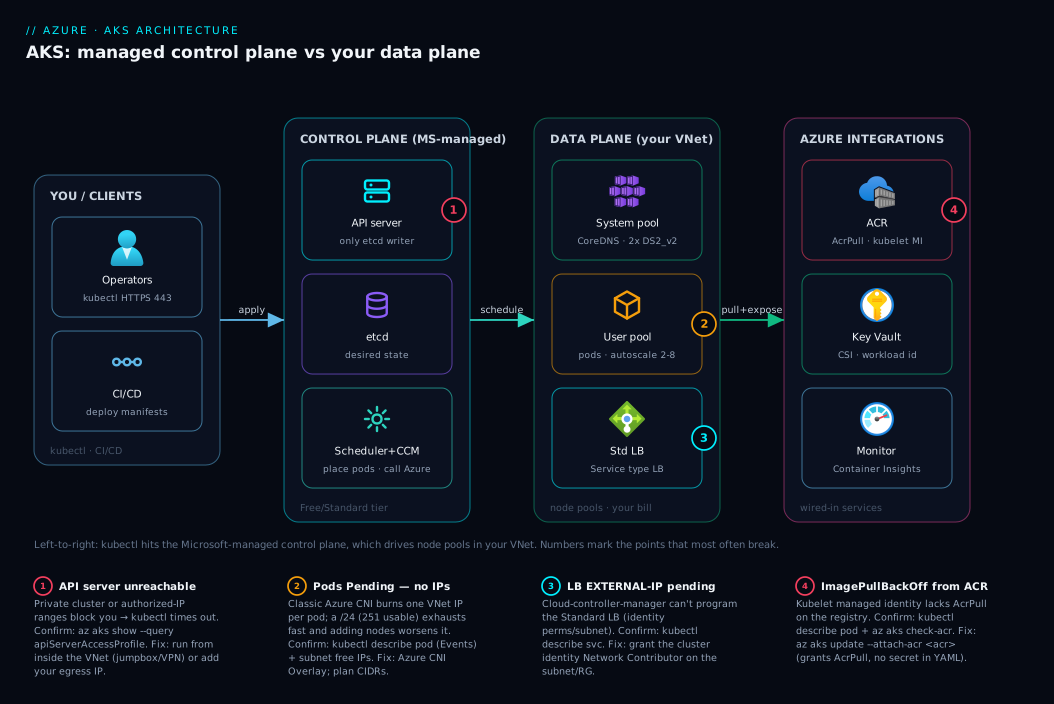
Read the diagram left to right; it is the whole article in one picture. On the far left, you drive the cluster: kubectl (or a CI/CD runner) sends a declarative request — “run 3 replicas of this image” — over HTTPS to the cluster’s API endpoint. That endpoint lands in the managed control plane (the shaded Microsoft-owned zone you never operate): the kube-apiserver validates the request and writes the desired state into etcd; the scheduler picks a suitable node; the controller-manager keeps watching to ensure the declared replica count is maintained; and the cloud-controller-manager stands ready to translate any Azure-backed object (like a LoadBalancer Service) into a real Azure resource. Nothing in this zone is on your bill beyond the flat tier fee, and you cannot SSH to it.
The request then crosses into your data plane — node pools of Azure VMs in your VNet. On the chosen node, the kubelet receives the pod spec, tells containerd to pull the image from Azure Container Registry (authenticated by the kubelet’s managed identity), and starts the container; Azure CNI assigns the pod an IP, and kube-proxy wires up Service routing. Finally, inbound traffic arrives through an Azure Standard Load Balancer (programmed by the cloud-controller-manager when you created a LoadBalancer Service) and reaches your running pods. Around the edges sit the integrations that make it all work: Entra ID authenticates the human at the keyboard, Key Vault feeds secrets to pods via the CSI driver, and Azure Monitor / Container Insights collects logs and metrics from every node. The numbered badges mark the points that most often break or matter — image-pull permission, IP exhaustion, the LB health probe, and the API-server reachability mode — and the legend narrates each. Follow the arrows once and the control-plane/data-plane split, and every Azure integration, is fixed in your head.
Real-world scenario
Finlytics, a fintech analytics startup in Bengaluru, is moving off a sprawl of Azure Container Instances and a couple of overworked App Service plans onto AKS. The platform team is three engineers; the workloads are a customer-facing dashboard API (Linux, .NET 8), a fleet of Python batch jobs that crunch market data on a schedule, and a legacy Windows service one client contractually requires. Their first AKS cluster, built in a hurry for a demo, was a single Linux System node pool of three Standard_DS2_v2 VMs using classic Azure CNI into an existing /24 subnet (10.20.5.0/24, 251 usable IPs) shared with other workloads. It worked — for a week.
The first failure was IP exhaustion. With classic Azure CNI every pod consumes a VNet IP; between the dashboard’s replicas, the batch jobs spinning up dozens of short-lived pods, and the system add-ons, the /24 ran dry. New pods sat Pending with FailedScheduling events citing no available IPs, and the batch tier silently stopped keeping up. The on-call engineer’s reflex — “scale the node pool” — made it worse: more nodes meant more pods meant faster IP burn. Nothing in the pod logs explained it, because the failure was in the subnet, not the app.
The second failure was a self-inflicted blast radius. Because everything ran in one System pool, a runaway batch job that ate memory caused node pressure that evicted the dashboard API’s pods and destabilised CoreDNS (which lives on the System pool), so in-cluster DNS got flaky and unrelated services started failing health checks. A workload problem had become a cluster problem because there was no separation. The Windows service, meanwhile, simply wouldn’t schedule — Windows containers need a dedicated Windows User node pool, which didn’t exist.
The redesign came from drawing the architecture properly. They rebuilt on Azure CNI Overlay so pods draw from a large private overlay CIDR (10.244.0.0/16) and only the nodes consume VNet IPs — the /24 now comfortably holds the node fleet with room to grow, and IP exhaustion vanished. They split into three node pools: a small, tainted System pool (2× Standard_DS2_v2) reserved for cluster-critical add-ons so CoreDNS could never be starved by app workloads; a User Linux pool with the Cluster Autoscaler (--min-count 2 --max-count 8) for the dashboard and batch jobs; and a dedicated Windows User pool (scaled to zero when the legacy client wasn’t active). They attached ACR with --attach-acr so pulls needed no registry secret, wired Container Insights for visibility, and exposed the dashboard through an internal Standard Load Balancer behind their existing Application Gateway.
The result: the next batch surge auto-scaled the User pool from 2 to 6 nodes and back, the dashboard’s pods were never touched, CoreDNS stayed rock-solid on its isolated System pool, and the Windows workload finally scheduled on its own pool. The cluster cost rose modestly (the autoscaler runs lean and scales to zero where it can) but the platform stopped being fragile. The lesson the team wrote on the wall: “One node pool and classic CNI is a demo. Production is multiple pools and an IP plan you made on purpose.”
The redesign as a before/after, because the shape of the fix is the lesson:
| Dimension | First (demo) cluster | Redesigned cluster | Why it mattered |
|---|---|---|---|
| Network plugin | Classic Azure CNI into a /24 |
Azure CNI Overlay (10.244.0.0/16 pods) |
Killed IP exhaustion; nodes alone use VNet IPs |
| Node pools | 1 System pool (everything) | System (tainted) + Linux User + Windows User | Isolated CoreDNS; enabled Windows; scoped blast radius |
| Scaling | Manual node count | Cluster Autoscaler 2–8 on the User pool | Absorbed batch surges without hand-holding |
| Registry auth | Image pull secret juggling | --attach-acr (kubelet identity, AcrPull) |
No registry credentials to rotate |
| Visibility | kubectl guesswork |
Container Insights | Saw Pending/NotReady/DNS issues directly |
| Windows workload | Wouldn’t schedule | Dedicated Windows User pool (scale-to-zero) | Met the contractual requirement |
Advantages and disadvantages
The managed-control-plane / customer-data-plane model is what makes AKS powerful and what creates its sharp edges. Weigh it honestly:
| Advantages (why AKS helps) | Disadvantages (why it bites) |
|---|---|
Microsoft operates the hardest part — etcd, API server HA, cert rotation, control-plane patching — for free (Free/Standard tier) |
You still operate the data plane: node OS updates, sizing, pool design, and all the workload complexity |
| Full upstream Kubernetes API — portability and the entire CNCF ecosystem | Kubernetes is genuinely complex; the learning curve dwarfs App Service / Container Apps |
| Deep Azure integration: VNet, Entra, ACR, Key Vault, LB, Monitor wired in | The wiring has day-one decisions (CNI mode, CIDRs) you can’t casually change later |
| Self-healing reconciliation loops keep declared state true | Misconfigured limits/probes/affinity create failures that look like the platform but are yours |
| Cluster Autoscaler + HPA scale nodes and pods automatically | Two scaling layers people conflate; cost can balloon if autoscaler bounds are loose |
| Managed identity + Workload Identity remove stored credentials | Identity has two layers (Azure RBAC vs K8s RBAC) that are easy to confuse |
| Multiple node pools isolate workloads and upgrades | More pools = more surface to size, taint, label, and keep patched |
AKS is the right model when you genuinely need orchestration — many cooperating services, custom scheduling, the portability of standard Kubernetes, or the CNCF tooling ecosystem — and you have (or will build) the operational maturity to run a data plane. It is the wrong model for a single stateless web app (use App Service) or simple event-driven microservices that want scale-to-zero without raw Kubernetes (use Container Apps). The disadvantages are all manageable, but only if you know they exist before you create the cluster — which is the entire reason to learn the architecture first.
Hands-on lab
Create a tiny two-node-pool AKS cluster, see the control-plane/data-plane split with your own eyes, deploy a pod, expose it, and tear it down. Free-tier-friendly: we use the Free cluster tier (no control-plane charge) and two small nodes you delete at the end. Run in Cloud Shell (Bash).
Step 1 — Variables and resource group.
RG=rg-aks-lab
LOC=centralindia
CLUSTER=aks-lab-$RANDOM
az group create -n $RG -l $LOC -o table
Step 2 — Create a cluster (Free tier, Azure CNI Overlay, a System pool of 1 node). Overlay keeps VNet IP usage tiny; managed identity is the default.
az aks create -g $RG -n $CLUSTER \
  --tier free \
  --node-count 1 \
  --node-vm-size Standard_B2s \
  --network-plugin azure --network-plugin-mode overlay \
  --enable-managed-identity \
  --generate-ssh-keys -o table
Expected: after a few minutes, a cluster resource with provisioningState: Succeeded. Note you were never asked to size a control plane — Microsoft runs it.
Step 3 — Get credentials and look at your nodes.
az aks get-credentials -g $RG -n $CLUSTER --overwrite-existing
kubectl get nodes -o wide
Expected: one node (your System pool). Notice you see worker nodes only — there are no master nodes in the list, because the control plane is managed and hidden. That absence is the architecture made visible.
Step 4 — Add a User node pool (the production shape).
az aks nodepool add -g $RG --cluster-name $CLUSTER -n userpool \
  --node-count 1 --node-vm-size Standard_B2s --mode User -o table
kubectl get nodes -o wide   # now two nodes, across two pools
Step 5 — Deploy a pod and expose it through an Azure Load Balancer.
kubectl create deployment web --image=mcr.microsoft.com/azuredocs/aks-helloworld:v1
kubectl expose deployment web --type=LoadBalancer --port=80 --target-port=80
kubectl get service web --watch   # wait for EXTERNAL-IP to populate
Expected: after a minute or two, EXTERNAL-IP changes from <pending> to a public IP. That IP is a rule the cloud-controller-manager just programmed on an Azure Standard Load Balancer — a Kubernetes Service became an Azure resource automatically. Browse to http://<EXTERNAL-IP> to see the welcome page.
Step 6 — Watch the reconciliation loop self-heal.
kubectl scale deployment web --replicas=3
kubectl get pods -o wide      # three pods, spread across nodes
kubectl delete pod <one-pod-name>
kubectl get pods              # a replacement appears — the controller closed the gap
Expected: deleting a pod triggers an immediate replacement. You just watched desired state (3 replicas in etcd) beat actual state — the loop in action.
Validation checklist. You created a cluster without ever sizing a control plane (it’s managed), saw only worker nodes in kubectl get nodes (masters are hidden), added a second node pool (the production shape), turned a LoadBalancer Service into a real Azure LB rule, and watched the reconciliation loop self-heal a deleted pod. The architecture, demonstrated end to end. What each step proved:
| Step | What you did | What it proves |
|---|---|---|
| 2 | Create with --tier free, no control-plane sizing |
The control plane is fully managed |
| 3 | kubectl get nodes shows workers only |
The masters are hidden by design |
| 4 | Add a User pool | Node pools are the unit of data-plane scaling |
| 5 | LoadBalancer Service → public IP |
Kubernetes objects become Azure resources |
| 6 | Delete a pod, watch it return | Reconciliation loops are the self-healing engine |
Cleanup (avoid lingering node charges).
az group delete -n $RG --yes --no-wait
Cost note. Two Standard_B2s nodes for an hour are a few tens of rupees; the Free tier adds no control-plane charge. Deleting the resource group stops everything — the LB, the nodes and the cluster.
Common mistakes & troubleshooting
This is the part you bookmark — the failure modes that come straight from misunderstanding the architecture. Symptom → root cause → how to confirm → fix.
| # | Symptom | Root cause | Confirm (exact cmd / path) | Fix |
|---|---|---|---|---|
| 1 | New pods stuck Pending, FailedScheduling cites no IPs |
VNet subnet IP exhaustion (classic CNI, each pod takes a VNet IP) | kubectl describe pod <p> (Events); check subnet free IPs in the portal |
Use Azure CNI Overlay; or a bigger subnet; plan CIDRs |
| 2 | kubectl fails: timeout / connection refused to API server |
Private cluster (no VNet line-of-sight) or authorized-IP ranges blocking you | az aks show -g RG -n C --query "apiServerAccessProfile" |
Run kubectl from inside the VNet (jumpbox/VPN); add your IP to allowed ranges |
| 3 | Pods ImagePullBackOff / ErrImagePull from ACR |
Kubelet identity lacks AcrPull on the registry |
kubectl describe pod <p> (pull error); az aks check-acr |
az aks update -g RG -n C --attach-acr <acr> |
| 4 | LoadBalancer Service EXTERNAL-IP stuck <pending> |
Cloud-controller can’t program the LB (perms, SKU, subnet) | kubectl describe svc <s>; check cluster identity role on the RG/subnet |
Grant the cluster identity Network Contributor on the relevant scope |
| 5 | Whole cluster wobbles when one workload misbehaves | Everything on the System pool; CoreDNS/add-ons starved | kubectl get pods -n kube-system -o wide (add-ons on a busy node) |
Separate User pool(s); taint the System pool |
| 6 | “I enabled autoscaling but no nodes were added” | Confusing HPA (pods) with Cluster Autoscaler (nodes) | kubectl get hpa; az aks nodepool show ... --query enableAutoScaling |
Enable the Cluster Autoscaler on the pool; set min/max |
| 7 | Node goes NotReady; pods evicted |
Node-level issue (kubelet, disk pressure, network) | kubectl describe node <n> (Conditions); Container Insights |
Cordon/drain + let the pool replace it; fix disk/resource pressure |
| 8 | Windows containers won’t schedule | No Windows node pool (only Linux exists) | kubectl get nodes -o wide (no Windows OS-IMAGE) |
Add a Windows User node pool |
| 9 | Pod can’t read a secret it should | Misconfigured Key Vault CSI / Workload Identity federation | kubectl describe pod <p> (volume/identity error) |
Fix the federated credential + CSI SecretProviderClass |
| 10 | Cluster upgrade took ages / surprised you | Upgrade rolls node pools (cordon/drain/replace) one node at a time | az aks get-upgrades; node ages after upgrade |
Upgrade control plane and pools deliberately; use surge settings |
The three that bite hardest, expanded:
1. Pods stuck Pending with no available IPs. With classic Azure CNI every pod consumes a VNet IP, so a small subnet (a /24 is only 251 usable) exhausts fast — and scaling out nodes makes it worse. Confirm with kubectl describe pod (the Events show the scheduling failure) and the subnet’s free-IP count in the portal. The real fix is Azure CNI Overlay, where pods draw from a private overlay CIDR and only nodes use VNet IPs; failing that, a far larger subnet. This is a planning decision made at creation — which is why understanding CNI before you build matters.
3. ImagePullBackOff from ACR. The cluster’s kubelet managed identity needs the AcrPull role on the registry, or every pull fails. Confirm with kubectl describe pod (the pull error names the registry) and az aks check-acr. Fix with a single command: az aks update --attach-acr <acr-name>, which grants AcrPull to the kubelet identity. No registry password ever enters a manifest.
6. “Autoscaling did nothing.” HPA scales pods; the Cluster Autoscaler scales nodes — they are different layers. If you enabled HPA but pods can’t schedule for lack of node capacity, you also need the Cluster Autoscaler on the pool (--enable-cluster-autoscaler --min-count --max-count). Confirm what’s enabled with kubectl get hpa and az aks nodepool show --query enableAutoScaling. The mental model — pods are one layer, nodes another — prevents this entirely.
Best practices
- Always run at least one dedicated System pool, separate from your workloads. Keep CoreDNS, metrics-server and other add-ons off your busy app nodes by tainting the System pool — so a runaway workload can never starve the cluster’s own services.
- Use multiple node pools to separate concerns. Different VM sizes for different tiers, a Windows pool only if you need one, isolation for noisy or sensitive workloads, and independent upgrades so one change never touches everything.
- Choose Azure CNI Overlay for most new clusters. It conserves VNet IPs (only nodes consume them) and avoids the day-one subnet-exhaustion trap; reserve classic CNI for the specific case where pods must be first-class on the VNet.
- Plan your CIDRs before creation and never overlap. Node subnet, pod CIDR, and Service CIDR must not collide with each other or any peered/on-prem range — this is a one-shot decision.
- Integrate Entra ID and use Azure RBAC for Kubernetes authorization. One identity plane for both “manage the cluster” (Azure RBAC) and “act inside the cluster” (Kubernetes RBAC); bind Entra groups, not individuals.
- Use managed identity everywhere; never service principals or stored secrets.
--attach-acrfor image pulls; Workload Identity so pods reach Key Vault/Storage/Azure APIs with no secret stored anywhere. - Enable the Cluster Autoscaler with sane bounds, and pair it with HPA. Set
--min-count/--max-countso cost can’t run away; let HPA scale pods and the autoscaler scale nodes underneath. - Turn on Container Insights from day one. Node and pod health, IP pressure and restarts should be visible, not guessed — it’s your only real window into the cluster.
- Keep images in a private ACR and pull via the kubelet identity. No registry credentials in manifests; scan and pin images (see the ACR hardening practices).
- Upgrade deliberately, control plane then node pools. Understand that node upgrades cordon/drain/replace nodes one at a time; use surge settings and a maintenance window so an upgrade is planned, not a surprise outage.
- Right-size node SKUs to the workload. Memory-heavy pods belong on memory-optimised pools; don’t pack everything onto one general-purpose size and discover OOM evictions under load.
- Treat the cluster config as code. Define it in Bicep/Terraform and the workloads in version-controlled manifests, reviewed in PRs — a hand-clicked cluster is a cluster nobody can rebuild.
Security notes
- Lock down the API server. Use authorized IP ranges to restrict the public endpoint to your admin/CI egress, or go private cluster so the control plane has no public surface at all. Default-public is fine for dev; production should restrict.
- Entra ID + Azure RBAC for Kubernetes, with least privilege. Bind Entra groups to the minimum Kubernetes roles; reserve
cluster-adminfor break-glass. Don’t hand out broadkubectlaccess where a scopedRolewould do. - Workload Identity over any stored secret. Pods should authenticate to Azure via a federated managed identity, not a connection string in a
Secretor, worse, a manifest. This removes the secret-zero problem. - Secrets in Key Vault, mounted via the CSI driver — never in YAML. Keep credentials out of manifests and
etcd; pull them at runtime through the Secrets Store CSI driver with Workload Identity. - Network-isolate the data plane. Run nodes in a controlled subnet with NSGs, use network policies (Azure or Cilium) to restrict pod-to-pod traffic, and reach Azure PaaS over Private Endpoints so traffic stays on the backbone.
- Pull only from a trusted private ACR. Use the kubelet identity for
AcrPull, scan images, and pin digests so a moved tag can’t slip an unknown image into production. - Keep nodes patched. Node OS updates are your responsibility (the control plane is Microsoft’s) — use node-image upgrades and automatic channels so the data plane doesn’t drift into vulnerable images.
The security split that mirrors the architecture — what Microsoft secures versus what you must:
| Surface | Secured by | Your action |
|---|---|---|
Control plane (etcd, API server host, certs) |
Microsoft | Choose the right API-server exposure (private / IP ranges) |
| Cluster identity to Azure | Shared | Use managed identity; least-privilege roles |
| In-cluster authorization | You | Entra + Kubernetes RBAC, least privilege |
| Pod-to-Azure auth | You | Workload Identity, no stored secrets |
| Secrets at rest/in use | You | Key Vault + CSI driver, not YAML |
| Node OS images | You | Node-image upgrades / auto channels |
| Pod-to-pod traffic | You | Network policies (Azure/Cilium) |
Cost & sizing
The bill has a shape that follows the architecture exactly: you pay for the data plane, barely anything for the brain.
- Nodes dominate the bill. You pay per VM-hour for every node, plus its managed OS disk, plus any data disks — exactly as if you ran those VMs yourself. The control plane is free on the Free and Standard tiers (Standard adds a per-cluster-hour fee for the financially-backed Uptime SLA, not for the VMs). So cost control is node control: right-size SKUs, scale to what you actually use, and scale to zero where you can.
- The pricing tier is about the SLA, not power. Free gives a best-effort control plane (fine for dev/test). Standard adds the Uptime SLA on the API server for a small per-cluster-hour fee — buy it for production. Premium adds long-term support (extended Kubernetes version support) for clusters that can’t upgrade on the standard cadence. None of these change your node cost.
- The Cluster Autoscaler is your main cost lever. Tight
--min-count/--max-countbounds stop a runaway scale-out; scale non-critical and Windows pools to zero when idle. A loose autoscaler is the fastest way to a surprise bill. - Storage and egress add up quietly. Persistent disks per stateful pod, Azure Files shares, and Container Insights log ingestion (billed per GB) are real line items — sample high-volume logs and right-size disks.
A rough monthly picture for a small production cluster in Central India: a System pool of 2 small nodes plus a User pool autoscaling 2–6 medium nodes lands roughly in the ₹25,000–60,000/month range depending on how much the User pool runs, plus the Standard tier’s modest Uptime-SLA fee, plus Container Insights ingestion. The cost drivers and what each buys:
| Cost driver | What you pay for | Rough INR / month | Lever |
|---|---|---|---|
| System node pool (2× small) | Always-on cluster-critical capacity | ~₹8,000–12,000 | Smallest SKU that holds add-ons |
| User node pool (autoscale 2–6 medium) | Workload capacity on demand | ~₹15,000–45,000 | Tight autoscaler bounds; right SKU |
| Standard tier (Uptime SLA) | Financially-backed API-server SLA | small per-cluster-hour fee | Free tier for dev; Standard for prod |
| Managed disks (per stateful pod) | OS + data disks | ~₹500–2,000 each | Right-size; delete orphaned PVCs |
| Container Insights ingestion | Per-GB log/metric ingestion | ~₹1,000–4,000 | Sample verbose logs |
| Load Balancer + egress | Standard LB + outbound data | ~₹1,500–3,000 | Consolidate via Ingress |
The discipline: the control plane is essentially free, so the entire game is node sizing and autoscaler bounds. A cluster that “costs too much” is almost always a User pool that never scales down or SKUs bigger than the workload needs.
Interview & exam questions
1. Explain the AKS control-plane vs data-plane split — who runs each and who pays? The control plane (API server, scheduler, controller-manager, etcd, cloud-controller-manager) is fully managed by Microsoft in a Microsoft-owned subscription; you don’t operate or (on Free/Standard) pay for its VMs. The data plane — node pools of Azure VMs — runs in your subscription and VNet, and you size, scale, patch and pay for it. You only ever interact with the control plane through the API server.
2. Why can’t you see or SSH into the AKS control-plane nodes? Because they’re not yours — they run in Microsoft’s managed environment so Microsoft can patch, scale and secure the most attack-sensitive part of Kubernetes. kubectl get nodes therefore shows worker nodes only; the masters are deliberately hidden. You manage the cluster through the API server endpoint, not by logging into hosts.
3. What is etcd, and why is it significant that AKS manages it? etcd is the consistent key-value store holding the cluster’s desired state (every object). It’s the single source of truth, and the only writer to it is the API server. Running etcd well (quorum, backups, certificate rotation) is hard and a common cause of self-managed-cluster outages, so AKS managing it is a core value of the service — you can’t even reach it directly.
4. What’s the difference between a System and a User node pool? Every cluster needs at least one System pool (Linux only) to run critical add-on pods like CoreDNS and metrics-server. User pools run your application workloads and are optional but normal. Best practice is to keep them separate (taint the System pool) so a workload can never starve cluster-critical services.
5. Trace what happens when you kubectl apply a Deployment. kubectl sends the request to the kube-apiserver, which validates it and writes the desired state to etcd. The controller-manager creates the required pods; the scheduler assigns each to a node; the target node’s kubelet tells containerd to pull the image (from ACR) and start the container; Azure CNI assigns the pod an IP and kube-proxy wires Service routing. The loop then keeps actual state matching desired.
6. Compare Azure CNI, Azure CNI Overlay and kubenet — what’s the IP consequence? Classic Azure CNI gives every pod a real VNet IP (directly routable, but it can exhaust a subnet fast). Azure CNI Overlay gives pods IPs from a private overlay CIDR so only nodes consume VNet IPs (the modern default for IP conservation). kubenet is legacy (pod CIDR + route tables) and being retired. The choice is made at creation and is hard to change later.
7. Difference between Azure RBAC and Kubernetes RBAC in AKS? Azure RBAC governs the cluster resource in Azure — who can scale it, read its credentials, delete it. Kubernetes RBAC governs actions inside the cluster — who can get pods or create deployments in a namespace. With Entra integration you can use Azure RBAC for Kubernetes authorization so one identity plane covers both, but conceptually they answer different questions.
8. How does an AKS pod authenticate to Azure services like Key Vault without a stored secret? Via Workload Identity: a Kubernetes service account is federated to an Azure managed identity, so the pod obtains Azure tokens with no secret stored anywhere. Combined with the Secrets Store CSI driver, secrets are pulled from Key Vault at runtime rather than living in manifests or etcd.
9. How does AKS pull images from a private ACR? The cluster’s kubelet managed identity is granted the AcrPull role on the registry, typically via az aks update --attach-acr. After that, image pulls authenticate automatically with no registry username/password in any manifest. An ImagePullBackOff from ACR is almost always this role missing.
10. HPA vs Cluster Autoscaler — what does each scale? The Horizontal Pod Autoscaler scales the number of pods (replicas) based on metrics. The Cluster Autoscaler scales the number of nodes in a pool (within min/max) when pods can’t be scheduled for lack of capacity. They work together: HPA wants more pods, the pods go Pending, the Cluster Autoscaler adds nodes. Confusing the two (“autoscaling did nothing”) is a classic error.
11. What does the Standard pricing tier give you over Free? Free is a best-effort control plane with no extra charge — fine for dev/test. Standard adds a financially-backed Uptime SLA on the API server for a small per-cluster-hour fee — the production choice. Neither tier changes your node costs; Premium adds long-term Kubernetes version support on top.
12. What is a LoadBalancer Service and which component makes it work? It’s a Kubernetes Service type that exposes pods externally; in AKS the cloud-controller-manager (a control-plane component) calls Azure and programs a rule on an Azure Standard Load Balancer, surfacing a public (or internal) IP. It’s the clearest example of a Kubernetes object becoming a real Azure resource automatically.
These map primarily to AZ-104 (Administrator) — configure and manage AKS, node pools, scaling, networking — and to AZ-305 (Solutions Architect) for the design-level control-plane/data-plane and integration choices. The container-platform and security angles (Workload Identity, ACR, Key Vault) also touch AZ-500. A compact mapping for revision:
| Question theme | Primary cert | Objective area |
|---|---|---|
Control/data-plane split, etcd, managed control plane |
AZ-104 / AZ-305 | Design & manage AKS |
| Node pools (System/User), scaling | AZ-104 | Configure & manage compute |
| CNI modes, CIDRs, Services/Ingress | AZ-104 / AZ-700 | Container & cluster networking |
| Entra + Kubernetes RBAC, Workload Identity | AZ-500 / AZ-104 | Secure access & identities |
| ACR pull, Key Vault CSI | AZ-500 | Secure containers & secrets |
| Pricing tiers, Uptime SLA, autoscaling | AZ-305 | Cost & resilience design |
Quick check
- In AKS, who operates the control plane, where does it live, and do you pay for its VMs on the Free tier?
- You run
kubectl get nodeson a healthy cluster and see only your worker nodes — where are the master nodes? - True or false: enabling the Horizontal Pod Autoscaler will add more nodes when your pods need capacity.
- Your pods are stuck
Pendingwith events about no available IPs, and adding nodes made it worse. What is the likely cause and the modern fix? - A pod is in
ImagePullBackOffpulling from your private ACR. Name the single most likely cause and the one command that fixes it.
Answers
- Microsoft operates the control plane; it runs in a Microsoft-owned subscription (not your VNet); and on the Free tier you pay nothing for its VMs (Standard adds only a small Uptime-SLA fee). You pay for the data-plane nodes, not the brain.
- The master/control-plane nodes are managed by Microsoft and hidden by design —
kubectl get nodeslists worker nodes only. You interact with the control plane solely through the API server endpoint, never by logging into hosts. - False. HPA scales pods, not nodes. Adding nodes when pods can’t be scheduled is the job of the Cluster Autoscaler; the two are different layers and you typically run both together.
- VNet subnet IP exhaustion under classic Azure CNI (every pod consumes a VNet IP, so more nodes burn IPs faster). The modern fix is Azure CNI Overlay, where pods use a private overlay CIDR and only nodes consume VNet IPs — and planning CIDRs at creation.
- The kubelet managed identity lacks the
AcrPullrole on the registry. Fix it withaz aks update --attach-acr <acr-name>, which grantsAcrPullso pulls authenticate automatically with no secret in any manifest.
Glossary
- AKS (Azure Kubernetes Service) — Azure’s managed Kubernetes: Microsoft runs the control plane; you run the node pools and workloads.
- Control plane — the cluster’s “brain” (API server, scheduler, controller-manager, cloud-controller-manager,
etcd); managed by Microsoft and not on your bill (Free/Standard). - Data plane — your node pools of Azure VMs where pods actually run; in your subscription, VNet and bill.
- kube-apiserver — the single front door for all cluster requests and the only component that reads/writes
etcd. etcd— the consistent key-value store holding the cluster’s desired state; the single source of truth, fully managed in AKS.- Scheduler — assigns pending pods to nodes based on resources and constraints.
- Controller-manager — runs the reconciliation loops that keep actual state matching desired state (replicas, nodes, endpoints).
- Cloud-controller-manager — bridges Kubernetes to Azure: provisions Load Balancers, attaches disks, manages routes.
- Node — an Azure VM that hosts pods; the unit of compute you pay for.
- Node pool — a group of identical nodes (same SKU/OS/config) scaled together; System (cluster-critical add-ons) or User (your workloads).
- kubelet — the per-node agent that runs scheduled pods, runs probes, and reports status to the API server.
containerd— the container runtime AKS uses to pull images and run containers (replaced Docker as the runtime).- kube-proxy — programs node network rules so
Servicevirtual IPs route to pod IPs. - Pod — the smallest deployable unit: one or more containers sharing a network identity (IP).
- Azure CNI — network plugin giving pods VNet IPs; Overlay mode keeps pods on a private CIDR so only nodes consume VNet IPs.
- kubenet — legacy network plugin (pod CIDR + route tables); being retired — avoid for new clusters.
- Cluster Autoscaler — scales the number of nodes in a pool (within min/max) when pods can’t be scheduled.
- Horizontal Pod Autoscaler (HPA) — scales the number of pods based on metrics; pairs with the Cluster Autoscaler.
- Managed identity — the cluster’s (and nodes’) Azure identity for ACR pulls, disk/LB operations — no stored secrets.
- Workload Identity — federates a Kubernetes service account to a managed identity so a pod authenticates to Azure with no secret.
- Kubernetes RBAC vs Azure RBAC — in-cluster authorization (
get pods) vs control over the cluster resource in Azure (scale, read credentials). - Pricing tier (Free / Standard / Premium) — best-effort control plane / control plane with Uptime SLA / SLA plus long-term version support; tiers don’t change node cost.
Next steps
You can now draw the AKS architecture, justify a node-pool and CNI layout, and name every Azure integration. Build outward:
- Next: Azure App Service vs Container Apps vs AKS — confirm AKS is the right compute model before you go deeper, and know when it’s overkill.
- Related: Securing Azure Container Registry: Private Endpoints, ACR Tasks, Content Trust, and Geo-Replication — harden the registry your nodes pull images from.
- Related: Azure Virtual Network, Subnets and NSGs — the networking the data plane lives in, and the subnet planning that prevents IP exhaustion.
- Related: Azure Key Vault: Secrets, Keys and Certificates Done Right — feed secrets to pods via the CSI driver and Workload Identity instead of YAML.
- Related: Azure Monitor and Application Insights: Full-Stack Observability — wire up Container Insights so cluster and pod health are visible, not guessed.