Spin up an Azure Kubernetes Service (AKS) cluster and a question hides in plain sight: when your cluster needs to do something in Azure — pull an image, attach a disk to a pod, program a public IP on a load balancer — who is it acting as? Kubernetes has no Azure account. Something must hold an Azure identity on the cluster’s behalf, prove it to Microsoft Entra ID (formerly Azure AD), and carry the RBAC permissions those operations need. That something is the cluster identity, and you have two ways to provide it: an old service principal or a modern managed identity.
This sounds like a footnote until 3 a.m. one year later, when every new node fails to pull images, your LoadBalancer services stop getting public IPs, and kubectl is throwing authorization errors — all because a service-principal client secret you set at cluster-creation time silently expired. No deployment changed. The cluster just stopped being able to talk to Azure. This is the single most common day-2 AKS identity outage, and it does not exist on managed-identity clusters because there is no secret to expire. That contrast — convenient-but-fragile credential versus zero-credential platform identity — is the whole point of this article.
By the end you will hold a clear mental model of every identity an AKS cluster uses (there are three, and people conflate them constantly), know why managed identity is the default and recommended choice, and be able to convert a service-principal cluster across. You’ll also meet workload identity — the modern, secretless way your pods (not the cluster) get Azure access. This is a concepts article: mental models and decision tables first, then an architecture walkthrough and a short troubleshooting playbook.
What problem this solves
A Kubernetes cluster is not a passive box of containers. AKS continuously performs Azure control-plane operations for you: a PersistentVolumeClaim makes the cluster create and attach a managed disk; a Service of type LoadBalancer makes it allocate a public IP and program the load balancer; a pod whose image lives in Azure Container Registry (ACR) makes the kubelet pull it. Each is an authenticated Azure API call made as some identity with the right permissions. Get the identity wrong and these fail in ways that look like networking or storage bugs but are really authorization failures.
The historical way to provide that identity was a service principal (SP) — an Entra ID application identity with a client ID and a client secret (a password) you created, granted roles, and handed to AKS at creation. It worked, but carried a time bomb: the client secret has an expiry date (commonly 1–2 years). Nobody puts “rotate the AKS service-principal secret” on a calendar, so a year later it expires and the cluster loses its ability to authenticate to Azure. The symptom is confusing because your application code is fine — it’s the platform underneath that lost its credential.
Managed identity removes the credential entirely. The platform fetches and rotates the cluster’s tokens automatically; there is no secret you hold, store, or rotate, and none that can expire. This is why every new AKS cluster — portal, CLI defaults, or modern IaC — uses a managed identity, and why Microsoft recommends migrating SP clusters. Who hits the old pain: anyone who built a cluster a year-plus ago with the classic --service-principal / --client-secret flags, anyone copying an old Terraform module, anyone who treats “it deployed fine” as proof it will keep working. The fix is almost never “redeploy” — it’s “stop holding a secret the platform can hold for you.”
Learning objectives
By the end of this article you can:
- Name the three distinct identities an AKS cluster uses — the control-plane (cluster) identity, the kubelet identity, and workload identity for pods — and what each authenticates.
- Explain plainly what a service principal and a managed identity are, and the difference between system-assigned and user-assigned.
- State why managed identity is the default and recommended cluster identity, and the day-2 secret-expiry failure that only afflicts service-principal clusters.
- Pick the right identity model for a new cluster from a decision table, and justify the rare cases where a service principal still appears.
- Grant the kubelet identity AcrPull so image pulls work with no registry secret in your YAML, via
az aks update --attach-acr. - Convert a service-principal cluster to managed identity with one
az aks updatecommand, and know what it does and doesn’t change. - Recognise where workload identity (OIDC issuer, federated credentials) fits versus the cluster identity, and why it replaces the deprecated aad-pod-identity.
- Diagnose the common identity failures —
ImagePullBackOff,LoadBalancer<pending>, disk-attach errors, the expired-SP outage — and apply the exact fix.
Prerequisites & where this fits
You should know the AKS basics: a cluster has a control plane (managed by Microsoft) and a data plane of worker nodes (the AKS Architecture Explained: Managed Control Plane, Node Pools, and the Azure Integrations That Make It Tick deep-dive covers this; identity is the glue that makes those Azure integrations work). You should be comfortable running az in Cloud Shell, reading JSON output, and have a working idea of Azure RBAC — that you grant a role (like Contributor or AcrPull) to a principal at a scope (a resource, resource group, or subscription). If RBAC scopes are fuzzy, the Azure Resource Hierarchy Explained: Subscriptions, Resource Groups and Resources article grounds the scope ladder this all hangs off.
This sits at the intersection of the Identity and Compute tracks, upstream of anything where your cluster touches another Azure service: pulling from Azure Container Registry, reading secrets from Azure Key Vault via the CSI driver, or emitting telemetry to Azure Monitor and Application Insights. You don’t need to have built a cluster before; you do need to accept that Kubernetes and Azure are two control planes that must trust each other, and identity is how.
One-paragraph orientation before the deep model: there is an identity for the cluster itself (control-plane components calling Azure), a separate identity for the kubelet on the nodes (pulling images from ACR), and an entirely different mechanism — workload identity — for your pods to reach Azure resources. Mixing these up is the root of most confusion, so we pin them down first.
Core concepts
Four mental models make every later decision obvious.
A cluster needs an Azure identity because it makes Azure API calls for you. AKS wires cloud-agnostic Kubernetes into Azure through the cloud controller manager (CCM). When a manifest asks for a LoadBalancer service or a PersistentVolumeClaim, the CCM translates that into Azure REST calls — allocate a public IP, configure load-balancer rules, create and attach a managed disk. Those calls run as the cluster identity, which must hold the right roles (typically Network Contributor on the node RG / subnet, plus disk rights) for them to succeed.
A service principal is an identity with a password you hold; a managed identity is one Azure holds the credential for. A service principal is an Entra ID application instance with a client ID (who it is) and a client secret or certificate (proof). You create, store, and rotate that secret before it expires. A managed identity is an Entra ID identity bound to an Azure resource where the platform creates, stores, and rotates the credential and issues short-lived tokens automatically. To RBAC both are just “a principal you grant roles to” — the only difference is who manages the secret, and that difference is the entire day-2 story.
System-assigned vs user-assigned is about lifecycle and reuse. A system-assigned managed identity is created with the cluster, deleted with it, and used by only that cluster. A user-assigned managed identity is a standalone resource that outlives the cluster and can be shared; you can pre-create it in IaC so roles exist before the cluster does, avoiding a chicken-and-egg ordering problem. AKS defaults to system-assigned for the cluster identity if you say nothing.
Three identities, three jobs — never conflate them. (1) The cluster (control-plane) identity authenticates the CCM’s Azure calls — load balancers, public IPs, disks, routes. (2) The kubelet identity is a separate user-assigned identity (auto-created on MI clusters) the kubelet uses to pull images from ACR — it needs AcrPull on the registry. (3) Workload identity is not a cluster identity at all: it’s how an individual pod gets its own Azure identity to read a Key Vault secret or write to Storage, with no secret, via a federated trust between the cluster’s OIDC issuer and a user-assigned managed identity. The cluster identity is the platform’s; workload identity is your application’s.
The three identities side by side
Before the deep sections, pin down each identity, what it authenticates, and what it needs:
| Identity | Whose calls it makes | What it’s for | Needs (RBAC) | Created how |
|---|---|---|---|---|
| Cluster / control-plane | Cloud controller manager | LBs, public IPs, disks, routes | Network/Contributor on node RG & subnet | System-assigned (default) or user-assigned |
| Kubelet identity | Kubelet on each node | Pull images from ACR | AcrPull on the registry | User-assigned MI, auto-created |
| Workload identity (per pod) | Your application pods | App access (Key Vault, Storage, SQL) | App’s role (e.g. KV Secrets User) | User-assigned MI + federated credential |
The trap to internalise: ImagePullBackOff from ACR is the kubelet identity; a LoadBalancer stuck pending is the cluster identity; a pod that can’t read a Key Vault secret is workload identity. Same word, three different principals.
Service principal vs managed identity: the core comparison
This is the heart of the article. Both are Entra ID principals you grant Azure roles to; the difference is operational, and decisive. A service principal makes you manage a credential — create a client secret with an expiry, store it where AKS can read it, rotate it before it lapses. Forget (almost everyone does, because nothing reminds you) and the cluster loses its ability to authenticate to Azure. A managed identity has no secret you ever see: the platform issues short-lived tokens via the instance metadata endpoint and rotates the underlying credential automatically. Nothing to expire, leak, or rotate.
The side-by-side, dimension by dimension:
| Dimension | Service principal (SP) | Managed identity (MI) |
|---|---|---|
| What it is | Entra ID app: client ID + secret | Entra ID identity bound to a resource |
| Credential | Secret/cert you hold | Platform-managed; none you handle |
| Expiry / rotation | Expires (1–2 yr); you rotate | None to expire or rotate |
| Day-2 outage risk | High — expired secret breaks auth | Effectively none |
| Where the secret lives | Config / secret store (leak surface) | Nowhere you manage |
| Setup effort | Create SP, secret, roles, pass to AKS | Default; AKS wires it |
| Cross-tenant use | Possible | Bound to tenant resources |
| AKS support | Legacy; not recommended | Default and recommended |
| Cost | Free | Free |
Three reading notes that prevent the usual mistakes:
| Distinction | The trap | How to think about it |
|---|---|---|
| “Managed identity = no secret” | Thinking tokens don’t exist | Tokens do; the platform fetches/rotates them — you just never hold a long-lived one |
| SP secret vs SP certificate | Certs seem exempt | Certificates also expire — same trap, longer fuse |
| “It deployed, so it’s fine” | Creation = durability | An SP secret valid at create-time expires later with zero deploy changes |
When does a service principal still legitimately appear? Rarely — some older automation and cross-tenant scenarios historically expected one. But for the cluster identity of a new AKS cluster, managed identity is correct in essentially every greenfield case, and Microsoft’s guidance is to migrate existing SP clusters.
| Scenario | SP? | MI? | Why |
|---|---|---|---|
| New cluster, control-plane identity | No | Yes | Default; no secret to expire |
| Kubelet identity for ACR pulls | No | Yes | Auto-created MI; grant AcrPull |
| Pods accessing Azure (KV, Storage) | No | Yes (workload id) | Secretless; replaces aad-pod-identity |
| Inherited SP cluster | Migrate | Yes | az aks update --enable-managed-identity |
| Niche legacy/cross-tenant automation | Maybe | Prefer MI | Only if a tool genuinely requires an SP |
Why managed identity is the default — stated plainly
If you remember one paragraph, remember this. A service principal puts the credential lifecycle on you — create the secret, store it, rotate it, eat the outage when it expires. A managed identity puts it on Azure — the platform owns the lifecycle end to end, so the failure mode doesn’t exist. There is no scenario where holding a long-lived secret yourself is more secure or reliable than letting the platform hold a short-lived one. That’s why AKS defaults to managed identity, why the portal no longer pushes the SP path, and why “we’re still on a service principal” is a finding in any AKS review.
System-assigned vs user-assigned managed identity
Once you’ve chosen managed identity (you have), there’s a second, smaller decision: system-assigned or user-assigned. Both are secretless; they differ in lifecycle and reuse. A system-assigned identity is born with the cluster and dies with it — the simplest path (AKS creates it, you do nothing), fine for a single self-contained cluster, but you can’t grant it roles before the cluster exists or share it. A user-assigned identity is a standalone resource you create first; because it exists before the cluster you can pre-grant its roles in IaC (so the cluster boots with AcrPull, Network Contributor already in place) and reuse it across many clusters — at the cost of one more resource to manage.
| Aspect | System-assigned MI | User-assigned MI |
|---|---|---|
| Lifecycle | Created/deleted with the cluster | Independent; outlives the cluster |
| Reuse | One cluster only | Shareable across resources |
| Pre-grant roles | No (doesn’t exist yet) | Yes — before the cluster exists |
| IaC ordering | Role grant comes after | Clean: MI → roles → cluster |
| Best for | A single, simple cluster | Fleets, strict IaC, shared identity |
| Default for | Cluster identity (unspecified) | Kubelet identity (auto-created) |
In practice, system-assigned suits a standalone cluster; user-assigned is cleaner for fleets or strict IaC ordering. The kubelet identity is user-assigned regardless — AKS creates one (named like <clustername>-agentpool) for image pulls so it persists independently of control-plane operations.
The kubelet identity and ACR pulls
The most common identity task you’ll actually perform is making ACR pulls work. The kubelet — the per-node agent that starts containers — pulls images using the kubelet identity (a user-assigned MI AKS creates), and for a private ACR that identity needs the AcrPull role on the registry. The clean way to grant it is az aks update --attach-acr, which assigns AcrPull to the kubelet identity for you — no registry username/password or imagePullSecret in your YAML.
# Attach an ACR to the cluster: grants AcrPull to the kubelet identity. No secret in YAML.
az aks update \
  --name aks-shop-prod \
  --resource-group rg-shop-prod \
  --attach-acr acrshopprod
Under the hood this is just an RBAC grant; you could do it manually, but --attach-acr finds the right kubelet identity and scope for you. To verify the pull path end to end, AKS ships a built-in check:
# Validates the kubelet identity actually has pull access to the registry
az aks check-acr \
  --name aks-shop-prod \
  --resource-group rg-shop-prod \
  --acr acrshopprod.azurecr.io
If you prefer the explicit grant (or need it in a pipeline), assign AcrPull to the kubelet object ID directly:
# Find the kubelet identity's object (principal) ID
KUBELET_OBJ=$(az aks show -n aks-shop-prod -g rg-shop-prod \
  --query identityProfile.kubeletidentity.objectId -o tsv)

# Grant AcrPull at the registry scope
ACR_ID=$(az acr show -n acrshopprod -g rg-shop-prod --query id -o tsv)
az role assignment create \
  --assignee-object-id "$KUBELET_OBJ" \
  --assignee-principal-type ServicePrincipal \
  --role AcrPull \
  --scope "$ACR_ID"
The roles that matter most for cluster and kubelet identities, with scope and what fails without them:
| Role | Assigned to | Scope | Enables | Failure if missing |
|---|---|---|---|---|
| AcrPull | Kubelet identity | The ACR | Pull private images | ImagePullBackOff / 401 |
| Network Contributor | Cluster identity | Node RG / subnet | LB, public IPs, routes | LoadBalancer <pending> |
| Contributor (node RG) | Cluster identity | Managed node RG | Disks, NICs, scale-set ops | PVC attach / scale failures |
| Managed Identity Operator | Cluster identity | Kubelet/user identities | Assign identities to cluster | Identity assign error at create |
| Key Vault Secrets User | Workload identity | The Key Vault | Pod reads a secret | CSI/SDK 403 on secret |
--attach-acr is recommended because it scopes the grant precisely to the kubelet identity and the one registry, embeds no secret, and survives rotation — there’s no credential to rotate.
Workload identity: secretless access for your pods
So far we’ve covered how the cluster talks to Azure. Workload identity is how your pods do — a different mechanism, not to be confused with the cluster identity. The old pod-managed identity (aad-pod-identity) is deprecated; Microsoft Entra Workload ID is the modern, secretless replacement.
The mental model: AKS exposes an OIDC issuer (a public endpoint that signs tokens for the cluster’s service accounts). You create a user-assigned managed identity for the workload, then a federated identity credential saying “trust tokens from this OIDC issuer for this Kubernetes service account.” A pod using that service account gets a projected token, exchanges it with Entra ID for an Azure access token, and calls Azure as the managed identity — with no client secret anywhere. The trust is cryptographic and federated, not a stored password.
| Aspect | aad-pod-identity | Workload identity (Entra Workload ID) |
|---|---|---|
| Status | Deprecated | Current, recommended |
| Mechanism | NMI pod intercepts IMDS | OIDC federation + projected SA token |
| Secret | None, but brittle interception | None; clean token exchange |
| Reliability | Known issues at scale | Robust, Kubernetes-native |
| You create | AzureIdentity / binding CRDs | User-assigned MI + federated credential |
Enabling it is two flags — the OIDC issuer and the workload-identity webhook:
# Enable the OIDC issuer and workload identity on the cluster
az aks update \
  --name aks-shop-prod \
  --resource-group rg-shop-prod \
  --enable-oidc-issuer \
  --enable-workload-identity
The federated credential ties a specific service account to a specific managed identity:
# Get the cluster's OIDC issuer URL
ISSUER=$(az aks show -n aks-shop-prod -g rg-shop-prod \
  --query oidcIssuerProfile.issuerUrl -o tsv)

# Federate: trust tokens for service account 'sa-orders' in namespace 'orders'
az identity federated-credential create \
  --name fic-orders \
  --identity-name id-orders-workload \
  --resource-group rg-shop-prod \
  --issuer "$ISSUER" \
  --subject "system:serviceaccount:orders:sa-orders" \
  --audience api://AzureADTokenExchange
Workload identity is the pod-level analogue of the cluster’s managed identity: the same principle — let Azure hold the credential, you hold no secret — applied one layer up, to your application. If you’re stuffing a Key Vault client secret into a Kubernetes Secret, this is the secretless answer, and it pairs naturally with the Azure Key Vault Secrets Store CSI driver.
Architecture at a glance
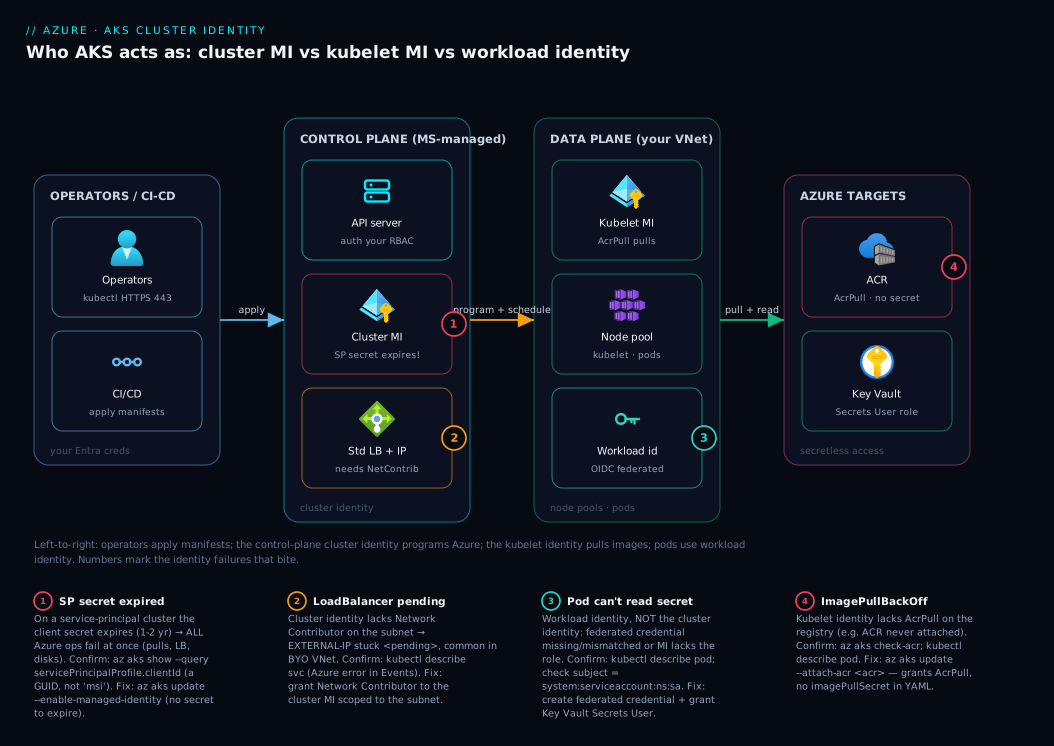
Read the diagram left to right. Operators and CI/CD run kubectl apply — authenticated by your Entra ID identity, separate from the cluster’s own. They hit the Microsoft-managed control plane, where the cloud controller manager turns manifests into Azure API calls: asked for a LoadBalancer or PersistentVolumeClaim, it authenticates as the cluster identity (a system- or user-assigned MI) and calls Azure Resource Manager to program a Standard Load Balancer, allocate a public IP, or attach a managed disk. Badge 1 is the day-2 trap: on a service-principal cluster, the secret behind this identity can expire and every one of these calls fails at once.
Down in the data plane (your node pools, your VNet), two more identities work. The kubelet uses the kubelet identity to pull images from ACR — badge 2 is the ImagePullBackOff when it lacks AcrPull. Separately, your pods use workload identity: a projected service-account token is exchanged via the cluster’s OIDC issuer for an Entra ID token, letting a pod read a Key Vault secret as a user-assigned identity with no stored secret (badge 3). Badge 4 sits on the cluster identity: lacking Network Contributor on the subnet, load-balancer programming fails and the Service hangs on <pending>. The takeaway: three identities, three planes, one principle — the platform holds the credentials so you don’t.
Real-world scenario
Northwind Retail runs its e-commerce API on a single AKS cluster, aks-nw-prod, provisioned in early 2024 by a contractor (since rolled off) whose old Terraform module used a service principal with a client secret, expiry defaulted to two years. It checked in cleanly, ran beautifully, and nobody thought about the identity again — no reminder, no alert, no runbook note. The secret was an invisible dependency.
Eighteen months later, during an autoscale event on a flash-sale Saturday, the cluster tried to add two nodes. The new nodes came up but their pods stuck in ImagePullBackOff, so the site limped rather than fell over. On-call assumed an ACR outage — checked ACR, found it healthy. Then a new LoadBalancer service hung on <pending>. Two unrelated-looking failures, image pulls and load-balancer programming, with one common cause: the service-principal secret had expired three days earlier, and the cluster could no longer authenticate to Azure for any control-plane operation. Running pods survived (they don’t re-auth to stay up); anything needing a new Azure call failed.
az aks show revealed the cluster was service-principal-based, and the SP’s credentials in Entra ID showed a past expiry. The immediate stop-gap was to reset the credential so the site could breathe:
# Emergency: reset the expired SP credential (buys time; not the real fix)
az aks update-credentials \
  --name aks-nw-prod \
  --resource-group rg-nw-prod \
  --reset-service-principal \
  --service-principal "$APP_ID" \
  --client-secret "$NEW_SECRET"
Image pulls and load-balancer programming recovered within minutes. But the team treated this as a near-miss, not a fix — a new secret just resets the same two-year fuse. The durable remediation, applied the following Tuesday in a change window, was to convert the cluster to a managed identity, eliminating the secret entirely:
# The real fix: move to managed identity — no secret to ever expire again
az aks update \
  --name aks-nw-prod \
  --resource-group rg-nw-prod \
  --enable-managed-identity
After conversion they re-attached the registry (az aks update --attach-acr acrnwprod) so the new kubelet identity held AcrPull, verified with az aks check-acr, and deleted the orphaned service principal and its secret from their secret store and Terraform. The runbook lesson: any cluster on a service principal is a scheduled outage waiting for its secret to expire; managed identity removes the failure class. Avoidable impact: ~40 minutes of degraded checkout at peak — entirely preventable by a default newer clusters get for free.
Advantages and disadvantages
The trade-off is lopsided in favour of managed identity, but state it honestly:
| Managed identity | Service principal | |
|---|---|---|
| Pros | No secret to expire/leak/rotate; default & recommended; platform-rotated tokens; no day-2 credential outage; simplest setup | Works across tenants/some legacy tooling; familiar to teams with old automation; portable identity model |
| Cons | Bound to Azure resources (less portable cross-tenant); user-assigned adds one resource to manage | Secret expires → cluster↔Azure auth breaks; you own rotation; secret is a leak surface; legacy / not recommended |
Managed identity matters for essentially every AKS cluster — eliminating the secret-expiry failure class is worth more than any flexibility a service principal offers, and setup is simpler, not harder. A service principal’s portability only counts in genuine cross-tenant or legacy-tooling edge cases a greenfield cluster doesn’t have. Choosing today, you choose managed identity; inheriting a service principal, you convert. Its only “disadvantage” — slightly less cross-tenant portability — is irrelevant to a cluster living in one tenant and subscription, which is the overwhelming majority.
Hands-on lab
This walk-through creates a managed-identity AKS cluster, attaches an ACR so pulls work with no secret, inspects the three identities, and tears everything down. Small SKUs keep it cheap; run it in Cloud Shell where az and kubectl are preinstalled.
1. Set variables and create a resource group.
RG=rg-aks-id-lab
LOC=eastus
AKS=aks-id-lab
ACR=acridlab$RANDOM   # ACR name must be globally unique, alphanumeric

az group create --name $RG --location $LOC
2. Create a registry (Basic tier — cheapest).
az acr create --name $ACR --resource-group $RG --sku Basic
3. Create a cluster with a managed identity. --enable-managed-identity is now the default, but state it explicitly so the intent is clear. One small node keeps cost down.
az aks create \
  --name $AKS \
  --resource-group $RG \
  --enable-managed-identity \
  --node-count 1 \
  --node-vm-size Standard_B2s \
  --generate-ssh-keys
Expected: the cluster provisions in a few minutes. No client secret was created or requested — that’s the point.
4. Inspect the three identities. Confirm the cluster identity type, then the kubelet identity:
# Cluster (control-plane) identity — should be 'SystemAssigned'
az aks show -n $AKS -g $RG --query "identity.type" -o tsv

# Kubelet identity (used for ACR pulls) — note its clientId/objectId
az aks show -n $AKS -g $RG \
  --query "identityProfile.kubeletidentity.{clientId:clientId, objectId:objectId, resourceId:resourceId}" -o jsonc
Expected: SystemAssigned for the cluster and a populated kubelet block — proof the kubelet has its own user-assigned identity, distinct from the cluster’s.
5. Attach the ACR (grant AcrPull to the kubelet identity).
az aks update --name $AKS --resource-group $RG --attach-acr $ACR
6. Verify the pull path.
az aks check-acr --name $AKS --resource-group $RG --acr $ACR.azurecr.io
Expected: a success message confirming the kubelet identity can authenticate and pull from the registry. No imagePullSecret, no registry password anywhere.
7. (Optional) Deploy a public image to see the cluster identity program a LoadBalancer.
az aks get-credentials --name $AKS --resource-group $RG --overwrite-existing
kubectl create deployment web --image=mcr.microsoft.com/azuredocs/aks-helloworld:v1
kubectl expose deployment web --type=LoadBalancer --port=80 --target-port=80
kubectl get service web --watch   # EXTERNAL-IP moves from <pending> to a real IP
When EXTERNAL-IP flips from <pending> to an address, you’ve just watched the cluster identity call Azure to allocate a public IP and program the Standard Load Balancer. Press Ctrl-C to stop.
8. Tear down — delete the resource group to remove everything (cluster, ACR, node RG, system-assigned identity).
az group delete --name $RG --yes --no-wait
The system-assigned cluster identity is deleted with the cluster (that’s its lifecycle); a user-assigned identity, had you used one, would survive and need separate cleanup.
The same cluster in Bicep, showing the managed-identity declaration explicitly:
resource aks 'Microsoft.ContainerService/managedClusters@2024-09-01' = {
  name: 'aks-id-lab'
  location: resourceGroup().location
  identity: {
    type: 'SystemAssigned'   // managed identity for the cluster; no secret
  }
  properties: {
    dnsPrefix: 'aksidlab'
    agentPoolProfiles: [
      {
        name: 'systempool'
        count: 1
        vmSize: 'Standard_B2s'
        mode: 'System'
      }
    ]
    // For a user-assigned cluster identity instead, set identity.type to
    // 'UserAssigned' and supply identity.userAssignedIdentities.
  }
}
Common mistakes & troubleshooting
The identity failures you’ll actually meet, each as symptom → root cause → confirm → fix. Scan the table, then read the detail for your row.
| # | Symptom | Root cause | Confirm | Fix |
|---|---|---|---|---|
| 1 | Cluster-wide ops fail (pulls + LB + disks) after months | SP secret expired | az aks show --query servicePrincipalProfile + Entra creds |
az aks update --enable-managed-identity |
| 2 | ImagePullBackOff, 401 from ACR |
Kubelet identity lacks AcrPull | az aks check-acr; kubectl describe pod |
az aks update --attach-acr <acr> |
| 3 | LoadBalancer stuck <pending> |
Cluster identity lacks Network Contributor | kubectl describe svc; check role assignments |
Network Contributor on the subnet |
| 4 | PVC Pending, disk attach error |
Can’t manage disks in node RG | kubectl describe pvc; node-RG roles |
Contributor on the managed node RG |
| 5 | Pod can’t read KV secret (403) | Workload identity unwired / MI lacks role | kubectl describe pod; check fed cred + role |
Create fed credential; grant KV Secrets User |
| 6 | aad-pod-identity breaks at scale | Pod-managed identity deprecated | Check for AzureIdentity CRDs | Migrate to workload identity |
| 7 | Roles vanish after recreating cluster | System-assigned ID changed | Compare identity objectId before/after | Use a user-assigned identity |
#1 — The expired service-principal secret (the big one)
Everything dies at once — pulls, load balancers, disks — while existing pods keep running, because they don’t re-authenticate to stay up. The cluster is service-principal-based and its client secret expired, so the CCM can no longer authenticate to Entra ID for any Azure call. Confirm whether it’s even SP-based:
# A real GUID here = service principal; 'msi' = already managed identity (not your problem)
az aks show -n aks-nw-prod -g rg-nw-prod \
  --query "servicePrincipalProfile.clientId" -o tsv
A GUID means an SP — check that app’s secret expiry in Entra ID. The durable fix is converting to managed identity; resetting the credential (az aks update-credentials --reset-service-principal) is an emergency stop-gap that just rearms the same fuse.
#2 — ImagePullBackOff from ACR
Pods stick in ImagePullBackOff with a 401 from *.azurecr.io because the kubelet identity lacks AcrPull — usually the ACR was never attached, or a rebuilt cluster’s new kubelet identity wasn’t re-granted. az aks check-acr confirms it directly; the fix is az aks update --attach-acr <acr>. This is the kubelet identity, not the cluster identity — the most common mix-up in this whole area.
#3 — LoadBalancer stuck on <pending>
EXTERNAL-IP hangs on <pending> because the cluster identity lacks Network Contributor on the subnet — common with a custom (BYO) VNet AKS doesn’t own. kubectl describe svc <name> shows the Azure error in Events. Fix: grant Network Contributor to the cluster identity scoped to the subnet (or the VNet’s RG).
#4 — PVC Pending / disk attach errors
A PersistentVolumeClaim stays Pending with an authorization error because the cluster identity can’t create/attach managed disks in the managed node resource group (MC_*). kubectl describe pvc <name> shows it; ensure the cluster identity can manage disks in that RG (Contributor at node-RG scope covers the default case).
#5 — Pod can’t read a Key Vault secret
A 403 reading a Key Vault secret is workload identity, not the cluster identity: the federated credential is missing/mismatched, or the user-assigned MI lacks the role. Verify the federated credential subject exactly matches system:serviceaccount:<ns>:<sa>, then grant the MI Key Vault Secrets User on the vault.
#6 — Still on aad-pod-identity
Intermittent identity failures under load with the old add-on mean you’re on the deprecated pod-managed-identity (look for AzureIdentity CRDs). Migrate to Entra Workload ID — enable the OIDC issuer and workload identity, then create federated credentials.
#7 — Roles vanish after a cluster rebuild
A system-assigned identity gets a new principal ID on recreation, so grants to the old object ID no longer apply. Use a user-assigned identity — a stable, independent principal whose role grants survive cluster lifecycle changes.
Best practices
- Default to managed identity for every new cluster — there’s no good reason to create a service-principal cluster today; the secret-expiry failure class is pure downside.
- Convert inherited SP clusters with
az aks update --enable-managed-identityin a change window, then delete the orphaned SP and its secret from your secret store and IaC. - Use
--attach-acrto grant the kubelet identity AcrPull rather than embedding registry credentials orimagePullSecrets — no secret to leak or rotate. - Prefer a user-assigned identity when roles must exist before the cluster (clean IaC ordering) or when a fleet wants one principal to grant roles to.
- Keep the three identities straight in head and runbook: cluster (LB/disks), kubelet (ACR pulls), workload (pod-to-Azure). Mislabelling sends you fixing the wrong principal.
- Adopt workload identity for pod-to-Azure access; treat aad-pod-identity as something to migrate off, not deploy.
- Grant least privilege at the tightest scope: AcrPull on the registry, Network Contributor on the subnet — never Contributor at subscription scope “to make it work.”
- Verify after every change with
az aks check-acrandaz aks show --query identity— confirm the wiring, don’t just trust an exit code. - Audit for remaining SP clusters —
az aks list --query "[?servicePrincipalProfile.clientId!='msi'].name"surfaces them across a subscription.
Security notes
Managed identity is the more secure choice because there is no long-lived secret to leak. A service-principal client secret lives in your config or secret store, can be copied, can end up in git history, and grants whatever the SP can do until rotated or revoked — exactly the leaked-credential exposure that turns a small mistake into a breach. A managed identity hands out only short-lived, platform-rotated tokens via the instance metadata endpoint; there is no static secret to exfiltrate.
Beyond that, apply ordinary RBAC hygiene. Grant least privilege at the tightest scope: AcrPull on the specific registry (not the RG), Network Contributor on the specific subnet (not the VNet or subscription), and resist granting Contributor at subscription scope to silence an authorization error. For pods, workload identity keeps application credentials out of the cluster entirely — no Key Vault secret in a Kubernetes Secret, no password baked into an image — scoped to exactly the vault, Storage account, or database it needs. Finally, treat the kubelet and cluster identities as privileged principals: whoever can change their role assignments changes what the cluster can do in Azure, so guard those grants with production-grade change control.
Cost & sizing
The good news: identity itself is free. Service principals and managed identities (system- or user-assigned) incur no charge — you pay for nodes, the load balancer, disks, ACR, not the principals. So SP vs MI is driven entirely by reliability and security, never cost. The “cost” of a service principal is the outage when its secret expires — real money in lost availability, but not a line item on your bill.
| Component | Cost driver | Rough figure | Note |
|---|---|---|---|
| Managed identity (system/user) | None | Free | No per-identity charge |
| Service principal | None | Free | “Cost” is the expiry outage, not a bill |
| AKS (Free tier control plane) | Nodes only | Node VM hourly | Control plane free; pay for nodes |
| AKS Standard tier (SLA) | Per cluster | ~₹8/hr (~$0.10/hr) | Adds a backed SLA; identity unchanged |
| Lab nodes (B2s ×1) | VM hours | ~₹8–12/hr (~$0.10–0.15/hr) | Delete the RG when done |
| Standard Load Balancer | Rules + data | Small hourly + per-GB | Allocated by a LoadBalancer svc |
The identity decision doesn’t scale with cost: choose managed identity regardless of cluster size. The only sizing-adjacent call is system-assigned vs user-assigned, a management decision (lifecycle and reuse), not a billing one — user-assigned is still free, just one more resource to track. For the lab, the dominant cost is the single B2s node; deleting the resource group (step 8) stops all charges, and the system-assigned identity is cleaned up automatically with no orphan left behind.
Interview & exam questions
Q1. What is the difference between a service principal and a managed identity in AKS? Both are Entra ID principals you grant Azure roles to. A service principal has a client ID and a client secret you create, store, and must rotate before it expires. A managed identity has no secret you handle — the platform creates, rotates, and hands out short-lived tokens automatically. Managed identity is the default and recommended cluster identity. (AZ-104, AZ-500.)
Q2. Why is managed identity recommended over a service principal? Because a service principal’s secret expires (commonly 1–2 years), and when it does the cluster can’t authenticate to Azure — pulls, load balancers, disks fail at once with no code change. Managed identity removes that failure class: no secret to expire, leak, or rotate.
Q3. Name the three identities an AKS cluster uses and what each is for. The cluster (control-plane) identity for the CCM’s Azure calls (load balancers, public IPs, disks, routes); the kubelet identity for pulling images from ACR (needs AcrPull); and workload identity for individual pods to reach Azure (Key Vault, Storage) without a secret, via OIDC federation.
Q4. How do you let an AKS cluster pull images from a private ACR without a registry secret?
Run az aks update --attach-acr <registry>, which grants the AcrPull role to the cluster’s kubelet identity scoped to that registry. No username/password or imagePullSecret goes into your YAML. Verify with az aks check-acr.
Q5. What is the difference between system-assigned and user-assigned managed identity? A system-assigned identity is created and deleted with the cluster and used by only that cluster. A user-assigned identity is a standalone resource that outlives the cluster, can be shared across resources, and can have roles granted before the cluster exists — which makes IaC ordering clean and gives you a stable principal across rebuilds.
Q6. A LoadBalancer service is stuck on <pending>. What identity problem might cause this?
The cluster identity likely lacks Network Contributor on the subnet or node resource group, so the cloud controller manager can’t program the Standard Load Balancer or allocate the public IP. Common in custom (BYO) VNets. Confirm with kubectl describe svc and check role assignments on the subnet.
Q7. How do you convert an existing service-principal cluster to managed identity?
Run az aks update --enable-managed-identity on the cluster. This switches the cluster to a managed identity; you then re-attach any ACR (so the new kubelet identity gets AcrPull) and remove the now-unused service principal and its secret from your secret store and IaC.
Q8. What is workload identity and what did it replace? Microsoft Entra Workload ID lets a pod authenticate to Azure with no secret by federating the cluster’s OIDC issuer token for a service account to a user-assigned managed identity. It replaces the deprecated aad-pod-identity, which intercepted IMDS calls and had reliability problems at scale.
Q9. If a cluster shows servicePrincipalProfile.clientId as msi, what does that mean?
It means the cluster is using a managed identity, not a service principal — msi is the sentinel value. A real GUID there would indicate a service-principal-based cluster (and a potential secret-expiry exposure).
Q10. Why might role assignments stop working after you recreate a cluster? If the cluster used a system-assigned identity, recreation produces a new principal with a new object ID, so roles granted to the old object ID no longer apply. Using a user-assigned identity gives a stable principal whose role grants survive cluster lifecycle changes.
Q11. Does choosing managed identity over a service principal cost more? No. Both managed identities and service principals are free; you pay for nodes, load balancers, disks, and ACR, not for the identity. The decision is about reliability and security, never cost — the only “cost” of a service principal is the outage when its secret expires.
Q12. Where would an ImagePullBackOff from ACR send you — cluster identity or kubelet identity?
The kubelet identity. Image pulls are performed by the kubelet, so a missing AcrPull grant on the kubelet identity is the cause. Fix with az aks update --attach-acr. The cluster identity governs load balancers and disks, not pulls — a common mix-up.
Quick check
- Which cluster identity model has a credential that can expire and cause a day-2 outage?
- Which of the three AKS identities needs the AcrPull role, and on what scope?
- What single
az akscommand converts a service-principal cluster to managed identity? - System-assigned or user-assigned: which gives you a stable principal whose role grants survive a cluster rebuild?
- What modern feature lets a pod access Azure with no secret, and what deprecated thing does it replace?
Answers
- The service principal — its client secret expires (typically after 1–2 years), breaking the cluster’s ability to authenticate to Azure. Managed identity has no such secret.
- The kubelet identity, scoped to the target Azure Container Registry. Grant it with
az aks update --attach-acr(or AcrPull on the registry directly). az aks update --enable-managed-identity. Afterwards, re-attach any ACR so the new kubelet identity holds AcrPull.- User-assigned — it’s an independent resource with a fixed principal ID, so role grants persist across cluster lifecycle changes. A system-assigned identity gets a new ID on recreation.
- Workload identity (Microsoft Entra Workload ID) — federating the cluster’s OIDC issuer token to a user-assigned managed identity. It replaces the deprecated pod-managed identity (aad-pod-identity).
Glossary
- Cluster (control-plane) identity — the Entra ID principal the cloud controller manager uses to make Azure calls (load balancers, public IPs, disks, routes) on the cluster’s behalf.
- Service principal (SP) — an Entra ID application identity with a client ID and a client secret (or certificate) you create, store, and must rotate before it expires.
- Managed identity (MI) — an Entra ID identity bound to an Azure resource for which the platform manages the credential and issues short-lived tokens automatically; no secret you handle.
- System-assigned managed identity — a managed identity created with, tied to, and deleted with a single resource (the cluster); used by only that resource.
- User-assigned managed identity — a standalone managed-identity resource that outlives the cluster, can be shared, and can have roles assigned before the cluster exists.
- Kubelet identity — the user-assigned managed identity AKS creates for the kubelet to pull images from ACR; needs the AcrPull role.
- Workload identity (Entra Workload ID) — the secretless way a pod authenticates to Azure, federating the cluster’s OIDC issuer token for a Kubernetes service account to a user-assigned MI.
- OIDC issuer — the public endpoint AKS exposes that signs tokens for the cluster’s service accounts, used by workload identity’s federated trust.
- Federated identity credential — the trust config that says “accept tokens from this OIDC issuer for this service account” so a pod can act as a managed identity.
- aad-pod-identity (pod-managed identity) — the deprecated predecessor to workload identity; migrate off it.
- AcrPull — the Azure RBAC role granting permission to pull images from an Azure Container Registry.
- Cloud controller manager (CCM) — the component that turns cluster operations (LB, PVC) into Azure API calls as the cluster identity.
- RBAC role assignment — the binding of a role (e.g. AcrPull) to a principal (e.g. the kubelet identity) at a scope (e.g. a registry).
- Node resource group (
MC_*) — the Azure resource group AKS creates to hold cluster infrastructure (VMSS, NICs, disks, LB) that the cluster identity manages. az aks update-credentials --reset-service-principal— resets a service-principal cluster’s secret; a stop-gap that rearms the same expiry, not a real fix.
Next steps
- Go deeper on what the cluster identity actually drives in AKS Architecture Explained: Managed Control Plane, Node Pools, and the Azure Integrations That Make It Tick.
- Make pod-to-Azure secrets secretless by pairing workload identity with the CSI driver in Azure Key Vault: Secrets, Keys and Certificates Done Right.
- Lock down the registry your kubelet identity pulls from in Securing Azure Container Registry: Private Endpoints, ACR Tasks, Content Trust, and Geo-Replication.
- Ground the RBAC scopes every grant in this article hangs off in Azure Resource Hierarchy Explained: Subscriptions, Resource Groups and Resources.
- Decide whether AKS is even the right compute for your workload in Azure App Service vs Container Apps vs AKS: Choose the Right Compute.