A file lands in a storage container at 3 a.m. and a thumbnail needs generating, a virus scan needs kicking off, and a downstream system needs telling. The old way to find out a file arrived was to poll — a timer that wakes every minute, lists the container, diffs against last time, and hopes it didn’t miss anything between runs. Polling is wasteful when nothing changes, laggy when something does, and fragile at scale. Azure Event Grid flips this around: instead of you asking “did anything happen?”, Azure tells you the instant it does. A blob is created, Event Grid pushes a small JSON event to your handler within a second or two — no timer, no list call, no missed window.
This article is about one specific and frequently misunderstood slice of Event Grid: system topics. A system topic is the built-in, Azure-managed stream of events that an Azure resource emits about itself — a Storage Account announcing “BlobCreated”, a Resource Group announcing “a resource was deployed”, a Subscription announcing “a policy compliance state changed”. You don’t write code to produce these events; Azure already does. Your job is only to subscribe — to say “when this storage account raises BlobCreated for a .jpg under /uploads/, call my Function.” That asymmetry — Azure is the publisher, you are only the subscriber — is the entire mental model, and it is what separates system topics from the custom topics you publish to yourself.
By the end you will know the four moving parts (publisher, topic, subscription, handler), read an Event Grid event payload without squinting, filter so your handler only wakes for events it cares about, and reason about what happens when delivery fails — retries, the dead-letter container, and the difference between “Event Grid couldn’t reach my handler” and “my handler threw a 500”. You will be able to wire a real blob-upload-to-Function reaction end to end, and explain when Event Grid is the right tool versus Event Hubs or Service Bus. This is foundational, AZ-204 and AZ-305 territory, and it underpins almost every serverless pattern you will build on Azure.
What problem this solves
Without an eventing layer, services that need to react to changes in other services have three bad options. They poll (the timer-and-diff loop above), which trades cost against latency and never wins both. They get tightly coupled — the storage-writing service is modified to also call the thumbnail service directly, so now an unrelated team’s deploy can break uploads, and adding a fourth consumer means a code change to the producer. Or they rely on change feeds and queues stitched together by hand, which works but is a lot of plumbing to maintain for “tell me when a blob appears.”
Event Grid removes the polling and decouples the producer from the consumers. The storage account does not know — and does not need to know — who is listening. It raises an event into its system topic; zero, one, or twenty subscribers each get their own copy delivered to their own handler. Add a consumer by adding a subscription; remove one by deleting a subscription; the publisher never changes. This is publish-subscribe at the platform level, and because Azure already emits the events, the publisher side is free.
Who hits the absence of this: any team building “do X when Y happens” across Azure resources. Image pipelines that process uploads. Compliance tooling that must react when a non-compliant resource is created. Cache-invalidation that must fire when source data changes. Audit and security automation that needs to know the moment a role assignment or resource changes. The instinct is to write a polling job; the right answer is almost always a system topic and a subscription. The few times it is not the right answer — high-throughput telemetry streams, ordered processing, long-retention replay — are exactly where Event Hubs or Service Bus belong, and knowing that boundary is half of using Event Grid well.
Learning objectives
By the end of this article you can:
- Explain the four-part Event Grid model — publisher → topic → subscription → handler — and place system topics, custom topics and partner topics within it.
- Identify which Azure services emit system-topic events (Storage, Resource Groups, Subscriptions, Key Vault, and more) and name the common event types for each.
- Read an Event Grid event payload and identify
eventType,subject,data,eventTimeandid, in both the legacy Event Grid schema and the CloudEvents 1.0 schema. - Create an event subscription that filters by event type, subject prefix/suffix and advanced fields so a handler only wakes for relevant events.
- Choose the right handler type — Azure Function, webhook, Service Bus queue/topic, Event Hubs, Storage Queue — for a given reliability and throughput need.
- Reason about delivery: at-least-once semantics, the retry schedule, dead-lettering to a blob container, and how to tell a transport failure from a handler bug.
- Decide when Event Grid is the right tool versus Event Hubs (streaming) or Service Bus (ordered/transactional messaging).
- Wire a blob-upload-to-Function reaction end to end with
azCLI and Bicep, and validate it with the dead-letter and metrics blades.
Prerequisites & where this fits
You should be comfortable with the basics of an Azure Storage Account (containers and blobs), able to run az commands in Cloud Shell, and able to read a block of JSON. Knowing what an Azure Function is helps, because Functions are the most common Event Grid handler; if triggers and bindings are new to you, Azure Functions Triggers and Bindings for Beginners is the companion piece — Event Grid is one of the events a Function can be triggered by. You do not need to know anything about Event Grid yet; that is what this article is for.
Where this sits: Event Grid is the discrete-event, reactive member of Azure’s messaging family. It is not a queue you pull from and it is not a stream you replay; it is a push-based notifier that fans a single event out to many subscribers. It pairs naturally with Azure Functions and serverless patterns (the compute that reacts) and sits alongside Service Bus queues and topics (the ordered, transactional sibling) and Event Hubs (the high-throughput streaming sibling). Many real architectures use Event Grid to trigger work and Service Bus to carry it reliably. Understanding the differences — covered in its own section below — is the point where this knowledge becomes load-bearing.
To anchor the family before the deep dive, here is the one-screen comparison of Azure’s three messaging services. Internalise this table and you will rarely reach for the wrong one:
| Service | Best for | Model | Delivery | Retention | Typical handler |
|---|---|---|---|---|---|
| Event Grid | Reacting to discrete events (“a blob was created”) | Publish-subscribe, push | At-least-once, retried | 24 h retry window (then dead-letter) | Function, webhook, Service Bus |
| Service Bus | Ordered/transactional messaging (commands, work items) | Queues + topics, pull | At-least-once, FIFO with sessions | Until consumed (TTL) | Worker, Function (SB trigger) |
| Event Hubs | High-throughput streaming (telemetry, logs, clickstream) | Partitioned log, pull | At-least-once, replayable | 1–90 days (configurable) | Stream Analytics, consumer group |
Core concepts
Five ideas make every later detail obvious. Read these once; the rest of the article is consequences of them.
The four parts: publisher, topic, subscription, handler. A publisher is whatever produces events — for system topics it is an Azure resource (a storage account, a resource group). A topic is the endpoint events are sent to; it is the routing point. A subscription (an event subscription) is a rule you create that says “route events matching this filter from this topic to that handler.” A handler (also called an event handler or endpoint) is the destination that receives the event — a Function, a webhook URL, a Service Bus queue. One topic can have many subscriptions; each subscription gets its own independent copy of every matching event. This is the whole architecture.
A system topic is the topic Azure manages for a resource. You do not create the events; the resource emits them automatically. You create the system topic (a lightweight Azure resource that represents that stream) and then create subscriptions on it. For some services you can even create the subscription directly against the source and Azure provisions the system topic implicitly. The defining trait: the topic type is fixed by Azure, the event types are defined by Azure, and you are purely a consumer. Contrast this with a custom topic, which you create and you POST your own application events to — there, you are the publisher. Partner topics are a third kind, where a non-Azure SaaS (e.g. an external system) publishes into Azure through Event Grid. This article is about system topics; the model is identical, only the publisher differs.
| Topic type | Who publishes the events | Who creates the topic | Example | This article |
|---|---|---|---|---|
| System topic | Azure itself, automatically | You (lightweight, or implicit) | Storage BlobCreated, RG resource changes |
The focus |
| Custom topic | Your own application code (POST) |
You | Your app raises OrderPlaced |
Mentioned for contrast |
| Partner topic | A third-party SaaS via Event Grid | The partner + you | External SaaS pushes events into Azure | Briefly noted |
An event is small, and it is a notification — not the data. An Event Grid event is a compact JSON object: what happened (eventType), to what (subject), when (eventTime), a unique id, and a small data payload with specifics. Crucially, the event tells you a blob was created and gives you its URL; it does not ship the blob’s bytes. The event is a doorbell, not a delivery van. Your handler reads the event, then goes and fetches whatever it needs (the blob, the resource) using the identifiers in the event. Events are designed to be small and numerous, with a maximum size around 1 MB (and billing/optimised around 64 KB chunks), so you keep payloads lean.
Delivery is push, at-least-once, and retried. Event Grid pushes to your handler — you don’t poll Event Grid. It guarantees at-least-once delivery: it will keep trying until your handler acknowledges success (an HTTP 2xx), with an exponential-ish retry schedule over a window (default up to 24 hours). “At-least-once” has a sharp edge: under retries or races your handler can receive the same event more than once, and ordering is not guaranteed. So handlers must be idempotent — processing the same event twice must be safe. If every retry fails for the whole window, the event is dead-lettered to a storage container you nominate (or dropped, if you configured none).
Filtering happens at the subscription, before your handler wakes. You rarely want every event. A subscription can filter by event type (only BlobCreated, not BlobDeleted), by subject (only blobs under /uploads/ ending in .jpg), and by advanced filters on fields inside the event. Filtering is evaluated by Event Grid before delivery, so an unmatched event never reaches — and never bills you for invoking — your handler. Good filters are how you keep a busy storage account from waking a Function 50,000 times a day for blobs it doesn’t care about. (Every term in bold above is collected in the Glossary at the end for quick lookup.)
Which Azure services emit system-topic events
System topics exist because Azure resources publish events about themselves. You can’t subscribe to a stream that doesn’t exist, so the first practical question is always “does this source emit the event I want?” The set of event sources and their event types is fixed by Azure. Here are the ones you will actually use, with the headline event types each produces:
| Event source (system topic type) | Common event types | Typical reason to subscribe |
|---|---|---|
| Storage Account (Blob) | BlobCreated, BlobDeleted, BlobRenamed, DirectoryCreated |
Process/scan uploads; invalidate caches |
| Resource Group | ResourceWriteSuccess, ResourceDeleteSuccess, ResourceActionSuccess (and …Failure) |
Audit/automation when resources change |
| Azure Subscription | Same Resource* event family, scoped to the whole subscription | Subscription-wide governance automation |
| Key Vault | SecretNewVersionCreated, SecretNearExpiry, CertificateNearExpiry |
Rotate secrets; alert before expiry |
| App Configuration | KeyValueModified, KeyValueDeleted |
Refresh config-driven services |
| Event Hubs | CaptureFileCreated |
React when a capture file lands in storage |
| Container Registry | ImagePushed, ImageDeleted |
Trigger deploys/scans on new images |
| Maps, Media, IoT Hub, SignalR, Machine Learning, Policy | Service-specific event families | Service-specific automation |
Two things to internalise from this table. First, the Resource events* from a Resource Group or a Subscription are the workhorse for governance and audit automation — “tell me whenever any resource is created/changed/deleted in this scope.” Second, the event types are namespaced strings (for example Microsoft.Storage.BlobCreated), and you filter on them exactly, so getting the string right matters. The next sections drill into the two most common sources — Storage and Resource/Subscription — because they cover the vast majority of real Event Grid work.
Storage events: the most common system topic
A storage account raises events as blobs change. The two you reach for constantly are Microsoft.Storage.BlobCreated (a blob was written) and Microsoft.Storage.BlobDeleted. The event’s subject encodes the path — /blobServices/default/containers/<container>/blobs/<path> — which is exactly what subject prefix/suffix filters key off. The data block carries the blob URL, content type, size and the API that caused it (PutBlob, PutBlockList, CopyBlob, etc.).
| Storage event type | Fires when | Key data fields |
Common filter |
|---|---|---|---|
Microsoft.Storage.BlobCreated |
A blob is committed | url, contentLength, api, contentType |
subject ends .jpg; api = PutBlockList |
Microsoft.Storage.BlobDeleted |
A blob is deleted | url, api |
subject prefix on a container |
Microsoft.Storage.BlobRenamed |
A blob is renamed (HNS accounts) | sourceUrl, destinationUrl |
by container prefix |
Microsoft.Storage.DirectoryCreated |
A directory is created (HNS / Data Lake) | url |
Data Lake folder automation |
One sharp gotcha lives here. With block-blob uploads, a naive subscription to BlobCreated can fire on every PutBlock intermediate step, not just the final commit, generating noise and duplicate-looking events. The fix is to filter on the api field (an advanced filter) for PutBlockList (or FlushWithClose on Data Lake), so you only react when the blob is fully written. This single filter is the difference between a clean pipeline and one that processes half-uploaded files.
Resource and subscription events: governance and audit
A Resource Group system topic emits an event for every successful (and failed) resource operation in that group; a Subscription system topic does the same across the whole subscription. These are the events you wire to compliance and audit automation: “whenever a resource is created in rg-prod, check it’s tagged and compliant,” or “whenever any storage account is created subscription-wide, enforce a private-endpoint policy.”
| Event type | Meaning | Use it to… |
|---|---|---|
Microsoft.Resources.ResourceWriteSuccess |
A resource was created or updated | Enforce tags, trigger config drift checks |
Microsoft.Resources.ResourceWriteFailure |
A create/update failed | Alert on failed deployments |
Microsoft.Resources.ResourceDeleteSuccess |
A resource was deleted | Audit deletions; trigger cleanup |
Microsoft.Resources.ResourceActionSuccess |
A control-plane action ran (e.g. restart) | Audit operational actions |
The data block here carries the operation name, the resource URI, the caller (claims), and correlation IDs — enough for an audit handler to record who did what to which resource when. Because these can be high-volume in a busy subscription, filtering by operation name or resource type in an advanced filter is essential; subscribing to everything unfiltered will flood your handler.
Reading an Event Grid event: schemas and fields
Every handler starts by parsing the event, so you must be fluent in the payload. Event Grid supports two schemas: its native Event Grid schema (the legacy default) and CloudEvents 1.0 (an open CNCF standard, increasingly the recommended default for interoperability). They carry the same information under slightly different field names. Here is the same conceptual event in both, starting with the Event Grid schema fields:
| Event Grid schema field | What it is | Example |
|---|---|---|
id |
Unique event id (use for idempotency) | "a1b2c3…" |
eventType |
What happened | "Microsoft.Storage.BlobCreated" |
subject |
What it happened to (path) | "/…/containers/uploads/blobs/cat.jpg" |
eventTime |
When it happened (UTC) | "2026-06-24T09:15:02Z" |
data |
Event-specific payload object | { "url": "…", "contentLength": 1048576, "api": "PutBlockList" } |
dataVersion |
Version of the data schema |
"1.0" |
topic |
Full resource ID of the topic | /subscriptions/…/storageAccounts/… |
CloudEvents 1.0 maps these to standardised names: eventType becomes type, topic becomes source, eventTime becomes time, and metadataVersion becomes specversion: "1.0" — while subject, id and data keep their names. So a handler that parsed the Event Grid schema needs only those four field renames to read CloudEvents, and nothing else changes conceptually.
Two practical rules. First, pick one schema per subscription and have your handler parse that — you set the delivery schema when you create the subscription (--event-delivery-schema EventGridSchema or CloudEventSchemaV1_0); for new work, CloudEvents is the safer default because tooling across clouds understands it. Second, treat the id field as your idempotency key (it’s the same id across retries of the same event). Here is a minimal Storage BlobCreated event in the Event Grid schema so you can see the shape end to end:
{
  "id": "1807e102-…",
  "topic": "/subscriptions/…/resourceGroups/rg-evt/providers/Microsoft.Storage/storageAccounts/stevtdemo",
  "subject": "/blobServices/default/containers/uploads/blobs/cat.jpg",
  "eventType": "Microsoft.Storage.BlobCreated",
  "eventTime": "2026-06-24T09:15:02.1234567Z",
  "dataVersion": "1.0",
  "data": {
    "api": "PutBlockList",
    "contentType": "image/jpeg",
    "contentLength": 1048576,
    "url": "https://stevtdemo.blob.core.windows.net/uploads/cat.jpg"
  }
}
Filtering: only wake the handler that cares
A subscription with no filter receives every event the topic emits. On a busy storage account that is thousands of invocations a day, most of them irrelevant — and each one may bill you for a Function execution. Filtering is therefore not optional polish; it is the core of a sane subscription. Event Grid offers three layers, from cheapest/simplest to most expressive:
| Filter type | Filters on | Example | Notes |
|---|---|---|---|
| Event type | eventType exact match |
only Microsoft.Storage.BlobCreated |
Cheapest; always set it |
| Subject begins-with | subject prefix |
/…/containers/uploads/blobs/ |
One container or path |
| Subject ends-with | subject suffix |
.jpg |
File extension matching |
| Advanced filters | Any field, incl. inside data |
data.api = PutBlockList; data.contentLength > 1000 |
Up to ~25 filters; operators below |
Subject filters are case-sensitive by default (you can opt into case-insensitive matching), so /Uploads/ and /uploads/ are different — a classic “why didn’t my handler fire” bug. Advanced filters are the powerful layer: they compare any JSON field, including nested data fields, using a set of operators. The ones you’ll use:
| Operator | Meaning | Example field & value |
|---|---|---|
StringBeginsWith / StringEndsWith |
Prefix/suffix on a string | subject ends .jpg |
StringContains / StringIn / StringNotIn |
Substring / set membership | data.api In ["PutBlockList","FlushWithClose"] |
NumberGreaterThan / NumberLessThan / NumberIn |
Numeric comparison | data.contentLength > 0 |
NumberGreaterThanOrEquals / …LessThanOrEquals |
Inclusive numeric | data.contentLength >= 1024 |
BoolEquals |
Boolean match | a custom boolean field |
A real example ties it together: to react only to fully-committed JPEG uploads in the uploads container, you combine an event-type filter (BlobCreated), a subject begins-with (/blobServices/default/containers/uploads/blobs/), a subject ends-with (.jpg), and an advanced filter on data.api StringIn ["PutBlockList"]. That subscription wakes your handler only for the events that matter, and ignores the thousands that don’t.
# Filtered subscription: only committed .jpg uploads, to a Function
az eventgrid system-topic event-subscription create \
  --name sub-thumbnails \
  --resource-group rg-evt \
  --system-topic-name st-stevtdemo \
  --endpoint-type azurefunction \
  --endpoint "/subscriptions/<sub>/resourceGroups/rg-evt/providers/Microsoft.Web/sites/fn-thumbs/functions/MakeThumbnail" \
  --included-event-types Microsoft.Storage.BlobCreated \
  --subject-begins-with "/blobServices/default/containers/uploads/blobs/" \
  --subject-ends-with ".jpg" \
  --advanced-filter data.api StringIn PutBlockList
Delivery, retries and dead-lettering
This is the section that separates people who use Event Grid from people who get paged by it. You must understand what happens after an event is raised but the handler isn’t happy. Event Grid’s contract is at-least-once delivery: it tries to deliver until your handler returns a success status, retrying on failure. Success is an HTTP 2xx within the timeout; anything else (5xx, timeout, connection refused) is a failure that triggers a retry.
| Handler response | Event Grid treats it as | What happens next |
|---|---|---|
| HTTP 200/202 (2xx) | Success | Event acknowledged, done |
| HTTP 400 / 413 (bad request / too large) | Permanent failure | No retry — straight to dead-letter |
| HTTP 401 / 403 / 404 | Permanent failure (config error) | No retry — dead-letter; fix the endpoint |
| HTTP 408 / 429 / 5xx | Transient failure | Retried on the schedule |
| Timeout / connection refused | Transient failure | Retried on the schedule |
The distinction matters: some failures are not retried. A 400 Bad Request or 413 Payload Too Large is treated as the handler permanently rejecting the event, so Event Grid dead-letters it immediately rather than retrying for 24 hours. A 404 (wrong URL) or 401/403 (auth misconfigured) is similarly non-retriable — these are your config being wrong, and retrying wouldn’t help. Transient codes (429, 503, timeouts) are retried with back-off.
The retry schedule is best-effort exponential back-off: Event Grid retries quickly at first, then spaces attempts out, over a configurable window. The two knobs you control per subscription:
| Retry control | What it sets | Default | Range / note |
|---|---|---|---|
--max-delivery-attempts |
Max number of delivery tries | 30 | 1–30 |
--event-ttl (time-to-live) |
How long to keep retrying | 1440 min (24 h) | 1–1440 minutes |
| Dead-letter destination | Where un-deliverable events go | none (dropped!) | A blob container you nominate |
Whichever limit (attempts or TTL) is hit first ends the retries. And here is the rule that bites teams: if you do not configure a dead-letter destination, exhausted events are silently dropped. Always set one in production. The dead-letter target is a blob container; failed events land there as JSON, annotated with the reason (deliveryAttempts, lastDeliveryOutcome, lastHttpStatusCode), so you can inspect and replay them. Wire it up:
# Add retry policy + dead-letter container to a subscription
az eventgrid system-topic event-subscription update \
  --name sub-thumbnails \
  --resource-group rg-evt \
  --system-topic-name st-stevtdemo \
  --max-delivery-attempts 30 \
  --event-ttl 1440 \
  --deadletter-endpoint "/subscriptions/<sub>/resourceGroups/rg-evt/providers/Microsoft.Storage/storageAccounts/stevtdemo/blobServices/default/containers/deadletter"
The decision table that ends the 3 a.m. confusion — “is this Event Grid’s fault or my handler’s?”:
| If you see… | It’s probably… | Do this |
|---|---|---|
Events in the dead-letter container with lastHttpStatusCode: 404 |
Wrong/deleted handler endpoint | Fix the endpoint URL; re-create the subscription |
Dead-letter with 5xx and high deliveryAttempts |
Handler crashing/throwing | Fix the handler bug; events were retried for 24 h |
Dead-letter with 400/413 and deliveryAttempts: 1 |
Handler rejected (bad request / too big) | Handler returned 4xx — fix what it rejects |
| No events arriving at all, none dead-lettered | Filter excludes them, or webhook not validated | Check filters/subject case; check handshake (below) |
| Duplicate processing | At-least-once + non-idempotent handler | Add idempotency on event id |
Choosing a handler (endpoint) type
A subscription routes to exactly one handler. Which one depends on what you need: synchronous compute, durable buffering, fan-in to a worker, or just a webhook. Event Grid supports several native endpoint types, and the choice changes reliability and scale characteristics:
| Handler type | Use when | Reliability characteristic | Note |
|---|---|---|---|
| Azure Function (Event Grid trigger) | You want to run code per event | Function handles retry/scale; idempotency on you | The default for “do X on event” |
| Webhook (HTTP) | An external/custom HTTP endpoint | Must return 2xx fast; must pass validation handshake | Most general; needs the handshake |
| Service Bus queue/topic | You need durable, ordered, transactional processing downstream | Event buffered in SB; consumer pulls at its pace | Event Grid → SB → worker is a top pattern |
| Storage Queue | Simple, cheap durable buffering | Event sits in a queue until consumed | Lightweight alternative to Service Bus |
| Event Hubs | You want to aggregate many events into a stream | Buffers into a partitioned log | For high-volume re-aggregation |
| Relay Hybrid Connection | On-prem handler behind a firewall | Tunnels to on-prem | Niche but useful |
The recurring senior-engineer pattern is Event Grid → Service Bus → worker: Event Grid gives you the cheap, decoupled “something happened” notification with fan-out and filtering; Service Bus gives the downstream the durability, ordering and transaction semantics that Event Grid deliberately doesn’t. If your handler must never drop work and must process in order, don’t point Event Grid straight at fragile compute — land it in a queue first. For the common “resize this image” case, a direct Function handler is perfect and simplest.
The webhook validation handshake
If your handler is a raw webhook (not a native Azure handler like Functions or Service Bus, which Azure validates automatically), Event Grid will not deliver real events until your endpoint proves it wants them. On subscription creation, Event Grid sends a SubscriptionValidationEvent, and your endpoint must echo back the validationCode it contains (or respond to a validation URL). This stops attackers from pointing Event Grid subscriptions at arbitrary URLs to flood them. If you see “subscription failed to validate,” this handshake is why — your webhook didn’t return the code. Native handlers (Functions, Logic Apps, Service Bus, Storage Queue, Event Hubs) skip this because Azure trusts and validates them internally.
Architecture at a glance
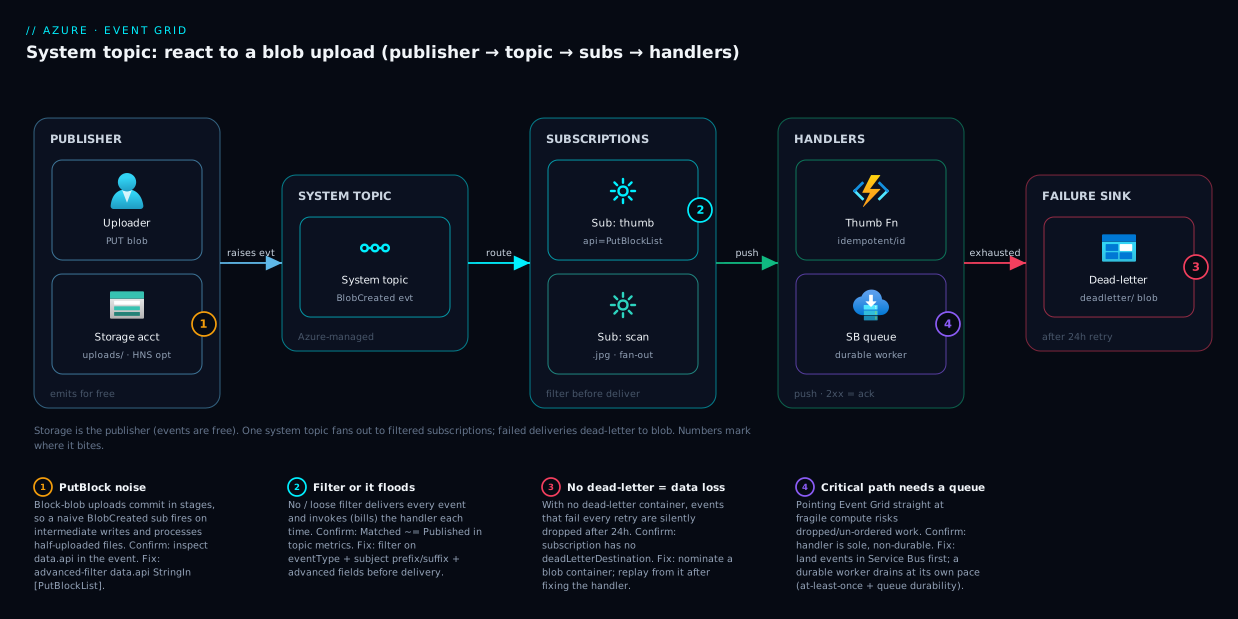
Follow the path left to right. A user (or any writer) uploads a file into a blob container on a storage account. That storage account is the publisher: the instant the upload commits, it raises a Microsoft.Storage.BlobCreated event into its system topic — a lightweight Azure resource that represents this account’s event stream. You did not write any code to produce that event; Azure emits it for free. The system topic is the routing point, and hanging off it are one or more event subscriptions, each its own filter-plus-handler rule.
The first subscription filters tightly — event type BlobCreated, subject ending .jpg, data.api is PutBlockList — and pushes matching events to an Azure Function that generates a thumbnail. A second subscription, with a different filter, fans the same upload event out to a Service Bus queue that a durable worker drains for virus scanning, because that path must never drop work. When Event Grid pushes to a handler and gets back anything but a 2xx, it retries on a back-off schedule for up to 24 hours; if every attempt fails, the event is dead-lettered into a nominated blob container where you can inspect the failure reason and replay it. The numbered badges mark the four places this design either bites or saves you: the un-committed-blob noise problem, the filter that prevents it, the dead-letter safety net, and the webhook validation handshake that an external endpoint must pass.
Real-world scenario
ContosoSnap, a fictional photo-sharing startup, lets users upload images that must be resized into three thumbnail sizes, scanned for malware, and indexed for search — within a couple of seconds of upload, at unpredictable volume (a viral post can spike from 5 to 5,000 uploads a minute). Their first design was a timer-triggered Function that ran every minute, listed the uploads container, and processed anything new. It worked in the demo and fell over in production: at low traffic it burned compute listing an empty container 1,440 times a day; at high traffic the per-minute batch lagged users by up to 60 seconds and occasionally double-processed blobs whose state it misjudged between runs.
They moved to Event Grid system topics. They created a system topic on the storage account and two subscriptions. The first routed Microsoft.Storage.BlobCreated events — filtered to subject ending in image extensions and data.api StringIn ["PutBlockList"] — directly to the thumbnailing Function, which now fires within a second or two of each upload and scales out automatically with load. The PutBlockList filter was the fix for a bug they’d hit immediately: without it, the Function fired on intermediate block writes and tried to resize half-uploaded files, producing corrupt thumbnails. The second subscription fanned the same events into a Service Bus queue drained by the virus-scanning worker, because scanning must never drop a file and must survive the scanner being down for maintenance — Event Grid’s 24-hour retry plus the queue’s durability gave them that guarantee without coupling the two paths.
Two incidents taught them the rest. One night the thumbnailing Function had a bad deploy and returned 500 for twenty minutes. Because they had configured a dead-letter container, the events that exhausted their retries landed there as JSON with lastHttpStatusCode: 500 and deliveryAttempts: 30; once the deploy was rolled back, they wrote a tiny script to re-publish the dead-lettered events and recovered every missed upload — nothing was lost. The second incident was subtler: an analytics teammate added a raw webhook subscription to a third-party service and it “didn’t work.” The cause was the validation handshake — the webhook never echoed the validationCode, so Event Grid never activated the subscription. Switching the third-party integration to land in a Storage Queue (a native handler that needs no handshake) and having their own code drain it fixed it in an hour.
The outcome: end-to-end upload-to-thumbnail latency dropped from up to 60 seconds to under 3, compute cost fell because nothing polls an empty container, and adding the search-indexing consumer later was a one-line subscription, not a change to the upload path. The producer (storage) never knew or cared how many consumers existed — which is the entire point of the pattern.
Advantages and disadvantages
Event Grid is the right tool for a specific shape of problem and the wrong tool for others. The explicit trade-off:
| Advantages | Disadvantages |
|---|---|
| Publisher emits events for free (system topics) — no producer code | Not for high-throughput streaming (use Event Hubs) |
| Decouples producer from consumers; add/remove subscribers freely | No ordering guarantee; no FIFO (use Service Bus sessions) |
| Push-based — sub-second reaction, no polling cost | At-least-once → duplicates possible; handler must be idempotent |
| Fan-out: one event to many subscribers, each filtered | No long retention/replay — 24 h retry window, then dead-letter |
| Filtering before delivery saves handler invocations/cost | Webhooks need a validation handshake; a footgun for newcomers |
| At-least-once with 24 h retry + dead-letter = durable enough | Events are notifications, not data — handler still fetches the payload |
| Serverless, pay-per-operation, scales automatically | High-volume unfiltered subscriptions can flood handlers/costs |
When each side matters: choose Event Grid when the workload is reactive and event-shaped — “when X happens, do Y” — and you value decoupling and fan-out over ordering and replay. That covers most blob-processing, governance-automation and cache-invalidation work. Avoid it (or pair it with something else) when you need strict ordering (a payment pipeline → Service Bus with sessions), high-throughput streaming with replay (millions of telemetry events/sec → Event Hubs), or guaranteed durable work queues (Event Grid → Service Bus, never Event Grid → fragile compute directly). The most common production architecture uses Event Grid for the notification and Service Bus for the durable carriage — they are complements, not competitors.
Hands-on lab
This builds a real blob-upload-to-Function reaction using Event Grid system topics, entirely with az CLI, on resources that fit comfortably in free credits. Run it in Cloud Shell. Total time ~15 minutes; teardown at the end removes everything.
Step 1 — variables and resource group.
RG=rg-evt-lab
LOC=eastus
SA=stevt$RANDOM            # storage account names must be globally unique + lowercase
az group create --name $RG --location $LOC
Step 2 — create the storage account (the publisher) and a container.
az storage account create --name $SA --resource-group $RG --location $LOC \
  --sku Standard_LRS --kind StorageV2
az storage container create --name uploads --account-name $SA --auth-mode login
Step 3 — register the Event Grid resource provider (once per subscription).
az provider register --namespace Microsoft.EventGrid
# Wait until it reports "Registered":
az provider show --namespace Microsoft.EventGrid --query registrationState -o tsv
Step 4 — create the system topic for the storage account. A system topic is a lightweight resource pointing at the source. Expected result: a topic of type Microsoft.Storage.StorageAccounts.
SA_ID=$(az storage account show -n $SA -g $RG --query id -o tsv)
az eventgrid system-topic create \
  --name st-$SA \
  --resource-group $RG \
  --location $LOC \
  --topic-type Microsoft.Storage.StorageAccounts \
  --source $SA_ID
Step 5 — wire a quick handler. For a zero-code test, route to a Storage Queue so you can see events land without deploying a Function. Create a queue, then subscribe with a tight filter.
az storage queue create --name eventqueue --account-name $SA --auth-mode login

az eventgrid system-topic event-subscription create \
  --name sub-uploads \
  --resource-group $RG \
  --system-topic-name st-$SA \
  --endpoint-type storagequeue \
  --endpoint "$SA_ID/queueservices/default/queues/eventqueue" \
  --included-event-types Microsoft.Storage.BlobCreated \
  --subject-begins-with "/blobServices/default/containers/uploads/blobs/" \
  --advanced-filter data.api StringIn PutBlockList CopyBlob
Step 6 — add a dead-letter container (the production-grade habit).
az storage container create --name deadletter --account-name $SA --auth-mode login
az eventgrid system-topic event-subscription update \
  --name sub-uploads --resource-group $RG --system-topic-name st-$SA \
  --max-delivery-attempts 30 --event-ttl 1440 \
  --deadletter-endpoint "$SA_ID/blobServices/default/containers/deadletter"
Step 7 — trigger an event. Upload a blob; within a second or two an event should appear in the queue.
echo "hello event grid" > sample.jpg
az storage blob upload --account-name $SA --container-name uploads \
  --name sample.jpg --file sample.jpg --auth-mode login
Step 8 — verify the event landed. Peek the queue; you should see one message whose body is a BlobCreated event JSON with subject ending sample.jpg.
az storage message peek --queue-name eventqueue --account-name $SA --auth-mode login -o jsonc
Expected: a base64 message body that decodes to the event, with "eventType": "Microsoft.Storage.BlobCreated" and your blob’s URL in data.url. If nothing appears, the troubleshooting section below maps the usual causes — most often a subject-case mismatch or the data.api filter excluding your upload’s API.
Step 9 — teardown. One command removes the lot.
az group delete --name $RG --yes --no-wait
The equivalent Bicep for the system topic and a Function subscription, for when you move this from lab to repo:
param location string = resourceGroup().location
param storageAccountName string
param functionResourceId string

resource sa 'Microsoft.Storage/storageAccounts@2023-05-01' existing = {
  name: storageAccountName
}

resource systemTopic 'Microsoft.EventGrid/systemTopics@2024-06-01-preview' = {
  name: 'st-${storageAccountName}'
  location: location
  properties: {
    source: sa.id
    topicType: 'Microsoft.Storage.StorageAccounts'
  }
}

resource sub 'Microsoft.EventGrid/systemTopics/eventSubscriptions@2024-06-01-preview' = {
  parent: systemTopic
  name: 'sub-thumbnails'
  properties: {
    destination: {
      endpointType: 'AzureFunction'
      properties: { resourceId: functionResourceId }
    }
    filter: {
      includedEventTypes: [ 'Microsoft.Storage.BlobCreated' ]
      subjectBeginsWith: '/blobServices/default/containers/uploads/blobs/'
      subjectEndsWith: '.jpg'
      advancedFilters: [
        { operatorType: 'StringIn', key: 'data.api', values: [ 'PutBlockList' ] }
      ]
    }
    eventDeliverySchema: 'CloudEventSchemaV1_0'
    retryPolicy: { maxDeliveryAttempts: 30, eventTimeToLiveInMinutes: 1440 }
  }
}
Common mistakes & troubleshooting
The failures below are the ones that actually generate support tickets. Each is symptom → root cause → how to confirm → fix.
| # | Symptom | Root cause | Confirm with | Fix |
|---|---|---|---|---|
| 1 | Handler never fires, nothing dead-lettered | Subject filter case mismatch (/Uploads/ vs /uploads/) |
Re-read the actual subject in a captured event |
Match case exactly, or enable case-insensitive subject matching |
| 2 | Handler fires on half-uploaded blobs | No data.api filter; firing on PutBlock steps |
Inspect events’ data.api field |
Add advanced filter data.api StringIn ["PutBlockList"] |
| 3 | Webhook “subscription failed to validate” | Endpoint didn’t echo the validationCode |
Subscription provisioning state = failed | Implement the handshake, or use a native handler (Function/queue) |
| 4 | Same event processed twice | At-least-once delivery + non-idempotent handler | Duplicate side-effects with same event id |
De-dupe on id; make the operation idempotent |
| 5 | Events vanish on handler outage | No dead-letter destination configured | Subscription has no deadLetterDestination |
Configure a dead-letter blob container |
| 6 | No events at all after creating topic | Resource provider Microsoft.EventGrid not registered |
az provider show … registrationState |
az provider register --namespace Microsoft.EventGrid |
| 7 | Handler flooded, costs spike | Subscription has no/loose filter on a busy account | Metrics show huge Delivery Attempts |
Tighten event-type + subject + advanced filters |
| 8 | 404/401 in dead-letter immediately |
Handler endpoint URL wrong or auth missing | Dead-letter lastHttpStatusCode 404/401 |
Fix endpoint resource ID / managed-identity access |
| 9 | “Why is my Function getting BlobDeleted too?” |
Subscribed to all event types, not just BlobCreated |
Check includedEventTypes is empty |
Set --included-event-types Microsoft.Storage.BlobCreated |
| 10 | Events delayed minutes, not seconds | Handler returning 5xx → being retried with back-off | Dead-letter/metrics show high deliveryAttempts |
Fix the handler so it returns 2xx promptly |
Two of these deserve a sentence of emphasis. #5 (no dead-letter) is the single most expensive omission: without it, a handler outage means permanent, silent data loss after 24 hours — always nominate a dead-letter container in production. #2 (the PutBlock noise) is the most common storage-specific surprise: block-blob uploads commit in stages, and only PutBlockList is the “blob is now complete” signal; filter on it or you process incomplete files.
To confirm what’s actually flowing, the Event Grid metrics on the topic and subscription are your truth source:
| Metric | Tells you | Watch for |
|---|---|---|
| Published Events | Events the source emitted | Zero → source isn’t raising events (wrong topic type) |
| Matched Events | Events that passed a subscription’s filter | Zero while Published > 0 → filter too tight / case bug |
| Delivery Attempts | Total push attempts to handlers | Spiking → handler failing & retrying |
| Delivery Succeeded | Handler returned 2xx | Flat while Attempts climb → handler down |
| Dead-Lettered Events | Events that exhausted retries | Any non-zero → investigate the handler |
Best practices
- Always set a dead-letter destination in production. No dead-letter means silent data loss after the retry window. It is one extra argument; never skip it.
- Filter at the subscription, not in the handler. Every event your handler rejects in code is an invocation you paid for. Push event-type, subject and advanced filters down so unmatched events never wake compute.
- Filter storage
BlobCreatedondata.api = PutBlockList. Otherwise you fire on intermediate block writes and process incomplete blobs. - Make every handler idempotent on the event
id. At-least-once delivery guarantees you will eventually see a duplicate; design so reprocessing is a no-op. - Prefer native handlers (Function, Service Bus, Storage Queue) over raw webhooks unless you need an external endpoint — native handlers skip the validation handshake and authenticate via managed identity.
- Use Event Grid → Service Bus for work that must not drop or must stay ordered. Don’t point Event Grid straight at fragile compute for critical paths; buffer in a queue.
- Choose CloudEvents 1.0 schema for new subscriptions for cross-tool/cross-cloud interoperability; pick one schema per subscription and parse exactly that.
- Watch the
MatchedvsPublishedmetrics when debugging “nothing fires” — a gap means your filter (often a subject-case bug) is dropping everything. - Scope governance subscriptions tightly — a Subscription-level Resource* topic can be enormous; filter by resource type or operation name before delivery.
- Right-size with one topic, many subscriptions. Don’t create a topic per consumer; create subscriptions per consumer on the shared system topic so each gets its own filter and retry policy.
- Secure the handler endpoint (see Security notes) — use managed identity and, for webhooks, validate the request; never expose an unauthenticated handler that mutates state.
Security notes
Event Grid’s security model has three faces: who can publish, who can receive, and how the event in transit is protected. For system topics you don’t publish (Azure does), so the action moves to receiving and access control.
- Use managed identity for delivery to native handlers. Event Grid can deliver to Service Bus, Event Hubs and Storage Queues using a system-assigned managed identity on the topic, with RBAC granting that identity send rights — no keys in config. This is the right pattern; see Managed Identities Demystified for the identity model. Grant the topic’s identity the minimal role (e.g.
Azure Event Grid Data Senderon the target). - Lock down handler endpoints. A Function with an Event Grid trigger is invoked by Event Grid with a validation flow; do not expose a parallel anonymous HTTP route that mutates the same state. For webhooks, validate the request (the handshake plus, ideally, checking the source) so attackers can’t forge events into your handler.
- The webhook validation handshake is a security feature, not red tape. It prevents anyone from creating an Event Grid subscription that floods an arbitrary URL. Don’t disable or work around it for raw endpoints — implement it.
- Least privilege on the subscription scope. Creating subscriptions on a Subscription-level system topic is a powerful, broad capability (you see every resource event). Restrict who has
Microsoft.EventGrid/eventSubscriptions/writeat that scope. - Encrypt and access-control the dead-letter container. Dead-lettered events are real event payloads sitting in blob storage; they can contain resource IDs, paths and caller claims. Treat that container like any sensitive data — private access, RBAC, no public blob access.
- Events are not the data, which is a security feature too. Because the event carries a reference (a blob URL) not the bytes, your handler must still authenticate to fetch the actual object — so a leaked event doesn’t leak the file, only its location.
Cost & sizing
Event Grid is priced per operation — essentially per event delivered (and a few other operation types), with a generous free monthly allowance (the first 100,000 operations per month are free), then a low per-million-operations rate. For most reactive workloads the bill is negligible; the cost mistakes are about volume you didn’t intend, not unit price.
| Cost driver | What it is | How to control it |
|---|---|---|
| Operations (events) | Each delivery is billed (after the free 100k/month) | Filter at the subscription so unmatched events aren’t delivered |
| Retry attempts | A failing handler multiplies attempts | Fix handlers fast; a 5xx loop inflates operations |
| Downstream handler cost | The Function/queue your events trigger | Usually dwarfs Event Grid’s own cost — filter to reduce invocations |
| Dead-letter storage | Blobs written for failed events | Tiny; lifecycle-expire old dead-letters |
Sizing intuition with rough figures: at the free tier, 100,000 events/month cost ₹0 / $0 in Event Grid charges. Even a busy app doing, say, 5 million events/month lands in single-digit US dollars for Event Grid itself — often well under ₹500/month. The number to watch is not Event Grid’s bill but the handler’s bill: 5 million unfiltered events that each invoke a Function cost far more in Functions execution than in Event Grid operations. This is why filtering is a cost control, not just a correctness one — every event you stop at the subscription is a handler invocation you didn’t pay for. Free-tier-friendly: the lab above stays inside the free operation allowance and uses Standard_LRS storage that costs pennies; the teardown removes even that.
Interview & exam questions
Q1. What is an Event Grid system topic, and how does it differ from a custom topic?
A system topic is an Azure-managed event stream for events a resource emits about itself (e.g. a storage account’s BlobCreated); Azure is the publisher and you only subscribe. A custom topic is one you create and publish your own application events to. Same model, different publisher. (AZ-204)
Q2. Name the four parts of the Event Grid model. Publisher (source of events), topic (routing endpoint), event subscription (filter + handler rule), and handler/endpoint (the destination that receives events). One topic can have many subscriptions, each delivering its own filtered copy. (AZ-204)
Q3. Event Grid guarantees what delivery semantics, and what must your handler therefore do?
At-least-once delivery with retries until a 2xx, over (by default) a 24-hour window. Because the same event can be delivered more than once and order isn’t guaranteed, handlers must be idempotent — typically de-duplicating on the event id. (AZ-204/AZ-305)
Q4. A storage BlobCreated subscription is firing on incomplete blobs. Why, and how do you fix it?
Block-blob uploads commit in stages; the subscription is reacting to intermediate PutBlock operations. Add an advanced filter data.api StringIn ["PutBlockList"] so it only fires when the blob is fully committed. (AZ-204)
Q5. What happens to an event when every delivery attempt fails?
If a dead-letter destination is configured, the event is written to that blob container with failure metadata (lastHttpStatusCode, deliveryAttempts); if none is configured, the event is silently dropped after the retry window. Always configure dead-lettering in production. (AZ-204)
Q6. When would you choose Event Grid over Service Bus or Event Hubs? Event Grid for reacting to discrete events with fan-out and filtering (“when X happens, do Y”); Service Bus for ordered/transactional messaging (work queues, FIFO with sessions); Event Hubs for high-throughput streaming with replay (telemetry, logs). They are complements; Event Grid → Service Bus is common. (AZ-305)
Q7. Why does a raw webhook handler require a validation handshake?
To prevent abuse: without it, anyone could create a subscription that floods an arbitrary URL. Event Grid sends a SubscriptionValidationEvent and the endpoint must echo the validationCode to prove it consents. Native handlers (Functions, Service Bus, Storage Queue) are validated internally and skip it. (AZ-204)
Q8. Which HTTP responses from a handler are retried, and which are not?
Transient codes — 408, 429, 5xx, timeouts, connection errors — are retried on the back-off schedule. 400 and 413 (and config errors like 401/403/404) are treated as permanent and dead-lettered without retry. 2xx is success. (AZ-204)
Q9. How do filters reduce cost, not just noise? Filtering is evaluated by Event Grid before delivery, so an unmatched event is never delivered — meaning your handler (often a Function you pay per execution) is never invoked. Tight filters cut both event-delivery operations and, more significantly, downstream handler invocation cost. (AZ-305)
Q10. What’s the difference between the Event Grid schema and CloudEvents 1.0?
Both carry the same information; CloudEvents 1.0 is an open CNCF standard using type/source/time/specversion where the Event Grid schema uses eventType/topic/eventTime/metadataVersion. Pick one per subscription; CloudEvents is recommended for cross-cloud interoperability. (AZ-204)
Q11. How would you securely deliver events to a Service Bus queue without secrets?
Enable a system-assigned managed identity on the Event Grid topic and grant it the Azure Event Grid Data Sender role on the target Service Bus, then set the subscription to deliver using that identity — no SAS keys in configuration. (AZ-305)
Q12. A governance team wants to act whenever any resource is created in a subscription. What do you build?
A Subscription-scoped system topic emitting Microsoft.Resources.ResourceWriteSuccess, with a subscription filtered (by resource type or operation name) routing to a Function or Logic App. Filter tightly — a subscription-wide topic is high-volume. (AZ-305)
Quick check
- In the four-part model, which part do you not write code for when using a system topic?
- You need to react only to fully-committed blob uploads. Which advanced filter do you add?
- Event Grid delivery is “at-least-once.” What property must your handler therefore have?
- Where do events go when every delivery attempt fails — and what happens if you didn’t configure that destination?
- For a high-throughput telemetry stream you need to replay later, is Event Grid the right tool? If not, what is?
Answers
- The publisher — Azure emits the events automatically; you only create the topic and subscriptions.
data.api StringIn ["PutBlockList"](block-blob commit) — so you don’t fire on intermediatePutBlockwrites.- Idempotency — the same event can be delivered more than once, so reprocessing must be safe (de-dupe on the event
id). - They are dead-lettered to the blob container you nominate, with failure metadata; if you configured no dead-letter destination, they are silently dropped after the 24-hour retry window.
- No — Event Grid has no long retention/replay. Use Event Hubs for high-throughput streaming with replay; pair with Event Grid only if you also need discrete-event reactions.
Glossary
- Event Grid — Azure’s push-based, publish-subscribe service for reacting to discrete events with filtering and fan-out.
- System topic — An Azure-managed topic representing the events a resource emits about itself (e.g. a storage account’s blob events).
- Custom topic — A topic you create and publish your own application events to (you are the publisher).
- Partner topic — A topic a third-party SaaS publishes into Azure through Event Grid.
- Publisher — The source of events; for system topics, Azure itself.
- Event subscription — A rule binding a filter to a handler, defining what is routed where and the retry/dead-letter policy.
- Handler / endpoint — The destination that receives events: Function, webhook, Service Bus, Storage Queue, Event Hubs, etc.
- Event — A small JSON notification (what/where/when + small
data); a reference to a change, not the changed data itself. eventType— The string naming what happened (e.g.Microsoft.Storage.BlobCreated); the primary filter key.subject— A path-like string naming what the event happened to; the key for prefix/suffix filters.- Advanced filter — A subscription filter that compares any JSON field (including nested
data) with string/number/bool operators. - At-least-once delivery — Event Grid retries until a 2xx, so events are never lost in transit but may be delivered more than once.
- Dead-lettering — Writing events that exhaust retries to a nominated blob container for inspection and replay.
- Idempotency — Designing a handler so processing the same event twice has the same effect as once.
- CloudEvents 1.0 — An open CNCF event-format standard Event Grid supports alongside its native schema.
- Validation handshake — The
SubscriptionValidationEventflow that proves a raw webhook consents to receive events.
Next steps
- Build the compute that reacts: Azure Functions Triggers and Bindings for Beginners — Event Grid is one of the triggers, and the Function is the most common handler.
- Go deeper on serverless reaction patterns with Azure Functions and Serverless Patterns.
- Learn the durable, ordered sibling for work that must not drop: Service Bus Queues vs Topics — the natural downstream of Event Grid for critical paths.
- Master the publisher source itself: Azure Storage Account Fundamentals — blobs, containers, and the events they raise.
- Secure delivery without secrets using Managed Identities Demystified, and observe the whole pipeline with Azure Monitor and Application Insights.