You wrote a small function that resizes an image. Now you have to actually run it when a file lands in storage. So you write a loop that polls a queue, code to open a connection to the storage account, code to download the blob, more for the SDK’s retries and credentials, and a block to write the thumbnail back. Two hundred lines later, about fifteen are your actual logic — the resize — and the rest is plumbing you’ll write again for the next function. That plumbing is the problem triggers and bindings exist to delete.
A trigger is the single event that starts your function — an HTTP request arrives, a message lands on a queue, a blob is uploaded, a timer fires. Bindings are the declarative wiring that hands your function its inputs (data read for you before your code runs) and carries its outputs (data written for you after your code returns) — without you opening a single connection or instantiating one SDK client. You declare “this function is triggered by a queue message, reads a row from a database, and writes a file to blob storage,” and the Azure Functions runtime does all the connecting, fetching, and writing around your code. You write the fifteen lines that matter.
This article is the beginner’s mental model. We define a trigger and a binding plainly, draw the line between triggers (exactly one, it starts you), input bindings (read before), and output bindings (write after), walk every common type with a one-line “use it when,” decode the function.json/decorator syntax, and finish with the day-one mistakes — wrong connection setting, a binding that silently does nothing, a trigger that fires twice. By the end you’ll read a function’s bindings the way you read a function signature: at a glance, knowing exactly what flows in and out.
What problem this solves
Most code that connects systems together is mostly plumbing. To react to a queue message you hold a connection to the broker, poll or subscribe, deserialize, manage credentials, retry on transient failures, and acknowledge or dead-letter; to then write a record you instantiate another client and repeat the ceremony. None of that is your business logic — it’s the same boilerplate for every integration, every team writes a subtly buggy version, and it tangles infrastructure (credentials, hostnames, retry counts) into the function that’s meant to just resize an image, so the logic is buried and hard to test.
Who hits this: anyone writing glue and automation, event processors (file pipelines, telemetry, change reactors), webhooks and lightweight APIs, and scheduled jobs. The bindings model removes the plumbing for all of them — you declare the connection points, the runtime owns the wiring, your code shrinks to its purpose. The honest limit: bindings cover the common integrations exceptionally well, and when you need an operation no binding supports, you reach for the SDK directly inside the function.
The whole idea, framed before the detail — the three roles a binding can play and what each removes from your code:
| Role | When it runs | What it does for you | What you’d write without it | You get / return |
|---|---|---|---|---|
| Trigger | Starts the function (exactly one) | Listens for the event, hands you its data | The whole event-listening / polling loop | The event payload (request, message, blob) |
| Input binding | Just before your code runs | Fetches data and passes it in | Client init + credential + fetch + retry | A ready-to-use object (row, document, blob) |
| Output binding | Just after your code returns | Writes the value you produced | Client init + credential + write + retry | You set a return/out value; runtime writes it |
Learning objectives
By the end of this article you can:
- Define a trigger and a binding in one sentence each, and explain why a function has exactly one trigger but many bindings.
- Tell apart a trigger, an input binding, and an output binding by when each runs and which direction data flows.
- Name the right trigger for an event source — HTTP, Timer, Queue Storage, Service Bus, Event Hubs, Event Grid, Blob, Cosmos DB.
- Read and write the binding declaration in
function.json, itshost.json/local.settings.jsoncompanions, and language decorators/attributes. - Explain the
connectionsetting indirection — why a binding names an app setting, not a literal string — the number-one beginner failure. - Walk a real event-driven architecture (a blob-upload thumbnail pipeline) and point to where the trigger and each binding sit.
- Recognise the model’s edges — at-least-once delivery, what has no binding, when to use the SDK instead.
Prerequisites & where this fits
You should be comfortable with the basics: what a function is (a small piece of code with one entry point), what a resource group is, running az in a terminal, and reading JSON. You don’t need messaging brokers, Kubernetes, or much about Functions hosting — we build the model from the ground up.
This sits at the very front of the Serverless / Compute track — the concept you learn first, before plans, scaling, or orchestration. Every function app needs a backing storage account (the runtime keeps trigger state there), so a passing familiarity with Azure Storage Account Fundamentals helps the blob and queue examples land. Once this clicks, the natural next read is the full reference, Azure Functions and Serverless Patterns: Event-Driven Compute — plan-by-plan, Durable Functions, scaling, and the production playbook. If you’re still deciding whether serverless functions are the right model at all, that lives upstream in Azure App Service vs Container Apps vs AKS.
Core concepts
Four mental models make every later detail obvious.
A trigger is the one doorway in; bindings are the conveyor belts. Picture your function as a room with exactly one door — the trigger — through which work enters; when the event happens, the door opens and your code runs once. Around the room, bindings are conveyor belts: input bindings drop materials on your desk before you start (a row, a file’s contents); output bindings carry away what you put on the out-tray after you finish (a message, a written file). Hence exactly one trigger (one door, one reason to run) but several bindings (many belts in and out).
Bindings are declarative, not imperative. You don’t write how to connect — you declare that a connection exists: “triggered by orders-queue; read the customer document from Cosmos DB; write a confirmation to confirmations-queue.” The runtime does the connecting, credentialing, fetching, retrying, and writing. The declaration is the function’s signature — what flows in and out — made real by the platform.
Direction is everything: in, out, and the trigger. A trigger is an in binding that also starts the function. A plain input binding (in) reads data and hands it to you but starts nothing. An output binding (out) writes a value you produce. Get the direction wrong — out when you meant in — and the binding silently does nothing: no error, just a function that doesn’t read or write what you expected. One of the most confusing beginner failures.
A binding names a setting, not a secret. The single most important beginner detail. A binding doesn’t contain a connection string — it contains the name of an app setting that holds it (or an identity-based connection). The Blob binding says "connection": "StorageConn", and StorageConn in app settings holds the actual value. Secrets stay out of code, and you swap dev/prod by changing settings. It’s also the number-one mistake — putting the string as the connection value, or forgetting to create the setting, so the binding fails to resolve.
The vocabulary in one table
Every moving part, side by side (the glossary repeats these for lookup):
| Term | One-line definition | Direction | Starts the function? |
|---|---|---|---|
| Trigger | The single event that runs the function | in (special) |
Yes — exactly one |
| Input binding | Data read and handed in before you run | in |
No |
| Output binding | A value you produce, written after you run | out |
No |
| Binding expression | A {placeholder} filled from the trigger |
n/a | No |
connection |
The app-setting name holding the connection | n/a | No |
function.json |
Per-function file listing trigger + bindings | n/a | No |
host.json |
App-wide runtime config | n/a | No |
| Function app | The deployment unit hosting the functions | n/a | No |
Triggers: the one event that starts your function
A trigger answers one question: what makes this function run? Every function has exactly one. It both listens for its event and delivers that event’s data as your function’s first parameter. Choosing the right one is mostly matching your event source to the trigger built for it. The catalogue you’ll use in 95% of real work:
| Trigger | Fires when… | You receive | Reach for it when |
|---|---|---|---|
| HTTP | A request hits the function URL | The request (method, headers, body, route params) | Webhooks, lightweight APIs, manual invokes |
| Timer | A schedule (NCRONTAB) elapses | A timer object (is-past-due, next run) | Nightly cleanups, polls, scheduled syncs |
| Queue Storage | A message lands on a Storage queue | The message body (string/POCO) | Simple, cheap async work; decoupling |
| Service Bus | A message arrives on a queue/topic | The message (body, properties, sessions) | Ordering, sessions, dead-letter, enterprise messaging |
| Event Hubs | Events arrive on a partition | A batch of events | High-throughput telemetry/streams |
| Event Grid | A subscribed event is published | The event (schema/CloudEvents) | Azure resource events, pub/sub fan-out |
| Blob | A blob is created/updated | The blob’s contents + metadata | File pipelines (thumbnails, parsing) |
| Cosmos DB | Documents change (change feed) | A batch of changed documents | React to data changes without polling |
A few rules that save beginners real time:
- Exactly one trigger, always. A function can’t be triggered by both a queue and a timer; for two sources, write two functions over shared code.
- The trigger’s data is your first parameter — the request, message body, or blob bytes arrives as the parameter named in the trigger binding. You don’t fetch it; it’s handed to you.
- The Blob trigger has a famous catch. By default it polls the storage logs, which can lag by minutes and miss events at high rates. Beyond light use, drive blob events through an Event Grid source instead.
- Most message triggers are at-least-once. Queue Storage, Service Bus, and Event Hubs can deliver the same event more than once (after a crash or lock timeout); your code must tolerate running twice — see troubleshooting.
Trigger metadata: free context from the event
Beyond the payload, a trigger hands you metadata for free — no extra fetch. You declare a parameter with the right name (or read a context object) and the runtime fills it. The dequeue count is gold — it tells you how many times this message has been delivered, which is how you detect a retry.
| Trigger | Useful metadata you get free | Why it’s handy |
|---|---|---|
| HTTP | Route params, query string, headers, method | Routing and validation without parsing the URL |
| Queue Storage | dequeueCount, message id, insertion/expiry time |
Detect retries; age-based logic |
| Service Bus | DeliveryCount, MessageId, session id, dead-letter info |
Idempotency keys; ordering; poison detection |
| Blob | name, uri, properties (size, content type) |
Use {name} downstream without re-reading the blob |
| Event Hubs | Partition id, sequence number, offset, enqueued time | Checkpoint reasoning; ordering within a partition |
Bindings: inputs and outputs without the SDK
If the trigger is why the function runs, bindings are what data flows around it. The one thing to internalise is when each runs. An input binding runs before your code, fetches data, and passes it in — declare “read the customer document for this order” and a ready Cosmos DB object is in your parameter at start, no client or credential code. An output binding runs after you return: assign a value (a return, an out parameter, or a collector) and the runtime writes it to the target — a message, blob, or row — again with no client code. The catalogue, the directions each supports, and when you’d wire it:
| Binding | Input (in) |
Output (out) |
Typical use |
|---|---|---|---|
| Blob Storage | Yes | Yes | Read a file in; write a processed file out (often via {name}) |
| Queue Storage | Trigger only | Yes | Emit a follow-up message (POCO serialized to JSON) |
| Service Bus | Trigger only | Yes | Send to a queue/topic; set message properties |
| Cosmos DB | Yes | Yes | Read a document by id; write/upsert a document |
| Table Storage | Yes | Yes | Cheap key-value reads/writes for small lookup data |
| Event Hubs | Trigger only | Yes | Emit events to a downstream stream |
| Event Grid | Trigger only | Yes | Publish a custom event (pub/sub fan-out) |
| SignalR | Yes (connection info) | Yes (messages) | Real-time push to clients without a server |
| SendGrid / Twilio | No | Yes | Send email / SMS as an output-only side-effect |
Two distinctions beginners must hold:
- Some bindings are output-only. You can’t trigger on or read from a SendGrid binding — it only sends. Queue/Service Bus/Event Hubs are triggers or outputs, not input bindings. The table’s columns say exactly what each supports.
- An input binding is not a trigger. A Cosmos DB input binding reads a document but never starts your function — something else must trigger it first. The trigger is the change feed; the input binding is a point lookup.
Binding expressions: borrowing values from the trigger
What makes input/output bindings dynamic is binding expressions — {placeholders} the runtime fills from the trigger’s data. A Blob trigger on uploads/{name} exposes {name}; an input binding reads thumbs/{name} and an output binding writes processed/{name} — all three referring to the same file by name, no string concatenation. Expressions can also pull from metadata or JSON fields of the trigger message ({order.customerId}).
| Expression | Resolves to | Example use |
|---|---|---|
{name} |
A token from the trigger (e.g. blob filename) | Read/write the same file across bindings |
{queueTrigger} |
The raw queue message string | Use the message body in a path |
{rand-guid} |
A fresh GUID at runtime | Unique output blob names |
{DateTime} |
The current UTC time | Time-partitioned output paths |
{order.customerId} |
A field from a JSON trigger message | Look up a document by a message field |
How bindings are declared
You’ll meet bindings in two shapes. Script languages (JavaScript, older-model Python, PowerShell) use a function.json file per function listing the trigger and bindings as JSON. Compiled languages (C#, Java) and the newer Python v2 / Node v4 models declare them in code via attributes or decorators. The concept is identical; only the syntax differs. The same Queue-triggered, Blob-output function both ways — first the classic function.json:
{
  "bindings": [
    {
      "name": "order",
      "type": "queueTrigger",
      "direction": "in",
      "queueName": "orders-queue",
      "connection": "StorageConn"
    },
    {
      "name": "receipt",
      "type": "blob",
      "direction": "out",
      "path": "receipts/{rand-guid}.txt",
      "connection": "StorageConn"
    }
  ]
}
Read it top to bottom: the binding with "direction": "in" and a Trigger type is the trigger; each "direction": "out" block is an output. The name is the parameter your code sees; connection is an app-setting name. A compiled language expresses the identical wiring as method attributes/decorators instead of JSON — e.g. C#'s [QueueTrigger("orders-queue", Connection = "StorageConn")] string order parameter with a [BlobOutput(...)] on the method — but the fields are the same; only the wrapper changes. This table decodes the ones you’ll write constantly:
| Field | Means | Example value | Beginner gotcha |
|---|---|---|---|
type |
Which binding (trigger/input/output) | queueTrigger, blob, cosmosDB |
Trigger types end in Trigger |
direction |
in (read) or out (write) |
in / out |
Wrong direction = silent no-op |
name |
The parameter name in your code | order, receipt |
Must match the code parameter exactly |
connection |
App-setting name holding the connection | StorageConn |
NOT the connection string itself |
queueName / path / containerName |
The specific resource | orders-queue |
Often uses a {binding-expression} |
dataType (optional) |
How to parse the input | string, binary, stream |
Wrong type → deserialization error |
host.json, local.settings.json, and the connection setting
Three files surround your bindings, and beginners conflate them: function.json / decorators declare one function’s trigger and bindings; host.json sets app-wide runtime behaviour (extension versions, batch sizes, retry, logging); local.settings.json holds local-only settings for func start — it’s in .gitignore and is never used in Azure, where the same keys must exist as real application settings.
The connection indirection ties them together: when a binding says "connection": "StorageConn", the runtime looks up an app setting named StorageConn — locally in local.settings.json, in Azure in the function app’s configuration. Set the Azure one explicitly:
# Create the app setting the binding's "connection" points at
az functionapp config appsettings set \
  --name fn-orders-prod --resource-group rg-fn-prod \
  --settings StorageConn="<storage-connection-string-or-leave-for-identity>"
resource fnApp 'Microsoft.Web/sites@2023-12-01' = {
  name: 'fn-orders-prod'
  location: location
  kind: 'functionapp'
  properties: {
    serverFarmId: plan.id
    siteConfig: {
      appSettings: [
        // The binding's connection="StorageConn" resolves to THIS setting
        { name: 'StorageConn', value: storage.properties.primaryEndpoints.blob }
        { name: 'AzureWebJobsStorage', value: storageConnString }
        { name: 'FUNCTIONS_EXTENSION_VERSION', value: '~4' }
      ]
    }
  }
}
For production, prefer an identity-based connection (managed identity) over a literal string — set the prefix StorageConn__blobServiceUri and grant the identity an RBAC role, so no secret sits in config. For now hold the rule: the binding names a setting, and that setting carries the connection or the identity hint.
Architecture at a glance
Walk a real pipeline: a user uploads a photo, and a function generates a thumbnail and records it — the canonical bindings example, because every role appears exactly once, reading left to right. A client uploads an image over HTTPS into a blob container (uploads/) — that upload is the event. An Event Grid subscription on the container detects the new blob and pushes a notification to the function; Event Grid rather than the polling Blob trigger is the production-correct choice, which is why it sits between storage and compute.
In the centre is the function, where you read the three roles straight off the picture. The trigger (the doorway) is the blob-created event from Event Grid — it starts one execution and hands it the blob’s {name}. An input binding reads the original bytes from uploads/{name} before your code runs. Your code — the only part you wrote — resizes the image. Two output bindings carry results away after you return: resized bytes to a thumbnails/{name} blob, and a record to Cosmos DB. The function opens no storage or database client — it declares four connection points and fills in the resize. To the side, Application Insights receives telemetry automatically and a Key Vault-backed setting supplies any non-identity connection. The badges mark the spots that bite beginners — polling-vs-Event-Grid, a wrong connection setting, a direction mistake, and at-least-once duplicates.
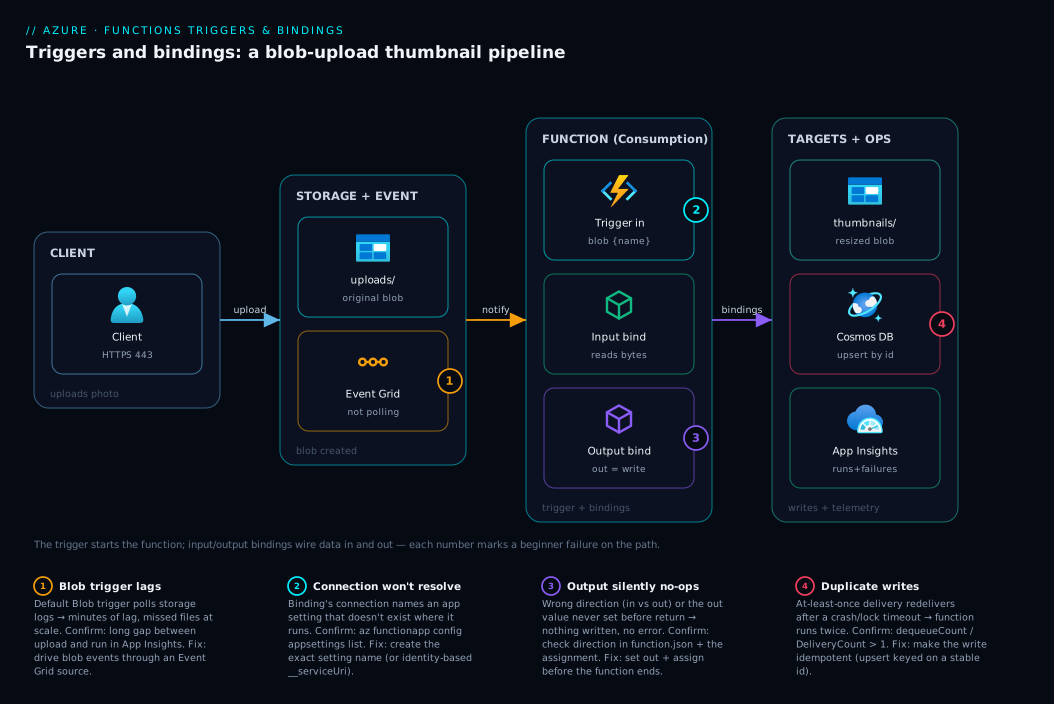
Trace it as a sentence and the model is yours: the upload triggers the function; the input binding reads the original; your code transforms it; the output bindings write the thumbnail and the record.
Real-world scenario
Northwind Photos, a small online print shop, let customers upload photos to order prints. Their original design ran a permanently-on web app whose background thread polled a storage queue, downloaded each image with the Storage SDK, generated a thumbnail, wrote it back, and inserted a catalogue row — about 240 lines of connection-and-retry code around 20 lines of resizing. The thread occasionally died silently on an unhandled SDK exception and thumbnails stopped until customers reported blank galleries; worse, a Black-Friday spike of 5,000 uploads in an hour overwhelmed the single web app and backed the queue up for forty minutes.
A junior engineer rebuilt the thumbnail step as one Azure Function: an Event Grid trigger on the uploads container, an input Blob binding reading uploads/{name}, an output Blob binding writing thumbnails/{name}, and an output Cosmos DB binding writing the catalogue record. The body shrank to the 20 lines of resize logic — every line of connection, credential, polling, and retry code deleted in favour of four binding declarations, with connection settings backed by the function’s managed identity so no storage key sat in config.
The payoff was concrete. Because the function scaled out automatically with the event rate, the forty-minute spike now drained in under three — dozens of instances in parallel, no autoscale configured. The silent-death problem vanished: no long-lived thread to die, each event got its own short execution, and Application Insights (free) showed every execution and failure on a dashboard instead of in a customer email. The one bump came on day two — duplicate catalogue rows for a handful of images, the model’s honest edge: at-least-once delivery redelivered a few events after a transient blip, so the function ran twice. The fix was small and lived in their code, not the bindings — an upsert keyed on the blob name. Bindings remove the plumbing, but idempotency is still your job: the platform guarantees the event arrives, not that it arrives exactly once. Six months on, the function needed zero operational attention and the plumbing was gone for good.
Advantages and disadvantages
The bindings model trades a little flexibility for a lot of deleted code:
| Advantages (why bindings help you) | Disadvantages (where they bite) |
|---|---|
| Delete most connection/credential/retry code — your function shrinks to its logic | A binding covers common operations; an unusual API call still needs the raw SDK |
| Declarative wiring reads like a function signature — what flows in/out is obvious | The “magic” can feel opaque when it fails — no client code to step through |
| The runtime owns the event-listening loop (no polling/checkpoint code to get wrong) | You give up fine control over how the listening/batching works (tunable, but indirect) |
Swap dev/prod by changing an app setting, not code (the connection indirection) |
A wrong/missing connection setting fails quietly until you know where to look |
| Identity-based connections keep secrets out of code entirely | More moving parts to learn up front (function.json, host.json, settings, extensions) |
| Built-in retries, poison queues, and Application Insights come for free | At-least-once delivery means you still own idempotency — bindings don’t dedupe |
The advantages dominate for the bread-and-butter of serverless — glue, file pipelines, webhooks, scheduled jobs, change reactors — where the integration is standard and the value is in your logic. The disadvantages matter when you need an operation no binding exposes, must precisely control batching and ordering, or are debugging a binding that won’t resolve. The practical stance: use bindings by default, drop to the SDK for the one call that needs it — the two coexist happily in the same function.
Hands-on lab
Build a tiny function with a real trigger and a real output binding — an HTTP trigger that writes a message to a storage queue. Free-tier-friendly (Consumption bills per execution; this costs effectively nothing) and you delete everything at the end. You need the Azure Functions Core Tools (func) and az.
Step 1 — Variables and resource group.
RG=rg-fn-lab
LOC=centralindia
STG=stfnlab$RANDOM          # storage name: lowercase, globally unique
APP=fn-lab-$RANDOM          # function app name: globally unique
az group create -n $RG -l $LOC -o table
Step 2 — Create the backing storage account. Every function app needs one (it stores trigger state and metadata).
az storage account create -n $STG -g $RG -l $LOC --sku Standard_LRS -o table
Step 3 — Create a Consumption-plan function app (Node shown).
az functionapp create -n $APP -g $RG \
  --storage-account $STG --consumption-plan-location $LOC \
  --runtime node --functions-version 4 --os-type Linux -o table
Step 4 — Scaffold the project and an HTTP-triggered function.
func init fnlab --javascript
cd fnlab
func new --name AddOrder --template "HTTP trigger" --authlevel anonymous
This creates an AddOrder function with an HTTP trigger already wired.
Step 5 — Add an output binding to a storage queue. In the function’s function.json, add a second binding so it writes to a queue when called:
{
  "name": "outputQueueItem",
  "type": "queue",
  "direction": "out",
  "queueName": "orders-queue",
  "connection": "AzureWebJobsStorage"
}
In the code, set the output before returning — e.g. context.bindings.outputQueueItem = req.query.name || "anonymous-order";. connection reuses AzureWebJobsStorage (a setting the app already has), so you create nothing new.
Step 6 — Deploy and call it.
func azure functionapp publish $APP
# Then invoke the deployed function (note the URL printed by publish):
curl "https://$APP.azurewebsites.net/api/AddOrder?name=widget-123"
Expected: an HTTP 200 with the function’s greeting, and — the point of the lab — a new message widget-123 now sitting in the orders-queue.
Step 7 — Confirm the binding wrote the message.
# The output binding created the queue and enqueued the message — no SDK code involved
az storage message peek --queue-name orders-queue \
  --account-name $STG --auth-mode login --num-messages 5 -o table
You should see your message body. You wrote zero lines of queue-client code — the output binding did the connecting and writing.
Validation checklist. You created an HTTP-triggered function, added a queue output binding via function.json, called it over HTTP, and confirmed the binding enqueued a message with no SDK code — the whole model in miniature: a trigger started the function, a binding carried data out.
Cleanup (avoid lingering charges).
az group delete -n $RG --yes --no-wait
Cost note. A Consumption app and LRS storage for a few test calls cost effectively nothing (well under ₹10); Consumption includes a monthly free execution grant. Deleting the resource group removes everything.
Common mistakes & troubleshooting
The failures that trip up almost everyone on day one — symptom → root cause → confirm → fix.
| # | Symptom | Root cause | Confirm | Fix |
|---|---|---|---|---|
| 1 | Function won’t start; “Microsoft.Azure.WebJobs… cannot find connection” | connection names a setting that doesn’t exist |
Check the binding’s connection value vs az functionapp config appsettings list |
Create the app setting with that exact name |
| 2 | Binding does nothing; no error | Wrong direction (declared in for an output, or vice-versa) |
Read direction in function.json against intent |
Set in for reads, out for writes |
| 3 | Output never written | Forgot to set the output value / out param before returning | No assignment to the binding name in code | Assign the return/out/collector before the function ends |
| 4 | Function runs twice for one event | At-least-once delivery (queue/Service Bus/Event Hubs) | dequeueCount/DeliveryCount > 1 in logs |
Make the work idempotent (upsert; dedupe key) |
| 5 | Blob trigger fires late or misses files | Default Blob trigger polls storage logs (lag at scale) | High latency between upload and run in App Insights | Use an Event Grid source for blob events |
| 6 | “No job functions found” / function not detected | name in binding ≠ code parameter, or wrong extension version |
Compare binding name to the parameter; check host.json extension bundle |
Align names; install/upgrade the binding extension |
| 7 | Poison queue fills up; messages vanish from main queue | Function keeps throwing; runtime dead-letters after retries | A -poison queue appears alongside the source |
Fix the throwing code; inspect the poison queue |
| 8 | Works locally, fails in Azure | Setting in local.settings.json not created as a real app setting |
Setting present locally, absent in az ... appsettings list |
Add the same key to the function app’s configuration |
| 9 | Input binding object is null/empty | Binding expression ({name}) didn’t resolve, or path is wrong |
Log the resolved path; check the trigger exposes that token | Fix the path/expression; ensure the source exists |
| 10 | Deserialization error on the message | dataType/parameter type mismatch (binary vs string vs POCO) |
Exception names a JSON/cast error | Match the parameter type to the payload shape |
The one that bites hardest is the connection setting (rows 1 and 8): most “it won’t start” and “works locally, not in Azure” failures share one root cause — the setting the binding names doesn’t exist where the function runs. Locally it lives in local.settings.json; in Azure it must be a real app setting. Confirm with az functionapp config appsettings list -n <app> -g <rg> -o table and create the exact name (e.g. StorageConn) if missing.
Best practices
- Default to bindings; drop to the SDK only for the call no binding covers. Most functions are 90% bindings with the occasional direct SDK call — that mix is correct.
- Never put a connection string as the
connectionvalue. It names an app setting; set the setting separately and keep secrets out offunction.jsonand source control. - Prefer identity-based connections in production — the function’s managed identity plus an RBAC role, so no secret lives in config.
- Make every event handler idempotent. Assume at-least-once delivery; design writes as upserts or dedupe on a stable key.
- Use Event Grid for blob events at any real scale. The polling Blob trigger is fine only for light use.
- One trigger per function; split when you need two sources — two small functions over shared code, not a fight with the model.
- Match the parameter name and type to the binding exactly, and keep
host.jsonlean —namemismatches make the function “not found”, and app-wide settings there affect every function. - Wire Application Insights from the start — near-free, and it turns “the thumbnail didn’t generate” into a visible execution.
- Use binding expressions, not string concatenation.
{name}/{rand-guid}keep paths declarative and bug-free. - Don’t do long, blocking work in a binding-heavy function. Bindings are for I/O at the edges; heavy orchestration belongs in Durable Functions.
Security notes
- Managed identity over keys. Give the app a system-assigned managed identity with least-privilege RBAC (e.g. Storage Blob Data Contributor for a blob binding), using the identity-based connection form (
<setting>__serviceUri) so no key sits in config. - Secrets in Key Vault, referenced not embedded. When a connection genuinely needs a secret, store it in Key Vault and use a Key Vault reference app setting. Details in Azure Key Vault: Secrets, Keys & Certificates.
- Lock down HTTP triggers.
authLevel: anonymousis fine for a public webhook but dangerous for internal APIs — usefunction/adminkeys or front the app with authentication. - Least privilege per binding. A function that only reads blobs should get a reader-style data role, not Contributor — scope each identity to the bindings it uses.
- Don’t log payloads blindly. Trigger data can contain PII; be deliberate about what reaches Application Insights.
- Protect the backing storage account.
AzureWebJobsStorageholds trigger state and keys — restrict its network access and prefer identity-based access where supported.
Cost & sizing
Triggers and bindings are free — part of the runtime. What you pay for is the executions they cause and the plan you run on. On Consumption you pay per execution and per GB-second of memory, with a monthly free grant, dropping to zero when nothing fires — ideal for spiky work and the cheapest place to learn. The cost lever is how often triggers fire and how long each run takes, not the bindings:
- Each event = one execution = one billing unit (plus memory-time). A chatty trigger costs more because it runs more — batch where the trigger supports it.
- Output bindings incur that service’s cost — writing to Cosmos DB consumes RU/s, Service Bus has its own pricing. The binding is free; the destination is not.
- The backing storage account and Application Insights add small costs — usually a few rupees a month for a light app; sample high-traffic apps so a spike doesn’t spike telemetry.
A rough monthly picture for a small event-driven function (a few hundred thousand executions) is often under ₹100–300 all-in on Consumption — executions frequently fall inside the free grant. The moment you need always-warm instances or VNet integration you move to Premium/Flex and the floor rises. The full plan-by-plan breakdown is in Azure Functions and Serverless Patterns.
Interview & exam questions
1. What is a trigger, and how many can a function have? The single event that causes the function to run (HTTP request, queue message, blob upload, timer). Exactly one per function, and it also delivers the event’s data as the input.
2. Difference between a trigger and an input binding? Both bring data in, but only the trigger starts the function. An input binding reads additional data and hands it in, but can’t start anything — the function must already have been triggered.
3. Why does connection hold a name, not a connection string? It’s the name of an app setting that holds the actual string (or identity hint), keeping secrets out of code and letting you swap dev/prod by changing settings. Putting the literal string there is the most common beginner error.
4. What does at-least-once delivery mean for a queue trigger? The same message may be delivered more than once (after a crash or lock timeout), so the function can run twice. Make the work idempotent (upsert, dedupe on a stable key) — bindings won’t dedupe for you.
5. What is an output binding, and when does it run? It writes a value your function produces — a message, blob, or record — to a target, after your code returns: you assign a return value, out parameter, or collector and the runtime writes it.
6. Why might a Blob trigger fire late, and what’s the fix? The default Blob trigger polls the storage logs, which can lag and miss events under load. Drive blob events through an Event Grid subscription instead — same bindings, timely and reliable.
7. A function has a Cosmos DB input binding — is it triggered by Cosmos DB? No. An input binding reads a document but never starts the function. Triggered by Cosmos means reacting to the change feed; the input binding is a point lookup that runs only after some other trigger fires.
8. Role of host.json vs function.json? function.json (or decorators) declares one function’s trigger and bindings; host.json configures app-wide runtime behaviour (extensions, batch sizes, retry, logging) for every function.
9. What is a binding expression? A {placeholder} the runtime fills from the trigger’s data — uploads/{name} exposes {name}, which an output binding reuses as thumbnails/{name} to act on the same file without string concatenation.
10. When should you bypass bindings and use the SDK? When you need an operation no binding exposes — a specific SDK option, a multi-document transaction. Bindings cover the common cases; for the edge, call the SDK directly. The two coexist.
11. Why isn’t local.settings.json enough in Azure? It only supplies settings for local func start and is never deployed. In Azure the same keys must exist as real application settings, or the binding’s connection won’t resolve — the classic “works locally, fails in Azure” bug.
12. What’s a poison queue and when does it appear? When a Queue-triggered function repeatedly throws on a message, the runtime retries then moves it to a -poison queue so it stops blocking the main queue. Inspect it and fix the handler.
These map mainly to AZ-204 (Developer Associate) — develop Azure compute solutions → implement Azure Functions (triggers, bindings, hosting) — and touch AZ-104 where function apps appear under App Service configuration. The connection/identity points also relate to AZ-500 (secure identities and secrets).
| Question theme | Primary cert | Objective area |
|---|---|---|
| Triggers vs bindings; direction | AZ-204 | Implement Azure Functions |
connection setting / app settings |
AZ-204 | Develop & configure Functions |
| At-least-once, idempotency, poison queues | AZ-204 | Event-driven & messaging |
| Managed identity / Key Vault references | AZ-204 / AZ-500 | Secure app config & identities |
Quick check
- A function needs to run both when a queue message arrives and on a nightly timer. Can one function have both triggers? If not, what do you do?
- Your output binding to a blob never writes anything, and there’s no error. Name the two most likely causes.
- True or false: the
connectionfield of a binding should contain the storage account’s connection string. - A queue-triggered function occasionally processes the same order twice. What’s the cause, and where does the fix live — in the binding or in your code?
- Your function works on your laptop but fails in Azure with a connection error. What’s the most likely reason?
Answers
- No — exactly one trigger per function. Write two functions (one queue-triggered, one timer-triggered) over shared code.
- Either the binding’s
directionis wrong (ininstead ofout), or your code never set the output value before the function ended. - False. It should contain the name of an app setting holding the connection string (or identity hint) — never the literal string.
- At-least-once delivery — the message was redelivered (crash or lock timeout). The fix lives in your code: make the write idempotent (upsert keyed on the order id); bindings don’t dedupe.
- The
connectionsetting exists inlocal.settings.jsonbut was never created as a real application setting in Azure. Add the same key to the app’s configuration.
Glossary
- Trigger — the single event that causes a function to run and delivers its data. Exactly one per function.
- Input binding — a declarative read that fetches data and hands it in before your code runs; does not start the function.
- Output binding — a declarative write that takes a value you produce and writes it to a target after your code returns.
- Binding direction —
in(read in) orout(write out); a trigger is a specialinthat also starts the function. - Binding expression — a
{placeholder}filled at runtime from the trigger’s data ({name},{rand-guid}), used in paths/queries. connection— a binding field holding the name of an app setting that contains the connection string or identity hint — never the literal secret.function.json— per-function file (script languages) listing trigger and bindings; compiled languages use attributes/decorators.host.json— app-wide runtime config shared by all functions (extensions, batch sizes, retry, logging).local.settings.json— local-only settings forfunc start; never deployed — the same keys must exist as app settings in Azure.- Binding extension — the package (extension bundle / NuGet / npm) implementing a binding type.
- At-least-once delivery — an event is delivered at least once (may repeat after a crash/lock timeout); your code must be idempotent.
- Idempotency — designing an operation so running it twice equals once (e.g. upsert), making redelivery safe.
- Poison queue — a
-poisonqueue the runtime moves a repeatedly-failing message to, so it stops blocking the main queue. - Function app — the deployment/management unit hosting one or more functions and their shared config.
- Managed identity — an Azure-managed credential the app uses to authenticate via RBAC, so bindings need no stored secret.
Next steps
You can now read a function’s triggers and bindings like a signature and wire code to events without plumbing. Build outward:
- Next: Azure Functions and Serverless Patterns: Event-Driven Compute — the full reference: hosting plans, scale controller, cold starts, concurrency, Durable Functions, and the production playbook.
- Related: Azure Storage Account Fundamentals — the backing store every function app needs, and the home of blob/queue/table bindings.
- Related: Azure Key Vault: Secrets, Keys & Certificates — store binding connection secrets safely and reference them from app settings.
- Related: Azure Monitor & Application Insights for Observability — see every function execution, duration, and failure.
- Related: Azure App Service vs Container Apps vs AKS — decide whether serverless functions are the right compute model at all.