In a nutshell
Imagine your company’s datacenter is a fully furnished house, and you only rent the land it sits on. The lease is ending. You could rebuild every room from scratch somewhere new — slow, expensive, risky — or you could lift the whole house, furniture and wiring and all, and set it down on a new plot that happens to be owned by Microsoft. Azure VMware Solution (AVS) is that second option. It gives you dedicated, bare-metal Azure servers running the exact same VMware software your team already operates — vSphere, vCenter, NSX, and vSAN — so your virtual machines move without changing their operating system, their IP address, or the consoles you manage them with.
That is the entire point: you migrate without re-platforming. “Re-platforming” means rebuilding an app to run natively on cloud services — new OS images, new networking, new plumbing. It is powerful, but it takes months or years per estate. AVS lets you skip that for now. The VM that ran on your ESXi host on Monday runs on an Azure-hosted ESXi host on Tuesday, and vCenter — the console your admins live in — looks identical. You keep the muscle memory; Microsoft keeps the hardware humming underneath.
Why should a beginner care? Because this is how large, regulated enterprises actually leave a datacenter on a deadline. When you cannot rewrite 1,900 applications before a lease expires, AVS is the bridge: relocate at full size now, then modernize the workloads that deserve it later, on a clock you control.
The tool that does the moving is VMware HCX — think of it as a fleet of moving trucks with a private tunnel between the old house and the new one. It can copy VMs in bulk, live-migrate them with zero downtime (that live move is called vMotion), or stretch your old network into Azure so a VM keeps its address after it moves. The private tunnel is ExpressRoute — a dedicated, private circuit into Azure that never touches the public internet.
Level: Advanced · Time: ~44 min
Before this lesson, you should be comfortable with:
- Core VMware concepts — what vCenter, ESXi, vSAN, and NSX/NSX-T are, and how a vSphere cluster works.
- Azure networking fundamentals — VNets, hub-and-spoke, and what ExpressRoute is (see Azure Landing Zone — Network).
- Basic identity ideas — federation, single sign-on, and role-based access control (RBAC).
After this lesson you will be able to:
- Explain when AVS is the right answer versus re-platforming to native Azure IaaS/PaaS — and defend the choice against a real deadline.
- Describe the AVS private-cloud anatomy: bare-metal hosts, the managed VMware stack, and the limited-admin (CloudAdmin / Run Command) model.
- Choose the right HCX migration type — cold, bulk, vMotion, or RAV — for a given workload’s risk profile.
- Lay out the connectivity spine (ExpressRoute + Global Reach) and the Layer-2 network extension that make a live migration safe.
- Reason about AVS scaling, host quota, reservations, storage offload, and DR so the cost and reliability numbers hold up.
A regional health-insurance carrier gets a hard date from its CFO and its head of facilities at the same meeting: the lease on the primary colocation datacenter — 1,900 VMware virtual machines across claims adjudication, member portals, a Moodle-based agent training platform, and a wall of regulated actuarial workloads — expires in fourteen months and will not be renewed. The hardware refresh quote alone is a seven-figure capital request the board has already declined twice. The mandate is blunt: be out of the building before the lease ends, do not refactor 1,900 applications to get there, and do not have a claims-processing outage that lands the company in front of a state insurance regulator. The infrastructure team has spent a decade building operational muscle around vSphere, vCenter, and NSX — and they are being told to keep all of it while the floor disappears underneath them. This article is the reference architecture for that exit: a lift-and-shift to Azure VMware Solution (AVS) that preserves the VMware operating model, moves live workloads with HCX, and lands on a hybrid estate the existing tools and runbooks still understand.
The pressures here are different from a greenfield cloud build, and naming them sets the whole design. Time is fixed and external — a lease clock, not an engineering preference. Risk is regulatory: a claims platform under HIPAA and state DOI oversight cannot have a multi-day cutover window. Skills are the hidden constraint — retraining a vSphere team into native Azure IaaS in fourteen months while also doing the migration is how projects miss the date. And cost is a moving target: AVS is not cheap, so the plan has to include getting smaller over time, not just relocating the whole estate at full size. AVS satisfies all four because it runs the actual VMware stack — ESXi, vCenter, vSAN, NSX-T — on dedicated bare-metal Azure hosts, so the VMs, the runbooks, and the muscle memory all transfer unchanged.
Why not the obvious alternatives
Each alternative fails against this specific clock, and someone on the steering committee will champion all three.
Re-platform every VM to native Azure IaaS (Azure VMs, managed disks, VMSS) is the “do it right” answer and the one that misses the lease date. 1,900 workloads means 1,900 OS-level migrations, driver and agent changes, network re-IPs, and regression tests against regulated systems — twelve to twenty-four months of effort the team does not have, on a corpus where many apps have no owner left to test them. Refactor to containers/PaaS is even further out: rewriting actuarial batch jobs and a claims engine as cloud-native services is a multi-year program, not a datacenter exit. A second colocation lease just resets the same problem in three years and still needs a hardware refresh the board already rejected.
AVS threads the clock. Because it is genuine VMware on Azure-hosted bare metal, a VM migrates without changing its guest OS, its IP address, its vNICs, or its backup agent — HCX can even keep the same MAC and Layer-2 segment so the application has no idea it moved. The team keeps vCenter and NSX-T Manager as their day-2 consoles. Migration becomes a relocation, measured in vMotion windows rather than application rewrites, and the harder modernization — re-platforming the workloads that deserve it — happens after the building is vacated, on a clock the company controls.
Architecture overview
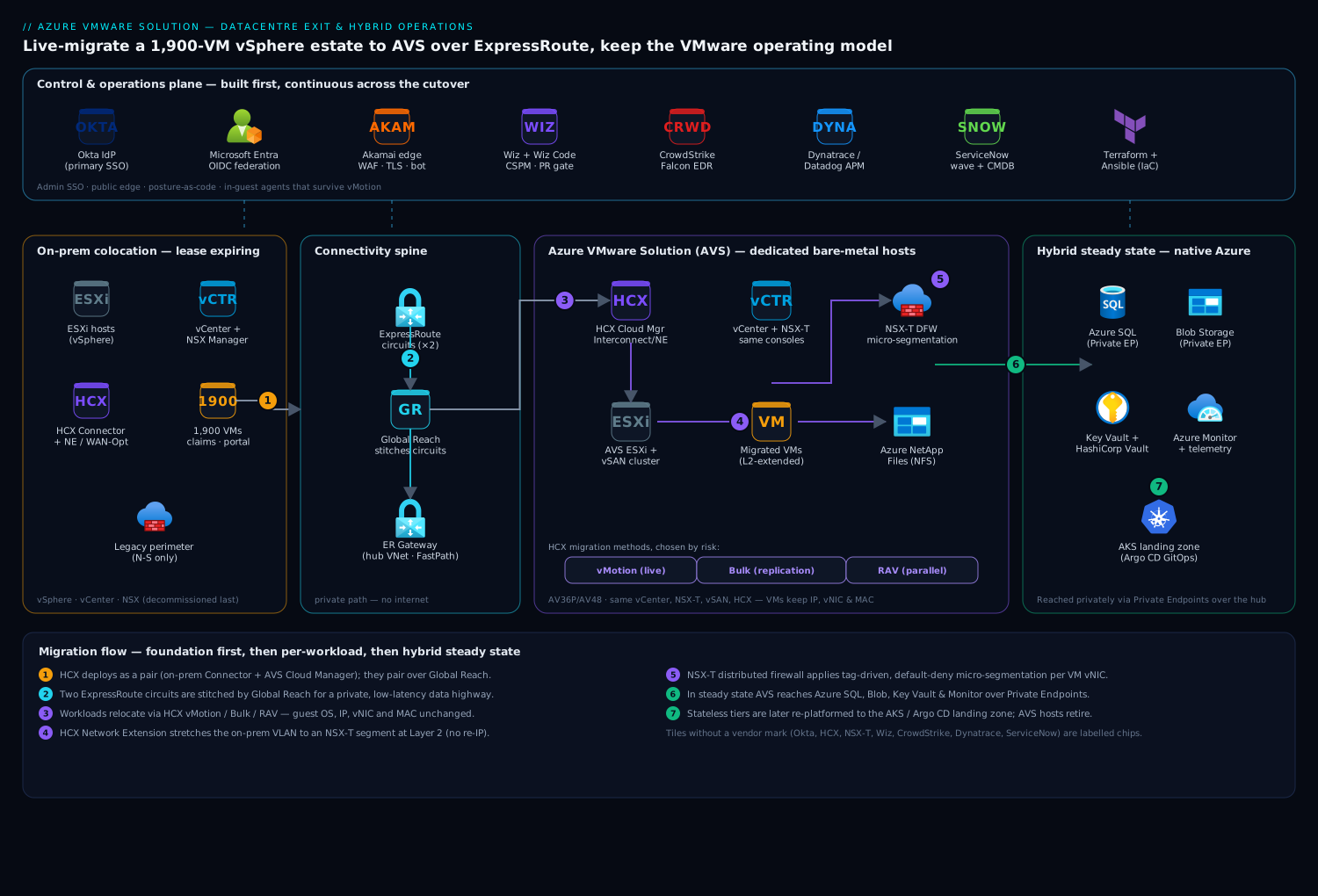
The architecture has two phases that share one topology: a migration phase where on-prem vSphere and an AVS private cloud run as a single stretched estate, and a steady-state hybrid phase where AVS is the primary compute and the colocation is gone. The whole design hinges on building the network and identity plane first, so that on the day a workload moves it lands somewhere already wired, secured, and observable.
The defining property is continuity: AVS exposes the same vCenter and NSX-T control plane the team already operates, so the migration changes where VMs run without changing how they are run. Everything below exists to make that continuity real across the move.
Foundation, built before a single VM moves:
- ExpressRoute is the spine. The AVS private cloud is provisioned with a managed ExpressRoute circuit (the “ER Direct”/AVS-managed circuit) into an Azure ExpressRoute Gateway in a hub VNet, and a second ExpressRoute circuit connects the colocation datacenter to the same hub. Crucially, the two circuits are stitched with ExpressRoute Global Reach, giving on-prem ESXi and AVS ESXi a private, low-latency, high-throughput path to each other — the data highway HCX needs to bulk-copy terabytes and run live vMotion. No migration traffic touches the public internet, which is the first thing the HIPAA assessor asks.
- Identity stays put and federates. The carrier’s workforce already authenticates through Okta as the primary IdP. Okta is federated to Microsoft Entra ID over OIDC so AVS management, the Azure portal, and Azure RBAC all see first-class Entra tokens, while administrators keep their Okta login and conditional-access policies. vCenter and NSX-T Manager bind to Entra (via the AVS identity integration / LDAPS to a domain-controller VM) so VMware roles map to the same human identities — no separate local admin sprawl appearing the moment the estate doubles.
- Akamai stays at the edge for the member portal and the public Moodle agent-training site. During migration its origin is failed over from the colocation public IPs to AVS-fronted load balancers, so members and agents see no change while the backend relocates — TLS termination, WAF, and bot mitigation continue uninterrupted at the perimeter.
Migration data flow, per workload:
- HCX is deployed as a pair: an HCX Connector on-prem and an HCX Cloud Manager in AVS, linked over Global Reach. HCX stands up its Interconnect, Network Extension, and WAN Optimization appliances — these are the virtual appliances that do the actual work: the Network Extension appliance stretches an on-prem VLAN into an AVS NSX-T segment as Layer 2, so a VM keeps its IP after it moves and its peers on-prem still reach it.
- A workload is migrated by its method-to-risk fit: HCX vMotion for zero-downtime live moves of latency-sensitive or always-on VMs (the claims API tier), HCX Bulk Migration for scheduled, replication-based moves of large batches during a maintenance window (the bulk of file and app servers), and HCX Replication Assisted vMotion (RAV) for moving many VMs in parallel with near-zero cutover. Migration waves are grouped by application affinity so an app’s tiers move together and never get split across a high-latency link mid-cutover.
- As VMs land in AVS, NSX-T enforces micro-segmentation: a distributed firewall applies allow-list rules between application tiers, scoped by NSX security groups populated from VM tags, so claims, member-portal, and actuarial workloads cannot reach each other except on the exact ports their contracts require. The same policy that took a change-control ticket per rule in the old physical firewall is now declarative and travels with the VM.
- Storage is vSAN on the AVS hosts for the hot estate, with Azure NetApp Files mounted over NFS as an external datastore for capacity-heavy, low-IOPS workloads — which decouples the storage bill from the host count and is the single biggest AVS cost lever.
Hybrid steady state, after the colocation is gone: AVS is the primary; native Azure services it now connects to over the hub — Azure SQL, Blob, Key Vault, and Azure Monitor — sit behind Private Endpoints, so an AVS VM that gets re-platformed later can call a managed service privately without leaving the VNet. The on-prem footprint shrinks to a small disaster-recovery toehold or disappears entirely, and the Global Reach circuit to the colo is decommissioned on the last day of the lease.
Component breakdown
| Component | Service / tool | Role in the migration | Key configuration choices |
|---|---|---|---|
| Connectivity spine | ExpressRoute + Global Reach | Private, high-throughput path between on-prem and AVS; AVS-to-Azure | AVS-managed circuit to ER Gateway; Global Reach to colo circuit; ER FastPath |
| Migration engine | VMware HCX | Live + bulk VM migration, L2 network extension | HCX Enterprise; Interconnect/NE/WAN-Opt appliances; RAV for parallel waves |
| VMware control plane | AVS vCenter + NSX-T Manager | Day-2 operations unchanged; same consoles as on-prem | Entra/LDAPS identity bind; CloudAdmin role scoping |
| Micro-segmentation | NSX-T Distributed Firewall | Tier-to-tier allow-listing inside the private cloud | Tag-driven security groups; default-deny; per-app sections |
| Edge | Akamai | TLS, WAF, bot mitigation for portal + Moodle | Origin failover colo → AVS LB; no member-facing change |
| Identity / SSO | Okta + Microsoft Entra ID | Admin SSO (Okta) federated to Entra for Azure RBAC and vCenter | OIDC federation; conditional access; VMware role mapping |
| Secrets | HashiCorp Vault | Migration service-account creds, vCenter API tokens, app secrets | Entra auth method; dynamic DB creds for re-platformed apps |
| Capacity storage | Azure NetApp Files | External NFS datastore to scale storage without buying hosts | NFSv3/v4.1; capacity pools sized off cold tier |
| Cloud posture | Wiz + Wiz Code | Posture, exposure, and attack-path scanning across AVS + Azure | Agentless scan of VNet/AVS; Wiz Code gates Terraform PRs |
| Runtime security | CrowdStrike Falcon | EDR on the guest VMs, before and after the move | Sensor in the golden image; detections to the SOC; survives vMotion |
| Observability | Dynatrace / Datadog | App + infra telemetry continuous across the cutover | OneAgent/agent in guest; AVS host metrics via vCenter API |
| ITSM / change | ServiceNow | Wave approvals, CMDB sync, cutover change records | Change gate per wave; CMDB updated from vCenter on landing |
| IaC / automation | Terraform + Ansible | AVS + network provisioning; in-guest config | Terraform for AVS/ExpressRoute/NSX; Ansible for OS hardening |
| CI / pipelines | Jenkins / GitHub Actions / Argo CD | Migration tooling builds; GitOps for re-platformed workloads | OIDC to Azure; Argo CD for the post-migration AKS landing zone |
A few choices deserve the why, because they are where AVS migrations go wrong.
Why ExpressRoute Global Reach, not a VPN. HCX bulk migration moves terabytes and live vMotion is exquisitely sensitive to latency and jitter — a VPN over the public internet introduces both, stretching a migration wave from a weekend into weeks and risking vMotion failures mid-flight. Global Reach links the two ExpressRoute circuits at the Microsoft backbone, so on-prem and AVS ESXi hosts exchange traffic at circuit speed with predictable latency. It is the difference between a migration that finishes on the lease clock and one that does not.
Why Layer-2 extension, not re-IP. The tempting “clean” approach is to give every VM a new AVS subnet and re-IP it. On 1,900 mostly-unowned workloads with hard-coded IPs in config files and firewall rules nobody documented, re-IP is a landmine field. HCX Network Extension stretches the on-prem VLAN into AVS at Layer 2, so a VM keeps its address, its default gateway stays on-prem until you choose to migrate it, and the app never notices. You migrate the gateway last, per segment, on your schedule — converting a risky big-bang re-IP into a controlled, reversible sequence.
Why micro-segmentation belongs in NSX, not the perimeter. Once the estate is a flat private cloud, an old-world perimeter firewall sees only north-south traffic and is blind to the east-west movement an attacker uses to pivot from a compromised member-portal VM into the claims database. NSX-T’s distributed firewall enforces allow-list policy at every VM’s vNIC, driven by tags, so segmentation is a property of the workload that travels with it during vMotion — not a static rule on a box the VM just moved away from.
Implementation guidance
Provision the landing zone with Terraform, network first. The order matters because HCX cannot do anything until the path exists.
- The AVS private cloud (host SKU and an initial 3-node cluster minimum; AV36P/AV48 class hosts), placed in a region paired with the colo for latency.
- The ExpressRoute Gateway in the hub VNet, the AVS-managed circuit connected to it, and Global Reach stitched to the colocation’s existing ExpressRoute circuit. Validate route propagation both ways before going further — a missing route advertisement is the most common silent failure here.
- NSX-T segments, tier-0/tier-1 gateways, and the distributed-firewall sections (default-deny, then per-app allow rules keyed to tags).
- Azure NetApp Files capacity pools and the external NFS datastore attachment, sized from the cold-data inventory.
- Private DNS and Private Endpoints for the Azure PaaS the re-platformed workloads will eventually call, plus the identity plumbing (Entra federation, domain-controller VMs, LDAPS to vCenter/NSX).
A minimal Terraform shape for the private cloud and Global Reach communicates the intent:
resource "azurerm_vmware_private_cloud" "avs" {
  name                = "avs-claims-prod-eus2"
  resource_group_name = azurerm_resource_group.avs.name
  location            = "eastus2"
  sku_name            = "AV36P"

  management_cluster {
    size = 3                       # minimum; scale hosts as waves land
  }
  network_subnet_cidr = "10.20.0.0/22"   # AVS management /22, non-overlapping
  internet_connection_enabled = false    # all ingress/egress via ExpressRoute
}

# Stitch the AVS circuit to the colo circuit at the Microsoft backbone
resource "azurerm_express_route_circuit_connection" "global_reach" {
  name                            = "gr-avs-to-colo"
  express_route_circuit_peering_id =
    azurerm_vmware_private_cloud.avs.circuit[0].express_route_private_peering_id
  peer_express_route_circuit_peering_id =
    data.azurerm_express_route_circuit.colo.peerings[0].id
  address_prefix                  = "172.16.0.0/29"   # /29 transit for Global Reach
}
The pipeline that applies this runs in GitHub Actions (with Jenkins still driving some legacy build jobs the team has not retired), authenticating to Azure via OIDC federation so no service-principal secret is stored — a discipline the security team holds to firmly. Wiz Code runs as a required check on every Terraform pull request, failing the build if a change would open a public IP on AVS, weaken an NSX rule to any-any, or create a datastore without encryption — posture enforced before merge, not discovered after deploy.
In-guest config is Ansible’s job. Terraform builds the AVS and network plane; Ansible handles what lives inside the VMs — baking the CrowdStrike Falcon sensor and the Dynatrace/Datadog agent into the golden image, applying CIS hardening, and rotating the local credentials that HashiCorp Vault now issues dynamically. Because the EDR and observability agents live in the guest, they survive the vMotion unchanged: a VM arrives in AVS already reporting to the SOC and the APM backend, with zero re-instrumentation.
Plan the waves in ServiceNow, drive the CMDB from vCenter. Group the 1,900 VMs into waves by application affinity and risk, lowest-risk first to build confidence (the Moodle training platform and internal file servers before the claims engine). Each wave is a ServiceNow change request with an approval gate, a tested rollback, and a defined window; as VMs land, the CMDB is updated from the AVS vCenter inventory so the source of truth never drifts during the most volatile months the estate will ever see.
Enterprise considerations
Security & Zero Trust. The posture is Zero Trust by construction and, importantly, continuous across the move. (a) NSX-T micro-segmentation default-denies east-west traffic so a foothold in one tier cannot pivot to another; (b) Okta → Entra federation means every admin action is tied to a real identity with conditional access, and vCenter/NSX roles map to those same identities rather than shared local accounts; © HashiCorp Vault issues short-lived credentials for migration service accounts and dynamic database creds for re-platformed apps, so nothing long-lived sits in a config file — directly addressing the carrier’s standing rule that database passwords are never static or committed; (d) CrowdStrike Falcon runtime EDR rides in the guest image and keeps reporting through the cutover; (e) Wiz runs continuous CSPM and attack-path analysis across both the AVS private cloud and the surrounding Azure estate, alerting the instant a host drifts to public exposure or an NSX rule widens, and Wiz Code stops those drifts at the pull request. All AVS management and migration traffic rides ExpressRoute — no public data-plane surface for the HIPAA assessor to flag.
Cost optimization. AVS bills per host-hour, so the estate’s size is the bill, and “relocate then shrink” is the financial heart of the plan.
| Lever | Mechanism | Typical effect |
|---|---|---|
| Reserved Instances | 1- or 3-year AVS RI on the steady-state host count | Up to ~50% vs pay-as-you-go on committed hosts |
| External datastore | Offload cold/low-IOPS data to Azure NetApp Files | Storage scales without buying hosts for capacity |
| Right-size on landing | vSAN dedupe/compression + drop zombie VMs before/after move | Fewer hosts needed than a 1:1 colo copy |
| Post-migration modernization | Re-platform stateless tiers to AKS/PaaS, retire their VMs | Shrinks the AVS host floor over 12–24 months |
| Host SKU fit | Match AV36P vs AV48 to the CPU:RAM:storage profile | Avoids over-provisioning the cluster |
The trap is treating AVS as the destination and paying to host 1,900 VMs forever. The win is treating it as the bridge: get out of the building at full size on the lease clock, then use the Argo CD / AKS landing zone to re-platform the workloads that justify it and retire AVS hosts as the estate shrinks — a glin path native-IaaS-first migrations never offered.
Scalability. AVS scales by adding hosts to a cluster (and the cluster autoscale policy can add hosts when CPU/RAM/storage cross a threshold), with storage scaling independently via Azure NetApp Files so you are not buying compute to get capacity. HCX migration throughput scales by adding Network Extension and Interconnect appliance pairs and by running RAV to move many VMs in parallel — the appliance count, not a single tunnel, is the migration’s real bandwidth ceiling. ExpressRoute is sized (and FastPath-enabled) so the circuit never becomes the bottleneck during the heaviest bulk-migration weekends.
Failure modes, and what each one looks like. Name them before the cutover weekend.
- A missing or unpropagated ExpressRoute route — HCX appliances deploy clean but cannot pair, and migrations stall with no obvious error. Mitigation: assert Global Reach route propagation in Terraform and a pre-wave smoke test both directions.
- MTU mismatch on the extended segment — large frames fragment or drop across the L2 stretch, and migrations crawl or fail intermittently. Mitigation: validate jumbo-frame end-to-end MTU before the first wave; HCX WAN-Opt tuned to the path.
- A split application across the link — half an app’s tiers move, the rest stay on-prem, and every transaction now pays a round-trip across ExpressRoute. Mitigation: wave grouping by application affinity so tiers move together.
- AVS capacity exhaustion mid-wave — a cluster fills and the next wave has nowhere to land. Mitigation: stage host additions ahead of the wave schedule; alert on vSAN/host headroom.
- vMotion failure on a fragile VM — an old guest with paravirtual driver issues fails live migration. Mitigation: fall back to HCX Bulk (replication-based) for known-fragile VMs; test a representative sample per wave first.
Reliability & DR (RTO/RPO). Decide the numbers per tier. During migration, the on-prem copy is the rollback — HCX keeps the source VM until you commit the cutover, so a failed wave reverts in minutes. In steady state, AVS DR uses VMware SRM with vSphere Replication (or JetStream/Zerto) replicating to a second AVS private cloud in a paired region, or back to a small on-prem toehold if one is retained. A pragmatic target for the claims platform: RTO 4 hours, RPO 15 minutes, with member-facing portal tiers tighter once they are re-platformed onto multi-region PaaS. Akamai health checks drive edge failover for the public properties.
Observability. Keep telemetry continuous across the move, because a migration is exactly when you most need to see regressions. Dynatrace (or Datadog, the carrier runs both during a tooling consolidation) keeps its agent in the guest image so application metrics, traces, and logs flow unbroken before, during, and after vMotion — a latency spike from a mid-wave split app surfaces immediately. AVS host and cluster health (CPU ready time, vSAN latency, host headroom) is pulled from the vCenter and NSX APIs into the same backend, so the platform team watches infrastructure and applications on one pane. Emit the metrics the migration program actually cares about — VMs migrated vs planned per wave, cutover window adherence, AVS host utilization, and east-west denied-flow counts from the NSX firewall — and pipe wave completion into the ServiceNow change record automatically.
Governance. Pin the AVS host SKU and cluster sizing in Terraform so capacity changes are reviewed, not ad hoc. Keep NSX firewall policy as code so every segmentation rule is version-controlled, reviewable, and revertable. Drive every wave through a ServiceNow change gate with a documented rollback, and sync the CMDB from vCenter so the configuration record matches reality throughout. Apply Azure Policy to deny public IP exposure on the AVS network and require diagnostic settings, with Wiz as the independent verifier that the controls are actually holding.
Explicit tradeoffs
Accept these or do not build it. AVS keeps your VMware skills and runbooks intact, but you are still paying for dedicated bare-metal hosts — it is more expensive per workload than well-tuned native Azure IaaS, and the only thing that makes the economics work is the commitment to shrink the estate afterward. You inherit the VMware operating model in full: vCenter, NSX-T, vSAN, and HCX are powerful but they are more to operate than a managed PaaS, and your team still patches ESXi (within the AVS shared-responsibility line) and tunes NSX. The Layer-2 extension that makes migration safe also means you carry on-prem network constructs into Azure until you deliberately retire them — convenient during cutover, technical debt if you never finish. And HCX itself is a set of appliances to size, monitor, and occasionally fight: MTU, bandwidth, and appliance scaling are real operational work, not a button.
The alternatives, and when they win. If you have time and application owners, native re-platforming to Azure IaaS/PaaS is cheaper and more cloud-native at the end — choose it when the clock and the staffing allow, and it composes with this design as the post-migration target. If a workload is already stateless and containerizable, re-architecting onto AKS (via the Argo CD GitOps landing zone this design provisions) beats hosting it on AVS forever — do that after the exit, per workload, as the economics justify. And if you are not actually leaving a datacenter — just extending capacity or bursting — a smaller hybrid AVS footprint alongside a retained on-prem estate is the right scope, without the full exit machinery here.
The shape of the win
For the carrier, the payoff is not “we moved to the cloud.” It is that the colocation floor goes dark before the lease ends, the claims engine processed every member’s claim through the entire migration without a regulator-visible outage, and the vSphere team that had spent a decade mastering VMware is still operating VMware the Monday after the last wave — now on Azure hosts, with the same vCenter, the same NSX policy, the same Okta login, the same Falcon sensors, and the same Dynatrace dashboards. That continuity is what let the project hit a fixed external date that a 1,900-application rewrite never could have. And because AVS is the bridge rather than the destination, the harder, more valuable work — re-platforming the workloads that deserve it and retiring AVS hosts as the estate shrinks — now runs on a clock the company controls, not a landlord’s. The architecture here is how a regulated enterprise gets out of the building on time without betting the business on a big-bang rewrite.
Going deeper
The overview gave you the shape of an AVS migration. This section is the engineering underneath it — the parts that decide whether the project lands on the lease clock or slips. Read it once for the mental model, then again when you are actually sizing a private cloud.
The AVS private cloud, physically
A private cloud is the top-level AVS object, and it is more literal than most Azure resources. When you deploy one, Microsoft racks dedicated, single-tenant bare-metal hosts in an Azure datacenter and installs the full VMware stack on them for you. There is no hypervisor-on-a-hypervisor and no shared tenancy — the ESXi hypervisor runs directly on the physical host, exactly as it would in your own rack. What Microsoft manages is the hardware lifecycle, the ESXi/vCenter/NSX/vSAN software lifecycle (patching within the shared-responsibility line), and the physical network fabric. What you manage is everything from the vCenter inventory up: clusters, resource pools, VMs, NSX segments and firewall policy, and storage policies.
Each private cloud starts with one management cluster of at least 3 hosts — three is the vSAN minimum for a fault-tolerant mirror. A cluster scales up to 16 hosts, and a private cloud holds multiple clusters (a common default ceiling is around 96 hosts total across clusters, raised by quota). The host families are AV36, AV36P, AV52, and AV64, differing in core count, RAM, and NVMe capacity — you pick the SKU whose CPU-to-RAM-to-storage ratio matches your estate so you are not buying cores just to get memory, or memory just to get storage. All hosts within a single cluster must be the same SKU. (The lesson’s Terraform targets the RAM-heavy AV36P, a common fit for mixed enterprise estates.)
The limited-admin model: CloudAdmin and Run Commands
Here is the single biggest surprise for a team coming from an on-prem vCenter they own: in AVS you do not get root. There is no SSH to the ESXi hosts, and your vCenter login is not administrator@vsphere.local — it is a scoped role called CloudAdmin. CloudAdmin can do almost everything an operator needs (create and manage VMs, resource pools, and workload clusters; deploy HCX; set storage policies), but it deliberately cannot do the things that would let a tenant destabilize the managed platform — reconfigure the physical hosts, touch the management appliances, or escalate to root. NSX gives you a parallel restricted cloudadmin account that can build segments, distributed-firewall rules, DHCP, NAT, and load balancing, but not rewire the tier-0 uplinks Microsoft owns.
So how do you perform the handful of privileged operations that genuinely need elevation — like pointing vCenter at your Active Directory over LDAPS, or changing a vSAN storage policy at the cluster level? Through Run Commands: a curated catalog of PowerShell/PowerCLI cmdlets Microsoft exposes through the Azure portal and API (New-LDAPSIdentitySource, Set-AvsStoragePolicy, New-AvsDatastorePolicy, and friends). You pass parameters, Azure runs the cmdlet with platform privileges on your behalf, and you get the result — elevation without root. Internalizing this early prevents the classic AVS onboarding friction: an admin trying to SSH to a host, finding they can’t, and assuming something is broken.
HCX: the migration engine, in detail
HCX is deployed as a matched pair — an HCX Connector on the source (on-prem) and an HCX Cloud Manager in AVS (installed for you) — joined by a Service Mesh, the construct that actually deploys the worker appliances across the wire between a source and destination compute profile. Those worker appliances are the ones that matter:
- Interconnect (IX) — the encrypted transport tunnel and the vMotion/replication data path.
- Network Extension (NE) — stretches a source VLAN into a destination NSX segment at Layer 2, so a VM keeps its IP, MAC, and default gateway after it moves.
- WAN Optimization (WO) — deduplication, compression, and forward error correction to squeeze the link during bulk copies.
HCX offers four migration types, and choosing the right one per workload is the core skill:
| HCX method | Downtime | Best for | Mechanics |
|---|---|---|---|
| Cold Migration | Full (VM off) | Powered-off or dev VMs | Copies a powered-off VM’s disks across |
| Bulk Migration | One reboot at cutover | Large batches, scheduled windows | Replicates in the background, then a brief switchover reboot |
| vMotion | Zero (live) | Latency-sensitive, always-on single VMs | Live-migrates running memory + disk, no reboot |
| Replication Assisted vMotion (RAV) | Near-zero, parallel | Many VMs at once with minimal cutover | Bulk-style background replication + vMotion-style live switchover |
RAV and features like Mobility Optimized Networking (MON) — which stops traffic hairpinning back to on-prem after a move — require HCX Enterprise (the included edition is HCX Advanced), so confirm the edition before you plan a RAV-heavy wave. The Layer-2 extension is what converts a terrifying big-bang re-IP into a controlled sequence: you stretch the segment, move VMs while their gateway stays on-prem, and migrate the gateway last, per segment, on your schedule — fully reversible until you cut it over. A compact, illustrative wave plan (a planning artifact, not a live tool config) makes the grouping-by-affinity discipline concrete:
# Illustrative migration wave plan (planning artifact, not executed here)
waves:
  - id: wave-01-lowrisk
    window: "2026-08-02T22:00Z/6h"
    method: bulk                     # scheduled, reboot at cutover
    app_affinity: [moodle-training, internal-fileshare]
    rollback: keep-source-until-commit
  - id: wave-07-claims-api
    window: "2026-09-13T02:00Z/2h"
    method: vmotion                  # live, zero-downtime for the always-on tier
    app_affinity: [claims-api, claims-cache]
    servicenow_change: CHGxxxxxxx    # change gate per wave (placeholder)
Connectivity: ExpressRoute all the way down
An AVS private cloud is born with a Microsoft-managed ExpressRoute circuit — you don’t order it from a carrier; it ships with the SDDC. You connect that circuit to an ExpressRoute Gateway in your hub VNet using an authorization key the private cloud issues, and from that moment AVS reaches your Azure VNets privately. To reach on-prem, you stitch the AVS circuit to your existing datacenter ExpressRoute circuit with ExpressRoute Global Reach, which links the two at the Microsoft backbone so ESXi-to-ESXi traffic never touches the internet. FastPath can be enabled to bypass the gateway for the data plane when you need maximum throughput on the heaviest bulk-migration weekends. For internet-facing needs, egress and public IPs are handled through NSX (a Public IP dropped to the NSX edge) or a hub firewall — and with internet_connection_enabled = false, as in the Terraform above, all ingress and egress is forced through the ExpressRoute path, which is exactly what the HIPAA assessor wants to see.
AVS vs native Azure VMs: the honest decision
The instinct of a cloud-native architect is “just use Azure VMs.” Sometimes they are right. Here is the decision, stripped down:
- Choose AVS when you are exiting a datacenter on a fixed clock, you have hundreds-to-thousands of VMs (many without owners to re-test), and a team whose skills are VMware. AVS moves the estate as-is in vMotion windows, not application rewrites. It is also right for VMware-specific dependencies — vSphere APIs, third-party appliances that expect ESXi — and for keeping a consistent operating model across a hybrid estate.
- Choose native Azure IaaS/PaaS when you have time and application owners, the workload count is modest, or the app is already a modernization candidate. Per-workload, well-tuned Azure IaaS is cheaper than a bare-metal AVS host, and PaaS removes operational toil AVS keeps.
The mature pattern is not either/or but sequence: lift-and-shift to AVS to make the date, then modernize the workloads that justify it — re-platform stateless tiers onto AKS/App Service, move databases to Azure SQL — and retire AVS hosts as the estate shrinks. AVS is the bridge; native Azure is the destination for the workloads that earn the trip. This is the same “migrate then modernize” arc the Azure Cloud Adoption Framework prescribes, applied to a VMware estate.
Scaling, quota, and reservations
Three numbers govern AVS cost and capacity, and you set each one deliberately:
- Host quota. A brand-new subscription has zero AVS host quota. Before you can deploy anything, you file an Azure support request for AVS nodes in your target region and SKU — and you do it early, because bare-metal capacity is finite per region and approval is not instant. Stage quota ahead of each wave so a cluster never fills with the next wave already loaded.
- Scaling. You add hosts to a cluster (up to 16) or add clusters to the private cloud; a cluster autoscale policy can add hosts when CPU, memory, or vSAN utilization crosses a threshold. Storage scales independently by attaching an external datastore (Azure NetApp Files, Azure Elastic SAN, or Pure Cloud Block Store) over NFS/iSCSI — so you stop buying whole hosts just to get terabytes, the single biggest AVS cost lever.
- Reservations. For the steady-state host count you know you will keep, buy an AVS Reserved Instance (1-year or 3-year) for up to ~50% off pay-as-you-go. Reserve the floor, burst on-demand above it, and let the reservation shrink as modernization retires hosts. (See Reservations & Savings Plans strategy.)
A vSAN nuance that bites capacity planning: with the default FTT=1 / RAID-1 storage policy, every object is mirrored, so usable capacity is roughly half of raw, and vSAN wants ~25% slack to rebuild after a host failure — so “we have ~46 TB raw across three hosts” is not 46 TB of VMs. Plan the headroom, or the “capacity exhaustion mid-wave” failure mode finds you at the worst possible time.
DR: SRM, HCX, and the Azure options
Disaster recovery in AVS is a design choice per tier, and there are three families:
- VMware SRM with vSphere Replication — the Microsoft-managed Site Recovery Manager add-on, orchestrating failover between two AVS private clouds in paired regions, or on-prem ↔ AVS. Automated runbooks, non-disruptive test failovers, and RPOs down to minutes. This is the enterprise default for the regulated tiers.
- JetStream DR / Zerto — third-party engines certified on AVS. JetStream replicates to Azure Blob as a cheap landing tier, which is attractive when you want DR without standing up a full second private cloud.
- HCX as short-term DR — during migration, the on-prem source VM is your rollback: HCX keeps it until you commit the cutover, so a failed wave reverts in minutes. And for workloads you eventually re-platform, Azure-native DR takes over — zone-redundant or multi-region PaaS, and Azure Site Recovery for the IaaS ones. (See Multi-region active-active DR.)
Set explicit RTO/RPO per tier — a claims platform might target RTO 4 h / RPO 15 min — and remember that during the migration itself, your best DR is simply not committing the cutover until the wave is verified.
Integration with Azure services and NSX segments
Once AVS reaches your hub over ExpressRoute, its VMs consume Azure PaaS as if they were native: Azure SQL, Blob Storage, Key Vault, and Azure Monitor sit behind Private Endpoints in a spoke, so an AVS VM calls them over private IPs without leaving the VNet — the same private path a re-platformed version of that app will use later, so modernization changes the compute without re-plumbing the network. Inside the private cloud, NSX segments are the L3 networks VMs attach to, and the distributed firewall (DFW) enforces allow-list micro-segmentation at every vNIC, driven by security groups populated from VM tags — so “claims tier may reach claims-db on 1433 only” is a policy that travels with the VM through vMotion, not a static rule on a box the VM just moved away from. That workload-level enforcement is the private-cloud half of the broader model in Zero Trust multi-layer security.
Practice challenges
Work these in order — the first two check the mental model, the middle two check design judgement, and the last two are the sizing-and-money reasoning a lead architect owns. Try each before opening the solution.
Challenge 1 — When AVS, when not (beginner). A team has 12 months to leave a colo with 1,900 VMs, most without application owners, and a VMware-skilled staff. A consultant proposes re-platforming everything to native Azure VMs. In two or three sentences, argue for AVS instead — and name the one thing AVS defers rather than solves.
<details><summary>Solution</summary>
AVS relocates the estate as-is in vMotion windows — no per-VM OS migration, re-IP, or regression test — so a VMware team can hit a fixed lease date that 1,900 rewrites never could. It defers, does not solve, modernization: you still owe the re-platform work later, on your own clock. Why: a hard deadline + owner-less VMs + VMware skills are precisely the conditions AVS is designed for; re-platforming needs the time and owners AVS buys you. </details>
Challenge 2 — The limited-admin gotcha (beginner). A new AVS admin files a ticket: “I can’t SSH to the ESXi hosts and vCenter won’t let me log in as administrator@vsphere.local — the platform is broken.” What is actually happening, and how do they bind vCenter to Active Directory for LDAPS auth?
<details><summary>Solution</summary>
Nothing is broken — AVS is limited-admin by design: no ESXi root/SSH, and your vCenter role is CloudAdmin, not the built-in administrator. Privileged operations run through Run Commands; to add an external identity source you run the New-LDAPSIdentitySource Run Command from the Azure portal or API. Why: AVS protects the managed platform by withholding root and exposing elevation only through a curated cmdlet catalog.
</details>
Challenge 3 — Match the migration method (intermediate). Assign the best HCX migration type to each: (a) a powered-off template VM; (b) 400 file servers to move over three weekend windows; © the always-on claims API that cannot take downtime; (d) 150 low-risk app VMs you want moved in parallel this weekend with near-zero cutover.
<details><summary>Solution</summary>
(a) Cold Migration; (b) Bulk Migration; © vMotion (live, zero downtime); (d) Replication Assisted vMotion (RAV) — and note RAV needs HCX Enterprise. Why: downtime tolerance and batch size pick the method — cold for powered-off VMs, bulk for scheduled batches, vMotion for zero-downtime singles, RAV for parallel near-zero cutover at scale. </details>
Challenge 4 — Wire the spine (intermediate). On-prem ESXi must reach AVS ESXi privately for HCX bulk copies. You already have an ExpressRoute circuit from the colo into Azure, and the AVS private cloud came with its own managed circuit. What single Azure construct connects the two, and why not a site-to-site VPN?
<details><summary>Solution</summary>
ExpressRoute Global Reach links the two circuits at the Microsoft backbone, giving private, low-latency ESXi-to-ESXi connectivity. A VPN over the public internet adds latency and jitter that stretch bulk waves and can fail live vMotion mid-flight. Why: HCX bulk and vMotion are bandwidth- and latency-sensitive; Global Reach delivers circuit-speed, predictable, private transit that keeps the migration on the lease clock. </details>
Challenge 5 — Capacity math before a wave (advanced). A 3-host AV36P cluster advertises roughly 46 TB of raw vSAN. Using the default FTT=1/RAID-1 policy and the recommended slack, about how much VM data can you safely place — and what is the failure mode if you ignore this? What do you file before adding hosts for the next wave?
<details><summary>Solution</summary>
FTT=1/RAID-1 mirrors every object, halving usable capacity to ~23 TB, and vSAN wants ~25% slack to rebuild after a host loss — so plan on roughly ~17 TB of actual VMs, not 46. Ignore it and you hit capacity exhaustion mid-wave: the next wave has nowhere to land and rebuilds can’t complete. File an AVS host quota request in that region and SKU ahead of the wave. Why: RAID-1 mirroring plus rebuild slack roughly quarters the raw figure, and host quota is not instant, so it must lead the schedule. </details>
Challenge 6 — Sequence the cost-down (advanced). Finance balks: hosting all 1,900 VMs on AVS is more expensive than native Azure IaaS. Design the multi-year cost trajectory that still makes AVS the right first move, naming the commitment you buy for the steady-state floor and two levers that shrink the host count.
<details><summary>Solution</summary>
Lift-and-shift to AVS to make the lease date at full size; buy a 1- or 3-year AVS Reserved Instance on the steady-state host floor (~50% off) while bursting on-demand above it. Then shrink: offload cold/low-IOPS data to an external datastore (Azure NetApp Files) so storage stops driving host count, and re-platform stateless tiers to AKS/PaaS and retire their AVS hosts over 12–24 months, letting the reservation shrink with the estate. Why: AVS is the bridge, not the destination — reserve the floor, externalize storage, and modernize downward so the bill falls as workloads leave the hosts. </details>
Common beginner mistakes
These are conceptual traps — the wrong mental model — distinct from the operational failure modes catalogued earlier. Each one has cost a real project time.
“AVS is just Azure VMs with a VMware skin.” It is not an abstraction over Azure compute; it is dedicated bare-metal hardware running the genuine VMware stack. You get vCenter, NSX-T, and vSAN — not the Azure VM control plane — and you operate them exactly as on-prem. Right model: your datacenter relocated, not your datacenter re-abstracted.
“I’ll have full vCenter admin and ESXi root, like on-prem.” No — AVS is limited-admin. Your role is CloudAdmin, there is no host SSH/root, and elevated actions come through Run Commands. Right model: elevation is curated, not owned — reach for the Run Command catalog, not an SSH session.
“We’ll re-IP every VM into clean Azure subnets as we migrate.” On 1,900 mostly-unowned VMs with hard-coded IPs in configs and undocumented firewall rules, mass re-IP is a minefield that will blow the schedule. Right model: HCX Layer-2 extension keeps every IP; you migrate the gateway last, per segment, reversibly.
“A VPN to AVS is good enough for the migration.” Public-internet latency and jitter stretch bulk waves into weeks and can fail live vMotion mid-flight. Right model: ExpressRoute + Global Reach is not a nice-to-have; it is the load-bearing spine that lets the migration finish on the clock.
“Once we’re off the colo, we’re done — AVS is the destination.” Financially fatal: you would pay for dedicated bare metal to host 1,900 VMs forever. Right model: AVS is a bridge. The win is relocating at full size then modernizing and retiring hosts as the estate shrinks.
“We can spin up AVS this weekend.” A new subscription has zero AVS host quota, and bare-metal capacity approval is not instant. Right model: quota leads the schedule — request it early, per region and SKU, and stage additions ahead of each wave.
“vSAN raw capacity is what we can fill.” With FTT=1/RAID-1 plus rebuild slack, usable capacity is closer to a quarter of the raw number. Right model: plan against usable-after-mirroring-and-slack, never the raw datasheet figure.
Glossary
Azure VMware Solution (AVS) — a first-party Azure service that runs the full VMware stack (vSphere/ESXi, vCenter, vSAN, NSX-T, HCX) on dedicated, Microsoft-operated bare-metal hosts inside an Azure region.
Private cloud — the top-level AVS object: your dedicated set of bare-metal hosts plus the VMware software running on them, in one Azure region. Sometimes called an SDDC (software-defined datacenter).
Bare-metal host — a physical, single-tenant server. AVS runs ESXi directly on it (no nested virtualization), which is why VMware behaves identically to on-prem.
ESXi — VMware’s bare-metal hypervisor; the software on each host that runs virtual machines.
vCenter Server — the management console and API for a vSphere estate; where admins create, move, and monitor VMs and clusters.
vSAN — VMware’s software-defined storage that pools the hosts’ local NVMe into a shared datastore. Its storage policy (e.g., FTT/RAID) sets redundancy and thus usable capacity.
NSX-T / NSX — VMware’s software-defined networking and security layer (segments, routing, and the distributed firewall). VMware has dropped the “-T”; current docs say simply “NSX”.
Distributed Firewall (DFW) — NSX enforcement applied at every VM’s virtual NIC, so allow/deny rules follow the workload during vMotion instead of living on a perimeter box.
Micro-segmentation — fine-grained, tier-to-tier allow-listing (e.g., web may reach app on one port only), so a foothold in one tier cannot pivot east-west to another.
Security group (NSX) — a dynamic membership set, typically populated from VM tags, that DFW rules target — so policy is written against roles, not IP addresses.
HCX — VMware’s migration and network-extension platform. Deployed as a Connector (source) + Cloud Manager (destination) with worker appliances that move VMs and stretch networks. Editions: HCX Advanced (included) and HCX Enterprise (adds RAV, MON, and more).
Service Mesh (HCX) — the HCX construct that deploys the paired worker appliances (IX/NE/WO) between a source and destination compute profile.
Interconnect / Network Extension / WAN Optimization — the three HCX worker appliances: the encrypted data tunnel, the Layer-2 stretch, and the dedup/compression optimizer, respectively.
Layer-2 (network) extension — stretching an on-prem VLAN into an AVS NSX segment so a migrated VM keeps its IP, MAC, and default gateway — turning a risky re-IP into a reversible, scheduled cutover.
vMotion — VMware’s live migration of a running VM (memory + disk) with no reboot and effectively zero downtime.
Bulk Migration (HCX) — replication-based migration of many VMs with a single brief reboot at cutover; the workhorse for scheduled batches.
Cold Migration (HCX) — migration of a powered-off VM by copying its disks.
Replication Assisted vMotion (RAV) — HCX Enterprise mode that combines background bulk replication with a live vMotion-style switchover, moving many VMs in parallel with near-zero cutover.
Mobility Optimized Networking (MON) — HCX Enterprise feature that prevents a migrated VM’s traffic from hairpinning back to the on-prem gateway.
ExpressRoute — a private, dedicated network circuit into Azure that bypasses the public internet.
ExpressRoute Gateway — the VNet-side endpoint that terminates an ExpressRoute circuit and injects its routes into your Azure network.
ExpressRoute Global Reach — a feature that links two ExpressRoute circuits at the Microsoft backbone, giving private site-to-site connectivity (here: on-prem ESXi ↔ AVS ESXi).
FastPath — an ExpressRoute option that sends data-plane traffic straight to its destination, bypassing the gateway for higher throughput.
CloudAdmin — the scoped vCenter role AVS grants you: broad operational rights, but no host reconfiguration, no management-appliance access, and no root.
Run Commands — a curated catalog of PowerShell/PowerCLI cmdlets Microsoft exposes via the Azure portal/API to perform privileged AVS operations (identity binding, storage policy, etc.) without giving you root.
Azure NetApp Files (ANF) — a managed, high-performance NFS/SMB file service; on AVS it attaches as an external datastore so storage scales without buying more hosts.
External datastore — VM storage that lives outside the hosts’ vSAN (ANF, Elastic SAN, or Pure Cloud Block Store), decoupling capacity from host count — the biggest AVS cost lever.
FTT / RAID-1 — vSAN’s “Failures To Tolerate” storage policy; the default FTT=1/RAID-1 mirrors data across hosts, so usable capacity is roughly half of raw (before rebuild slack).
Reserved Instance (AVS RI) — a 1- or 3-year commitment to a steady-state host count for up to ~50% off pay-as-you-go pricing.
Host quota — the per-region, per-SKU AVS capacity you must request (via an Azure support case) before deploying; new subscriptions start at zero.
Site Recovery Manager (SRM) — VMware’s DR orchestrator (a managed AVS add-on) that automates failover and test failover, paired with vSphere Replication.
JetStream DR / Zerto — third-party DR products certified on AVS; JetStream can replicate to Azure Blob as a low-cost landing tier.
Private Endpoint — a private IP inside your VNet that fronts an Azure PaaS service (SQL, Blob, Key Vault), so AVS VMs reach it without traversing the public internet.
Microsoft Entra ID — Microsoft’s cloud identity service (formerly Azure Active Directory / Azure AD); here Okta federates to it for Azure RBAC and portal access.
LDAPS — LDAP over TLS; the secure protocol AVS uses (via a Run Command) to bind vCenter/NSX to an Active Directory identity source.
RTO / RPO — Recovery Time Objective (how fast you must be back) and Recovery Point Objective (how much data loss is tolerable); set per tier to size the DR design.
Compute profile (HCX) — the definition of which clusters, datastores, and networks HCX may use on a given side, consumed by the Service Mesh to place its appliances.