A storage account leaks ten million records. A virtual machine is mined for crypto through an SSH port left open to 0.0.0.0/0. A SQL database is exfiltrated because a firewall rule said allow Azure services and someone read it as allow only my Azure services. In every post-mortem the same sentence appears: “We thought the cloud handled that.” It didn’t. The shared responsibility model is the contract that says precisely which security tasks Microsoft performs for you and which remain yours — and almost every avoidable Azure breach traces back to a team that drew that line in the wrong place for the specific service they were using.
The model is usually taught with one famous diagram: three columns for IaaS, PaaS and SaaS, with the boundary sliding leftward as you move up the stack. That diagram is correct and you should know it cold (the companion piece The Azure Shared Responsibility Model: Who Secures What Across IaaS, PaaS and SaaS walks it end to end). But in real life nobody deploys “PaaS.” They deploy Azure SQL Database, App Service, or AKS — and each sits at a slightly different point on the line; the line for AKS is not the line for App Service even though both are loosely “PaaS.” This article is the per-service map: pick the service you actually run, and read the exact rows you own.
By the end you will look at any Azure service and answer the question that matters at 2 a.m.: if this is misconfigured and breached, whose fault is it, and which knob was I supposed to have set? We define the model plainly, lay out a responsibility matrix for the services you actually run, show the controls that flip ownership as you climb the tiers, and prove your half with real az CLI and Bicep — because a responsibility you cannot verify is one you have not met.
What problem this solves
The pain is concrete and recurring: a team assumes a security task is handled by Azure, it is not, and the gap becomes an incident. This happens constantly — even to experienced engineers — because the boundary genuinely moves between services, and the moving part is rarely the dramatic stuff. Microsoft has always patched the physical hosts and hypervisor; nobody loses sleep over that. The boundary that bites is the unglamorous middle: who patches the guest OS, configures the firewall, rotates the key, decides whether this endpoint faces the internet. Those answers differ for a VM versus a SQL database versus a SaaS mailbox — and the difference is exactly where breaches live.
What breaks is predictable, and the same misreading produces opposite failures by tier. On IaaS people forget guest-OS patching is theirs and leave a kernel exposed. On PaaS they over-relax (“Microsoft manages it”) and ship a database open to all Azure tenants. On SaaS they assume identity and data are Microsoft’s job and skip the MFA, conditional access, and data classification that are always the customer’s. It bites hardest on teams migrating from on-premises (an over-correction toward “someone else owns it now”) and developers shipping PaaS quickly. The fix is not a tool: it is a service-specific mental model of the boundary plus the habit of verifying your side rather than assuming it.
To frame the whole field before the deep dive, here is the boundary at the three classic tiers — the one table to anchor everything that follows. Read “Microsoft” as they do it, you cannot touch it; read “You” as yours to configure, and yours to get breached over if you don’t.
| Responsibility layer | On-premises | IaaS (VMs) | PaaS (App Service, SQL DB) | SaaS (M365) |
|---|---|---|---|---|
| Data classification & accountability | You | You | You | You |
| Client / endpoint devices | You | You | You | You |
| Identity & access management | You | You | Shared | Shared |
| Application code & logic | You | You | You | Microsoft |
| Network controls | You | You | Shared | Microsoft |
| Operating system | You | You | Microsoft | Microsoft |
| Host / hypervisor / compute | You | Microsoft | Microsoft | Microsoft |
| Physical hosts, network, datacenter | You | Microsoft | Microsoft | Microsoft |
Three rows never leave you no matter how far up you climb: data, endpoints, and your share of identity. That is the single most important sentence here — the rest is detail about which middle rows flip and when.
Learning objectives
By the end of this article you can:
- State the shared responsibility model in one sentence and name the three responsibilities that are always yours regardless of service tier.
- Place any common Azure service (VM, AKS, App Service, Functions, SQL Database, Cosmos DB, Storage, Key Vault, Entra ID) at the right point on the boundary and recite the rows you own for it.
- Explain how a single control — guest-OS patching, network exposure, or encryption-key custody — flips ownership as you move from IaaS to PaaS to SaaS.
- Diagnose a misconfiguration to the correct owner: decide whether a given gap is “Microsoft’s platform did this” or “you were supposed to set this.”
- Prove your half with concrete
azCLI and Bicep — OS patch status, network restrictions, encryption mode, and identity controls — and avoid the classic misreading breaches (public storage, “allow Azure services”, unpatched guest OS, no-MFA admins) by knowing they sit squarely on your side. - Map the model to the AZ-900 and SC-900 exams, where “who is responsible for X” is a guaranteed question.
Prerequisites & where this fits
You need only the gentlest Azure footing: you know Azure is Microsoft’s public cloud, that you create resources (a VM, a database, a web app) inside a subscription, and that Microsoft Entra ID (formerly Azure AD) controls who can sign in. If you can read a small az command and a Bicep block, you are ready — every snippet is explained in plain English first.
This article is foundational — it sits under almost everything else in the security and governance tracks. Once the boundary is clear, the next layers make sense: Azure Policy at Scale: Governance with Management Groups & Initiatives is how you enforce your half across subscriptions; Microsoft Entra: App Registrations vs Enterprise Apps Explained and OAuth 2.0 & OpenID Connect Flows in Entra ID flesh out the always-shared identity half; and Azure Key Vault: Secrets, Keys & Certificates is where your encryption-key responsibility lives. Think of this as the map you read before any of those.
Core concepts
Five mental models make every per-service decision obvious. Internalise these and you can place a service you have never seen.
The line slides; three rows never move. As you climb from on-premises → IaaS → PaaS → SaaS, Microsoft progressively absorbs the lower layers — physical, host, OS, runtime, then network and application. But data classification, endpoint devices, and your portion of identity & access management never transfer to Microsoft on any service. You always decide which data is sensitive, who secures the admin’s laptop, and who configures MFA and least-privilege. If you remember nothing else, remember these three are permanently yours.
“Managed” means managed operations, not secured for you. A managed service means Microsoft patches the engine and runs the fabric — not that it arrives secure-by-your-standards. SQL Database is fully managed, yet its firewall blocks nothing useful until you add rules; a storage account is fully managed, yet you can flip a container to public. Managed removes operational toil; it does not remove your obligation to configure the security surface. Conflating the two is the single most expensive misreading in the cloud.
Identity is the universal shared row. On every tier above raw on-prem, identity is shared: Microsoft runs the Entra ID service and offers the controls — but you decide whether to enforce MFA, use conditional access, scope roles, and whether the global-admin account still has a 2019 password. This is why “identity is the new perimeter” is not a slogan: it is the one control plane that is your responsibility on every service.
The control surface is what you own. A useful litmus: anything you can set in the portal, CLI, or Bicep for a resource is, by definition, your responsibility. If az sql server firewall-rule create exists, the firewall is yours to get right. Microsoft does not expose knobs for the things they own and does for the things you own — the control plane (where you configure a resource) and the data plane (where your data lives and is exposed) are both yours.
Misconfiguration, not platform failure, is the modern breach. Microsoft’s share — physical security, hypervisor isolation, fabric patching — is extraordinarily well run and almost never the cause of a customer incident. The overwhelming majority of cloud breaches are customer-side misconfigurations: a public bucket, an over-permissive firewall rule, a leaked key, a missing MFA. The breaches cluster entirely on your half, and knowing which half is yours is the whole defense.
How the boundary slides: the same control, three answers
The clearest way to feel the model is to take one security control and watch ownership change as you climb the tiers. Three tell the whole story.
Guest-OS patching — the IaaS-only burden
On a Virtual Machine the OS inside is yours — every kernel CVE, package update, and reboot — even though Microsoft patches the host underneath (same for VM Scale Set base images and AKS node images, which you trigger upgrades for). Move to App Service, Functions, SQL Database or Storage and that OS is Microsoft’s, untouchable and patched automatically. Same control, opposite owner — and the unpatched VM is the classic IaaS breach (RCE, crypto-mining) that “the cloud patches everything” thinking causes. Prove your side — Azure Update Manager reports whether the guest OS is current:
# Ask Update Manager what patches the guest OS is missing (this is YOUR responsibility on IaaS)
az vm assess-patches --resource-group rg-prod --name vm-web-01 \
  --query "{status:status, critical:criticalAndSecurityPatchCount, other:otherPatchCount}" -o json
Network exposure — shared on PaaS, yours to lock
On IaaS you own the whole network — NSGs, route tables, the lot (see Azure Network Security Groups: Rules, Priorities & Effective Rules). On PaaS the fabric is Microsoft’s but the exposure decision is shared and lands on you: every PaaS resource (SQL DB, Storage, App Service, Cosmos DB, Key Vault) ships with a public endpoint and a knob — --public-network-access, firewall rules, Private Endpoints — that you must set, and the default is usually permissive. The single most misread — the SQL “Allow Azure services” toggle — permits every Azure customer’s resources to reach your server, not only yours:
# REMOVE the "allow all Azure services" rule (0.0.0.0 = every Azure tenant, not just you)
az sql server firewall-rule delete --resource-group rg-prod \
  --server sql-prod-01 --name AllowAllWindowsAzureIps

# Disable the public endpoint and rely on a Private Endpoint instead
az sql server update --resource-group rg-prod --name sql-prod-01 \
  --set publicNetworkAccess=Disabled
// Bicep: a SQL server with NO public access — network exposure is YOUR row
resource sqlServer 'Microsoft.Sql/servers@2023-08-01-preview' = {
  name: 'sql-prod-01'
  location: location
  properties: {
    administratorLogin: 'sqladminuser'
    publicNetworkAccess: 'Disabled' // force private-only; pair with a Private Endpoint
    minimalTlsVersion: '1.2'
  }
}
For the deeper decision, Azure Private Endpoint vs Service Endpoint is the next read; on a VM, inbound rules belong to your NSG.
Encryption-key custody — on by default, yours to escalate
A row that surprises people in the good direction: encryption at rest is on by default for essentially every Azure storage and database service, with Microsoft-managed keys, at no cost and no action from you. You own nothing here unless you choose to. The escalation is optional — if compliance demands you hold the key, switch to a customer-managed key (CMK) in Key Vault and key custody (generation, rotation, revocation) moves to your side.
| Encryption mode | Who holds the key | Your effort | When you need it |
|---|---|---|---|
| Microsoft-managed key (default) | Microsoft | None — already on | Most workloads; meets common compliance |
| Customer-managed key (CMK) | You (in Key Vault) | Create key + grant resource access | Regulatory mandate to control/rotate keys |
| Double encryption | Microsoft + your CMK | Enable both layers | High-assurance / sovereign requirements |
Confirm who holds the key (it is encrypted either way):
# Storage is encrypted at rest by default; keySource shows whose key
az storage account show --name stprod01 --resource-group rg-prod \
  --query "encryption.keySource" -o tsv
# "Microsoft.Storage" = MS-managed (default) | "Microsoft.Keyvault" = your CMK
A responsibility matrix for the services you actually run
The heart of the article: the per-service map. Each table states the rows that are yours (configure these or own the breach), what Microsoft handles, and the gotcha that catches most teams. Read down to the service you run.
IaaS and container services
Lowest on the stack, so you own the most — the OS and everything above it.
| Service | You own (must configure) | Microsoft owns | The gotcha most teams miss |
|---|---|---|---|
| Virtual Machine | Guest OS patching, NSG rules, disk encryption, RBAC, app, data, backups | Host, hypervisor, physical, availability | Guest OS patching is yours; the host being patched does not patch your kernel |
| VM Scale Set | OS image upgrades, NSGs, the app | Fabric, instance placement, physical | An old base image bakes a CVE into every new instance |
| AKS | Node image upgrades, K8s RBAC, network policy, pod security, secrets, workload identity, app | Control plane, node provisioning, host fabric | The control plane is managed; node OS and everything in the cluster is yours — see AKS: Kubenet vs Azure CNI Networking Models Explained |
| Container Instances | Image scanning, env secrets, network, identity | Host, runtime, orchestration fabric | A vulnerable image is your supply-chain problem, not Azure’s |
The defining trap of this band is the “we came from on-prem, this feels familiar” team assuming the cloud now patches the OS. It does not, unless you configure it to — and AKS is the exception where Microsoft manages one layer (the control plane), the nodes and cluster internals still yours.
PaaS — the shared middle
Where most boundary mistakes happen, because “managed” lulls teams into under-configuring. Microsoft runs the OS and runtime; you own network exposure, identity, configuration, and always the data.
| Service | You own (must configure) | Microsoft owns | The gotcha most teams miss |
|---|---|---|---|
| App Service | Access restrictions / private endpoint, TLS, managed identity, app code, app settings/secrets, data | OS, web-server runtime, scaling, patching | Defaults to public; no network restriction = reachable by the whole internet |
| Azure Functions | Trigger/binding auth, identity, network restrictions, secrets, function code | Runtime, scaling, host OS | Anonymous HTTP triggers are wide open until you set an auth level — see Azure Functions Triggers & Bindings Explained for Beginners |
| Azure SQL Database | Firewall/private endpoint, Entra-vs-SQL auth, TDE key choice, data classification, the data | Engine patching, host, HA, backups infra | “Allow Azure services” exposes you to all tenants — see Azure SQL Database: DTU vs vCore Purchasing Models Explained |
| Cosmos DB | Network access, key/RBAC, partitioning of sensitive data, the data | Engine, replication, global distribution | A public endpoint plus a leaked key = full database read — see Azure Cosmos DB APIs Explained |
| Storage account | Public-access toggle, key vs Entra auth, SAS scope/expiry, encryption-key choice, the data | Durability, replication, disk encryption | Anonymous container access and long-lived SAS tokens leak data — see Azure Storage Account Fundamentals |
| Key Vault | RBAC/access policies, network access, soft-delete/purge protection, what you store | Availability, HSM backing, patching | A public vault relying on RBAC alone; no purge protection means a deleted key is gone |
The rule for this band: Microsoft secured the engine; you secure the front door and the contents. Every service arrives functional but not locked to your standard — the work is small (a firewall rule, an access restriction, an identity), but skipping it is exactly the breach.
Identity and SaaS — mostly Microsoft, but never entirely
At the top, the application becomes Microsoft’s, yet two rows refuse to leave you: data and your half of identity. Entra ID is the clearest case — Microsoft runs the directory, but every MFA, conditional-access, and role decision is yours.
| Service | You own (must configure) | Microsoft owns | The gotcha most teams miss |
|---|---|---|---|
| Microsoft Entra ID | MFA enforcement, conditional access, role assignments, app consent, identity hygiene | The directory service, availability, auth protocols | The platform is secure-capable; no MFA on admins is your gap, not Microsoft’s |
| Managed identities | Assigning them, scoping their RBAC | Credential rotation, identity lifecycle | Over-scoping one to Contributor on the subscription |
| Microsoft 365 (SaaS) | Data classification/DLP, sharing policies, user identity, retention | App code, infra, OS, runtime, the service | Assuming Microsoft classifies your data — they never do |
| Microsoft Defender for Cloud | Acting on recommendations, enabling plans | Detection content, the scoring engine | Treating a green secure score as someone else’s achievement |
The permanent truth at the top: you can outsource the application, never the data or the identity policy. A SaaS vendor cannot know which documents are confidential, and Microsoft will let an admin sign in from anywhere with a weak password if you did not turn on the controls that prevent it.
Architecture at a glance
The diagram renders the boundary as a left-to-right climb up the abstraction ladder. The leftmost zone is the physical and host fabric — datacenters, racks, the hypervisor — entirely Microsoft, no knobs, never your breach. The IaaS zone is where you take the wheel for the guest OS and up on a VM (badge 1, the unpatched-OS failure). The PaaS zone is the shared middle — App Service, SQL Database, Storage — where Microsoft owns the engine but the badges mark your network-exposure and access decisions, the exact spots where “allow Azure services” and public blobs become incidents.
The rightmost two zones never change owner: identity & access (Entra ID, MFA, RBAC) is shared with your half non-negotiable, and data (classification, public-access, the records) is always yours. Follow the flow arrows to trace a request climbing from Microsoft’s fabric, through the tier you chose, past the identity gate you configured, to the data you classified — every badge a place where misreading the line caused a real breach, narrated in the legend as symptom · confirm · fix.
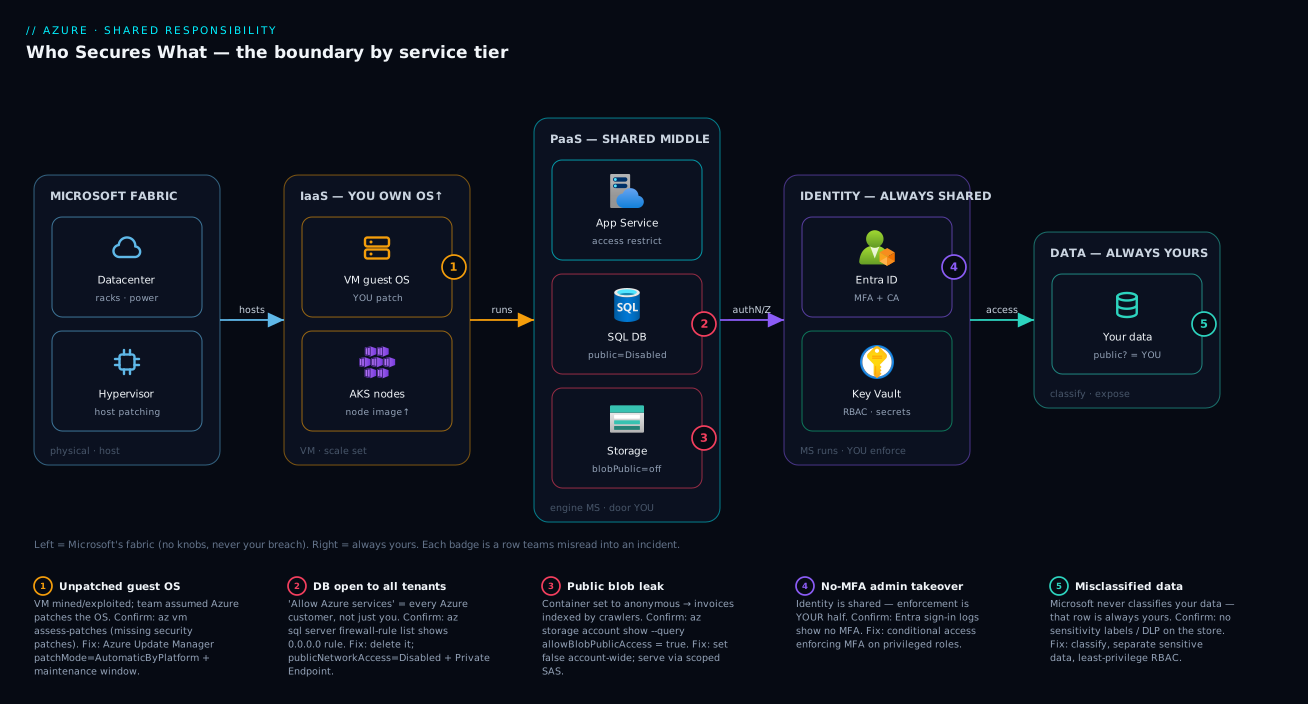
The takeaway is unmistakable: Microsoft’s zone (far left) is rarely your problem, the failure badges all cluster in the zones you configure, and identity and data stay yours all the way up.
Real-world scenario
Nimbus Retail, a mid-size Indian e-commerce company, ran a “lift-and-shift then modernize” migration over eighteen months. Three incidents tour the boundary — each one a different team misreading a different row of the same model.
Incident one — the unpatched VM (IaaS row misread). The platform team moved a legacy order-processing service onto Linux Virtual Machines. Diligent about NSGs and disk encryption, they came from a decade of on-prem appliances where a vendor patched the OS and carried the assumption that “the cloud handles updates.” Eleven weeks later a CVE in the VMs’ OpenSSH version was exploited and the boxes joined a crypto-mining botnet; the first symptom was a CPU bill three times normal. The misread row was singular — guest-OS patching on IaaS is the customer’s, and Microsoft patching the host does nothing for the kernel inside. The fix was mechanical (az vm assess-patches found forty-one missing patches; Update Manager with a weekly window) but the lesson conceptual: managed host ≠ managed guest.
Incident two — “allow Azure services” (PaaS network row misread). Migrating the catalog to Azure SQL Database, a developer enabled “Allow Azure services and resources to access this server” — reading it, reasonably but wrongly, as “allow my Azure services.” That toggle permits every Azure tenant’s resources to reach the server (authentication still applies, but the network moat is gone). When a connection string with the admin password later surfaced in a public repo, the exposure was immediate and total rather than contained. The remediation was textbook: delete the AllowAllWindowsAzureIps rule, set publicNetworkAccess=Disabled, add a Private Endpoint, and switch to Entra authentication so there was no static password to leak. Network exposure on PaaS is shared, and the customer half is what bites.
Incident three — the public storage container (data row, always yours). A contractor’s storage account held product images and, in the same container, customer invoice PDFs. To let a static site read the images without keys, they set the container to public (anonymous blob) — and every invoice served fine too, indexed by a crawler within days. No ambiguity here: data and its public-access posture are always the customer’s, on every tier. The fix: allowBlobPublicAccess=false at the account level, sensitive data in its own private container, images via a scoped SAS. Afterward Nimbus added the guardrail that would have caught all three — Azure Policy denying public network and public blob access org-wide, with Defender for Cloud as the standing scorecard. The bill for learning the model the hard way was three incidents; for applying it, a weekend.
Advantages and disadvantages
The model is not a feature you enable — it is the structural reality of cloud. Its trade-offs clarify why the cloud is both safer and more dangerous than on-prem at once.
| Advantages (what the model gives you) | Disadvantages / risks (what it demands) |
|---|---|
| Microsoft absorbs the hardest, most expensive security work (physical, hypervisor, fabric) at world-class quality | The boundary moves per service — no single rule to memorize |
| You inherit strong defaults: encryption at rest on, isolated tenancy, patched hosts | “Managed” is easily misread as “secured,” producing over-relaxation |
| The higher you go (PaaS/SaaS), the fewer rows you own | A single misconfigured row you own (public bucket, open firewall) can breach everything |
| Your responsibilities are concrete and verifiable via CLI/Bicep/Policy | The responsibility is silent — Azure rarely stops you leaving your half undone |
| Tools (Defender for Cloud, Policy) score and enforce your exact side | You must actively run them; a green default is not a secured default |
| Climbing tiers cuts operational toil and attack surface at once | Higher tiers reduce your control, which some compliance regimes resist |
When each side matters: the advantages dominate for teams that lean into managed services and verify their slice; the disadvantages dominate for teams that treat managed as a synonym for secured. The model’s silence — Azure lets you deploy a public database without complaint — means an unmet responsibility produces no error, only an eventual incident. It rewards the deliberate and quietly punishes the assuming.
Hands-on lab
This free-tier-friendly lab makes the boundary tangible: create a storage account, observe Microsoft already encrypted it (their row), then exercise your rows — public-access and network posture. Run in Cloud Shell (Bash); cost is near zero and we delete it at the end.
Step 1 — Variables and resource group.
RG=rg-shared-resp-lab
LOC=centralindia
ST=stshared$RANDOM   # storage names must be globally unique, lowercase, no dashes
az group create -n $RG -l $LOC -o table
Step 2 — Create a storage account and confirm Microsoft’s row is already done. Encryption at rest is on by default — you did nothing and it is encrypted:
az storage account create -n $ST -g $RG -l $LOC --sku Standard_LRS -o none
# Microsoft's responsibility — encryption at rest — is ALREADY satisfied:
az storage account show -n $ST -g $RG --query "{encrypted:encryption.services.blob.enabled, keySource:encryption.keySource}" -o json
Expected: encrypted: true, keySource: "Microsoft.Storage" — you never enabled encryption; Microsoft owns that row and it was on from creation.
Step 3 — Observe your row: is public access possible? Check the account-level toggle that decides whether any container can be made public:
az storage account show -n $ST -g $RG --query "allowBlobPublicAccess" -o tsv
# If this is true, a container CAN be set to anonymous — your responsibility to decide
Step 4 — Exercise your responsibility: forbid public blob access account-wide. This is the row that caused Nimbus’s third incident:
az storage account update -n $ST -g $RG --allow-blob-public-access false -o none
az storage account show -n $ST -g $RG --query "allowBlobPublicAccess" -o tsv   # now: false
No container can now be made public even by a careless contractor — you have met your data-exposure responsibility structurally.
Step 5 — Lock the network door (your shared PaaS row). Default to deny; you would then allow only the IPs/subnets you trust:
az storage account update -n $ST -g $RG --default-action Deny --bypass AzureServices -o none
az storage account show -n $ST -g $RG --query "{publicAccess:publicNetworkAccess, default:networkRuleSet.defaultAction}" -o json
Expected: default: "Deny" — the account rejects network traffic unless explicitly allowed.
Step 6 — Confirm identity-based access is available (your identity row). List role assignments scoped to the account — RBAC, not just keys, should govern data access:
SID=$(az storage account show -n $ST -g $RG --query id -o tsv)
az role assignment list --scope $SID --query "[].{role:roleDefinitionName, who:principalName}" -o table
Validation checklist. You confirmed Microsoft’s encryption row was pre-satisfied (Step 2), then met three of your rows: data public-access (Step 4), network exposure (Step 5), and identity-based access (Step 6). The lab maps one-to-one to the model:
| Step | What you did | Which row of the model | Whose responsibility |
|---|---|---|---|
| 2 | Saw encryption already on | Encryption at rest | Microsoft (done for you) |
| 3–4 | Forbade public blob access | Data exposure | You (always) |
| 5 | Set network default-deny | Network controls | You (shared on PaaS) |
| 6 | Listed RBAC assignments | Identity & access | You (always shared) |
Cleanup.
az group delete -n $RG --yes --no-wait
Common mistakes & troubleshooting
The boundary misreadings that become incidents — symptom, the row that was misread, how to confirm whose side it is on, and the fix.
| # | Symptom | Misread row (root cause) | Confirm (exact command / portal path) | Fix |
|---|---|---|---|---|
| 1 | VM compromised / mining; “but Azure patches things” | Guest-OS patching is yours on IaaS | az vm assess-patches shows missing security patches |
Enable Azure Update Manager; schedule reboots |
| 2 | DB reachable from outside your tenant | “Allow Azure services” = all tenants | az sql server firewall-rule list shows 0.0.0.0 rule |
Delete it; publicNetworkAccess=Disabled + Private Endpoint |
| 3 | Files/invoices public on the internet | Data public-access is always yours | az storage account show --query allowBlobPublicAccess = true |
Set --allow-blob-public-access false; private containers |
| 4 | Admin account taken over, no MFA | Your half of identity, on every tier | Entra → Sign-in logs show no MFA on the sign-in | Enforce MFA / conditional access on admins |
| 5 | “Encryption isn’t enabled, is that Azure’s job?” | It IS on by default — non-issue | az storage account show --query encryption.keySource |
Nothing; or move to CMK if compliance requires |
| 6 | Function endpoint called by anyone | Trigger auth level is yours | Function → Authorization level = Anonymous | Set function/admin auth; add identity |
| 7 | Leaked key gives full DB read | Key custody + network are yours | Cosmos/Storage public endpoint + key in code | Rotate key; private endpoint; Entra RBAC + Key Vault |
| 8 | Managed identity can do far too much | Over-scoped RBAC (your row) | az role assignment list --assignee <mi-principal> |
Re-scope to least privilege on the exact resource |
| 9 | “Defender score is low, whose problem?” | It scores your side; act on it | Defender for Cloud → Recommendations | Remediate the listed customer-side gaps |
| 10 | Deleted Key Vault secret is gone forever | Purge protection is your config | az keyvault show --query properties.enablePurgeProtection |
Enable soft-delete + purge protection |
Two cause most real Azure incidents: the unpatched VM (row 1) — Microsoft patching the host does nothing for the kernel inside your VM — and the over-shared database (row 2) — “Allow Azure services” opens the network to every Azure tenant, and authentication is not a network moat. Both are squarely your side and a two-command fix once you know whose row it is.
Best practices
- Pick the service first, then read its rows. Name the exact service and recite what you own from the matrix above; “it’s PaaS so it’s handled” is the thought that precedes the incident.
- Treat “managed” as “managed operations,” never “secured.” Every managed service still needs your network, identity, and data configuration — assume nothing is locked down until you locked it.
- Lock the three permanent rows on every service: classify your data, enforce your half of identity (MFA, least-privilege RBAC, conditional access), and remember the endpoints/admin workstations are yours.
- Default PaaS to private:
publicNetworkAccess=Disabled+ Private Endpoints unless you have a deliberate reason otherwise, and never leave “allow all Azure services” on. - Forbid public blob access at the account level (
allowBlobPublicAccess=false) so no container can be made public by accident. - On IaaS, own the OS like it’s on-prem — Azure Update Manager, patch the guest, alert on drift; the cloud does not do this for you.
- Enforce your rows with Azure Policy, not discipline. A policy denying public network and public blob access org-wide turns a human responsibility into a guardrail. See Azure Policy at Scale.
- Run Defender for Cloud as your standing scorecard and prefer managed identities scoped to least privilege over keys and passwords.
- Verify, don’t assume. If you cannot show the
azoutput or Bicep that proves a row is met, treat it as unmet — and keep a one-page “who owns what” per workload so the 2 a.m. question is a lookup, not a debate.
Security notes
- Least privilege is your row on every service. Microsoft gives you RBAC; granting Contributor-on-subscription to a service that needs read on one storage account is your misconfiguration. Scope to the narrowest role on the narrowest resource.
- Identity is the universal perimeter. Identity is shared on every tier and the enforcement half is yours, so MFA + conditional access on privileged accounts is the highest-leverage control you own — a breached, MFA-less admin defeats every lower-layer protection Microsoft provides.
- Enforce encryption in transit too. At-rest is default, but in-transit is a knob: set
minimalTlsVersion: '1.2'and HTTPS-only on every endpoint. A CMK is a deliberate escalation — take it only when compliance demands and protect the vault with purge protection and RBAC. - Network isolation is your half of PaaS. Private Endpoints, firewall rules, and disabling public access contain a leaked credential to your network instead of the whole internet.
- Secrets belong in Key Vault, referenced — never in code or plaintext app settings (a Key Vault reference plus managed identity removes the static secret entirely; see Azure Key Vault: Secrets, Keys & Certificates), and protect critical resources from accidental deletion with resource locks.
Cost & sizing
The model is not a billed resource, and most of meeting your half is free. Inherited platform security (encryption, tenant isolation, host patching) is baked into the per-hour price, and your-side controls — firewall rules, MFA, conditional access, publicNetworkAccess=Disabled, RBAC scoping, allowBlobPublicAccess=false — are settings, not SKUs. The expensive thing is not setting them.
A few responsibility tools carry a charge (below): Defender for Cloud paid plans, Private Endpoints, and customer-managed keys. And the cheapest way to own fewer risky rows is to climb tiers deliberately — moving a workload from a self-managed VM to App Service or a managed database hands the OS and runtime rows to Microsoft, often at comparable total cost once you price in the patching you no longer do.
| Cost driver | What you pay for | Rough INR / month | Whose row it covers | Watch-out |
|---|---|---|---|---|
| Inherited platform security | Encryption, isolation, host patching | ₹0 (in base price) | Microsoft’s side | Don’t pay twice reinventing it |
| Your-side config (firewalls, MFA, RBAC) | Settings, not SKUs | ₹0 | Yours | The risk is skipping it |
| Defender for Cloud (paid plans) | Per-resource threat protection | ~₹300–2,000 / resource | Helps you meet your rows | Free tier still scores |
| Private Endpoints | Hourly + per-GB | ~₹1,000–2,500 / endpoint | Your network row | Needed to truly disable public access |
| Customer-managed keys | Key Vault ops + rotation | ~₹100s + ops | Your key-custody row | Only when compliance demands |
Interview & exam questions
1. State the shared responsibility model in one sentence. It divides security duties between Microsoft and the customer by layer: Microsoft secures the physical, host and (on higher tiers) the OS and runtime, while the customer always secures data, endpoints and their share of identity — with the middle layers shifting to Microsoft as you climb from IaaS to PaaS to SaaS.
2. Which responsibilities are always the customer’s, on every tier? Data (classification, protection, public-access posture), endpoints/devices, and the customer’s portion of identity & access management (MFA, conditional access, RBAC). These never transfer to Microsoft.
3. Who patches the guest OS on a VM versus Azure SQL Database? On a VM (IaaS) it is the customer’s — Microsoft patches the host, not the OS inside the VM. On SQL Database (PaaS) Microsoft patches the OS and engine. Same control, owner flips with the tier.
4. A developer enables “Allow Azure services” on a SQL server. What is the actual exposure? It permits every Azure tenant’s resources to reach the server at the network layer, not just the customer’s — a common misreading. Authentication still applies, but the network moat is gone; disable it and use explicit rules or a Private Endpoint.
5. Is encryption at rest the customer’s responsibility? Not by default — it is on automatically with Microsoft-managed keys at no cost. It becomes the customer’s only if compliance requires a customer-managed key (CMK), which moves key custody and rotation to them.
6. Identity is a “shared” responsibility. What is each side’s half? Microsoft runs and protects the Entra ID directory; the customer decides whether to enforce MFA, configure conditional access, scope roles, and maintain identity hygiene. Microsoft provides a secure-capable platform; configuring it securely is the customer’s half.
7. A storage container leaks customer invoices publicly. Whose responsibility, and on which tier? The customer’s, on every tier — data and its public-access posture never leave the customer. Fix: allowBlobPublicAccess=false at the account level, and serve legitimate public assets via scoped SAS or a CDN.
8. How does the amount of responsibility change from IaaS to SaaS? It decreases as you climb: IaaS leaves you the OS and up; PaaS hands Microsoft the OS and runtime; SaaS hands them the application too, leaving you essentially only data and identity. Higher tier = fewer rows you own.
9. What tool tells you which responsibilities are unmet, and what does its score represent? Microsoft Defender for Cloud. Its recommendations enumerate customer-side gaps and its secure score measures how many of your rows are met — the model made measurable. A low score is a to-do list for your half, not a Microsoft deliverable.
10. Where does the AKS boundary sit, and why is it unusual? Microsoft manages the Kubernetes control plane (you cannot touch it), but the node OS, node image upgrades, in-cluster RBAC, network policy, pod security, and workloads are all the customer’s — “more managed than a VM, less managed than App Service.”
These map directly to AZ-900 (Azure Fundamentals) — describe the shared responsibility model and cloud security concepts — and SC-900 (Security, Compliance & Identity Fundamentals) — shared responsibility, defense in depth, and identity. The identity-half questions also touch SC-300 and the governance angle AZ-104. A compact cert map for revision:
| Question theme | Primary cert | Objective area |
|---|---|---|
| The model itself, the three permanent rows | AZ-900 / SC-900 | Describe shared responsibility & security concepts |
| Identity as the shared row, MFA/CA | SC-900 / SC-300 | Identity & access fundamentals |
| Network exposure, private endpoints | AZ-104 / AZ-500 | Secure & manage Azure resources |
| Encryption at rest / CMK | AZ-900 / AZ-500 | Data protection & key management |
| Defender for Cloud / secure score | SC-900 / AZ-500 | Security posture management |
Quick check
- Name the three responsibilities that stay with the customer on every Azure service, no matter the tier.
- On an Azure VM versus Azure SQL Database, who is responsible for patching the operating system?
- True or false: enabling “Allow Azure services” on a SQL server lets only your Azure resources reach it.
- Is encryption at rest something you must turn on for a new Azure storage account?
- A storage container is serving private invoices to the public internet. Whose responsibility is that, and what is the account-level fix?
Answers
- Data (classification and protection, including public-access posture), endpoints/devices, and the customer’s share of identity & access management (MFA, conditional access, RBAC). These never transfer to Microsoft.
- On the VM (IaaS) the guest OS is the customer’s responsibility (Microsoft patches only the host underneath). On SQL Database (PaaS) Microsoft patches the OS and engine — not the customer.
- False. It allows every Azure tenant’s resources to reach the server at the network layer, not only yours. Disable it and use explicit rules or a Private Endpoint.
- No — encryption at rest is on by default with Microsoft-managed keys, at no cost. You only act if compliance requires a customer-managed key.
- The customer’s, on every tier — data and its exposure are always yours. Account-level fix:
allowBlobPublicAccess=false(so no container can be made public), then serve legitimately public assets via scoped SAS or a CDN.
Glossary
- IaaS / PaaS / SaaS — the three tiers: IaaS (you rent VMs, own the guest OS up), PaaS (Microsoft manages OS and runtime; you own network, identity, config, data), SaaS (Microsoft owns the whole app; you own only data and your share of identity).
- Guest OS — the operating system inside your VM; yours to patch on IaaS, Microsoft’s on PaaS and above.
- Encryption at rest — data encrypted on disk; on by default in Azure with Microsoft-managed keys at no cost.
- Customer-managed key (CMK) — an encryption key you generate and hold in Key Vault, moving key custody and rotation to your side.
- Managed identity — an Azure-managed credential for a resource; you assign and scope it (your half), Microsoft rotates it (theirs).
- Conditional access — Entra ID policies that gate sign-in on conditions (MFA, device, risk); the customer’s half of the shared identity row.
- Private Endpoint — a private IP that brings a PaaS service into your VNet, letting you disable its public endpoint; a key customer-side network control.
- Microsoft Defender for Cloud / secure score — the posture-management tool that enumerates unmet customer-side responsibilities and scores how many of your rows are met — the model made quantifiable.
Next steps
You can now place any Azure service on the boundary and recite the rows you own. Build outward:
- Next: The Azure Shared Responsibility Model: Who Secures What Across IaaS, PaaS and SaaS — the conceptual companion that walks the IaaS/PaaS/SaaS line end to end.
- Enforce your half at scale: Azure Policy at Scale: Governance with Management Groups & Initiatives — turn “remember to lock it down” into org-wide guardrails.
- Master the always-shared identity row: Microsoft Entra: App Registrations vs Enterprise Apps Explained and OAuth 2.0 & OpenID Connect Flows in Entra ID.
- Own your key-custody and secrets row: Azure Key Vault: Secrets, Keys & Certificates.
- Lock the network half of PaaS: Azure Private Endpoint vs Service Endpoint and Azure Network Security Groups: Rules, Priorities & Effective Rules.