A scale-up’s analytics team has been running Snowflake “by clicking” for a year, and the December bill arrived 3.4× the November one. The post-mortem found the usual culprits: an XL warehouse a contractor spun up for a one-off backfill and never suspended, twelve people sharing the ACCOUNTADMIN role because nobody could remember who needed what, and a dbt service account with SYSADMIN that an offboarded engineer’s key still authenticated to. The CFO wants a hard spending cap that cannot be argued around, security wants every role assignment reviewable in a pull request, and the data team wants to stop being paged about credits. This guide rebuilds that account the way it should have been built the first time: the entire access model, every resource monitor, and every warehouse’s cost guardrails defined in Terraform, reviewed in Git, and applied by CI — so the account’s state is a file you can read, not a year of forgotten clicks.
In a nutshell
Picture a key-cabinet bolted to the wall. Every door, drawer, and safe in the building has its own lock, and the cabinet holds the labelled keys. You never hand a person a key — you hand them a badge that says what their job is (“analyst”, “data engineer”), and the badge is what opens the cabinet drawers that job is allowed to. When someone leaves, you deactivate one badge; you never have to hunt down which of forty locks they touched. That is Snowflake RBAC. Access roles are the labelled keys — they hold the actual privileges on databases, schemas, tables, and warehouses. Functional roles are the badges people carry. A person is only ever granted a badge, never a bare key. Roles hold the keys; people hold roles.
Now picture a governor on an engine — the mechanical kind that caps how fast it can run no matter how hard the pedal is pressed. A resource monitor is that governor for spend: you give it a credit budget for the month, and when the meter crosses your line it throttles or cuts the warehouses off. It is not a warning email you can wave away — set correctly, it stops the engine.
This lesson builds both the key-cabinet and the governor as Terraform code rather than clicks, so the account’s access model and its spending ceiling are a file you review in a pull request, not a year of forgotten UI changes.
Level: Intermediate · Time: ~30 min
Before you start, be comfortable with the Terraform core loop (init / plan / apply), what a provider and remote state are, and the general idea of RBAC (roles and privileges). You do not need to be a Snowflake expert — every SQL and HCL block below is explained inline. The full tooling checklist (account edition, versions, IdP, Vault) is in Prerequisites, immediately below.
After this lesson you will be able to:
- Model a Snowflake role hierarchy — functional roles, access roles, and the grants between them — entirely in Terraform.
- Use future grants so tables created tomorrow inherit access automatically, with no manual grant each time.
- Codify warehouses with
auto_suspend/auto_resumecost guardrails and per-query timeouts. - Enforce a hard ceiling on spend with
snowflake_resource_monitor— a credit quota plus notify / suspend / suspend-immediate triggers. - Authenticate the provider with key-pair (JWT) auth brokered from Vault, so no Snowflake password ever touches a config file or state.
- Navigate the
snowflakedb/snowflakeprovider’s v0.8x → v1 resource-rename churn and upgrade without destroying the account.
Prerequisites
- A Snowflake account on Enterprise edition or higher (resource monitor notifications and several governance features need it), and the
ACCOUNTADMINrole for the initial bootstrap only. - Terraform >= 1.6 locally, and the
snowflakedb/snowflakeprovider (the official provider, formerly Snowflake-Labs) >= 1.0. - A version-control repo with a CI runner — this guide uses GitHub Actions, with notes for Jenkins and Argo CD where they differ.
- A Snowflake-supported IdP for human SSO — Okta or Microsoft Entra ID — and access to create a SAML/SCIM app there.
- HashiCorp Vault (or your cloud’s secret manager) to hold the Terraform service account’s key-pair private key. Do not put it in
.tfvars. - The SnowSQL CLI (or any Snowflake client) for the one-time bootstrap and for validation queries.
Target topology
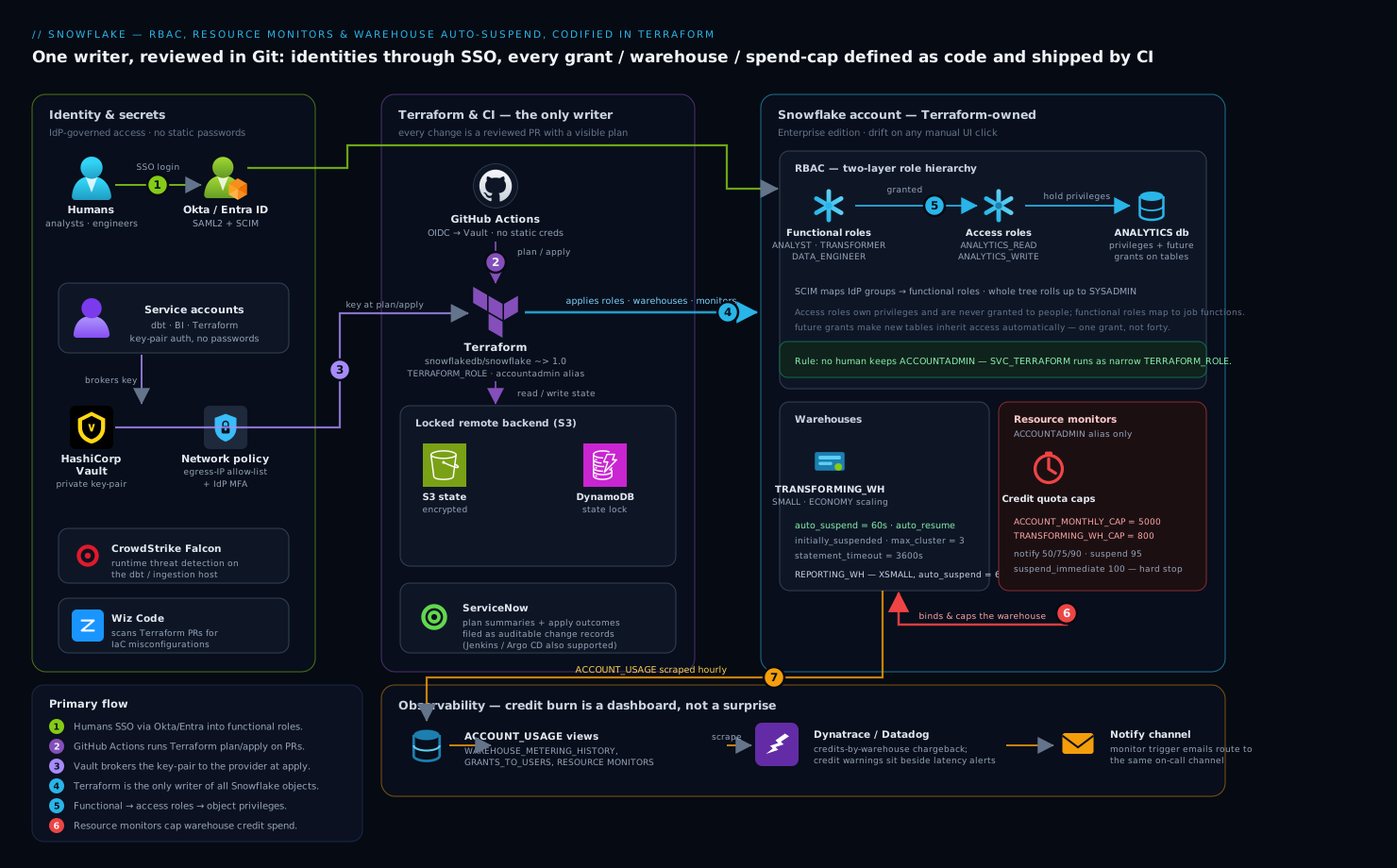
The model has four moving parts and a strict dependency order. Humans authenticate through Okta or Entra ID by SSO and land in functional roles (ANALYST, TRANSFORMER, DATA_ENGINEER) that are granted access roles (<DB>_READ, <DB>_WRITE), which in turn hold the actual object privileges — the two-layer pattern that keeps grants sane. Service accounts (dbt, the Terraform provider itself, the BI tool) authenticate by key-pair, never password, with the private key brokered from HashiCorp Vault. Every warehouse carries AUTO_SUSPEND and a MAX_CONCURRENCY_LEVEL, and is bound to a resource monitor with credit quotas and SUSPEND/SUSPEND_IMMEDIATE triggers — the hard cap the CFO asked for. Terraform is the only writer of all of this; it runs in GitHub Actions, which means every change is a reviewed PR, and Dynatrace/Datadog scrape Snowflake’s ACCOUNT_USAGE views so credit burn is a dashboard, not a surprise.
A non-negotiable rule shapes everything below: Terraform owns the security objects, and Terraform is the only thing that owns them. The moment someone fixes a grant by clicking in the UI, the next terraform apply either reverts it or errors on drift — and that tension is the whole point. State lives in a real remote backend with locking, never on a laptop.
1. Bootstrap a dedicated Terraform role and service user
Never let Terraform run as ACCOUNTADMIN — that is the credential you are trying to retire. Create a purpose-built role with exactly the grants the provider needs, and a key-pair service user for it. Generate the key-pair first.
# Encrypted private key for the Terraform service user; passphrase goes to Vault.
openssl genrsa 2048 | openssl pkcs8 -topk8 -v2 des3 -inform PEM -out tf_snowflake_key.p8
openssl rsa -in tf_snowflake_key.p8 -pubout -out tf_snowflake_key.pub

# Strip header/footer to the single-line form Snowflake's RSA_PUBLIC_KEY wants.
grep -v -e '-----BEGIN' -e '-----END' tf_snowflake_key.pub | tr -d '\n'
Run this once in SnowSQL as ACCOUNTADMIN to create the role and user (this is the only manual click-equivalent in the whole setup):
USE ROLE ACCOUNTADMIN;

CREATE ROLE IF NOT EXISTS TERRAFORM_ROLE;
-- Grants Terraform genuinely needs — not ACCOUNTADMIN.
GRANT CREATE ROLE      ON ACCOUNT TO ROLE TERRAFORM_ROLE;
GRANT CREATE USER      ON ACCOUNT TO ROLE TERRAFORM_ROLE;
GRANT CREATE DATABASE  ON ACCOUNT TO ROLE TERRAFORM_ROLE;
GRANT CREATE WAREHOUSE ON ACCOUNT TO ROLE TERRAFORM_ROLE;
GRANT MANAGE GRANTS    ON ACCOUNT TO ROLE TERRAFORM_ROLE;  -- so it can wire up grants
GRANT MONITOR USAGE    ON ACCOUNT TO ROLE TERRAFORM_ROLE;
-- Resource monitors can only be created/owned by ACCOUNTADMIN, so delegate that path:
GRANT ROLE TERRAFORM_ROLE TO ROLE SYSADMIN;

CREATE USER IF NOT EXISTS SVC_TERRAFORM
  DEFAULT_ROLE      = TERRAFORM_ROLE
  DEFAULT_WAREHOUSE = COMPUTE_WH
  RSA_PUBLIC_KEY    = 'MIIBIjANBgkq...the-stripped-key...AQAB'
  MUST_CHANGE_PASSWORD = FALSE;

GRANT ROLE TERRAFORM_ROLE TO USER SVC_TERRAFORM;
Resource monitors are special: in Snowflake only
ACCOUNTADMINcan create or own them. We handle that in step 4 by running the monitor resources under anaccountadmin-roled provider alias, kept narrow and separate from the main provider.
2. Wire the provider and a locked remote backend
Configure the provider to authenticate as SVC_TERRAFORM by key-pair, pulling the private key from Vault at plan/apply time rather than from disk. Use a remote backend with state locking so two CI runs can never apply at once.
# versions.tf
terraform {
  required_version = ">= 1.6"
  required_providers {
    snowflake = {
      source  = "snowflakedb/snowflake"
      version = "~> 1.0"
    }
    vault = { source = "hashicorp/vault", version = "~> 4.0" }
  }
  backend "s3" {
    bucket         = "acme-tfstate-snowflake"
    key            = "snowflake/prod/terraform.tfstate"
    region         = "ap-south-1"
    dynamodb_table = "tf-locks"        # state locking
    encrypt        = true
  }
}

# providers.tf
data "vault_kv_secret_v2" "tf_key" {
  mount = "secret"
  name  = "snowflake/svc_terraform"   # holds private_key + passphrase
}

provider "snowflake" {
  organization_name = "ACME"
  account_name      = "ANALYTICS_PROD"
  user              = "SVC_TERRAFORM"
  authenticator     = "SNOWFLAKE_JWT"
  private_key       = data.vault_kv_secret_v2.tf_key.data["private_key"]
  role              = "TERRAFORM_ROLE"
}

# A narrow second provider only for resource monitors, which require ACCOUNTADMIN.
provider "snowflake" {
  alias             = "accountadmin"
  organization_name = "ACME"
  account_name      = "ANALYTICS_PROD"
  user              = "SVC_TERRAFORM"
  authenticator     = "SNOWFLAKE_JWT"
  private_key       = data.vault_kv_secret_v2.tf_key.data["private_key"]
  role              = "ACCOUNTADMIN"
}
Initialize and confirm the backend and providers resolve:
terraform init
terraform providers   # expect snowflakedb/snowflake and hashicorp/vault
3. Codify the role hierarchy (access roles + functional roles)
This is the heart of RBAC. The pattern: access roles own privileges on objects and are never granted to people; functional roles map to job functions, are granted the access roles they need, and are what users actually receive. This indirection means adding a new database to “everything analysts can read” is one grant, not forty.
# databases.tf
resource "snowflake_database" "analytics" {
  name                        = "ANALYTICS"
  data_retention_time_in_days = 7
}

# roles.tf — access roles (privilege holders)
resource "snowflake_account_role" "analytics_read" { name = "ANALYTICS_READ" }
resource "snowflake_account_role" "analytics_write" { name = "ANALYTICS_WRITE" }

# functional roles (assigned to humans/services)
resource "snowflake_account_role" "analyst"      { name = "ANALYST" }
resource "snowflake_account_role" "transformer"  { name = "TRANSFORMER" }
resource "snowflake_account_role" "data_engineer"{ name = "DATA_ENGINEER" }

# Compose: functional -> access -> (privileges below)
resource "snowflake_grant_account_role" "analyst_gets_read" {
  role_name        = snowflake_account_role.analytics_read.name
  parent_role_name = snowflake_account_role.analyst.name
}
resource "snowflake_grant_account_role" "transformer_gets_write" {
  role_name        = snowflake_account_role.analytics_write.name
  parent_role_name = snowflake_account_role.transformer.name
}
# Roll the whole tree up to SYSADMIN so it stays manageable.
resource "snowflake_grant_account_role" "analyst_to_sysadmin" {
  role_name        = snowflake_account_role.analyst.name
  parent_role_name = "SYSADMIN"
}
Now attach real privileges to the access roles, using future grants so new schemas/tables inherit access automatically:
# grants.tf — privileges live on access roles only
resource "snowflake_grant_privileges_to_account_role" "read_db_usage" {
  account_role_name = snowflake_account_role.analytics_read.name
  privileges        = ["USAGE"]
  on_account_object {
    object_type = "DATABASE"
    object_name = snowflake_database.analytics.name
  }
}

resource "snowflake_grant_privileges_to_account_role" "read_future_tables" {
  account_role_name = snowflake_account_role.analytics_read.name
  privileges        = ["SELECT"]
  on_schema_object {
    future {
      object_type_plural = "TABLES"
      in_database        = snowflake_database.analytics.name
    }
  }
}

resource "snowflake_grant_privileges_to_account_role" "write_future_tables" {
  account_role_name = snowflake_account_role.analytics_write.name
  privileges        = ["SELECT", "INSERT", "UPDATE", "DELETE"]
  on_schema_object {
    future {
      object_type_plural = "TABLES"
      in_database        = snowflake_database.analytics.name
    }
  }
}
Bind human identities through SSO rather than provisioning passwords. Configure a SAML2 integration to Okta (or Entra ID) so workforce login is centralized and offboarding in the IdP instantly cuts Snowflake access, and use SCIM so the IdP pushes users and group membership into Snowflake roles automatically:
resource "snowflake_saml2_integration" "okta" {
  name                = "OKTA_SSO"
  saml2_issuer        = "http://www.okta.com/exk1abc..."
  saml2_sso_url       = "https://acme.okta.com/app/.../sso/saml"
  saml2_provider      = "OKTA"
  saml2_x509_cert     = var.okta_signing_cert
  saml2_sp_initiated_login_page_label = "Okta"
}
With SCIM enabled in the Okta/Entra app, an Okta group like snowflake-analysts maps straight to the ANALYST functional role — so “who is an analyst” is answered in the IdP, reviewed there, and never drifts into a pile of manual GRANT ROLE statements.
4. Define warehouses with auto-suspend guardrails
Every warehouse gets auto_suspend (seconds of idle before it powers down) and auto_resume, plus a sane size and concurrency. A warehouse that suspends after 60s of idle costs nothing while no query runs — this single setting reverses most of the “forgot to turn it off” bill.
# warehouses.tf
resource "snowflake_warehouse" "transforming" {
  name                                = "TRANSFORMING_WH"
  warehouse_size                      = "SMALL"
  auto_suspend                        = 60      # idle seconds before suspend
  auto_resume                         = true    # wake on the next query
  initially_suspended                 = true    # never bill for an idle birth
  min_cluster_count                   = 1
  max_cluster_count                   = 3        # multi-cluster only when queued
  scaling_policy                      = "ECONOMY"
  statement_timeout_in_seconds        = 3600     # kill a runaway query at 1h
  statement_queued_timeout_in_seconds = 600
  max_concurrency_level               = 8
}

resource "snowflake_warehouse" "reporting" {
  name           = "REPORTING_WH"
  warehouse_size = "XSMALL"
  auto_suspend   = 60
  auto_resume    = true
  initially_suspended = true
}

# Grant USAGE on the warehouse to the functional roles that should run on it.
resource "snowflake_grant_privileges_to_account_role" "transformer_uses_wh" {
  account_role_name = snowflake_account_role.transformer.name
  privileges        = ["USAGE", "OPERATE"]
  on_account_object {
    object_type = "WAREHOUSE"
    object_name = snowflake_warehouse.transforming.name
  }
}
statement_timeout_in_seconds is the per-query backstop the contractor’s runaway backfill needed — no single statement can burn credits for more than an hour. ECONOMY scaling favors cost over raw concurrency, spinning extra clusters only when queries actually queue.
5. Create resource monitors — the hard spending cap
Resource monitors are the CFO’s lever: a credit quota over a rolling interval, with triggers that notify, suspend-on-finish, or suspend-immediately when thresholds are crossed. Because monitors require ACCOUNTADMIN, declare them through the provider alias from step 2.
# monitors.tf — account-level safety net
resource "snowflake_resource_monitor" "account_cap" {
  provider       = snowflake.accountadmin
  name           = "ACCOUNT_MONTHLY_CAP"
  credit_quota   = 5000          # credits per frequency window
  frequency      = "MONTHLY"
  start_timestamp = "IMMEDIATELY"

  notify_triggers           = [50, 75, 90]   # email the admins at these %
  suspend_trigger           = 95             # suspend warehouses after running queries finish
  suspend_immediate_trigger = 100            # hard stop — kill in-flight queries
}

# Per-warehouse monitor so one team can't drain the whole account quota.
resource "snowflake_resource_monitor" "transforming_cap" {
  provider                  = snowflake.accountadmin
  name                      = "TRANSFORMING_WH_CAP"
  credit_quota              = 800
  frequency                 = "MONTHLY"
  start_timestamp           = "IMMEDIATELY"
  notify_triggers           = [80, 90]
  suspend_trigger           = 95
  suspend_immediate_trigger = 100
}

# Attach the warehouse-scoped monitor to its warehouse.
resource "snowflake_resource_monitor" "transforming_cap_attach" {
  # In provider v1.x the binding is set via the warehouse's resource_monitor arg:
  provider     = snowflake.accountadmin
  name         = snowflake_resource_monitor.transforming_cap.name
  notify_users = ["DATA_ONCALL"]
}
Bind the per-warehouse monitor by adding resource_monitor = "TRANSFORMING_WH_CAP" to the snowflake_warehouse.transforming resource. The two-tier structure matters: the account monitor is the absolute ceiling that protects the bill, while per-warehouse monitors localize blame and stop a single noisy pipeline from consuming everyone else’s headroom. notify_triggers route to the email addresses on the notified admin users — wire those into the same channel Dynatrace/Datadog alerts land in so credit warnings sit beside latency alerts.
6. Ship it through CI, not a laptop
Move applies into GitHub Actions so every change is a reviewed PR with a visible plan. The runner authenticates to Vault for the Snowflake key and never stores a long-lived Snowflake password.
# .github/workflows/snowflake.yml
name: snowflake-terraform
on:
  pull_request: { paths: ["snowflake/**"] }
  push:        { branches: [main], paths: ["snowflake/**"] }
permissions: { id-token: write, contents: read }   # OIDC, no static creds
jobs:
  plan-apply:
    runs-on: ubuntu-latest
    steps:
      - uses: actions/checkout@v4
      - uses: hashicorp/setup-terraform@v3
        with: { terraform_version: 1.6.6 }
      - name: Vault login (OIDC)
        uses: hashicorp/vault-action@v3
        with:
          url: https://vault.acme.internal
          method: jwt
          role: snowflake-ci
          secrets: secret/data/snowflake/svc_terraform private_key | TF_VAR_sf_key
      - run: terraform -chdir=snowflake init
      - run: terraform -chdir=snowflake plan -out tf.plan
      - name: Apply on main only
        if: github.ref == 'refs/heads/main'
        run: terraform -chdir=snowflake apply -auto-approve tf.plan
On Jenkins, the same flow is a declarative pipeline with a withVault block and a manual input approval gate before apply. If you run Argo CD, drive Terraform through a controller like the Terraform Operator and let Argo’s RBAC and sync windows govern when monitor/warehouse changes land — useful when the platform team wants the same GitOps console for Kubernetes and Snowflake. Route plan summaries and apply outcomes to ServiceNow as change records so each access or quota change has an auditable ticket, and let Wiz Code scan the Terraform in the PR for IaC misconfigurations — an over-broad grant or a monitor with no suspend_immediate_trigger is exactly the policy violation it flags before merge.
Validation
After the first apply, prove the four guardrails actually hold. Run these as a privileged role in SnowSQL.
-- 1. Role hierarchy: ANALYST should reach ANALYTICS_READ, not ACCOUNTADMIN.
SHOW GRANTS TO ROLE ANALYST;
SHOW GRANTS TO ROLE ANALYTICS_READ;

-- 2. Warehouse guardrails: confirm auto_suspend + size on every warehouse.
SHOW WAREHOUSES;
--   eyeball the "auto_suspend" and "size" columns — none should be NULL/huge.

-- 3. Resource monitors and their triggers exist and are bound.
SHOW RESOURCE MONITORS;

-- 4. No human still holds ACCOUNTADMIN by accident.
SELECT grantee_name, role
FROM   SNOWFLAKE.ACCOUNT_USAGE.GRANTS_TO_USERS
WHERE  role = 'ACCOUNTADMIN' AND deleted_on IS NULL;
A live test of the cap: temporarily set a tiny credit_quota (e.g. 1) on a non-prod monitor, run a deliberately heavy query, and confirm the warehouse suspends and the notification fires. Then revert. Confirm Terraform is the source of truth by running terraform plan again — a clean “No changes” means the applied state matches the code and nothing drifted via the UI. Finally, check that Dynatrace/Datadog is ingesting SNOWFLAKE.ACCOUNT_USAGE.WAREHOUSE_METERING_HISTORY so credit burn shows up on the dashboard within the hour.
Rollback / teardown
Because everything is Terraform, rollback is git revert of the offending commit followed by terraform apply — the access model and monitors snap back to the last reviewed state. For a clean teardown of a non-prod account:
# Detach monitors from warehouses first (a monitor in use won't drop cleanly),
# then destroy in dependency order. -target lets you peel layers safely.
terraform plan -destroy
terraform destroy -target=snowflake_resource_monitor.transforming_cap
terraform destroy   # removes warehouses, roles, grants, databases
Order matters: drop resource monitors and grants before warehouses and roles, and warehouses before the databases their objects depend on. The bootstrap TERRAFORM_ROLE and SVC_TERRAFORM from step 1 are not in Terraform state by design — remove them manually as ACCOUNTADMIN only when you are decommissioning the whole automation. Keep the remote state backend until last; it is your audit trail of what existed.
Common pitfalls
- Running Terraform as
ACCOUNTADMIN. It works, then it owns objects with god-mode and becomes the exact credential you were trying to retire. Use the narrowTERRAFORM_ROLE, with a separateaccountadminalias only for resource monitors. - Granting privileges to functional roles directly. It feels faster and rots within a month. Privileges go on access roles; functional roles get access roles. Skip the indirection and every new database is a fresh sprawl of grants.
- Forgetting
futuregrants. Without them, every new table created tomorrow has no analyst access and you are back to clicking. Future grants make access inherit automatically. - Monitors with notify-only triggers. A monitor that emails at 100% but never suspends is a smoke alarm with no sprinkler. Always set
suspend_triggerandsuspend_immediate_trigger. - No
initially_suspendedand a hugeauto_suspend. A warehouse born running, or one that idles for an hour before suspending, quietly bills the whole time. Setinitially_suspended = trueandauto_suspend = 60. - State on a laptop. No locking means two applies race and corrupt state. Use a remote backend with a lock table from day one.
Security notes
The whole point of this setup is that access is reviewable: every role, grant, and SSO binding is a diff a security reviewer approves in a PR, and Wiz Code scans that PR for over-broad privileges before merge. Human login flows through Okta/Entra ID SSO with SCIM provisioning, so disabling someone in the IdP instantly revokes their Snowflake roles — no orphaned account survives offboarding. Service accounts (Terraform, dbt, BI) use key-pair authentication with private keys held in HashiCorp Vault and rotated on a schedule, never passwords in a config file. On the data-plane host running dbt or ingestion, CrowdStrike Falcon provides runtime threat detection. Enforce a NETWORK POLICY to restrict Snowflake logins to corporate egress IPs, and require MFA in the IdP for any role that can touch ACCOUNTADMIN.
Cost notes
Resource monitors are the hard ceiling and auto_suspend is the everyday saver — together they reverse the “3.4× bill” that started this. Size warehouses to the workload, not the wish: an XSMALL that auto-suspends beats an XL that idles. Use ECONOMY scaling on multi-cluster warehouses so extra clusters spin up only under genuine queue pressure, and set per-warehouse monitors so each team owns its credits. Pipe WAREHOUSE_METERING_HISTORY into Dynatrace or Datadog for a credits-by-warehouse chargeback view the CFO can read, and have a ServiceNow change record accompany any quota increase so a raised cap is a decision, not a drift. The standing rule that funds the platform: if a warehouse has no monitor and no auto_suspend, it should not exist.
Going deeper
The provider: Snowflake-Labs → snowflakedb, and why the version matters
The provider you configured in step 2 has a history worth knowing, because it changes which tutorials you can trust. It began life as a community project, Snowflake-Labs/snowflake. Snowflake later adopted it as the officially supported provider and moved it to the snowflakedb/snowflake namespace, reaching a 1.0 GA in 2024. That GA came with the single biggest breaking change in the provider’s life: nearly every RBAC and grant resource was renamed or redesigned. Code copied from a 2022 blog post will not plan against v1.x — the resource types simply no longer exist.
Here is the map from the old world to the current one — the churn to flag before you touch an inherited Snowflake stack:
| Concept | Old resource (≤ v0.86) | Current resource (v0.87+ / v1.x) |
|---|---|---|
| An account-level role | snowflake_role |
snowflake_account_role |
| Grant a role to a parent role or a user | snowflake_role_grants |
snowflake_grant_account_role |
| Privileges on a database / schema / table / warehouse | snowflake_database_grant, snowflake_schema_grant, snowflake_table_grant, snowflake_warehouse_grant, … (one resource per object type) |
snowflake_grant_privileges_to_account_role (one resource for every object type) |
| Privileges on a database role | (no clean equivalent) | snowflake_grant_privileges_to_database_role |
| Ownership transfer | snowflake_role_ownership_grant |
snowflake_grant_ownership |
Account identifier in the provider block |
account = "AB12345" |
organization_name + account_name |
The lesson already uses the current names — snowflake_account_role, snowflake_grant_account_role, snowflake_grant_privileges_to_account_role — which is why it plans cleanly on ~> 1.0. Two rules keep you out of trouble: pin the version (version = "~> 1.0", or an exact pin in a regulated shop) so a terraform init -upgrade can’t silently jump a major, and when you do bump, read that version’s migration guide first and move state with moved {} blocks or terraform state mv — never let a rename become a destroy-and-recreate of your roles. The refactoring with moved / import / removed blocks lesson covers that surgery in depth.
Access roles vs functional roles — why two layers, not one
The indirection in step 3 is the part beginners are most tempted to skip, so it earns a table:
| Access role | Functional role | |
|---|---|---|
| Holds | privileges on objects (USAGE, SELECT, …) | other (access) roles |
| Granted to | functional roles only — never people | people and service accounts |
| Example | ANALYTICS_READ, ANALYTICS_WRITE |
ANALYST, TRANSFORMER, DATA_ENGINEER |
| Changes when | the object model changes (new DB, new schema) | a job function changes (new team, new duty) |
Adding a new database to “everything an analyst can read” is then one snowflake_grant_account_role (grant the new <DB>_READ to ANALYST), not a fresh privilege grant fanned out to every person. The whole tree rolls up to SYSADMIN, which keeps object ownership in a role rather than an individual — so no warehouse or table is orphaned when the person who created it leaves. Ownership is its own privilege in Snowflake (snowflake_grant_ownership moves it), and a common production rule is that SYSADMIN owns everything, humans own nothing.
Future grants and their one sharp edge
on_schema_object { future { … } } is what makes access inherit automatically — but it only ever applies to objects created after the grant exists. Tables that already sit in the schema when you add the future grant get nothing. To cover what’s already there you need a one-time bulk grant on the existing set:
# Cover tables that already exist (future grants do NOT reach backwards).
resource "snowflake_grant_privileges_to_account_role" "read_all_current_tables" {
  account_role_name = snowflake_account_role.analytics_read.name
  privileges        = ["SELECT"]
  on_schema_object {
    all {
      object_type_plural = "TABLES"
      in_database        = snowflake_database.analytics.name
    }
  }
}
So the durable pattern for a database is future + all together: future for everything from now on, all once for the backlog. There is also a precedence subtlety — a schema-level future grant overrides a database-level future grant for that schema, which trips people who set both and wonder why the broad one seems ignored.
Warehouses and resource monitors, under the hood
A warehouse bills per second while it runs, with a 60-second minimum each time it resumes — which is exactly why auto_suspend = 60 and auto_resume = true are the everyday saver: idle time costs nothing, and the first query after a suspend pays at most one minute of spin-up. ECONOMY scaling on a multi-cluster warehouse favours cost (it packs queries and spins extra clusters only under real queue pressure); STANDARD favours latency (it adds clusters more eagerly). Pick per workload.
Resource monitors have their own mechanics worth internalising:
- They are free — a monitor is a metering-and-control object, not a billed resource. Adding more of them costs nothing.
- A warehouse can be watched by one monitor; a monitor can watch many warehouses (or the whole account). That’s the two-tier structure in step 5: one account ceiling, plus per-warehouse caps.
- Triggers are evaluated on Snowflake’s internal cadence, not instantly. A
suspend_immediate_trigger = 100can slightly overshoot because credit accounting has lag — treat the number as “hard stop, roughly here”, not a cycle-accurate fuse. - Only
ACCOUNTADMINcan create or own a monitor — the reason the lesson runs them through thesnowflake.accountadminprovider alias instead of the narrowTERRAFORM_ROLE. - In provider v1.x the binding moved onto the warehouse (
resource_monitor = "…"onsnowflake_warehouse); the oldwarehouses/set_for_accountattributes on the monitor resource are gone. This is another edge of the same rename churn.
The auth model: key-pair, and why no password ever lands in state
Service accounts authenticate with an RSA key-pair over SNOWFLAKE_JWT, not a password. The provider takes private_key (and private_key_passphrase if the key is encrypted, as ours is), and the lesson brokers that key from Vault at plan/apply time so it never sits in .tfvars or the repo — the secrets in IaC with Vault lesson goes deeper on dynamic credentials. Key-pair beats a password for a service account on three counts: it rotates cleanly (register a second public key, cut over, retire the first), it can be revoked without changing a shared secret, and it sidesteps the MFA prompts a headless password can’t answer.
Mark any variable that carries the key sensitive:
variable "sf_private_key" {
  type      = string
  sensitive = true      # masks it in plan/apply OUTPUT
}
Here is the nuance that catches almost everyone: sensitive = true only masks the value in CLI output — it does not keep it out of the state file. Terraform still writes the private key into state in plaintext. That is why the backend in step 2 sets encrypt = true and lives in a locked, access-controlled bucket, and why the keys are short-lived and rotated. Sensitive hides the value from a shoulder-surfer reading the plan; the state is protected by encryption and IAM, not by that flag. The state deep-dive lesson covers exactly what does and doesn’t get protected.
Drift on manually-granted privileges
The unified grant resource is authoritative only over the grants it declares. If someone opens the UI and runs GRANT MONITOR ON WAREHOUSE … TO ROLE ANALYST, and no Terraform resource describes that privilege, the next terraform plan shows “No changes” — the manual grant is simply invisible to code. That is the quiet failure mode of “Terraform owns security”: it owns what it is told about.
Three levers make it genuinely authoritative:
always_apply = trueon a grant resource forces it to re-run every apply, re-asserting the declared grant and reconciling drift — especially valuable onfuture/allgrants where the object set changes underneath you. The cost is a noisier plan (the resource always shows as “will apply”).all_privileges = true(usually withalways_apply) claims the full privilege set on an object, so a stray manual grant is swept back.snowflake_grant_ownershipis the strongest — owning the object subsumes the argument entirely.
Beyond that, schedule terraform plan on a timer in CI as drift detection and diff SHOW GRANTS output against expectation; the drift detection and reconciliation lesson builds that loop. The tension the intro promised — “the moment someone fixes a grant by clicking, the next apply reverts it or errors” — only actually bites for grants Terraform declares; the manual grant on an undeclared privilege is the blind spot to design around.
Practice challenges
Work these against the code in the lesson. Each solution is one valid approach, not the only one.
1. (Beginner) Give analysts read access to a second database. Add a RAW database and let the ANALYST functional role read every table in it, now and in the future.
<details> <summary>Solution</summary>
resource "snowflake_database" "raw" { name = "RAW" }

resource "snowflake_account_role" "raw_read" { name = "RAW_READ" }

resource "snowflake_grant_privileges_to_account_role" "raw_read_usage" {
  account_role_name = snowflake_account_role.raw_read.name
  privileges        = ["USAGE"]
  on_account_object { object_type = "DATABASE", object_name = snowflake_database.raw.name }
}

resource "snowflake_grant_privileges_to_account_role" "raw_read_future" {
  account_role_name = snowflake_account_role.raw_read.name
  privileges        = ["SELECT"]
  on_schema_object { future { object_type_plural = "TABLES", in_database = snowflake_database.raw.name } }
}

resource "snowflake_grant_account_role" "analyst_gets_raw_read" {
  role_name        = snowflake_account_role.raw_read.name
  parent_role_name = snowflake_account_role.analyst.name
}
Why: privileges go on a new access role (RAW_READ), and the functional role (ANALYST) is granted that access role — the two-layer pattern, so no privilege is ever attached to ANALYST directly.
</details>
2. (Beginner) Stop a warehouse billing while idle. Configure REPORTING_WH so it suspends after one minute of idle and never bills the moment it is created.
<details> <summary>Solution</summary>
resource "snowflake_warehouse" "reporting" {
  name                = "REPORTING_WH"
  warehouse_size      = "XSMALL"
  auto_suspend        = 60      # idle seconds before suspend
  auto_resume         = true    # wake on next query
  initially_suspended = true    # never bill for an idle birth
}
Why: auto_suspend + initially_suspended are the two settings that reverse most “forgot to turn it off” spend; auto_resume keeps it transparent to queries.
</details>
3. (Intermediate) Cover the tables that already exist. You added a future grant but analysts still cannot read the twenty tables already in ANALYTICS. Fix it without touching the future grant.
<details> <summary>Solution</summary>
resource "snowflake_grant_privileges_to_account_role" "read_existing_tables" {
  account_role_name = snowflake_account_role.analytics_read.name
  privileges        = ["SELECT"]
  on_schema_object {
    all { object_type_plural = "TABLES", in_database = snowflake_database.analytics.name }
  }
}
Why: future grants never reach backwards — all { … } grants the current set once, and the two together (future + all) cover both the backlog and everything created from now on.
</details>
4. (Intermediate) Make a future grant self-heal against UI drift. Someone keeps revoking analyst SELECT by hand. Force Terraform to re-assert the future grant on every apply.
<details> <summary>Solution</summary>
resource "snowflake_grant_privileges_to_account_role" "read_future_tables" {
  account_role_name = snowflake_account_role.analytics_read.name
  privileges        = ["SELECT"]
  always_apply      = true       # re-assert every apply, reconciling drift
  on_schema_object {
    future { object_type_plural = "TABLES", in_database = snowflake_database.analytics.name }
  }
}
Why: always_apply = true forces the grant to run each apply so manual revokes are overwritten — the trade-off is that the resource always shows as “will apply” in the plan.
</details>
5. (Advanced) Keep the service key out of plan output — and know where it still lives. Wire the Terraform service account’s private key through a sensitive variable, and state in one line where the key remains in plaintext.
<details> <summary>Solution</summary>
variable "sf_private_key" {
  type      = string
  sensitive = true
}

provider "snowflake" {
  organization_name = "ACME"
  account_name      = "ANALYTICS_PROD"
  user              = "SVC_TERRAFORM"
  authenticator     = "SNOWFLAKE_JWT"
  private_key       = var.sf_private_key
  role              = "TERRAFORM_ROLE"
}
Why: sensitive = true masks the key in CLI output only — it is still written to state in plaintext, so the remote backend must be encrypted and access-controlled and the key rotated.
</details>
6. (Advanced) Upgrade the provider without destroying every role. You inherit a stack pinned to Snowflake-Labs/snowflake v0.85 using snowflake_role. Moving to snowflakedb/snowflake v1.x, plan wants to destroy and recreate every role. Make the upgrade non-destructive.
<details> <summary>Solution</summary>
# 1. Point at the official provider and pin the new major.
terraform {
  required_providers {
    snowflake = { source = "snowflakedb/snowflake", version = "~> 1.0" }
  }
}

# 2. Rename in state instead of recreating — one moved block per role.
moved {
  from = snowflake_role.analyst
  to   = snowflake_account_role.analyst
}
# (repeat for each role; replace old per-object grant resources with
#  snowflake_grant_privileges_to_account_role, importing where needed.)
Why: the v0.8x → v1 churn renamed the resource type, so moved {} blocks (or terraform state mv) re-map existing objects to the new names — a destroy/recreate would drop live roles and every grant hanging off them. Always read the version’s migration guide first.
</details>
Common beginner mistakes
These are misconceptions about the model, distinct from the operational traps in Common pitfalls above.
-
“A role is basically a user.” It is not. A role is a key on a ring, not a person. One human can hold several roles and switch between them (
USE ROLE); one role can be held by many humans and services. Design roles around jobs and objects, then hand them out — do not create a role per person. -
“Future grants will fix access on the tables that are already there.” They will not —
futureonly touches objects created after the grant. Existing tables need a one-timeall { … }grant. If access “works for new tables but not old ones”, this is almost always why. -
“A resource monitor will cost me money, or slow things down while I’m under budget.” No. A monitor is a free metering object that does nothing until a threshold is crossed. There is no reason not to put an account-level ceiling on every account on day one.
-
“
sensitive = truekeeps my private key out of the state file.” It does not.sensitiveonly masks CLI output; the value is still written to state in plaintext. Protect the state (encrypted, access-controlled backend) and rotate the key — do not rely on the flag as if it were encryption. -
“I found a Snowflake Terraform tutorial — I’ll copy its resources.” Check the date and the provider source first. Anything using
snowflake_role,snowflake_role_grants, orsnowflake_database_grantpredates the v1 redesign and will not plan againstsnowflakedb/snowflakev1.x. Map it tosnowflake_account_roleandsnowflake_grant_privileges_to_account_role. -
“If someone changes a grant in the UI, Terraform will catch it.” Only if a Terraform resource declares that grant. A manual grant on a privilege you never wrote code for is invisible to
plan. Make Terraform authoritative where it matters withalways_apply,all_privileges, or ownership — otherwise “Terraform owns security” quietly means “Terraform owns the parts it was told about”.
Glossary
- RBAC (Role-Based Access Control): granting privileges to roles, and roles to users, rather than privileges straight to users. The key-cabinet model.
- Access role: a role that holds privileges on objects (databases, schemas, tables, warehouses) and is granted only to functional roles — never to people. Example:
ANALYTICS_READ. - Functional role: a role that maps to a job function (
ANALYST,DATA_ENGINEER), is granted the access roles it needs, and is what users and service accounts actually receive. - Role hierarchy / role grant: granting one role to another (
snowflake_grant_account_role) so privileges roll up. Functional → access →SYSADMINis the usual chain. - Privilege: a specific right on an object —
USAGE,SELECT,INSERT,OPERATE,MONITOR, and so on. - Future grant: a grant that automatically applies to objects created after it (
on_schema_object { future { … } }). Does not reach objects that already exist. allgrant: a one-time grant over the objects that currently exist (on_schema_object { all { … } }) — the companion to a future grant for covering the backlog.- Ownership: the special privilege of owning an object (
snowflake_grant_ownership). The owner can do anything to it; production keeps ownership inSYSADMIN, not a person. - Warehouse: Snowflake’s compute engine. Sized
XSMALL…6X-LARGE; bills per second while running (60-second minimum on resume). - Credit: Snowflake’s unit of compute billing. Warehouses burn credits per second of run time; monitors budget them.
- Auto-suspend / auto-resume: power a warehouse down after N idle seconds (
auto_suspend) and wake it on the next query (auto_resume) — the everyday cost saver. - Multi-cluster warehouse: a warehouse that adds compute clusters under concurrency;
ECONOMYscaling favours cost,STANDARDfavours latency. - Resource monitor: a free control object that caps credit spend over a window with notify / suspend / suspend-immediate triggers. Only
ACCOUNTADMINcan own one. - Credit quota: the credit budget a monitor enforces over its
frequencywindow (e.g.MONTHLY). - Trigger: a monitor threshold and action —
notify_triggers(email at %),suspend_trigger(suspend after running queries finish),suspend_immediate_trigger(kill in-flight queries). - Key-pair authentication: logging in with an RSA private key over
SNOWFLAKE_JWTinstead of a password — the standard for service accounts. Supports rotation and revocation. SNOWFLAKE_JWT: the providerauthenticatorvalue that selects key-pair (JWT) auth.- SSO / SAML2: single sign-on via an identity provider (Okta, Entra ID) so human login is centralized;
snowflake_saml2_integrationcodifies it. - SCIM: the protocol by which the IdP pushes users and group membership into Snowflake roles automatically.
ACCOUNTADMIN/SYSADMIN: the top built-in roles —ACCOUNTADMINfor account-wide settings (and the only owner of resource monitors),SYSADMINfor owning databases and warehouses. Neither should be held by a dozen humans.- Provider alias: a second configuration of the same provider (here, one as
TERRAFORM_ROLE, one asACCOUNTADMIN) selected per resource withprovider = snowflake.accountadmin. - Remote backend / state locking: storing
terraform.tfstatein a shared, locked store (S3 + DynamoDB here) so two applies cannot race and corrupt it. - Drift: divergence between real infrastructure and Terraform’s state/code — for example, a grant changed by hand in the UI.
sensitive: a flag that masks a value in CLI output — it does not encrypt or remove the value from state.always_apply: a grant-resource flag that re-asserts the grant on every apply, reconciling manual drift (at the cost of a noisier plan).ACCOUNT_USAGE: the Snowflake schema of account-wide metadata and metering views (e.g.WAREHOUSE_METERING_HISTORY) that dashboards read for credit-burn visibility.