You have a rack of Windows and Linux servers in your own data centre, plus a handful of VMs over in AWS and GCP, and your security team has just asked the question every hybrid shop eventually hears: “Can you show me these machines in Azure, apply our tag policy, and tell me which ones are missing patches?” The machines aren’t in Azure and you won’t migrate them — but they still need to sit under the same governance, monitoring and identity plane as everything in the cloud. That is the gap Azure Arc closes: it projects a server that lives anywhere into Azure as a first-class resource you can see, tag, govern with Azure Policy, monitor, and grant Azure RBAC over, all without moving a byte of the workload.
The mechanism is a lightweight piece of software, the Azure Connected Machine agent (the azcmagent binary). You install it on each server; it registers the machine as an Azure Resource Manager resource of type Microsoft.HybridCompute/machines, and from that moment the server shows up next to your native Azure VMs — same resource group, tags, policy assignments and activity log. Doing one server by hand takes five minutes; doing three hundred by hand is a non-starter, which is why this guide treats bulk enrolment with a service principal as the real goal — the interactive install teaches you the moving parts, then you automate it.
By the end you will have onboarded a server two ways (portal and az CLI), created a least-privilege onboarding service principal, generated and run the at-scale script unattended, validated the connection from both sides, and torn it all down — plus you’ll know the handful of things that actually go wrong (firewall egress, the wrong RBAC role, a clock skew breaking TLS) and how to confirm and fix each in under a minute.
What problem this solves
Without Arc, a server outside Azure is invisible to Azure. It has no resource ID, so you cannot put it in a resource group, cannot tag it for cost allocation, cannot target it with an Azure Policy assignment, cannot grant a colleague time-boxed RBAC access to it, and cannot pull its guest inventory or patch status into Azure Monitor. Your “single pane of glass” has a hole in it the exact shape of everything that isn’t in the cloud — which, for most enterprises, is still the majority of the estate.
The painful workarounds are familiar — a separate on-prem monitoring stack nobody reconciles, a stale “servers we also have” spreadsheet, patch compliance proven by audit screenshots — each a governance gap waiting to become an audit finding. Onboarding fixes all of it at once. Who hits it: anyone running hybrid, multicloud (Azure + AWS/GCP), or edge estates told to bring everything under one governance model — hardest during a compliance push, when every server must carry the right tags, report patch status, and sit behind the same Microsoft Defender for Cloud posture.
Learning objectives
By the end of this article you can:
- Explain what Azure Arc is, what the Connected Machine agent does, and what an Arc-enabled server resource (
Microsoft.HybridCompute/machines) gives you that a bare server cannot. - Register the two resource providers Arc needs and identify the exact Azure RBAC roles required to onboard and to manage Arc machines.
- Onboard a single server interactively, both in the Azure portal (generate-and-run script) and from the
azCLI /azcmagent, and read the expected output at each step. - Create a dedicated onboarding service principal with the least-privilege Azure Connected Machine Onboarding role and store its secret safely.
- Generate and run the at-scale onboarding script to bulk-enrol many servers unattended, including the agent download for both Windows and Linux.
- Express the Arc machine and its role assignment as Bicep so the resource and access are managed as code.
- Validate a connection from both the server (
azcmagent show) and Azure (az connectedmachine show), and tear down an onboarded machine cleanly from both sides. - Diagnose the common onboarding failures — blocked egress, wrong role, proxy/TLS and clock-skew issues — using the exact command or portal path that confirms each.
Prerequisites & where this fits
You should be comfortable with the Azure basics — what a subscription and a resource group are (see Azure Resource Hierarchy Explained: Subscriptions, Resource Groups and Resources), running az in Cloud Shell, and logging in to a server as local administrator/root. You’ll want a server you can install software on: a spare VM, a local Hyper-V/VirtualBox guest, or even a cloud VM in another provider — the whole point of Arc is that the machine need not be in Azure.
On the identity side this builds on the service principal model: at-scale onboarding authenticates as an app, not a human. If app registration, service principal and client secret are fuzzy, read App Registrations vs Enterprise Applications: The Service Principal Model Explained first; storing that secret correctly leads into Azure Key Vault: Secrets, Keys and Certificates Done Right.
Onboarding is the front door of the whole Arc story. Once a server is Arc-enabled, the downstream work — governing it with Azure Policy Effects Decoded: Deny vs Audit vs Modify vs DeployIfNotExists, monitoring it via Azure Monitor and Application Insights: Full-Stack Observability, and scoping access with Management Groups 101: Designing a Hierarchy That Scopes Policy and RBAC — is identical to a native Azure VM. This article gets the machine into Azure; those tell you what to do once it’s there.
Core concepts
A few mental models make every later step obvious.
Arc projects a resource, not the workload. Onboarding does not move, copy, or change your server. It creates a small ARM resource — Microsoft.HybridCompute/machines/<name> — in a resource group you choose, and links it to the physical/virtual machine via the agent. The workload keeps running exactly where it is; Azure simply gains a handle to it. Delete the Arc resource and the server is untouched (it just disappears from Azure).
The Connected Machine agent is the bridge. The agent (azcmagent plus background services) does three jobs: it registers the machine (creating that ARM resource), maintains a managed identity for the server (to authenticate to Azure services like Key Vault), and is the landing pad for extensions (Log Analytics agent, custom scripts, Defender). It is deliberately lightweight — not a remote-desktop or remote-shell tool, and it gives Microsoft no shell on your box.
Onboarding needs an identity that can create the resource. Someone — a human signed in with az login, or a service principal running a script — must have permission to create the HybridCompute/machines resource. Interactive onboarding uses your login; at-scale onboarding uses a dedicated service principal so no human credentials sit in a deployment script. The right role for that identity is the narrow Azure Connected Machine Onboarding role — it can create and read Arc machines and nothing else.
The agent reaches Azure outbound over HTTPS (443). The server initiates all communication outbound to a defined set of Azure endpoints on TCP 443. Azure never connects inbound to your server, so you do not open any inbound firewall ports. If onboarding fails, it is almost always because outbound 443 to one of those endpoints is blocked — that is the single most common failure, and the agent has a built-in azcmagent check to test it.
The machine then carries an Azure identity and a region. Once connected, the Arc machine lives in a specific Azure region and resource group, and its system-assigned identity lets a local process read a token from http://localhost:40342 to call Azure RBAC-protected services — exactly like a managed identity on a native VM.
The vocabulary in one table
| Term | One-line definition | Why it matters to onboarding |
|---|---|---|
| Azure Arc | Extends ARM control plane to non-Azure machines | The umbrella feature you’re enabling |
| Connected Machine agent | The azcmagent software you install |
The thing that registers and maintains the link |
azcmagent |
The agent’s CLI (connect, show, check, disconnect) | Every server-side action runs through it |
Microsoft.HybridCompute/machines |
The ARM resource type Arc creates | The “handle” Azure gets to your server |
| Resource provider | The ARM service that owns a resource type | Must be registered on the subscription first |
| Onboarding service principal | An app identity used to enrol at scale | Replaces a human login in automation |
| Azure Connected Machine Onboarding | Built-in RBAC role to create Arc machines | Least-privilege role for the SPN |
| Azure Connected Machine Resource Administrator | RBAC role to manage Arc machines + extensions | For day-2 management, not onboarding |
| System-assigned managed identity | Per-machine identity Arc grants the server | Lets the server call Azure services securely |
| Extension | Software Azure pushes onto an Arc machine | Monitoring, Defender, scripts — all post-onboard |
What you need before the first install
Onboarding has a small, fixed set of prerequisites. Get these right and the install is uneventful; miss one and you hit a clear, specific error. Here is the full checklist.
| Prerequisite | Detail / value | How to satisfy it |
|---|---|---|
| Supported OS | Windows Server 2012 R2+; common Linux (Ubuntu, RHEL, SUSE, Debian, etc.) | Check the server OS version |
| Local privilege on the server | Administrator (Windows) or root/sudo (Linux) | Log in with that account |
| Two resource providers registered | Microsoft.HybridCompute, Microsoft.GuestConfiguration (also Microsoft.HybridConnectivity, Microsoft.AzureArcData for some features) |
az provider register (shown below) |
| Azure RBAC to onboard | Azure Connected Machine Onboarding (create) on the target RG | Role assignment (human or SPN) |
| Outbound HTTPS (443) | To the Arc service endpoints (and optionally via proxy) | Firewall rule / proxy config |
| A target resource group + region | Where the Arc resource will live | az group create |
| Correct system clock | TLS fails if skew is large | NTP/time sync on the server |
The two resource providers must be registered on the subscription before the first onboarding, or registration fails with a provider-not-registered error. Do it once per subscription:
# Register the providers Arc needs (idempotent; takes a minute to propagate)
az provider register --namespace Microsoft.HybridCompute --wait
az provider register --namespace Microsoft.GuestConfiguration --wait
az provider register --namespace Microsoft.HybridConnectivity --wait
az provider register --namespace Microsoft.AzureArcData --wait

# Confirm they show Registered
az provider show -n Microsoft.HybridCompute --query registrationState -o tsv
az provider show -n Microsoft.GuestConfiguration --query registrationState -o tsv
Expected output: each show prints Registered. If it prints Registering, wait a minute and re-check.
The two roles that matter (and the difference)
There are two Arc-specific built-in roles, and conflating them is a common early mistake. One is for getting machines in; the other is for managing them afterwards. Use the narrowest one for each job.
| Role | Can do | Use it for | Don’t use it for |
|---|---|---|---|
| Azure Connected Machine Onboarding | Create + read Arc machines | The onboarding SPN / first enrolment | Day-2 management, running extensions |
| Azure Connected Machine Resource Administrator | Read, manage, delete Arc machines + extensions | Operators managing the fleet | The onboarding SPN (too broad) |
| Reader (built-in) | View the Arc machine | Auditors, viewers | Anything that changes state |
The onboarding service principal should hold only Azure Connected Machine Onboarding, scoped to the single resource group it enrols into — that role cannot delete machines, cannot push extensions, and cannot read your other resources, so a leaked onboarding secret has a tightly bounded blast radius. See Managed Identities Demystified: System vs User-Assigned and When to Use Each for how this contrasts with the machine’s own identity after onboarding.
Network egress: the endpoints and ports
The agent talks outbound only, over TCP 443, to a defined set of endpoints. You open no inbound ports. The endpoint set below is what onboarding and steady-state operation require; if your firewall is restrictive, allow-list these (or route via the agent’s proxy support).
| Endpoint (outbound) | Port | Purpose | Required? |
|---|---|---|---|
login.microsoftonline.com |
443 | Entra ID auth (get a token) | Yes |
management.azure.com |
443 | ARM — create/update the machine resource | Yes |
*.his.arc.azure.com |
443 | Hybrid Identity Service (machine identity) | Yes |
*.guestconfiguration.azure.com |
443 | Guest configuration / policy | Yes (for policy) |
pas.windows.net |
443 | Azure AD device registration (Windows) | Yes (Windows) |
download.microsoft.com / packages.microsoft.com |
443 | Agent + extension download | During install |
*.servicebus.windows.net |
443 | Optional SSH/remote features | Only if used |
If you can’t open broad egress, the agent supports an HTTP/HTTPS proxy (azcmagent config set proxy.url) and Azure offers a private-endpoint model (Arc private link scope) so traffic stays on a private network — but for a first onboarding, allow-listing the endpoints above over 443 is the simplest path.
Onboarding a single server (the interactive path)
There are two interactive routes to the same result: the portal, which generates a ready-to-run script, and the az/azcmagent CLI, which you run directly. Both end with the same HybridCompute/machines resource. Learn the CLI path because it’s the basis of the at-scale script; the portal path is the friendliest way to see the moving parts the first time.
Route A — the Azure portal (generate-and-run)
The portal never installs anything by itself (your server isn’t reachable from Azure); instead it builds a script you copy to the server and run there.
| # | In the portal | What it does |
|---|---|---|
| 1 | Search Azure Arc → Machines → + Add/Connect → Add a single server | Starts the onboarding wizard |
| 2 | Pick Subscription, Resource group, Region, and Operating system (Windows/Linux) | Sets where the Arc resource will live |
| 3 | Choose connectivity method (Public endpoint / Proxy / Private endpoint) | Matches your network egress |
| 4 | (Optional) add tags | Stamps the resource on creation |
| 5 | Click Download and run script — copy the generated script to the server | The script installs the agent + runs azcmagent connect with an interactive login |
| 6 | On the server (as admin/root), run the script; complete the device-code login in a browser | Registers the machine; it appears under Arc → Machines |
The generated script does exactly what the CLI path does below — it downloads the agent, installs it, then calls azcmagent connect with an interactive (device-code) authentication, so a human approves the enrolment in a browser. That’s perfect for one or two machines and terrible for three hundred (you can’t device-code-login on every box) — which is the whole reason the service-principal path exists.
Route B — the CLI (az connectedmachine connect)
This is the same flow, command-line driven. Run it on the target server (the agent must be installed locally). First install the agent, then connect.
Step 1 — Install the agent on the server. On Linux, Microsoft provides a one-line installer script:
# Linux: download and run the agent installer (run as root/sudo)
wget https://gbl.his.arc.azure.com/azcmagent-linux -O install_linux_azcmagent.sh
bash install_linux_azcmagent.sh
On Windows, download and install the MSI (PowerShell, as Administrator):
# Windows: download the agent MSI and install it silently
Invoke-WebRequest -Uri "https://aka.ms/AzureConnectedMachineAgent" -OutFile AzureConnectedMachineAgent.msi
msiexec /i AzureConnectedMachineAgent.msi /qn
Expected: the installer reports success and the azcmagent binary is now on PATH. Confirm with azcmagent version.
Step 2 — Connect the machine (interactive login). Now register it against Azure. This uses your interactive login, so you’ll complete a device-code prompt:
# Connect this server to Azure Arc (interactive auth)
azcmagent connect \
  --resource-group "rg-arc-lab" \
  --location "centralindia" \
  --subscription-id "<your-subscription-id>" \
  --tags "env=lab,owner=vinod"
Expected output ends with Successfully onboarded resource to Azure. Confirm from both sides the same way the lab does below: azcmagent show on the server should read Agent Status : Connected (with the resource name, group, region and machine-identity object ID), and az connectedmachine show --name "$(hostname)" -g rg-arc-lab from Azure should return status: Connected. The machine then appears in the portal under Azure Arc → Machines, carrying your tags. If the server reads Disconnected, jump to troubleshooting — it’s almost always egress.
The azcmagent connect flags you’ll actually use:
| Flag | Purpose | Example |
|---|---|---|
--resource-group |
Target RG for the Arc resource | rg-arc-lab |
--location |
Azure region for the resource metadata | centralindia |
--subscription-id |
Target subscription | a GUID |
--tags |
Tags stamped on creation | env=prod,app=erp |
--service-principal-id |
App (client) ID for non-interactive auth | a GUID |
--service-principal-secret |
The SPN secret (at-scale) | a secret string |
--tenant-id |
Entra tenant (with SPN auth) | a GUID |
--cloud |
Azure cloud (Public, USGov, China) | AzureCloud |
--proxy-url |
Route through an HTTP proxy | http://proxy:8080 |
Bulk enrolment with a service principal (the real goal)
Interactive onboarding doesn’t scale — you cannot device-code-login on hundreds of servers. The at-scale pattern replaces your login with a dedicated service principal that holds only the onboarding role, then runs azcmagent connect non-interactively with that SPN’s credentials. You build the script once and run it from your configuration-management tool (Ansible, Group Policy, a startup script, an imaging template, etc.).
Step 1 — Create the onboarding service principal
Create an app and assign it only the Azure Connected Machine Onboarding role, scoped to the resource group you’ll enrol into. The single command both creates the SPN and assigns the role at that scope:
RG=rg-arc-lab
SUB=$(az account show --query id -o tsv)

az ad sp create-for-rbac \
  --name "sp-arc-onboarding" \
  --role "Azure Connected Machine Onboarding" \
  --scopes "/subscriptions/$SUB/resourceGroups/$RG"
Expected output (capture these — the password is shown once):
{
  "appId": "11111111-1111-1111-1111-111111111111",
  "displayName": "sp-arc-onboarding",
  "password": "<the-client-secret-shown-once>",
  "tenant": "22222222-2222-2222-2222-222222222222"
}
Store appId, password and tenant immediately in Azure Key Vault (never in the script, never in source control) — see Azure Key Vault: Secrets, Keys and Certificates Done Right:
az keyvault secret set --vault-name kv-arc-lab --name arc-sp-appid    --value "<appId>"
az keyvault secret set --vault-name kv-arc-lab --name arc-sp-secret   --value "<password>"
az keyvault secret set --vault-name kv-arc-lab --name arc-sp-tenant   --value "<tenant>"
Decide the SPN’s scope deliberately, because broader scope means a leaked secret can enrol into more places: a single resource group (most labs and small fleets) bounds the blast radius to that RG; a subscription lets one SPN enrol any RG in it; a management group reaches every subscription beneath it — convenient for a large estate but wide, so use it sparingly. Pin the secret expiry too — az ad sp create-for-rbac issues a credential with a default lifetime; rotate it before it expires or onboarding silently starts failing with an auth error.
Step 2 — Generate the at-scale install script
The portal can generate this for you: Azure Arc → Machines → + Add → Add servers at scale → Create a new service principal (or use existing) → Download script. It produces a script that installs the agent and connects using the SPN. The essential shape of that script (the part that matters) for Linux:
#!/bin/bash
# At-scale onboarding (Linux) — runs unattended with a service principal
export SUBSCRIPTION_ID="<your-subscription-id>"
export RESOURCE_GROUP="rg-arc-lab"
export TENANT_ID="<tenant-id>"
export LOCATION="centralindia"
export APP_ID="<sp-appId>"
export APP_SECRET="<sp-secret>"   # injected from Key Vault / secret store, not hard-coded

# 1) Install the Connected Machine agent
wget https://gbl.his.arc.azure.com/azcmagent-linux -O /tmp/install_linux_azcmagent.sh
bash /tmp/install_linux_azcmagent.sh

# 2) Connect non-interactively using the service principal
azcmagent connect \
  --service-principal-id "$APP_ID" \
  --service-principal-secret "$APP_SECRET" \
  --resource-group "$RESOURCE_GROUP" \
  --tenant-id "$TENANT_ID" \
  --location "$LOCATION" \
  --subscription-id "$SUBSCRIPTION_ID" \
  --tags "env=prod,onboarded-by=arc-script"
The Windows version is identical in shape — install the MSI as in Route B, then call azcmagent.exe connect with the same --service-principal-id/--service-principal-secret/--tenant-id flags:
# Windows at-scale: same SPN flags (install the MSI first, as in Route B)
& "$env:ProgramFiles\AzureConnectedMachineAgent\azcmagent.exe" connect `
  --service-principal-id "$env:APP_ID" --service-principal-secret "$env:APP_SECRET" `
  --tenant-id "$env:TENANT_ID" --resource-group "$env:RESOURCE_GROUP" `
  --location "$env:LOCATION" --subscription-id "$env:SUBSCRIPTION_ID" --tags "env=prod"
The key difference from the interactive path is that --service-principal-id / --service-principal-secret / --tenant-id trio: no human, no device-code prompt, fully unattended. Inject APP_SECRET from your secret store at run time — never bake it into the checked-in script.
Step 3 — Distribute and run across the fleet
You don’t run this by hand on each box; you push it through whatever already manages your servers — an Ansible/Chef/Puppet play for Linux and mixed fleets, Group Policy or Intune for Windows domains, a cloud-init / startup script for AWS/GCP VMs, or baked into a golden VM image so new servers self-enrol at build time. A few hard rules for the at-scale run:
- Make it idempotent. If
azcmagentis already connected, a re-run should detect that and skip (checkazcmagent showstatus before connecting), so re-applying the config doesn’t error. - Unique resource names. By default the Arc resource takes the server’s hostname. Duplicate hostnames across the fleet collide — ensure hostnames are unique or pass an explicit
--resource-name. - Inject the secret at run time. Pull
APP_SECRETfrom Key Vault or your config tool’s secret store in the moment; never commit it. - Stagger large fleets. Onboarding thousands at once is fine, but stagger waves so you can spot a systemic egress/firewall problem on wave one before it hits all of them.
Step 4 — Validate the fleet from Azure
After a wave runs, confirm in bulk from az:
# List every Arc machine in the RG with its connection status and last seen time
az connectedmachine list --resource-group rg-arc-lab \
  --query "[].{name:name, status:status, os:osName, agent:agentVersion}" -o table

# Count how many are actually Connected
az connectedmachine list --resource-group rg-arc-lab \
  --query "length([?status=='Connected'])" -o tsv
Expected: one row per onboarded server, the connected count matching the number you enrolled. Any Disconnected rows are your follow-up list — head to troubleshooting for each.
The Bicep version: Arc machine and access as code
A subtlety drives what’s worth coding: the HybridCompute/machines resource is created by the agent at connect time, not by a template — so the most useful Bicep is the governance and access around Arc (the role assignment for your onboarding SPN, and tags on the machine once it exists), not the machine itself. If you’re new to Bicep, start with Deploy Your First Bicep File From Scratch: Author, Validate and Ship in 20 Minutes.
The role assignment that grants the onboarding SPN its least-privilege role on the resource group:
// Grant the onboarding service principal the Azure Connected Machine Onboarding role on this RG
// Run at resource-group scope: az deployment group create ...
param onboardingSpObjectId string   // the SPN's object (principal) ID
@description('Azure Connected Machine Onboarding role definition ID')
var onboardingRoleId = 'b64e21ea-ac4e-4cdf-9dc9-5b892992bee7'

resource onboardingRole 'Microsoft.Authorization/roleAssignments@2022-04-01' = {
  name: guid(resourceGroup().id, onboardingSpObjectId, onboardingRoleId)
  properties: {
    roleDefinitionId: subscriptionResourceId('Microsoft.Authorization/roleDefinitions', onboardingRoleId)
    principalId: onboardingSpObjectId
    principalType: 'ServicePrincipal'
  }
}
Once a machine is onboarded, you can manage its tags declaratively by referencing the existing resource (Bicep doesn’t create it — the agent did — so use existing):
// Reference an already-onboarded Arc machine and standardise its tags
resource arcMachine 'Microsoft.HybridCompute/machines@2024-07-10' existing = {
  name: 'web-onprem-01'
}

// Apply tags via a tags resource (works on the existing Arc machine)
resource arcTags 'Microsoft.Resources/tags@2024-03-01' = {
  scope: arcMachine
  name: 'default'
  properties: {
    tags: {
      env: 'prod'
      app: 'erp'
      owner: 'vinod'
      'onboarded-by': 'arc-script'
    }
  }
}
Deploy it at resource-group scope:
az deployment group create \
  --resource-group rg-arc-lab \
  --template-file arc-governance.bicep \
  --parameters onboardingSpObjectId="<spn-object-id>"
Expected: the deployment succeeds and the role assignment plus tags appear on the resource group / machine. From here, Azure Policy can enforce those tags fleet-wide — the same Modify/DeployIfNotExists effects you’d use on native VMs, covered in Azure Policy Effects Decoded: Deny vs Audit vs Modify vs DeployIfNotExists.
Architecture at a glance
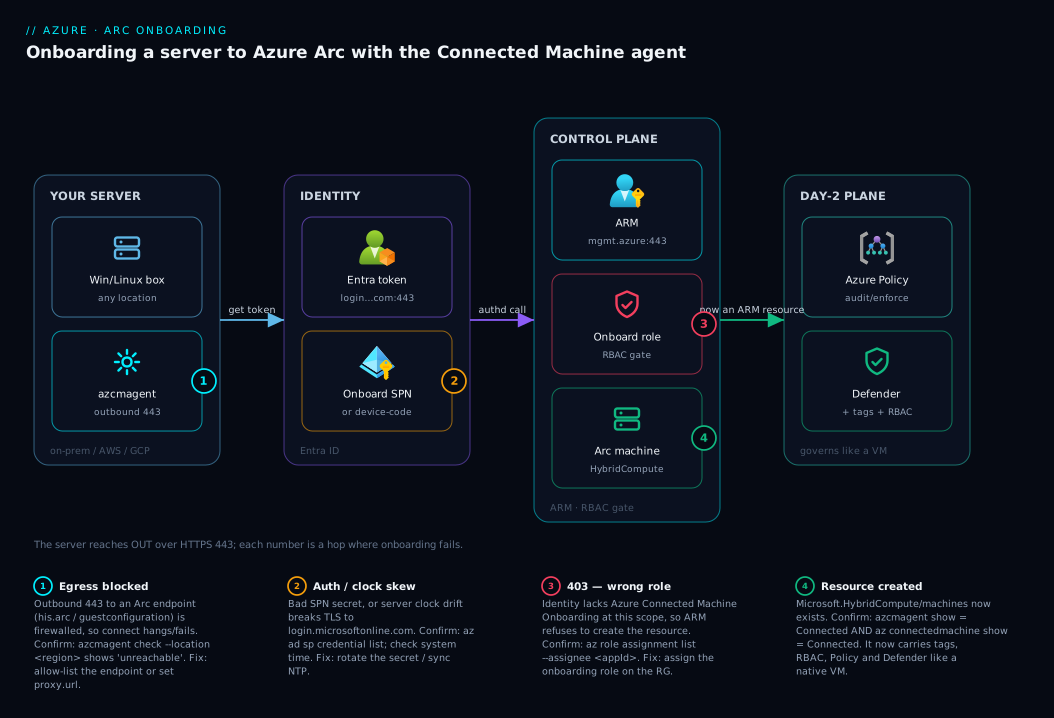
Read the diagram left to right as the path a single onboarding takes. On the far left, the server you own runs the Connected Machine agent, which makes an outbound HTTPS (443) call first to Entra ID for a token — authenticating either as you (device-code, one-off) or as the onboarding service principal (unattended at scale). With the token it calls Azure Resource Manager, which — gated by the SPN’s Azure Connected Machine Onboarding role — creates the Microsoft.HybridCompute/machines resource in your chosen resource group and region, while the Hybrid Identity Service issues the machine a system-assigned managed identity.
Three things the diagram makes concrete: every arrow points outbound (Azure never connects in, so you open no inbound ports); the role assignment is the gate (no onboarding role → ARM 403, however good the egress); and once the resource exists the machine is a normal ARM resource that Azure Policy, tags, RBAC and Defender for Cloud attach to exactly as a native VM — the whole payoff. The numbered badges mark the three hops where onboarding fails — egress blocked, wrong role, clock/TLS skew — and the legend gives confirm-and-fix for each.
Real-world scenario
Meridian Logistics runs a hybrid estate: about 180 servers on-prem across two data centres (Windows Server 2019 for the warehouse system, Ubuntu for routing microservices) plus 40 VMs in AWS for partner integrations. Their Azure footprint is small, but ahead of an ISO certification their auditors demanded a single inventory with patch-compliance proof and a consistent tag standard across every server, cloud or not. The platform team is three engineers; nobody wanted a second monitoring stack or a migration.
The first attempt was the classic trap: onboard a dozen servers by hand with the portal’s single-server script, device-code login on each box over RDP/SSH. It worked, but extrapolating to 220 servers — each needing an interactive login — was hopeless, and three of the twelve silently failed. The cause was the data-centre firewall: it allowed outbound 443 to most of the internet but blocked *.his.arc.azure.com, so the agent got a token but couldn’t register its identity. azcmagent show read Disconnected; azcmagent check flagged the his.arc endpoint as unreachable. One firewall allow-list fixed all three.
They then did it properly: one onboarding service principal with only the Azure Connected Machine Onboarding role, scoped to a single resource group, secret in Key Vault. The portal-generated at-scale script pulled APP_SECRET at run time and was delivered two ways — an Ansible play for the on-prem fleet and a cloud-init snippet in a new AWS launch template (the agent doesn’t care the VM runs in AWS; outbound 443 to Azure is all it needs) — staggered in waves of 40. Two issues surfaced at scale: older Windows boxes failed TLS to Entra from clock drift (an NTP sync fixed the wave), and cloned VMs sharing one hostname collided on the default resource name (fixed with an explicit --resource-name from the AWS instance ID). Within two days all 260 servers showed Connected with a uniform tag set, and an Azure Policy initiative audited tag and patch compliance fleet-wide — the same controls their Azure VMs already had. Total new infrastructure: one service principal and a Key Vault secret. The lesson they wrote down: “Onboarding is 5% agent install and 95% egress and identity.”
Advantages and disadvantages
| Advantages (why Arc onboarding is worth it) | Disadvantages / costs to weigh |
|---|---|
| Non-Azure servers become real ARM resources — tags, RBAC, Policy all apply | You run and patch an agent on every server (a managed footprint) |
| One governance/inventory plane for hybrid + multicloud + edge | Requires reliable outbound 443 egress to specific endpoints |
| Least-privilege onboarding via a dedicated service principal | A leaked SPN secret can enrol machines (scope it tightly, rotate it) |
| Workload never moves — zero migration risk | Arc enables management, not the workload itself — it’s not “lift to cloud” |
| Per-machine managed identity lets servers call Azure services securely | Some downstream features (Defender, Update Manager) bill separately |
| Free to onboard and use core control-plane features | Steady-state egress + extension data has a small network/cost footprint |
| At-scale script + IaC make hundreds of servers as easy as one | Day-2 ops (extensions, policy) is a real program, not a one-off install |
The advantages dominate whenever you have a meaningful non-Azure footprint and a governance mandate — most enterprises. The disadvantages bite most in locked-down networks (opening egress is itself a project) and tiny estates (one server may not justify the program, though onboarding is cheap). The agent footprint is light; the real cost is the discipline of egress, the SPN lifecycle, and the day-2 program onboarding unlocks.
Hands-on lab
You’ll onboard one server end to end, the at-scale way (with a service principal), validate from both sides, then tear it down. Use any spare Windows or Linux VM you can get admin/root on — it does not need to be in Azure. Run the Azure-side commands from Cloud Shell; run the server-side commands on the target box.
Prerequisites for the lab: an Azure subscription where you can create a resource group and a service principal (Owner or User Access Administrator on the target RG to assign the role), and a server with outbound 443 and admin/root. Estimated cost: ₹0 — onboarding and the core control plane are free; you’ll add no billable extensions.
Step 1 — Register the providers (once per subscription).
az provider register --namespace Microsoft.HybridCompute --wait
az provider register --namespace Microsoft.GuestConfiguration --wait
az provider show -n Microsoft.HybridCompute --query registrationState -o tsv
Expected: prints Registered.
Step 2 — Create the target resource group.
az group create -n rg-arc-lab -l centralindia -o table
Expected: a table row, provisioningState: Succeeded.
Step 3 — Create the onboarding service principal (least privilege).
SUB=$(az account show --query id -o tsv)
az ad sp create-for-rbac \
  --name "sp-arc-lab-onboarding" \
  --role "Azure Connected Machine Onboarding" \
  --scopes "/subscriptions/$SUB/resourceGroups/rg-arc-lab"
Expected: JSON with appId, password, tenant. Copy all three now — the password is shown once. (In production, push these straight into Key Vault.)
Step 4 — On the target server, install the agent. Linux (as root/sudo):
wget https://gbl.his.arc.azure.com/azcmagent-linux -O install_linux_azcmagent.sh
bash install_linux_azcmagent.sh
azcmagent version
Windows (PowerShell as Administrator):
Invoke-WebRequest -Uri "https://aka.ms/AzureConnectedMachineAgent" -OutFile AzureConnectedMachineAgent.msi
msiexec /i AzureConnectedMachineAgent.msi /qn
Expected: install completes; azcmagent version prints a version string.
Step 5 — Pre-flight the network (don’t skip this). The agent ships a connectivity checker — run it before connecting to catch egress problems early:
azcmagent check --location centralindia
Expected: every required endpoint shows reachable. Any unreachable row is a blocked egress you must fix before Step 6 will work.
Step 6 — Connect using the service principal (unattended). On the server, substitute the values from Step 3:
azcmagent connect \
  --service-principal-id "<appId>" \
  --service-principal-secret "<password>" \
  --tenant-id "<tenant>" \
  --resource-group "rg-arc-lab" \
  --subscription-id "<your-subscription-id>" \
  --location "centralindia" \
  --tags "env=lab,owner=vinod"
Expected: ends with Successfully onboarded resource to Azure.
Step 7 — Validate from the server.
azcmagent show
Expected: Agent Status : Connected, with the resource name, resource group, region, and a machine identity object ID listed.
Step 8 — Validate from Azure.
az connectedmachine show \
  --name "$(hostname)" \
  --resource-group rg-arc-lab \
  --query "{name:name, status:status, os:osName, agent:agentVersion}" -o table
Expected: a row with status: Connected. Open Azure Arc → Machines in the portal — the server is listed in rg-arc-lab with your env=lab and owner=vinod tags.
Validation checklist — what each step proved:
| Step | What you did | What it proves |
|---|---|---|
| 1 | Registered providers | The subscription can host Arc resources |
| 3 | Created a least-privilege SPN | Onboarding works without a human login |
| 5 | azcmagent check |
Egress is the real prerequisite — verified first |
| 6 | azcmagent connect with SPN |
The unattended, at-scale auth path |
| 7–8 | show both sides |
The resource exists and the agent agrees it’s connected |
Step 9 — Teardown (clean from both sides). Disconnect on the server, then delete the Azure resources:
# On the server: remove the agent's connection (deletes the Arc resource too)
azcmagent disconnect

# From Azure: delete the resource group and the service principal
az group delete -n rg-arc-lab --yes --no-wait
az ad sp delete --id "<appId>"
Expected: azcmagent disconnect reports success and the machine leaves Arc → Machines; the resource group and SPN are removed. Optionally uninstall the agent itself (apt remove azcmagent / remove the MSI) if you’re done with the box.
Cost note. This lab is free — onboarding, the agent and the core control plane carry no charge, and it touches no billable extensions (see Cost & sizing below).
Common mistakes & troubleshooting
These are the failures you’ll actually meet, with the exact command or portal path that confirms each. Scan the table, then read the detail for your row.
| # | Symptom | Root cause | Confirm (exact cmd / path) | Fix |
|---|---|---|---|---|
| 1 | connect fails; can’t reach an endpoint |
Outbound 443 to an Arc endpoint blocked | azcmagent check --location <region> shows unreachable |
Allow-list the endpoint / set proxy |
| 2 | connect fails with 403 / authorization |
SPN lacks Onboarding role at that scope | az role assignment list --assignee <appId> -o table |
Assign Azure Connected Machine Onboarding on the RG |
| 3 | Provider-not-registered error | Resource providers not registered | az provider show -n Microsoft.HybridCompute --query registrationState |
az provider register --namespace ... --wait |
| 4 | TLS / certificate error to login.microsoftonline.com | System clock skew | Check server time vs real time | Sync NTP / time service |
| 5 | Auth fails on the at-scale run | SPN secret expired | az ad sp credential list --id <appId> |
Rotate the secret; update the script’s source |
| 6 | Two servers collide on one Arc name | Duplicate hostnames (cloned VMs) | az connectedmachine list -g <rg> -o table (name clash / overwrite) |
Pass --resource-name <unique> |
| 7 | connect says already connected |
Agent already onboarded | azcmagent show → Connected |
azcmagent disconnect first, or skip (make script idempotent) |
| 8 | Status Disconnected after a while |
Agent can’t reach Azure (egress dropped / service stopped) | azcmagent show; check the agent service is running |
Restart the agent service; re-check egress |
| 9 | connect via proxy fails |
Proxy not configured on the agent | azcmagent config list |
azcmagent config set proxy.url http://proxy:8080 |
| 10 | “Insufficient privileges” creating the SPN | Your user can’t create app registrations or assign roles | az ad sp create-for-rbac errors |
Get an admin to create the SPN, or gain the rights |
The three that cause the most wasted time, in detail:
Blocked egress (#1) is the number-one failure. The agent often authenticates fine, then stalls because a required endpoint — commonly *.his.arc.azure.com or *.guestconfiguration.azure.com — is firewalled. Run azcmagent check --location <region> to see exactly which endpoint is unreachable, then allow-list it on outbound 443 (or set azcmagent config set proxy.url ...). Never open inbound ports — Arc is outbound-only.
A 403 at connect (#2) is always the role, not the network. The agent authenticated but ARM refused to create the resource because the identity lacks Azure Connected Machine Onboarding at the target scope. Confirm with az role assignment list --assignee <appId> --all -o table; the usual cause is the role assigned at the wrong scope (a different RG or subscription). Assign it on the correct resource group and retry.
Clock skew (#4) breaks TLS to Entra. A server whose clock has drifted by more than a few minutes fails certificate validation against login.microsoftonline.com — so the connect dies before it even reaches ARM. This disproportionately hits long-uptime and cloned VMs; sync NTP / the Windows Time service and retry. The remaining rows (expired SPN secret, duplicate hostnames, post-onboarding Disconnected) follow the same shape — the table’s confirm-command tells you which.
Best practices
- Use one dedicated onboarding service principal with only the Onboarding role, scoped as narrowly as your enrolment plan allows (RG or subscription, not management group unless you must). It cannot delete machines or read your other resources — a tightly bounded blast radius.
- Store the SPN secret in Key Vault and inject it at run time. Never bake it into the script, and never commit it to source control. Rotate it on a schedule and before it expires.
- Always run
azcmagent checkbeforeconnect(and bake it into your at-scale script). Egress is the real prerequisite; catching a blocked endpoint pre-flight saves a confusing failure mid-run. - Allow-list the specific Arc endpoints over outbound 443; open no inbound ports. For locked-down networks, use the agent’s proxy support or an Arc private-link scope rather than broad internet egress.
- Make the at-scale script idempotent. Check
azcmagent showstatus before connecting so re-applying your configuration management doesn’t error on already-connected hosts. - Guarantee unique resource names. Either enforce unique hostnames or pass an explicit
--resource-name; cloned-image fleets are the classic collision source. - Tag at onboarding time (
--tags) so every machine lands with environment/owner/app metadata, then enforce the standard with Azure Policy — don’t backfill tags by hand later. - Stagger large fleets into waves. Onboard 40–50, validate, then proceed — so a systemic egress or clock problem surfaces on wave one, not on all 300 boxes.
- Keep the agent updated. Treat
azcmagentlike any other agent in your patch cycle; new versions carry security and reliability fixes. - Validate from both sides.
azcmagent show(server agrees) andaz connectedmachine show/list(Azure agrees) — a green status on only one side hides drift. - Plan day-2 before you onboard at scale. Decide which extensions (monitoring, Defender, Update Manager) and which policies you’ll apply, so onboarding feeds an actual governance program rather than a dormant inventory.
Security notes
- Least privilege and tight scope for the onboarding identity. The SPN holds only Azure Connected Machine Onboarding (not Resource Administrator, which can delete machines and run extensions), scoped to a single resource group — so a leaked secret can only enrol into that RG, nothing more.
- Protect and rotate the SPN secret. It is a credential that can enrol machines into your tenant. Keep it in Key Vault, restrict who can read it, set a short expiry and rotate it — and prefer a certificate over a client secret where your tooling supports it.
- Outbound-only, allow-listed egress. Arc never accepts inbound connections, so your firewall stays “deny inbound.” Allow-list the named endpoints rather than opening blanket egress, and consider an Arc private-link scope to keep management traffic on a private network.
- Scope what the machine’s managed identity can reach. After onboarding, the server can request Azure tokens via a local endpoint (
localhost:40342). Grant it only the RBAC it needs, and treat local admin on the box as sensitive — any local process that reaches that endpoint can request the machine’s tokens. - Audit onboarding via the activity log. Every machine creation is an ARM operation in the resource group’s activity log — review it to spot unexpected enrolments.
Cost & sizing
The good news for a Basic guide: onboarding itself is free, and so is the core Arc control plane. Creating the HybridCompute/machines resource, tagging it, granting RBAC, and evaluating Azure Policy against it carry no charge. The agent is free software. So a fleet of 10 or 10,000 servers can be Arc-enabled at zero control-plane cost.
Costs appear only when you light up billable add-ons on top of onboarded machines — and those are choices you make after onboarding, not part of it:
| Cost driver | What it is | Roughly when it bills | Notes |
|---|---|---|---|
| Onboarding + control plane | Create resource, tags, RBAC, policy eval | Free | The subject of this article |
| Defender for Servers (via Arc) | Defender for Cloud plan on the machine | Per server/hour when enabled | Optional security posture/EDR |
| Azure Update Manager | Managed patch orchestration | Per managed server (where applicable) | Optional patching at scale |
| Log Analytics ingestion | Logs/metrics sent to a workspace | Per GB ingested + retention | Driven by the monitoring extension |
| Extensions’ own egress | Steady-state data the agent/extensions send | Tiny network footprint | Negligible for the agent alone; grows with monitoring |
| Arc-enabled “guest” features | e.g. SQL Server on Arc, Kubernetes on Arc | Vary by feature | Out of scope here; priced separately |
There’s nothing to “size” for onboarding — the agent is light (modest CPU/RAM/disk), identical on a 2-vCPU box or a 64-core server. The decisions that cost money are downstream: how many machines you put Defender for Servers on, how much you ingest into Log Analytics (use data collection rules to send only what you need), and whether you adopt Update Manager. The sensible pattern is to onboard everything (free), then enable billable plans selectively where the need justifies it — and tag per Azure Tagging Strategy 101: A Naming and Tag Schema for Cost Allocation so that spend is attributable.
Interview & exam questions
1. What does Azure Arc actually do for a non-Azure server? It projects the server into Azure’s control plane as a Microsoft.HybridCompute/machines ARM resource without moving the workload, so the machine gains a resource ID and can be tagged, governed with Azure Policy, granted RBAC, and onboarded to services like Defender for Cloud and Update Manager — exactly like a native Azure VM.
2. What is the Connected Machine agent and what are its responsibilities? The azcmagent-based agent installed on each server. It registers the machine (creating the ARM resource), maintains a system-assigned managed identity for the server, and serves as the landing point for Azure extensions. It is not a remote-shell or remote-desktop tool.
3. Which RBAC role does the onboarding service principal need, and why not a broader one? Azure Connected Machine Onboarding — it can create and read Arc machines and nothing else. A broader role (e.g. Resource Administrator, which can delete machines and run extensions) would give a leaked onboarding secret far more reach, violating least privilege.
4. Why use a service principal for at-scale onboarding instead of interactive login? Interactive (device-code) auth requires a human to approve each enrolment in a browser, which is impossible across hundreds of servers. A service principal authenticates non-interactively (--service-principal-id/-secret/--tenant-id), so the install runs fully unattended from configuration management, golden images, or startup scripts.
5. What network connectivity does onboarding require? Outbound TCP 443 from the server to a defined set of Azure endpoints (Entra ID, ARM, the Hybrid Identity Service, guest configuration, etc.). Azure never connects inbound, so no inbound ports are opened. azcmagent check validates reachability before you connect.
6. A connect fails with a 403 even though connectivity is fine. What’s wrong? The identity (your login or the SPN) lacks the Azure Connected Machine Onboarding role at the target scope, so ARM refuses to create the resource. Confirm with az role assignment list --assignee <id> and assign the role on the correct resource group/subscription.
7. Onboarding fails with a TLS/certificate error to login.microsoftonline.com. Likely cause? The server’s system clock is skewed beyond the tolerance for certificate validation. Sync NTP/the Windows Time service and retry. This commonly hits cloned or long-uptime VMs.
8. You cloned 20 VMs from one image and only some appear in Arc. Why? They share a hostname, and Arc names the resource after the hostname by default, so the clones collide/overwrite. Fix by ensuring unique hostnames or passing an explicit --resource-name.
9. After onboarding works, a machine shows Disconnected. How do you diagnose it? Check azcmagent show and the agent service on the server, and confirm steady-state egress still reaches Azure (azcmagent check). Either the agent service stopped or a firewall change blocked outbound 443; restart the service and/or restore egress.
10. Does Arc onboarding cost money? No — onboarding and the core control plane (resource creation, tags, RBAC, Policy evaluation) are free. Costs come only from optional, separately-billed add-ons enabled afterward, such as Defender for Servers, Update Manager managed updates, and Log Analytics ingestion.
These map to AZ-800/AZ-801 (Windows Server Hybrid Administrator) — manage servers and workloads in a hybrid environment, Azure Arc onboarding and management — and AZ-104 (Administrator) for the RBAC, resource-group and tagging fundamentals. The identity/service-principal angle touches AZ-500 (Security Engineer).
| Question theme | Primary cert | Objective area |
|---|---|---|
| What Arc is, agent responsibilities | AZ-800/801 | Manage hybrid servers with Arc |
| Onboarding role, service principal | AZ-800/801 / AZ-500 | Onboard and secure Arc machines |
| RBAC, resource groups, tags | AZ-104 | Manage identities, governance, resources |
| Network egress, private link | AZ-800/801 | Hybrid connectivity |
| Policy/monitoring on Arc machines | AZ-104 / AZ-800 | Govern and monitor at scale |
Quick check
- Does onboarding a server to Azure Arc move or migrate the workload into Azure? What does it actually create?
- Which built-in RBAC role should the onboarding service principal hold, and why not a broader one?
- Your at-scale
azcmagent connectfails on every box this morning after working yesterday. Name the two most likely causes. - What command do you run on the server before
connectto catch egress problems, and what does it test? - Twenty cloned VMs were onboarded but only a few show up in Arc. What’s the cause and the fix?
Answers
- No — it does not move the workload. It creates a
Microsoft.HybridCompute/machinesARM resource that projects the server into Azure’s control plane (giving it a resource ID, tags, RBAC, and policy reach). The server keeps running exactly where it is. - Azure Connected Machine Onboarding — it can only create and read Arc machines. A broader role (e.g. Resource Administrator) would let a leaked onboarding secret delete machines or run extensions, breaking least privilege.
- Either the service principal secret expired (confirm with
az ad sp credential list --id <appId>) or a firewall change blocked outbound 443 to an Arc endpoint (confirm withazcmagent check). Rotate the secret or restore egress respectively. azcmagent check --location <region>— it tests reachability of each required Arc endpoint over outbound 443 and printsreachable/unreachable, so you catch a blocked endpoint before the connect fails confusingly.- They share the same hostname (cloned from one image), and Arc names the resource after the hostname by default, so they collide/overwrite. Fix by ensuring unique hostnames or passing an explicit
--resource-nameper machine.
Glossary
- Azure Arc — extends the Azure Resource Manager control plane to servers, Kubernetes clusters and data services running outside Azure, so they can be managed like Azure resources.
- Connected Machine agent — the lightweight software (
azcmagentplus background services) installed on a server to register it with Arc and maintain the link. azcmagent— the agent’s command-line tool:connect,disconnect,show,check,config.Microsoft.HybridCompute/machines— the ARM resource type Arc creates to represent an onboarded server.- Resource provider — the ARM service that owns a resource type;
Microsoft.HybridComputeandMicrosoft.GuestConfigurationmust be registered on the subscription before onboarding. - Onboarding service principal — an Entra app identity used to enrol servers non-interactively at scale, replacing a human login in automation.
- Azure Connected Machine Onboarding — the least-privilege built-in RBAC role that can create and read Arc machines; the right role for the onboarding SPN.
- Azure Connected Machine Resource Administrator — the broader built-in role to read, manage and delete Arc machines and their extensions; for day-2 operations.
- System-assigned managed identity — a per-machine identity Arc grants the onboarded server, letting it request Azure tokens (via a local endpoint) to call Azure services.
- Extension — software Azure pushes onto an Arc-enabled machine (monitoring agent, Defender, custom script), all after onboarding.
- Device-code authentication — the interactive login flow where a human approves enrolment in a browser; used for single-server onboarding, not at scale.
azcmagent check— the agent’s pre-flight connectivity test that verifies each required Azure endpoint is reachable over outbound 443.- Arc private-link scope — a configuration that routes Arc management traffic over a private network instead of public endpoints.
Next steps
You can now project any server into Azure and enrol a whole fleet unattended. Build outward:
- Next: Azure Policy Effects Decoded: Deny vs Audit vs Modify vs DeployIfNotExists — govern your newly Arc-enabled servers with the same policies as native VMs.
- Related: Azure Monitor and Application Insights: Full-Stack Observability — pull inventory, logs and metrics from Arc machines into one place.
- Related: App Registrations vs Enterprise Applications: The Service Principal Model Explained — go deeper on the service-principal model your onboarding SPN relies on.
- Related: Azure Key Vault: Secrets, Keys and Certificates Done Right — store the onboarding secret (and the machine’s secrets) the right way.
- Related: Azure Tagging Strategy 101: A Naming and Tag Schema for Cost Allocation — apply a consistent tag schema across your hybrid fleet so Arc-driven spend is attributable.